A new article has been published at prMac.
Music Vibes released for iOS - Piano App for the Deaf - Published on 12/04/19
Melbourne baed developer, Interactive Coconut today releases Music Vibes, its new piano app for iOS. Music Vibes doesn't just play music as audio, it can also play it as haptic vibrations on iPhones. By pressing your iPhone to your jaw, users can actually feel the vibrations become sound and melodies. It can be used by some deaf and hard of hearing people, to actually feel music through their bones. Users can turn the vibration on and off, or even control its intensity.
Melbourne, Australia - Interactive Coconut today announces the launch of Music Vibes, piano app for iOS that doesn't just play music as audio, it can also play it as haptic vibrations. That's right, you can feel the music with vibrations! If you place the phone to your jaw, or the side of your head, the vibrations can be "heard" as music - even by some deaf or hard of hearing people! A fascinating and thrilling experience.
Did you know that the famous composer Ludwig van Beethoven became deaf later in life? When his hearing had degraded significantly, Beethoven looked for support, and after finding nothing that helped in contemporary solutions, he turned to experimentation. He discovered that if he clenched a rod in his jaw and held it to the soundbar of the piano he was playing, the vibrations he could feel in his jaw could be experienced as sound! Little did Beethoven know that he had discovered the phenomenon now known as bone conduction.
Music Vibes takes this 19th century discovery to the 21st century! Instead of a real piano producing audio vibrations, Music Vibes is a piano app that can produce haptic feedback vibrations on iPhones. By pressing your iPhone to your jaw, users can actually feel the vibrations become sound and melodies.
The amazing thing about Music Vibes is that it can be used by some deaf and hard of hearing people, to actually feel music through their bones.
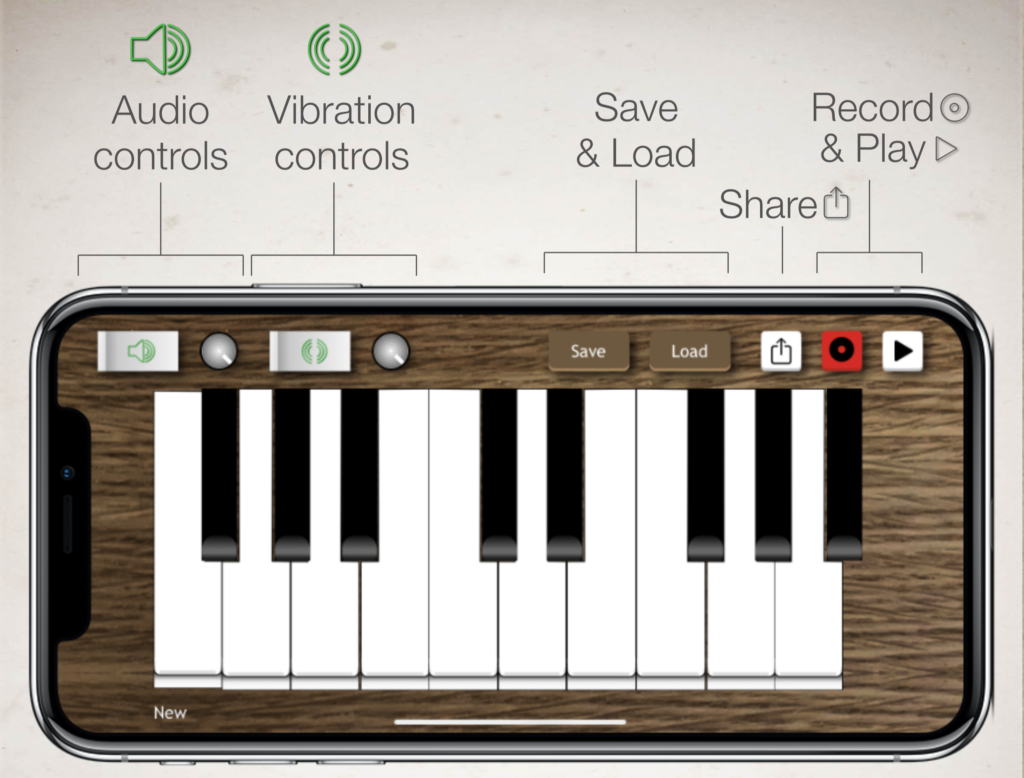
Music Vibes has many of the features of a piano app you would expect:
* Play music using the piano keys.
* Record a tune and play it back.
* Save a tune for later.
* Share a tune with friends to play in their Music Vibes app.
* Turn audio on and off or control the volume.
* Load preset melodies from the library.
Of course the one feature that sets this app apart from other piano apps, is that you can turn vibration on and off, or even control its intensity!
Device Requirements:
* Note: Doesn't work for all types of deafness
* iPhone from iPhone 8 onwards.
* Requires iOS 13 or later
* 27 MB
Pricing and Availability:
Music Vibes is free. It does offer an In-App purchase of $1.99 (USD) to download a Christmas Pack of Christmas melodies - a pack of 15 Christmas classics, especially for this month, that you can play. The developer has also provided several preset melodies to load, and expects to add to these over time. For more information on Music Vibes, read the company announcement.
Interactive Coconut: http://interactivecoconut.com
Music Vibes: http://interactivecoconut.com/music-vibes-piano-app-for-the-deaf/
Download from the App Store: https://apps.apple.com/app/music-vibes/id1480998628
Screenshot: http://interactivecoconut.com/wp-content/uploads/2019/12/Interface-1024x778.png
App Icon: http://interactivecoconut.com/wp-content/uploads/2019/12/Icon-60@3x.png
Located in Melbourne, Australia, Interactive Coconut is an independent app developer in the App Store. Founder Craig Grummitt has several apps on the app store and is a published author on iOS development. All Material and Software (C) Copyright 2019 Interactive Coconut. All Rights Reserved. Apple, the Apple logo, iPhone, iPod and iPad are registered trademarks of Apple Inc. in the U.S. and/or other countries. Other trademarks and registered trademarks may be the property of their respective owners.
*******
Link To Article: https://prmac.com/release-id-83810.htm
*******
---------------------------------------------------------------------------------
Note that you can alter delivered distributions at any time.
Login to your account on prMac to alter your channel selection, or to opt-out at any time.


The Enterprise File Fabric solution now supports macOS Catalina
A new article has been published at prMac.
The Enterprise File Fabric solution now supports macOS Catalina - Published on 12/03/19
UK based Storage Made Easy releases its Enterprise File Fabric macOS software is now compatible with macOS Catalina. Users can collaborate in real time with their colleagues using the File Fabric Drive, bringing the Cloud directly into their Mac desktop. This gives users the ultimate editing and browsing facilities, whether that's using the Enterprise File Fabric's Virtual OSX Drive in Finder, Cloud Files browser from the Mac menu bar, Desktop Syncronization, or editing directly from a browser.
London, United Kingdom - Storage Made Easy(R) (SME), announces its Enterprise File Fabric macOS software is now compatible with Apple's latest macOS release, Catalina. Users can now collaborate in real time with their colleagues using the Enterprise File Fabric Drive bringing the Cloud directly into their Mac desktop.
On its last update, the macOS app suite also developed user experience improvements, giving users the ultimate editing and browsing facilities, whether that's using the Enterprise File Fabric's 'Virtual' OSX Drive in Finder, Cloud Files browser from the Mac menu bar, Desktop Syncronization, or editing directly from a browser through the File Fabric's CloudEdit functionality (Open in a web browser and edit and save back to Cloud from the desktop application).
The SME macOS App suite consists of:
* Cloud Drive: Adds a mapped Cloud Drive that appears directly in Finder
* Finder integration: Integrated into Finder actions for sharing or locking a file
* Desktop Sync: In addition to the drive nominate local or cloud folders for sync
* Mail Integration: Integrates directly into Mac Mail for secure file sharing
* Search integration: Accessible directly from the toolbar
* Unified Coud File Access: Access files from all your public/private Clouds
Key features of the SME macOS App include:
* Branded versions available for On-Premises or OEM customers
* A Cloud Drive right in Mac Finder
* Extends Finder with right click actions
* Supports 60 public / private Clouds
-F older Sync to map desktop to cloud folders
* Search Toolbar integration for remote cloud files
* Edit files directly by simply double clicking
* Easy to use and setup
* The updated SME macOS App for Catalina is available now
James Norman, Storage Made Easy Engineering Manager, said: "A substantial amount of effort has been put into getting the Catalina release shipped and we are very pleased to now make this available to customers."
Storage Made Easy: http://www.storagemadeeasy.com/
macOS App Suite : https://docs.storagemadeeasy.com/maccloudtools
SME macOS App for Catalina: https://storagemadeeasy.com/MacCloudTools/
Storage Made Easy provides a cloud service data broker platform and related services either as SaaS or a hybrid on-premise solution. Storage Made Easy unites cloud and data services into a single environment, guaranteeing file access no matter the location or device while providing the highest levels of management, security, compliance, audit, and access services. Storage Made Easy is wholly owned by Vehera Ltd., a private London-based limited company. All Material and Software (C) Copyright 2019 Vehera Ltd. All Rights Reserved. Apple, the Apple logo, Macintosh Mac OS X and macOS are registered trademarks of Apple Inc. in the U.S. and/or other countries. Other trademarks and registered trademarks may be the property of their respective owners.
*******
Link To Article: https://prmac.com/release-id-83809.htm
*******
---------------------------------------------------------------------------------
Note that you can alter delivered distributions at any time.
Login to your account on prMac to alter your channel selection, or to opt-out at any time.
The Enterprise File Fabric solution now supports macOS Catalina - Published on 12/03/19
UK based Storage Made Easy releases its Enterprise File Fabric macOS software is now compatible with macOS Catalina. Users can collaborate in real time with their colleagues using the File Fabric Drive, bringing the Cloud directly into their Mac desktop. This gives users the ultimate editing and browsing facilities, whether that's using the Enterprise File Fabric's Virtual OSX Drive in Finder, Cloud Files browser from the Mac menu bar, Desktop Syncronization, or editing directly from a browser.
London, United Kingdom - Storage Made Easy(R) (SME), announces its Enterprise File Fabric macOS software is now compatible with Apple's latest macOS release, Catalina. Users can now collaborate in real time with their colleagues using the Enterprise File Fabric Drive bringing the Cloud directly into their Mac desktop.
On its last update, the macOS app suite also developed user experience improvements, giving users the ultimate editing and browsing facilities, whether that's using the Enterprise File Fabric's 'Virtual' OSX Drive in Finder, Cloud Files browser from the Mac menu bar, Desktop Syncronization, or editing directly from a browser through the File Fabric's CloudEdit functionality (Open in a web browser and edit and save back to Cloud from the desktop application).
The SME macOS App suite consists of:
* Cloud Drive: Adds a mapped Cloud Drive that appears directly in Finder
* Finder integration: Integrated into Finder actions for sharing or locking a file
* Desktop Sync: In addition to the drive nominate local or cloud folders for sync
* Mail Integration: Integrates directly into Mac Mail for secure file sharing
* Search integration: Accessible directly from the toolbar
* Unified Coud File Access: Access files from all your public/private Clouds
Key features of the SME macOS App include:
* Branded versions available for On-Premises or OEM customers
* A Cloud Drive right in Mac Finder
* Extends Finder with right click actions
* Supports 60 public / private Clouds
-F older Sync to map desktop to cloud folders
* Search Toolbar integration for remote cloud files
* Edit files directly by simply double clicking
* Easy to use and setup
* The updated SME macOS App for Catalina is available now
James Norman, Storage Made Easy Engineering Manager, said: "A substantial amount of effort has been put into getting the Catalina release shipped and we are very pleased to now make this available to customers."
Storage Made Easy: http://www.storagemadeeasy.com/
macOS App Suite : https://docs.storagemadeeasy.com/maccloudtools
SME macOS App for Catalina: https://storagemadeeasy.com/MacCloudTools/
Storage Made Easy provides a cloud service data broker platform and related services either as SaaS or a hybrid on-premise solution. Storage Made Easy unites cloud and data services into a single environment, guaranteeing file access no matter the location or device while providing the highest levels of management, security, compliance, audit, and access services. Storage Made Easy is wholly owned by Vehera Ltd., a private London-based limited company. All Material and Software (C) Copyright 2019 Vehera Ltd. All Rights Reserved. Apple, the Apple logo, Macintosh Mac OS X and macOS are registered trademarks of Apple Inc. in the U.S. and/or other countries. Other trademarks and registered trademarks may be the property of their respective owners.
*******
Link To Article: https://prmac.com/release-id-83809.htm
*******
---------------------------------------------------------------------------------
Note that you can alter delivered distributions at any time.
Login to your account on prMac to alter your channel selection, or to opt-out at any time.
Decorate Virtual Christmas Trees With Pico Christmas Tree AR for iPhone
A new article has been published at prMac.
Decorate Virtual Christmas Trees With Pico Christmas Tree AR for iPhone - Published on 12/03/19
Polish indie developer Boleslaw Walczyk today announces Pico Christmas Tree AR 1.0, his entertaining new holiday-themed Augmented Reality app for iOS devices. The app allows users to place a virtual Christmas tree anywhere in the room and decorate it with a wide variety of ornaments and decorations. Family and friends can join in the fun on their devices, connected via Wi-Fi or Bluetooth. There's even a handy auto-decorate feature that will randomly place decorations on the tree.
Lodzkie, Poland - Independent developer Boleslaw Walczyk today is proud to announce the release and immediate availability of Pico Christmas Tree AR 1.0, his entertaining holiday-themed app for iPhone and iPad devices. The app allows users to place a Christmas tree anywhere in the room and decorate it using a wide selection of ornaments and decorations.
Simply select a space in the room where you'd like the Christmas tree to appear, and tap the screen to place the tree. Once the tree has been "planted" in the room, users can then begin decorating the tree, using a wide variety of ornaments and other decorations. (Additional decorations are available via convenient in-app purchases.)
"We all love Christmas time, which for my family always kicks off with decorating the tree a few weeks before the big day. It's a beautiful family bonding experience and the children in the family especially enjoy it," shares developer Boleslaw Walczyk. "I've always felt the experience should last longer than for just a few hours each year. So, with the latest in iPhone technology, I've created an app that allows users to have that feeling any time."
Pico Christmas Tree AR's sharing feature means everyone in the family can join in the decorating fun, without needing to crowd around a single small screen. Families can collaboratively decorate the tree by sharing the decorating session with other iOS devices. Up to 4 devices can be used to decorate the tree via Wi-Fi or Bluetooth.
The app features include:
* Place the tree anywhere in the room using the power of Augmented Reality
* Change the location, size and rotation of the tree at any time
* Decorate using a variety or ornaments and decorations
* Additional decorations available via convenient in-app purchase
* Auto-decorate feature decorates the tree on its own
* Save the current tree project and come back to it any time
* Built-in gallery allows saving trees for later enjoyment
* Share a photo of your tree with friends and family
If users can decide how to start decorating the tree, they can make use of the app's auto-decorate feature. Simply select the desired decorations, and which colors to use, and the app will randomly place the decorations on the tree.
While Christmas is a once a year occasion, decorating the tree need not be, thanks to Pico Christmas Tree AR. Reviewers at EducationalAppStore.com enjoyed the app, saying "This app does exactly what it sets out to do. It provides a creative outlet for children who have become enthralled by the idea of decorating trees for Christmas."
The reviewer also said "Those of an artistic inclination will see how colours can be matched to work best, compare busy designs with minimalist ones, and design a tree that works with the decor of each room in their home. Sharing the decoration of a single tree will encourage children to work together and share their ideas."
Device Requirements:
* iPhone or iPad
* Requires iOS 12 or later
* iOS 13 compatible
* Universal Application
* 274.6 MB
Pricing and Availability:
Pico Christmas Tree AR 1.0 is free and is available worldwide exclusively through the App Store in the Education and Entertainment categories. Additional decorations are available via convenient in-app purchases. The app is intended for ages 8 and up.
Bigobjuo: http://bigobjuo.com
Pico Christmas Tree AR 1.0: http://bigobjuo.com/picoChristmasTreeAR.html
Download in App Store: https://apps.apple.com/app/id1481199762
YouTube Video (Announcement): https://www.youtube.com/watch?v=r3SvCve90a4
Screenshot: https://is2-ssl.mzstatic.com/image/thumb/Purple123/v4/2a/a0/47/2aa04708-6bc4-8171-2672-b23c0c71fa4f/pr_source.png/300x0w.png
App Icon: https://is2-ssl.mzstatic.com/image/thumb/Purple113/v4/f5/1d/23/f51d2363-fa52-f54f-a405-6bbb3f4714a4/AppIcon-0-0-1x_U007emarketing-0-0-0-7-0-0-sRGB-0-0-0-GLES2_U002c0-512MB-85-220-0-0.png/246x0w.png
Bigobjuo is a one man endeavor, founded in 2013 by Boleslaw Walczyk, an independent developer from Poland. The company started creating a coloring book for kids called PicoToONs, followed up with a Christmas version called PicoChristmas 2 years later. This adventure started with a focus on apps for kids but at this point it is shifting towards using AR/VR technologies to creating immersive experiences without any specific age in mind. All Material and Software (C) Copyright 2019 Bigobjuo. All Rights Reserved. Apple, the Apple logo, iPhone, iPod and iPad are registered trademarks of Apple Inc. in the U.S. and/or other countries. Other trademarks and registered trademarks may be the property of their respective owners.
*******
Link To Article: https://prmac.com/release-id-83807.htm
*******
---------------------------------------------------------------------------------
Note that you can alter delivered distributions at any time.
Login to your account on prMac to alter your channel selection, or to opt-out at any time.
Decorate Virtual Christmas Trees With Pico Christmas Tree AR for iPhone - Published on 12/03/19
Polish indie developer Boleslaw Walczyk today announces Pico Christmas Tree AR 1.0, his entertaining new holiday-themed Augmented Reality app for iOS devices. The app allows users to place a virtual Christmas tree anywhere in the room and decorate it with a wide variety of ornaments and decorations. Family and friends can join in the fun on their devices, connected via Wi-Fi or Bluetooth. There's even a handy auto-decorate feature that will randomly place decorations on the tree.
Lodzkie, Poland - Independent developer Boleslaw Walczyk today is proud to announce the release and immediate availability of Pico Christmas Tree AR 1.0, his entertaining holiday-themed app for iPhone and iPad devices. The app allows users to place a Christmas tree anywhere in the room and decorate it using a wide selection of ornaments and decorations.
Simply select a space in the room where you'd like the Christmas tree to appear, and tap the screen to place the tree. Once the tree has been "planted" in the room, users can then begin decorating the tree, using a wide variety of ornaments and other decorations. (Additional decorations are available via convenient in-app purchases.)
"We all love Christmas time, which for my family always kicks off with decorating the tree a few weeks before the big day. It's a beautiful family bonding experience and the children in the family especially enjoy it," shares developer Boleslaw Walczyk. "I've always felt the experience should last longer than for just a few hours each year. So, with the latest in iPhone technology, I've created an app that allows users to have that feeling any time."
Pico Christmas Tree AR's sharing feature means everyone in the family can join in the decorating fun, without needing to crowd around a single small screen. Families can collaboratively decorate the tree by sharing the decorating session with other iOS devices. Up to 4 devices can be used to decorate the tree via Wi-Fi or Bluetooth.
The app features include:
* Place the tree anywhere in the room using the power of Augmented Reality
* Change the location, size and rotation of the tree at any time
* Decorate using a variety or ornaments and decorations
* Additional decorations available via convenient in-app purchase
* Auto-decorate feature decorates the tree on its own
* Save the current tree project and come back to it any time
* Built-in gallery allows saving trees for later enjoyment
* Share a photo of your tree with friends and family
If users can decide how to start decorating the tree, they can make use of the app's auto-decorate feature. Simply select the desired decorations, and which colors to use, and the app will randomly place the decorations on the tree.
While Christmas is a once a year occasion, decorating the tree need not be, thanks to Pico Christmas Tree AR. Reviewers at EducationalAppStore.com enjoyed the app, saying "This app does exactly what it sets out to do. It provides a creative outlet for children who have become enthralled by the idea of decorating trees for Christmas."
The reviewer also said "Those of an artistic inclination will see how colours can be matched to work best, compare busy designs with minimalist ones, and design a tree that works with the decor of each room in their home. Sharing the decoration of a single tree will encourage children to work together and share their ideas."
Device Requirements:
* iPhone or iPad
* Requires iOS 12 or later
* iOS 13 compatible
* Universal Application
* 274.6 MB
Pricing and Availability:
Pico Christmas Tree AR 1.0 is free and is available worldwide exclusively through the App Store in the Education and Entertainment categories. Additional decorations are available via convenient in-app purchases. The app is intended for ages 8 and up.
Bigobjuo: http://bigobjuo.com
Pico Christmas Tree AR 1.0: http://bigobjuo.com/picoChristmasTreeAR.html
Download in App Store: https://apps.apple.com/app/id1481199762
YouTube Video (Announcement): https://www.youtube.com/watch?v=r3SvCve90a4
Screenshot: https://is2-ssl.mzstatic.com/image/thumb/Purple123/v4/2a/a0/47/2aa04708-6bc4-8171-2672-b23c0c71fa4f/pr_source.png/300x0w.png

App Icon: https://is2-ssl.mzstatic.com/image/thumb/Purple113/v4/f5/1d/23/f51d2363-fa52-f54f-a405-6bbb3f4714a4/AppIcon-0-0-1x_U007emarketing-0-0-0-7-0-0-sRGB-0-0-0-GLES2_U002c0-512MB-85-220-0-0.png/246x0w.png

Bigobjuo is a one man endeavor, founded in 2013 by Boleslaw Walczyk, an independent developer from Poland. The company started creating a coloring book for kids called PicoToONs, followed up with a Christmas version called PicoChristmas 2 years later. This adventure started with a focus on apps for kids but at this point it is shifting towards using AR/VR technologies to creating immersive experiences without any specific age in mind. All Material and Software (C) Copyright 2019 Bigobjuo. All Rights Reserved. Apple, the Apple logo, iPhone, iPod and iPad are registered trademarks of Apple Inc. in the U.S. and/or other countries. Other trademarks and registered trademarks may be the property of their respective owners.
*******
Link To Article: https://prmac.com/release-id-83807.htm
*******
---------------------------------------------------------------------------------
Note that you can alter delivered distributions at any time.
Login to your account on prMac to alter your channel selection, or to opt-out at any time.
AlphaDigits Top Rated Mobile Apps November 2019
A new article has been published at prMac.
AlphaDigits Top Rated Mobile Apps November 2019 - Published on 12/01/19
Mobile app review publisher AlphaDigits has named top rated applications for November 2019. Finalrentals makes finding and finalizing your car rental easy. ijura builds a wall around anything you do that takes place on your mobile. Solitaire Classic Era is one of the best ways to spend your idle time. VDV MATCH 3 RPG: ZOMBIES demands Candy Crush skills to get rid of zombies. Sports Fit VR is a combination of a game and an exercise app.
Long Island, New York - Mobile app review publisher AlphaDigits has named top rated applications for November 2019. AlphaDigits names five top class mobile apps every month based on the reviews published in the website during that particular month. This website has now released the names of top rated mobile apps for the month of November.
Finalrentals (10/10): Serving the U.A.E. market, Finalrentals Rent a Car Dubai is an app that makes finding and finalizing your car rental easy. The app is free to download and is laid out in an easy to use way, so you won't waste time scrolling through screens trying to find what you need. The app works out of most airports and malls, so pick up and drop off is convenient, saving you time.
ijura (9.5/10): Cyber threats are real. You hear about identity theft, information leaks and hackers getting into systems and taking over. And now, we do almost everything from our mobile devices - banking, shopping, home security controls and more. While it seems impossible to thwart such threats, there are steps you can take to protect yourself and your stuff - at least at the mobile level. ijura is an app that makes it easy to build a wall around anything you do that takes place on your mobile.
Solitaire Classic Era (9/10): For a game with less than 28MB of size in your smartphone, the Solitaire Classic Era - Classic Klondike Card Game is one of the best ways to spend your idle time and sharpening your brain at the same time. Of course, earlier it would have meant for you to travel with your own deck of 52 cards to play the game, but this app reduces the weight of your pockets. Furthermore, you also have the option to customize the look of your cards (not just the back, but also the front!).
VDV MATCH 3 RPG: ZOMBIES (8.5/10): At first appearance, VDV MATCH 3 RPG: ZOMBIES seems like a hybrid of first person shooting game combined with a "match 3" puzzle game interface, where if you're able to match 3 or more tiles of the same type, your squadron of 4 soldiers (and a dog) shoots the walking dead creatures ahead of you. The zombies come in waves, in a group of two or more, trying to eat the soldiers alive (typical) and it is up to your candy-crush skills to find a way to get rid of them.
Sports Fit VR (8/10): It's hard to say whether this is a game or an exercising app because it seems to achieve both at the same time. You need to have a VR headset though, and you have to make sure that there's plenty of space for exercising, so that you can enjoy it fully. It achieves everything, from running, to squatting by just having you play the game. It's a neat way to involve all your body muscles to play the game so you end up having a complete workout.
Joe Ellen, an Editor at AlphaDigits said, "Our marketing team can generate any number of reviews for mobile apps on Play Store and App Store. Our service starts at just $2 per review." Developers can also contact AlphaDigits through the onsite app submission form, mail or the contact form to get their apps reviewed.
Website: https://alphadigits.com/
Submit App for Review: https://alphadigits.com/submit-app-for-review/
AlphaDigits is a review site run by a few app marketers. Enjoying the support from a handy amount of regular visitors, AlphaDigits provides reviews for iPhone, iPad and Android apps. Copyright (C) 2019 AlphaDigits. All Rights Reserved. Apple, the Apple logo, iPhone, iPod and iPad are registered trademarks of Apple Inc. in the U.S. and/or other countries.
*******
Link To Article: https://prmac.com/release-id-83805.htm
*******
---------------------------------------------------------------------------------
Note that you can alter delivered distributions at any time.
Login to your account on prMac to alter your channel selection, or to opt-out at any time.
AlphaDigits Top Rated Mobile Apps November 2019 - Published on 12/01/19
Mobile app review publisher AlphaDigits has named top rated applications for November 2019. Finalrentals makes finding and finalizing your car rental easy. ijura builds a wall around anything you do that takes place on your mobile. Solitaire Classic Era is one of the best ways to spend your idle time. VDV MATCH 3 RPG: ZOMBIES demands Candy Crush skills to get rid of zombies. Sports Fit VR is a combination of a game and an exercise app.
Long Island, New York - Mobile app review publisher AlphaDigits has named top rated applications for November 2019. AlphaDigits names five top class mobile apps every month based on the reviews published in the website during that particular month. This website has now released the names of top rated mobile apps for the month of November.
Finalrentals (10/10): Serving the U.A.E. market, Finalrentals Rent a Car Dubai is an app that makes finding and finalizing your car rental easy. The app is free to download and is laid out in an easy to use way, so you won't waste time scrolling through screens trying to find what you need. The app works out of most airports and malls, so pick up and drop off is convenient, saving you time.
ijura (9.5/10): Cyber threats are real. You hear about identity theft, information leaks and hackers getting into systems and taking over. And now, we do almost everything from our mobile devices - banking, shopping, home security controls and more. While it seems impossible to thwart such threats, there are steps you can take to protect yourself and your stuff - at least at the mobile level. ijura is an app that makes it easy to build a wall around anything you do that takes place on your mobile.
Solitaire Classic Era (9/10): For a game with less than 28MB of size in your smartphone, the Solitaire Classic Era - Classic Klondike Card Game is one of the best ways to spend your idle time and sharpening your brain at the same time. Of course, earlier it would have meant for you to travel with your own deck of 52 cards to play the game, but this app reduces the weight of your pockets. Furthermore, you also have the option to customize the look of your cards (not just the back, but also the front!).
VDV MATCH 3 RPG: ZOMBIES (8.5/10): At first appearance, VDV MATCH 3 RPG: ZOMBIES seems like a hybrid of first person shooting game combined with a "match 3" puzzle game interface, where if you're able to match 3 or more tiles of the same type, your squadron of 4 soldiers (and a dog) shoots the walking dead creatures ahead of you. The zombies come in waves, in a group of two or more, trying to eat the soldiers alive (typical) and it is up to your candy-crush skills to find a way to get rid of them.
Sports Fit VR (8/10): It's hard to say whether this is a game or an exercising app because it seems to achieve both at the same time. You need to have a VR headset though, and you have to make sure that there's plenty of space for exercising, so that you can enjoy it fully. It achieves everything, from running, to squatting by just having you play the game. It's a neat way to involve all your body muscles to play the game so you end up having a complete workout.
Joe Ellen, an Editor at AlphaDigits said, "Our marketing team can generate any number of reviews for mobile apps on Play Store and App Store. Our service starts at just $2 per review." Developers can also contact AlphaDigits through the onsite app submission form, mail or the contact form to get their apps reviewed.
Website: https://alphadigits.com/
Submit App for Review: https://alphadigits.com/submit-app-for-review/
AlphaDigits is a review site run by a few app marketers. Enjoying the support from a handy amount of regular visitors, AlphaDigits provides reviews for iPhone, iPad and Android apps. Copyright (C) 2019 AlphaDigits. All Rights Reserved. Apple, the Apple logo, iPhone, iPod and iPad are registered trademarks of Apple Inc. in the U.S. and/or other countries.
*******
Link To Article: https://prmac.com/release-id-83805.htm
*******
---------------------------------------------------------------------------------
Note that you can alter delivered distributions at any time.
Login to your account on prMac to alter your channel selection, or to opt-out at any time.
The Enterprise File Fabric(TM) Solution Now Supports macOS Catalina
A new article has been published at prMac.
The Enterprise File Fabric(TM) Solution Now Supports macOS Catalina - Published on 12/01/19
Storage Made Easy(R) (SME) announces its Enterprise File Fabric macOS software is now compatible with Apple's latest macOS release, Catalina. Users can now collaborate in real time with their colleagues using the Enterprise File Fabric Drive bringing the Cloud directly into their Mac desktop. The File Fabric now includes support for macOS Catalina providing users with convenient and secure desktop based access to their File Fabric solution and its 60 supported storage platforms.
London, United Kingdom - Storage Made Easy(R) (SME) announces its Enterprise File Fabric macOS software is now compatible with Apple's latest macOS release, Catalina. Users can now collaborate in real time with their colleagues using the Enterprise File Fabric Drive bringing the Cloud directly into their Mac desktop.
On its last update, the macOS app suite also developed user experience improvements, giving users the ultimate editing and browsing facilities, whether that's using the Enterprise File Fabric's 'Virtual' OSX Drive in Finder, Cloud Files browser from the Mac menu bar, Desktop Syncronization, or editing directly from a browser through the File Fabric's CloudEdit functionality (Open in a web browser and edit and save back to Cloud from the desktop application).
The SME macOS App suite consists of:
* Cloud Drive: Adds a mapped Cloud Drive that appears directly in Finder.
* Finder integration: Integrated into Finder actions for sharing or locking a file.
* Desktop Sync: In addition to the drive nominate local or cloud folders for sync.
* Mail Integration: Integrates directly into Mac Mail for secure file sharing.
* Search integration: Accessible directly from the toolbar.
* Unified Coud File Access: Access files from all your public/private Clouds.
Key features of the SME macOS App include:
* Branded versions available for On-Premises or OEM customers
* A Cloud Drive right in Mac Finder
* Extends Finder with right click actions
* Supports 60 public / private Clouds
* Folder Sync to map desktop to cloud folders
* Search Toolbar integration for remote cloud files
* Edit files directly by simply double clicking
* Easy to use and setup
James Norman, Storage Made Easy Engineering Manager, said: "A substantial amount of effort has been put into getting the Catalina release shipped and we are very pleased to now make this available to customers."
The updated SME macOS App for Catalina is available at the Storage Made Easy website.
Storage Made Easy: https://storagemadeeasy.com/
Updated SME macOS App for Catalina: https://storagemadeeasy.com/MacCloudTools//
macOS App Suite: https://docs.storagemadeeasy.com/maccloudtools
Storage Made Easy provides a cloud service data broker platform and related services either as SaaS or a hybrid on-premise solution. Storage Made Easy unites cloud and data services into a single environment, guaranteeing file access no matter the location or device while providing the highest levels of management, security, compliance, audit, and access services. Storage Made Easy is wholly owned by Vehera Ltd., a private London-based limited company. All Material and Software (C) Copyright 2019 Vehera Ltd. All Rights Reserved. Apple, the Apple logo, Macintosh Mac OS X and macOS are registered trademarks of Apple Inc. in the U.S. and/or other countries. Other trademarks and registered trademarks may be the property of their respective owners.
*******
Link To Article: https://prmac.com/release-id-83804.htm
*******
---------------------------------------------------------------------------------
Note that you can alter delivered distributions at any time.
Login to your account on prMac to alter your channel selection, or to opt-out at any time.
The Enterprise File Fabric(TM) Solution Now Supports macOS Catalina - Published on 12/01/19
Storage Made Easy(R) (SME) announces its Enterprise File Fabric macOS software is now compatible with Apple's latest macOS release, Catalina. Users can now collaborate in real time with their colleagues using the Enterprise File Fabric Drive bringing the Cloud directly into their Mac desktop. The File Fabric now includes support for macOS Catalina providing users with convenient and secure desktop based access to their File Fabric solution and its 60 supported storage platforms.
London, United Kingdom - Storage Made Easy(R) (SME) announces its Enterprise File Fabric macOS software is now compatible with Apple's latest macOS release, Catalina. Users can now collaborate in real time with their colleagues using the Enterprise File Fabric Drive bringing the Cloud directly into their Mac desktop.
On its last update, the macOS app suite also developed user experience improvements, giving users the ultimate editing and browsing facilities, whether that's using the Enterprise File Fabric's 'Virtual' OSX Drive in Finder, Cloud Files browser from the Mac menu bar, Desktop Syncronization, or editing directly from a browser through the File Fabric's CloudEdit functionality (Open in a web browser and edit and save back to Cloud from the desktop application).
The SME macOS App suite consists of:
* Cloud Drive: Adds a mapped Cloud Drive that appears directly in Finder.
* Finder integration: Integrated into Finder actions for sharing or locking a file.
* Desktop Sync: In addition to the drive nominate local or cloud folders for sync.
* Mail Integration: Integrates directly into Mac Mail for secure file sharing.
* Search integration: Accessible directly from the toolbar.
* Unified Coud File Access: Access files from all your public/private Clouds.
Key features of the SME macOS App include:
* Branded versions available for On-Premises or OEM customers
* A Cloud Drive right in Mac Finder
* Extends Finder with right click actions
* Supports 60 public / private Clouds
* Folder Sync to map desktop to cloud folders
* Search Toolbar integration for remote cloud files
* Edit files directly by simply double clicking
* Easy to use and setup
James Norman, Storage Made Easy Engineering Manager, said: "A substantial amount of effort has been put into getting the Catalina release shipped and we are very pleased to now make this available to customers."
The updated SME macOS App for Catalina is available at the Storage Made Easy website.
Storage Made Easy: https://storagemadeeasy.com/
Updated SME macOS App for Catalina: https://storagemadeeasy.com/MacCloudTools//
macOS App Suite: https://docs.storagemadeeasy.com/maccloudtools
Storage Made Easy provides a cloud service data broker platform and related services either as SaaS or a hybrid on-premise solution. Storage Made Easy unites cloud and data services into a single environment, guaranteeing file access no matter the location or device while providing the highest levels of management, security, compliance, audit, and access services. Storage Made Easy is wholly owned by Vehera Ltd., a private London-based limited company. All Material and Software (C) Copyright 2019 Vehera Ltd. All Rights Reserved. Apple, the Apple logo, Macintosh Mac OS X and macOS are registered trademarks of Apple Inc. in the U.S. and/or other countries. Other trademarks and registered trademarks may be the property of their respective owners.
*******
Link To Article: https://prmac.com/release-id-83804.htm
*******
---------------------------------------------------------------------------------
Note that you can alter delivered distributions at any time.
Login to your account on prMac to alter your channel selection, or to opt-out at any time.
Black Friday Special from Aperio Lux
A new article has been published at prMac.
Black Friday Special from Aperio Lux - Published on 11/28/19
Kicking off this Thursday, November 27, Aperio Lux will offer special Black Friday deals on some of its popular apps. Save up to 50% on the following apps: IconFly, Recordam, RSS Follower (Unlimited package), deepTIFF, and i39. All apps are available worldwide exclusively on the Mac App Store.
Kyiv, Ukraine - The Aperio Lux Team today shared the list of this year's Black Friday deals. Starting this Thursday, November 27 through Saturday, November 30, customers can buy some of popular Aperio Lux apps with special discounts reached up to 50%. All of Aperio Lux Black Friday deals can be found by visiting sales.aperio-lux.com
Black Friday deals list:
IconFly - just $3.99 (USD)
IconFly allows users to create app icons for macOS, iOS, and watchOS applications. The icons are compatible with all guidelines; latest devices and OS created by Apple. With IconFly customers can create app icons for Android applications, Web clip icons, and favicon too.
RSS Follower (Unlimited Package) - just $2.99 (USD)
RSS Follower Unlimited package is available as In-App purchase for the RSS Follower app. RSS Follower is a brand-new modern and powerful application for reading news, designed especially for macOS. RSS Follower makes reading news more simple and convenient. With 'Unlimited' package, customers can read a lot of RSS feeds; in fact, as many as they want.
Recordam - just $1.99 (USD)
Recordam allows customers to create high-quality audio recordings with no limitations. With built-in Library, customers may store the audio recordings in one place and share them with friends or colleagues via Mail, Message or AirDrop. Keywords help customers organize their recordings and find them with just one click right in Finder.
deepTIFF - just 0.99 (USD)
deepTIFF is a simple tool for merge several images or even TIFF files into a single multi-page TIFF file. Customers can reorder, import or remove images from any TIFF files, even if they created them before. Just 3 simple steps and a TIFF file is ready: Click Import, Select files you want to merge, Save your TIFF file.
i39 - just $0.99 (USD)
i39 is an elegant and user-friendly ringtone creation tool. Customers can easily create ringtones an upload them on their phones. i39 supports AIFF, MP3, WAV, M4A, CAF, AAC, FLAC audio files.
The Black Friday Special will last from November 26 to November 30 inclusive. All apps are available worldwide exclusively on the Mac App Store.
Aperio Lux: https://aperio-Lux.com
Aperio Lux Black Friday Deals: https://sales.aperio-Lux.com
Aperio Lux is an independent team of enthusiasts and innovators from Ukraine. The Aperio Lux team develops ergonomic and user-friendly software for OS X and iOS. All Rights Reserved. All Material and Software (C) Copyright 2011-2019 Alexey Nikitin and Alexandr Bondar. All Rights Reserved. Apple, the Apple logo, Macintosh Mac OS X and macOS are registered trademarks of Apple Inc. in the U.S. and/or other countries. Other trademarks and registered trademarks may be the property of their respective owners.
*******
Link To Article: https://prmac.com/release-id-83803.htm
*******
---------------------------------------------------------------------------------
Note that you can alter delivered distributions at any time.
Login to your account on prMac to alter your channel selection, or to opt-out at any time.
Black Friday Special from Aperio Lux - Published on 11/28/19
Kicking off this Thursday, November 27, Aperio Lux will offer special Black Friday deals on some of its popular apps. Save up to 50% on the following apps: IconFly, Recordam, RSS Follower (Unlimited package), deepTIFF, and i39. All apps are available worldwide exclusively on the Mac App Store.
Kyiv, Ukraine - The Aperio Lux Team today shared the list of this year's Black Friday deals. Starting this Thursday, November 27 through Saturday, November 30, customers can buy some of popular Aperio Lux apps with special discounts reached up to 50%. All of Aperio Lux Black Friday deals can be found by visiting sales.aperio-lux.com
Black Friday deals list:
IconFly - just $3.99 (USD)
IconFly allows users to create app icons for macOS, iOS, and watchOS applications. The icons are compatible with all guidelines; latest devices and OS created by Apple. With IconFly customers can create app icons for Android applications, Web clip icons, and favicon too.
RSS Follower (Unlimited Package) - just $2.99 (USD)
RSS Follower Unlimited package is available as In-App purchase for the RSS Follower app. RSS Follower is a brand-new modern and powerful application for reading news, designed especially for macOS. RSS Follower makes reading news more simple and convenient. With 'Unlimited' package, customers can read a lot of RSS feeds; in fact, as many as they want.
Recordam - just $1.99 (USD)
Recordam allows customers to create high-quality audio recordings with no limitations. With built-in Library, customers may store the audio recordings in one place and share them with friends or colleagues via Mail, Message or AirDrop. Keywords help customers organize their recordings and find them with just one click right in Finder.
deepTIFF - just 0.99 (USD)
deepTIFF is a simple tool for merge several images or even TIFF files into a single multi-page TIFF file. Customers can reorder, import or remove images from any TIFF files, even if they created them before. Just 3 simple steps and a TIFF file is ready: Click Import, Select files you want to merge, Save your TIFF file.
i39 - just $0.99 (USD)
i39 is an elegant and user-friendly ringtone creation tool. Customers can easily create ringtones an upload them on their phones. i39 supports AIFF, MP3, WAV, M4A, CAF, AAC, FLAC audio files.
The Black Friday Special will last from November 26 to November 30 inclusive. All apps are available worldwide exclusively on the Mac App Store.
Aperio Lux: https://aperio-Lux.com
Aperio Lux Black Friday Deals: https://sales.aperio-Lux.com
Aperio Lux is an independent team of enthusiasts and innovators from Ukraine. The Aperio Lux team develops ergonomic and user-friendly software for OS X and iOS. All Rights Reserved. All Material and Software (C) Copyright 2011-2019 Alexey Nikitin and Alexandr Bondar. All Rights Reserved. Apple, the Apple logo, Macintosh Mac OS X and macOS are registered trademarks of Apple Inc. in the U.S. and/or other countries. Other trademarks and registered trademarks may be the property of their respective owners.
*******
Link To Article: https://prmac.com/release-id-83803.htm
*******
---------------------------------------------------------------------------------
Note that you can alter delivered distributions at any time.
Login to your account on prMac to alter your channel selection, or to opt-out at any time.
Productive Black Friday from Jumsoft
A new article has been published at prMac.
Productive Black Friday from Jumsoft - Published on 11/28/19
Jumsoft have announced Black Friday deals spanning their whole app range for macOS and iOS. With deals of up to 60% off, it includes all content bundles in their popular productivity apps Toolbox for Pages, Toolbox for Keynote, Toolbox for iWork, and Toolbox for Microsoft Office. Jumsoft's popular personal finance tracker Money also got 60% off the Standard service. Jumsoft's deals are available worldwide on macOS and iOS App Stores starting today.
Vilnius, Lithuania - Productivity experts Jumsoft have announced Black Friday deals spanning their whole app range on the Mac and iOS App Stores. The deals of up to 60% off are available for all content bundles in their popular productivity apps Toolbox for Pages, Toolbox for Keynote, Toolbox for iWork, and Toolbox for Microsoft Office. Jumsoft's popular personal finance tracker Money also got 60% off the Standard service!
"We love Black Friday because it's an amazing opportunity for us to show our products to new users and offer them great deals on all products! It's a great time to explore the never-ending range of productivity templates in our Toolbox apps, or start managing your finances the smart way with the popular Money app." said Algirdas Unguvaitis, CEO of Jumsoft. "Our passionate, talented design team work tirelessly on developing new templates. We're sure that there is no other source so comprehensive and complete that could match the quality and amount of all the print, documents, infographics, and slideshows templates we have to offer. It's truly an amazing opportunity to take your work to a completely next level with Toolbox apps, or start a good habit of keeping track your budget with Money!"
Jumsoft's deals are available worldwide on macOS and iOS App Stores starting today. The Mac versions of Toolbox apps offer discounts for all content bundles of up to 60%. iOS versions of Toolbox productivity apps offer discounts of up to 50% for all content bundles. They contain Templates for Pages, Themes, Layouts for Keynote, Infographics, Graphics Elements, and much more. All purchases entitle users to free content updates in their owned product categories.
Money Standard for Mac is 60% off, while Money for iOS is 67% off. All Jumsoft apps are available to download and try out for free from the App Store, and items can be bought as in-app purchases.
Jumsoft: http://www.jumsoft.com/
Jumsoft Apps: https://apps.apple.com/us/developer/jumsoft/id325934228
Press Kit (zip): http://jumsoft.com/press-kit
Based in Vilnius, Lithuania, Jumsoft is a privately funded company, founded in 2002. Committed to developing highest-quality applications, Jumsoft consists of a team of macOS and iOS experts and enthusiasts who dedicate their time to develop amazing tools for personal and professional use. Copyright 2002-2019 Jumsoft. All Rights Reserved. Apple, the Apple logo, iWork and macOS are registered trademarks of Apple Inc. in the U.S. and/or other countries.
*******
Link To Article: https://prmac.com/release-id-83802.htm
*******
---------------------------------------------------------------------------------
Note that you can alter delivered distributions at any time.
Login to your account on prMac to alter your channel selection, or to opt-out at any time.
Productive Black Friday from Jumsoft - Published on 11/28/19
Jumsoft have announced Black Friday deals spanning their whole app range for macOS and iOS. With deals of up to 60% off, it includes all content bundles in their popular productivity apps Toolbox for Pages, Toolbox for Keynote, Toolbox for iWork, and Toolbox for Microsoft Office. Jumsoft's popular personal finance tracker Money also got 60% off the Standard service. Jumsoft's deals are available worldwide on macOS and iOS App Stores starting today.
Vilnius, Lithuania - Productivity experts Jumsoft have announced Black Friday deals spanning their whole app range on the Mac and iOS App Stores. The deals of up to 60% off are available for all content bundles in their popular productivity apps Toolbox for Pages, Toolbox for Keynote, Toolbox for iWork, and Toolbox for Microsoft Office. Jumsoft's popular personal finance tracker Money also got 60% off the Standard service!
"We love Black Friday because it's an amazing opportunity for us to show our products to new users and offer them great deals on all products! It's a great time to explore the never-ending range of productivity templates in our Toolbox apps, or start managing your finances the smart way with the popular Money app." said Algirdas Unguvaitis, CEO of Jumsoft. "Our passionate, talented design team work tirelessly on developing new templates. We're sure that there is no other source so comprehensive and complete that could match the quality and amount of all the print, documents, infographics, and slideshows templates we have to offer. It's truly an amazing opportunity to take your work to a completely next level with Toolbox apps, or start a good habit of keeping track your budget with Money!"
Jumsoft's deals are available worldwide on macOS and iOS App Stores starting today. The Mac versions of Toolbox apps offer discounts for all content bundles of up to 60%. iOS versions of Toolbox productivity apps offer discounts of up to 50% for all content bundles. They contain Templates for Pages, Themes, Layouts for Keynote, Infographics, Graphics Elements, and much more. All purchases entitle users to free content updates in their owned product categories.
Money Standard for Mac is 60% off, while Money for iOS is 67% off. All Jumsoft apps are available to download and try out for free from the App Store, and items can be bought as in-app purchases.
Jumsoft: http://www.jumsoft.com/
Jumsoft Apps: https://apps.apple.com/us/developer/jumsoft/id325934228
Press Kit (zip): http://jumsoft.com/press-kit
Based in Vilnius, Lithuania, Jumsoft is a privately funded company, founded in 2002. Committed to developing highest-quality applications, Jumsoft consists of a team of macOS and iOS experts and enthusiasts who dedicate their time to develop amazing tools for personal and professional use. Copyright 2002-2019 Jumsoft. All Rights Reserved. Apple, the Apple logo, iWork and macOS are registered trademarks of Apple Inc. in the U.S. and/or other countries.
*******
Link To Article: https://prmac.com/release-id-83802.htm
*******
---------------------------------------------------------------------------------
Note that you can alter delivered distributions at any time.
Login to your account on prMac to alter your channel selection, or to opt-out at any time.
Subscribe to:
Posts (Atom)