A new article has been published at prMac.
iOS Vitamin K App Update - Now with Extremely Powerful Search Capability - Published on 12/17/19
Independent iOS Developer, James Hollender has just updated his Vitamin K app, which aids users on blood thinners like Coumadin. This is just one of ten apps updated to version 7.0 in the suite of iNutrient apps: iCarbs, iCholesterol, iFiber, iKals, iPotassium, iProteins, iSatFat, iSodium, iSugars and Vitamin K. Version 6.0 made the app capable of using the entire screen even of newer iPhones with the notch. Now version 7.0 brings back the Search feature, but one that's much more powerful.
Revere, Massachusetts - Independent iOS Developer, James Hollender has just updated his Vitamin K app, which aids users on blood thinners like Coumadin. This is just one of ten apps updated to version 7.0 in the suite of iNutrient apps: iCarbs, iCholesterol, iFiber, iKals, iPotassium, iProteins, iSatFat, iSodium, iSugars and Vitamin K. Version 6.0 made the app capable of using the entire screen even of newer iPhones with the "notch". Now version 7.0 brings back the Search feature, but one that's much more powerful. These apps include data from the USDA National Nutrient Database covering the following nutrients: Calories, Carbohydrates, Cholesterol, Fiber, Potassium, Proteins, Saturated Fat, Sodium, Sugars and Vitamin K. All ten apps are universal apps that can be used on the iPhone, iPad or iPod touch devices. The apps include information on how they can be upgraded to app bundles for additional significant savings, i.e., the cost of any apps previously purchased included in bundle
is deducted from the cost of the app bundle.
The big new feature in version 7.0 is a search capability that allows for both simple and complex searches. There are two fields that can accommodate either words or phrases. Using only the first provides a simple search that looks for the supplied value in the title, description and USDA ID fields. If a second word or phrase is supplied, then the user has the choice of three operands for how the fields are evaluated: "AND", "OR" and "But Not". As the user enter or changes their values, an instantaneous display is given of how many records will be found. Pressing the "Results" button then displays the full list of matches found.
In the "Access My Records" section, each food serving for the day is listed in it's own section and the total daily amount of the nutrient is included in the day's heading. This makes comparing nutrient intake for each day an easy task.
All of these apps include a simple color scale to help readily identify the approximate quantity of the nutrient contained in each food serving:
1. Vitamin K - iNutrient: Vitamins K1, K1D & K2:
The Vitamin K app provides information about foods and how they are rated for Vitamin K content. This is provided as a means to assist in deciding which foods to eat if you are using blood thinning medications such as Coumadin or Warfarin. The food servings are rated from NO Vitamin K all the way up to EXTREMELY HIGH in Vitamin K. The following colors help readily identify which is which:
* Black = EXTREMELY HIGH in Vitamin K (700.0 - 1146.6 mcg)
* Dark Red = VERY HIGH in Vitamin K (300.0 - 699.9 mcg)
* Red = HIGH in Vitamin K (25.0 - 299.9 mcg)
* Orange = MODERATELY HIGH in Vitamin K (20.0 - 24.9 mcg)
* Yellow = MODERATE in Vitamin K (15.0 - 19.9 mcg)
* Light Green = MODERATELY LOW in Vitamin K (10.0 - 14.9 mcg)
* Green = LOW in Vitamin K (5.0 - 9.9 mcg)
* Cyan = VERY LOW in Vitamin K (0.1 - 4.9 mcg)
* White = EXTREMELY LOW in Vitamin K (0.0 msg)
2. iCarbs - iNutrient: Carbohydrates:
The iCarbs app provides information about foods and how they are rated for carbohydrate content. This is provided as a means to assist in deciding which foods to eat. If you are a bodybuilder, you probably want to have a high intake of carbohydrates, but on the other hand if you have diabetes you need to make sure you don't exceed your recommended daily amount of carbohydrates. The food servings are rated from EXTREMELY LOW in Carbohydrates all the way up to EXTREMELY HIGH. The following colors help readily identify which is which:
* Black = EXTREMELY HIGH in Carbohydrates (Carbs) (45.01 - 166.46 g)
* Dark Red = VERY HIGH in Carbs (30.01 - 45.00 g)
* Red = HIGH in Carbs (15.01 - 30.0 g)
* Orange = MODERATELY HIGH in Carbs (12.01 - 15.00 g)
* Yellow = MODERATE in Carbs (9.01 - 12.00 g)
* Yellow-Green = MODERATELY LOW in Carbs (6.01 - 9.00 g)
* Green = LOW in Carbs (3.01 - 6.00 g)
* Cyan = VERY LOW in Carbs (0.01 - 3.00 g)
* White = EXTREMELY LOW in Carbs (0.00 g)
3. iCholesterol - iNutrient: Dietary Cholesterol:
The iCholesterol app provides information about foods and how they are rated for content of dietary cholesterol. This is provided as a means to assist in deciding which foods to eat. The food servings are rated from EXTREMELY LOW in cholesterol all the way up to EXTREMELY HIGH. The following colors help readily identify which is which:
* Black = EXTREMELY HIGH in Cholesterol (151 - 641 mg)
* Dark Red = VERY HIGH in Cholesterol (81 - 150 mg)
* Red = HIGH in Cholesterol (51 - 80 mg)
* Orange = MODERATELY HIGH in Cholesterol (31 - 50 mg)
* Yellow = MODERATE in Cholesterol (21 - 30 mg)
* Light Green = MODERATELY LOW in Cholesterol (11 - 20 mg)
* Green = LOW in Cholesterol (6 - 10 mg)
* Cyan = VERY LOW in Cholesterol (1 - 5 mg)
* White = EXTREMELY LOW in Cholesterol (0 mg)
4. iFiber - iNutrient: Fiber:
The iFiber app provides information about foods and how they are rated for content of fiber. This is provided as a means to assist in deciding which foods to eat. The food servings are rated from EXTREMELY LOW in fiber all the way up to EXTREMELY HIGH. The following colors help readily identify which is which:
* Black = EXTREMELY HIGH in Fiber (10.1 - 31.2 g)
* Dark Red = VERY HIGH in Fiber (8.1 - 10.0 g)
* Red = HIGH in Fiber (6.1 - 8.0 g)
* Orange = MODERATELY HIGH in Fiber (4.1 - 6.0 g)
* Yellow = MODERATE in Fiber (3.1 - 4.0 g)
* Light Green = MODERATELY LOW in Fiber (2.1 - 3.0 g)
* Green = LOW in Fiber (1.1 - 2.0 g)
* Cyan = VERY LOW in Fiber (0.1 - 1.0 g)
* White = EXTREMELY LOW in Fiber (0.00 g)
5. iKals - iNutrient: Calories:
The iKals app provides information about foods and how they are rated for Calorie content. This is provided as a means to assist in deciding which foods to eat. The food servings are rated from EXTREMELY LOW in Calories all the way up to EXTREMELY HIGH. The following colors help readily identify which is which:
* Black = EXTREMELY HIGH in Calories (500 - 1,181)
* Dark Red = VERY HIGH in Calories (400 - 499)
* Red = HIGH in Calories (300 - 399)
* Orange = MODERATELY HIGH in Calories (250 - 299)
* Yellow = MODERATE in Calories (200 - 249)
* Light Green = MODERATELY LOW in Calories (150 - 199)
* Green = LOW in Calories (100 - 149)
* Cyan = VERY LOW in Calories (50 - 99)
* White = EXTREMELY LOW in Calories (00 - 49)
6. iPotassium - iNutrient: Potassium:
The iPotassium app provides information about foods and how they are rated for content of potassium. This is provided as a means to assist in deciding which foods to eat. The food servings are rated from EXTREMELY LOW in potassium all the way up to EXTREMELY HIGH. The following colors help readily identify which is which:
* Black = EXTREMELY HIGH in Potassium (> 700 mg)
* Dark Red = VERY HIGH in Potassium (501 - 700 mg)
* Red = HIGH in Potassium (351 - 500 mg)
* Orange = MODERATELY HIGH in Potassium (201 - 350 mg)
* Yellow = MODERATE in Potassium (151 - 200 mg)
* Light Green = MODERATELY LOW in Potassium (101 - 150 mg)
* Green = LOW in Potassium (51 - 100 mg)
* Cyan = VERY LOW in Potassium (11 - 50 mg)
* White = EXTREMELY LOW in Potassium (0 - 10 mg)
7. iProteins - iNutrient: Proteins:
The iProteins app provides information about foods and how they are rated for protein content. This is provided as a means to assist in deciding which foods to eat. If you are a bodybuilder, you probably want to have a high intake of carbohydrates, but on the other hand if you are a vegan then you want to make sure you are taking in a sufficient amount of protein. The food servings are rated from EXTREMELY LOW in Proteins all the way up to EXTREMELY HIGH. The following colors help readily identify which is which:
* Black = EXTREMELY HIGH in Proteins (30.01 - 51.89 g)
* Dark Red = VERY HIGH in Proteins (20.01 - 30.00 g)
* Red = HIGH in Proteins (15.01 - 20.00 g)
* Orange = MODERATELY HIGH in Proteins (12.01 - 15.00 g)
* Yellow = MODERATE in Proteins (9.01 - 12.00 g)
* Yellow-Green = MODERATELY LOW in Proteins (6.01 9.00 g)
* Green = LOW in Proteins (3.01 - 6.00 g)
* Cyan = VERY LOW in Proteins (0.01 - 3.00 g)
* White = EXTREMELY LOW in Proteins (0.00 g)
8. iSatFat - iNutrient: Saturated Fat:
The iSatFat app provides information about foods and how they are rated for content of saturated fat. This is provided as a means to assist in deciding which foods to eat. The food servings are rated from EXTREMELY LOW in fiber all the way up to EXTREMELY HIGH. The following colors help readily identify which is which:
* Black = EXTREMELY HIGH in Saturated Fat (10.001 - 33.000 g)
* Dark Red = VERY HIGH in Saturated Fat (5.001 - 10.000 g)
* Red = HIGH in Saturated Fat (3.001 - 5.000 g)
* Orange = MODERATELY HIGH in Saturated Fat (1.001 - 3.000 g)
* Yellow = MODERATE in Saturated Fat (0.501 - 1.000 g)
* Light Green = MODERATELY LOW in Saturated Fat (0.101 - 0.500 g)
* Green = LOW in Saturated Fat (0.011 - 0.100 g)
* Cyan = VERY LOW in Saturated Fat (0.001 - 0.010 g)
* White = EXTREMELY LOW in Saturated Fat (0.000 g)
9. iSodium - iNutrient: Sodium:
The iSodium app provides information about foods and how they are rated for content of sodium. This is provided as a means to assist in deciding which foods to eat. The food servings are rated from EXTREMELY LOW in cholesterol all the way up to EXTREMELY HIGH. The following colors help readily identify which is which:
* Black = EXTREMELY HIGH in Sodium (> 1,000 mg)
* Dark Red = VERY HIGH in Sodium (501 - 1,000 mg)
* Red = HIGH in Sodium (401 - 500 mg)
* Orange = MODERATELY HIGH in Sodium (301 - 400 mg)
* Yellow = MODERATE in Sodium (201 - 300 mg)
* Light Green = MODERATELY LOW in Sodium (141 - 200 mg)
* Green = LOW in Sodium (51 - 140 mg)
* Cyan = VERY LOW in Sodium (11 - 50 mg)
* White = EXTREMELY LOW in Sodium (0 - 10 mg)
10. iSugars - iNutrient: Sugars:
The iSugars app provides information about foods and how they are rated for content of sugars. This is provided as a means to assist in deciding which foods to eat. The food servings are rated from EXTREMELY LOW in sugars all the way up to EXTREMELY HIGH. The following colors help readily identify which is which:
* Black = EXTREMELY HIGH in Sugars (40.01 - 166.46 g)
* Dark Red = VERY HIGH in Sugars (30.01 - 40.00 g)
* Red = HIGH in Sugars (20.01 - 30.0 g)
* Orange = MODERATELY HIGH in Sugars (15.01 - 20.00 g)
* Yellow = MODERATE in Sugars (10.01 - 15.00 g)
* Light Green = MODERATELY LOW in Sugars (5.01 - 10.00 g)
* Green = LOW in Sugars (1.01 - 5.00 g)
* Cyan = VERY LOW in Sugars (0.01 - 1.00 g)
* White = EXTREMELY LOW in Sugars (0.00 g)
Users interested in multiple nutrients should be aware of the "iNutrients App", which includes all ten of the above listed nutrients. Instead of the USDA partial selection of foods used in the individual iNutrient apps, the iNutrients app includes all foods and food servings in the entire USDA National Nutrient Database for those nutrients. It also includes the capability for altering the color scale for each nutrient if desired. And Custom Foods can be created for those not included in the USDA database. Even an entire meal's nutrient information could be included in a single Custom Food definition to make entry even simpler. The iNutrients app is available for less than the cost of two individual iNutrient apps.
All iNutrient Apps Bundle: https://itunes.apple.com/us/app-bundle/all-inutrient-apps/id917498465?mt=8
Most Popular iNutrient Apps Bundle: https://itunes.apple.com/us/app-bundle/most-popular-inutrient-apps/id917503222?mt=8http://
iNutrients App: https://itunes.apple.com/us/app/id580660547
Vitamin K App - For Users of Coumadin / Warfarin: https://itunes.apple.com/us/app/vitamin-k-inutrient-vitamins/id393118621?mt=8
iCarbs App - For Users Interested in Keeping Track of their Carbohydrate Intake: https://itunes.apple.com/us/app/icarbs-inutrient-carbohydrates/id400449849?mt=8
iSatFat App - For Users Interested in Keeping Track of their Saturated Fat Intake: https://apps.apple.com/au/app/isatfat/id412363059
Based in Revere, Massachusetts, Indie developer James Hollender is a well seasoned Information Technology professional who has been familiar with Apple products since the days of the first Macintosh computer and has been involved with object oriented programming since the introduction of Java, culminating most recently in writing apps in Objective C for the iPhone, iPod touch and iPad. His innovative ideas have resulted in numerous suggestion and other awards including a commendation from a former President of the United States. James Hollender has been involved writing iPhone and iPad apps with Foliage, Kronos, Olympus, Cross Country Automotive Services (now Agero), and Valmarc Corporation (now Vi3 Global). Copyright (C) 2010-2019 James Hollender. All Rights Reserved. Apple, the Apple logo, iPhone, and iPod are registered trademarks of Apple Inc. in the U.S. and/or other countries. Other trademarks and registered trademarks may be the property of their respective owners.
*******
Link To Article: https://prmac.com/release-id-83828.htm
*******
---------------------------------------------------------------------------------
Note that you can alter delivered distributions at any time.
Login to your account on prMac to alter your channel selection, or to opt-out at any time.

SmartOffice App for iOS Goes Freemium - Premium Plan Added
A new article has been published at prMac.
SmartOffice App for iOS Goes Freemium - Premium Plan Added - Published on 12/17/19
California based Artifex Software Inc. today releases a tiered premium plan for SmartOffice, its popular mobile office editing and PDF viewer app for iOS and Android devices. SmartOffice enables you to view, edit, create, share, present and print Microsoft Office (Word, Excel, and PowerPoint) and PDF documents on your mobile devices. Now offered for free on App Stores. users may unlock advanced features with a monthly or yearly subscription to SmartOffice Pro.
Novato, California - Artifex Software Inc., developers of the SmartOffice family of products is pleased to announce the release of a tiered premium plan for the popular mobile office editing and PDF viewer app, SmartOffice.
The SmartOffice mobile app enables you to view, edit, create, share, present and print Microsoft Office (Word, Excel, and PowerPoint) and PDF documents on your mobile devices. Customers who upgrade to the PRO version can utilize advanced tools including Track Changes and PDF form filling, while users who don't require these advanced features can use the standard app for free.
"Artifex is pleased to move to a freemium pricing model. This allows end-users to try our standard product free of charge (and free of ads) while offering advanced features on a subscription basis," said Miles Jones, President of Artifex Software. "Our easy-to-use editing functions and powerful PDF annotation features make SmartOffice the perfect match for today's on-the-go world. Offering our solution for free will expand our reach and broaden the SmartOffice audience."
Effective immediately, SmartOffice PRO is offered as an in-app upgrade with either a monthly ($2.99) or yearly ($13.99) auto-renewable subscription. The SmartOffice standard mobile app is available for no charge for iOS on the Apple iTunes App Store and Android on Google Play. Additional premium features for SmartOffice PRO will be released in early 2020.
About SmartOffice:
SmartOffice by Artifex is a leading Mobile Document Productivity Suite that solves the BYOD dilemma. SmartOffice supports all major document formats, increases mobile productivity, and offers excellent conformance with Microsoft Office document standards. The SmartOffice mobile app for personal use can be downloaded from Google Play and the App Store. The SmartOffice SDK and viewers for enterprise use are integrated into dozens of customer solutions and are available through a commercial license. For more information, please visit our website.
Artifex Software: https://artifex.com/
SmartOffice 3.6.12: https://artifex.com/products/smartoffice/
Direct Download Link: https://apps.apple.com/app/smartoffice-document-editing/id504520620
Screenshot: https://is5-ssl.mzstatic.com/image/thumb/Purple123/v4/5c/08/ae/5c08ae0f-465b-d99e-be08-77592c942af1/mzl.hbxvtnga.png/643x0w.png
App Icon: https://is4-ssl.mzstatic.com/image/thumb/Purple113/v4/1b/3b/73/1b3b73b8-a806-dbbf-6f74-792a8c54b4d4/AppIcon-0-0-1x_U007emarketing-0-0-0-4-0-0-sRGB-0-0-0-GLES2_U002c0-512MB-85-220-0-0.png/246x0w.png
For over 25 years Artifex Software has provided premiere document management solutions to top level global customers including HP, Adobe, Oracle, IBM, Google, Dropbox, LG Electronics, Garmin, Intuit, and BlackBerry. Artifex has teams of engineers and leadership talent in North America, Europe, and Asia. All Material and Software (C) Copyright 2019 Artifex Software, Inc. All Rights Reserved. Apple, the Apple logo, iPhone, iPod and iPad are registered trademarks of Apple Inc. in the U.S. and/or other countries. Other trademarks and registered trademarks may be the property of their respective owners.
*******
Link To Article: https://prmac.com/release-id-83829.htm
*******
---------------------------------------------------------------------------------
Note that you can alter delivered distributions at any time.
Login to your account on prMac to alter your channel selection, or to opt-out at any time.
SmartOffice App for iOS Goes Freemium - Premium Plan Added - Published on 12/17/19
California based Artifex Software Inc. today releases a tiered premium plan for SmartOffice, its popular mobile office editing and PDF viewer app for iOS and Android devices. SmartOffice enables you to view, edit, create, share, present and print Microsoft Office (Word, Excel, and PowerPoint) and PDF documents on your mobile devices. Now offered for free on App Stores. users may unlock advanced features with a monthly or yearly subscription to SmartOffice Pro.
Novato, California - Artifex Software Inc., developers of the SmartOffice family of products is pleased to announce the release of a tiered premium plan for the popular mobile office editing and PDF viewer app, SmartOffice.
The SmartOffice mobile app enables you to view, edit, create, share, present and print Microsoft Office (Word, Excel, and PowerPoint) and PDF documents on your mobile devices. Customers who upgrade to the PRO version can utilize advanced tools including Track Changes and PDF form filling, while users who don't require these advanced features can use the standard app for free.
"Artifex is pleased to move to a freemium pricing model. This allows end-users to try our standard product free of charge (and free of ads) while offering advanced features on a subscription basis," said Miles Jones, President of Artifex Software. "Our easy-to-use editing functions and powerful PDF annotation features make SmartOffice the perfect match for today's on-the-go world. Offering our solution for free will expand our reach and broaden the SmartOffice audience."
Effective immediately, SmartOffice PRO is offered as an in-app upgrade with either a monthly ($2.99) or yearly ($13.99) auto-renewable subscription. The SmartOffice standard mobile app is available for no charge for iOS on the Apple iTunes App Store and Android on Google Play. Additional premium features for SmartOffice PRO will be released in early 2020.
About SmartOffice:
SmartOffice by Artifex is a leading Mobile Document Productivity Suite that solves the BYOD dilemma. SmartOffice supports all major document formats, increases mobile productivity, and offers excellent conformance with Microsoft Office document standards. The SmartOffice mobile app for personal use can be downloaded from Google Play and the App Store. The SmartOffice SDK and viewers for enterprise use are integrated into dozens of customer solutions and are available through a commercial license. For more information, please visit our website.
Artifex Software: https://artifex.com/
SmartOffice 3.6.12: https://artifex.com/products/smartoffice/
Direct Download Link: https://apps.apple.com/app/smartoffice-document-editing/id504520620
Screenshot: https://is5-ssl.mzstatic.com/image/thumb/Purple123/v4/5c/08/ae/5c08ae0f-465b-d99e-be08-77592c942af1/mzl.hbxvtnga.png/643x0w.png

App Icon: https://is4-ssl.mzstatic.com/image/thumb/Purple113/v4/1b/3b/73/1b3b73b8-a806-dbbf-6f74-792a8c54b4d4/AppIcon-0-0-1x_U007emarketing-0-0-0-4-0-0-sRGB-0-0-0-GLES2_U002c0-512MB-85-220-0-0.png/246x0w.png

For over 25 years Artifex Software has provided premiere document management solutions to top level global customers including HP, Adobe, Oracle, IBM, Google, Dropbox, LG Electronics, Garmin, Intuit, and BlackBerry. Artifex has teams of engineers and leadership talent in North America, Europe, and Asia. All Material and Software (C) Copyright 2019 Artifex Software, Inc. All Rights Reserved. Apple, the Apple logo, iPhone, iPod and iPad are registered trademarks of Apple Inc. in the U.S. and/or other countries. Other trademarks and registered trademarks may be the property of their respective owners.
*******
Link To Article: https://prmac.com/release-id-83829.htm
*******
---------------------------------------------------------------------------------
Note that you can alter delivered distributions at any time.
Login to your account on prMac to alter your channel selection, or to opt-out at any time.
Sidify 2019 Christmas Special Offers - Up to 18% Off!
A new article has been published at prMac.
Sidify 2019 Christmas Special Offers - Up to 18% Off! - Published on 12/16/19
The biggest festival of year is coming. Sidify is glad to announce that we are celebrating Christmas with the holiday sales from December 13, 2019 to January 12, 2020! For this year, our promotion is up to 18% off on our best-selling products, including Sidify Music Converter for Spotify, Sidify Apple Music Converter, and TunePat Netflix Video Downloader.
Jerk, Alabama - The biggest festival of year is coming. Sidify is glad to announce that we are celebrating Christmas with the holiday sales from December 13, 2019 to January 12, 2020! For this year, our promotion is up to 18% off on our best-selling products - Sidify Spotify Converter and Sidify Apple Music Converter. And in addition, we added an extra promotion along with these two products - TunePat Netflix Video Downloader (Windows). TunePat Netflix Video Downloader is a great video tool that specialists in downloading Netflix videos to MP4 format with original quality.
Check out our promotion web page for more details, linked below.
Sidify Christmas Special Deals:
Sidify Music Converter for Spotify is an amazing Spotify music converter that has gained millions of users globally. It is exclusively designed to convert Spotify music and playlist to common audio formats like MP3, AAC, WAV, FLAC with 5X conversion speed, which then you can transfer them to your mobile phone or other portable devices and listen anywhere. For better organizing the music library, all of ID3 tags and metadata including title, artwork, artist, album, track number, and more are preserved with converted songs. Available for Windows and Mac Systems: Was $39.95, Now $35.96
Sidify Apple Music Converter is designed for converting tracks from Apple Music to other more compatible formats like MP3, M4A, WAV, FLAC. It also supports converting any playable music on iTunes such as M4P Music, iTunes M4A, M4B & Audible AA, AAX audiobooks. And the ID3 Tags will be all preserved with converted files. Available for Windows and Mac Systems: Was $39.95, Now $32.76
TunePat Netflix Video Downloader (Windows) is a program that provides the best solution to help users enjoy unlimited Netflix movies & TV shows on any devices offline. You can download any videos that are available on Netflix to mp4 format with TunePat Netflix Video Downloader, and enjoy them on iPhone, iPad, Android phones & tablets, TV or any other mp4 compatible devices. Available for Windows system: Was $39.95, Now $33.96
Sidify 2019 Christmas Special Offers - Up to 18% Off!: https://www.sidify.com/press-releases/sidify-2019-christmas-sales.html
Sidify Inc. is a software development company engaged in developing streaming audio converters for Spotify Music, Apple Music, and others. Two of the most popular products, Spotify music Converter and Apple Music Converter are functional with converting tracks to MP3/AAC/WAV/FLAC format. Apple Music Converter is also capable of converting iTunes M4P music, iTunes M4A, M4B and Audible AA, AAX audiobooks. We promise to provide free technical support, keeping software up-to-date, and 30 days money back guarantee. All Material and Software (C) Copyright 2019 Sidify Inc. All Rights Reserved. Apple, the Apple logo, Macintosh Mac OS X and macOS are registered trademarks of Apple Inc. in the U.S. and/or other countries. Other trademarks and registered trademarks may be the property of their respective owners.
*******
Link To Article: https://prmac.com/release-id-83833.htm
*******
---------------------------------------------------------------------------------
Note that you can alter delivered distributions at any time.
Login to your account on prMac to alter your channel selection, or to opt-out at any time.
Sidify 2019 Christmas Special Offers - Up to 18% Off! - Published on 12/16/19
The biggest festival of year is coming. Sidify is glad to announce that we are celebrating Christmas with the holiday sales from December 13, 2019 to January 12, 2020! For this year, our promotion is up to 18% off on our best-selling products, including Sidify Music Converter for Spotify, Sidify Apple Music Converter, and TunePat Netflix Video Downloader.
Jerk, Alabama - The biggest festival of year is coming. Sidify is glad to announce that we are celebrating Christmas with the holiday sales from December 13, 2019 to January 12, 2020! For this year, our promotion is up to 18% off on our best-selling products - Sidify Spotify Converter and Sidify Apple Music Converter. And in addition, we added an extra promotion along with these two products - TunePat Netflix Video Downloader (Windows). TunePat Netflix Video Downloader is a great video tool that specialists in downloading Netflix videos to MP4 format with original quality.
Check out our promotion web page for more details, linked below.
Sidify Christmas Special Deals:
Sidify Music Converter for Spotify is an amazing Spotify music converter that has gained millions of users globally. It is exclusively designed to convert Spotify music and playlist to common audio formats like MP3, AAC, WAV, FLAC with 5X conversion speed, which then you can transfer them to your mobile phone or other portable devices and listen anywhere. For better organizing the music library, all of ID3 tags and metadata including title, artwork, artist, album, track number, and more are preserved with converted songs. Available for Windows and Mac Systems: Was $39.95, Now $35.96
Sidify Apple Music Converter is designed for converting tracks from Apple Music to other more compatible formats like MP3, M4A, WAV, FLAC. It also supports converting any playable music on iTunes such as M4P Music, iTunes M4A, M4B & Audible AA, AAX audiobooks. And the ID3 Tags will be all preserved with converted files. Available for Windows and Mac Systems: Was $39.95, Now $32.76
TunePat Netflix Video Downloader (Windows) is a program that provides the best solution to help users enjoy unlimited Netflix movies & TV shows on any devices offline. You can download any videos that are available on Netflix to mp4 format with TunePat Netflix Video Downloader, and enjoy them on iPhone, iPad, Android phones & tablets, TV or any other mp4 compatible devices. Available for Windows system: Was $39.95, Now $33.96
Sidify 2019 Christmas Special Offers - Up to 18% Off!: https://www.sidify.com/press-releases/sidify-2019-christmas-sales.html
Sidify Inc. is a software development company engaged in developing streaming audio converters for Spotify Music, Apple Music, and others. Two of the most popular products, Spotify music Converter and Apple Music Converter are functional with converting tracks to MP3/AAC/WAV/FLAC format. Apple Music Converter is also capable of converting iTunes M4P music, iTunes M4A, M4B and Audible AA, AAX audiobooks. We promise to provide free technical support, keeping software up-to-date, and 30 days money back guarantee. All Material and Software (C) Copyright 2019 Sidify Inc. All Rights Reserved. Apple, the Apple logo, Macintosh Mac OS X and macOS are registered trademarks of Apple Inc. in the U.S. and/or other countries. Other trademarks and registered trademarks may be the property of their respective owners.
*******
Link To Article: https://prmac.com/release-id-83833.htm
*******
---------------------------------------------------------------------------------
Note that you can alter delivered distributions at any time.
Login to your account on prMac to alter your channel selection, or to opt-out at any time.
"Kinda's Mysterious Trip" Is A Puzzle Challenge Through 3D Space
A new article has been published at prMac.
"Kinda's Mysterious Trip" Is A Puzzle Challenge Through 3D Space - Published on 12/13/19
Independent developer Tetsuyoshi Morikawa announces Kinda's Mysterious Trip 1.2.1, the entertaining game for iOS devices. Kinda's Mysterious Trip offers a puzzle challenge like no other. Players must navigate 30 programmatically generated levels to unlock the exit gate and proceed to the next mysterious world. Available now for iPhone and iPad.
Shikoku Island, Japan - Independent developer Tetsuyoshi Morikawa is proud to announce the release and immediate availability of Kinda's Mysterious Trip 1.2.1, the entertaining game for iPhone, iPad, and iPod touch devices. Gamers desiring a creative and unique experience should look no further than Kinda's Mysterious Trip - a puzzle game from the mind of Tetsuyoshi Morikawa that takes gamers on a mysterious trip via a series of puzzling challenges in a virtual world like no other before.
Each of the 30 levels creates a therapeutic environment, yet the puzzles within - or even understanding how to proceed - offers a creative challenge to keep even the most seasoned puzzle gamer entertained.
Players begin each level in control of Kinda, the games protagonist, and must guide them around the level to find the exit gate to the next stage. This is easier said than done as Kinda must fulfil the levels criteria before gate even appears, and players must use their intelligence and intrigue to understand what must be done and reach the gate. Each level is difference, and the puzzles within each level are programmatically generated to ensure that every play-through is different.
Despite it's unique puzzles "Kinda's Mysterious Trip" is suitable for all ages, and specifically designed to be easy-to-play: Simply draw a path on the screen using touch controls and Kinda will follow.
The game also includes the following features:
* A unique hand-coded world.
* 30 levels.
* Just touch to move and rotate Kinda.
* Programatically generated puzzles.
* Therapeutic experience.
* Save and continue at any time.
* Suitable for players of all ages and abilities.
"Kinda's Mysterious Trip is a totally original game experience that takes players to a wonderful space with no earth or sky." commented developer Tetsuyoshi Morikawa. "The aim is to reach the gate to exit the level, however with every level being programatically created the challenge changes every time you play!"
Players around the globe can explore the creative world of "Kinda's Mysterious Trip" from the App Store.
Device Requirements:
* iPhone, iPad, and iPod touch
* iOS 9.0 or later
* Universal Application
* 62.4 MB
Pricing and Availability:
Kinda's Mysterious Trip 1.2.1 is $2.99 USD (or an equivalent amount in other currencies) and is available worldwide exclusively through the App Store in the Games category.
Kinda's Mysterious Trip 1.2.1: https://www.appshout.com/apps/kindas-mysterious-trip/index.html
Purchase and Download from the App Store: https://apps.apple.com/us/app/kindas-mysterious-trip/id600947146
Tetsuyoshi Morikawa's App Portfolio: https://apps.apple.com/us/developer/tetsuyoshi-morikawa/id430144969
App Icon: https://www.appshout.com/apps/kindas-mysterious-trip/icon.png
Based on Japan's Shikoku Island, Tetsuyoshi Morikawa is a talented developer with a creative passion for creating unique experience for iOS devices. All Material and Software (C) Copyright 2019 Tetsuyoshi Morikawa. All Rights Reserved. Apple, the Apple logo, iPhone, iPod and iPad are registered trademarks of Apple Inc. in the U.S. and/or other countries. Other trademarks and registered trademarks may be the property of their respective owners.
*******
Link To Article: https://prmac.com/release-id-83827.htm
*******
---------------------------------------------------------------------------------
Note that you can alter delivered distributions at any time.
Login to your account on prMac to alter your channel selection, or to opt-out at any time.
"Kinda's Mysterious Trip" Is A Puzzle Challenge Through 3D Space - Published on 12/13/19
Independent developer Tetsuyoshi Morikawa announces Kinda's Mysterious Trip 1.2.1, the entertaining game for iOS devices. Kinda's Mysterious Trip offers a puzzle challenge like no other. Players must navigate 30 programmatically generated levels to unlock the exit gate and proceed to the next mysterious world. Available now for iPhone and iPad.
Shikoku Island, Japan - Independent developer Tetsuyoshi Morikawa is proud to announce the release and immediate availability of Kinda's Mysterious Trip 1.2.1, the entertaining game for iPhone, iPad, and iPod touch devices. Gamers desiring a creative and unique experience should look no further than Kinda's Mysterious Trip - a puzzle game from the mind of Tetsuyoshi Morikawa that takes gamers on a mysterious trip via a series of puzzling challenges in a virtual world like no other before.
Each of the 30 levels creates a therapeutic environment, yet the puzzles within - or even understanding how to proceed - offers a creative challenge to keep even the most seasoned puzzle gamer entertained.
Players begin each level in control of Kinda, the games protagonist, and must guide them around the level to find the exit gate to the next stage. This is easier said than done as Kinda must fulfil the levels criteria before gate even appears, and players must use their intelligence and intrigue to understand what must be done and reach the gate. Each level is difference, and the puzzles within each level are programmatically generated to ensure that every play-through is different.
Despite it's unique puzzles "Kinda's Mysterious Trip" is suitable for all ages, and specifically designed to be easy-to-play: Simply draw a path on the screen using touch controls and Kinda will follow.
The game also includes the following features:
* A unique hand-coded world.
* 30 levels.
* Just touch to move and rotate Kinda.
* Programatically generated puzzles.
* Therapeutic experience.
* Save and continue at any time.
* Suitable for players of all ages and abilities.
"Kinda's Mysterious Trip is a totally original game experience that takes players to a wonderful space with no earth or sky." commented developer Tetsuyoshi Morikawa. "The aim is to reach the gate to exit the level, however with every level being programatically created the challenge changes every time you play!"
Players around the globe can explore the creative world of "Kinda's Mysterious Trip" from the App Store.
Device Requirements:
* iPhone, iPad, and iPod touch
* iOS 9.0 or later
* Universal Application
* 62.4 MB
Pricing and Availability:
Kinda's Mysterious Trip 1.2.1 is $2.99 USD (or an equivalent amount in other currencies) and is available worldwide exclusively through the App Store in the Games category.
Kinda's Mysterious Trip 1.2.1: https://www.appshout.com/apps/kindas-mysterious-trip/index.html
Purchase and Download from the App Store: https://apps.apple.com/us/app/kindas-mysterious-trip/id600947146
Tetsuyoshi Morikawa's App Portfolio: https://apps.apple.com/us/developer/tetsuyoshi-morikawa/id430144969
App Icon: https://www.appshout.com/apps/kindas-mysterious-trip/icon.png

Based on Japan's Shikoku Island, Tetsuyoshi Morikawa is a talented developer with a creative passion for creating unique experience for iOS devices. All Material and Software (C) Copyright 2019 Tetsuyoshi Morikawa. All Rights Reserved. Apple, the Apple logo, iPhone, iPod and iPad are registered trademarks of Apple Inc. in the U.S. and/or other countries. Other trademarks and registered trademarks may be the property of their respective owners.
*******
Link To Article: https://prmac.com/release-id-83827.htm
*******
---------------------------------------------------------------------------------
Note that you can alter delivered distributions at any time.
Login to your account on prMac to alter your channel selection, or to opt-out at any time.
Enjoy Your Dates Better with this Interest-Based Dating App
A new article has been published at prMac.
Enjoy Your Dates Better with this Interest-Based Dating App - Published on 12/12/19
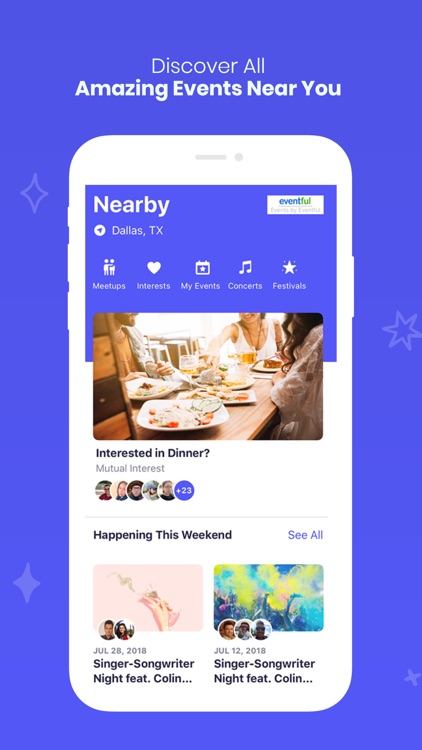
Dallas based YeahWeKhan, LLC releases Twoish 1.1, a minor update to its popular dating app for iOS and Android devices. Twoish was developed exclusively for matching people based on their interests and hobbies. The app enables users to find nearby events and invite others who are interested in the same events. For those who aren't looking for love or dating, but merely a group to hang out with, there's a separate option enabling friendships between likeminded people in the neighborhood.
Dallas, Texas - YeahWeKhan, LLC is proud to announce the release of Twoish 1.1, a minor update to the company's popular dating app developed for iOS and Android devices. Ever felt tongue-tied on a date? Not because you were smitten, but only because you and your partner had nothing common to do or talk about. That's the pitfall of online dating apps that allow users to swipe right or left based on looks. A few online chats are not enough to reveal someone's personality to ensure a successful date. However, Twoish, the new kid on the dating block, breaks away from the conventional format of dating apps by enabling users to choose each other based on events they'd like to attend in an area.
"In a world where loneliness and depression are growing problems, even those with thousands of online connections find it hard to connect with a partner in the real world. With Twoish, we decided to merge the virtual and the real worlds by creating an event-based app that not only lets you discover what's happening in your vicinity but also someone to attend your favorite events with," says Nazair Khan, Founder, Twoish.
Twoish is a unique dating platform for folks who are tired of swiping right and left to find a like-minded partner to go out with. On the app, you can discover people in your neighborhood who are up for drinks, dinner, karaoke, paintball, movies, and other such events so that you can bond over shared interests.
"It becomes a lot easier to say hi when the other person has similar tastes in activities," adds Mr. Khan, who has designed a separate interface on the app for users not looking for a partner but friends in crime (read, fun!). "The app lets you discover events, people interested in those events, and also lets you create your own events or meetups. You can choose at the outset whether you are looking for a date or a gang of friends, and the app throws up personalized suggestions to meet your criteria."
For those who are tired of the swiping game and are looking for a company in real-time, the Twoish app offers a plethora of features that are perfect to meet up with likeminded people and have some real fun.
Here's what we loved in Twoish app:
* A curated list of events near you
* A list of people who share your interests
* Chat option to invite others who are interested in the same events
* Option to create your own events and invite others
* View a list of users who are interested in your meetup
* Secure and personalized chat option for users
* Follow other users and mark them as favorites
* Block jerks and report inappropriate behavior
"We have designed the Twoish app with our users' security in mind. That's why we give them full control over their profile to block jerks and report any inappropriate events and behavior so that we can take action," says Mr. Khan.
Those looking for love or friends to hangout can join the Twoish app to meet people in real-time and bond over common interests. Visit the Twoish App website to know more.
Device Requirements:
* iPhone, iPad, and iPod touch
* iOS 11.0 or later
* 120.1 MB
Pricing and Availability:
Twoish app is currently available for free on the App Store under the 'Social Networking' category.
Twoish 1.1: https://www.twoish.com/
Download from the App Store: https://apps.apple.com/us/app/twoish/id1462427791?ls=1
Screenshot: https://is3-ssl.mzstatic.com/image/thumb/Purple123/v4/cd/02/d1/cd02d1fd-14ae-70d2-fcbe-e2e55fc5b4e9/pr_source.png/750x750bb.jpeg
App Icon: https://is3-ssl.mzstatic.com/image/thumb/Purple113/v4/74/6d/ea/746dead7-4c97-f431-bf2f-24bc172ad1a1/source/60x60bb.jpg
Twoish was founded in early Jan 2019 and created in Dallas, Texas at Capital Factory. Capital Factory is a resource center for entrepreneurs and a venture capital firm. Nazair Khan is the founder of Twoish and specializes in product development in both the healthcare and online dating industry. All Material and Software (C) Copyright 2019 YeahWeKhan, LLC. All Rights Reserved. Apple, the Apple logo, iPhone, iPod and iPad are registered trademarks of Apple Inc. in the U.S. and/or other countries. Other trademarks and registered trademarks may be the property of their respective owners.
*******
Link To Article: https://prmac.com/release-id-83824.htm
*******
---------------------------------------------------------------------------------
Note that you can alter delivered distributions at any time.
Login to your account on prMac to alter your channel selection, or to opt-out at any time.
Enjoy Your Dates Better with this Interest-Based Dating App - Published on 12/12/19
Dallas based YeahWeKhan, LLC releases Twoish 1.1, a minor update to its popular dating app for iOS and Android devices. Twoish was developed exclusively for matching people based on their interests and hobbies. The app enables users to find nearby events and invite others who are interested in the same events. For those who aren't looking for love or dating, but merely a group to hang out with, there's a separate option enabling friendships between likeminded people in the neighborhood.
Dallas, Texas - YeahWeKhan, LLC is proud to announce the release of Twoish 1.1, a minor update to the company's popular dating app developed for iOS and Android devices. Ever felt tongue-tied on a date? Not because you were smitten, but only because you and your partner had nothing common to do or talk about. That's the pitfall of online dating apps that allow users to swipe right or left based on looks. A few online chats are not enough to reveal someone's personality to ensure a successful date. However, Twoish, the new kid on the dating block, breaks away from the conventional format of dating apps by enabling users to choose each other based on events they'd like to attend in an area.
"In a world where loneliness and depression are growing problems, even those with thousands of online connections find it hard to connect with a partner in the real world. With Twoish, we decided to merge the virtual and the real worlds by creating an event-based app that not only lets you discover what's happening in your vicinity but also someone to attend your favorite events with," says Nazair Khan, Founder, Twoish.
Twoish is a unique dating platform for folks who are tired of swiping right and left to find a like-minded partner to go out with. On the app, you can discover people in your neighborhood who are up for drinks, dinner, karaoke, paintball, movies, and other such events so that you can bond over shared interests.
"It becomes a lot easier to say hi when the other person has similar tastes in activities," adds Mr. Khan, who has designed a separate interface on the app for users not looking for a partner but friends in crime (read, fun!). "The app lets you discover events, people interested in those events, and also lets you create your own events or meetups. You can choose at the outset whether you are looking for a date or a gang of friends, and the app throws up personalized suggestions to meet your criteria."
For those who are tired of the swiping game and are looking for a company in real-time, the Twoish app offers a plethora of features that are perfect to meet up with likeminded people and have some real fun.
Here's what we loved in Twoish app:
* A curated list of events near you
* A list of people who share your interests
* Chat option to invite others who are interested in the same events
* Option to create your own events and invite others
* View a list of users who are interested in your meetup
* Secure and personalized chat option for users
* Follow other users and mark them as favorites
* Block jerks and report inappropriate behavior
"We have designed the Twoish app with our users' security in mind. That's why we give them full control over their profile to block jerks and report any inappropriate events and behavior so that we can take action," says Mr. Khan.
Those looking for love or friends to hangout can join the Twoish app to meet people in real-time and bond over common interests. Visit the Twoish App website to know more.
Device Requirements:
* iPhone, iPad, and iPod touch
* iOS 11.0 or later
* 120.1 MB
Pricing and Availability:
Twoish app is currently available for free on the App Store under the 'Social Networking' category.
Twoish 1.1: https://www.twoish.com/
Download from the App Store: https://apps.apple.com/us/app/twoish/id1462427791?ls=1
Screenshot: https://is3-ssl.mzstatic.com/image/thumb/Purple123/v4/cd/02/d1/cd02d1fd-14ae-70d2-fcbe-e2e55fc5b4e9/pr_source.png/750x750bb.jpeg
App Icon: https://is3-ssl.mzstatic.com/image/thumb/Purple113/v4/74/6d/ea/746dead7-4c97-f431-bf2f-24bc172ad1a1/source/60x60bb.jpg

Twoish was founded in early Jan 2019 and created in Dallas, Texas at Capital Factory. Capital Factory is a resource center for entrepreneurs and a venture capital firm. Nazair Khan is the founder of Twoish and specializes in product development in both the healthcare and online dating industry. All Material and Software (C) Copyright 2019 YeahWeKhan, LLC. All Rights Reserved. Apple, the Apple logo, iPhone, iPod and iPad are registered trademarks of Apple Inc. in the U.S. and/or other countries. Other trademarks and registered trademarks may be the property of their respective owners.
*******
Link To Article: https://prmac.com/release-id-83824.htm
*******
---------------------------------------------------------------------------------
Note that you can alter delivered distributions at any time.
Login to your account on prMac to alter your channel selection, or to opt-out at any time.
PDF Checkpoint Now Supports macOS Mojave: PDF Preflight, Conversion Tool
A new article has been published at prMac.
PDF Checkpoint Now Supports macOS Mojave: PDF Preflight, Conversion Tool - Published on 12/12/19
Zevrix Solutions announces PDF Checkpoint 1.9.7, a compatibility update to company's PDF preflight and conversion solution. Remarkably fast, PDF Checkpoint automatically preflights, exports as images, splits and optimizes Adobe PDFs. The software can also convert the PDF document colors to specific ICC profile helping users easily prepare their files for print, web and mobile devices. The new version adds support for macOS 10.15 Catalina and fixes CMYK images rendering in Affinity PDF files.
Toronto (ON), Canada - Zevrix Solutions today announces PDF Checkpoint 1.9.7, a compatibility update to company's PDF preflight and conversion automation tool. Remarkably fast, PDF Checkpoint automatically preflights, exports as images, splits and optimizes batches of Adobe PDF files. PDF Checkpoint is an ideal tool for users who need a fast, affordable and easy to use solution to check PDF files for errors and convert them to the desired format and color space.
The new version adds support for the recently released macOS 10.15 Catalina and is offered as a free update to licensed users. The update also fixed an issue in which previews of CMYK images in PDF created by Affinity products appeared inverted.
"PDF Checkpoint saves me a lot of time when deciphering client-submitted ads for large magazines," says Miles Linklater of design studio 24pt Helvetica in Vancouver, Canada. "It's a great idea to enable color profile conversion in PDF files so easily."
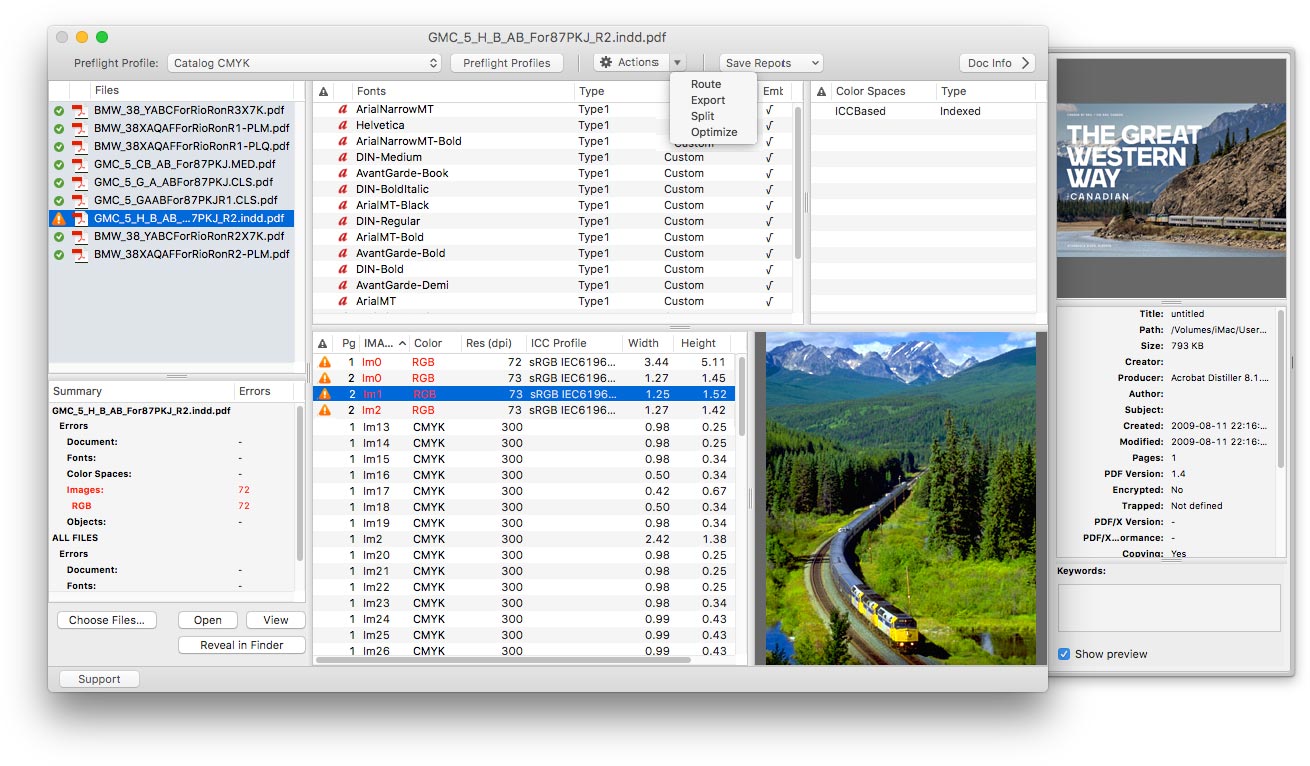
PDF Checkpoint is designed to automate and simplify PDF workflows of publishers, ad agencies, prepress houses, printers and graphic designers:
* Batch preflighting and conversion of PDF files
* Check PDF fonts, colors, images and metadata for specific attributes
* Convert PDF color mode using ICC profiles
* Split files into single page PDFs
* Route files by preflight results into success and error folders
* Export PDF as images with specific resolution, color and page scale
For example, users can preflight a folder of PDF files and convert them to TIFF images at 300 dpi while scaling each page by 50%. Users can also create print-ready PDFs from such apps as Apple Pages and Swift Publisher by converting colors to the recommended CMYK profile.
Pricing and availability:
PDF Checkpoint can be purchased on Mac App Store and Zevrix website for $39.95 (USD), as well as from authorized resellers. The update is free to licensed users. Trial is also available for download. PDF Checkpoint requires macOS 10.8-10.15.
Zevrix Solutions: http://zevrix.com
PDF Checkpoint 1.9.7: http://zevrix.com/PDFCheckpoint.php
Download PDF Checkpoint: http://zevrix.com/PDFCheckpoint.dmg
Purchase: http://zevrix.com/store.php
Screenshot: http://zevrix.com/screenshots/pdfcheckpoint/pdfc-main-sierra.jpg
Located in Toronto, Canada, Zevrix Solutions provides automation and productivity solutions for Adobe Creative Cloud and Creative Suite software, PDF workflows, graphic file diagnostics and Microsoft Office output on Mac OS. Zevrix is dedicated to help professionals increase their profits through automating everyday tasks, producing error-free documents, saving disk space and cutting production costs. For more information, visit their website. Copyright (C) 2019 Zevrix Solutions. All Rights Reserved. Other trademarks and registered trademarks may be the property of their respective owners.
*******
Link To Article: https://prmac.com/release-id-83823.htm
*******
---------------------------------------------------------------------------------
Note that you can alter delivered distributions at any time.
Login to your account on prMac to alter your channel selection, or to opt-out at any time.
PDF Checkpoint Now Supports macOS Mojave: PDF Preflight, Conversion Tool - Published on 12/12/19
Zevrix Solutions announces PDF Checkpoint 1.9.7, a compatibility update to company's PDF preflight and conversion solution. Remarkably fast, PDF Checkpoint automatically preflights, exports as images, splits and optimizes Adobe PDFs. The software can also convert the PDF document colors to specific ICC profile helping users easily prepare their files for print, web and mobile devices. The new version adds support for macOS 10.15 Catalina and fixes CMYK images rendering in Affinity PDF files.
Toronto (ON), Canada - Zevrix Solutions today announces PDF Checkpoint 1.9.7, a compatibility update to company's PDF preflight and conversion automation tool. Remarkably fast, PDF Checkpoint automatically preflights, exports as images, splits and optimizes batches of Adobe PDF files. PDF Checkpoint is an ideal tool for users who need a fast, affordable and easy to use solution to check PDF files for errors and convert them to the desired format and color space.
The new version adds support for the recently released macOS 10.15 Catalina and is offered as a free update to licensed users. The update also fixed an issue in which previews of CMYK images in PDF created by Affinity products appeared inverted.
"PDF Checkpoint saves me a lot of time when deciphering client-submitted ads for large magazines," says Miles Linklater of design studio 24pt Helvetica in Vancouver, Canada. "It's a great idea to enable color profile conversion in PDF files so easily."
PDF Checkpoint is designed to automate and simplify PDF workflows of publishers, ad agencies, prepress houses, printers and graphic designers:
* Batch preflighting and conversion of PDF files
* Check PDF fonts, colors, images and metadata for specific attributes
* Convert PDF color mode using ICC profiles
* Split files into single page PDFs
* Route files by preflight results into success and error folders
* Export PDF as images with specific resolution, color and page scale
For example, users can preflight a folder of PDF files and convert them to TIFF images at 300 dpi while scaling each page by 50%. Users can also create print-ready PDFs from such apps as Apple Pages and Swift Publisher by converting colors to the recommended CMYK profile.
Pricing and availability:
PDF Checkpoint can be purchased on Mac App Store and Zevrix website for $39.95 (USD), as well as from authorized resellers. The update is free to licensed users. Trial is also available for download. PDF Checkpoint requires macOS 10.8-10.15.
Zevrix Solutions: http://zevrix.com
PDF Checkpoint 1.9.7: http://zevrix.com/PDFCheckpoint.php
Download PDF Checkpoint: http://zevrix.com/PDFCheckpoint.dmg
Purchase: http://zevrix.com/store.php
Screenshot: http://zevrix.com/screenshots/pdfcheckpoint/pdfc-main-sierra.jpg
Located in Toronto, Canada, Zevrix Solutions provides automation and productivity solutions for Adobe Creative Cloud and Creative Suite software, PDF workflows, graphic file diagnostics and Microsoft Office output on Mac OS. Zevrix is dedicated to help professionals increase their profits through automating everyday tasks, producing error-free documents, saving disk space and cutting production costs. For more information, visit their website. Copyright (C) 2019 Zevrix Solutions. All Rights Reserved. Other trademarks and registered trademarks may be the property of their respective owners.
*******
Link To Article: https://prmac.com/release-id-83823.htm
*******
---------------------------------------------------------------------------------
Note that you can alter delivered distributions at any time.
Login to your account on prMac to alter your channel selection, or to opt-out at any time.
Unbelievable - An App That Helps You With Problems We All Face In Life
A new article has been published at prMac.
Unbelievable - An App That Helps You With Problems We All Face In Life - Published on 12/12/19
James Hollender's version 4.0 of his iPhone/iPod touch Life Inventory apps are very stable. With these apps users get in-depth perception of themselves and why they do the things they do. The apps include built-in instructions that help guide users step by step in creating their own Life Inventory to provide greater self understanding of personality, strengths and weaknesses, leading to a better knowledge of self than they ever thought possible and at only a fraction the cost of a therapy visit.
Revere, Massachusetts - James Hollender's version 4.0 of his iPhone/iPod touch Life Inventory apps are very stable. In the past several years there has only been one update and that was to remove the status bar providing more space for your information. With these apps users get in-depth perception of themselves and why they do the things they do. The apps include built-in instructions that help guide users step by step in creating their own Life Inventory to provide greater self understanding of personality, strengths and weaknesses, leading to a better knowledge of self than they ever thought possible and at only a fraction the cost of a single therapy visit. A Life Inventory can also function as a Moral Inventory for those in 12-step programs.
User "Hakerz" says, "There isn't another app like this anywhere and it helps you with problems you face in your life or how to make your life better. Thanks, James for adding a password! In the app there's an explanation in how this works."
Both the iPad and iPhone/iPod touch versions accomplish exactly the same thing, only the interface is considerably different for each because of the significant differences in screen size.
The process of completing a Life Inventory does not directly address anyone's specific problems, habits or addictions, but rather helps the user examine in detail events that have transpired in their life. The Life Inventory apps gently assist the user in probing not only what happened, but also why it happened. The questions asked help the user delve into areas often never considered before, like:
* What did I want
* Why did I want it
* What am I not admitting
* What lie did I tell myself
* What did I leave out or not say
* What lie did I tell others
* Have I ever done the same thing
* Was it any of my business
* Were my expectations reasonable
* What was the real truth
* What was I not seeing
* Did I fail to see the facts of the situation
* What actions did I take to get what I wanted
* What actions did I omit to get what I wanted
Life Inventory guides the user through six different steps, each with its own activity grouping, for making a Life Inventory:
* Build Lists
* Causes and Effects
* My Part
* Fears Analysis
* Fear Questions
* Sex Relations
Throughout the process, users are encouraged to enter data into their Inventory, be completely honest about themselves and take advantage of encouragement and support from others.
The Inventory begins by making one simple list, which defines four fixed Categories in which to file away what are broadly categorized as Incidents:
* People
* Institutions and Organizations
* Principles, Ideals and Beliefs
* Sources of Anxiety and Excitement
Each of these four Categories will contain hierarchical sub-categories. From there, users outline Entities and then individual Incidents related to each Entity.
Step-by-step, users complete the Causes and Effects of each Incident. Next, they determine the part they played in each Incident listed. It is not unusual to create hundreds of Incident forms, each devoted to a single incident. The app includes the ability to create and save all written lists and forms with password protection. Having completed all of their Incident forms, users can then refer to these forms to help list all their Fears. The app includes the following eight pre-defined fears, to which the user is free to add more if desired:
* Other people's opinions
* Not getting what I want
* Not having control of the situation
* Financial insecurity
* Abandonment
* Physical harm
* Failure
* Success
The fifth step is examining each Fear category and answering the following key questions:
* Why did I have this fear
* When did I first notice this fear in my life
* How did I hold onto this fear
* What did this fear make me do
* What chain of circumstances did this fear set in motion in my life
* How did I react to this fear
* What decision did this fear cause me to make
* How did self-reliance fail me
* What should I have done instead
And the sixth and final step is examining Sex Relations, where users answer all the following questions regarding each of their sexual relationships:
* How was I selfish
* Where was I dishonest
* Where was I inconsiderate
* Who was hurt in this situation
* Did I arouse jealousy, suspicion, or bitterness
* Where was I at fault
* What should I have done instead
* What will I do in the future
* Did I pray or have spiritual conversations with him/her
* Did I pray for him/her
* Did I enjoy his/her company
* Did we bring each other closer to God
"The process of completing a Life Inventory doesn't directly address anyone's specific problems, habits or addictions, but rather helps the user examine in detail events that have transpired in their life," stated indie developer James Hollender. "The Life Inventory app gently assists the user in probing into not only what happened, but also why it happened."
The Canadian Reviewer has suggested Life Inventory may even become your always available digital therapist: "If your smartphone has become your personal trainer, assistant, and even financial advisor, why not turn it into your therapist as well? The Life Inventory app for iOS is here to help you understand what makes you tick. This app helps you create your own Life Inventory or Moral Inventory to provide you with a better understanding of your personality, strengths, and weaknesses to help you live a better life."
James Hollender is also the author of a suite of Nutrient apps based on the USDA National Nutrient Database:
* iCarbs (Carbohydrates)
* iCholesterol (Dietary Cholesterol)
* iFiber (Fiber)
* iKals (Calories)
* iPotassium (Potassium)
* iProteins (Proteins)
* iSatFat (Saturated Fat)
* iSodium (Sodium)
* iSugars (Sugars)
* Vitamin K (Vitamins K1, K1D & K2)
* iNutrients (encompasses all ten nutrients listed above)
Device Requirements:
* "Life Inventory" & "Life Inventory Lite" - iPhone and iPod touch
* "Life Inventory for iPad" & "Life Inventory Lite for iPad" - iPad only
* Requires iOS 8.0 or later
Pricing and Availability:
Life Inventory and Life Inventory for iPad are each $11.99 (USD) and available worldwide exclusively through the iTunes App Store in the Lifestyle category. A Lite version of each app is $1.99, which supplement the main app by providing a mock Life Inventory from which the user can learn by example and experimentation, but is limited as to the number of records created so it's not sufficient to complete a full Life Inventory. Review copies are available of each on request.
Save even more money with App Bundles:
There are also app bundles where you can save by purchasing both the main and Lite Life Inventory apps along with the $7.99 iNutrients.
All James Hollender Apps & App Bundles in the iTunes App Store: https://itunes.apple.com/us/developer/james-hollender/id364725528
Life Inventory (for iPhone & iPod touch): https://itunes.apple.com/app/life-inventory-12-step-moral/id463922586
Life Inventory Lite with Optional Mock Data (for iPhone & iPod touch): https://itunes.apple.com/app/life-inventory-lite-optional/id463925790
Life Inventory for iPad: https://itunes.apple.com/app/life-inventory-for-ipad-12/id450749504
Life Inventory for iPad Lite with Optional Mock Data: https://itunes.apple.com/app/life-inventory-for-ipad-lite/id451516125
Life Inventory + iNutrients (for iPhone) App Bundle: https://itunes.apple.com/app-bundle/life-inventory-+-inutrients/id917511270
Based in Revere, Massachusetts, Indie developer James Hollender is a well seasoned Information Technology professional who has been familiar with Apple products since the days of the first Macintosh computer and has been involved with object oriented programming since the introduction of Java, culminating most recently in writing apps in Objective C for the iPhone, iPod touch and iPad. Hollender now has many apps and app bundles in the iTunes App Store. His innovative ideas have resulted in numerous suggestions and other awards including a commendation from a past President of the United States. James Hollender has been involved writing iPhone and iPad apps with Foliage, Kronos, Olympus, Agero (formerly Cross Country Automotive Services), and most recently Valmarc Corp. Copyright (C) 2010-2019 James Hollender. All Rights Reserved. Apple, the Apple logo, iPhone, and iPod are registered trademarks of Apple Inc. in the U.S. and/or other countries. Other trademarks and registered
trademarks may be the property of their respective owners.
*******
Link To Article: https://prmac.com/release-id-83822.htm
*******
---------------------------------------------------------------------------------
Note that you can alter delivered distributions at any time.
Login to your account on prMac to alter your channel selection, or to opt-out at any time.
Unbelievable - An App That Helps You With Problems We All Face In Life - Published on 12/12/19
James Hollender's version 4.0 of his iPhone/iPod touch Life Inventory apps are very stable. With these apps users get in-depth perception of themselves and why they do the things they do. The apps include built-in instructions that help guide users step by step in creating their own Life Inventory to provide greater self understanding of personality, strengths and weaknesses, leading to a better knowledge of self than they ever thought possible and at only a fraction the cost of a therapy visit.
Revere, Massachusetts - James Hollender's version 4.0 of his iPhone/iPod touch Life Inventory apps are very stable. In the past several years there has only been one update and that was to remove the status bar providing more space for your information. With these apps users get in-depth perception of themselves and why they do the things they do. The apps include built-in instructions that help guide users step by step in creating their own Life Inventory to provide greater self understanding of personality, strengths and weaknesses, leading to a better knowledge of self than they ever thought possible and at only a fraction the cost of a single therapy visit. A Life Inventory can also function as a Moral Inventory for those in 12-step programs.
User "Hakerz" says, "There isn't another app like this anywhere and it helps you with problems you face in your life or how to make your life better. Thanks, James for adding a password! In the app there's an explanation in how this works."
Both the iPad and iPhone/iPod touch versions accomplish exactly the same thing, only the interface is considerably different for each because of the significant differences in screen size.
The process of completing a Life Inventory does not directly address anyone's specific problems, habits or addictions, but rather helps the user examine in detail events that have transpired in their life. The Life Inventory apps gently assist the user in probing not only what happened, but also why it happened. The questions asked help the user delve into areas often never considered before, like:
* What did I want
* Why did I want it
* What am I not admitting
* What lie did I tell myself
* What did I leave out or not say
* What lie did I tell others
* Have I ever done the same thing
* Was it any of my business
* Were my expectations reasonable
* What was the real truth
* What was I not seeing
* Did I fail to see the facts of the situation
* What actions did I take to get what I wanted
* What actions did I omit to get what I wanted
Life Inventory guides the user through six different steps, each with its own activity grouping, for making a Life Inventory:
* Build Lists
* Causes and Effects
* My Part
* Fears Analysis
* Fear Questions
* Sex Relations
Throughout the process, users are encouraged to enter data into their Inventory, be completely honest about themselves and take advantage of encouragement and support from others.
The Inventory begins by making one simple list, which defines four fixed Categories in which to file away what are broadly categorized as Incidents:
* People
* Institutions and Organizations
* Principles, Ideals and Beliefs
* Sources of Anxiety and Excitement
Each of these four Categories will contain hierarchical sub-categories. From there, users outline Entities and then individual Incidents related to each Entity.
Step-by-step, users complete the Causes and Effects of each Incident. Next, they determine the part they played in each Incident listed. It is not unusual to create hundreds of Incident forms, each devoted to a single incident. The app includes the ability to create and save all written lists and forms with password protection. Having completed all of their Incident forms, users can then refer to these forms to help list all their Fears. The app includes the following eight pre-defined fears, to which the user is free to add more if desired:
* Other people's opinions
* Not getting what I want
* Not having control of the situation
* Financial insecurity
* Abandonment
* Physical harm
* Failure
* Success
The fifth step is examining each Fear category and answering the following key questions:
* Why did I have this fear
* When did I first notice this fear in my life
* How did I hold onto this fear
* What did this fear make me do
* What chain of circumstances did this fear set in motion in my life
* How did I react to this fear
* What decision did this fear cause me to make
* How did self-reliance fail me
* What should I have done instead
And the sixth and final step is examining Sex Relations, where users answer all the following questions regarding each of their sexual relationships:
* How was I selfish
* Where was I dishonest
* Where was I inconsiderate
* Who was hurt in this situation
* Did I arouse jealousy, suspicion, or bitterness
* Where was I at fault
* What should I have done instead
* What will I do in the future
* Did I pray or have spiritual conversations with him/her
* Did I pray for him/her
* Did I enjoy his/her company
* Did we bring each other closer to God
"The process of completing a Life Inventory doesn't directly address anyone's specific problems, habits or addictions, but rather helps the user examine in detail events that have transpired in their life," stated indie developer James Hollender. "The Life Inventory app gently assists the user in probing into not only what happened, but also why it happened."
The Canadian Reviewer has suggested Life Inventory may even become your always available digital therapist: "If your smartphone has become your personal trainer, assistant, and even financial advisor, why not turn it into your therapist as well? The Life Inventory app for iOS is here to help you understand what makes you tick. This app helps you create your own Life Inventory or Moral Inventory to provide you with a better understanding of your personality, strengths, and weaknesses to help you live a better life."
James Hollender is also the author of a suite of Nutrient apps based on the USDA National Nutrient Database:
* iCarbs (Carbohydrates)
* iCholesterol (Dietary Cholesterol)
* iFiber (Fiber)
* iKals (Calories)
* iPotassium (Potassium)
* iProteins (Proteins)
* iSatFat (Saturated Fat)
* iSodium (Sodium)
* iSugars (Sugars)
* Vitamin K (Vitamins K1, K1D & K2)
* iNutrients (encompasses all ten nutrients listed above)
Device Requirements:
* "Life Inventory" & "Life Inventory Lite" - iPhone and iPod touch
* "Life Inventory for iPad" & "Life Inventory Lite for iPad" - iPad only
* Requires iOS 8.0 or later
Pricing and Availability:
Life Inventory and Life Inventory for iPad are each $11.99 (USD) and available worldwide exclusively through the iTunes App Store in the Lifestyle category. A Lite version of each app is $1.99, which supplement the main app by providing a mock Life Inventory from which the user can learn by example and experimentation, but is limited as to the number of records created so it's not sufficient to complete a full Life Inventory. Review copies are available of each on request.
Save even more money with App Bundles:
There are also app bundles where you can save by purchasing both the main and Lite Life Inventory apps along with the $7.99 iNutrients.
All James Hollender Apps & App Bundles in the iTunes App Store: https://itunes.apple.com/us/developer/james-hollender/id364725528
Life Inventory (for iPhone & iPod touch): https://itunes.apple.com/app/life-inventory-12-step-moral/id463922586
Life Inventory Lite with Optional Mock Data (for iPhone & iPod touch): https://itunes.apple.com/app/life-inventory-lite-optional/id463925790
Life Inventory for iPad: https://itunes.apple.com/app/life-inventory-for-ipad-12/id450749504
Life Inventory for iPad Lite with Optional Mock Data: https://itunes.apple.com/app/life-inventory-for-ipad-lite/id451516125
Life Inventory + iNutrients (for iPhone) App Bundle: https://itunes.apple.com/app-bundle/life-inventory-+-inutrients/id917511270
Based in Revere, Massachusetts, Indie developer James Hollender is a well seasoned Information Technology professional who has been familiar with Apple products since the days of the first Macintosh computer and has been involved with object oriented programming since the introduction of Java, culminating most recently in writing apps in Objective C for the iPhone, iPod touch and iPad. Hollender now has many apps and app bundles in the iTunes App Store. His innovative ideas have resulted in numerous suggestions and other awards including a commendation from a past President of the United States. James Hollender has been involved writing iPhone and iPad apps with Foliage, Kronos, Olympus, Agero (formerly Cross Country Automotive Services), and most recently Valmarc Corp. Copyright (C) 2010-2019 James Hollender. All Rights Reserved. Apple, the Apple logo, iPhone, and iPod are registered trademarks of Apple Inc. in the U.S. and/or other countries. Other trademarks and registered
trademarks may be the property of their respective owners.
*******
Link To Article: https://prmac.com/release-id-83822.htm
*******
---------------------------------------------------------------------------------
Note that you can alter delivered distributions at any time.
Login to your account on prMac to alter your channel selection, or to opt-out at any time.
Subscribe to:
Posts (Atom)