A new article has been published at prMac.
SheetPlanner 1.2 for Mac Update Brings Several New Features - Published on 12/18/19
Virginia-based indie developer, SheetPlanner Software LLC today announces SheetPlanner 1.2, an important update to their popular planning, project and task tracking application for macOS. SheetPlanner allows anyone to easily organize tasks, perform long range planning, manage projects, and more. Users can plan and visualize goals in a convenient timeline view. Version 1.2 brings several new features, multi select lists, picture type columns, custom cell styles and more.
Alexandria, Virginia - Independent developer, SheetPlanner Software LLC is today proud to announce the release and immediate availability of SheetPlanner 1.2, an important update to their popular planning, project and task management application for macOS. SheetPlanner helps anyone organize information, make long range plans, manage projects, and track everyday tasks.
Version 1.2 of the app brings numerous improvements. New features include the ability to select multiple items in a list, a new picture column type that allows you to store images, custom cell styles, and so much more.
"The previous version of SheetPlanner made it easy to plan and manage projects on your Mac, as it made it simple to plan and visualize your long term goals, helping to keep projects and tasks on schedule," says SheetPlanner Software CEO Peter Davey. "The new version of the software offers improvements and new features that make the app more powerful than ever!"
With SheetPlanner, users can easily plan and visualize their goals and create project tasks and schedules using the app's convenient timeline and calendar views. Users can quickly view all of their tasks and their duration and the sequence they need to be completed in. The timeline can be viewed in convenient days, weeks, months, quarters, or years views.
SheetPlanner Features Include:
* Outliner with columns - Add text, numeric, date, picture or list columns
* Keep inline notes using the built-in full text editor
* Customize row styles using custom fonts, size, and color
* Focus on a row, or a row and its children, transverse row hierarchy via the handy path bar
* Create Smart Filters using simple or complex criteria, save them for future use
* Search outlines across columns from the toolbar, save the search as a Smart Filter
* Sort outlines by any column and order
* Link documents and folders, whether they're stored locally or in the cloud
* View documents via Quicklook or in tabs
* Link to web pages via quicklook or in a tab of their own
* View an outline in multiple tabs simultaneously in any combination of views
* View a monthly view of outline rows using assigned dates
* Convenient heat-mapped yearly calendar shows activities starting and ending for each date
* Timeline allows viewing and adjusting of key dates for each task on a convenient horizontal timeline
* Cells, columns, rows, calendars and timeline can all be customized
* Convenient import and export functionality can export in .CSV or .OPML format
* Copy and paste information to and from Excel and Numbers spreadsheets
* Personalize the Outline view using green bar, yellow notepad or green notepad themes
* Easy to use templates for business, educational, and personal use
* macOS Mojave dark mode
* Much more
SheetPlanner 1.2 offers numerous improvements and new features. Among the new features is the ability select multiple items from a drop down list enabling the population of multiple values in a list column cell. You can also type in the cell to auto-complete items, separating multiple with commas.
List cells for parent rows now offer a Summary value calculation, that results in all of the values used by child cells.
The new Picture column type allows users to include images in a cell. Picture cells are displayed as a thumbnail and can quickly be viewed in full via Quick Look. Images can be dragged or pasted into Picture cells. Picture cells can be a fixed size, fit to the width of the column or the height of the row.
Custom cell styles provide the ability to to set custom styles for individual cells via the Format menu and in a newly enhanced style editor in the inspector
New Features Include:
* Picture column type.
* Choose multiple items in List cells.
* Custom cell styles.
* New style Inspector controls
* Notifications.
* New timeline info Panel.
* Date stamp.
* Link reveal in Finder.
* Links improvements.
* Undo enhancements.
* Many more enhancements
"SheetPlanner was originally created to provide users with an easy way to track everything they need to complete their tasks and accomplish their goals. The new features in version 1.2 makes that easier than ever," continues Peter. "Users can take advantage of the app's 21-day free trial to ensure SheetPlanner is the right app for their needs. I'm confident they'll buy it once they've tried it."
System Requirements:
* macOS 10.12 Sierra or Later
* mac OS 10.14 Mojave Compatible
* 9.3 MB
Pricing and Availability:
SheetPlanner 1.2 is a free update to users of 1.0 and is available worldwide from the Mac App Store. A 21-day free trial is available. Users can continue to view documents in read-only mode after the trial has expired. A convenient in-app purchase of $49.95 will unlock the app's full features after the trial has expired. SheetPlanner 1.1, is also available on SetApp. Review copies are available to journalists upon request.
SheetPlanner Software LLC: http://sheetplanner.com
SheetPlanner 1.2: http://sheetplanner.com
Purchase and Download From Mac App Store: https://apps.apple.com/us/app/sheetplanner/id1438761088?mt=12
Screenshots: http://sheetplanner.com/user/pages/01.home/_hero/sp_calendar.png
SheetPlanner Icon: http://sheetplanner.com/user/themes/twentyfifteen/images/Sheetplanner_mark.png
SheetPlanner Software LLC is located in Alexandria, VA and is focused on bringing great planning software to individuals and teams. All Material and Software (C) Copyright 2019 SheetPlanner Software LLC. All Rights Reserved. Apple, the Apple logo, Macintosh Mac OS X and macOS are registered trademarks of Apple Inc. in the U.S. and/or other countries. Other trademarks and registered trademarks may be the property of their respective owners.
*******
Link To Article: https://prmac.com/release-id-83839.htm
*******
---------------------------------------------------------------------------------
Note that you can alter delivered distributions at any time.
Login to your account on prMac to alter your channel selection, or to opt-out at any time.


Shadowgun War Games Hits 500,000 Pre-Registration Milestone
A new article has been published at prMac.
Shadowgun War Games Hits 500,000 Pre-Registration Milestone - Published on 12/17/19
MADFINGER Games has announced today that the pre-registration campaign for their upcoming title Shadowgun War Games has now hit half a million players. The figure puts the company on course for a promising launch when the game is released globally in early 2020. Jump in a whole new level of 5v5 mobile FPS action with Shadowgun War Games! Be a part of a worldwide community, meet new friends, choose your hero and lead your team to victory. Anyone can join, but only a few can become champions.
Brno, Czech Republic - Indie studio MADFINGER Games has announced today that the pre-registration campaign for their upcoming title Shadowgun War Games has now hit half a million players. The figure puts the company on course for a promising launch when the game is released globally in early 2020.
Shadowgun War Games has been eagerly awaited since a prototype version wowed audiences at Gamescom last year, and the studio is currently putting the finishing touches to a closed beta version. Players still have the chance to pre-register for Shadowgun War Games at shadowgunwargames.com/preregister/now.
"We're thrilled at the response we've had since pre-reg launched in mid-November," said Marek Rabas, CEO of MADFINGER Games. "It proves that the community can't wait to get their hands on our latest game, and it really encourages us to go the extra mile and make it absolutely perfect for players all over the world."
Shadowgun War Games is a free-to-play tactical FPS with incredible graphics and intense 5v5 battles. Players choose from a gallery of heroes, each with unique personalities and skills to match their play style. With an emphasis on quick pick-up-and-play action, Shadowgun War Games offers truly console-quality team-based action for everyone with access to a mobile device.
Shadowgun War Games: http://shadowgunwargames.com/preregister/now
Media Assets: https://drive.google.com/drive/folders/17yPN3rtsK2hYrwsxQFUpvtJYuVVpDvjZ?usp=sharing
MADFINGER Games is a world-class independent game developer with a focus on mobile and console platforms. Founded in 2010, their games quickly shot to the top of the charts in sales and hit the #1 spot in over 100 countries. MADFINGER Games is renowned for stunning visuals and outstanding gameplay experiences, which have received worldwide acclaim and a series of prestigious awards, including Google Play's "Most Beautiful Mobile Game 2019". The studio's most popular titles are Shadowgun Legends, Unkilled, and Dead Trigger 2, and their games have been downloaded over 250 million times. All Material and Software (C) Copyright 2019 MADFINGER Games. All Rights Reserved. Apple, the Apple logo, iPhone, iPod and iPad are registered trademarks of Apple Inc. in the U.S. and/or other countries. Other trademarks and registered trademarks may be the property of their respective owners.
*******
Link To Article: https://prmac.com/release-id-83838.htm
*******
---------------------------------------------------------------------------------
Note that you can alter delivered distributions at any time.
Login to your account on prMac to alter your channel selection, or to opt-out at any time.
Shadowgun War Games Hits 500,000 Pre-Registration Milestone - Published on 12/17/19
MADFINGER Games has announced today that the pre-registration campaign for their upcoming title Shadowgun War Games has now hit half a million players. The figure puts the company on course for a promising launch when the game is released globally in early 2020. Jump in a whole new level of 5v5 mobile FPS action with Shadowgun War Games! Be a part of a worldwide community, meet new friends, choose your hero and lead your team to victory. Anyone can join, but only a few can become champions.
Brno, Czech Republic - Indie studio MADFINGER Games has announced today that the pre-registration campaign for their upcoming title Shadowgun War Games has now hit half a million players. The figure puts the company on course for a promising launch when the game is released globally in early 2020.
Shadowgun War Games has been eagerly awaited since a prototype version wowed audiences at Gamescom last year, and the studio is currently putting the finishing touches to a closed beta version. Players still have the chance to pre-register for Shadowgun War Games at shadowgunwargames.com/preregister/now.
"We're thrilled at the response we've had since pre-reg launched in mid-November," said Marek Rabas, CEO of MADFINGER Games. "It proves that the community can't wait to get their hands on our latest game, and it really encourages us to go the extra mile and make it absolutely perfect for players all over the world."
Shadowgun War Games is a free-to-play tactical FPS with incredible graphics and intense 5v5 battles. Players choose from a gallery of heroes, each with unique personalities and skills to match their play style. With an emphasis on quick pick-up-and-play action, Shadowgun War Games offers truly console-quality team-based action for everyone with access to a mobile device.
Shadowgun War Games: http://shadowgunwargames.com/preregister/now
Media Assets: https://drive.google.com/drive/folders/17yPN3rtsK2hYrwsxQFUpvtJYuVVpDvjZ?usp=sharing
MADFINGER Games is a world-class independent game developer with a focus on mobile and console platforms. Founded in 2010, their games quickly shot to the top of the charts in sales and hit the #1 spot in over 100 countries. MADFINGER Games is renowned for stunning visuals and outstanding gameplay experiences, which have received worldwide acclaim and a series of prestigious awards, including Google Play's "Most Beautiful Mobile Game 2019". The studio's most popular titles are Shadowgun Legends, Unkilled, and Dead Trigger 2, and their games have been downloaded over 250 million times. All Material and Software (C) Copyright 2019 MADFINGER Games. All Rights Reserved. Apple, the Apple logo, iPhone, iPod and iPad are registered trademarks of Apple Inc. in the U.S. and/or other countries. Other trademarks and registered trademarks may be the property of their respective owners.
*******
Link To Article: https://prmac.com/release-id-83838.htm
*******
---------------------------------------------------------------------------------
Note that you can alter delivered distributions at any time.
Login to your account on prMac to alter your channel selection, or to opt-out at any time.
Pixelmator Pro update adds ability to enhance image resolution using AI
A new article has been published at prMac.
Pixelmator Pro update adds ability to enhance image resolution using AI - Published on 12/17/19
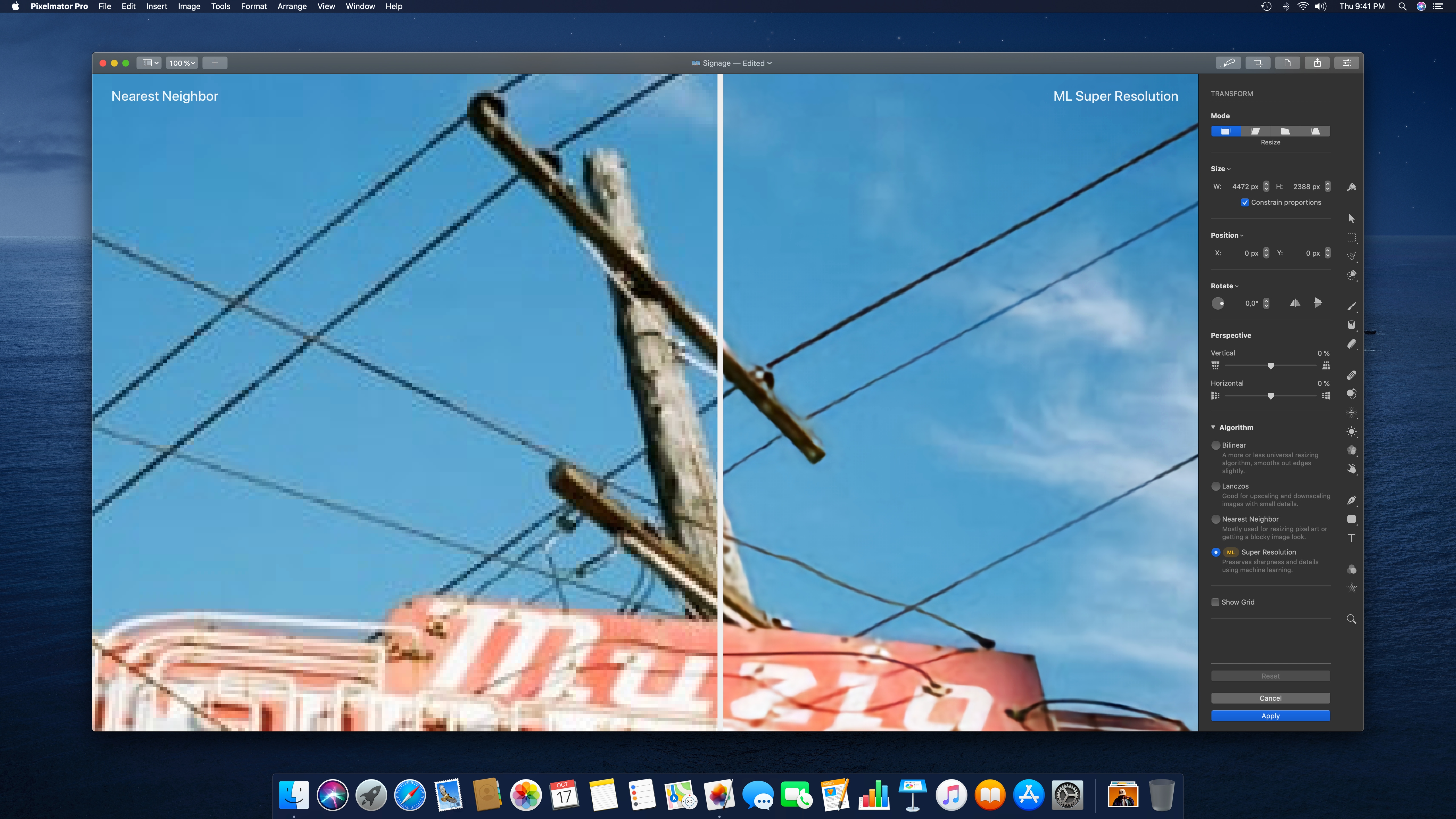
The Pixelmator Team today released Pixelmator Pro 1.5.4, an update to the award-winning Mac image editor. Pixelmator Pro is an incredibly powerful, beautiful, and easy to use image editor designed exclusively for Mac. Integrated using Core ML 3 and the first tool of its kind widely available to consumers, version 1.5.4 adds a new ML Super Resolution feature, giving users the ability to increase the resolution of images using state-of-the-art machine learning techniques.
Vilnius, Lithuania - The Pixelmator Team today released an update to Pixelmator Pro, the award-winning Mac image editor designed to make powerful professional tools accessible to everyday users. The update adds a new ML Super Resolution feature, giving users the ability to increase the resolution of images using state-of-the-art machine learning techniques.
"Machine learning has been the most exciting technology in image editing over the past few years and we've taken full advantage of it with a number of ML-powered features," said Saulius Dailide, one of the founders of the Pixelmator Team. "And thanks to the new ML Super Resolution feature, users can now increase the resolution of any image with a click while preserving its quality, which simply wouldn't be possible without AI."
ML Super Resolution is integrated using Core ML 3 and is the first tool of its kind widely available to consumers. Using cutting-edge machine learning techniques, it increases the resolution of images - whether photos, illustrations, paintings, or designs - while preserving textures, edges, and other details. What's more, ML Super Resolution also intelligently removes image noise and compression artifacts during the upscaling process, delivering incredible quality. The new feature is available as a one-click action, as an algorithm when changing the size of images, and as an algorithm when scaling objects using the Transform tool.
Advances in Mac graphics processor performance and multi-GPU support in Core ML 3 make these groundbreaking technologies available to everyday users. To upscale an image, ML Super Resolution creates a representation of it that is over 100 channels deep, detecting features such as edges, patterns, textures, gradients, and colors. The channels are then upscaled separately and combined back into an image. This all happens in under a second on the latest hardware, while on devices from just 5 years ago, the same action can take over a minute. Performance increases are especially notable - up to 200x - on Mac computers with multiple GPUs or AMD Navi eGPUs.
Pixelmator Pro 1.5.4 also brings improvements to ML Denoise, the AI-powered camera noise and image compression artifact removal tool. With the latest round of improvements, ML Denoise is between 2-4 times better at analyzing and removing image noise.
Pixelmator Pro 1.5.4: https://www.pixelmator.com/pro/
Purchase and Download (Mac App Store): https://itunes.apple.com/app/pixelmator-pro/id1289583905
Pixelmator Pro Blog - ML Super Resolution: https://www.pixelmator.com/blog/2019/12/17/all-about-the-new-ml-super-resolution-feature-in-pixelmator-pro/
ML Super Resolution (Screenshot): http://pixelmator-download.s3.amazonaws.com/press/Pixelmator-Pro-1.5.4-ML-Super-Resolution.jpg
Application Icon: http://download.pixelmator.com/press/pro/Pixelmator-Pro-Icon.png
Press Kit (zip): http://pixelmator-download.s3.amazonaws.com/press/Pixelmator-Pro-1.5.4-Press-Kit.zip
Founded in 2007 by two brothers, Saulius Dailide and Aidas Dailide, the Pixelmator Team develops powerful image editing apps for Mac and iOS. The team's apps have been honored with multiple Mac App of the Year awards, an iPad App of the Year award, an Apple Design Award, and many others. Pixelmator for iPad was featured at the Apple Special Event in October 2014. All Material and Software (C) Copyright 2007-2019 Pixelmator. All Rights Reserved. Apple, the Apple logo, Macintosh, iPhone, iPad, and macOS are registered trademarks of Apple Inc. in the U.S. and/or other countries. Other trademarks and registered trademarks may be the property of their respective owners.
*******
Link To Article: https://prmac.com/release-id-83835.htm
*******
---------------------------------------------------------------------------------
Note that you can alter delivered distributions at any time.
Login to your account on prMac to alter your channel selection, or to opt-out at any time.
Pixelmator Pro update adds ability to enhance image resolution using AI - Published on 12/17/19
The Pixelmator Team today released Pixelmator Pro 1.5.4, an update to the award-winning Mac image editor. Pixelmator Pro is an incredibly powerful, beautiful, and easy to use image editor designed exclusively for Mac. Integrated using Core ML 3 and the first tool of its kind widely available to consumers, version 1.5.4 adds a new ML Super Resolution feature, giving users the ability to increase the resolution of images using state-of-the-art machine learning techniques.
Vilnius, Lithuania - The Pixelmator Team today released an update to Pixelmator Pro, the award-winning Mac image editor designed to make powerful professional tools accessible to everyday users. The update adds a new ML Super Resolution feature, giving users the ability to increase the resolution of images using state-of-the-art machine learning techniques.
"Machine learning has been the most exciting technology in image editing over the past few years and we've taken full advantage of it with a number of ML-powered features," said Saulius Dailide, one of the founders of the Pixelmator Team. "And thanks to the new ML Super Resolution feature, users can now increase the resolution of any image with a click while preserving its quality, which simply wouldn't be possible without AI."
ML Super Resolution is integrated using Core ML 3 and is the first tool of its kind widely available to consumers. Using cutting-edge machine learning techniques, it increases the resolution of images - whether photos, illustrations, paintings, or designs - while preserving textures, edges, and other details. What's more, ML Super Resolution also intelligently removes image noise and compression artifacts during the upscaling process, delivering incredible quality. The new feature is available as a one-click action, as an algorithm when changing the size of images, and as an algorithm when scaling objects using the Transform tool.
Advances in Mac graphics processor performance and multi-GPU support in Core ML 3 make these groundbreaking technologies available to everyday users. To upscale an image, ML Super Resolution creates a representation of it that is over 100 channels deep, detecting features such as edges, patterns, textures, gradients, and colors. The channels are then upscaled separately and combined back into an image. This all happens in under a second on the latest hardware, while on devices from just 5 years ago, the same action can take over a minute. Performance increases are especially notable - up to 200x - on Mac computers with multiple GPUs or AMD Navi eGPUs.
Pixelmator Pro 1.5.4 also brings improvements to ML Denoise, the AI-powered camera noise and image compression artifact removal tool. With the latest round of improvements, ML Denoise is between 2-4 times better at analyzing and removing image noise.
Pixelmator Pro 1.5.4: https://www.pixelmator.com/pro/
Purchase and Download (Mac App Store): https://itunes.apple.com/app/pixelmator-pro/id1289583905
Pixelmator Pro Blog - ML Super Resolution: https://www.pixelmator.com/blog/2019/12/17/all-about-the-new-ml-super-resolution-feature-in-pixelmator-pro/
ML Super Resolution (Screenshot): http://pixelmator-download.s3.amazonaws.com/press/Pixelmator-Pro-1.5.4-ML-Super-Resolution.jpg
Application Icon: http://download.pixelmator.com/press/pro/Pixelmator-Pro-Icon.png
Press Kit (zip): http://pixelmator-download.s3.amazonaws.com/press/Pixelmator-Pro-1.5.4-Press-Kit.zip
Founded in 2007 by two brothers, Saulius Dailide and Aidas Dailide, the Pixelmator Team develops powerful image editing apps for Mac and iOS. The team's apps have been honored with multiple Mac App of the Year awards, an iPad App of the Year award, an Apple Design Award, and many others. Pixelmator for iPad was featured at the Apple Special Event in October 2014. All Material and Software (C) Copyright 2007-2019 Pixelmator. All Rights Reserved. Apple, the Apple logo, Macintosh, iPhone, iPad, and macOS are registered trademarks of Apple Inc. in the U.S. and/or other countries. Other trademarks and registered trademarks may be the property of their respective owners.
*******
Link To Article: https://prmac.com/release-id-83835.htm
*******
---------------------------------------------------------------------------------
Note that you can alter delivered distributions at any time.
Login to your account on prMac to alter your channel selection, or to opt-out at any time.
24U Software announces Bridge for Arduino
A new article has been published at prMac.
24U Software announces Bridge for Arduino - Published on 12/17/19
24U Software announces Bridge for Arduino, extending the range of hardware modules that can be easily integrated with the FileMaker platform by adding support with the popular open-source hardware platform Arduino. 24U Bridge is a modulethat acts as a bridge between software apps, developed on the FileMaker platform, and physical devices to allow them to be controlled by the software or to control the software. Arduino is commonly used for electronics prototyping projects.
Prague, Czech Republic - 24U Software announces Bridge for Arduino, extending the range of hardware modules that can be easily integrated with the FileMaker platform by adding support the popular open-source hardware platform Arduino. The successful Phidgets Plug-In so becomes Bridge to reflect the growing range of supported hardware platforms.
24U Bridge is a module (add-on, plug-in) that acts as a bridge between software apps, developed on the FileMaker platform, and physical devices to allow them to be controlled by the software or to control the software.
Bridge has been known as 24U Phidgets Plug-In for over 10 years since 2008 as a plug-in enabling the FileMaker platform to integrate with physical devices provided by Phidgets, Inc. Today, 24U has extended its support to the world of Arduino, another popular sort of physical devices, commonly used for electronics prototyping projects, changing its name to Bridge to reflect the fact that it's no longer limited to a single technology. Support for more device technologies is expected to be added to the product in the future, depending on actual demand.
About Arduino:
According to Arduino AG, "Arduino is an open-source electronics platform based on easy-to-use hardware and software. Arduino boards are able to read inputs - light on a sensor, a finger on a button, or a Twitter message - and turn it into an output - activating a motor, turning on an LED, publishing something online. You can tell your board what to do by sending a set of instructions to the microcontroller on the board."
The Arduino project started in 2005 as a program for students at the Interaction Design Institute Ivrea in Ivrea, Italy, aiming to provide a low-cost and easy way for novices and professionals to create devices that interact with their environment using sensors and actuators. Since then in became popular not only for students and hobbyists, but also for technology professionals looking for cost-effective way to build custom hardware solutions addressing specific, often new or unique, business needs.
About Bridge for Arduino:
Bridge for Arduino enables FileMaker Pro to interact with custom hardware devices based on the popular open-source Arduino platform while maintaining the ease of use typical for FileMaker development.
By default, Arduino boards come free of any software and developers have to write their own code to make them do something. Bridge for Arduino comes with a ready-to-use firmware that saves FileMaker developers from having to write a single line of programming language code, letting them to focus on their use cases and easily control their devices directly from FileMaker Pro.
The plug-in lets FileMaker developers easily:
* Read from Arduino pins to process digital signals and sensor values
* Write directly to Arduino pins to control various electrical devices
* Control servo and stepper motors to automate moving parts of robots and machines
* Display text on an LCD display to provide custom user interface such as cashbox
* Connect Arduino boards over network to control and monitor distant devices
* Install 24U's firmware to Arduino to avoid having to write your own C code
The first version of Bridge for Arduino supports Arduino UNO board and its 100% compatible clones, Arduino Starter Kit, Arduino Ethernet shield, and the ESP-01 wi-fi module. Support for other boards and modules will be added in the future based on actual demand, support for specific setup can be also added upon request as a custom modification.
Pricing and Availability:
Licenses for Bridge for Arduino start at $79 (USD) per user and device or $249 per user with unlimited devices. Volume discounts are available for 5 or more users.
24U Software: https://www.24usoftware.com/company
24U Bridge for Arduino: https://www.24usoftware.com/arduino
Download for macOS: https://www.24usoftware.com/download/BridgeForArduino10.zip
Download for Windows: https://www.24usoftware.com/download/BridgeForArduino10.dmg
Purchase a license: https://www.24usoftware.com/arduino#buy
With customers in 68 countries and 28 years of experience with the FileMaker platform, 24U excels in developing new or taking care of existing custom apps, optimizing their performance, identifying and resolving potential issues and liabilities, improving reliability, stability and scalability, integrating them with other systems including various hardware devices, and extending them beyond expectation. As a platinum member of the FileMaker Business Alliance, 24U helps global businesses around the world to maintain sustainable growth by working with their in-house developers or completely taking care of the maintenance and development of their business solutions. (C) 2019 24U s.r.o. All rights reserved. 24U, 24U Software, and Email OSAX are trademarks of 24U s.r.o. FileMaker is a trademark of FileMaker, Inc., registered in the U.S. and other countries. All other trademarks are the property of their respective owners.
*******
Link To Article: https://prmac.com/release-id-83836.htm
*******
---------------------------------------------------------------------------------
Note that you can alter delivered distributions at any time.
Login to your account on prMac to alter your channel selection, or to opt-out at any time.
24U Software announces Bridge for Arduino - Published on 12/17/19
24U Software announces Bridge for Arduino, extending the range of hardware modules that can be easily integrated with the FileMaker platform by adding support with the popular open-source hardware platform Arduino. 24U Bridge is a modulethat acts as a bridge between software apps, developed on the FileMaker platform, and physical devices to allow them to be controlled by the software or to control the software. Arduino is commonly used for electronics prototyping projects.
Prague, Czech Republic - 24U Software announces Bridge for Arduino, extending the range of hardware modules that can be easily integrated with the FileMaker platform by adding support the popular open-source hardware platform Arduino. The successful Phidgets Plug-In so becomes Bridge to reflect the growing range of supported hardware platforms.
24U Bridge is a module (add-on, plug-in) that acts as a bridge between software apps, developed on the FileMaker platform, and physical devices to allow them to be controlled by the software or to control the software.
Bridge has been known as 24U Phidgets Plug-In for over 10 years since 2008 as a plug-in enabling the FileMaker platform to integrate with physical devices provided by Phidgets, Inc. Today, 24U has extended its support to the world of Arduino, another popular sort of physical devices, commonly used for electronics prototyping projects, changing its name to Bridge to reflect the fact that it's no longer limited to a single technology. Support for more device technologies is expected to be added to the product in the future, depending on actual demand.
About Arduino:
According to Arduino AG, "Arduino is an open-source electronics platform based on easy-to-use hardware and software. Arduino boards are able to read inputs - light on a sensor, a finger on a button, or a Twitter message - and turn it into an output - activating a motor, turning on an LED, publishing something online. You can tell your board what to do by sending a set of instructions to the microcontroller on the board."
The Arduino project started in 2005 as a program for students at the Interaction Design Institute Ivrea in Ivrea, Italy, aiming to provide a low-cost and easy way for novices and professionals to create devices that interact with their environment using sensors and actuators. Since then in became popular not only for students and hobbyists, but also for technology professionals looking for cost-effective way to build custom hardware solutions addressing specific, often new or unique, business needs.
About Bridge for Arduino:
Bridge for Arduino enables FileMaker Pro to interact with custom hardware devices based on the popular open-source Arduino platform while maintaining the ease of use typical for FileMaker development.
By default, Arduino boards come free of any software and developers have to write their own code to make them do something. Bridge for Arduino comes with a ready-to-use firmware that saves FileMaker developers from having to write a single line of programming language code, letting them to focus on their use cases and easily control their devices directly from FileMaker Pro.
The plug-in lets FileMaker developers easily:
* Read from Arduino pins to process digital signals and sensor values
* Write directly to Arduino pins to control various electrical devices
* Control servo and stepper motors to automate moving parts of robots and machines
* Display text on an LCD display to provide custom user interface such as cashbox
* Connect Arduino boards over network to control and monitor distant devices
* Install 24U's firmware to Arduino to avoid having to write your own C code
The first version of Bridge for Arduino supports Arduino UNO board and its 100% compatible clones, Arduino Starter Kit, Arduino Ethernet shield, and the ESP-01 wi-fi module. Support for other boards and modules will be added in the future based on actual demand, support for specific setup can be also added upon request as a custom modification.
Pricing and Availability:
Licenses for Bridge for Arduino start at $79 (USD) per user and device or $249 per user with unlimited devices. Volume discounts are available for 5 or more users.
24U Software: https://www.24usoftware.com/company
24U Bridge for Arduino: https://www.24usoftware.com/arduino
Download for macOS: https://www.24usoftware.com/download/BridgeForArduino10.zip
Download for Windows: https://www.24usoftware.com/download/BridgeForArduino10.dmg
Purchase a license: https://www.24usoftware.com/arduino#buy
With customers in 68 countries and 28 years of experience with the FileMaker platform, 24U excels in developing new or taking care of existing custom apps, optimizing their performance, identifying and resolving potential issues and liabilities, improving reliability, stability and scalability, integrating them with other systems including various hardware devices, and extending them beyond expectation. As a platinum member of the FileMaker Business Alliance, 24U helps global businesses around the world to maintain sustainable growth by working with their in-house developers or completely taking care of the maintenance and development of their business solutions. (C) 2019 24U s.r.o. All rights reserved. 24U, 24U Software, and Email OSAX are trademarks of 24U s.r.o. FileMaker is a trademark of FileMaker, Inc., registered in the U.S. and other countries. All other trademarks are the property of their respective owners.
*******
Link To Article: https://prmac.com/release-id-83836.htm
*******
---------------------------------------------------------------------------------
Note that you can alter delivered distributions at any time.
Login to your account on prMac to alter your channel selection, or to opt-out at any time.
Adobe InDesign Plug-Ins and PDF Tools on 50% off Holiday Sale
A new article has been published at prMac.
Adobe InDesign Plug-Ins and PDF Tools on 50% off Holiday Sale - Published on 12/17/19
Zevrix Solutions, a developer of automation solutions for Adobe InDesign, PDF workflows and Microsoft Office, announces today a holiday sale until December 31. The company offers 50% discount on all software including upgrades. Zevrix products include plug-ins for InDesign that automate document printing and exporting, reduce linked image size, and simplify file packaging. The company's software also automates PDF printing and conversion, file delivery, and output from Microsoft Office.
Toronto, Canada - Zevrix Solutions, a developer of automation solutions for Adobe InDesign, PDF workflows and Microsoft Office, announces today a holiday sale until December 31. Zevrix offers 50% discount on everything in its online store including product upgrades. The company's products include several popular plug-ins for Adobe InDesign and Illustrator, which help professionals automate document printing and exporting, repurpose files for web and mobile devices, save disk space, and cut production costs.
"Zevrix software its the best kept secret out there for the Graphic Design industry," says Darren Rath of eponymous design studio in Melbourne, Australia. "It rocks and continues to impress and improve at a scary rate... Thanks to Zevrix products, every piece of artwork that flies out of here requires no intervention by the prepress departments."
The following products are available on sale:
LinkOptimizer for InDesign, which reduces link size by eliminating excess image data, performs essential picture adjustments, and converts file formats. LinkOptimizer lets users save gigabytes of disk space, cut down on processing time, and reduce production costs.
Output Factory for InDesign, which automates document printing and exporting and offers batch output, layer versioning, export as single pages, preflighting, variable file names, and more. A server version that processes files from watched hot folders is also available.
InPreflight for InDesign, which offers advanced preflighting as well as automatic packaging of multiple files. InPreflight helps users eliminate errors, save disk space, and collect all linked files into a single location.
Zevrix tools for PDF workflows let users batch print PDF files and automate preflighting, color conversion and format exchange. The company also offers batch output solutions for Microsoft Office, file delivery automation tools, and quality control software for images and vector graphic files.
Pricing and Availability:
Zevrix software can be purchased at 50% off until December 31, 2019 from Zevrix website. For details, please visit the website. Product trials are also available for download. All Zevrix products require macOS 10.8-10.15; InDesign and Illustrator solutions require Adobe Creative Cloud CS5-2020 software.
Zevrix Solutions: http://zevrix.com
Holiday Sale: http://zevrix.com/LinkOptimizer.php
Purchase: http://zevrix.com/store.php
Screenshot: http://zevrix.com/screenshots/of2/of2-pdf.jpg
Located in Toronto, Canada, Zevrix Solutions provides automation and productivity solutions for Adobe Creative Cloud and Creative Suite software, PDF workflows, graphic file diagnostics and Microsoft Office output on Mac OS. Zevrix is dedicated to help professionals increase their profits through automating everyday tasks, producing error-free documents, saving disk space and cutting production costs. For more information, visit their website. Copyright (C) 2019 Zevrix Solutions. All Rights Reserved. Other trademarks and registered trademarks may be the property of their respective owners.
*******
Link To Article: https://prmac.com/release-id-83834.htm
*******
---------------------------------------------------------------------------------
Note that you can alter delivered distributions at any time.
Login to your account on prMac to alter your channel selection, or to opt-out at any time.
Adobe InDesign Plug-Ins and PDF Tools on 50% off Holiday Sale - Published on 12/17/19
Zevrix Solutions, a developer of automation solutions for Adobe InDesign, PDF workflows and Microsoft Office, announces today a holiday sale until December 31. The company offers 50% discount on all software including upgrades. Zevrix products include plug-ins for InDesign that automate document printing and exporting, reduce linked image size, and simplify file packaging. The company's software also automates PDF printing and conversion, file delivery, and output from Microsoft Office.
Toronto, Canada - Zevrix Solutions, a developer of automation solutions for Adobe InDesign, PDF workflows and Microsoft Office, announces today a holiday sale until December 31. Zevrix offers 50% discount on everything in its online store including product upgrades. The company's products include several popular plug-ins for Adobe InDesign and Illustrator, which help professionals automate document printing and exporting, repurpose files for web and mobile devices, save disk space, and cut production costs.
"Zevrix software its the best kept secret out there for the Graphic Design industry," says Darren Rath of eponymous design studio in Melbourne, Australia. "It rocks and continues to impress and improve at a scary rate... Thanks to Zevrix products, every piece of artwork that flies out of here requires no intervention by the prepress departments."
The following products are available on sale:
LinkOptimizer for InDesign, which reduces link size by eliminating excess image data, performs essential picture adjustments, and converts file formats. LinkOptimizer lets users save gigabytes of disk space, cut down on processing time, and reduce production costs.
Output Factory for InDesign, which automates document printing and exporting and offers batch output, layer versioning, export as single pages, preflighting, variable file names, and more. A server version that processes files from watched hot folders is also available.
InPreflight for InDesign, which offers advanced preflighting as well as automatic packaging of multiple files. InPreflight helps users eliminate errors, save disk space, and collect all linked files into a single location.
Zevrix tools for PDF workflows let users batch print PDF files and automate preflighting, color conversion and format exchange. The company also offers batch output solutions for Microsoft Office, file delivery automation tools, and quality control software for images and vector graphic files.
Pricing and Availability:
Zevrix software can be purchased at 50% off until December 31, 2019 from Zevrix website. For details, please visit the website. Product trials are also available for download. All Zevrix products require macOS 10.8-10.15; InDesign and Illustrator solutions require Adobe Creative Cloud CS5-2020 software.
Zevrix Solutions: http://zevrix.com
Holiday Sale: http://zevrix.com/LinkOptimizer.php
Purchase: http://zevrix.com/store.php
Screenshot: http://zevrix.com/screenshots/of2/of2-pdf.jpg

Located in Toronto, Canada, Zevrix Solutions provides automation and productivity solutions for Adobe Creative Cloud and Creative Suite software, PDF workflows, graphic file diagnostics and Microsoft Office output on Mac OS. Zevrix is dedicated to help professionals increase their profits through automating everyday tasks, producing error-free documents, saving disk space and cutting production costs. For more information, visit their website. Copyright (C) 2019 Zevrix Solutions. All Rights Reserved. Other trademarks and registered trademarks may be the property of their respective owners.
*******
Link To Article: https://prmac.com/release-id-83834.htm
*******
---------------------------------------------------------------------------------
Note that you can alter delivered distributions at any time.
Login to your account on prMac to alter your channel selection, or to opt-out at any time.
MacXDVD Offers 70% Discount on Xmas Pack ft. 4 Best Apps for Christmas
A new article has been published at prMac.
MacXDVD Offers 70% Discount on Xmas Pack ft. 4 Best Apps for Christmas - Published on 12/17/19
MacXDVD has just announced its 2019 Merry Christmas Sale, which will give customers the exclusive opportunity to get the company's best-selling DVD ripper, HD video converter, iPhone manager, and 4K video player at up to 70% off and save big on an assortment of hot products. The sale, which begins today and runs through December 31, is the largest and longest-running holiday event of its kind. All selected items will enable customers to complete a host of Christmas projects with ease.
Chengdu, China - MacXDVD has just announced its 2019 Merry Christmas Sale, which will give customers the exclusive opportunity to get the company's best-selling DVD ripper, HD video converter, iPhone manager, and 4K video player at up to 70% and save big on an assortment of hot products. The sale, which begins today and runs through December 31, is the largest and longest-running holiday event of its kind. All selected items will enable customers to complete a host of Christmas projects with ease; from holiday-spirit movies to family videos.
Rejoice! Christmas is upon us with jam-packed calendars filled with shopping, holiday parties, travel plans, and family union. The Christmas media content is the one thing users won't have to worry about - with MacXDVD's 2019 special Xmas pack, all the Santa movie lineup, party background music, precious holiday recordings & photos, other media content are taken care of. Four world's leading multimedia programs are at customers' fingertips to help bring people together in front of the TV and make it easy for families and friends to spend quality time with one another.
Included in MacXDVD's 2019 Special Xmas Pack are 4 flagship apps:
MacX DVD Ripper Pro: a strong DVD ripper for macOS that has proved to be especially effective when dealing with region-locked discs, encrypted titles, homemade and tough DVDs. It offers industry-leading options to backup old & classic Christmas DVDs 1:1 to ISO, Video_TS folder, MPEG and rip DVDs on Mac to every major video format, including HEVC, H.265, MOV, MP4, MKV, AVI for easier share and playback on phones, tablets, TVs, NAS, game consoles, etc. The support for Intel QSV, Nvidia, and AMD ensures fast DVD ripping speed, making it possible to rip a full DVD within 5 minutes.
MacX Video Converter Pro: a video converter that is designed to convert 4K and HD videos. It's updated regularly with HEVC codec, 60fps, 8K resolution, GPU acceleration, and other latest technologies to smoothly convert HD, 4K, and even 8K footages from iPhone, GoPro, DJI, DSLR cameras, other modern devices into 420 formats & profiles. The unique Level-3 Hardware Acceleration lets users process 4K and high-res videos on computers fast without stutters. More than that, it also offers a 4K video compressor, video editor, slideshow maker, and online video downloader.
MacX MediaTrans: a one-click iPhone data manager that makes the data transfer between iDevices and computers extremely fast and easy. Via simple clicks, users can sync selected or massive photos, songs, videos, ringtones, books, etc. in a matter of seconds without confusing settings or a complicated interface. It will also turn songs into ringtones, auto convert incompatible video/audio formats, create playlists, mount iDevices, encrypt local media files, and do more.
5KPlayer: a free video player that plays virtually everything from common media formats to 4K/5K/FUHD and 360 videos. The GPU decoding allows it to play intensive codecs like HEVC, VP9 and high-res footages without stutters or freezes. The smooth playback and crisp picture make it one of the users' favorite.
"Christmas is a great time to gather the family for movies, music, photos, and other entertainment", said Jack Han, CEO of MacXDVD Software, Inc., "It's also the busiest time of year. We're pleased to offer every user the disc & video processing power and convenience of our products with big savings."
Pricing and Availability
The MacX Christmas Gift Pack, with four powerful media program, is 70% off at $49.95 from today to December 31, 2019. Otherwise, it will cost $169.95 for a single license. The gift pack comes with a lifetime upgrade and 7/24 tech support. More than that, 50%-56% discounts are offered on the company's best sellers during Christmas. Check the details on MacXDVD Christmas Special Offer page.
MacXDVD Christmas Special Offer : https://www.macxdvd.com/special-offer/
MacX DVD Ripper Pro: https://www.macxdvd.com/mac-dvd-ripper-pro/
MacX Video Converter Pro: https://www.macxdvd.com/mac-video-converter-pro/
MacXDVD Software is a division of Digiarty Software Company, owns a professional multimedia software development team, providing a range of products for Macintosh Computer users, including MacX Video Converter, MacX DVD Ripper, DVD Author, DVD backup tools, etc, series of apps for Apple video player, and iPhone, iPad 2D and 3D video games. Copyright (C) 2019 MacXDVD Software. All Rights Reserved. Apple, the Apple logo and Macintosh are registered trademarks of Apple Inc. in the U.S. and/or other countries.
*******
Link To Article: https://prmac.com/release-id-83832.htm
*******
---------------------------------------------------------------------------------
Note that you can alter delivered distributions at any time.
Login to your account on prMac to alter your channel selection, or to opt-out at any time.
MacXDVD Offers 70% Discount on Xmas Pack ft. 4 Best Apps for Christmas - Published on 12/17/19
MacXDVD has just announced its 2019 Merry Christmas Sale, which will give customers the exclusive opportunity to get the company's best-selling DVD ripper, HD video converter, iPhone manager, and 4K video player at up to 70% off and save big on an assortment of hot products. The sale, which begins today and runs through December 31, is the largest and longest-running holiday event of its kind. All selected items will enable customers to complete a host of Christmas projects with ease.
Chengdu, China - MacXDVD has just announced its 2019 Merry Christmas Sale, which will give customers the exclusive opportunity to get the company's best-selling DVD ripper, HD video converter, iPhone manager, and 4K video player at up to 70% and save big on an assortment of hot products. The sale, which begins today and runs through December 31, is the largest and longest-running holiday event of its kind. All selected items will enable customers to complete a host of Christmas projects with ease; from holiday-spirit movies to family videos.
Rejoice! Christmas is upon us with jam-packed calendars filled with shopping, holiday parties, travel plans, and family union. The Christmas media content is the one thing users won't have to worry about - with MacXDVD's 2019 special Xmas pack, all the Santa movie lineup, party background music, precious holiday recordings & photos, other media content are taken care of. Four world's leading multimedia programs are at customers' fingertips to help bring people together in front of the TV and make it easy for families and friends to spend quality time with one another.
Included in MacXDVD's 2019 Special Xmas Pack are 4 flagship apps:
MacX DVD Ripper Pro: a strong DVD ripper for macOS that has proved to be especially effective when dealing with region-locked discs, encrypted titles, homemade and tough DVDs. It offers industry-leading options to backup old & classic Christmas DVDs 1:1 to ISO, Video_TS folder, MPEG and rip DVDs on Mac to every major video format, including HEVC, H.265, MOV, MP4, MKV, AVI for easier share and playback on phones, tablets, TVs, NAS, game consoles, etc. The support for Intel QSV, Nvidia, and AMD ensures fast DVD ripping speed, making it possible to rip a full DVD within 5 minutes.
MacX Video Converter Pro: a video converter that is designed to convert 4K and HD videos. It's updated regularly with HEVC codec, 60fps, 8K resolution, GPU acceleration, and other latest technologies to smoothly convert HD, 4K, and even 8K footages from iPhone, GoPro, DJI, DSLR cameras, other modern devices into 420 formats & profiles. The unique Level-3 Hardware Acceleration lets users process 4K and high-res videos on computers fast without stutters. More than that, it also offers a 4K video compressor, video editor, slideshow maker, and online video downloader.
MacX MediaTrans: a one-click iPhone data manager that makes the data transfer between iDevices and computers extremely fast and easy. Via simple clicks, users can sync selected or massive photos, songs, videos, ringtones, books, etc. in a matter of seconds without confusing settings or a complicated interface. It will also turn songs into ringtones, auto convert incompatible video/audio formats, create playlists, mount iDevices, encrypt local media files, and do more.
5KPlayer: a free video player that plays virtually everything from common media formats to 4K/5K/FUHD and 360 videos. The GPU decoding allows it to play intensive codecs like HEVC, VP9 and high-res footages without stutters or freezes. The smooth playback and crisp picture make it one of the users' favorite.
"Christmas is a great time to gather the family for movies, music, photos, and other entertainment", said Jack Han, CEO of MacXDVD Software, Inc., "It's also the busiest time of year. We're pleased to offer every user the disc & video processing power and convenience of our products with big savings."
Pricing and Availability
The MacX Christmas Gift Pack, with four powerful media program, is 70% off at $49.95 from today to December 31, 2019. Otherwise, it will cost $169.95 for a single license. The gift pack comes with a lifetime upgrade and 7/24 tech support. More than that, 50%-56% discounts are offered on the company's best sellers during Christmas. Check the details on MacXDVD Christmas Special Offer page.
MacXDVD Christmas Special Offer : https://www.macxdvd.com/special-offer/
MacX DVD Ripper Pro: https://www.macxdvd.com/mac-dvd-ripper-pro/
MacX Video Converter Pro: https://www.macxdvd.com/mac-video-converter-pro/
MacXDVD Software is a division of Digiarty Software Company, owns a professional multimedia software development team, providing a range of products for Macintosh Computer users, including MacX Video Converter, MacX DVD Ripper, DVD Author, DVD backup tools, etc, series of apps for Apple video player, and iPhone, iPad 2D and 3D video games. Copyright (C) 2019 MacXDVD Software. All Rights Reserved. Apple, the Apple logo and Macintosh are registered trademarks of Apple Inc. in the U.S. and/or other countries.
*******
Link To Article: https://prmac.com/release-id-83832.htm
*******
---------------------------------------------------------------------------------
Note that you can alter delivered distributions at any time.
Login to your account on prMac to alter your channel selection, or to opt-out at any time.
ExeWrapper 1.2.0 - Authenticode sign Windows executables from macOS
A new article has been published at prMac.
ExeWrapper 1.2.0 - Authenticode sign Windows executables from macOS - Published on 12/17/19
Indie developer, Tim Parnell today releases ExeWrapper 1.2.0 for macOS. Version 1.2.0 sports many usability improvements around every corner, with a focus on simplicity and power. ExeWrapper is a tool for batch code signing Windows executables from macOS. Features like secure certificate password storage on the macOS Keychain, drag & drop file management, and one click signing make packing deliverables easier than ever. Automation functions have also been improved in this release.
Rochester, New York - Tim Parnell is excited to announce the latest version of ExeWrapper 1.2.0 for macOS. Available today, the latest version of ExeWrapper focuses on simplicity and power. This version is jam packed with so many improvements it's basically a major update.
ExeWrapper is a tool for batch code signing Windows executables from macOS. Features like secure certificate password storage on the macOS Keychain, drag & drop file management, and one click signing make packing deliverables easier than ever.
The code signing process has been improved to skip signed executables, making ExeWrapper safer to use for beginners. The signing window has been redesigned to be easier to understand, and now optionally offers progress updates with macOS notifications.
For the pros several new functions are now available including signature verification, extraction, and removal tools. Logging is now persistent, and can be found in-app or accessed directly as a text file. A new option to disable signature timestamping, though not recommended, allows ExeWrapper to function in an entirely offline environment.
Automation functions have also been improved in this release. ExeWrapper can now automatically select which timestamp server to use based on the certificate issuer. The function for determining files to sign will no longer skip .sys files.
Code signing from macOS means there's no need to dual boot into another operating system. Stop fumbling with VMs to find the one with the right configuration. ExeWrapper makes it easy to code sign your Windows software.
ExeWrapper 1.2.0: https://exewrapper.com
Download ExeWrapper: https://exewrapper.com/download/get
Purchase ExeWrapper: https://exewrapper.com/buy
Screenshot: https://exewrapper.com/img/Main_Window_2x.png
Application Icon: https://exewrapper.com/img/ExeWrapper_1024.png
Based in Rochester, New York, Tim Parnell has been making software since his high-school career 2007. Tim has worked on several popular products, including Answers, MacDust, and cloud screenshot software. Now, a software development consultant with a background in customer service Tim is making software for Mac and Windows users alike. All Material and Software (C) Copyright 2019 Tim Parnell. All Rights Reserved. Other trademarks and registered trademarks may be the property of their respective owners.
*******
Link To Article: https://prmac.com/release-id-83831.htm
*******
---------------------------------------------------------------------------------
Note that you can alter delivered distributions at any time.
Login to your account on prMac to alter your channel selection, or to opt-out at any time.
ExeWrapper 1.2.0 - Authenticode sign Windows executables from macOS - Published on 12/17/19
Indie developer, Tim Parnell today releases ExeWrapper 1.2.0 for macOS. Version 1.2.0 sports many usability improvements around every corner, with a focus on simplicity and power. ExeWrapper is a tool for batch code signing Windows executables from macOS. Features like secure certificate password storage on the macOS Keychain, drag & drop file management, and one click signing make packing deliverables easier than ever. Automation functions have also been improved in this release.
Rochester, New York - Tim Parnell is excited to announce the latest version of ExeWrapper 1.2.0 for macOS. Available today, the latest version of ExeWrapper focuses on simplicity and power. This version is jam packed with so many improvements it's basically a major update.
ExeWrapper is a tool for batch code signing Windows executables from macOS. Features like secure certificate password storage on the macOS Keychain, drag & drop file management, and one click signing make packing deliverables easier than ever.
The code signing process has been improved to skip signed executables, making ExeWrapper safer to use for beginners. The signing window has been redesigned to be easier to understand, and now optionally offers progress updates with macOS notifications.
For the pros several new functions are now available including signature verification, extraction, and removal tools. Logging is now persistent, and can be found in-app or accessed directly as a text file. A new option to disable signature timestamping, though not recommended, allows ExeWrapper to function in an entirely offline environment.
Automation functions have also been improved in this release. ExeWrapper can now automatically select which timestamp server to use based on the certificate issuer. The function for determining files to sign will no longer skip .sys files.
Code signing from macOS means there's no need to dual boot into another operating system. Stop fumbling with VMs to find the one with the right configuration. ExeWrapper makes it easy to code sign your Windows software.
ExeWrapper 1.2.0: https://exewrapper.com
Download ExeWrapper: https://exewrapper.com/download/get
Purchase ExeWrapper: https://exewrapper.com/buy
Screenshot: https://exewrapper.com/img/Main_Window_2x.png

Application Icon: https://exewrapper.com/img/ExeWrapper_1024.png

Based in Rochester, New York, Tim Parnell has been making software since his high-school career 2007. Tim has worked on several popular products, including Answers, MacDust, and cloud screenshot software. Now, a software development consultant with a background in customer service Tim is making software for Mac and Windows users alike. All Material and Software (C) Copyright 2019 Tim Parnell. All Rights Reserved. Other trademarks and registered trademarks may be the property of their respective owners.
*******
Link To Article: https://prmac.com/release-id-83831.htm
*******
---------------------------------------------------------------------------------
Note that you can alter delivered distributions at any time.
Login to your account on prMac to alter your channel selection, or to opt-out at any time.
Subscribe to:
Posts (Atom)