A new article has been published at prMac.
360Works Scribe 4 Released - For FileMaker OCR, PDF Merge and More - Published on 01/20/20
Atlanta based developer, 360Works today releases Scribe 4, a new major version of their popular FileMaker plug-in. 360Works Scribe is the ultimate document automation plug-in for FileMaker. It allows integration with Word, Excel, and PDF documents. Version 4 adds the ability to read scanned documents with Optical Character Recognition functionality as well as the ability to merge PDFs and get meta-data from them, plus multiple fixes for existing functionality in Scribe.
Atlanta, Georgia - 360Works today is excited to announce a new major version of a popular 360Works plug-in, introducing Scribe 4! 360Works Scribe is the ultimate document automation plug-in for FileMaker; it allows integration with Word, Excel, and PDF documents.
In this release, we are taking it to the next level by adding in the ability to read your scanned documents, such as receipts, forms, or contract PDF files, with OCR (Optical Character Recognition) functionality. Additionally, we added features to allow you to merge PDFs and get meta-data from them, plus multiple fixes for existing functionality in Scribe.
New OCR Functionality:
Scribe 4 ships with brand new OCR functionality to read your scanned documents and extract text to be added into FileMaker. For example, a law firm can scan in loads of paper legal contracts and have the text extracted and imported into the appropriate FileMaker records!Scribe leverages the technology of Amazon Textract which goes beyond simple OCR by not only extracting text but also identifying key information like the contents of fields in forms.
New PDF Merge Feature:
We added two new functions to merge and manipulate PDFs with Scribe. For example, if you have a couple of PDFs stored in container fields, the new function ScribePDFMerge allows the two PDFs to be merged together. The new ScribePDFSplice function allows a multi-page PDF to be split up into smaller PDFs. This is beneficial if you have containers with multi-page PDFs, and only need to utilize a specific part of the entire PDF file.
Get PDF Meta-Data:
You can now get meta-data about a PDF, such as the name of the author and page count. The new ScribeGetPDFAttributes function will return various meta-data about a PDF. This can be helpful if you want to have FileMaker manage PDF files according to the author or number of pages specified in the meta-data.
Multiple Improvements To Existing Functionality:
We also made several upgrades to the existing Scribe functionality. When using Excel with Scribe, the Excel cell reading and writing images to Excel cells has been greatly improved. We also made fixes for the ScribeDocSubstitute function for replacing a value.
Availability:
Scribe 4 is available now. Active maintenance subscribers for Scribe or the 360Works Portfolio Bundle can download new major version 4 at no additional cost. All purchases within the last 12 months are still under an active maintenance subscription. If the maintenance on Scribe has not been renewed within the last 12 months, you will need to purchase a new license to use Scribe 4.
For new license purchases, we have several license types available based on number of users, client-side or server-side usage, and a solution bundle license for developers with a vertical market solution. A free, fully functional demo is available to test Scribe. While in demo mode, Scribe will run for 2 hours every time you launch FileMaker (or FileMaker Server, for server deployment). Full pricing, license type information, and the demo version can be accessed at the Scribe product page.
360Works Scribe 4: https://360works.com/filemaker-pdf-plugin/
Release Notes: https://360works.com/article-detail/#!?id=scribe-4-filemaker-released
360Works Portfolio Bundle Deal: https://360works.com/portfolio/
Download FileMaker Demo File: https://s3.amazonaws.com/static.360works.com/demos/scribe/Scribe+Textract+Demo.fmp12.zip
Located in metro Atlanta, 360Works, a FileMaker Platinum Business Alliance member, has been providing FileMaker-based solutions for more than a decade. The company is a leading developer of both shrink-wrapped and custom FileMaker database design solutions for clients such as NASA, Bernard Hodes Group, US Marines, Make-A-Wish foundation and others. The company is credited for its forward-thinking solutions, dedication and unparalleled client service. FileMaker, Inc. is a subsidiary of Apple Inc. FileMaker, and the FileMaker logo are trademarks or registered trademarks of FileMaker Incorporated.
*******
Link To Article: https://prmac.com/release-id-83876.htm
*******
---------------------------------------------------------------------------------
Note that you can alter delivered distributions at any time.
Login to your account on prMac to alter your channel selection, or to opt-out at any time.

ArtOptimizer for Illustrator Adds Preserve Details 2 Upscale Method
A new article has been published at prMac.
ArtOptimizer for Illustrator Adds Preserve Details 2 Upscale Method - Published on 01/20/20
Zevrix Solutions announces the release of ArtOptimizer 3.0.8, a feature update to company's image workflow automation tool for Adobe Illustrator. ArtOptimizer helps users reduce the size of Illustrator links and automate complex image transformations. The software also offers image format and color conversion, batch processing, settings presets, and much more. The new version adds support for the Preserve Details 2.0 resampling method - the most advanced upscaling technology in Photoshop.
Toronto (ON), Canada - Zevrix Solutions today announce release of ArtOptimizer 3.0.8 for Adobe Illustrator, a feature update to company's image workflow automation solution. The only tool of its kind for the Mac platform, ArtOptimizer eliminates the excess image data of Illustrator picture links and performs essential image adjustments. The software helps users save disk space as well as cut production time and reduce operational costs through automation of complex image manipulation tasks.
The new version adds support for the Preserve Details 2.0 resampling method, a new upscaling algorithm introduced in Photoshop CC 2018. The new option is the most advanced upscaling technology in Photoshop, which utilizes artificial intelligence to interpolate much more effectively. With this algorithm, image size can increase dramatically with surprisingly little loss of quality. ArtOptimizer users now can select the Preserve Details 2.0 method directly in the app in order to apply it automatically to Illustrator links that require upscaling.
ArtOptimizer is a powerful automation solution for users in the print, prepress, and web design industries. For example, with just a click of a button users can:
* Batch-process Illustrator files
* Scale images in Photoshop to match their dimensions in Illustrator
* Change image resolution to 300 dpi
* Convert RGB images to CMYK profile
* Resave JPEG files as TIFF
* Merge layers and delete unused ones
In the end of processing ArtOptimizer reimports images to Illustrator at 100% in their precise position. As a result users can save gigabytes of disk space and countless hours of optimizing images manually. In addition, ArtOptimizer helps users accelerate document printing and exporting to PDF, speed up file transfer to service providers, reduce job turnaround, and cut costs through faster processing.
Pricing and Availability:
ArtOptimizer can be purchased from Zevrix web site for $120 (USD), as well as from authorized resellers and Adobe Exchange. Licensed users of earlier versions can upgrade to ArtOptimizer 3 for $60. Trial is also available for download. ArtOptimizer requires macOS 10.8-10.15 and Adobe Illustrator/Photoshop CS6-2020.
Zevrix Solutions: http://zevrix.com
ArtOptimizer 3.0.8: http://zevrix.com/ArtOptimizer.php
Download ArtOptimizer: http://zevrix.com/ArtOptimizer.dmg
Purchase: http://zevrix.com/store.php
Screenshot: http://zevrix.com/screenshots/ao3/ao3-res-win.png
Located in Toronto, Canada, Zevrix Solutions provides automation and productivity solutions for Adobe Creative Cloud and Creative Suite software, PDF workflows, graphic file diagnostics and Microsoft Office output on Mac OS. Zevrix is dedicated to help professionals increase their profits through automating everyday tasks, producing error-free documents, saving disk space and cutting production costs. For more information, visit their website. Copyright (C) 2020 Zevrix Solutions. All Rights Reserved. Other trademarks and registered trademarks may be the property of their respective owners.
*******
Link To Article: https://prmac.com/release-id-83877.htm
*******
---------------------------------------------------------------------------------
Note that you can alter delivered distributions at any time.
Login to your account on prMac to alter your channel selection, or to opt-out at any time.
ArtOptimizer for Illustrator Adds Preserve Details 2 Upscale Method - Published on 01/20/20
Zevrix Solutions announces the release of ArtOptimizer 3.0.8, a feature update to company's image workflow automation tool for Adobe Illustrator. ArtOptimizer helps users reduce the size of Illustrator links and automate complex image transformations. The software also offers image format and color conversion, batch processing, settings presets, and much more. The new version adds support for the Preserve Details 2.0 resampling method - the most advanced upscaling technology in Photoshop.
Toronto (ON), Canada - Zevrix Solutions today announce release of ArtOptimizer 3.0.8 for Adobe Illustrator, a feature update to company's image workflow automation solution. The only tool of its kind for the Mac platform, ArtOptimizer eliminates the excess image data of Illustrator picture links and performs essential image adjustments. The software helps users save disk space as well as cut production time and reduce operational costs through automation of complex image manipulation tasks.
The new version adds support for the Preserve Details 2.0 resampling method, a new upscaling algorithm introduced in Photoshop CC 2018. The new option is the most advanced upscaling technology in Photoshop, which utilizes artificial intelligence to interpolate much more effectively. With this algorithm, image size can increase dramatically with surprisingly little loss of quality. ArtOptimizer users now can select the Preserve Details 2.0 method directly in the app in order to apply it automatically to Illustrator links that require upscaling.
ArtOptimizer is a powerful automation solution for users in the print, prepress, and web design industries. For example, with just a click of a button users can:
* Batch-process Illustrator files
* Scale images in Photoshop to match their dimensions in Illustrator
* Change image resolution to 300 dpi
* Convert RGB images to CMYK profile
* Resave JPEG files as TIFF
* Merge layers and delete unused ones
In the end of processing ArtOptimizer reimports images to Illustrator at 100% in their precise position. As a result users can save gigabytes of disk space and countless hours of optimizing images manually. In addition, ArtOptimizer helps users accelerate document printing and exporting to PDF, speed up file transfer to service providers, reduce job turnaround, and cut costs through faster processing.
Pricing and Availability:
ArtOptimizer can be purchased from Zevrix web site for $120 (USD), as well as from authorized resellers and Adobe Exchange. Licensed users of earlier versions can upgrade to ArtOptimizer 3 for $60. Trial is also available for download. ArtOptimizer requires macOS 10.8-10.15 and Adobe Illustrator/Photoshop CS6-2020.
Zevrix Solutions: http://zevrix.com
ArtOptimizer 3.0.8: http://zevrix.com/ArtOptimizer.php
Download ArtOptimizer: http://zevrix.com/ArtOptimizer.dmg
Purchase: http://zevrix.com/store.php
Screenshot: http://zevrix.com/screenshots/ao3/ao3-res-win.png
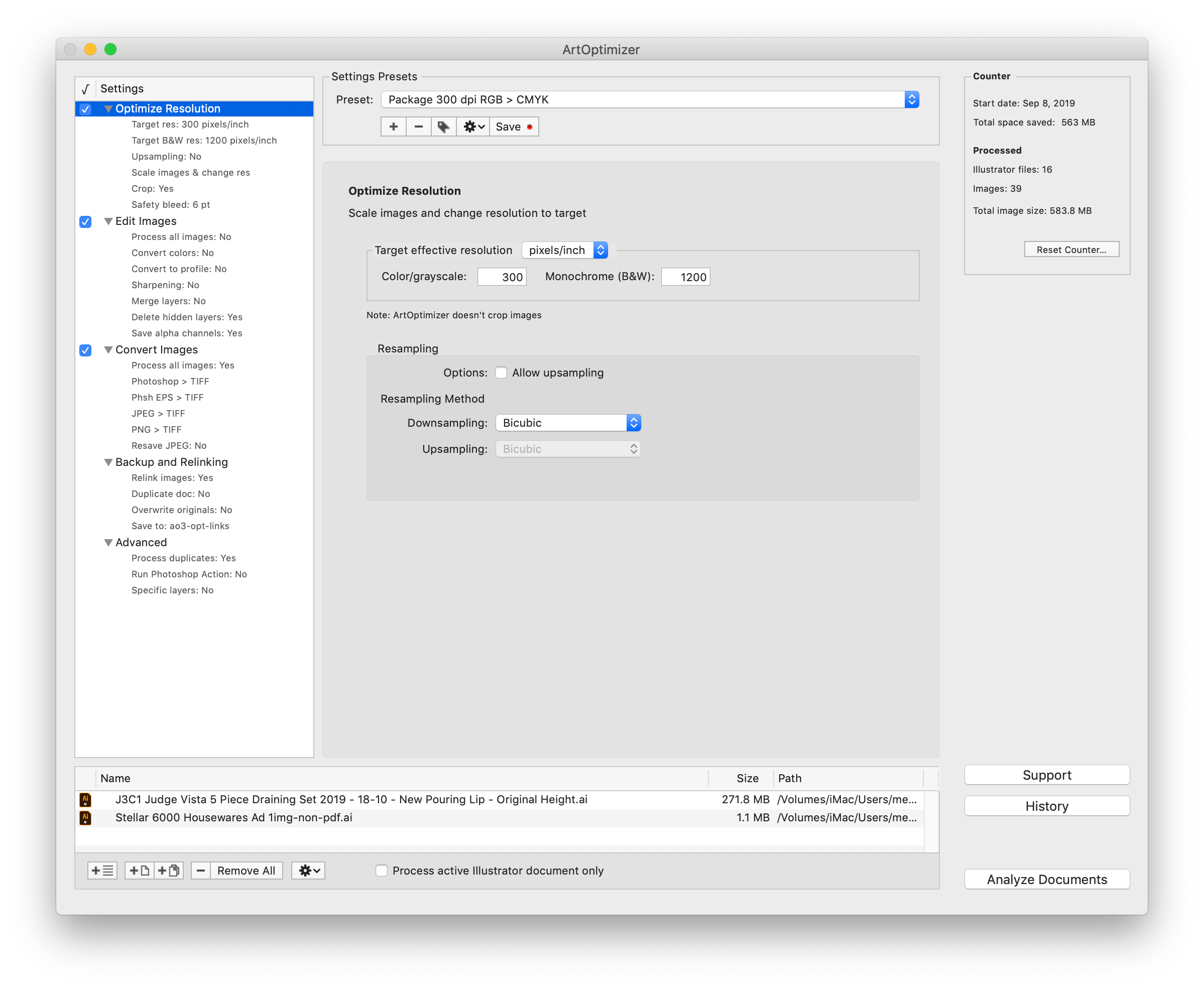
Located in Toronto, Canada, Zevrix Solutions provides automation and productivity solutions for Adobe Creative Cloud and Creative Suite software, PDF workflows, graphic file diagnostics and Microsoft Office output on Mac OS. Zevrix is dedicated to help professionals increase their profits through automating everyday tasks, producing error-free documents, saving disk space and cutting production costs. For more information, visit their website. Copyright (C) 2020 Zevrix Solutions. All Rights Reserved. Other trademarks and registered trademarks may be the property of their respective owners.
*******
Link To Article: https://prmac.com/release-id-83877.htm
*******
---------------------------------------------------------------------------------
Note that you can alter delivered distributions at any time.
Login to your account on prMac to alter your channel selection, or to opt-out at any time.
Further Expansion for CNet Training HQ in 2020
A new article has been published at prMac.
Further Expansion for CNet Training HQ in 2020 - Published on 01/18/20
CNet Training is continuing to expand its team with the appointment of two new team members at CNet's HQ in Suffolk, UK. New Instructor Andrew Reeves will join the strong team of highly experienced CNet Instructors who deliver data centre and network infrastructure programs across the globe. Andrew will work as part of the technical team to deliver high-quality network infrastructure education programs from The Global Digital Infrastructure Education Framework.
Bury St Edmunds, Suffolk - New Instructor Andrew Reeves will join the strong team of highly experienced CNet Instructors who deliver data centre and network infrastructure programs across the globe. Andrew will work as part of the technical team to deliver high-quality network infrastructure education programs from The Global Digital Infrastructure Education Framework. His role will also involve assessing learner's performance and marking assignments in support of the BTEC Qualifications quality process.
Andrew joins CNet following 15 years experience in the IT Services industry including project management roles with high profile network infrastructure organisations. Andrew displays skills in leadership, change management, project management, Enterprise Resource Planning tool implementation and service delivery. In previous roles, Andrew has also undertaken a project management role in a variety of large installation projects including work with The London Olympics, BBC, Walt Disney, Westgate Oxford, Bloomberg. More recently he was responsible for the implementation of a disaster recovery team to eight European datacentres incorporating a quality improvement plan.
Andy Brisbane has also joined the CNet team as Market Researcher. Andrew will work alongside the sales and marketing teams to provide insight into opportunities and to support the company in achieving on-going growth opportunities. Andrew joins the team from an analytical background and has experience in working to develop critical leads and processes and research management.
Andrew Stevens, President and CEO, CNet Training, says, "What a great start to the new decade, we are delighted to expand the CNet Training team again. CNet is focused on continuing its growth throughout the digital infrastructure industry and this expansion comes at an exciting and busy time for the business. The new team members are a fantastic addition to the team, they will work alongside the existing strong team of individuals employed by CNet across the world to help strengthen and further grow the global brand identity and reputation."
For more information on CNet Training's programs, please go to the CNet Training website or call +44 (0) 1284 767100.
CNet Training: https://www.cnet-training.com
CNet Training is the global leader in technical education for the digital infrastructure industry, comprising the data centre and network infrastructure sectors, and has been delivering industry education since 1996. CNet is the only industry dedicated education provider in the world to offer both internationally recognised qualifications and official certifications. All Material and Software (C) Copyright 2020 CNet Training. All Rights Reserved. Apple, the Apple logo, Macintosh Mac OS X and macOS are registered trademarks of Apple Inc. in the U.S. and/or other countries. Other trademarks and registered trademarks may be the property of their respective owners.
*******
Link To Article: https://prmac.com/release-id-83875.htm
*******
---------------------------------------------------------------------------------
Note that you can alter delivered distributions at any time.
Login to your account on prMac to alter your channel selection, or to opt-out at any time.
Further Expansion for CNet Training HQ in 2020 - Published on 01/18/20
CNet Training is continuing to expand its team with the appointment of two new team members at CNet's HQ in Suffolk, UK. New Instructor Andrew Reeves will join the strong team of highly experienced CNet Instructors who deliver data centre and network infrastructure programs across the globe. Andrew will work as part of the technical team to deliver high-quality network infrastructure education programs from The Global Digital Infrastructure Education Framework.
Bury St Edmunds, Suffolk - New Instructor Andrew Reeves will join the strong team of highly experienced CNet Instructors who deliver data centre and network infrastructure programs across the globe. Andrew will work as part of the technical team to deliver high-quality network infrastructure education programs from The Global Digital Infrastructure Education Framework. His role will also involve assessing learner's performance and marking assignments in support of the BTEC Qualifications quality process.
Andrew joins CNet following 15 years experience in the IT Services industry including project management roles with high profile network infrastructure organisations. Andrew displays skills in leadership, change management, project management, Enterprise Resource Planning tool implementation and service delivery. In previous roles, Andrew has also undertaken a project management role in a variety of large installation projects including work with The London Olympics, BBC, Walt Disney, Westgate Oxford, Bloomberg. More recently he was responsible for the implementation of a disaster recovery team to eight European datacentres incorporating a quality improvement plan.
Andy Brisbane has also joined the CNet team as Market Researcher. Andrew will work alongside the sales and marketing teams to provide insight into opportunities and to support the company in achieving on-going growth opportunities. Andrew joins the team from an analytical background and has experience in working to develop critical leads and processes and research management.
Andrew Stevens, President and CEO, CNet Training, says, "What a great start to the new decade, we are delighted to expand the CNet Training team again. CNet is focused on continuing its growth throughout the digital infrastructure industry and this expansion comes at an exciting and busy time for the business. The new team members are a fantastic addition to the team, they will work alongside the existing strong team of individuals employed by CNet across the world to help strengthen and further grow the global brand identity and reputation."
For more information on CNet Training's programs, please go to the CNet Training website or call +44 (0) 1284 767100.
CNet Training: https://www.cnet-training.com
CNet Training is the global leader in technical education for the digital infrastructure industry, comprising the data centre and network infrastructure sectors, and has been delivering industry education since 1996. CNet is the only industry dedicated education provider in the world to offer both internationally recognised qualifications and official certifications. All Material and Software (C) Copyright 2020 CNet Training. All Rights Reserved. Apple, the Apple logo, Macintosh Mac OS X and macOS are registered trademarks of Apple Inc. in the U.S. and/or other countries. Other trademarks and registered trademarks may be the property of their respective owners.
*******
Link To Article: https://prmac.com/release-id-83875.htm
*******
---------------------------------------------------------------------------------
Note that you can alter delivered distributions at any time.
Login to your account on prMac to alter your channel selection, or to opt-out at any time.
Cisdem Document Reader Ver5.1.0 Optimizes File Display Quality
A new article has been published at prMac.
Cisdem Document Reader Ver5.1.0 Optimizes File Display Quality - Published on 01/16/20
Cisdem announces Cisdem Document Reader for Mac 5.1.0, the update their intuitive and effective software for macOS. The update offers the WPD display quality optimized and crash issue fixed. It's a useful program to open PDF, XPS/OXPS, Visio, WPS, DjVu, WPD, and Winmail.dat on Mac at the same. Users can also export your files as PDF/image or only extract image from a document.
Madelia, Minnesota - Cisdem announces version 5.1.0 of Document Reader, one of their intuitive and effective software for macOS. This new version optimized WPD display quality and fixed the crash issue. Cisdem Document Reader enables users to view multiple file types including PDF, XPS/OXPS, Visio, WPS, DjVu, WPD, and Winmail.dat within one program. Users can adjust view modes; navigate to certain results by keywords; print or save the file into the PDF form.
"In the previous version (5.0.0), we optimize XPS display quality and Improved DjVu file opening speed for Cisdem Document Reader. But in less than 10 days, we immediately released another version (5.1.0) due to the discovery of some minor issues", said Edward Riley, the project manager of Cisdem. "We are committed to developing higher quality programs and bring good experience to our users. Once any issues appear, we will improve and upgrade the programs right away according to more advanced technology."
What's New in Version 5.1.0?
* Optimize WPD display quality
* Fixed the crash issue
Main Functions
* Support to open 7 document file types
Users can read PDF, VISIO (VSD, VSDX, VDX, and VST), WordPerfect (WPD), WPS, XPS, OXPS, DjVu, PDF and Winmail.dat files on Mac.
* Open various file types at the same time
The software can open multiple documents in different tabs. Just drag the files you want to read into the interface of the Cisdem Document Reader.
* Equipped with a set of reading tools
It offers a set of tools to enhance users' reading experience, such as full screen, view modes, page navigation, zoom & rotate, bookmark, etc.
* Print files as PDF
Specify the available printer, presets, copies, page ranges, and save your documents as PDF or PostScript.
* Keyword Search
This feature helps users quickly locate a word, character, or phrase with keywords, which greatly save time and let works go efficiency.
* Export file and extract image
It saves the file as PDF, TXT, PNG, JPEG, TIFF, BMP, and GIF. Or users can directly extract image from a document.
Price and Availability
Cisdem Document Reader for Mac 5.1.0 is worldwide exclusively through the official Cisdem website. It's completely free to open PDF files. While each of the other 6 file types is priced at $9.99. There is also a great discount for the full version, finally priced at $29.99. The free trial is available for download at the Cisdem website.
Cisdem: https://www.cisdem.com/
Cisdem Document Reader 5.1.0: https://www.cisdem.com/document-reader-mac.html
Download the Free Trial : https://www.cisdem.com/downloads/cisdem-documentreader-18.dmg
Cisdem provides productivity and business software that helps Mac users to get their job done faster. Cisdem products include top rated software centered on PDF Conversion, PDF Management, Data Recovery, and File Management. The company is dedicated in building highly efficient Mac software that make life easier and processes simpler. All Material and Software (C) Copyright 2020 Cisdem. All Rights Reserved. Apple, the Apple logo, Mac OS X and Macintosh are registered trademarks of Apple Inc. in the U.S. and/or other countries. Other trademarks and registered trademarks may be the property of their respective owners.
*******
Link To Article: https://prmac.com/release-id-83872.htm
*******
---------------------------------------------------------------------------------
Note that you can alter delivered distributions at any time.
Login to your account on prMac to alter your channel selection, or to opt-out at any time.
Cisdem Document Reader Ver5.1.0 Optimizes File Display Quality - Published on 01/16/20
Cisdem announces Cisdem Document Reader for Mac 5.1.0, the update their intuitive and effective software for macOS. The update offers the WPD display quality optimized and crash issue fixed. It's a useful program to open PDF, XPS/OXPS, Visio, WPS, DjVu, WPD, and Winmail.dat on Mac at the same. Users can also export your files as PDF/image or only extract image from a document.
Madelia, Minnesota - Cisdem announces version 5.1.0 of Document Reader, one of their intuitive and effective software for macOS. This new version optimized WPD display quality and fixed the crash issue. Cisdem Document Reader enables users to view multiple file types including PDF, XPS/OXPS, Visio, WPS, DjVu, WPD, and Winmail.dat within one program. Users can adjust view modes; navigate to certain results by keywords; print or save the file into the PDF form.
"In the previous version (5.0.0), we optimize XPS display quality and Improved DjVu file opening speed for Cisdem Document Reader. But in less than 10 days, we immediately released another version (5.1.0) due to the discovery of some minor issues", said Edward Riley, the project manager of Cisdem. "We are committed to developing higher quality programs and bring good experience to our users. Once any issues appear, we will improve and upgrade the programs right away according to more advanced technology."
What's New in Version 5.1.0?
* Optimize WPD display quality
* Fixed the crash issue
Main Functions
* Support to open 7 document file types
Users can read PDF, VISIO (VSD, VSDX, VDX, and VST), WordPerfect (WPD), WPS, XPS, OXPS, DjVu, PDF and Winmail.dat files on Mac.
* Open various file types at the same time
The software can open multiple documents in different tabs. Just drag the files you want to read into the interface of the Cisdem Document Reader.
* Equipped with a set of reading tools
It offers a set of tools to enhance users' reading experience, such as full screen, view modes, page navigation, zoom & rotate, bookmark, etc.
* Print files as PDF
Specify the available printer, presets, copies, page ranges, and save your documents as PDF or PostScript.
* Keyword Search
This feature helps users quickly locate a word, character, or phrase with keywords, which greatly save time and let works go efficiency.
* Export file and extract image
It saves the file as PDF, TXT, PNG, JPEG, TIFF, BMP, and GIF. Or users can directly extract image from a document.
Price and Availability
Cisdem Document Reader for Mac 5.1.0 is worldwide exclusively through the official Cisdem website. It's completely free to open PDF files. While each of the other 6 file types is priced at $9.99. There is also a great discount for the full version, finally priced at $29.99. The free trial is available for download at the Cisdem website.
Cisdem: https://www.cisdem.com/
Cisdem Document Reader 5.1.0: https://www.cisdem.com/document-reader-mac.html
Download the Free Trial : https://www.cisdem.com/downloads/cisdem-documentreader-18.dmg
Cisdem provides productivity and business software that helps Mac users to get their job done faster. Cisdem products include top rated software centered on PDF Conversion, PDF Management, Data Recovery, and File Management. The company is dedicated in building highly efficient Mac software that make life easier and processes simpler. All Material and Software (C) Copyright 2020 Cisdem. All Rights Reserved. Apple, the Apple logo, Mac OS X and Macintosh are registered trademarks of Apple Inc. in the U.S. and/or other countries. Other trademarks and registered trademarks may be the property of their respective owners.
*******
Link To Article: https://prmac.com/release-id-83872.htm
*******
---------------------------------------------------------------------------------
Note that you can alter delivered distributions at any time.
Login to your account on prMac to alter your channel selection, or to opt-out at any time.
CS Odessa Released New Software Development Solution
A new article has been published at prMac.
CS Odessa Released New Software Development Solution - Published on 01/17/20
CS Odessa is pleased to announce a new enhancement for ConceptDraw OFFICE products. The new Solution provides a set of tools including vector graphics library, sample drawings and mind maps delivering a complete tool-kit for Document Object Model (DOM) practice visualization. The new addition to ConceptDraw Solutions extends the ConceptDraw Development area with a powerful Document Object Model tool.
Odessa, Ukraine - CS Odessa is pleased to announce a new enhancement for ConceptDraw OFFICE products. The new Solution provides a set of tools including vector graphics library, sample drawings and mind maps delivering a complete tool-kit for Document Object Model (DOM) practice visualization.
Using DOM is a method to represent webpages and XML documents in a structured hierarchical view so that it becomes easier for developers and users to glide through the document. With DOM, one can easily access and manage tags, IDs, classes, and other attributes of HTML and XML documents.
This new solution provides support for drawing DOM-tree in ConceptDraw DIAGRAM and for making DOM-tree mind maps in ConceptDraw MINDMAP with the ability to automatically generate DOM diagrams in DIAGRAM.
The Document Object Model (DOM) is available as a free download for current users of ConceptDraw DIAGRAM v13 and MINDMAP v11.
ConceptDraw DIAGRAM v13 and MINDMAP v11, supported by an ever-growing collection of business solutions, compatible with macOS and Windows. Both Apps can be purchased individually, or together with PROJECT v10 as part of ConceptDraw OFFICE v6.
ConceptDraw DIAGRAM, supported by the ever-growing collection of business solutions is compatible with macOS and Windows. It is well-known for the ability to exchange documents with Microsoft Visio - the de facto standard in business graphics documents. ConceptDraw DIAGRAM can open and save documents that can be used by Visio (VSD, VDX, and VSDX) documents users.
ConceptDraw DIAGRAM v13 retails separately for US$199 per end-user license and is includes in ConceptDraw OFFICE v6 which retails for US$499.
DOM Tree Solution - Easy-To-Use Family Tree Making Tool: https://www.conceptdraw.com/solution-park/software-dom-tree
ConceptDraw DIAGRAM v13 - Business Graphics and Diagramming Product (Compatible With MS Visio): https://www.conceptdraw.com/products/drawing-tool
ConceptDraw MINDMAP v11 - Brainstorming, Planning, and Mind Mapping Software: https://www.conceptdraw.com/products/mind-map
ConceptDraw PROJECT v10 - Project and Resource Management Tool (Compatible With MS Project): https://www.conceptdraw.com/products/project-management-software
ConceptDraw OFFICE v6 - Business Suite That Contains The Entire ConceptDraw Desktop Product line: https://www.conceptdraw.com/products/office
Solution Park - An Online Collection of Visual Solutions: https://www.conceptdraw.com/solution-park
Founded in 1993, Computer Systems Odessa supplies cross-platform productivity tools and graphics technologies to professional and corporate users around the world. With headquarter in Odessa, Ukraine, CS Odessa sells products internationally through resellers in over 150 countries, both directly and through resellers. The ConceptDraw line of products has won numerous awards and is used by hundreds of thousands, including Fortune 500 companies, U.S. Federal Government agencies, small and medium businesses, and students and educators around the globe. ConceptDraw is a registered trademark, and ConceptDraw Office, ConceptDraw Solution Park, ConceptDraw PRO, ConceptDraw MINDMAP, ConceptDraw PROJECT, and ConceptDraw STORE are trademarks of CS Odessa. All other trademarks and registered trademarks are the properties of their respective owners.
*******
Link To Article: https://prmac.com/release-id-83873.htm
*******
---------------------------------------------------------------------------------
Note that you can alter delivered distributions at any time.
Login to your account on prMac to alter your channel selection, or to opt-out at any time.
CS Odessa Released New Software Development Solution - Published on 01/17/20
CS Odessa is pleased to announce a new enhancement for ConceptDraw OFFICE products. The new Solution provides a set of tools including vector graphics library, sample drawings and mind maps delivering a complete tool-kit for Document Object Model (DOM) practice visualization. The new addition to ConceptDraw Solutions extends the ConceptDraw Development area with a powerful Document Object Model tool.
Odessa, Ukraine - CS Odessa is pleased to announce a new enhancement for ConceptDraw OFFICE products. The new Solution provides a set of tools including vector graphics library, sample drawings and mind maps delivering a complete tool-kit for Document Object Model (DOM) practice visualization.
Using DOM is a method to represent webpages and XML documents in a structured hierarchical view so that it becomes easier for developers and users to glide through the document. With DOM, one can easily access and manage tags, IDs, classes, and other attributes of HTML and XML documents.
This new solution provides support for drawing DOM-tree in ConceptDraw DIAGRAM and for making DOM-tree mind maps in ConceptDraw MINDMAP with the ability to automatically generate DOM diagrams in DIAGRAM.
The Document Object Model (DOM) is available as a free download for current users of ConceptDraw DIAGRAM v13 and MINDMAP v11.
ConceptDraw DIAGRAM v13 and MINDMAP v11, supported by an ever-growing collection of business solutions, compatible with macOS and Windows. Both Apps can be purchased individually, or together with PROJECT v10 as part of ConceptDraw OFFICE v6.
ConceptDraw DIAGRAM, supported by the ever-growing collection of business solutions is compatible with macOS and Windows. It is well-known for the ability to exchange documents with Microsoft Visio - the de facto standard in business graphics documents. ConceptDraw DIAGRAM can open and save documents that can be used by Visio (VSD, VDX, and VSDX) documents users.
ConceptDraw DIAGRAM v13 retails separately for US$199 per end-user license and is includes in ConceptDraw OFFICE v6 which retails for US$499.
DOM Tree Solution - Easy-To-Use Family Tree Making Tool: https://www.conceptdraw.com/solution-park/software-dom-tree
ConceptDraw DIAGRAM v13 - Business Graphics and Diagramming Product (Compatible With MS Visio): https://www.conceptdraw.com/products/drawing-tool
ConceptDraw MINDMAP v11 - Brainstorming, Planning, and Mind Mapping Software: https://www.conceptdraw.com/products/mind-map
ConceptDraw PROJECT v10 - Project and Resource Management Tool (Compatible With MS Project): https://www.conceptdraw.com/products/project-management-software
ConceptDraw OFFICE v6 - Business Suite That Contains The Entire ConceptDraw Desktop Product line: https://www.conceptdraw.com/products/office
Solution Park - An Online Collection of Visual Solutions: https://www.conceptdraw.com/solution-park
Founded in 1993, Computer Systems Odessa supplies cross-platform productivity tools and graphics technologies to professional and corporate users around the world. With headquarter in Odessa, Ukraine, CS Odessa sells products internationally through resellers in over 150 countries, both directly and through resellers. The ConceptDraw line of products has won numerous awards and is used by hundreds of thousands, including Fortune 500 companies, U.S. Federal Government agencies, small and medium businesses, and students and educators around the globe. ConceptDraw is a registered trademark, and ConceptDraw Office, ConceptDraw Solution Park, ConceptDraw PRO, ConceptDraw MINDMAP, ConceptDraw PROJECT, and ConceptDraw STORE are trademarks of CS Odessa. All other trademarks and registered trademarks are the properties of their respective owners.
*******
Link To Article: https://prmac.com/release-id-83873.htm
*******
---------------------------------------------------------------------------------
Note that you can alter delivered distributions at any time.
Login to your account on prMac to alter your channel selection, or to opt-out at any time.
Piano Chords and Scales 4.0 - Major Update Released For iOS
A new article has been published at prMac.
Piano Chords and Scales 4.0 - Major Update Released For iOS - Published on 01/17/20
Sincere Apps SIA announces Piano Chords and Scales 4.0, an important feature update to their popular music app for iOS devices. Piano Chords and Scales lets you explore and learn huge collections of chords, scales, chord progressions and compose songs in an intuitive and interactive way. Version 4.0 includes a new chord lookup by notes sheet music staff, MIDI in and out connections, redesigned layout for quicker navigation across the app's user interface, with other improvements and bug fixes.
Riga, Latvia - Sincere Apps SIA is pleased to announce the release of Piano Chords and Scales 4.0, an important feature update to their popular music app developed for iPhone, iPad and iPod touch devices. Piano Chord and Scales allows you to understand all the piano theory related to chords, scales and song composing. The true goal for creating this app was to lower the barrier for an individual to start playing and understanding piano. How all the theory comes together and how songs can be composed.
Piano Chord and Scales lets you explore and learn huge collections of chords, scales, chord progressions and compose songs in intuitive and interactive way. It helpful for piano players and musicians ranging from beginners to experts and allows you to understand musical structures and find inspiration. All chords and scales can be played ascending, descending and harmonically and are shown on virtual piano and staff. You can experiment with different roots and inversions. You can also find chords and scales though reverse lookup.
Features
* Large chord collection
* Large scale collection
* Chord progressions collection
* Song composer with chord recommendations
* Audio playback support for everything
* Piano view for chords and scales
* Staff view for chords and scales
* Find chords by the root and inversion, notes on staff or piano keys
* Find scales by the root or piano keys
* Interactive circle of fifths
* MIDI in and out support
* Scale fingerings for both hands
* Simple and intuitive
The app also includes song composer that allows you to easily layout chords progressions and recommend/suggested chords based on selected scale. You can then experiment on those songs by changing inversions, tempo, rhythm and other settings.
What new in version 4.0
* Chord lookup by notes sheet music staff
* MIDI in and out connections
* Redesigned layout for quicker navigation across the app's user interface
* Other improvements and bug fixes
Device Requirements:
* iiPhone, iPad or iPod touch
* Requires iOS 12.0 or later
* 39.7 MB
Pricing and Availability:
Pet Tricks 1.0 is Free (With $7.99 in-app purchase to unlock more content) and available worldwide exclusively through the App Store in the Entertainment category. Promotional codes for the purpose of review are also available. If you are interested in reviewing Chords and Scales, please don't hesitate to request one!.
Piano Chords and Scales 4.0: https://www.chordsandscales.app/
Download from the App Store: https://apps.apple.com/app/piano-chords-and-scales/id714086944
Media Assets: https://chordsandscales.app/presskit
Headquartered in Riga, Latvia, Sincere Apps is small mobile app development company whose main focus is developing applications related to music education and productivity. Copyright (C) 2020 Sincere Apps SIA. All Rights Reserved. Apple, the Apple logo, Mac OS X, iPhone, iPad, iPad mini, iPod touch, and Macintosh are registered trademarks of Apple Inc. in the U.S. and/or other countries. Other trademarks and registered trademarks may be the property of their respective owners.
*******
Link To Article: https://prmac.com/release-id-83871.htm
*******
---------------------------------------------------------------------------------
Note that you can alter delivered distributions at any time.
Login to your account on prMac to alter your channel selection, or to opt-out at any time.
Piano Chords and Scales 4.0 - Major Update Released For iOS - Published on 01/17/20
Sincere Apps SIA announces Piano Chords and Scales 4.0, an important feature update to their popular music app for iOS devices. Piano Chords and Scales lets you explore and learn huge collections of chords, scales, chord progressions and compose songs in an intuitive and interactive way. Version 4.0 includes a new chord lookup by notes sheet music staff, MIDI in and out connections, redesigned layout for quicker navigation across the app's user interface, with other improvements and bug fixes.
Riga, Latvia - Sincere Apps SIA is pleased to announce the release of Piano Chords and Scales 4.0, an important feature update to their popular music app developed for iPhone, iPad and iPod touch devices. Piano Chord and Scales allows you to understand all the piano theory related to chords, scales and song composing. The true goal for creating this app was to lower the barrier for an individual to start playing and understanding piano. How all the theory comes together and how songs can be composed.
Piano Chord and Scales lets you explore and learn huge collections of chords, scales, chord progressions and compose songs in intuitive and interactive way. It helpful for piano players and musicians ranging from beginners to experts and allows you to understand musical structures and find inspiration. All chords and scales can be played ascending, descending and harmonically and are shown on virtual piano and staff. You can experiment with different roots and inversions. You can also find chords and scales though reverse lookup.
Features
* Large chord collection
* Large scale collection
* Chord progressions collection
* Song composer with chord recommendations
* Audio playback support for everything
* Piano view for chords and scales
* Staff view for chords and scales
* Find chords by the root and inversion, notes on staff or piano keys
* Find scales by the root or piano keys
* Interactive circle of fifths
* MIDI in and out support
* Scale fingerings for both hands
* Simple and intuitive
The app also includes song composer that allows you to easily layout chords progressions and recommend/suggested chords based on selected scale. You can then experiment on those songs by changing inversions, tempo, rhythm and other settings.
What new in version 4.0
* Chord lookup by notes sheet music staff
* MIDI in and out connections
* Redesigned layout for quicker navigation across the app's user interface
* Other improvements and bug fixes
Device Requirements:
* iiPhone, iPad or iPod touch
* Requires iOS 12.0 or later
* 39.7 MB
Pricing and Availability:
Pet Tricks 1.0 is Free (With $7.99 in-app purchase to unlock more content) and available worldwide exclusively through the App Store in the Entertainment category. Promotional codes for the purpose of review are also available. If you are interested in reviewing Chords and Scales, please don't hesitate to request one!.
Piano Chords and Scales 4.0: https://www.chordsandscales.app/
Download from the App Store: https://apps.apple.com/app/piano-chords-and-scales/id714086944
Media Assets: https://chordsandscales.app/presskit
Headquartered in Riga, Latvia, Sincere Apps is small mobile app development company whose main focus is developing applications related to music education and productivity. Copyright (C) 2020 Sincere Apps SIA. All Rights Reserved. Apple, the Apple logo, Mac OS X, iPhone, iPad, iPad mini, iPod touch, and Macintosh are registered trademarks of Apple Inc. in the U.S. and/or other countries. Other trademarks and registered trademarks may be the property of their respective owners.
*******
Link To Article: https://prmac.com/release-id-83871.htm
*******
---------------------------------------------------------------------------------
Note that you can alter delivered distributions at any time.
Login to your account on prMac to alter your channel selection, or to opt-out at any time.
Fleets of Heroes 2.0 released for iOS and Android Today
A new article has been published at prMac.
Fleets of Heroes 2.0 released for iOS and Android Today - Published on 01/16/20
Inner Hero LLC today announces Fleets of Heroes 2.0, an important updat to its premier gaming title for iOS and Android devices. Join in the exploration of a rich and ruthless universe run by space mavericks and heroes, competing in an intergalactic free-for-all for valuable resources and equipment. Version 2.0 features new art & sfx, new game mechanics and defenses, as well as the new Survival Mode, which allows players to control units and defend their own base against waves of attackers.
Nashville, Tennessee - If you're a base building fanatic, you may already be familiar with the space-age, resource pirating, hero ship piloting game Fleets of Heroes. Think of some of the barbarian village builders you may have played, add some upgrade/resource complexity, put yourself in space, and you won't be too far off. After a relatively quiet release and slow-burning soft launch phase , Inner Hero LLC has officially released its anticipated v2.0 update, kicking Fleets of Heroes gameplay into high gear as of January 16, 2020.
In addition to an array of cosmetic upgrades and QoL improvements, version 2.0 of the game features the long awaited Survival Mode. Fleets of Heroes players will be able to pilot their hero ships, normally used for attacking the bases of story mode levels or other players, and use them to defend their own bases against squadrons of fighter ships coming to destroy them. Repel waves of enemies to earn rewards and prizes to upgrade your units!
"With most games not allowing the player to control any units throughout battle, we knew we had a special opportunity to create a completely different way to apply hero ship units in battle. When you consider the potential of how interactive and entertaining a mechanic like this can be, it's pretty unbelievable that we're the first to apply it to our game." - Thibaut De Bock, CEO
Device Requirements:
* iPhone, iPad, and iPod touch
* Requires iOS 10.0 or later
* 218.7 MB
Pricing and Availability:
Fleets of Heroes 2.0 is Free (With In-App Purchases) and available worldwide through the App Store in the Games category. There is also an Android version available on Google PLay. For more information, please contact Thibaut De Bock. Check out the trailer and more info below.
Fleets of Heroes 2.0: http://www.innerherostudios.com/
Download from the App Store: https://apps.apple.com/us/app/fleets-of-heroes/id1292135105
Download from Google Play: https://play.google.com/store/apps/details?id=com.InnerHero.FleetsofHeroes&hl=en_US
YouTube Video (Trailer): https://www.youtube.com/watch?v=7VI_iWc-nQI
Screenshot: https://is1-ssl.mzstatic.com/image/thumb/Purple113/v4/ce/22/87/ce228727-b4eb-cc62-3283-a31230547f9a/mzl.akscdexq.png/643x0w.png
App Icon: https://is5-ssl.mzstatic.com/image/thumb/Purple123/v4/f8/3e/8e/f83e8ee6-5ff6-2cd6-c91f-31126558e97e/AppIcon-0-1x_U007emarketing-0-0-GLES2_U002c0-512MB-sRGB-0-0-0-85-220-0-0-0-7.png/246x0w.png
Inner Hero LLC is an independent software development Studio based out of Nashville, TN. Thibaut De Bock, Kevin Gardner, and Evan Morgan met at the University of Tennessee in 2006. Throughout the course of their education and professional lives, they developed a set of complimentary skills which allowed them to create innovative and immersive video games. Joining forces with award winning graphic artist Igor Puskaric, and adding more talent to their team in 2018, Inner Hero LLC developed and released their premier title, Fleets of Heroes. All Material and Software (C) Copyright 2020 Inner Hero LLC. All Rights Reserved. Apple, the Apple logo, iPhone, iPod and iPad are registered trademarks of Apple Inc. in the U.S. and/or other countries. Other trademarks and registered trademarks may be the property of their respective owners.
*******
Link To Article: https://prmac.com/release-id-83870.htm
*******
---------------------------------------------------------------------------------
Note that you can alter delivered distributions at any time.
Login to your account on prMac to alter your channel selection, or to opt-out at any time.
Fleets of Heroes 2.0 released for iOS and Android Today - Published on 01/16/20
Inner Hero LLC today announces Fleets of Heroes 2.0, an important updat to its premier gaming title for iOS and Android devices. Join in the exploration of a rich and ruthless universe run by space mavericks and heroes, competing in an intergalactic free-for-all for valuable resources and equipment. Version 2.0 features new art & sfx, new game mechanics and defenses, as well as the new Survival Mode, which allows players to control units and defend their own base against waves of attackers.
Nashville, Tennessee - If you're a base building fanatic, you may already be familiar with the space-age, resource pirating, hero ship piloting game Fleets of Heroes. Think of some of the barbarian village builders you may have played, add some upgrade/resource complexity, put yourself in space, and you won't be too far off. After a relatively quiet release and slow-burning soft launch phase , Inner Hero LLC has officially released its anticipated v2.0 update, kicking Fleets of Heroes gameplay into high gear as of January 16, 2020.
In addition to an array of cosmetic upgrades and QoL improvements, version 2.0 of the game features the long awaited Survival Mode. Fleets of Heroes players will be able to pilot their hero ships, normally used for attacking the bases of story mode levels or other players, and use them to defend their own bases against squadrons of fighter ships coming to destroy them. Repel waves of enemies to earn rewards and prizes to upgrade your units!
"With most games not allowing the player to control any units throughout battle, we knew we had a special opportunity to create a completely different way to apply hero ship units in battle. When you consider the potential of how interactive and entertaining a mechanic like this can be, it's pretty unbelievable that we're the first to apply it to our game." - Thibaut De Bock, CEO
Device Requirements:
* iPhone, iPad, and iPod touch
* Requires iOS 10.0 or later
* 218.7 MB
Pricing and Availability:
Fleets of Heroes 2.0 is Free (With In-App Purchases) and available worldwide through the App Store in the Games category. There is also an Android version available on Google PLay. For more information, please contact Thibaut De Bock. Check out the trailer and more info below.
Fleets of Heroes 2.0: http://www.innerherostudios.com/
Download from the App Store: https://apps.apple.com/us/app/fleets-of-heroes/id1292135105
Download from Google Play: https://play.google.com/store/apps/details?id=com.InnerHero.FleetsofHeroes&hl=en_US
YouTube Video (Trailer): https://www.youtube.com/watch?v=7VI_iWc-nQI
Screenshot: https://is1-ssl.mzstatic.com/image/thumb/Purple113/v4/ce/22/87/ce228727-b4eb-cc62-3283-a31230547f9a/mzl.akscdexq.png/643x0w.png

App Icon: https://is5-ssl.mzstatic.com/image/thumb/Purple123/v4/f8/3e/8e/f83e8ee6-5ff6-2cd6-c91f-31126558e97e/AppIcon-0-1x_U007emarketing-0-0-GLES2_U002c0-512MB-sRGB-0-0-0-85-220-0-0-0-7.png/246x0w.png

Inner Hero LLC is an independent software development Studio based out of Nashville, TN. Thibaut De Bock, Kevin Gardner, and Evan Morgan met at the University of Tennessee in 2006. Throughout the course of their education and professional lives, they developed a set of complimentary skills which allowed them to create innovative and immersive video games. Joining forces with award winning graphic artist Igor Puskaric, and adding more talent to their team in 2018, Inner Hero LLC developed and released their premier title, Fleets of Heroes. All Material and Software (C) Copyright 2020 Inner Hero LLC. All Rights Reserved. Apple, the Apple logo, iPhone, iPod and iPad are registered trademarks of Apple Inc. in the U.S. and/or other countries. Other trademarks and registered trademarks may be the property of their respective owners.
*******
Link To Article: https://prmac.com/release-id-83870.htm
*******
---------------------------------------------------------------------------------
Note that you can alter delivered distributions at any time.
Login to your account on prMac to alter your channel selection, or to opt-out at any time.
Subscribe to:
Posts (Atom)