A new article has been published at prMac.
Nifty File Lists: simple, powerful file list creation tool enters beta - Published on 02/04/20
publicspace.net today announces the release of beta 6 of their new Nifty File Lists product. This simple, powerful file list creation tool can save file lists in CSV, TSV and HTML formats for import into MS Excel, Apple Numbers, databases, content management systems and statistics packages. It can extract a wide range of file metadata including Spotlight, EXIF, IPTC, GPS, AV and ID3 tags, offers deep customization and sorting and can work via copy/paste with all leading spreadsheet solutions.
Luxembourg, Luxembourg - publicspace today announces that its latest Mac-only product, Nifty File Lists is now in public beta testing. Nifty File Lists joins publicspace's portfolio of photography & media-centric file management utilities, including A Better Finder Rename, A Better Finder Attributes and the "Big Mean Folder Machine".
Nifty File Lists is a simple, powerful file list creation tool that can save file lists in Comma-Separated Values (CSV) and Tab-Separated Values (TSV) formats for import into MS Excel, Apple Numbers, database, content management and statistics packages. It can also save HTML files and interact via copy/paste with spreadsheets and HTML editing tools.
Nifty File Lists features a powerful, multi-threaded meta-data extraction system that covers everything from basic file information, such as file name, path, size, creation and modification dates, over Spotlight-accessible meta-data information, including document attributes (e.g. title, authors, contributors, comments, copyright, etc.), photo, video and image attributes (content creation date, camera, lens, exposure, GPS information) to EXIF, GPS, IPTC, ID3 and AV tags.
The product was developed from the ground-up using the latest macOS technologies and application programming interfaces. It features a best-of-class user interface including a clever scheduling system that prioritizes user visible data retrieval to allow for fine-tuning of output even while the output system is still processing.
Nifty File Lists is designed for users managing large file collections and is particularly suited for managing digital photography (EXIF, GPS, IPTC), music (ID3) and video (Spotlight, common AV tags) collections. Through its Spotlight interface it can also extract meta-information from a wide range of document formats, such as PDF, MS Word, etc.
Nifty File Lists is fully macOS 10.15 Catalina compatible and requires at least macOS 10.14 Mojave.
System Requirements:
* Mac OS X 10.14 Mojave and later
Pricing and Availability:
Nifty File Lists costs $17.95 (USD). Family, Small Business, Business and Enterprise licensing is also available. Customers may chose to include a "forever upgrade" with their purchase.
publicspace: http://www.publicspace.net/
Nifty File Lists: http://www.publicspace.net/NiftyFileLists/
Download Nifty File Lists: http://www.publicspace.net/download/NiftyFileLists.dmg
Online Store: http://www.publicspace.net/NiftyFileLists/order.html
publicspace was founded by Frank Reiff in 1996 with the aim of producing affordable best-of-breed software for the Macintosh. In the past decade, our A Better Finder series of file utilities and our MacBreakZ personal ergonomic assistant have become familiar fixtures of the Macintosh community. publicspace also produces "The Big Mean Folder Machine" and Vitamin-R. Copyright (C) 2020 publicspace. All Rights Reserved. Apple, the Apple logo and Mac are registered trademarks of Apple Inc. in the U.S. and/or other countries.
*******
Link To Article: https://prmac.com/release-id-83908.htm
*******
---------------------------------------------------------------------------------
Note that you can alter delivered distributions at any time.
Login to your account on prMac to alter your channel selection, or to opt-out at any time.

iPhone Owners Escape to Astral in a New Augmented Reality Game
A new article has been published at prMac.
iPhone Owners Escape to Astral in a New Augmented Reality Game - Published on 02/02/20
Astral World LP announces the new augmented reality game Astral World 1.04 for iPhone devices, set in a magical universe where everything is not as it seems. Players enter astral to chase intruders and catch criminals across streets of the seemingly mundane city. Every successful mission results in new levels, more mana points and health, and even the ability to make an astral selfie.
Richmond Hill, Canada - Astral World LP is proud to announce the release and availability of The Astral World 1.04 for the iPhone. Technically a fitness application, Astral World puts the typical process far beyond what is accustomed thanks to the augmented reality technologies.
The backstory of the game tells about the Astral World, a hidden parallel dimension where legendary mages work as police force to prevent unauthorized sorcery and to protect the reality from the Astral World beings. Unfortunately, there is also another side of the conflict - the Dark Side, whose ultimate goal is to unleash astral terrors on Earth.
Being easy to grasp, the gameplay is extremely addictive. A player dives into the Astral World on his or her phone and scans the vicinity. The goal is to find and capture astral beings represented on the screen as emoticons. Magic powers of the player character give a clue on what to do next, and whether the target is close. And if it's not, the player should wander around searching, which technically means making a certain number of steps.
When the astral being is near, the phone briefly vibrates indicating that the astral emanations have become exceptionally strong. Now, the player must identify and capture the astral being. The Astral World is deceptive, and everyone is under a cloud of suspicion, so the player must closely inspect the surroundings first to identify the correct person. Quickly tapping the screen as soon as an emoticon appears allows the player to scan the astral being, capture it, and score. Scores advance the player to higher experience levels opening new scenarios and raising his or her health and mana bars.
At any moment in the game, the player can take an Astral Selfie - a special magic photo that projects astral emoticons to player's face. Also, reflecting the recent iOS dark mode, in Astral World the player also can choose between light and dark sides to play for.
Device Requirement:
* iPhone XR, XS, XS Max, 11, 11 Pro, 11 Pro Max
* iOS 13.0 or later
* 42 MB
Pricing and Availability:
Astral World 1.04 is free ans is available worldwide through the App Store in the Games category.
Convenient in-app purchases are available.
The Astral World 1.04: https://astral-world.com/
Download from the App Store: https://apps.apple.com/us/app/the-astral-world/id1482672362
YouTube Trailer: https://youtu.be/UJkjVk8EgB4
Astral World LP is a provider of software products for iOS. Astral World is the first AR game developed by the company. All Material and Software (C) Copyright 2020 Inverse Metric LLC. All Rights Reserved. Apple, the Apple logo, iPhone, iPod and iPad are registered trademarks of Apple Inc. in the U.S. and/or other countries. Other trademarks and registered trademarks may be the property of their respective owners.
*******
Link To Article: https://prmac.com/release-id-83907.htm
*******
---------------------------------------------------------------------------------
Note that you can alter delivered distributions at any time.
Login to your account on prMac to alter your channel selection, or to opt-out at any time.
iPhone Owners Escape to Astral in a New Augmented Reality Game - Published on 02/02/20
Astral World LP announces the new augmented reality game Astral World 1.04 for iPhone devices, set in a magical universe where everything is not as it seems. Players enter astral to chase intruders and catch criminals across streets of the seemingly mundane city. Every successful mission results in new levels, more mana points and health, and even the ability to make an astral selfie.
Richmond Hill, Canada - Astral World LP is proud to announce the release and availability of The Astral World 1.04 for the iPhone. Technically a fitness application, Astral World puts the typical process far beyond what is accustomed thanks to the augmented reality technologies.
The backstory of the game tells about the Astral World, a hidden parallel dimension where legendary mages work as police force to prevent unauthorized sorcery and to protect the reality from the Astral World beings. Unfortunately, there is also another side of the conflict - the Dark Side, whose ultimate goal is to unleash astral terrors on Earth.
Being easy to grasp, the gameplay is extremely addictive. A player dives into the Astral World on his or her phone and scans the vicinity. The goal is to find and capture astral beings represented on the screen as emoticons. Magic powers of the player character give a clue on what to do next, and whether the target is close. And if it's not, the player should wander around searching, which technically means making a certain number of steps.
When the astral being is near, the phone briefly vibrates indicating that the astral emanations have become exceptionally strong. Now, the player must identify and capture the astral being. The Astral World is deceptive, and everyone is under a cloud of suspicion, so the player must closely inspect the surroundings first to identify the correct person. Quickly tapping the screen as soon as an emoticon appears allows the player to scan the astral being, capture it, and score. Scores advance the player to higher experience levels opening new scenarios and raising his or her health and mana bars.
At any moment in the game, the player can take an Astral Selfie - a special magic photo that projects astral emoticons to player's face. Also, reflecting the recent iOS dark mode, in Astral World the player also can choose between light and dark sides to play for.
Device Requirement:
* iPhone XR, XS, XS Max, 11, 11 Pro, 11 Pro Max
* iOS 13.0 or later
* 42 MB
Pricing and Availability:
Astral World 1.04 is free ans is available worldwide through the App Store in the Games category.
Convenient in-app purchases are available.
The Astral World 1.04: https://astral-world.com/
Download from the App Store: https://apps.apple.com/us/app/the-astral-world/id1482672362
YouTube Trailer: https://youtu.be/UJkjVk8EgB4
Astral World LP is a provider of software products for iOS. Astral World is the first AR game developed by the company. All Material and Software (C) Copyright 2020 Inverse Metric LLC. All Rights Reserved. Apple, the Apple logo, iPhone, iPod and iPad are registered trademarks of Apple Inc. in the U.S. and/or other countries. Other trademarks and registered trademarks may be the property of their respective owners.
*******
Link To Article: https://prmac.com/release-id-83907.htm
*******
---------------------------------------------------------------------------------
Note that you can alter delivered distributions at any time.
Login to your account on prMac to alter your channel selection, or to opt-out at any time.
AlphaDigits Top Rated Mobile Apps January 2020
A new article has been published at prMac.
AlphaDigits Top Rated Mobile Apps January 2020 - Published on 02/02/20
Mobile app review publisher AlphaDigits has named top rated applications for January 2020. VideoProc is a good video editing tool. AlphaDigits names five top class mobile apps every month based on the reviews published in the website during the particular month. Bleeker St turns the tables on making poor purchases. It does take some practice to get it right in Swiperly game. Pop Queue uses your location to map out your hangout places. tellows has one of the largest databases of phone numbers.
Long Island, New York - Mobile app review publisher AlphaDigits has named top rated applications for January 2020. AlphaDigits names five top class mobile apps every month based on the reviews published in the website during the particular month. This website has now released the names of top rated mobile apps for the month of January.
VideoProc (10/10): Some of the issues that social media users face when posting video clips to YouTube or Instagram are file size and maintaining overall quality of the video when viewed in either app. Videos taken are typically 4K resolution and can be fairly large. The angle may be skewed, there may be a fisheye effect, and so on. Users need a good video editing tool that provides a wide variety of features, is easy to use and produces solid results, so that stories told on Instagram or YouTube have maximum impact. That program is VideoProc.
Bleeker St (9.5/10): This app turns the tables on making poor purchases by bringing people together to check out brands they love. It allows you to scan the user community offerings to see if anyone is hosting a demo party for something you may be interested in, sign up to attend, and then enjoy as the item is demoed and used. You can even try it out yourself and there is no pressure to buy.
Swiperly (9/10): What is really nice about this app is that it provides a description of the game and a practice area so you can get a feel for how to swipe and what it takes to move the ball the way you want it to go. The How to Play screen also keeps your stats, so you can quickly see where you stand. The ball can roll left or right, jump and climb stairs. And while that sounds simple enough, it does take some practice to get it right.
Pop Queue (8.5/10): It uses your location to map out eateries, shopping, libraries and other such hangout places where you can go and spend some time. The app finds these destinations and color codes them to indicate how many people are at that location. This gives you an idea of which places are rockin and which places may serve up some simple solitude. The app can be used in this way to find you a place to hang out, whether you are in your own neighborhood, are vacationing or traveling for business.
tellows (8/10): This app has one of the largest databases of numbers, making it a very reliable user reporting service for phone numbers and spam. It is also powered by its user community, so you know that it is legit. It allows users to see if an incoming call is a known or unknown number, it will block unwanted calls so you are not bothered by them at all.
Joe Ellen, an Editor at AlphaDigits said, "Along with our other network websites AppReviews.Live and AppsandApplications.com, AlphaDigits reached a new height in terms of traffic by reaching the Alexa rank around 110K."Developers can also contact AlphaDigits through the onsite form, mail or the contact form to get their apps reviewed.
AlphaDigits: https://alphadigits.com/
Submit App for Review: https://alphadigits.com/submit-app-for-review/
AlphaDigits is a review site run by a few app marketers. Enjoying the support from a handy amount of regular visitors, AlphaDigits provides reviews for iPhone, iPad and Android apps. Copyright (C) 2020 AlphaDigits. All Rights Reserved. Apple, the Apple logo, iPhone, iPod and iPad are registered trademarks of Apple Inc. in the U.S. and/or other countries.
*******
Link To Article: https://prmac.com/release-id-83906.htm
*******
---------------------------------------------------------------------------------
Note that you can alter delivered distributions at any time.
Login to your account on prMac to alter your channel selection, or to opt-out at any time.
AlphaDigits Top Rated Mobile Apps January 2020 - Published on 02/02/20
Mobile app review publisher AlphaDigits has named top rated applications for January 2020. VideoProc is a good video editing tool. AlphaDigits names five top class mobile apps every month based on the reviews published in the website during the particular month. Bleeker St turns the tables on making poor purchases. It does take some practice to get it right in Swiperly game. Pop Queue uses your location to map out your hangout places. tellows has one of the largest databases of phone numbers.
Long Island, New York - Mobile app review publisher AlphaDigits has named top rated applications for January 2020. AlphaDigits names five top class mobile apps every month based on the reviews published in the website during the particular month. This website has now released the names of top rated mobile apps for the month of January.
VideoProc (10/10): Some of the issues that social media users face when posting video clips to YouTube or Instagram are file size and maintaining overall quality of the video when viewed in either app. Videos taken are typically 4K resolution and can be fairly large. The angle may be skewed, there may be a fisheye effect, and so on. Users need a good video editing tool that provides a wide variety of features, is easy to use and produces solid results, so that stories told on Instagram or YouTube have maximum impact. That program is VideoProc.
Bleeker St (9.5/10): This app turns the tables on making poor purchases by bringing people together to check out brands they love. It allows you to scan the user community offerings to see if anyone is hosting a demo party for something you may be interested in, sign up to attend, and then enjoy as the item is demoed and used. You can even try it out yourself and there is no pressure to buy.
Swiperly (9/10): What is really nice about this app is that it provides a description of the game and a practice area so you can get a feel for how to swipe and what it takes to move the ball the way you want it to go. The How to Play screen also keeps your stats, so you can quickly see where you stand. The ball can roll left or right, jump and climb stairs. And while that sounds simple enough, it does take some practice to get it right.
Pop Queue (8.5/10): It uses your location to map out eateries, shopping, libraries and other such hangout places where you can go and spend some time. The app finds these destinations and color codes them to indicate how many people are at that location. This gives you an idea of which places are rockin and which places may serve up some simple solitude. The app can be used in this way to find you a place to hang out, whether you are in your own neighborhood, are vacationing or traveling for business.
tellows (8/10): This app has one of the largest databases of numbers, making it a very reliable user reporting service for phone numbers and spam. It is also powered by its user community, so you know that it is legit. It allows users to see if an incoming call is a known or unknown number, it will block unwanted calls so you are not bothered by them at all.
Joe Ellen, an Editor at AlphaDigits said, "Along with our other network websites AppReviews.Live and AppsandApplications.com, AlphaDigits reached a new height in terms of traffic by reaching the Alexa rank around 110K."Developers can also contact AlphaDigits through the onsite form, mail or the contact form to get their apps reviewed.
AlphaDigits: https://alphadigits.com/
Submit App for Review: https://alphadigits.com/submit-app-for-review/
AlphaDigits is a review site run by a few app marketers. Enjoying the support from a handy amount of regular visitors, AlphaDigits provides reviews for iPhone, iPad and Android apps. Copyright (C) 2020 AlphaDigits. All Rights Reserved. Apple, the Apple logo, iPhone, iPod and iPad are registered trademarks of Apple Inc. in the U.S. and/or other countries.
*******
Link To Article: https://prmac.com/release-id-83906.htm
*******
---------------------------------------------------------------------------------
Note that you can alter delivered distributions at any time.
Login to your account on prMac to alter your channel selection, or to opt-out at any time.
The Spirits of Kelley Family Adventure game now on Steam
A new article has been published at prMac.
The Spirits of Kelley Family Adventure game now on Steam - Published on 02/03/20
Itallian indie studio, MoonMonky Studio today releases The Spirits of Kelley Family, the desktop version of their hand drawn, point-and-click adventure game for macOS and Windows. What the hell has happened to the Kelley family? It seems that their souls have been trapped in four mysterious crystals inside an old mansion. Luckily you came to free them! Solve all intricate puzzles to retrieve the Elemental Crystals and finally release their souls.
Torino, Italy - MoonMonky Studio today is proud to announce The Spirits of Kelley Family, the desktop version of their hand drawn, point-and-click adventure game available for macOS and Windows. What the hell has happened to the Kelley family? It seems that their souls have been trapped in four mysterious crystals inside an old mansion. Luckily you came to free them! Solve all puzzles to retrieve the Elemental Crystals and finally release their souls.
Review by SpazioGames.it: "The Spirits of the Kelley Family is the first project of an Italian design team and for this we felt compelled to give it a voice. MoonMonkey's point-and-click adventure manages to present itself worthy, thanks mainly to an interesting graphic style and a plot that at the end veers sharply towards an unexpected epilogue. A pleasant pastime with limited longevity. Especially aimed at lovers of the point and click genre."
Alvin Kelley has just moved with his family into an old mansion. Here Alvin will enjoy a well-deserved retirement playing with alchemy, an old passion sidelined for too long. And then there's Jimi, the little Alvin son. He's curious as much as his father! It's so nice to play with father's potions. However, the tranquility of the family will be disturbed by an old acquaintance returned to visit him... And you are here to - save them of course!
Features:
* Intricate puzzles and exciting mini-games to solve
* Fantastic hand-drawn environments
* A lot of items to find
* Plot articulated and exciting
* The Spirits of Kelley Family is translated in Italian and in English
The Spirits of Kelley Family for macOS and Windows is available now on Steam. There is a 30% off discount until the end of February 2020. For more information, please contact Federico Chiummento.
The Spirits of Kelley Family: http://builderslabs.eu/tskf.html
Download from Steam: https://store.steampowered.com/app/1215710/The_Spirits_of_Kelley_Family/
Screenshot: https://steamcdn-a.akamaihd.net/steam/apps/1215710/extras/7.png?t=1580458827
MoonMonky is a small indie studio that dreams of transforming passion in a job. It was born from the meeting of two twenty guys with a shared passion for video games. All Material and Software (C) Copyright 2016 MoonMonky. All Rights Reserved. Apple, the Apple logo, macOS, iPhone, iPod and iPad are registered trademarks of Apple Inc. in the U.S. and/or other countries. Other trademarks and registered trademarks may be the property of their respective owners.
*******
Link To Article: https://prmac.com/release-id-83905.htm
*******
---------------------------------------------------------------------------------
Note that you can alter delivered distributions at any time.
Login to your account on prMac to alter your channel selection, or to opt-out at any time.
The Spirits of Kelley Family Adventure game now on Steam - Published on 02/03/20
Itallian indie studio, MoonMonky Studio today releases The Spirits of Kelley Family, the desktop version of their hand drawn, point-and-click adventure game for macOS and Windows. What the hell has happened to the Kelley family? It seems that their souls have been trapped in four mysterious crystals inside an old mansion. Luckily you came to free them! Solve all intricate puzzles to retrieve the Elemental Crystals and finally release their souls.
Torino, Italy - MoonMonky Studio today is proud to announce The Spirits of Kelley Family, the desktop version of their hand drawn, point-and-click adventure game available for macOS and Windows. What the hell has happened to the Kelley family? It seems that their souls have been trapped in four mysterious crystals inside an old mansion. Luckily you came to free them! Solve all puzzles to retrieve the Elemental Crystals and finally release their souls.
Review by SpazioGames.it: "The Spirits of the Kelley Family is the first project of an Italian design team and for this we felt compelled to give it a voice. MoonMonkey's point-and-click adventure manages to present itself worthy, thanks mainly to an interesting graphic style and a plot that at the end veers sharply towards an unexpected epilogue. A pleasant pastime with limited longevity. Especially aimed at lovers of the point and click genre."
Alvin Kelley has just moved with his family into an old mansion. Here Alvin will enjoy a well-deserved retirement playing with alchemy, an old passion sidelined for too long. And then there's Jimi, the little Alvin son. He's curious as much as his father! It's so nice to play with father's potions. However, the tranquility of the family will be disturbed by an old acquaintance returned to visit him... And you are here to - save them of course!
Features:
* Intricate puzzles and exciting mini-games to solve
* Fantastic hand-drawn environments
* A lot of items to find
* Plot articulated and exciting
* The Spirits of Kelley Family is translated in Italian and in English
The Spirits of Kelley Family for macOS and Windows is available now on Steam. There is a 30% off discount until the end of February 2020. For more information, please contact Federico Chiummento.
The Spirits of Kelley Family: http://builderslabs.eu/tskf.html
Download from Steam: https://store.steampowered.com/app/1215710/The_Spirits_of_Kelley_Family/
Screenshot: https://steamcdn-a.akamaihd.net/steam/apps/1215710/extras/7.png?t=1580458827

MoonMonky is a small indie studio that dreams of transforming passion in a job. It was born from the meeting of two twenty guys with a shared passion for video games. All Material and Software (C) Copyright 2016 MoonMonky. All Rights Reserved. Apple, the Apple logo, macOS, iPhone, iPod and iPad are registered trademarks of Apple Inc. in the U.S. and/or other countries. Other trademarks and registered trademarks may be the property of their respective owners.
*******
Link To Article: https://prmac.com/release-id-83905.htm
*******
---------------------------------------------------------------------------------
Note that you can alter delivered distributions at any time.
Login to your account on prMac to alter your channel selection, or to opt-out at any time.
iOS iCarbs App Update - Now with Extremely Powerful Search Capability
A new article has been published at prMac.
iOS iCarbs App Update - Now with Extremely Powerful Search Capability - Published on 02/03/20
Independent iOS Developer, James Hollender has just updated his iCarbs app, which aids users keep track of carbohydrate intake. This is just one of ten apps updated to version 7.0 in the suite of iNutrient apps: iCarbs, iCholesterol, iFiber, iKals, iPotassium, iProteins, iSatFat, iSodium, iSugars and Vitamin K. iCarbs 6.0 made the app capable of using the entire screen even of newer iPhones with the notch. Now version 7.0 brings back the Search feature, but one that's much more powerful.
Revere, Massachusetts - Independent iOS Developer, James Hollender has just updated his iCarbs app, which aids users trying to keep track of their carbohydrate intake. This is just one of ten apps updated to version 7.0 in the suite of iNutrient apps: iCarbs, iCholesterol, iFiber, iKals, iPotassium, iProteins, iSatFat, iSodium, iSugars and Vitamin K.
Version 6.0 made the app capable of using the entire screen even of newer iPhones with the "notch". Now version 7.0 brings back the Search feature, but one that's much more powerful. These apps include data from the USDA National Nutrient Database covering the following nutrients: Calories, Carbohydrates, Cholesterol, Fiber, Potassium, Proteins, Saturated Fat, Sodium, Sugars and Vitamin K. All ten apps are universal apps that can be used on the iPhone, iPad or iPod touch devices. The apps include information on how they can be upgraded to app bundles for additional significant savings, i.e., the cost of any apps previously purchased included in bundle is deducted from the cost of the app bundle.
The big new feature in version 7.0 of iCarbs is a search capability that allows for both simple and complex searches. There are two fields that can accommodate either words or phrases. Using only the first provides a simple search that looks for the supplied value in the title, description and USDA ID fields. If a second word or phrase is supplied, then the user has the choice of three operands for how the fields are evaluated: "AND", "OR" and "But Not". As the user enter or changes their values, an instantaneous display is given of how many records will be found. Pressing the "Results" button then displays the full list of matches found.
In the "Access My Records" section, each food serving for the day is listed in it's own section and the total daily amount of the nutrient is included in the day's heading. This makes comparing nutrient intake for each day an easy task.
The iCarbs app provides information about foods and how they are rated for carbohydrate content. This is provided as a means to assist in deciding which foods to eat. If you are a bodybuilder, you probably want to have a high intake of carbohydrates, but on the other hand if you have diabetes you need to make sure you don't exceed your recommended daily amount of carbohydrates. The app employs a simple color scale to help readily identify the approximate quantity of the nutrient contained in each food serving rated from EXTREMELY LOW in Carbohydrates all the way up to EXTREMELY HIGH. The following colors help readily identify which is which:
* Black = EXTREMELY HIGH in Carbohydrates (Carbs) (45.01 - 166.46 g)
* Dark Red = VERY HIGH in Carbs (30.01 - 45.00 g)
* Red = HIGH in Carbs (15.01 - 30.0 g)
* Orange = MODERATELY HIGH in Carbs (12.01 - 15.00 g)
* Yellow = MODERATE in Carbs (9.01 - 12.00 g)
* Yellow-Green = MODERATELY LOW in Carbs (6.01 - 9.00 g)
* Green = LOW in Carbs (3.01 - 6.00 g)
* Cyan = VERY LOW in Carbs (0.01 - 3.00 g)
* White = EXTREMELY LOW in Carbs (0.00 g)
Users interested in multiple nutrients should be aware of the "iNutrients App", which includes all ten of the above listed nutrients. Instead of the USDA partial selection of foods used in the individual iNutrient apps, the iNutrients app includes all foods and food servings in the entire USDA National Nutrient Database for those nutrients. It also includes the capability for altering the color scale for each nutrient if desired. And Custom Foods can be created for those not included in the USDA database. Even an entire meal's nutrient information could be included in a single Custom Food definition to make entry even simpler. The iNutrients app is available for less than the cost of three individual iNutrient apps.
iCarbs 7.0: https://itunes.apple.com/app/icarbs-inutrient-carbohydrates/id400449849
All iNutrient Apps Bundle: https://itunes.apple.com/app-bundle/all-inutrient-apps/id917498465
iNutrients 3.1.1: https://itunes.apple.com/app/id580660547?mt=8
Vitamin K 7.0: https://itunes.apple.com/app/vitamin-k-inutrient-vitamins/id393118621
iSatFat 7.0: https://apps.apple.com/app/isatfat/id412363059
Based in Revere, Massachusetts, Indie developer James Hollender is a well seasoned Information Technology professional who has been familiar with Apple products since the days of the first Macintosh computer and has been involved with object oriented programming since the introduction of Java, culminating most recently in writing apps in Objective C for the iPhone, iPod touch and iPad. His innovative ideas have resulted in numerous suggestion and other awards including a commendation from a former President of the United States. James Hollender has been involved writing iPhone and iPad apps with Foliage, Kronos, Olympus, Cross Country Automotive Services (now Agero), and Valmarc Corporation (now Vi3 Global). Copyright (C) 2010-2020 James Hollender. All Rights Reserved. Apple, the Apple logo, iPhone, and iPod are registered trademarks of Apple Inc. in the U.S. and/or other countries. Other trademarks and registered trademarks may be the property of their respective owners.
*******
Link To Article: https://prmac.com/release-id-83901.htm
*******
---------------------------------------------------------------------------------
Note that you can alter delivered distributions at any time.
Login to your account on prMac to alter your channel selection, or to opt-out at any time.
iOS iCarbs App Update - Now with Extremely Powerful Search Capability - Published on 02/03/20
Independent iOS Developer, James Hollender has just updated his iCarbs app, which aids users keep track of carbohydrate intake. This is just one of ten apps updated to version 7.0 in the suite of iNutrient apps: iCarbs, iCholesterol, iFiber, iKals, iPotassium, iProteins, iSatFat, iSodium, iSugars and Vitamin K. iCarbs 6.0 made the app capable of using the entire screen even of newer iPhones with the notch. Now version 7.0 brings back the Search feature, but one that's much more powerful.
Revere, Massachusetts - Independent iOS Developer, James Hollender has just updated his iCarbs app, which aids users trying to keep track of their carbohydrate intake. This is just one of ten apps updated to version 7.0 in the suite of iNutrient apps: iCarbs, iCholesterol, iFiber, iKals, iPotassium, iProteins, iSatFat, iSodium, iSugars and Vitamin K.
Version 6.0 made the app capable of using the entire screen even of newer iPhones with the "notch". Now version 7.0 brings back the Search feature, but one that's much more powerful. These apps include data from the USDA National Nutrient Database covering the following nutrients: Calories, Carbohydrates, Cholesterol, Fiber, Potassium, Proteins, Saturated Fat, Sodium, Sugars and Vitamin K. All ten apps are universal apps that can be used on the iPhone, iPad or iPod touch devices. The apps include information on how they can be upgraded to app bundles for additional significant savings, i.e., the cost of any apps previously purchased included in bundle is deducted from the cost of the app bundle.
The big new feature in version 7.0 of iCarbs is a search capability that allows for both simple and complex searches. There are two fields that can accommodate either words or phrases. Using only the first provides a simple search that looks for the supplied value in the title, description and USDA ID fields. If a second word or phrase is supplied, then the user has the choice of three operands for how the fields are evaluated: "AND", "OR" and "But Not". As the user enter or changes their values, an instantaneous display is given of how many records will be found. Pressing the "Results" button then displays the full list of matches found.
In the "Access My Records" section, each food serving for the day is listed in it's own section and the total daily amount of the nutrient is included in the day's heading. This makes comparing nutrient intake for each day an easy task.
The iCarbs app provides information about foods and how they are rated for carbohydrate content. This is provided as a means to assist in deciding which foods to eat. If you are a bodybuilder, you probably want to have a high intake of carbohydrates, but on the other hand if you have diabetes you need to make sure you don't exceed your recommended daily amount of carbohydrates. The app employs a simple color scale to help readily identify the approximate quantity of the nutrient contained in each food serving rated from EXTREMELY LOW in Carbohydrates all the way up to EXTREMELY HIGH. The following colors help readily identify which is which:
* Black = EXTREMELY HIGH in Carbohydrates (Carbs) (45.01 - 166.46 g)
* Dark Red = VERY HIGH in Carbs (30.01 - 45.00 g)
* Red = HIGH in Carbs (15.01 - 30.0 g)
* Orange = MODERATELY HIGH in Carbs (12.01 - 15.00 g)
* Yellow = MODERATE in Carbs (9.01 - 12.00 g)
* Yellow-Green = MODERATELY LOW in Carbs (6.01 - 9.00 g)
* Green = LOW in Carbs (3.01 - 6.00 g)
* Cyan = VERY LOW in Carbs (0.01 - 3.00 g)
* White = EXTREMELY LOW in Carbs (0.00 g)
Users interested in multiple nutrients should be aware of the "iNutrients App", which includes all ten of the above listed nutrients. Instead of the USDA partial selection of foods used in the individual iNutrient apps, the iNutrients app includes all foods and food servings in the entire USDA National Nutrient Database for those nutrients. It also includes the capability for altering the color scale for each nutrient if desired. And Custom Foods can be created for those not included in the USDA database. Even an entire meal's nutrient information could be included in a single Custom Food definition to make entry even simpler. The iNutrients app is available for less than the cost of three individual iNutrient apps.
iCarbs 7.0: https://itunes.apple.com/app/icarbs-inutrient-carbohydrates/id400449849
All iNutrient Apps Bundle: https://itunes.apple.com/app-bundle/all-inutrient-apps/id917498465
iNutrients 3.1.1: https://itunes.apple.com/app/id580660547?mt=8
Vitamin K 7.0: https://itunes.apple.com/app/vitamin-k-inutrient-vitamins/id393118621
iSatFat 7.0: https://apps.apple.com/app/isatfat/id412363059
Based in Revere, Massachusetts, Indie developer James Hollender is a well seasoned Information Technology professional who has been familiar with Apple products since the days of the first Macintosh computer and has been involved with object oriented programming since the introduction of Java, culminating most recently in writing apps in Objective C for the iPhone, iPod touch and iPad. His innovative ideas have resulted in numerous suggestion and other awards including a commendation from a former President of the United States. James Hollender has been involved writing iPhone and iPad apps with Foliage, Kronos, Olympus, Cross Country Automotive Services (now Agero), and Valmarc Corporation (now Vi3 Global). Copyright (C) 2010-2020 James Hollender. All Rights Reserved. Apple, the Apple logo, iPhone, and iPod are registered trademarks of Apple Inc. in the U.S. and/or other countries. Other trademarks and registered trademarks may be the property of their respective owners.
*******
Link To Article: https://prmac.com/release-id-83901.htm
*******
---------------------------------------------------------------------------------
Note that you can alter delivered distributions at any time.
Login to your account on prMac to alter your channel selection, or to opt-out at any time.
Start the Celebrations with Flowmotion Entertainment's New Game Update
A new article has been published at prMac.
Start the Celebrations with Flowmotion Entertainment's New Game Update - Published on 01/30/20
FlowMotion Entertainment announces Cooking Crush: Restaurant Dash 1.0.6, the company's latest mobile entertainment title for iOS and Android devices. Cooking Crush is available today on the Apple App Store and Google Play Stores with 2 new restaurants for you to enjoy: Tandoori Treasure (an Indian Restaurant) & Perfect Pie (a Pizza Restaurant).
West Vancouver, Canada - Flowmotion Entertainment Inc. is proud to announce the release of Cooking Crush: Restaurant Dash 1.0.6 their game for iPhone, iPad, and iPod touch devices. The game sets a new standard for innovation within the cooking game category. Inspired by the industry-leading cooking games, it allows players to push beyond the kitchen into control of an entire restaurant.
No mess, no hassle, and no math required! Cooking Crush is the ultimate cooking game for closet chefs who want to become CULINARY MASTERS!
They've had over 40,000,000 players across our cooking games like "Cook It!", "Kitchen Craze", and "Cooking Country", but Cooking Crush is their best game yet! With smoother gameplay, and more delicious foods!
Most importantly, with their cooking games you are making a difference with each day you play. A percentage of all profits at FlowMotion Games from in-game purchases and ads goes to support a charity called Backpack Buddies.
Some of the best features in the game are:
* Happiness Wall - Where you can earn Premium Currency by sharing some love to yourself & others!
* Infinite Meaningful Fun! - Have meaningful fun knowing you help others each time you play! PLUS, never worry about finishing the game, we are committed to bringing you more fun, always!
* Enjoy Cooking with Friends! - Introducing New "Play with Friends ' feature where you can challenge friends by competing in leaderboards!
Cooking Crush is most notable for the scope of its gameplay. Players can download Cooking Crush on the Apple App Store and Google Play Store right now by visiting our website.
Device Requirements:
* iPhone, iPad and iPod touch
* Requires iOS 9.0 or later
* Universal Application
* 183.5 MB
Pricing and Availability:
Cooking Crush: Restaurant Dash 1.0.6 is free and is available worldwide through the App Store in the Games category. It is also available for Android devices in the Google Play Store. Convenient in-app purchases are available.
Flowmotion Entertainment Inc.: http://www.flowmotionentertainment.com
Cooking Crush: Restaurant Dash 1.0.6: https://cookingcrush.app/
Download from App Store: https://apps.apple.com/pk/app/cooking-crush-restaurant-game/id1468882189
Download from Google Play: https://play.google.com/store/apps/details?id=com.fme.cooking.crush.food.games
Screenshot 1: https://www.facebook.com/Flowmotionentertainment/photos/a.451357951658006/2563581460435634/?type=3&theater
Screenshot 2: https://www.facebook.com/Flowmotionentertainment/photos/a.451357951658006/2519435404850240/?type=3&theater
Flowmotion Entertainment Inc. is committed to publishing games that can be enjoyed by the entire family. Founded in 2014, the studio's dozens of games have been downloaded by more than 10 million players. All Material and Software (C) 2020 Flowmotion Entertainment Inc. All Rights Reserved. Apple, the Apple logo, iPhone, iPod and iPad are registered trademarks of Apple Inc. in the U.S. and/or other countries. Other trademarks and registered trademarks may be the property of their respective owners.
*******
Link To Article: https://prmac.com/release-id-83904.htm
*******
---------------------------------------------------------------------------------
Note that you can alter delivered distributions at any time.
Login to your account on prMac to alter your channel selection, or to opt-out at any time.
Start the Celebrations with Flowmotion Entertainment's New Game Update - Published on 01/30/20
FlowMotion Entertainment announces Cooking Crush: Restaurant Dash 1.0.6, the company's latest mobile entertainment title for iOS and Android devices. Cooking Crush is available today on the Apple App Store and Google Play Stores with 2 new restaurants for you to enjoy: Tandoori Treasure (an Indian Restaurant) & Perfect Pie (a Pizza Restaurant).
West Vancouver, Canada - Flowmotion Entertainment Inc. is proud to announce the release of Cooking Crush: Restaurant Dash 1.0.6 their game for iPhone, iPad, and iPod touch devices. The game sets a new standard for innovation within the cooking game category. Inspired by the industry-leading cooking games, it allows players to push beyond the kitchen into control of an entire restaurant.
No mess, no hassle, and no math required! Cooking Crush is the ultimate cooking game for closet chefs who want to become CULINARY MASTERS!
They've had over 40,000,000 players across our cooking games like "Cook It!", "Kitchen Craze", and "Cooking Country", but Cooking Crush is their best game yet! With smoother gameplay, and more delicious foods!
Most importantly, with their cooking games you are making a difference with each day you play. A percentage of all profits at FlowMotion Games from in-game purchases and ads goes to support a charity called Backpack Buddies.
Some of the best features in the game are:
* Happiness Wall - Where you can earn Premium Currency by sharing some love to yourself & others!
* Infinite Meaningful Fun! - Have meaningful fun knowing you help others each time you play! PLUS, never worry about finishing the game, we are committed to bringing you more fun, always!
* Enjoy Cooking with Friends! - Introducing New "Play with Friends ' feature where you can challenge friends by competing in leaderboards!
Cooking Crush is most notable for the scope of its gameplay. Players can download Cooking Crush on the Apple App Store and Google Play Store right now by visiting our website.
Device Requirements:
* iPhone, iPad and iPod touch
* Requires iOS 9.0 or later
* Universal Application
* 183.5 MB
Pricing and Availability:
Cooking Crush: Restaurant Dash 1.0.6 is free and is available worldwide through the App Store in the Games category. It is also available for Android devices in the Google Play Store. Convenient in-app purchases are available.
Flowmotion Entertainment Inc.: http://www.flowmotionentertainment.com
Cooking Crush: Restaurant Dash 1.0.6: https://cookingcrush.app/
Download from App Store: https://apps.apple.com/pk/app/cooking-crush-restaurant-game/id1468882189
Download from Google Play: https://play.google.com/store/apps/details?id=com.fme.cooking.crush.food.games
Screenshot 1: https://www.facebook.com/Flowmotionentertainment/photos/a.451357951658006/2563581460435634/?type=3&theater
Screenshot 2: https://www.facebook.com/Flowmotionentertainment/photos/a.451357951658006/2519435404850240/?type=3&theater
Flowmotion Entertainment Inc. is committed to publishing games that can be enjoyed by the entire family. Founded in 2014, the studio's dozens of games have been downloaded by more than 10 million players. All Material and Software (C) 2020 Flowmotion Entertainment Inc. All Rights Reserved. Apple, the Apple logo, iPhone, iPod and iPad are registered trademarks of Apple Inc. in the U.S. and/or other countries. Other trademarks and registered trademarks may be the property of their respective owners.
*******
Link To Article: https://prmac.com/release-id-83904.htm
*******
---------------------------------------------------------------------------------
Note that you can alter delivered distributions at any time.
Login to your account on prMac to alter your channel selection, or to opt-out at any time.
Logo Creator Allows Mac Users to Create Professional Logos in Minutes
A new article has been published at prMac.
Logo Creator Allows Mac Users to Create Professional Logos in Minutes - Published on 01/31/20
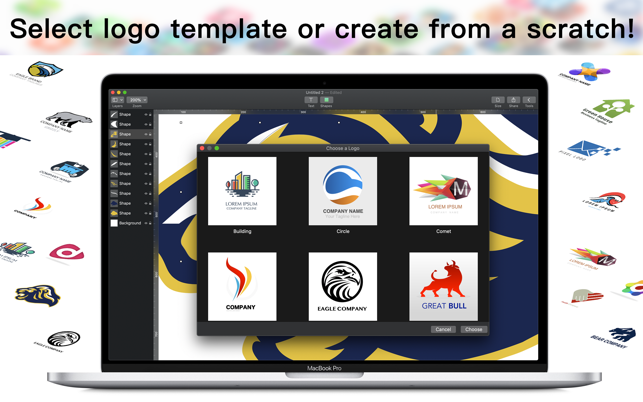
Lithuanian indie developers Apso MB today announce Logo Creator 1.0, their new logo design application for macOS. The app allows users to create a custom logo in a matter of minutes. Users can choose a vector-based logo from a list and customize the logo for their needs or create a new logo from scratch. Logos can be used on social media, banners, covers, business cards, envelopes, letters, emails, flyers or even on large screens and billboards.
Kaunas, Lithuania - Independent development team, Apso MB is today proud to announce the release and immediate availability of Logo Creator 1.0, their new logo design application for macOS computers. Logo Creator allows users to select a previously designed logo and customize it for their needs or create a new logo from scratch. The vector-based logos can be resized and used for almost any purpose, and in any sized end result.
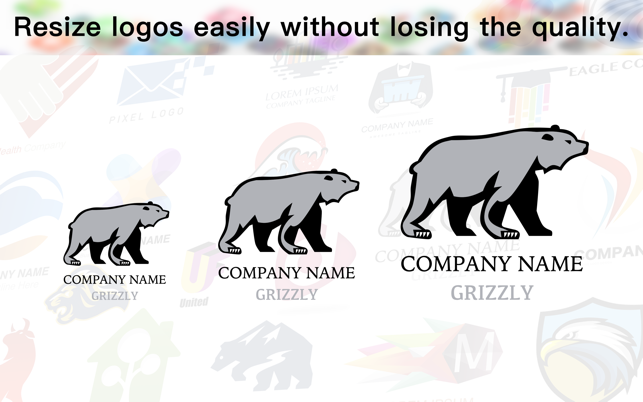
Logo Creator's vector-based designs allow users to create a logo in any size, without any loss of quality or resolution. Logos can be used for any purpose, ranging from business cards, to letterheads, to banners, to huge billboard-sized advertisements.
"Everyone wants the perfect result right here and right now. We've spent lots of hours to bring to perfection this logo-creating and editing app, so that users could create a superb logo in minutes." says Apso MB General Manager, Vytautas Jankevicius. "Choose the vector logo from a list in seconds, customize the logo for your needs in minutes or create a perfect logo from a scratch easily."
Creating a logo can be as simple as selecting a logo from a list, furnishing a company name and slogan, and using the logo. Logos can also be customized in as many ways as are needed. Each logo is created using separate layers. Colors, gradients, shadows and opacity of every layer can be changed or added quickly and easily. Shape transformation, perspective numerous other tools can be used to create professional results.
Features Include:
* Large library of pre-designed logos
* Also create logos from scratch
* Vector-based logos can be resized without loss of quality
* Numerous shapes available for use
* Control color, fill, shadows, reflections, and more
* Logo elements can be resized, repositioned, and rotated
* Logo perspective completely adjustable
* Built-in text editor
* Export logos as PNG, JPG, and PDF files
* Share logos in text messages, emails, photos, and more
Logo Creator makes it easy for anyone to create the perfect logo in a matter of minutes. The Apso MB team has spent many long hours designing and developing the app to allow their users to create a logo, edit it until they're satisfied, and use their new logo in all of their promotional materials so they can be noticed and successful.
Logos can be used in social media, print and online advertisements, television commercials, business cards, banners, and billboards. The vector based logos can be used for any situation where a quality logo is required.
"A well-designed logo can say many things about you. If you want to be noticed among the competitors, Logo Creator app is right for you," continues Vytautas. "It lets you choose a professionally designed logo in seconds. Your logo is one of the first things a prospective customer notices about you, make sure it presents your business in the best way possible."
System Requirements:
* macOS 10.14 or later
* macOS 10.15 Catalina Compatible
* 64-bit processor
* 8.3 MB
Pricing and Availability:
Logo Creator 1.0 is free and is available worldwide exclusively through the Mac App Store in the Graphics and Design category. The app is completely free, with no in-app purchases or advertisements.
Apso MB Company: https://www.apsomb.com
Logo Creator 1.0: https://www.apsomb.com/logo-creator/
Download from the Mac App Store: https://apps.apple.com/app/logo-creator-design-maker/id1491137256
Screenshot 1: https://is5-ssl.mzstatic.com/image/thumb/Purple113/v4/60/3a/3c/603a3c11-213e-009d-85dd-79ecc030dbba/pr_source.png/643x0w.png
Screenshot 2: https://is4-ssl.mzstatic.com/image/thumb/Purple113/v4/78/1a/cd/781acdc8-98d1-6420-78ce-b8b76abe2d50/pr_source.png/643x0w.png
Application Icon: https://is4-ssl.mzstatic.com/image/thumb/Purple113/v4/75/cb/c7/75cbc7db-a982-d53d-3926-6e6d8c3697a2/AppIcon-0-0-85-220-0-0-0-0-4-0-0-0-2x-sRGB-0-0-0-0-0.png/246x0w.png
A group of creative Apple Macintosh professionals founded Apso MB company in Kaunas, Lithuania. Apso MB was launched in 2018 with the goal of creating exciting and fun apps for Apple macOS and iOS. The team of professional software developers and designers wishes unforgettable experiences while using apps designed by our company. All Material and Software (C) Copyright 2020 Apso MB. All Rights Reserved. Apple, the Apple logo, Macintosh Mac OS X and macOS are registered trademarks of Apple Inc. in the U.S. and/or other countries. Other trademarks and registered trademarks may be the property of their respective owners.
*******
Link To Article: https://prmac.com/release-id-83903.htm
*******
---------------------------------------------------------------------------------
Note that you can alter delivered distributions at any time.
Login to your account on prMac to alter your channel selection, or to opt-out at any time.
Logo Creator Allows Mac Users to Create Professional Logos in Minutes - Published on 01/31/20
Lithuanian indie developers Apso MB today announce Logo Creator 1.0, their new logo design application for macOS. The app allows users to create a custom logo in a matter of minutes. Users can choose a vector-based logo from a list and customize the logo for their needs or create a new logo from scratch. Logos can be used on social media, banners, covers, business cards, envelopes, letters, emails, flyers or even on large screens and billboards.
Kaunas, Lithuania - Independent development team, Apso MB is today proud to announce the release and immediate availability of Logo Creator 1.0, their new logo design application for macOS computers. Logo Creator allows users to select a previously designed logo and customize it for their needs or create a new logo from scratch. The vector-based logos can be resized and used for almost any purpose, and in any sized end result.
Logo Creator's vector-based designs allow users to create a logo in any size, without any loss of quality or resolution. Logos can be used for any purpose, ranging from business cards, to letterheads, to banners, to huge billboard-sized advertisements.
"Everyone wants the perfect result right here and right now. We've spent lots of hours to bring to perfection this logo-creating and editing app, so that users could create a superb logo in minutes." says Apso MB General Manager, Vytautas Jankevicius. "Choose the vector logo from a list in seconds, customize the logo for your needs in minutes or create a perfect logo from a scratch easily."
Creating a logo can be as simple as selecting a logo from a list, furnishing a company name and slogan, and using the logo. Logos can also be customized in as many ways as are needed. Each logo is created using separate layers. Colors, gradients, shadows and opacity of every layer can be changed or added quickly and easily. Shape transformation, perspective numerous other tools can be used to create professional results.
Features Include:
* Large library of pre-designed logos
* Also create logos from scratch
* Vector-based logos can be resized without loss of quality
* Numerous shapes available for use
* Control color, fill, shadows, reflections, and more
* Logo elements can be resized, repositioned, and rotated
* Logo perspective completely adjustable
* Built-in text editor
* Export logos as PNG, JPG, and PDF files
* Share logos in text messages, emails, photos, and more
Logo Creator makes it easy for anyone to create the perfect logo in a matter of minutes. The Apso MB team has spent many long hours designing and developing the app to allow their users to create a logo, edit it until they're satisfied, and use their new logo in all of their promotional materials so they can be noticed and successful.
Logos can be used in social media, print and online advertisements, television commercials, business cards, banners, and billboards. The vector based logos can be used for any situation where a quality logo is required.
"A well-designed logo can say many things about you. If you want to be noticed among the competitors, Logo Creator app is right for you," continues Vytautas. "It lets you choose a professionally designed logo in seconds. Your logo is one of the first things a prospective customer notices about you, make sure it presents your business in the best way possible."
System Requirements:
* macOS 10.14 or later
* macOS 10.15 Catalina Compatible
* 64-bit processor
* 8.3 MB
Pricing and Availability:
Logo Creator 1.0 is free and is available worldwide exclusively through the Mac App Store in the Graphics and Design category. The app is completely free, with no in-app purchases or advertisements.
Apso MB Company: https://www.apsomb.com
Logo Creator 1.0: https://www.apsomb.com/logo-creator/
Download from the Mac App Store: https://apps.apple.com/app/logo-creator-design-maker/id1491137256
Screenshot 1: https://is5-ssl.mzstatic.com/image/thumb/Purple113/v4/60/3a/3c/603a3c11-213e-009d-85dd-79ecc030dbba/pr_source.png/643x0w.png
Screenshot 2: https://is4-ssl.mzstatic.com/image/thumb/Purple113/v4/78/1a/cd/781acdc8-98d1-6420-78ce-b8b76abe2d50/pr_source.png/643x0w.png
Application Icon: https://is4-ssl.mzstatic.com/image/thumb/Purple113/v4/75/cb/c7/75cbc7db-a982-d53d-3926-6e6d8c3697a2/AppIcon-0-0-85-220-0-0-0-0-4-0-0-0-2x-sRGB-0-0-0-0-0.png/246x0w.png

A group of creative Apple Macintosh professionals founded Apso MB company in Kaunas, Lithuania. Apso MB was launched in 2018 with the goal of creating exciting and fun apps for Apple macOS and iOS. The team of professional software developers and designers wishes unforgettable experiences while using apps designed by our company. All Material and Software (C) Copyright 2020 Apso MB. All Rights Reserved. Apple, the Apple logo, Macintosh Mac OS X and macOS are registered trademarks of Apple Inc. in the U.S. and/or other countries. Other trademarks and registered trademarks may be the property of their respective owners.
*******
Link To Article: https://prmac.com/release-id-83903.htm
*******
---------------------------------------------------------------------------------
Note that you can alter delivered distributions at any time.
Login to your account on prMac to alter your channel selection, or to opt-out at any time.
Subscribe to:
Posts (Atom)