A new article has been published at prMac.
Cisdem Document Reader V5.2.0 Refines Memory Usage and Fixes Bugs - Published on 03/20/20
Cisdem announces it has upgraded Document Reader 5.2.0 with memory usage optimized and bugs fixed. The app is an easy-to-use tool that supports to open PDF, WPD, WPS, XPS, OXPS, Visio, DjVu, and Winmail.dat files on Mac. It also comes integrated with comprehensive document viewing features, such as full-screen support, page navigation, zoom, rotation, search support, bookmarks, print, etc.
Arizona - Cisdem Document Reader for Mac has been upgraded to version 5.2.0, aiming at optimizing memory usage and fixing minor bugs. Cisdem Document Reader is an easy-to-use tool that supports to open PDF, WPD, WPS, XPS, OXPS, Visio, DjVu, and Winmail.dat files on Mac. It comes integrated with comprehensive document viewing features, such as full-screen support, page navigation, zoom, rotation, search support, bookmarks, print, etc. Meanwhile, you can export files as PDF, text or image for easy editing and sharing.
"The coronavirus outbreak has triggered a trial run for studying and working from home", said Edward Riley, the project manager of Cisdem. "To make reading easier, we upgraded our Document Reader. Hopefully, it meets your basic demands and improves your studying and working efficiency. Finally what I have to say is washing your hands frequently and using facemasks to fight Covid-19 together!"
What's New in Version 5.2.0?
* Refined memory usage.
* Fixed the crash issue.
* Fixed the unable to export photos issue for some documents.
* Fix minor bugs.
Main Functions
* Open Different Types of Files
Importing files into the program by dragging-n-dropping. It lets you open PDF, WordPerfect, WPS, XPS/OXPS, Visio, DjVu, and Winmail.dat files simultaneously in multiple tabs.
* Export Files to Other Formats
Users can convert to PDF, Text, and image (PNG, JPEG, BMP, GIF, and TIFF) format. When it comes to exporting multi-page files, you can specify the page ranges or just choose a single page.
* Extract Images from Documents
Users are capable of extracting images including PNG, JPEG, BMP, GIF or TIFF from files. Also, you can select the page ranges of documents as well.
* Print Documents
The software will auto-connect to an available printer to help you print documents on Mac. Everything thing you should do is to customize Preset, Pages, Pages per Sheet, Border, etc.
* Search the Content in Files
Users can quickly find a word, character, or phrase in the file by entering a keyword in the search bar.
* A set of Tools to Make Reading More Fluent
It's packed with some useful tools including full-screen reading, two viewing modes, page navigation, zoom & rotate, bookmark, etc.
Price and Availability
It's free to open PDF files on Mac, while the other 6 file types are priced at $9.99. But there is a great discount for the full version which is priced at $29.99. All of them are lifetime licenses and can be upgraded to the newest version for free.
Cisdem Document Reader 5.2.0 is worldwide exclusively through the official website, while the free trial is also available for download at the official website.
About Cisdem
Cisdem, an international leading software company established in 2009, is committed to creating reliable utility tools, PDF tools, multimedia tools, and some mobile tools for both business and home Mac users. For more details and information, please visit the Cisdem website.
Cisdem: https://www.cisdem.com/
Cisdem Document Reader 5.2.0 for Mac: https://www.cisdem.com/document-reader-mac.html
Download the Free Trial : https://www.cisdem.com/downloads/cisdem-appcrypt-14.dmg
Cisdem provides productivity and business software that helps Mac users to get their job done faster. Cisdem products include top rated software centered on PDF Conversion, PDF Management, Data Recovery, and File Management. The company is dedicated in building highly efficient Mac software that make life easier and processes simpler. All Material and Software (C) Copyright 2020 Cisdem. All Rights Reserved. Apple, the Apple logo, Mac OS X and Macintosh are registered trademarks of Apple Inc. in the U.S. and/or other countries. Other trademarks and registered trademarks may be the property of their respective owners.
*******
Link To Article: https://prmac.com/release-id-83965.htm
*******
---------------------------------------------------------------------------------
Note that you can alter delivered distributions at any time.
Login to your account on prMac to alter your channel selection, or to opt-out at any time.

WaterField Unveils Hitch Crossbody Laptop Brief for New MacBook and iPad
A new article has been published at prMac.
WaterField Unveils Hitch Crossbody Laptop Brief for New MacBook and iPad - Published on 03/19/20
San Francisco's WaterField Designs unveils the handcrafted Hitch Crossbody Brief, a spacious vertical laptop and tablet crossbody bag in a streamlined form that functions as an everyday carry or briefcase. Two sizes, each with dual padded compartments, fit daily work necessities, the new Apple 12.9-inch iPad Pro with Magic Keyboard, plus the newly-announced MacBook Air or anticipated MacBook Pro 14-inch, or the 16-inch MacBook Pro.
San Francisco, California - WaterField Designs, an innovative leader in custom laptop sleeves, bags, and cases for digital-minded professionals announces the new Hitch Crossbody Laptop Brief in two sizes: the "Compact" to fit Apple's newly-announced 13-inch MacBook Air, the anticipated 14-inch MacBook Pro, or the 13-inch Surface Pro, and the "Full" to fit the 16-inch Apple MacBook Pro or the 15-inch Surface Pro.
The bag's clean lines keep the look compact even as subtle expanders add depth and capacity to the bag's front pockets. Each Hitch Crossbody Brief includes two padded interior compartments: one for a laptop and another for Apple's new 12.9-inch iPad Pro with Magic Keyboard.
The bag's clean lines keep the look compact even as subtle expanders add depth and capacity to the bag's front pockets. The Hitch Crossbody Brief is suitable for business, travel, or casual use, and its padded tech compartments and three carry options make it an optimal briefcase for a day at the office.
"The Hitch is so comfortable even when it's packed, and it keeps all my gear easy to access," said company owner Gary Waterfield. "The vertical design keeps the weight distributed. It holds a lot but stays really sleek looking"it's sharp enough to serve as an office briefcase. The adjustable shoulder strap can be worn crossbody or off one shoulder."
Every detail on the Hitch Crossbody Brief is carefully devised for ease of use and esthetic appeal. A spacious main compartment, accessed from either side, features a padded laptop and padded tablet sleeve. Two sizes suit laptops as large as the upcoming 14-inch and the 16-inch MacBook Pro and tablets up to 12.9 inches. Gold rip-stop lining lights up the interior making it easy to find everything else needed for a day's work, even at the bottom of the bag. Interior open-topped pockets, pen slots, and a quick-retrieval key tether are all raised off the bottom for convenient access and balanced weight distribution.
A zippered front pocket is larger than it appears thanks to subtle, cleverly-designed expanders, so it can hold bulky items like a power brick or mouse without bulging. Inside the front pocket, additional organizational pockets keep quick-access items easy to locate. Flexible carry options include a comfortable and removable suspension shoulder strap, two briefcase-style handles, and a convenient wheeled suitcase passthrough. A full-grain leather base and front panel reinforce the bag and add a bit of luxury to this handsome laptop bag.
Users choose from a durable black ballistic nylon or rugged tan waxed canvas base. They can then opt for accents in one of two premium, full-grain leather colors. The Hitch Crossbody Brief joins an extensive line of WaterField tech-friendly messenger bags, briefcases, backpacks, and duffel bags designed for commuting, for supporting professionals at the office, and for improving the travel experience.
Colors:
* Black ballistic nylon with black or chocolate full-grain leather or tan waxed canvas with chocolate or grizzly full-grain leather
Dimensions and Weight:
* Compact; 10.375 x 13.25 x 3.75 inches; Canvas"1.8 lbs. Ballistic 1.5 lbs. (Fits new 13-inch MacBook Air, anticipated 14-inch MacBook Pro & Surface Pro 13-inch.)
* Long; 11.75 x 15 x 3.75 inches; Canvas; 2.2 lbs. Ballistic; 1.8 lbs. (Fits MacBook Pro 16-inch and Surface Pro 15-inch.)
Pricing and Availability:
The Hitch Crossbody Brief is priced: (Compact $249). and Full $259 (USD). Pre-order now. First production run ships as soon as we are back in our San Fransico sewing studio.
WaterField Designs: http://www.sfbags.com/
Hitch Crossbody Brief: https://www.sfbags.com/products/hitch-crossbody-laptop-brief/
YouTube Video (Tour of the Hitch Crossbody Brief): https://www.youtube.com/watch?v=MZ7hbn_-jAw
Screenshot: https://cdn.shopify.com/s/files/1/0281/2796/products/Lifestyle-3_680fc1fd-7be6-4d96-aa36-d77e10aa6fe8_1800x1800.jpg
WaterField Designs is an innovative San Francisco designer and manufacturer of bags and cases for tech-savvy consumers who want to stylishly and responsibly transport their technology. WaterField manufactures custom-fitted, high-quality cases and bags for a full-range of laptop computers, smartphones, tablets, gaming devices, and other digital gear. All products are manufactured to exacting standards entirely in San Francisco. WaterField Designs, SFBags, and Hitch Crossbody Brief are trademarks of WaterField Designs. Copyright (C) 2020 WaterField Designs. All Rights Reserved. Other trademarks and registered trademarks may be the property of their respective owners.
*******
Link To Article: https://prmac.com/release-id-83964.htm
*******
---------------------------------------------------------------------------------
Note that you can alter delivered distributions at any time.
Login to your account on prMac to alter your channel selection, or to opt-out at any time.
WaterField Unveils Hitch Crossbody Laptop Brief for New MacBook and iPad - Published on 03/19/20
San Francisco's WaterField Designs unveils the handcrafted Hitch Crossbody Brief, a spacious vertical laptop and tablet crossbody bag in a streamlined form that functions as an everyday carry or briefcase. Two sizes, each with dual padded compartments, fit daily work necessities, the new Apple 12.9-inch iPad Pro with Magic Keyboard, plus the newly-announced MacBook Air or anticipated MacBook Pro 14-inch, or the 16-inch MacBook Pro.
San Francisco, California - WaterField Designs, an innovative leader in custom laptop sleeves, bags, and cases for digital-minded professionals announces the new Hitch Crossbody Laptop Brief in two sizes: the "Compact" to fit Apple's newly-announced 13-inch MacBook Air, the anticipated 14-inch MacBook Pro, or the 13-inch Surface Pro, and the "Full" to fit the 16-inch Apple MacBook Pro or the 15-inch Surface Pro.
The bag's clean lines keep the look compact even as subtle expanders add depth and capacity to the bag's front pockets. Each Hitch Crossbody Brief includes two padded interior compartments: one for a laptop and another for Apple's new 12.9-inch iPad Pro with Magic Keyboard.
The bag's clean lines keep the look compact even as subtle expanders add depth and capacity to the bag's front pockets. The Hitch Crossbody Brief is suitable for business, travel, or casual use, and its padded tech compartments and three carry options make it an optimal briefcase for a day at the office.
"The Hitch is so comfortable even when it's packed, and it keeps all my gear easy to access," said company owner Gary Waterfield. "The vertical design keeps the weight distributed. It holds a lot but stays really sleek looking"it's sharp enough to serve as an office briefcase. The adjustable shoulder strap can be worn crossbody or off one shoulder."
Every detail on the Hitch Crossbody Brief is carefully devised for ease of use and esthetic appeal. A spacious main compartment, accessed from either side, features a padded laptop and padded tablet sleeve. Two sizes suit laptops as large as the upcoming 14-inch and the 16-inch MacBook Pro and tablets up to 12.9 inches. Gold rip-stop lining lights up the interior making it easy to find everything else needed for a day's work, even at the bottom of the bag. Interior open-topped pockets, pen slots, and a quick-retrieval key tether are all raised off the bottom for convenient access and balanced weight distribution.
A zippered front pocket is larger than it appears thanks to subtle, cleverly-designed expanders, so it can hold bulky items like a power brick or mouse without bulging. Inside the front pocket, additional organizational pockets keep quick-access items easy to locate. Flexible carry options include a comfortable and removable suspension shoulder strap, two briefcase-style handles, and a convenient wheeled suitcase passthrough. A full-grain leather base and front panel reinforce the bag and add a bit of luxury to this handsome laptop bag.
Users choose from a durable black ballistic nylon or rugged tan waxed canvas base. They can then opt for accents in one of two premium, full-grain leather colors. The Hitch Crossbody Brief joins an extensive line of WaterField tech-friendly messenger bags, briefcases, backpacks, and duffel bags designed for commuting, for supporting professionals at the office, and for improving the travel experience.
Colors:
* Black ballistic nylon with black or chocolate full-grain leather or tan waxed canvas with chocolate or grizzly full-grain leather
Dimensions and Weight:
* Compact; 10.375 x 13.25 x 3.75 inches; Canvas"1.8 lbs. Ballistic 1.5 lbs. (Fits new 13-inch MacBook Air, anticipated 14-inch MacBook Pro & Surface Pro 13-inch.)
* Long; 11.75 x 15 x 3.75 inches; Canvas; 2.2 lbs. Ballistic; 1.8 lbs. (Fits MacBook Pro 16-inch and Surface Pro 15-inch.)
Pricing and Availability:
The Hitch Crossbody Brief is priced: (Compact $249). and Full $259 (USD). Pre-order now. First production run ships as soon as we are back in our San Fransico sewing studio.
WaterField Designs: http://www.sfbags.com/
Hitch Crossbody Brief: https://www.sfbags.com/products/hitch-crossbody-laptop-brief/
YouTube Video (Tour of the Hitch Crossbody Brief): https://www.youtube.com/watch?v=MZ7hbn_-jAw
Screenshot: https://cdn.shopify.com/s/files/1/0281/2796/products/Lifestyle-3_680fc1fd-7be6-4d96-aa36-d77e10aa6fe8_1800x1800.jpg

WaterField Designs is an innovative San Francisco designer and manufacturer of bags and cases for tech-savvy consumers who want to stylishly and responsibly transport their technology. WaterField manufactures custom-fitted, high-quality cases and bags for a full-range of laptop computers, smartphones, tablets, gaming devices, and other digital gear. All products are manufactured to exacting standards entirely in San Francisco. WaterField Designs, SFBags, and Hitch Crossbody Brief are trademarks of WaterField Designs. Copyright (C) 2020 WaterField Designs. All Rights Reserved. Other trademarks and registered trademarks may be the property of their respective owners.
*******
Link To Article: https://prmac.com/release-id-83964.htm
*******
---------------------------------------------------------------------------------
Note that you can alter delivered distributions at any time.
Login to your account on prMac to alter your channel selection, or to opt-out at any time.
Graphic Inspector Addresses macOS Catalina Memory Bug: Image Check Tool
A new article has been published at prMac.
Graphic Inspector Addresses macOS Catalina Memory Bug: Image Check Tool - Published on 03/18/20
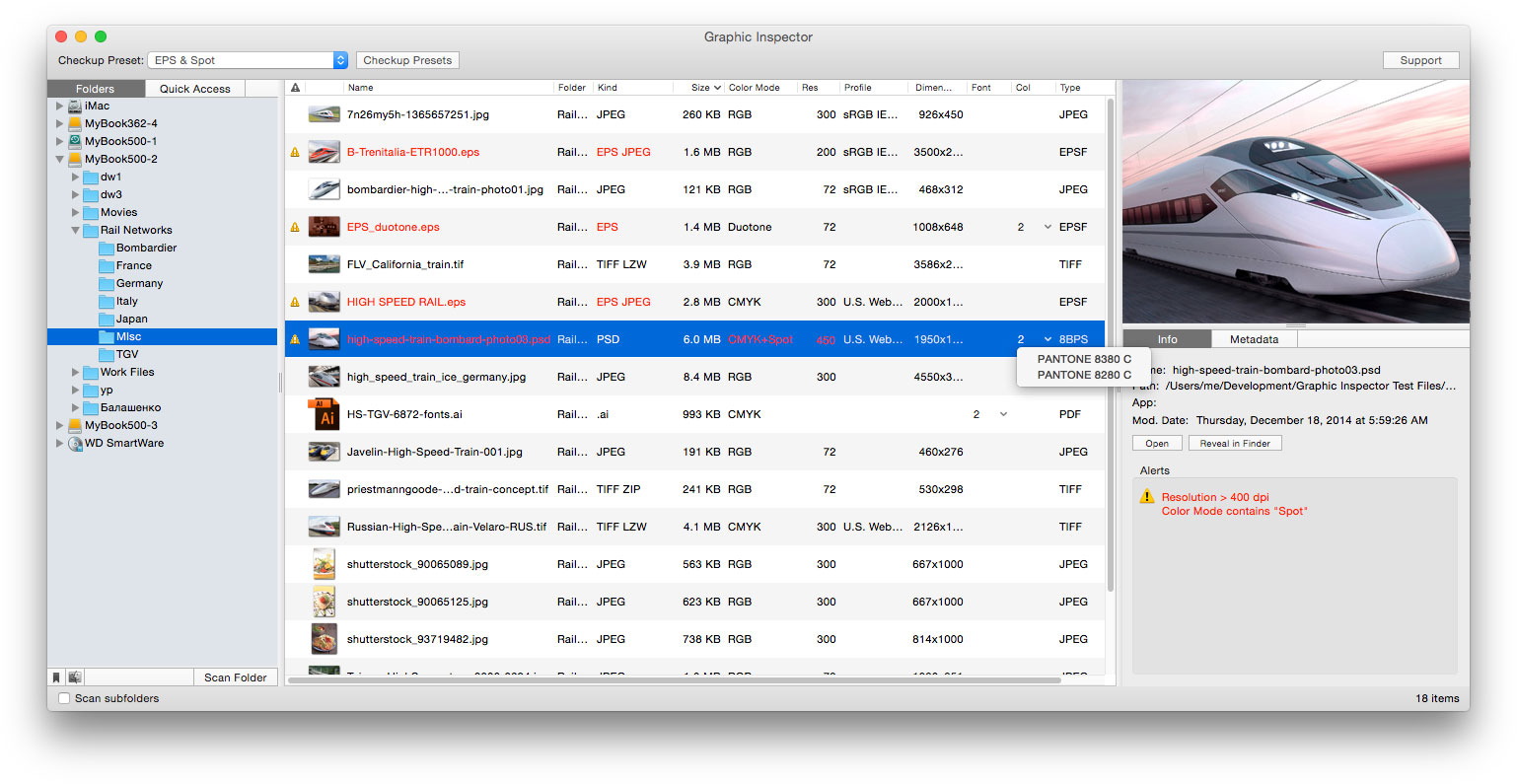
Zevrix Solutions announces Graphic Inspector 2.4.6, a bug fix update to company's quality control tool for images and vector graphics files. Graphic Inspector can flag images and Illustrator files with specific attributes such as resolution, color, spot channels, fonts and more. The app is the only tool on the market that preflights both bitmap and vector files. The new version addresses a memory bug on macOS Catalina that prevented the app from retrieving icon previews of large file batches.
Toronto (ON), Canada - Zevrix Solutions today announces the release of Graphic Inspector 2.4.6, a security update to company's quality control solution for images and vector graphic files. The software can check entire folders of documents for potential problems according to specific workflow requirements. Graphic Inspector is the only tool on the market that lets the graphics industry professionals inspect both raster images and Adobe Illustrator documents.
The new version addresses an issue that made Graphic Inspector hang when retrieving icon previews for large batches of files on macOS Catalina. The problem was eventually traced to a memory bug introduced on macOS 10.15. The new update restores uninterrupted file processing of large image folders by Graphic Inspector. In the meantime, the display of icon previews on Catalina is temporarily suspended even if this option is checked in the app's preferences. Until a workaround is found, Graphic Inspector will always display generic icons for all files.
"Graphic Inspector displays every bit of useful information about vector or raster graphic files and flags the ones that match rules you define," writes Jay Nelson in Layers magazine. "With its combination of price, utility, and thoughtful design, Graphic Inspector is a rare gem."
Graphic Inspector is designed to help users of any trade, whether it's print, prepress, web design, or digital photography. For example, users can quickly locate files whose color mode is CMYK, format - TIFF, resolution is below 300 dpi, ICC profile isn't "US Web Coated" and so on. The app offers the following key features:
* Check multiple images and vector files for potential problems
* Customizable checkup presets
* Common checks such as resolution, color mode, ICC profile
* Professional prepress checks: spot colors, fonts in vector files, image compression and more
* Search image EXIF, IPTC and GPS metadata
Pricing and Availability:
Graphic Inspector can be purchased from the Zevrix web site for $19.95 (USD), as well as from authorized resellers. Trial is also available for download. The update is free for users of version 2 ($10 to upgrade from version 1). Graphic Inspector requires macOS 10.8-10.15.
Zevrix Solutions: http://zevrix.com
Graphic Inspector 2.4.6: http://zevrix.com/GraphicInspector.php
Download Graphic Inspector: http://zevrix.com/GraphicInspector.dmg
Purchase: http://zevrix.com/store.php
Screenshot: http://zevrix.com/screenshots/gi2/gi2-main.jpg
Located in Toronto, Canada, Zevrix Solutions provides automation and productivity solutions for Adobe Creative Cloud and Creative Suite software, PDF workflows, graphic file diagnostics and Microsoft Office output on Mac OS. Zevrix is dedicated to help professionals increase their profits through automating everyday tasks, producing error-free documents, saving disk space and cutting production costs. For more information, visit their website. Copyright (C) 2020 Zevrix Solutions. All Rights Reserved. Other trademarks and registered trademarks may be the property of their respective owners.
*******
Link To Article: https://prmac.com/release-id-83963.htm
*******
---------------------------------------------------------------------------------
Note that you can alter delivered distributions at any time.
Login to your account on prMac to alter your channel selection, or to opt-out at any time.
Graphic Inspector Addresses macOS Catalina Memory Bug: Image Check Tool - Published on 03/18/20
Zevrix Solutions announces Graphic Inspector 2.4.6, a bug fix update to company's quality control tool for images and vector graphics files. Graphic Inspector can flag images and Illustrator files with specific attributes such as resolution, color, spot channels, fonts and more. The app is the only tool on the market that preflights both bitmap and vector files. The new version addresses a memory bug on macOS Catalina that prevented the app from retrieving icon previews of large file batches.
Toronto (ON), Canada - Zevrix Solutions today announces the release of Graphic Inspector 2.4.6, a security update to company's quality control solution for images and vector graphic files. The software can check entire folders of documents for potential problems according to specific workflow requirements. Graphic Inspector is the only tool on the market that lets the graphics industry professionals inspect both raster images and Adobe Illustrator documents.
The new version addresses an issue that made Graphic Inspector hang when retrieving icon previews for large batches of files on macOS Catalina. The problem was eventually traced to a memory bug introduced on macOS 10.15. The new update restores uninterrupted file processing of large image folders by Graphic Inspector. In the meantime, the display of icon previews on Catalina is temporarily suspended even if this option is checked in the app's preferences. Until a workaround is found, Graphic Inspector will always display generic icons for all files.
"Graphic Inspector displays every bit of useful information about vector or raster graphic files and flags the ones that match rules you define," writes Jay Nelson in Layers magazine. "With its combination of price, utility, and thoughtful design, Graphic Inspector is a rare gem."
Graphic Inspector is designed to help users of any trade, whether it's print, prepress, web design, or digital photography. For example, users can quickly locate files whose color mode is CMYK, format - TIFF, resolution is below 300 dpi, ICC profile isn't "US Web Coated" and so on. The app offers the following key features:
* Check multiple images and vector files for potential problems
* Customizable checkup presets
* Common checks such as resolution, color mode, ICC profile
* Professional prepress checks: spot colors, fonts in vector files, image compression and more
* Search image EXIF, IPTC and GPS metadata
Pricing and Availability:
Graphic Inspector can be purchased from the Zevrix web site for $19.95 (USD), as well as from authorized resellers. Trial is also available for download. The update is free for users of version 2 ($10 to upgrade from version 1). Graphic Inspector requires macOS 10.8-10.15.
Zevrix Solutions: http://zevrix.com
Graphic Inspector 2.4.6: http://zevrix.com/GraphicInspector.php
Download Graphic Inspector: http://zevrix.com/GraphicInspector.dmg
Purchase: http://zevrix.com/store.php
Screenshot: http://zevrix.com/screenshots/gi2/gi2-main.jpg
Located in Toronto, Canada, Zevrix Solutions provides automation and productivity solutions for Adobe Creative Cloud and Creative Suite software, PDF workflows, graphic file diagnostics and Microsoft Office output on Mac OS. Zevrix is dedicated to help professionals increase their profits through automating everyday tasks, producing error-free documents, saving disk space and cutting production costs. For more information, visit their website. Copyright (C) 2020 Zevrix Solutions. All Rights Reserved. Other trademarks and registered trademarks may be the property of their respective owners.
*******
Link To Article: https://prmac.com/release-id-83963.htm
*******
---------------------------------------------------------------------------------
Note that you can alter delivered distributions at any time.
Login to your account on prMac to alter your channel selection, or to opt-out at any time.
SideNotes 1.1 for macOS Brings Multiple New Features to Note-Taking App
A new article has been published at prMac.
SideNotes 1.1 for macOS Brings Multiple New Features to Note-Taking App - Published on 03/18/20
Polish indie development team Apptorium announces SideNotes 1.1, an important update to their note-taking solution for macOS. SideNotes is the non-distracting note-taking app where users can save all of their thoughts and ideas in a neat and organized package. The app saves users' ideas, graphics, task lists, and more. Version 1.1. brings search functionality for notes and folders, run on startup, the ability to move notes to other folders, drop shortcuts to files into notes, and much more.
Zielona Gora, Poland - Independent development team Apptorium is today proud to announce the release and immediate availability of SideNotes 1.1, an important update to their note-taking solution for macOS. The app is totally non-distracting, as it hides on the side of the monitor when not being used, and appears instantly when the need arises.
SideNotes allows Mac users to quickly take notes by appearing with a single click of the mouse, by pressing a keyboard shortcut, or by moving the mouse cursor. The application allows users to keep handy notes, graphics, task lists, and more without being distracted from their main workflow, all thanks to the app's clean and minimalistic user interface.
"Have you ever had a thought that came to your mind and all you wanted was to write it down quickly? Meet SideNotes!" says Apptorium CEO Marcin Krzywonos. "It's an app for note-taking where you put all your busy thoughts into a neat, quick and organized way. Enjoy its non-distractive workflow. With SideNotes you can save your ideas, pictures, task lists and many more."
With SideNotes there's no searching under windows on your Mac desktop looking for your notes. The app instantly appears, sliding over the other open windows with the click of a mouse or a quick keyboard combo. The app is completely controlable with the keyboard, allowing users to keep their fingers on the keys.
SideNotes allows users to:
* Smoothly pull out notes from outside your monitor and easily hide them again
* Mark notes with colors and group them into folders
* Drag and drop pictures directly from a web browser
* Save links, code snippets or even colors
* Create task lists and mark items done
* Create notes directly from the pasteboard
* Drop any file or folder
* Three text formatting modes are available: Markdown, Plain Text and Code
SideNotes text formatting takes advantage of both Markdown and plain text formatting. Using Markdown syntax, users can format text quickly. Formatting is rendered on the fly, allowing users to format text without knowing complicated syntax. The app also offers a Text Formatting button that displays a menu of various text formatting options.
Markdown formatting can be disabled by choosing from Plain Text, or Code mode. Developers will appreciate Code mode, as it allows them to store short code snippets, only to retrieve them with just a click. SideNotes also allows users to drop images into notes from saved images or drag-and-drop them directly from a web browser. The image size is automatically adjusted to the note's width. SideNotes also stores the original image, so when a user double-clicks it, the original image opens.
Version 1.1 brings numerous new and improved features:
* Search for notes and folders
* Share Extension
* New option to show and hide the app - by clicking on a menubar icon
* Ability to move notes to other folders
* Dropping any file on the app will create a shortcut to that file with a preview
* Run app on startup
* New keyboard shortcut to pin the app window
* New keyboard shortcut to move notes up and down
* New keyboard shortcut to create a new note from pasteboard
* Ability to set dark and light appearance manually
* AppleScript: ability to get current folder and selected note
* New empty note placeholders
* Fixed: On clickable elements in notes that were on screen bottom
* Fixed: URLs with a dash weren't working
* Fixed: Escape key didn't work properly during editing folder name
* Fixed: Other application scrollbars were not working
* Small bug fixes and performance enhancements
SideNotes also offers users an accessible task list. Users can add a task by clicking the text formatting button or by using the key combo "CMD-T." This creates a line with a checkmark, which can be marked as complete with a single mouse click. The app can also group notes into folders, each note can have one of six pre-set colors.
"SideNotes is the answer to messy desktop," continues Marcin. "If users tend to make a short text files on the desktop, they can now simply Drag & Drop them on the application window. It will copy content of all these files to the application."
System Requirements:
* macOS 10.14 or later
* macOS Catalina 10.15 compatible
* 64-bit processor
* 31 MB
Pricing and Availability:
SideNotes 1.1 is $19.99 USD (or an equivalent amount in other currencies) and is available worldwide through the Mac App Store in the Productivity Category. The app is also available through the Apptorium website. A trial download version of the app is also available. Setapp subscribers also get access to SideNotes. Promo Codes are available to members of the press. For more info, please contact Marcin Krzywonos.
Apptorium: https://www.apptorium.com/
SideNotes 1.1: https://www.apptorium.com/sidenotes
Purchase and Download from Mac App Store: https://apps.apple.com/us/app/sidenotes/id1441958036?ls=1&mt=12
Download Trial Version: https://www.apptorium.com/sidenotes/trial
YouTube Video (Getting Started): https://www.youtube.com/watch?v=IBFXwovCuOM&t=1s
Press Kit (Zip): https://www.apptorium.com/sidenotes/presskit
Headquartered in Zielona Gora, Poland, Apptorium has been creating Mac and iOS software since 2016. The developers for the company make Mac and iOS apps because that's what they love. All Material and Software (C) Copyright 2020 Apptorium. All Rights Reserved. Apple, the Apple logo, Macintosh, Mac OS X, and macOS are registered trademarks of Apple Inc. in the U.S. and/or other countries. Other trademarks and registered trademarks may be the property of their respective owners.
*******
Link To Article: https://prmac.com/release-id-83962.htm
*******
---------------------------------------------------------------------------------
Note that you can alter delivered distributions at any time.
Login to your account on prMac to alter your channel selection, or to opt-out at any time.
SideNotes 1.1 for macOS Brings Multiple New Features to Note-Taking App - Published on 03/18/20
Polish indie development team Apptorium announces SideNotes 1.1, an important update to their note-taking solution for macOS. SideNotes is the non-distracting note-taking app where users can save all of their thoughts and ideas in a neat and organized package. The app saves users' ideas, graphics, task lists, and more. Version 1.1. brings search functionality for notes and folders, run on startup, the ability to move notes to other folders, drop shortcuts to files into notes, and much more.
Zielona Gora, Poland - Independent development team Apptorium is today proud to announce the release and immediate availability of SideNotes 1.1, an important update to their note-taking solution for macOS. The app is totally non-distracting, as it hides on the side of the monitor when not being used, and appears instantly when the need arises.
SideNotes allows Mac users to quickly take notes by appearing with a single click of the mouse, by pressing a keyboard shortcut, or by moving the mouse cursor. The application allows users to keep handy notes, graphics, task lists, and more without being distracted from their main workflow, all thanks to the app's clean and minimalistic user interface.
"Have you ever had a thought that came to your mind and all you wanted was to write it down quickly? Meet SideNotes!" says Apptorium CEO Marcin Krzywonos. "It's an app for note-taking where you put all your busy thoughts into a neat, quick and organized way. Enjoy its non-distractive workflow. With SideNotes you can save your ideas, pictures, task lists and many more."
With SideNotes there's no searching under windows on your Mac desktop looking for your notes. The app instantly appears, sliding over the other open windows with the click of a mouse or a quick keyboard combo. The app is completely controlable with the keyboard, allowing users to keep their fingers on the keys.
SideNotes allows users to:
* Smoothly pull out notes from outside your monitor and easily hide them again
* Mark notes with colors and group them into folders
* Drag and drop pictures directly from a web browser
* Save links, code snippets or even colors
* Create task lists and mark items done
* Create notes directly from the pasteboard
* Drop any file or folder
* Three text formatting modes are available: Markdown, Plain Text and Code
SideNotes text formatting takes advantage of both Markdown and plain text formatting. Using Markdown syntax, users can format text quickly. Formatting is rendered on the fly, allowing users to format text without knowing complicated syntax. The app also offers a Text Formatting button that displays a menu of various text formatting options.
Markdown formatting can be disabled by choosing from Plain Text, or Code mode. Developers will appreciate Code mode, as it allows them to store short code snippets, only to retrieve them with just a click. SideNotes also allows users to drop images into notes from saved images or drag-and-drop them directly from a web browser. The image size is automatically adjusted to the note's width. SideNotes also stores the original image, so when a user double-clicks it, the original image opens.
Version 1.1 brings numerous new and improved features:
* Search for notes and folders
* Share Extension
* New option to show and hide the app - by clicking on a menubar icon
* Ability to move notes to other folders
* Dropping any file on the app will create a shortcut to that file with a preview
* Run app on startup
* New keyboard shortcut to pin the app window
* New keyboard shortcut to move notes up and down
* New keyboard shortcut to create a new note from pasteboard
* Ability to set dark and light appearance manually
* AppleScript: ability to get current folder and selected note
* New empty note placeholders
* Fixed: On clickable elements in notes that were on screen bottom
* Fixed: URLs with a dash weren't working
* Fixed: Escape key didn't work properly during editing folder name
* Fixed: Other application scrollbars were not working
* Small bug fixes and performance enhancements
SideNotes also offers users an accessible task list. Users can add a task by clicking the text formatting button or by using the key combo "CMD-T." This creates a line with a checkmark, which can be marked as complete with a single mouse click. The app can also group notes into folders, each note can have one of six pre-set colors.
"SideNotes is the answer to messy desktop," continues Marcin. "If users tend to make a short text files on the desktop, they can now simply Drag & Drop them on the application window. It will copy content of all these files to the application."
System Requirements:
* macOS 10.14 or later
* macOS Catalina 10.15 compatible
* 64-bit processor
* 31 MB
Pricing and Availability:
SideNotes 1.1 is $19.99 USD (or an equivalent amount in other currencies) and is available worldwide through the Mac App Store in the Productivity Category. The app is also available through the Apptorium website. A trial download version of the app is also available. Setapp subscribers also get access to SideNotes. Promo Codes are available to members of the press. For more info, please contact Marcin Krzywonos.
Apptorium: https://www.apptorium.com/
SideNotes 1.1: https://www.apptorium.com/sidenotes
Purchase and Download from Mac App Store: https://apps.apple.com/us/app/sidenotes/id1441958036?ls=1&mt=12
Download Trial Version: https://www.apptorium.com/sidenotes/trial
YouTube Video (Getting Started): https://www.youtube.com/watch?v=IBFXwovCuOM&t=1s
Press Kit (Zip): https://www.apptorium.com/sidenotes/presskit
Headquartered in Zielona Gora, Poland, Apptorium has been creating Mac and iOS software since 2016. The developers for the company make Mac and iOS apps because that's what they love. All Material and Software (C) Copyright 2020 Apptorium. All Rights Reserved. Apple, the Apple logo, Macintosh, Mac OS X, and macOS are registered trademarks of Apple Inc. in the U.S. and/or other countries. Other trademarks and registered trademarks may be the property of their respective owners.
*******
Link To Article: https://prmac.com/release-id-83962.htm
*******
---------------------------------------------------------------------------------
Note that you can alter delivered distributions at any time.
Login to your account on prMac to alter your channel selection, or to opt-out at any time.
Cisdem AppCrypt for Mac 4.6.1 Refines Reminders on Camera Authorization
A new article has been published at prMac.
Cisdem AppCrypt for Mac 4.6.1 Refines Reminders on Camera Authorization - Published on 03/15/20
Cisdem announces it has upgraded AppCrypt for macOS to version 4.6.1 with refined reminders on camera authorization. AppCrypt is an efficient, easy-to-use app locker and website blocker for Mac. The app can lock one or multiple or all apps on Mac with one password, including the apps already included on macOS and the third-party apps a user has installed.
Madelia, Minnesota - Cisdem AppCrypt for Mac has been upgraded to 4.6.1 with refined reminders on camera authorization. AppCrypt is an app locker and website blocker for Mac. It can lock one or multiple or all apps on Mac with one password. If someone who tries to open locked app enters a wrong password, AppCrypt will generate a report of the failed attempt and take a picture of the person. In the app's Preferences, users can disable or enable the picture taking functionality.
"You can use AppCrypt to easily lock apps and block websites," said Edward Riley, Cisdem's project manager. "It can help you protect privacy, block distractions and improve productivity. Its Schedule feature allows users to block or unblock apps during certain hours. The website blocking feature lets users blacklist or whitelist websites on Mac, individually or in batch. The latest version (4.6.1) refined the reminders on camera authorization and improved user experience. It's completely free to update to the new version!"
What's New in Version 4.6.1?
* Refined the reminders on camera authorization.
Main Functions of Cisdem AppCrypt
* Lock apps on Mac - AppCrypt can be used to lock any apps on a Mac, including the apps already included on macOS and the third-party apps a user has installed. One can lock one specific app or multiple apps.
* Lock or unlock apps during certain hours - With the Schedule feature, users can set the app to unlock the locked apps at certain time of the day or day of the week.
* Provide a report of failed attempts to access locked apps - To unblock a locked app, or remove an app from the lock list, or quit AppCrypt, one needs to enter the right password. If someone enters a wrong password, the locked app will refuse to open. In addition, AppCrypt will record the failed attempt with date, time and photo.
* Block any website on Mac - This app locker and website blocker also block access to websites. The blocking feature applies to Safari and other websites on Mac such as Google Chrome and Firefox.
* The Blacklist and Whitelist features - Users can add block one or multiple websites by adding them to the app's Blacklist. It's also possible to block websites by only using the Whitelist feature. This way, only the websites on the whitelist are accessible.
Price and Availability
Cisdem AppCrypt for Mac is available for download and purchase at the Cisdem AppCrypt for Mac website. Users can get a lifetime license with $29.99 and enjoy lifetime free upgrades. A free trial is also available for download at the Cisdem AppCrypt for Mac website.
Cisdem: https://www.cisdem.com/
Cisdem AppCrypt for Mac: https://www.cisdem.com/appcrypt-mac.html
Download Free Trial: https://www.cisdem.com/downloads/cisdem-appcrypt-14.dmg
Cisdem provides productivity and business software that helps Mac users to get their job done faster. Cisdem products include top rated software centered on PDF Conversion, PDF Management, Data Recovery, and File Management. The company is dedicated in building highly efficient Mac software that make life easier and processes simpler. All Material and Software (C) Copyright 2020 Cisdem. All Rights Reserved. Apple, the Apple logo, Mac OS X and Macintosh are registered trademarks of Apple Inc. in the U.S. and/or other countries. Other trademarks and registered trademarks may be the property of their respective owners.
*******
Link To Article: https://prmac.com/release-id-83961.htm
*******
---------------------------------------------------------------------------------
Note that you can alter delivered distributions at any time.
Login to your account on prMac to alter your channel selection, or to opt-out at any time.
Cisdem AppCrypt for Mac 4.6.1 Refines Reminders on Camera Authorization - Published on 03/15/20
Cisdem announces it has upgraded AppCrypt for macOS to version 4.6.1 with refined reminders on camera authorization. AppCrypt is an efficient, easy-to-use app locker and website blocker for Mac. The app can lock one or multiple or all apps on Mac with one password, including the apps already included on macOS and the third-party apps a user has installed.
Madelia, Minnesota - Cisdem AppCrypt for Mac has been upgraded to 4.6.1 with refined reminders on camera authorization. AppCrypt is an app locker and website blocker for Mac. It can lock one or multiple or all apps on Mac with one password. If someone who tries to open locked app enters a wrong password, AppCrypt will generate a report of the failed attempt and take a picture of the person. In the app's Preferences, users can disable or enable the picture taking functionality.
"You can use AppCrypt to easily lock apps and block websites," said Edward Riley, Cisdem's project manager. "It can help you protect privacy, block distractions and improve productivity. Its Schedule feature allows users to block or unblock apps during certain hours. The website blocking feature lets users blacklist or whitelist websites on Mac, individually or in batch. The latest version (4.6.1) refined the reminders on camera authorization and improved user experience. It's completely free to update to the new version!"
What's New in Version 4.6.1?
* Refined the reminders on camera authorization.
Main Functions of Cisdem AppCrypt
* Lock apps on Mac - AppCrypt can be used to lock any apps on a Mac, including the apps already included on macOS and the third-party apps a user has installed. One can lock one specific app or multiple apps.
* Lock or unlock apps during certain hours - With the Schedule feature, users can set the app to unlock the locked apps at certain time of the day or day of the week.
* Provide a report of failed attempts to access locked apps - To unblock a locked app, or remove an app from the lock list, or quit AppCrypt, one needs to enter the right password. If someone enters a wrong password, the locked app will refuse to open. In addition, AppCrypt will record the failed attempt with date, time and photo.
* Block any website on Mac - This app locker and website blocker also block access to websites. The blocking feature applies to Safari and other websites on Mac such as Google Chrome and Firefox.
* The Blacklist and Whitelist features - Users can add block one or multiple websites by adding them to the app's Blacklist. It's also possible to block websites by only using the Whitelist feature. This way, only the websites on the whitelist are accessible.
Price and Availability
Cisdem AppCrypt for Mac is available for download and purchase at the Cisdem AppCrypt for Mac website. Users can get a lifetime license with $29.99 and enjoy lifetime free upgrades. A free trial is also available for download at the Cisdem AppCrypt for Mac website.
Cisdem: https://www.cisdem.com/
Cisdem AppCrypt for Mac: https://www.cisdem.com/appcrypt-mac.html
Download Free Trial: https://www.cisdem.com/downloads/cisdem-appcrypt-14.dmg
Cisdem provides productivity and business software that helps Mac users to get their job done faster. Cisdem products include top rated software centered on PDF Conversion, PDF Management, Data Recovery, and File Management. The company is dedicated in building highly efficient Mac software that make life easier and processes simpler. All Material and Software (C) Copyright 2020 Cisdem. All Rights Reserved. Apple, the Apple logo, Mac OS X and Macintosh are registered trademarks of Apple Inc. in the U.S. and/or other countries. Other trademarks and registered trademarks may be the property of their respective owners.
*******
Link To Article: https://prmac.com/release-id-83961.htm
*******
---------------------------------------------------------------------------------
Note that you can alter delivered distributions at any time.
Login to your account on prMac to alter your channel selection, or to opt-out at any time.
GraphicConverter 11.1.3 Adds More New Image Editing Features
A new article has been published at prMac.
GraphicConverter 11.1.3 Adds More New Image Editing Features - Published on 03/11/20
German indie development team Lemke Software GmbH today announces GraphicConverter 11.1.3, an important update to their award-winning image editing utility for macOS. GraphicConverter can convert most any format graphic file to one of over 90 other graphic formats. Version 11.1.3 brings new and updated features, native 64 bit pcd import, plus code support, menu item for showing embedded sub images and much more.
Peine, Germany - Independent developer, Lemke Software GmbH today is proud to announce the release and immediate availability of GraphicConverter 11.1.3, an important update to their popular image editing utility for macOS. The utility, considered by many as the "Swiss Army Knife" of image editing applications, can convert any of over 200 graphic file formats into any of over 90 other graphic formats.
New features in version 11.1.3 include, native 64 bit pcd import, plus code support, menu item for showing embedded sub images and as well as a selection of bug fixes and performance improvements.
"GraphicConverter 11.1.3 continues our tradition of continual improvement of GraphicConverter, as we work to add new features and make performance improvements that both new and long-time users will appreciate and find useful," says Thorsten Lemke, founder of Lemke Software GmbH. "While we continue to work to improve the application, we also strive to keep things simple enough for even novice users."
New Features Include:
* Convert & modify: function rasterize PDF
* Preferences convert/export IPTC
* Preferences open/dds
* Native 64 bit PCD import without usage of a helper application
* Copy video dates to matching videos in destination folder
* Batch action: add/remove margin with percentage
* Browser: export of summary as CSV
* Menu edit/copy/copy GPS as plus code
* Menu file/new/items to create a new image from Exif preview, FLIR data and depth data (if that data exists)
Updated Features Include:
* Prefs open/metadata: sorting of keywords, persons, categories can be enabled/disabled
* Browser drop area context menu: show in browser
* Enhanced xpm import and export (support of more colors)
* Prefs browser/library: option for choosing original or modified images in the media library
* Save as options tiff: option for disabling multipage support
* Icon set export supports new iOS sizes
* Updated localizations
* Map display remembers display kind
* Improved Exif export
* Reverse geocoding sets the xmp location to the complete result
* Equalizer dialog supports storage of settings
* Notification dialog before saving password protected PDFs
* Support for move folders in drop area
* Browser: gps support for pdf documents
* Find duplicates: added delete both button
* ExifTool, libDynaPDF
* Added plus code support to summary tab in the browser
* Resample pdf convert and modify function
* Tiff import supports float16 encoding
* Slideshow: shorten filename option
* Convert & modify:concat supports selected of color mode
* Bug fixes
GraphicConverter 11.1.3 continues to offer users the best method of editing images on the Mac. The app's powerful editing features can be used to capture, import, convert, and export images. In addition, the app offers powerful slideshow capabilities, the ability to import images directly from cameras (even in the RAW format). GraphicConverter also offers powerful batch processing features, support for AppleScript, catalog generation, and much more.
Features Include:
* Ability to open files in 200 graphics formats
* Ability to export to over 90 different formats
* Graphical file and picture browser
* Slide show functions
* Powerful batch processor feature
* Import directly from camera (also RAW)
* Catalog generation (web, print, picture)
* TWAIN and image capture interface for scanners
* Direct support of the photo services Flickr and locr
* Support for Applescript
* Express picture enhancement function
* Powerful functions for editing pictures
* Advanced effects and filters
* Plug-in architecture
* Color management with ColorSync and ICC profiles
* 3D image support
* Supports the latest technologies of the different macOS versions
* Multilingual (12 available languages)
* Image verifier
* Ability to browse local copies on cloud services like Dropbox, SkyDrive, Amazon Cloud and Google Drive
* Record Macros: Save time by recording steps and applying them to other files
* RAW Developer: A full-screen dialog is now available when opening RAW files
* Unpack Archives: View or unpack archive files
* Wide Equalization: Reduce distortion present in wide-angle shots
* Gradients: Easily create color gradients with up to 10 colors
* Duo-Tone: Color shots with two colors to duo-tone images
* Apple Finder Tags: Use the context menu to directly display and change Finder tags
GraphicConverter 11.1.3's new features and enhancements provide even more powerful image editing and enhancement features than ever before. However, the app continues to be simple enough to use for even new users to dive right in, quickly and efficiently editing their images.
"We encourage Mac users to download the trial version of GraphicConverter and give it a try. We're sure once they try the app that they'll find out that it's perfect for any graphic editor's needs," continues Thorsten. "We also look forward to hearing how photographers, both pro and amateur use our app. If they have any suggestions for the app, we urge them to email us and share them."
Language Support:
English, Germany, French, Japanese, Chinese (simplified and traditional), Portuguese, Spanish, Danish, Swedish and Italian
System Requirements:
* OS X 10.9 or later
* Compatible With macOS 10.15 Catalina (supports new features, too)
* 64-bit processor
* 153.5 MB
Pricing and Availability:
GraphicConverter 11.1.3 is only $39.95 USD (or an equivalent amount in other currencies) and is available worldwide through the Mac App Store in the Photography category. It can also be directly purchased online from the Lemkesoft website. Upgrades from older versions of GraphicConverter are available for $25.95 USD. The upgrade is free for all customers of version 11.0
GraphicConverter 11.1.3: https://www.lemkesoft.de/en/products/graphicconverter/
More Information: https://www.lemkesoft.info/forum
Download GraphicConverter: https://www.lemkesoft.de/en/products/graphicconverter/download/
Purchase and Download from the Mac App Store: https://itunes.apple.com/app/graphicconverter11/id1465576485
Purchase from Lemke Software: https://www.lemkesoft.de/en/order/
YouTube Channel (Tutorial Videos): https://www.youtube.com/channel/UCAtl9qcyQ3-hxhYnSCkbZ7Q
Based in Peine, Germany, Lemke Software GmbH is a developer and publisher of Macintosh software. Founded by Thorsten Lemke in 2002, the main focus and passion of Lemke Software is centered on the maintenance and further development of GraphicConverter. Lemke Software also develops individual solutions for special customer requirements. All Material and Software (C) Copyright 2020 Lemke Software GmbH. All Rights Reserved. Apple, the Apple logo, Macintosh Mac OS X, and macOS are registered trademarks of Apple Inc. in the U.S. and/or other countries. Other trademarks and registered trademarks may be the property of their respective owners.
*******
Link To Article: https://prmac.com/release-id-83960.htm
*******
---------------------------------------------------------------------------------
Note that you can alter delivered distributions at any time.
Login to your account on prMac to alter your channel selection, or to opt-out at any time.
GraphicConverter 11.1.3 Adds More New Image Editing Features - Published on 03/11/20
German indie development team Lemke Software GmbH today announces GraphicConverter 11.1.3, an important update to their award-winning image editing utility for macOS. GraphicConverter can convert most any format graphic file to one of over 90 other graphic formats. Version 11.1.3 brings new and updated features, native 64 bit pcd import, plus code support, menu item for showing embedded sub images and much more.
Peine, Germany - Independent developer, Lemke Software GmbH today is proud to announce the release and immediate availability of GraphicConverter 11.1.3, an important update to their popular image editing utility for macOS. The utility, considered by many as the "Swiss Army Knife" of image editing applications, can convert any of over 200 graphic file formats into any of over 90 other graphic formats.
New features in version 11.1.3 include, native 64 bit pcd import, plus code support, menu item for showing embedded sub images and as well as a selection of bug fixes and performance improvements.
"GraphicConverter 11.1.3 continues our tradition of continual improvement of GraphicConverter, as we work to add new features and make performance improvements that both new and long-time users will appreciate and find useful," says Thorsten Lemke, founder of Lemke Software GmbH. "While we continue to work to improve the application, we also strive to keep things simple enough for even novice users."
New Features Include:
* Convert & modify: function rasterize PDF
* Preferences convert/export IPTC
* Preferences open/dds
* Native 64 bit PCD import without usage of a helper application
* Copy video dates to matching videos in destination folder
* Batch action: add/remove margin with percentage
* Browser: export of summary as CSV
* Menu edit/copy/copy GPS as plus code
* Menu file/new/items to create a new image from Exif preview, FLIR data and depth data (if that data exists)
Updated Features Include:
* Prefs open/metadata: sorting of keywords, persons, categories can be enabled/disabled
* Browser drop area context menu: show in browser
* Enhanced xpm import and export (support of more colors)
* Prefs browser/library: option for choosing original or modified images in the media library
* Save as options tiff: option for disabling multipage support
* Icon set export supports new iOS sizes
* Updated localizations
* Map display remembers display kind
* Improved Exif export
* Reverse geocoding sets the xmp location to the complete result
* Equalizer dialog supports storage of settings
* Notification dialog before saving password protected PDFs
* Support for move folders in drop area
* Browser: gps support for pdf documents
* Find duplicates: added delete both button
* ExifTool, libDynaPDF
* Added plus code support to summary tab in the browser
* Resample pdf convert and modify function
* Tiff import supports float16 encoding
* Slideshow: shorten filename option
* Convert & modify:concat supports selected of color mode
* Bug fixes
GraphicConverter 11.1.3 continues to offer users the best method of editing images on the Mac. The app's powerful editing features can be used to capture, import, convert, and export images. In addition, the app offers powerful slideshow capabilities, the ability to import images directly from cameras (even in the RAW format). GraphicConverter also offers powerful batch processing features, support for AppleScript, catalog generation, and much more.
Features Include:
* Ability to open files in 200 graphics formats
* Ability to export to over 90 different formats
* Graphical file and picture browser
* Slide show functions
* Powerful batch processor feature
* Import directly from camera (also RAW)
* Catalog generation (web, print, picture)
* TWAIN and image capture interface for scanners
* Direct support of the photo services Flickr and locr
* Support for Applescript
* Express picture enhancement function
* Powerful functions for editing pictures
* Advanced effects and filters
* Plug-in architecture
* Color management with ColorSync and ICC profiles
* 3D image support
* Supports the latest technologies of the different macOS versions
* Multilingual (12 available languages)
* Image verifier
* Ability to browse local copies on cloud services like Dropbox, SkyDrive, Amazon Cloud and Google Drive
* Record Macros: Save time by recording steps and applying them to other files
* RAW Developer: A full-screen dialog is now available when opening RAW files
* Unpack Archives: View or unpack archive files
* Wide Equalization: Reduce distortion present in wide-angle shots
* Gradients: Easily create color gradients with up to 10 colors
* Duo-Tone: Color shots with two colors to duo-tone images
* Apple Finder Tags: Use the context menu to directly display and change Finder tags
GraphicConverter 11.1.3's new features and enhancements provide even more powerful image editing and enhancement features than ever before. However, the app continues to be simple enough to use for even new users to dive right in, quickly and efficiently editing their images.
"We encourage Mac users to download the trial version of GraphicConverter and give it a try. We're sure once they try the app that they'll find out that it's perfect for any graphic editor's needs," continues Thorsten. "We also look forward to hearing how photographers, both pro and amateur use our app. If they have any suggestions for the app, we urge them to email us and share them."
Language Support:
English, Germany, French, Japanese, Chinese (simplified and traditional), Portuguese, Spanish, Danish, Swedish and Italian
System Requirements:
* OS X 10.9 or later
* Compatible With macOS 10.15 Catalina (supports new features, too)
* 64-bit processor
* 153.5 MB
Pricing and Availability:
GraphicConverter 11.1.3 is only $39.95 USD (or an equivalent amount in other currencies) and is available worldwide through the Mac App Store in the Photography category. It can also be directly purchased online from the Lemkesoft website. Upgrades from older versions of GraphicConverter are available for $25.95 USD. The upgrade is free for all customers of version 11.0
GraphicConverter 11.1.3: https://www.lemkesoft.de/en/products/graphicconverter/
More Information: https://www.lemkesoft.info/forum
Download GraphicConverter: https://www.lemkesoft.de/en/products/graphicconverter/download/
Purchase and Download from the Mac App Store: https://itunes.apple.com/app/graphicconverter11/id1465576485
Purchase from Lemke Software: https://www.lemkesoft.de/en/order/
YouTube Channel (Tutorial Videos): https://www.youtube.com/channel/UCAtl9qcyQ3-hxhYnSCkbZ7Q
Based in Peine, Germany, Lemke Software GmbH is a developer and publisher of Macintosh software. Founded by Thorsten Lemke in 2002, the main focus and passion of Lemke Software is centered on the maintenance and further development of GraphicConverter. Lemke Software also develops individual solutions for special customer requirements. All Material and Software (C) Copyright 2020 Lemke Software GmbH. All Rights Reserved. Apple, the Apple logo, Macintosh Mac OS X, and macOS are registered trademarks of Apple Inc. in the U.S. and/or other countries. Other trademarks and registered trademarks may be the property of their respective owners.
*******
Link To Article: https://prmac.com/release-id-83960.htm
*******
---------------------------------------------------------------------------------
Note that you can alter delivered distributions at any time.
Login to your account on prMac to alter your channel selection, or to opt-out at any time.
Brush Up Your Soccer Skills and Compete Against the World
A new article has been published at prMac.
Brush Up Your Soccer Skills and Compete Against the World - Published on 03/11/20
Riyadh based developer, OM Entertainment releases Fans of Soccer: Disc Football 1.0.11, an important update to their popular soccer-themed disc game for iOS and Android devices. Version 1.0.11 adds a new World Cup feature, players can now compete with opponent in many new ways every month, adds new Events feature, new extraordinary powers, adds new Championship Leaderboard and World Cup Leaderboard, minor bug fixes and so much more.
Riyadh, Saudi Arabia - OM Entertainment's soccer-themed disc game, Fans of Soccer, which bagged the Best Sports Game title in the 4th International Mobile Game Awards for the Middle East and North Africa, has been updated with some new features like World Cup and New Events. With these latest features, users can enter thrilling matches against worldwide competitors and also win exciting rewards for every achievement in the game.
Always wished to be a soccer star? Well, your dream can come true, faster than you ever imagined, with a thrilling soccer-themed disc game - Fans of Soccer - built by OM Entertainment, a games and entertainment company based in Riyadh, Saudi Arabia. Powered with eye-catching and extremely immersive graphics, the app has garnered over [number] users within a few months of its launch. Most fans find themselves addicted to the progressive gameplay that includes one-on-one matches, a World Cup, and various team-based and individual tournaments that are also highly rewarding.
"Soccer is a rewarding game that exercises the brain and the body. No wonder, soccer superstars need a lot of physical exercises as well as mental alacrity. That's also why we created Fans of Soccer, a mini soccer-themed game that provides hours of fun while provoking users to plan and strategize their moves across progressive levels of complexity to establish their prowess as a soccer player," explains Omar Alsuwailem, Founder of OM Entertainment.
Amazing graphics, engaging gameplay, individual and group tournaments, worldwide leaderboards and exciting rewards have made this game extremely popular with users. However, OM Entertainment decided to offer more to its loyal users by improving their gaming experience through the introduction of new features that include extraordinary challenges at every level, new superpowers to boost scores, World Cup and New Events for thrilling matches, and Championship and World Cup Leaderboards that applaud the best players and also serve as motivation for the others.
The game simulates various soccer tournaments and leagues while allowing players to enter multiple tournaments, play one-on-one, and even decide whether they wish to play attack or defense. Instead of the blood and gore or mindless running, it encourages users to put their brains at work and make their dream of becoming a soccer superstar real. Here are some of the unique features of the game:
* Soccer-themed disc game with progressive levels
* Play with friends or opponents from across the globe
* Be a part of multiple matches of different durations
* Enjoy short mini-games to get your daily dose of soccer excitement
* Enter tournaments, new events, and the World Cup, and win exciting prizes after every achievement
* Earn superpowers to boost your score and improve your chances of winning
* Feature on Championship and World Cup Leaderboards and enjoy the satisfaction of winning from worthy opponents
* Enjoy multi-level gameplay allows you to play attack or defense - enjoying every aspect of the game on your mobile
Are you ready to be the soccer superstar you always wished to be? Try Fans of Soccer to polish your game or simply enjoy some Soccer fun, as and when you please.
Device Requirements for iPhone:
* Size: 421.3 MB
* System: Requires iOS 8.0 or later.
* Compatible with iPhone, iPad, and iPod touch.
Device Requirements for Android:
* Size: Varies with device
* System: 5.0 and up
Pricing and Availability:
Fans of Soccer version 1.0.11 is available for Free with In-App purchases on the App Store in the Games category and also version 1.0.12 available for Free with In-App purchases on Google Play in the Sports category.
Fans of Soccer: Disc Football 1.0.11: https://www.om-e.net/app-games
Download from the App Store: https://apps.apple.com/us/app/fans-of-soccer/id1451189463
Download from Google Play: https://play.google.com/store/apps/details?id=com.omentertainment.soccerfans
Screenshot: https://lh3.googleusercontent.com/H0bun5FfT35jJO2D5p_xvEHUwXQKkxpY0I-NxLVnNLSClNH5axubU2D3RMAixEWlmrk=w720-h310-rw
App Icon: https://lh3.googleusercontent.com/_VMtnaxNDrP-uz2rqkHUUVvopAmlHd9OHm9TnISWTSyzdiDQlXdOiGUG7FSI5kD_Aig=s180-rw
OM Entertainment is a company based in Riyadh, Saudi Arabia, and specializes in the domain of entertainment and mobile games. Their latest offering, Fans of Soccer, is a strategic soccer-themed disc game that was recently awarded the Best Sports Game in the 4th International Mobile Game Awards for the Middle East and North Africa. All Material and Software (C) Copyright 2020 OM Entertainment. All Rights Reserved. Apple, the Apple logo, iPhone, iPod and iPad are registered trademarks of Apple Inc. in the U.S. and/or other countries. Other trademarks and registered trademarks may be the property of their respective owners.
*******
Link To Article: https://prmac.com/release-id-83959.htm
*******
---------------------------------------------------------------------------------
Note that you can alter delivered distributions at any time.
Login to your account on prMac to alter your channel selection, or to opt-out at any time.
Brush Up Your Soccer Skills and Compete Against the World - Published on 03/11/20
Riyadh based developer, OM Entertainment releases Fans of Soccer: Disc Football 1.0.11, an important update to their popular soccer-themed disc game for iOS and Android devices. Version 1.0.11 adds a new World Cup feature, players can now compete with opponent in many new ways every month, adds new Events feature, new extraordinary powers, adds new Championship Leaderboard and World Cup Leaderboard, minor bug fixes and so much more.
Riyadh, Saudi Arabia - OM Entertainment's soccer-themed disc game, Fans of Soccer, which bagged the Best Sports Game title in the 4th International Mobile Game Awards for the Middle East and North Africa, has been updated with some new features like World Cup and New Events. With these latest features, users can enter thrilling matches against worldwide competitors and also win exciting rewards for every achievement in the game.
Always wished to be a soccer star? Well, your dream can come true, faster than you ever imagined, with a thrilling soccer-themed disc game - Fans of Soccer - built by OM Entertainment, a games and entertainment company based in Riyadh, Saudi Arabia. Powered with eye-catching and extremely immersive graphics, the app has garnered over [number] users within a few months of its launch. Most fans find themselves addicted to the progressive gameplay that includes one-on-one matches, a World Cup, and various team-based and individual tournaments that are also highly rewarding.
"Soccer is a rewarding game that exercises the brain and the body. No wonder, soccer superstars need a lot of physical exercises as well as mental alacrity. That's also why we created Fans of Soccer, a mini soccer-themed game that provides hours of fun while provoking users to plan and strategize their moves across progressive levels of complexity to establish their prowess as a soccer player," explains Omar Alsuwailem, Founder of OM Entertainment.
Amazing graphics, engaging gameplay, individual and group tournaments, worldwide leaderboards and exciting rewards have made this game extremely popular with users. However, OM Entertainment decided to offer more to its loyal users by improving their gaming experience through the introduction of new features that include extraordinary challenges at every level, new superpowers to boost scores, World Cup and New Events for thrilling matches, and Championship and World Cup Leaderboards that applaud the best players and also serve as motivation for the others.
The game simulates various soccer tournaments and leagues while allowing players to enter multiple tournaments, play one-on-one, and even decide whether they wish to play attack or defense. Instead of the blood and gore or mindless running, it encourages users to put their brains at work and make their dream of becoming a soccer superstar real. Here are some of the unique features of the game:
* Soccer-themed disc game with progressive levels
* Play with friends or opponents from across the globe
* Be a part of multiple matches of different durations
* Enjoy short mini-games to get your daily dose of soccer excitement
* Enter tournaments, new events, and the World Cup, and win exciting prizes after every achievement
* Earn superpowers to boost your score and improve your chances of winning
* Feature on Championship and World Cup Leaderboards and enjoy the satisfaction of winning from worthy opponents
* Enjoy multi-level gameplay allows you to play attack or defense - enjoying every aspect of the game on your mobile
Are you ready to be the soccer superstar you always wished to be? Try Fans of Soccer to polish your game or simply enjoy some Soccer fun, as and when you please.
Device Requirements for iPhone:
* Size: 421.3 MB
* System: Requires iOS 8.0 or later.
* Compatible with iPhone, iPad, and iPod touch.
Device Requirements for Android:
* Size: Varies with device
* System: 5.0 and up
Pricing and Availability:
Fans of Soccer version 1.0.11 is available for Free with In-App purchases on the App Store in the Games category and also version 1.0.12 available for Free with In-App purchases on Google Play in the Sports category.
Fans of Soccer: Disc Football 1.0.11: https://www.om-e.net/app-games
Download from the App Store: https://apps.apple.com/us/app/fans-of-soccer/id1451189463
Download from Google Play: https://play.google.com/store/apps/details?id=com.omentertainment.soccerfans
Screenshot: https://lh3.googleusercontent.com/H0bun5FfT35jJO2D5p_xvEHUwXQKkxpY0I-NxLVnNLSClNH5axubU2D3RMAixEWlmrk=w720-h310-rw
App Icon: https://lh3.googleusercontent.com/_VMtnaxNDrP-uz2rqkHUUVvopAmlHd9OHm9TnISWTSyzdiDQlXdOiGUG7FSI5kD_Aig=s180-rw
OM Entertainment is a company based in Riyadh, Saudi Arabia, and specializes in the domain of entertainment and mobile games. Their latest offering, Fans of Soccer, is a strategic soccer-themed disc game that was recently awarded the Best Sports Game in the 4th International Mobile Game Awards for the Middle East and North Africa. All Material and Software (C) Copyright 2020 OM Entertainment. All Rights Reserved. Apple, the Apple logo, iPhone, iPod and iPad are registered trademarks of Apple Inc. in the U.S. and/or other countries. Other trademarks and registered trademarks may be the property of their respective owners.
*******
Link To Article: https://prmac.com/release-id-83959.htm
*******
---------------------------------------------------------------------------------
Note that you can alter delivered distributions at any time.
Login to your account on prMac to alter your channel selection, or to opt-out at any time.
Subscribe to:
Posts (Atom)