A new article has been published at prMac.
Pixelmator Team releases Pixelmator Pro 1.6 Magenta major update - Published on 03/30/20
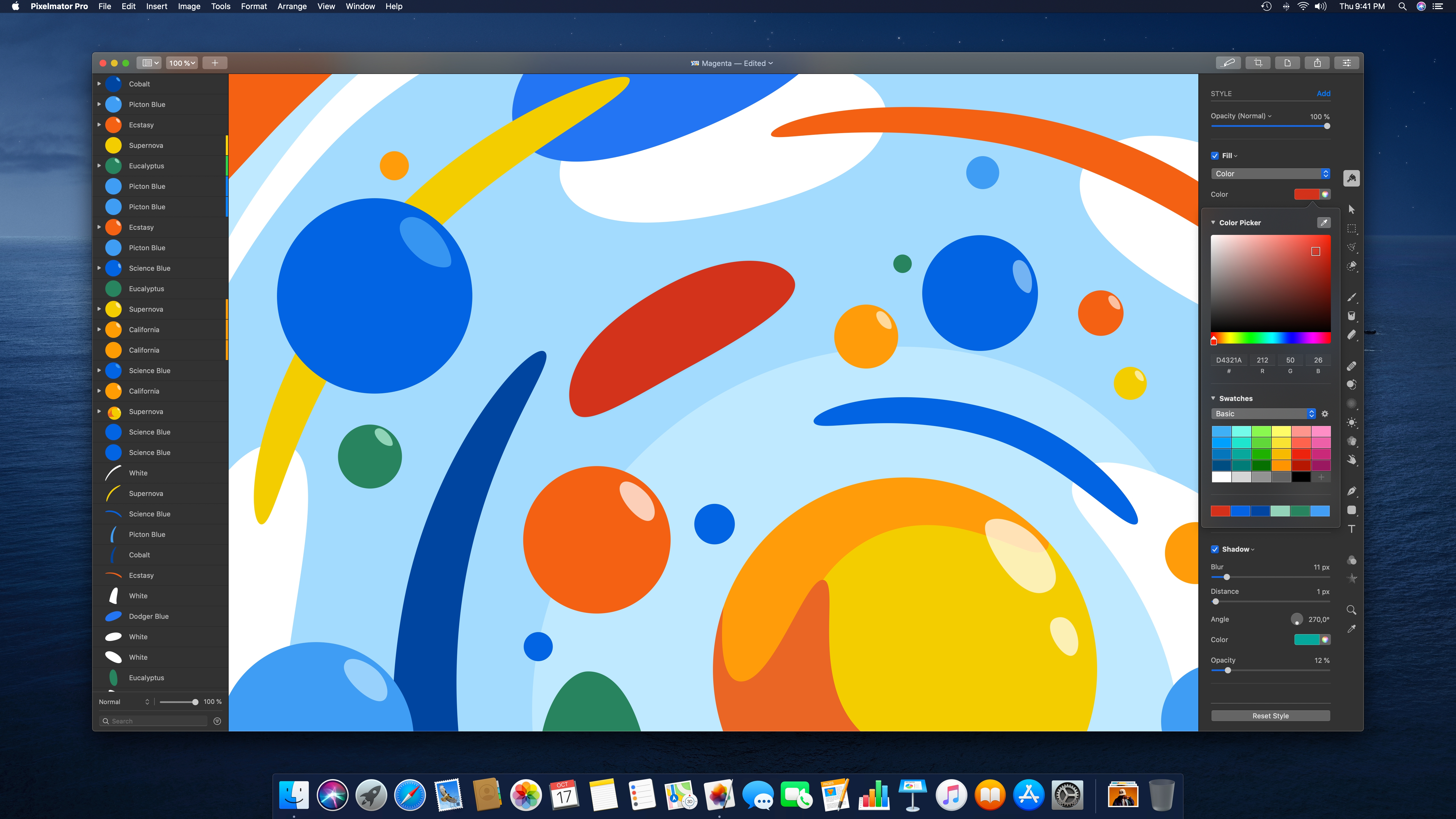
The Pixelmator Team today released Pixelmator Pro 1.6, codenamed Magenta, a major update to the award-winning Mac image editor designed to make powerful professional tools accessible to everyday users. The update adds an all-new, beautiful, and easy-to-use color picker, includes the ability to quickly choose colors using hex color codes, makes it possible to select multiple objects by simply dragging over them, improves performance, and brings a whole lot more.
Vilnius, Lithuania - The Pixelmator Team today released Pixelmator Pro 1.6, codenamed Magenta, a major update to the award-winning Mac image editor designed to make powerful professional tools accessible to everyday users. The update adds an all-new, beautiful, and easy-to-use color picker, includes the ability to quickly choose colors using hex color codes, makes it possible to select multiple objects by simply dragging over them, improves performance, and brings a whole lot more.
"Combining powerful image editing tools with unmatched ease of use is at the core of everything we do," said Monika Perlikovskiene, the lead designer of Pixelmator Pro. "And this update to Pixelmator Pro stays true to that goal with the beautiful new color picker, which makes it easier than ever to choose and manage colors."
The new color picker in Pixelmator Pro has everything you need for choosing colors, whether you're working on a photo, illustration, digital painting, or graphic design. With the most important tools and features - hue, saturation, and lightness controls, hex and RGB color codes, and color swatches - all in one place, the new color picker is incredibly easy to use, no matter if you're just starting out with image editing or you're a seasoned pro.
The update also adds a number of new features to make image editing more convenient and fun. For example, it is now possible to quickly select multiple objects by dragging over them on the canvas, making it much easier to move and place layers in all kinds of designs and illustrations. And thanks to the Replace Fonts feature, any time you open an image that contains fonts that are not available on your Mac, you'll be able to identify and replace those fonts in a snap.
Along with these changes, Pixelmator Pro 1.6 Magenta brings some significant performance improvements, adds the ability to more easily see RGB color codes, includes a way to view recently used fonts, and features many other improvements and fixes.
Pixelmator Pro 1.6 Magenta is available today from the Mac App Store. It is free for existing users and $39.99 (USD) for new customers. An upgrade discount is also available to owners of the original Pixelmator through the Pixelmator Pro Upgrade Bundle, also available from the Mac App Store. Pixelmator Pro requires macOS High Sierra or later and a Metal-compatible graphics card. Full system requirements and more information on Pixelmator Pro can be found online.
Pixelmator Pro 1.6 Magenta: https://www.pixelmator.com/pro/
Pixelmator Pro Blog Update: https://www.pixelmator.com/blog/2020/03/30/pixelmator-pro-1-6-magenta-now-available/
Purchase and Download (Mac App Store): https://itunes.apple.com/app/pixelmator-pro/id1289583905
Pixelmator Pro 1.6 Magenta (Image): http://pixelmator-download.s3.amazonaws.com/press/Pixelmator-Pro-1.6-Magenta.jpg
Application Icon: http://pixelmator-download.s3.amazonaws.com/press/pro/Pixelmator-Pro-Icon.png
Press Kit (zip): http://pixelmator-download.s3.amazonaws.com/press/Pixelmator-Pro-1.6-Press-Kit.zip
Founded in 2007 by two brothers, Saulius Dailide and Aidas Dailide, the Pixelmator Team develops powerful image editing apps for Mac and iOS. The team's apps have been honored with multiple Mac App of the Year awards, an iPad App of the Year award, an Apple Design Award, and many others. Pixelmator for iPad was featured at the Apple Special Event in October 2014. All Material and Software (C) Copyright 2007-2020 Pixelmator. All Rights Reserved. Apple, the Apple logo, Macintosh, iPhone, iPad, and macOS are registered trademarks of Apple Inc. in the U.S. and/or other countries. Other trademarks and registered trademarks may be the property of their respective owners.
*******
Link To Article: https://prmac.com/release-id-83973.htm
*******
---------------------------------------------------------------------------------
Note that you can alter delivered distributions at any time.
Login to your account on prMac to alter your channel selection, or to opt-out at any time.


Microsoft Office Output Automation Tools on 50% off Spring Sale
A new article has been published at prMac.
Microsoft Office Output Automation Tools on 50% off Spring Sale - Published on 03/30/20
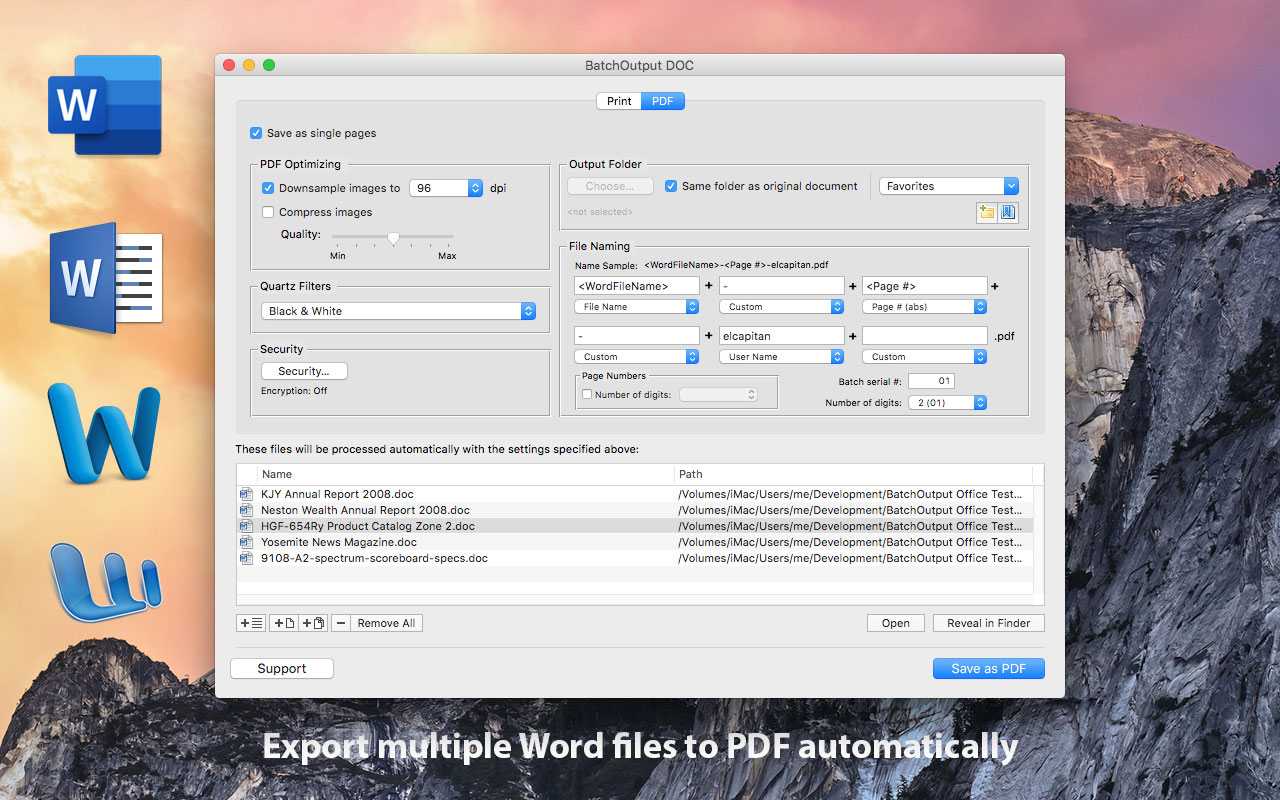
Zevrix Solutions announces today a spring sale on all products including output automation solutions for Microsoft Office. The company offers a 50% discount until April 3. Zevrix BatchOutput Office Suite automates PDF production and printing from Microsoft Word, Excel and PowerPoint on Mac. The software offers batch printing, variable file names, PDF security, single page export and more. The products on sale also include automation solutions for Adobe InDesign, Illustrator, and PDF workflows.
Toronto (ON), Canada - Zevrix Solutions announces a spring sale on all products including output automation tools for Microsoft Office. The company offers a 50% discount until April 3. Zevrix BatchOutput Office Suite is a collection of output automation apps for Microsoft Word, Excel and PowerPoint for macOS. The only automation tool for Microsoft users on the Mac market, the software streamlines printing and exporting of Office documents to PDF through batch processing with time saving output options.
In addition to batch printing, BatchOutput Office offers powerful professional PDF production tools for demanding enterprise and office publishing environments that can be applied to direct output from Word, Excel and PowerPoint.
"BatchOutput makes the process of saving collections of Word docs to PDF so much faster and easier," says Giorgio La Scala from Cologny, Switzerland. "Developers also provide top notch support that is fast and efficient... Very impressed by the level of dedication to customer satisfaction."
BatchOutput helps Office users save production costs by eliminating repetitive tasks and reducing the need for time consuming post-processing of PDF files:
* Print and export multiple Office documents to PDF with a single click
* Split Microsoft files into single page PDFs
* Variable output file names
* Reduce PDF file size and optimize documents for web, print and mobile devices
* Encrypt and password-protect PDF documents
* Change PDF color tone, brightness and other properties
BatchOutput Office is a part of the Zevrix family of software products, which also include advanced automation solutions Adobe InDesign, Illustrator, PDF workflows and file delivery.
Pricing and Availability:
BatchOutput Office Suite can be purchased at half price for US$30 from Zevrix website until April 3. The suite's applications - BatchOutput DOC, BatchOutput XLS and BatchOutput PPT - can be also purchased separately for $10 (USD) each. Trial is also available for download. The sale also applies all other products and upgrades. BatchOutput Office requires macOS 10.8 - 10.15 and Microsoft Office 2008-2019. InDesign and Illustrator solutions require Adobe Creative Cloud CS6 - 2020.
Zevrix Solutions: http://zevrix.com
Office Suite Spring Sale: http://zevrix.com/BatchOutputOffice.php
Download Office Suite: http://zevrix.com/BatchOutputOffice.dmg
Purchase: http://zevrix.com/store.php
Screenshot: http://zevrix.com/screenshots/bo-office/MAS/bodoc-pdf-mas.jpg
Located in Toronto, Canada, Zevrix Solutions provides automation and productivity solutions for Adobe Creative Cloud and Creative Suite software, PDF workflows, graphic file diagnostics and Microsoft Office output on Mac OS. Zevrix is dedicated to help professionals increase their profits through automating everyday tasks, producing error-free documents, saving disk space and cutting production costs. For more information, visit their website. Copyright (C) 2020 Zevrix Solutions. All Rights Reserved. Other trademarks and registered trademarks may be the property of their respective owners.
*******
Link To Article: https://prmac.com/release-id-83971.htm
*******
---------------------------------------------------------------------------------
Note that you can alter delivered distributions at any time.
Login to your account on prMac to alter your channel selection, or to opt-out at any time.
Microsoft Office Output Automation Tools on 50% off Spring Sale - Published on 03/30/20
Zevrix Solutions announces today a spring sale on all products including output automation solutions for Microsoft Office. The company offers a 50% discount until April 3. Zevrix BatchOutput Office Suite automates PDF production and printing from Microsoft Word, Excel and PowerPoint on Mac. The software offers batch printing, variable file names, PDF security, single page export and more. The products on sale also include automation solutions for Adobe InDesign, Illustrator, and PDF workflows.
Toronto (ON), Canada - Zevrix Solutions announces a spring sale on all products including output automation tools for Microsoft Office. The company offers a 50% discount until April 3. Zevrix BatchOutput Office Suite is a collection of output automation apps for Microsoft Word, Excel and PowerPoint for macOS. The only automation tool for Microsoft users on the Mac market, the software streamlines printing and exporting of Office documents to PDF through batch processing with time saving output options.
In addition to batch printing, BatchOutput Office offers powerful professional PDF production tools for demanding enterprise and office publishing environments that can be applied to direct output from Word, Excel and PowerPoint.
"BatchOutput makes the process of saving collections of Word docs to PDF so much faster and easier," says Giorgio La Scala from Cologny, Switzerland. "Developers also provide top notch support that is fast and efficient... Very impressed by the level of dedication to customer satisfaction."
BatchOutput helps Office users save production costs by eliminating repetitive tasks and reducing the need for time consuming post-processing of PDF files:
* Print and export multiple Office documents to PDF with a single click
* Split Microsoft files into single page PDFs
* Variable output file names
* Reduce PDF file size and optimize documents for web, print and mobile devices
* Encrypt and password-protect PDF documents
* Change PDF color tone, brightness and other properties
BatchOutput Office is a part of the Zevrix family of software products, which also include advanced automation solutions Adobe InDesign, Illustrator, PDF workflows and file delivery.
Pricing and Availability:
BatchOutput Office Suite can be purchased at half price for US$30 from Zevrix website until April 3. The suite's applications - BatchOutput DOC, BatchOutput XLS and BatchOutput PPT - can be also purchased separately for $10 (USD) each. Trial is also available for download. The sale also applies all other products and upgrades. BatchOutput Office requires macOS 10.8 - 10.15 and Microsoft Office 2008-2019. InDesign and Illustrator solutions require Adobe Creative Cloud CS6 - 2020.
Zevrix Solutions: http://zevrix.com
Office Suite Spring Sale: http://zevrix.com/BatchOutputOffice.php
Download Office Suite: http://zevrix.com/BatchOutputOffice.dmg
Purchase: http://zevrix.com/store.php
Screenshot: http://zevrix.com/screenshots/bo-office/MAS/bodoc-pdf-mas.jpg
Located in Toronto, Canada, Zevrix Solutions provides automation and productivity solutions for Adobe Creative Cloud and Creative Suite software, PDF workflows, graphic file diagnostics and Microsoft Office output on Mac OS. Zevrix is dedicated to help professionals increase their profits through automating everyday tasks, producing error-free documents, saving disk space and cutting production costs. For more information, visit their website. Copyright (C) 2020 Zevrix Solutions. All Rights Reserved. Other trademarks and registered trademarks may be the property of their respective owners.
*******
Link To Article: https://prmac.com/release-id-83971.htm
*******
---------------------------------------------------------------------------------
Note that you can alter delivered distributions at any time.
Login to your account on prMac to alter your channel selection, or to opt-out at any time.
Sixbytes Offers a Way to Improve Productivity with Launch of Mobile App
A new article has been published at prMac.
Sixbytes Offers a Way to Improve Productivity with Launch of Mobile App - Published on 03/30/20
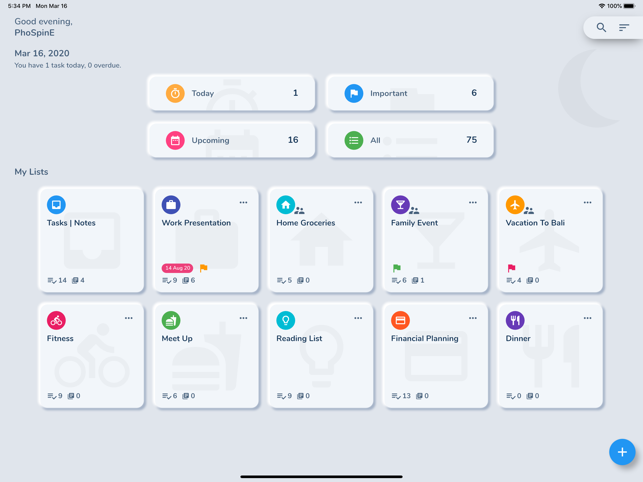
Penang-based technology company, Sixbytes releases HibiDo, a new To-do list & Notes application for mobile devices. Developed expressly to help improve your productivity, HibiDo offers a new and unique way to schedule your personal and work activities in the most efficient manner. Apart from scheduling personal activities and projects, one can also collaborate with their team to get tasks completed. Easily assign tasks to others, from family weekend plan to teamwork, share lists and more.
George Town (Penang) Malaysia - Sixbytes, a technology company focused on developing applications to improve sharing of files across multiple devices, has announced the launch of HibiDo, a new To-do list & Notes application that helps synchronize across all devices. Developed expressly to help improve your productivity, HibiDo offers a new and unique way to schedule your personal and work activities in the most efficient manner. Apart from scheduling personal activities and projects, one can also collaborate with their team to get tasks completed.
Speaking about the productivity app, Felix Yew, the developer of the app emphasized that he came up with the idea for the app after observing a number of problems her sister was going through while scheduling her tasks. "I always believed that technology can play a strong role in helping everyone improve themselves, every day. I remember observing my sister struggling to schedule her tasks. She would use different platforms to schedule her project list, reminders, personal activities and many others. It was so confusing. I thought, there must be a better way of bringing all these together into one. That is what HibiDo does. Whether you want to schedule an agenda, make memos, create a to-do lists, share shopping lists, collaborate in a team, or even taking note and journal, HibiDo is always here to help you get stuff done and keep life on track"
The app's main features and functions listed below seamlessly work together to improve your life:
* Enabling you to set task and note taking with a single app instead of using two separate apps to manage both of your task and note
* Improved collaboration by sharing workload - collaborate on projects by assigning task to others - From family weekend plan to teamwork, share lists and assign task on the go
* Auto Sync - Syncs seamlessly between multiple devices; All tasks and notes are stored on cloud and accessible across multiple platforms
* Simple and elegant design - To ensure that there is improved visibility while you schedule your projects
* Reminder - Get reminded anytime, anywhere; It helps you to remember deadlines with reminders and due dates when creating a new task
With the launch of the new productivity application by Sixbytes, there is no doubt that the company has gone a long way in resolving a number of productivity challenges that we face. Recent research has indicated that as human beings we spend 45% of our waking hours thinking about multiple tasks at once, hence hindering our productivity. HibiDo resolves all these issues by helping you to track a single activity at a time. The app allows you to have a better clarification of the tasks that you want to carry out beginning from the high priority, medium level priority and the no priority levels.
Device Requirements:
* iPhone, iPad, and iPod touch
* Requires iOS 9.0 or later
* 88.5 MB
Pricing and Availability:
HibiDo 1.0.9 is Free (With In-App Purchases) and available worldwide exclusively through the App Store in the Productivity category. To learn more visit the company's website.
HibiDo 1.0.9: https://sixbytes.io
Download from the App Store: https://apps.apple.com/us/app/hibido-to-do-list-notes/id1486134043
Screenshot: https://is4-ssl.mzstatic.com/image/thumb/Purple123/v4/1f/e7/f8/1fe7f8c5-da18-c47b-9fac-b0ffc44ccc76/pr_source.png/643x0w.png
App Icon: https://is1-ssl.mzstatic.com/image/thumb/Purple123/v4/90/90/f8/9090f8a0-7a67-37ab-d807-5f30cc4a468e/AppIcon-0-0-1x_U007emarketing-0-0-0-7-0-0-85-220.png/246x0w.png
Press Kit (zip): https://sixbytes.io/assets/press.zip?189db0&189db0
Sixbytes was founded in 2009 to develop an app as the simplest way to share files between mobile devices. We are passionate about productivity, simplicity, and beautiful design. Today we have a set of beautifully obvious tools to keep your ideas moving. Our goal is to help everyone boost productivity and enjoy life by building a simple, but not simpler product that improves human productivity. We value our users' experience, and continuously develop innovative features to make the app ever more stable and smooth. To learn more about the company please visit our website. All Material and Software (C) Copyright 2020 Sixbytes PLT. All Rights Reserved. Apple, the Apple logo, iPhone, iPod and iPad are registered trademarks of Apple Inc. in the U.S. and/or other countries. Other trademarks and registered trademarks may be the property of their respective owners.
*******
Link To Article: https://prmac.com/release-id-83970.htm
*******
---------------------------------------------------------------------------------
Note that you can alter delivered distributions at any time.
Login to your account on prMac to alter your channel selection, or to opt-out at any time.
Sixbytes Offers a Way to Improve Productivity with Launch of Mobile App - Published on 03/30/20
Penang-based technology company, Sixbytes releases HibiDo, a new To-do list & Notes application for mobile devices. Developed expressly to help improve your productivity, HibiDo offers a new and unique way to schedule your personal and work activities in the most efficient manner. Apart from scheduling personal activities and projects, one can also collaborate with their team to get tasks completed. Easily assign tasks to others, from family weekend plan to teamwork, share lists and more.
George Town (Penang) Malaysia - Sixbytes, a technology company focused on developing applications to improve sharing of files across multiple devices, has announced the launch of HibiDo, a new To-do list & Notes application that helps synchronize across all devices. Developed expressly to help improve your productivity, HibiDo offers a new and unique way to schedule your personal and work activities in the most efficient manner. Apart from scheduling personal activities and projects, one can also collaborate with their team to get tasks completed.
Speaking about the productivity app, Felix Yew, the developer of the app emphasized that he came up with the idea for the app after observing a number of problems her sister was going through while scheduling her tasks. "I always believed that technology can play a strong role in helping everyone improve themselves, every day. I remember observing my sister struggling to schedule her tasks. She would use different platforms to schedule her project list, reminders, personal activities and many others. It was so confusing. I thought, there must be a better way of bringing all these together into one. That is what HibiDo does. Whether you want to schedule an agenda, make memos, create a to-do lists, share shopping lists, collaborate in a team, or even taking note and journal, HibiDo is always here to help you get stuff done and keep life on track"
The app's main features and functions listed below seamlessly work together to improve your life:
* Enabling you to set task and note taking with a single app instead of using two separate apps to manage both of your task and note
* Improved collaboration by sharing workload - collaborate on projects by assigning task to others - From family weekend plan to teamwork, share lists and assign task on the go
* Auto Sync - Syncs seamlessly between multiple devices; All tasks and notes are stored on cloud and accessible across multiple platforms
* Simple and elegant design - To ensure that there is improved visibility while you schedule your projects
* Reminder - Get reminded anytime, anywhere; It helps you to remember deadlines with reminders and due dates when creating a new task
With the launch of the new productivity application by Sixbytes, there is no doubt that the company has gone a long way in resolving a number of productivity challenges that we face. Recent research has indicated that as human beings we spend 45% of our waking hours thinking about multiple tasks at once, hence hindering our productivity. HibiDo resolves all these issues by helping you to track a single activity at a time. The app allows you to have a better clarification of the tasks that you want to carry out beginning from the high priority, medium level priority and the no priority levels.
Device Requirements:
* iPhone, iPad, and iPod touch
* Requires iOS 9.0 or later
* 88.5 MB
Pricing and Availability:
HibiDo 1.0.9 is Free (With In-App Purchases) and available worldwide exclusively through the App Store in the Productivity category. To learn more visit the company's website.
HibiDo 1.0.9: https://sixbytes.io
Download from the App Store: https://apps.apple.com/us/app/hibido-to-do-list-notes/id1486134043
Screenshot: https://is4-ssl.mzstatic.com/image/thumb/Purple123/v4/1f/e7/f8/1fe7f8c5-da18-c47b-9fac-b0ffc44ccc76/pr_source.png/643x0w.png
App Icon: https://is1-ssl.mzstatic.com/image/thumb/Purple123/v4/90/90/f8/9090f8a0-7a67-37ab-d807-5f30cc4a468e/AppIcon-0-0-1x_U007emarketing-0-0-0-7-0-0-85-220.png/246x0w.png

Press Kit (zip): https://sixbytes.io/assets/press.zip?189db0&189db0
Sixbytes was founded in 2009 to develop an app as the simplest way to share files between mobile devices. We are passionate about productivity, simplicity, and beautiful design. Today we have a set of beautifully obvious tools to keep your ideas moving. Our goal is to help everyone boost productivity and enjoy life by building a simple, but not simpler product that improves human productivity. We value our users' experience, and continuously develop innovative features to make the app ever more stable and smooth. To learn more about the company please visit our website. All Material and Software (C) Copyright 2020 Sixbytes PLT. All Rights Reserved. Apple, the Apple logo, iPhone, iPod and iPad are registered trademarks of Apple Inc. in the U.S. and/or other countries. Other trademarks and registered trademarks may be the property of their respective owners.
*******
Link To Article: https://prmac.com/release-id-83970.htm
*******
---------------------------------------------------------------------------------
Note that you can alter delivered distributions at any time.
Login to your account on prMac to alter your channel selection, or to opt-out at any time.
Cell4pets Is Buying iPhones & Offering Biggest Bonus Yet - No Disruption
A new article has been published at prMac.
Cell4pets Is Buying iPhones & Offering Biggest Bonus Yet - No Disruption - Published on 03/26/20
Cell4pets is offering their biggest bonus yet for used iPhones and iPads. The mission at Cell4pets is to find responsible and loving homes for the millions of abandoned and abused dogs and cats. The company is offering an additional $15.00 when you sell them an iPhone or iPad. Enter Coupon Code StaySafe at checkout to receive the bonus. They will buy iPhone 6s up through iPhone 11 Pro Max. They resell your device and take a portion of every sale and donate it to the North Shore Animal League.
Mechanicsburg, Pennsylvania - CoronaVirus Update - No Disruption Of Cell4pets Services - They have made all the required adjustments and are following local and state guidance. Cell4pets is offering top dollar for iPhones and iPads. Sell an iPhone or iPad today and earn an additional $15.00! Go to Cell4pets and enter the details about an iPhone or iPad. At checkout, enter Coupon Code "StaySafe" for an additional $15.00. Cell4pets offers some of the highest payouts in the industry, typically 30% more than the carriers.
Extending the life cycle of electronic devices keeps them out of landfills. It's estimated there are millions if not a billion unused cell phones in the US. It is Cell4pets mission to reduce the amount of unused electronic devices that end up in landfills. By refurbishing, reselling, or recycling, Cell4pets is helping to save the planet and giving back to no-kill animal shelters.
Factors impacting the price received for a device.
* Model: It's simple, iPhones, iPads, and Galaxy phones bring the highest offers. The newer the model the higher the offer
* Condition: Please read descriptions carefully. Good and Flawless devices receive significantly more than Fair, Cracked or Broken
* Manufacturer: Apple and Samsung have an edge over the other smartphone manufacturers due to higher global demand
Earn significantly more for iPhones or Samsung phones when selling a device to Cell4pets. Cell4pets has made it really simple to sell iPhones and iPads online. The process is quick and easy, just three simple steps! Cell4pets offers an instant price quote for used Apple iPhones, iPads or Samsung Galaxy smartphones making the entire process seamless. They provide a Priority USPS label and offer different payout options. Even if a device is not listed on the portal, a request can be sent to their team of technicians.
Cell4pets: https://cell4pets.com
Sell Your iPhone For More: https://cell4pets.com/devices/sell/iphone
Sell Your iPad For More: https://cell4pets.com/devices/sell/ipad
Our Mission: https://cell4pets.com/about/
Located in Mechanicsburg, Pennsylvania, Cell4pets has been in the electronic surplus business for 20 years. With a solid reputation, the company is 5 Star rated on Trust Pilot, with 660 100% positive feedbacks on eBay, and 670 all positive reviews on Swappa. All Material and Software (C) Copyright 2020 Cell4pets. All Rights Reserved. Apple, the Apple logo, iPhone, iPod and iPad are registered trademarks of Apple Inc. in the U.S. and/or other countries. Other trademarks and registered trademarks may be the property of their respective owners.
*******
Link To Article: https://prmac.com/release-id-83969.htm
*******
---------------------------------------------------------------------------------
Note that you can alter delivered distributions at any time.
Login to your account on prMac to alter your channel selection, or to opt-out at any time.
Cell4pets Is Buying iPhones & Offering Biggest Bonus Yet - No Disruption - Published on 03/26/20
Cell4pets is offering their biggest bonus yet for used iPhones and iPads. The mission at Cell4pets is to find responsible and loving homes for the millions of abandoned and abused dogs and cats. The company is offering an additional $15.00 when you sell them an iPhone or iPad. Enter Coupon Code StaySafe at checkout to receive the bonus. They will buy iPhone 6s up through iPhone 11 Pro Max. They resell your device and take a portion of every sale and donate it to the North Shore Animal League.
Mechanicsburg, Pennsylvania - CoronaVirus Update - No Disruption Of Cell4pets Services - They have made all the required adjustments and are following local and state guidance. Cell4pets is offering top dollar for iPhones and iPads. Sell an iPhone or iPad today and earn an additional $15.00! Go to Cell4pets and enter the details about an iPhone or iPad. At checkout, enter Coupon Code "StaySafe" for an additional $15.00. Cell4pets offers some of the highest payouts in the industry, typically 30% more than the carriers.
Extending the life cycle of electronic devices keeps them out of landfills. It's estimated there are millions if not a billion unused cell phones in the US. It is Cell4pets mission to reduce the amount of unused electronic devices that end up in landfills. By refurbishing, reselling, or recycling, Cell4pets is helping to save the planet and giving back to no-kill animal shelters.
Factors impacting the price received for a device.
* Model: It's simple, iPhones, iPads, and Galaxy phones bring the highest offers. The newer the model the higher the offer
* Condition: Please read descriptions carefully. Good and Flawless devices receive significantly more than Fair, Cracked or Broken
* Manufacturer: Apple and Samsung have an edge over the other smartphone manufacturers due to higher global demand
Earn significantly more for iPhones or Samsung phones when selling a device to Cell4pets. Cell4pets has made it really simple to sell iPhones and iPads online. The process is quick and easy, just three simple steps! Cell4pets offers an instant price quote for used Apple iPhones, iPads or Samsung Galaxy smartphones making the entire process seamless. They provide a Priority USPS label and offer different payout options. Even if a device is not listed on the portal, a request can be sent to their team of technicians.
Cell4pets: https://cell4pets.com
Sell Your iPhone For More: https://cell4pets.com/devices/sell/iphone
Sell Your iPad For More: https://cell4pets.com/devices/sell/ipad
Our Mission: https://cell4pets.com/about/
Located in Mechanicsburg, Pennsylvania, Cell4pets has been in the electronic surplus business for 20 years. With a solid reputation, the company is 5 Star rated on Trust Pilot, with 660 100% positive feedbacks on eBay, and 670 all positive reviews on Swappa. All Material and Software (C) Copyright 2020 Cell4pets. All Rights Reserved. Apple, the Apple logo, iPhone, iPod and iPad are registered trademarks of Apple Inc. in the U.S. and/or other countries. Other trademarks and registered trademarks may be the property of their respective owners.
*******
Link To Article: https://prmac.com/release-id-83969.htm
*******
---------------------------------------------------------------------------------
Note that you can alter delivered distributions at any time.
Login to your account on prMac to alter your channel selection, or to opt-out at any time.
Adobe InDesign Plug-Ins and PDF Tools on 50% off Spring Sale
A new article has been published at prMac.
Adobe InDesign Plug-Ins and PDF Tools on 50% off Spring Sale - Published on 03/25/20
Zevrix Solutions, a developer of automation solutions for Adobe InDesign, PDF workflows and Microsoft Office, announces today a spring sale until April 3. The company offers 50% discount on all products including upgrades. Zevrix offers plug-ins for InDesign that automate document printing and exporting, reduce linked image size, and simplify file packaging. The company's software also automates PDF printing and conversion, image and vector file preflighting, and output from Microsoft Office.
Toronto, Canada - Zevrix Solutions, a developer of automation solutions for Adobe InDesign, PDF workflows and Microsoft Office, announces today a spring sale until April 3. Zevrix offers 50% discount on everything in its online store including product upgrades. The company offers several popular plug-ins for Adobe InDesign and Illustrator, which help professionals automate document output, automate repetitive tasks, save disk space, and cut production costs.
"Zevrix software its the best kept secret out there for the Graphic Design industry," says Darren Rath of eponymous design studio in Melbourne, Australia. "It rocks and continues to impress and improve at a scary rate... Thanks to Zevrix products, every piece of artwork that flies out of here requires no intervention by the prepress departments."
The following products are available on sale:
* LinkOptimizer for InDesign, a plug-in that reduces link size by eliminating excess image data, performs essential picture adjustments, and converts file formats. LinkOptimizer lets users save gigabytes of disk space, cut down on processing time, and reduce production costs.
* Output Factory for InDesign, a document printing and exporting automation solution that offers batch output, layer versioning, export as single pages, preflighting, variable file names, and more. A server version that processes files from watched hot folders is also available.
* Package Central for InDesign, a server-grade tool that automates packaging of InDesign documents from hot folders. The app automatically collects InDesign documents along with their links and fonts with the ability to include PDF and IDML files, send email notifications, assign variable folder names and more.
* Zevrix tools for PDF workflows let users batch print PDF files and automate preflighting, color conversion and format exchange. The company also offers batch output solutions for Microsoft Office, file delivery automation tools, and quality control software for images and vector graphic files.
Pricing and Availability:
Zevrix software can be purchased at 50% off until April 3, 2020 from Zevrix website. For details, please visit the website. Product trials are also available for download. All Zevrix products require macOS 10.8-10.15; InDesign and Illustrator solutions require Adobe Creative Cloud CS5-2020 software.
Zevrix Solutions Sale: http://zevrix.com
Download Applications: http://zevrix.com/download.php
Purchase: http://zevrix.com/store.php
Screenshot: http://zevrix.com/screenshots/of2/of2-pdf.jpg
Located in Toronto, Canada, Zevrix Solutions provides automation and productivity solutions for Adobe Creative Cloud and Creative Suite software, PDF workflows, graphic file diagnostics and Microsoft Office output on Mac OS. Zevrix is dedicated to help professionals increase their profits through automating everyday tasks, producing error-free documents, saving disk space and cutting production costs. For more information, visit their website. Copyright (C) 2020 Zevrix Solutions. All Rights Reserved. Other trademarks and registered trademarks may be the property of their respective owners.
*******
Link To Article: https://prmac.com/release-id-83968.htm
*******
---------------------------------------------------------------------------------
Note that you can alter delivered distributions at any time.
Login to your account on prMac to alter your channel selection, or to opt-out at any time.
Adobe InDesign Plug-Ins and PDF Tools on 50% off Spring Sale - Published on 03/25/20
Zevrix Solutions, a developer of automation solutions for Adobe InDesign, PDF workflows and Microsoft Office, announces today a spring sale until April 3. The company offers 50% discount on all products including upgrades. Zevrix offers plug-ins for InDesign that automate document printing and exporting, reduce linked image size, and simplify file packaging. The company's software also automates PDF printing and conversion, image and vector file preflighting, and output from Microsoft Office.
Toronto, Canada - Zevrix Solutions, a developer of automation solutions for Adobe InDesign, PDF workflows and Microsoft Office, announces today a spring sale until April 3. Zevrix offers 50% discount on everything in its online store including product upgrades. The company offers several popular plug-ins for Adobe InDesign and Illustrator, which help professionals automate document output, automate repetitive tasks, save disk space, and cut production costs.
"Zevrix software its the best kept secret out there for the Graphic Design industry," says Darren Rath of eponymous design studio in Melbourne, Australia. "It rocks and continues to impress and improve at a scary rate... Thanks to Zevrix products, every piece of artwork that flies out of here requires no intervention by the prepress departments."
The following products are available on sale:
* LinkOptimizer for InDesign, a plug-in that reduces link size by eliminating excess image data, performs essential picture adjustments, and converts file formats. LinkOptimizer lets users save gigabytes of disk space, cut down on processing time, and reduce production costs.
* Output Factory for InDesign, a document printing and exporting automation solution that offers batch output, layer versioning, export as single pages, preflighting, variable file names, and more. A server version that processes files from watched hot folders is also available.
* Package Central for InDesign, a server-grade tool that automates packaging of InDesign documents from hot folders. The app automatically collects InDesign documents along with their links and fonts with the ability to include PDF and IDML files, send email notifications, assign variable folder names and more.
* Zevrix tools for PDF workflows let users batch print PDF files and automate preflighting, color conversion and format exchange. The company also offers batch output solutions for Microsoft Office, file delivery automation tools, and quality control software for images and vector graphic files.
Pricing and Availability:
Zevrix software can be purchased at 50% off until April 3, 2020 from Zevrix website. For details, please visit the website. Product trials are also available for download. All Zevrix products require macOS 10.8-10.15; InDesign and Illustrator solutions require Adobe Creative Cloud CS5-2020 software.
Zevrix Solutions Sale: http://zevrix.com
Download Applications: http://zevrix.com/download.php
Purchase: http://zevrix.com/store.php
Screenshot: http://zevrix.com/screenshots/of2/of2-pdf.jpg

Located in Toronto, Canada, Zevrix Solutions provides automation and productivity solutions for Adobe Creative Cloud and Creative Suite software, PDF workflows, graphic file diagnostics and Microsoft Office output on Mac OS. Zevrix is dedicated to help professionals increase their profits through automating everyday tasks, producing error-free documents, saving disk space and cutting production costs. For more information, visit their website. Copyright (C) 2020 Zevrix Solutions. All Rights Reserved. Other trademarks and registered trademarks may be the property of their respective owners.
*******
Link To Article: https://prmac.com/release-id-83968.htm
*******
---------------------------------------------------------------------------------
Note that you can alter delivered distributions at any time.
Login to your account on prMac to alter your channel selection, or to opt-out at any time.
Extreme Bowling Challenge for iOS, Android, AppleTV, Windows PC, Xbox
A new article has been published at prMac.
Extreme Bowling Challenge for iOS, Android, AppleTV, Windows PC, Xbox - Published on 03/24/20
Magnin & Associates today introduces Extreme Bowling Challenge 1.0, their new game for iOS, Android, Apple TV, Windows PC and Xbox, where it's like having your own bowling alley in your pocket! Have a lane to yourself, bowl up to 3 AI players, or challenge up to 3 friends online. The game optionally shares player accomplishments through Facebook, Twitter, email, or instant messaging. The Universal App supports iPhone, iPod touch, and iPad, including standard, Retina, and iPhone X displays.
Farmers Branch, Texas, USA - Magnin & Associates today introduces Extreme Bowling Challenge 1.0, their new game for iOS, Android, Apple TV, Windows PC, and Xbox.
It's like having your own bowling alley in your pocket:
* Have a lane to yourself
* Bowl against up to 3 AI players
* Challenge up to 3 friends online
Five unique types of gameplay:
* Normal 10-frame bowling game with automatic scoring
* Curve ball - pins are positioned on a curve stretching the length of the lane
* Interception - avoid a sliding triangular block which knocks you off course
* Ramp - your ball goes airborne off a ramp, landing just before the pins
* Turbulence - giant blowers from either side push your ball off course
The game is multiplayer and multi-platform, supporting most popular smartphones, tablets, and computers. Optionally share player accomplishments with Facebook, Twitter, email, or instant messaging. Universal App - supports iPhone, iPod touch, and iPad, including standard, Retina, and iPhone X displays.
The game was produced by Ed Magnin, programmed by Willie Johnson, Jr, playtested by game dev student interns from Richland College - Daniel Batts and Lorenzo Torres, along with Dallas ISD, Conrad H-TECH students - David Hayes, Amber Roberson, and Collin Porter. Matt Campana created the sound effects.
According to Ed Magnin, "It is like having a bowling alley in your pocket, with traditional as well as extreme gameplay modes, both single player or multiplayer with up to 3 online friends."
Device Requirements (iOS):
* Compatible with iPhone, iPad, and iPod touch
* Requires iOS 9.0 or later
* Universal App (includes Standard, Retina, and iPhone X and XS displays)
* 133.5 MB
* Rated 4+
Pricing and Availability:
Extreme Bowling Challenge 1.0 is $2.99 USD (or an equivalent amount in other currencies) and available worldwide through the App Store in the Games category for iPhone, iPad, and Apple TV. An Android version is available worldwide from both Google Play and the Amazon AppStore. A Windows 10 PC and Xbox version is available from the Windows Store. For more information, please contact Ed Magnin.
Magnin & Associates: http://MagninGames.com
Extreme Bowling Challenge 1.0: http://MagninGames.com/bowling
YouTube Video: https://www.youtube.com/watch?v=2SVu_LGKMdU
Game Credits: https://www.pinterest.com/pin/477733472974317360/
Screenshot (Title Screen): http://magningames.com/iphone/bowling/images/Title.png
App Icon: http://MagninGames.com/iphone/bowling/images/Icon_144.png
Ed Magnin has been actively involved in the game industry since 1979. Earlier in his career he worked for some of the top game developers of their day - MicroProse, Cinemaware, Virgin Games, and Park Place Productions. In 1993, he founded Magnin & Associates and has focused on handheld games ever since. They have created over 30 games for iOS (with over a million App Store downloads). Most are also available for Android, Apple TV, Windows 10 PC and Xbox. All Material and Software (C) Copyright 2020 Magnin & Associates. All Rights Reserved. Apple, the Apple logo, iPhone, iPod and iPad are registered trademarks of Apple Inc. in the U.S. and/or other countries. Other trademarks and registered trademarks may be the property of their respective owners.
*******
Link To Article: https://prmac.com/release-id-83967.htm
*******
---------------------------------------------------------------------------------
Note that you can alter delivered distributions at any time.
Login to your account on prMac to alter your channel selection, or to opt-out at any time.
Extreme Bowling Challenge for iOS, Android, AppleTV, Windows PC, Xbox - Published on 03/24/20
Magnin & Associates today introduces Extreme Bowling Challenge 1.0, their new game for iOS, Android, Apple TV, Windows PC and Xbox, where it's like having your own bowling alley in your pocket! Have a lane to yourself, bowl up to 3 AI players, or challenge up to 3 friends online. The game optionally shares player accomplishments through Facebook, Twitter, email, or instant messaging. The Universal App supports iPhone, iPod touch, and iPad, including standard, Retina, and iPhone X displays.
Farmers Branch, Texas, USA - Magnin & Associates today introduces Extreme Bowling Challenge 1.0, their new game for iOS, Android, Apple TV, Windows PC, and Xbox.
It's like having your own bowling alley in your pocket:
* Have a lane to yourself
* Bowl against up to 3 AI players
* Challenge up to 3 friends online
Five unique types of gameplay:
* Normal 10-frame bowling game with automatic scoring
* Curve ball - pins are positioned on a curve stretching the length of the lane
* Interception - avoid a sliding triangular block which knocks you off course
* Ramp - your ball goes airborne off a ramp, landing just before the pins
* Turbulence - giant blowers from either side push your ball off course
The game is multiplayer and multi-platform, supporting most popular smartphones, tablets, and computers. Optionally share player accomplishments with Facebook, Twitter, email, or instant messaging. Universal App - supports iPhone, iPod touch, and iPad, including standard, Retina, and iPhone X displays.
The game was produced by Ed Magnin, programmed by Willie Johnson, Jr, playtested by game dev student interns from Richland College - Daniel Batts and Lorenzo Torres, along with Dallas ISD, Conrad H-TECH students - David Hayes, Amber Roberson, and Collin Porter. Matt Campana created the sound effects.
According to Ed Magnin, "It is like having a bowling alley in your pocket, with traditional as well as extreme gameplay modes, both single player or multiplayer with up to 3 online friends."
Device Requirements (iOS):
* Compatible with iPhone, iPad, and iPod touch
* Requires iOS 9.0 or later
* Universal App (includes Standard, Retina, and iPhone X and XS displays)
* 133.5 MB
* Rated 4+
Pricing and Availability:
Extreme Bowling Challenge 1.0 is $2.99 USD (or an equivalent amount in other currencies) and available worldwide through the App Store in the Games category for iPhone, iPad, and Apple TV. An Android version is available worldwide from both Google Play and the Amazon AppStore. A Windows 10 PC and Xbox version is available from the Windows Store. For more information, please contact Ed Magnin.
Magnin & Associates: http://MagninGames.com
Extreme Bowling Challenge 1.0: http://MagninGames.com/bowling
YouTube Video: https://www.youtube.com/watch?v=2SVu_LGKMdU
Game Credits: https://www.pinterest.com/pin/477733472974317360/
Screenshot (Title Screen): http://magningames.com/iphone/bowling/images/Title.png

App Icon: http://MagninGames.com/iphone/bowling/images/Icon_144.png

Ed Magnin has been actively involved in the game industry since 1979. Earlier in his career he worked for some of the top game developers of their day - MicroProse, Cinemaware, Virgin Games, and Park Place Productions. In 1993, he founded Magnin & Associates and has focused on handheld games ever since. They have created over 30 games for iOS (with over a million App Store downloads). Most are also available for Android, Apple TV, Windows 10 PC and Xbox. All Material and Software (C) Copyright 2020 Magnin & Associates. All Rights Reserved. Apple, the Apple logo, iPhone, iPod and iPad are registered trademarks of Apple Inc. in the U.S. and/or other countries. Other trademarks and registered trademarks may be the property of their respective owners.
*******
Link To Article: https://prmac.com/release-id-83967.htm
*******
---------------------------------------------------------------------------------
Note that you can alter delivered distributions at any time.
Login to your account on prMac to alter your channel selection, or to opt-out at any time.
LinkOptimizer for Adobe InDesign Adds New Duplicate Image Name Options
A new article has been published at prMac.
LinkOptimizer for Adobe InDesign Adds New Duplicate Image Name Options - Published on 03/24/20
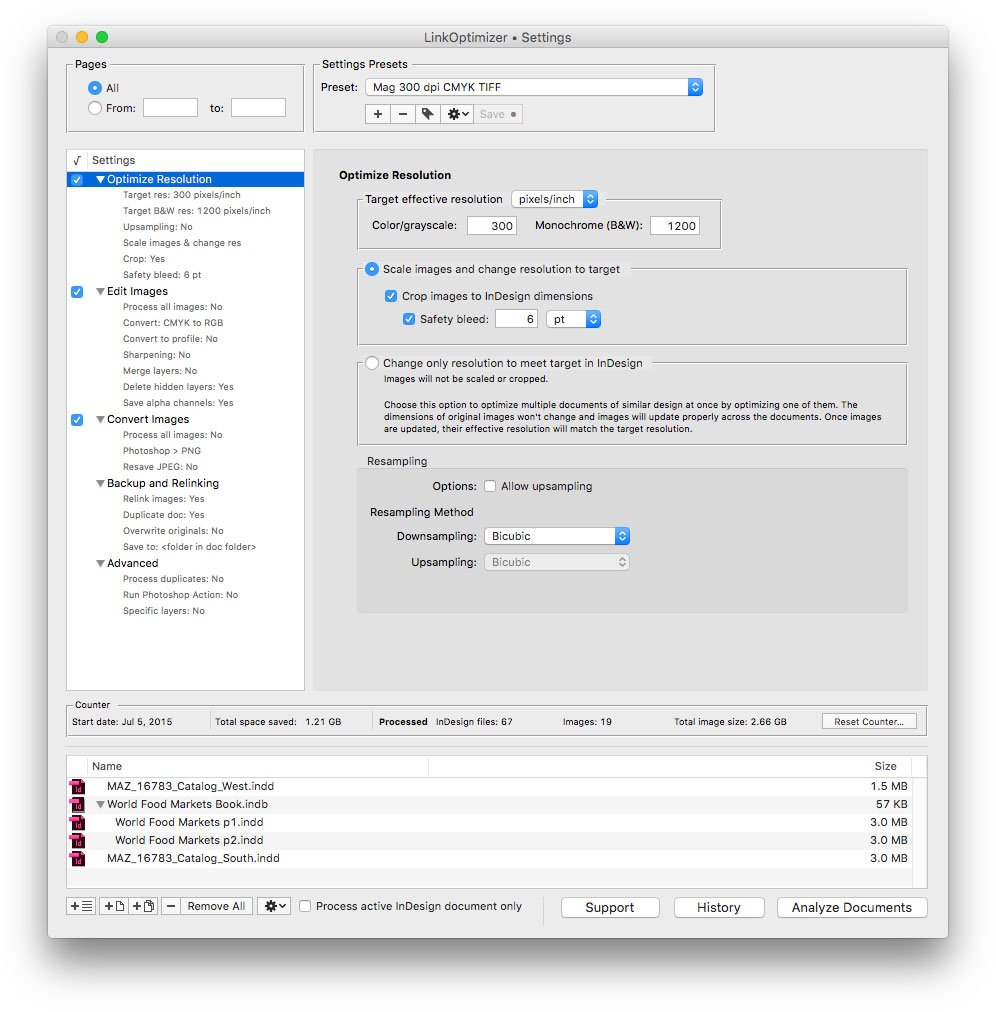
Zevrix Solutions announces LinkOptimizer 5.4.15, a feature update to company's workflow automation solution for Adobe InDesign. LinkOptimizer automatically scales and crops images to their InDesign dimensions at a target resolution, converts image formats and colors, adjusts sharpening, runs Photoshop actions and more. The new version adds new options for variable names of duplicate image links, improves memory management, and addresses an InDesign bug on macOS Catalina.
Toronto (ON), Canada - Zevrix Solutions today announces LinkOptimizer 5.4.15, a feature update to company's image processing automation tool for Adobe InDesign. LinkOptimizer automates complex image manipulation tasks and allows users to reduce the size of InDesign links, save processing time, and decrease production costs.
The new version adds advanced options for the naming of duplicate InDesign links during processing. Users can now assign unique names to duplicates by using a random number or by appending a serial number to the variable file name. The update also improves memory management and addresses a bug in InDesign that caused an error when updating links during analyzing on macOS Catalina.
"LinkOptimizer has changed my life and saved me days and days of work as a retoucher for an international quarterly magazine," says Steve Krason of Chicago based SK Design Group. "It's a lifesaver".
LinkOptimizer works automatically with Adobe Photoshop to eliminate the excess image data of InDesign links, perform essential image adjustments and convert various image formats. For example, with just a click of a button users can:
* Scale and crop images to match their dimensions in InDesign
* Change their resolution to 300 ppi
* Convert all RGB images to CMYK
* Resave all JPEG images as TIFF
* Run a Photoshop Action on each image
At the end of processing, LinkOptimizer will reimport images to InDesign at 100% in their precise position. The resulting savings of disk space, time and resources can be dramatic:
* Save gigabytes of disk space
* Accelerate document output
* Save endless hours - and even days - of manually optimizing image size, resolution and formats
* Reduce job turnaround drastically and cut costs through faster processing
Pricing and Availability:
LinkOptimizer can be purchased from Zevrix website for $259.95 USD (Light version: $179.95) as well as from Adobe Exchange and authorized resellers. Trial is also available for download. The update is free for LinkOptimizer 5.x users and $130 to upgrade from previous versions. LinkOptimizer requires macOS 10.8-10.15 and Adobe InDesign / Photoshop CS5-2020.
Zevrix Solutions: http://zevrix.com
LinkOptimizer 5.4.15: http://zevrix.com/LinkOptimizer.php
Download LinkOptimizer: http://zevrix.com/LinkOptimizer.dmg
Purchase: http://zevrix.com/store.php
Screenshot: http://zevrix.com/screenshots/lo5/res-win.jpg
Located in Toronto, Canada, Zevrix Solutions provides automation and productivity solutions for Adobe Creative Cloud and Creative Suite software, PDF workflows, graphic file diagnostics and Microsoft Office output on Mac OS. Zevrix is dedicated to help professionals increase their profits through automating everyday tasks, producing error-free documents, saving disk space and cutting production costs. For more information, visit their website. Copyright (C) 2020 Zevrix Solutions. All Rights Reserved. Other trademarks and registered trademarks may be the property of their respective owners.
*******
Link To Article: https://prmac.com/release-id-83966.htm
*******
---------------------------------------------------------------------------------
Note that you can alter delivered distributions at any time.
Login to your account on prMac to alter your channel selection, or to opt-out at any time.
LinkOptimizer for Adobe InDesign Adds New Duplicate Image Name Options - Published on 03/24/20
Zevrix Solutions announces LinkOptimizer 5.4.15, a feature update to company's workflow automation solution for Adobe InDesign. LinkOptimizer automatically scales and crops images to their InDesign dimensions at a target resolution, converts image formats and colors, adjusts sharpening, runs Photoshop actions and more. The new version adds new options for variable names of duplicate image links, improves memory management, and addresses an InDesign bug on macOS Catalina.
Toronto (ON), Canada - Zevrix Solutions today announces LinkOptimizer 5.4.15, a feature update to company's image processing automation tool for Adobe InDesign. LinkOptimizer automates complex image manipulation tasks and allows users to reduce the size of InDesign links, save processing time, and decrease production costs.
The new version adds advanced options for the naming of duplicate InDesign links during processing. Users can now assign unique names to duplicates by using a random number or by appending a serial number to the variable file name. The update also improves memory management and addresses a bug in InDesign that caused an error when updating links during analyzing on macOS Catalina.
"LinkOptimizer has changed my life and saved me days and days of work as a retoucher for an international quarterly magazine," says Steve Krason of Chicago based SK Design Group. "It's a lifesaver".
LinkOptimizer works automatically with Adobe Photoshop to eliminate the excess image data of InDesign links, perform essential image adjustments and convert various image formats. For example, with just a click of a button users can:
* Scale and crop images to match their dimensions in InDesign
* Change their resolution to 300 ppi
* Convert all RGB images to CMYK
* Resave all JPEG images as TIFF
* Run a Photoshop Action on each image
At the end of processing, LinkOptimizer will reimport images to InDesign at 100% in their precise position. The resulting savings of disk space, time and resources can be dramatic:
* Save gigabytes of disk space
* Accelerate document output
* Save endless hours - and even days - of manually optimizing image size, resolution and formats
* Reduce job turnaround drastically and cut costs through faster processing
Pricing and Availability:
LinkOptimizer can be purchased from Zevrix website for $259.95 USD (Light version: $179.95) as well as from Adobe Exchange and authorized resellers. Trial is also available for download. The update is free for LinkOptimizer 5.x users and $130 to upgrade from previous versions. LinkOptimizer requires macOS 10.8-10.15 and Adobe InDesign / Photoshop CS5-2020.
Zevrix Solutions: http://zevrix.com
LinkOptimizer 5.4.15: http://zevrix.com/LinkOptimizer.php
Download LinkOptimizer: http://zevrix.com/LinkOptimizer.dmg
Purchase: http://zevrix.com/store.php
Screenshot: http://zevrix.com/screenshots/lo5/res-win.jpg
Located in Toronto, Canada, Zevrix Solutions provides automation and productivity solutions for Adobe Creative Cloud and Creative Suite software, PDF workflows, graphic file diagnostics and Microsoft Office output on Mac OS. Zevrix is dedicated to help professionals increase their profits through automating everyday tasks, producing error-free documents, saving disk space and cutting production costs. For more information, visit their website. Copyright (C) 2020 Zevrix Solutions. All Rights Reserved. Other trademarks and registered trademarks may be the property of their respective owners.
*******
Link To Article: https://prmac.com/release-id-83966.htm
*******
---------------------------------------------------------------------------------
Note that you can alter delivered distributions at any time.
Login to your account on prMac to alter your channel selection, or to opt-out at any time.
Subscribe to:
Posts (Atom)