A new article has been published at prMac.
File Transfer Automation App Deliver Now Can Import Cyberduck Bookmarks - Published on 05/12/20
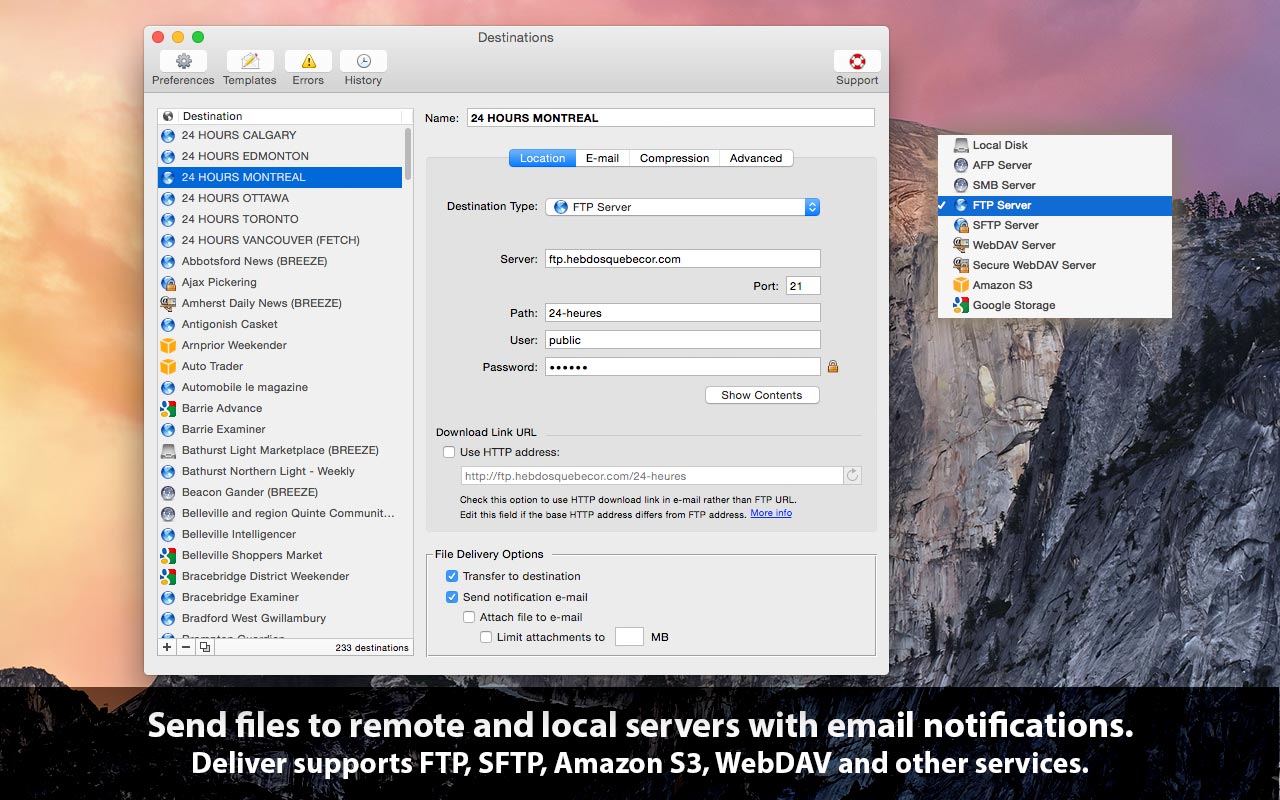
Zevrix Solutions announces Deliver 2.6.16, a maintenance update to company's file transfer tool with automatic email notifications. Deliver lets users send files to FTP, SFTP, Amazon S3 and other remote and local servers. The app offers email delivery notifications, file encryption, multi-destination transfer, upload history, and other powerful capabilities. The new version lets users import bookmarks from the popular cloud storage browser Cyberduck in order to use them as Deliver destinations.
Toronto (ON), Canada - Zevrix Solutions today announces Deliver 2.6.16, a compatibility update to the company's file transfer solution with automatic email notifications. Deliver lets users send files over the Internet and local networks to pre-defined destinations. The app offers file compression, delivery history, automatic PDF creation and other powerful capabilities. It supports FTP, SFTP, WebDAV and other remote and local services, and allows to send files to multiple destinations at once.
The new version allows users to import bookmarks from Cyberduck - a popular libre server and cloud storage browser for Mac and Windows with support for FTP, SFTP, WebDAV, Google Drive and other services. The bookmarks will be automatically converted to Deliver destinations, which enables users to quickly repurpose Cyberduck favorites for automatic delivery with email notifications.
"Deliver is a Mac app that comes close to fulfilling the laundry list of requirements," writes Natalia Nowak on Mac360, a Mac app reviews site. "It gives you a methodology and work flow to send files safely and securely to many users over the internet or to local, secure servers."
Deliver solves the problem of notifying recipients of Internet file deliveries automatically by eliminating the need to compose and send confirmations for each transfer. The app offers the following key features:
* Transfer files to FTP, Google Storage, Amazon S3 and other servers
* Automatic email notifications based on variable templates
* Compress files automatically (zip/dmg)
* Hyperlink to file for instant download by recipients
* Encrypt disk images with passwords
* Create lo-res PDF on the fly and attach to e-mail
* Transfer history
Pricing and Availability:
Deliver can be purchased from Zevrix website for $19.95 (USD), as well as from Apple Mac App Store and authorized resellers. Trial is also available for download. The update is free for licensed users of Deliver 2.x. Deliver requires macOS 10.8-10.15.
Zevrix Solutions: http://zevrix.com
Deliver 2.6.16: http://zevrix.com/Deliver.php
Download Deliver: http://zevrix.com/Deliver.dmg
Purchase: http://zevrix.com/store.php
Screenshot: http://zevrix.com/screenshots/deliver-2/MAS/deliver-mas-location.jpg
Located in Toronto, Canada, Zevrix Solutions provides automation and productivity solutions for Adobe Creative Cloud and Creative Suite software, PDF workflows, graphic file diagnostics and Microsoft Office output on Mac OS. Zevrix is dedicated to help professionals increase their profits through automating everyday tasks, producing error-free documents, saving disk space and cutting production costs. For more information, visit their website. Copyright (C) 2020 Zevrix Solutions. All Rights Reserved. Other trademarks and registered trademarks may be the property of their respective owners.
*******
Link To Article: https://prmac.com/release-id-84024.htm
*******
---------------------------------------------------------------------------------
Note that you can alter delivered distributions at any time.
Login to your account on prMac to alter your channel selection, or to opt-out at any time.

SweetP Productions, Inc. releases Minim 3.0 for macOS 10.15
A new article has been published at prMac.
SweetP Productions, Inc. releases Minim 3.0 for macOS 10.15 - Published on 05/08/20
Wilmington based SweetP Productions today announces Minim 3.0, a major update to their advanced Safari content blocker Extension. With Minim, it's super easy to block any or all page resources from the domain you are visiting and also from any third party sites not related to that domain.. iCloud support is included for convenient sync between your various Macs. Version 3.0 is a major rewrite, sporting a much improved UI, adds the ability to fully customize blocked load types, and more.
Wilmington, Delaware - SweetP Productions today is pleased to announce Minim 3.0, a major update to their advanced Safari content blocker Extension. With Minim, it's super easy to block any or all page resources from the domain you are visiting and also from any third party sites not related to that domain.. iCloud support is included for convenient sync between your various Macs.
What's a content blocker?
A content blocker stops url resources from downloading. For example, a lot of websites load images from other websites. With a traditional blocker, these images would be hidden, but still actually download to your computer. With a content blocker, the images are not downloaded at all.
Why use Minim?
It's integrated right into Safari as an extension. Minim is built using the latest macOS technologies to be fast, and does not degrade your browsing experience. In fact it enhances your internet, as everything you decide to block is not just hidden (like javascript based blockers) - but is actually blocked from downloading at all. This has the effect of speeding up your browsing by avoiding download of junk data.
Minim Features:
* Configure global block rules for all domains
* Setup Exception domain overrides with fully customizable block options
* Optionally configure to only block exception domains
* iCloud support for preferences and Exception domains
* Export/Importing of exceptions for archiving
* Notifications
* Handy Safari contextual menu options
Built with the latest technologies, and integrated right in to Safari as an Extension, Minim can help declutter the internet and/or provide a basic level of privacy.
System Requirements:
* macOS 10.15 required
* Safari 13.1 or better
Pricing and Availability:
Minim 3.0 is $19.99 USD (or equivalent amount in other currencies) and available worldwide through the Mac App Store in the Productivity category. Promo codes are available to vetted members of the press. Please contact SweetP Productions, Inc. for more information.
SweetP Productions: https://sweetpproductions.com/
Minim 3.0: https://minim.sweetpproductions.com
Purchase from the Mac App Store: https://apps.apple.com/app/minim/id1406044470
Download Trial: https://sweetpproductions.com/products/minim/Minim.dmg
Promotional image: https://minim.sweetpproductions.com/images/prefs.jpg
Headquartered in Wilmington, Delaware, USA - SweetP Productions, Inc. has been providing quality software to the Mac community since 2009. Copyright (C) 2009-2020 SweetP Productions. All Rights Reserved. Apple, the Apple logo and Macintosh are registered trademarks of Apple Inc. in the U.S. and/or other countries.
*******
Link To Article: https://prmac.com/release-id-84023.htm
*******
---------------------------------------------------------------------------------
Note that you can alter delivered distributions at any time.
Login to your account on prMac to alter your channel selection, or to opt-out at any time.
SweetP Productions, Inc. releases Minim 3.0 for macOS 10.15 - Published on 05/08/20
Wilmington based SweetP Productions today announces Minim 3.0, a major update to their advanced Safari content blocker Extension. With Minim, it's super easy to block any or all page resources from the domain you are visiting and also from any third party sites not related to that domain.. iCloud support is included for convenient sync between your various Macs. Version 3.0 is a major rewrite, sporting a much improved UI, adds the ability to fully customize blocked load types, and more.
Wilmington, Delaware - SweetP Productions today is pleased to announce Minim 3.0, a major update to their advanced Safari content blocker Extension. With Minim, it's super easy to block any or all page resources from the domain you are visiting and also from any third party sites not related to that domain.. iCloud support is included for convenient sync between your various Macs.
What's a content blocker?
A content blocker stops url resources from downloading. For example, a lot of websites load images from other websites. With a traditional blocker, these images would be hidden, but still actually download to your computer. With a content blocker, the images are not downloaded at all.
Why use Minim?
It's integrated right into Safari as an extension. Minim is built using the latest macOS technologies to be fast, and does not degrade your browsing experience. In fact it enhances your internet, as everything you decide to block is not just hidden (like javascript based blockers) - but is actually blocked from downloading at all. This has the effect of speeding up your browsing by avoiding download of junk data.
Minim Features:
* Configure global block rules for all domains
* Setup Exception domain overrides with fully customizable block options
* Optionally configure to only block exception domains
* iCloud support for preferences and Exception domains
* Export/Importing of exceptions for archiving
* Notifications
* Handy Safari contextual menu options
Built with the latest technologies, and integrated right in to Safari as an Extension, Minim can help declutter the internet and/or provide a basic level of privacy.
System Requirements:
* macOS 10.15 required
* Safari 13.1 or better
Pricing and Availability:
Minim 3.0 is $19.99 USD (or equivalent amount in other currencies) and available worldwide through the Mac App Store in the Productivity category. Promo codes are available to vetted members of the press. Please contact SweetP Productions, Inc. for more information.
SweetP Productions: https://sweetpproductions.com/
Minim 3.0: https://minim.sweetpproductions.com
Purchase from the Mac App Store: https://apps.apple.com/app/minim/id1406044470
Download Trial: https://sweetpproductions.com/products/minim/Minim.dmg
Promotional image: https://minim.sweetpproductions.com/images/prefs.jpg

Headquartered in Wilmington, Delaware, USA - SweetP Productions, Inc. has been providing quality software to the Mac community since 2009. Copyright (C) 2009-2020 SweetP Productions. All Rights Reserved. Apple, the Apple logo and Macintosh are registered trademarks of Apple Inc. in the U.S. and/or other countries.
*******
Link To Article: https://prmac.com/release-id-84023.htm
*******
---------------------------------------------------------------------------------
Note that you can alter delivered distributions at any time.
Login to your account on prMac to alter your channel selection, or to opt-out at any time.
iOS iSugars App Update: Now with Extremely Powerful Search Facility
A new article has been published at prMac.
iOS iSugars App Update: Now with Extremely Powerful Search Facility - Published on 05/07/20
Independent iOS Developer, James Hollender has updated his iSugars app, which helps in determining sugar content in foods. This is just one of ten apps updated to version 7.0 in the suite of iNutrient apps: iCarbs, iCholesterol, iFiber, iKals, iPotassium, iProteins, iSatFat, iSodium, iSugars and Vitamin K. Version 6.0 made the app capable of using the entire screen even of newer iPhones with the notch. Now version 7.0 brings back the Search feature, but one that's much more powerful.
Revere, Massachusetts - Independent iOS Developer, James Hollender has updated his iSugars app, which helps users trying to restrict their sugar intake by determining sugar content in foods. This is just one of ten apps updated to version 7.0 in the suite of iNutrient apps: iCarbs, iCholesterol, iFiber, iKals, iPotassium, iProteins, iSatFat, iSodium, iSugars and Vitamin K. Version 6.0 made the app capable of using the entire screen even of newer iPhones with the notch. Now version 7.0 brings back the Search feature, but one that's much more powerful.
Version 6.0 made the app capable of using the entire screen even of newer iPhones with the "notch". Now version 7.0 brings back the Search feature, but one that's much more powerful. These apps include data from the USDA National Nutrient Database covering the following nutrients: Calories, Carbohydrates, Cholesterol, Fiber, Potassium, Proteins, Saturated Fat, Sodium, Sugars and Vitamin K. All ten apps are universal apps that can be used on the iPhone, iPad or iPod touch devices. The apps include information on how they can be upgraded to app bundles for additional significant savings, i.e., the cost of any apps previously purchased included in bundle is deducted from the cost of the app bundle.
The big new feature in version 7.0 of iSugars is a search capability that allows for both simple and complex searches. There are two fields that can accommodate either words or phrases. Using only the first provides a simple search that looks for the supplied value in the title, description and USDA ID fields. If a second word or phrase is supplied, then the user has the choice of three operands for how the fields are evaluated: "AND", "OR" and "But Not". As the user enter or changes their values, an instantaneous display is given of how many records will be found. Pressing the "Results" button then displays the full list of matches found.
In the "Access My Records" section, each food serving for the day is listed in it's own section and the total daily amount of the nutrient is included in the day's heading. This makes comparing nutrient intake for each day an easy task.
The iSugars app provides information about foods and how they are rated for sugar content. This is provided as a means to assist in deciding which foods to eat.
"High intakes of dietary sugars in the setting of a worldwide pandemic of obesity and cardiovascular disease have heightened concerns about the adverse affects of excessive consumption of sugars. In 2001 to 2004, the usual intake of added sugars for Americans was 22.2 teaspoons a day (355 calories per day). Between 1970 and 2005, average annual availability of sugars/added sugars increased by 19%, which added 76 calories to Americans' average daily energy intake. Soft drinks and other sugar-sweetened beverages are the primary source of added sugars in Americans' diets. Excessive consumption of sugars has been linked with several metabolic abnormalities and adverse health conditions, as well as shortfalls of essential nutrients. Although trial data are limited, evidence from observational studies indicates that a higher intake of soft drinks is associated with greater energy intake, higher body weight, and lower intake of essential nutrients. National survey data also indicate the
excessive consumption of added sugars is contributing to overconsumption of discretionary calories by Americans. On the basis of the 2005 US Dietary Guidelines, intake of added sugars greatly exceeds discretionary calorie allowances, regardless of energy needs. In view of these considerations, the American Heart Association recommends reductions in the intake of added sugars. A prudent upper limit of intake is half of the discretionary calorie allowance, which for most American women is no more than 100 calories per day and for most American men is no more than 150 calories per day from added sugars." (Source: Abstract from "Dietary Sugars Intake and Cardiovascular Health" - A Scientific Statement from the American Heart Association)
From over 1,100 food servings included in the iSugars app each is rated from EXTREMELY LOW to EXTREMELY HIGH in Carbohydrates. The following colors help readily identify which is which:
* Black = Rated EXTREMELY HIGH in Sugars (40.01 - 166.46 g)
* Dark Red = Rated VERY HIGH in Sugars (30.01 - 40.00 g)
* Red = Rated HIGH in Sugars (20.01 - 30.0 g)
* Orange = Rated MODERATELY HIGH in Sugars (15.01 - 20.00 g)
* Yellow = Rated MODERATE in Sugars (10.01 - 15.00 g)
* Light Green = Rated MODERATELY LOW in Sugars (5.01 - 10.00 g)
* Green = Rated LOW in Sugars (1.01 - 5.00 g)
* Cyan = Rated VERY LOW in Sugars (0.01 - 1.00 g)
* White = Rated EXTREMELY LOW in Sugars (0.00 g)
Essentially, the cooler the color, the lower the amount of Sugars, with white being the coolest color and black being the hottest (think burnt).
There are eight tables listing food servings:
* All Foods
* Fast Foods
* Fruits & Vegetables
* Meat, Fish & Shellfish
* Dairy & Egg
* Cereal Grains & Pasta
* Sweets
* Snacks
The All Foods list allows you to search by any word or partial word from all the Food Titles. Selecting a food in any of the tables will display pertinent information about the selected food serving:
* Food Title
* Weight (in grams)
* Common Measure (serving size for weight)
* Sugars Content (in grams)
* Calories
* Percentage of Sugars by Weight (if at least 1%)
* USDA Description
* USDA Food Group
* USDA Nutrient Database Number
Information is derived from the USDA National Nutrient Database for Standard Reference: Sugars Content of Selected Foods per Common Measure. There are currently over 1,100 different foods included, searchable using more than 2,500 names (some foods are known by different names or how they are prepared, e.g., "Egg, Scrambled" and "Scrambled Egg"). A few these have as many as six searchable names.
The iSugars Info screen provides access to additional information pages:
* What are Sugars?
* Concerns About Sugars
* Highest Sugar Foods
* User Agreement
* How to Use this App
* About this App (includes allowance to 1) Report a Problem; 2) Ask a Questions; and 3) Make a Suggestion)
The iSugars app is one of 10 apps in the iNutrients collection. Others include:
* iCarbs - Carbohydrates - great for bodybuilders or diabetics
* iCholesterol - Dietary Cholesterol - for those wanting to watch their cholesterol intake
* iFiber - Fiber - for those interested in getting enough fiber in their diet
* iKals - Calories - for anyone watching their calories
* iPotassium - Potassium - helps with anxiety, stress, blood pressure, brain function, cramps and many other ailments
* iProteins - Proteins - great for bodybuilders, vegetarians or vegans needing to make sure they get enough protein in their diet
* iSatFat - Saturated Fats - for those who have been advised by their physician to limit their intake of saturated fat
* iSodium - Sodium - for those who want to cut down on their salt intake
* Vitamin K - Vitamins K1, K1D and K2 - For users of blood thinning medications like Coumadin or Warfarin
Device Requirements:
* iPhone, iPod touch, and iPad
* Requires iOS 12 or later
Pricing and Availability:
iSugars is available in the iTunes App Store for the iPhone, iPad and iPod touch. The current price is $2.99 USD (or equivalent amount in other currencies) and can be found in the Health & Fitness category. As always, updates are provide free of charge. Promo codes are available for qualified reviewers. Please specify the website, blog or organization when making a request.
Users interested in multiple nutrients should be aware of the "iNutrients App", which includes all ten of the above listed nutrients. Instead of the USDA partial selection of foods used in the individual iNutrient apps, the iNutrients app includes all foods and food servings in the entire USDA National Nutrient Database for those nutrients. It also includes the capability for altering the color scale for each nutrient if desired. And Custom Foods can be created for those not included in the USDA database. Even an entire meal's nutrient information could be included in a single Custom Food definition to make entry even simpler. The iNutrients app is available for less than the cost of three individual iNutrient apps and is specially reduced during the Covid-19 Pandemic.
iSugars 7.0: http://itunes.apple.com/app/id408507521
All iNutrient Apps Bundle (10 apps): https://apps.apple.com/us/app-bundle/all-inutrient-apps/id917498465
Most Popular iNutrient Apps Bundle (5 apps): https://apps.apple.com/us/app-bundle/most-popular-inutrient-apps/id917503222
iNutrients App (Entire USDA National Nutrient Database for 10 nutrients): https://apps.apple.com/us/app/inutrients-10-nutrients-incl-carbs-vitamin-k/id580660547
Based in Revere, Massachusetts, Indie developer James Hollender is a well seasoned Information Technology professional who has been familiar with Apple products since the days of the first Macintosh computer and has been involved with object oriented programming since the introduction of Java, culminating most recently in writing apps in Objective C for the iPhone, iPod touch and iPad. His innovative ideas have resulted in numerous suggestion and other awards including a commendation from a former President of the United States. James Hollender has been involved writing iPhone and iPad apps with Foliage, Kronos, Olympus, Cross Country Automotive Services (now Agero), and Valmarc Corporation (now Vi3 Global). Copyright (C) 2010-2020 James Hollender. All Rights Reserved. Apple, the Apple logo, iPhone, and iPod are registered trademarks of Apple Inc. in the U.S. and/or other countries. Other trademarks and registered trademarks may be the property of their respective owners.
*******
Link To Article: https://prmac.com/release-id-84016.htm
*******
---------------------------------------------------------------------------------
Note that you can alter delivered distributions at any time.
Login to your account on prMac to alter your channel selection, or to opt-out at any time.
iOS iSugars App Update: Now with Extremely Powerful Search Facility - Published on 05/07/20
Independent iOS Developer, James Hollender has updated his iSugars app, which helps in determining sugar content in foods. This is just one of ten apps updated to version 7.0 in the suite of iNutrient apps: iCarbs, iCholesterol, iFiber, iKals, iPotassium, iProteins, iSatFat, iSodium, iSugars and Vitamin K. Version 6.0 made the app capable of using the entire screen even of newer iPhones with the notch. Now version 7.0 brings back the Search feature, but one that's much more powerful.
Revere, Massachusetts - Independent iOS Developer, James Hollender has updated his iSugars app, which helps users trying to restrict their sugar intake by determining sugar content in foods. This is just one of ten apps updated to version 7.0 in the suite of iNutrient apps: iCarbs, iCholesterol, iFiber, iKals, iPotassium, iProteins, iSatFat, iSodium, iSugars and Vitamin K. Version 6.0 made the app capable of using the entire screen even of newer iPhones with the notch. Now version 7.0 brings back the Search feature, but one that's much more powerful.
Version 6.0 made the app capable of using the entire screen even of newer iPhones with the "notch". Now version 7.0 brings back the Search feature, but one that's much more powerful. These apps include data from the USDA National Nutrient Database covering the following nutrients: Calories, Carbohydrates, Cholesterol, Fiber, Potassium, Proteins, Saturated Fat, Sodium, Sugars and Vitamin K. All ten apps are universal apps that can be used on the iPhone, iPad or iPod touch devices. The apps include information on how they can be upgraded to app bundles for additional significant savings, i.e., the cost of any apps previously purchased included in bundle is deducted from the cost of the app bundle.
The big new feature in version 7.0 of iSugars is a search capability that allows for both simple and complex searches. There are two fields that can accommodate either words or phrases. Using only the first provides a simple search that looks for the supplied value in the title, description and USDA ID fields. If a second word or phrase is supplied, then the user has the choice of three operands for how the fields are evaluated: "AND", "OR" and "But Not". As the user enter or changes their values, an instantaneous display is given of how many records will be found. Pressing the "Results" button then displays the full list of matches found.
In the "Access My Records" section, each food serving for the day is listed in it's own section and the total daily amount of the nutrient is included in the day's heading. This makes comparing nutrient intake for each day an easy task.
The iSugars app provides information about foods and how they are rated for sugar content. This is provided as a means to assist in deciding which foods to eat.
"High intakes of dietary sugars in the setting of a worldwide pandemic of obesity and cardiovascular disease have heightened concerns about the adverse affects of excessive consumption of sugars. In 2001 to 2004, the usual intake of added sugars for Americans was 22.2 teaspoons a day (355 calories per day). Between 1970 and 2005, average annual availability of sugars/added sugars increased by 19%, which added 76 calories to Americans' average daily energy intake. Soft drinks and other sugar-sweetened beverages are the primary source of added sugars in Americans' diets. Excessive consumption of sugars has been linked with several metabolic abnormalities and adverse health conditions, as well as shortfalls of essential nutrients. Although trial data are limited, evidence from observational studies indicates that a higher intake of soft drinks is associated with greater energy intake, higher body weight, and lower intake of essential nutrients. National survey data also indicate the
excessive consumption of added sugars is contributing to overconsumption of discretionary calories by Americans. On the basis of the 2005 US Dietary Guidelines, intake of added sugars greatly exceeds discretionary calorie allowances, regardless of energy needs. In view of these considerations, the American Heart Association recommends reductions in the intake of added sugars. A prudent upper limit of intake is half of the discretionary calorie allowance, which for most American women is no more than 100 calories per day and for most American men is no more than 150 calories per day from added sugars." (Source: Abstract from "Dietary Sugars Intake and Cardiovascular Health" - A Scientific Statement from the American Heart Association)
From over 1,100 food servings included in the iSugars app each is rated from EXTREMELY LOW to EXTREMELY HIGH in Carbohydrates. The following colors help readily identify which is which:
* Black = Rated EXTREMELY HIGH in Sugars (40.01 - 166.46 g)
* Dark Red = Rated VERY HIGH in Sugars (30.01 - 40.00 g)
* Red = Rated HIGH in Sugars (20.01 - 30.0 g)
* Orange = Rated MODERATELY HIGH in Sugars (15.01 - 20.00 g)
* Yellow = Rated MODERATE in Sugars (10.01 - 15.00 g)
* Light Green = Rated MODERATELY LOW in Sugars (5.01 - 10.00 g)
* Green = Rated LOW in Sugars (1.01 - 5.00 g)
* Cyan = Rated VERY LOW in Sugars (0.01 - 1.00 g)
* White = Rated EXTREMELY LOW in Sugars (0.00 g)
Essentially, the cooler the color, the lower the amount of Sugars, with white being the coolest color and black being the hottest (think burnt).
There are eight tables listing food servings:
* All Foods
* Fast Foods
* Fruits & Vegetables
* Meat, Fish & Shellfish
* Dairy & Egg
* Cereal Grains & Pasta
* Sweets
* Snacks
The All Foods list allows you to search by any word or partial word from all the Food Titles. Selecting a food in any of the tables will display pertinent information about the selected food serving:
* Food Title
* Weight (in grams)
* Common Measure (serving size for weight)
* Sugars Content (in grams)
* Calories
* Percentage of Sugars by Weight (if at least 1%)
* USDA Description
* USDA Food Group
* USDA Nutrient Database Number
Information is derived from the USDA National Nutrient Database for Standard Reference: Sugars Content of Selected Foods per Common Measure. There are currently over 1,100 different foods included, searchable using more than 2,500 names (some foods are known by different names or how they are prepared, e.g., "Egg, Scrambled" and "Scrambled Egg"). A few these have as many as six searchable names.
The iSugars Info screen provides access to additional information pages:
* What are Sugars?
* Concerns About Sugars
* Highest Sugar Foods
* User Agreement
* How to Use this App
* About this App (includes allowance to 1) Report a Problem; 2) Ask a Questions; and 3) Make a Suggestion)
The iSugars app is one of 10 apps in the iNutrients collection. Others include:
* iCarbs - Carbohydrates - great for bodybuilders or diabetics
* iCholesterol - Dietary Cholesterol - for those wanting to watch their cholesterol intake
* iFiber - Fiber - for those interested in getting enough fiber in their diet
* iKals - Calories - for anyone watching their calories
* iPotassium - Potassium - helps with anxiety, stress, blood pressure, brain function, cramps and many other ailments
* iProteins - Proteins - great for bodybuilders, vegetarians or vegans needing to make sure they get enough protein in their diet
* iSatFat - Saturated Fats - for those who have been advised by their physician to limit their intake of saturated fat
* iSodium - Sodium - for those who want to cut down on their salt intake
* Vitamin K - Vitamins K1, K1D and K2 - For users of blood thinning medications like Coumadin or Warfarin
Device Requirements:
* iPhone, iPod touch, and iPad
* Requires iOS 12 or later
Pricing and Availability:
iSugars is available in the iTunes App Store for the iPhone, iPad and iPod touch. The current price is $2.99 USD (or equivalent amount in other currencies) and can be found in the Health & Fitness category. As always, updates are provide free of charge. Promo codes are available for qualified reviewers. Please specify the website, blog or organization when making a request.
Users interested in multiple nutrients should be aware of the "iNutrients App", which includes all ten of the above listed nutrients. Instead of the USDA partial selection of foods used in the individual iNutrient apps, the iNutrients app includes all foods and food servings in the entire USDA National Nutrient Database for those nutrients. It also includes the capability for altering the color scale for each nutrient if desired. And Custom Foods can be created for those not included in the USDA database. Even an entire meal's nutrient information could be included in a single Custom Food definition to make entry even simpler. The iNutrients app is available for less than the cost of three individual iNutrient apps and is specially reduced during the Covid-19 Pandemic.
iSugars 7.0: http://itunes.apple.com/app/id408507521
All iNutrient Apps Bundle (10 apps): https://apps.apple.com/us/app-bundle/all-inutrient-apps/id917498465
Most Popular iNutrient Apps Bundle (5 apps): https://apps.apple.com/us/app-bundle/most-popular-inutrient-apps/id917503222
iNutrients App (Entire USDA National Nutrient Database for 10 nutrients): https://apps.apple.com/us/app/inutrients-10-nutrients-incl-carbs-vitamin-k/id580660547
Based in Revere, Massachusetts, Indie developer James Hollender is a well seasoned Information Technology professional who has been familiar with Apple products since the days of the first Macintosh computer and has been involved with object oriented programming since the introduction of Java, culminating most recently in writing apps in Objective C for the iPhone, iPod touch and iPad. His innovative ideas have resulted in numerous suggestion and other awards including a commendation from a former President of the United States. James Hollender has been involved writing iPhone and iPad apps with Foliage, Kronos, Olympus, Cross Country Automotive Services (now Agero), and Valmarc Corporation (now Vi3 Global). Copyright (C) 2010-2020 James Hollender. All Rights Reserved. Apple, the Apple logo, iPhone, and iPod are registered trademarks of Apple Inc. in the U.S. and/or other countries. Other trademarks and registered trademarks may be the property of their respective owners.
*******
Link To Article: https://prmac.com/release-id-84016.htm
*******
---------------------------------------------------------------------------------
Note that you can alter delivered distributions at any time.
Login to your account on prMac to alter your channel selection, or to opt-out at any time.
Inko 2.0 Brings Remote Whiteboarding to iPad & a New Mac Catalyst App
A new article has been published at prMac.
Inko 2.0 Brings Remote Whiteboarding to iPad & a New Mac Catalyst App - Published on 05/07/20
Longtime Belgium developer, Creaceed releases Inko 2.0, a major upgrade to their collaborative whiteboard app for iPad, iPhone, Mac, and Apple TV. Inko brings collaborative drawing over the Internet as well as a new Mac Catalyst app. Version 2.0 also comes with an updated user interface and support for modern iOS features such as high-performance Metal rendering, Dark Mode, Universal Link, SF Symbols, Smart Screenshot, and Siri Shortcuts.
Mons, Belgium - Creaceed is pleased to release Inko 2.0, a major upgrade to their collaborative whiteboard app for iPad, iPhone, Mac, and Apple TV. Inko 2.0 brings collaborative drawing over the Internet as well as a new Mac Catalyst app. This release also comes with an updated user interface and support for modern iOS features such as high-performance Metal rendering, Dark Mode, and Smart Screenshots.
Inko lets multiple users draw together on the same virtual whiteboard with instant feedback. This makes it a great tool for schools and businesses alike as Inko can be used during meetings, brainstorming sessions and school group work. Inko also offers a remarkable drawing experience through its extensive support for Apple Pencil, as well as a beautiful pixel-free visualization with vibrant colors on wide color displays (P3). Inko's peer-to-peer connectivity makes infrastructure network or internet access superfluous, offering a one-tap setup process that permits easy deployment in any environment. Moreover, Inko 2.0 now offers remote drawing over the Internet, bringing richer interactions with people from other places or even all around the world.
Macs can now also join other iOS devices thanks to Inko's new Mac Catalyst app. Combined with video conferencing, Inko 2.0 is thus a key tool for remote collaboration, group work, or 1-to-1 teaching. The free Apple TV companion app enables live mirroring of contents on large displays, up to 4K, at a fraction of the cost of dedicated interactive whiteboards by reusing standard multi-purpose equipment (tablets, TVs), and it also offers innovative interaction with the remote as a laser pointer.
New features in 2.0:
* Remote collaboration over the Internet to draw with anyone around the world
* A Mac Catalyst app that brings the Inko experience to the Mac. Join or create a drawing group using your Mac, along with iPad, iPhone, and Apple TV
* High-performance Metal rendering
* Support of modern iOS features: Dark Mode, Universal Link, SF Symbols, Smart Screenshot, Siri Shortcuts
Other features include:
* Beautiful pixel-free visualization with vibrant colors (on P3 displays)
* Extensive Apple Pencil support with finger action, angle, pressure, high-speed & predictive sampling
* Real-time drawing: highly responsive, "appears-as-it-happens" multi-user drawing with no lag including from remote locations
* Dynamic trails: participants' labels on drawing trails that show who is currently drawing
* Nearby collaboration: nomadic connectivity for local devices, even without Wi-Fi access point (peer-to-peer or LAN)
* Remote Collaboration: seamless connectivity over the Internet for global reach via invitation link sharing
* Up to 8 participants for peer-to-peer connectivity or 12 participants for LAN/Internet
* Group saving for quick setup of future sessions
* Security & privacy: TLS connection between devices (nearby) and end-to-end encryption with daily data removal on server (remote)
* No account creation
* Reliable syncing and multi-user undo/redo
* Pen tool with two sizes & one calligraphic variant. Eraser tool with two sizes
* Ephemeral highlighter tool. On Apple TV, motion-driven, laser pointer-like control with the remote
* Hi-res PDF export for a productive workflow
* iCloud sync for personal drawings
* Free Apple TV companion app
System Requirements:
Inko 2.0 requires an iPhone/iPad running iOS 13.4 or later, or a Mac running macOS Catalina 10.15.4 or later. It is localized in 12 languages.
Pricing and Availability:
Inko 2.0 can be freely downloaded on the Mac App Store. Multi-user collaboration requires a subscription. Two plans are proposed that enable all your devices (iPad, iPhone, Mac) and let other users join using just the free app:
* Nearby Plan ($1.99/month, $9.99/year) enables local collaboration over peer-to-peer or LAN.
* Remote Plan ($3.99/month, $29.99/year) enables remote collaboration over the Internet. Also includes all features of Nearby Plan.
Both plans offer a fully functional 7-day free trial. The free app provides full drawing capabilities in single user mode, lets you access, organize, & export your drawings, and try out nearby collaboration for 5-minute time-limited sessions. Volume purchase (VPP) is also available for schools & businesses: see Inko (Volume Ed.).
Apple TV companion app is a free download on the App Store and has no limitation. Existing owners of Collaboration Pack (Inko 1) automatically receive a complementary lifetime subscription to the Nearby Plan. Existing Hero Plan subscribers (Inko 1) are automatically promoted to the Remote Plan with additional features & a lower price.
Inko 2.0: https://creaceed.com/inko
Download from the Mac App Store: https://apps.apple.com/app/id1344902057?mt=8&at=1l3vojn&ct=prmac
Vimeo Video (Preview): https://vimeo.com/408770700
Vimeo Video (Inko + FaceTime): https://vimeo.com/408320337
Creaceed is a Belgian company that has been making apps for over 10 years, focusing on image processing technologies in the fields of document scanning & vision aid, note taking, photo and video processing. Other apps like Hydra, Carbo, Prizmo and Prizmo Go have been awarded & featured by Apple on multiple occasions. Copyright 2008-2020 Creaceed. All Rights Reserved. Apple, the Apple logo, Macintosh, iOS, macOS, iPhone, iPad are registered trademarks of Apple Computer in the U.S. and/or other countries.
*******
Link To Article: https://prmac.com/release-id-84022.htm
*******
---------------------------------------------------------------------------------
Note that you can alter delivered distributions at any time.
Login to your account on prMac to alter your channel selection, or to opt-out at any time.
Inko 2.0 Brings Remote Whiteboarding to iPad & a New Mac Catalyst App - Published on 05/07/20
Longtime Belgium developer, Creaceed releases Inko 2.0, a major upgrade to their collaborative whiteboard app for iPad, iPhone, Mac, and Apple TV. Inko brings collaborative drawing over the Internet as well as a new Mac Catalyst app. Version 2.0 also comes with an updated user interface and support for modern iOS features such as high-performance Metal rendering, Dark Mode, Universal Link, SF Symbols, Smart Screenshot, and Siri Shortcuts.
Mons, Belgium - Creaceed is pleased to release Inko 2.0, a major upgrade to their collaborative whiteboard app for iPad, iPhone, Mac, and Apple TV. Inko 2.0 brings collaborative drawing over the Internet as well as a new Mac Catalyst app. This release also comes with an updated user interface and support for modern iOS features such as high-performance Metal rendering, Dark Mode, and Smart Screenshots.
Inko lets multiple users draw together on the same virtual whiteboard with instant feedback. This makes it a great tool for schools and businesses alike as Inko can be used during meetings, brainstorming sessions and school group work. Inko also offers a remarkable drawing experience through its extensive support for Apple Pencil, as well as a beautiful pixel-free visualization with vibrant colors on wide color displays (P3). Inko's peer-to-peer connectivity makes infrastructure network or internet access superfluous, offering a one-tap setup process that permits easy deployment in any environment. Moreover, Inko 2.0 now offers remote drawing over the Internet, bringing richer interactions with people from other places or even all around the world.
Macs can now also join other iOS devices thanks to Inko's new Mac Catalyst app. Combined with video conferencing, Inko 2.0 is thus a key tool for remote collaboration, group work, or 1-to-1 teaching. The free Apple TV companion app enables live mirroring of contents on large displays, up to 4K, at a fraction of the cost of dedicated interactive whiteboards by reusing standard multi-purpose equipment (tablets, TVs), and it also offers innovative interaction with the remote as a laser pointer.
New features in 2.0:
* Remote collaboration over the Internet to draw with anyone around the world
* A Mac Catalyst app that brings the Inko experience to the Mac. Join or create a drawing group using your Mac, along with iPad, iPhone, and Apple TV
* High-performance Metal rendering
* Support of modern iOS features: Dark Mode, Universal Link, SF Symbols, Smart Screenshot, Siri Shortcuts
Other features include:
* Beautiful pixel-free visualization with vibrant colors (on P3 displays)
* Extensive Apple Pencil support with finger action, angle, pressure, high-speed & predictive sampling
* Real-time drawing: highly responsive, "appears-as-it-happens" multi-user drawing with no lag including from remote locations
* Dynamic trails: participants' labels on drawing trails that show who is currently drawing
* Nearby collaboration: nomadic connectivity for local devices, even without Wi-Fi access point (peer-to-peer or LAN)
* Remote Collaboration: seamless connectivity over the Internet for global reach via invitation link sharing
* Up to 8 participants for peer-to-peer connectivity or 12 participants for LAN/Internet
* Group saving for quick setup of future sessions
* Security & privacy: TLS connection between devices (nearby) and end-to-end encryption with daily data removal on server (remote)
* No account creation
* Reliable syncing and multi-user undo/redo
* Pen tool with two sizes & one calligraphic variant. Eraser tool with two sizes
* Ephemeral highlighter tool. On Apple TV, motion-driven, laser pointer-like control with the remote
* Hi-res PDF export for a productive workflow
* iCloud sync for personal drawings
* Free Apple TV companion app
System Requirements:
Inko 2.0 requires an iPhone/iPad running iOS 13.4 or later, or a Mac running macOS Catalina 10.15.4 or later. It is localized in 12 languages.
Pricing and Availability:
Inko 2.0 can be freely downloaded on the Mac App Store. Multi-user collaboration requires a subscription. Two plans are proposed that enable all your devices (iPad, iPhone, Mac) and let other users join using just the free app:
* Nearby Plan ($1.99/month, $9.99/year) enables local collaboration over peer-to-peer or LAN.
* Remote Plan ($3.99/month, $29.99/year) enables remote collaboration over the Internet. Also includes all features of Nearby Plan.
Both plans offer a fully functional 7-day free trial. The free app provides full drawing capabilities in single user mode, lets you access, organize, & export your drawings, and try out nearby collaboration for 5-minute time-limited sessions. Volume purchase (VPP) is also available for schools & businesses: see Inko (Volume Ed.).
Apple TV companion app is a free download on the App Store and has no limitation. Existing owners of Collaboration Pack (Inko 1) automatically receive a complementary lifetime subscription to the Nearby Plan. Existing Hero Plan subscribers (Inko 1) are automatically promoted to the Remote Plan with additional features & a lower price.
Inko 2.0: https://creaceed.com/inko
Download from the Mac App Store: https://apps.apple.com/app/id1344902057?mt=8&at=1l3vojn&ct=prmac
Vimeo Video (Preview): https://vimeo.com/408770700
Vimeo Video (Inko + FaceTime): https://vimeo.com/408320337
Creaceed is a Belgian company that has been making apps for over 10 years, focusing on image processing technologies in the fields of document scanning & vision aid, note taking, photo and video processing. Other apps like Hydra, Carbo, Prizmo and Prizmo Go have been awarded & featured by Apple on multiple occasions. Copyright 2008-2020 Creaceed. All Rights Reserved. Apple, the Apple logo, Macintosh, iOS, macOS, iPhone, iPad are registered trademarks of Apple Computer in the U.S. and/or other countries.
*******
Link To Article: https://prmac.com/release-id-84022.htm
*******
---------------------------------------------------------------------------------
Note that you can alter delivered distributions at any time.
Login to your account on prMac to alter your channel selection, or to opt-out at any time.
iOS iSodium App Update: Now with Extremely Powerful Search Facility
A new article has been published at prMac.
iOS iSodium App Update: Now with Extremely Powerful Search Facility - Published on 05/06/20
Independent iOS Developer, James Hollender has updated his iSodium app, which helps determine sodium content in foods. This is just one of ten apps updated to version 7.0 in the suite of iNutrient apps: iCarbs, iCholesterol, iFiber, iKals, iPotassium, iProteins, iSatFat, iSodium, iSugars and Vitamin K. Version 6.0 made the app capable of using the entire screen even of newer iPhones with the notch. Now version 7.0 brings back the Search feature, but one that's much more powerful.
Revere, Massachusetts - Independent iOS Developer, James Hollender has updated his iSodium app, which helps determine sodium content in foods. This is just one of ten apps updated to version 7.0 in the suite of iNutrient apps: iCarbs, iCholesterol, iFiber, iKals, iPotassium, iProteins, iSatFat, iSodium, iSugars and Vitamin K. Version 6.0 made the app capable of using the entire screen even of newer iPhones with the notch. Now version 7.0 brings back the Search feature, but one that's much more powerful.
Version 6.0 made the app capable of using the entire screen even of newer iPhones with the "notch". Now version 7.0 brings back the Search feature, but one that's much more powerful. These apps include data from the USDA National Nutrient Database covering the following nutrients: Calories, Carbohydrates, Cholesterol, Fiber, Potassium, Proteins, Saturated Fat, Sodium, Sugars and Vitamin K. All ten apps are universal apps that can be used on the iPhone, iPad or iPod touch devices. The apps include information on how they can be upgraded to app bundles for additional significant savings, i.e., the cost of any apps previously purchased included in bundle is deducted from the cost of the app bundle.
The big new feature in version 7.0 of iSodium is a search capability that allows for both simple and complex searches. There are two fields that can accommodate either words or phrases. Using only the first provides a simple search that looks for the supplied value in the title, description and USDA ID fields. If a second word or phrase is supplied, then the user has the choice of three operands for how the fields are evaluated: "AND", "OR" and "But Not". As the user enter or changes their values, an instantaneous display is given of how many records will be found. Pressing the "Results" button then displays the full list of matches found.
In the "Access My Records" section, each food serving for the day is listed in it's own section and the total daily amount of the nutrient is included in the day's heading. This makes comparing nutrient intake for each day an easy task.
If you are working towards healthy eating, knowing the amount of sodium in the foods available for consumption can be extremely helpful.
There isn't any sodium in water is there? Find out in the included information on managing sodium intake.
The iSodium app provides information about foods and how they are rated for content of sodium. This is provided as a means to assist in deciding which foods to eat. The food servings are rated from EXTREMELY LOW in cholesterol all the way up to EXTREMELY HIGH. The following colors help readily identify which is which:
* Black = Rated EXTREMELY HIGH in Sodium (> 1,000 mg)
* Dark Red = Rated VERY HIGH in Sodium (501 - 1,000 mg)
* Red = Rated HIGH in Sodium (401 - 500 mg)
* Orange = Rated MODERATELY HIGH in Sodium (301 - 400 mg)
* Yellow = Rated MODERATE in Sodium (201 - 300 mg)
* Light Green = Rated MODERATELY LOW in Sodium (141 - 200 mg)
* Green = Rated LOW in Sodium (51 - 140 mg)
* Cyan = Rated VERY LOW in Sodium (11 - 50 mg)
* White = Rated EXTREMELY LOW in Sodium (0 - 10 mg)
Essentially, the cooler the color, the lower the amount of Cholesterol, with white being the coolest color and black being the hottest (think burnt). There are eight tables listing food servings:
* All Foods
* Fast Foods
* Fruits & Vegetables
* Meat, Fish & Shellfish
* Dairy & Egg
* Cereal Grains & Pasta
* Sweets
* Snacks
The All Foods list allows you to search by any word or partial word from all the Food Titles. Selecting a food in any of the tables will display pertinent information about the selected food serving:
* Food Title
* Weight (in grams)
* Common Measure (serving size for weight)
* Sodium Content (in milligrams)
* Calories
* USDA Description
* USDA Food Group
* USDA Nutrient Database Number
This app now allows users to record their intake of the nutrient. The information is maintained for one year and is presented in reverse chronological order grouped by day, so the latest data is presented first in the list. Editing allows for: 1) changing the number of servings; 2) changing the date; and 3) deleting records.
Information is derived from the USDA National Nutrient Database for Standard Reference: Sodium Content of Selected Foods per Common Measure. There are currently over 1,100 different food servings included, searchable using more than 2,500 names (some foods are known by different names or how they are prepared, e.g., "Egg, Scrambled" and "Scrambled Egg"). A few these have as many as six searchable names.
The iSodium Info screen provides access to additional information pages:
* Facts About Sodium
* Managing Sodium Intake
* Highest Sodium Foods
* How to Use this App
* Other Important Information (includes allowance to: 1) Report a Problem; 2) Ask a Questions; and 3) Make a Suggestion)
The iSodium app is one of 10 apps in the iNutrients collection. Others include:
* iCarbs - Carbohydrates - great for bodybuilders or diabetics
* iCholesterol - Dietary Cholesterol - for those wanting to watch their cholesterol intake
* iFiber - Fiber - for those interested in getting enough fiber in their diet
* iKals - Calories - for anyone watching their calories
* iPotassium - Potassium - helps with anxiety, stress, blood pressure, brain function, cramps and many other ailments
* iProteins - Proteins - great for bodybuilders, vegetarians or vegans needing to make sure they get enough protein in their diet
* iSatFat - Saturated Fats - for those who have been advised by their physician to limit their intake of saturated fat
* iSugars - Sugars - for those concerned with getting too much added sugar in their diet
* Vitamin K - Vitamins K1, K1D and K2 - For users of blood thinning medications like Coumadin or Warfarin
Device Requirements:
* iPhone, iPod touch, and iPad
* Requires iOS 12 or later
Pricing and Availability:
iSodium is $2.99 USD (or equivalent amount in other currencies) and available worldwide exclusively through the App Store in the Health & Fitness category.
Users interested in multiple nutrients should be aware of the "iNutrients App", which includes all ten of the above listed nutrients. Instead of the USDA partial selection of foods used in the individual iNutrient apps, the iNutrients app includes all foods and food servings in the entire USDA National Nutrient Database for those nutrients. It also includes the capability for altering the color scale for each nutrient if desired. And Custom Foods can be created for those not included in the USDA database. Even an entire meal's nutrient information could be included in a single Custom Food definition to make entry even simpler. The iNutrients app is available for less than the cost of three individual iNutrient apps and is specially reduced during the Covid-19 Pandemic.
iSodium 7.0: http://itunes.apple.com/app/id568774637
All iNutrient Apps Bundle (10 apps): https://apps.apple.com/us/app-bundle/all-inutrient-apps/id917498465
Most Popular iNutrient Apps Bundle (5 apps): https://apps.apple.com/us/app-bundle/most-popular-inutrient-apps/id917503222
iNutrients App (Entire USDA National Nutrient Database for 10 nutrients): https://apps.apple.com/us/app/inutrients-10-nutrients-incl-carbs-vitamin-k/id580660547
Based in Revere, Massachusetts, Indie developer James Hollender is a well seasoned Information Technology professional who has been familiar with Apple products since the days of the first Macintosh computer and has been involved with object oriented programming since the introduction of Java, culminating most recently in writing apps in Objective C for the iPhone, iPod touch and iPad. His innovative ideas have resulted in numerous suggestion and other awards including a commendation from a former President of the United States. James Hollender has been involved writing iPhone and iPad apps with Foliage, Kronos, Olympus, Cross Country Automotive Services (now Agero), and Valmarc Corporation (now Vi3 Global). Copyright (C) 2010-2020 James Hollender. All Rights Reserved. Apple, the Apple logo, iPhone, and iPod are registered trademarks of Apple Inc. in the U.S. and/or other countries. Other trademarks and registered trademarks may be the property of their respective owners.
*******
Link To Article: https://prmac.com/release-id-84015.htm
*******
---------------------------------------------------------------------------------
Note that you can alter delivered distributions at any time.
Login to your account on prMac to alter your channel selection, or to opt-out at any time.
iOS iSodium App Update: Now with Extremely Powerful Search Facility - Published on 05/06/20
Independent iOS Developer, James Hollender has updated his iSodium app, which helps determine sodium content in foods. This is just one of ten apps updated to version 7.0 in the suite of iNutrient apps: iCarbs, iCholesterol, iFiber, iKals, iPotassium, iProteins, iSatFat, iSodium, iSugars and Vitamin K. Version 6.0 made the app capable of using the entire screen even of newer iPhones with the notch. Now version 7.0 brings back the Search feature, but one that's much more powerful.
Revere, Massachusetts - Independent iOS Developer, James Hollender has updated his iSodium app, which helps determine sodium content in foods. This is just one of ten apps updated to version 7.0 in the suite of iNutrient apps: iCarbs, iCholesterol, iFiber, iKals, iPotassium, iProteins, iSatFat, iSodium, iSugars and Vitamin K. Version 6.0 made the app capable of using the entire screen even of newer iPhones with the notch. Now version 7.0 brings back the Search feature, but one that's much more powerful.
Version 6.0 made the app capable of using the entire screen even of newer iPhones with the "notch". Now version 7.0 brings back the Search feature, but one that's much more powerful. These apps include data from the USDA National Nutrient Database covering the following nutrients: Calories, Carbohydrates, Cholesterol, Fiber, Potassium, Proteins, Saturated Fat, Sodium, Sugars and Vitamin K. All ten apps are universal apps that can be used on the iPhone, iPad or iPod touch devices. The apps include information on how they can be upgraded to app bundles for additional significant savings, i.e., the cost of any apps previously purchased included in bundle is deducted from the cost of the app bundle.
The big new feature in version 7.0 of iSodium is a search capability that allows for both simple and complex searches. There are two fields that can accommodate either words or phrases. Using only the first provides a simple search that looks for the supplied value in the title, description and USDA ID fields. If a second word or phrase is supplied, then the user has the choice of three operands for how the fields are evaluated: "AND", "OR" and "But Not". As the user enter or changes their values, an instantaneous display is given of how many records will be found. Pressing the "Results" button then displays the full list of matches found.
In the "Access My Records" section, each food serving for the day is listed in it's own section and the total daily amount of the nutrient is included in the day's heading. This makes comparing nutrient intake for each day an easy task.
If you are working towards healthy eating, knowing the amount of sodium in the foods available for consumption can be extremely helpful.
There isn't any sodium in water is there? Find out in the included information on managing sodium intake.
The iSodium app provides information about foods and how they are rated for content of sodium. This is provided as a means to assist in deciding which foods to eat. The food servings are rated from EXTREMELY LOW in cholesterol all the way up to EXTREMELY HIGH. The following colors help readily identify which is which:
* Black = Rated EXTREMELY HIGH in Sodium (> 1,000 mg)
* Dark Red = Rated VERY HIGH in Sodium (501 - 1,000 mg)
* Red = Rated HIGH in Sodium (401 - 500 mg)
* Orange = Rated MODERATELY HIGH in Sodium (301 - 400 mg)
* Yellow = Rated MODERATE in Sodium (201 - 300 mg)
* Light Green = Rated MODERATELY LOW in Sodium (141 - 200 mg)
* Green = Rated LOW in Sodium (51 - 140 mg)
* Cyan = Rated VERY LOW in Sodium (11 - 50 mg)
* White = Rated EXTREMELY LOW in Sodium (0 - 10 mg)
Essentially, the cooler the color, the lower the amount of Cholesterol, with white being the coolest color and black being the hottest (think burnt). There are eight tables listing food servings:
* All Foods
* Fast Foods
* Fruits & Vegetables
* Meat, Fish & Shellfish
* Dairy & Egg
* Cereal Grains & Pasta
* Sweets
* Snacks
The All Foods list allows you to search by any word or partial word from all the Food Titles. Selecting a food in any of the tables will display pertinent information about the selected food serving:
* Food Title
* Weight (in grams)
* Common Measure (serving size for weight)
* Sodium Content (in milligrams)
* Calories
* USDA Description
* USDA Food Group
* USDA Nutrient Database Number
This app now allows users to record their intake of the nutrient. The information is maintained for one year and is presented in reverse chronological order grouped by day, so the latest data is presented first in the list. Editing allows for: 1) changing the number of servings; 2) changing the date; and 3) deleting records.
Information is derived from the USDA National Nutrient Database for Standard Reference: Sodium Content of Selected Foods per Common Measure. There are currently over 1,100 different food servings included, searchable using more than 2,500 names (some foods are known by different names or how they are prepared, e.g., "Egg, Scrambled" and "Scrambled Egg"). A few these have as many as six searchable names.
The iSodium Info screen provides access to additional information pages:
* Facts About Sodium
* Managing Sodium Intake
* Highest Sodium Foods
* How to Use this App
* Other Important Information (includes allowance to: 1) Report a Problem; 2) Ask a Questions; and 3) Make a Suggestion)
The iSodium app is one of 10 apps in the iNutrients collection. Others include:
* iCarbs - Carbohydrates - great for bodybuilders or diabetics
* iCholesterol - Dietary Cholesterol - for those wanting to watch their cholesterol intake
* iFiber - Fiber - for those interested in getting enough fiber in their diet
* iKals - Calories - for anyone watching their calories
* iPotassium - Potassium - helps with anxiety, stress, blood pressure, brain function, cramps and many other ailments
* iProteins - Proteins - great for bodybuilders, vegetarians or vegans needing to make sure they get enough protein in their diet
* iSatFat - Saturated Fats - for those who have been advised by their physician to limit their intake of saturated fat
* iSugars - Sugars - for those concerned with getting too much added sugar in their diet
* Vitamin K - Vitamins K1, K1D and K2 - For users of blood thinning medications like Coumadin or Warfarin
Device Requirements:
* iPhone, iPod touch, and iPad
* Requires iOS 12 or later
Pricing and Availability:
iSodium is $2.99 USD (or equivalent amount in other currencies) and available worldwide exclusively through the App Store in the Health & Fitness category.
Users interested in multiple nutrients should be aware of the "iNutrients App", which includes all ten of the above listed nutrients. Instead of the USDA partial selection of foods used in the individual iNutrient apps, the iNutrients app includes all foods and food servings in the entire USDA National Nutrient Database for those nutrients. It also includes the capability for altering the color scale for each nutrient if desired. And Custom Foods can be created for those not included in the USDA database. Even an entire meal's nutrient information could be included in a single Custom Food definition to make entry even simpler. The iNutrients app is available for less than the cost of three individual iNutrient apps and is specially reduced during the Covid-19 Pandemic.
iSodium 7.0: http://itunes.apple.com/app/id568774637
All iNutrient Apps Bundle (10 apps): https://apps.apple.com/us/app-bundle/all-inutrient-apps/id917498465
Most Popular iNutrient Apps Bundle (5 apps): https://apps.apple.com/us/app-bundle/most-popular-inutrient-apps/id917503222
iNutrients App (Entire USDA National Nutrient Database for 10 nutrients): https://apps.apple.com/us/app/inutrients-10-nutrients-incl-carbs-vitamin-k/id580660547
Based in Revere, Massachusetts, Indie developer James Hollender is a well seasoned Information Technology professional who has been familiar with Apple products since the days of the first Macintosh computer and has been involved with object oriented programming since the introduction of Java, culminating most recently in writing apps in Objective C for the iPhone, iPod touch and iPad. His innovative ideas have resulted in numerous suggestion and other awards including a commendation from a former President of the United States. James Hollender has been involved writing iPhone and iPad apps with Foliage, Kronos, Olympus, Cross Country Automotive Services (now Agero), and Valmarc Corporation (now Vi3 Global). Copyright (C) 2010-2020 James Hollender. All Rights Reserved. Apple, the Apple logo, iPhone, and iPod are registered trademarks of Apple Inc. in the U.S. and/or other countries. Other trademarks and registered trademarks may be the property of their respective owners.
*******
Link To Article: https://prmac.com/release-id-84015.htm
*******
---------------------------------------------------------------------------------
Note that you can alter delivered distributions at any time.
Login to your account on prMac to alter your channel selection, or to opt-out at any time.
Tumult Inc. Introduces Whisk - An Essential Tool for Web Developers
A new article has been published at prMac.
Tumult Inc. Introduces Whisk - An Essential Tool for Web Developers - Published on 05/05/20
Tumult Inc. today released Whisk, a new web development product for macOS. Whisk is a HTML5 and PHP editor with an integrated preview pane that renders pages live as users type. Whisk automatically finds files that are used by a document, and automatically reloads the preview when they change on disk. Developer Tools access gives users access to the console and page inspector tools. The application contains other powerful features to improve efficiency when editing web pages.
San Francisco, California - Tumult Inc. today released a new web development product called Whisk. This macOS application is a HTML5 and PHP editor with an integrated preview pane that renders pages live as users type. Whisk is available for sale today. Whisk joins a family of Tumult's other best-in-class tools including Hype for producing beautiful animated interactive HTML5 content, and Reflect for previewing web pages on iOS devices.
Whisk's flagship Live Preview feature empowers rapid development, yet has not been as well utilized in other web editors. Live Preview combines the writing phase with the viewing phase clarifies the effects of users changes, speeding up the overall process of making a web page. Beta testers report frustration returning to prior workflows after using this style of live previewing.
The application contains other powerful features to improve efficiency when editing web pages. W3C-based HTML5 validation will red-underline any mistakes live as users type. Whisk automatically finds files that are used by a document, and automatically reloads the preview when they change on disk. Developer Tools access gives users access to the console and page inspector tools.
"Whisk is the type of app that has a spot in web developer's dock," said Jonathan Deutsch, founder and CEO of Tumult. "It is lightweight so it is easy to get in and out of. It doesn't replace other source editors; Whisk can make whole sites but truly shines when needing to test snippets of web-related code, playing with CSS styling, or writing rich forum or blog posts. Live previewing is a pivotal way to work."
Tumult Whisk started its life 17 years ago. In 2003, Apple introduced a SDK for Mac app developers to embed a Safari browser into their own software. Jonathan Deutsch, then in college, paired this with a text editor to create the live preview method of web development and released it as a shareware application called HyperEdit. Whisk is a modernization of HyperEdit and replaces it in Tumult's lineup.
Tumult Whisk is sold on the Mac App Store and the Tumult Store. For new customers, Tumult Whisk is available for $29.99 USD. Whisk also has upgrade pricing available for existing HyperEdit owners. A fully functional 14-day free trial is available for download.
Whisk: https://tumult.com/whisk/
Download Whisk: https://tumult.com/whisk/download/
Purchase Whisk: https://tumult.com/store/
YouTube Video (Demonstration): https://www.youtube.com/watch?v=QKKMSRFC9wE
Press Kit (zip): https://tumult.com/press/media/Tumult_Whisk_Press_Kit_2020_04.zip
Tumult's mission is to develop next generation tools to allow designers, developers, and coders to easily produce engaging websites, apps, animations, and interactive content. The company was funded as a member of Y Combinator's Winter 2011 class. Led by ex-Apple employees, the company was founded in 2010. Copyright (C) 2020 Tumult Inc. All Rights Reserved. Apple, the Apple logo, iPhone, iPod, iPad and macOS are registered trademarks of Apple Inc. in the U.S. and/or other countries.
*******
Link To Article: https://prmac.com/release-id-84021.htm
*******
---------------------------------------------------------------------------------
Note that you can alter delivered distributions at any time.
Login to your account on prMac to alter your channel selection, or to opt-out at any time.
Tumult Inc. Introduces Whisk - An Essential Tool for Web Developers - Published on 05/05/20
Tumult Inc. today released Whisk, a new web development product for macOS. Whisk is a HTML5 and PHP editor with an integrated preview pane that renders pages live as users type. Whisk automatically finds files that are used by a document, and automatically reloads the preview when they change on disk. Developer Tools access gives users access to the console and page inspector tools. The application contains other powerful features to improve efficiency when editing web pages.
San Francisco, California - Tumult Inc. today released a new web development product called Whisk. This macOS application is a HTML5 and PHP editor with an integrated preview pane that renders pages live as users type. Whisk is available for sale today. Whisk joins a family of Tumult's other best-in-class tools including Hype for producing beautiful animated interactive HTML5 content, and Reflect for previewing web pages on iOS devices.
Whisk's flagship Live Preview feature empowers rapid development, yet has not been as well utilized in other web editors. Live Preview combines the writing phase with the viewing phase clarifies the effects of users changes, speeding up the overall process of making a web page. Beta testers report frustration returning to prior workflows after using this style of live previewing.
The application contains other powerful features to improve efficiency when editing web pages. W3C-based HTML5 validation will red-underline any mistakes live as users type. Whisk automatically finds files that are used by a document, and automatically reloads the preview when they change on disk. Developer Tools access gives users access to the console and page inspector tools.
"Whisk is the type of app that has a spot in web developer's dock," said Jonathan Deutsch, founder and CEO of Tumult. "It is lightweight so it is easy to get in and out of. It doesn't replace other source editors; Whisk can make whole sites but truly shines when needing to test snippets of web-related code, playing with CSS styling, or writing rich forum or blog posts. Live previewing is a pivotal way to work."
Tumult Whisk started its life 17 years ago. In 2003, Apple introduced a SDK for Mac app developers to embed a Safari browser into their own software. Jonathan Deutsch, then in college, paired this with a text editor to create the live preview method of web development and released it as a shareware application called HyperEdit. Whisk is a modernization of HyperEdit and replaces it in Tumult's lineup.
Tumult Whisk is sold on the Mac App Store and the Tumult Store. For new customers, Tumult Whisk is available for $29.99 USD. Whisk also has upgrade pricing available for existing HyperEdit owners. A fully functional 14-day free trial is available for download.
Whisk: https://tumult.com/whisk/
Download Whisk: https://tumult.com/whisk/download/
Purchase Whisk: https://tumult.com/store/
YouTube Video (Demonstration): https://www.youtube.com/watch?v=QKKMSRFC9wE
Press Kit (zip): https://tumult.com/press/media/Tumult_Whisk_Press_Kit_2020_04.zip
Tumult's mission is to develop next generation tools to allow designers, developers, and coders to easily produce engaging websites, apps, animations, and interactive content. The company was funded as a member of Y Combinator's Winter 2011 class. Led by ex-Apple employees, the company was founded in 2010. Copyright (C) 2020 Tumult Inc. All Rights Reserved. Apple, the Apple logo, iPhone, iPod, iPad and macOS are registered trademarks of Apple Inc. in the U.S. and/or other countries.
*******
Link To Article: https://prmac.com/release-id-84021.htm
*******
---------------------------------------------------------------------------------
Note that you can alter delivered distributions at any time.
Login to your account on prMac to alter your channel selection, or to opt-out at any time.
iOS iProteins App Update: Now with Extremely Powerful Search Facility
A new article has been published at prMac.
iOS iProteins App Update: Now with Extremely Powerful Search Facility - Published on 05/05/20
Independent iOS Developer, James Hollender has updated his iProteins app, which aids in determining Protein amounts in foods. This is just one of ten apps updated to version 7.0 in the suite of iNutrient apps: iCarbs, iCholesterol, iFiber, iKals, iPotassium, iProteins, iSatFat, iSodium, iSugars and Vitamin K. Version 6.0 made the app capable of using the entire screen even of newer iPhones with the notch. Now version 7.0 brings back the Search feature, but one that's much more powerful.
Revere, Massachusetts - Independent iOS Developer, James Hollender has updated his iProteins app, which aids in determining Protein amounts in foods. This is just one of ten apps updated to version 7.0 in the suite of iNutrient apps: iCarbs, iCholesterol, iFiber, iKals, iPotassium, iProteins, iSatFat, iSodium, iSugars and Vitamin K. Version 6.0 made the app capable of using the entire screen even of newer iPhones with the notch. Now version 7.0 brings back the Search feature, but one that's much more powerful.
Version 6.0 made the app capable of using the entire screen even of newer iPhones with the "notch". Now version 7.0 brings back the Search feature, but one that's much more powerful. These apps include data from the USDA National Nutrient Database covering the following nutrients: Calories, Carbohydrates, Cholesterol, Fiber, Potassium, Proteins, Saturated Fat, Sodium, Sugars and Vitamin K. All ten apps are universal apps that can be used on the iPhone, iPad or iPod touch devices. The apps include information on how they can be upgraded to app bundles for additional significant savings, i.e., the cost of any apps previously purchased included in bundle is deducted from the cost of the app bundle.
The big new feature in version 7.0 of iProteins is a search capability that allows for both simple and complex searches. There are two fields that can accommodate either words or phrases. Using only the first provides a simple search that looks for the supplied value in the title, description and USDA ID fields. If a second word or phrase is supplied, then the user has the choice of three operands for how the fields are evaluated: "AND", "OR" and "But Not". As the user enter or changes their values, an instantaneous display is given of how many records will be found. Pressing the "Results" button then displays the full list of matches found.
In the "Access My Records" section, each food serving for the day is listed in it's own section and the total daily amount of the nutrient is included in the day's heading. This makes comparing nutrient intake for each day an easy task.
The iProteins app provides information about foods and how they are rated for Protein content. This is given as a means to assist in deciding which foods to eat. This can help to make sure users get their recommended daily amount of Proteins. The following colors help readily identify which is which:
* Black = Rated extremely high in Proteins (30.01 - 51.89 g)
* Dark Red = Rated very high in Proteins (20.01 - 30.00 g)
* Red = Rated high in Proteins (15.01 - 20.00 g)
* Orange = Rated moderately high in Proteins (12.01 - 15.00 g)
* Yellow = Rated moderate in Proteins (9.01 - 12.00 g)
* Light Green = Rated moderately low in Proteins (6.01 - 9.00 g)
* Green = Rated low in Proteins (3.01 - 6.00 g)
* Cyan = Rated very low in Proteins (0.01 - 3.00 g)
* White = Rated extremely low in Proteins (less than 0.01 g)
There are eight tables listing foods:
* All Foods
* Fast Foods
* Fruits & Vegetables
* Meat, Fish & Shellfish
* Dairy & Egg
* Cereal Grains & Pasta
* Sweets
* Snacks
The All Foods table includes a search capability to quickly find food servings you are interested in.
Selecting an item in any of the tables will display pertinent information about the selected food serving:
* Food Title
* Weight in grams
* Common Measure, e.g., 1/2 cup, etc.
* Protein Content
* Calories
* USDA Description
* USDA Food Group
* USDA National Nutrient Database for Standard Reference ID
Information is derived from the USDA National Nutrient Database for Standard Reference: Protein Content of Selected Foods per Common Measure. There are currently over 1,100 different food servings included, searchable using approximately 2,500 names (some foods are known by different names or how they are prepared, e.g., "Egg, Scrambled" and "Scrambled Egg"). A few of these have as many as six searchable names. The Info page provides additional information about Proteins:
* What are Proteins?
* Vegan Diet and Proteins
* Highest Protein Foods - Lists 19 different foods containing the highest amounts of Protein
* How to Use this App - Shows detailed information about how to record the user's personal nutrient intake of Proteins, how to make changes to what the user has recorded, how to backup and restore the data.
* Access My Records - Provides up to a full year of recorded entries, listed and grouped by date. Users may also view each individual entry in the database. Allowances are made for deleting records, changing the date, and also changing the number of servings.
* Other Important Information - Provides access to a copy of the User Agreement, and links to communicate with the developer about bugs, suggestions or comments.
Device Requirements:
* iPhone, iPod touch, and iPad
* Requires iOS 12 or later
The iProteins app is one of 10 apps in the iNutrients collection. Others include:
* iCarbs - Carbohydrates - great for bodybuilders or diabetics
* iCholesterol - Dietary Cholesterol - for those wanting to watch their cholesterol intake
* iFiber - Fiber - for those interested in getting enough fiber in their diet
* iKals - Calories - for anyone watching their calories
* iPotassium - Potassium - helps with anxiety, stress, blood pressure, brain function, cramps and many other ailments
* iSatFat - Saturated Fats - for those who have been advised by their physician to limit their intake of saturated fat
* iSodium - Sodium - for those who want to cut down on their salt intake
* iSugars - Sugars - for those concerned with getting too much added sugar in their diet
* Vitamin K - Vitamins K1, K1D and K2 - For users of blood thinning medications like Coumadin or Warfarin
Pricing and Availability:
The iProtiens app is available in the iTunes App Store for the iPhone, iPad and iPod touch. The current price is $2.99 USD (or equivalent amount in other currencies) and can be found in the Health & Fitness category. Promo codes are available for qualified reviewers. Please specify the website, blog or organization you represent when making your request.
Users interested in multiple nutrients should be aware of the "iNutrients App", which includes all ten of the above listed nutrients. Instead of the USDA partial selection of foods used in the individual iNutrient apps, the iNutrients app includes all foods and food servings in the entire USDA National Nutrient Database for those nutrients. It also includes the capability for altering the color scale for each nutrient if desired. And Custom Foods can be created for those not included in the USDA database. Even an entire meal's nutrient information could be included in a single Custom Food definition to make entry even simpler. The iNutrients app is available for less than the cost of three individual iNutrient apps and is specially reduced during the Covid-19 Pandemic.
iProteins 7.0: http://itunes.apple.com/app/id403459710
All iNutrient Apps Bundle (10 apps): https://apps.apple.com/us/app-bundle/all-inutrient-apps/id917498465
Most Popular iNutrient Apps Bundle (5 apps): https://apps.apple.com/us/app-bundle/most-popular-inutrient-apps/id917503222
iNutrients App (Entire USDA National Nutrient Database for 10 nutrients): https://apps.apple.com/us/app/inutrients-10-nutrients-incl-carbs-vitamin-k/id580660547
Based in Revere, Massachusetts, Indie developer James Hollender is a well seasoned Information Technology professional who has been familiar with Apple products since the days of the first Macintosh computer and has been involved with object oriented programming since the introduction of Java, culminating most recently in writing apps in Objective C for the iPhone, iPod touch and iPad. His innovative ideas have resulted in numerous suggestion and other awards including a commendation from a former President of the United States. James Hollender has been involved writing iPhone and iPad apps with Foliage, Kronos, Olympus, Cross Country Automotive Services (now Agero), and Valmarc Corporation (now Vi3 Global). Copyright (C) 2010-2020 James Hollender. All Rights Reserved. Apple, the Apple logo, iPhone, and iPod are registered trademarks of Apple Inc. in the U.S. and/or other countries. Other trademarks and registered trademarks may be the property of their respective owners.
*******
Link To Article: https://prmac.com/release-id-84014.htm
*******
---------------------------------------------------------------------------------
Note that you can alter delivered distributions at any time.
Login to your account on prMac to alter your channel selection, or to opt-out at any time.
iOS iProteins App Update: Now with Extremely Powerful Search Facility - Published on 05/05/20
Independent iOS Developer, James Hollender has updated his iProteins app, which aids in determining Protein amounts in foods. This is just one of ten apps updated to version 7.0 in the suite of iNutrient apps: iCarbs, iCholesterol, iFiber, iKals, iPotassium, iProteins, iSatFat, iSodium, iSugars and Vitamin K. Version 6.0 made the app capable of using the entire screen even of newer iPhones with the notch. Now version 7.0 brings back the Search feature, but one that's much more powerful.
Revere, Massachusetts - Independent iOS Developer, James Hollender has updated his iProteins app, which aids in determining Protein amounts in foods. This is just one of ten apps updated to version 7.0 in the suite of iNutrient apps: iCarbs, iCholesterol, iFiber, iKals, iPotassium, iProteins, iSatFat, iSodium, iSugars and Vitamin K. Version 6.0 made the app capable of using the entire screen even of newer iPhones with the notch. Now version 7.0 brings back the Search feature, but one that's much more powerful.
Version 6.0 made the app capable of using the entire screen even of newer iPhones with the "notch". Now version 7.0 brings back the Search feature, but one that's much more powerful. These apps include data from the USDA National Nutrient Database covering the following nutrients: Calories, Carbohydrates, Cholesterol, Fiber, Potassium, Proteins, Saturated Fat, Sodium, Sugars and Vitamin K. All ten apps are universal apps that can be used on the iPhone, iPad or iPod touch devices. The apps include information on how they can be upgraded to app bundles for additional significant savings, i.e., the cost of any apps previously purchased included in bundle is deducted from the cost of the app bundle.
The big new feature in version 7.0 of iProteins is a search capability that allows for both simple and complex searches. There are two fields that can accommodate either words or phrases. Using only the first provides a simple search that looks for the supplied value in the title, description and USDA ID fields. If a second word or phrase is supplied, then the user has the choice of three operands for how the fields are evaluated: "AND", "OR" and "But Not". As the user enter or changes their values, an instantaneous display is given of how many records will be found. Pressing the "Results" button then displays the full list of matches found.
In the "Access My Records" section, each food serving for the day is listed in it's own section and the total daily amount of the nutrient is included in the day's heading. This makes comparing nutrient intake for each day an easy task.
The iProteins app provides information about foods and how they are rated for Protein content. This is given as a means to assist in deciding which foods to eat. This can help to make sure users get their recommended daily amount of Proteins. The following colors help readily identify which is which:
* Black = Rated extremely high in Proteins (30.01 - 51.89 g)
* Dark Red = Rated very high in Proteins (20.01 - 30.00 g)
* Red = Rated high in Proteins (15.01 - 20.00 g)
* Orange = Rated moderately high in Proteins (12.01 - 15.00 g)
* Yellow = Rated moderate in Proteins (9.01 - 12.00 g)
* Light Green = Rated moderately low in Proteins (6.01 - 9.00 g)
* Green = Rated low in Proteins (3.01 - 6.00 g)
* Cyan = Rated very low in Proteins (0.01 - 3.00 g)
* White = Rated extremely low in Proteins (less than 0.01 g)
There are eight tables listing foods:
* All Foods
* Fast Foods
* Fruits & Vegetables
* Meat, Fish & Shellfish
* Dairy & Egg
* Cereal Grains & Pasta
* Sweets
* Snacks
The All Foods table includes a search capability to quickly find food servings you are interested in.
Selecting an item in any of the tables will display pertinent information about the selected food serving:
* Food Title
* Weight in grams
* Common Measure, e.g., 1/2 cup, etc.
* Protein Content
* Calories
* USDA Description
* USDA Food Group
* USDA National Nutrient Database for Standard Reference ID
Information is derived from the USDA National Nutrient Database for Standard Reference: Protein Content of Selected Foods per Common Measure. There are currently over 1,100 different food servings included, searchable using approximately 2,500 names (some foods are known by different names or how they are prepared, e.g., "Egg, Scrambled" and "Scrambled Egg"). A few of these have as many as six searchable names. The Info page provides additional information about Proteins:
* What are Proteins?
* Vegan Diet and Proteins
* Highest Protein Foods - Lists 19 different foods containing the highest amounts of Protein
* How to Use this App - Shows detailed information about how to record the user's personal nutrient intake of Proteins, how to make changes to what the user has recorded, how to backup and restore the data.
* Access My Records - Provides up to a full year of recorded entries, listed and grouped by date. Users may also view each individual entry in the database. Allowances are made for deleting records, changing the date, and also changing the number of servings.
* Other Important Information - Provides access to a copy of the User Agreement, and links to communicate with the developer about bugs, suggestions or comments.
Device Requirements:
* iPhone, iPod touch, and iPad
* Requires iOS 12 or later
The iProteins app is one of 10 apps in the iNutrients collection. Others include:
* iCarbs - Carbohydrates - great for bodybuilders or diabetics
* iCholesterol - Dietary Cholesterol - for those wanting to watch their cholesterol intake
* iFiber - Fiber - for those interested in getting enough fiber in their diet
* iKals - Calories - for anyone watching their calories
* iPotassium - Potassium - helps with anxiety, stress, blood pressure, brain function, cramps and many other ailments
* iSatFat - Saturated Fats - for those who have been advised by their physician to limit their intake of saturated fat
* iSodium - Sodium - for those who want to cut down on their salt intake
* iSugars - Sugars - for those concerned with getting too much added sugar in their diet
* Vitamin K - Vitamins K1, K1D and K2 - For users of blood thinning medications like Coumadin or Warfarin
Pricing and Availability:
The iProtiens app is available in the iTunes App Store for the iPhone, iPad and iPod touch. The current price is $2.99 USD (or equivalent amount in other currencies) and can be found in the Health & Fitness category. Promo codes are available for qualified reviewers. Please specify the website, blog or organization you represent when making your request.
Users interested in multiple nutrients should be aware of the "iNutrients App", which includes all ten of the above listed nutrients. Instead of the USDA partial selection of foods used in the individual iNutrient apps, the iNutrients app includes all foods and food servings in the entire USDA National Nutrient Database for those nutrients. It also includes the capability for altering the color scale for each nutrient if desired. And Custom Foods can be created for those not included in the USDA database. Even an entire meal's nutrient information could be included in a single Custom Food definition to make entry even simpler. The iNutrients app is available for less than the cost of three individual iNutrient apps and is specially reduced during the Covid-19 Pandemic.
iProteins 7.0: http://itunes.apple.com/app/id403459710
All iNutrient Apps Bundle (10 apps): https://apps.apple.com/us/app-bundle/all-inutrient-apps/id917498465
Most Popular iNutrient Apps Bundle (5 apps): https://apps.apple.com/us/app-bundle/most-popular-inutrient-apps/id917503222
iNutrients App (Entire USDA National Nutrient Database for 10 nutrients): https://apps.apple.com/us/app/inutrients-10-nutrients-incl-carbs-vitamin-k/id580660547
Based in Revere, Massachusetts, Indie developer James Hollender is a well seasoned Information Technology professional who has been familiar with Apple products since the days of the first Macintosh computer and has been involved with object oriented programming since the introduction of Java, culminating most recently in writing apps in Objective C for the iPhone, iPod touch and iPad. His innovative ideas have resulted in numerous suggestion and other awards including a commendation from a former President of the United States. James Hollender has been involved writing iPhone and iPad apps with Foliage, Kronos, Olympus, Cross Country Automotive Services (now Agero), and Valmarc Corporation (now Vi3 Global). Copyright (C) 2010-2020 James Hollender. All Rights Reserved. Apple, the Apple logo, iPhone, and iPod are registered trademarks of Apple Inc. in the U.S. and/or other countries. Other trademarks and registered trademarks may be the property of their respective owners.
*******
Link To Article: https://prmac.com/release-id-84014.htm
*******
---------------------------------------------------------------------------------
Note that you can alter delivered distributions at any time.
Login to your account on prMac to alter your channel selection, or to opt-out at any time.
Subscribe to:
Posts (Atom)