A new article has been published at prMac.
Output Factory for InDesign at 50% off on BitsDuJour until May 21 - Published on 05/20/20
Zevrix Solutions announces that Output Factory for Adobe InDesign is available at 50% off on the software discount website BitsDuJour until May 21 only. Output Factory automates printing, exporting and preflighting from InDesign. Thew app offers batch output, export as single pages, variable file names, layer versioning, custom scripts integration, FTP delivery, and more. The software is designed to automate and simplify workflows of printers, prepress bureaus, ad agencies and publishing houses.
Toronto (ON), Canada - Zevrix Solutions announces that Output Factory for Adobe InDesign is available at 50% off on the software discount website BitsDuJour until May 21 only. Output Factory lets printers, ad agencies and publishing houses worldwide automate and simplify their printing and exporting workflows and eliminate repetitive tasks. The offer lets users save $85 on each copy of the software.
"Output Factory has been the single biggest time-saver I've encountered in ten years of print production," says Mike Agate, Head of Production of Which?, Europe's largest consumer rights organization. "Easily saves hours a week, producing bullet-proof documents over and over... With the reduction in head count and efficiency savings, it must have paid for itself 500 times over."
With Output Factory, users only need to queue the desired InDesign files and select pre-defined output options. The software will then save multiple files to PDF or other formats with just a click of a button. Output Factory can also assign complex variable file names, output layer combinations, preflight documents before output, and export to multiple formats at once. Output Factory supports printing, PDF, PostScript, EPS, TIFF, EPUB and other formats. The app offers the following key features:
* Batch printing and exporting of InDesign files
* Export as single pages
* Output to several formats with one click
* Layer versioning: output layer combinations as single files
* Variable output file names based on file contents, page numbering, date and other data
* Run custom scripts
* Preflight InDesign and PDF documents
* Send output files to FTP and other servers
Pricing and Availability:
Output Factory can be purchased form BitsDuJour at 50% off for $84.97 until May 21 only. Trial is also available for download. Output Factory requires macOS 10.8-10.15 and InDesign CS5-2020.
Zevrix Solutions: http://zevrix.com
Output Factory: https://www.bitsdujour.com/software/output-factory/in=todays-deals-home
Download Output Factory: http://zevrix.com/OutputFactory.dmg
Purchase: http://zevrix.com/store.php
Screenshot: http://zevrix.com/screenshots/of2/of2-pdf.jpg
Located in Toronto, Canada, Zevrix Solutions provides automation and productivity solutions for Adobe Creative Cloud and Creative Suite software, PDF workflows, graphic file diagnostics and Microsoft Office output on Mac OS. Zevrix is dedicated to help professionals increase their profits through automating everyday tasks, producing error-free documents, saving disk space and cutting production costs. For more information, visit their website. Copyright (C) 2020 Zevrix Solutions. All Rights Reserved. Other trademarks and registered trademarks may be the property of their respective owners.
*******
Link To Article: https://prmac.com/release-id-84028.htm
*******
---------------------------------------------------------------------------------
Note that you can alter delivered distributions at any time.
Login to your account on prMac to alter your channel selection, or to opt-out at any time.


New Economy Infographics Solution for ConceptDraw DIAGRAM Released
A new article has been published at prMac.
New Economy Infographics Solution for ConceptDraw DIAGRAM Released - Published on 05/19/20
CS Odessa today announces its Economy Infographics Solution for ConceptDraw DIAGRAM, a new addition to the ConceptDraw Solutions Suite. The new solution allows anyone to build Infographics from data that conveys a complete story to one's audience. It provides all of the graphical user elements needed to transform economic and financial information into a compelling visual message. The Economy Infographics Solution contains 6 vector libraries composed of 316 scalable icons.
Odessa, Ukraine - CS Odessa is pleased to announce the Economy Infographics Solution for ConceptDraw DIAGRAM, available immediately in ConceptDraw Solutions. The new business solution for ConceptDraw DIAGRAM allows anyone to build Infographics from data that conveys a complete story to one's audience. The new solution provides all of the graphical user elements needed to transform economic and financial information into a compelling visual message.
The Economy Infographics Solution contains 6 vector libraries composed of 316 scalable icons. One can use this solution to quickly create eye catching and impressive infographics which can be used to effectively communicate economic and financial messages at a glance. The Economy Infographics Solution is available at $25US to users of ConceptDraw DIAGRAM v13 and ConceptDraw OFFICE v6, via STORE.
ConceptDraw DIAGRAM is well-known for its ability to exchange documents with Microsoft Visio. It can open and save documents that can be used by Visio (VSD, VDX and VSDX documents) users. It retails for $199US per end user license.
ConceptDraw OFFICE v6 is an integrated set of visualization products and document exchange technologies. It consists of a diagramming platform, a mind mapping tool, and a project management tool. These tools are essential to generate business diagrams, project plans, mind maps, dashboards, presentations, schematics, and any other business visualizations.
The powerful suite of three products found in ConceptDraw OFFICE v6 is designed for knowledge workers, project managers, managers, and academics and retails for $499 (USD) per end user license. The combination of diagramming, mind mapping, and project management tools along with no charge dynamic support and ongoing development make ConceptDraw OFFICE v6 a good choice to support the activities that move businesses ahead.
ConceptDraw OFFICE v6: https://www.conceptdraw.com/products/office
ConceptDraw DIAGRAM v13: https://www.conceptdraw.com/products/drawing-tool
ConceptDraw Economy Infographics Solution: https://www.conceptdraw.com/solution-park/economy-infographics
Solution Park: https://www.conceptdraw.com/solution-park
Founded in 1993, Computer Systems Odessa supplies cross-platform productivity tools and graphics technologies to professional and corporate users around the world. With headquarter in Odessa, Ukraine, CS Odessa sells products internationally through resellers in over 150 countries, both directly and through resellers. The ConceptDraw line of products has won numerous awards and is used by hundreds of thousands, including Fortune 500 companies, U.S. Federal Government agencies, small and medium businesses, and students and educators around the globe. ConceptDraw is a registered trademark, and ConceptDraw Office, ConceptDraw Solution Park, ConceptDraw PRO, ConceptDraw MINDMAP, ConceptDraw PROJECT, and ConceptDraw STORE are trademarks of CS Odessa. All other trademarks and registered trademarks are the properties of their respective owners.
*******
Link To Article: https://prmac.com/release-id-84027.htm
*******
---------------------------------------------------------------------------------
Note that you can alter delivered distributions at any time.
Login to your account on prMac to alter your channel selection, or to opt-out at any time.
New Economy Infographics Solution for ConceptDraw DIAGRAM Released - Published on 05/19/20
CS Odessa today announces its Economy Infographics Solution for ConceptDraw DIAGRAM, a new addition to the ConceptDraw Solutions Suite. The new solution allows anyone to build Infographics from data that conveys a complete story to one's audience. It provides all of the graphical user elements needed to transform economic and financial information into a compelling visual message. The Economy Infographics Solution contains 6 vector libraries composed of 316 scalable icons.
Odessa, Ukraine - CS Odessa is pleased to announce the Economy Infographics Solution for ConceptDraw DIAGRAM, available immediately in ConceptDraw Solutions. The new business solution for ConceptDraw DIAGRAM allows anyone to build Infographics from data that conveys a complete story to one's audience. The new solution provides all of the graphical user elements needed to transform economic and financial information into a compelling visual message.
The Economy Infographics Solution contains 6 vector libraries composed of 316 scalable icons. One can use this solution to quickly create eye catching and impressive infographics which can be used to effectively communicate economic and financial messages at a glance. The Economy Infographics Solution is available at $25US to users of ConceptDraw DIAGRAM v13 and ConceptDraw OFFICE v6, via STORE.
ConceptDraw DIAGRAM is well-known for its ability to exchange documents with Microsoft Visio. It can open and save documents that can be used by Visio (VSD, VDX and VSDX documents) users. It retails for $199US per end user license.
ConceptDraw OFFICE v6 is an integrated set of visualization products and document exchange technologies. It consists of a diagramming platform, a mind mapping tool, and a project management tool. These tools are essential to generate business diagrams, project plans, mind maps, dashboards, presentations, schematics, and any other business visualizations.
The powerful suite of three products found in ConceptDraw OFFICE v6 is designed for knowledge workers, project managers, managers, and academics and retails for $499 (USD) per end user license. The combination of diagramming, mind mapping, and project management tools along with no charge dynamic support and ongoing development make ConceptDraw OFFICE v6 a good choice to support the activities that move businesses ahead.
ConceptDraw OFFICE v6: https://www.conceptdraw.com/products/office
ConceptDraw DIAGRAM v13: https://www.conceptdraw.com/products/drawing-tool
ConceptDraw Economy Infographics Solution: https://www.conceptdraw.com/solution-park/economy-infographics
Solution Park: https://www.conceptdraw.com/solution-park
Founded in 1993, Computer Systems Odessa supplies cross-platform productivity tools and graphics technologies to professional and corporate users around the world. With headquarter in Odessa, Ukraine, CS Odessa sells products internationally through resellers in over 150 countries, both directly and through resellers. The ConceptDraw line of products has won numerous awards and is used by hundreds of thousands, including Fortune 500 companies, U.S. Federal Government agencies, small and medium businesses, and students and educators around the globe. ConceptDraw is a registered trademark, and ConceptDraw Office, ConceptDraw Solution Park, ConceptDraw PRO, ConceptDraw MINDMAP, ConceptDraw PROJECT, and ConceptDraw STORE are trademarks of CS Odessa. All other trademarks and registered trademarks are the properties of their respective owners.
*******
Link To Article: https://prmac.com/release-id-84027.htm
*******
---------------------------------------------------------------------------------
Note that you can alter delivered distributions at any time.
Login to your account on prMac to alter your channel selection, or to opt-out at any time.
CS Odessa Announces ConceptDraw PROJECT v10 Update
A new article has been published at prMac.
CS Odessa Announces ConceptDraw PROJECT v10 Update - Published on 05/14/20
Ukraine based developer, CS Odessa unveils a set of improvements for ConceptDraw PROJECT v10 that help project managers plan, maintain, and communicate all aspects of multiple projects on Windows and macOS even more efficiently. Version 10.0.1 features many improvements and fixes. ConceptDraw PROJECT v10.0.1 has been enhanced with Improved recurring task usability that helps easily schedule project tasks that occur on a regular basis.
Odessa, Ukraine - CS Odessa is pleased to unveil a set of improvements for ConceptDraw PROJECT v10 that help project managers plan, maintain, and communicate all aspects of multiple projects on Windows and macOS even more efficiently. The current update for ConceptDraw PROJECT brings it to version 10.0.1 and is featured with the set of improvements and fixes. ConceptDraw PROJECT v10.0.1 has been enhanced with Improved recurring task usability that helps easily schedule project tasks that occur on a regular basis.
"Recurring tasks can be rather helpful when scheduling project tasks that should happen regularly. No one will be happy to list all the tasks for the monthly procedure in a project that will take an annum to complete. Instead, the project manager can establish the recurrence, and PROJECT automatically creates all repeated tasks." - says Robert Mitchell, 11 years experienced IT Project Manager who has used ConceptDraw PROJECT since 2015.
Mac users who are involved with larger projects will appreciate the enhanced scroll performance, which is so important when dealing with large task lists. In addition, those of them with a passion for Apple technologies will like the improved representation of the application in Dark Mode. Also, the update includes a pack of quality issues fixes.
ConceptDraw OFFICE v6 is an integrated set of visualization products and document exchange technologies. It consists of a diagramming platform, a mind mapping tool, and a project management tool. These tools are essential to generate business diagrams, project plans, mind maps, dashboards, presentations, schematics, and any other business visualizations.
Operating Systems Supported
* macOS 10.13, 10.14 and 10.15
* Windows 7 SP1, 8.1, and 10 (64-bit certified)
ConceptDraw PROJECT is compatible with macOS and Windows and retails for $299 (USD). It is now included in ConceptDraw OFFICE v6 which retails for $499 (USD). The update to ConceptDraw PROJECT v10.0.1 is available at no charge for PROJECT v10 and OFFICE v6 users. Owners of ConceptDraw PROJECT's earlier versions are eligible to upgrade their software to the latest release at a special upgrade price.
ConceptDraw OFFICE v6: https://www.conceptdraw.com/products/office
ConceptDraw PROJECT v10: https://www.conceptdraw.com/products/project-management-software
Founded in 1993, Computer Systems Odessa supplies cross-platform productivity tools and graphics technologies to professional and corporate users around the world. With headquarter in Odessa, Ukraine, CS Odessa sells products internationally through resellers in over 150 countries, both directly and through resellers. The ConceptDraw line of products has won numerous awards and is used by hundreds of thousands, including Fortune 500 companies, U.S. Federal Government agencies, small and medium businesses, and students and educators around the globe. ConceptDraw is a registered trademark, and ConceptDraw Office, ConceptDraw Solution Park, ConceptDraw PRO, ConceptDraw MINDMAP, ConceptDraw PROJECT, and ConceptDraw STORE are trademarks of CS Odessa. All other trademarks and registered trademarks are the properties of their respective owners.
*******
Link To Article: https://prmac.com/release-id-84026.htm
*******
---------------------------------------------------------------------------------
Note that you can alter delivered distributions at any time.
Login to your account on prMac to alter your channel selection, or to opt-out at any time.
CS Odessa Announces ConceptDraw PROJECT v10 Update - Published on 05/14/20
Ukraine based developer, CS Odessa unveils a set of improvements for ConceptDraw PROJECT v10 that help project managers plan, maintain, and communicate all aspects of multiple projects on Windows and macOS even more efficiently. Version 10.0.1 features many improvements and fixes. ConceptDraw PROJECT v10.0.1 has been enhanced with Improved recurring task usability that helps easily schedule project tasks that occur on a regular basis.
Odessa, Ukraine - CS Odessa is pleased to unveil a set of improvements for ConceptDraw PROJECT v10 that help project managers plan, maintain, and communicate all aspects of multiple projects on Windows and macOS even more efficiently. The current update for ConceptDraw PROJECT brings it to version 10.0.1 and is featured with the set of improvements and fixes. ConceptDraw PROJECT v10.0.1 has been enhanced with Improved recurring task usability that helps easily schedule project tasks that occur on a regular basis.
"Recurring tasks can be rather helpful when scheduling project tasks that should happen regularly. No one will be happy to list all the tasks for the monthly procedure in a project that will take an annum to complete. Instead, the project manager can establish the recurrence, and PROJECT automatically creates all repeated tasks." - says Robert Mitchell, 11 years experienced IT Project Manager who has used ConceptDraw PROJECT since 2015.
Mac users who are involved with larger projects will appreciate the enhanced scroll performance, which is so important when dealing with large task lists. In addition, those of them with a passion for Apple technologies will like the improved representation of the application in Dark Mode. Also, the update includes a pack of quality issues fixes.
ConceptDraw OFFICE v6 is an integrated set of visualization products and document exchange technologies. It consists of a diagramming platform, a mind mapping tool, and a project management tool. These tools are essential to generate business diagrams, project plans, mind maps, dashboards, presentations, schematics, and any other business visualizations.
Operating Systems Supported
* macOS 10.13, 10.14 and 10.15
* Windows 7 SP1, 8.1, and 10 (64-bit certified)
ConceptDraw PROJECT is compatible with macOS and Windows and retails for $299 (USD). It is now included in ConceptDraw OFFICE v6 which retails for $499 (USD). The update to ConceptDraw PROJECT v10.0.1 is available at no charge for PROJECT v10 and OFFICE v6 users. Owners of ConceptDraw PROJECT's earlier versions are eligible to upgrade their software to the latest release at a special upgrade price.
ConceptDraw OFFICE v6: https://www.conceptdraw.com/products/office
ConceptDraw PROJECT v10: https://www.conceptdraw.com/products/project-management-software
Founded in 1993, Computer Systems Odessa supplies cross-platform productivity tools and graphics technologies to professional and corporate users around the world. With headquarter in Odessa, Ukraine, CS Odessa sells products internationally through resellers in over 150 countries, both directly and through resellers. The ConceptDraw line of products has won numerous awards and is used by hundreds of thousands, including Fortune 500 companies, U.S. Federal Government agencies, small and medium businesses, and students and educators around the globe. ConceptDraw is a registered trademark, and ConceptDraw Office, ConceptDraw Solution Park, ConceptDraw PRO, ConceptDraw MINDMAP, ConceptDraw PROJECT, and ConceptDraw STORE are trademarks of CS Odessa. All other trademarks and registered trademarks are the properties of their respective owners.
*******
Link To Article: https://prmac.com/release-id-84026.htm
*******
---------------------------------------------------------------------------------
Note that you can alter delivered distributions at any time.
Login to your account on prMac to alter your channel selection, or to opt-out at any time.
Thailand's leading newspaper, Bangkok Post is now available on Magzter
A new article has been published at prMac.
Thailand's leading newspaper, Bangkok Post is now available on Magzter - Published on 05/14/20
Bangkok Post, the prestigious English-language newspaper from Thailand, has partnered with Magzter, the World's largest digital reading destination, to expand its digital reader base across the globe. Having the longest history of any newspaper in existence in Thailand, the Bangkok Post has been bringing the latest news, analysis and commentary about Thailand, Asia and the World for more than 70 years. Bangkok Post is the first leading newspaper from Thailand to join Magzter.
New York, New York - Bangkok Post, the prestigious English-language newspaper from Thailand, has partnered with Magzter, the World's largest digital reading destination, to expand its digital reader base across the globe. Having the longest history of any newspaper in existence in Thailand, The Bangkok Post has been bringing the latest news, analysis and commentary about Thailand, Asia and the World for more than 70 years.
Magzter has been rapidly expanding its newspaper catalog recently. With 500+ newspapers currently available in its catalogue, Bangkok Post is the first leading newspaper from Thailand to join Magzter.
"The Bangkok Post is Thailand's oldest newspaper, having been founded in 1946 as the "Newspaper You Can Trust". The newspaper prides itself for its accurate, neutral and balanced reporting of trends and events affecting Thailand and the region. The Bangkok Post is proud to have joined hands with Magzter in providing readers around the world access to news and information about Thailand and the region through its innovative electronic platform." - Kritsanee Techavisitpong, Marketing Specialist, Bangkok Post Plc.
"Magzter has always been at the forefront of adding magazines and newspapers from every part of the World so that our users can enjoy reading them all on our platform, and the addition of Bangkok Post newspaper from Thailand stands testimony to this fact. We're quite confident that the newspaper will tap into unexplored territories via Magzter and the existing readers will love reading it on our superlative platform." - Girish Ramdas, CEO, Magzter Inc.
"We're extremely pleased to add Bangkok Post, one of the most dependable sources of information from Thailand, to our catalog. Our readership for newspapers is growing exponentially during these unprecedented times and Bangkok Post, being the best-selling newspaper in Thailand for more than 70 years, now can surely benefit from our large global reader base." - Vijay Radhakrishnan, President, Magzter Inc.
Magzter offers the world's largest "All-You-Can-Read" subscription service called Magzter GOLD, which gives digital readers unlimited access to thousands of magazines and newspapers for a monthly subscription price. The Bangkok Post comes as a treat to Magzter GOLD users, who can enjoy reading it along with 5,000 other newspapers and magazines.
Magzter - Digital Magazine Newsstand 8.18.1: http://www.magzter.com
Bangkok Post: https://www.magzter.com/TH/Bangkok-Post-Plc/Bangkok-Post/Newspaper/
Download from iTunes: https://apps.apple.com/app/magzter-newsstand/id412163953
Download from Google Play: https://play.google.com/store/apps/details?id=com.dci.magzter
Screenshot: https://files.magzter.com/resize/magazine/1584349337/1589321078/view/2.jpg
App Icon: http://akcdn.magzter.com/magcom/mailer/common/Icon1024-curved.png
Magzter is the world's largest and fastest-growing digital reading destination with over 55 million digital consumers, and thousands of magazines and newspapers from over 4,000 publishers. Headquartered in New York, Magzter has its local presence in Amsterdam, London, Mexico City, Chennai, Mumbai, New Delhi, Bengaluru, Singapore, and will soon be expanding to other countries. Founded by global entrepreneurs, Girish Ramdas and Vijay Radhakrishnan in June 2011, Magzter enables magazine publishers around the world to create and deliver digital editions of their titles to global consumers. Powered by its proprietary OREY Click Publishing System(R), Magzter also enables their customers to publish interactive/audio-visual content in the magazine as it supports HTML5. Magzter launched Magzter GOLD subscription service to give digital readers unlimited access to thousands of magazines and newspapers for a low monthly price. All Material and Software (C) Copyright 2020 Magzter Inc. All
Rights Reserved. Apple, the Apple logo, iPhone, iPod, and iPad are registered trademarks of Apple Inc. in the U.S. and/or other countries. Other trademarks and registered trademarks may be the property of their respective owners.
*******
Link To Article: https://prmac.com/release-id-84025.htm
*******
---------------------------------------------------------------------------------
Note that you can alter delivered distributions at any time.
Login to your account on prMac to alter your channel selection, or to opt-out at any time.
Thailand's leading newspaper, Bangkok Post is now available on Magzter - Published on 05/14/20
Bangkok Post, the prestigious English-language newspaper from Thailand, has partnered with Magzter, the World's largest digital reading destination, to expand its digital reader base across the globe. Having the longest history of any newspaper in existence in Thailand, the Bangkok Post has been bringing the latest news, analysis and commentary about Thailand, Asia and the World for more than 70 years. Bangkok Post is the first leading newspaper from Thailand to join Magzter.
New York, New York - Bangkok Post, the prestigious English-language newspaper from Thailand, has partnered with Magzter, the World's largest digital reading destination, to expand its digital reader base across the globe. Having the longest history of any newspaper in existence in Thailand, The Bangkok Post has been bringing the latest news, analysis and commentary about Thailand, Asia and the World for more than 70 years.
Magzter has been rapidly expanding its newspaper catalog recently. With 500+ newspapers currently available in its catalogue, Bangkok Post is the first leading newspaper from Thailand to join Magzter.
"The Bangkok Post is Thailand's oldest newspaper, having been founded in 1946 as the "Newspaper You Can Trust". The newspaper prides itself for its accurate, neutral and balanced reporting of trends and events affecting Thailand and the region. The Bangkok Post is proud to have joined hands with Magzter in providing readers around the world access to news and information about Thailand and the region through its innovative electronic platform." - Kritsanee Techavisitpong, Marketing Specialist, Bangkok Post Plc.
"Magzter has always been at the forefront of adding magazines and newspapers from every part of the World so that our users can enjoy reading them all on our platform, and the addition of Bangkok Post newspaper from Thailand stands testimony to this fact. We're quite confident that the newspaper will tap into unexplored territories via Magzter and the existing readers will love reading it on our superlative platform." - Girish Ramdas, CEO, Magzter Inc.
"We're extremely pleased to add Bangkok Post, one of the most dependable sources of information from Thailand, to our catalog. Our readership for newspapers is growing exponentially during these unprecedented times and Bangkok Post, being the best-selling newspaper in Thailand for more than 70 years, now can surely benefit from our large global reader base." - Vijay Radhakrishnan, President, Magzter Inc.
Magzter offers the world's largest "All-You-Can-Read" subscription service called Magzter GOLD, which gives digital readers unlimited access to thousands of magazines and newspapers for a monthly subscription price. The Bangkok Post comes as a treat to Magzter GOLD users, who can enjoy reading it along with 5,000 other newspapers and magazines.
Magzter - Digital Magazine Newsstand 8.18.1: http://www.magzter.com
Bangkok Post: https://www.magzter.com/TH/Bangkok-Post-Plc/Bangkok-Post/Newspaper/
Download from iTunes: https://apps.apple.com/app/magzter-newsstand/id412163953
Download from Google Play: https://play.google.com/store/apps/details?id=com.dci.magzter
Screenshot: https://files.magzter.com/resize/magazine/1584349337/1589321078/view/2.jpg

App Icon: http://akcdn.magzter.com/magcom/mailer/common/Icon1024-curved.png

Magzter is the world's largest and fastest-growing digital reading destination with over 55 million digital consumers, and thousands of magazines and newspapers from over 4,000 publishers. Headquartered in New York, Magzter has its local presence in Amsterdam, London, Mexico City, Chennai, Mumbai, New Delhi, Bengaluru, Singapore, and will soon be expanding to other countries. Founded by global entrepreneurs, Girish Ramdas and Vijay Radhakrishnan in June 2011, Magzter enables magazine publishers around the world to create and deliver digital editions of their titles to global consumers. Powered by its proprietary OREY Click Publishing System(R), Magzter also enables their customers to publish interactive/audio-visual content in the magazine as it supports HTML5. Magzter launched Magzter GOLD subscription service to give digital readers unlimited access to thousands of magazines and newspapers for a low monthly price. All Material and Software (C) Copyright 2020 Magzter Inc. All
Rights Reserved. Apple, the Apple logo, iPhone, iPod, and iPad are registered trademarks of Apple Inc. in the U.S. and/or other countries. Other trademarks and registered trademarks may be the property of their respective owners.
*******
Link To Article: https://prmac.com/release-id-84025.htm
*******
---------------------------------------------------------------------------------
Note that you can alter delivered distributions at any time.
Login to your account on prMac to alter your channel selection, or to opt-out at any time.
File Transfer Automation App Deliver Now Can Import Cyberduck Bookmarks
A new article has been published at prMac.
File Transfer Automation App Deliver Now Can Import Cyberduck Bookmarks - Published on 05/12/20
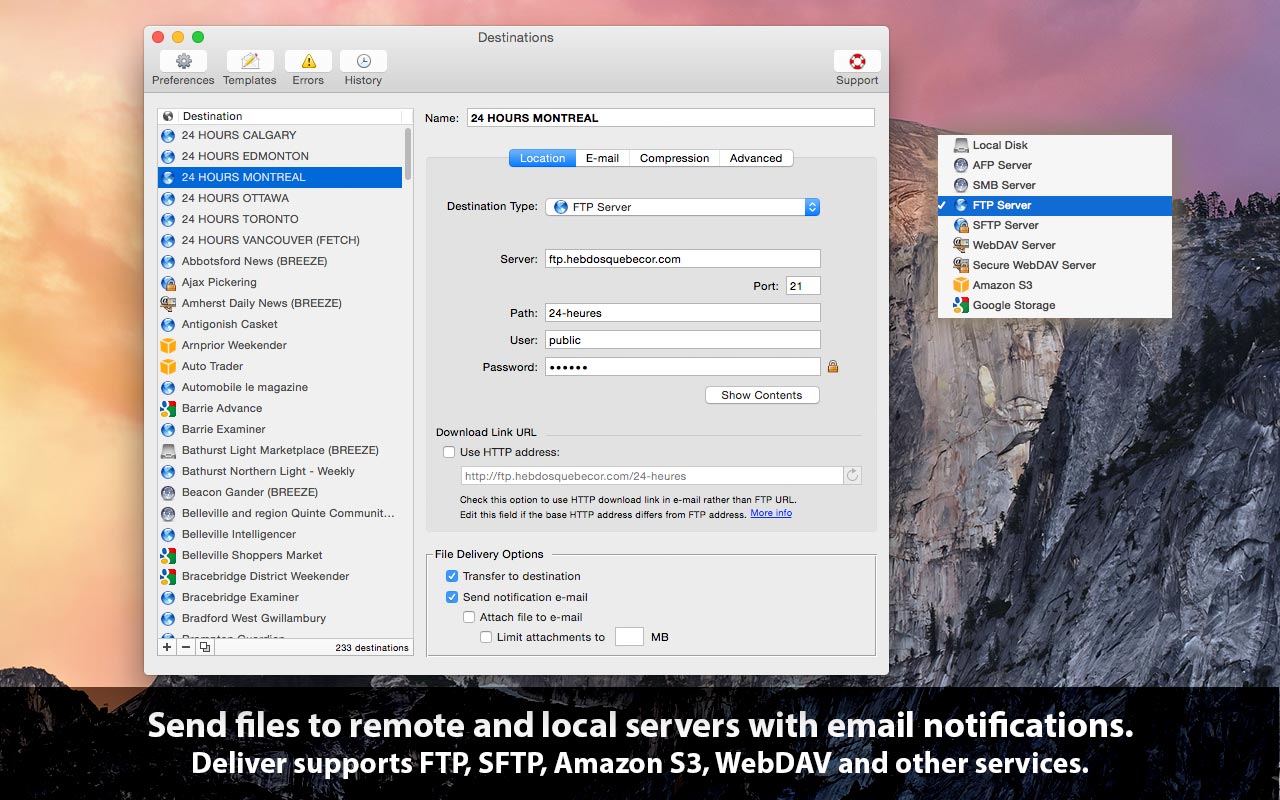
Zevrix Solutions announces Deliver 2.6.16, a maintenance update to company's file transfer tool with automatic email notifications. Deliver lets users send files to FTP, SFTP, Amazon S3 and other remote and local servers. The app offers email delivery notifications, file encryption, multi-destination transfer, upload history, and other powerful capabilities. The new version lets users import bookmarks from the popular cloud storage browser Cyberduck in order to use them as Deliver destinations.
Toronto (ON), Canada - Zevrix Solutions today announces Deliver 2.6.16, a compatibility update to the company's file transfer solution with automatic email notifications. Deliver lets users send files over the Internet and local networks to pre-defined destinations. The app offers file compression, delivery history, automatic PDF creation and other powerful capabilities. It supports FTP, SFTP, WebDAV and other remote and local services, and allows to send files to multiple destinations at once.
The new version allows users to import bookmarks from Cyberduck - a popular libre server and cloud storage browser for Mac and Windows with support for FTP, SFTP, WebDAV, Google Drive and other services. The bookmarks will be automatically converted to Deliver destinations, which enables users to quickly repurpose Cyberduck favorites for automatic delivery with email notifications.
"Deliver is a Mac app that comes close to fulfilling the laundry list of requirements," writes Natalia Nowak on Mac360, a Mac app reviews site. "It gives you a methodology and work flow to send files safely and securely to many users over the internet or to local, secure servers."
Deliver solves the problem of notifying recipients of Internet file deliveries automatically by eliminating the need to compose and send confirmations for each transfer. The app offers the following key features:
* Transfer files to FTP, Google Storage, Amazon S3 and other servers
* Automatic email notifications based on variable templates
* Compress files automatically (zip/dmg)
* Hyperlink to file for instant download by recipients
* Encrypt disk images with passwords
* Create lo-res PDF on the fly and attach to e-mail
* Transfer history
Pricing and Availability:
Deliver can be purchased from Zevrix website for $19.95 (USD), as well as from Apple Mac App Store and authorized resellers. Trial is also available for download. The update is free for licensed users of Deliver 2.x. Deliver requires macOS 10.8-10.15.
Zevrix Solutions: http://zevrix.com
Deliver 2.6.16: http://zevrix.com/Deliver.php
Download Deliver: http://zevrix.com/Deliver.dmg
Purchase: http://zevrix.com/store.php
Screenshot: http://zevrix.com/screenshots/deliver-2/MAS/deliver-mas-location.jpg
Located in Toronto, Canada, Zevrix Solutions provides automation and productivity solutions for Adobe Creative Cloud and Creative Suite software, PDF workflows, graphic file diagnostics and Microsoft Office output on Mac OS. Zevrix is dedicated to help professionals increase their profits through automating everyday tasks, producing error-free documents, saving disk space and cutting production costs. For more information, visit their website. Copyright (C) 2020 Zevrix Solutions. All Rights Reserved. Other trademarks and registered trademarks may be the property of their respective owners.
*******
Link To Article: https://prmac.com/release-id-84024.htm
*******
---------------------------------------------------------------------------------
Note that you can alter delivered distributions at any time.
Login to your account on prMac to alter your channel selection, or to opt-out at any time.
File Transfer Automation App Deliver Now Can Import Cyberduck Bookmarks - Published on 05/12/20
Zevrix Solutions announces Deliver 2.6.16, a maintenance update to company's file transfer tool with automatic email notifications. Deliver lets users send files to FTP, SFTP, Amazon S3 and other remote and local servers. The app offers email delivery notifications, file encryption, multi-destination transfer, upload history, and other powerful capabilities. The new version lets users import bookmarks from the popular cloud storage browser Cyberduck in order to use them as Deliver destinations.
Toronto (ON), Canada - Zevrix Solutions today announces Deliver 2.6.16, a compatibility update to the company's file transfer solution with automatic email notifications. Deliver lets users send files over the Internet and local networks to pre-defined destinations. The app offers file compression, delivery history, automatic PDF creation and other powerful capabilities. It supports FTP, SFTP, WebDAV and other remote and local services, and allows to send files to multiple destinations at once.
The new version allows users to import bookmarks from Cyberduck - a popular libre server and cloud storage browser for Mac and Windows with support for FTP, SFTP, WebDAV, Google Drive and other services. The bookmarks will be automatically converted to Deliver destinations, which enables users to quickly repurpose Cyberduck favorites for automatic delivery with email notifications.
"Deliver is a Mac app that comes close to fulfilling the laundry list of requirements," writes Natalia Nowak on Mac360, a Mac app reviews site. "It gives you a methodology and work flow to send files safely and securely to many users over the internet or to local, secure servers."
Deliver solves the problem of notifying recipients of Internet file deliveries automatically by eliminating the need to compose and send confirmations for each transfer. The app offers the following key features:
* Transfer files to FTP, Google Storage, Amazon S3 and other servers
* Automatic email notifications based on variable templates
* Compress files automatically (zip/dmg)
* Hyperlink to file for instant download by recipients
* Encrypt disk images with passwords
* Create lo-res PDF on the fly and attach to e-mail
* Transfer history
Pricing and Availability:
Deliver can be purchased from Zevrix website for $19.95 (USD), as well as from Apple Mac App Store and authorized resellers. Trial is also available for download. The update is free for licensed users of Deliver 2.x. Deliver requires macOS 10.8-10.15.
Zevrix Solutions: http://zevrix.com
Deliver 2.6.16: http://zevrix.com/Deliver.php
Download Deliver: http://zevrix.com/Deliver.dmg
Purchase: http://zevrix.com/store.php
Screenshot: http://zevrix.com/screenshots/deliver-2/MAS/deliver-mas-location.jpg
Located in Toronto, Canada, Zevrix Solutions provides automation and productivity solutions for Adobe Creative Cloud and Creative Suite software, PDF workflows, graphic file diagnostics and Microsoft Office output on Mac OS. Zevrix is dedicated to help professionals increase their profits through automating everyday tasks, producing error-free documents, saving disk space and cutting production costs. For more information, visit their website. Copyright (C) 2020 Zevrix Solutions. All Rights Reserved. Other trademarks and registered trademarks may be the property of their respective owners.
*******
Link To Article: https://prmac.com/release-id-84024.htm
*******
---------------------------------------------------------------------------------
Note that you can alter delivered distributions at any time.
Login to your account on prMac to alter your channel selection, or to opt-out at any time.
SweetP Productions, Inc. releases Minim 3.0 for macOS 10.15
A new article has been published at prMac.
SweetP Productions, Inc. releases Minim 3.0 for macOS 10.15 - Published on 05/08/20
Wilmington based SweetP Productions today announces Minim 3.0, a major update to their advanced Safari content blocker Extension. With Minim, it's super easy to block any or all page resources from the domain you are visiting and also from any third party sites not related to that domain.. iCloud support is included for convenient sync between your various Macs. Version 3.0 is a major rewrite, sporting a much improved UI, adds the ability to fully customize blocked load types, and more.
Wilmington, Delaware - SweetP Productions today is pleased to announce Minim 3.0, a major update to their advanced Safari content blocker Extension. With Minim, it's super easy to block any or all page resources from the domain you are visiting and also from any third party sites not related to that domain.. iCloud support is included for convenient sync between your various Macs.
What's a content blocker?
A content blocker stops url resources from downloading. For example, a lot of websites load images from other websites. With a traditional blocker, these images would be hidden, but still actually download to your computer. With a content blocker, the images are not downloaded at all.
Why use Minim?
It's integrated right into Safari as an extension. Minim is built using the latest macOS technologies to be fast, and does not degrade your browsing experience. In fact it enhances your internet, as everything you decide to block is not just hidden (like javascript based blockers) - but is actually blocked from downloading at all. This has the effect of speeding up your browsing by avoiding download of junk data.
Minim Features:
* Configure global block rules for all domains
* Setup Exception domain overrides with fully customizable block options
* Optionally configure to only block exception domains
* iCloud support for preferences and Exception domains
* Export/Importing of exceptions for archiving
* Notifications
* Handy Safari contextual menu options
Built with the latest technologies, and integrated right in to Safari as an Extension, Minim can help declutter the internet and/or provide a basic level of privacy.
System Requirements:
* macOS 10.15 required
* Safari 13.1 or better
Pricing and Availability:
Minim 3.0 is $19.99 USD (or equivalent amount in other currencies) and available worldwide through the Mac App Store in the Productivity category. Promo codes are available to vetted members of the press. Please contact SweetP Productions, Inc. for more information.
SweetP Productions: https://sweetpproductions.com/
Minim 3.0: https://minim.sweetpproductions.com
Purchase from the Mac App Store: https://apps.apple.com/app/minim/id1406044470
Download Trial: https://sweetpproductions.com/products/minim/Minim.dmg
Promotional image: https://minim.sweetpproductions.com/images/prefs.jpg
Headquartered in Wilmington, Delaware, USA - SweetP Productions, Inc. has been providing quality software to the Mac community since 2009. Copyright (C) 2009-2020 SweetP Productions. All Rights Reserved. Apple, the Apple logo and Macintosh are registered trademarks of Apple Inc. in the U.S. and/or other countries.
*******
Link To Article: https://prmac.com/release-id-84023.htm
*******
---------------------------------------------------------------------------------
Note that you can alter delivered distributions at any time.
Login to your account on prMac to alter your channel selection, or to opt-out at any time.
SweetP Productions, Inc. releases Minim 3.0 for macOS 10.15 - Published on 05/08/20
Wilmington based SweetP Productions today announces Minim 3.0, a major update to their advanced Safari content blocker Extension. With Minim, it's super easy to block any or all page resources from the domain you are visiting and also from any third party sites not related to that domain.. iCloud support is included for convenient sync between your various Macs. Version 3.0 is a major rewrite, sporting a much improved UI, adds the ability to fully customize blocked load types, and more.
Wilmington, Delaware - SweetP Productions today is pleased to announce Minim 3.0, a major update to their advanced Safari content blocker Extension. With Minim, it's super easy to block any or all page resources from the domain you are visiting and also from any third party sites not related to that domain.. iCloud support is included for convenient sync between your various Macs.
What's a content blocker?
A content blocker stops url resources from downloading. For example, a lot of websites load images from other websites. With a traditional blocker, these images would be hidden, but still actually download to your computer. With a content blocker, the images are not downloaded at all.
Why use Minim?
It's integrated right into Safari as an extension. Minim is built using the latest macOS technologies to be fast, and does not degrade your browsing experience. In fact it enhances your internet, as everything you decide to block is not just hidden (like javascript based blockers) - but is actually blocked from downloading at all. This has the effect of speeding up your browsing by avoiding download of junk data.
Minim Features:
* Configure global block rules for all domains
* Setup Exception domain overrides with fully customizable block options
* Optionally configure to only block exception domains
* iCloud support for preferences and Exception domains
* Export/Importing of exceptions for archiving
* Notifications
* Handy Safari contextual menu options
Built with the latest technologies, and integrated right in to Safari as an Extension, Minim can help declutter the internet and/or provide a basic level of privacy.
System Requirements:
* macOS 10.15 required
* Safari 13.1 or better
Pricing and Availability:
Minim 3.0 is $19.99 USD (or equivalent amount in other currencies) and available worldwide through the Mac App Store in the Productivity category. Promo codes are available to vetted members of the press. Please contact SweetP Productions, Inc. for more information.
SweetP Productions: https://sweetpproductions.com/
Minim 3.0: https://minim.sweetpproductions.com
Purchase from the Mac App Store: https://apps.apple.com/app/minim/id1406044470
Download Trial: https://sweetpproductions.com/products/minim/Minim.dmg
Promotional image: https://minim.sweetpproductions.com/images/prefs.jpg

Headquartered in Wilmington, Delaware, USA - SweetP Productions, Inc. has been providing quality software to the Mac community since 2009. Copyright (C) 2009-2020 SweetP Productions. All Rights Reserved. Apple, the Apple logo and Macintosh are registered trademarks of Apple Inc. in the U.S. and/or other countries.
*******
Link To Article: https://prmac.com/release-id-84023.htm
*******
---------------------------------------------------------------------------------
Note that you can alter delivered distributions at any time.
Login to your account on prMac to alter your channel selection, or to opt-out at any time.
iOS iSugars App Update: Now with Extremely Powerful Search Facility
A new article has been published at prMac.
iOS iSugars App Update: Now with Extremely Powerful Search Facility - Published on 05/07/20
Independent iOS Developer, James Hollender has updated his iSugars app, which helps in determining sugar content in foods. This is just one of ten apps updated to version 7.0 in the suite of iNutrient apps: iCarbs, iCholesterol, iFiber, iKals, iPotassium, iProteins, iSatFat, iSodium, iSugars and Vitamin K. Version 6.0 made the app capable of using the entire screen even of newer iPhones with the notch. Now version 7.0 brings back the Search feature, but one that's much more powerful.
Revere, Massachusetts - Independent iOS Developer, James Hollender has updated his iSugars app, which helps users trying to restrict their sugar intake by determining sugar content in foods. This is just one of ten apps updated to version 7.0 in the suite of iNutrient apps: iCarbs, iCholesterol, iFiber, iKals, iPotassium, iProteins, iSatFat, iSodium, iSugars and Vitamin K. Version 6.0 made the app capable of using the entire screen even of newer iPhones with the notch. Now version 7.0 brings back the Search feature, but one that's much more powerful.
Version 6.0 made the app capable of using the entire screen even of newer iPhones with the "notch". Now version 7.0 brings back the Search feature, but one that's much more powerful. These apps include data from the USDA National Nutrient Database covering the following nutrients: Calories, Carbohydrates, Cholesterol, Fiber, Potassium, Proteins, Saturated Fat, Sodium, Sugars and Vitamin K. All ten apps are universal apps that can be used on the iPhone, iPad or iPod touch devices. The apps include information on how they can be upgraded to app bundles for additional significant savings, i.e., the cost of any apps previously purchased included in bundle is deducted from the cost of the app bundle.
The big new feature in version 7.0 of iSugars is a search capability that allows for both simple and complex searches. There are two fields that can accommodate either words or phrases. Using only the first provides a simple search that looks for the supplied value in the title, description and USDA ID fields. If a second word or phrase is supplied, then the user has the choice of three operands for how the fields are evaluated: "AND", "OR" and "But Not". As the user enter or changes their values, an instantaneous display is given of how many records will be found. Pressing the "Results" button then displays the full list of matches found.
In the "Access My Records" section, each food serving for the day is listed in it's own section and the total daily amount of the nutrient is included in the day's heading. This makes comparing nutrient intake for each day an easy task.
The iSugars app provides information about foods and how they are rated for sugar content. This is provided as a means to assist in deciding which foods to eat.
"High intakes of dietary sugars in the setting of a worldwide pandemic of obesity and cardiovascular disease have heightened concerns about the adverse affects of excessive consumption of sugars. In 2001 to 2004, the usual intake of added sugars for Americans was 22.2 teaspoons a day (355 calories per day). Between 1970 and 2005, average annual availability of sugars/added sugars increased by 19%, which added 76 calories to Americans' average daily energy intake. Soft drinks and other sugar-sweetened beverages are the primary source of added sugars in Americans' diets. Excessive consumption of sugars has been linked with several metabolic abnormalities and adverse health conditions, as well as shortfalls of essential nutrients. Although trial data are limited, evidence from observational studies indicates that a higher intake of soft drinks is associated with greater energy intake, higher body weight, and lower intake of essential nutrients. National survey data also indicate the
excessive consumption of added sugars is contributing to overconsumption of discretionary calories by Americans. On the basis of the 2005 US Dietary Guidelines, intake of added sugars greatly exceeds discretionary calorie allowances, regardless of energy needs. In view of these considerations, the American Heart Association recommends reductions in the intake of added sugars. A prudent upper limit of intake is half of the discretionary calorie allowance, which for most American women is no more than 100 calories per day and for most American men is no more than 150 calories per day from added sugars." (Source: Abstract from "Dietary Sugars Intake and Cardiovascular Health" - A Scientific Statement from the American Heart Association)
From over 1,100 food servings included in the iSugars app each is rated from EXTREMELY LOW to EXTREMELY HIGH in Carbohydrates. The following colors help readily identify which is which:
* Black = Rated EXTREMELY HIGH in Sugars (40.01 - 166.46 g)
* Dark Red = Rated VERY HIGH in Sugars (30.01 - 40.00 g)
* Red = Rated HIGH in Sugars (20.01 - 30.0 g)
* Orange = Rated MODERATELY HIGH in Sugars (15.01 - 20.00 g)
* Yellow = Rated MODERATE in Sugars (10.01 - 15.00 g)
* Light Green = Rated MODERATELY LOW in Sugars (5.01 - 10.00 g)
* Green = Rated LOW in Sugars (1.01 - 5.00 g)
* Cyan = Rated VERY LOW in Sugars (0.01 - 1.00 g)
* White = Rated EXTREMELY LOW in Sugars (0.00 g)
Essentially, the cooler the color, the lower the amount of Sugars, with white being the coolest color and black being the hottest (think burnt).
There are eight tables listing food servings:
* All Foods
* Fast Foods
* Fruits & Vegetables
* Meat, Fish & Shellfish
* Dairy & Egg
* Cereal Grains & Pasta
* Sweets
* Snacks
The All Foods list allows you to search by any word or partial word from all the Food Titles. Selecting a food in any of the tables will display pertinent information about the selected food serving:
* Food Title
* Weight (in grams)
* Common Measure (serving size for weight)
* Sugars Content (in grams)
* Calories
* Percentage of Sugars by Weight (if at least 1%)
* USDA Description
* USDA Food Group
* USDA Nutrient Database Number
Information is derived from the USDA National Nutrient Database for Standard Reference: Sugars Content of Selected Foods per Common Measure. There are currently over 1,100 different foods included, searchable using more than 2,500 names (some foods are known by different names or how they are prepared, e.g., "Egg, Scrambled" and "Scrambled Egg"). A few these have as many as six searchable names.
The iSugars Info screen provides access to additional information pages:
* What are Sugars?
* Concerns About Sugars
* Highest Sugar Foods
* User Agreement
* How to Use this App
* About this App (includes allowance to 1) Report a Problem; 2) Ask a Questions; and 3) Make a Suggestion)
The iSugars app is one of 10 apps in the iNutrients collection. Others include:
* iCarbs - Carbohydrates - great for bodybuilders or diabetics
* iCholesterol - Dietary Cholesterol - for those wanting to watch their cholesterol intake
* iFiber - Fiber - for those interested in getting enough fiber in their diet
* iKals - Calories - for anyone watching their calories
* iPotassium - Potassium - helps with anxiety, stress, blood pressure, brain function, cramps and many other ailments
* iProteins - Proteins - great for bodybuilders, vegetarians or vegans needing to make sure they get enough protein in their diet
* iSatFat - Saturated Fats - for those who have been advised by their physician to limit their intake of saturated fat
* iSodium - Sodium - for those who want to cut down on their salt intake
* Vitamin K - Vitamins K1, K1D and K2 - For users of blood thinning medications like Coumadin or Warfarin
Device Requirements:
* iPhone, iPod touch, and iPad
* Requires iOS 12 or later
Pricing and Availability:
iSugars is available in the iTunes App Store for the iPhone, iPad and iPod touch. The current price is $2.99 USD (or equivalent amount in other currencies) and can be found in the Health & Fitness category. As always, updates are provide free of charge. Promo codes are available for qualified reviewers. Please specify the website, blog or organization when making a request.
Users interested in multiple nutrients should be aware of the "iNutrients App", which includes all ten of the above listed nutrients. Instead of the USDA partial selection of foods used in the individual iNutrient apps, the iNutrients app includes all foods and food servings in the entire USDA National Nutrient Database for those nutrients. It also includes the capability for altering the color scale for each nutrient if desired. And Custom Foods can be created for those not included in the USDA database. Even an entire meal's nutrient information could be included in a single Custom Food definition to make entry even simpler. The iNutrients app is available for less than the cost of three individual iNutrient apps and is specially reduced during the Covid-19 Pandemic.
iSugars 7.0: http://itunes.apple.com/app/id408507521
All iNutrient Apps Bundle (10 apps): https://apps.apple.com/us/app-bundle/all-inutrient-apps/id917498465
Most Popular iNutrient Apps Bundle (5 apps): https://apps.apple.com/us/app-bundle/most-popular-inutrient-apps/id917503222
iNutrients App (Entire USDA National Nutrient Database for 10 nutrients): https://apps.apple.com/us/app/inutrients-10-nutrients-incl-carbs-vitamin-k/id580660547
Based in Revere, Massachusetts, Indie developer James Hollender is a well seasoned Information Technology professional who has been familiar with Apple products since the days of the first Macintosh computer and has been involved with object oriented programming since the introduction of Java, culminating most recently in writing apps in Objective C for the iPhone, iPod touch and iPad. His innovative ideas have resulted in numerous suggestion and other awards including a commendation from a former President of the United States. James Hollender has been involved writing iPhone and iPad apps with Foliage, Kronos, Olympus, Cross Country Automotive Services (now Agero), and Valmarc Corporation (now Vi3 Global). Copyright (C) 2010-2020 James Hollender. All Rights Reserved. Apple, the Apple logo, iPhone, and iPod are registered trademarks of Apple Inc. in the U.S. and/or other countries. Other trademarks and registered trademarks may be the property of their respective owners.
*******
Link To Article: https://prmac.com/release-id-84016.htm
*******
---------------------------------------------------------------------------------
Note that you can alter delivered distributions at any time.
Login to your account on prMac to alter your channel selection, or to opt-out at any time.
iOS iSugars App Update: Now with Extremely Powerful Search Facility - Published on 05/07/20
Independent iOS Developer, James Hollender has updated his iSugars app, which helps in determining sugar content in foods. This is just one of ten apps updated to version 7.0 in the suite of iNutrient apps: iCarbs, iCholesterol, iFiber, iKals, iPotassium, iProteins, iSatFat, iSodium, iSugars and Vitamin K. Version 6.0 made the app capable of using the entire screen even of newer iPhones with the notch. Now version 7.0 brings back the Search feature, but one that's much more powerful.
Revere, Massachusetts - Independent iOS Developer, James Hollender has updated his iSugars app, which helps users trying to restrict their sugar intake by determining sugar content in foods. This is just one of ten apps updated to version 7.0 in the suite of iNutrient apps: iCarbs, iCholesterol, iFiber, iKals, iPotassium, iProteins, iSatFat, iSodium, iSugars and Vitamin K. Version 6.0 made the app capable of using the entire screen even of newer iPhones with the notch. Now version 7.0 brings back the Search feature, but one that's much more powerful.
Version 6.0 made the app capable of using the entire screen even of newer iPhones with the "notch". Now version 7.0 brings back the Search feature, but one that's much more powerful. These apps include data from the USDA National Nutrient Database covering the following nutrients: Calories, Carbohydrates, Cholesterol, Fiber, Potassium, Proteins, Saturated Fat, Sodium, Sugars and Vitamin K. All ten apps are universal apps that can be used on the iPhone, iPad or iPod touch devices. The apps include information on how they can be upgraded to app bundles for additional significant savings, i.e., the cost of any apps previously purchased included in bundle is deducted from the cost of the app bundle.
The big new feature in version 7.0 of iSugars is a search capability that allows for both simple and complex searches. There are two fields that can accommodate either words or phrases. Using only the first provides a simple search that looks for the supplied value in the title, description and USDA ID fields. If a second word or phrase is supplied, then the user has the choice of three operands for how the fields are evaluated: "AND", "OR" and "But Not". As the user enter or changes their values, an instantaneous display is given of how many records will be found. Pressing the "Results" button then displays the full list of matches found.
In the "Access My Records" section, each food serving for the day is listed in it's own section and the total daily amount of the nutrient is included in the day's heading. This makes comparing nutrient intake for each day an easy task.
The iSugars app provides information about foods and how they are rated for sugar content. This is provided as a means to assist in deciding which foods to eat.
"High intakes of dietary sugars in the setting of a worldwide pandemic of obesity and cardiovascular disease have heightened concerns about the adverse affects of excessive consumption of sugars. In 2001 to 2004, the usual intake of added sugars for Americans was 22.2 teaspoons a day (355 calories per day). Between 1970 and 2005, average annual availability of sugars/added sugars increased by 19%, which added 76 calories to Americans' average daily energy intake. Soft drinks and other sugar-sweetened beverages are the primary source of added sugars in Americans' diets. Excessive consumption of sugars has been linked with several metabolic abnormalities and adverse health conditions, as well as shortfalls of essential nutrients. Although trial data are limited, evidence from observational studies indicates that a higher intake of soft drinks is associated with greater energy intake, higher body weight, and lower intake of essential nutrients. National survey data also indicate the
excessive consumption of added sugars is contributing to overconsumption of discretionary calories by Americans. On the basis of the 2005 US Dietary Guidelines, intake of added sugars greatly exceeds discretionary calorie allowances, regardless of energy needs. In view of these considerations, the American Heart Association recommends reductions in the intake of added sugars. A prudent upper limit of intake is half of the discretionary calorie allowance, which for most American women is no more than 100 calories per day and for most American men is no more than 150 calories per day from added sugars." (Source: Abstract from "Dietary Sugars Intake and Cardiovascular Health" - A Scientific Statement from the American Heart Association)
From over 1,100 food servings included in the iSugars app each is rated from EXTREMELY LOW to EXTREMELY HIGH in Carbohydrates. The following colors help readily identify which is which:
* Black = Rated EXTREMELY HIGH in Sugars (40.01 - 166.46 g)
* Dark Red = Rated VERY HIGH in Sugars (30.01 - 40.00 g)
* Red = Rated HIGH in Sugars (20.01 - 30.0 g)
* Orange = Rated MODERATELY HIGH in Sugars (15.01 - 20.00 g)
* Yellow = Rated MODERATE in Sugars (10.01 - 15.00 g)
* Light Green = Rated MODERATELY LOW in Sugars (5.01 - 10.00 g)
* Green = Rated LOW in Sugars (1.01 - 5.00 g)
* Cyan = Rated VERY LOW in Sugars (0.01 - 1.00 g)
* White = Rated EXTREMELY LOW in Sugars (0.00 g)
Essentially, the cooler the color, the lower the amount of Sugars, with white being the coolest color and black being the hottest (think burnt).
There are eight tables listing food servings:
* All Foods
* Fast Foods
* Fruits & Vegetables
* Meat, Fish & Shellfish
* Dairy & Egg
* Cereal Grains & Pasta
* Sweets
* Snacks
The All Foods list allows you to search by any word or partial word from all the Food Titles. Selecting a food in any of the tables will display pertinent information about the selected food serving:
* Food Title
* Weight (in grams)
* Common Measure (serving size for weight)
* Sugars Content (in grams)
* Calories
* Percentage of Sugars by Weight (if at least 1%)
* USDA Description
* USDA Food Group
* USDA Nutrient Database Number
Information is derived from the USDA National Nutrient Database for Standard Reference: Sugars Content of Selected Foods per Common Measure. There are currently over 1,100 different foods included, searchable using more than 2,500 names (some foods are known by different names or how they are prepared, e.g., "Egg, Scrambled" and "Scrambled Egg"). A few these have as many as six searchable names.
The iSugars Info screen provides access to additional information pages:
* What are Sugars?
* Concerns About Sugars
* Highest Sugar Foods
* User Agreement
* How to Use this App
* About this App (includes allowance to 1) Report a Problem; 2) Ask a Questions; and 3) Make a Suggestion)
The iSugars app is one of 10 apps in the iNutrients collection. Others include:
* iCarbs - Carbohydrates - great for bodybuilders or diabetics
* iCholesterol - Dietary Cholesterol - for those wanting to watch their cholesterol intake
* iFiber - Fiber - for those interested in getting enough fiber in their diet
* iKals - Calories - for anyone watching their calories
* iPotassium - Potassium - helps with anxiety, stress, blood pressure, brain function, cramps and many other ailments
* iProteins - Proteins - great for bodybuilders, vegetarians or vegans needing to make sure they get enough protein in their diet
* iSatFat - Saturated Fats - for those who have been advised by their physician to limit their intake of saturated fat
* iSodium - Sodium - for those who want to cut down on their salt intake
* Vitamin K - Vitamins K1, K1D and K2 - For users of blood thinning medications like Coumadin or Warfarin
Device Requirements:
* iPhone, iPod touch, and iPad
* Requires iOS 12 or later
Pricing and Availability:
iSugars is available in the iTunes App Store for the iPhone, iPad and iPod touch. The current price is $2.99 USD (or equivalent amount in other currencies) and can be found in the Health & Fitness category. As always, updates are provide free of charge. Promo codes are available for qualified reviewers. Please specify the website, blog or organization when making a request.
Users interested in multiple nutrients should be aware of the "iNutrients App", which includes all ten of the above listed nutrients. Instead of the USDA partial selection of foods used in the individual iNutrient apps, the iNutrients app includes all foods and food servings in the entire USDA National Nutrient Database for those nutrients. It also includes the capability for altering the color scale for each nutrient if desired. And Custom Foods can be created for those not included in the USDA database. Even an entire meal's nutrient information could be included in a single Custom Food definition to make entry even simpler. The iNutrients app is available for less than the cost of three individual iNutrient apps and is specially reduced during the Covid-19 Pandemic.
iSugars 7.0: http://itunes.apple.com/app/id408507521
All iNutrient Apps Bundle (10 apps): https://apps.apple.com/us/app-bundle/all-inutrient-apps/id917498465
Most Popular iNutrient Apps Bundle (5 apps): https://apps.apple.com/us/app-bundle/most-popular-inutrient-apps/id917503222
iNutrients App (Entire USDA National Nutrient Database for 10 nutrients): https://apps.apple.com/us/app/inutrients-10-nutrients-incl-carbs-vitamin-k/id580660547
Based in Revere, Massachusetts, Indie developer James Hollender is a well seasoned Information Technology professional who has been familiar with Apple products since the days of the first Macintosh computer and has been involved with object oriented programming since the introduction of Java, culminating most recently in writing apps in Objective C for the iPhone, iPod touch and iPad. His innovative ideas have resulted in numerous suggestion and other awards including a commendation from a former President of the United States. James Hollender has been involved writing iPhone and iPad apps with Foliage, Kronos, Olympus, Cross Country Automotive Services (now Agero), and Valmarc Corporation (now Vi3 Global). Copyright (C) 2010-2020 James Hollender. All Rights Reserved. Apple, the Apple logo, iPhone, and iPod are registered trademarks of Apple Inc. in the U.S. and/or other countries. Other trademarks and registered trademarks may be the property of their respective owners.
*******
Link To Article: https://prmac.com/release-id-84016.htm
*******
---------------------------------------------------------------------------------
Note that you can alter delivered distributions at any time.
Login to your account on prMac to alter your channel selection, or to opt-out at any time.
Subscribe to:
Posts (Atom)