A new article has been published at prMac.
Typinator 8.5 is ready for macOS Big Sur and supports tables - Published on 09/15/20
Ergonis Software today releases Typinator 8.5, an update to their highly acclaimed text expander. Typinator is a powerful, yet elegantly simple solution that automates the process of inserting frequently used text and auto-correcting typing errors. Version 8.5 is ready for macOS version Big Sur and offers many further enhancements. It now supports direct editing of tables in formatted text expansions and improves overall stability and compatibility with third-party applications and more.
Perg, Austria - Ergonis Software today released Typinator 8.5, an improved version of their highly acclaimed text expander. Although it's just a minor update, Typinator 8.5 is yet another milestone in the more than 15 years of development and enhancement of the popular text expansion tool - Typinator 8.5 is ready for Apple's next big macOS version Big Sur, which is expected to launch later this year.
Besides enhancements and tweaks to make Typinator a first-class citizen on Big Sur, the new version brings a number of other enhancements. It now supports direct editing of tables in formatted text expansions and improves overall stability and compatibility with third-party applications like CopyPaste Pro, Parallels Client, and others. Typinator 8.5 also corrects an incorrect replacement in the TidBITS AutoCorrection sets and includes fixes and workarounds for user-reported issues. Visit Ergonis Software's website to learn more about the changes in this release and to download and try the new version.
Typinator is a powerful, yet elegantly simple solution that boosts your productivity by automating the process of inserting frequently used text and auto-correcting typing errors. Across all applications, it detects specific sequences of typed characters and automatically replaces them with text snippets, graphics, URLs, dates and special characters.
System Requirements:
Typinator 8.5 requires OS X Mountain Lion (10.8) or newer, is recommended for macOS Catalina (10.15), and is compatible with the current beta versions of macOS Big Sur (11.0).
Availability and Ordering:
Typinator can be purchased securely on the Ergonis Software website. The upgrade to Typinator 8.5 is free for anyone who purchased a license for Typinator on or after January 1st, 2019. Upgrade paths are available for owners of older licenses. For information about purchases, including enterprise licenses, volume discounts, and upgrade pricing offers, see the company's web site.
Ergonis Software: https://www.ergonis.com/
Typinator 8.5: https://www.ergonis.com/products/typinator
Download Typinator: https://www.ergonis.com/downloads/typinator-install.dmg
Purchase Typinator: https://store.ergonis.com/products/typinator
Screenshot (Typinator - define abbreviations): https://www.ergonis.com/press/2020/20200915/typinator-screen.png
Headquartered in Perg, Austria, Ergonis Software Gmbh is a privately held software development company founded in 2002. With a focus on innovation, Ergonis develops ergonomic and intuitive software that boosts the productivity of Mac and PC users alike. Copyright 2002-2020 Ergonis Software Gmbh. All Rights Reserved. Ergonis products are either registered trademarks or trademarks of Ergonis Software GmbH. Other company and product names may be trademarks of their respective owners.
*******
Link To Article: https://prmac.com/release-id-84128.htm
*******
---------------------------------------------------------------------------------
Note that you can alter delivered distributions at any time.
Login to your account on prMac to alter your channel selection, or to opt-out at any time.


Tropical Software releases iAddressX 4 for macOS
A new article has been published at prMac.
Tropical Software releases iAddressX 4 for macOS - Published on 09/15/20
Longtime Florida based developer, Tropical Software today announces iAddressX 4 for macOS. Use iAddressX to navigate contacts from a small icon in the system menu, and to initiate various tasks including printing of Dymo labels, dialing iPhone and/or Skype calls, sending SMS messages to Skype pals or friend's cell phone, and more. Now a 64-bit only app, the new version adds a new preferences option to dial iPhone via FaceTime, a new Maps feature, and much more.
Atlantic Beach, Florida - Tropical Software today is pleased to announce that iAddressX 4 is available for macOS. Use iAddressX to navigate contacts from a small icon in the system menu, and to initiate various tasks including printing of Dymo labels, dialing iPhone and/or Skype calls, sending SMS messages to Skype pals or friend's cell phone, and more. Interested users can visit the Tropical Software website to try reliable iAddressX 4 for free today.
System Menu Convenience and iAddressX:
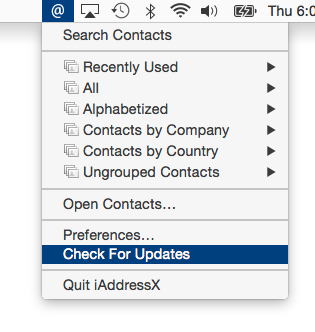
From the first release of Macintosh computers, the main menu bar, also called the system menu, has been a central Mac navigational feature. iAddressX has now returned to the Mac system menu as a status item, allowing easy access to almost everything related to contacts from hierarchical menus.
Navigate Contacts:
* Navigate contacts from a small icon in the system menu and access many contact options
Dymo Support:
* Print to your Dymo Label printer right from iAddressX.
Dial iPhone:
* Dial using Facetime, iPhone, Skype or an old-fashioned landline
Search:
* Search your contacts directly from the menu bar
Skype:
* Initiate a call or chat using Skype
* Send SMS messages to Skype pals
Maps:
* View any contact's location on Apple or Google Maps
A Brief History of iAddressX:
Tropical Software President James Lee explains the return of iAddressX: "iAddressX was developed by Michael Balle-Pedersen, a Software Engineer at Apple Inc. Before he worked at Apple, Michael released versions running in macOS 10.3 and 10.4. I discovered iAddressX languishing after Michael went to work for Apple and we were able to acquire iAddressX. We immediately developed a version that ran under macOS 10.5 (Leopard) that is still available. Thanks to help from many friends, we were able to get iAddressX working in macOS 10.7 through 10.15. In-house expert Lewis Garrett inserted the "Check for Update" and registration code, and put the final touches on this release."
iAddressX 4 has the following changes:
New Features:
* iAddressX is now a 64-bit App only. Do not install this update if your system is 32-bit only.
* Added Preferences option to Dial iPhone using Apple's "FaceTime" dialing options
* Maps feature that allows selecting Apple or Google Maps of a contact address.
* Changes required by macOS 10.15 (Catalina).
* Enabled "Hardened Runtime" to protect the runtime integrity by preventing certain classes of exploits, like code injection, dynamically linked library (DLL) hijacking, and process memory space tampering.
* Granted a trial period to try out iAddressX 4.0 prior to purchase.
Changed Features:
* Updated "Check for Update" to address latest security vulnerabilities.
* Include build number in version string displayed in About.
* Modify Dial menu command to include the Dialing method.
* Change "Map Of using:" Menu command default selection to "Apple Maps".
* Change Dialing default from "Speaker" to "FaceTime via iPhone".
* Moved Preferences "About" tab to be first tab.
Fixed:
* Problem that caused registration to become lost.
* "View Read Me" menu command appeared not to be working because its window was obscured by other windows. The ReadMe.rtf window will now be forced to the front.
* Corrected misspelling in "Display Order:" menu item.
* Improved display of menu bar iAddressX @ icon when Appearance is Dark Mode.
* "View Read Me" menu command when Appearance is Dark Mode displayed Read Me was too dark to read.
iAddressX- Reviews:
iAddressX was reviewed a few times many years ago and we hope it will once again get good reviews for its design and convenience. We are looking for feedback from prior iAddressX customers and new users for what they would like to see us develop in the future.
Pricing and Availability:
Try Tropical Software's reliable iAddressX 4 for free today! iAddressX 4 is only $19.95 (USD) from our web site.
iAddressX 4: http://www.tropic4.com/iaddressx.html
Download Free Trial (Zip): http://www.tropic4.com/download/iAddressX.zip
Purchase iAddressX: http://sites.fastspring.com/tropic4/product/iAddressX
Screenshot: http://www.tropic4.com/images/MainiAXmenuthumb.png
Application Icon: http://www.tropic4.com/images/iaddressx.png
Tropical Software makes the award-winning TopXNotes, a modern personal Mac note manager with state of the art proprietary encryption technology for the ultimate in securing personal information. We also offer KitchenTimer, a general-purpose timer, 2Remember, a lightweight easy to use reminder app with a minimal screen footprint, and iAddressX for navigating and accessing your contacts. Located in Atlantic Beach, Florida, Tropical Software is owned and operated by former Apple employee James Lee, and is dedicated to improving the lives of its customers by offering easy to use productivity software for Macs and Apple touch devices including iPhone, iPod touch and iPad. Copyright (C) 2020 Tropical Software-All Rights Reserved. Apple, the Apple logo, macOS, iPhone, iPod, iPad and Macintosh are registered trademarks of Apple Inc. in the U.S. and/or other countries.
*******
Link To Article: https://prmac.com/release-id-84127.htm
*******
---------------------------------------------------------------------------------
Note that you can alter delivered distributions at any time.
Login to your account on prMac to alter your channel selection, or to opt-out at any time.
Tropical Software releases iAddressX 4 for macOS - Published on 09/15/20
Longtime Florida based developer, Tropical Software today announces iAddressX 4 for macOS. Use iAddressX to navigate contacts from a small icon in the system menu, and to initiate various tasks including printing of Dymo labels, dialing iPhone and/or Skype calls, sending SMS messages to Skype pals or friend's cell phone, and more. Now a 64-bit only app, the new version adds a new preferences option to dial iPhone via FaceTime, a new Maps feature, and much more.
Atlantic Beach, Florida - Tropical Software today is pleased to announce that iAddressX 4 is available for macOS. Use iAddressX to navigate contacts from a small icon in the system menu, and to initiate various tasks including printing of Dymo labels, dialing iPhone and/or Skype calls, sending SMS messages to Skype pals or friend's cell phone, and more. Interested users can visit the Tropical Software website to try reliable iAddressX 4 for free today.
System Menu Convenience and iAddressX:
From the first release of Macintosh computers, the main menu bar, also called the system menu, has been a central Mac navigational feature. iAddressX has now returned to the Mac system menu as a status item, allowing easy access to almost everything related to contacts from hierarchical menus.
Navigate Contacts:
* Navigate contacts from a small icon in the system menu and access many contact options
Dymo Support:
* Print to your Dymo Label printer right from iAddressX.
Dial iPhone:
* Dial using Facetime, iPhone, Skype or an old-fashioned landline
Search:
* Search your contacts directly from the menu bar
Skype:
* Initiate a call or chat using Skype
* Send SMS messages to Skype pals
Maps:
* View any contact's location on Apple or Google Maps
A Brief History of iAddressX:
Tropical Software President James Lee explains the return of iAddressX: "iAddressX was developed by Michael Balle-Pedersen, a Software Engineer at Apple Inc. Before he worked at Apple, Michael released versions running in macOS 10.3 and 10.4. I discovered iAddressX languishing after Michael went to work for Apple and we were able to acquire iAddressX. We immediately developed a version that ran under macOS 10.5 (Leopard) that is still available. Thanks to help from many friends, we were able to get iAddressX working in macOS 10.7 through 10.15. In-house expert Lewis Garrett inserted the "Check for Update" and registration code, and put the final touches on this release."
iAddressX 4 has the following changes:
New Features:
* iAddressX is now a 64-bit App only. Do not install this update if your system is 32-bit only.
* Added Preferences option to Dial iPhone using Apple's "FaceTime" dialing options
* Maps feature that allows selecting Apple or Google Maps of a contact address.
* Changes required by macOS 10.15 (Catalina).
* Enabled "Hardened Runtime" to protect the runtime integrity by preventing certain classes of exploits, like code injection, dynamically linked library (DLL) hijacking, and process memory space tampering.
* Granted a trial period to try out iAddressX 4.0 prior to purchase.
Changed Features:
* Updated "Check for Update" to address latest security vulnerabilities.
* Include build number in version string displayed in About.
* Modify Dial menu command to include the Dialing method.
* Change "Map Of using:" Menu command default selection to "Apple Maps".
* Change Dialing default from "Speaker" to "FaceTime via iPhone".
* Moved Preferences "About" tab to be first tab.
Fixed:
* Problem that caused registration to become lost.
* "View Read Me" menu command appeared not to be working because its window was obscured by other windows. The ReadMe.rtf window will now be forced to the front.
* Corrected misspelling in "Display Order:" menu item.
* Improved display of menu bar iAddressX @ icon when Appearance is Dark Mode.
* "View Read Me" menu command when Appearance is Dark Mode displayed Read Me was too dark to read.
iAddressX- Reviews:
iAddressX was reviewed a few times many years ago and we hope it will once again get good reviews for its design and convenience. We are looking for feedback from prior iAddressX customers and new users for what they would like to see us develop in the future.
Pricing and Availability:
Try Tropical Software's reliable iAddressX 4 for free today! iAddressX 4 is only $19.95 (USD) from our web site.
iAddressX 4: http://www.tropic4.com/iaddressx.html
Download Free Trial (Zip): http://www.tropic4.com/download/iAddressX.zip
Purchase iAddressX: http://sites.fastspring.com/tropic4/product/iAddressX
Screenshot: http://www.tropic4.com/images/MainiAXmenuthumb.png
Application Icon: http://www.tropic4.com/images/iaddressx.png

Tropical Software makes the award-winning TopXNotes, a modern personal Mac note manager with state of the art proprietary encryption technology for the ultimate in securing personal information. We also offer KitchenTimer, a general-purpose timer, 2Remember, a lightweight easy to use reminder app with a minimal screen footprint, and iAddressX for navigating and accessing your contacts. Located in Atlantic Beach, Florida, Tropical Software is owned and operated by former Apple employee James Lee, and is dedicated to improving the lives of its customers by offering easy to use productivity software for Macs and Apple touch devices including iPhone, iPod touch and iPad. Copyright (C) 2020 Tropical Software-All Rights Reserved. Apple, the Apple logo, macOS, iPhone, iPod, iPad and Macintosh are registered trademarks of Apple Inc. in the U.S. and/or other countries.
*******
Link To Article: https://prmac.com/release-id-84127.htm
*******
---------------------------------------------------------------------------------
Note that you can alter delivered distributions at any time.
Login to your account on prMac to alter your channel selection, or to opt-out at any time.
Package Central for Adobe InDesign Fixes Image Relinking Anomaly
A new article has been published at prMac.
Package Central for Adobe InDesign Fixes Image Relinking Anomaly - Published on 09/15/20
Zevrix Solutions announces Package Central 1.11.18, a maintenance update to company's file packaging automation solution for Adobe InDesign. The software collects InDesign documents along with their fonts and links from hot folders. Package Central serves unlimited users on a network and offers variable folder names, email alerts, PDF export, and more. The new version abandons the use of intermediate temporary folder names, which could result in incorrect image linkage in the final job folder.
Toronto (ON), Canada - Zevrix Solutions today announces Package Central 1.11.18, a maintenance update to company's document packaging automation solution for Adobe InDesign. Originally developed for a major publishing house in the United States, the software automates InDesign workflows by collecting files from hot folders. Package Central offloads InDesign packaging to a central system leaving operator workstations free from the collection process.
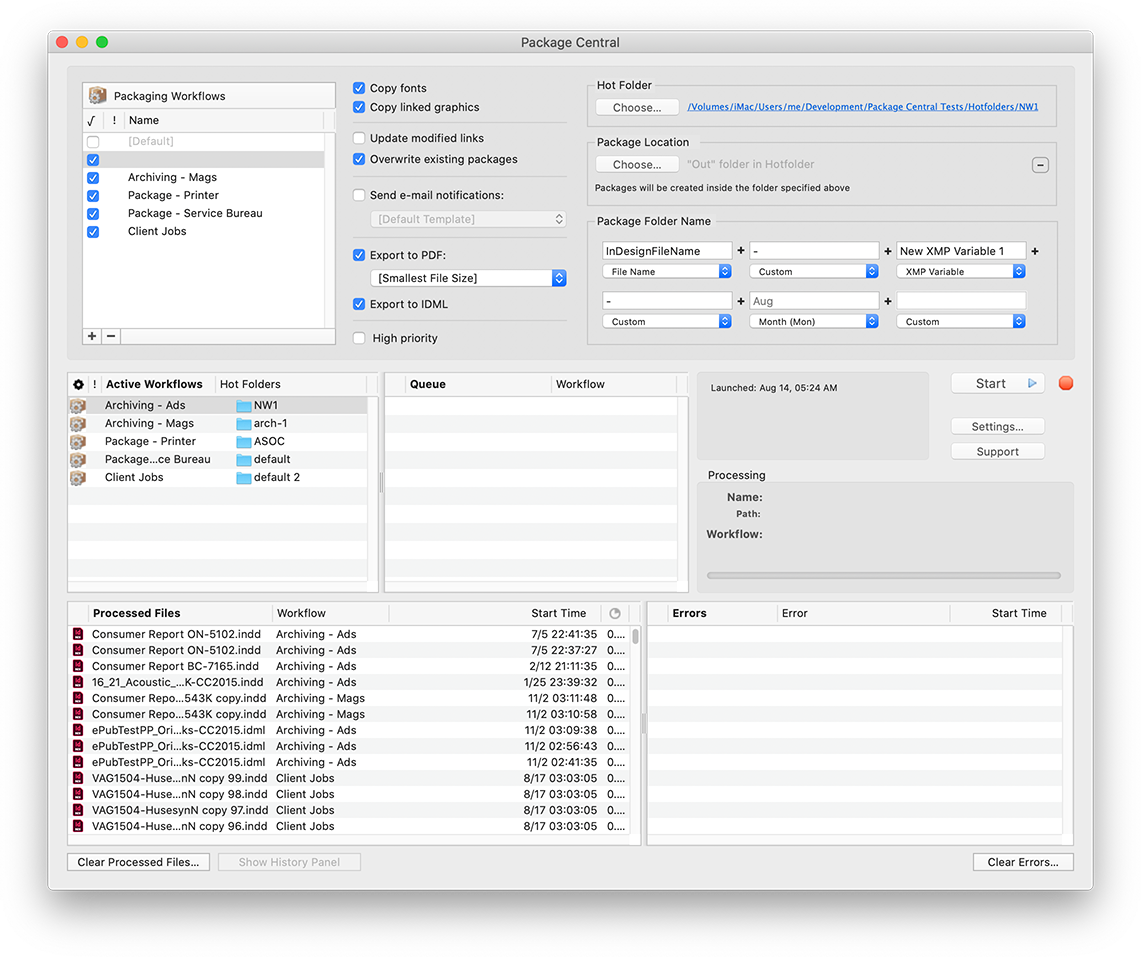
The new version abandons the use of intermediate temporary folder names which were initially assigned to the InDesign package folders. Users reported that under some rare conditions it could result to incorrect link paths in the collected InDesign files. With the new update, Package Central assigns the final variable folder names right away, which ensures the correct image relinking in final InDesign files at any time. Package Central lets users compose variable package names based on InDesign file name, date, current user and other tokens.
Package Central solves the problem of centralized packaging and archiving of InDesign projects in a workgroup environment while serving unlimited users on a network. The software lets prepress operators, production artists, and designers simply submit files to watched hot folders that reside on a network. The app then automatically collects InDesign files along with their fonts and links into the destination folder with dynamically assigned variable name.
Package Central runs on a dedicated Mac station and watches hot folders for incoming InDesign files. The software offers the following key features and benefits:
* Automatically collect InDesign files from hot folders
* Update modified links automatically
* Create IDML and PDF files on the fly
* Automatic email notifications of process stages and errors
* Serves unlimited users on a network
* Variable folder names
* Detailed processing history
Pricing and Availability:
Package Central can be purchased for $149.95 (USD) from Zevrix website as well as from authorized resellers. Trial is also available for download. The update is free for registered users. Package Central requires macOS 10.8-10.15 and Adobe InDesign CS5-2020.
Zevrix Solutions: https://zevrix.com
Package Central 1.11.18: https://zevrix.com/packagecentral
Download Package Central: https://zevrix.com/downloads/PackageCentral.dmg
Purchase: https://zevrix.com/store
Screenshot: https://zevrix.com/wp-content/uploads/2020/08/pac-main-1141-tall.png
Located in Toronto, Canada, Zevrix Solutions provides automation and productivity solutions for Adobe Creative Cloud and Creative Suite software, PDF workflows, graphic file diagnostics and Microsoft Office output on Mac OS. Zevrix is dedicated to help professionals increase their profits through automating everyday tasks, producing error-free documents, saving disk space and cutting production costs. For more information, visit their website. Copyright (C) 2020 Zevrix Solutions. All Rights Reserved. Other trademarks and registered trademarks may be the property of their respective owners.
*******
Link To Article: https://prmac.com/release-id-84126.htm
*******
---------------------------------------------------------------------------------
Note that you can alter delivered distributions at any time.
Login to your account on prMac to alter your channel selection, or to opt-out at any time.
Package Central for Adobe InDesign Fixes Image Relinking Anomaly - Published on 09/15/20
Zevrix Solutions announces Package Central 1.11.18, a maintenance update to company's file packaging automation solution for Adobe InDesign. The software collects InDesign documents along with their fonts and links from hot folders. Package Central serves unlimited users on a network and offers variable folder names, email alerts, PDF export, and more. The new version abandons the use of intermediate temporary folder names, which could result in incorrect image linkage in the final job folder.
Toronto (ON), Canada - Zevrix Solutions today announces Package Central 1.11.18, a maintenance update to company's document packaging automation solution for Adobe InDesign. Originally developed for a major publishing house in the United States, the software automates InDesign workflows by collecting files from hot folders. Package Central offloads InDesign packaging to a central system leaving operator workstations free from the collection process.
The new version abandons the use of intermediate temporary folder names which were initially assigned to the InDesign package folders. Users reported that under some rare conditions it could result to incorrect link paths in the collected InDesign files. With the new update, Package Central assigns the final variable folder names right away, which ensures the correct image relinking in final InDesign files at any time. Package Central lets users compose variable package names based on InDesign file name, date, current user and other tokens.
Package Central solves the problem of centralized packaging and archiving of InDesign projects in a workgroup environment while serving unlimited users on a network. The software lets prepress operators, production artists, and designers simply submit files to watched hot folders that reside on a network. The app then automatically collects InDesign files along with their fonts and links into the destination folder with dynamically assigned variable name.
Package Central runs on a dedicated Mac station and watches hot folders for incoming InDesign files. The software offers the following key features and benefits:
* Automatically collect InDesign files from hot folders
* Update modified links automatically
* Create IDML and PDF files on the fly
* Automatic email notifications of process stages and errors
* Serves unlimited users on a network
* Variable folder names
* Detailed processing history
Pricing and Availability:
Package Central can be purchased for $149.95 (USD) from Zevrix website as well as from authorized resellers. Trial is also available for download. The update is free for registered users. Package Central requires macOS 10.8-10.15 and Adobe InDesign CS5-2020.
Zevrix Solutions: https://zevrix.com
Package Central 1.11.18: https://zevrix.com/packagecentral
Download Package Central: https://zevrix.com/downloads/PackageCentral.dmg
Purchase: https://zevrix.com/store
Screenshot: https://zevrix.com/wp-content/uploads/2020/08/pac-main-1141-tall.png
Located in Toronto, Canada, Zevrix Solutions provides automation and productivity solutions for Adobe Creative Cloud and Creative Suite software, PDF workflows, graphic file diagnostics and Microsoft Office output on Mac OS. Zevrix is dedicated to help professionals increase their profits through automating everyday tasks, producing error-free documents, saving disk space and cutting production costs. For more information, visit their website. Copyright (C) 2020 Zevrix Solutions. All Rights Reserved. Other trademarks and registered trademarks may be the property of their respective owners.
*******
Link To Article: https://prmac.com/release-id-84126.htm
*******
---------------------------------------------------------------------------------
Note that you can alter delivered distributions at any time.
Login to your account on prMac to alter your channel selection, or to opt-out at any time.
Teleconferencing? Upgrade Your Webcam With Filters and FX - macOS
A new article has been published at prMac.
Teleconferencing? Upgrade Your Webcam With Filters and FX - macOS - Published on 09/14/20
Calgary based developer, Stonelight Pictures today introduces Webcam Effects Live 1.0.5, a new tool for video conferencing that improves the image of webcams in macOS 10.15. Webcam Effects Live is designed to enhance webcam video, and help get the best possible image when teleconferencing, streaming live, or recording video. Webcam Effects Live works with any 3rd party webcam or video source that is supported by the macOS system, and works with any built-in FaceTime HD camera.
Calgary, Canada - Stonelight Pictures today is proud to announce the release of Webcam Effects Live, its new video tool to enhance the video coming from webcams while teleconferencing, streaming live, or recording video. Intuitive controls allow adjustment of the look and feel of the video stream. 65 professional looks, each can be customized and saved in a filter library. Zoom, pan, and tilt with any webcam. Webcam Effects Live creates a virtual camera with an image adjusted video stream to send video to 3rd party apps.
Filter adjustment ranges from subtle to extreme, allowing for maximum control of the webcam image. Webcam Effects Live works with any 3rd party webcam or video source that is supported by the macOS system, and works with any built-in FaceTime HD camera. Webcam Effects Live is available from Stonelight Pictures today.
Other Features Include:
* 65 Professional cinema-grade customizable camera "Looks"
* System-wide menu-bar access
* Mirror Image
* Brightness, contrast, gamma, saturation, hue, sharpness, and white balance control
* Works with external webcams and built-in FaceTime HD webcams
* Before/After toggle, to compare adjusted video stream to original
System Requirements:
* macOS X 10.15
* 30 MB
Pricing and Availability:
Webcam Effects Live is only $9.99 (USD) from Stonelight Pictures online. Promo codes are available to members of the press. For more information, please contact Terry Demco.
Webcam Effects Live 1.0.5: http://stonelightpictures.com
Download Webcam Effects Live: http://stonelightpictures.com/WebcamEffects/WebcamEffectsLive.zip
Screenshot 1: http://stonelightpictures.com/images/Screenshot1.png
Screenshot 2: http://stonelightpictures.com/images/Screenshot2.png
Screenshot 3: http://stonelightpictures.com/images/Split.png
Application Icon: http://stonelightpictures.com/images/WebcamEffectsLiveLogo.png
Located in Alberta, Canada, Stonelight Pictures is a software development company bringing new and exciting apps to iOS and macOS for the last 12 years. All Material and Software (C) Copyright 2020 Stonelight Pictures. All Rights Reserved. Apple, the Apple logo, macOS, iPhone, iPod, iPad and Macintosh are registered trademarks of Apple Inc. in the U.S. and/or other countries. Other trademarks and registered trademarks may be the property of their respective owners.
*******
Link To Article: https://prmac.com/release-id-84125.htm
*******
---------------------------------------------------------------------------------
Note that you can alter delivered distributions at any time.
Login to your account on prMac to alter your channel selection, or to opt-out at any time.
Teleconferencing? Upgrade Your Webcam With Filters and FX - macOS - Published on 09/14/20
Calgary based developer, Stonelight Pictures today introduces Webcam Effects Live 1.0.5, a new tool for video conferencing that improves the image of webcams in macOS 10.15. Webcam Effects Live is designed to enhance webcam video, and help get the best possible image when teleconferencing, streaming live, or recording video. Webcam Effects Live works with any 3rd party webcam or video source that is supported by the macOS system, and works with any built-in FaceTime HD camera.
Calgary, Canada - Stonelight Pictures today is proud to announce the release of Webcam Effects Live, its new video tool to enhance the video coming from webcams while teleconferencing, streaming live, or recording video. Intuitive controls allow adjustment of the look and feel of the video stream. 65 professional looks, each can be customized and saved in a filter library. Zoom, pan, and tilt with any webcam. Webcam Effects Live creates a virtual camera with an image adjusted video stream to send video to 3rd party apps.
Filter adjustment ranges from subtle to extreme, allowing for maximum control of the webcam image. Webcam Effects Live works with any 3rd party webcam or video source that is supported by the macOS system, and works with any built-in FaceTime HD camera. Webcam Effects Live is available from Stonelight Pictures today.
Other Features Include:
* 65 Professional cinema-grade customizable camera "Looks"
* System-wide menu-bar access
* Mirror Image
* Brightness, contrast, gamma, saturation, hue, sharpness, and white balance control
* Works with external webcams and built-in FaceTime HD webcams
* Before/After toggle, to compare adjusted video stream to original
System Requirements:
* macOS X 10.15
* 30 MB
Pricing and Availability:
Webcam Effects Live is only $9.99 (USD) from Stonelight Pictures online. Promo codes are available to members of the press. For more information, please contact Terry Demco.
Webcam Effects Live 1.0.5: http://stonelightpictures.com
Download Webcam Effects Live: http://stonelightpictures.com/WebcamEffects/WebcamEffectsLive.zip
Screenshot 1: http://stonelightpictures.com/images/Screenshot1.png

Screenshot 2: http://stonelightpictures.com/images/Screenshot2.png

Screenshot 3: http://stonelightpictures.com/images/Split.png

Application Icon: http://stonelightpictures.com/images/WebcamEffectsLiveLogo.png

Located in Alberta, Canada, Stonelight Pictures is a software development company bringing new and exciting apps to iOS and macOS for the last 12 years. All Material and Software (C) Copyright 2020 Stonelight Pictures. All Rights Reserved. Apple, the Apple logo, macOS, iPhone, iPod, iPad and Macintosh are registered trademarks of Apple Inc. in the U.S. and/or other countries. Other trademarks and registered trademarks may be the property of their respective owners.
*******
Link To Article: https://prmac.com/release-id-84125.htm
*******
---------------------------------------------------------------------------------
Note that you can alter delivered distributions at any time.
Login to your account on prMac to alter your channel selection, or to opt-out at any time.
iMazing Update Brings Powerful Device Management Features for Business
A new article has been published at prMac.
iMazing Update Brings Powerful Device Management Features for Business - Published on 09/10/20
Independent developer DigiDNA announces iMazing 2.12 for macOS and Windows, an important update for their popular iOS device management app. Version 2.12 gives business users access to advanced iPhone, iPad and iPod configuration features, allowing them to lock a device to a point-of-sale app, enforce web content filtering, or even block the Camera or the Messages app. For the first time, local configuration of Apple mobile devices can be done from a Windows computer as well as a Mac.
San Francisco, California - Independent developer DigiDNA is proud to announce the release and immediate availability of iMazing 2.12 for macOS and Windows. iMazing is the popular iOS device management app that allows transferring of messages, music, files, and other types of data from any iPhone, iPad or iPod touch device. Version 2.12 adds a new set of features which enable configuration of iOS devices for business use.
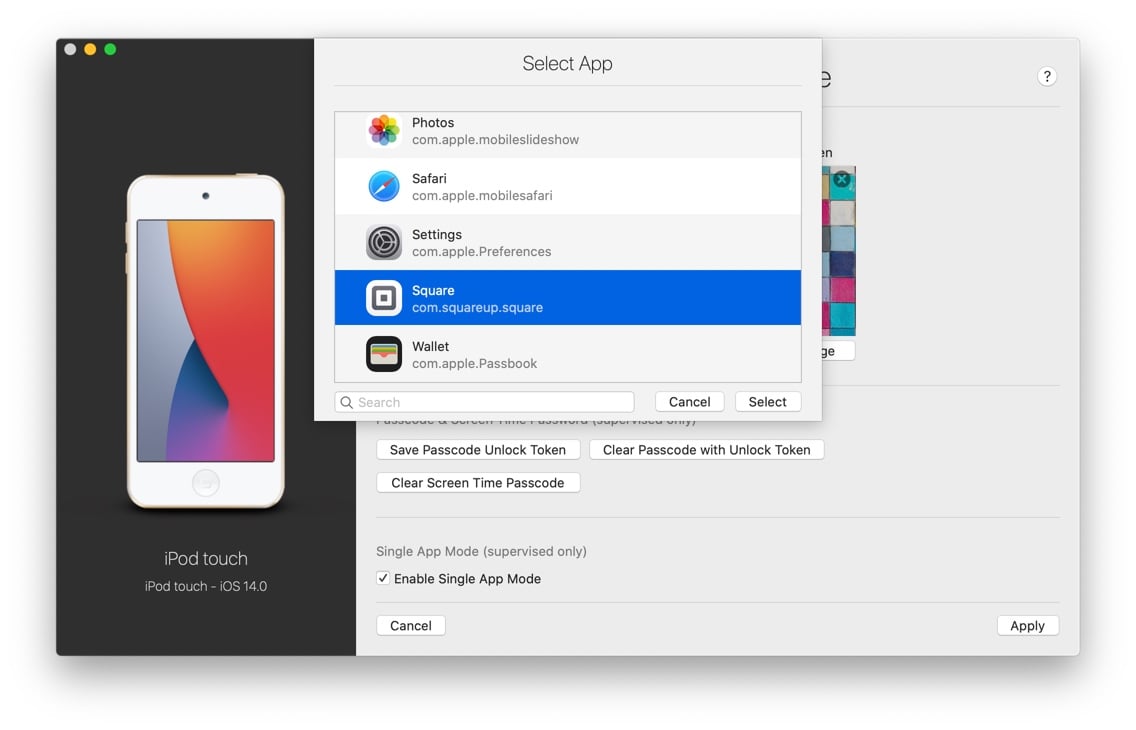
This new version introduces powerful yet approachable tools which help businesses make the most of Apple mobile devices. It is now easier than ever to lockdown iOS devices to the use of a single app, enforce web content filters, or restrict the use of specific features of the iOS device, including blocking the Camera app or preventing connection to unauthorized computers. In less than 10 minutes, an iPad can be configured to be used for point-of-sale purposes, locked down to only display a single app such as Square or TouchBistro.
"Thanks to a plethora of high quality business apps and services, iPhone, iPad and iPod touch routinely act as point of sales devices, digital menus, inventory management terminals, exhibition screens, flight planning assistants and more," says says DigiDNA's Gregorio Zanon. "This worldwide adoption of Apple mobile devices as utilities is made possible thanks to sophisticated supervision and configuration Apple technologies which traditionally required advanced IT skills. iMazing 2.12 makes all of the above easier."
New Features in iMazing 2.12 Include:
* Supervise iOS and iPadOS devices to enable advanced configuration features
* Easily enable and disable Single App Mode (also known as Kiosk mode)
* Use configuration profiles to enforce security policies and block specific features
* Fully compatible with devices supervised via DEP or Apple Configurator
* Integrates well in corporate device management environments
iMazing can also integrate with sophisticated device management solutions such as MDM, DEP and VPP. The new version complements remote management by enabling backup and data transfer of MDM enrolled devices, even if they are supervised via DEP or Apple Configurator. Furthermore, the Windows version of iMazing is the only solution of its kind to fully support supervised device management from a Windows PC.
For professional ITs, DigiDNA also offers iMazing Configurator Edition (macOS only). The Configurator feature set allows local supervision, configuration and provisioning of iOS devices in bulk. Advanced blueprints enable powerful automations, as well as a configuration process that is mindful of existing device data.
System Requirements:
* macOS 10.9 or higher
* Compatible with macOS Big Sur
* Windows version requires Windows 7 or higher
* iPhone, iPad, and iPod touch
* Supports all iOS versions
* 273.8 MB
Pricing and Availability:
iMazing 2.12 is free to download and is available worldwide through the iMazing website. Backing up and browsing data is entirely free. Premium features require the purchase of a license. A Single License (1 computer) is $44.99 USD, Universal license (2 computers) is $49.99, Family license (5 computers) is $69.99. The 2.12 update is free for all iMazing 2 license owners.
iMazing 2.12: https://imazing.com/
iMazing Configurator: https://imazing.com/configurator
More Info: https://imazing.com/blog/make-the-most-of-ios-devices-in-your-business-with-supervision
YouTube Video (Introduction): https://www.youtube.com/watch?v=hkzFX1s1Cdo
Screenshot: https://imazing.com/uploads/blog/imazing-2-12/supervised-choose-single-app.jpg
iMazing Banner: https://imazing.com/uploads/blog/imazing-2-12/imazing-business-banner.jpg
Headquartered in Geneva, Switzerland, DigiDNA is an independent software developer company incorporated in 2008 under the name of DigiDNA Sarl. In 2013 the company and its products were granted the Swiss Label. DigiDNA proudly carries the crossbow - symbolizing Swiss precision work and quality products. DigiDNA is committed to helping users and businesses get the most out of their Apple mobile devices by providing innovative device management solutions and efficient data transfer software, for both Mac and PC. All Material and Software (C) Copyright 2008-2020 DigiDNA Sarl. All Rights Reserved. Apple, the Apple logo, iPhone, iPad and iPod are registered trademarks of Apple Inc. in the U.S. and/or other countries. Other trademarks and registered trademarks may be the property of their respective owners.
*******
Link To Article: https://prmac.com/release-id-84124.htm
*******
---------------------------------------------------------------------------------
Note that you can alter delivered distributions at any time.
Login to your account on prMac to alter your channel selection, or to opt-out at any time.
iMazing Update Brings Powerful Device Management Features for Business - Published on 09/10/20
Independent developer DigiDNA announces iMazing 2.12 for macOS and Windows, an important update for their popular iOS device management app. Version 2.12 gives business users access to advanced iPhone, iPad and iPod configuration features, allowing them to lock a device to a point-of-sale app, enforce web content filtering, or even block the Camera or the Messages app. For the first time, local configuration of Apple mobile devices can be done from a Windows computer as well as a Mac.
San Francisco, California - Independent developer DigiDNA is proud to announce the release and immediate availability of iMazing 2.12 for macOS and Windows. iMazing is the popular iOS device management app that allows transferring of messages, music, files, and other types of data from any iPhone, iPad or iPod touch device. Version 2.12 adds a new set of features which enable configuration of iOS devices for business use.
This new version introduces powerful yet approachable tools which help businesses make the most of Apple mobile devices. It is now easier than ever to lockdown iOS devices to the use of a single app, enforce web content filters, or restrict the use of specific features of the iOS device, including blocking the Camera app or preventing connection to unauthorized computers. In less than 10 minutes, an iPad can be configured to be used for point-of-sale purposes, locked down to only display a single app such as Square or TouchBistro.
"Thanks to a plethora of high quality business apps and services, iPhone, iPad and iPod touch routinely act as point of sales devices, digital menus, inventory management terminals, exhibition screens, flight planning assistants and more," says says DigiDNA's Gregorio Zanon. "This worldwide adoption of Apple mobile devices as utilities is made possible thanks to sophisticated supervision and configuration Apple technologies which traditionally required advanced IT skills. iMazing 2.12 makes all of the above easier."
New Features in iMazing 2.12 Include:
* Supervise iOS and iPadOS devices to enable advanced configuration features
* Easily enable and disable Single App Mode (also known as Kiosk mode)
* Use configuration profiles to enforce security policies and block specific features
* Fully compatible with devices supervised via DEP or Apple Configurator
* Integrates well in corporate device management environments
iMazing can also integrate with sophisticated device management solutions such as MDM, DEP and VPP. The new version complements remote management by enabling backup and data transfer of MDM enrolled devices, even if they are supervised via DEP or Apple Configurator. Furthermore, the Windows version of iMazing is the only solution of its kind to fully support supervised device management from a Windows PC.
For professional ITs, DigiDNA also offers iMazing Configurator Edition (macOS only). The Configurator feature set allows local supervision, configuration and provisioning of iOS devices in bulk. Advanced blueprints enable powerful automations, as well as a configuration process that is mindful of existing device data.
System Requirements:
* macOS 10.9 or higher
* Compatible with macOS Big Sur
* Windows version requires Windows 7 or higher
* iPhone, iPad, and iPod touch
* Supports all iOS versions
* 273.8 MB
Pricing and Availability:
iMazing 2.12 is free to download and is available worldwide through the iMazing website. Backing up and browsing data is entirely free. Premium features require the purchase of a license. A Single License (1 computer) is $44.99 USD, Universal license (2 computers) is $49.99, Family license (5 computers) is $69.99. The 2.12 update is free for all iMazing 2 license owners.
iMazing 2.12: https://imazing.com/
iMazing Configurator: https://imazing.com/configurator
More Info: https://imazing.com/blog/make-the-most-of-ios-devices-in-your-business-with-supervision
YouTube Video (Introduction): https://www.youtube.com/watch?v=hkzFX1s1Cdo
Screenshot: https://imazing.com/uploads/blog/imazing-2-12/supervised-choose-single-app.jpg
iMazing Banner: https://imazing.com/uploads/blog/imazing-2-12/imazing-business-banner.jpg
Headquartered in Geneva, Switzerland, DigiDNA is an independent software developer company incorporated in 2008 under the name of DigiDNA Sarl. In 2013 the company and its products were granted the Swiss Label. DigiDNA proudly carries the crossbow - symbolizing Swiss precision work and quality products. DigiDNA is committed to helping users and businesses get the most out of their Apple mobile devices by providing innovative device management solutions and efficient data transfer software, for both Mac and PC. All Material and Software (C) Copyright 2008-2020 DigiDNA Sarl. All Rights Reserved. Apple, the Apple logo, iPhone, iPad and iPod are registered trademarks of Apple Inc. in the U.S. and/or other countries. Other trademarks and registered trademarks may be the property of their respective owners.
*******
Link To Article: https://prmac.com/release-id-84124.htm
*******
---------------------------------------------------------------------------------
Note that you can alter delivered distributions at any time.
Login to your account on prMac to alter your channel selection, or to opt-out at any time.
AlphaDigits Announces Top Rated Mobile Apps for August 2020
A new article has been published at prMac.
AlphaDigits Announces Top Rated Mobile Apps for August 2020 - Published on 09/09/20
Mobile app review publisher AlphaDigits has named top rated applications for August 2020. Mobilo Card saves you a lot of money. Marble Jetpack has a simplistic goal which is to beat the clock and collect stars. My Walk Tracker has better accuracy and advanced graphics. Pepi Wonder World lets kids re-enact those same childhood fairytales. Save the Princess is designed like a text-based CYOA game.
Long Island, New York - Mobile app review publisher AlphaDigits has named top rated applications for August 2020. AlphaDigits names five top class mobile apps every month based on the reviews published in the website during the particular month. This website has now released the names of top rated mobile apps for the month of August.
Mobilo Card (10/10): Mobilo Card saves you a lot of money, unlike paper cards. You will spend some money only on designing the card, whether it's Mobilo Branded or Fully Personalized, with an only cost of $7 or $39. It is an eco-friendly alternative to paper business cards. The use of trees in the production of mass paper products such as books, newspapers, or business cards, has been widely debated over the years, as companies and consumers are tending now more to digital products.
Marble Jetpack (9.5/10): This game has a simplistic goal which is to beat the clock and collect stars along the way with a few twists thrown in. There are enemy marbles that float and try to shoot and the players have to jetpack themselves from island to island without drowning in the water between them. They start off as a basic marble that can roll around the ground. There is a handy yet difficult tutorial to pass through before attempting any other levels.
My Walk Tracker (9/10): My Walk Tracker has better accuracy and advanced graphics. It also offers optional audio updates during the workouts, and the ability to record the progress. Users can track their running route with its GPS Tracking feature. This view will measure the distance along with a map and tell them exactly where they started their walk, and where they finished it. My Walk Tracker features a Realtime speed indication right on the tracking map, as well as pause function if the users need to take a breath without counting the time or distance.
Pepi Wonder World (8.5/10): Pepi Play offers a marvelous app called Pepi Wonder World, where players can let their kid re-enact those same childhood fairytales and stories that they enacted in their dollhouse. The only difference is that technology has made the experience much more interactive and alluring than they could have imagined in days of yore. The first thing that catches the eye is the stunning graphics, which are both jaunty and topflight.
Save the Princess (8/10): This game is designed like a text-based CYOA game. By playing it, they are the star of the story. It puts them in control. Every few pages, they have to make a critical decision on how to proceed. This is usually used as a metaphor for real-life conflict. Save the Princess has some sort of quest or mission mechanic that gives your character "Vladmir" a reason to get out and explore the world, gain experience using your skills, and make an impact on the game world.
Joe Ellen, an Editor at AlphaDigits said, "This month AlphaDigits has got around 100K rank in Alexa. We are working on it to increase the traffic and to get around 50K." Developers can also contact AlphaDigits through the onsite form or mail to get their apps reviewed.
AlphaDigits: https://alphadigits.com/
Submit App for Review: https://alphadigits.com/submit-app-for-review/
AlphaDigits is a review site run by a few app marketers. Enjoying the support from a handy amount of regular visitors, AlphaDigits provides reviews for iPhone, iPad and Android apps. Copyright (C) 2020 AlphaDigits. All Rights Reserved. Apple, the Apple logo, iPhone, iPod and iPad are registered trademarks of Apple Inc. in the U.S. and/or other countries.
*******
Link To Article: https://prmac.com/release-id-84123.htm
*******
---------------------------------------------------------------------------------
Note that you can alter delivered distributions at any time.
Login to your account on prMac to alter your channel selection, or to opt-out at any time.
AlphaDigits Announces Top Rated Mobile Apps for August 2020 - Published on 09/09/20
Mobile app review publisher AlphaDigits has named top rated applications for August 2020. Mobilo Card saves you a lot of money. Marble Jetpack has a simplistic goal which is to beat the clock and collect stars. My Walk Tracker has better accuracy and advanced graphics. Pepi Wonder World lets kids re-enact those same childhood fairytales. Save the Princess is designed like a text-based CYOA game.
Long Island, New York - Mobile app review publisher AlphaDigits has named top rated applications for August 2020. AlphaDigits names five top class mobile apps every month based on the reviews published in the website during the particular month. This website has now released the names of top rated mobile apps for the month of August.
Mobilo Card (10/10): Mobilo Card saves you a lot of money, unlike paper cards. You will spend some money only on designing the card, whether it's Mobilo Branded or Fully Personalized, with an only cost of $7 or $39. It is an eco-friendly alternative to paper business cards. The use of trees in the production of mass paper products such as books, newspapers, or business cards, has been widely debated over the years, as companies and consumers are tending now more to digital products.
Marble Jetpack (9.5/10): This game has a simplistic goal which is to beat the clock and collect stars along the way with a few twists thrown in. There are enemy marbles that float and try to shoot and the players have to jetpack themselves from island to island without drowning in the water between them. They start off as a basic marble that can roll around the ground. There is a handy yet difficult tutorial to pass through before attempting any other levels.
My Walk Tracker (9/10): My Walk Tracker has better accuracy and advanced graphics. It also offers optional audio updates during the workouts, and the ability to record the progress. Users can track their running route with its GPS Tracking feature. This view will measure the distance along with a map and tell them exactly where they started their walk, and where they finished it. My Walk Tracker features a Realtime speed indication right on the tracking map, as well as pause function if the users need to take a breath without counting the time or distance.
Pepi Wonder World (8.5/10): Pepi Play offers a marvelous app called Pepi Wonder World, where players can let their kid re-enact those same childhood fairytales and stories that they enacted in their dollhouse. The only difference is that technology has made the experience much more interactive and alluring than they could have imagined in days of yore. The first thing that catches the eye is the stunning graphics, which are both jaunty and topflight.
Save the Princess (8/10): This game is designed like a text-based CYOA game. By playing it, they are the star of the story. It puts them in control. Every few pages, they have to make a critical decision on how to proceed. This is usually used as a metaphor for real-life conflict. Save the Princess has some sort of quest or mission mechanic that gives your character "Vladmir" a reason to get out and explore the world, gain experience using your skills, and make an impact on the game world.
Joe Ellen, an Editor at AlphaDigits said, "This month AlphaDigits has got around 100K rank in Alexa. We are working on it to increase the traffic and to get around 50K." Developers can also contact AlphaDigits through the onsite form or mail to get their apps reviewed.
AlphaDigits: https://alphadigits.com/
Submit App for Review: https://alphadigits.com/submit-app-for-review/
AlphaDigits is a review site run by a few app marketers. Enjoying the support from a handy amount of regular visitors, AlphaDigits provides reviews for iPhone, iPad and Android apps. Copyright (C) 2020 AlphaDigits. All Rights Reserved. Apple, the Apple logo, iPhone, iPod and iPad are registered trademarks of Apple Inc. in the U.S. and/or other countries.
*******
Link To Article: https://prmac.com/release-id-84123.htm
*******
---------------------------------------------------------------------------------
Note that you can alter delivered distributions at any time.
Login to your account on prMac to alter your channel selection, or to opt-out at any time.
TechAffinity's Mission To Care for Its Workforce Is a Model to Replicate
A new article has been published at prMac.
TechAffinity's Mission To Care for Its Workforce Is a Model to Replicate - Published on 09/09/20
TechAffinity, an IT services company headquartered in Tampa, Florida, and with a development center in Chennai, India announces various benefits for its employees during COVID-19. Recently, the Tampa based company celebrated its 20th anniversary alongside announcing their acquisition of an IT Staffing firm TechSmarte. TechAffinity was one of the early implementers of the "Work from Anywhere" strategy.
Tampa, Florida - TechAffinity, an IT services company headquartered in Tampa, Florida, and with a development center in Chennai, India announces various benefits for its employees during COVID-19. Recently, the Tampa based company celebrated its 20th anniversary alongside announcing their acquisition of an IT Staffing firm TechSmarte.
Earlier this year with the rapid spread of COVID19, TechAffinity was one of the early implementers of the "Work from Anywhere" strategy for its more than 250 employees ensuring smooth business operations.
"To equip ourselves against the pandemic, we must understand its impact on our employees, clients, partners, and local communities. By doing this, It helped us expedite our process and make our business infrastructure more mobile and accessible" said Jam Nelavai, Founder and CEO of TechAffinity.
In Addition, he recognized the financial burden and the importance of the well-being of the employees and their families during the pandemic by announcing a special incentive of 2.5% across the company. "Employee health and well being has always been a top priority of ours. Our incredible team is the backbone of our company and this special incentive is one way of thanking for having risen to the challenge and continuing to work with a sense of purpose and pride."
Another big challenge during the pandemic was to maintain smooth IT business operations and delivery for 300+ businesses worldwide. The company carried out multiple upgrades to its infrastructure and virtual operations to assure continuity of its services for all its clients.
About TechAffinity
TechAffinity, a technology-driven custom software solution company enables businesses to use all the benefits of the modern technology landscape to make digital transformation simpler, enhancing the growth of businesses with innovative Design and Development to deliver market-defining high-quality solutions that create real value.
For more questions and media queries parties can reach out to TechAffinity's media contact.
TechAffinity: https://www.techaffinity.com/
TechAffinity, an IT services company headquartered in Tampa, Florida, and with a development center in Chennai, India. All Material and Software (C) Copyright 2020 TechAffinity. All Rights Reserved. Apple, the Apple logo, Macintosh Mac OS X and macOS are registered trademarks of Apple Inc. in the U.S. and/or other countries. Other trademarks and registered trademarks may be the property of their respective owners.
*******
Link To Article: https://prmac.com/release-id-84122.htm
*******
---------------------------------------------------------------------------------
Note that you can alter delivered distributions at any time.
Login to your account on prMac to alter your channel selection, or to opt-out at any time.
TechAffinity's Mission To Care for Its Workforce Is a Model to Replicate - Published on 09/09/20
TechAffinity, an IT services company headquartered in Tampa, Florida, and with a development center in Chennai, India announces various benefits for its employees during COVID-19. Recently, the Tampa based company celebrated its 20th anniversary alongside announcing their acquisition of an IT Staffing firm TechSmarte. TechAffinity was one of the early implementers of the "Work from Anywhere" strategy.
Tampa, Florida - TechAffinity, an IT services company headquartered in Tampa, Florida, and with a development center in Chennai, India announces various benefits for its employees during COVID-19. Recently, the Tampa based company celebrated its 20th anniversary alongside announcing their acquisition of an IT Staffing firm TechSmarte.
Earlier this year with the rapid spread of COVID19, TechAffinity was one of the early implementers of the "Work from Anywhere" strategy for its more than 250 employees ensuring smooth business operations.
"To equip ourselves against the pandemic, we must understand its impact on our employees, clients, partners, and local communities. By doing this, It helped us expedite our process and make our business infrastructure more mobile and accessible" said Jam Nelavai, Founder and CEO of TechAffinity.
In Addition, he recognized the financial burden and the importance of the well-being of the employees and their families during the pandemic by announcing a special incentive of 2.5% across the company. "Employee health and well being has always been a top priority of ours. Our incredible team is the backbone of our company and this special incentive is one way of thanking for having risen to the challenge and continuing to work with a sense of purpose and pride."
Another big challenge during the pandemic was to maintain smooth IT business operations and delivery for 300+ businesses worldwide. The company carried out multiple upgrades to its infrastructure and virtual operations to assure continuity of its services for all its clients.
About TechAffinity
TechAffinity, a technology-driven custom software solution company enables businesses to use all the benefits of the modern technology landscape to make digital transformation simpler, enhancing the growth of businesses with innovative Design and Development to deliver market-defining high-quality solutions that create real value.
For more questions and media queries parties can reach out to TechAffinity's media contact.
TechAffinity: https://www.techaffinity.com/
TechAffinity, an IT services company headquartered in Tampa, Florida, and with a development center in Chennai, India. All Material and Software (C) Copyright 2020 TechAffinity. All Rights Reserved. Apple, the Apple logo, Macintosh Mac OS X and macOS are registered trademarks of Apple Inc. in the U.S. and/or other countries. Other trademarks and registered trademarks may be the property of their respective owners.
*******
Link To Article: https://prmac.com/release-id-84122.htm
*******
---------------------------------------------------------------------------------
Note that you can alter delivered distributions at any time.
Login to your account on prMac to alter your channel selection, or to opt-out at any time.
Subscribe to:
Posts (Atom)