A new article has been published at prMac.
Output Factory Server 3 for InDesign Released, Adds LinkOptimizer Server - Published on 09/29/20
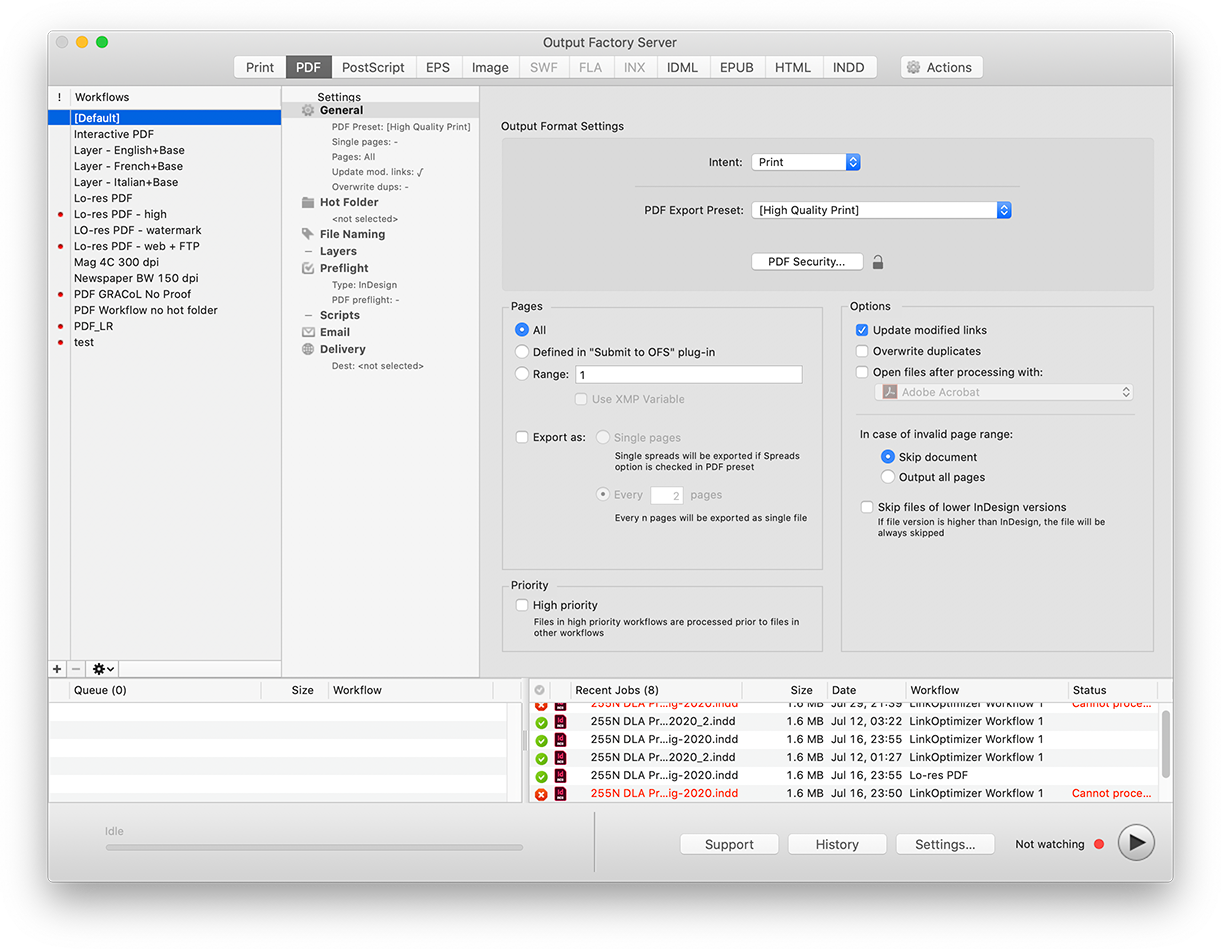
Zevrix Solutions announces the release of Output Factory Server 3, a major upgrade to company's output automation solution for Adobe InDesign. Output Factory Server automates printing and exporting from InDesign with hot folders processing. The new release incorporates another Zevrix product for InDesign, LinkOptimizer, directly into Output Factory Server, which lets InDesign workgroups automate their image workflows and combine them with PDF, print, EPUB other output formats.
Toronto (ON), Canada - Zevrix Solutions today announces the release of Output Factory Server 3, a major upgrade to company's output automation tool for Adobe InDesign. The app automates InDesign production workflows by processing files from watched hot folders. True to its name, Output Factory Server provides printers and publishing companies with conveyor-style industrial output facilities that reduce manual labor and save InDesign operators countless hours of tedious repetitive tasks.
The new version incorporates LinkOptimizer, the company's image workflow automation solution for InDesign, directly into Output Factory Server. Long requested by LinkOptimizer customers, the new version will be able to serve unlimited users on a network from a single installation via watched hot folders. LinkOptimizer users will now take advantage of the existing and time-proven hot folder facilities of Output Factory Server that automate workflows of printers, publishers and ad agencies worldwide for well over a decade.
LinkOptimizer automates complex image manipulation tasks and allows users to reduce the size of InDesign links, convert image colors and formats, run Photoshop actions and much more. And as LinkOptimizer becomes a part of Output Factory Server, users will be empowered to combine LinkOptimizer processing with standard output workflows such as PDF, print, IDML and other formats. For example, the app will provide an option to resize, convert and relink images by LinkOptimizer - and then export the optimized InDesign file to PDF automatically with no further steps required by the operator. All they need to do is drop InDesign file into a single hot folder that invokes the multi-workflow processing.
The final product that combines both Output Factory Server 3 and LinkOptimizer Server will also enable InDesign workgroups to resize and crop images to their InDesign dimensions, convert image link formats, output InDesign layer combinations as single files, send email notifications, perform automatic preflighting, and much more.
Pricing and Availability:
Output Factory Server 3 with built-in LinkOptimizer Server can be purchased from Zevrix web site for $699.95 (USD), as well as from authorized resellers. Trial is also available for download. The upgrade cost is $350 for the licensed users of earlier Output Factory Server versions and BatchOutput Server. Output Factory Server requires macOS 10.13 or later and Adobe InDesign CC 2019-2020.
Zevrix Solutions: https://zevrix.com
Output Factory Server 3: https://zevrix.com/outputfactoryserver
Download Output Factory Server: https://zevrix.com/downloads/OutputFactoryServer.dmg
Purchase: https://zevrix.com/store
Screenshot: https://zevrix.com/wp-content/uploads/2020/08/ofs2-main-pdf-1221-tr.png
Located in Toronto, Canada, Zevrix Solutions provides automation and productivity solutions for Adobe Creative Cloud and Creative Suite software, PDF workflows, graphic file diagnostics and Microsoft Office output on Mac OS. Zevrix is dedicated to help professionals increase their profits through automating everyday tasks, producing error-free documents, saving disk space and cutting production costs. For more information, visit their website. Copyright (C) 2020 Zevrix Solutions. All Rights Reserved. Other trademarks and registered trademarks may be the property of their respective owners.
*******
Link To Article: https://prmac.com/release-id-84139.htm
*******
---------------------------------------------------------------------------------
Note that you can alter delivered distributions at any time.
Login to your account on prMac to alter your channel selection, or to opt-out at any time.

WaterField Issues Protective Dash Sleeve for Magic Keyboard and Trackpad
A new article has been published at prMac.
WaterField Issues Protective Dash Sleeve for Magic Keyboard and Trackpad - Published on 09/29/20
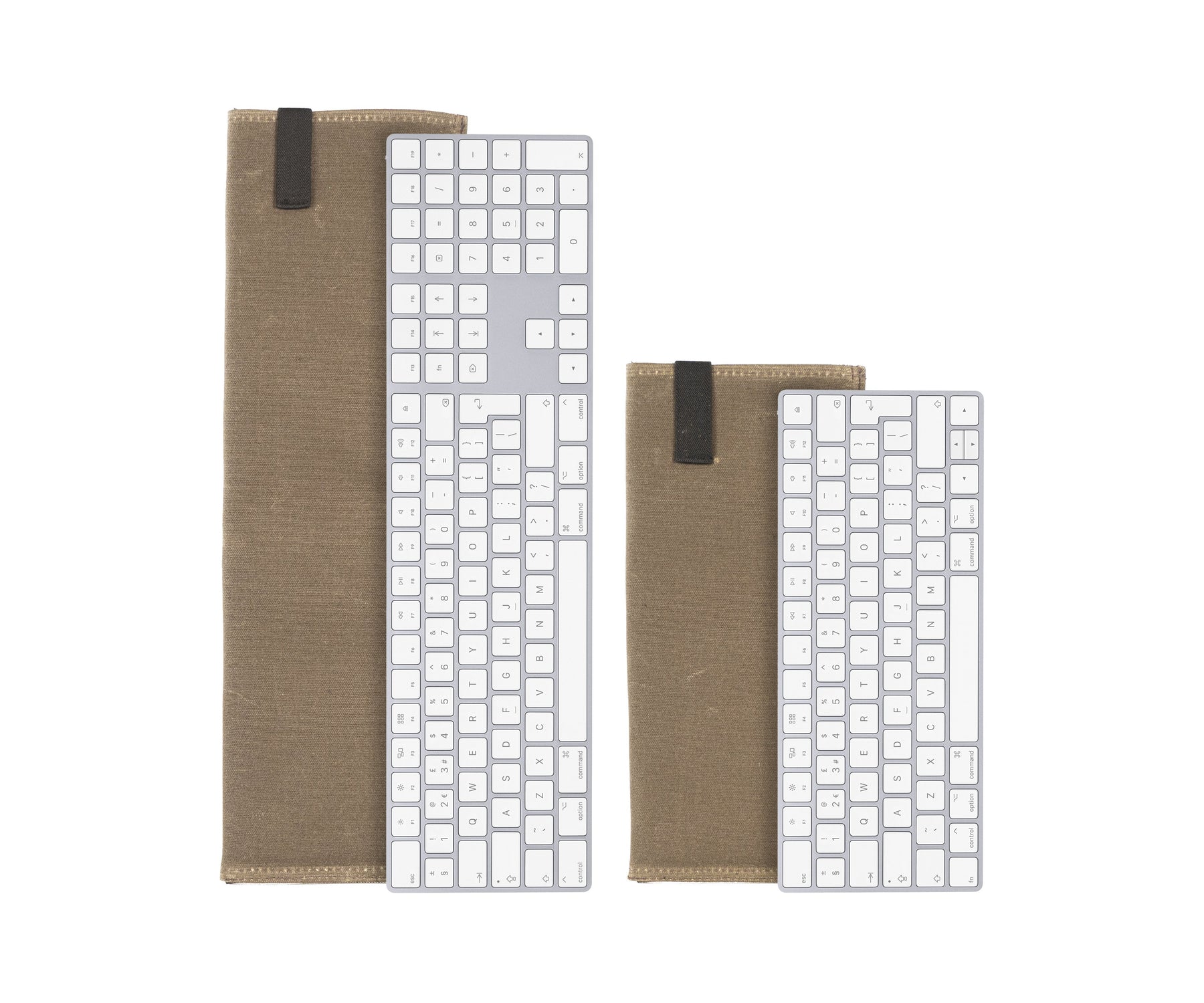
San Francisco based, WaterField Designs introduces the ultra-slim Dash Sleeve to protect the Apple Magic Keyboard and Magic Trackpad 2. Colorful, water-resistant Italian fabric, ballistic nylon, or waxed canvas on the exterior and a plush, padded interior combine for a precise fit, protecting the devices from dings and scratches while in transit or storage. Three custom-fit sizes protect the Apple 10-key Magic Keyboard, the Apple standard Magic Keyboard, and the Apple Magic Trackpad.
San Francisco, California - WaterField Designs, a San Francisco manufacturer of custom laptop sleeves, bags, and cases for digital gear, introduces the custom-fit Dash Sleeve for the standard and 10-key Apple Magic Keyboard and for the Magic Trackpad 2. Enveloped in beautiful, water-resistant, Italian "Forza" fabric lined with a padded, plush liner, these minimalist cases offer maximum protection from spills, dings, and scratches. Whether transporting them to and from work or setting up and breaking down a work-from-home station, the clean and simple Dash Sleeves provide substantial protection for these digital devices.
"Our mission is to help our customers protect their tech, all their tech, and that includes making cases otherwise unavailable for smaller devices like the Magic Keyboard and Trackpad," said company owner Gary Waterfield. "We created these custom-fitted versions of our popular Dash Sleeve so customers can get the same rugged protection for these that they have for their laptops and tablets."
Dash Sleeve Features:
* Rear mesh pocket stores a mouse, charging cable, or other accessories
* Stretchy elastic band keeps the device securely inside
* Precise yet comfortable fit makes inserting and extracting the device easy
* Substantially protective yet featherweight and slim
* Colorful, water-resistant "Forza" material, black ballistic nylon, or tan waxed canvas envelope and protect the devices
* Ultra-plush, foam-padded liner "as soft as a puppy's ear" cushions against dings and scratches
The new Dash Trackpad and Keyboard Sleeves are available in five colors. The colorful, water-resistant 'Forza' fabric is made by weaving together two yarn-dyed nylon threads creating a vibrant basket-weave pattern with beautiful undertones. Ballistic nylon and waxed canvas offer similarly rugged protection with an understated aesthetic. Three custom-fit sizes protect the Apple 10-key Magic Keyboard, the Apple standard Magic Keyboard, and the Apple Magic Trackpad. The sleeves can be stylishly stowed in any of WaterField Design's messenger bags, briefcases, or backpacks.
Colors and Materials:
Water-resistant, nylon, woven "Forza" Italian fabric in blue, coffee, or red; or black ballistic nylon; or tan waxed canvas. Ultra-soft, foam-padded lining. Elastic strap closure.
Pricing & Availability - Available Now:
Dash Case for the: Standard Magic Keyboard is priced at $59 USD (11.5 x 5.25 inches; 3 oz.)
10-key Magic Keyboard is priced at $59 USD (17.75 x 5.25 inches; 4 oz.)
Magic Trackpad is priced at $59 USD (7 x 5.375 inches; 2 oz.)
WaterField Designs: http://www.sfbags.com/
Dash Sleeve for Keyboard or Trackpad 2: https://www.sfbags.com/collections/dash-keyboard-and-dash-trackpad
YouTube Video (Demo): https://www.youtube.com/watch?v=vkz9RITEr4k
Product Image: https://cdn.shopify.com/s/files/1/0281/2796/products/KeyboardTwoSizes_1800x1800.jpg
WaterField Designs is an innovative San Francisco designer and manufacturer of bags and cases for tech-savvy consumers who want to stylishly and responsibly transport their technology. WaterField manufactures custom-fitted, high-quality cases and bags for a full-range of laptop computers, smartphones, tablets, gaming devices, and other digital gear. All products are manufactured to exacting standards entirely in San Francisco. More information is available on the company website at "Our Story." WaterField Designs and SFBags are trademarks of WaterField Designs. Copyright (C) 1998-2020 WaterField Designs. All Rights Reserved. Other trademarks and registered trademarks may be the property of their respective owners.
*******
Link To Article: https://prmac.com/release-id-84138.htm
*******
---------------------------------------------------------------------------------
Note that you can alter delivered distributions at any time.
Login to your account on prMac to alter your channel selection, or to opt-out at any time.
WaterField Issues Protective Dash Sleeve for Magic Keyboard and Trackpad - Published on 09/29/20
San Francisco based, WaterField Designs introduces the ultra-slim Dash Sleeve to protect the Apple Magic Keyboard and Magic Trackpad 2. Colorful, water-resistant Italian fabric, ballistic nylon, or waxed canvas on the exterior and a plush, padded interior combine for a precise fit, protecting the devices from dings and scratches while in transit or storage. Three custom-fit sizes protect the Apple 10-key Magic Keyboard, the Apple standard Magic Keyboard, and the Apple Magic Trackpad.
San Francisco, California - WaterField Designs, a San Francisco manufacturer of custom laptop sleeves, bags, and cases for digital gear, introduces the custom-fit Dash Sleeve for the standard and 10-key Apple Magic Keyboard and for the Magic Trackpad 2. Enveloped in beautiful, water-resistant, Italian "Forza" fabric lined with a padded, plush liner, these minimalist cases offer maximum protection from spills, dings, and scratches. Whether transporting them to and from work or setting up and breaking down a work-from-home station, the clean and simple Dash Sleeves provide substantial protection for these digital devices.
"Our mission is to help our customers protect their tech, all their tech, and that includes making cases otherwise unavailable for smaller devices like the Magic Keyboard and Trackpad," said company owner Gary Waterfield. "We created these custom-fitted versions of our popular Dash Sleeve so customers can get the same rugged protection for these that they have for their laptops and tablets."
Dash Sleeve Features:
* Rear mesh pocket stores a mouse, charging cable, or other accessories
* Stretchy elastic band keeps the device securely inside
* Precise yet comfortable fit makes inserting and extracting the device easy
* Substantially protective yet featherweight and slim
* Colorful, water-resistant "Forza" material, black ballistic nylon, or tan waxed canvas envelope and protect the devices
* Ultra-plush, foam-padded liner "as soft as a puppy's ear" cushions against dings and scratches
The new Dash Trackpad and Keyboard Sleeves are available in five colors. The colorful, water-resistant 'Forza' fabric is made by weaving together two yarn-dyed nylon threads creating a vibrant basket-weave pattern with beautiful undertones. Ballistic nylon and waxed canvas offer similarly rugged protection with an understated aesthetic. Three custom-fit sizes protect the Apple 10-key Magic Keyboard, the Apple standard Magic Keyboard, and the Apple Magic Trackpad. The sleeves can be stylishly stowed in any of WaterField Design's messenger bags, briefcases, or backpacks.
Colors and Materials:
Water-resistant, nylon, woven "Forza" Italian fabric in blue, coffee, or red; or black ballistic nylon; or tan waxed canvas. Ultra-soft, foam-padded lining. Elastic strap closure.
Pricing & Availability - Available Now:
Dash Case for the: Standard Magic Keyboard is priced at $59 USD (11.5 x 5.25 inches; 3 oz.)
10-key Magic Keyboard is priced at $59 USD (17.75 x 5.25 inches; 4 oz.)
Magic Trackpad is priced at $59 USD (7 x 5.375 inches; 2 oz.)
WaterField Designs: http://www.sfbags.com/
Dash Sleeve for Keyboard or Trackpad 2: https://www.sfbags.com/collections/dash-keyboard-and-dash-trackpad
YouTube Video (Demo): https://www.youtube.com/watch?v=vkz9RITEr4k
Product Image: https://cdn.shopify.com/s/files/1/0281/2796/products/KeyboardTwoSizes_1800x1800.jpg
WaterField Designs is an innovative San Francisco designer and manufacturer of bags and cases for tech-savvy consumers who want to stylishly and responsibly transport their technology. WaterField manufactures custom-fitted, high-quality cases and bags for a full-range of laptop computers, smartphones, tablets, gaming devices, and other digital gear. All products are manufactured to exacting standards entirely in San Francisco. More information is available on the company website at "Our Story." WaterField Designs and SFBags are trademarks of WaterField Designs. Copyright (C) 1998-2020 WaterField Designs. All Rights Reserved. Other trademarks and registered trademarks may be the property of their respective owners.
*******
Link To Article: https://prmac.com/release-id-84138.htm
*******
---------------------------------------------------------------------------------
Note that you can alter delivered distributions at any time.
Login to your account on prMac to alter your channel selection, or to opt-out at any time.
SecuritySpy iOS App - Major Update to Video Surveillance Viewer
A new article has been published at prMac.
SecuritySpy iOS App - Major Update to Video Surveillance Viewer - Published on 09/28/20
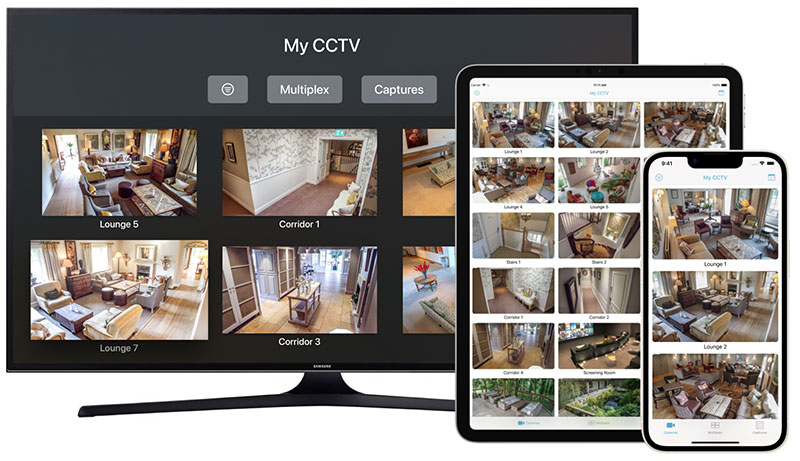
UK based developer, Ben Software today announced SecuritySpy 1.3.0, a major update of their iOS app for viewing and managing SecuritySpy CCTV systems. SecuritySpy is a video surveillance solution for macOS that turns any Mac into a CCTV recording station (NVR). With the iOS app, customers can use their iPhone or iPad to view live video and audio, play back captured footage, control Pan/Tilt/Zoom, and control recording, all from over a local network or over the Internet.
London, United Kingdom - Ben Software today announced a major update of their iOS app for viewing and managing SecuritySpy CCTV systems. SecuritySpy is a video surveillance solution for macOS that turns any Mac into a CCTV recording station (NVR). With the iOS app, customers can use their iPhone or iPad to view live video and audio, play back captured footage, control Pan/Tilt/Zoom, and control recording, all from over a local network or over the Internet.
"Our new app enhances users' experience, providing a host of new functions for remote access to SecuritySpy video surveillance systems from iOS devices" said Ben Bird, the developer of SecuritySpy. "Remotely monitoring a SecuritySpy CCTV system has never been easier."
The main features of the new SecuritySpy iOS app are as follows:
* Easy setup with auto-detection of SecuritySpy servers on your network
* Connect to your system locally or remotely over the Internet
* View live video and audio from all your cameras
* Two-way audio support: send audio to be played via a camera's speaker
* View and manage multiple SecuritySpy servers
* Arm or disarm camera recording modes
* Control Pan/Tilt/Zoom for cameras with these features
* Save or share images from your cameras via email, iMessage, iCloud Photo Sharing and more
* Push notifications instantly inform you of motion events
* Multiplex: cycle through groups of cameras in a full-screen display
* Captures: play recorded footage from your cameras
Device Requirements:
* iPhone, iPad, and iPod touch and Apple TV
* Requires iOS 10.0 or later
* 21.3 MB
Pricing and Availability:
The SecuritySpy iOS/tvOS app is a free download from Apple's App Store that offers most of its features for free. To access the Multiplex and Browser features, there is an in-app purchase that costs GBP 4.99 (USD $6.99). This is a one-time payment that covers all devices linked to the same Apple ID account. A counterpart tvOS app is also available, which provides a similar viewing experience for Apple TV. Please note you will need a Mac running SecuritySpy to use this app. SecuritySpy itself can be trialled for 30 days before purchase, with no demo limitations whatsoever. Read more and download the software online.
Ben Software: http://www.bensoftware.com/
SecuritySpy for iOS 1.3.0: http://bensoftware.com/securityspy/app.html
Download from the App Store: https://itunes.apple.com/app/securityspy/id1142125928
Screenshot: http://bensoftware.com/img/app-screenshots-1.jpg
App Icon: http://bensoftware.com/securityspy/app-guide/icon.png
Ben Software Ltd is an independent software development house focused on providing high-quality video-related software for the Mac platform. Copyright (C) 2000-2020 Ben Software. All Rights Reserved. Apple, the Apple logo, macOS, iPhone, iPad and Macintosh are registered trademarks of Apple Inc. in the U.S. and/or other countries.
*******
Link To Article: https://prmac.com/release-id-84137.htm
*******
---------------------------------------------------------------------------------
Note that you can alter delivered distributions at any time.
Login to your account on prMac to alter your channel selection, or to opt-out at any time.
SecuritySpy iOS App - Major Update to Video Surveillance Viewer - Published on 09/28/20
UK based developer, Ben Software today announced SecuritySpy 1.3.0, a major update of their iOS app for viewing and managing SecuritySpy CCTV systems. SecuritySpy is a video surveillance solution for macOS that turns any Mac into a CCTV recording station (NVR). With the iOS app, customers can use their iPhone or iPad to view live video and audio, play back captured footage, control Pan/Tilt/Zoom, and control recording, all from over a local network or over the Internet.
London, United Kingdom - Ben Software today announced a major update of their iOS app for viewing and managing SecuritySpy CCTV systems. SecuritySpy is a video surveillance solution for macOS that turns any Mac into a CCTV recording station (NVR). With the iOS app, customers can use their iPhone or iPad to view live video and audio, play back captured footage, control Pan/Tilt/Zoom, and control recording, all from over a local network or over the Internet.
"Our new app enhances users' experience, providing a host of new functions for remote access to SecuritySpy video surveillance systems from iOS devices" said Ben Bird, the developer of SecuritySpy. "Remotely monitoring a SecuritySpy CCTV system has never been easier."
The main features of the new SecuritySpy iOS app are as follows:
* Easy setup with auto-detection of SecuritySpy servers on your network
* Connect to your system locally or remotely over the Internet
* View live video and audio from all your cameras
* Two-way audio support: send audio to be played via a camera's speaker
* View and manage multiple SecuritySpy servers
* Arm or disarm camera recording modes
* Control Pan/Tilt/Zoom for cameras with these features
* Save or share images from your cameras via email, iMessage, iCloud Photo Sharing and more
* Push notifications instantly inform you of motion events
* Multiplex: cycle through groups of cameras in a full-screen display
* Captures: play recorded footage from your cameras
Device Requirements:
* iPhone, iPad, and iPod touch and Apple TV
* Requires iOS 10.0 or later
* 21.3 MB
Pricing and Availability:
The SecuritySpy iOS/tvOS app is a free download from Apple's App Store that offers most of its features for free. To access the Multiplex and Browser features, there is an in-app purchase that costs GBP 4.99 (USD $6.99). This is a one-time payment that covers all devices linked to the same Apple ID account. A counterpart tvOS app is also available, which provides a similar viewing experience for Apple TV. Please note you will need a Mac running SecuritySpy to use this app. SecuritySpy itself can be trialled for 30 days before purchase, with no demo limitations whatsoever. Read more and download the software online.
Ben Software: http://www.bensoftware.com/
SecuritySpy for iOS 1.3.0: http://bensoftware.com/securityspy/app.html
Download from the App Store: https://itunes.apple.com/app/securityspy/id1142125928
Screenshot: http://bensoftware.com/img/app-screenshots-1.jpg
App Icon: http://bensoftware.com/securityspy/app-guide/icon.png

Ben Software Ltd is an independent software development house focused on providing high-quality video-related software for the Mac platform. Copyright (C) 2000-2020 Ben Software. All Rights Reserved. Apple, the Apple logo, macOS, iPhone, iPad and Macintosh are registered trademarks of Apple Inc. in the U.S. and/or other countries.
*******
Link To Article: https://prmac.com/release-id-84137.htm
*******
---------------------------------------------------------------------------------
Note that you can alter delivered distributions at any time.
Login to your account on prMac to alter your channel selection, or to opt-out at any time.
Shaderific now with full support for iOS 14
A new article has been published at prMac.
Shaderific now with full support for iOS 14 - Published on 09/23/20
Shaderific version 5.1 is available on the App Store now. Shaderific is an educational app for iPad, iPhone and iPod touch that helps computer science students and experienced developers to get started with OpenGL ES 2.0 and OpenGL ES 3.0 shader development. The app makes it possible to write, compile and test shader programs directly on any iOS device without ever touching a laptop or desktop computer. Version 5.1 adds full support for iOS 14 and external pointing devices on iPad.
Hamburg, Germany - Gryphos GmbH has released Shaderific version 5.1, a minor update of its OpenGL ES shader development application for iOS. Shaderific provides the full range of shader development with the OpenGL Shading Language (GLSL) on tablet computers and mobile devices. Vertex and fragment shader code can be created, edited and compiled on the device and all changes are visible instantly. There is no need to use a personal computer (laptop or desktop) in the shader development process anymore. The update adds support for iOS 14 and contains bug fixes and minor improvements.
Shaderific streamlines the process of prototyping, testing and debugging shaders immensely by cutting the cord to the personal computer. Whereas traditional shader development requires compilation of the whole graphics application for every change to a shader file, all this is unnecessary now. Since the shaders are edited and compiled right on the iPad, iPhone or iPod no file transfer is needed with a personal computer and a lot of time can be saved. A further strength of Shaderific lies in the possibility to change parameters (uniforms) of the shaders via the settings menu without interrupting the rendering loop. All changes can be examined in real-time and fine-tuning the rendering result is fast and easy.
New features of version 5.1:
* Full support for iOS 14
Device requirements:
* Compatible with iPhone, iPad, and iPod touch.
* Requires iOS 13.0 or later.
* 73.4 MB
Pricing and availability:
Shaderific is available as a paid app for $9.99 (USD), or the local equivalent, on the App Store. Review copies are available upon request.
Shaderific for iOS 5.1: http://www.shaderific.com
Purchase and Download: http://itunes.apple.com/app/shaderific/id510588451
Screenshots: http://www.shaderific.com/screenshots
App Icon: https://static1.squarespace.com/static/5016718124ac93bdfdfaad92/t/5915a4f2e4fcb5bd4f624cdf/1494590712151/?format=1500w
Founded in 2007, Gryphos GmbH is a small consulting and development company located in Hamburg, Germany. Since 2011 we are focussing on educational and utility software for iPhone and iPad. Copyright (C) 2011-2020 Gryphos GmbH / All Rights Reserved. Apple, the Apple logo, iPhone, iPod and iPad are registered trademarks of Apple Inc. in the U.S. and/or other countries. OpenGL ES and oval logo are registered trademarks of Silicon Graphics, Inc. in the United States and/or other countries worldwide. Products bearing such trademarks incorporate intellectual property that is owned and licensed to others by SGI. All other trademarks are the property of their respective owners.
*******
Link To Article: https://prmac.com/release-id-84136.htm
*******
---------------------------------------------------------------------------------
Note that you can alter delivered distributions at any time.
Login to your account on prMac to alter your channel selection, or to opt-out at any time.
Shaderific now with full support for iOS 14 - Published on 09/23/20
Shaderific version 5.1 is available on the App Store now. Shaderific is an educational app for iPad, iPhone and iPod touch that helps computer science students and experienced developers to get started with OpenGL ES 2.0 and OpenGL ES 3.0 shader development. The app makes it possible to write, compile and test shader programs directly on any iOS device without ever touching a laptop or desktop computer. Version 5.1 adds full support for iOS 14 and external pointing devices on iPad.
Hamburg, Germany - Gryphos GmbH has released Shaderific version 5.1, a minor update of its OpenGL ES shader development application for iOS. Shaderific provides the full range of shader development with the OpenGL Shading Language (GLSL) on tablet computers and mobile devices. Vertex and fragment shader code can be created, edited and compiled on the device and all changes are visible instantly. There is no need to use a personal computer (laptop or desktop) in the shader development process anymore. The update adds support for iOS 14 and contains bug fixes and minor improvements.
Shaderific streamlines the process of prototyping, testing and debugging shaders immensely by cutting the cord to the personal computer. Whereas traditional shader development requires compilation of the whole graphics application for every change to a shader file, all this is unnecessary now. Since the shaders are edited and compiled right on the iPad, iPhone or iPod no file transfer is needed with a personal computer and a lot of time can be saved. A further strength of Shaderific lies in the possibility to change parameters (uniforms) of the shaders via the settings menu without interrupting the rendering loop. All changes can be examined in real-time and fine-tuning the rendering result is fast and easy.
New features of version 5.1:
* Full support for iOS 14
Device requirements:
* Compatible with iPhone, iPad, and iPod touch.
* Requires iOS 13.0 or later.
* 73.4 MB
Pricing and availability:
Shaderific is available as a paid app for $9.99 (USD), or the local equivalent, on the App Store. Review copies are available upon request.
Shaderific for iOS 5.1: http://www.shaderific.com
Purchase and Download: http://itunes.apple.com/app/shaderific/id510588451
Screenshots: http://www.shaderific.com/screenshots
App Icon: https://static1.squarespace.com/static/5016718124ac93bdfdfaad92/t/5915a4f2e4fcb5bd4f624cdf/1494590712151/?format=1500w
Founded in 2007, Gryphos GmbH is a small consulting and development company located in Hamburg, Germany. Since 2011 we are focussing on educational and utility software for iPhone and iPad. Copyright (C) 2011-2020 Gryphos GmbH / All Rights Reserved. Apple, the Apple logo, iPhone, iPod and iPad are registered trademarks of Apple Inc. in the U.S. and/or other countries. OpenGL ES and oval logo are registered trademarks of Silicon Graphics, Inc. in the United States and/or other countries worldwide. Products bearing such trademarks incorporate intellectual property that is owned and licensed to others by SGI. All other trademarks are the property of their respective owners.
*******
Link To Article: https://prmac.com/release-id-84136.htm
*******
---------------------------------------------------------------------------------
Note that you can alter delivered distributions at any time.
Login to your account on prMac to alter your channel selection, or to opt-out at any time.
PlayTally lets users explore their Apple Music History, Stats and Trends
A new article has been published at prMac.
PlayTally lets users explore their Apple Music History, Stats and Trends - Published on 09/22/20
Indie developer, Mike Clay announces the pre-release of PlayTally, a new app that allows users to dive deeper into their Apple Music statistics and create customized Replay-style playlists of their top songs. PlayTally creates its own time-stamped playback records using the new background tasks API introduced in iOS 13. Users can view their listening history, focus on specific dates, see recent activity for songs or artists, and create playlists. It is expected to be released October 15, 2020.
Toronto, Ontario - Independent developer, Mike Clay announced today the pre-release of PlayTally, a new app that allows users to dive deeper into their Apple Music statistics and create customized Replay-style playlists of their top songs. It is his second Apple Music expansion pack, following popular smart playlist generator Miximum.
Unlike competitive apps that simply display library information, PlayTally creates its own time-stamped playback records (similar to a last.fm scrobble) using the new background tasks API introduced in iOS 13. Users can view their listening history, focus on specific dates, see recent activity for songs or artists, and create playlists.
As more playback data is collected, PlayTally analyzes it to create dynamic playlists of the users top songs, much like Apple's Replay playlist. Unlike Replay however, which consists of the users top songs year-to-date, PlayTally's PlayBack lists can be calculated for any date range, allowing users to see their top songs of the summer, past week or all time. PlayBack lists are also calculated dynamically, so there is no waiting for weekly updates from Apple.
Developer Mike Clay says an early beta tester summed it up best. "They asked me, 'so is this basically like an integrated last.fm for my Apple Music?' And that's exactly what it's like. I wanted to provide that sort of tracking without having to have an account and share that data with a company. With PlayTally, that data never leaves the users device and/or personal iCloud storage."
The app also adds a bit of fun with listening awards heavily inspired by Apple Watch fitness challenges. As users continue to use Apple Music they unlock badges for number of songs and time listened, adding and loving songs in their library, or by listening on specific dates. There's also a daily listening "personal best" to try to beat.
Device Requirements:
* iPhone, iPad, and iPod touch
* Requires iOS 13.0 or later
* 13.6 MB
Pricing and Availability:
PlayTally is now available for pre-order and available worldwide exclusively through the App Store in the Music category. It is expected to be released October 15, 2020. For more information, contact Mike Clay.
PlayTally: http://playtally.mclay.dev
TestFlight: http://beta.playtally.mclay.dev
Download from the App Store: https://apps.apple.com/app/playtally-your-music-stats/id1513271356
Media Assets: http://presskit.playtally.mclay.dev
Mike Clay is an independent developer working in Ontario, Canada. For 5 years, he has developed a series of iOS music applications and tools including the widely covered Cs Music Player and smart playlist creator Miximum. All Material and Software (C) Copyright 2020 Michael Clay. All Rights Reserved. Apple, Apple Music, the Apple logo, iPhone, iPod and iPad are registered trademarks of Apple Inc. in the U.S. and/or other countries. Other trademarks and registered trademarks may be the property of their respective owners.
*******
Link To Article: https://prmac.com/release-id-84132.htm
*******
---------------------------------------------------------------------------------
Note that you can alter delivered distributions at any time.
Login to your account on prMac to alter your channel selection, or to opt-out at any time.
PlayTally lets users explore their Apple Music History, Stats and Trends - Published on 09/22/20
Indie developer, Mike Clay announces the pre-release of PlayTally, a new app that allows users to dive deeper into their Apple Music statistics and create customized Replay-style playlists of their top songs. PlayTally creates its own time-stamped playback records using the new background tasks API introduced in iOS 13. Users can view their listening history, focus on specific dates, see recent activity for songs or artists, and create playlists. It is expected to be released October 15, 2020.
Toronto, Ontario - Independent developer, Mike Clay announced today the pre-release of PlayTally, a new app that allows users to dive deeper into their Apple Music statistics and create customized Replay-style playlists of their top songs. It is his second Apple Music expansion pack, following popular smart playlist generator Miximum.
Unlike competitive apps that simply display library information, PlayTally creates its own time-stamped playback records (similar to a last.fm scrobble) using the new background tasks API introduced in iOS 13. Users can view their listening history, focus on specific dates, see recent activity for songs or artists, and create playlists.
As more playback data is collected, PlayTally analyzes it to create dynamic playlists of the users top songs, much like Apple's Replay playlist. Unlike Replay however, which consists of the users top songs year-to-date, PlayTally's PlayBack lists can be calculated for any date range, allowing users to see their top songs of the summer, past week or all time. PlayBack lists are also calculated dynamically, so there is no waiting for weekly updates from Apple.
Developer Mike Clay says an early beta tester summed it up best. "They asked me, 'so is this basically like an integrated last.fm for my Apple Music?' And that's exactly what it's like. I wanted to provide that sort of tracking without having to have an account and share that data with a company. With PlayTally, that data never leaves the users device and/or personal iCloud storage."
The app also adds a bit of fun with listening awards heavily inspired by Apple Watch fitness challenges. As users continue to use Apple Music they unlock badges for number of songs and time listened, adding and loving songs in their library, or by listening on specific dates. There's also a daily listening "personal best" to try to beat.
Device Requirements:
* iPhone, iPad, and iPod touch
* Requires iOS 13.0 or later
* 13.6 MB
Pricing and Availability:
PlayTally is now available for pre-order and available worldwide exclusively through the App Store in the Music category. It is expected to be released October 15, 2020. For more information, contact Mike Clay.
PlayTally: http://playtally.mclay.dev
TestFlight: http://beta.playtally.mclay.dev
Download from the App Store: https://apps.apple.com/app/playtally-your-music-stats/id1513271356
Media Assets: http://presskit.playtally.mclay.dev
Mike Clay is an independent developer working in Ontario, Canada. For 5 years, he has developed a series of iOS music applications and tools including the widely covered Cs Music Player and smart playlist creator Miximum. All Material and Software (C) Copyright 2020 Michael Clay. All Rights Reserved. Apple, Apple Music, the Apple logo, iPhone, iPod and iPad are registered trademarks of Apple Inc. in the U.S. and/or other countries. Other trademarks and registered trademarks may be the property of their respective owners.
*******
Link To Article: https://prmac.com/release-id-84132.htm
*******
---------------------------------------------------------------------------------
Note that you can alter delivered distributions at any time.
Login to your account on prMac to alter your channel selection, or to opt-out at any time.
Announcing ChronoSync 4.9.11
A new article has been published at prMac.
Announcing ChronoSync 4.9.11 - Published on 09/22/20
Econ Technologies, Inc. releases ChronoSync 4.9.11 and ChronoAgent 1.9.8. ChronoSync is the multipurpose Mac app for local and cloud backup, bootable backup, and folder synchronizing. Version 4.9.11 of ChronoSync also marks the release of initial support for macOS 11, Big Sur. Although Bootable Backups of Big Sur are currently not supported, all other ChronoSync operations work well under the new Beta macOS 11. This is a free update for all existing ChronoSync and ChronoAgent users.
Casselberry, Florida - Econ Technologies, Inc. updates ChronoSync to version 4.9.11 to simplify the creation of Bootable Backups in macOS 10.15.6. Previous work-arounds created for the Apple-induced macOS 10.15.5 problems have been removed to streamline the creation of new Bootable Backups. ChronoSync 4.9.11 also marks the release of initial support for macOS 11, Big Sur. Although Bootable Backups of Big Sur are currently not supported, all other ChronoSync operations work well under the new Beta macOS 11. This is a free update for all existing ChronoSync users.
Other changes in this release improve stability and reliability, improve performance evaluating package files, improve diagnostic logging and fix a number of minor bugs. Check out the Release Notes for an extensive list of changes and enhancements.
Duilio Proni, President of Econ Technologies, Inc., said "Our engineering team has been under a lot of pressure to keep up with the changes in Catalina as well as prepare ChronoSync for Big Sur." He added, "We've come full circle, enabling all the prior functionality for creation of Bootable Backups for Catalina and preparing ChronoSync to work well on macOS 11. We're committed to making our customers' transition to Big Sur as safe as possible with reliable backups!"
In addition, ChronoAgent, 1.9.8 is released to support Remote Bootable Backup on macOS 10.15.6 and to provide initial support for macOS 11.
Owners of ChronoSync and ChronoAgent can install the update immediately for free! If you don't already own ChronoSync, download today and start the 15-day free trial to learn how ChronoSync is your best long-term backup investment for your Mac. If you need to backup or synchronize two Macs, add ChronoAgent to the destination Mac to experience more secure, reliable, and faster performance than just using standard file sharing.
ChronoSync, the multipurpose Mac App for local and cloud backup, bootable backup and folder synchronizing is designed to work on macOS 10.11 and newer. Full working trial licenses are available or purchase ChronoSync for $49.99 (USD).
ChronoAgent, the indispensable companion app to ChronoSync, runs on the destination Mac and connects directly to ChronoSync on the source Mac. Full working trial licenses are available or purchase ChronoAgent for $14.99 (USD). The ChronoSync to ChronoAgent connection provides a direct, high performance, and encrypted connection. It is simply the best way to establish a connection between two Macs to transfer files.
Econ Technologies: https://www.econtechnologies.com
ChronoSync 4.9.11 Overview: https://www.econtechnologies.com/chronosync/overview.html
Version 4.9.11 Release Notes: https://www.econtechnologies.com/chronosync/notes.html
ChronoAgent 1.9.8 Release Notes: https://www.econtechnologies.com/chronoagent/notes.html
Media Resources: https://www.econtechnologies.com/about/media.html
Econ Technologies, Inc has been creating Apple(R) software for over 20 years including ChronoSync(TM) for Mac(R) OS X , ChronoAgent(TM) for Mac(R) OS X, and InterConneX for the iPad & iPhone. All Material and Software (C) Copyright 2020 Econ Technologies. All Rights Reserved. Apple, the Apple logo, Macintosh and macOS are registered trademarks of Apple Inc. in the U.S. and/or other countries. Other trademarks and registered trademarks may be the property of their respective owners.
*******
Link To Article: https://prmac.com/release-id-84134.htm
*******
---------------------------------------------------------------------------------
Note that you can alter delivered distributions at any time.
Login to your account on prMac to alter your channel selection, or to opt-out at any time.
Announcing ChronoSync 4.9.11 - Published on 09/22/20
Econ Technologies, Inc. releases ChronoSync 4.9.11 and ChronoAgent 1.9.8. ChronoSync is the multipurpose Mac app for local and cloud backup, bootable backup, and folder synchronizing. Version 4.9.11 of ChronoSync also marks the release of initial support for macOS 11, Big Sur. Although Bootable Backups of Big Sur are currently not supported, all other ChronoSync operations work well under the new Beta macOS 11. This is a free update for all existing ChronoSync and ChronoAgent users.
Casselberry, Florida - Econ Technologies, Inc. updates ChronoSync to version 4.9.11 to simplify the creation of Bootable Backups in macOS 10.15.6. Previous work-arounds created for the Apple-induced macOS 10.15.5 problems have been removed to streamline the creation of new Bootable Backups. ChronoSync 4.9.11 also marks the release of initial support for macOS 11, Big Sur. Although Bootable Backups of Big Sur are currently not supported, all other ChronoSync operations work well under the new Beta macOS 11. This is a free update for all existing ChronoSync users.
Other changes in this release improve stability and reliability, improve performance evaluating package files, improve diagnostic logging and fix a number of minor bugs. Check out the Release Notes for an extensive list of changes and enhancements.
Duilio Proni, President of Econ Technologies, Inc., said "Our engineering team has been under a lot of pressure to keep up with the changes in Catalina as well as prepare ChronoSync for Big Sur." He added, "We've come full circle, enabling all the prior functionality for creation of Bootable Backups for Catalina and preparing ChronoSync to work well on macOS 11. We're committed to making our customers' transition to Big Sur as safe as possible with reliable backups!"
In addition, ChronoAgent, 1.9.8 is released to support Remote Bootable Backup on macOS 10.15.6 and to provide initial support for macOS 11.
Owners of ChronoSync and ChronoAgent can install the update immediately for free! If you don't already own ChronoSync, download today and start the 15-day free trial to learn how ChronoSync is your best long-term backup investment for your Mac. If you need to backup or synchronize two Macs, add ChronoAgent to the destination Mac to experience more secure, reliable, and faster performance than just using standard file sharing.
ChronoSync, the multipurpose Mac App for local and cloud backup, bootable backup and folder synchronizing is designed to work on macOS 10.11 and newer. Full working trial licenses are available or purchase ChronoSync for $49.99 (USD).
ChronoAgent, the indispensable companion app to ChronoSync, runs on the destination Mac and connects directly to ChronoSync on the source Mac. Full working trial licenses are available or purchase ChronoAgent for $14.99 (USD). The ChronoSync to ChronoAgent connection provides a direct, high performance, and encrypted connection. It is simply the best way to establish a connection between two Macs to transfer files.
Econ Technologies: https://www.econtechnologies.com
ChronoSync 4.9.11 Overview: https://www.econtechnologies.com/chronosync/overview.html
Version 4.9.11 Release Notes: https://www.econtechnologies.com/chronosync/notes.html
ChronoAgent 1.9.8 Release Notes: https://www.econtechnologies.com/chronoagent/notes.html
Media Resources: https://www.econtechnologies.com/about/media.html
Econ Technologies, Inc has been creating Apple(R) software for over 20 years including ChronoSync(TM) for Mac(R) OS X , ChronoAgent(TM) for Mac(R) OS X, and InterConneX for the iPad & iPhone. All Material and Software (C) Copyright 2020 Econ Technologies. All Rights Reserved. Apple, the Apple logo, Macintosh and macOS are registered trademarks of Apple Inc. in the U.S. and/or other countries. Other trademarks and registered trademarks may be the property of their respective owners.
*******
Link To Article: https://prmac.com/release-id-84134.htm
*******
---------------------------------------------------------------------------------
Note that you can alter delivered distributions at any time.
Login to your account on prMac to alter your channel selection, or to opt-out at any time.
Onedic Dictionary Translator Released for iPhone and iPad
A new article has been published at prMac.
Onedic Dictionary Translator Released for iPhone and iPad - Published on 09/22/20
iThinkdiff today introduces Onedic Dictionary Translator for iPhone and iPad devices. Supporting English, Arabic, Bangla, Hindi, Hebrew, Spanish, Tamil, Thai, Filipino, and more, Onedic Dictionary Translator helps anyone to learn the details of a word, including a special translator to translate long sentences and phrases and also helps to learn common phrases in foreign countries. Additionally, word of the day, phrase of the day, quotes and flashcards helps to learn words, phrases and wisdom.
Kuala Lumpur, Malaysia - iThinkdiff today introduces Onedic Dictionary Translator for iPhone and iPad devices. Onedic Dictionary Translator supports over 30 languages including English, Arabic, Bangla, Hindi, Hebrew, Spanish, Tamil, Thai, Filipino, and more. This useful app helps to learn details of a word, a special translator that helps to translate long sentences and phrases, as well as helps to learn common phrases in foreign countries. Additionally, word of the day, phrase of the day, quotes and flashcard helps to learn words, phrases, and wisdom.
Key Features:
* Multilingual dictionary
* Offline database
* External reference to know details of any word
* Designed for student, teacher, tourist, and language learners
* Having thesaurus, synonyms, and antonyms
* Translate individual words, phrases, or complete sentences
* Tap a word for cross-searching
* Bookmark and Recent history for instant recall
* Word of the day to learn IELTS, TOEFL, and SAT words
* Offline Pronunciation helps to learn words properly
* Word of the Day helps to improve vocabulary
* Phrasebook, Phrase of the day helps to speak common phrases
* Quote of the Day improves wisdom and motivation
* Multiple games and Flashcard to improve vocabulary (coming soon)
Onedic dictionary translator was specifically developed to help all ages people," explained Mahmud Ahsan, founder of iThinkdiff. Supporting over 30 languages, we redesigned and combined our dictionaries in this one app."
Supported Languages:
Onedic Dictionary Translator supports English, Arabic, Bangla, Bulgarian, Chinese Traditional, Croatian, Czech, Dutch, Filipino, Finnish, French, German, Greek, Gujarati, Hebrew, Hindi, Indonesian, Italian, Japanese, Korean, Malay, Mandarin, Marathi, Portuguese, Russian, Serbian, Spanish, Swedish, Tamil, Thai, Turkish, Urdu and Vietnamese languages.
Device Requirements:
* iPhone, iPad, and iPod touch
* Requires iOS 13.0 or later
* 24.3 MB
Pricing and Availability:
Onedic Dictionary Translator 0.6 is Free (With In-App Purchases) and available worldwide exclusively through the App Store in the Education category.
Onedic Dictionary Translator 0.6: http://ithinkdiff.net
Download from the Aoo Store: https://apps.apple.com/us/app/id1527918864
Screenshot: https://ithinkdiff.net/wp-content/uploads/2020/09/onedic.png
App Icon: https://is4-ssl.mzstatic.com/image/thumb/Purple114/v4/c4/10/4f/c4104f2f-3d02-70fd-65c8-e43da70e12b2/AppIcon-0-1x_U007emarketing-0-10-0-85-220.png/460x0w.png
Founded in 2010 by programmer Mahmud Ahsan, iThinkdiff is a leading creator of educational and entertainment apps for iPhones, iPads, and other Apple iOS devices. With over 14 million total downloads, thousands of five-star reviews, and 15 million monthly ad impressions, iThinkdiff games and translation apps are frequently featured on the Apple iTunes homepage. Copyright (C) 2010-2020 iThinkdiff. All Rights Reserved. Apple, the Apple logo, iPhone, iPad, iPad mini, iPod touch, and Mac are registered trademarks of Apple Inc. in the U.S. and/or other countries. Other trademarks and registered trademarks may be the property of their respective owners.
*******
Link To Article: https://prmac.com/release-id-84135.htm
*******
---------------------------------------------------------------------------------
Note that you can alter delivered distributions at any time.
Login to your account on prMac to alter your channel selection, or to opt-out at any time.
Onedic Dictionary Translator Released for iPhone and iPad - Published on 09/22/20
iThinkdiff today introduces Onedic Dictionary Translator for iPhone and iPad devices. Supporting English, Arabic, Bangla, Hindi, Hebrew, Spanish, Tamil, Thai, Filipino, and more, Onedic Dictionary Translator helps anyone to learn the details of a word, including a special translator to translate long sentences and phrases and also helps to learn common phrases in foreign countries. Additionally, word of the day, phrase of the day, quotes and flashcards helps to learn words, phrases and wisdom.
Kuala Lumpur, Malaysia - iThinkdiff today introduces Onedic Dictionary Translator for iPhone and iPad devices. Onedic Dictionary Translator supports over 30 languages including English, Arabic, Bangla, Hindi, Hebrew, Spanish, Tamil, Thai, Filipino, and more. This useful app helps to learn details of a word, a special translator that helps to translate long sentences and phrases, as well as helps to learn common phrases in foreign countries. Additionally, word of the day, phrase of the day, quotes and flashcard helps to learn words, phrases, and wisdom.
Key Features:
* Multilingual dictionary
* Offline database
* External reference to know details of any word
* Designed for student, teacher, tourist, and language learners
* Having thesaurus, synonyms, and antonyms
* Translate individual words, phrases, or complete sentences
* Tap a word for cross-searching
* Bookmark and Recent history for instant recall
* Word of the day to learn IELTS, TOEFL, and SAT words
* Offline Pronunciation helps to learn words properly
* Word of the Day helps to improve vocabulary
* Phrasebook, Phrase of the day helps to speak common phrases
* Quote of the Day improves wisdom and motivation
* Multiple games and Flashcard to improve vocabulary (coming soon)
Onedic dictionary translator was specifically developed to help all ages people," explained Mahmud Ahsan, founder of iThinkdiff. Supporting over 30 languages, we redesigned and combined our dictionaries in this one app."
Supported Languages:
Onedic Dictionary Translator supports English, Arabic, Bangla, Bulgarian, Chinese Traditional, Croatian, Czech, Dutch, Filipino, Finnish, French, German, Greek, Gujarati, Hebrew, Hindi, Indonesian, Italian, Japanese, Korean, Malay, Mandarin, Marathi, Portuguese, Russian, Serbian, Spanish, Swedish, Tamil, Thai, Turkish, Urdu and Vietnamese languages.
Device Requirements:
* iPhone, iPad, and iPod touch
* Requires iOS 13.0 or later
* 24.3 MB
Pricing and Availability:
Onedic Dictionary Translator 0.6 is Free (With In-App Purchases) and available worldwide exclusively through the App Store in the Education category.
Onedic Dictionary Translator 0.6: http://ithinkdiff.net
Download from the Aoo Store: https://apps.apple.com/us/app/id1527918864
Screenshot: https://ithinkdiff.net/wp-content/uploads/2020/09/onedic.png

App Icon: https://is4-ssl.mzstatic.com/image/thumb/Purple114/v4/c4/10/4f/c4104f2f-3d02-70fd-65c8-e43da70e12b2/AppIcon-0-1x_U007emarketing-0-10-0-85-220.png/460x0w.png
Founded in 2010 by programmer Mahmud Ahsan, iThinkdiff is a leading creator of educational and entertainment apps for iPhones, iPads, and other Apple iOS devices. With over 14 million total downloads, thousands of five-star reviews, and 15 million monthly ad impressions, iThinkdiff games and translation apps are frequently featured on the Apple iTunes homepage. Copyright (C) 2010-2020 iThinkdiff. All Rights Reserved. Apple, the Apple logo, iPhone, iPad, iPad mini, iPod touch, and Mac are registered trademarks of Apple Inc. in the U.S. and/or other countries. Other trademarks and registered trademarks may be the property of their respective owners.
*******
Link To Article: https://prmac.com/release-id-84135.htm
*******
---------------------------------------------------------------------------------
Note that you can alter delivered distributions at any time.
Login to your account on prMac to alter your channel selection, or to opt-out at any time.
Subscribe to:
Posts (Atom)