A new article has been published at prMac.
Miximum developer releases powerful Apple Music statistics app PlayTally - Published on 10/08/20
Independent developer Mike Clay announces the public release of PlayTally, a new app that allows users to explore their Apple Music listening history, stats and trends. Users can track their Apple Music listening history play by play, watch their top songs and artists trend in real-time, and earn awards as they listen more and grow their library. PlayTally creates its own time-stamped playback records using the background tasks API introduced in iOS 13.
Toronto, Ontario - Independent developer Mike Clay announced today the release of PlayTally, a new app that lets users easily see the music they love most. It is his second Apple Music "expansion pack", following popular smart playlist generator Miximum.
Unlike competitive apps that simply display library information, PlayTally creates its own time-stamped playback records (similar to a last.fm scrobble) using the background tasks API introduced in iOS 13. Users can view their listening history, focus on specific dates, see recent activity for songs or artists, and create playlists.
As more playback data is collected, PlayTally analyzes it to create dynamic playlists of the users top songs, much like Apple's Replay playlist. Unlike Replay however, which consists of the users top songs year-to-date, PlayTally's trending lists can be calculated for any date range, allowing users to see their top songs of the summer, past week or all time. These lists are also calculated dynamically, so there is no waiting for weekly updates from Apple.
Developer Mike Clay says an early beta tester summed it up best. "They asked me, 'so is this basically like an integrated last.fm for my Apple Music?' And that's exactly what it's like. I wanted to provide that sort of tracking without having to have an account and share that with a company. With PlayTally, the user's data never leaves their personal device and/or iCloud storage."
The app also adds a bit of fun with listening awards heavily inspired by Apple Watch fitness challenges. As users continue to use Apple Music they unlock badges for number of songs and time listened, adding and loving songs in their library, or by listening on specific dates. There's also a daily listening "personal best" to try to beat. PlayTally is now available worldwide. It is free for limited time.
PlayTally: https://playtally.mclay.dev
Download from the App Store: https://apps.apple.com/app/playtally-your-music-stats/id1513271356
Media Assets: http://presskit.playtally.mclay.dev
Mike Clay is an independent developer working in Ontario, Canada. For 6 years, he has developed a series of iOS music applications and tools including the widely covered Cs Music Player and smart playlist creator Miximum. All Material and Software (C) Copyright 2020 Michael Clay. All Rights Reserved. Apple, Apple Music, the Apple logo, iPhone, iPod and iPad are registered trademarks of Apple Inc. in the U.S. and/or other countries. Other trademarks and registered trademarks may be the property of their respective owners.
*******
Link To Article: https://prmac.com/release-id-84161.htm
*******
---------------------------------------------------------------------------------
Note that you can alter delivered distributions at any time.
Login to your account on prMac to alter your channel selection, or to opt-out at any time.

CS Odessa Introduces ConceptDraw OFFICE v7 for macOS and Windows
A new article has been published at prMac.
CS Odessa Introduces ConceptDraw OFFICE v7 for macOS and Windows - Published on 10/07/20
CS Odessa today releases ConceptDraw OFFICE, an important update to their business-productivity software for macOS and Windows. ConceptDraw OFFICE provides business professionals, knowledge workers, consultants, and project managers with a major update to the software suite that extends the capabilities of each of its components. Version 7 boasts new and improved versions of every aspect of the OFFICE suite, including tools for diagramming, mind mapping, and project management.
Odessa, Ukraine - CS Odessa is extremely pleased to announce ConceptDraw OFFICE, the next generation of the well-respected business-productivity software for macOS and Windows. The seventh installment boasts new and improved versions of every aspect of the OFFICE suite, including tools for diagramming, mind mapping, and project management.
An experienced development team is constantly updating ConceptDraw products to meet the needs of business users. The latest release of ConceptDraw OFFICE v7 contains a set of improvements and feature enhancements. Each of the products included in ConceptDraw OFFICE v7 has been updated with new features.
"Faced with a lack of time and resources, which the management of business processes is connected today with, it is important that the tools used by business managers correspond to the tasks set as much as possible," says Gregory Zhukov, CEO of CS Odessa. "We position CS Odessa as a user-oriented company that strives to enable our clients to grow their business. Based on current market trends and user reactions, we are constantly working to develop innovative, comprehensive software tools that are best suited for business visualization, productivity enhancement and clear communication."
The new ConceptDraw DIAGRAM v14 provides a set of improvements designed to make your diagramming experience easier and more intuitive. Below is a list of new features that help you be more efficient in the DIAGRAM v14 both on macOS and Windows platforms.
With the release of the new ConceptDraw MINDMAP v12, it empowers users in their creative thinking and allows them to more effectively capture, organize and visualize ideas and information, both in professional work and life.
ConceptDraw PROJECT v11 includes some features that can help you manage your projects more efficiently, especially when it comes to multiple projects that involve common material and human resources.
Operating Systems Supported:
* macOS 10.14 and 10.15
* Windows 7, 8.1, and 10 (64-bit certified)
ConceptDraw OFFICE v7 is compatible with the latest versions of macOS and Windows. It includes ConceptDraw MINDMAP v12, ConceptDraw PROJECT v11, and ConceptDraw DIAGRAM v14 and retails for $499 (USD) with all its components available in a suite and individually.
ConceptDraw OFFICE v7: https://www.conceptdraw.com/products/office
Solution Park: https://www.conceptdraw.com/solution-park
Founded in 1993, Computer Systems Odessa supplies cross-platform productivity tools and graphics technologies to professional and corporate users around the world. With headquarter in Odessa, Ukraine, CS Odessa sells products internationally through resellers in over 150 countries, both directly and through resellers. The ConceptDraw line of products has won numerous awards and is used by hundreds of thousands, including Fortune 500 companies, U.S. Federal Government agencies, small and medium businesses, and students and educators around the globe. ConceptDraw is a registered trademark, and ConceptDraw Office, ConceptDraw Solution Park, ConceptDraw PRO, ConceptDraw MINDMAP, ConceptDraw PROJECT, and ConceptDraw STORE are trademarks of CS Odessa. All other trademarks and registered trademarks are the properties of their respective owners.
*******
Link To Article: https://prmac.com/release-id-84160.htm
*******
---------------------------------------------------------------------------------
Note that you can alter delivered distributions at any time.
Login to your account on prMac to alter your channel selection, or to opt-out at any time.
CS Odessa Introduces ConceptDraw OFFICE v7 for macOS and Windows - Published on 10/07/20
CS Odessa today releases ConceptDraw OFFICE, an important update to their business-productivity software for macOS and Windows. ConceptDraw OFFICE provides business professionals, knowledge workers, consultants, and project managers with a major update to the software suite that extends the capabilities of each of its components. Version 7 boasts new and improved versions of every aspect of the OFFICE suite, including tools for diagramming, mind mapping, and project management.
Odessa, Ukraine - CS Odessa is extremely pleased to announce ConceptDraw OFFICE, the next generation of the well-respected business-productivity software for macOS and Windows. The seventh installment boasts new and improved versions of every aspect of the OFFICE suite, including tools for diagramming, mind mapping, and project management.
An experienced development team is constantly updating ConceptDraw products to meet the needs of business users. The latest release of ConceptDraw OFFICE v7 contains a set of improvements and feature enhancements. Each of the products included in ConceptDraw OFFICE v7 has been updated with new features.
"Faced with a lack of time and resources, which the management of business processes is connected today with, it is important that the tools used by business managers correspond to the tasks set as much as possible," says Gregory Zhukov, CEO of CS Odessa. "We position CS Odessa as a user-oriented company that strives to enable our clients to grow their business. Based on current market trends and user reactions, we are constantly working to develop innovative, comprehensive software tools that are best suited for business visualization, productivity enhancement and clear communication."
The new ConceptDraw DIAGRAM v14 provides a set of improvements designed to make your diagramming experience easier and more intuitive. Below is a list of new features that help you be more efficient in the DIAGRAM v14 both on macOS and Windows platforms.
With the release of the new ConceptDraw MINDMAP v12, it empowers users in their creative thinking and allows them to more effectively capture, organize and visualize ideas and information, both in professional work and life.
ConceptDraw PROJECT v11 includes some features that can help you manage your projects more efficiently, especially when it comes to multiple projects that involve common material and human resources.
Operating Systems Supported:
* macOS 10.14 and 10.15
* Windows 7, 8.1, and 10 (64-bit certified)
ConceptDraw OFFICE v7 is compatible with the latest versions of macOS and Windows. It includes ConceptDraw MINDMAP v12, ConceptDraw PROJECT v11, and ConceptDraw DIAGRAM v14 and retails for $499 (USD) with all its components available in a suite and individually.
ConceptDraw OFFICE v7: https://www.conceptdraw.com/products/office
Solution Park: https://www.conceptdraw.com/solution-park
Founded in 1993, Computer Systems Odessa supplies cross-platform productivity tools and graphics technologies to professional and corporate users around the world. With headquarter in Odessa, Ukraine, CS Odessa sells products internationally through resellers in over 150 countries, both directly and through resellers. The ConceptDraw line of products has won numerous awards and is used by hundreds of thousands, including Fortune 500 companies, U.S. Federal Government agencies, small and medium businesses, and students and educators around the globe. ConceptDraw is a registered trademark, and ConceptDraw Office, ConceptDraw Solution Park, ConceptDraw PRO, ConceptDraw MINDMAP, ConceptDraw PROJECT, and ConceptDraw STORE are trademarks of CS Odessa. All other trademarks and registered trademarks are the properties of their respective owners.
*******
Link To Article: https://prmac.com/release-id-84160.htm
*******
---------------------------------------------------------------------------------
Note that you can alter delivered distributions at any time.
Login to your account on prMac to alter your channel selection, or to opt-out at any time.
LinkOptimizer Server for Adobe InDesign Adds Hot Folder Automation
A new article has been published at prMac.
LinkOptimizer Server for Adobe InDesign Adds Hot Folder Automation - Published on 10/06/20
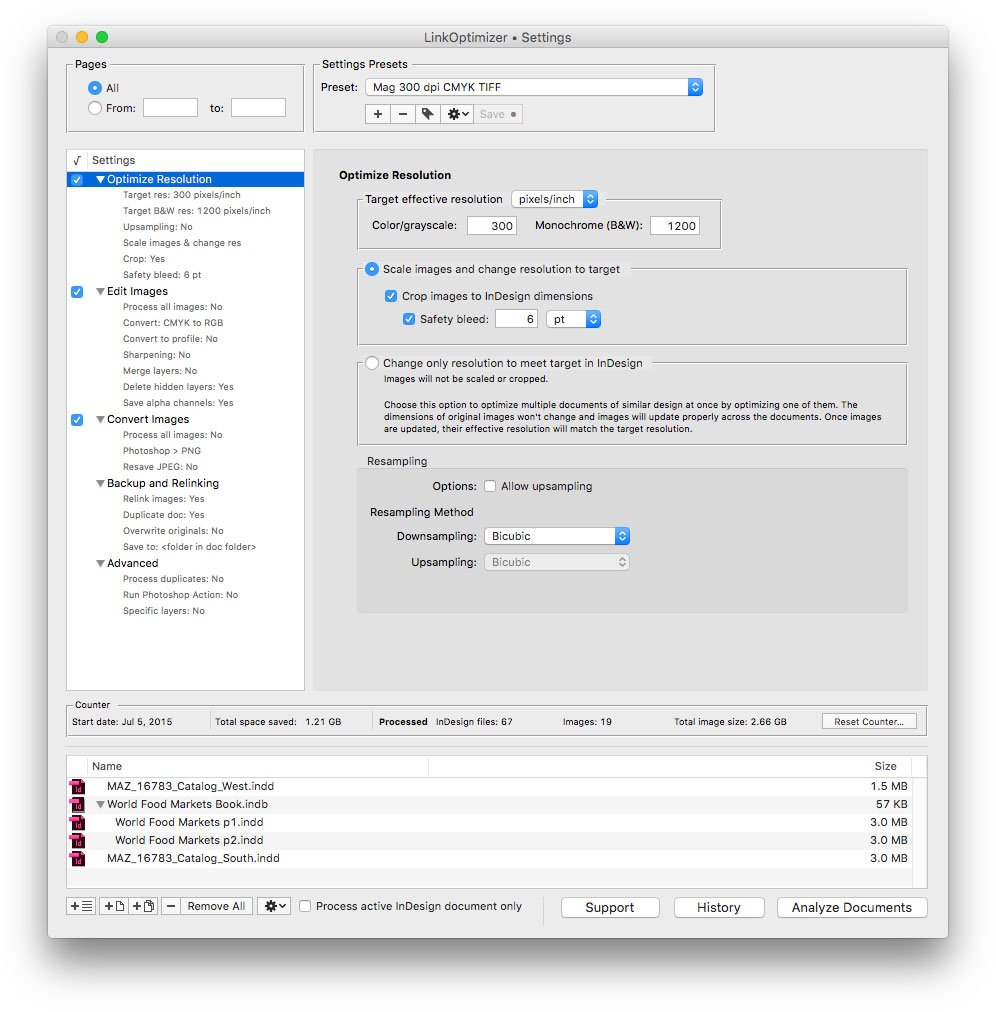
Zevrix Solutions announces the release of LinkOptimizer Server, a hot folder version of company's image workflow solution for Adobe InDesign. LinkOptimizer automates complex image manipulation tasks and allows users to reduce the size of InDesign links, convert images, optimize resolution and more. The new server version can serve unlimited users via hot folders on a network and combine LinkOptimizer processing with standard output targets such as PDF, print, EPUB and other formats.
Toronto (ON), Canada - Zevrix Solutions today announces the release of LinkOptimizer Server, a multi-user version of company's workflow automation tool for Adobe InDesign. LinkOptimizer automates complex image manipulation tasks and lets users reduce the size of InDesign links, convert images, assign color profiles and more. The app can save users countless hours - and even days - of manual processing through automation of repetitive tasks multiplied by centralized hot folder operations.
LinkOptimizer Server is not a standalone tool but an integral part of Zevrix Output Factory Server - the company's long-running solution to automate InDesign's printing and exporting from watched hot folders. LinkOptimizer will now take advantage of the existing and time-proven hot folder facilities of Output Factory Server that automate workflows of printers, publishers, ad agencies, and prepress houses worldwide for well over a decade.
Long requested by LinkOptimizer customers, the new server version will be able to serve unlimited InDesign users on a network from a single installation via watched hot folders. And as LinkOptimizer becomes a part of Output Factory Server, users will be empowered to combine LinkOptimizer processing with standard output workflows such as PDF, print, EPUB and other formats. For example, customers will have an option to resize, convert and relink images by LinkOptimizer - and then export the optimized InDesign file to PDF automatically in one step. The operator only needs to drop the InDesign file into a single hot folder that invokes the multi-workflow processing.
The final combined product branded as Output Factory Server 3 will also enable InDesign workgroups to convert image link formats, resize and crop images to their InDesign dimensions, output InDesign layers and their combinations as single files, assign variable file names, perform automatic preflighting, issue email notifications and much more.
Pricing and Availability:
Output Factory Server 3 with built-in LinkOptimizer Server can be purchased from Zevrix web site for $699.95 (USD), as well as from authorized resellers. Trial is also available for download. The upgrade cost is $350 for the licensed users of earlier Output Factory Server versions and BatchOutput Server. LinkOptimizer users can get a $200 discount. Output Factory Server requires macOS 10.12 or later and Adobe InDesign CC 2018-2020.
Zevrix Solutions: https://zevrix.com
Output Factory Server 3: https://zevrix.com/outputfactoryserver
Download Output Factory Server: https://zevrix.com/downloads/OutputFactoryServer.dmg
Purchase: https://zevrix.com/store
Screenshot: http://zevrix.com/screenshots/lo5/res-win.jpg
Located in Toronto, Canada, Zevrix Solutions provides automation and productivity solutions for Adobe Creative Cloud and Creative Suite software, PDF workflows, graphic file diagnostics and Microsoft Office output on Mac OS. Zevrix is dedicated to help professionals increase their profits through automating everyday tasks, producing error-free documents, saving disk space and cutting production costs. For more information, visit their website. Copyright (C) 2020 Zevrix Solutions. All Rights Reserved. Other trademarks and registered trademarks may be the property of their respective owners.
*******
Link To Article: https://prmac.com/release-id-84159.htm
*******
---------------------------------------------------------------------------------
Note that you can alter delivered distributions at any time.
Login to your account on prMac to alter your channel selection, or to opt-out at any time.
LinkOptimizer Server for Adobe InDesign Adds Hot Folder Automation - Published on 10/06/20
Zevrix Solutions announces the release of LinkOptimizer Server, a hot folder version of company's image workflow solution for Adobe InDesign. LinkOptimizer automates complex image manipulation tasks and allows users to reduce the size of InDesign links, convert images, optimize resolution and more. The new server version can serve unlimited users via hot folders on a network and combine LinkOptimizer processing with standard output targets such as PDF, print, EPUB and other formats.
Toronto (ON), Canada - Zevrix Solutions today announces the release of LinkOptimizer Server, a multi-user version of company's workflow automation tool for Adobe InDesign. LinkOptimizer automates complex image manipulation tasks and lets users reduce the size of InDesign links, convert images, assign color profiles and more. The app can save users countless hours - and even days - of manual processing through automation of repetitive tasks multiplied by centralized hot folder operations.
LinkOptimizer Server is not a standalone tool but an integral part of Zevrix Output Factory Server - the company's long-running solution to automate InDesign's printing and exporting from watched hot folders. LinkOptimizer will now take advantage of the existing and time-proven hot folder facilities of Output Factory Server that automate workflows of printers, publishers, ad agencies, and prepress houses worldwide for well over a decade.
Long requested by LinkOptimizer customers, the new server version will be able to serve unlimited InDesign users on a network from a single installation via watched hot folders. And as LinkOptimizer becomes a part of Output Factory Server, users will be empowered to combine LinkOptimizer processing with standard output workflows such as PDF, print, EPUB and other formats. For example, customers will have an option to resize, convert and relink images by LinkOptimizer - and then export the optimized InDesign file to PDF automatically in one step. The operator only needs to drop the InDesign file into a single hot folder that invokes the multi-workflow processing.
The final combined product branded as Output Factory Server 3 will also enable InDesign workgroups to convert image link formats, resize and crop images to their InDesign dimensions, output InDesign layers and their combinations as single files, assign variable file names, perform automatic preflighting, issue email notifications and much more.
Pricing and Availability:
Output Factory Server 3 with built-in LinkOptimizer Server can be purchased from Zevrix web site for $699.95 (USD), as well as from authorized resellers. Trial is also available for download. The upgrade cost is $350 for the licensed users of earlier Output Factory Server versions and BatchOutput Server. LinkOptimizer users can get a $200 discount. Output Factory Server requires macOS 10.12 or later and Adobe InDesign CC 2018-2020.
Zevrix Solutions: https://zevrix.com
Output Factory Server 3: https://zevrix.com/outputfactoryserver
Download Output Factory Server: https://zevrix.com/downloads/OutputFactoryServer.dmg
Purchase: https://zevrix.com/store
Screenshot: http://zevrix.com/screenshots/lo5/res-win.jpg
Located in Toronto, Canada, Zevrix Solutions provides automation and productivity solutions for Adobe Creative Cloud and Creative Suite software, PDF workflows, graphic file diagnostics and Microsoft Office output on Mac OS. Zevrix is dedicated to help professionals increase their profits through automating everyday tasks, producing error-free documents, saving disk space and cutting production costs. For more information, visit their website. Copyright (C) 2020 Zevrix Solutions. All Rights Reserved. Other trademarks and registered trademarks may be the property of their respective owners.
*******
Link To Article: https://prmac.com/release-id-84159.htm
*******
---------------------------------------------------------------------------------
Note that you can alter delivered distributions at any time.
Login to your account on prMac to alter your channel selection, or to opt-out at any time.
All-New Disk Drill for Mac v4: Up to a 200% Recovery Efficiency Increase
A new article has been published at prMac.
All-New Disk Drill for Mac v4: Up to a 200% Recovery Efficiency Increase - Published on 10/06/20
Virginia based CleverFiles today announces Disk Drill for Mac version 4, its full-featured data recovery solution for macOS. Disk Drill boasts a robust set of file recovery tools that can undelete files from almost any device (including data extraction from devices with the T2 encryption chip), offering iOS 14 and Android Recovery, macOS Big Sur support. In addition to well-known recovery and protection algorithms, the release of version 4 is powered by free features like Data Shredder and more.
Alexandria, Virginia - Today, CleverFiles announces the release of the new version of Disk Drill for Mac, ready for macOS 11 Big Sur and data recovery from iOS 14. Disk Drill can scan and recover over 400 file types with a press of a single button, right from your computer's internal or external drive, or any supported storage device. Files can be recovered whole, or reconstructed in the event of a damaged drive.
According to the recent Data Recovery Survey 2020 conducted by CleverFiles, 63% of respondents have recently lost their personal digital data, and 42% of them weren't able to recover their data.
For fast, reliable file recovery Disk Drill comes with advanced scanning algorithms to identify and reconstruct deleted files in over 400 different file formats, including the new raw photo, videos and audio formats. Updated FAT32, NTFS, HFS and APFS recovery algorithms, powered by Disk Drill's smart scans, find more recoverable files, which allows for an improved (up to a 200%) recovery efficiency.
Disk Drill can successfully recover lost and deleted data from a computer's internal disk as well as external drives, mobile devices, memory cards, digital cameras, and more. Accidentally deleted files can be easily retrieved with the Quick Scan.
In case of a less recent data loss, Disk Drill performs a Deep Scan, a thorough search of the entire drive to reconstruct lost files. In fact, the sequence of algorithms Disk Drill runs in the background is much more complicated than that, and is always adapted to a specific use case and ensures the best recovery results for one's file system, storage device condition, etc.
Deep Scan is one of the most advanced Disk Drill's recovery algorithms. It works even when hard drives lose their formatting and disk space is marked as unallocated. This Disk Drill release concentrates on raw photos and videos, and substantially improves their recovery in many ways.
New image file types now recoverable on Mac:
Disk Drill supports image files types for GoPro GPR, JP2, HEIC, WMF, Panasonic/Leica RAW, Panasonic RWL, Sony SR2 and SRF, Leaf MOS, Mamiya MEF, Epson ERF, Minolta MRW, Olympus ORF, Canon CR3, APM, and more.
As well as many video and audio formats:
* BRAW: professional video recordings
* CinemaDNG: reconstruct deleted digital cinema files
* Canon CRM: Cinema RAW Light HD videos
* Ground-breaking improvements in QuickTime-based video recovery (MOV and similar containers)
* MPC: compressed audio files based on MPEG-2 algorithms
* and others
In addition to improved data recovery, Disk Drill for Mac introduces new and updated free features:
* NEW: Time Machine Recovery: analyze your Time Machine backups and safely extract any data you may need without the need to restore the backups.
* NEW: Data Shredder: securely delete any files and folders for good. This new free module will destroy unwanted files on a storage device beyond any future recovery.
* NEW: Free Disk Space: securely erase free space on any disk. Ensures others can't recover what was deleted by securely wiping disk space marked as free.
* IMPROVED: Clean Up: allows to free some space and quickly get a data map of all existing files and folders to remove space hogs.
* IMPROVED: Find Duplicates: scans the drivers for duplicate content to free up some extra space. Also a convenient way to remove duplicates from network folders and online storage accounts like Dropbox or Google Drive.
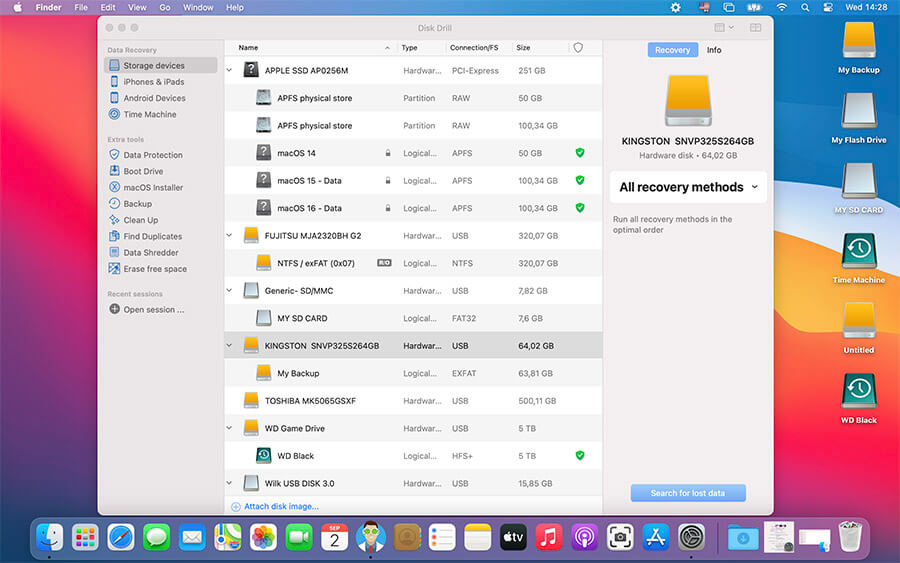
Disk Drill 4 is the biggest update in the program's history, the software has received significant improvements and refinements, including the new User Interface and Dark Mode. It's more intuitive and easier to navigate and displays all of the functionality of the application in its main window.
Pricing and availability:
Downloading the trial version of Disk Drill 4 for Mac, the customer can preview the data that can be recovered before purchasing the Pro version for $99 at CleverFiles online. With a purchase of Disk Drill PRO for Mac, the customer also gets a license letting them use Disk Drill for Windows.
Disk Drill 4: https://www.cleverfiles.com/
Full changelog: https://www.cleverfiles.com/help/disk-drill-4-mac-review.html
Download Disk Drill: https://www.cleverfiles.com/disk-drill-mac.html
Disk Drill Pricing: https://www.cleverfiles.com/pro.html
Screenshot: https://www.cleverfiles.com/images/upload/press/1-Disk-Drill-Mac-List@2x.jpg
Application Icon: https://www.cleverfiles.com/images/press/icons/Disk-Drill-3-icon-512.png
CleverFiles is a US-based software development company, specializing in Data Recovery solutions. Developers of Disk Drill for Mac & Windows. Our mission is to secure personal data one computer at a time. Empowering users with affordable tools to solve everyday technical challenges. Copyright (C) 2001-2020 Cleverfiles Software. All Rights Reserved. Apple, the Apple logo, macOS and Macintosh are registered trademarks of Apple Inc. in the U.S. and/or other countries.
*******
Link To Article: https://prmac.com/release-id-84157.htm
*******
---------------------------------------------------------------------------------
Note that you can alter delivered distributions at any time.
Login to your account on prMac to alter your channel selection, or to opt-out at any time.
All-New Disk Drill for Mac v4: Up to a 200% Recovery Efficiency Increase - Published on 10/06/20
Virginia based CleverFiles today announces Disk Drill for Mac version 4, its full-featured data recovery solution for macOS. Disk Drill boasts a robust set of file recovery tools that can undelete files from almost any device (including data extraction from devices with the T2 encryption chip), offering iOS 14 and Android Recovery, macOS Big Sur support. In addition to well-known recovery and protection algorithms, the release of version 4 is powered by free features like Data Shredder and more.
Alexandria, Virginia - Today, CleverFiles announces the release of the new version of Disk Drill for Mac, ready for macOS 11 Big Sur and data recovery from iOS 14. Disk Drill can scan and recover over 400 file types with a press of a single button, right from your computer's internal or external drive, or any supported storage device. Files can be recovered whole, or reconstructed in the event of a damaged drive.
According to the recent Data Recovery Survey 2020 conducted by CleverFiles, 63% of respondents have recently lost their personal digital data, and 42% of them weren't able to recover their data.
For fast, reliable file recovery Disk Drill comes with advanced scanning algorithms to identify and reconstruct deleted files in over 400 different file formats, including the new raw photo, videos and audio formats. Updated FAT32, NTFS, HFS and APFS recovery algorithms, powered by Disk Drill's smart scans, find more recoverable files, which allows for an improved (up to a 200%) recovery efficiency.
Disk Drill can successfully recover lost and deleted data from a computer's internal disk as well as external drives, mobile devices, memory cards, digital cameras, and more. Accidentally deleted files can be easily retrieved with the Quick Scan.
In case of a less recent data loss, Disk Drill performs a Deep Scan, a thorough search of the entire drive to reconstruct lost files. In fact, the sequence of algorithms Disk Drill runs in the background is much more complicated than that, and is always adapted to a specific use case and ensures the best recovery results for one's file system, storage device condition, etc.
Deep Scan is one of the most advanced Disk Drill's recovery algorithms. It works even when hard drives lose their formatting and disk space is marked as unallocated. This Disk Drill release concentrates on raw photos and videos, and substantially improves their recovery in many ways.
New image file types now recoverable on Mac:
Disk Drill supports image files types for GoPro GPR, JP2, HEIC, WMF, Panasonic/Leica RAW, Panasonic RWL, Sony SR2 and SRF, Leaf MOS, Mamiya MEF, Epson ERF, Minolta MRW, Olympus ORF, Canon CR3, APM, and more.
As well as many video and audio formats:
* BRAW: professional video recordings
* CinemaDNG: reconstruct deleted digital cinema files
* Canon CRM: Cinema RAW Light HD videos
* Ground-breaking improvements in QuickTime-based video recovery (MOV and similar containers)
* MPC: compressed audio files based on MPEG-2 algorithms
* and others
In addition to improved data recovery, Disk Drill for Mac introduces new and updated free features:
* NEW: Time Machine Recovery: analyze your Time Machine backups and safely extract any data you may need without the need to restore the backups.
* NEW: Data Shredder: securely delete any files and folders for good. This new free module will destroy unwanted files on a storage device beyond any future recovery.
* NEW: Free Disk Space: securely erase free space on any disk. Ensures others can't recover what was deleted by securely wiping disk space marked as free.
* IMPROVED: Clean Up: allows to free some space and quickly get a data map of all existing files and folders to remove space hogs.
* IMPROVED: Find Duplicates: scans the drivers for duplicate content to free up some extra space. Also a convenient way to remove duplicates from network folders and online storage accounts like Dropbox or Google Drive.
Disk Drill 4 is the biggest update in the program's history, the software has received significant improvements and refinements, including the new User Interface and Dark Mode. It's more intuitive and easier to navigate and displays all of the functionality of the application in its main window.
Pricing and availability:
Downloading the trial version of Disk Drill 4 for Mac, the customer can preview the data that can be recovered before purchasing the Pro version for $99 at CleverFiles online. With a purchase of Disk Drill PRO for Mac, the customer also gets a license letting them use Disk Drill for Windows.
Disk Drill 4: https://www.cleverfiles.com/
Full changelog: https://www.cleverfiles.com/help/disk-drill-4-mac-review.html
Download Disk Drill: https://www.cleverfiles.com/disk-drill-mac.html
Disk Drill Pricing: https://www.cleverfiles.com/pro.html
Screenshot: https://www.cleverfiles.com/images/upload/press/1-Disk-Drill-Mac-List@2x.jpg
Application Icon: https://www.cleverfiles.com/images/press/icons/Disk-Drill-3-icon-512.png

CleverFiles is a US-based software development company, specializing in Data Recovery solutions. Developers of Disk Drill for Mac & Windows. Our mission is to secure personal data one computer at a time. Empowering users with affordable tools to solve everyday technical challenges. Copyright (C) 2001-2020 Cleverfiles Software. All Rights Reserved. Apple, the Apple logo, macOS and Macintosh are registered trademarks of Apple Inc. in the U.S. and/or other countries.
*******
Link To Article: https://prmac.com/release-id-84157.htm
*******
---------------------------------------------------------------------------------
Note that you can alter delivered distributions at any time.
Login to your account on prMac to alter your channel selection, or to opt-out at any time.
PDFpen 12.2 Adds Items to the Library From the Context Menu and More
A new article has been published at prMac.
PDFpen 12.2 Adds Items to the Library From the Context Menu and More - Published on 10/06/20
Smile, the developer of productivity applications for Mac, iPhone and iPad, launches PDFpen and PDFpenPro 12, a new major version of its all-purpose PDF editing tool for Mac. Users can easily add signatures, text, and images, make changes and correct typos, OCR scanned docs, fill out forms, and more. Easily mark up documents with highlighting, underscoring and strikethrough. Version 12.2 features adding items to the library from the context menu, and for Pro users, JavaScript editing.
San Francisco, California - Smile, the developer of productivity applications for Mac(R), iPhone(R) and iPad(R), launches PDFpen and PDFpenPro 12, a new major version of its all-purpose PDF editing tool for Mac. Version 12.2 features the ability to add selected items to the library from the context menu, updates for Big Sur compatibility, and for Pro users, introduces a new scripting window for JavaScript editing.
PDFpen 12.2 provides the ability to add selected items, such as images, icons, or custom annotations to the PDFpen library directly from the context menu. Save frequently-used items faster.
PDFpenPro 12.2 introduces a scripting window for editing and adding JavaScript-based calculation fields to interactive forms and more.
"Having capable tools are essential for busy professionals," said Philip Goward, Smile founder. "Now in version 12.2, save business logos and icons to the library faster with just a single click. Additionally, for PDFpenPro users, we're excited to introduce the ability to edit and add JavaScript-based calculations to form fields with a new scripting window."
PDFpen and PDFpenPro 12 work with PDFpen for iPad & iPhone, allowing seamless editing across devices when used with Dropbox or iCloud.
PDFpen retails for US $79.95, PDFpenPro for $129.95. Family Pack licenses, which cover up to five computers in one household, are $99.95 for PDFpen and $159.95 for PDFpenPro. Office Pack licenses start at $249.95 for PDFpen (5 users) and $374.95 for PDFpenPro (5 users).
Upgrades from earlier single-user versions of either application are US $35, and free for users who purchased on or after January 1, 2020. Upgrades from any previous version of PDFpen to PDFpenPro 12 are US $50. Upgrade pricing for Family Packs and Office Packs is available in our web store.
PDFpen and PDFpenPro 12 require macOS 10.13 (High Sierra) or later. For macOS 10.12 (Sierra) or earlier, see our website for compatible PDFpen versions. Demo versions are available on our site. Full versions of PDFpen and PDFpenPro are available for purchase on Apple's Mac App Store. PDFpen is also available via subscription from Setapp.
New in PDFpen 12.2:
* Add items to the library from the context menu
* Adds JavaScript editing (PDFpenPro only)
* Updates for Big Sur compatibility
* Various fixes and improvements
Features Specific to PDFpenPro:
* Export to Microsoft(R) Excel (.xlsx), Microsoft(R) PowerPoint (.pptx) and PDF Archive (PDF/A) formats (requires Internet connection for .pptx and PDF/A, must be a licensed user)
* Create cross-platform fillable PDF forms including interactive signature fields and email or web submission buttons
* Create and edit Table of Contents
* Convert websites into PDFs
* OCR multiple documents in batch
* Add and edit document permissions
* Automatic form creation makes existing PDF forms fillable
* Gather submitted form data via backend integration
* Add and delete file attachments and annotations
* Create Portfolio documents, combining related files
* Correct typos in OCR text layer
* OCR horizontal Chinese, Japanese & Korean
* DocuSign(R) support
Features:
* Add text, images and signatures to PDFs
* Correct text in original PDF with editable text blocks
* Fill out interactive PDF forms and sign them
* Redact or erase text, including OCR text
* Search and replace, search and redact, and search and highlight text
* Export in Microsoft(R) Word format, TIFF, JPEG, PNG, and flat PDF
* Scan directly from Image Capture and Mac compatible scanners
* Perform OCR (Optical Character Recognition) on scanned documents
* View OCR layer for proofing OCR text from scanned pages, or remove OCR layer
* Edit original images, including adjusting resolution, color depth and contrast, skew, and size of an image or scanned document
* Sign PDF forms via drawing, interactive signature fields, or AATL or self-signed certificates
* Insert and remove pages; reorder pages in a PDF with drag & drop; combine PDFs maintaining Table of Contents entries
* Move, resize, copy and delete images in original PDF
* Save PDFs directly to Evernote
* Preview and extract file attachments and annotations
* Record and playback audio annotations
* Copy and paste rich text; retain fonts and formatting when copying from PDFs, including columns
* Context-sensitive popup-menus enable quick edits
* Add notes and comments, print annotation summary with or without the original text
* Mark up documents with highlighting, underscoring and strikethrough
* Save frequently-used images, signatures, objects and text in the Library; sync Library items with PDFpen for iPad & iPhone via iCloud
* Add page numbers, bookmarks, headers and footers, line numbers and watermarks
* Apply business-related and Sign Here stamps via the Library
* Password protect a document with up to 256-bit AES encryption
* Compress PDF documents for smaller file sizes
* Automate PDF manipulations with AppleScript and JavaScript
* Available in English, Japanese, German, French, Italian, and Spanish
System Requirements:
* macOS 10.13 (High Sierra) or later
PDFpen Pricing:
* US $79.95
* Family Pack: $99.95 (home use; up to 5 computers in one household)
* Office Pack: starts at $249.95 for 5 users
* Single user upgrade from earlier versions of PDFpen: $35
* Upgrade pricing for Family Packs and Office Packs is available
* (Free upgrades for purchases made on or after January 1, 2020; no free upgrades available on the Mac App Store)
PDFpenPro Pricing:
* US $129.95
* Family Pack: $159.95 (home use; up to 5 computers in one household)
* Office Pack: starts at $374.95 for 5 users
* Single user upgrade from earlier versions of PDFpenPro: $35
* Upgrade pricing for Family Packs and Office Packs is available
* (Free upgrades for purchases made on or after January 1, 2020; no free upgrades available on the Mac App Store)
* Single user upgrade from the previous version of PDFpen to PDFpenPro 12: $50
* Site licenses: PDFpen $1449.95; PDFpenPro $1699.95
* Site license terms: Single contact for support; single physical address or company with fewer than 1,000 employees; visit our site license store
* Education discounts are available. For more information about PDFpen, please visit our website
Smile: https://smilesoftware.com/
PDFpen Family of Products: https://smilesoftware.com/pdfpen-family/
Download PDFpen or PDFpenPro: https://smilesoftware.com/pdfpen/download/
Purchase : https://smilesoftware.com/store
YouTube Video (What's New in PDFpen and PDFpenPro 12): https://www.youtube.com/watch?v=jyoXqvWYf48
Media Assets : https://smilesoftware.com/pdfpen/presskit/
Smile makes clever software for efficient people, including TextExpander, the typing shortcut tool for Mac, Windows, Chrome, iPhone and iPad; PDFpen, the all-purpose Mac PDF editor; and PDFpen for iPad and iPhone, the mobile PDF editor. Copyright (C) 2020 SmileOnMyMac, LLC dba Smile. All Rights Reserved. PDFpen, PDFpenPro, TextExpander, and the Smile logo are registered trademarks of SmileOnMyMac, LLC dba Smile. Apple, the Apple logo, Mac, iPad, iPhone, and iPod touch are trademarks of Apple Inc., registered in the U.S. and other countries. App Store is a service mark of Apple Inc.
*******
Link To Article: https://prmac.com/release-id-84158.htm
*******
---------------------------------------------------------------------------------
Note that you can alter delivered distributions at any time.
Login to your account on prMac to alter your channel selection, or to opt-out at any time.
PDFpen 12.2 Adds Items to the Library From the Context Menu and More - Published on 10/06/20
Smile, the developer of productivity applications for Mac, iPhone and iPad, launches PDFpen and PDFpenPro 12, a new major version of its all-purpose PDF editing tool for Mac. Users can easily add signatures, text, and images, make changes and correct typos, OCR scanned docs, fill out forms, and more. Easily mark up documents with highlighting, underscoring and strikethrough. Version 12.2 features adding items to the library from the context menu, and for Pro users, JavaScript editing.
San Francisco, California - Smile, the developer of productivity applications for Mac(R), iPhone(R) and iPad(R), launches PDFpen and PDFpenPro 12, a new major version of its all-purpose PDF editing tool for Mac. Version 12.2 features the ability to add selected items to the library from the context menu, updates for Big Sur compatibility, and for Pro users, introduces a new scripting window for JavaScript editing.
PDFpen 12.2 provides the ability to add selected items, such as images, icons, or custom annotations to the PDFpen library directly from the context menu. Save frequently-used items faster.
PDFpenPro 12.2 introduces a scripting window for editing and adding JavaScript-based calculation fields to interactive forms and more.
"Having capable tools are essential for busy professionals," said Philip Goward, Smile founder. "Now in version 12.2, save business logos and icons to the library faster with just a single click. Additionally, for PDFpenPro users, we're excited to introduce the ability to edit and add JavaScript-based calculations to form fields with a new scripting window."
PDFpen and PDFpenPro 12 work with PDFpen for iPad & iPhone, allowing seamless editing across devices when used with Dropbox or iCloud.
PDFpen retails for US $79.95, PDFpenPro for $129.95. Family Pack licenses, which cover up to five computers in one household, are $99.95 for PDFpen and $159.95 for PDFpenPro. Office Pack licenses start at $249.95 for PDFpen (5 users) and $374.95 for PDFpenPro (5 users).
Upgrades from earlier single-user versions of either application are US $35, and free for users who purchased on or after January 1, 2020. Upgrades from any previous version of PDFpen to PDFpenPro 12 are US $50. Upgrade pricing for Family Packs and Office Packs is available in our web store.
PDFpen and PDFpenPro 12 require macOS 10.13 (High Sierra) or later. For macOS 10.12 (Sierra) or earlier, see our website for compatible PDFpen versions. Demo versions are available on our site. Full versions of PDFpen and PDFpenPro are available for purchase on Apple's Mac App Store. PDFpen is also available via subscription from Setapp.
New in PDFpen 12.2:
* Add items to the library from the context menu
* Adds JavaScript editing (PDFpenPro only)
* Updates for Big Sur compatibility
* Various fixes and improvements
Features Specific to PDFpenPro:
* Export to Microsoft(R) Excel (.xlsx), Microsoft(R) PowerPoint (.pptx) and PDF Archive (PDF/A) formats (requires Internet connection for .pptx and PDF/A, must be a licensed user)
* Create cross-platform fillable PDF forms including interactive signature fields and email or web submission buttons
* Create and edit Table of Contents
* Convert websites into PDFs
* OCR multiple documents in batch
* Add and edit document permissions
* Automatic form creation makes existing PDF forms fillable
* Gather submitted form data via backend integration
* Add and delete file attachments and annotations
* Create Portfolio documents, combining related files
* Correct typos in OCR text layer
* OCR horizontal Chinese, Japanese & Korean
* DocuSign(R) support
Features:
* Add text, images and signatures to PDFs
* Correct text in original PDF with editable text blocks
* Fill out interactive PDF forms and sign them
* Redact or erase text, including OCR text
* Search and replace, search and redact, and search and highlight text
* Export in Microsoft(R) Word format, TIFF, JPEG, PNG, and flat PDF
* Scan directly from Image Capture and Mac compatible scanners
* Perform OCR (Optical Character Recognition) on scanned documents
* View OCR layer for proofing OCR text from scanned pages, or remove OCR layer
* Edit original images, including adjusting resolution, color depth and contrast, skew, and size of an image or scanned document
* Sign PDF forms via drawing, interactive signature fields, or AATL or self-signed certificates
* Insert and remove pages; reorder pages in a PDF with drag & drop; combine PDFs maintaining Table of Contents entries
* Move, resize, copy and delete images in original PDF
* Save PDFs directly to Evernote
* Preview and extract file attachments and annotations
* Record and playback audio annotations
* Copy and paste rich text; retain fonts and formatting when copying from PDFs, including columns
* Context-sensitive popup-menus enable quick edits
* Add notes and comments, print annotation summary with or without the original text
* Mark up documents with highlighting, underscoring and strikethrough
* Save frequently-used images, signatures, objects and text in the Library; sync Library items with PDFpen for iPad & iPhone via iCloud
* Add page numbers, bookmarks, headers and footers, line numbers and watermarks
* Apply business-related and Sign Here stamps via the Library
* Password protect a document with up to 256-bit AES encryption
* Compress PDF documents for smaller file sizes
* Automate PDF manipulations with AppleScript and JavaScript
* Available in English, Japanese, German, French, Italian, and Spanish
System Requirements:
* macOS 10.13 (High Sierra) or later
PDFpen Pricing:
* US $79.95
* Family Pack: $99.95 (home use; up to 5 computers in one household)
* Office Pack: starts at $249.95 for 5 users
* Single user upgrade from earlier versions of PDFpen: $35
* Upgrade pricing for Family Packs and Office Packs is available
* (Free upgrades for purchases made on or after January 1, 2020; no free upgrades available on the Mac App Store)
PDFpenPro Pricing:
* US $129.95
* Family Pack: $159.95 (home use; up to 5 computers in one household)
* Office Pack: starts at $374.95 for 5 users
* Single user upgrade from earlier versions of PDFpenPro: $35
* Upgrade pricing for Family Packs and Office Packs is available
* (Free upgrades for purchases made on or after January 1, 2020; no free upgrades available on the Mac App Store)
* Single user upgrade from the previous version of PDFpen to PDFpenPro 12: $50
* Site licenses: PDFpen $1449.95; PDFpenPro $1699.95
* Site license terms: Single contact for support; single physical address or company with fewer than 1,000 employees; visit our site license store
* Education discounts are available. For more information about PDFpen, please visit our website
Smile: https://smilesoftware.com/
PDFpen Family of Products: https://smilesoftware.com/pdfpen-family/
Download PDFpen or PDFpenPro: https://smilesoftware.com/pdfpen/download/
Purchase : https://smilesoftware.com/store
YouTube Video (What's New in PDFpen and PDFpenPro 12): https://www.youtube.com/watch?v=jyoXqvWYf48
Media Assets : https://smilesoftware.com/pdfpen/presskit/
Smile makes clever software for efficient people, including TextExpander, the typing shortcut tool for Mac, Windows, Chrome, iPhone and iPad; PDFpen, the all-purpose Mac PDF editor; and PDFpen for iPad and iPhone, the mobile PDF editor. Copyright (C) 2020 SmileOnMyMac, LLC dba Smile. All Rights Reserved. PDFpen, PDFpenPro, TextExpander, and the Smile logo are registered trademarks of SmileOnMyMac, LLC dba Smile. Apple, the Apple logo, Mac, iPad, iPhone, and iPod touch are trademarks of Apple Inc., registered in the U.S. and other countries. App Store is a service mark of Apple Inc.
*******
Link To Article: https://prmac.com/release-id-84158.htm
*******
---------------------------------------------------------------------------------
Note that you can alter delivered distributions at any time.
Login to your account on prMac to alter your channel selection, or to opt-out at any time.
National Geographic Al Arabiya's 10th anniversary issue live on Magzter
A new article has been published at prMac.
National Geographic Al Arabiya's 10th anniversary issue live on Magzter - Published on 10/05/20
National Geographic Al Arabiya has published its 10th anniversary edition this month on Magzter, the World's largest digital reading destination. Published since October 2010 by Abu Dhabi Media, National Geographic Al Arabiya covers a range of topics that include geography, archeology, natural science, wildlife, astronomy, history, culture and adventure, and promotes environmental and historical conservation, alongside award-winning and historical photographs.
New York, New York - National Geographic Al Arabiya, one of the most renowned science magazines in the Middle East, has published its 10th anniversary edition this month on Magzter, the World's largest digital reading destination. Ever since the magazine was added to Magzter earlier this year, it has been garnering great traction across the globe.
Published since October 2010 by Abu Dhabi Media, National Geographic Al Arabiya covers a range of topics that include geography, archeology, natural science, wildlife, astronomy, history, culture and adventure, and promotes environmental and historical conservation, alongside award-winning and historical photographs. In addition to features from the magazine's international edition, it also publishes regional content to suit audiences in the Arab world.
The latest 10th anniversary edition of National Geographic Al Arabiya features an exclusive story on the reimagination of dinosaurs in today's golden age of paleontology. Also, don't miss to read about the galactic map that could guide aliens to Earth and COVID-19's impact on the animal kingdom so far.
"As one of the most sought-after publications in the region, our constant endeavour is to provide inspiring scientific content across a range of platforms. Our collaboration with a pioneering digital platform like Magzter enables us to do just that by ensuring seamless access to our featured content on natural science, wildlife, astronomy, history, culture and adventure, among others. As we celebrate a decade in the region, we are even more motivated to continue using the power of innovation as well as storytelling to inspire our readers to protect and preserve the planet." - Alsaad Almenhaly, Editor-in-Chief, National Geographic Al Arabiya
"National Geographic Al Arabiya carries the legacy of the National Geographic brand by publishing compelling stories and breathtaking photographs that keep science enthusiasts hooked every month. I'd like to take this opportunity to congratulate the National Geographic Al Arabiya team for completing 10 glorious years and here's wishing them to continue thrilling their readers for many more decades to come." - Girish Ramdas, CEO, Magzter Inc.
"It is no mean achievement for a magazine to sustain the curiosity of its readers for 10 years. National Geographic Al Arabiya has managed to do it with consummate ease and in fact, the buzz around this magazine is forever increasing. We are delighted to take the 10th anniversary edition of the magazine to millions of Magzter users across the globe." - Vijay Radhakrishnan, President, Magzter Inc.
Magzter offers the world's largest "All-You-Can-Read" subscription service called Magzter GOLD, which gives digital readers unlimited access to 5,000 magazines and newspapers for a monthly subscription price. National Geographic Al Arabiya also comes as a treat to Magzter GOLD
Device Requirements:
* iPhone, iPad, and iPod touch
* Requires iOS 9.0 or later
* 112.1 MB
Pricing and Availability:
Magzter - Digital Magazine Newsstand 8.24 is free (with in-app purchases) and available worldwide through the App Store in the News category. The Magzter app is also available on the web, Google Play and is expanding to more platforms soon. Magzter's easy purchase and renewal systems ensure subscriptions are paid on time, eliminating the need for paper checks and postal mail issues. Users can buy their magazines on any of the above devices/platforms and seamlessly port their purchases to any other devices, a feature unique to Magzter.
Magzter - Digital Magazine Newsstand 8.24: http://www.magzter.com
National Geographic Al Arabiya: https://www.magzter.com/AE/Abu-Dhabi-Media/National-Geographic-Al-Arabiya-%D9%85%D8%AC%D9%84%D8%A9-%D9%86%D8%A7%D8%B4%D9%8A%D9%88%D9%86%D8%A7%D9%84-%D8%AC%D9%8A%D9%88%D8%BA%D8%B1%D8%A7%D9%81%D9%8A%D9%83-%D8%A7%D9%84%D8%B9%D8%B1%D8%A8%D9%8A%D8%A9/Science/
Download from iTunes: https://apps.apple.com/in/app/magzter-newsstand/id412163953
Download from Google Play: https://play.google.com/store/apps/details?id=com.dci.magzter
Screenshot: https://files.magzter.com/resize/magazine/1593433937/1600778936/view/2.jpg
App Icon: http://akcdn.magzter.com/magcom/mailer/common/Icon1024-curved.png
Magzter is the world's largest and fastest-growing digital reading destination with over 70 million users since its inception in 2011, and thousands of magazines and newspapers from over 4,500 publishers. Headquartered in New York, Magzter has its local presence in Amsterdam, London, Mexico City, Chennai, Mumbai, New Delhi, Bengaluru, Singapore, and will soon be expanding to other countries. Founded by global entrepreneurs, Girish Ramdas and Vijay Radhakrishnan in June 2011, Magzter enables magazine publishers around the world to create and deliver digital editions of their titles to global consumers. Powered by its proprietary OREY Click Publishing System(R), Magzter also enables their customers to publish interactive/audio-visual content in the magazine as it supports HTML5. Magzter launched Magzter GOLD subscription service to give digital readers unlimited access to 5,000 magazines and newspapers for a low monthly price. All Material and Software (C) Copyright 2020 Magzter Inc.
All Rights Reserved. Apple, the Apple logo, iPhone, iPod, and iPad are registered trademarks of Apple Inc. in the U.S. and/or other countries. Other trademarks and registered trademarks may be the property of their respective owners.
*******
Link To Article: https://prmac.com/release-id-84156.htm
*******
---------------------------------------------------------------------------------
Note that you can alter delivered distributions at any time.
Login to your account on prMac to alter your channel selection, or to opt-out at any time.
National Geographic Al Arabiya's 10th anniversary issue live on Magzter - Published on 10/05/20
National Geographic Al Arabiya has published its 10th anniversary edition this month on Magzter, the World's largest digital reading destination. Published since October 2010 by Abu Dhabi Media, National Geographic Al Arabiya covers a range of topics that include geography, archeology, natural science, wildlife, astronomy, history, culture and adventure, and promotes environmental and historical conservation, alongside award-winning and historical photographs.
New York, New York - National Geographic Al Arabiya, one of the most renowned science magazines in the Middle East, has published its 10th anniversary edition this month on Magzter, the World's largest digital reading destination. Ever since the magazine was added to Magzter earlier this year, it has been garnering great traction across the globe.
Published since October 2010 by Abu Dhabi Media, National Geographic Al Arabiya covers a range of topics that include geography, archeology, natural science, wildlife, astronomy, history, culture and adventure, and promotes environmental and historical conservation, alongside award-winning and historical photographs. In addition to features from the magazine's international edition, it also publishes regional content to suit audiences in the Arab world.
The latest 10th anniversary edition of National Geographic Al Arabiya features an exclusive story on the reimagination of dinosaurs in today's golden age of paleontology. Also, don't miss to read about the galactic map that could guide aliens to Earth and COVID-19's impact on the animal kingdom so far.
"As one of the most sought-after publications in the region, our constant endeavour is to provide inspiring scientific content across a range of platforms. Our collaboration with a pioneering digital platform like Magzter enables us to do just that by ensuring seamless access to our featured content on natural science, wildlife, astronomy, history, culture and adventure, among others. As we celebrate a decade in the region, we are even more motivated to continue using the power of innovation as well as storytelling to inspire our readers to protect and preserve the planet." - Alsaad Almenhaly, Editor-in-Chief, National Geographic Al Arabiya
"National Geographic Al Arabiya carries the legacy of the National Geographic brand by publishing compelling stories and breathtaking photographs that keep science enthusiasts hooked every month. I'd like to take this opportunity to congratulate the National Geographic Al Arabiya team for completing 10 glorious years and here's wishing them to continue thrilling their readers for many more decades to come." - Girish Ramdas, CEO, Magzter Inc.
"It is no mean achievement for a magazine to sustain the curiosity of its readers for 10 years. National Geographic Al Arabiya has managed to do it with consummate ease and in fact, the buzz around this magazine is forever increasing. We are delighted to take the 10th anniversary edition of the magazine to millions of Magzter users across the globe." - Vijay Radhakrishnan, President, Magzter Inc.
Magzter offers the world's largest "All-You-Can-Read" subscription service called Magzter GOLD, which gives digital readers unlimited access to 5,000 magazines and newspapers for a monthly subscription price. National Geographic Al Arabiya also comes as a treat to Magzter GOLD
Device Requirements:
* iPhone, iPad, and iPod touch
* Requires iOS 9.0 or later
* 112.1 MB
Pricing and Availability:
Magzter - Digital Magazine Newsstand 8.24 is free (with in-app purchases) and available worldwide through the App Store in the News category. The Magzter app is also available on the web, Google Play and is expanding to more platforms soon. Magzter's easy purchase and renewal systems ensure subscriptions are paid on time, eliminating the need for paper checks and postal mail issues. Users can buy their magazines on any of the above devices/platforms and seamlessly port their purchases to any other devices, a feature unique to Magzter.
Magzter - Digital Magazine Newsstand 8.24: http://www.magzter.com
National Geographic Al Arabiya: https://www.magzter.com/AE/Abu-Dhabi-Media/National-Geographic-Al-Arabiya-%D9%85%D8%AC%D9%84%D8%A9-%D9%86%D8%A7%D8%B4%D9%8A%D9%88%D9%86%D8%A7%D9%84-%D8%AC%D9%8A%D9%88%D8%BA%D8%B1%D8%A7%D9%81%D9%8A%D9%83-%D8%A7%D9%84%D8%B9%D8%B1%D8%A8%D9%8A%D8%A9/Science/
Download from iTunes: https://apps.apple.com/in/app/magzter-newsstand/id412163953
Download from Google Play: https://play.google.com/store/apps/details?id=com.dci.magzter
Screenshot: https://files.magzter.com/resize/magazine/1593433937/1600778936/view/2.jpg

App Icon: http://akcdn.magzter.com/magcom/mailer/common/Icon1024-curved.png

Magzter is the world's largest and fastest-growing digital reading destination with over 70 million users since its inception in 2011, and thousands of magazines and newspapers from over 4,500 publishers. Headquartered in New York, Magzter has its local presence in Amsterdam, London, Mexico City, Chennai, Mumbai, New Delhi, Bengaluru, Singapore, and will soon be expanding to other countries. Founded by global entrepreneurs, Girish Ramdas and Vijay Radhakrishnan in June 2011, Magzter enables magazine publishers around the world to create and deliver digital editions of their titles to global consumers. Powered by its proprietary OREY Click Publishing System(R), Magzter also enables their customers to publish interactive/audio-visual content in the magazine as it supports HTML5. Magzter launched Magzter GOLD subscription service to give digital readers unlimited access to 5,000 magazines and newspapers for a low monthly price. All Material and Software (C) Copyright 2020 Magzter Inc.
All Rights Reserved. Apple, the Apple logo, iPhone, iPod, and iPad are registered trademarks of Apple Inc. in the U.S. and/or other countries. Other trademarks and registered trademarks may be the property of their respective owners.
*******
Link To Article: https://prmac.com/release-id-84156.htm
*******
---------------------------------------------------------------------------------
Note that you can alter delivered distributions at any time.
Login to your account on prMac to alter your channel selection, or to opt-out at any time.
Connect Macs to Windows File Servers With Acronis Files Connect
A new article has been published at prMac.
Connect Macs to Windows File Servers With Acronis Files Connect - Published on 10/04/20
Acronis announces Acronis Files Connect, their AFP server software. Acronis Files Connect makes it easy to connect your Mac to Windows file servers or NAS devices without suffering from poor performance and data integrity issues. The latest version introduces several important new features for both Mac users and administrators.
Woburn, Massachusetts - September 2020: Acronis is happy to announce the release of Acronis Files Connect, an AFP server that makes it easy for macOS users to connect to a Windows file server or NAS. The latest version introduces several important new features for both Mac users and administrators, including a completely new Mac client application, updates to real-time search indexes, and a new spotlight search for SMB file shares.
Introducing a Unified Interface for macOS
Perhaps the most important new feature of this release is the new client for macOS users. The client now provides a handy unified interface so users can easily browse through files across connected Windows file servers and NAS devices. There is now a fast and powerful search function and an easy way to share files, network printers, and other connected resources. This is much faster than using the very limited native functionality built into macOS. The substantial boost to performance and data integrity is down to Acronis Files Connect using the Apple Filling Protocol (AFP) rather than the far more limited Server Message Block (SMB) protocol.
Enhanced Search Indexing and Performance
Acronis Files Connect now includes greatly improved search indexing, making it even more suitable for use in data-heavy environments. The software will now constantly monitor changes and updates on the file server and update its indexes in real-time. Users can also control search indexes by applying exclusion rules. The system also integrates seamlessly with Windows Search controls, provides intelligent handling of archived files, and allows users to file content indexing limits. Extensive macOS tags support and optional support for Windows tags search also enhances interoperability.
Other enhancements in this update include smarter handling of Windows .URL shortcuts and DFS Connect being included in the base license, rather than only as an optional add-on.
Stop Mac SMB file-sharing inefficiencies now at the Acronis Files Connect website.
Acronis, LLC: http://www.acronis.com
Acronis Files Connect: https://www.acronis.com/en-us/mobility/mac-windows-compatibility/
Acronis is a world leader in providing advanced, scalable storage management and disaster recovery software that helps users and enterprises safeguard their information and assures the availability, security, integrity and recoverability of their infrastructure. Acronis patented disk imaging and disk management technology have won broad industry acclaim and numerous awards for excellence in data protection, backup and recovery, system deployment, and server migration for both physical and virtual machine servers. Its flagship product, Acronis True Image, is a leading commercial disk-imaging and bare-metal restore solution for Windows and Linux servers, as well as an automated system portability and migration tool. All Material and Software (C) Copyright 2020 Acronis. All Rights Reserved. Apple, the Apple logo, Macintosh Mac OS X and macOS are registered trademarks of Apple Inc. in the U.S. and/or other countries. Other trademarks and registered trademarks may be the property of
their respective owners.
*******
Link To Article: https://prmac.com/release-id-84155.htm
*******
---------------------------------------------------------------------------------
Note that you can alter delivered distributions at any time.
Login to your account on prMac to alter your channel selection, or to opt-out at any time.
Connect Macs to Windows File Servers With Acronis Files Connect - Published on 10/04/20
Acronis announces Acronis Files Connect, their AFP server software. Acronis Files Connect makes it easy to connect your Mac to Windows file servers or NAS devices without suffering from poor performance and data integrity issues. The latest version introduces several important new features for both Mac users and administrators.
Woburn, Massachusetts - September 2020: Acronis is happy to announce the release of Acronis Files Connect, an AFP server that makes it easy for macOS users to connect to a Windows file server or NAS. The latest version introduces several important new features for both Mac users and administrators, including a completely new Mac client application, updates to real-time search indexes, and a new spotlight search for SMB file shares.
Introducing a Unified Interface for macOS
Perhaps the most important new feature of this release is the new client for macOS users. The client now provides a handy unified interface so users can easily browse through files across connected Windows file servers and NAS devices. There is now a fast and powerful search function and an easy way to share files, network printers, and other connected resources. This is much faster than using the very limited native functionality built into macOS. The substantial boost to performance and data integrity is down to Acronis Files Connect using the Apple Filling Protocol (AFP) rather than the far more limited Server Message Block (SMB) protocol.
Enhanced Search Indexing and Performance
Acronis Files Connect now includes greatly improved search indexing, making it even more suitable for use in data-heavy environments. The software will now constantly monitor changes and updates on the file server and update its indexes in real-time. Users can also control search indexes by applying exclusion rules. The system also integrates seamlessly with Windows Search controls, provides intelligent handling of archived files, and allows users to file content indexing limits. Extensive macOS tags support and optional support for Windows tags search also enhances interoperability.
Other enhancements in this update include smarter handling of Windows .URL shortcuts and DFS Connect being included in the base license, rather than only as an optional add-on.
Stop Mac SMB file-sharing inefficiencies now at the Acronis Files Connect website.
Acronis, LLC: http://www.acronis.com
Acronis Files Connect: https://www.acronis.com/en-us/mobility/mac-windows-compatibility/
Acronis is a world leader in providing advanced, scalable storage management and disaster recovery software that helps users and enterprises safeguard their information and assures the availability, security, integrity and recoverability of their infrastructure. Acronis patented disk imaging and disk management technology have won broad industry acclaim and numerous awards for excellence in data protection, backup and recovery, system deployment, and server migration for both physical and virtual machine servers. Its flagship product, Acronis True Image, is a leading commercial disk-imaging and bare-metal restore solution for Windows and Linux servers, as well as an automated system portability and migration tool. All Material and Software (C) Copyright 2020 Acronis. All Rights Reserved. Apple, the Apple logo, Macintosh Mac OS X and macOS are registered trademarks of Apple Inc. in the U.S. and/or other countries. Other trademarks and registered trademarks may be the property of
their respective owners.
*******
Link To Article: https://prmac.com/release-id-84155.htm
*******
---------------------------------------------------------------------------------
Note that you can alter delivered distributions at any time.
Login to your account on prMac to alter your channel selection, or to opt-out at any time.
Subscribe to:
Posts (Atom)