A new article has been published at prMac.
The World Game Launches Board Game Version of Geography Game - Published on 11/11/20
The World Game is a highly interactive geography game for 2 to 5 players. A fast playing board game full of excitement. Race around the world, pass famous landmarks, learn about countries, recognize flags and find locations on the map. Impress your friends with your geography knowledge in no time.
Orlando, FL - The World Game team is excited to announce the launch of their new Geography Board Game - The World Game. TWG is a highly interactive educational tabletop game for 2 - 5 players that is easy to learn and fun to play. It is a fast-playing adventure for kids and adults alike. Learning about world countries and becoming a full-on Geography Wiz is an inevitable consequence of playing this game. It will have you and your kids impressing people with knowledge of countries, flags, capital cities and other cool facts.
The creators of The World Game wanted to develop a Geography version of their favorite childhood card game so they developed, designed and launched a card game of their own. The card game version of The World Game is now a best-seller in its category. The customer feedback for the card game is excellent, and many parents are excited to have found a fun-but-educational activity that drew their kids away from their screens. They guys at TWG wanted to provide more educational gameplay to their community, so the exciting new Board Game version was developed.
Race around the world and learn geography.
You win the game by being the first person to complete the race around the world and cross the finish line. You advance by beating other players with stronger country facts and completing challenges like: "where is country x located on the map?", "which country does this flag belong to?", "what is the capital of country x?", etc. But watch out! Your opponents can use Action Cards to slow you down, change challenges, block actions and much more. There are 194 Country Cards and 26 Action Cards, so no two games played are ever the same.
You can also choose the difficulty level of challenges you use, so that kids can play against adults, or you can gradually introduce harder challenges and less known country cards to match your level of knowledge as you progress. This makes The World Game uniquely appropriate for everyone, no matter their age, and ensures you never get tired of playing!
This board game will have you going back to the shelf and reaching for the Blue Box.
FUN & ENGAGING Education is The Way to Go
During this ongoing Covid-19 Pandemic, a lot of new realities emerged for us, with many people scrambling to adapt; and for many kids and their parents this means that a lot more learning and schoolwork is happening from, and at home. This was an interesting point made by the designer and creator of the game, Damir Islamovic, who said: "With homeschooling increasingly becoming an inevitability due to Covid-19, we think our Board Game is a perfect product to help ease the load that many parents are feeling now."
The World Game was designed to provide people with an option to move away from their screens and spend personal time with their children and friends in a fun and engaging way, all the while learning about Geography and all of the 194 countries of the world.
"This game got my family away from a screen! Thank you very much. - Aline on Facebook
Geography is Important.
When I asked the creators to tell me the most surprising fact they learned while working on The World Game, and what they had to say came as a shock to me. They wanted to learn about who their customer base could be, and they found out that in the US, kids and young adults are performing very poorly when asked basic Geography questions, and that the rest of the globe is just as uninformed.
They found out that there truly is a need for their games in the world. A National Geographic Survey on geographic literacy showed some worrying numbers:
About 11 percent of young citizens of the U.S. couldn't even locate the U.S. on a map. The Pacific Ocean's location was a mystery to 29 percent; Japan, to 58 percent; France, to 65 percent; and the United Kingdom, to 69 percent. Young adults worldwide are not markedly more literate at geography than Americans.
Those of you who will support them early on Kickstarter will receive a free map of the world poster with all countries, their flags and capital cities listed and color-sorted by continent. That way you can sharpen your knowledge and get ready to beat your opponents in the next round of The World Game, or use it to quiz your kids and track their progress.
The World Game: http://www.playworldgame.com
The World Game is a Game Brand focused on developing Educational Games. Our mission is to create Fun and Engaging games and incorporating Learning mechanisms into gameplay. We provide alternative Teaching tools for parents and teachers to use as part of their curriculum. We believe that Education should be Fun! All Material and Software (C) Copyright 2020 The World Game. All Rights Reserved. Apple, the Apple logo, Macintosh Mac OS X and macOS are registered trademarks of Apple Inc. in the U.S. and/or other countries. Other trademarks and registered trademarks may be the property of their respective owners.
*******
Link To Article: https://prmac.com/release-id-84200.htm
*******
---------------------------------------------------------------------------------
Note that you can alter delivered distributions at any time.
Login to your account on prMac to alter your channel selection, or to opt-out at any time.

PDF Checkpoint Now Supports macOS Big Sur: Preflight, Conversion Tool
A new article has been published at prMac.
PDF Checkpoint Now Supports macOS Big Sur: Preflight, Conversion Tool - Published on 11/11/20
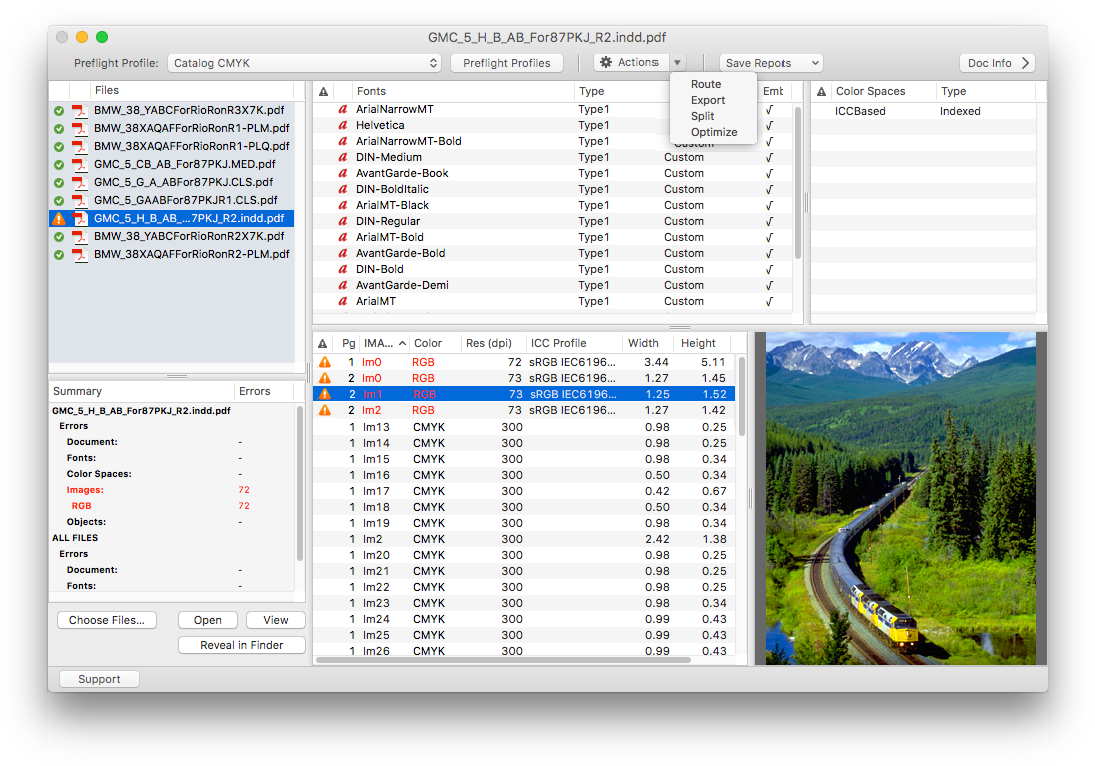
Zevrix Solutions announces PDF Checkpoint 1.9.10, a compatibility update to company's PDF preflight and conversion solution. Remarkably fast, PDF Checkpoint automatically preflights, exports as images, splits, and optimizes Adobe PDFs. The app can also convert the PDF document colors to selected ICC profile helping users easily prepare their files for print, web and mobile devices. The new version adds support for macOS 11 Big Sur and automatically fixes file permission errors during activation.
Toronto (ON), Canada - Zevrix Solutions today announces PDF Checkpoint 1.9.10, a compatibility update to company's PDF preflight and conversion automation tool. Remarkably fast, PDF Checkpoint automatically preflights, exports as images, splits and optimizes batches of Adobe PDF files. The app is an ideal tool for users who need a fast, affordable and easy to use solution to check PDF files for errors and convert them to the desired format and color space.
The new version adds support for the forthcoming macOS 11 Big Sur and is offered as a free update to licensed users. The update also adjusts the appearance of certain controls to accommodate Big Sur UI changes and automatically fixes file permission errors during license activation.
"PDF Checkpoint saves me a lot of time when deciphering client-submitted ads for large magazines," says Miles Linklater of design studio 24pt Helvetica in Vancouver, Canada. "It's a great idea to enable color profile conversion in PDF files so easily."
PDF Checkpoint is designed to automate and simplify PDF workflows of publishers, ad agencies, prepress houses, printers and graphic designers:
* Batch preflighting and conversion of PDF files
* Convert PDF color mode using ICC profiles
* Check PDF fonts, colors, images and metadata for specific attributes
* Export PDF as images with specific resolution, color and page scale
* Split files into single page PDFs
* Route files by preflight results into success and error folders
For example, users can preflight a folder of PDF files and convert them to JPEG images at 300 dpi while scaling each page by 50%. Users can also create print-ready PDFs from such apps as Apple Pages and Swift Publisher by converting colors to the requested CMYK profile.
Pricing and availability:
PDF Checkpoint can be purchased on Mac App Store and Zevrix website for $39.95 (USD), as well as from authorized resellers. The update is free to licensed users. Trial is also available for download. PDF Checkpoint requires macOS 10.8-11.0.
Zevrix Solutions: https://zevrix.com
PDF Checkpoint 1.9.10: https://zevrix.com/pdfcheckpoint
Download PDF Checkpoint: https://zevrix.com/downloads/PDFCheckpoint.dmg
Purchase: https://zevrix.com/store
Screenshot: https://zevrix.com/wp-content/uploads/2020/08/pdfc-main-1149-no-drawer-tr2.png
Located in Toronto, Canada, Zevrix Solutions provides automation and productivity solutions for Adobe Creative Cloud and Creative Suite software, PDF workflows, graphic file diagnostics and Microsoft Office output on Mac OS. Zevrix is dedicated to help professionals increase their profits through automating everyday tasks, producing error-free documents, saving disk space and cutting production costs. For more information, visit their website. Copyright (C) 2020 Zevrix Solutions. All Rights Reserved. Other trademarks and registered trademarks may be the property of their respective owners.
*******
Link To Article: https://prmac.com/release-id-84199.htm
*******
---------------------------------------------------------------------------------
Note that you can alter delivered distributions at any time.
Login to your account on prMac to alter your channel selection, or to opt-out at any time.
PDF Checkpoint Now Supports macOS Big Sur: Preflight, Conversion Tool - Published on 11/11/20
Zevrix Solutions announces PDF Checkpoint 1.9.10, a compatibility update to company's PDF preflight and conversion solution. Remarkably fast, PDF Checkpoint automatically preflights, exports as images, splits, and optimizes Adobe PDFs. The app can also convert the PDF document colors to selected ICC profile helping users easily prepare their files for print, web and mobile devices. The new version adds support for macOS 11 Big Sur and automatically fixes file permission errors during activation.
Toronto (ON), Canada - Zevrix Solutions today announces PDF Checkpoint 1.9.10, a compatibility update to company's PDF preflight and conversion automation tool. Remarkably fast, PDF Checkpoint automatically preflights, exports as images, splits and optimizes batches of Adobe PDF files. The app is an ideal tool for users who need a fast, affordable and easy to use solution to check PDF files for errors and convert them to the desired format and color space.
The new version adds support for the forthcoming macOS 11 Big Sur and is offered as a free update to licensed users. The update also adjusts the appearance of certain controls to accommodate Big Sur UI changes and automatically fixes file permission errors during license activation.
"PDF Checkpoint saves me a lot of time when deciphering client-submitted ads for large magazines," says Miles Linklater of design studio 24pt Helvetica in Vancouver, Canada. "It's a great idea to enable color profile conversion in PDF files so easily."
PDF Checkpoint is designed to automate and simplify PDF workflows of publishers, ad agencies, prepress houses, printers and graphic designers:
* Batch preflighting and conversion of PDF files
* Convert PDF color mode using ICC profiles
* Check PDF fonts, colors, images and metadata for specific attributes
* Export PDF as images with specific resolution, color and page scale
* Split files into single page PDFs
* Route files by preflight results into success and error folders
For example, users can preflight a folder of PDF files and convert them to JPEG images at 300 dpi while scaling each page by 50%. Users can also create print-ready PDFs from such apps as Apple Pages and Swift Publisher by converting colors to the requested CMYK profile.
Pricing and availability:
PDF Checkpoint can be purchased on Mac App Store and Zevrix website for $39.95 (USD), as well as from authorized resellers. The update is free to licensed users. Trial is also available for download. PDF Checkpoint requires macOS 10.8-11.0.
Zevrix Solutions: https://zevrix.com
PDF Checkpoint 1.9.10: https://zevrix.com/pdfcheckpoint
Download PDF Checkpoint: https://zevrix.com/downloads/PDFCheckpoint.dmg
Purchase: https://zevrix.com/store
Screenshot: https://zevrix.com/wp-content/uploads/2020/08/pdfc-main-1149-no-drawer-tr2.png
Located in Toronto, Canada, Zevrix Solutions provides automation and productivity solutions for Adobe Creative Cloud and Creative Suite software, PDF workflows, graphic file diagnostics and Microsoft Office output on Mac OS. Zevrix is dedicated to help professionals increase their profits through automating everyday tasks, producing error-free documents, saving disk space and cutting production costs. For more information, visit their website. Copyright (C) 2020 Zevrix Solutions. All Rights Reserved. Other trademarks and registered trademarks may be the property of their respective owners.
*******
Link To Article: https://prmac.com/release-id-84199.htm
*******
---------------------------------------------------------------------------------
Note that you can alter delivered distributions at any time.
Login to your account on prMac to alter your channel selection, or to opt-out at any time.
WaterField Debuts Zoom Crossbody Laptop Bag for Apple M1 Silicon MacBook
A new article has been published at prMac.
WaterField Debuts Zoom Crossbody Laptop Bag for Apple M1 Silicon MacBook - Published on 11/11/20
WaterField's new Zoom Crossbody vertical laptop bag carries tablets or Apple's new M1 Silicon chip Macbooks in style. The ultra-comfortable, lightweight crossbody combines premium materials, a tightly-edited design, and clean lines for a modern look ideal for daily use. Offered in rugged black ballistic nylon, tan waxed canvas, or blue or red high-performance Forza textile, each with full-grain leather highlights, the Zoom Crossbody laptop bag is meticulously crafted and built to last.
San Francisco, California - WaterField Designs, a San Francisco designer and manufacturer of custom laptop sleeves, bags, and device-specific cases, debuts the lightweight Zoom Crossbody vertical laptop bag for the new M1 Apple Silicon chip MacBooks. Available in an array of colorful modern textiles paired with premium, full-grain leather, smooth-gliding water-resistant zippers, and all-metal hardware, the refined vertical shoulder bag's clean lines and no-fuss form complement any look from casual neighborhood walk, to travel wear, to boardroom formal.
"When I take a break from working at home, whether to take a short walk, to work at a local park for a change of scenery, or to visit the office, I need a lightweight bag to carry my essentials," explained Gary Waterfield, company founder. "The nimble Zoom Crossbody comfortably holds them while keeping frequently-used items at the ready. The suspension shoulder strap and vertical orientation distribute the weight making it so comfortable that I can wear it all day."
The vertical laptop bag holds a day's necessities; an iPad or MacBook and cords, a book, keys, wallet, PPE, sunglasses, pens, and more. An extra-wide, double zipper opens to the main compartment that houses a plush padded MacBook pocket, two pen pockets, two open-topped pockets raised off the bottom of the bag, and a leashed key hook. Custom rectangular zipper pulls can overlap to take a small lock (not included) for extra security. Gold, water-resistant liner lights up the interior for easy visibility.
A subtle pleat facilitates easy access to a full-grain leather front pocket with interior organizational pockets. A rear, open-topped pocket keeps papers, files, or travel guides handy. Even when filled to capacity, the bag remains smooth, lean, and comfortable. Three carry options add to the bag's convenience: an adjustable shoulder strap connects to black matte, all-metal D-rings, and a discreet horizontal rear-strap acts as a quick-grab handle or wheeled suitcase passthrough while doubling as an attractive design feature.
Offered in rugged black ballistic nylon, tan waxed canvas, or blue or red high-performance Forza textile, each with full-grain leather highlights, the Zoom Crossbody laptop bag is meticulously crafted and built to last. The Zoom joins other hard-wearing, stylish, vertical crossbody bags in the WaterField collection including the Leather Muzetto and Hitch Crossbody Brief.
Colors and Materials:
Tan waxed canvas with chocolate full-grain, distressed leather; black ballistic nylon with full-grain black leather; or blue or red Forza high-performance textile with full-grain black leather. Waterproof zippers. Black matte, all-metal D-rings and zipper pulls.
The Zoom Crossbody Dimensions:
* Compact - 10.5 x 8.5 x 2.5,1.1 lbs. Fits 11-inch iPad with Magic Keyboard, Surface Pro Go, or similarly-sized tablets
* Tall - 12.75 x 10 x 2.5,1.3 lbs. Fits new Apple M1 Silicon chip MacBooks, 12.9-inch iPad Pro with Magic Keyboard, Microsoft Surface Pro X, Pro 7 with Type Cover, Pixel Slate, and similarly-sized laptops
Pricing and Availability:
The Zoom Crossbody Compact is $209 (USD). The Zoom Crossbody Tall is $229 (USD). Pre-order now. Shipping begins by November 27, 2020.
WaterField Designs: http://www.sfbags.com/
Zoom Crossbody MacBook Bag: https://www.sfbags.com/products/zoom-laptop-crossbody-bag
WaterField Vertical Laptop Bags: https://www.sfbags.com/collections/vertical-laptop-bags
WaterField Designs is an innovative San Francisco designer and manufacturer of bags and cases for tech-savvy consumers who want to stylishly and responsibly transport their technology. WaterField manufactures custom-fitted, high-quality cases and bags for a full-range of laptop computers, smartphones, tablets, gaming devices, and other digital gear. All products are manufactured to exacting standards entirely in San Francisco. More information at "Our Story." WaterField Designs, SFBags, Zoom Crossbody, Leather Muzetto and Hitch Crossbody bag are trademarks of WaterField Designs. (C)2020. All Rights Reserved. Other company and product names may be trademarks of their respective owners.
*******
Link To Article: https://prmac.com/release-id-84198.htm
*******
---------------------------------------------------------------------------------
Note that you can alter delivered distributions at any time.
Login to your account on prMac to alter your channel selection, or to opt-out at any time.
WaterField Debuts Zoom Crossbody Laptop Bag for Apple M1 Silicon MacBook - Published on 11/11/20
WaterField's new Zoom Crossbody vertical laptop bag carries tablets or Apple's new M1 Silicon chip Macbooks in style. The ultra-comfortable, lightweight crossbody combines premium materials, a tightly-edited design, and clean lines for a modern look ideal for daily use. Offered in rugged black ballistic nylon, tan waxed canvas, or blue or red high-performance Forza textile, each with full-grain leather highlights, the Zoom Crossbody laptop bag is meticulously crafted and built to last.
San Francisco, California - WaterField Designs, a San Francisco designer and manufacturer of custom laptop sleeves, bags, and device-specific cases, debuts the lightweight Zoom Crossbody vertical laptop bag for the new M1 Apple Silicon chip MacBooks. Available in an array of colorful modern textiles paired with premium, full-grain leather, smooth-gliding water-resistant zippers, and all-metal hardware, the refined vertical shoulder bag's clean lines and no-fuss form complement any look from casual neighborhood walk, to travel wear, to boardroom formal.
"When I take a break from working at home, whether to take a short walk, to work at a local park for a change of scenery, or to visit the office, I need a lightweight bag to carry my essentials," explained Gary Waterfield, company founder. "The nimble Zoom Crossbody comfortably holds them while keeping frequently-used items at the ready. The suspension shoulder strap and vertical orientation distribute the weight making it so comfortable that I can wear it all day."
The vertical laptop bag holds a day's necessities; an iPad or MacBook and cords, a book, keys, wallet, PPE, sunglasses, pens, and more. An extra-wide, double zipper opens to the main compartment that houses a plush padded MacBook pocket, two pen pockets, two open-topped pockets raised off the bottom of the bag, and a leashed key hook. Custom rectangular zipper pulls can overlap to take a small lock (not included) for extra security. Gold, water-resistant liner lights up the interior for easy visibility.
A subtle pleat facilitates easy access to a full-grain leather front pocket with interior organizational pockets. A rear, open-topped pocket keeps papers, files, or travel guides handy. Even when filled to capacity, the bag remains smooth, lean, and comfortable. Three carry options add to the bag's convenience: an adjustable shoulder strap connects to black matte, all-metal D-rings, and a discreet horizontal rear-strap acts as a quick-grab handle or wheeled suitcase passthrough while doubling as an attractive design feature.
Offered in rugged black ballistic nylon, tan waxed canvas, or blue or red high-performance Forza textile, each with full-grain leather highlights, the Zoom Crossbody laptop bag is meticulously crafted and built to last. The Zoom joins other hard-wearing, stylish, vertical crossbody bags in the WaterField collection including the Leather Muzetto and Hitch Crossbody Brief.
Colors and Materials:
Tan waxed canvas with chocolate full-grain, distressed leather; black ballistic nylon with full-grain black leather; or blue or red Forza high-performance textile with full-grain black leather. Waterproof zippers. Black matte, all-metal D-rings and zipper pulls.
The Zoom Crossbody Dimensions:
* Compact - 10.5 x 8.5 x 2.5,1.1 lbs. Fits 11-inch iPad with Magic Keyboard, Surface Pro Go, or similarly-sized tablets
* Tall - 12.75 x 10 x 2.5,1.3 lbs. Fits new Apple M1 Silicon chip MacBooks, 12.9-inch iPad Pro with Magic Keyboard, Microsoft Surface Pro X, Pro 7 with Type Cover, Pixel Slate, and similarly-sized laptops
Pricing and Availability:
The Zoom Crossbody Compact is $209 (USD). The Zoom Crossbody Tall is $229 (USD). Pre-order now. Shipping begins by November 27, 2020.
WaterField Designs: http://www.sfbags.com/
Zoom Crossbody MacBook Bag: https://www.sfbags.com/products/zoom-laptop-crossbody-bag
WaterField Vertical Laptop Bags: https://www.sfbags.com/collections/vertical-laptop-bags
WaterField Designs is an innovative San Francisco designer and manufacturer of bags and cases for tech-savvy consumers who want to stylishly and responsibly transport their technology. WaterField manufactures custom-fitted, high-quality cases and bags for a full-range of laptop computers, smartphones, tablets, gaming devices, and other digital gear. All products are manufactured to exacting standards entirely in San Francisco. More information at "Our Story." WaterField Designs, SFBags, Zoom Crossbody, Leather Muzetto and Hitch Crossbody bag are trademarks of WaterField Designs. (C)2020. All Rights Reserved. Other company and product names may be trademarks of their respective owners.
*******
Link To Article: https://prmac.com/release-id-84198.htm
*******
---------------------------------------------------------------------------------
Note that you can alter delivered distributions at any time.
Login to your account on prMac to alter your channel selection, or to opt-out at any time.
Output Factory for Adobe InDesign Now Supports Creative Cloud 2021
A new article has been published at prMac.
Output Factory for Adobe InDesign Now Supports Creative Cloud 2021 - Published on 11/10/20
Zevrix Solutions announces Output Factory 2.4.46, a compatibility update to company's output automation solution for Adobe InDesign. Output Factory solves the problem of time-consuming InDesign production workflows through automation of printing, exporting, preflighting and other repetitive tasks. The new versions adds compatibility with the recently released InDesign 2021, improves folder tree management for output files, and fixes a preflight issue in documents with modified links.
Toronto (ON), Canada - Zevrix Solutions today announces the release of Output Factory 2.4.46, a compatibility update to company's output automation plug-in for Adobe InDesign. Awarded 5 stars by InDesign Magazine, Output Factory automates and simplifies workflows of publishers, printers, prepress houses, and ad agencies worldwide. The software helps users eliminate repetitive tasks and costly errors through batch processing with time-saving output options.
The new version makes Output Factory compatible with the recently released InDesign 2021 and is offered free of charge to licensed users. The same version of Output Factory can be used with any version of InDesign from CS5 and later. The update also improves the management of folder tree for output files, fixes a preflight issue in documents with modified links, blocks attempts to add an InDesign file with unsafe characters in its path, and automatically fixes folder permissions in a rare situation where the serial number couldn't be written to disk.
"With Output Factory, I've got our magazine production down to six minutes from three hours," says Jeff Middleton, a graphic designer from Toronto, Canada. "Once I set up all my presets, it was insane how fast it was."
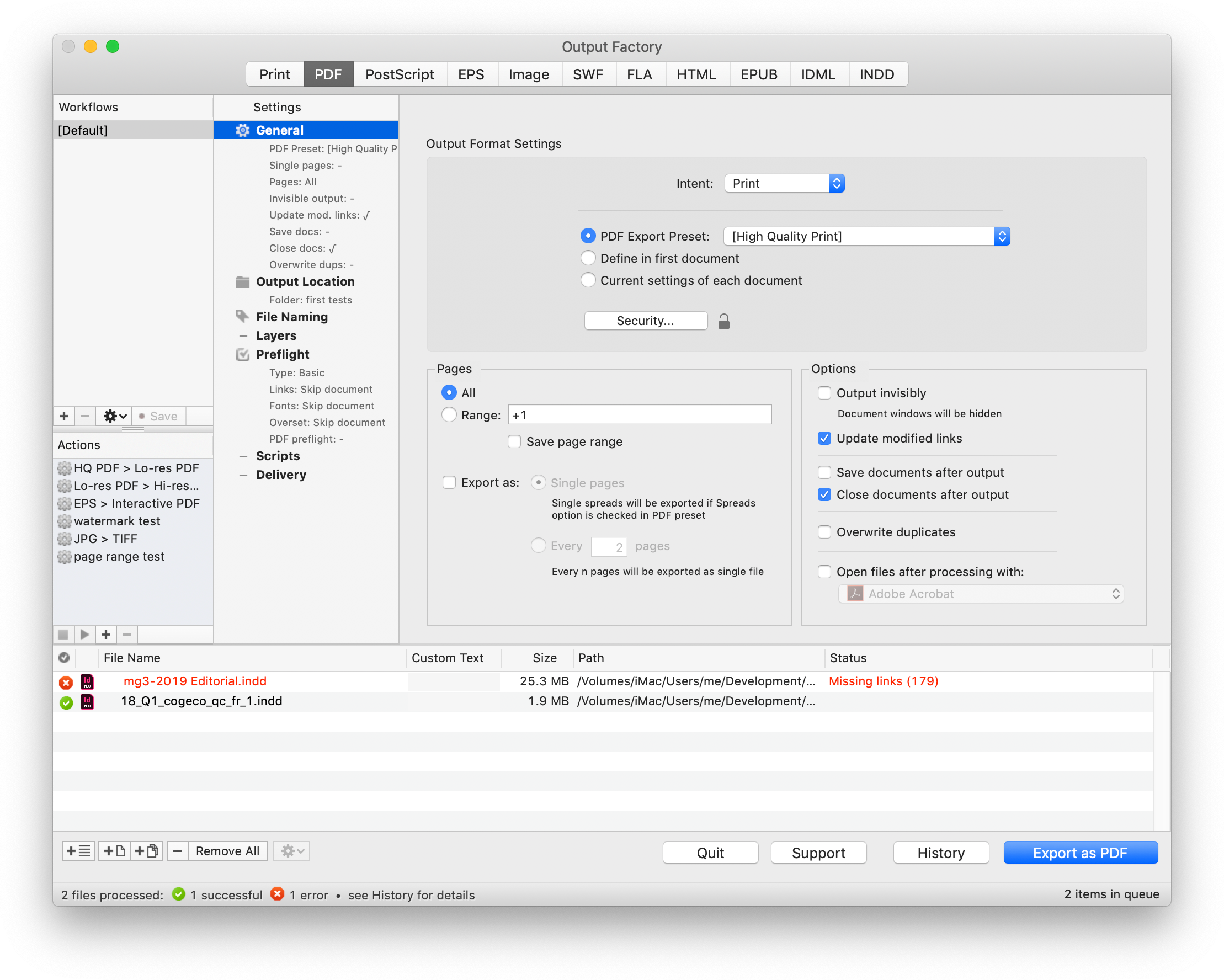
Output Factory lets InDesign users enjoy shorter work hours by offering streamlined stress-free workflows with pre-defined actions. The app supports printing as well as exporting to PDF, PostScript, IDML, EPUB and several image formats. It offers the following key features:
* Batch output of InDesign files
* Export every n pages as a single PDF file
* Variable output file names
* Run custom AppleScript and JavaScript scripts
* Create PDF security presets
* Output files to multiple formats with one click
* Layer versioning: output layer combinations as single files
* Eliminate errors with automatic preflight
Pricing and Availability:
Output Factory can be purchased from Zevrix website for $169.95 USD (Lite version $99.95), as well as from authorized resellers and Adobe Exchange. Trial is also available for download. The update is free for the users of Output Factory 2.x, and $84.97 to upgrade from Output Factory 1.x and BatchOutput. Output Factory requires macOS 10.8-11.0 and Adobe InDesign CS5-2021.
Zevrix Solutions: https://zevrix.com
Output Factory 2.4.46: https://zevrix.com/outputfactory
Download Output Factory: https://zevrix.com/downloads/OutputFactory.dmg
Purchase: https://zevrix.com/store
Screenshot: https://zevrix.com/wp-content/uploads/2019/05/of2-tr-8files.png
Located in Toronto, Canada, Zevrix Solutions provides automation and productivity solutions for Adobe Creative Cloud and Creative Suite software, PDF workflows, graphic file diagnostics and Microsoft Office output on Mac OS. Zevrix is dedicated to help professionals increase their profits through automating everyday tasks, producing error-free documents, saving disk space and cutting production costs. For more information, visit their website. Copyright (C) 2020 Zevrix Solutions. All Rights Reserved. Other trademarks and registered trademarks may be the property of their respective owners.
*******
Link To Article: https://prmac.com/release-id-84196.htm
*******
---------------------------------------------------------------------------------
Note that you can alter delivered distributions at any time.
Login to your account on prMac to alter your channel selection, or to opt-out at any time.
Output Factory for Adobe InDesign Now Supports Creative Cloud 2021 - Published on 11/10/20
Zevrix Solutions announces Output Factory 2.4.46, a compatibility update to company's output automation solution for Adobe InDesign. Output Factory solves the problem of time-consuming InDesign production workflows through automation of printing, exporting, preflighting and other repetitive tasks. The new versions adds compatibility with the recently released InDesign 2021, improves folder tree management for output files, and fixes a preflight issue in documents with modified links.
Toronto (ON), Canada - Zevrix Solutions today announces the release of Output Factory 2.4.46, a compatibility update to company's output automation plug-in for Adobe InDesign. Awarded 5 stars by InDesign Magazine, Output Factory automates and simplifies workflows of publishers, printers, prepress houses, and ad agencies worldwide. The software helps users eliminate repetitive tasks and costly errors through batch processing with time-saving output options.
The new version makes Output Factory compatible with the recently released InDesign 2021 and is offered free of charge to licensed users. The same version of Output Factory can be used with any version of InDesign from CS5 and later. The update also improves the management of folder tree for output files, fixes a preflight issue in documents with modified links, blocks attempts to add an InDesign file with unsafe characters in its path, and automatically fixes folder permissions in a rare situation where the serial number couldn't be written to disk.
"With Output Factory, I've got our magazine production down to six minutes from three hours," says Jeff Middleton, a graphic designer from Toronto, Canada. "Once I set up all my presets, it was insane how fast it was."
Output Factory lets InDesign users enjoy shorter work hours by offering streamlined stress-free workflows with pre-defined actions. The app supports printing as well as exporting to PDF, PostScript, IDML, EPUB and several image formats. It offers the following key features:
* Batch output of InDesign files
* Export every n pages as a single PDF file
* Variable output file names
* Run custom AppleScript and JavaScript scripts
* Create PDF security presets
* Output files to multiple formats with one click
* Layer versioning: output layer combinations as single files
* Eliminate errors with automatic preflight
Pricing and Availability:
Output Factory can be purchased from Zevrix website for $169.95 USD (Lite version $99.95), as well as from authorized resellers and Adobe Exchange. Trial is also available for download. The update is free for the users of Output Factory 2.x, and $84.97 to upgrade from Output Factory 1.x and BatchOutput. Output Factory requires macOS 10.8-11.0 and Adobe InDesign CS5-2021.
Zevrix Solutions: https://zevrix.com
Output Factory 2.4.46: https://zevrix.com/outputfactory
Download Output Factory: https://zevrix.com/downloads/OutputFactory.dmg
Purchase: https://zevrix.com/store
Screenshot: https://zevrix.com/wp-content/uploads/2019/05/of2-tr-8files.png
Located in Toronto, Canada, Zevrix Solutions provides automation and productivity solutions for Adobe Creative Cloud and Creative Suite software, PDF workflows, graphic file diagnostics and Microsoft Office output on Mac OS. Zevrix is dedicated to help professionals increase their profits through automating everyday tasks, producing error-free documents, saving disk space and cutting production costs. For more information, visit their website. Copyright (C) 2020 Zevrix Solutions. All Rights Reserved. Other trademarks and registered trademarks may be the property of their respective owners.
*******
Link To Article: https://prmac.com/release-id-84196.htm
*******
---------------------------------------------------------------------------------
Note that you can alter delivered distributions at any time.
Login to your account on prMac to alter your channel selection, or to opt-out at any time.
AirBeamTV Launches Classroom Screen Mirroring
A new article has been published at prMac.
AirBeamTV Launches Classroom Screen Mirroring - Published on 11/10/20
Leader of wireless screen mirroring apps, AirBeamTV releases Classroom Screen Mirroring, its first B2B solution for schools, universities and businesses. With a focus on the educational market, Classroom Screen Mirroring allows teachers and educators to share their iPhone or iPad on the desktop, beamer, or a digital schoolboard. With it, educators teach from their mobile devices from anywhere in the classroom, creating a more engaging experience for students.
Naarden, Netherlands - AirBeamTV launched today their first screen mirroring app aimed at the educational market and enterprises, after six years of developing successful screen mirroring solutions for iOS and macOS users. Classroom Screen Mirroring allows teachers and educators to share their iPhone or iPad on the desktop, beamer, or a digital schoolboard. With it, educators teach from their mobile devices from anywhere in the classroom, creating a more engaging experience for students.
"In the last years, we have received many requests from teachers, school IT Managers, and principals to buy a Pro Version of our Mirror to Mac or Windows PC app. However, because In-App Purchases are not available on Mobile Device Management Solutions, most schools were not able to participate. AirBeamTV Classroom Screen Mirroring is the answer to that", Jan van Ottele, AirBeamTV founder said.
Highlighted Features:
* Easy licenses management - Educational institutions and any other enterprise can buy AirBeamTV Classroom licenses and manage users and devices on Apple Business Manager or Apple School Manager.
* Multiple devices - AirBeamTV Classroom mirrors to macOS and Windows PC devices, making the collaboration with iPhone and iPad easy.
* Mirroring while in different networks - Screen mirroring can be done while being on different networks. For example, 4G to a wi-fi/router connected device.
Classroom Screen Mirroring supports the following devices:
* Any laptop or desktop with Windows (Windows 10, 8.1, 8 or 7) with the Chrome browser installed
* Any Mac, iMac, MacBook (Pro) with the Chrome browser installed
AirBeamTV School is available for $24.99 (USD) as a custom app on Apple Business Manager and Apple School Manager, with lifetime support. To be able to purchase Classroom Screen Mirroring, a school or business first needs to be registered by AirBeamTV.
AirBeamTV: https://www.airbeam.tv
Classroom Screen Mirroring: https://www.airbeam.tv/classroom/
Screenshot: https://www.airbeam.tv/wp-content/uploads/2020/11/ex3-1024x575.png
Application Icon: https://drive.google.com/file/d/1d71By7NEagmmpNr824X3O9XOvZUmY87k/view?usp=sharing
AirBeamTV was founded in 2014 to develop applications for wireless screen mirroring to Smart TVs. It is based in Naarden, The Netherlands. Prior to launching the iOS screen mirroring app, the Company released the Mirror for Samsung TV, LG TV, Panasonic TV, Philips TV, Sony TV, Chromecast, Roku, Fire TV and Android TV applications for macOS. AirBeamTV products consistently stay in the top Mac App Store charts since the launch. All Material and Software (C) Copyright 2014-2020 AirBeamTV. All Rights Reserved. Apple, the Apple logo, macOS, iPhone, iPad, iPod and Macintosh are registered trademarks of Apple Inc. in the U.S. and/or other countries. Other trademarks and registered trademarks may be the property of their respective owners.
*******
Link To Article: https://prmac.com/release-id-84197.htm
*******
---------------------------------------------------------------------------------
Note that you can alter delivered distributions at any time.
Login to your account on prMac to alter your channel selection, or to opt-out at any time.
AirBeamTV Launches Classroom Screen Mirroring - Published on 11/10/20
Leader of wireless screen mirroring apps, AirBeamTV releases Classroom Screen Mirroring, its first B2B solution for schools, universities and businesses. With a focus on the educational market, Classroom Screen Mirroring allows teachers and educators to share their iPhone or iPad on the desktop, beamer, or a digital schoolboard. With it, educators teach from their mobile devices from anywhere in the classroom, creating a more engaging experience for students.
Naarden, Netherlands - AirBeamTV launched today their first screen mirroring app aimed at the educational market and enterprises, after six years of developing successful screen mirroring solutions for iOS and macOS users. Classroom Screen Mirroring allows teachers and educators to share their iPhone or iPad on the desktop, beamer, or a digital schoolboard. With it, educators teach from their mobile devices from anywhere in the classroom, creating a more engaging experience for students.
"In the last years, we have received many requests from teachers, school IT Managers, and principals to buy a Pro Version of our Mirror to Mac or Windows PC app. However, because In-App Purchases are not available on Mobile Device Management Solutions, most schools were not able to participate. AirBeamTV Classroom Screen Mirroring is the answer to that", Jan van Ottele, AirBeamTV founder said.
Highlighted Features:
* Easy licenses management - Educational institutions and any other enterprise can buy AirBeamTV Classroom licenses and manage users and devices on Apple Business Manager or Apple School Manager.
* Multiple devices - AirBeamTV Classroom mirrors to macOS and Windows PC devices, making the collaboration with iPhone and iPad easy.
* Mirroring while in different networks - Screen mirroring can be done while being on different networks. For example, 4G to a wi-fi/router connected device.
Classroom Screen Mirroring supports the following devices:
* Any laptop or desktop with Windows (Windows 10, 8.1, 8 or 7) with the Chrome browser installed
* Any Mac, iMac, MacBook (Pro) with the Chrome browser installed
AirBeamTV School is available for $24.99 (USD) as a custom app on Apple Business Manager and Apple School Manager, with lifetime support. To be able to purchase Classroom Screen Mirroring, a school or business first needs to be registered by AirBeamTV.
AirBeamTV: https://www.airbeam.tv
Classroom Screen Mirroring: https://www.airbeam.tv/classroom/
Screenshot: https://www.airbeam.tv/wp-content/uploads/2020/11/ex3-1024x575.png

Application Icon: https://drive.google.com/file/d/1d71By7NEagmmpNr824X3O9XOvZUmY87k/view?usp=sharing
AirBeamTV was founded in 2014 to develop applications for wireless screen mirroring to Smart TVs. It is based in Naarden, The Netherlands. Prior to launching the iOS screen mirroring app, the Company released the Mirror for Samsung TV, LG TV, Panasonic TV, Philips TV, Sony TV, Chromecast, Roku, Fire TV and Android TV applications for macOS. AirBeamTV products consistently stay in the top Mac App Store charts since the launch. All Material and Software (C) Copyright 2014-2020 AirBeamTV. All Rights Reserved. Apple, the Apple logo, macOS, iPhone, iPad, iPod and Macintosh are registered trademarks of Apple Inc. in the U.S. and/or other countries. Other trademarks and registered trademarks may be the property of their respective owners.
*******
Link To Article: https://prmac.com/release-id-84197.htm
*******
---------------------------------------------------------------------------------
Note that you can alter delivered distributions at any time.
Login to your account on prMac to alter your channel selection, or to opt-out at any time.
Recosoft ships PDF2ID 2021 - PDF to InDesign 2021 conversion tool
A new article has been published at prMac.
Recosoft ships PDF2ID 2021 - PDF to InDesign 2021 conversion tool - Published on 11/05/20
Recosoft Corporation today releases PDF2ID 2021, the latest version of the company's PDF-to-InDesign conversion plug-in for Adobe InDesign 2021. PDF2ID converts PDF and Windows XPS files into fully editable InDesign files allowing PDF and XPS file content recovery and reuse within InDesign. PDF2ID is the de-facto PDF conversion plug-in for InDesign, allowing anyone to open, convert and edit PDF & XPS documents in InDesign; eliminating the need to acquire additional PDF and XPS conversion tools.
Osaka, Japan - Recosoft Corporation, the developers of solutions enhancing workflow automation for the Adobe(R) Creative Cloud(R) platform and creators of PDF centric conversion software, has released PDF2ID 2021, the latest version of the company's PDF-to-InDesign conversion plug-in for Adobe InDesign(R) 2021.
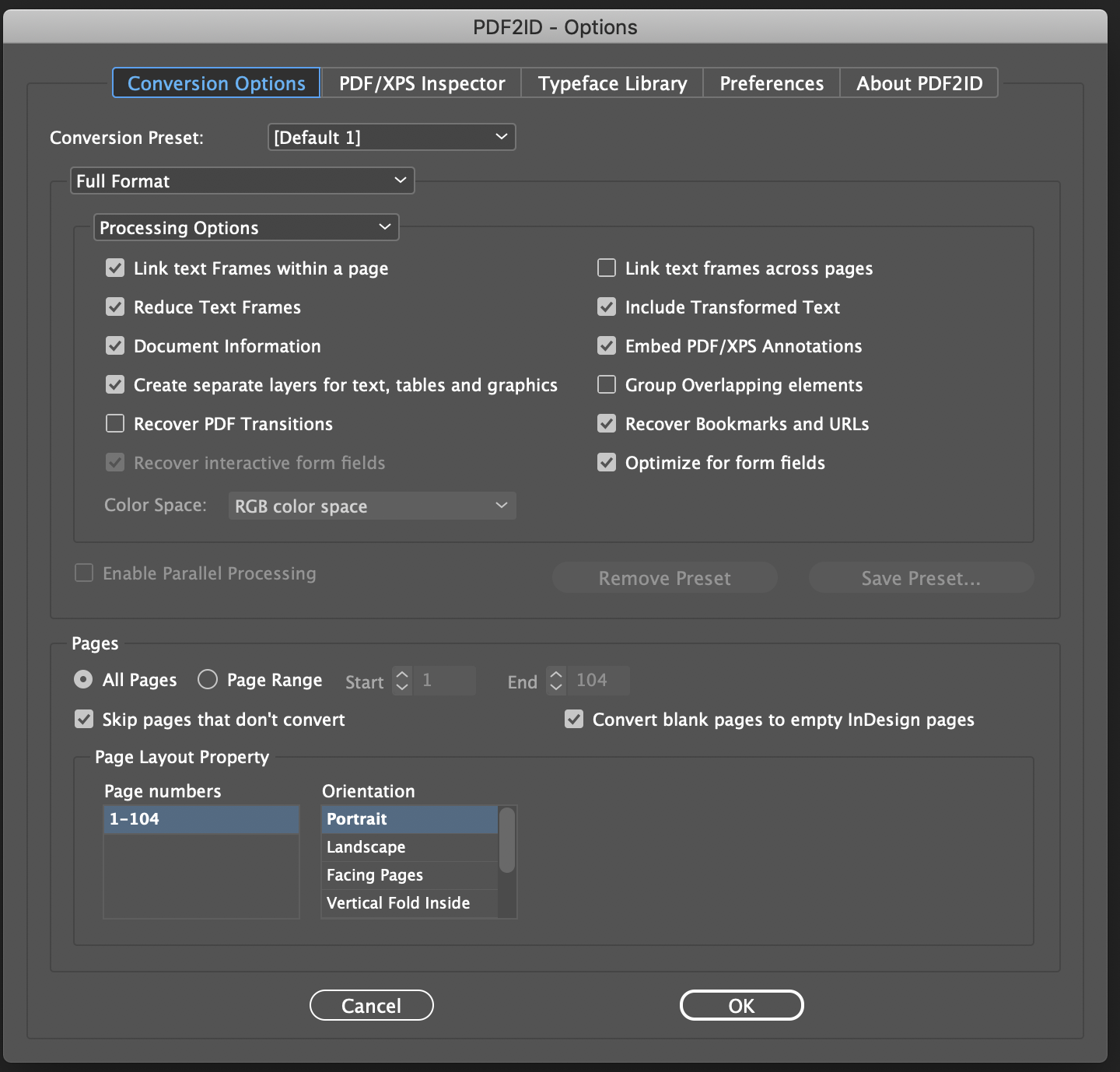
PDF2ID 2021 incorporates support for Adobe InDesign 2021 while supporting InDesign CC through CC 2020 for both macOS and Windows. Additionally, PDF2ID 2021 recovers PDF Accessibility tags, producing the appropriate accessibility properties in the resulting InDesign file. Finally, PDF2ID 2021 recognizes Printer marks in a PDF applying them to the subsequent InDesign document.
"Recovering PDF Accessibility tags was a top priority for our customers due to increased regulations. PDF2ID 2021 delivers this important feature while supporting Adobe InDesign 2021" - Paramjit Chadha, MD, Recosoft Corporation
PDF2ID converts PDF and Windows XPS files into fully editable InDesign files allowing PDF and XPS file content recovery and reuse within InDesign. PDF2ID is the de-facto PDF conversion plug-in for InDesign, allowing anyone to open, convert and edit PDF and XPS documents in InDesign; eliminating the need to acquire additional PDF and XPS conversion tools.
Key New Features:
* InDesign 2021 support - Support has been added for InDesign 2021 (InDesign CC to InDesign 2020 are supported as well)
* Printer Marks - Printer marks are now recovered, and the appropriate InDesign document properties are applied
* PDF Accessibility tags - PDF accessibility tags are processed, and the corresponding tags are set in the ensuing InDesign document (PDF2ID Professional only); Furthermore, paragraph style-sheets specific to accessibility tags are created
* Rotated table text cells - Rotated table text cells are identified, and InDesign tables are created with rotated text in table cells
* Hidden PDF layers and Objects - PDF layers that are hidden are now ignored during the conversion and hidden objects/text are also removed
* Image Mask and Pattern support - Image masks are recognized and applied to the resulting images and PDF patterns are converted to high-resolution images
* Rotated PDF page recognition and conversion improvements - Rotated PDF pages are accurately recognized, resulting in dramatically improved conversions along with the ability to identify rotated tables in such pages
* General conversion and stability improvements - General conversion and stability improvements have been made throughout the PDF and InDesign conversion core
System Requirements:
* Mac OS :macOS 10.10.x or higher
* Intel based Mac
* InDesign CC, CC 2014, CC 2015, CC 2017, CC 2018, CC 2019, 2020 or 2021
* Windows: Windows 7, Windows 8/8.1 or Windows 10
* Minimum Pentium III computer
* :InDesign CC, CC 2014, CC 2015, CC 2017, CC 2018, CC 2019, 2020 or 2021
Pricing and Availability:
PDF2ID 2021 is available immediately in the following configurations from the Recosoft web store (per license):
* PDF2ID Standard 2021 - $199.00 (USD)
* PDF2ID Professional 2021 - $299.00 (USD)
* PDF2ID Standard 2021 Upgrade - $99.00 (USD)
* PDF2ID Professional 2021 Upgrade - $149.00 (USD)
Recosoft: https://www.recosoft.com
PDF2ID 2021: https://www.recosoft.com/products/pdf2id
Screenshot: http://www.recosoftcorporation.com/ftpenglish2/How-to-convert-pdf-to-indesign-2021-format-using-pdf2id.png
Recosoft Corporation has pioneered PDF2Office(R), the de-facto PDF-to-Excel, PDF-to-Word, PDF-to-PowerPoint, PDF-to-OmniGraffle conversion utility; PDF2Office(R) for iWork, the PDF-to-Keynote, PDF-to-Numbers and PDF-to-Pages conversion application; IR2Office, the only Adobe Illustrator to PowerPoint and Apple Keynote tool; ID2Office, the InDesign-to-Word, InDesign-to-PowerPoint converter; and PDF2ID(R) the de-facto PDF-to-InDesign conversion tool. The company is a leader in designing and delivering PDF converters, InDesign and Illustrator software solutions enhancing workflow automation and productivity. IR2Office, ID2Office, PDF2Office, PDF2ID, PDFtoID are trademarks or registered trademarks of Recosoft Corporation in the US and/or other countries. Microsoft, Excel, PowerPoint, Word and the Office logo are trademarks or registered trademarks of Microsoft Corporation in the US and/or other countries. Adobe, InDesign, Illustrator and Creative Cloud are either registered trademarks or
trademarks of Adobe System Incorporated in the US and/or other countries. Apple, Macintosh, macOS, Mac are either trademarks or registered trademarks of Apple, Inc. in the US and or other countries. All other trademarks are recognized.
*******
Link To Article: https://prmac.com/release-id-84192.htm
*******
---------------------------------------------------------------------------------
Note that you can alter delivered distributions at any time.
Login to your account on prMac to alter your channel selection, or to opt-out at any time.
Recosoft ships PDF2ID 2021 - PDF to InDesign 2021 conversion tool - Published on 11/05/20
Recosoft Corporation today releases PDF2ID 2021, the latest version of the company's PDF-to-InDesign conversion plug-in for Adobe InDesign 2021. PDF2ID converts PDF and Windows XPS files into fully editable InDesign files allowing PDF and XPS file content recovery and reuse within InDesign. PDF2ID is the de-facto PDF conversion plug-in for InDesign, allowing anyone to open, convert and edit PDF & XPS documents in InDesign; eliminating the need to acquire additional PDF and XPS conversion tools.
Osaka, Japan - Recosoft Corporation, the developers of solutions enhancing workflow automation for the Adobe(R) Creative Cloud(R) platform and creators of PDF centric conversion software, has released PDF2ID 2021, the latest version of the company's PDF-to-InDesign conversion plug-in for Adobe InDesign(R) 2021.
PDF2ID 2021 incorporates support for Adobe InDesign 2021 while supporting InDesign CC through CC 2020 for both macOS and Windows. Additionally, PDF2ID 2021 recovers PDF Accessibility tags, producing the appropriate accessibility properties in the resulting InDesign file. Finally, PDF2ID 2021 recognizes Printer marks in a PDF applying them to the subsequent InDesign document.
"Recovering PDF Accessibility tags was a top priority for our customers due to increased regulations. PDF2ID 2021 delivers this important feature while supporting Adobe InDesign 2021" - Paramjit Chadha, MD, Recosoft Corporation
PDF2ID converts PDF and Windows XPS files into fully editable InDesign files allowing PDF and XPS file content recovery and reuse within InDesign. PDF2ID is the de-facto PDF conversion plug-in for InDesign, allowing anyone to open, convert and edit PDF and XPS documents in InDesign; eliminating the need to acquire additional PDF and XPS conversion tools.
Key New Features:
* InDesign 2021 support - Support has been added for InDesign 2021 (InDesign CC to InDesign 2020 are supported as well)
* Printer Marks - Printer marks are now recovered, and the appropriate InDesign document properties are applied
* PDF Accessibility tags - PDF accessibility tags are processed, and the corresponding tags are set in the ensuing InDesign document (PDF2ID Professional only); Furthermore, paragraph style-sheets specific to accessibility tags are created
* Rotated table text cells - Rotated table text cells are identified, and InDesign tables are created with rotated text in table cells
* Hidden PDF layers and Objects - PDF layers that are hidden are now ignored during the conversion and hidden objects/text are also removed
* Image Mask and Pattern support - Image masks are recognized and applied to the resulting images and PDF patterns are converted to high-resolution images
* Rotated PDF page recognition and conversion improvements - Rotated PDF pages are accurately recognized, resulting in dramatically improved conversions along with the ability to identify rotated tables in such pages
* General conversion and stability improvements - General conversion and stability improvements have been made throughout the PDF and InDesign conversion core
System Requirements:
* Mac OS :macOS 10.10.x or higher
* Intel based Mac
* InDesign CC, CC 2014, CC 2015, CC 2017, CC 2018, CC 2019, 2020 or 2021
* Windows: Windows 7, Windows 8/8.1 or Windows 10
* Minimum Pentium III computer
* :InDesign CC, CC 2014, CC 2015, CC 2017, CC 2018, CC 2019, 2020 or 2021
Pricing and Availability:
PDF2ID 2021 is available immediately in the following configurations from the Recosoft web store (per license):
* PDF2ID Standard 2021 - $199.00 (USD)
* PDF2ID Professional 2021 - $299.00 (USD)
* PDF2ID Standard 2021 Upgrade - $99.00 (USD)
* PDF2ID Professional 2021 Upgrade - $149.00 (USD)
Recosoft: https://www.recosoft.com
PDF2ID 2021: https://www.recosoft.com/products/pdf2id
Screenshot: http://www.recosoftcorporation.com/ftpenglish2/How-to-convert-pdf-to-indesign-2021-format-using-pdf2id.png
Recosoft Corporation has pioneered PDF2Office(R), the de-facto PDF-to-Excel, PDF-to-Word, PDF-to-PowerPoint, PDF-to-OmniGraffle conversion utility; PDF2Office(R) for iWork, the PDF-to-Keynote, PDF-to-Numbers and PDF-to-Pages conversion application; IR2Office, the only Adobe Illustrator to PowerPoint and Apple Keynote tool; ID2Office, the InDesign-to-Word, InDesign-to-PowerPoint converter; and PDF2ID(R) the de-facto PDF-to-InDesign conversion tool. The company is a leader in designing and delivering PDF converters, InDesign and Illustrator software solutions enhancing workflow automation and productivity. IR2Office, ID2Office, PDF2Office, PDF2ID, PDFtoID are trademarks or registered trademarks of Recosoft Corporation in the US and/or other countries. Microsoft, Excel, PowerPoint, Word and the Office logo are trademarks or registered trademarks of Microsoft Corporation in the US and/or other countries. Adobe, InDesign, Illustrator and Creative Cloud are either registered trademarks or
trademarks of Adobe System Incorporated in the US and/or other countries. Apple, Macintosh, macOS, Mac are either trademarks or registered trademarks of Apple, Inc. in the US and or other countries. All other trademarks are recognized.
*******
Link To Article: https://prmac.com/release-id-84192.htm
*******
---------------------------------------------------------------------------------
Note that you can alter delivered distributions at any time.
Login to your account on prMac to alter your channel selection, or to opt-out at any time.
Zevrix InDesign Automation Bundle on MacUpdate Sale Until November 10
A new article has been published at prMac.
Zevrix InDesign Automation Bundle on MacUpdate Sale Until November 10 - Published on 11/04/20
Developer of automation plug-ins for Adobe InDesign, Zevrix Solutions has partnered with MacUpdate to offer InDesign users a highly discounted bundle of company's workflow automation tools. Users can get LinkOptimizer, Output Factory, Package Central and InPreflight Pro until September 22. The deal offers customers a 92% discount. The apps automate InDesign image workflow and output tasks, allow file collection from hot folders, and offer expert preflight options.
Toronto, Canada - Zevrix Solutions, a developer of automation tools for Adobe InDesign, announces today that it has partnered with MacUpdate to offer a highly discounted bundle of company's workflow automation plug-ins. InDesign users can get LinkOptimizer, Output Factory, Package Central and InPreflight Pro for $49 only until November 10. The deal saves customers $630 - a 92% discount. Zevrix software helps users reduce InDesign link size, automate image and output workflows, streamline document packaging, and work shorter hours through automation of repetitive tasks.
The bundle is available on MacUpdate Shop which enables people to organically discover products and brands they love along with the very best apps and software for macOS. MacUpdate is one of the most popular and complete Mac software directories around that brings thousands of new and updated apps to over one million Mac users every day. The shop carries a bundle of four Zevrix InDesign automation tools:
* LinkOptimizer lets users reduce InDesign link size by eliminating excess image data, perform image adjustments, convert file formats and their color profiles. The software saves users countless hours of optimizing images manually and helps cut costs through faster processing.
* Output Factory automates printing and exporting from InDesign and offers batch output, layer versioning, single page export, preflighting, variable file names and more.
* InPreflight for InDesign offers advanced preflighting as well as automatic packaging of multiple files. InPreflight helps users eliminate errors, save disk space and collect all linked files into a single location.
* The last product on sale is Package Central which automates InDesign file packaging by processing files from watched hot folders. The software offloads file packaging from InDesign to a central system leaving operator workstations free from the collection process.
Pricing and Availability:
Zevrix InDesign bundle can be purchased on MacUpdate Shop for $49 (USD) until November 10, 2020. Product trials are also available for download. All products require macOS 10.8-10.15 and Adobe InDesign CS5-CC 2021 software.
Zevrix Solutions: https://zevrix.com
Zevrix Workflow Automation Plug-ins: https://shop.macupdate.com/sales/zevrix-adobe-indesign-app-bundle
Download LinkOptimizer: https://zevrix.com/downloads/LinkOptimizer.dmg
Screenshot: https://cdnp2.stackassets.com/fc57c640b37db5de533ce96e553fa83815e6d816/store/fitb/360/270/56aed4a76bf3f7dc65731259e5ad51a228da32d5ff55df3b919a250faa55/sale_27675_primary_image.jpg
Located in Toronto, Canada, Zevrix Solutions provides automation and productivity solutions for Adobe Creative Cloud and Creative Suite software, PDF workflows, graphic file diagnostics and Microsoft Office output on Mac OS. Zevrix is dedicated to help professionals increase their profits through automating everyday tasks, producing error-free documents, saving disk space and cutting production costs. For more information, visit their website. Copyright (C) 2020 Zevrix Solutions. All Rights Reserved. Other trademarks and registered trademarks may be the property of their respective owners.
*******
Link To Article: https://prmac.com/release-id-84193.htm
*******
---------------------------------------------------------------------------------
Note that you can alter delivered distributions at any time.
Login to your account on prMac to alter your channel selection, or to opt-out at any time.
Zevrix InDesign Automation Bundle on MacUpdate Sale Until November 10 - Published on 11/04/20
Developer of automation plug-ins for Adobe InDesign, Zevrix Solutions has partnered with MacUpdate to offer InDesign users a highly discounted bundle of company's workflow automation tools. Users can get LinkOptimizer, Output Factory, Package Central and InPreflight Pro until September 22. The deal offers customers a 92% discount. The apps automate InDesign image workflow and output tasks, allow file collection from hot folders, and offer expert preflight options.
Toronto, Canada - Zevrix Solutions, a developer of automation tools for Adobe InDesign, announces today that it has partnered with MacUpdate to offer a highly discounted bundle of company's workflow automation plug-ins. InDesign users can get LinkOptimizer, Output Factory, Package Central and InPreflight Pro for $49 only until November 10. The deal saves customers $630 - a 92% discount. Zevrix software helps users reduce InDesign link size, automate image and output workflows, streamline document packaging, and work shorter hours through automation of repetitive tasks.
The bundle is available on MacUpdate Shop which enables people to organically discover products and brands they love along with the very best apps and software for macOS. MacUpdate is one of the most popular and complete Mac software directories around that brings thousands of new and updated apps to over one million Mac users every day. The shop carries a bundle of four Zevrix InDesign automation tools:
* LinkOptimizer lets users reduce InDesign link size by eliminating excess image data, perform image adjustments, convert file formats and their color profiles. The software saves users countless hours of optimizing images manually and helps cut costs through faster processing.
* Output Factory automates printing and exporting from InDesign and offers batch output, layer versioning, single page export, preflighting, variable file names and more.
* InPreflight for InDesign offers advanced preflighting as well as automatic packaging of multiple files. InPreflight helps users eliminate errors, save disk space and collect all linked files into a single location.
* The last product on sale is Package Central which automates InDesign file packaging by processing files from watched hot folders. The software offloads file packaging from InDesign to a central system leaving operator workstations free from the collection process.
Pricing and Availability:
Zevrix InDesign bundle can be purchased on MacUpdate Shop for $49 (USD) until November 10, 2020. Product trials are also available for download. All products require macOS 10.8-10.15 and Adobe InDesign CS5-CC 2021 software.
Zevrix Solutions: https://zevrix.com
Zevrix Workflow Automation Plug-ins: https://shop.macupdate.com/sales/zevrix-adobe-indesign-app-bundle
Download LinkOptimizer: https://zevrix.com/downloads/LinkOptimizer.dmg
Screenshot: https://cdnp2.stackassets.com/fc57c640b37db5de533ce96e553fa83815e6d816/store/fitb/360/270/56aed4a76bf3f7dc65731259e5ad51a228da32d5ff55df3b919a250faa55/sale_27675_primary_image.jpg

Located in Toronto, Canada, Zevrix Solutions provides automation and productivity solutions for Adobe Creative Cloud and Creative Suite software, PDF workflows, graphic file diagnostics and Microsoft Office output on Mac OS. Zevrix is dedicated to help professionals increase their profits through automating everyday tasks, producing error-free documents, saving disk space and cutting production costs. For more information, visit their website. Copyright (C) 2020 Zevrix Solutions. All Rights Reserved. Other trademarks and registered trademarks may be the property of their respective owners.
*******
Link To Article: https://prmac.com/release-id-84193.htm
*******
---------------------------------------------------------------------------------
Note that you can alter delivered distributions at any time.
Login to your account on prMac to alter your channel selection, or to opt-out at any time.
Subscribe to:
Posts (Atom)