A new article has been published at prMac.
Mocha Pro 2021 Redefines Organic Warp Tracking with PowerMesh VFX Tool - Published on 11/23/20
Boris FX Mocha Pro 2021 delivers the next evolution in planar motion tracking. The Mocha Pro 2021 release builds upon its Academy Award-winning technology to give visual effects artists, editors, and colorists the most significant new feature to date. Mocha Pro 2021's PowerMesh tracking, warped spline, and warped stabilization workflows provide the most accurate results on time-consuming visual effects tasks including tracking organic moving objects such as musculature, skin & fabrics.
Boston, Massachusetts, USA - Boris FX Mocha Pro 2021 delivers the next evolution in planar motion tracking. The Mocha Pro 2021 release builds upon its Academy and Emmy Award-winning technology to give visual effects artists, editors, and colorists the most significant new feature to date. Mocha Pro 2021's PowerMesh tracking, warped spline, and warped stabilization workflows provide the most accurate results on time-consuming visual effects tasks including tracking organic moving objects such as musculature, skin, and fabrics.
Mocha Pro 2021 is now available as a plugin for Adobe After Effects, Adobe Premiere Pro, Avid Media Composer, and OFX host applications including Foundry Nuke, Autodesk Flame, Blackmagic Fusion, VEGAS Pro, and HitFilm (and as a standalone application) with affordable monthly and annual subscription options.
Post-production professionals have long relied on Mocha's planar tracking to accomplish high-end visual effects on the industry's most acclaimed projects. Artists have recently used Mocha Pro on Stranger Things (Netflix), The Mandalorian (Disney+), Westworld (HBO), and Avengers: Endgame (Marvel).
"Tracking organic and moving warped surfaces with realistic results is probably the most challenging job a VFX artist can work on. If there is one feature that the Mocha user base has consistently asked for, this is it," says Ross Shain, Chief Product Officer, Boris FX. "Our engineering team did an amazing job developing a unique sub-planar image processing workflow that delivers the accuracy, speed, and usability that Mocha is known for, and the shared image warping code from our Silhouette team produces high-quality warped-stabilized render results."
Shain continues, "PowerMesh not only simplifies complex digital makeup and touch-up work. It can also speed up rotoscoping. Other key new features such as Alembic exports, the revamped AdjustTrack Module, and the new ability to export Apple ProRes in the standalone make this a significant Mocha Pro release. We look forward to seeing the amazing things our customers will do with Mocha Pro 2021."
Early beta testers react to the Mocha Pro 2021 release:
"I have taught Mocha Pro to upcoming visual effects artists for over 10 years and have to say that PowerMesh tracking is one of the most exciting new tools from Boris FX," states Daniel Smith, Senior Compositor, Crafty Apes, and author of Nuke Codex: Nodes within Nodes. "PowerMesh is incredibly fast and easy to use from my experience in beta testing. Mocha Pro 2021 delivers better results than some of the optical flow-based tools that are out there."
"PowerMesh simplifies the typically tedious and unpredictable motion vector workflow," remarks Katie Morris, Senior VFX Artist, and professor at fxphd.com. "Now I can quickly track a custom mesh, mask out obstructions, and export the tracked and warped mesh to a variety of hosts to assist with painting on organic moving surfaces. As a bonus, we also get warped splines. There's incredible potential here to help make organic roto procedural-based."
Mocha Pro 2021 Highlights:
New! PowerMesh: Mocha's dynamic PowerMesh tracking is the next evolution of the incomparable and award-winning planar motion tracking technology. Users can now accurately track complex warped surfaces for advanced match moves, digital retouching, and stabilization with a workflow that is faster and more accurate than optical flow-based techniques. Track and composite graphics, scars, tattoos, blood, and digital makeup with ease.
PowerMesh tracking can be rendered for a warped stabilize/destabilized compositing workflow that will work in almost any VFX or editing host. PowerMesh dense tracking data can also be exported to Adobe After Effects, Foundry Nuke, Autodesk Flame, Blackmagic Fusion, and other 3D applications via the new Alembic export format.
New! Improved AdjustTrack module: Correcting slipping or drifting tracking errors has never been easier. Refined user interface and controls offer dynamic adjustments to achieve perfect results on difficult tracking shots. Once limited to 4-point perspective fixes, AdjustTrack now includes all planar track parameters to be more effective in editing and interpolating data when objects go off-screen or become occluded by foreground objects.
New! Updated Python Script Editor: Mocha Pro's plugin for Adobe, Avid, and OFX now includes the Python Script Editor which enables developers and coders the freedom and ability to build new tools, automate processes, and integrate with external asset management tools. Python scripting brings more complete feature parity between the Mocha Pro standalone application and the plugin options.
New! Performance & Stability: Mocha Pro 2021 is updated with under-the-hood engineering features to increase performance and stability in a variety of environments. The Mocha Pro plugin now runs an out-of-process, freeing up system resources for a better user experience. Mocha Pro's standalone application can now read and export more file formats including Apple ProRes.
Pricing & Availability
Mocha Pro 2021 is available with affordable pricing and subscription (annual and monthly) options: plugins for Adobe After Effects and Premiere Pro, Avid Media Composer, and OFX hosts, including Autodesk Flame, Blackmagic Fusion, Foundry Nuke, VEGAS Pro, and HitFilm (or as a standalone application).
Multi-host option (includes all supported host plugins: Adobe, Avid, OFX)
Single license: $995
Upgrades start at $395
Annual subscription: $395
Monthly subscription: $50
Individual host option (choose one supported host plugin: Adobe, Avid, OFX)
Single license: $695
Upgrades start at $295
Annual subscription: $295
Monthly subscription: $37
Multi-host option + standalone application
Single license: $1495
Upgrades start at $595
Annual subscription: $595
Monthly subscription: $75
Visit the Boris FX website to learn more.
Mocha Pro 2021: Product Page: https://borisfx.com/products/mocha-pro/?collection=mocha-pro&product=mocha-pro
Mocha Pro 2021: Blog Post: https://borisfx.com/news/new-mocha-pro-2021-now-available-with-powermesh-tracking/
Mocha Pro 2021: Purchase Link: https://borisfx.com/store/?collection=mocha-pro&product=mocha-pro
Mocha Pro 2021: Hero image: https://bit.ly/36uFobk
Mocha Pro 2021: PowerMesh image: https://bit.ly/3piQ718
Mocha Pro 2021: What's New Video: https://borisfx.com/videos/mocha-pro-2021-what-s-new/
Founded in 1995, Boris FX is a leading developer of VFX, compositing, titling, video editing, and workflow tools for broadcast, post-production, and film professionals. Boris FX products have grown to serve over a million artists worldwide. The company's success lies in its ability to tightly integrate and leverage technologies through strong partnerships with Adobe, Apple, Avid, Blackmagic Design, Autodesk, Grass Valley, Magix, and other leading developers of video editing software. In 2014, Boris FX acquired Imagineer Systems, the Academy Award-winning developer of Mocha planar tracking software. In 2016, Boris FX acquired GenArts, the developer of Sapphire, the gold standard plug-in package for high-end visual effects. In 2019, Boris FX acquired Academy Award-winning SilhouetteFX and Digital Film Tools for advanced feature film rotoscoping, painting, and effects.
*******
Link To Article: https://prmac.com/release-id-84220.htm
*******
---------------------------------------------------------------------------------
Note that you can alter delivered distributions at any time.
Login to your account on prMac to alter your channel selection, or to opt-out at any time.

FLEXCLIP Kickstarter Launches
A new article has been published at prMac.
FLEXCLIP Kickstarter Launches - Published on 11/23/20
FLEXCLIP Kickstarter launches. With it, Reverse Wireless Charging finally makes sense, and Apple, ZAGG, and PopSocket have some stiff competition. The FLEXCLIP is an ultra-thin (2.4mm), two-piece clip that attaches to any smooth, clean, non-textured surface via adhesive. It's designed to connect the things that are most important to you and is the perfect accessory for your mobile phone.
Saint Petersburg, FL - The FLEXCLIP is an ultra-thin (2.4mm), two-piece clip that attaches to any smooth, clean, non-textured surface via adhesive. It's designed to connect the things that are most important to you and is the perfect accessory for your mobile phone.
As a thinner version of the PopSockets AirPods Holder (6.6mm thinner), the FLEXCLIP allows you to attach your wireless earbuds case to the back of your phone. However, unlike the PopSockets AirPods Holder, if you have a compatible phone, you can wirelessly charge your earbuds from the back of your phone while still using it. It creates a whole new level of synergy between your phone and wireless earbuds that the market has yet to see.
Similarly, just like ZAGG's Mophie Juice Pack Connect, you can attach a wireless power bank to your phone with the FLEXCLIP and give your phone some extra juice without having to sit and wait for a charge, but with more versatility and at a lower price point. You can even use the FLEXCLIP to attach your phone to a wireless charger to keep it secured on a wireless charging pad while you use your phone, similar to the new MagSafe feature provided on the latest iPhone, except the FLEXCLIP is compatible with all phones.
To get the full story on how the FLEXCLIP stacks up against competitor products like the ones mentioned above, watch the FLEXCLIP comparison video at the FLEXCLIP website.
The list of FLEXCLIP compatible accessories include (but are not limited to):
* Wireless earbuds
* Power banks
* Wireless chargers
* Grips/Kickstands
* Magnets
* Vapes and e-cigarettes
* Wallets / clutch purses
* Vehicles (passenger side visor, phone mounts)
* Walls (kitchen, bathroom, office)
* Laptops
The link to purchase compatible accessories can be found at the FLEXCLIP store.
With manufacturing set to begin soon, the FLEXCLIP Kickstarter is launching at 9:00 am November 10th and is aiming for deliveries in mid-December. The Kickstarter's FLEXCLIP Early Bird packages are priced at an unheard of $7. Founder and owner of SynergyWiz, John Toner, states, "We are tremendously excited to get the FLEXCLIP in as many hands as possible, and we have priced our Kickstarter accordingly. The unbound utility of the FLEXCLIP is not something the mobile market has seen before, and it is something you really have to experience firsthand to appreciate. The FLEXCLIP has so many uses, even we don't know all of them yet, and we can't wait to see what the community shows us!"
SynergyWiz, Inc., a Florida corporation in the product development business, is comprised of industry leading professionals that have worked for or with top Fortune 100 companies including General Electric, Procter and Gamble, American Express, Walmart, Target, Google, and Zynga.
Learn more about the FLEXCLIP at the FLEXCLIP website.
FLEXCLIP Kickstarter: https://www.kickstarter.com/projects/theflexclip/the-flexclip
FLEXCLIP: https://www.theflexclip.com/
FLEXCLIP Store: https://www.theflexclip.com/store
FLEXCLIP Comparison Video: https://www.theflexclip.com/compare
SynergyWiz is a product development company that creates accessories for products that we already love and use. All Material and Software (C) Copyright 2020 SynergyWiz. All Rights Reserved. Apple, the Apple logo, iPhone, iPod and iPad are registered trademarks of Apple Inc. in the U.S. and/or other countries. Other trademarks and registered trademarks may be the property of their respective owners.
*******
Link To Article: https://prmac.com/release-id-84219.htm
*******
---------------------------------------------------------------------------------
Note that you can alter delivered distributions at any time.
Login to your account on prMac to alter your channel selection, or to opt-out at any time.
FLEXCLIP Kickstarter Launches - Published on 11/23/20
FLEXCLIP Kickstarter launches. With it, Reverse Wireless Charging finally makes sense, and Apple, ZAGG, and PopSocket have some stiff competition. The FLEXCLIP is an ultra-thin (2.4mm), two-piece clip that attaches to any smooth, clean, non-textured surface via adhesive. It's designed to connect the things that are most important to you and is the perfect accessory for your mobile phone.
Saint Petersburg, FL - The FLEXCLIP is an ultra-thin (2.4mm), two-piece clip that attaches to any smooth, clean, non-textured surface via adhesive. It's designed to connect the things that are most important to you and is the perfect accessory for your mobile phone.
As a thinner version of the PopSockets AirPods Holder (6.6mm thinner), the FLEXCLIP allows you to attach your wireless earbuds case to the back of your phone. However, unlike the PopSockets AirPods Holder, if you have a compatible phone, you can wirelessly charge your earbuds from the back of your phone while still using it. It creates a whole new level of synergy between your phone and wireless earbuds that the market has yet to see.
Similarly, just like ZAGG's Mophie Juice Pack Connect, you can attach a wireless power bank to your phone with the FLEXCLIP and give your phone some extra juice without having to sit and wait for a charge, but with more versatility and at a lower price point. You can even use the FLEXCLIP to attach your phone to a wireless charger to keep it secured on a wireless charging pad while you use your phone, similar to the new MagSafe feature provided on the latest iPhone, except the FLEXCLIP is compatible with all phones.
To get the full story on how the FLEXCLIP stacks up against competitor products like the ones mentioned above, watch the FLEXCLIP comparison video at the FLEXCLIP website.
The list of FLEXCLIP compatible accessories include (but are not limited to):
* Wireless earbuds
* Power banks
* Wireless chargers
* Grips/Kickstands
* Magnets
* Vapes and e-cigarettes
* Wallets / clutch purses
* Vehicles (passenger side visor, phone mounts)
* Walls (kitchen, bathroom, office)
* Laptops
The link to purchase compatible accessories can be found at the FLEXCLIP store.
With manufacturing set to begin soon, the FLEXCLIP Kickstarter is launching at 9:00 am November 10th and is aiming for deliveries in mid-December. The Kickstarter's FLEXCLIP Early Bird packages are priced at an unheard of $7. Founder and owner of SynergyWiz, John Toner, states, "We are tremendously excited to get the FLEXCLIP in as many hands as possible, and we have priced our Kickstarter accordingly. The unbound utility of the FLEXCLIP is not something the mobile market has seen before, and it is something you really have to experience firsthand to appreciate. The FLEXCLIP has so many uses, even we don't know all of them yet, and we can't wait to see what the community shows us!"
SynergyWiz, Inc., a Florida corporation in the product development business, is comprised of industry leading professionals that have worked for or with top Fortune 100 companies including General Electric, Procter and Gamble, American Express, Walmart, Target, Google, and Zynga.
Learn more about the FLEXCLIP at the FLEXCLIP website.
FLEXCLIP Kickstarter: https://www.kickstarter.com/projects/theflexclip/the-flexclip
FLEXCLIP: https://www.theflexclip.com/
FLEXCLIP Store: https://www.theflexclip.com/store
FLEXCLIP Comparison Video: https://www.theflexclip.com/compare
SynergyWiz is a product development company that creates accessories for products that we already love and use. All Material and Software (C) Copyright 2020 SynergyWiz. All Rights Reserved. Apple, the Apple logo, iPhone, iPod and iPad are registered trademarks of Apple Inc. in the U.S. and/or other countries. Other trademarks and registered trademarks may be the property of their respective owners.
*******
Link To Article: https://prmac.com/release-id-84219.htm
*******
---------------------------------------------------------------------------------
Note that you can alter delivered distributions at any time.
Login to your account on prMac to alter your channel selection, or to opt-out at any time.
Digital Marketing Company to Promote Your iOS App
A new article has been published at prMac.
Digital Marketing Company to Promote Your iOS App - Published on 11/23/20
Digital marketing is the best possible way to grow your business but it mainly depends on the company that you choose for the growth of your business. One company, The One Technologies which is best for your business needs and enhances your business and brand growth.
Ahmedabad, Gujarat - Digital marketing is the best possible way to grow your business, especially after this worst pandemic, whether you are a small start-up company or a well-established business. But it mainly depends on the company that you choose for the growth of your business.
The current pandemic situation across the globe has shown all the business persons how online helping you to stay connected with your customers and clients.
The online world is very interesting but at the same time, it becomes very competitive in this current pandemic so hiring a digital marketing company will help to promote your company or business online.
But after this pandemic, almost everyone is relying on the online business and everyone wants to make sure that their online business will be more strong and impactful.
So, you must make sure that the digital marketing company you hire is top-notch, and hiring the services from a professional company during this pandemic time will prove to be really very effective for you.
How to Choose the right Digital Marketing Agency:
* Must check your company's marketing needs.
* Find a company that meets your needs.
* Do complete research before finalizing the company
* Ask the right questions to the company to get your satisfactory answer
* Hold a meeting with the company and clear out all your points
Benefits of Digital Marketing company:
1) They will focus on running your business and you can hire a digital agency for improving your brand and also save your time to focus on your business with full dedication.
2) The company cut down your extra cost and you can also outsource an agency in spite of hiring every individual for every section and spending a lot of money on these expenses.
3) You get a chance to work with experts in digital marketing who know each and every bit of the industry on ways to improve your business or brand.
4) A professional company will give you great ideas on what techniques will give you results. You will also get a new perspective to create new ideas based on the viewpoint of the consumers.
5) A good company accommodates your needs as your business grows. They also offer several plans and packages that best suit your business size and provide you with scalable services.
Meeting With A Digital Marketing Agency
When you'll meet an agent and discuss your business needs, you'll be able to work your business and brand more effectively:
The type of business products and services offered.
* The company's brand.
* Business goals and objectives.
* Business principles.
* Current marketing plan.
* The business target market.
* The techniques and tools to be used.
* Expectations concerning working with a digital marketing agency.
One company, The One Technologies which is best for your business needs and enhances your business and brand growth.
The One Technologies: https://theonetechnologies.com/
Mobile App Development: https://theonetechnologies.com/outsourcing-services/mobile-app-development-company.aspx
Website Design: https://theonetechnologies.com/hire-programmers/hire-web-designers.aspx
Digital Marketing: https://theonetechnologies.com/outsourcing-services/digital-marketing-services.aspx
Web Development: https://theonetechnologies.com/outsourcing-services/website-development-company.aspx
Software Development: https://theonetechnologies.com/outsourcing-services/custom-software-development-services.aspx
The One Technologies is counted amongst the most trusted offshore web and software development company located in Ahmedabad, India. At present, We have ventured in the business of Mobile application development, Website development, Open source customization, Custom software development and Graphics designing. All Material and Software (C) Copyright 2020 The One Technologies. All Rights Reserved. Apple, the Apple logo, Macintosh Mac OS X and macOS are registered trademarks of Apple Inc. in the U.S. and/or other countries. Other trademarks and registered trademarks may be the property of their respective owners.
*******
Link To Article: https://prmac.com/release-id-84218.htm
*******
---------------------------------------------------------------------------------
Note that you can alter delivered distributions at any time.
Login to your account on prMac to alter your channel selection, or to opt-out at any time.
Digital Marketing Company to Promote Your iOS App - Published on 11/23/20
Digital marketing is the best possible way to grow your business but it mainly depends on the company that you choose for the growth of your business. One company, The One Technologies which is best for your business needs and enhances your business and brand growth.
Ahmedabad, Gujarat - Digital marketing is the best possible way to grow your business, especially after this worst pandemic, whether you are a small start-up company or a well-established business. But it mainly depends on the company that you choose for the growth of your business.
The current pandemic situation across the globe has shown all the business persons how online helping you to stay connected with your customers and clients.
The online world is very interesting but at the same time, it becomes very competitive in this current pandemic so hiring a digital marketing company will help to promote your company or business online.
But after this pandemic, almost everyone is relying on the online business and everyone wants to make sure that their online business will be more strong and impactful.
So, you must make sure that the digital marketing company you hire is top-notch, and hiring the services from a professional company during this pandemic time will prove to be really very effective for you.
How to Choose the right Digital Marketing Agency:
* Must check your company's marketing needs.
* Find a company that meets your needs.
* Do complete research before finalizing the company
* Ask the right questions to the company to get your satisfactory answer
* Hold a meeting with the company and clear out all your points
Benefits of Digital Marketing company:
1) They will focus on running your business and you can hire a digital agency for improving your brand and also save your time to focus on your business with full dedication.
2) The company cut down your extra cost and you can also outsource an agency in spite of hiring every individual for every section and spending a lot of money on these expenses.
3) You get a chance to work with experts in digital marketing who know each and every bit of the industry on ways to improve your business or brand.
4) A professional company will give you great ideas on what techniques will give you results. You will also get a new perspective to create new ideas based on the viewpoint of the consumers.
5) A good company accommodates your needs as your business grows. They also offer several plans and packages that best suit your business size and provide you with scalable services.
Meeting With A Digital Marketing Agency
When you'll meet an agent and discuss your business needs, you'll be able to work your business and brand more effectively:
The type of business products and services offered.
* The company's brand.
* Business goals and objectives.
* Business principles.
* Current marketing plan.
* The business target market.
* The techniques and tools to be used.
* Expectations concerning working with a digital marketing agency.
One company, The One Technologies which is best for your business needs and enhances your business and brand growth.
The One Technologies: https://theonetechnologies.com/
Mobile App Development: https://theonetechnologies.com/outsourcing-services/mobile-app-development-company.aspx
Website Design: https://theonetechnologies.com/hire-programmers/hire-web-designers.aspx
Digital Marketing: https://theonetechnologies.com/outsourcing-services/digital-marketing-services.aspx
Web Development: https://theonetechnologies.com/outsourcing-services/website-development-company.aspx
Software Development: https://theonetechnologies.com/outsourcing-services/custom-software-development-services.aspx
The One Technologies is counted amongst the most trusted offshore web and software development company located in Ahmedabad, India. At present, We have ventured in the business of Mobile application development, Website development, Open source customization, Custom software development and Graphics designing. All Material and Software (C) Copyright 2020 The One Technologies. All Rights Reserved. Apple, the Apple logo, Macintosh Mac OS X and macOS are registered trademarks of Apple Inc. in the U.S. and/or other countries. Other trademarks and registered trademarks may be the property of their respective owners.
*******
Link To Article: https://prmac.com/release-id-84218.htm
*******
---------------------------------------------------------------------------------
Note that you can alter delivered distributions at any time.
Login to your account on prMac to alter your channel selection, or to opt-out at any time.
Output Factory Server for InDesign Now Supports Creative Cloud 2021
A new article has been published at prMac.
Output Factory Server for InDesign Now Supports Creative Cloud 2021 - Published on 11/23/20
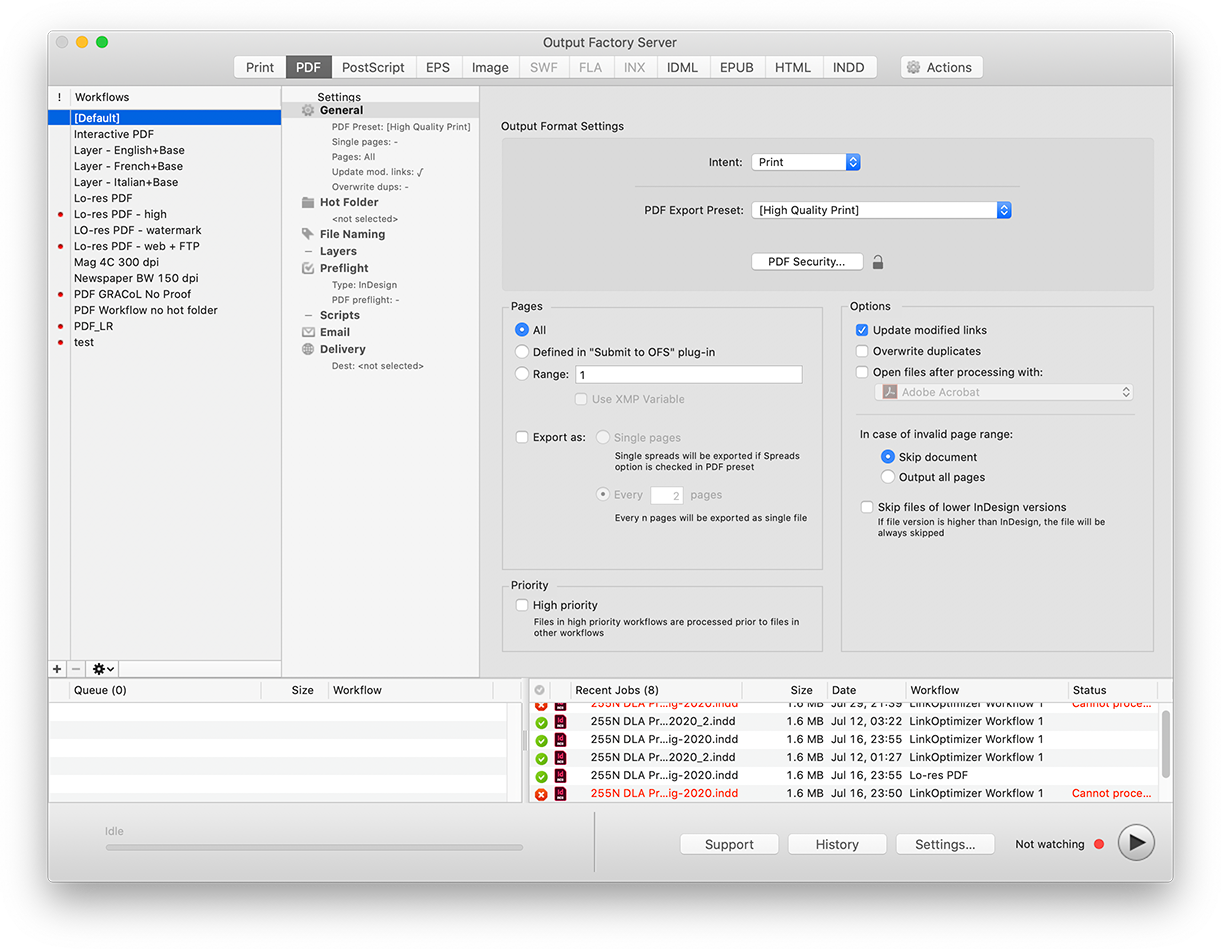
Zevrix Solutions announces the release of Output Factory Server 3.0.7, a compatibility update to company's output automation solution for Adobe InDesign. Output Factory Server automates printing and exporting from InDesign with hot folders processing while built-in LinkOptimizer Server which lets InDesign workgroups automate their image workflows and combine them other output formats. The new update adds support for the recently released InDesign 2021 and fixes preflighting and email issues.
Toronto (ON), Canada - Zevrix Solutions today announces the release of Output Factory Server 3.0.7, a compatibility update to company's output automation tool for Adobe InDesign. The app automates InDesign production workflows by processing files from watched hot folders. True to its name, Output Factory Server provides printers and publishing companies with conveyor-style industrial output facilities that reduce manual labor and save InDesign operators countless hours of tedious repetitive tasks. Built-in LinkOptimizer Server automates complex image manipulation tasks and allows users to reduce the size of InDesign links, convert image colors and formats, run Photoshop actions and much more.
The new version adds support for the recently released InDesign 2021 and is offered free of charge to the licensed users. The update also improves preflighting of documents with modified and missing links, offers better email notifications of custom script errors, and updates support for email addresses based on XMP metadata
"Output Factory Server is an extremely useful utility for a busy production facility or advertising agency", writes David Creamer in Layers magazine. "The setup process is simple and users experience is very straightforward. It can save lots of time - which equates to money."
Output Factory Server is intended to run on a dedicated Mac station and serve unlimited users on a network via watched hot folders. Users can create hot folders for different output targets such as hi-res PDF, large format printing, TIFF images and so on:
* Automate InDesign output with watched hot folders
* Support for print, PDF, PostScript, JPEG, EPUB and other formats
* Built-in LinkOptimizer Server for InDesign image workflows
* Layer versioning
* Variable output file names
* Preflight files before output
* Automatic e-mail notifications
* Run custom scripts
* PDF security presets for different workflows
Pricing and Availability:
Output Factory Server with built-in LinkOptimizer Server can be purchased from Zevrix web site for $699.95 (USD), as well as from authorized resellers. Trial is also available for download. The update is free for the licensed users of Output Factory Server 3 and $350 for the users of earlier Output Factory Server versions and BatchOutput Server. Output Factory Server requires macOS 10.12 or later and Adobe InDesign CC 2018-2021.
Zevrix Solutions: https://zevrix.com
Output Factory Server 3.0.7: http://zevrix.com/OutputFactoryServer.php
Download Output Factory Server: https://zevrix.com/downloads/OutputFactoryServer.dmg
Purchase: https://zevrix.com/store
Screenshot: https://zevrix.com/wp-content/uploads/2020/08/ofs2-main-pdf-1221-tr.png
Located in Toronto, Canada, Zevrix Solutions provides automation and productivity solutions for Adobe Creative Cloud and Creative Suite software, PDF workflows, graphic file diagnostics and Microsoft Office output on Mac OS. Zevrix is dedicated to help professionals increase their profits through automating everyday tasks, producing error-free documents, saving disk space and cutting production costs. For more information, visit their website. Copyright (C) 2020 Zevrix Solutions. All Rights Reserved. Other trademarks and registered trademarks may be the property of their respective owners.
*******
Link To Article: https://prmac.com/release-id-84217.htm
*******
---------------------------------------------------------------------------------
Note that you can alter delivered distributions at any time.
Login to your account on prMac to alter your channel selection, or to opt-out at any time.
Output Factory Server for InDesign Now Supports Creative Cloud 2021 - Published on 11/23/20
Zevrix Solutions announces the release of Output Factory Server 3.0.7, a compatibility update to company's output automation solution for Adobe InDesign. Output Factory Server automates printing and exporting from InDesign with hot folders processing while built-in LinkOptimizer Server which lets InDesign workgroups automate their image workflows and combine them other output formats. The new update adds support for the recently released InDesign 2021 and fixes preflighting and email issues.
Toronto (ON), Canada - Zevrix Solutions today announces the release of Output Factory Server 3.0.7, a compatibility update to company's output automation tool for Adobe InDesign. The app automates InDesign production workflows by processing files from watched hot folders. True to its name, Output Factory Server provides printers and publishing companies with conveyor-style industrial output facilities that reduce manual labor and save InDesign operators countless hours of tedious repetitive tasks. Built-in LinkOptimizer Server automates complex image manipulation tasks and allows users to reduce the size of InDesign links, convert image colors and formats, run Photoshop actions and much more.
The new version adds support for the recently released InDesign 2021 and is offered free of charge to the licensed users. The update also improves preflighting of documents with modified and missing links, offers better email notifications of custom script errors, and updates support for email addresses based on XMP metadata
"Output Factory Server is an extremely useful utility for a busy production facility or advertising agency", writes David Creamer in Layers magazine. "The setup process is simple and users experience is very straightforward. It can save lots of time - which equates to money."
Output Factory Server is intended to run on a dedicated Mac station and serve unlimited users on a network via watched hot folders. Users can create hot folders for different output targets such as hi-res PDF, large format printing, TIFF images and so on:
* Automate InDesign output with watched hot folders
* Support for print, PDF, PostScript, JPEG, EPUB and other formats
* Built-in LinkOptimizer Server for InDesign image workflows
* Layer versioning
* Variable output file names
* Preflight files before output
* Automatic e-mail notifications
* Run custom scripts
* PDF security presets for different workflows
Pricing and Availability:
Output Factory Server with built-in LinkOptimizer Server can be purchased from Zevrix web site for $699.95 (USD), as well as from authorized resellers. Trial is also available for download. The update is free for the licensed users of Output Factory Server 3 and $350 for the users of earlier Output Factory Server versions and BatchOutput Server. Output Factory Server requires macOS 10.12 or later and Adobe InDesign CC 2018-2021.
Zevrix Solutions: https://zevrix.com
Output Factory Server 3.0.7: http://zevrix.com/OutputFactoryServer.php
Download Output Factory Server: https://zevrix.com/downloads/OutputFactoryServer.dmg
Purchase: https://zevrix.com/store
Screenshot: https://zevrix.com/wp-content/uploads/2020/08/ofs2-main-pdf-1221-tr.png
Located in Toronto, Canada, Zevrix Solutions provides automation and productivity solutions for Adobe Creative Cloud and Creative Suite software, PDF workflows, graphic file diagnostics and Microsoft Office output on Mac OS. Zevrix is dedicated to help professionals increase their profits through automating everyday tasks, producing error-free documents, saving disk space and cutting production costs. For more information, visit their website. Copyright (C) 2020 Zevrix Solutions. All Rights Reserved. Other trademarks and registered trademarks may be the property of their respective owners.
*******
Link To Article: https://prmac.com/release-id-84217.htm
*******
---------------------------------------------------------------------------------
Note that you can alter delivered distributions at any time.
Login to your account on prMac to alter your channel selection, or to opt-out at any time.
Dropshare receives major updates on macOS and iOS
A new article has been published at prMac.
Dropshare receives major updates on macOS and iOS - Published on 11/20/20
Indie software developer, Timo Josten releases major updates for Dropshare, the heavily customisable file sharing tool, on macOS and iOS. They bring new features, support additional cloud storage providers like Google Drive, OneDrive, Dropbox and Box, and also make Dropshare on iOS available on Setapp, the popular app subscription service. Easily upload files, screenshots and even directories to hosting providers like Amazon S3, Rackspace Cloud Files, Google Drive, and more.
Dusseldorf, Germany - Timo Josten releases major updates for Dropshare, the heavily customisable file sharing tool, on macOS and iOS. The new Dropshare 3 on iOS adds support for four new cloud storage providers: Google Drive, Box, Dropbox and OneDrive. It also brings features from the Mac to iOS: URL shortener services Rebrandly and Bitly are now natively supported. New options for filename generation have been added as well.
The reworked Share Extension allows quick uploading from Photos and Files and also copies the upload URL to the clipboard for easy sharing. A new Widget allows a quick glance at the most recent uploads at any time. Under the hood, the update brings a reworked UI for easy access to new uploads and app preferences. Starting with this update, Dropshare Pro is included in a Setapp subscription. Setapp is a popular app subscription service with over 200 hand-curated apps included.
Dropshare on macOS received also an update, bringing support for Google Drive and FTP-based storage providers, as well as a modern new landing page design. It is fully compatible with the new macOS Big Sur and Apple M1 MacBooks. With iCloud, the Dropshare upload history is automatically synchronised between Macs and iOS, granting easy access from any device out of the box.
System Requirements:
* OS X 10.10 or later
* iOS 13 or later
The new updates are available on the website, via in-app update, on Setapp and the iOS App Store.
Dropshare: https://dropshare.app
More Info: https://dropshare.app/news/dropshare-ios-3/
Download Dropshare: https://dropshare.app/download
Setapp: https://setapp.com/en/apps/dropshare
Media Assets: https://dropshare.app/press/
Dropshare is being developed by Timo Josten, an independent software developer. Dropshare Cloud is operated by chaos.cloud UG (haftungsbeschrankt), founded in 2016 by Timo Josten and Tim Buchwaldt. Copyright (C) 2014-2020 Timo Josten. All Rights Reserved. Apple, the Apple logo and Mac OS X platforms are trademarks of Apple Inc. in the U.S. and/or other countries. Other trademarks and registered trademarks may be the property of their respective owners.
*******
Link To Article: https://prmac.com/release-id-84215.htm
*******
---------------------------------------------------------------------------------
Note that you can alter delivered distributions at any time.
Login to your account on prMac to alter your channel selection, or to opt-out at any time.
Dropshare receives major updates on macOS and iOS - Published on 11/20/20
Indie software developer, Timo Josten releases major updates for Dropshare, the heavily customisable file sharing tool, on macOS and iOS. They bring new features, support additional cloud storage providers like Google Drive, OneDrive, Dropbox and Box, and also make Dropshare on iOS available on Setapp, the popular app subscription service. Easily upload files, screenshots and even directories to hosting providers like Amazon S3, Rackspace Cloud Files, Google Drive, and more.
Dusseldorf, Germany - Timo Josten releases major updates for Dropshare, the heavily customisable file sharing tool, on macOS and iOS. The new Dropshare 3 on iOS adds support for four new cloud storage providers: Google Drive, Box, Dropbox and OneDrive. It also brings features from the Mac to iOS: URL shortener services Rebrandly and Bitly are now natively supported. New options for filename generation have been added as well.
The reworked Share Extension allows quick uploading from Photos and Files and also copies the upload URL to the clipboard for easy sharing. A new Widget allows a quick glance at the most recent uploads at any time. Under the hood, the update brings a reworked UI for easy access to new uploads and app preferences. Starting with this update, Dropshare Pro is included in a Setapp subscription. Setapp is a popular app subscription service with over 200 hand-curated apps included.
Dropshare on macOS received also an update, bringing support for Google Drive and FTP-based storage providers, as well as a modern new landing page design. It is fully compatible with the new macOS Big Sur and Apple M1 MacBooks. With iCloud, the Dropshare upload history is automatically synchronised between Macs and iOS, granting easy access from any device out of the box.
System Requirements:
* OS X 10.10 or later
* iOS 13 or later
The new updates are available on the website, via in-app update, on Setapp and the iOS App Store.
Dropshare: https://dropshare.app
More Info: https://dropshare.app/news/dropshare-ios-3/
Download Dropshare: https://dropshare.app/download
Setapp: https://setapp.com/en/apps/dropshare
Media Assets: https://dropshare.app/press/
Dropshare is being developed by Timo Josten, an independent software developer. Dropshare Cloud is operated by chaos.cloud UG (haftungsbeschrankt), founded in 2016 by Timo Josten and Tim Buchwaldt. Copyright (C) 2014-2020 Timo Josten. All Rights Reserved. Apple, the Apple logo and Mac OS X platforms are trademarks of Apple Inc. in the U.S. and/or other countries. Other trademarks and registered trademarks may be the property of their respective owners.
*******
Link To Article: https://prmac.com/release-id-84215.htm
*******
---------------------------------------------------------------------------------
Note that you can alter delivered distributions at any time.
Login to your account on prMac to alter your channel selection, or to opt-out at any time.
Itemtopia Launches New App that Organizes Your Life and Everything in it
A new article has been published at prMac.
Itemtopia Launches New App that Organizes Your Life and Everything in it - Published on 11/20/20
Itemtopia Inc. today releases Itemtopia 5.1.3, its free app for iOS and Android devices. Itemtopia is an app that becomes one space for the accumulated wisdom about your home, things, services, family, and pets. An assistant feature alerts you to vehicle recalls, any upcoming product warranty expiry and manages your reminders and your history for everything. It organizes your receipts, notes, photos, and documents and quickly becomes a personal knowledge base for everything in your life.
Ottawa, Canada - Itemtopia Inc., a life, knowledge, and personal asset management software company, today releases Itemtopia 5.1.3, their free app for iOS and Android offering a way to get your life and home organized without the need to get your hands dirty. The latest update includes a new walkthrough and getting started capability. Itemtopia is available in 11 languages and already has users in 65 countries.
When you create a profile, Itemtopia walks you through adding your home, your car, and some of your services. You then enter the 'My Life' home screen, which categorizes your life into the; (i) Things you own, (ii) Services you use, (iii) and your Family and Pets.
For every 'thing' added to Itemtopia, you select a category of what it is you are adding, and a place for Notes, Receipts, Warranties, Reminders, and Documents then appears. Itemtopia is much more than a filing system because as you add your vehicle, the system proactively looks for recalls every day and immediately alerts you when it finds one. It also sends an alert 30 days in advance of any product warranty expiring so you can check to see that everything is working fine or take advantage of a repair without having to pay for it if something is amiss.
Unlike banking apps, which track your expenses, Itemtopia allows purchases or expenses to link to an item, person, pet, or service - all categorized by their type of expense - enabling you to see the individual lifetime cost of these specific things in your life. Receipts can be tagged as tax-deductible or reimbursable along with reports for total assets, present valuation, or a listing of what you own, which is useful for insurance claims.
"We realize that keeping all the information about the things or people in our lives is virtually impossible, so we focused on providing simplicity by creating a single blue icon which knows exactly where you are and what you want to do within Itemtopia. Items, notes, reminders are all added this way, and our users tell us we are one of the few apps on their home screen," says Kristen Hulaj, Itemtopia's UI Designer and Director.
Itemtopia creates a complete history of your experiences and knowledge, and everything is searchable - thus becoming your own personal Google for your life and the things in it.
"Unlike most apps, there is no advertising within Itemtopia. It's just you and your life in an ever-expanding app with lots of great features planned as we extend our services," says Kristen.
Itemtopia works both in and out of wireless coverage, allowing you to access your information whenever and wherever you are. Simultaneous multi-device support is included, and it uses encrypted synchronization to update all other devices or family members, so the most recent information about everything is in everyone's hand. It even backs your data up via encrypted transfer, just in case you lose your phone.
Itemtopia's founder, Steve Hulaj, grew his first item/asset tracking software company, Nextair Inc., from his basement into a global customer base of large enterprises in over 45 countries before selling it to Blackberry in 2005. With over 30 years of experience tracking items, Steve says, "Keeping a history of all my things and being a bit OCD about how to keep this simple and powerful was the idea behind Itemtopia. Creating an app for people rather than a large enterprise is also incredibly enjoyable because my wife and family see the benefits and beauty of what we regularly enhance as they use it almost every day. Of course, that means I now hear direct user feedback at the dinner table rather than in a conference room, which is also entertaining."
Device Requirements:
* Phone, iPad and iPod touch
* Requires iOS 12.0 or later
* 46.8 MB
Pricing and Availability:
Itemtopia 5.1.3 is Free and available worldwide through the App Store in the Productivity category. There is also an Android app on Google Play, For more information, please contact Kristen Hulaj.
Itemtopia 5.1.3: https://www.itemtopia.com
Download from the App Store: https://apps.apple.com/ca/app/itemtopia/id952405279
Instagram Feed: https://www.instagram.com/itemtopia/
Screenshot: https://itemtopia.com/wp-content/uploads/2020/11/1-My-Life-Home-Screen.png
App Icon: https://itemtopia.com/wp-content/uploads/2020/11/ItemtopiaSquare.png
Media Assets: https://www.dropbox.com/sh/gx3b9uxoputr2fv/AADZ2sJBnlb4yiHYx50OTe43a?dl=0
Based in Ottawa, Ontario, Itemtopia Inc. was founded by entrepreneurs who have built and deployed Item Tracking applications for some of the world's largest corporations, including Boeing, Airbus, Canon and Toshiba. They have used this combined experience to create a company focused on creating item tracking software for consumers, in order to make people's lives easier. The company is focused on making the promises of the Internet of Things mean something to every day people. All Material and Software (C) Copyright 2020 Itemtopia Inc. All Rights Reserved. Apple, the Apple logo, iPhone, iPod and iPad are registered trademarks of Apple Inc. in the U.S. and/or other countries. Other trademarks and registered trademarks may be the property of their respective owners.
*******
Link To Article: https://prmac.com/release-id-84214.htm
*******
---------------------------------------------------------------------------------
Note that you can alter delivered distributions at any time.
Login to your account on prMac to alter your channel selection, or to opt-out at any time.
Itemtopia Launches New App that Organizes Your Life and Everything in it - Published on 11/20/20
Itemtopia Inc. today releases Itemtopia 5.1.3, its free app for iOS and Android devices. Itemtopia is an app that becomes one space for the accumulated wisdom about your home, things, services, family, and pets. An assistant feature alerts you to vehicle recalls, any upcoming product warranty expiry and manages your reminders and your history for everything. It organizes your receipts, notes, photos, and documents and quickly becomes a personal knowledge base for everything in your life.
Ottawa, Canada - Itemtopia Inc., a life, knowledge, and personal asset management software company, today releases Itemtopia 5.1.3, their free app for iOS and Android offering a way to get your life and home organized without the need to get your hands dirty. The latest update includes a new walkthrough and getting started capability. Itemtopia is available in 11 languages and already has users in 65 countries.
When you create a profile, Itemtopia walks you through adding your home, your car, and some of your services. You then enter the 'My Life' home screen, which categorizes your life into the; (i) Things you own, (ii) Services you use, (iii) and your Family and Pets.
For every 'thing' added to Itemtopia, you select a category of what it is you are adding, and a place for Notes, Receipts, Warranties, Reminders, and Documents then appears. Itemtopia is much more than a filing system because as you add your vehicle, the system proactively looks for recalls every day and immediately alerts you when it finds one. It also sends an alert 30 days in advance of any product warranty expiring so you can check to see that everything is working fine or take advantage of a repair without having to pay for it if something is amiss.
Unlike banking apps, which track your expenses, Itemtopia allows purchases or expenses to link to an item, person, pet, or service - all categorized by their type of expense - enabling you to see the individual lifetime cost of these specific things in your life. Receipts can be tagged as tax-deductible or reimbursable along with reports for total assets, present valuation, or a listing of what you own, which is useful for insurance claims.
"We realize that keeping all the information about the things or people in our lives is virtually impossible, so we focused on providing simplicity by creating a single blue icon which knows exactly where you are and what you want to do within Itemtopia. Items, notes, reminders are all added this way, and our users tell us we are one of the few apps on their home screen," says Kristen Hulaj, Itemtopia's UI Designer and Director.
Itemtopia creates a complete history of your experiences and knowledge, and everything is searchable - thus becoming your own personal Google for your life and the things in it.
"Unlike most apps, there is no advertising within Itemtopia. It's just you and your life in an ever-expanding app with lots of great features planned as we extend our services," says Kristen.
Itemtopia works both in and out of wireless coverage, allowing you to access your information whenever and wherever you are. Simultaneous multi-device support is included, and it uses encrypted synchronization to update all other devices or family members, so the most recent information about everything is in everyone's hand. It even backs your data up via encrypted transfer, just in case you lose your phone.
Itemtopia's founder, Steve Hulaj, grew his first item/asset tracking software company, Nextair Inc., from his basement into a global customer base of large enterprises in over 45 countries before selling it to Blackberry in 2005. With over 30 years of experience tracking items, Steve says, "Keeping a history of all my things and being a bit OCD about how to keep this simple and powerful was the idea behind Itemtopia. Creating an app for people rather than a large enterprise is also incredibly enjoyable because my wife and family see the benefits and beauty of what we regularly enhance as they use it almost every day. Of course, that means I now hear direct user feedback at the dinner table rather than in a conference room, which is also entertaining."
Device Requirements:
* Phone, iPad and iPod touch
* Requires iOS 12.0 or later
* 46.8 MB
Pricing and Availability:
Itemtopia 5.1.3 is Free and available worldwide through the App Store in the Productivity category. There is also an Android app on Google Play, For more information, please contact Kristen Hulaj.
Itemtopia 5.1.3: https://www.itemtopia.com
Download from the App Store: https://apps.apple.com/ca/app/itemtopia/id952405279
Instagram Feed: https://www.instagram.com/itemtopia/
Screenshot: https://itemtopia.com/wp-content/uploads/2020/11/1-My-Life-Home-Screen.png

App Icon: https://itemtopia.com/wp-content/uploads/2020/11/ItemtopiaSquare.png

Media Assets: https://www.dropbox.com/sh/gx3b9uxoputr2fv/AADZ2sJBnlb4yiHYx50OTe43a?dl=0
Based in Ottawa, Ontario, Itemtopia Inc. was founded by entrepreneurs who have built and deployed Item Tracking applications for some of the world's largest corporations, including Boeing, Airbus, Canon and Toshiba. They have used this combined experience to create a company focused on creating item tracking software for consumers, in order to make people's lives easier. The company is focused on making the promises of the Internet of Things mean something to every day people. All Material and Software (C) Copyright 2020 Itemtopia Inc. All Rights Reserved. Apple, the Apple logo, iPhone, iPod and iPad are registered trademarks of Apple Inc. in the U.S. and/or other countries. Other trademarks and registered trademarks may be the property of their respective owners.
*******
Link To Article: https://prmac.com/release-id-84214.htm
*******
---------------------------------------------------------------------------------
Note that you can alter delivered distributions at any time.
Login to your account on prMac to alter your channel selection, or to opt-out at any time.
Dejal Time Out 2.7 for Big Sur, Option to Ask to Start Breaks, More
A new article has been published at prMac.
Dejal Time Out 2.7 for Big Sur, Option to Ask to Start Breaks, More - Published on 11/20/20
Dejal today announced Time Out 2.7, an update to their popular break reminder app for macOS. Using a computer for hours on end can lead to eye, back, and neck strain. Time Out offers users gentle reminders to take breaks, allowing them to stretch and relax. Version 2.7 features a new app icon, plus a number of changes for compatibility with Big Sur. It also includes a new feature to ask to start a break, improvements to the break preview feature, adds several new break themes, and much more.
Portland, Oregon - Dejal Systems, LLC today is proud to announce the release and immediate availability of Time Out 2.7, an important update to their popular break reminder app for macOS. This free app sits in the background tracking the last time the user took a break. At regular intervals, it reminds users to take a short respite from their current tasks. Users can take the time to stand, stretch, and move around a bit, in order to refresh themselves. They can also schedule both long and short breaks, offering flexibility for the user's own personal preferences.
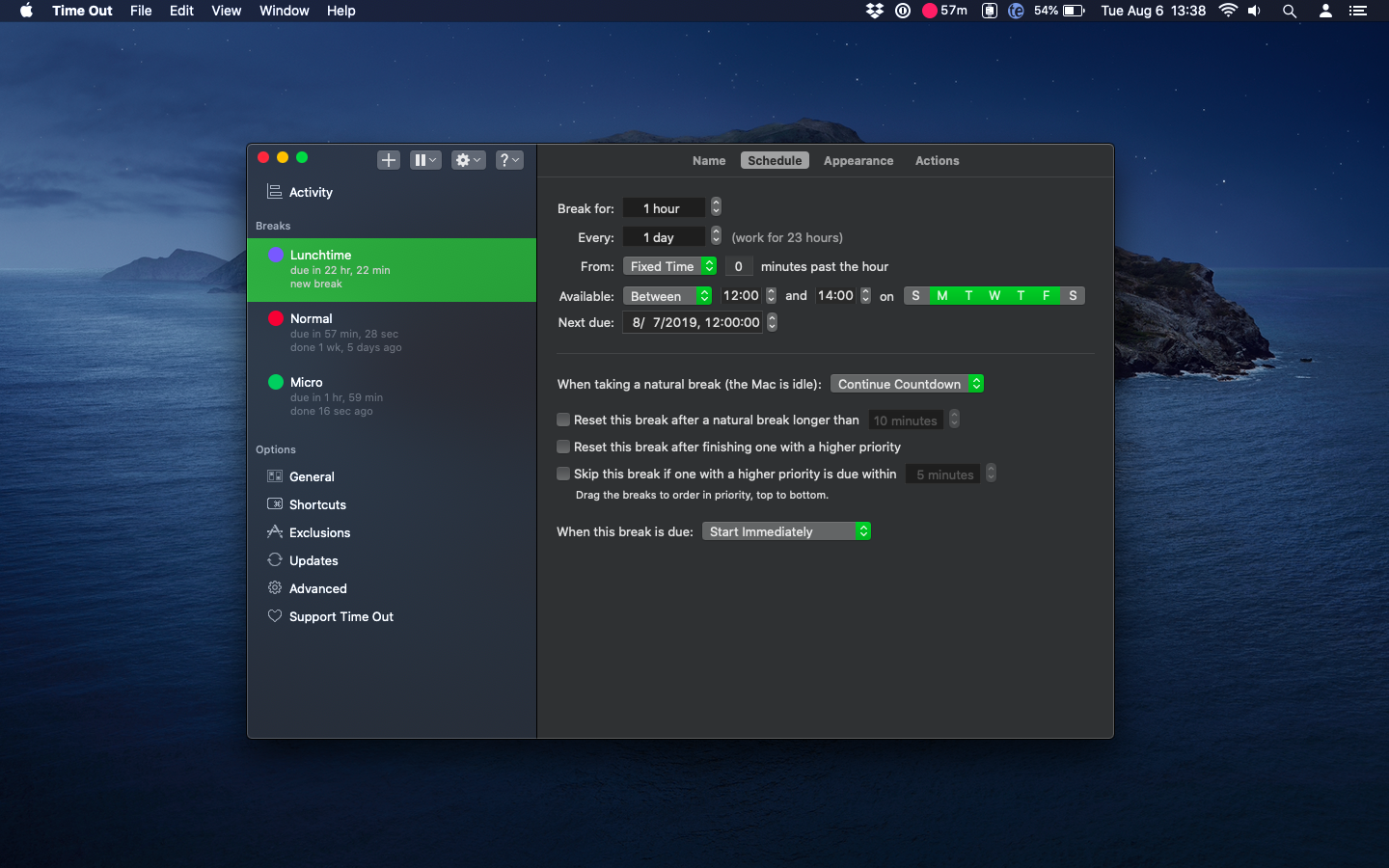
Time Out offers two types of breaks by default. A "Normal" break by default will occur every hour, lasting for 10 minutes each time. This allows users to get up, move about, stretch, and even take a quick restroom break. "Micro" breaks occur every 15 minutes, lasting for a short 15 second period. This gives users the opportunity to adjust their posture, look away from the screen, and relax their focus. Both types of breaks are adjustable, and can be delayed, disabled, or deleted by the user at any time. Users can also add their own custom breaks, of any delay and length, and at any specific time. This feature is handy for reminders about fixed breaks such as lunch, or mid-morning and mid-afternoon breaks.
When a break is due, Time Out slowly dims the screen, and displays a customizable break theme. During the break, the app's progress bar displays the remaining break time, and also offers optional buttons to allow a break to be postponed or skipped, if needed. Once the break is over, the break screen then fades, allowing the user to return to work. Time Out then begins marking off the time until the next scheduled break.
"It's very easy for users to fall into bad habits when using a computer for hours on end. People strive to complete their tasks on time, pushing themselves to the limit," says Time Out developer David Sinclair. "The human body just isn't built to sit in one spot for hours at a time, staring at a monitor and typing at a keyboard. That's why I created Time Out. It offers a gentle and customizable way to remind users to take much needed breaks, reducing stress and increasing their productivity."
Time Out has an option to show the time until the next break in the menu bar. By clicking the timer, users can access the app's preferences, allowing them to make quick adjustments to the app's settings if needed.
Version 2.7 features a new app icon, plus a number of changes for compatibility with Big Sur, including being built for Apple's new M1-based Macs, in addition to Intel ones. It also includes a much-requested new feature to ask to start a break, improvements to the break preview feature, adds several new break themes, and much more.
The app offers several break themes, which use web standards such as HTML, CSS, and JavaScript, so users can customize the themes as they like. Themes can also make use of local web pages, or even pages from sites on the internet, so the amount of customization available is almost unlimited.
Customization doesn't end with appearance; Time Out can also be set to perform various actions before, during, or after a break. The app can display a notification, speak text, play a sound, or even run an Automator or AppleScript action. All actions can be chained, allowing users to set as many, or as few actions as they prefer. What's more, these actions can be set to execute at any time, be it just before a break, after a break starts, just before a break ends, or after it's over. A number of useful scripts are included with the app, and custom scripts created by Time Out users are also available for download from the Time Out website.
The Preferences window allows users to view the breaks and their options, and it includes buttons along the top to quickly add a break, pause all breaks, postpone or skip the upcoming break, or get help. Users can also post about the app on Facebook and Twitter, as well as visit the Dejal social media pages.
Color-coded labels can be applied to any break to visually indicate which type of break is due next. Users can also view when the break is next due, how long ago the last break was, and also use hover buttons to start, postpone, disable, skip, or delete a break. Users can also apply and edit a global keyboard shortcut to immediately start a specific break. Other options include scheduling features that set the length of a break, how often it occurs, what time of day it occurs, and even the next date and time it is due to occur.
One customization option that will be especially useful for corporate users is the ability to add any app to an Exclusions list that tells Time Out to not allow break reminders when any app included in the list is open, or is the frontmost app. This option is particularly handy when users are performing such tasks as FaceTime calls, viewing videos, or making presentations.
Time Out keeps users at their best. It reminds them to make better use of their time by taking regular breaks in order to remain mentally sharp, productive, and healthy.
System Requirements:
* macOS Yosemite (10.10) or later; ready for Big Sur (macOS 11)
* Apple Silicon or Intel 64-bit processor
* 33.7 MB
Pricing and Availability:
Time Out 2.7 is free, and is available worldwide through the Mac App Store in the Health and Fitness category, and also included in a Setapp subscription, as well as the Dejal website. Advanced features are available via easy in-app donations. Review codes are available upon request.
Dejal Time Out 2.7: https://dejal.com/timeout/
Download Time Out: https://dejal.com/download/?prod=timeout&op=show&ref=pr
Download from the Mac App Store: https://apps.apple.com/app/time-out-break-reminders/id402592703
Screenshot: https://dejal.com/timeout/images/full/schedule-dark.png
Application Icon: https://dejal.com/timeout/images/icons/1024px.png
Media Assets: https://dejal.com/timeout/media/
Founded by David Sinclair in 1991, Dejal Systems, LLC was originally established in New Zealand, and later moved to Portland, Oregon in 2001. With a focus on the macOS and iOS platforms, Dejal specializes in user-friendly and flexible utility software. Copyright 2020 Dejal Systems, LLC. All Rights Reserved. Dejal and the Dejal logo are registered trademarks of Dejal Systems, LLC. Time Out is a trademark of Dejal Systems, LLC. Apple and the Apple logo are registered trademarks of Apple Inc in the U.S. and/or other countries.
*******
Link To Article: https://prmac.com/release-id-84216.htm
*******
---------------------------------------------------------------------------------
Note that you can alter delivered distributions at any time.
Login to your account on prMac to alter your channel selection, or to opt-out at any time.
Dejal Time Out 2.7 for Big Sur, Option to Ask to Start Breaks, More - Published on 11/20/20
Dejal today announced Time Out 2.7, an update to their popular break reminder app for macOS. Using a computer for hours on end can lead to eye, back, and neck strain. Time Out offers users gentle reminders to take breaks, allowing them to stretch and relax. Version 2.7 features a new app icon, plus a number of changes for compatibility with Big Sur. It also includes a new feature to ask to start a break, improvements to the break preview feature, adds several new break themes, and much more.
Portland, Oregon - Dejal Systems, LLC today is proud to announce the release and immediate availability of Time Out 2.7, an important update to their popular break reminder app for macOS. This free app sits in the background tracking the last time the user took a break. At regular intervals, it reminds users to take a short respite from their current tasks. Users can take the time to stand, stretch, and move around a bit, in order to refresh themselves. They can also schedule both long and short breaks, offering flexibility for the user's own personal preferences.
Time Out offers two types of breaks by default. A "Normal" break by default will occur every hour, lasting for 10 minutes each time. This allows users to get up, move about, stretch, and even take a quick restroom break. "Micro" breaks occur every 15 minutes, lasting for a short 15 second period. This gives users the opportunity to adjust their posture, look away from the screen, and relax their focus. Both types of breaks are adjustable, and can be delayed, disabled, or deleted by the user at any time. Users can also add their own custom breaks, of any delay and length, and at any specific time. This feature is handy for reminders about fixed breaks such as lunch, or mid-morning and mid-afternoon breaks.
When a break is due, Time Out slowly dims the screen, and displays a customizable break theme. During the break, the app's progress bar displays the remaining break time, and also offers optional buttons to allow a break to be postponed or skipped, if needed. Once the break is over, the break screen then fades, allowing the user to return to work. Time Out then begins marking off the time until the next scheduled break.
"It's very easy for users to fall into bad habits when using a computer for hours on end. People strive to complete their tasks on time, pushing themselves to the limit," says Time Out developer David Sinclair. "The human body just isn't built to sit in one spot for hours at a time, staring at a monitor and typing at a keyboard. That's why I created Time Out. It offers a gentle and customizable way to remind users to take much needed breaks, reducing stress and increasing their productivity."
Time Out has an option to show the time until the next break in the menu bar. By clicking the timer, users can access the app's preferences, allowing them to make quick adjustments to the app's settings if needed.
Version 2.7 features a new app icon, plus a number of changes for compatibility with Big Sur, including being built for Apple's new M1-based Macs, in addition to Intel ones. It also includes a much-requested new feature to ask to start a break, improvements to the break preview feature, adds several new break themes, and much more.
The app offers several break themes, which use web standards such as HTML, CSS, and JavaScript, so users can customize the themes as they like. Themes can also make use of local web pages, or even pages from sites on the internet, so the amount of customization available is almost unlimited.
Customization doesn't end with appearance; Time Out can also be set to perform various actions before, during, or after a break. The app can display a notification, speak text, play a sound, or even run an Automator or AppleScript action. All actions can be chained, allowing users to set as many, or as few actions as they prefer. What's more, these actions can be set to execute at any time, be it just before a break, after a break starts, just before a break ends, or after it's over. A number of useful scripts are included with the app, and custom scripts created by Time Out users are also available for download from the Time Out website.
The Preferences window allows users to view the breaks and their options, and it includes buttons along the top to quickly add a break, pause all breaks, postpone or skip the upcoming break, or get help. Users can also post about the app on Facebook and Twitter, as well as visit the Dejal social media pages.
Color-coded labels can be applied to any break to visually indicate which type of break is due next. Users can also view when the break is next due, how long ago the last break was, and also use hover buttons to start, postpone, disable, skip, or delete a break. Users can also apply and edit a global keyboard shortcut to immediately start a specific break. Other options include scheduling features that set the length of a break, how often it occurs, what time of day it occurs, and even the next date and time it is due to occur.
One customization option that will be especially useful for corporate users is the ability to add any app to an Exclusions list that tells Time Out to not allow break reminders when any app included in the list is open, or is the frontmost app. This option is particularly handy when users are performing such tasks as FaceTime calls, viewing videos, or making presentations.
Time Out keeps users at their best. It reminds them to make better use of their time by taking regular breaks in order to remain mentally sharp, productive, and healthy.
System Requirements:
* macOS Yosemite (10.10) or later; ready for Big Sur (macOS 11)
* Apple Silicon or Intel 64-bit processor
* 33.7 MB
Pricing and Availability:
Time Out 2.7 is free, and is available worldwide through the Mac App Store in the Health and Fitness category, and also included in a Setapp subscription, as well as the Dejal website. Advanced features are available via easy in-app donations. Review codes are available upon request.
Dejal Time Out 2.7: https://dejal.com/timeout/
Download Time Out: https://dejal.com/download/?prod=timeout&op=show&ref=pr
Download from the Mac App Store: https://apps.apple.com/app/time-out-break-reminders/id402592703
Screenshot: https://dejal.com/timeout/images/full/schedule-dark.png
Application Icon: https://dejal.com/timeout/images/icons/1024px.png

Media Assets: https://dejal.com/timeout/media/
Founded by David Sinclair in 1991, Dejal Systems, LLC was originally established in New Zealand, and later moved to Portland, Oregon in 2001. With a focus on the macOS and iOS platforms, Dejal specializes in user-friendly and flexible utility software. Copyright 2020 Dejal Systems, LLC. All Rights Reserved. Dejal and the Dejal logo are registered trademarks of Dejal Systems, LLC. Time Out is a trademark of Dejal Systems, LLC. Apple and the Apple logo are registered trademarks of Apple Inc in the U.S. and/or other countries.
*******
Link To Article: https://prmac.com/release-id-84216.htm
*******
---------------------------------------------------------------------------------
Note that you can alter delivered distributions at any time.
Login to your account on prMac to alter your channel selection, or to opt-out at any time.
Subscribe to:
Posts (Atom)