A new article has been published at prMac.
Package Central for Adobe InDesign Now Supports macOS Big Sur - Published on 11/24/20
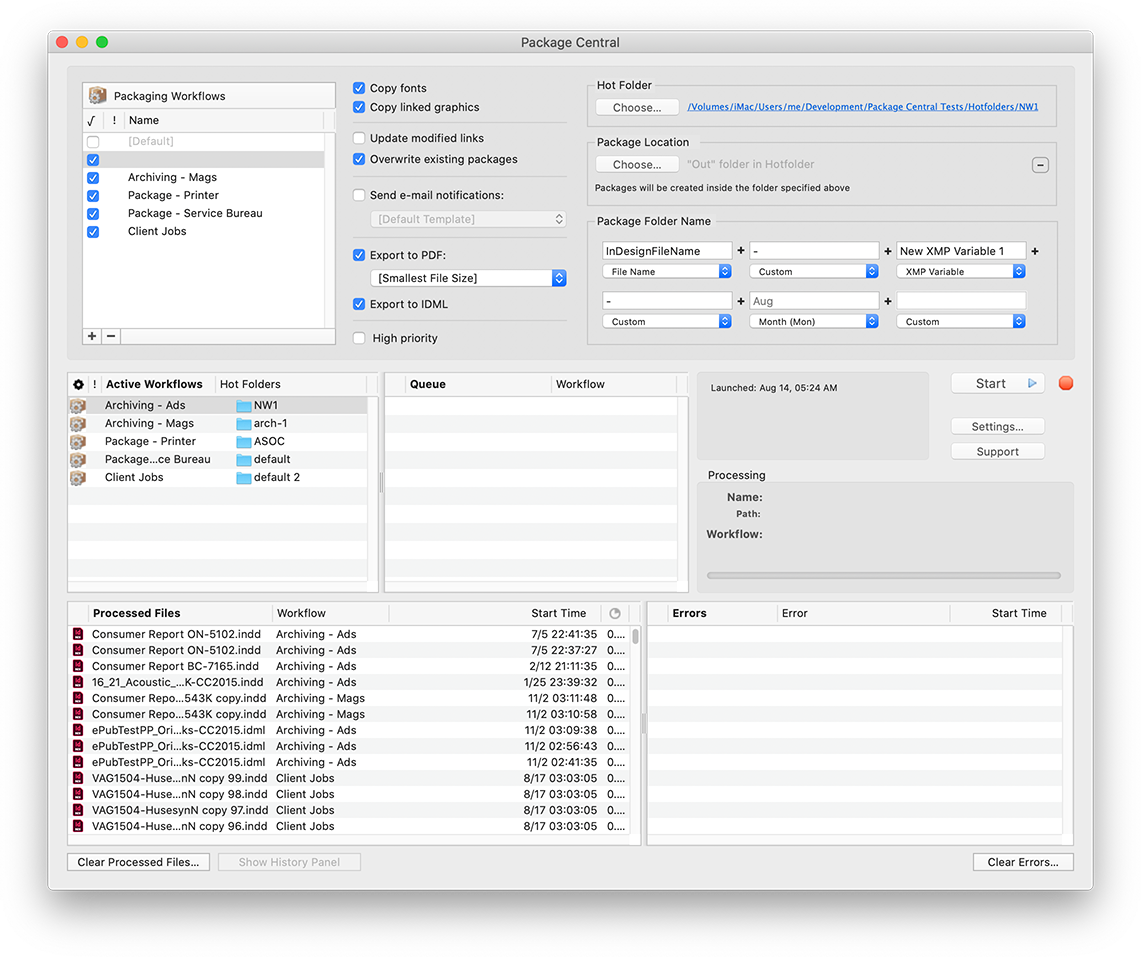
Zevrix Solutions announces Package Central 1.11.20, a compatibility update to company's file packaging automation solution for Adobe InDesign. Package Central collects InDesign documents automatically from watched hot folders. The app serves unlimited users on a network and offers automatic email notifications, PDF/IDML export, variable folder names and more. The new version adds support to the recently released macOS 11 Big Sur and automatically fixes file permission errors during activation.
Toronto (ON), Canada - Zevrix Solutions today announces Package Central 1.11.20, a compatibility update to company's file packaging automation solution for Adobe InDesign. Originally developed for a major publisher in the United States, the software automates InDesign document collection by processing files from watched hot folders. Package Central solves the problem of centralized packaging and archiving of InDesign projects in a workgroup environment while serving unlimited users on a network.
The new version introduces support for the recently released macOS 11 Big Sur and is offered free of charge to licensed users. The update also improves memory management and automatically fixes file permission errors that could occur during license activation.
Package Central lets prepress operators, production artists, and designers simply submit files to watched hot folders that reside on a network. The app then automatically collects InDesign files along with their fonts and links into the destination folder with dynamically assigned variable name. Package Central offers the following key features:
* Automatically package InDesign files from watched hot folders
* Create PDF and IDML files on the fly
* Create hot folders for various packaging settings
* Assign variable package folder names
* Automatic email notifications on process stages and errors
* Update modified links automatically
* Detailed processing logs
* Maintain a single set of settings for entire workgroup
Pricing and Availability:
Package Central can be purchased for $149.95 (USD) from Zevrix website, as well as from authorized resellers. Trial is also available for download. Package Central requires macOS 10.8-11.0 and Adobe InDesign CS5-2021.
Zevrix Solutions: https://zevrix.com
Package Central 1.11.20: https://zevrix.com/packagecentral
Download Package Central: https://zevrix.com/downloads/PackageCentral.dmg
Purchase: https://zevrix.com/store
Screenshot: https://zevrix.com/wp-content/uploads/2020/08/pac-main-1141-tall.png
Located in Toronto, Canada, Zevrix Solutions provides automation and productivity solutions for Adobe Creative Cloud and Creative Suite software, PDF workflows, graphic file diagnostics and Microsoft Office output on Mac OS. Zevrix is dedicated to help professionals increase their profits through automating everyday tasks, producing error-free documents, saving disk space and cutting production costs. For more information, visit their website. Copyright (C) 2020 Zevrix Solutions. All Rights Reserved. Other trademarks and registered trademarks may be the property of their respective owners.
*******
Link To Article: https://prmac.com/release-id-84227.htm
*******
---------------------------------------------------------------------------------
Note that you can alter delivered distributions at any time.
Login to your account on prMac to alter your channel selection, or to opt-out at any time.

MaBaSoft Releases World Clock Deluxe 4.17
A new article has been published at prMac.
MaBaSoft Releases World Clock Deluxe 4.17 - Published on 11/24/20
MaBaSoft announces World Clock Deluxe 4.17, an update to their world time utility for macOS. World Clock Deluxe comes with over 1,600 cities and 200 time zones, displays multiple clocks in a horizontal or vertical palette, in the menu bar, or in the Dock, calculates corresponding times in different cities, and allows users to easily identify the best time for meetings across multiple time zones. Version 4.17 adopts the new look of macOS 11.0 Big Sur and introduces some improvements and fixes.
Milano, Italy - MaBaSoft announces World Clock Deluxe 4.17, the latest version of their popular world time utility for macOS. World Clock Deluxe is a reliable and easy-to-use time tool for companies and organizations regularly communicating with people across the world, frequent travelers, and home users having family or friends in other countries or time zones.
World Clock Deluxe displays multiple digital or analog clocks in a highly configurable horizontal or vertical palette, in the menu bar, and in the Dock, and can show the time in over 1,600 cities and 200 time zones and world times, including Greenwich Mean Time, Coordinated Universal Time, and Internet Time. It comes with a variety of date and time formats and can display seconds, weekday, date, date change, time zone, offset from UTC, and offset from local time.
With World Clock Deluxe users can easily organize clocks so that they always have a good overview of the displayed times. Colors and labels can be assigned to clocks to quickly single out the local clock or different groups of clocks. Clocks can be sorted by name, time, longitude, longitude offset, or label. Seldom used clocks can be hidden and different clocks can be displayed in the palette, in the menu bar, and in the Dock.
World Clock Deluxe also helps users with phone calls to other countries and international meetings. The Time Converter quickly calculates corresponding dates and times in different cities or time zones, while the Meeting Planner allows users to easily identify the best time for online chats, conference calls, or video conferences across multiple time zones. Conversion results and meeting details can be easily shared via Mail or Messages, saved to a note, or added to a reminder.
With World Clock Deluxe, users can finally show the weather all over the world. World Clock Deluxe downloads National Oceanic and Atmospheric Administration (NOAA) weather reports and displays temperature, pressure, visibility, wind conditions, and precipitations.
Version 4.17 is fully compatible with macOS 11.0 Big Sur and adopts the new look of macOS. In addition to that, it revises the appearance of the Clocks palette, solves an incompatibility with Catalina, and updates daylight-saving time information for Fiji, Iran, Morocco, Palestine, and Western Sahara.
Language Support:
* English, German, French, Dutch, and Italian
System Requirements:
* macOS 10.11, 10.12, 10.13, 10.14, 10.15, or 11.0 (Big Sur)
Pricing and Availability:
World Clock Deluxe 4.17 is a free update for registered version 4 users. It is $10.00 (USD) for users who purchased version 3, and costs $19.00 (USD) for new users. Family, Site, and World-wide licenses are also available.
MaBaSoft: https://www.mabasoft.net/
World Clock Deluxe 4.17: https://www.mabasoft.net/products/worldClockDeluxeX.html
Purchase World Clock Deluxe: https://sites.fastspring.com/mabasoft/product/all?language=en
Direct Download: https://www.mabasoft.net/downloads/files/World_Clock_Deluxe_4.17.dmg
Release Notes: https://www.mabasoft.net/releaseNotes/worldClockDeluxeX.html
Media Assets: https://www.mabasoft.net/pressImages/worldClockDeluxeX.html
MaBaSoft, based in Milano, Italy, is a small independent company founded by Marco Damaschi and Barbara Canino in 1997. MaBaSoft develops quality system utilities and applications for the Macintosh. All Material and Software Copyright 1997-2020 MaBaSoft. All Rights Reserved. Apple, the Apple logo and Mac are registered trademarks of Apple Inc. in the U.S. and/or other countries. Other trademarks and registered trademarks may be the property of their respective owners.
*******
Link To Article: https://prmac.com/release-id-84225.htm
*******
---------------------------------------------------------------------------------
Note that you can alter delivered distributions at any time.
Login to your account on prMac to alter your channel selection, or to opt-out at any time.
MaBaSoft Releases World Clock Deluxe 4.17 - Published on 11/24/20
MaBaSoft announces World Clock Deluxe 4.17, an update to their world time utility for macOS. World Clock Deluxe comes with over 1,600 cities and 200 time zones, displays multiple clocks in a horizontal or vertical palette, in the menu bar, or in the Dock, calculates corresponding times in different cities, and allows users to easily identify the best time for meetings across multiple time zones. Version 4.17 adopts the new look of macOS 11.0 Big Sur and introduces some improvements and fixes.
Milano, Italy - MaBaSoft announces World Clock Deluxe 4.17, the latest version of their popular world time utility for macOS. World Clock Deluxe is a reliable and easy-to-use time tool for companies and organizations regularly communicating with people across the world, frequent travelers, and home users having family or friends in other countries or time zones.
World Clock Deluxe displays multiple digital or analog clocks in a highly configurable horizontal or vertical palette, in the menu bar, and in the Dock, and can show the time in over 1,600 cities and 200 time zones and world times, including Greenwich Mean Time, Coordinated Universal Time, and Internet Time. It comes with a variety of date and time formats and can display seconds, weekday, date, date change, time zone, offset from UTC, and offset from local time.
With World Clock Deluxe users can easily organize clocks so that they always have a good overview of the displayed times. Colors and labels can be assigned to clocks to quickly single out the local clock or different groups of clocks. Clocks can be sorted by name, time, longitude, longitude offset, or label. Seldom used clocks can be hidden and different clocks can be displayed in the palette, in the menu bar, and in the Dock.
World Clock Deluxe also helps users with phone calls to other countries and international meetings. The Time Converter quickly calculates corresponding dates and times in different cities or time zones, while the Meeting Planner allows users to easily identify the best time for online chats, conference calls, or video conferences across multiple time zones. Conversion results and meeting details can be easily shared via Mail or Messages, saved to a note, or added to a reminder.
With World Clock Deluxe, users can finally show the weather all over the world. World Clock Deluxe downloads National Oceanic and Atmospheric Administration (NOAA) weather reports and displays temperature, pressure, visibility, wind conditions, and precipitations.
Version 4.17 is fully compatible with macOS 11.0 Big Sur and adopts the new look of macOS. In addition to that, it revises the appearance of the Clocks palette, solves an incompatibility with Catalina, and updates daylight-saving time information for Fiji, Iran, Morocco, Palestine, and Western Sahara.
Language Support:
* English, German, French, Dutch, and Italian
System Requirements:
* macOS 10.11, 10.12, 10.13, 10.14, 10.15, or 11.0 (Big Sur)
Pricing and Availability:
World Clock Deluxe 4.17 is a free update for registered version 4 users. It is $10.00 (USD) for users who purchased version 3, and costs $19.00 (USD) for new users. Family, Site, and World-wide licenses are also available.
MaBaSoft: https://www.mabasoft.net/
World Clock Deluxe 4.17: https://www.mabasoft.net/products/worldClockDeluxeX.html
Purchase World Clock Deluxe: https://sites.fastspring.com/mabasoft/product/all?language=en
Direct Download: https://www.mabasoft.net/downloads/files/World_Clock_Deluxe_4.17.dmg
Release Notes: https://www.mabasoft.net/releaseNotes/worldClockDeluxeX.html
Media Assets: https://www.mabasoft.net/pressImages/worldClockDeluxeX.html
MaBaSoft, based in Milano, Italy, is a small independent company founded by Marco Damaschi and Barbara Canino in 1997. MaBaSoft develops quality system utilities and applications for the Macintosh. All Material and Software Copyright 1997-2020 MaBaSoft. All Rights Reserved. Apple, the Apple logo and Mac are registered trademarks of Apple Inc. in the U.S. and/or other countries. Other trademarks and registered trademarks may be the property of their respective owners.
*******
Link To Article: https://prmac.com/release-id-84225.htm
*******
---------------------------------------------------------------------------------
Note that you can alter delivered distributions at any time.
Login to your account on prMac to alter your channel selection, or to opt-out at any time.
MaBaSoft Releases Currency Assistant 3.4
A new article has been published at prMac.
MaBaSoft Releases Currency Assistant 3.4 - Published on 11/22/20
MaBaSoft announces Currency Assistant 3.4, an important update to their currency converter for macOS. Currency Assistant is a very flexible currency conversion calculator that provides 174 currencies, including all major circulating currencies plus the 19 Eurozone legacy currencies, allows the creation of multiple converters, and automatically updates exchange rates over the Internet. Version 3.4 adopts the new look of macOS 11.0 Big Sur.
Milano, Italy - MaBaSoft announces the release of Currency Assistant 3.4, the latest version of their currency converter for macOS. Currency Assistant allows users to easily calculate conversions between 174 world currencies (all major circulating currencies plus the 19 Eurozone legacy currencies) and updates exchange rates automatically over the Internet. Version 3.4 is fully compatible with macOS 11.0 Big Sur and adopts the new look of macOS: converters have a new design, windows, toolbars, and lists have been revised, and symbol images and a custom accent color have been introduced.
Currency Assistant is a very flexible currency converter; users can define multiple conversion windows which can contain up to 24 currencies. Converters are very easy to set up or edit and have an Action pop-up menu to quickly accomplish recurrent tasks, a Rate pop-up menu to view and copy exchange rates, and a tape to log results.
With Currency Assistant users can quickly calculate conversions to multiple currencies and automatically convert the result of expressions. In addition to that, multiple amounts can be copied from a spreadsheet or another document and pasted to the desired input display: Currency Assistant will automatically convert the pasted amounts and log results in the tape. Finally, Currency Assistant can import text files, Word documents, and text clippings containing series of amounts and automatically convert the enclosed values.
Working with results is also very easy. Amounts can be copied from a display or from the tape, conversions can be exported by dragging them from the tape to a document in another application, and the tape can be saved to a RTF or plain text file and printed. Moreover, configurable Copy Special commands allow users to copy results including ISO code, currency name, or symbol and quickly copy frequently used text snippets containing conversion results, ISO codes, currency names, and symbols.
Managing currencies is simple and straightforward with Currency Assistant. The Currencies window allows users to quickly search, sort, edit, batch edit, and restore currencies, set a base currency, and automatically update exchange rates. Currency Assistant uses the rates published by the European Central Bank, the International Monetary Fund, and the Bank of Italy to automatically update exchange rates.
Language Support:
* US English, German, French, Dutch, and Italian
System Requirements:
* macOS 10.11, 10.12, 10.13, 10.14, 10.15, or 11.0 (Big Sur)
Pricing and Availability:
Currency Assistant 3.4 is now 50% off and available for just $8.95 (USD) for new users or $4.95 (USD) for Euro Assistant Pro registered users. Version 3.4 is a free update for registered version 3 users. Site and world-wide licenses are also available.
MaBaSoft: https://www.mabasoft.net/
Currency Assistant 3.4: https://www.mabasoft.net/products/currencyAssistant.html
Purchase Currency Assistant: https://sites.fastspring.com/mabasoft/product/all?language=en
Direct Download: https://www.mabasoft.net/downloads/files/Currency_Assistant_3.4.dmg
Release Notes: https://www.mabasoft.net/releaseNotes/currencyAssistant.html
Media Assets: https://www.mabasoft.net/pressImages/currencyAssistant.html
MaBaSoft, based in Milano, Italy, is a small independent company founded by Marco Damaschi and Barbara Canino in 1997. MaBaSoft develops quality system utilities and applications for the Macintosh. Copyright 1997-2020 MaBaSoft. All Rights Reserved. Apple, the Apple logo, Macintosh and macOS are registered trademarks of Apple Inc. in the U.S. and/or other countries. Other trademarks and registered trademarks may be the property of their respective owners.
*******
Link To Article: https://prmac.com/release-id-84224.htm
*******
---------------------------------------------------------------------------------
Note that you can alter delivered distributions at any time.
Login to your account on prMac to alter your channel selection, or to opt-out at any time.
MaBaSoft Releases Currency Assistant 3.4 - Published on 11/22/20
MaBaSoft announces Currency Assistant 3.4, an important update to their currency converter for macOS. Currency Assistant is a very flexible currency conversion calculator that provides 174 currencies, including all major circulating currencies plus the 19 Eurozone legacy currencies, allows the creation of multiple converters, and automatically updates exchange rates over the Internet. Version 3.4 adopts the new look of macOS 11.0 Big Sur.
Milano, Italy - MaBaSoft announces the release of Currency Assistant 3.4, the latest version of their currency converter for macOS. Currency Assistant allows users to easily calculate conversions between 174 world currencies (all major circulating currencies plus the 19 Eurozone legacy currencies) and updates exchange rates automatically over the Internet. Version 3.4 is fully compatible with macOS 11.0 Big Sur and adopts the new look of macOS: converters have a new design, windows, toolbars, and lists have been revised, and symbol images and a custom accent color have been introduced.
Currency Assistant is a very flexible currency converter; users can define multiple conversion windows which can contain up to 24 currencies. Converters are very easy to set up or edit and have an Action pop-up menu to quickly accomplish recurrent tasks, a Rate pop-up menu to view and copy exchange rates, and a tape to log results.
With Currency Assistant users can quickly calculate conversions to multiple currencies and automatically convert the result of expressions. In addition to that, multiple amounts can be copied from a spreadsheet or another document and pasted to the desired input display: Currency Assistant will automatically convert the pasted amounts and log results in the tape. Finally, Currency Assistant can import text files, Word documents, and text clippings containing series of amounts and automatically convert the enclosed values.
Working with results is also very easy. Amounts can be copied from a display or from the tape, conversions can be exported by dragging them from the tape to a document in another application, and the tape can be saved to a RTF or plain text file and printed. Moreover, configurable Copy Special commands allow users to copy results including ISO code, currency name, or symbol and quickly copy frequently used text snippets containing conversion results, ISO codes, currency names, and symbols.
Managing currencies is simple and straightforward with Currency Assistant. The Currencies window allows users to quickly search, sort, edit, batch edit, and restore currencies, set a base currency, and automatically update exchange rates. Currency Assistant uses the rates published by the European Central Bank, the International Monetary Fund, and the Bank of Italy to automatically update exchange rates.
Language Support:
* US English, German, French, Dutch, and Italian
System Requirements:
* macOS 10.11, 10.12, 10.13, 10.14, 10.15, or 11.0 (Big Sur)
Pricing and Availability:
Currency Assistant 3.4 is now 50% off and available for just $8.95 (USD) for new users or $4.95 (USD) for Euro Assistant Pro registered users. Version 3.4 is a free update for registered version 3 users. Site and world-wide licenses are also available.
MaBaSoft: https://www.mabasoft.net/
Currency Assistant 3.4: https://www.mabasoft.net/products/currencyAssistant.html
Purchase Currency Assistant: https://sites.fastspring.com/mabasoft/product/all?language=en
Direct Download: https://www.mabasoft.net/downloads/files/Currency_Assistant_3.4.dmg
Release Notes: https://www.mabasoft.net/releaseNotes/currencyAssistant.html
Media Assets: https://www.mabasoft.net/pressImages/currencyAssistant.html
MaBaSoft, based in Milano, Italy, is a small independent company founded by Marco Damaschi and Barbara Canino in 1997. MaBaSoft develops quality system utilities and applications for the Macintosh. Copyright 1997-2020 MaBaSoft. All Rights Reserved. Apple, the Apple logo, Macintosh and macOS are registered trademarks of Apple Inc. in the U.S. and/or other countries. Other trademarks and registered trademarks may be the property of their respective owners.
*******
Link To Article: https://prmac.com/release-id-84224.htm
*******
---------------------------------------------------------------------------------
Note that you can alter delivered distributions at any time.
Login to your account on prMac to alter your channel selection, or to opt-out at any time.
AppleSource Software Releases TimeNet Law 3.4
A new article has been published at prMac.
AppleSource Software Releases TimeNet Law 3.4 - Published on 11/23/20
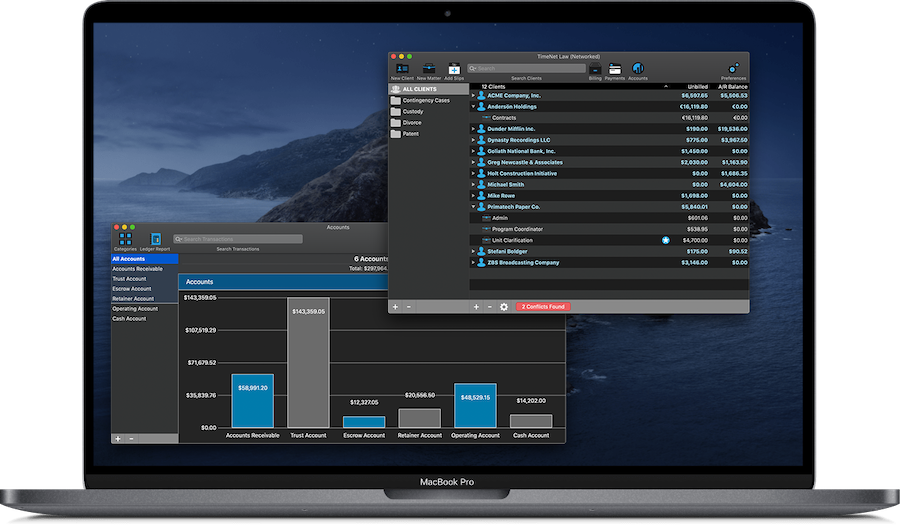
AppleSource Software has released TimeNet Law 3.4, a major update to their legal billing, time tracking, and case management software for Mac. Designed to be simple to use and extremely powerful for legal professionals, TimeNet Law gives you everything you need to manage your law firm. TimeNet Law is fully compatible with macOS Big Sur and all Intel and Apple Silicon M1 Macs.
Klamath Falls, Oregon - AppleSource Software, maker of powerful and easy to use business applications for Mac, is pleased to announce the release of TimeNet Law 3.4, a major update to their complete time tracking, billing, case management, and accounting solution for law firms and other professionals that want to run their business on the stable, secure Mac platform. This update brings over 60 new features and improvements, including full compatibility with new Apple Silicon M1 Macs and macOS Big Sur.
TimeNet Law's modular design allows you to custom-build a system that is perfectly suited to your firm. With features like advanced reporting, task code billing and csv export of invoices for e-billing, evergreen retainers, advanced scheduling and task management, and a full Control Center that allows you to give each timekeeper in your office their own custom permissions and the ability to track their movements in the system, TimeNet Law has everything your need to manage your law firm.
Features:
* Built exclusively for Mac
* Simple, intuitive, powerful
* Fully networkable (local network or cloud, your choice)
* Built-in timer, rapid data entry with shortcuts, and flexible client and matter options
* Conflict of interest checking
* One click billing turns all of your work into beautiful invoices with one click
* Flat fee billing, contingency billing, joint billing, split billing between parties, automatically recurring fees, and much more billing flexibility
* Advanced reporting, customize and save reports
* Full accounting, evergreen retainer tracking, automatic payments, replenishment notices, and much more!
* Client and matter-level trust, escrow and retainer accounts
* Calendar, Contacts and Mail integration
* Document everything with unlimited notes
* Global control of timers via the menubar and Dock
* Automatic backup keeps data safe
* User logins, permissions, complete auditing of every change in the system and who made it
* UTBMS and LEDES98B compatible
* Many, many more features!
TimeNet Law 3.4: https://www.timenetlaw.com
Download Link: https://www.timenetlaw.com
Purchase Link: https://www.timenetlaw.com/#pricing
Screenshot: https://www.timenetlaw.com/tnlmbp.png
Application Icon: https://www.timenetlaw.com/tnliconlg.png
AppleSource Software has been making best-in-class business software for Mac for over 25 years. Our focus is designing easy to use, feature-packed software backed by the best customer support in the industry. All Material and Software (C) Copyright 2020 AppleSource Software. All Rights Reserved. Apple, the Apple logo, Macintosh Mac OS X and macOS are registered trademarks of Apple Inc. in the U.S. and/or other countries. Other trademarks and registered trademarks may be the property of their respective owners.
*******
Link To Article: https://prmac.com/release-id-84226.htm
*******
---------------------------------------------------------------------------------
Note that you can alter delivered distributions at any time.
Login to your account on prMac to alter your channel selection, or to opt-out at any time.
AppleSource Software Releases TimeNet Law 3.4 - Published on 11/23/20
AppleSource Software has released TimeNet Law 3.4, a major update to their legal billing, time tracking, and case management software for Mac. Designed to be simple to use and extremely powerful for legal professionals, TimeNet Law gives you everything you need to manage your law firm. TimeNet Law is fully compatible with macOS Big Sur and all Intel and Apple Silicon M1 Macs.
Klamath Falls, Oregon - AppleSource Software, maker of powerful and easy to use business applications for Mac, is pleased to announce the release of TimeNet Law 3.4, a major update to their complete time tracking, billing, case management, and accounting solution for law firms and other professionals that want to run their business on the stable, secure Mac platform. This update brings over 60 new features and improvements, including full compatibility with new Apple Silicon M1 Macs and macOS Big Sur.
TimeNet Law's modular design allows you to custom-build a system that is perfectly suited to your firm. With features like advanced reporting, task code billing and csv export of invoices for e-billing, evergreen retainers, advanced scheduling and task management, and a full Control Center that allows you to give each timekeeper in your office their own custom permissions and the ability to track their movements in the system, TimeNet Law has everything your need to manage your law firm.
Features:
* Built exclusively for Mac
* Simple, intuitive, powerful
* Fully networkable (local network or cloud, your choice)
* Built-in timer, rapid data entry with shortcuts, and flexible client and matter options
* Conflict of interest checking
* One click billing turns all of your work into beautiful invoices with one click
* Flat fee billing, contingency billing, joint billing, split billing between parties, automatically recurring fees, and much more billing flexibility
* Advanced reporting, customize and save reports
* Full accounting, evergreen retainer tracking, automatic payments, replenishment notices, and much more!
* Client and matter-level trust, escrow and retainer accounts
* Calendar, Contacts and Mail integration
* Document everything with unlimited notes
* Global control of timers via the menubar and Dock
* Automatic backup keeps data safe
* User logins, permissions, complete auditing of every change in the system and who made it
* UTBMS and LEDES98B compatible
* Many, many more features!
TimeNet Law 3.4: https://www.timenetlaw.com
Download Link: https://www.timenetlaw.com
Purchase Link: https://www.timenetlaw.com/#pricing
Screenshot: https://www.timenetlaw.com/tnlmbp.png
Application Icon: https://www.timenetlaw.com/tnliconlg.png

AppleSource Software has been making best-in-class business software for Mac for over 25 years. Our focus is designing easy to use, feature-packed software backed by the best customer support in the industry. All Material and Software (C) Copyright 2020 AppleSource Software. All Rights Reserved. Apple, the Apple logo, Macintosh Mac OS X and macOS are registered trademarks of Apple Inc. in the U.S. and/or other countries. Other trademarks and registered trademarks may be the property of their respective owners.
*******
Link To Article: https://prmac.com/release-id-84226.htm
*******
---------------------------------------------------------------------------------
Note that you can alter delivered distributions at any time.
Login to your account on prMac to alter your channel selection, or to opt-out at any time.
Spymaster Pro Update for The Latest Version of iOS 14 Is Here
A new article has been published at prMac.
Spymaster Pro Update for The Latest Version of iOS 14 Is Here - Published on 11/23/20
With the rolling out of the latest iOS 14 update, Spymaster Pro continues to keep pace with the technology by releasing an update that is compatible with iOS 14. This new update not only makes the cell phone spy app compatible with the latest OS but also comes with some improved and re-defined features.
Sheridan, Wyoming , U.S - Spymaster Pro, a leading software in the cell phone spy industry, is known for delivering uninterrupted and top-notch services worldwide. Its attempts to keep up with the latest trends in the mobile phone industry are commendable. Owing to these, the company has announced that the cell phone monitoring software will be compatible with the iOS 14.
Yes, the latest Spymaster Pro update is here, and it supports the newly released iOS 14. Owing to this update, all the existing and new users of the spy app can spy on the latest iPhone using this OS version.
While the iOS 14 update is received by iPhone 6s and the later models, Spymaster Pro continues to be compatible even with the older models. Therefore, if you are using it to spy on iPhone 5, it is still compatible with it, even after the latest update.
Another news that the company has announced is that the new version has some improved features to ensure high-level customer service. Some of the changes that can be observed in the features of this mobile monitoring software are:
>>>Phone Tracking
You can now monitor call logs and phonebook details easily with the re-defined phone tracking feature.
>>>Social Media Tracking
With the social media tracking feature, you can track Snapchat, WhatsApp, Facebook, Instagram, and any other social platform out there. The tracking is not just limited to chats.
>>>GPS Location Tracking
Tracking the real-time iPhone location is now easier than ever before and quite accurate with the Spymaster Pro update for iOS 14.
>>>Web History Tracking
You can easily view all the saved bookmarks of the target iPhone user. Along with this, the accessed URL's can be seen too.
>>>Multimedia Tracking
Along with the photos in the gallery, you now also get access to the video and audio files with this Spymaster Pro feature.
>>>SMS Tracking
You can now read deleted messages of the target iPhone user. Also, the messages that you will read with this feature come with a date and time stamp.
Other features of the spy app like sensitive information alert and installed app tracking remain the same and work exceptionally well with iPhones that have received an iOS 14 update. At the same time, the update remains to work the same for the older OS. So, all the information about the target phone can be found on the Spymaster Pro dashboard.
Another thing that the users must know is that just like the past updates, Spymaster Pro continues to offer a no-installation and no-jailbreak solution for iPhone. The company understands the complexities of today's uncertain and chaotic world and knows how crucial it is to keep your family and kids safe online. So, it is known to keep up with the growing technological trends.
As a result, if your spouse or kid's phone has received an iOS 14 update, you need not worry. With Spymaster Pro, you can continue to track their phone activities and ensure their safety online. To keep up with future OS releases, the company is working towards adding some new features to their updates. Visit the Spymaster Pro website for more details.
Spymaster Pro: https://www.spymasterpro.com/
iPhone Spy Software: https://www.spymasterpro.com/iphone-spy/
Spymaster Pro Login: https://senseye.spymasterpro.com/main_admin/login.php
Purchase : https://www.spymasterpro.com/buynow/
Spymaster Pro is a reliable and the most sought-after cell phone monitoring software you can find today. This high-tech spy app has been serving customers for years now, and all the reviews of the product boast about how useful it is. It is available for Android and iOS platforms and works remotely so that the target user will have no idea about you spying on them. All Material and Software (C) Copyright 2020 Spymaster Pro. All Rights Reserved. Apple, the Apple logo, iPhone, iPod and iPad are registered trademarks of Apple Inc. in the U.S. and/or other countries. Other trademarks and registered trademarks may be the property of their respective owners.
*******
Link To Article: https://prmac.com/release-id-84221.htm
*******
---------------------------------------------------------------------------------
Note that you can alter delivered distributions at any time.
Login to your account on prMac to alter your channel selection, or to opt-out at any time.
Spymaster Pro Update for The Latest Version of iOS 14 Is Here - Published on 11/23/20
With the rolling out of the latest iOS 14 update, Spymaster Pro continues to keep pace with the technology by releasing an update that is compatible with iOS 14. This new update not only makes the cell phone spy app compatible with the latest OS but also comes with some improved and re-defined features.
Sheridan, Wyoming , U.S - Spymaster Pro, a leading software in the cell phone spy industry, is known for delivering uninterrupted and top-notch services worldwide. Its attempts to keep up with the latest trends in the mobile phone industry are commendable. Owing to these, the company has announced that the cell phone monitoring software will be compatible with the iOS 14.
Yes, the latest Spymaster Pro update is here, and it supports the newly released iOS 14. Owing to this update, all the existing and new users of the spy app can spy on the latest iPhone using this OS version.
While the iOS 14 update is received by iPhone 6s and the later models, Spymaster Pro continues to be compatible even with the older models. Therefore, if you are using it to spy on iPhone 5, it is still compatible with it, even after the latest update.
Another news that the company has announced is that the new version has some improved features to ensure high-level customer service. Some of the changes that can be observed in the features of this mobile monitoring software are:
>>>Phone Tracking
You can now monitor call logs and phonebook details easily with the re-defined phone tracking feature.
>>>Social Media Tracking
With the social media tracking feature, you can track Snapchat, WhatsApp, Facebook, Instagram, and any other social platform out there. The tracking is not just limited to chats.
>>>GPS Location Tracking
Tracking the real-time iPhone location is now easier than ever before and quite accurate with the Spymaster Pro update for iOS 14.
>>>Web History Tracking
You can easily view all the saved bookmarks of the target iPhone user. Along with this, the accessed URL's can be seen too.
>>>Multimedia Tracking
Along with the photos in the gallery, you now also get access to the video and audio files with this Spymaster Pro feature.
>>>SMS Tracking
You can now read deleted messages of the target iPhone user. Also, the messages that you will read with this feature come with a date and time stamp.
Other features of the spy app like sensitive information alert and installed app tracking remain the same and work exceptionally well with iPhones that have received an iOS 14 update. At the same time, the update remains to work the same for the older OS. So, all the information about the target phone can be found on the Spymaster Pro dashboard.
Another thing that the users must know is that just like the past updates, Spymaster Pro continues to offer a no-installation and no-jailbreak solution for iPhone. The company understands the complexities of today's uncertain and chaotic world and knows how crucial it is to keep your family and kids safe online. So, it is known to keep up with the growing technological trends.
As a result, if your spouse or kid's phone has received an iOS 14 update, you need not worry. With Spymaster Pro, you can continue to track their phone activities and ensure their safety online. To keep up with future OS releases, the company is working towards adding some new features to their updates. Visit the Spymaster Pro website for more details.
Spymaster Pro: https://www.spymasterpro.com/
iPhone Spy Software: https://www.spymasterpro.com/iphone-spy/
Spymaster Pro Login: https://senseye.spymasterpro.com/main_admin/login.php
Purchase : https://www.spymasterpro.com/buynow/
Spymaster Pro is a reliable and the most sought-after cell phone monitoring software you can find today. This high-tech spy app has been serving customers for years now, and all the reviews of the product boast about how useful it is. It is available for Android and iOS platforms and works remotely so that the target user will have no idea about you spying on them. All Material and Software (C) Copyright 2020 Spymaster Pro. All Rights Reserved. Apple, the Apple logo, iPhone, iPod and iPad are registered trademarks of Apple Inc. in the U.S. and/or other countries. Other trademarks and registered trademarks may be the property of their respective owners.
*******
Link To Article: https://prmac.com/release-id-84221.htm
*******
---------------------------------------------------------------------------------
Note that you can alter delivered distributions at any time.
Login to your account on prMac to alter your channel selection, or to opt-out at any time.
MaBaSoft Releases Application Wizard 4.2
A new article has been published at prMac.
MaBaSoft Releases Application Wizard 4.2 - Published on 11/23/20
MaBaSoft announces Application Wizard 4.2, an important update to their popular menu-based application launcher, quitter, and switcher for macOS. With Application Wizard users can quickly open and quit applications, switch between running applications, browse volumes and folders, access favorite and recent files, look up contacts, and preview images, music, movies, and documents. Version 4.2 solves the incompatibilities with macOS 11.0 Big Sur.
Milano, Italy - MaBaSoft is proud to announce the release of Application Wizard 4.2, an important update of their popular menu-based launcher, quitter, switcher, and navigation tool for macOS. Application Wizard allows users to create groups of applications to easily access favorite applications and quickly open or quit multiple applications at the same time. It allows smooth switching between running applications and open windows and provides single application mode to reduce screen clutter.
With Application Wizard, users can also browse volumes and favorite folders to rapidly open enclosed items, eject and mount disks, check memory usage, and easily access recent documents and contacts. Application Wizard previews images, music, movies, and documents and displays file properties and metadata.
Finally, Application Wizard allows users to define keyboard shortcuts so that they can quickly accomplish frequent tasks by pressing keys on their keyboard. Shortcuts can be used, for instance, to quit all running applications, or switch back to the previous application, or turn single application mode on and off.
Version 4.2 solves the incompatibilities with macOS 11.0 Big Sur and introduces several minor interface revisions.
Language Support:
* US English, German, French, Dutch, Spanish, and Italian
System Requirements:
* macOS 10.11, 10.12, 10.13, 10.14, 10.15, or 11.0 (Big Sur)
Pricing and Availability:
Application Wizard 4 costs $19.00 (USD) for new users and $7.00 (USD) for users who purchased version 2 or version 3. Version 4.2 is a free update for registered version 4 users. Family, site, and world-wide licenses are also available.
MaBaSoft: https://www.mabasoft.net/
Application Wizard 4.2: https://www.mabasoft.net/products/applicationWizard/
Release Notes: https://www.mabasoft.net/releaseNotes/applicationWizard.html
Purchase Application Wizard: https://sites.fastspring.com/mabasoft/product/all?language=en
Direct Download: https://www.mabasoft.net/downloads/files/Application_Wizard_4.2.dmg
Media Assets: https://www.mabasoft.net/pressImages/applicationWizard.html
MaBaSoft, based in Milano, Italy, is a small independent company founded by Marco Damaschi and Barbara Canino in 1997. MaBaSoft develops quality system utilities and applications for the Macintosh. Copyright (C) 1997-2020 MaBaSoft. All Rights Reserved. Apple, the Apple logo and Mac are registered trademarks of Apple Inc. in the U.S. and/or other countries.
*******
Link To Article: https://prmac.com/release-id-84223.htm
*******
---------------------------------------------------------------------------------
Note that you can alter delivered distributions at any time.
Login to your account on prMac to alter your channel selection, or to opt-out at any time.
MaBaSoft Releases Application Wizard 4.2 - Published on 11/23/20
MaBaSoft announces Application Wizard 4.2, an important update to their popular menu-based application launcher, quitter, and switcher for macOS. With Application Wizard users can quickly open and quit applications, switch between running applications, browse volumes and folders, access favorite and recent files, look up contacts, and preview images, music, movies, and documents. Version 4.2 solves the incompatibilities with macOS 11.0 Big Sur.
Milano, Italy - MaBaSoft is proud to announce the release of Application Wizard 4.2, an important update of their popular menu-based launcher, quitter, switcher, and navigation tool for macOS. Application Wizard allows users to create groups of applications to easily access favorite applications and quickly open or quit multiple applications at the same time. It allows smooth switching between running applications and open windows and provides single application mode to reduce screen clutter.
With Application Wizard, users can also browse volumes and favorite folders to rapidly open enclosed items, eject and mount disks, check memory usage, and easily access recent documents and contacts. Application Wizard previews images, music, movies, and documents and displays file properties and metadata.
Finally, Application Wizard allows users to define keyboard shortcuts so that they can quickly accomplish frequent tasks by pressing keys on their keyboard. Shortcuts can be used, for instance, to quit all running applications, or switch back to the previous application, or turn single application mode on and off.
Version 4.2 solves the incompatibilities with macOS 11.0 Big Sur and introduces several minor interface revisions.
Language Support:
* US English, German, French, Dutch, Spanish, and Italian
System Requirements:
* macOS 10.11, 10.12, 10.13, 10.14, 10.15, or 11.0 (Big Sur)
Pricing and Availability:
Application Wizard 4 costs $19.00 (USD) for new users and $7.00 (USD) for users who purchased version 2 or version 3. Version 4.2 is a free update for registered version 4 users. Family, site, and world-wide licenses are also available.
MaBaSoft: https://www.mabasoft.net/
Application Wizard 4.2: https://www.mabasoft.net/products/applicationWizard/
Release Notes: https://www.mabasoft.net/releaseNotes/applicationWizard.html
Purchase Application Wizard: https://sites.fastspring.com/mabasoft/product/all?language=en
Direct Download: https://www.mabasoft.net/downloads/files/Application_Wizard_4.2.dmg
Media Assets: https://www.mabasoft.net/pressImages/applicationWizard.html
MaBaSoft, based in Milano, Italy, is a small independent company founded by Marco Damaschi and Barbara Canino in 1997. MaBaSoft develops quality system utilities and applications for the Macintosh. Copyright (C) 1997-2020 MaBaSoft. All Rights Reserved. Apple, the Apple logo and Mac are registered trademarks of Apple Inc. in the U.S. and/or other countries.
*******
Link To Article: https://prmac.com/release-id-84223.htm
*******
---------------------------------------------------------------------------------
Note that you can alter delivered distributions at any time.
Login to your account on prMac to alter your channel selection, or to opt-out at any time.
DesignRush Featured Ace Infoway in Top 20 Software and App Development
A new article has been published at prMac.
DesignRush Featured Ace Infoway in Top 20 Software and App Development - Published on 11/23/20
Ace Infoway featured in Designrush Q3 Industry Report. The report analyzes the demand for software and app development companies during the COVID-19 crisis. The main objective of the survey was to acquaint the service providers and their clients with the impact of the pandemic on the market trends so that they could make informed decisions regarding their business.
Los Angeles, CA, USA - DesignRush, an independent B2B Marketplace that connects Brands With Agencies, has released a new Q3 industry report, showcasing the impact of Covid-19 on the demand for the software and app development services. The main objective of the survey was to acquaint the service providers and their clients with the impact of the pandemic on the market trends so that they could make informed decisions regarding their business.
500 companies responded to the research process, who were analyzed over 5 verticals:
1. Software and Application Development Services
2. Web Designing Services
3. eCommerce related Services
4. Digital Marketing Services
5. Branding Services
Based on their client behavior and demand for the agency services during the pandemic crisis, DesignRush came up with a report giving insights to all these verticals. The report gives you an idea of the rise and fall of the demand for these agency services as well as the upcoming advanced trends in the market.
Considering the insights of the report, DesignRush listed the Top 20 Software and App Development Industry Leaders, who excelled in their agency services performance, among the 500 powerful participating agencies. And we are glad to announce that Ace Infoway successfully marked its place in top rankers.
DesignRush is known for its in-depth research and accurate ranking process. It ranks over 7000 agencies across categories to assist the brands in decision making. And this report is one such contribution to help you prepare for this unpredictable Covid crisis.
> Highlights of the Report
The report is divided into 3 categories- Services, Location, and Industries. Here are the highlights of each category-
Services:
- According to DesignRush, despite the uncertainty and economic volatility, 81.8% of respondents observed a significant increase in demand for at least any one of software and app development services such as Web Development, Mobile app development, Custom software, etc.
- A difference in the respondents' preference is observed, i.e. the new clients are making smart investments, preferring to invest in the less costly alternate solutions such as templated and off-the-shelf solutions.
Industry:
- Healthcare, online retail, education, and food, and beverage businesses are increasing their investment in digital agency services.
- The demand for design and branding services is increasing at a great pace, as the Businesses are increasing investment in these services to stand out from the growing online crowd.
- Companies are exploring new advertising channels and platforms to increase their brand awareness and customer engagement. The major reason behind this is the increase in demand for online retail services i.e. up to 39.4%
Location:
- Demand for dedicated teams and staff augmentation is expected to increase post-Covid-19. In fact, 25.3% of the respondents have already experienced an increase in these services.
-DesignRush also observed that Outsourcing and Offshoring are rising in popularity as businesses become more cost-sensitive and remote.
DesignRush Featured Ace Infoway in Top 20 Software and App Development Industry Leaders in 2020: https://www.aceinfoway.com/top-software-and-app-development-industry-leaders
Demand For Software & App Development Services During COVID-19 Crisis [Q3 Industry Report]: https://www.designrush.com/trends/covid-19-impact-on-software-and-app-deveopment-services
Ace Infoway is a passionate 'Go-To' Technology Partner for Web/Software Agencies and Businesses in various industry verticals, across the globe as an extended partner and offshore development center. With a Tech-focused vision, we ensure to create success stories for their clients above all else. Ace Infoway has gained 20 years of experience in a plethora of IT Services and has access to resources and teams in the United States and India. We are proud to be an extended partner and offer remote development teams for over 50+ Web Agencies & Businesses in diverse industries. Ace's value proposition lies in its diverse domain expertise, minimum learning curve period, and efficient turn-around-time. We learn and invest for our customers and with an electrifying and eccentric team on-board, we are ready to harness the force for good. All Material and Software (C) Copyright 2020 Ace Infoway. All Rights Reserved. Apple, the Apple logo, iPhone, iPod and iPad are registered trademarks of
Apple Inc. in the U.S. and/or other countries. Other trademarks and registered trademarks may be the property of their respective owners.
*******
Link To Article: https://prmac.com/release-id-84222.htm
*******
---------------------------------------------------------------------------------
Note that you can alter delivered distributions at any time.
Login to your account on prMac to alter your channel selection, or to opt-out at any time.
DesignRush Featured Ace Infoway in Top 20 Software and App Development - Published on 11/23/20
Ace Infoway featured in Designrush Q3 Industry Report. The report analyzes the demand for software and app development companies during the COVID-19 crisis. The main objective of the survey was to acquaint the service providers and their clients with the impact of the pandemic on the market trends so that they could make informed decisions regarding their business.
Los Angeles, CA, USA - DesignRush, an independent B2B Marketplace that connects Brands With Agencies, has released a new Q3 industry report, showcasing the impact of Covid-19 on the demand for the software and app development services. The main objective of the survey was to acquaint the service providers and their clients with the impact of the pandemic on the market trends so that they could make informed decisions regarding their business.
500 companies responded to the research process, who were analyzed over 5 verticals:
1. Software and Application Development Services
2. Web Designing Services
3. eCommerce related Services
4. Digital Marketing Services
5. Branding Services
Based on their client behavior and demand for the agency services during the pandemic crisis, DesignRush came up with a report giving insights to all these verticals. The report gives you an idea of the rise and fall of the demand for these agency services as well as the upcoming advanced trends in the market.
Considering the insights of the report, DesignRush listed the Top 20 Software and App Development Industry Leaders, who excelled in their agency services performance, among the 500 powerful participating agencies. And we are glad to announce that Ace Infoway successfully marked its place in top rankers.
DesignRush is known for its in-depth research and accurate ranking process. It ranks over 7000 agencies across categories to assist the brands in decision making. And this report is one such contribution to help you prepare for this unpredictable Covid crisis.
> Highlights of the Report
The report is divided into 3 categories- Services, Location, and Industries. Here are the highlights of each category-
Services:
- According to DesignRush, despite the uncertainty and economic volatility, 81.8% of respondents observed a significant increase in demand for at least any one of software and app development services such as Web Development, Mobile app development, Custom software, etc.
- A difference in the respondents' preference is observed, i.e. the new clients are making smart investments, preferring to invest in the less costly alternate solutions such as templated and off-the-shelf solutions.
Industry:
- Healthcare, online retail, education, and food, and beverage businesses are increasing their investment in digital agency services.
- The demand for design and branding services is increasing at a great pace, as the Businesses are increasing investment in these services to stand out from the growing online crowd.
- Companies are exploring new advertising channels and platforms to increase their brand awareness and customer engagement. The major reason behind this is the increase in demand for online retail services i.e. up to 39.4%
Location:
- Demand for dedicated teams and staff augmentation is expected to increase post-Covid-19. In fact, 25.3% of the respondents have already experienced an increase in these services.
-DesignRush also observed that Outsourcing and Offshoring are rising in popularity as businesses become more cost-sensitive and remote.
DesignRush Featured Ace Infoway in Top 20 Software and App Development Industry Leaders in 2020: https://www.aceinfoway.com/top-software-and-app-development-industry-leaders
Demand For Software & App Development Services During COVID-19 Crisis [Q3 Industry Report]: https://www.designrush.com/trends/covid-19-impact-on-software-and-app-deveopment-services
Ace Infoway is a passionate 'Go-To' Technology Partner for Web/Software Agencies and Businesses in various industry verticals, across the globe as an extended partner and offshore development center. With a Tech-focused vision, we ensure to create success stories for their clients above all else. Ace Infoway has gained 20 years of experience in a plethora of IT Services and has access to resources and teams in the United States and India. We are proud to be an extended partner and offer remote development teams for over 50+ Web Agencies & Businesses in diverse industries. Ace's value proposition lies in its diverse domain expertise, minimum learning curve period, and efficient turn-around-time. We learn and invest for our customers and with an electrifying and eccentric team on-board, we are ready to harness the force for good. All Material and Software (C) Copyright 2020 Ace Infoway. All Rights Reserved. Apple, the Apple logo, iPhone, iPod and iPad are registered trademarks of
Apple Inc. in the U.S. and/or other countries. Other trademarks and registered trademarks may be the property of their respective owners.
*******
Link To Article: https://prmac.com/release-id-84222.htm
*******
---------------------------------------------------------------------------------
Note that you can alter delivered distributions at any time.
Login to your account on prMac to alter your channel selection, or to opt-out at any time.
Subscribe to:
Posts (Atom)