A new article has been published at prMac.
Workspaces Brings Easy-to-Use Project Workspace Management to the Mac - Published on 11/27/20
Polish indie development team Apptorium announces Workspaces 2.0, an important update to their desktop workspace management app for macOS. Workspaces allows users to organize and save applications, files, folders, and more into individual projects (workspaces). Users can ensure all resources are available for a project with just a few clicks of the mouse. Version 2.0 brings numerous new features to the app, including a redesigned UI, plugins, quick searching, notes and much more.
Zielona Gora, Poland - Independent development team Apptorium is today proud to announce the release and immediate availability of Workspaces 2.0, an important update to their desktop workspace management app for macOS. Workspaces organizes and saves links to resources that are grouped into projects (workspaces). Users can designate which resources can be started up and accessed with a single click. The update brings numerous new features to the app, including powerful search commands, plugins, a redesigned UI, and much more.
Workspaces allows users to create projects containing folders, files, apps, and other resources, all of which can be launched with a click of the mouse. This allows users to start an entire workspace for any project, eliminating the need for remembering and starting each app or opening each resource on a one-by-one basis. Users can also see all of the resources for a particular job and open the app, folder, or other resource on its own.
"Do you have, like me, multiple projects that you're juggling on a regular basis? When it came time to work on each project, I always found that I would open up a set of apps, folders, and other resources but I'd always forget one or two things," shares Apptorium CEO Marcin Krzywonos. "By using Workspaces 2.0 I'm sure that nothing is missing. I set up a workspace for each project. And with just a few clicks of the mouse, the proper apps and other resources will be open and ready when I need them."
Workspaces is a must-have for designers, programmers, project managers, students and teachers. Really, anyone that juggles multiple projects or jobs will find Workspaces to be an invaluable addition to their Mac application arsenal. This is especially true in 2020, when more people than ever are working from home.
Editing a workspace (project) is simplicity in itself. Click the "Edit" button and the editor window appears. Drag and drop your resources or click the "+"" button to add them manually. Users can choose which applications will be run when they click START Button.
Workspaces 2 adds a multiple new features to the already useful app, including:
* Clean and fresh redesigned user interface
* Search for Workspaces and Resources
* Plugins
* Share Extension
* Set workspace icons
* Separators in resources lists
* Delay resource starting
* Set resources launched on finish
* Notes function
* Templates (for creating similar workspaces quickly)
* Set custom apps for Terminal and File Manager
* Type commands in search window
* Disable selected resources, so they're hidden in the workspace
* Add resources by dropping them on the menubar icon
* Run resources using CMD+Num
* Create resources directly from the Pasteboard
* Quick switch between workspaces with a long-press of the Back Button
* Sort workspaces lists
Workspaces also allows users to designate which application uses a resource. For example, users can open a website in the browser of their choice. Even if Safari is the default Mac browser, websites can be opened automatically using Chrome, Firefox, or any other browser. For another example, users can set Terminal to start up in a designated folder, saving time usually spent typing a path to switch to the needed directory.
In addition to the above new features, Workspaces still offers the same great features it always has:
* Launch resources quickly
* Launch multiple resources with a single click
* Workspaces can be archived and restored in the future when needed
* Set custom apps to open files and folders
* Launch emails (Mail app only)
* Keyboard shortcuts
* Custom URL support (for example: mailto:info@apptorium.com or sms:00000000,etc)
* Open Terminal in a selected folder
"Workspaces 2.0 builds on the already useful foundation of previous versions of Workspaces, adding great new features that I know users will love," continued Marcin. "I can't wait to see the new ways Mac owners make use of the app, and I look forward to hearing their ideas for future improvements."
Device Requirements:
* macOS 10.14 or newer
* macOS Big Sur compatible
* 64-bit processor
* 30 MB
Pricing and Availability:
Workspaces 2.0 is only $19.99 (USD) and available worldwide through Apptorium website, SetApp, and the Mac App Store in the Productivity category. A trial download is available from the Apptorium website. Review copies are available for journalists upon request.
Apptorium: https://www.apptorium.com
Workspaces 2.0: https://www.apptorium.com/workspaces
Download Trial Version: https://www.apptorium.com/workspaces/trial
Purchase and Download from Mac App Store: https://apps.apple.com/us/app/workspaces-2/id1540284555
Getting Started YouTube Video: https://www.youtube.com/watch?v=xvNwLjPNOYE
Latest Press Kit (zip): https://www.apptorium.com/workspaces/presskit
Headquartered in Zielona Gora, Poland, Apptorium has been creating Mac and iOS software since 2011. The developers for the company make Mac and iOS apps because that's what they love. Currently most of their work is about creating their own products for Macs. All Material and Software (C) Copyright 2020 Apptorium. All Rights Reserved. Apple, the Apple logo, Macintosh, Mac OS X, and macOS are registered trademarks of Apple Inc. in the U.S. and/or other countries. Other trademarks and registered trademarks may be the property of their respective owners.
*******
Link To Article: https://prmac.com/release-id-84231.htm
*******
---------------------------------------------------------------------------------
Note that you can alter delivered distributions at any time.
Login to your account on prMac to alter your channel selection, or to opt-out at any time.

New App is a Fun Way for Toddlers to Build Memory and Vocabulary Skills
A new article has been published at prMac.
New App is a Fun Way for Toddlers to Build Memory and Vocabulary Skills - Published on 11/27/20
Developer K2K Soft, LLC today announces Lotti's World - First Words 1.0, its new educational app for iOS devices, the first in a series of educational apps. The app offers an enjoyable way to build a toddler's memory and vocabulary skills by combining object association games and voice-based feedback. The app is designed for toddlers 2-5 years old to help them excel in preschool, kindergarten and beyond. The app helps kids build a strong educational foundation by teaching them their first words.
Tampa, Florida - Independent developer, K2K Soft, LLC today is proud to announce the release and immediate availability of Lotti's World - First Words 1.0, its new educational app for iPhone, iPad, and iPod touch devices. Lotti's World is an enjoyable memory and vocabulary building app that combines the fun of voice and object association games for youngsters of any gender ages 2 to 5 years old.
Lotti's World helps build a foundation of early education for all children helping them to learn their first words, enable logical thinking, refine their motor skills, develop their problem solving skills, expand their imagination. The app gives toddlers the tools they need to learn their first 100 words.
"It's been impossible to find free to try toddler games that can develop your child's logical thinking, fine-motor skills, problem solving ability and imagination all in the same app until now," said K2K Soft LLC owner Krisztian Zsolczai. "Lotti's World gives your child the tools they need to learn their first 100 words! By downloading Lotti's World, you can boost your child's cognitive development with interactive content that will leave them immersed in an intriguing world"
Lotti's World was specifically designed for toddlers of all ages to help them excel in preschool, kindergarten, and beyond. The app is suitable for kids aged 2 to 5 years old, allowing children to build a strong educational foundation by teaching them their first words.
The app uses voice feedback for each word, along with memory recall activity. As the child uses the app's simple drag-and-drop interface, Lotti provides positive voice-based feedback. In the farm scenes, Lotti encourages the toddler to drag and drop each animal into the proper spot in the scene. She says the name of each animal, and cheers the player on for positioning each animal into their proper location. When all of the animals are in place, the child is rewarded with a celebration.
The learning fun continues while Lotti and the children have a picnic, visit a zoo, go to Lotti's bedroom, hang up their clothes, and much more. Toddlers will also learn about items in the bathroom and the kitchen, have fun in the playroom, and visit the living room. All of the settings offer fun activities that will help a child build their word recognition skills, work on their concentration skills, and learn their first 100 words.
Although Lotti's World is a free download, parents will be glad to learn that there are no ads of any kind in the Lotti's World app, and the app works great offline. Also, there is no sign up or login required. The first level is free to play over and over again. The download includes a great puzzle that kids will enjoy. Once the toddler begins getting comfortable with the first puzzle, parents can use the app's convenient in-app purchases to unlock additional levels for just $0.99 per level, or unlock all of the remaining levels for a one time purchase of just $3.99.
Lotti's World includes 3 entertaining levels:
* Level 1 = Learn voice and object association!
* Level 2 = Match the correct objects from three choices!
* Level 3 = Memory Recall!
"I hope that parents and toddler enjoy using this app and that it helps your little one learn and grow to problem solve like a pro," continues Krisztian. "Please reach out and let us know about your unique iOS mobile app/tablet user experiences! Be sure to follow Lotti's World on social media too!"
Device Requirements:
* iPhone, iPad, and iPod touch
* Requires iOS 9.0 or later
* Universal Application
* 60-80 MB
Pricing and Availability:
Lotti's World 1.0 is free and is available worldwide exclusively through the App Store in the Education category. Convenient in-app purchases are available to unlock individual app themes or to unlock all of the themes.
Lotti's World - First Words 1.0: http://lottis.world
Download from the App Store: http://apps.apple.com/us/app/lottis-world-first-words/id1497047219
Gameplay Video: https://www.facebook.com/LottisWorldApp/videos/358025101938393/
Screenshot 1: https://www.facebook.com/LottisWorldApp/photos/rpp.617141392264526/699988727313125/?type=3&theater
Screenshot 2: https://www.facebook.com/LottisWorldApp/photos/rpp.617141392264526/699988673979797/?type=3&theater
Based in Lake Worth, Florida, K2K Soft, LLC is an independent developer of educational apps. The firm is branching out into early child education and is planning on releasing several apps in the field. All Material and Software (C) Copyright 2020 K2K Soft, LLC. All Rights Reserved. Apple, the Apple logo, iPhone, iPod and iPad are registered trademarks of Apple Inc. in the U.S. and/or other countries. Other trademarks and registered trademarks may be the property of their respective owners.
*******
Link To Article: https://prmac.com/release-id-84232.htm
*******
---------------------------------------------------------------------------------
Note that you can alter delivered distributions at any time.
Login to your account on prMac to alter your channel selection, or to opt-out at any time.
New App is a Fun Way for Toddlers to Build Memory and Vocabulary Skills - Published on 11/27/20
Developer K2K Soft, LLC today announces Lotti's World - First Words 1.0, its new educational app for iOS devices, the first in a series of educational apps. The app offers an enjoyable way to build a toddler's memory and vocabulary skills by combining object association games and voice-based feedback. The app is designed for toddlers 2-5 years old to help them excel in preschool, kindergarten and beyond. The app helps kids build a strong educational foundation by teaching them their first words.
Tampa, Florida - Independent developer, K2K Soft, LLC today is proud to announce the release and immediate availability of Lotti's World - First Words 1.0, its new educational app for iPhone, iPad, and iPod touch devices. Lotti's World is an enjoyable memory and vocabulary building app that combines the fun of voice and object association games for youngsters of any gender ages 2 to 5 years old.
Lotti's World helps build a foundation of early education for all children helping them to learn their first words, enable logical thinking, refine their motor skills, develop their problem solving skills, expand their imagination. The app gives toddlers the tools they need to learn their first 100 words.
"It's been impossible to find free to try toddler games that can develop your child's logical thinking, fine-motor skills, problem solving ability and imagination all in the same app until now," said K2K Soft LLC owner Krisztian Zsolczai. "Lotti's World gives your child the tools they need to learn their first 100 words! By downloading Lotti's World, you can boost your child's cognitive development with interactive content that will leave them immersed in an intriguing world"
Lotti's World was specifically designed for toddlers of all ages to help them excel in preschool, kindergarten, and beyond. The app is suitable for kids aged 2 to 5 years old, allowing children to build a strong educational foundation by teaching them their first words.
The app uses voice feedback for each word, along with memory recall activity. As the child uses the app's simple drag-and-drop interface, Lotti provides positive voice-based feedback. In the farm scenes, Lotti encourages the toddler to drag and drop each animal into the proper spot in the scene. She says the name of each animal, and cheers the player on for positioning each animal into their proper location. When all of the animals are in place, the child is rewarded with a celebration.
The learning fun continues while Lotti and the children have a picnic, visit a zoo, go to Lotti's bedroom, hang up their clothes, and much more. Toddlers will also learn about items in the bathroom and the kitchen, have fun in the playroom, and visit the living room. All of the settings offer fun activities that will help a child build their word recognition skills, work on their concentration skills, and learn their first 100 words.
Although Lotti's World is a free download, parents will be glad to learn that there are no ads of any kind in the Lotti's World app, and the app works great offline. Also, there is no sign up or login required. The first level is free to play over and over again. The download includes a great puzzle that kids will enjoy. Once the toddler begins getting comfortable with the first puzzle, parents can use the app's convenient in-app purchases to unlock additional levels for just $0.99 per level, or unlock all of the remaining levels for a one time purchase of just $3.99.
Lotti's World includes 3 entertaining levels:
* Level 1 = Learn voice and object association!
* Level 2 = Match the correct objects from three choices!
* Level 3 = Memory Recall!
"I hope that parents and toddler enjoy using this app and that it helps your little one learn and grow to problem solve like a pro," continues Krisztian. "Please reach out and let us know about your unique iOS mobile app/tablet user experiences! Be sure to follow Lotti's World on social media too!"
Device Requirements:
* iPhone, iPad, and iPod touch
* Requires iOS 9.0 or later
* Universal Application
* 60-80 MB
Pricing and Availability:
Lotti's World 1.0 is free and is available worldwide exclusively through the App Store in the Education category. Convenient in-app purchases are available to unlock individual app themes or to unlock all of the themes.
Lotti's World - First Words 1.0: http://lottis.world
Download from the App Store: http://apps.apple.com/us/app/lottis-world-first-words/id1497047219
Gameplay Video: https://www.facebook.com/LottisWorldApp/videos/358025101938393/
Screenshot 1: https://www.facebook.com/LottisWorldApp/photos/rpp.617141392264526/699988727313125/?type=3&theater
Screenshot 2: https://www.facebook.com/LottisWorldApp/photos/rpp.617141392264526/699988673979797/?type=3&theater
Based in Lake Worth, Florida, K2K Soft, LLC is an independent developer of educational apps. The firm is branching out into early child education and is planning on releasing several apps in the field. All Material and Software (C) Copyright 2020 K2K Soft, LLC. All Rights Reserved. Apple, the Apple logo, iPhone, iPod and iPad are registered trademarks of Apple Inc. in the U.S. and/or other countries. Other trademarks and registered trademarks may be the property of their respective owners.
*******
Link To Article: https://prmac.com/release-id-84232.htm
*******
---------------------------------------------------------------------------------
Note that you can alter delivered distributions at any time.
Login to your account on prMac to alter your channel selection, or to opt-out at any time.
Come and Enjoy TunesKit Thanksgiving Free Gift and More Discounts
A new article has been published at prMac.
Come and Enjoy TunesKit Thanksgiving Free Gift and More Discounts - Published on 11/25/20
TunesKit Software's big Thanksgiving & Black Friday sale is coming. Visitors can get its top video editor program for free, and more huge discounts are provided here from now to Dec. 4, 2020.
Shenzhen, Guangdong - To express gratitude to all its customers, TunesKit Studio recently announced a special Thanksgiving & Black Friday giveaway and deals on all its multimedia and iOS tools.
Starting November 20th, everyone had a chance to get its upcoming flagship product - AceMovi Video Editor absolutely free, which will be valued at $59.95 per year. What's more, visitors can purchase its Video Cutter or Screen Recorder at $5 only, the lowest price ever. Besides, all customers can save up to 65% discount to get its popular music converters or iOS solutions, and they can save more for software packs at up to 55% discount, which can meet their different usage needs.
This Thanksgiving & Black Friday Sale will last for two weeks only and be invalid in the last minutes of December 4. For more details about this promo, please visit the TunesKit website.
The first offer of TunesKit Thanksgiving Promotion is a totally free video editor called AceMovi. The company is going to release it in December. Now if visitors share this information with your friends on Facebook, Twitter or Pinterest, you can get a one-year free subscription. This software is well-designed to help users create or enhance videos to a new level with filters, transition, effects or other advanced features. Of course, users can also use it to record and create their own videos or tutorials with ease.
The second part is special offers for its Screen Recorder and Video Cutter. Both of the two useful multimedia programs are now only $5, and you can save almost $45. The former application can help record any videos or sounds on the desktop, while the latter is proud of cutting and trimming out the unwanted parts without quality loss.
Furthermore, TunesKit provides up to 65% discounts for its hot music converters and iOS solutions, including Spotify Music Converter, Apple Music Converter, Audio Capture, Audible Converter, iOS System Recovery, and many others. In addition, more discounts of these idea programs will be bunded at a lower price. Visitors can save more money if they bought these offers.
"TunesKit offers professional yet easy-to-use video, audio and iOS tools for Mac and Windows users all over the world," said Andres, the marketing director of TunesKit. "We're happy to offer a free gift and big savings to our dear customers on this Thanksgiving holiday."
2020 Thanksgiving & Black Friday Sale: https://www.tuneskit.com/special/thanksgiving-sales/
TunesKit Studio is a professional multimedia software developer dedicated to providing the best DRM removal solutions and services, including iTunes DRM Video Converter and DRM Audiobook Converter for Mac and Windows platforms to customers throughout the world based on the personal use only. As a reliable DRM removal solution provider, the company also offers free and prompt online support for all users. Currently TunesKit Studio already have millions of active users who are speaking highly of their DRM removal products. All Material and Software (C) Copyright 2020 TunesKit Studio. All Rights Reserved. Apple, the Apple logo, Mac OS X and Macintosh are registered trademarks of Apple Inc. in the U.S. and/or other countries. Other trademarks and registered trademarks may be the property of their respective owners.
*******
Link To Article: https://prmac.com/release-id-84230.htm
*******
---------------------------------------------------------------------------------
Note that you can alter delivered distributions at any time.
Login to your account on prMac to alter your channel selection, or to opt-out at any time.
Come and Enjoy TunesKit Thanksgiving Free Gift and More Discounts - Published on 11/25/20
TunesKit Software's big Thanksgiving & Black Friday sale is coming. Visitors can get its top video editor program for free, and more huge discounts are provided here from now to Dec. 4, 2020.
Shenzhen, Guangdong - To express gratitude to all its customers, TunesKit Studio recently announced a special Thanksgiving & Black Friday giveaway and deals on all its multimedia and iOS tools.
Starting November 20th, everyone had a chance to get its upcoming flagship product - AceMovi Video Editor absolutely free, which will be valued at $59.95 per year. What's more, visitors can purchase its Video Cutter or Screen Recorder at $5 only, the lowest price ever. Besides, all customers can save up to 65% discount to get its popular music converters or iOS solutions, and they can save more for software packs at up to 55% discount, which can meet their different usage needs.
This Thanksgiving & Black Friday Sale will last for two weeks only and be invalid in the last minutes of December 4. For more details about this promo, please visit the TunesKit website.
The first offer of TunesKit Thanksgiving Promotion is a totally free video editor called AceMovi. The company is going to release it in December. Now if visitors share this information with your friends on Facebook, Twitter or Pinterest, you can get a one-year free subscription. This software is well-designed to help users create or enhance videos to a new level with filters, transition, effects or other advanced features. Of course, users can also use it to record and create their own videos or tutorials with ease.
The second part is special offers for its Screen Recorder and Video Cutter. Both of the two useful multimedia programs are now only $5, and you can save almost $45. The former application can help record any videos or sounds on the desktop, while the latter is proud of cutting and trimming out the unwanted parts without quality loss.
Furthermore, TunesKit provides up to 65% discounts for its hot music converters and iOS solutions, including Spotify Music Converter, Apple Music Converter, Audio Capture, Audible Converter, iOS System Recovery, and many others. In addition, more discounts of these idea programs will be bunded at a lower price. Visitors can save more money if they bought these offers.
"TunesKit offers professional yet easy-to-use video, audio and iOS tools for Mac and Windows users all over the world," said Andres, the marketing director of TunesKit. "We're happy to offer a free gift and big savings to our dear customers on this Thanksgiving holiday."
2020 Thanksgiving & Black Friday Sale: https://www.tuneskit.com/special/thanksgiving-sales/
TunesKit Studio is a professional multimedia software developer dedicated to providing the best DRM removal solutions and services, including iTunes DRM Video Converter and DRM Audiobook Converter for Mac and Windows platforms to customers throughout the world based on the personal use only. As a reliable DRM removal solution provider, the company also offers free and prompt online support for all users. Currently TunesKit Studio already have millions of active users who are speaking highly of their DRM removal products. All Material and Software (C) Copyright 2020 TunesKit Studio. All Rights Reserved. Apple, the Apple logo, Mac OS X and Macintosh are registered trademarks of Apple Inc. in the U.S. and/or other countries. Other trademarks and registered trademarks may be the property of their respective owners.
*******
Link To Article: https://prmac.com/release-id-84230.htm
*******
---------------------------------------------------------------------------------
Note that you can alter delivered distributions at any time.
Login to your account on prMac to alter your channel selection, or to opt-out at any time.
Macsome Inc. Launched Tidal Music Downloader for Mac Black Friday Sales
A new article has been published at prMac.
Macsome Inc. Launched Tidal Music Downloader for Mac Black Friday Sales - Published on 11/25/20
Macsome Inc. has launched 2020 Thanksgiving Day, as well as Black Friday Special sales. Customers can get up to 50% off on Macsome featured Mac progams, and this promotion runs until 30th Nov, 2020.
Cortaro, Arizona - As the holidays approach, The Thanksgiving Day & Black Friday special promotion from Macsome Inc. will start from Nov. 24th 2020 to Nov. 30th, 2020. Anyone can get all our featured programs with big discounts from 20% to 50%, including the newly launched Macsome Tidal Music Downloader for Mac and Macsome Any Audiobook Converter for Mac.
Main Functions of Macsome New Programs
Macsome Tidal Music Downloader for Mac is a powerful Tidal Music Converter, which is able to download Tidal Music, playlist and albums to MP3, AAC, WAV and FLAC with hi-fi output quality.
Another featured new program available in the sales promotion is Macsome Audiobook Converter for Mac, which can convert Audible audiobooks to MP3, M4A and M4B at up to 60x faster speed. It you set the M4A as the output format, you can also keep the primary chapter information for the output files.
Currently all of our streaming music converters are fully compatible with macOS 10.15 Catalina. And all of our programs have a free trial version, which let you download it for free and have a trial.
The following listed the lowest discounted prices for all programs for sale for 2020 Thanksgiving Day as well as Black Friday for your reference:
* Macsome Tidal Music Downloader for Mac - 50% Off - $9.95 (Original $19.95)
* Macsome Audiobook Converter for Mac - 50% Off - $9.95 (Original $19.95)
* Macsome iTunes Converter for Mac - 20% Off - $14.95 (Original $19.95)
* Macsome Spotify Downloader for Mac - 20% Off - $14.95 (Original $19.95)
2020 has been difficult for everyone. And Macsome Inc. want to make the holiday special. Regardless of how the people plan to celebrate Thanksgiving, Macsome Inc is committed to ensuring their customers can find what they want, all at affordable prices. This promotion is valid from Nov 24th, 2020 until Nov 30th, 2020. Anyone who visit Macsome official website can enjoy the special discount.
Macsome: https://macsome.com/
Thanksgiving Day & Black Friday Promotion: https://macsome.com/promotion/thanksgiving-day-special-sales-offer.html
Products: https://macsome.com/products.html
Downloads: https://macsome.com/downloads.html
Order Link: https://macsome.com/order.html
Macsome Inc is a software development company which established in 2008. It is devoted to providing ultimte multimedia solutions to customers worldwide. Main products include Spotify Downloader, Amazon Music Downloader, Tidal Music Downloader, Audiobook Converter, and iTunes Converter. All Material and Software (C) Copyright 2020 MaBaSoft. All Rights Reserved. Apple, the Apple logo, Macintosh Mac OS X and macOS are registered trademarks of Apple Inc. in the U.S. and/or other countries. Other trademarks and registered trademarks may be the property of their respective owners.
*******
Link To Article: https://prmac.com/release-id-84229.htm
*******
---------------------------------------------------------------------------------
Note that you can alter delivered distributions at any time.
Login to your account on prMac to alter your channel selection, or to opt-out at any time.
Macsome Inc. Launched Tidal Music Downloader for Mac Black Friday Sales - Published on 11/25/20
Macsome Inc. has launched 2020 Thanksgiving Day, as well as Black Friday Special sales. Customers can get up to 50% off on Macsome featured Mac progams, and this promotion runs until 30th Nov, 2020.
Cortaro, Arizona - As the holidays approach, The Thanksgiving Day & Black Friday special promotion from Macsome Inc. will start from Nov. 24th 2020 to Nov. 30th, 2020. Anyone can get all our featured programs with big discounts from 20% to 50%, including the newly launched Macsome Tidal Music Downloader for Mac and Macsome Any Audiobook Converter for Mac.
Main Functions of Macsome New Programs
Macsome Tidal Music Downloader for Mac is a powerful Tidal Music Converter, which is able to download Tidal Music, playlist and albums to MP3, AAC, WAV and FLAC with hi-fi output quality.
Another featured new program available in the sales promotion is Macsome Audiobook Converter for Mac, which can convert Audible audiobooks to MP3, M4A and M4B at up to 60x faster speed. It you set the M4A as the output format, you can also keep the primary chapter information for the output files.
Currently all of our streaming music converters are fully compatible with macOS 10.15 Catalina. And all of our programs have a free trial version, which let you download it for free and have a trial.
The following listed the lowest discounted prices for all programs for sale for 2020 Thanksgiving Day as well as Black Friday for your reference:
* Macsome Tidal Music Downloader for Mac - 50% Off - $9.95 (Original $19.95)
* Macsome Audiobook Converter for Mac - 50% Off - $9.95 (Original $19.95)
* Macsome iTunes Converter for Mac - 20% Off - $14.95 (Original $19.95)
* Macsome Spotify Downloader for Mac - 20% Off - $14.95 (Original $19.95)
2020 has been difficult for everyone. And Macsome Inc. want to make the holiday special. Regardless of how the people plan to celebrate Thanksgiving, Macsome Inc is committed to ensuring their customers can find what they want, all at affordable prices. This promotion is valid from Nov 24th, 2020 until Nov 30th, 2020. Anyone who visit Macsome official website can enjoy the special discount.
Macsome: https://macsome.com/
Thanksgiving Day & Black Friday Promotion: https://macsome.com/promotion/thanksgiving-day-special-sales-offer.html
Products: https://macsome.com/products.html
Downloads: https://macsome.com/downloads.html
Order Link: https://macsome.com/order.html
Macsome Inc is a software development company which established in 2008. It is devoted to providing ultimte multimedia solutions to customers worldwide. Main products include Spotify Downloader, Amazon Music Downloader, Tidal Music Downloader, Audiobook Converter, and iTunes Converter. All Material and Software (C) Copyright 2020 MaBaSoft. All Rights Reserved. Apple, the Apple logo, Macintosh Mac OS X and macOS are registered trademarks of Apple Inc. in the U.S. and/or other countries. Other trademarks and registered trademarks may be the property of their respective owners.
*******
Link To Article: https://prmac.com/release-id-84229.htm
*******
---------------------------------------------------------------------------------
Note that you can alter delivered distributions at any time.
Login to your account on prMac to alter your channel selection, or to opt-out at any time.
SplitMetrics to Hold App Growth Talk on iOS 14 & The Post-IDFA World
A new article has been published at prMac.
SplitMetrics to Hold App Growth Talk on iOS 14 & The Post-IDFA World - Published on 11/25/20
Successful startup that provides tools for mobile publishers holds an App Growth Panel on the IDFA deprecation with the leading app industry experts. SplitMetrics, a company behind top-tier solutions for mobile publishers, and an official Apple Search Ads Partner, starts a series of discussions with mobile growth experts.
San Francisco, California - SplitMetrics, a company behind top-tier solutions for mobile publishers, and an official Apple Search Ads Partner, starts a series of discussions with mobile growth experts. App Growth Discussion #1, which is to be held on November 26, is devoted to one of the most burning issues in late 2020 & early 2021, IDFA deprecation that has recently been delayed by Apple.
SplitMetrics is the developer of SearchAdsHQ, a platform for Apple Search Ads management & automation, and SplitMetrics, eponymous tools for conversion optimization on the app stores through mobile A/B testing.
The company is also known for its educational projects in mobile marketing & advertising, and app growth: AppGrowthLab and App Growth Talks are among them. Being an Apple Search Ads Partner, SplitMetrics also released the most comprehensive Apple Search Ads course and professional exam for Search Ads.
Now, SplitMetrics launches a series of App Growth Panels, starting with the first one on November 26, covering the topic: "New era in mobile marketing with iOS 14: post-IDFA changes, strategies and trends".
Leading app marketing experts Thomas Petit, Independent Mobile Growth Consultant, Andrea Raggi, Performance Marketing Lead at Phiture, Johannes von Cramon, App Marketer and Co-founder of Growfirst and Ryan Goeden, VP of Sales at Kochava, will discuss how this change will affect mobile publishers, ad networks (such as Facebook) and mobile attribution partners (such as Adjust, AppsFlyer or Kochava). Lina Danilchik from SplitMetrics, who also hosts App Growth Talks, will host this event.
"We build solutions and implement educational projects for mobile publishers to help them focus on what matters most: conversion optimization, meeting strategic objectives and, of course, increasing revenue. Now, as IDFA deprecation has hit the news, we decided to bring together leading app industry experts, so that they could share their expertise and help publishers, ad networks and MMPs get a greater understanding of what to expect and better adjust to a new reality.
During our first great talk on iOS14 and the post-IDFA world, we'll discuss how user acquisition, ASO and performance will change; whether SKAdNetwork is a perfect substitute for IDFA and what limitations it has; what's the new role of MMPs, whether such big players as Google will follow Apple in taking such measures and other big buzz topics," said Lina Danilchik, Marketing Manager & App Growth Evangelist at SplitMetrics & SearchAdsHQ.
SplitMetrics: http://splitmetrics.com
App Growth Panel Series: https://splitmetrics.com/app-growth-panel/iOS14-and-IDFA/
SearchAdsHQ: https://searchadshq.com/
Explore SearchAdsHQ: https://searchadshq.com/product/
SplitMetrics provides top-tier software products and services to help mobile publishers improve conversion on the app stores, reduce customer acquisition cost, grow mobile apps & games and increase ROI. World-famous companies and brands like Google, Wargaming, MSQRD, Rovio and more take advantage of the Company's tools for Apple Search Ads management (SearchAdsHQ) and App Store conversion optimization through A/B testing (SplitMetrics). All Material and Software (C) Copyright 2020 SplitMetrics. All Rights Reserved. Apple, the Apple logo, iPhone, iPod and iPad are registered trademarks of Apple Inc. in the U.S. and/or other countries. Other trademarks and registered trademarks may be the property of their respective owners.
*******
Link To Article: https://prmac.com/release-id-84228.htm
*******
---------------------------------------------------------------------------------
Note that you can alter delivered distributions at any time.
Login to your account on prMac to alter your channel selection, or to opt-out at any time.
SplitMetrics to Hold App Growth Talk on iOS 14 & The Post-IDFA World - Published on 11/25/20
Successful startup that provides tools for mobile publishers holds an App Growth Panel on the IDFA deprecation with the leading app industry experts. SplitMetrics, a company behind top-tier solutions for mobile publishers, and an official Apple Search Ads Partner, starts a series of discussions with mobile growth experts.
San Francisco, California - SplitMetrics, a company behind top-tier solutions for mobile publishers, and an official Apple Search Ads Partner, starts a series of discussions with mobile growth experts. App Growth Discussion #1, which is to be held on November 26, is devoted to one of the most burning issues in late 2020 & early 2021, IDFA deprecation that has recently been delayed by Apple.
SplitMetrics is the developer of SearchAdsHQ, a platform for Apple Search Ads management & automation, and SplitMetrics, eponymous tools for conversion optimization on the app stores through mobile A/B testing.
The company is also known for its educational projects in mobile marketing & advertising, and app growth: AppGrowthLab and App Growth Talks are among them. Being an Apple Search Ads Partner, SplitMetrics also released the most comprehensive Apple Search Ads course and professional exam for Search Ads.
Now, SplitMetrics launches a series of App Growth Panels, starting with the first one on November 26, covering the topic: "New era in mobile marketing with iOS 14: post-IDFA changes, strategies and trends".
Leading app marketing experts Thomas Petit, Independent Mobile Growth Consultant, Andrea Raggi, Performance Marketing Lead at Phiture, Johannes von Cramon, App Marketer and Co-founder of Growfirst and Ryan Goeden, VP of Sales at Kochava, will discuss how this change will affect mobile publishers, ad networks (such as Facebook) and mobile attribution partners (such as Adjust, AppsFlyer or Kochava). Lina Danilchik from SplitMetrics, who also hosts App Growth Talks, will host this event.
"We build solutions and implement educational projects for mobile publishers to help them focus on what matters most: conversion optimization, meeting strategic objectives and, of course, increasing revenue. Now, as IDFA deprecation has hit the news, we decided to bring together leading app industry experts, so that they could share their expertise and help publishers, ad networks and MMPs get a greater understanding of what to expect and better adjust to a new reality.
During our first great talk on iOS14 and the post-IDFA world, we'll discuss how user acquisition, ASO and performance will change; whether SKAdNetwork is a perfect substitute for IDFA and what limitations it has; what's the new role of MMPs, whether such big players as Google will follow Apple in taking such measures and other big buzz topics," said Lina Danilchik, Marketing Manager & App Growth Evangelist at SplitMetrics & SearchAdsHQ.
SplitMetrics: http://splitmetrics.com
App Growth Panel Series: https://splitmetrics.com/app-growth-panel/iOS14-and-IDFA/
SearchAdsHQ: https://searchadshq.com/
Explore SearchAdsHQ: https://searchadshq.com/product/
SplitMetrics provides top-tier software products and services to help mobile publishers improve conversion on the app stores, reduce customer acquisition cost, grow mobile apps & games and increase ROI. World-famous companies and brands like Google, Wargaming, MSQRD, Rovio and more take advantage of the Company's tools for Apple Search Ads management (SearchAdsHQ) and App Store conversion optimization through A/B testing (SplitMetrics). All Material and Software (C) Copyright 2020 SplitMetrics. All Rights Reserved. Apple, the Apple logo, iPhone, iPod and iPad are registered trademarks of Apple Inc. in the U.S. and/or other countries. Other trademarks and registered trademarks may be the property of their respective owners.
*******
Link To Article: https://prmac.com/release-id-84228.htm
*******
---------------------------------------------------------------------------------
Note that you can alter delivered distributions at any time.
Login to your account on prMac to alter your channel selection, or to opt-out at any time.
Package Central for Adobe InDesign Now Supports macOS Big Sur
A new article has been published at prMac.
Package Central for Adobe InDesign Now Supports macOS Big Sur - Published on 11/24/20
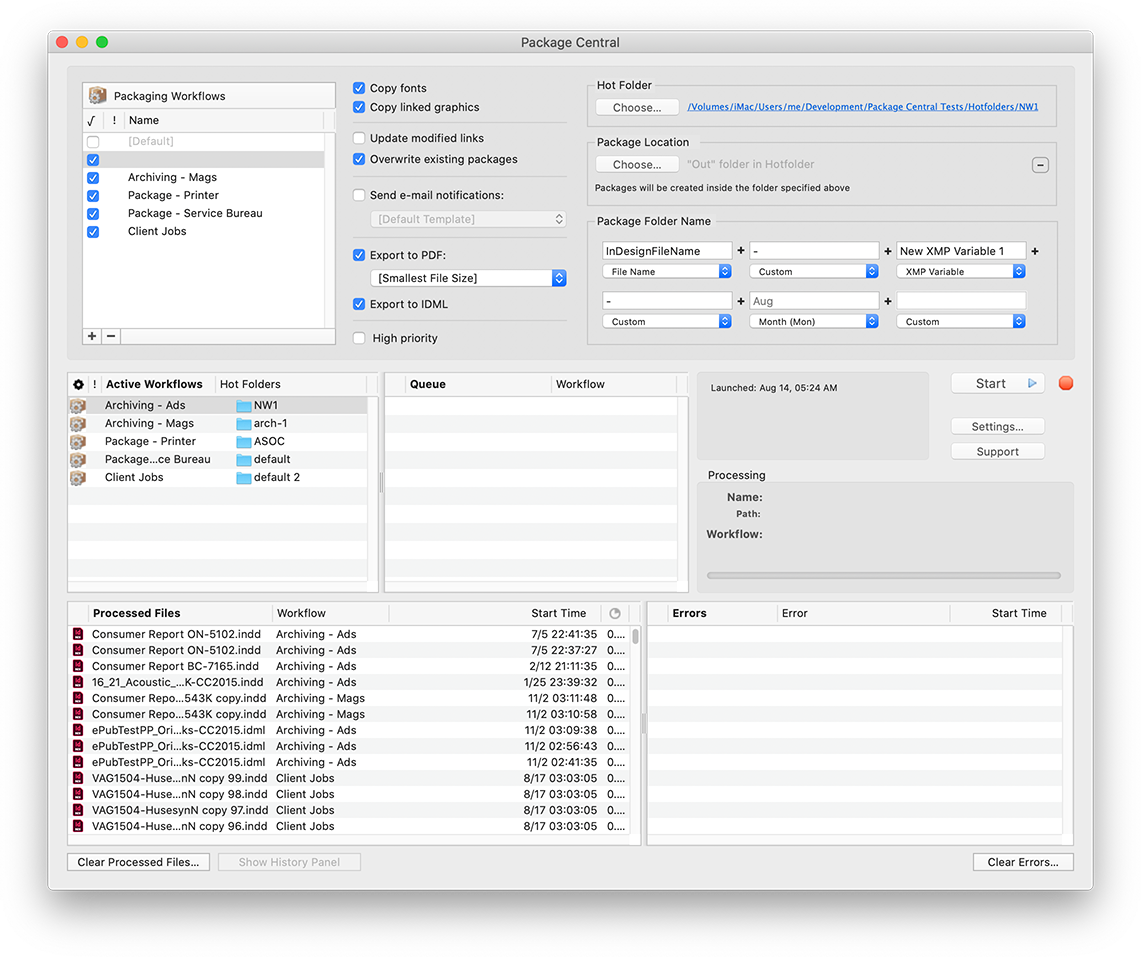
Zevrix Solutions announces Package Central 1.11.20, a compatibility update to company's file packaging automation solution for Adobe InDesign. Package Central collects InDesign documents automatically from watched hot folders. The app serves unlimited users on a network and offers automatic email notifications, PDF/IDML export, variable folder names and more. The new version adds support to the recently released macOS 11 Big Sur and automatically fixes file permission errors during activation.
Toronto (ON), Canada - Zevrix Solutions today announces Package Central 1.11.20, a compatibility update to company's file packaging automation solution for Adobe InDesign. Originally developed for a major publisher in the United States, the software automates InDesign document collection by processing files from watched hot folders. Package Central solves the problem of centralized packaging and archiving of InDesign projects in a workgroup environment while serving unlimited users on a network.
The new version introduces support for the recently released macOS 11 Big Sur and is offered free of charge to licensed users. The update also improves memory management and automatically fixes file permission errors that could occur during license activation.
Package Central lets prepress operators, production artists, and designers simply submit files to watched hot folders that reside on a network. The app then automatically collects InDesign files along with their fonts and links into the destination folder with dynamically assigned variable name. Package Central offers the following key features:
* Automatically package InDesign files from watched hot folders
* Create PDF and IDML files on the fly
* Create hot folders for various packaging settings
* Assign variable package folder names
* Automatic email notifications on process stages and errors
* Update modified links automatically
* Detailed processing logs
* Maintain a single set of settings for entire workgroup
Pricing and Availability:
Package Central can be purchased for $149.95 (USD) from Zevrix website, as well as from authorized resellers. Trial is also available for download. Package Central requires macOS 10.8-11.0 and Adobe InDesign CS5-2021.
Zevrix Solutions: https://zevrix.com
Package Central 1.11.20: https://zevrix.com/packagecentral
Download Package Central: https://zevrix.com/downloads/PackageCentral.dmg
Purchase: https://zevrix.com/store
Screenshot: https://zevrix.com/wp-content/uploads/2020/08/pac-main-1141-tall.png
Located in Toronto, Canada, Zevrix Solutions provides automation and productivity solutions for Adobe Creative Cloud and Creative Suite software, PDF workflows, graphic file diagnostics and Microsoft Office output on Mac OS. Zevrix is dedicated to help professionals increase their profits through automating everyday tasks, producing error-free documents, saving disk space and cutting production costs. For more information, visit their website. Copyright (C) 2020 Zevrix Solutions. All Rights Reserved. Other trademarks and registered trademarks may be the property of their respective owners.
*******
Link To Article: https://prmac.com/release-id-84227.htm
*******
---------------------------------------------------------------------------------
Note that you can alter delivered distributions at any time.
Login to your account on prMac to alter your channel selection, or to opt-out at any time.
Package Central for Adobe InDesign Now Supports macOS Big Sur - Published on 11/24/20
Zevrix Solutions announces Package Central 1.11.20, a compatibility update to company's file packaging automation solution for Adobe InDesign. Package Central collects InDesign documents automatically from watched hot folders. The app serves unlimited users on a network and offers automatic email notifications, PDF/IDML export, variable folder names and more. The new version adds support to the recently released macOS 11 Big Sur and automatically fixes file permission errors during activation.
Toronto (ON), Canada - Zevrix Solutions today announces Package Central 1.11.20, a compatibility update to company's file packaging automation solution for Adobe InDesign. Originally developed for a major publisher in the United States, the software automates InDesign document collection by processing files from watched hot folders. Package Central solves the problem of centralized packaging and archiving of InDesign projects in a workgroup environment while serving unlimited users on a network.
The new version introduces support for the recently released macOS 11 Big Sur and is offered free of charge to licensed users. The update also improves memory management and automatically fixes file permission errors that could occur during license activation.
Package Central lets prepress operators, production artists, and designers simply submit files to watched hot folders that reside on a network. The app then automatically collects InDesign files along with their fonts and links into the destination folder with dynamically assigned variable name. Package Central offers the following key features:
* Automatically package InDesign files from watched hot folders
* Create PDF and IDML files on the fly
* Create hot folders for various packaging settings
* Assign variable package folder names
* Automatic email notifications on process stages and errors
* Update modified links automatically
* Detailed processing logs
* Maintain a single set of settings for entire workgroup
Pricing and Availability:
Package Central can be purchased for $149.95 (USD) from Zevrix website, as well as from authorized resellers. Trial is also available for download. Package Central requires macOS 10.8-11.0 and Adobe InDesign CS5-2021.
Zevrix Solutions: https://zevrix.com
Package Central 1.11.20: https://zevrix.com/packagecentral
Download Package Central: https://zevrix.com/downloads/PackageCentral.dmg
Purchase: https://zevrix.com/store
Screenshot: https://zevrix.com/wp-content/uploads/2020/08/pac-main-1141-tall.png
Located in Toronto, Canada, Zevrix Solutions provides automation and productivity solutions for Adobe Creative Cloud and Creative Suite software, PDF workflows, graphic file diagnostics and Microsoft Office output on Mac OS. Zevrix is dedicated to help professionals increase their profits through automating everyday tasks, producing error-free documents, saving disk space and cutting production costs. For more information, visit their website. Copyright (C) 2020 Zevrix Solutions. All Rights Reserved. Other trademarks and registered trademarks may be the property of their respective owners.
*******
Link To Article: https://prmac.com/release-id-84227.htm
*******
---------------------------------------------------------------------------------
Note that you can alter delivered distributions at any time.
Login to your account on prMac to alter your channel selection, or to opt-out at any time.
MaBaSoft Releases World Clock Deluxe 4.17
A new article has been published at prMac.
MaBaSoft Releases World Clock Deluxe 4.17 - Published on 11/24/20
MaBaSoft announces World Clock Deluxe 4.17, an update to their world time utility for macOS. World Clock Deluxe comes with over 1,600 cities and 200 time zones, displays multiple clocks in a horizontal or vertical palette, in the menu bar, or in the Dock, calculates corresponding times in different cities, and allows users to easily identify the best time for meetings across multiple time zones. Version 4.17 adopts the new look of macOS 11.0 Big Sur and introduces some improvements and fixes.
Milano, Italy - MaBaSoft announces World Clock Deluxe 4.17, the latest version of their popular world time utility for macOS. World Clock Deluxe is a reliable and easy-to-use time tool for companies and organizations regularly communicating with people across the world, frequent travelers, and home users having family or friends in other countries or time zones.
World Clock Deluxe displays multiple digital or analog clocks in a highly configurable horizontal or vertical palette, in the menu bar, and in the Dock, and can show the time in over 1,600 cities and 200 time zones and world times, including Greenwich Mean Time, Coordinated Universal Time, and Internet Time. It comes with a variety of date and time formats and can display seconds, weekday, date, date change, time zone, offset from UTC, and offset from local time.
With World Clock Deluxe users can easily organize clocks so that they always have a good overview of the displayed times. Colors and labels can be assigned to clocks to quickly single out the local clock or different groups of clocks. Clocks can be sorted by name, time, longitude, longitude offset, or label. Seldom used clocks can be hidden and different clocks can be displayed in the palette, in the menu bar, and in the Dock.
World Clock Deluxe also helps users with phone calls to other countries and international meetings. The Time Converter quickly calculates corresponding dates and times in different cities or time zones, while the Meeting Planner allows users to easily identify the best time for online chats, conference calls, or video conferences across multiple time zones. Conversion results and meeting details can be easily shared via Mail or Messages, saved to a note, or added to a reminder.
With World Clock Deluxe, users can finally show the weather all over the world. World Clock Deluxe downloads National Oceanic and Atmospheric Administration (NOAA) weather reports and displays temperature, pressure, visibility, wind conditions, and precipitations.
Version 4.17 is fully compatible with macOS 11.0 Big Sur and adopts the new look of macOS. In addition to that, it revises the appearance of the Clocks palette, solves an incompatibility with Catalina, and updates daylight-saving time information for Fiji, Iran, Morocco, Palestine, and Western Sahara.
Language Support:
* English, German, French, Dutch, and Italian
System Requirements:
* macOS 10.11, 10.12, 10.13, 10.14, 10.15, or 11.0 (Big Sur)
Pricing and Availability:
World Clock Deluxe 4.17 is a free update for registered version 4 users. It is $10.00 (USD) for users who purchased version 3, and costs $19.00 (USD) for new users. Family, Site, and World-wide licenses are also available.
MaBaSoft: https://www.mabasoft.net/
World Clock Deluxe 4.17: https://www.mabasoft.net/products/worldClockDeluxeX.html
Purchase World Clock Deluxe: https://sites.fastspring.com/mabasoft/product/all?language=en
Direct Download: https://www.mabasoft.net/downloads/files/World_Clock_Deluxe_4.17.dmg
Release Notes: https://www.mabasoft.net/releaseNotes/worldClockDeluxeX.html
Media Assets: https://www.mabasoft.net/pressImages/worldClockDeluxeX.html
MaBaSoft, based in Milano, Italy, is a small independent company founded by Marco Damaschi and Barbara Canino in 1997. MaBaSoft develops quality system utilities and applications for the Macintosh. All Material and Software Copyright 1997-2020 MaBaSoft. All Rights Reserved. Apple, the Apple logo and Mac are registered trademarks of Apple Inc. in the U.S. and/or other countries. Other trademarks and registered trademarks may be the property of their respective owners.
*******
Link To Article: https://prmac.com/release-id-84225.htm
*******
---------------------------------------------------------------------------------
Note that you can alter delivered distributions at any time.
Login to your account on prMac to alter your channel selection, or to opt-out at any time.
MaBaSoft Releases World Clock Deluxe 4.17 - Published on 11/24/20
MaBaSoft announces World Clock Deluxe 4.17, an update to their world time utility for macOS. World Clock Deluxe comes with over 1,600 cities and 200 time zones, displays multiple clocks in a horizontal or vertical palette, in the menu bar, or in the Dock, calculates corresponding times in different cities, and allows users to easily identify the best time for meetings across multiple time zones. Version 4.17 adopts the new look of macOS 11.0 Big Sur and introduces some improvements and fixes.
Milano, Italy - MaBaSoft announces World Clock Deluxe 4.17, the latest version of their popular world time utility for macOS. World Clock Deluxe is a reliable and easy-to-use time tool for companies and organizations regularly communicating with people across the world, frequent travelers, and home users having family or friends in other countries or time zones.
World Clock Deluxe displays multiple digital or analog clocks in a highly configurable horizontal or vertical palette, in the menu bar, and in the Dock, and can show the time in over 1,600 cities and 200 time zones and world times, including Greenwich Mean Time, Coordinated Universal Time, and Internet Time. It comes with a variety of date and time formats and can display seconds, weekday, date, date change, time zone, offset from UTC, and offset from local time.
With World Clock Deluxe users can easily organize clocks so that they always have a good overview of the displayed times. Colors and labels can be assigned to clocks to quickly single out the local clock or different groups of clocks. Clocks can be sorted by name, time, longitude, longitude offset, or label. Seldom used clocks can be hidden and different clocks can be displayed in the palette, in the menu bar, and in the Dock.
World Clock Deluxe also helps users with phone calls to other countries and international meetings. The Time Converter quickly calculates corresponding dates and times in different cities or time zones, while the Meeting Planner allows users to easily identify the best time for online chats, conference calls, or video conferences across multiple time zones. Conversion results and meeting details can be easily shared via Mail or Messages, saved to a note, or added to a reminder.
With World Clock Deluxe, users can finally show the weather all over the world. World Clock Deluxe downloads National Oceanic and Atmospheric Administration (NOAA) weather reports and displays temperature, pressure, visibility, wind conditions, and precipitations.
Version 4.17 is fully compatible with macOS 11.0 Big Sur and adopts the new look of macOS. In addition to that, it revises the appearance of the Clocks palette, solves an incompatibility with Catalina, and updates daylight-saving time information for Fiji, Iran, Morocco, Palestine, and Western Sahara.
Language Support:
* English, German, French, Dutch, and Italian
System Requirements:
* macOS 10.11, 10.12, 10.13, 10.14, 10.15, or 11.0 (Big Sur)
Pricing and Availability:
World Clock Deluxe 4.17 is a free update for registered version 4 users. It is $10.00 (USD) for users who purchased version 3, and costs $19.00 (USD) for new users. Family, Site, and World-wide licenses are also available.
MaBaSoft: https://www.mabasoft.net/
World Clock Deluxe 4.17: https://www.mabasoft.net/products/worldClockDeluxeX.html
Purchase World Clock Deluxe: https://sites.fastspring.com/mabasoft/product/all?language=en
Direct Download: https://www.mabasoft.net/downloads/files/World_Clock_Deluxe_4.17.dmg
Release Notes: https://www.mabasoft.net/releaseNotes/worldClockDeluxeX.html
Media Assets: https://www.mabasoft.net/pressImages/worldClockDeluxeX.html
MaBaSoft, based in Milano, Italy, is a small independent company founded by Marco Damaschi and Barbara Canino in 1997. MaBaSoft develops quality system utilities and applications for the Macintosh. All Material and Software Copyright 1997-2020 MaBaSoft. All Rights Reserved. Apple, the Apple logo and Mac are registered trademarks of Apple Inc. in the U.S. and/or other countries. Other trademarks and registered trademarks may be the property of their respective owners.
*******
Link To Article: https://prmac.com/release-id-84225.htm
*******
---------------------------------------------------------------------------------
Note that you can alter delivered distributions at any time.
Login to your account on prMac to alter your channel selection, or to opt-out at any time.
Subscribe to:
Posts (Atom)