A new article has been published at prMac.
Recosoft ships ID2Office 2021 - Export InDesign to Word, PPT & Keynote - Published on 12/10/20
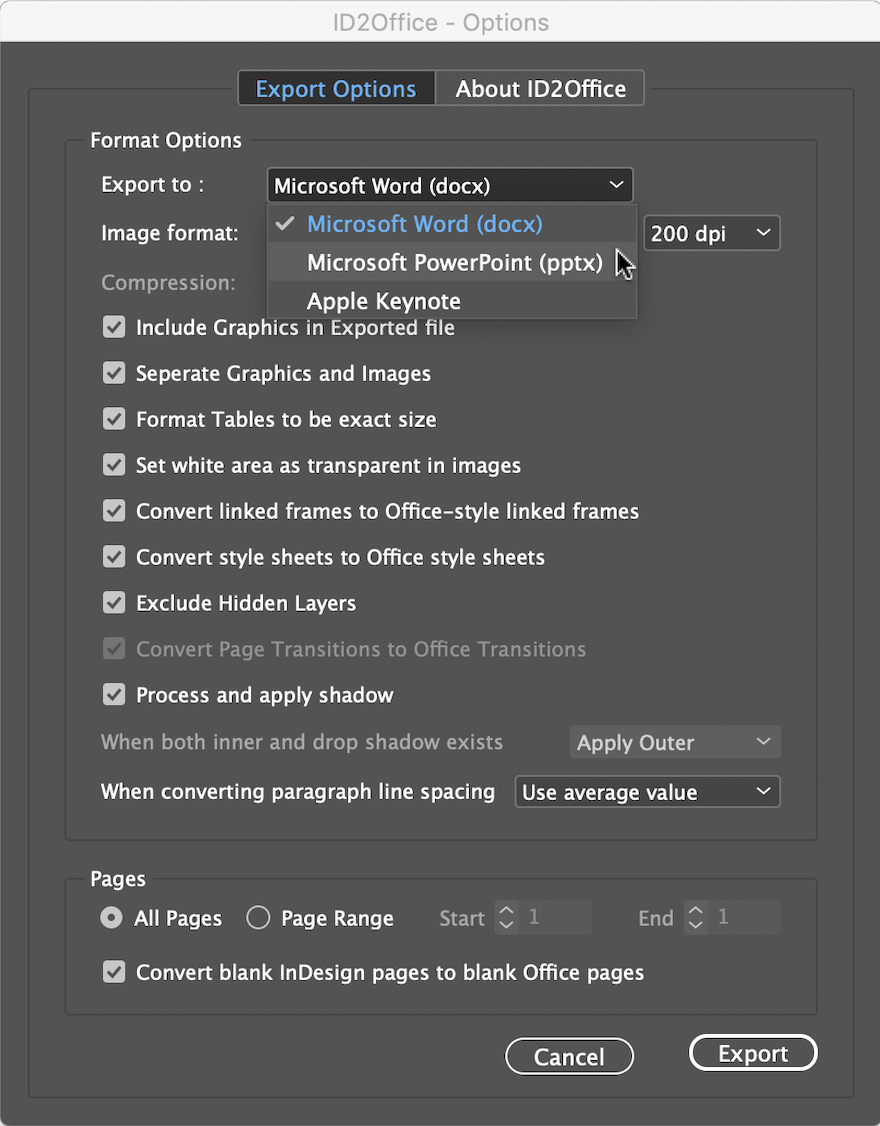
Recosoft Corporation has released ID2Office 2021, the newest version of its InDesign to Word, PowerPoint and Keynote conversion solution for Adobe InDesign 2021. ID2Office 2021 includes support for InDesign 2021 in addition to supporting InDesign CC through 2020 for both macOS and Windows systems. It includes an enhanced graphics processing algorithm improving image and graphics separation in the resulting Office file types. ID2Office 2021 also identifies Arabic and Hebrew languages and more.
Osaka, Japan - Recosoft Corporation, creators of workflow automation software and plug-ins for the Adobe(R) Creative Cloud(R) platform, and developers of PDF conversion tools, has released ID2Office 2021, the newest version of its InDesign to Word, PowerPoint and Keynote conversion solution for Adobe InDesign(R) 2021.
ID2Office 2021 includes support for InDesign 2021 in addition to supporting InDesign CC through 2020 for both macOS and Windows systems. ID2Office 2021 includes an enhanced graphics processing algorithm improving image and graphics separation in the resulting Office file types. Finally, ID2Office 2021 identifies Arabic and Hebrew languages ensuring the precise conversion of text, associated properties and layout elements.
"Over the years our customers have requested improved graphics separation and the capability to process right-to-left languages such as Arabic and Hebrew. With ID2Office 2021, we were finally able to meets these needs"
Paramjit Chadha, MD, Recosoft Corporation
ID2Office converts InDesign files to Microsoft Word, PowerPoint, and Apple Keynote types; converting the text, associated styles, paragraph structure, related property information, tables, graphics and other objects while matching and maintaining the layout fidelity; enhancing data exchange between InDesign and Office platforms. Key new features include:
* Support for InDesign 2021 - ID2Office 2021 now supports and integrates with InDesign 2021. InDesign CC through 2020 are supported as well.
* Arabic and Hebrew language text support - ID2Office adds support for Arabic and Hebrew languages. When exporting InDesign documents with Arabic/Hebrew text, the resulting Word and PowerPoint files includes Arabic/Hebrew text. Furthermore, the right-to-left layout properties and style sheet names are propagated as well.
* Separation of images - Images are now separated as much as possible resulting in converted files having images that can be manipulated.
* Conversion of native InDesign vector graphics to Office vector graphics - InDesign vector graphics such as rectangles, lines, ovals, and polygons along with the respective properties are converted to Word, PowerPoint and Keynote vector graphics.
* InDesign form fields to Word form fields - InDesign form field objects are now converted to Word form field objects.
* URL and Link properties - Hyperlinks and local links are now supported and converted to equivalent links in resulting Word/PowerPoint file.
* Extended paragraph properties - Paragraph properties such as borders, shading and rules are now processed, and equivalent properties are made in the converted file.
System Requirements
* macOS 10.10.x or higher
* Intel based Mac
* InDesign CC, CC 2014, CC 2015, CC 2017, CC 2018, CC 2019, 2020 or 2021
* Windows 7, Windows 8/8.1 or Windows 10
* Minimum Pentium III computer
* InDesign CC, CC 2014, CC 2015, CC 2017, CC 2018, CC 2019, 2020 or 2021
Pricing and Availability:
ID2Office 2021 is available immediately in the following configurations from the Recosoft web store (per license). ID2Office Standard 2021 annual subscription (macOS/Windows) is $199.00 (USD). ID2Office Professional 2021 Annual subscription (macOS only) is $249.00 (USD).
Recosoft Corporation: http://www.recosoft.com
ID2Office 2021: http://www.recosoft.com/products/id2office
Screenshot: http://www.recosoftcorporation.com/ftpenglish2/convert-indesign-to-ppt-or-word-or-keynote.png
Recosoft Corporation has pioneered PDF2Office(R), the de-facto PDF-to-Excel, PDF-to-Word, PDF-to-PowerPoint, PDF-to-OmniGraffle conversion utility; PDF2Office(R) for iWork, the PDF-to-Keynote, PDF-to-Numbers and PDF-to-Pages conversion application; ID2Office, the InDesign-to-Word, InDesign-to-PowerPoint converter; and PDF2ID(R) the de-facto PDF-to-InDesign conversion tool. The company is a leader in designing and delivering PDF converters and InDesign software solutions enhancing workflow automation and productivity. ID2Office, PDF2Office, PDF2ID, PDFtoID are trademarks or registered trademarks of Recosoft Corporation in the US and/or other countries. Microsoft, Excel, PowerPoint, Word and the Office logo are trademarks or registered trademarks of Microsoft Corporation in the US and/or other countries. Adobe, InDesign and Creative Cloud are either registered trademarks or trademarks of Adobe System Incorporated in the US and/or other countries. Apple, Macintosh, macOS, Mac, Numbers,
Keynote, Pages, iWork, iPod, iPhone, iOS, iPad are either trademarks or registered trademarks of Apple, Inc. in the US and or other countries. All other trademarks are recognized and are the property of their respective owners.
*******
Link To Article: https://prmac.com/release-id-84248.htm
*******
---------------------------------------------------------------------------------
Note that you can alter delivered distributions at any time.
Login to your account on prMac to alter your channel selection, or to opt-out at any time.

HoudahSpot 6.0 - Major Upgrade to Mac File Search and Management Tool
A new article has been published at prMac.
HoudahSpot 6.0 - Major Upgrade to Mac File Search and Management Tool - Published on 12/09/20
Houdah Software announces the availability of HoudahSpot 6.0 for macOS, a file search tool that helps Mac users organize files and finds these if they did not. HoudahSpot combines fast and precise file search with a customizable results display and previews. HoudahSpot makes it easy to find the right document, email message, photo, or video file. Version 6.0 adds many user-requested enhancements, including the ability to find Apple Mail.app messages files.
Luxembourg - Houdah Software is pleased to announce the availability of HoudahSpot 6.0 today. HoudahSpot is a file search tool that helps Mac users organize files and finds these if they did not. HoudahSpot combines fast and precise file search with a customizable results display and previews. It makes it easy to find the right document, email message, photo, or video file.
HoudahSpot is a productivity tool that serves as the hub of many workflows: in HoudahSpot, all the files related to the task at hand come together. It is also the starting point for deep dive searches to fetch further information from archives. Full-text search and a multitude of precise search criteria can be used to iteratively refine searches and hunt down an elusive document. A customizable interface makes HoudahSpot equally adept at presenting mail messages, documents, or media files. Search templates provide starting points for specialized searches. E.g., a search for video files.
HoudahSpot is a powerful, versatile, and highly customizable file search tool for Mac. It uses the existing Spotlight index for ultra-fast file searches. The purpose of HoudahSpot is to provide quick access to all kinds of files. It achieves this with searches that can be refined to return a manageable list of results. HoudahSpot shows search results in an interface that keeps relevant details within reach. Combined with previews of file content and text matches, this makes it easy to sort through search results and assess the found files' relevance.
HoudahSpot is the go-to tool for Mac users who need to find a precise document, mail message, photo, video, artwork, etc., in a "haystack" of files. HoudahSpot makes it easy to combine multiple criteria (such as name, text content, kind, and a wide assortment of other metadata) and thus helps users find the files they need:
* Mails messages with attachments received this year
* Word processing files containing the word "invoice" or "estimate"
* Image files named "logo" or "icon" that are more than 512 pixels wide
* Files created, modified, or opened within the last 7 days
Feature Highlights:
* Quick search field: start a search by typing just a few words
* Multi-criteria file search: Find files by name, text, content kind, author, recipient, image dimensions, and more
* Easy-to-use criteria editor: Combine search criteria to narrow down search results to the exact files you need
* Smart location selection: Search multiple folders at once, and exclude others
* Tag cloud: Lists file tags found in current search results. Provides a quick way to narrow down results (new)
* Customizable results display: View search results as a list or grid. Add columns. Sort. Arrange in groups
* Concise file info: See properties relevant to the selected file type
* Preview of file content: Peek inside files. See text matches in context
* Saved searches and templates: Use as starting points for recurring searches
* Snippets: Save sets of frequently used search criteria
* Filter by folder. See top-level files only. Combine multiple filters (new)
* Fully customizable. Set the default search window to match your preferences and workflow
* Continued search: Open files and, where the application supports it, continue searching for text matches by pressing command-G (Find Next)
* Integrates with Finder and third-party tools like Default Folder X, PopClip, ForkLift, Path Finder, Alfred, LaunchBar, and Butler
What's New in HoudahSpot 6.0:
macOS 11.0 Big Sur has introduced a dramatic new look representing a significant aesthetic departure from previous macOS versions. HoudahSpot 6.0 adopts this refreshed Mac user interface with a fine-tuned new look, a new icon, and a redesigned toolbar.
"This year Apple has announced and released major upgrades to both Mac software and hardware. These have presented us some unique challenges," says Pierre Bernard of Houdah Software. "Some of the appearance changes in macOS Big Sur root deep in how standard interface elements should be used. While working on the new HoudahSpot, we had to consider how both new and existing elements should fit the new design language." "Apple has also started the transition from Intel CPUs to their own Apple Silicon. HoudahSpot 6.0 manages the balancing act of providing a first-class experience across three major releases of macOS and two hardware architectures."
Of course, HoudahSpot 6.0 has much more to offer than good looks. It comes packed with features to improve your productivity. Many of these enhancements take root in user feedback collected over the years.
HoudahSpot 6.0 can again search Apple Mail messages. Finally! Starting with macOS 10.15 Catalina, Apple Mail messages are no longer available through the Spotlight index used by HoudahSpot. HoudahSpot 6.0 can nonetheless find your Apple Mail messages. HoudahSpot installs a plug-in that runs within the Mail application. This plug-in allows HoudahSpot to include Mail message files in your search results.
Tag Cloud:
The Tag Cloud lists your favorite file tags as well as all the tags found in the current search results. It also shows the number of occurrences of each tag.
The Tag Cloud is yet another way to incrementally refine your search to find only the most relevant files. Click a tag to restrict your search to files having that tag. Command-click a tag to exclude files. Hold the shift key while clicking to clear a previous selection and select only the last clicked tag.
Powerful Filters:
Filters help you focus on relevant files by only showing you a subset of your search results. HoudahSpot can filter files to show only those that share a common property. E.g., files modified the same day.
HoudahSpot can also filter files by name, path, and folder names. These filters also support regular expressions. You can thus show or hide results by matching their names or paths to a pattern. Filters can narrow down result lists in ways that are not pat is possible with a plain search. In HoudahSpot 6.0, you can now apply multiple filters at the same time.
Top-level Files:
You can also use a filter to see only files from a specific folder. Thus, you can choose to see only files from the top level of the folder structure where you are searching. Files nested deeper in the folder structure are hidden. The option to filter by folder can also help you break up a lengthy list of search results: explore search results folder by folder.
Grouped Results:
HoudahSpot can group search results by application, date, size, and kind. This option is another way HoudahSpot can help break up search results into manageable chunks. Version 6.0 can now also arrange results by file tags or volume/drive.
* Files Having or Missing a Property:
In the Refine pane, many attributes now offer the "is set" operator. This operator matches files that have - to the knowledge of the Spotlight index - a value for the selected attribute. You can, for example, use this to find files that have at least one tag. Their "Tags" attribute is set. This criterion can be nested in a "none of the following is true" group to find files that lack tags. Similarly, you can use the "is set" operator to find PDF files that lack "Text Content". These files may need OCR processing.
* Recent Searches:
HoudahSpot now remembers recent searches. You can resume an earlier search by selecting it from the list in the File menu.
* Share a Search:
HoudahSpot 6.0 makes it easy to share your current search configuration with a friend or colleague. Just select File > Share Search from the menu.
Further Enhancements:
* New columns in search results: parent folder and volume/drive names
* A quicker way of using Snippets: option-click a snippet in the sidebar to add it to the current search
* Improved support for VoiceOver
* Option to automatically start searching as soon as you enter a query
Customer Voices:
"If there is one utility that is indispensable for me on the Mac, HoudahSpot is it (locates files on disk)."
- @helgeg via Twitter
"I love HoudahSpot - way, way better than Spotlight as a search app for @Apple Mac computer."
- @sinabhfuil via Twitter
"HoudahSpot may be the most helpful application I own."
- H. E. Jr., Edmond, OK
"There's nothing else like it [HoudahSpot] for Mac users by a long margin."
- Adrain Stevenson
Language Support:
* HoudahSpot is offered in English, German, and French language versions
Minimum Requirements:
* macOS 10.14 Mojave or newer
* Optimized for macOS 11 Big Sur on both Intel and Apple Silicon Macs
* Spotlight enabled
* 35 MB of disk space
Pricing and Availability:
HoudahSpot 6.0 is priced at $34 (USD) for a single-user license. A family license is available for $42. Upgrades are priced $19 and $29, respectively. HoudahSpot licenses purchased on or after June 1, 2020 upgrade for free. A full-featured trial version is available. Licenses can be purchased from the Houdah Software store. Upgrades are available upon loading a previous license.
Houdah Software: https://www.houdah.com/
HoudahSpot 6.0: https://www.houdah.com/houdahSpot/
Tips & Tricks: https://blog.houdah.com/
Download HoudahSpot: https://www.houdah.com/houdahSpot/download.html
Purchase HoudahSpot: https://www.houdah.com/store/
Press Kit (zip): https://www.houdah.com/houdahSpot/assets/HoudahSpot-Press-Kit.zip
Founded in 2005 by Pierre Bernard, Houdah Software s.a r.l is a small company based in Luxembourg, Europe. Houdah Software specializes in quality software for Mac, iPhone and Apple iPad. Our mission is to pair quality products with excellent customer support. All Material and Software Copyright (C) 2005-2020 s.a r.l. All Rights Reserved. Apple, the Apple logo, Macintosh, Mac, macOS, iPhone, iPod and iPad are registered trademarks of Apple Inc. in the U.S. and/or other countries. Other trademarks and registered trademarks may be the property of their respective owners.
*******
Link To Article: https://prmac.com/release-id-84247.htm
*******
---------------------------------------------------------------------------------
Note that you can alter delivered distributions at any time.
Login to your account on prMac to alter your channel selection, or to opt-out at any time.
HoudahSpot 6.0 - Major Upgrade to Mac File Search and Management Tool - Published on 12/09/20
Houdah Software announces the availability of HoudahSpot 6.0 for macOS, a file search tool that helps Mac users organize files and finds these if they did not. HoudahSpot combines fast and precise file search with a customizable results display and previews. HoudahSpot makes it easy to find the right document, email message, photo, or video file. Version 6.0 adds many user-requested enhancements, including the ability to find Apple Mail.app messages files.
Luxembourg - Houdah Software is pleased to announce the availability of HoudahSpot 6.0 today. HoudahSpot is a file search tool that helps Mac users organize files and finds these if they did not. HoudahSpot combines fast and precise file search with a customizable results display and previews. It makes it easy to find the right document, email message, photo, or video file.
HoudahSpot is a productivity tool that serves as the hub of many workflows: in HoudahSpot, all the files related to the task at hand come together. It is also the starting point for deep dive searches to fetch further information from archives. Full-text search and a multitude of precise search criteria can be used to iteratively refine searches and hunt down an elusive document. A customizable interface makes HoudahSpot equally adept at presenting mail messages, documents, or media files. Search templates provide starting points for specialized searches. E.g., a search for video files.
HoudahSpot is a powerful, versatile, and highly customizable file search tool for Mac. It uses the existing Spotlight index for ultra-fast file searches. The purpose of HoudahSpot is to provide quick access to all kinds of files. It achieves this with searches that can be refined to return a manageable list of results. HoudahSpot shows search results in an interface that keeps relevant details within reach. Combined with previews of file content and text matches, this makes it easy to sort through search results and assess the found files' relevance.
HoudahSpot is the go-to tool for Mac users who need to find a precise document, mail message, photo, video, artwork, etc., in a "haystack" of files. HoudahSpot makes it easy to combine multiple criteria (such as name, text content, kind, and a wide assortment of other metadata) and thus helps users find the files they need:
* Mails messages with attachments received this year
* Word processing files containing the word "invoice" or "estimate"
* Image files named "logo" or "icon" that are more than 512 pixels wide
* Files created, modified, or opened within the last 7 days
Feature Highlights:
* Quick search field: start a search by typing just a few words
* Multi-criteria file search: Find files by name, text, content kind, author, recipient, image dimensions, and more
* Easy-to-use criteria editor: Combine search criteria to narrow down search results to the exact files you need
* Smart location selection: Search multiple folders at once, and exclude others
* Tag cloud: Lists file tags found in current search results. Provides a quick way to narrow down results (new)
* Customizable results display: View search results as a list or grid. Add columns. Sort. Arrange in groups
* Concise file info: See properties relevant to the selected file type
* Preview of file content: Peek inside files. See text matches in context
* Saved searches and templates: Use as starting points for recurring searches
* Snippets: Save sets of frequently used search criteria
* Filter by folder. See top-level files only. Combine multiple filters (new)
* Fully customizable. Set the default search window to match your preferences and workflow
* Continued search: Open files and, where the application supports it, continue searching for text matches by pressing command-G (Find Next)
* Integrates with Finder and third-party tools like Default Folder X, PopClip, ForkLift, Path Finder, Alfred, LaunchBar, and Butler
What's New in HoudahSpot 6.0:
macOS 11.0 Big Sur has introduced a dramatic new look representing a significant aesthetic departure from previous macOS versions. HoudahSpot 6.0 adopts this refreshed Mac user interface with a fine-tuned new look, a new icon, and a redesigned toolbar.
"This year Apple has announced and released major upgrades to both Mac software and hardware. These have presented us some unique challenges," says Pierre Bernard of Houdah Software. "Some of the appearance changes in macOS Big Sur root deep in how standard interface elements should be used. While working on the new HoudahSpot, we had to consider how both new and existing elements should fit the new design language." "Apple has also started the transition from Intel CPUs to their own Apple Silicon. HoudahSpot 6.0 manages the balancing act of providing a first-class experience across three major releases of macOS and two hardware architectures."
Of course, HoudahSpot 6.0 has much more to offer than good looks. It comes packed with features to improve your productivity. Many of these enhancements take root in user feedback collected over the years.
HoudahSpot 6.0 can again search Apple Mail messages. Finally! Starting with macOS 10.15 Catalina, Apple Mail messages are no longer available through the Spotlight index used by HoudahSpot. HoudahSpot 6.0 can nonetheless find your Apple Mail messages. HoudahSpot installs a plug-in that runs within the Mail application. This plug-in allows HoudahSpot to include Mail message files in your search results.
Tag Cloud:
The Tag Cloud lists your favorite file tags as well as all the tags found in the current search results. It also shows the number of occurrences of each tag.
The Tag Cloud is yet another way to incrementally refine your search to find only the most relevant files. Click a tag to restrict your search to files having that tag. Command-click a tag to exclude files. Hold the shift key while clicking to clear a previous selection and select only the last clicked tag.
Powerful Filters:
Filters help you focus on relevant files by only showing you a subset of your search results. HoudahSpot can filter files to show only those that share a common property. E.g., files modified the same day.
HoudahSpot can also filter files by name, path, and folder names. These filters also support regular expressions. You can thus show or hide results by matching their names or paths to a pattern. Filters can narrow down result lists in ways that are not pat is possible with a plain search. In HoudahSpot 6.0, you can now apply multiple filters at the same time.
Top-level Files:
You can also use a filter to see only files from a specific folder. Thus, you can choose to see only files from the top level of the folder structure where you are searching. Files nested deeper in the folder structure are hidden. The option to filter by folder can also help you break up a lengthy list of search results: explore search results folder by folder.
Grouped Results:
HoudahSpot can group search results by application, date, size, and kind. This option is another way HoudahSpot can help break up search results into manageable chunks. Version 6.0 can now also arrange results by file tags or volume/drive.
* Files Having or Missing a Property:
In the Refine pane, many attributes now offer the "is set" operator. This operator matches files that have - to the knowledge of the Spotlight index - a value for the selected attribute. You can, for example, use this to find files that have at least one tag. Their "Tags" attribute is set. This criterion can be nested in a "none of the following is true" group to find files that lack tags. Similarly, you can use the "is set" operator to find PDF files that lack "Text Content". These files may need OCR processing.
* Recent Searches:
HoudahSpot now remembers recent searches. You can resume an earlier search by selecting it from the list in the File menu.
* Share a Search:
HoudahSpot 6.0 makes it easy to share your current search configuration with a friend or colleague. Just select File > Share Search from the menu.
Further Enhancements:
* New columns in search results: parent folder and volume/drive names
* A quicker way of using Snippets: option-click a snippet in the sidebar to add it to the current search
* Improved support for VoiceOver
* Option to automatically start searching as soon as you enter a query
Customer Voices:
"If there is one utility that is indispensable for me on the Mac, HoudahSpot is it (locates files on disk)."
- @helgeg via Twitter
"I love HoudahSpot - way, way better than Spotlight as a search app for @Apple Mac computer."
- @sinabhfuil via Twitter
"HoudahSpot may be the most helpful application I own."
- H. E. Jr., Edmond, OK
"There's nothing else like it [HoudahSpot] for Mac users by a long margin."
- Adrain Stevenson
Language Support:
* HoudahSpot is offered in English, German, and French language versions
Minimum Requirements:
* macOS 10.14 Mojave or newer
* Optimized for macOS 11 Big Sur on both Intel and Apple Silicon Macs
* Spotlight enabled
* 35 MB of disk space
Pricing and Availability:
HoudahSpot 6.0 is priced at $34 (USD) for a single-user license. A family license is available for $42. Upgrades are priced $19 and $29, respectively. HoudahSpot licenses purchased on or after June 1, 2020 upgrade for free. A full-featured trial version is available. Licenses can be purchased from the Houdah Software store. Upgrades are available upon loading a previous license.
Houdah Software: https://www.houdah.com/
HoudahSpot 6.0: https://www.houdah.com/houdahSpot/
Tips & Tricks: https://blog.houdah.com/
Download HoudahSpot: https://www.houdah.com/houdahSpot/download.html
Purchase HoudahSpot: https://www.houdah.com/store/
Press Kit (zip): https://www.houdah.com/houdahSpot/assets/HoudahSpot-Press-Kit.zip
Founded in 2005 by Pierre Bernard, Houdah Software s.a r.l is a small company based in Luxembourg, Europe. Houdah Software specializes in quality software for Mac, iPhone and Apple iPad. Our mission is to pair quality products with excellent customer support. All Material and Software Copyright (C) 2005-2020 s.a r.l. All Rights Reserved. Apple, the Apple logo, Macintosh, Mac, macOS, iPhone, iPod and iPad are registered trademarks of Apple Inc. in the U.S. and/or other countries. Other trademarks and registered trademarks may be the property of their respective owners.
*******
Link To Article: https://prmac.com/release-id-84247.htm
*******
---------------------------------------------------------------------------------
Note that you can alter delivered distributions at any time.
Login to your account on prMac to alter your channel selection, or to opt-out at any time.
BatchOutput for Microsoft Excel Automation Now Supports macOS Big Sur
A new article has been published at prMac.
BatchOutput for Microsoft Excel Automation Now Supports macOS Big Sur - Published on 12/08/20
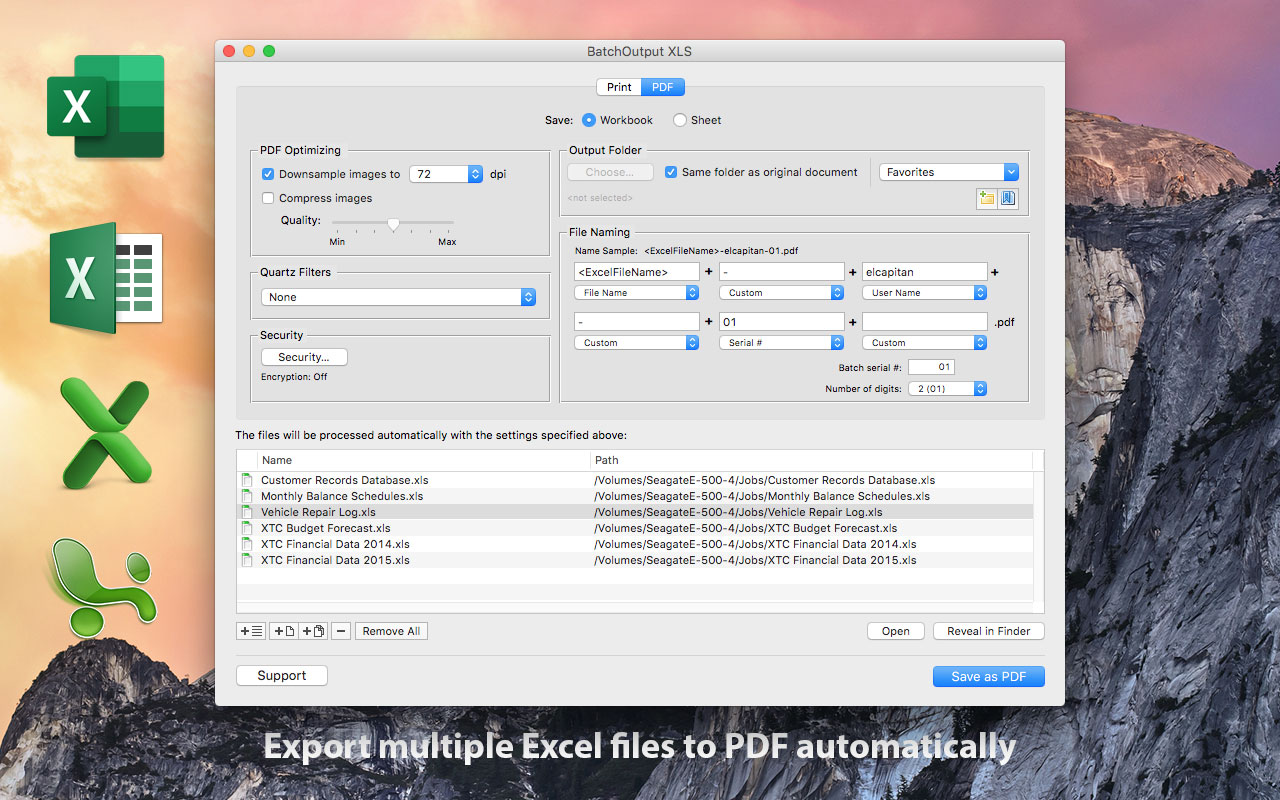
Zevrix Solutions announces BatchOutput XLS 2.5.13, a compatibility update to company's output automation solution for Microsoft Excel. BatchOutput automates printing and exporting of multiple spreadsheets to PDF and allows to carry out professional PDF production directly from Excel. The app offers PDF security, image compression, variable file names and more. The new version adds support for the recently released macOS Big Sur and automatically fixes file permission errors during activation.
Toronto (ON), Canada - Zevrix Solutions announces BatchOutput XLS 2.5.13, a compatibility update to company's output automation solution for Microsoft Excel on macOS. The only batch processing tool for Excel on the Mac market, the software helps users eliminate repetitive tasks through automation of printing and professional PDF output.
The new version introduces support for the recently released macOS 10.14 Mojave and is offered as a free update to the licensed users. While BatchOutput XLS is fully compatible with the new Dark Mode, the app currently preserves its original appearance. A dark appearance will be introduced in the future.
"I have enjoyed BatchOutput XLS for years now," says Steve Nelson Martin of New Hope Foundation in Beijing, China. "It has really been a huge help for me to process Excel documents into various PDF reports. I estimate that BatchOutput has helped me generate over 200,000 PDFs."
In addition to batch printing, BatchOutput XLS allows to carry out professional PDF production directly from Excel, helping users simplify and streamline the conversion process. BatchOutput XLS is the only app on the market that provides Excel users with advanced PDF creation options:
* Print and export multiple Excel documents to PDF with just a button click
* Variable PDF file names based on user name, date, batch number and other values
* Split Excel workbooks into single PDF worksheets
* Reduce PDF file size and optimize documents for web, print and mobile devices
* Encrypt and password-protect PDF from unauthorized copying, printing and viewing
* Change PDF color tone, brightness and other qualities
BatchOutput XLS is a part of the Zevrix BatchOutput product family which also includes output automation solutions for Microsoft Word, PowerPoint, Adobe InDesign and PDF workflows.
Pricing and Availability:
BatchOutput XLS can be purchased for $19.95 (USD) from Zevrix website, as well as from authorized resellers and Mac App Store. Trial is also available for download. BatchOutput XLS requires macOS 10.8-11.0 and Microsoft Excel 2008, 2011, 2016 or 2019.
Zevrix Solutions: https://zevrix.com
BatchOutput XLS 2.5.13: https://zevrix.com/batchoutputoffice
Download BatchOutput XLS: https://zevrix.com/downloads/BatchOutputOffice.dmg
Purchase: https://zevrix.com/store
Screenshot: https://zevrix.com/screenshots/bo-office/MAS/box2-pdf-mas.jpg
Located in Toronto, Canada, Zevrix Solutions provides automation and productivity solutions for Adobe Creative Cloud and Creative Suite software, PDF workflows, graphic file diagnostics and Microsoft Office output on Mac OS. Zevrix is dedicated to help professionals increase their profits through automating everyday tasks, producing error-free documents, saving disk space and cutting production costs. For more information, visit their website. Copyright (C) 2020 Zevrix Solutions. All Rights Reserved. Other trademarks and registered trademarks may be the property of their respective owners.
*******
Link To Article: https://prmac.com/release-id-84245.htm
*******
---------------------------------------------------------------------------------
Note that you can alter delivered distributions at any time.
Login to your account on prMac to alter your channel selection, or to opt-out at any time.
BatchOutput for Microsoft Excel Automation Now Supports macOS Big Sur - Published on 12/08/20
Zevrix Solutions announces BatchOutput XLS 2.5.13, a compatibility update to company's output automation solution for Microsoft Excel. BatchOutput automates printing and exporting of multiple spreadsheets to PDF and allows to carry out professional PDF production directly from Excel. The app offers PDF security, image compression, variable file names and more. The new version adds support for the recently released macOS Big Sur and automatically fixes file permission errors during activation.
Toronto (ON), Canada - Zevrix Solutions announces BatchOutput XLS 2.5.13, a compatibility update to company's output automation solution for Microsoft Excel on macOS. The only batch processing tool for Excel on the Mac market, the software helps users eliminate repetitive tasks through automation of printing and professional PDF output.
The new version introduces support for the recently released macOS 10.14 Mojave and is offered as a free update to the licensed users. While BatchOutput XLS is fully compatible with the new Dark Mode, the app currently preserves its original appearance. A dark appearance will be introduced in the future.
"I have enjoyed BatchOutput XLS for years now," says Steve Nelson Martin of New Hope Foundation in Beijing, China. "It has really been a huge help for me to process Excel documents into various PDF reports. I estimate that BatchOutput has helped me generate over 200,000 PDFs."
In addition to batch printing, BatchOutput XLS allows to carry out professional PDF production directly from Excel, helping users simplify and streamline the conversion process. BatchOutput XLS is the only app on the market that provides Excel users with advanced PDF creation options:
* Print and export multiple Excel documents to PDF with just a button click
* Variable PDF file names based on user name, date, batch number and other values
* Split Excel workbooks into single PDF worksheets
* Reduce PDF file size and optimize documents for web, print and mobile devices
* Encrypt and password-protect PDF from unauthorized copying, printing and viewing
* Change PDF color tone, brightness and other qualities
BatchOutput XLS is a part of the Zevrix BatchOutput product family which also includes output automation solutions for Microsoft Word, PowerPoint, Adobe InDesign and PDF workflows.
Pricing and Availability:
BatchOutput XLS can be purchased for $19.95 (USD) from Zevrix website, as well as from authorized resellers and Mac App Store. Trial is also available for download. BatchOutput XLS requires macOS 10.8-11.0 and Microsoft Excel 2008, 2011, 2016 or 2019.
Zevrix Solutions: https://zevrix.com
BatchOutput XLS 2.5.13: https://zevrix.com/batchoutputoffice
Download BatchOutput XLS: https://zevrix.com/downloads/BatchOutputOffice.dmg
Purchase: https://zevrix.com/store
Screenshot: https://zevrix.com/screenshots/bo-office/MAS/box2-pdf-mas.jpg
Located in Toronto, Canada, Zevrix Solutions provides automation and productivity solutions for Adobe Creative Cloud and Creative Suite software, PDF workflows, graphic file diagnostics and Microsoft Office output on Mac OS. Zevrix is dedicated to help professionals increase their profits through automating everyday tasks, producing error-free documents, saving disk space and cutting production costs. For more information, visit their website. Copyright (C) 2020 Zevrix Solutions. All Rights Reserved. Other trademarks and registered trademarks may be the property of their respective owners.
*******
Link To Article: https://prmac.com/release-id-84245.htm
*******
---------------------------------------------------------------------------------
Note that you can alter delivered distributions at any time.
Login to your account on prMac to alter your channel selection, or to opt-out at any time.
Scorpion Research releases Scorpion BarCode 3.20 for macOS
A new article has been published at prMac.
Scorpion Research releases Scorpion BarCode 3.20 for macOS - Published on 12/08/20
Scorpion Research today announces Scorpion BarCode 3.20, an update to its popular barcode creation software for Apple macOS. Scorpion BarCode helps with easy creation and printing of all major barcode symbologies in EPS, PDF, PNG, or TIFF file formats. Easily integrate Barcodes into popular database, spreadsheet and word processor applications. A command line version is also provided to build powerful scripted solutions. Designed for macOS 11 Big Sur but works with OS X 10.9 or later.
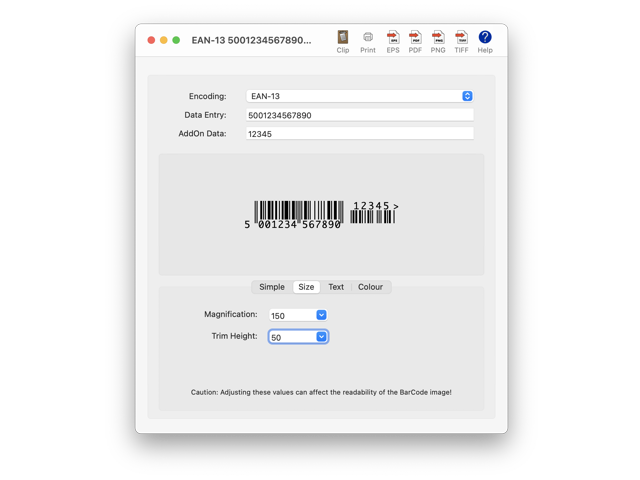
Chislehurst Kent, United Kingdom - Scorpion Research today announced the release of version 3.20 of Scorpion BarCode, its popular BarCode creation software for Apple macOS computers. Scorpion BarCode is a complete Barcode creation utility that you can use to quickly create Barcode images for use in other applications. The software supports the following symbologies:
* EAN-13 (With or without Add-On codes)
* EAN-8
* EAN-128
* EAN-14
* EAN-18
* EAN-99
* EAN-Coupon
* EAN-Velocity
* UPC-A (With or without Add-On codes)
* UPC-E
* Code-128
* Code-93
* Code-39
* Code-32
* Code-25
* UPC-Coupon
* Codabar
* ISSN (10 digit / 13 digit)
* ISBN (10 digit / 13 digit)
* ISMN
* PostNet (5 digit / 9 digit / 11 digit)
* RM4SCC
* Pharmacode
* CIP
* PZN
* MSI
* ITF-SCC
* ITF-14
* Interleaved-25
* QRCode
* MicroQR
* PDF417
* Identcode
* DataMatrix
* USPS4CB
* FIM
* Databar-Omnidirectional
* Databar-Truncated
* Databar-Stacked
* Databar-StackedOmnidirectional
* Databar-Limited
* Databar-Expanded
* Telepen
By entering the text of a Barcode, the software produces the graphic equivalent using one of the above selected symbologies. Use it to:
* Create editable vector PDF or EPS documents
* Create bitmap PNG or TIFF documents with transparency
* Paste into another application simply via the Clipboard
* Print camera ready artwork automatically
* Convert text in other applications into Barcode graphics using AppleScript
Sample AppleScripts are available to enable you to automate your BarCode creation workflow including integrating Barcodes into popular database, spreadsheet and word processor software.
A command line version is also available, enabling powerful custom scripting solutions beyond AppleScript or Automator. Integrate into solutions directly using Unix technologies such as shell scripts or via web CGI scripts.
The Scorpion BarCode software embraces the latest Apple technology to simplify the user experience. The entire User Guide is built into the onscreen help and separately viewable.
New in Scorpion BarCode 3.20:
* Optimised for macOS 11 Big Sur
* Universal Binary for Apple Silicon or Intel processors
* Improved layout for advanced editing options
System Requirements:
The Scorpion BarCode software operates natively on any macOS compatible system running OS X 10.9 Mavericks or later. Optimised for macOS 11 Big Sur with Apple Silicon or Intel processors.
Pricing and Availability:
Scorpion BarCode 3.20 is available now with a Free 30 day trial. A single user license GBP 25.00 (Approx $30.00 USD). Scorpion BarCode may be downloaded from the Scorpion Research web site, following the links to Software Products, Scorpion BarCode and then Download.
Scorpion Research: https://www.scorpionresearch.com/
Scorpion BarCode 3.20: https://www.scorpionresearch.com/srl/SBCH_Hom.htm
Download Scorpion BarCode: https://www.scorpionresearch.com/srl/ScorpionBarCode_310.dmg
Purchase: https://www.scorpionresearch.com/srl/SBCH_Buy.htm
Screenshot: https://www.scorpionresearch.com/srl/SBCH_ScL.png
Application Icon: https://www.scorpionresearch.com/srl/SBCH_icn.png
Scorpion Research was founded in 1994 focusing its activities on implementing modern management techniques using its innovative software products. Scorpion Research is an ISO 9001 and ISO 14001 compliant company demonstrating its commitment to a consistent level of quality and environmental responsibility. Scorpion Research complements these activities by providing consultancy and support services that assist in implementing rapid, efficient and cost effective solutions. Copyright (C) 1994-2020 Scorpion Research Ltd. All Rights Reserved Worldwide. Apple, the Apple logo and Macintosh are registered trademarks of Apple Inc. in the U.S. and/or other countries.
*******
Link To Article: https://prmac.com/release-id-84246.htm
*******
---------------------------------------------------------------------------------
Note that you can alter delivered distributions at any time.
Login to your account on prMac to alter your channel selection, or to opt-out at any time.
Scorpion Research releases Scorpion BarCode 3.20 for macOS - Published on 12/08/20
Scorpion Research today announces Scorpion BarCode 3.20, an update to its popular barcode creation software for Apple macOS. Scorpion BarCode helps with easy creation and printing of all major barcode symbologies in EPS, PDF, PNG, or TIFF file formats. Easily integrate Barcodes into popular database, spreadsheet and word processor applications. A command line version is also provided to build powerful scripted solutions. Designed for macOS 11 Big Sur but works with OS X 10.9 or later.
Chislehurst Kent, United Kingdom - Scorpion Research today announced the release of version 3.20 of Scorpion BarCode, its popular BarCode creation software for Apple macOS computers. Scorpion BarCode is a complete Barcode creation utility that you can use to quickly create Barcode images for use in other applications. The software supports the following symbologies:
* EAN-13 (With or without Add-On codes)
* EAN-8
* EAN-128
* EAN-14
* EAN-18
* EAN-99
* EAN-Coupon
* EAN-Velocity
* UPC-A (With or without Add-On codes)
* UPC-E
* Code-128
* Code-93
* Code-39
* Code-32
* Code-25
* UPC-Coupon
* Codabar
* ISSN (10 digit / 13 digit)
* ISBN (10 digit / 13 digit)
* ISMN
* PostNet (5 digit / 9 digit / 11 digit)
* RM4SCC
* Pharmacode
* CIP
* PZN
* MSI
* ITF-SCC
* ITF-14
* Interleaved-25
* QRCode
* MicroQR
* PDF417
* Identcode
* DataMatrix
* USPS4CB
* FIM
* Databar-Omnidirectional
* Databar-Truncated
* Databar-Stacked
* Databar-StackedOmnidirectional
* Databar-Limited
* Databar-Expanded
* Telepen
By entering the text of a Barcode, the software produces the graphic equivalent using one of the above selected symbologies. Use it to:
* Create editable vector PDF or EPS documents
* Create bitmap PNG or TIFF documents with transparency
* Paste into another application simply via the Clipboard
* Print camera ready artwork automatically
* Convert text in other applications into Barcode graphics using AppleScript
Sample AppleScripts are available to enable you to automate your BarCode creation workflow including integrating Barcodes into popular database, spreadsheet and word processor software.
A command line version is also available, enabling powerful custom scripting solutions beyond AppleScript or Automator. Integrate into solutions directly using Unix technologies such as shell scripts or via web CGI scripts.
The Scorpion BarCode software embraces the latest Apple technology to simplify the user experience. The entire User Guide is built into the onscreen help and separately viewable.
New in Scorpion BarCode 3.20:
* Optimised for macOS 11 Big Sur
* Universal Binary for Apple Silicon or Intel processors
* Improved layout for advanced editing options
System Requirements:
The Scorpion BarCode software operates natively on any macOS compatible system running OS X 10.9 Mavericks or later. Optimised for macOS 11 Big Sur with Apple Silicon or Intel processors.
Pricing and Availability:
Scorpion BarCode 3.20 is available now with a Free 30 day trial. A single user license GBP 25.00 (Approx $30.00 USD). Scorpion BarCode may be downloaded from the Scorpion Research web site, following the links to Software Products, Scorpion BarCode and then Download.
Scorpion Research: https://www.scorpionresearch.com/
Scorpion BarCode 3.20: https://www.scorpionresearch.com/srl/SBCH_Hom.htm
Download Scorpion BarCode: https://www.scorpionresearch.com/srl/ScorpionBarCode_310.dmg
Purchase: https://www.scorpionresearch.com/srl/SBCH_Buy.htm
Screenshot: https://www.scorpionresearch.com/srl/SBCH_ScL.png
Application Icon: https://www.scorpionresearch.com/srl/SBCH_icn.png

Scorpion Research was founded in 1994 focusing its activities on implementing modern management techniques using its innovative software products. Scorpion Research is an ISO 9001 and ISO 14001 compliant company demonstrating its commitment to a consistent level of quality and environmental responsibility. Scorpion Research complements these activities by providing consultancy and support services that assist in implementing rapid, efficient and cost effective solutions. Copyright (C) 1994-2020 Scorpion Research Ltd. All Rights Reserved Worldwide. Apple, the Apple logo and Macintosh are registered trademarks of Apple Inc. in the U.S. and/or other countries.
*******
Link To Article: https://prmac.com/release-id-84246.htm
*******
---------------------------------------------------------------------------------
Note that you can alter delivered distributions at any time.
Login to your account on prMac to alter your channel selection, or to opt-out at any time.
Ronald G. Wayne Offers Signed by Ron Memorabilia and Collectibles
A new article has been published at prMac.
Ronald G. Wayne Offers Signed by Ron Memorabilia and Collectibles - Published on 12/08/20
The third "forgotten" co-founder of Apple, Ronald G. Wayne announces signed replicas of the original Apple Computer Company contract, Apple-1 Operation Manual, the early "Newton" Apple Computer Company logo, and Ron's autobiography "Adventures of an Apple Founder" are now available for purchase on his official website. On April 1st, 1976, Ronald G. Wayne, Steve Wozniak, and Steve Jobs signed the contract agreement that formed the Apple Computer Company, later re-formed as "Apple Computer, Inc."
Pahrump, Nevada - Ronald G. Wayne, the "forgotten" co-founder of Apple, is pleased to announce the immediate availability of signed replicas of the original Apple Computer Company contract, Apple-1 Operation Manual, the early "Newton" Apple Computer Company logo, and Ron's autobiography "Adventures of an Apple Founder." The items are now available for purchase on Mr. Wayne's official website.
On April 1st, 1976, Ronald G. Wayne, Steve Wozniak, and Steve Jobs signed the contract agreement that formed the Apple Computer Company. Mr. Wayne typed that document before the signing.
The following day, April 2, Mr. Wayne created the "Apple-1 Operation Manual" in which he typed out the computer's operating instructions in detail. The manual included hand-drawn illustrations, also created by Mr. Wayne.
Featured on that Apple-1 Operation Manual is a pen-and-ink illustration of Sir Isaac Newton, sitting under an apple tree, also created by Mr. Wayne. That illustration would become known as the company's iconic, if short-lived, unofficial logo. Now, official merchandise bearing the 44-year-old work of art, personally sanctioned by Ronald Wayne, is available. Items include coffee mugs, pillows, iPhone cases, laptop sleeves, stickers and more.
"It was a truly whimsical expression, that work," says Ron. "Newton, sitting under an apple tree, at the start of something that would go on to change the world. I wanted to capture that feeling." 12 Days later, Ron would remove himself from the company, which would go on to be re-formed as "Apple Computer, Inc" without his involvement.
In addition to the logo merchandise, signed replicas of the original Apple Computer Company contract, Apple-1 Operation Manual, early "Newton Logo" as well as Ron's autobiography "Adventures of an Apple Founder" are now available for purchase on Ron's website. These documents have historical significance to hardcore Apple fans.
Available Items Include:
* Apple "Newton" Logo Print - Signed: $25.00 - Laser printed on archival paper, signed with embossed-seal by Ronald G. Wayne. Includes a certificate of authenticity, with serial number.
* Apple-1 Operation Manual: $50.00 - A replica of the original 15 page Apple-1 Operation Manual, laser printed on archival paper, signed by it's creator Ronald G. Wayne. Includes a certificate of authenticity, with serial number.
* Framed replica of the original "Apple Computer Company contract" signed and emboss-sealed by Ronald G. Wayne: $800 - Includes a certificate of authenticity, with serial number, a black frame with a white/cream matte, clear glass. Wire and hanging hardware included.
* Autographed copy of "Adventures of an Apple Founder" by Ronald G. Wayne: $25.00 - Soft-cover, signed with embossed-seal by Ronald G. Wayne.
Other Apple "Newton" Logo Items Include:
* Beach Bag: $35.00
* Biodegradable Phone Case: $21.50
* Bubble-Free Stickers: $3 to $3.50, Depending on Size
* Framed Poster: $26.00
* Short-Sleeve Unisex T-Shirt: $26.50
* Your New Favorite Mug: $11.00
* Your New Favorite Pillow: $26.50
Often considered the "forgotten" co-founder of the Apple, Ron Wayne has spent the later years of his life researching and writing about socioeconomics and the nature (and dangers) of fiat money. A Kickstarter campaign for his next work "Counterfeit Trust & the Nature of Money" will be launching soon and will include new, never-before seen personalized Ronald G. Wayne memorabilia.
For more information about the upcoming "Counterfeit Trust & the Nature of Money" Kickstarter campaign, speaking engagements or stamp collecting, Ron may be contacted at his website.
Ronald G. Wayne Website: https://www.ronaldgwayne.com/
Replica Apple-1 Manual Product: https://www.ronaldgwayne.com/products/apple-1-operation-manual
Replica Apple Computer Company Contract: https://www.ronaldgwayne.com/products/framed-replica-of-the-original-apple-computer-company-contract
Apple "Newton" Logo Print - Signed: https://www.ronaldgwayne.com/collections/signed-by-ron/products/apple-newton-logo-signed
Apple "Newton" Logo Official Merchandise: https://www.ronaldgwayne.com/collections/all
Contact Ronald G. Wayne: https://www.ronaldgwayne.com/pages/contact-us
Ronald G. Wayne is an Engineer, Historian and Author, co-founder of the Apple Computer Company and Former Chief Draftsman and Product Development Engineer at Atari. All Material and Software (C) Copyright 2020 Ronald G. Wayne. All Rights Reserved. Apple, the Apple logo, Macintosh Mac OS X and macOS are registered trademarks of Apple Inc. in the U.S. and/or other countries. Other trademarks and registered trademarks may be the property of their respective owners.
*******
Link To Article: https://prmac.com/release-id-84244.htm
*******
---------------------------------------------------------------------------------
Note that you can alter delivered distributions at any time.
Login to your account on prMac to alter your channel selection, or to opt-out at any time.
Ronald G. Wayne Offers Signed by Ron Memorabilia and Collectibles - Published on 12/08/20
The third "forgotten" co-founder of Apple, Ronald G. Wayne announces signed replicas of the original Apple Computer Company contract, Apple-1 Operation Manual, the early "Newton" Apple Computer Company logo, and Ron's autobiography "Adventures of an Apple Founder" are now available for purchase on his official website. On April 1st, 1976, Ronald G. Wayne, Steve Wozniak, and Steve Jobs signed the contract agreement that formed the Apple Computer Company, later re-formed as "Apple Computer, Inc."
Pahrump, Nevada - Ronald G. Wayne, the "forgotten" co-founder of Apple, is pleased to announce the immediate availability of signed replicas of the original Apple Computer Company contract, Apple-1 Operation Manual, the early "Newton" Apple Computer Company logo, and Ron's autobiography "Adventures of an Apple Founder." The items are now available for purchase on Mr. Wayne's official website.
On April 1st, 1976, Ronald G. Wayne, Steve Wozniak, and Steve Jobs signed the contract agreement that formed the Apple Computer Company. Mr. Wayne typed that document before the signing.
The following day, April 2, Mr. Wayne created the "Apple-1 Operation Manual" in which he typed out the computer's operating instructions in detail. The manual included hand-drawn illustrations, also created by Mr. Wayne.
Featured on that Apple-1 Operation Manual is a pen-and-ink illustration of Sir Isaac Newton, sitting under an apple tree, also created by Mr. Wayne. That illustration would become known as the company's iconic, if short-lived, unofficial logo. Now, official merchandise bearing the 44-year-old work of art, personally sanctioned by Ronald Wayne, is available. Items include coffee mugs, pillows, iPhone cases, laptop sleeves, stickers and more.
"It was a truly whimsical expression, that work," says Ron. "Newton, sitting under an apple tree, at the start of something that would go on to change the world. I wanted to capture that feeling." 12 Days later, Ron would remove himself from the company, which would go on to be re-formed as "Apple Computer, Inc" without his involvement.
In addition to the logo merchandise, signed replicas of the original Apple Computer Company contract, Apple-1 Operation Manual, early "Newton Logo" as well as Ron's autobiography "Adventures of an Apple Founder" are now available for purchase on Ron's website. These documents have historical significance to hardcore Apple fans.
Available Items Include:
* Apple "Newton" Logo Print - Signed: $25.00 - Laser printed on archival paper, signed with embossed-seal by Ronald G. Wayne. Includes a certificate of authenticity, with serial number.
* Apple-1 Operation Manual: $50.00 - A replica of the original 15 page Apple-1 Operation Manual, laser printed on archival paper, signed by it's creator Ronald G. Wayne. Includes a certificate of authenticity, with serial number.
* Framed replica of the original "Apple Computer Company contract" signed and emboss-sealed by Ronald G. Wayne: $800 - Includes a certificate of authenticity, with serial number, a black frame with a white/cream matte, clear glass. Wire and hanging hardware included.
* Autographed copy of "Adventures of an Apple Founder" by Ronald G. Wayne: $25.00 - Soft-cover, signed with embossed-seal by Ronald G. Wayne.
Other Apple "Newton" Logo Items Include:
* Beach Bag: $35.00
* Biodegradable Phone Case: $21.50
* Bubble-Free Stickers: $3 to $3.50, Depending on Size
* Framed Poster: $26.00
* Short-Sleeve Unisex T-Shirt: $26.50
* Your New Favorite Mug: $11.00
* Your New Favorite Pillow: $26.50
Often considered the "forgotten" co-founder of the Apple, Ron Wayne has spent the later years of his life researching and writing about socioeconomics and the nature (and dangers) of fiat money. A Kickstarter campaign for his next work "Counterfeit Trust & the Nature of Money" will be launching soon and will include new, never-before seen personalized Ronald G. Wayne memorabilia.
For more information about the upcoming "Counterfeit Trust & the Nature of Money" Kickstarter campaign, speaking engagements or stamp collecting, Ron may be contacted at his website.
Ronald G. Wayne Website: https://www.ronaldgwayne.com/
Replica Apple-1 Manual Product: https://www.ronaldgwayne.com/products/apple-1-operation-manual
Replica Apple Computer Company Contract: https://www.ronaldgwayne.com/products/framed-replica-of-the-original-apple-computer-company-contract
Apple "Newton" Logo Print - Signed: https://www.ronaldgwayne.com/collections/signed-by-ron/products/apple-newton-logo-signed
Apple "Newton" Logo Official Merchandise: https://www.ronaldgwayne.com/collections/all
Contact Ronald G. Wayne: https://www.ronaldgwayne.com/pages/contact-us
Ronald G. Wayne is an Engineer, Historian and Author, co-founder of the Apple Computer Company and Former Chief Draftsman and Product Development Engineer at Atari. All Material and Software (C) Copyright 2020 Ronald G. Wayne. All Rights Reserved. Apple, the Apple logo, Macintosh Mac OS X and macOS are registered trademarks of Apple Inc. in the U.S. and/or other countries. Other trademarks and registered trademarks may be the property of their respective owners.
*******
Link To Article: https://prmac.com/release-id-84244.htm
*******
---------------------------------------------------------------------------------
Note that you can alter delivered distributions at any time.
Login to your account on prMac to alter your channel selection, or to opt-out at any time.
Vijayavani Newspaper Editions now available on Magzter
A new article has been published at prMac.
Vijayavani Newspaper Editions now available on Magzter - Published on 12/07/20
Magzter has now added Vijayavani, to its vast catalogue of newspapers. Published since 2012 by VRL Media, Vijayavani is the most dependable sources of information for people in Karnataka, and one of the leading Kannada-language dailies. Millions of readers will now be able to get their daily dose of information from the Vijayavani newspaper, anytime and anywhere on the Magzter website and app. Magzter's aim is to be the World's largest digital reading destination.
New York, New York - Magzter, the World's largest digital reading destination, has now added one of the leading Kannada-language dailies, Vijayavani, to its vast catalogue of newspapers. Millions of readers will now be able to get their daily dose of information from the Vijayavani newspaper, anytime and anywhere on the Magzter website and app.
Published since 2012 by VRL Media, Vijayavani is one of the most dependable sources of information for people in Karnataka. It also became the first Kannada newspaper to launch nine editions in just 90 days from its launch. All the editions of Vijayavani, namely, Bengaluru, Mangaluru, Hubli, Mysuru, Belagavi, Vijayapura, Gangavathi, Chitradurga, Shivamogga and Kalaburgi, are now available on Magzter.
"Vijayavani, No.1 Kannada daily and the flagship entity of the VRL Group, is the largest circulated newspaper in Karnataka. We are constantly looking for new ways to reach out to more readers and we believe Magzter, with its wide international reach, is one of the right platforms for us." - Anand Sankeshwar, Managing Director, VRL Media Ltd.
"At Magzter, we always strive to be the one-stop digital reading destination for our users and offer them a wide range of magazines and newspapers including regional titles, which is a key part of our go-global-go-local strategy. We are delighted to add Vijayavani to our rapidly growing catalogue of newspapers. While the existing readers will surely love reading their favorite Kannada newspaper on our platform, we are also quite confident that we will be able to bring a lot of new readers to Vijayavani from around the globe." - Girish Ramdas, CEO, Magzter Inc.
"All of us depend on a reliable newspaper to get the latest updates from around the globe every morning. Over the years, Vijayavani has become a household name in Karnataka, thanks to its steadfast and unbiased reporting style. We're delighted to provide the digital wings to Vijayavani and take it to new readers and geographies." - Vijay Radhakrishnan, President, Magzter Inc.
Magzter offers the world's largest "All-You-Can-Read" subscription service called Magzter GOLD, which gives digital readers unlimited access to 5,000 magazines and newspapers for a monthly subscription price. Vijayavani also comes as a treat to Magzter GOLD users.
Device Requirements:
* iPhone, iPad, and iPod touch
* Requires iOS 9.0 or later
* 116.3 MB
Pricing and Availability:
Magzter - Digital Newsstand 8.25.2 is free (with in-app purchases) and available worldwide through the App Store in the News category. The Magzter app is also available on the web, Google Play and is expanding to more platforms soon. Magzter's easy purchase and renewal systems ensure subscriptions are paid on time, eliminating the need for paper checks and postal mail issues. Users can buy their magazines on any of the above devices/platforms and seamlessly port their purchases to any other devices, a feature unique to Magzter.
Magzter - Digital Newsstand 8.25.2: http://www.magzter.com
Vijayavani Newspaper: https://www.magzter.com/publishers/VRL-Media-Ltd--Vijayavani-
Download from the App Store: https://apps.apple.com/in/app/magzter-newsstand/id412163953
Download from Google Play: https://play.google.com/store/apps/details?id=com.dci.magzter
Screenshot: https://files.magzter.com/resize/magazine/1603785150/1607307322/view/2.jpg
App Icon: http://akcdn.magzter.com/magcom/mailer/common/Icon1024-curved.png
Magzter is the world's largest and fastest-growing digital reading destination with over 70 million users since its inception in 2011, and thousands of magazines and newspapers from over 4,500 publishers. Headquartered in New York, Magzter has its local presence in Amsterdam, London, Mexico City, Chennai, Mumbai, New Delhi, Bengaluru, Singapore, and will soon be expanding to other countries. Founded by global entrepreneurs, Girish Ramdas and Vijay Radhakrishnan in June 2011, Magzter enables magazine publishers around the world to create and deliver digital editions of their titles to global consumers. Powered by its proprietary OREY Click Publishing System(R), Magzter also enables their customers to publish interactive/audio-visual content in the magazine as it supports HTML5. Magzter launched Magzter GOLD subscription service to give digital readers unlimited access to 5,000 magazines and newspapers for a low monthly price. All Material and Software (C) Copyright 2020 Magzter Inc.
All Rights Reserved. Apple, the Apple logo, iPhone, iPod, and iPad are registered trademarks of Apple Inc. in the U.S. and/or other countries. Other trademarks and registered trademarks may be the property of their respective owners.
*******
Link To Article: https://prmac.com/release-id-84242.htm
*******
---------------------------------------------------------------------------------
Note that you can alter delivered distributions at any time.
Login to your account on prMac to alter your channel selection, or to opt-out at any time.
Vijayavani Newspaper Editions now available on Magzter - Published on 12/07/20
Magzter has now added Vijayavani, to its vast catalogue of newspapers. Published since 2012 by VRL Media, Vijayavani is the most dependable sources of information for people in Karnataka, and one of the leading Kannada-language dailies. Millions of readers will now be able to get their daily dose of information from the Vijayavani newspaper, anytime and anywhere on the Magzter website and app. Magzter's aim is to be the World's largest digital reading destination.
New York, New York - Magzter, the World's largest digital reading destination, has now added one of the leading Kannada-language dailies, Vijayavani, to its vast catalogue of newspapers. Millions of readers will now be able to get their daily dose of information from the Vijayavani newspaper, anytime and anywhere on the Magzter website and app.
Published since 2012 by VRL Media, Vijayavani is one of the most dependable sources of information for people in Karnataka. It also became the first Kannada newspaper to launch nine editions in just 90 days from its launch. All the editions of Vijayavani, namely, Bengaluru, Mangaluru, Hubli, Mysuru, Belagavi, Vijayapura, Gangavathi, Chitradurga, Shivamogga and Kalaburgi, are now available on Magzter.
"Vijayavani, No.1 Kannada daily and the flagship entity of the VRL Group, is the largest circulated newspaper in Karnataka. We are constantly looking for new ways to reach out to more readers and we believe Magzter, with its wide international reach, is one of the right platforms for us." - Anand Sankeshwar, Managing Director, VRL Media Ltd.
"At Magzter, we always strive to be the one-stop digital reading destination for our users and offer them a wide range of magazines and newspapers including regional titles, which is a key part of our go-global-go-local strategy. We are delighted to add Vijayavani to our rapidly growing catalogue of newspapers. While the existing readers will surely love reading their favorite Kannada newspaper on our platform, we are also quite confident that we will be able to bring a lot of new readers to Vijayavani from around the globe." - Girish Ramdas, CEO, Magzter Inc.
"All of us depend on a reliable newspaper to get the latest updates from around the globe every morning. Over the years, Vijayavani has become a household name in Karnataka, thanks to its steadfast and unbiased reporting style. We're delighted to provide the digital wings to Vijayavani and take it to new readers and geographies." - Vijay Radhakrishnan, President, Magzter Inc.
Magzter offers the world's largest "All-You-Can-Read" subscription service called Magzter GOLD, which gives digital readers unlimited access to 5,000 magazines and newspapers for a monthly subscription price. Vijayavani also comes as a treat to Magzter GOLD users.
Device Requirements:
* iPhone, iPad, and iPod touch
* Requires iOS 9.0 or later
* 116.3 MB
Pricing and Availability:
Magzter - Digital Newsstand 8.25.2 is free (with in-app purchases) and available worldwide through the App Store in the News category. The Magzter app is also available on the web, Google Play and is expanding to more platforms soon. Magzter's easy purchase and renewal systems ensure subscriptions are paid on time, eliminating the need for paper checks and postal mail issues. Users can buy their magazines on any of the above devices/platforms and seamlessly port their purchases to any other devices, a feature unique to Magzter.
Magzter - Digital Newsstand 8.25.2: http://www.magzter.com
Vijayavani Newspaper: https://www.magzter.com/publishers/VRL-Media-Ltd--Vijayavani-
Download from the App Store: https://apps.apple.com/in/app/magzter-newsstand/id412163953
Download from Google Play: https://play.google.com/store/apps/details?id=com.dci.magzter
Screenshot: https://files.magzter.com/resize/magazine/1603785150/1607307322/view/2.jpg

App Icon: http://akcdn.magzter.com/magcom/mailer/common/Icon1024-curved.png

Magzter is the world's largest and fastest-growing digital reading destination with over 70 million users since its inception in 2011, and thousands of magazines and newspapers from over 4,500 publishers. Headquartered in New York, Magzter has its local presence in Amsterdam, London, Mexico City, Chennai, Mumbai, New Delhi, Bengaluru, Singapore, and will soon be expanding to other countries. Founded by global entrepreneurs, Girish Ramdas and Vijay Radhakrishnan in June 2011, Magzter enables magazine publishers around the world to create and deliver digital editions of their titles to global consumers. Powered by its proprietary OREY Click Publishing System(R), Magzter also enables their customers to publish interactive/audio-visual content in the magazine as it supports HTML5. Magzter launched Magzter GOLD subscription service to give digital readers unlimited access to 5,000 magazines and newspapers for a low monthly price. All Material and Software (C) Copyright 2020 Magzter Inc.
All Rights Reserved. Apple, the Apple logo, iPhone, iPod, and iPad are registered trademarks of Apple Inc. in the U.S. and/or other countries. Other trademarks and registered trademarks may be the property of their respective owners.
*******
Link To Article: https://prmac.com/release-id-84242.htm
*******
---------------------------------------------------------------------------------
Note that you can alter delivered distributions at any time.
Login to your account on prMac to alter your channel selection, or to opt-out at any time.
ArtOptimizer for Adobe Illustrator Now Supports macOS Big Sur
A new article has been published at prMac.
ArtOptimizer for Adobe Illustrator Now Supports macOS Big Sur - Published on 12/07/20
Zevrix Solutions announces the release of ArtOptimizer 3.1.10, a compatibility upgrade to company's image workflow automation tool for Adobe Illustrator. ArtOptimizer helps users reduce the size of Illustrator links and automate complex image transformations. The software also offers image format and color conversion, batch processing of Illustrator files, settings presets and much more. The new version adds support for the recently released macOS Big Sur and fixes log display issues.
Toronto (ON), Canada - Zevrix Solutions today announce release of ArtOptimizer 3.1.10 for Adobe Illustrator, a compatibility upgrade to company's image workflow automation solution. The only tool of its kind on the Mac market, ArtOptimizer eliminates the excess image data of Illustrator picture links and performs essential image adjustments. The app helps users save disk space as well as cut production time and reduce operational costs through automation of complex image manipulation tasks.
The new version adds support to the recently released macOS 11 Big Sur and is offered free of charge to licensed users of ArtOptimizer 3. The update also fixes an issue in which processing logs weren't loaded when selecting Illustrator files in the History window.
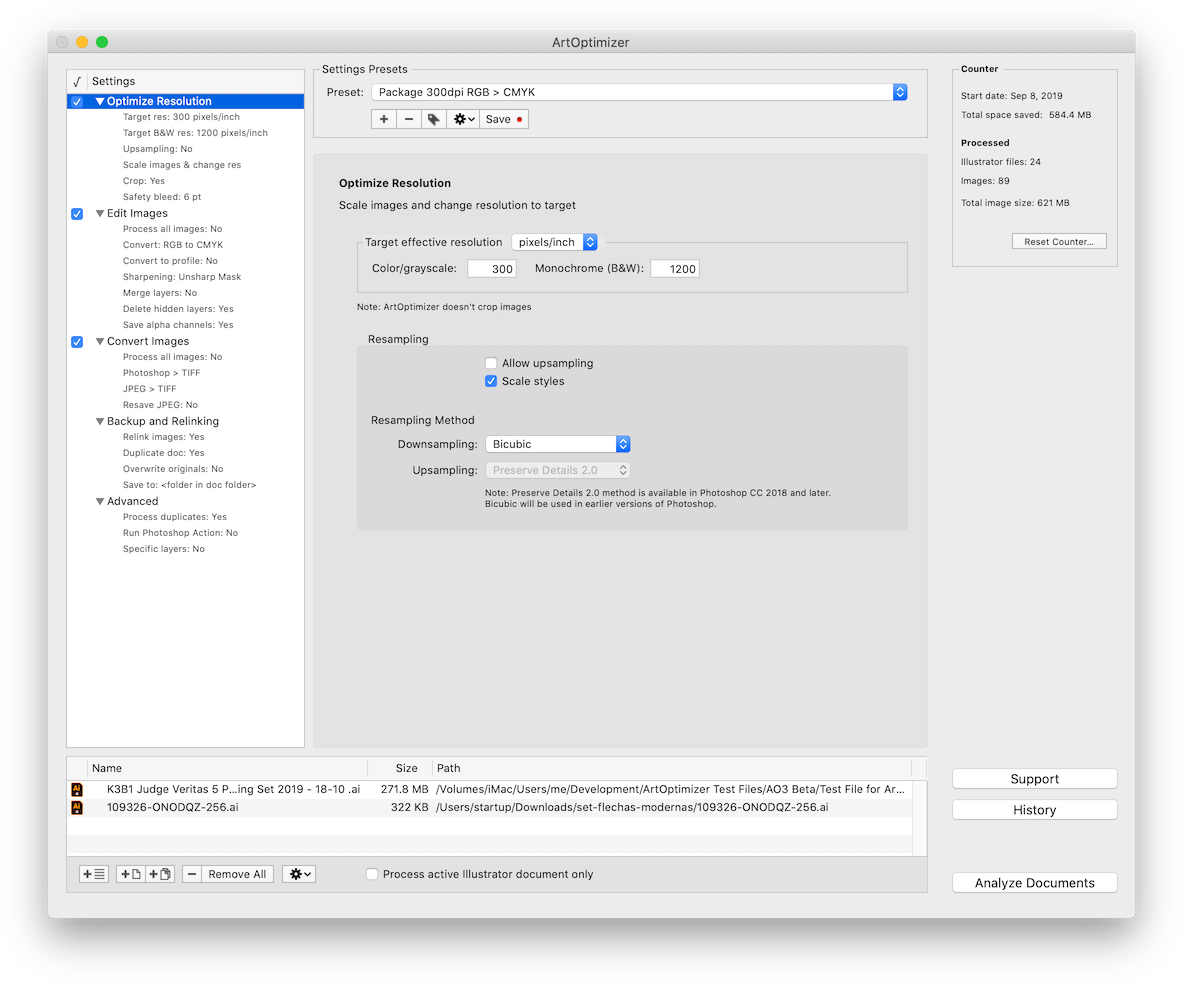
ArtOptimizer is a powerful automation solution for users in the print, prepress, and web design industries. For example, with just a click of a button users can:
* Process multiple Illustrator files
* Change image resolution to 300 ppi
* Scale images in Photoshop to match their dimensions in Illustrator
* Convert RGB images to CMYK profile
* Resave JPEG files as PSD
* Merge layers and delete unused ones
* Assign variable names to optimized links
* Run Photoshop action on each email
In the end of processing ArtOptimizer reimports images to Illustrator at 100% in their precise position. As a result users can save gigabytes of disk space and countless hours of optimizing images manually. In addition, ArtOptimizer helps users accelerate document printing and exporting to PDF, speed up file transfer to service providers, reduce job turnaround, and cut costs through faster processing.
Pricing and Availability:
ArtOptimizer can be purchased from Zevrix web site for $120 (USD), as well as from authorized resellers and Adobe Exchange. Licensed users of earlier versions can upgrade to ArtOptimizer 3 for $60. Trial is also available for download. ArtOptimizer requires macOS 10.8-11.0 and Adobe Illustrator/Photoshop CS6-2021.
Zevrix Solutions: https://zevrix.com
ArtOptimizer 3.1.10: https://zevrix.com/artoptimizer
Download ArtOptimizer: https://zevrix.com/downloads/ArtOptimizer.dmg
Purchase: https://zevrix.com/store
Screenshot: https://zevrix.com/wp-content/uploads/2020/08/ao3-res-win-1183-tr-preview-phs.png
Located in Toronto, Canada, Zevrix Solutions provides automation and productivity solutions for Adobe Creative Cloud and Creative Suite software, PDF workflows, graphic file diagnostics and Microsoft Office output on Mac OS. Zevrix is dedicated to help professionals increase their profits through automating everyday tasks, producing error-free documents, saving disk space and cutting production costs. For more information, visit their website. Copyright (C) 2020 Zevrix Solutions. All Rights Reserved. Other trademarks and registered trademarks may be the property of their respective owners.
*******
Link To Article: https://prmac.com/release-id-84241.htm
*******
---------------------------------------------------------------------------------
Note that you can alter delivered distributions at any time.
Login to your account on prMac to alter your channel selection, or to opt-out at any time.
ArtOptimizer for Adobe Illustrator Now Supports macOS Big Sur - Published on 12/07/20
Zevrix Solutions announces the release of ArtOptimizer 3.1.10, a compatibility upgrade to company's image workflow automation tool for Adobe Illustrator. ArtOptimizer helps users reduce the size of Illustrator links and automate complex image transformations. The software also offers image format and color conversion, batch processing of Illustrator files, settings presets and much more. The new version adds support for the recently released macOS Big Sur and fixes log display issues.
Toronto (ON), Canada - Zevrix Solutions today announce release of ArtOptimizer 3.1.10 for Adobe Illustrator, a compatibility upgrade to company's image workflow automation solution. The only tool of its kind on the Mac market, ArtOptimizer eliminates the excess image data of Illustrator picture links and performs essential image adjustments. The app helps users save disk space as well as cut production time and reduce operational costs through automation of complex image manipulation tasks.
The new version adds support to the recently released macOS 11 Big Sur and is offered free of charge to licensed users of ArtOptimizer 3. The update also fixes an issue in which processing logs weren't loaded when selecting Illustrator files in the History window.
ArtOptimizer is a powerful automation solution for users in the print, prepress, and web design industries. For example, with just a click of a button users can:
* Process multiple Illustrator files
* Change image resolution to 300 ppi
* Scale images in Photoshop to match their dimensions in Illustrator
* Convert RGB images to CMYK profile
* Resave JPEG files as PSD
* Merge layers and delete unused ones
* Assign variable names to optimized links
* Run Photoshop action on each email
In the end of processing ArtOptimizer reimports images to Illustrator at 100% in their precise position. As a result users can save gigabytes of disk space and countless hours of optimizing images manually. In addition, ArtOptimizer helps users accelerate document printing and exporting to PDF, speed up file transfer to service providers, reduce job turnaround, and cut costs through faster processing.
Pricing and Availability:
ArtOptimizer can be purchased from Zevrix web site for $120 (USD), as well as from authorized resellers and Adobe Exchange. Licensed users of earlier versions can upgrade to ArtOptimizer 3 for $60. Trial is also available for download. ArtOptimizer requires macOS 10.8-11.0 and Adobe Illustrator/Photoshop CS6-2021.
Zevrix Solutions: https://zevrix.com
ArtOptimizer 3.1.10: https://zevrix.com/artoptimizer
Download ArtOptimizer: https://zevrix.com/downloads/ArtOptimizer.dmg
Purchase: https://zevrix.com/store
Screenshot: https://zevrix.com/wp-content/uploads/2020/08/ao3-res-win-1183-tr-preview-phs.png
Located in Toronto, Canada, Zevrix Solutions provides automation and productivity solutions for Adobe Creative Cloud and Creative Suite software, PDF workflows, graphic file diagnostics and Microsoft Office output on Mac OS. Zevrix is dedicated to help professionals increase their profits through automating everyday tasks, producing error-free documents, saving disk space and cutting production costs. For more information, visit their website. Copyright (C) 2020 Zevrix Solutions. All Rights Reserved. Other trademarks and registered trademarks may be the property of their respective owners.
*******
Link To Article: https://prmac.com/release-id-84241.htm
*******
---------------------------------------------------------------------------------
Note that you can alter delivered distributions at any time.
Login to your account on prMac to alter your channel selection, or to opt-out at any time.
Subscribe to:
Posts (Atom)