A new article has been published at prMac.
MeisterApps Launches MirrorMeister for iOS and macOS - Published on 12/14/20
MeisterApps today releases MirrorMeister, their first screen mirroring app for macOS and iOS. MirrorMeister is a cross-platform screencasting app, supporting more than 20 different Smart TVs brands, streaming devices, and televisions using the Android TV operating system. Designed with an easy-to-use interface, the app introduces new features to the market. The user just needs to download the app once and can stream music, cast photos, and videos from an iPhone, iPad, or MacBook to any TV.
Naarden, Netherlands - MeisterApps launched today their first screen mirroring app, MirrorMeister. Unlike its competitors, MirrorMeister is a cross-platform screencasting app, supporting more than 20 different Smart TVs brands, streaming devices, and televisions using the Android TV operating system. With MirrorMeister, the company aims to change the consumer expectation of what they can do with a mirroring app. Designed with an easy-to-use interface, the app introduces new features to the market.
Highlighted Features:
* Cross-Platform - The user just needs to download the app once and can stream music, cast photos, and videos from an iPhone, iPad, or MacBook to any TV without paying more for that
* Cast to Multiple Receivers - MirrorMeister shares content to a number of media receivers, including streaming devices. Users can broadcast their iOS or macOS devices to Smart TVs, Chromecast, Amazon FireTV, and more
* Wireless - MirrorMeister doesn't require any adapters. All content is shared wirelessly from any Apple device to any television or streaming receiver.
* The app is available for Family Sharing, only one subscription is needed for the entire family
According to Bart van Heijst, marketing director for MeisterApps BV, MirrorMeister was developed as an answer to a growing demand for flexible TV products. "We have received many requests to provide a high-quality screen mirroring app for any TV and that could be used in all Apple devices. With MirrorMeister, users can mirror their favorite videos during a family meeting from their iPhone on a Samsung TV and the next day, cast a business presentation from a MacBook to a Sony. They don't need to worry about compatibility issues ever again".
The app supports the following devices:
* iPhone (6S and newer), iPad (requires iOS 12 or higher), MacBook Air, MacBook Pro, iMac
* Streaming devices: Roku Streaming Player, Chromecast, Amazon FireTV, Xiaomi Mi Box
* Smart TV brands: Samsung, Roku TV, Sony, LG, Panasonic, Philips, Grundig, Arçelik, Beko, Hisense, TCL, Toshiba, Sharp, Hitachi, Skyworth, Changhong, and any other TV using Android TV operational system
MirrorMeister is available for free or with subscription on the App Store. Users can opt for monthly subscriptions to gain Pro functionality and enjoy regularly added features, updates, and services.
MirrorMeister 1.0.2: https://www.mirrormeister.com/
Download from the Mac App Store: https://apps.apple.com/app/mirrormeister-for-smart-tv/id1474077410
YouTube Video (Introduction to MirrorMeister): https://www.youtube.com/watch?v=WyB7ZCNuuJQ
Media Assets: https://drive.google.com/drive/folders/1CvLEDPtcT-F3knJvD9kiGUnjXTXsDOX5?usp=sharing
MeisterApps was established in 2019 to develop innovative, flexible, and proven solutions for the connected TV device industry. The company sells applications for most major TV brands, including Samsung, LG, Sony, Panasonic, Philips, and Roku TV. All Material and Software (C) Copyright 2020 MeisterApps BV. All Rights Reserved. Apple, the Apple logo, iPhone, iPod and iPad are registered trademarks of Apple Inc. in the U.S. and/or other countries. Other trademarks and registered trademarks may be the property of their respective owners.
*******
Link To Article: https://prmac.com/release-id-84254.htm
*******
---------------------------------------------------------------------------------
Note that you can alter delivered distributions at any time.
Login to your account on prMac to alter your channel selection, or to opt-out at any time.

BatchOutput PDF Now Supports macOS Big Sur: PDF Automation Tool
A new article has been published at prMac.
BatchOutput PDF Now Supports macOS Big Sur: PDF Automation Tool - Published on 12/14/20
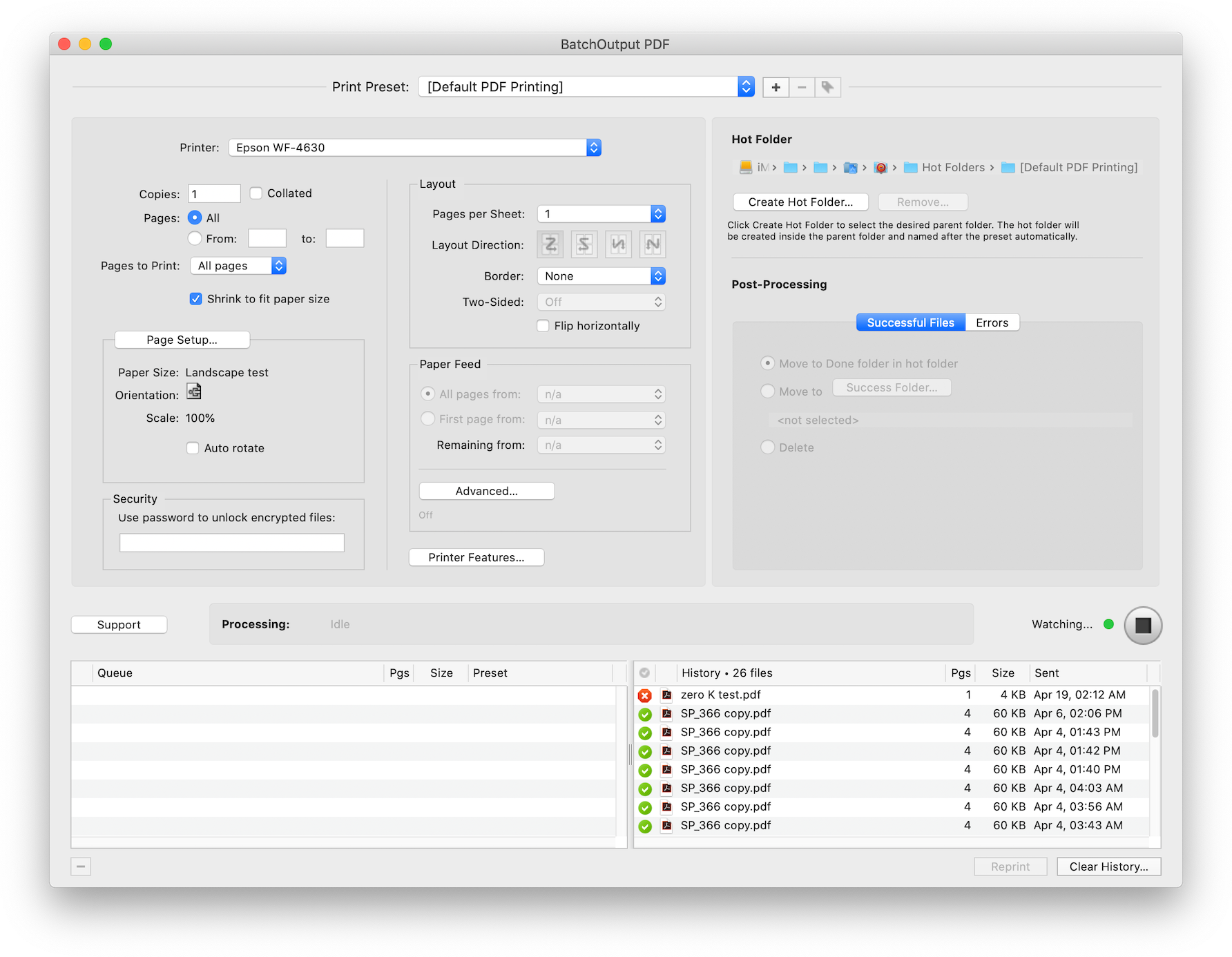
Zevrix Solutions releases BatchOutput PDF 2.3.6, a compatibility update to company's PDF printing automation solution for macOS. The only product for automatic PDF printing on the Mac market, the app processes PDF from watched hot folders. BatchOutput PDF saves users the time and effort of printing PDFs manually. Users only need to drop PDFs into hot folders for automatic printing. The new version adds support for the recently released macOS Big Sur and improves parsing of complex PPD files.
Toronto (ON), Canada - Zevrix Solutions announces the release of BatchOutput PDF 2.3.6, a compatibility update to the company's PDF printing automation solution for Mac. The only consumer-oriented product for automatic PDF printing on the Apple market, the software allows users to process PDF documents from watched hot folders. The software saves the time and effort of opening and printing each document manually.
The new version introduces support for the recently released macOS 11 Big Sur and is offered as a free update to licensed users. The update also ensures accurate processing of complex printer description files, fixes minor UI glitches, automatically fixes file permissions in a rare situation where the serial number couldn't be written to disk during license activation.
"The cost is very low compared to the power this app has," says Mark Lenaerts of ZwartOpWit printing company in Herenthout, Belgium. "We produce thousands of prints every week and direct them to the right printers with the correct settings. To be able to make adjustments in one place for every workflow is easy and efficient."
BatchOutput PDF helps users eliminate countless repetitive tasks of opening PDF files and adjusting print settings manually by bypassing the print dialog. Users only need to drop their PDF files into watched hot folders and the software will print the documents automatically using the hot folder settings:
* Print PDFs automatically from watched hot folders
* Create hot folders for different print settings
* Detailed output history
* Specify password for encrypted PDFs
* Printer tray selection based on document text
* Save time and hassle of printing each PDF manually
In addition to the single-user version of the program, Zevrix also offers BatchOutput PDF Server that can serve unlimited users on a network.
Pricing and Availability:
BatchOutput PDF can be purchased from Zevrix website for $24.95 USD (Server version $99.95), as well as from Mac App Store and authorized resellers. The update is free for licensed users of version 2. Trial is also available for download. BatchOutput PDF supports macOS 10.8-11.
Zevrix Solutions: https://zevrix.com
BatchOutput PDF 2.3.6: https://zevrix.com/batchoutputpdf
Download BatchOutput PDF: https://zevrix.com/downloads/BatchOutputPDF.dmg
Purchase: https://zevrix.com/store
Screenshot: https://zevrix.com/wp-content/uploads/2020/08/bopdf2-main-new.png
Located in Toronto, Canada, Zevrix Solutions provides automation and productivity solutions for Adobe Creative Cloud and Creative Suite software, PDF workflows, graphic file diagnostics and Microsoft Office output on Mac OS. Zevrix is dedicated to help professionals increase their profits through automating everyday tasks, producing error-free documents, saving disk space and cutting production costs. For more information, visit their website. Copyright (C) 2020 Zevrix Solutions. All Rights Reserved. Other trademarks and registered trademarks may be the property of their respective owners.
*******
Link To Article: https://prmac.com/release-id-84253.htm
*******
---------------------------------------------------------------------------------
Note that you can alter delivered distributions at any time.
Login to your account on prMac to alter your channel selection, or to opt-out at any time.
BatchOutput PDF Now Supports macOS Big Sur: PDF Automation Tool - Published on 12/14/20
Zevrix Solutions releases BatchOutput PDF 2.3.6, a compatibility update to company's PDF printing automation solution for macOS. The only product for automatic PDF printing on the Mac market, the app processes PDF from watched hot folders. BatchOutput PDF saves users the time and effort of printing PDFs manually. Users only need to drop PDFs into hot folders for automatic printing. The new version adds support for the recently released macOS Big Sur and improves parsing of complex PPD files.
Toronto (ON), Canada - Zevrix Solutions announces the release of BatchOutput PDF 2.3.6, a compatibility update to the company's PDF printing automation solution for Mac. The only consumer-oriented product for automatic PDF printing on the Apple market, the software allows users to process PDF documents from watched hot folders. The software saves the time and effort of opening and printing each document manually.
The new version introduces support for the recently released macOS 11 Big Sur and is offered as a free update to licensed users. The update also ensures accurate processing of complex printer description files, fixes minor UI glitches, automatically fixes file permissions in a rare situation where the serial number couldn't be written to disk during license activation.
"The cost is very low compared to the power this app has," says Mark Lenaerts of ZwartOpWit printing company in Herenthout, Belgium. "We produce thousands of prints every week and direct them to the right printers with the correct settings. To be able to make adjustments in one place for every workflow is easy and efficient."
BatchOutput PDF helps users eliminate countless repetitive tasks of opening PDF files and adjusting print settings manually by bypassing the print dialog. Users only need to drop their PDF files into watched hot folders and the software will print the documents automatically using the hot folder settings:
* Print PDFs automatically from watched hot folders
* Create hot folders for different print settings
* Detailed output history
* Specify password for encrypted PDFs
* Printer tray selection based on document text
* Save time and hassle of printing each PDF manually
In addition to the single-user version of the program, Zevrix also offers BatchOutput PDF Server that can serve unlimited users on a network.
Pricing and Availability:
BatchOutput PDF can be purchased from Zevrix website for $24.95 USD (Server version $99.95), as well as from Mac App Store and authorized resellers. The update is free for licensed users of version 2. Trial is also available for download. BatchOutput PDF supports macOS 10.8-11.
Zevrix Solutions: https://zevrix.com
BatchOutput PDF 2.3.6: https://zevrix.com/batchoutputpdf
Download BatchOutput PDF: https://zevrix.com/downloads/BatchOutputPDF.dmg
Purchase: https://zevrix.com/store
Screenshot: https://zevrix.com/wp-content/uploads/2020/08/bopdf2-main-new.png
Located in Toronto, Canada, Zevrix Solutions provides automation and productivity solutions for Adobe Creative Cloud and Creative Suite software, PDF workflows, graphic file diagnostics and Microsoft Office output on Mac OS. Zevrix is dedicated to help professionals increase their profits through automating everyday tasks, producing error-free documents, saving disk space and cutting production costs. For more information, visit their website. Copyright (C) 2020 Zevrix Solutions. All Rights Reserved. Other trademarks and registered trademarks may be the property of their respective owners.
*******
Link To Article: https://prmac.com/release-id-84253.htm
*******
---------------------------------------------------------------------------------
Note that you can alter delivered distributions at any time.
Login to your account on prMac to alter your channel selection, or to opt-out at any time.
Cocoatech releases Path Finder 10 (macOS Big Sur Edition)
A new article has been published at prMac.
Cocoatech releases Path Finder 10 (macOS Big Sur Edition) - Published on 12/11/20
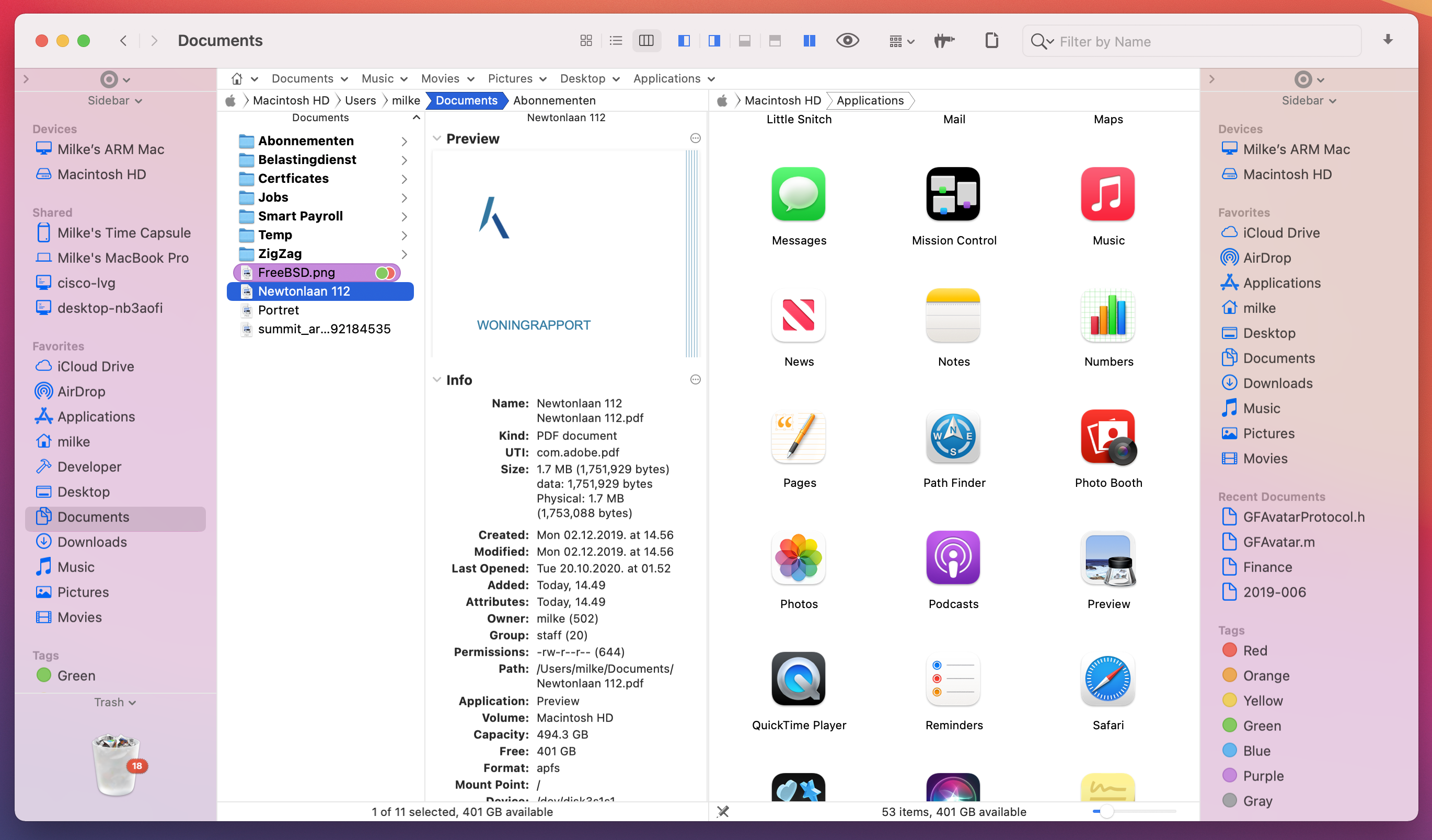
California based Cocoatech is pleased to announce the release of Path Finder 10, which is a paid update of their popular file browser for Path Finder 9 users. Become a master of file management with Path Finder 10. This useful app allows anyone to view hidden files, compare, merge and synchronize folders, batch rename files, use Dual Pane, browse and perform file operations on iOS devices and much more. Path Finder is extremely customizable and allows you to work how you want.
San Francisco, California - Cocoatech is pleased to announce the release of Path Finder 10, which is a paid update of their popular file browser for Path Finder 9 users. Path Finder allows you to view hidden files, compare, merge and synchronize folders, batch rename and batch select files, use Dual Pane, browse and perform file operations on iOS devices and much more. Path Finder is one of the oldest software on the macOS market (*first released in 2001) and boasts a very large and loyal userbase. The application is extremely customizable and allows you to work how you want. Become a master of file management with Path Finder 10!
Path Finder 10 brings support for AirDrop and allows users to browse and perform file operations on iOS devices. Path Finder 10 now allows you to access and browse the file system of your iPhone or iPad like you would on your desktop computer. Discover the simplicity of file transfers and copy/move operations, browse files by size, delete and perform many more file operations on your iOS device with Path Finder 10!
Path Finder 10 is fully redesigned for macOS 11 Big Sur and boasts native support for Apple Silicon processors. With the Path Finder 10 release, Cocoatech provides the users with the promised upgrade in the new yearly release cycle.
What's new:
* File browsing and file operations on iOS devices connected to USB port
* AirDrop support (currently only for devices discoverable by "Everyone")
* Fully redesigned for macOS 11 Big Sur
* Native support for Apple Silicon processors
* Added "Share" services to AirDrop, Mail, Messages, Notes
* Redesigned and improved Drop Stack
* Improved Batch Renamer functionality
* Even better support for system Dark Mode Appearance
* Many other improvements, tweaks and fixes
Supported Languages:
Path Finder supports Chinese, Czech, Dutch, English, Finnish, French, German, Italian, Japanese, Korean, Norwegian, Polish, Portuguese, Russian, Spanish and Swedish languages.
System Requirements:
* Mac OS X 10.12 or newer
Pricing and Availability:
You can try Path Finder for free for 30 days with all the features available to you during that period. Path Finder costs $36.00 (USD) for a single user license applicable for up to 3 user-owned computers, and $18.00 (USD) when upgrading from version 9. The software comes with a 60-day money back garantee. The software is available for purchase from the Cocoatech online store or from within the application itself. Volume license discounts available.
Path Finder 10.0: http://www.cocoatech.com/
Release Notes: https://cocoatech.com/#/support?notes=yes
Download Free Trial (dmg): https://get.cocoatech.com/PF10.dmg
Screenshot 1: https://cocoatech.com/wp-content/uploads/2020/12/PF10_Screenshot-1_DarkTerminal.png
Screenshot 2: https://cocoatech.com/wp-content/uploads/2020/12/PF10_Screenshot2_LightDualPane.png
Application Icon: https://cocoatech.com/wp-content/uploads/2020/12/Path-Finder-10-icon-1024x1024-1.png
Headquartered in San Francisco, California, Cocoatech LLC is a privately funded software company founded in 2001 by Steve Gehrman. Steve has over 20 years as a software developer, and founded Cocoatech with the intention of bringing this experience to the Mac platform. The company has grown up alongside Apple helping entrepreneurs, small to large companies, and creative professionals to make order of chaos. Our team reaches from the US to Europe but our clients are all over the world. Copyright 2008-2020 Cocoatech, LLC. All Rights Reserved. Apple, the Apple logo, and Finder are registered trademarks of Apple Computer in the U.S. and/or other countries. Other trademarks and registered trademarks may be the property of their respective owners.
*******
Link To Article: https://prmac.com/release-id-84252.htm
*******
---------------------------------------------------------------------------------
Note that you can alter delivered distributions at any time.
Login to your account on prMac to alter your channel selection, or to opt-out at any time.
Cocoatech releases Path Finder 10 (macOS Big Sur Edition) - Published on 12/11/20
California based Cocoatech is pleased to announce the release of Path Finder 10, which is a paid update of their popular file browser for Path Finder 9 users. Become a master of file management with Path Finder 10. This useful app allows anyone to view hidden files, compare, merge and synchronize folders, batch rename files, use Dual Pane, browse and perform file operations on iOS devices and much more. Path Finder is extremely customizable and allows you to work how you want.
San Francisco, California - Cocoatech is pleased to announce the release of Path Finder 10, which is a paid update of their popular file browser for Path Finder 9 users. Path Finder allows you to view hidden files, compare, merge and synchronize folders, batch rename and batch select files, use Dual Pane, browse and perform file operations on iOS devices and much more. Path Finder is one of the oldest software on the macOS market (*first released in 2001) and boasts a very large and loyal userbase. The application is extremely customizable and allows you to work how you want. Become a master of file management with Path Finder 10!
Path Finder 10 brings support for AirDrop and allows users to browse and perform file operations on iOS devices. Path Finder 10 now allows you to access and browse the file system of your iPhone or iPad like you would on your desktop computer. Discover the simplicity of file transfers and copy/move operations, browse files by size, delete and perform many more file operations on your iOS device with Path Finder 10!
Path Finder 10 is fully redesigned for macOS 11 Big Sur and boasts native support for Apple Silicon processors. With the Path Finder 10 release, Cocoatech provides the users with the promised upgrade in the new yearly release cycle.
What's new:
* File browsing and file operations on iOS devices connected to USB port
* AirDrop support (currently only for devices discoverable by "Everyone")
* Fully redesigned for macOS 11 Big Sur
* Native support for Apple Silicon processors
* Added "Share" services to AirDrop, Mail, Messages, Notes
* Redesigned and improved Drop Stack
* Improved Batch Renamer functionality
* Even better support for system Dark Mode Appearance
* Many other improvements, tweaks and fixes
Supported Languages:
Path Finder supports Chinese, Czech, Dutch, English, Finnish, French, German, Italian, Japanese, Korean, Norwegian, Polish, Portuguese, Russian, Spanish and Swedish languages.
System Requirements:
* Mac OS X 10.12 or newer
Pricing and Availability:
You can try Path Finder for free for 30 days with all the features available to you during that period. Path Finder costs $36.00 (USD) for a single user license applicable for up to 3 user-owned computers, and $18.00 (USD) when upgrading from version 9. The software comes with a 60-day money back garantee. The software is available for purchase from the Cocoatech online store or from within the application itself. Volume license discounts available.
Path Finder 10.0: http://www.cocoatech.com/
Release Notes: https://cocoatech.com/#/support?notes=yes
Download Free Trial (dmg): https://get.cocoatech.com/PF10.dmg
Screenshot 1: https://cocoatech.com/wp-content/uploads/2020/12/PF10_Screenshot-1_DarkTerminal.png
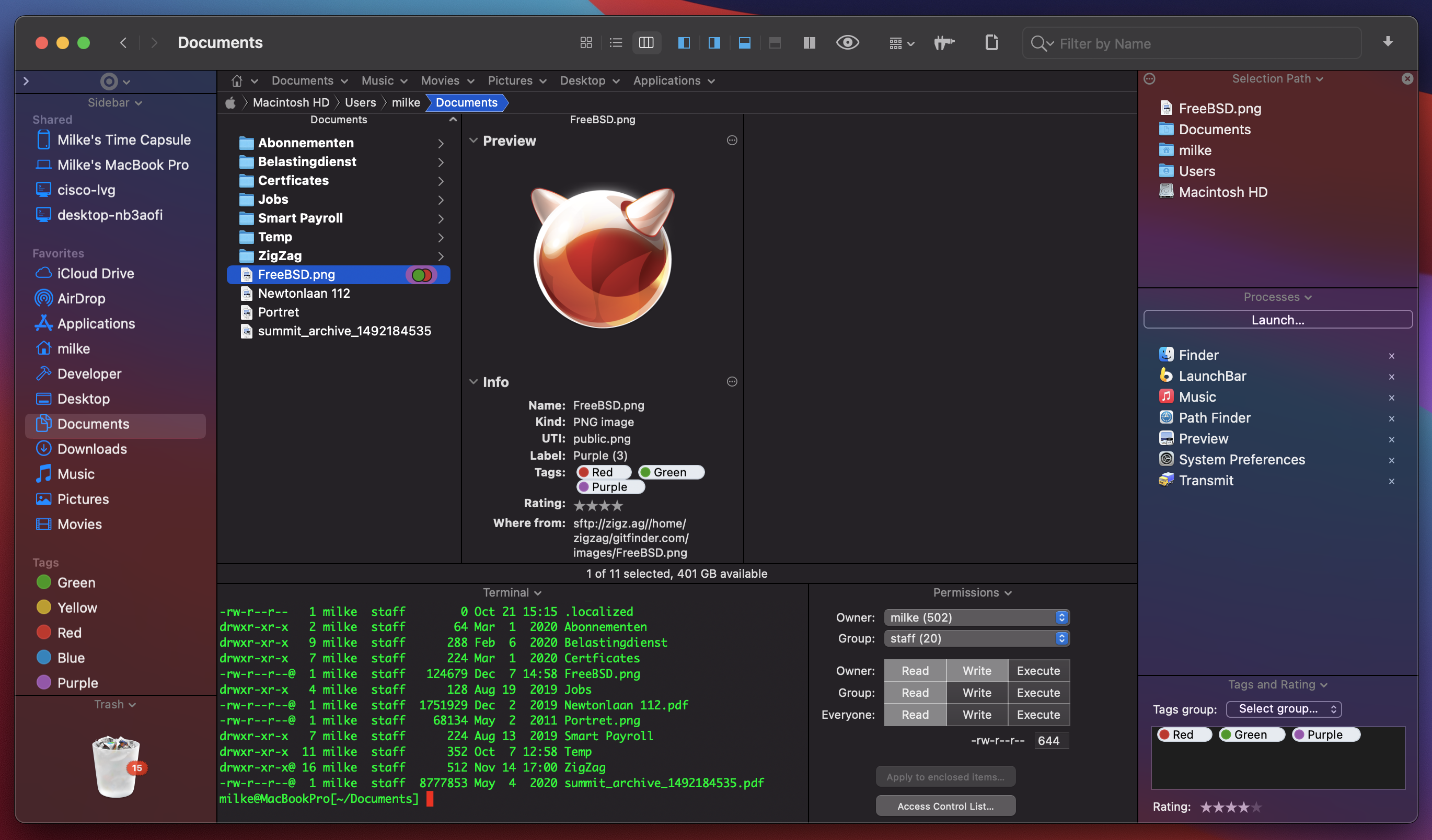
Screenshot 2: https://cocoatech.com/wp-content/uploads/2020/12/PF10_Screenshot2_LightDualPane.png
Application Icon: https://cocoatech.com/wp-content/uploads/2020/12/Path-Finder-10-icon-1024x1024-1.png
Headquartered in San Francisco, California, Cocoatech LLC is a privately funded software company founded in 2001 by Steve Gehrman. Steve has over 20 years as a software developer, and founded Cocoatech with the intention of bringing this experience to the Mac platform. The company has grown up alongside Apple helping entrepreneurs, small to large companies, and creative professionals to make order of chaos. Our team reaches from the US to Europe but our clients are all over the world. Copyright 2008-2020 Cocoatech, LLC. All Rights Reserved. Apple, the Apple logo, and Finder are registered trademarks of Apple Computer in the U.S. and/or other countries. Other trademarks and registered trademarks may be the property of their respective owners.
*******
Link To Article: https://prmac.com/release-id-84252.htm
*******
---------------------------------------------------------------------------------
Note that you can alter delivered distributions at any time.
Login to your account on prMac to alter your channel selection, or to opt-out at any time.
Golden Yacca App Aids Users in Selecting Vegan Supplements
A new article has been published at prMac.
Golden Yacca App Aids Users in Selecting Vegan Supplements - Published on 12/11/20
United Kingdom-based Golden Yacca Ltd, UK announces Golden Yacca Vegan Supplements 1.3.4, an important update to their vegan supplements app for iOS and Android devices. The app allows users to order vegan food supplements made with the naturally pure powder from the whole plant of the wild desert agave Yucca Schidigera, which comes from the high-altitude desert of the southwestern United States. Version 1.3.4 brings automatic device language detection, bug fixes, and performance updates.
United Kingdom - Golden Yacca Ltd, UK is pleased to announce the release and immediate availability of Golden Yacca Vegan Supplements 1.3.4, an important update to their vegan supplements app for iPhone, iPad, iPod touch, and Android devices. The app allows users to order wild desert agave Yucca Schidigera-based food supplements. The substance has been known to the Native Americans for centuries as a valuable natural product that promotes better absorption of nutrients and has other health benefits.
Golden Yacca products are food supplements derived from the the wild desert agave Yucca Schidigera, also known as Mojave yucca or Spanish dagger. Golden Yacca contains saponins, resveratrol, and other polyphenols.
"Yucca Schidigera is found in the high-altitude desert of the southwestern United States and has been known to the Native Americans for centuries as a valuable natural product," shares company director Tomas J Stehlik. "Among other things, the Yucca schidigera supplies two important phytochemicals to our vegan users: saponins and polyphenols (including resveratrol)."
Saponins and polyphenols offers numerous health benefits. These can include exhibiting anti-inflammatory and immune-boosting properties as well as offering antibacterial effects. Golden Yacca supplements promote better absorption of nutrients and has other health benefits. It is a natural herbal product, not an extract. It is produced from the whole Yucca Schidigera plant.
Golden Yacca Vegan Supplements 1.3.4 app allows users to browse the Golden Yacca supplements, which are available in both powder and capsule form, with the ability to purchase the supplements through the app and conveniently pay for the purchase using PayPal.
The app also provides convenient information about the Yucca Schidigera plant, along with information on its usage and benefits. The app is designed for use on the iPad, iPhone, and various Android devices, allowing users to view information about the products or order the products anytime and any place.
Users around the world can access the app, as it is available in multiple languages, including English, Braid Scots, Welsh, Irish, Scottish Gaelic, Cornish, Korean, Japanese, Chinese Traditional, Chinese Simplified, Hebrew, Arabic, Czech, Danish, German, Spanish, Faroese, French, Croatian, Icelandic, Italian, Hungarian, Dutch, Norwegian, Polish, Portuguese, Romanian, Russian, Slovak, Slovenian, Finnish, and Swedish.
The Yucca Schidigera plant is found in the Mojave Desert, Chihuahuan Desert and Sonoran Desert in the southwestern United States and northwestern Mexico. Due to the extreme climates conditions in this area of the world, growing conditions are subject to great diurnal temperature variations.
These harsh conditions cause the plant to collect and synthesize various substances. The collection of these substances allows it to survive. Apart from polyphenols and resveratrol, Mojave yucca has the highest content of saponins. Navajo and Cherokee Native Americans have used Yucca for centuries as a supplement in their daily diet.
Device Requirements:
* iPhone, iPad and iPod touch
* Requires iOS 12.0 or later
* Compatible with iOS 14
* Universal Application
* 27.9 MB
Pricing and Availability:
Golden Yacca Vegan Supplements 1.3.4 is free and is available worldwide through the App Store in the Health and Fitness category. An Android version is available through the Google Play Store.
Golden Yacca Vegan Supplements 1.3.4: https://www.goldenyacca.org/
Download from the App Store: https://apps.apple.com/gb/app/id1532856467
Download from Google Play: https://play.google.com/store/apps/details?id=net.goldenyacca.app&utm_source=prmac-com&pcampaignid=prmac_2020_12
iOS and Android Screenshots (ZIP File): https://www.goldenyacca.org/_archive/GoldenYacca_screenshots_2020-12-09_en.zip
Application Icon: https://hs-dac5.kxcdn.com/ui/img/gy/GoldenYacca_AppLogo_1024x1024.png
Headquartered in the United Kingdom, Golden Yacca Ltd, UK specializes in natural vegan food supplements. All Material and Software (C) Copyright 2020 Golden Yacca Ltd, UK. All Rights Reserved. Apple, the Apple logo, iPhone, iPod and iPad are registered trademarks of Apple Inc. in the U.S. and/or other countries. Other trademarks and registered trademarks may be the property of their respective owners.
*******
Link To Article: https://prmac.com/release-id-84250.htm
*******
---------------------------------------------------------------------------------
Note that you can alter delivered distributions at any time.
Login to your account on prMac to alter your channel selection, or to opt-out at any time.
Golden Yacca App Aids Users in Selecting Vegan Supplements - Published on 12/11/20
United Kingdom-based Golden Yacca Ltd, UK announces Golden Yacca Vegan Supplements 1.3.4, an important update to their vegan supplements app for iOS and Android devices. The app allows users to order vegan food supplements made with the naturally pure powder from the whole plant of the wild desert agave Yucca Schidigera, which comes from the high-altitude desert of the southwestern United States. Version 1.3.4 brings automatic device language detection, bug fixes, and performance updates.
United Kingdom - Golden Yacca Ltd, UK is pleased to announce the release and immediate availability of Golden Yacca Vegan Supplements 1.3.4, an important update to their vegan supplements app for iPhone, iPad, iPod touch, and Android devices. The app allows users to order wild desert agave Yucca Schidigera-based food supplements. The substance has been known to the Native Americans for centuries as a valuable natural product that promotes better absorption of nutrients and has other health benefits.
Golden Yacca products are food supplements derived from the the wild desert agave Yucca Schidigera, also known as Mojave yucca or Spanish dagger. Golden Yacca contains saponins, resveratrol, and other polyphenols.
"Yucca Schidigera is found in the high-altitude desert of the southwestern United States and has been known to the Native Americans for centuries as a valuable natural product," shares company director Tomas J Stehlik. "Among other things, the Yucca schidigera supplies two important phytochemicals to our vegan users: saponins and polyphenols (including resveratrol)."
Saponins and polyphenols offers numerous health benefits. These can include exhibiting anti-inflammatory and immune-boosting properties as well as offering antibacterial effects. Golden Yacca supplements promote better absorption of nutrients and has other health benefits. It is a natural herbal product, not an extract. It is produced from the whole Yucca Schidigera plant.
Golden Yacca Vegan Supplements 1.3.4 app allows users to browse the Golden Yacca supplements, which are available in both powder and capsule form, with the ability to purchase the supplements through the app and conveniently pay for the purchase using PayPal.
The app also provides convenient information about the Yucca Schidigera plant, along with information on its usage and benefits. The app is designed for use on the iPad, iPhone, and various Android devices, allowing users to view information about the products or order the products anytime and any place.
Users around the world can access the app, as it is available in multiple languages, including English, Braid Scots, Welsh, Irish, Scottish Gaelic, Cornish, Korean, Japanese, Chinese Traditional, Chinese Simplified, Hebrew, Arabic, Czech, Danish, German, Spanish, Faroese, French, Croatian, Icelandic, Italian, Hungarian, Dutch, Norwegian, Polish, Portuguese, Romanian, Russian, Slovak, Slovenian, Finnish, and Swedish.
The Yucca Schidigera plant is found in the Mojave Desert, Chihuahuan Desert and Sonoran Desert in the southwestern United States and northwestern Mexico. Due to the extreme climates conditions in this area of the world, growing conditions are subject to great diurnal temperature variations.
These harsh conditions cause the plant to collect and synthesize various substances. The collection of these substances allows it to survive. Apart from polyphenols and resveratrol, Mojave yucca has the highest content of saponins. Navajo and Cherokee Native Americans have used Yucca for centuries as a supplement in their daily diet.
Device Requirements:
* iPhone, iPad and iPod touch
* Requires iOS 12.0 or later
* Compatible with iOS 14
* Universal Application
* 27.9 MB
Pricing and Availability:
Golden Yacca Vegan Supplements 1.3.4 is free and is available worldwide through the App Store in the Health and Fitness category. An Android version is available through the Google Play Store.
Golden Yacca Vegan Supplements 1.3.4: https://www.goldenyacca.org/
Download from the App Store: https://apps.apple.com/gb/app/id1532856467
Download from Google Play: https://play.google.com/store/apps/details?id=net.goldenyacca.app&utm_source=prmac-com&pcampaignid=prmac_2020_12
iOS and Android Screenshots (ZIP File): https://www.goldenyacca.org/_archive/GoldenYacca_screenshots_2020-12-09_en.zip
Application Icon: https://hs-dac5.kxcdn.com/ui/img/gy/GoldenYacca_AppLogo_1024x1024.png

Headquartered in the United Kingdom, Golden Yacca Ltd, UK specializes in natural vegan food supplements. All Material and Software (C) Copyright 2020 Golden Yacca Ltd, UK. All Rights Reserved. Apple, the Apple logo, iPhone, iPod and iPad are registered trademarks of Apple Inc. in the U.S. and/or other countries. Other trademarks and registered trademarks may be the property of their respective owners.
*******
Link To Article: https://prmac.com/release-id-84250.htm
*******
---------------------------------------------------------------------------------
Note that you can alter delivered distributions at any time.
Login to your account on prMac to alter your channel selection, or to opt-out at any time.
PDFpen for iPad & iPhone v6 Adds Continuous Scrolling and an Eraser Tool
A new article has been published at prMac.
PDFpen for iPad & iPhone v6 Adds Continuous Scrolling and an Eraser Tool - Published on 12/11/20
Longtime Developer of productivity applications for Mac and iOS, Smile today releases PDFpen for iPad and iPhone 6.0, an important feature update to their popular mobile PDF editor. With PDFpen for iPad & iPhone, users can add text, images, and signatures to PDFs, make corrections, resize and delete images, and fill out forms. PDFs can be annotated with comments and highlighting. Version 6 features continuous scrolling and an eraser tool for freehand scribbles.
San Francisco, California - Smile, the developer of productivity applications for Mac(R), iPhone(R) and iPad(R), has released PDFpen for iPad & iPhone v6, the mobile PDF editor for iPad & iPhone. Version 6 features continuous scrolling and an eraser tool for freehand scribbles.
Continuous scrolling enhances the PDF viewing experience on mobile and tablet devices. Scroll smoothly across multiple pages without page breaks. Navigate lengthy documents vertically or horizontally on the iPad or iPhone's smaller screens quickly and comfortably.
The eraser tool allows users to easily remove freehand marks drawn by the Scribble tool, streamlining the handwriting and note-taking process. Teachers will find this makes grading with PDFpen easier than ever.
PDFpen for iPad & iPhone syncs documents with PDFpen and PDFpenPro 12 for Mac via iCloud, Dropbox, Google Drive, Microsoft OneNote, and other Files-compatible apps for seamless PDF editing.
New in This Version:
* Adds continuous scrolling
* Eraser tool for freehand scribbles
* Updates for OS compatibility
* Various fixes and improvements
PDFpen for iPad & iPhone Features:
* Read and edit PDF documents on your iPad and iPhone
* Add highlights and freehand scribbles safely with wrist/palm protection
* Add text, images, and signatures to PDFs
* Correct text in original PDF with editable text blocks
* Fill out PDF forms, including specialized signature fields
* Email and Airdrop your documents, with an option to flatten documents for maximum compatibility
* Set a document password, which is required when opening your document, and even set the level of encryption
* Save documents in iCloud & Files-compatible apps such as Dropbox, Google Drive, Microsoft OneNote, for sharing between devices
* Insert note and comment annotations
* Create and edit links to URLs, email addresses, and other PDF pages
* Draw shapes, including lines, arrows, rectangles, ellipses, and polygons
* Move, resize, copy and delete images in original PDF
* Import images from Photo Library
* Annotate with proofreading marks and stamps
* Save frequently-used images, signatures, objects, and text for reuse
* Automatic page numbering including Bates numbering
* Add watermarks
* Sidebar for thumbnail, annotation, and table of contents skimming
* Duplicate and rotate pages
* Combine documents
* Use the iOS Files interface to import/export and organize PDFs in folders
* Support for pressure-sensitive/Bluetooth styluses: Apple Pencil, FiftyThree Pencil, Adonit Bluetooth Stylus
Device Requirements:
* iOS 14, iPadOS
Pricing and Availability:
PDFpen for iPad & iPhone is $6.99 (USD) on the App Store. PDFpen for Mac is available for $79.95. PDFpenPro is $129.95. Both require macOS 10.13 (High Sierra) or later. Demos of all Smile desktop products are available for free download from our website. For more information about PDFpen, please visit our website.
PDFpen Family: https://pdfpen.com/
PDFpen for iPad and iPhone : https://pdfpen.com/pdfpen-ios/
Download from the App Store: https://apps.apple.com/us/app/id924203665?_ga=2.154196539.20334112.1568731214-1903873678.1492567734&ign-mpt=uo%3D4
Media Assets : https://pdfpen.com/pdfpen/presskit/
Press Kit (zip): https://smilesoftware.com/assets/images/uploads/PDFpenforiOS_graphics.zip
Headquartered in San Francisco, California, Smile makes clever software for efficient people, including TextExpander, the typing shortcut tool for Mac, Windows, Chrome, iPhone and iPad; PDFpen, the all-purpose Mac PDF editor; and PDFpen for iPad and iPhone, the mobile PDF editor. Copyright (C) 2020 SmileOnMyMac, LLC dba Smile. All Rights Reserved. PDFpen, PDFpenPro, TextExpander, and the Smile logo are registered trademarks of SmileOnMyMac, LLC dba Smile. DiscLabel is a trademark of Smile. Apple, the Apple logo, Mac, iPad, iPhone, and iPod touch are trademarks of Apple Inc., registered in the U.S. and other countries. App Store is a service mark of Apple Inc.
*******
Link To Article: https://prmac.com/release-id-84251.htm
*******
---------------------------------------------------------------------------------
Note that you can alter delivered distributions at any time.
Login to your account on prMac to alter your channel selection, or to opt-out at any time.
PDFpen for iPad & iPhone v6 Adds Continuous Scrolling and an Eraser Tool - Published on 12/11/20
Longtime Developer of productivity applications for Mac and iOS, Smile today releases PDFpen for iPad and iPhone 6.0, an important feature update to their popular mobile PDF editor. With PDFpen for iPad & iPhone, users can add text, images, and signatures to PDFs, make corrections, resize and delete images, and fill out forms. PDFs can be annotated with comments and highlighting. Version 6 features continuous scrolling and an eraser tool for freehand scribbles.
San Francisco, California - Smile, the developer of productivity applications for Mac(R), iPhone(R) and iPad(R), has released PDFpen for iPad & iPhone v6, the mobile PDF editor for iPad & iPhone. Version 6 features continuous scrolling and an eraser tool for freehand scribbles.
Continuous scrolling enhances the PDF viewing experience on mobile and tablet devices. Scroll smoothly across multiple pages without page breaks. Navigate lengthy documents vertically or horizontally on the iPad or iPhone's smaller screens quickly and comfortably.
The eraser tool allows users to easily remove freehand marks drawn by the Scribble tool, streamlining the handwriting and note-taking process. Teachers will find this makes grading with PDFpen easier than ever.
PDFpen for iPad & iPhone syncs documents with PDFpen and PDFpenPro 12 for Mac via iCloud, Dropbox, Google Drive, Microsoft OneNote, and other Files-compatible apps for seamless PDF editing.
New in This Version:
* Adds continuous scrolling
* Eraser tool for freehand scribbles
* Updates for OS compatibility
* Various fixes and improvements
PDFpen for iPad & iPhone Features:
* Read and edit PDF documents on your iPad and iPhone
* Add highlights and freehand scribbles safely with wrist/palm protection
* Add text, images, and signatures to PDFs
* Correct text in original PDF with editable text blocks
* Fill out PDF forms, including specialized signature fields
* Email and Airdrop your documents, with an option to flatten documents for maximum compatibility
* Set a document password, which is required when opening your document, and even set the level of encryption
* Save documents in iCloud & Files-compatible apps such as Dropbox, Google Drive, Microsoft OneNote, for sharing between devices
* Insert note and comment annotations
* Create and edit links to URLs, email addresses, and other PDF pages
* Draw shapes, including lines, arrows, rectangles, ellipses, and polygons
* Move, resize, copy and delete images in original PDF
* Import images from Photo Library
* Annotate with proofreading marks and stamps
* Save frequently-used images, signatures, objects, and text for reuse
* Automatic page numbering including Bates numbering
* Add watermarks
* Sidebar for thumbnail, annotation, and table of contents skimming
* Duplicate and rotate pages
* Combine documents
* Use the iOS Files interface to import/export and organize PDFs in folders
* Support for pressure-sensitive/Bluetooth styluses: Apple Pencil, FiftyThree Pencil, Adonit Bluetooth Stylus
Device Requirements:
* iOS 14, iPadOS
Pricing and Availability:
PDFpen for iPad & iPhone is $6.99 (USD) on the App Store. PDFpen for Mac is available for $79.95. PDFpenPro is $129.95. Both require macOS 10.13 (High Sierra) or later. Demos of all Smile desktop products are available for free download from our website. For more information about PDFpen, please visit our website.
PDFpen Family: https://pdfpen.com/
PDFpen for iPad and iPhone : https://pdfpen.com/pdfpen-ios/
Download from the App Store: https://apps.apple.com/us/app/id924203665?_ga=2.154196539.20334112.1568731214-1903873678.1492567734&ign-mpt=uo%3D4
Media Assets : https://pdfpen.com/pdfpen/presskit/
Press Kit (zip): https://smilesoftware.com/assets/images/uploads/PDFpenforiOS_graphics.zip
Headquartered in San Francisco, California, Smile makes clever software for efficient people, including TextExpander, the typing shortcut tool for Mac, Windows, Chrome, iPhone and iPad; PDFpen, the all-purpose Mac PDF editor; and PDFpen for iPad and iPhone, the mobile PDF editor. Copyright (C) 2020 SmileOnMyMac, LLC dba Smile. All Rights Reserved. PDFpen, PDFpenPro, TextExpander, and the Smile logo are registered trademarks of SmileOnMyMac, LLC dba Smile. DiscLabel is a trademark of Smile. Apple, the Apple logo, Mac, iPad, iPhone, and iPod touch are trademarks of Apple Inc., registered in the U.S. and other countries. App Store is a service mark of Apple Inc.
*******
Link To Article: https://prmac.com/release-id-84251.htm
*******
---------------------------------------------------------------------------------
Note that you can alter delivered distributions at any time.
Login to your account on prMac to alter your channel selection, or to opt-out at any time.
Photo Software Editors Put On Their Show
A new article has been published at prMac.
Photo Software Editors Put On Their Show - Published on 12/10/20
Creaceed, CYME and Gentlemen Coders have launched their special online show. Starting today, photography enthusiasts will have the opportunity to discover and get the editions of Avalanche, Emulsio, Hydra, RAW Power and more, with discounts up to 40%. This special online space is designed to provide visitors a taste of what's available in the realm of macOS photography software. This event runs from December 10 through December 20, 2020.
Mons (Belgium), Cupertino (USA), Montpellier (France) - Creaceed, CYME and Gentlemen Coders today announce the launch of their special online show. 2020 has been a rough ride for everyone. Lockdowns. Travel restrictions. Shortages. No trade fairs, no shows, no exhibitions. As software editors we all feel frustrated not to have been able to meet, and exchange with clients and partners around our passion, photography.
So to end the year on a positive note, three Mac software editors have decided to put on a show and give photographers a sneak peek at a variety of their latest photo and video applications.
For 10 days, starting today, photography enthusiasts on Mac will have the opportunity to discover and get the editions of Avalanche (photo catalogs migration), Emulsio (video stabilization), Hydra (computational photography & HDR), RAW Power (workflow for photographers) and more, with discounts up to 40%. This special online space is designed to provide visitors a taste of what's available in the realm of photography software.
About Creaceed:
Creaceed is a Belgian company made up of a small & passionate team that has been making apps for over 10 years, focusing on image processing technologies in the fields of document scanning, note taking, photo and video processing. Apps like Hydra, Emulsio, and Prizmo (text recognition) have been awarded by the press & featured by Apple on multiple occasions.
About CYME:
CYME was founded in summer 2019 by Matthieu Kopp, Thomas Ribreau, and Claudia Zimmer. After working together on a previous adventure (Aquafadas Rakuten DX), the three co-founders decided to embark on yet another adventure to explore the creation of powerful software solutions for photographers. They are passionate about photography, well-designed software and flawless user experiences. They like cool gear, have a vision for a better digital life, and love the Mac.
About Gentlemen Coders:
Gentlemen Coders develops and distributes software for professional and enthusiast photographers. Focusing exclusively on Apple platforms, the company offers unparalleled integration with Apple's built-in services on macOS and iOS, maximizing customers' investment in Apple devices and services. Gentlemen Coders' products consistently deliver high-quality image processing, innovative workflows, intuitive organizational tools, and high performance. Gentlemen Coders was founded by Nik Bhatt, former Senior Director of Engineering at Apple, and the former Chief Technical Officer of the Apple Photo Apps group.
Availability:
The event page can be found on CYME website. There are discounts up to 40%. This event runs from December 10 through December 20, 2020.
Photo Show: https://cyme.io/photo-software-show/
Creaceed: https://creaceed.com
Gentlemen Coders: https://gentlemencoders.com
CYME: https://cyme.io
Creaceed is a Belgian company made up of a small and passionate team that has been making apps for over 10 years, focusing on image processing technologies in the fields of document scanning, note taking, photo and video processing. Apps like Hydra, Emulsio, and Prizmo (text recognition) have been awarded by the press and featured by Apple on multiple occasions. Copyright 2008-2020 Creaceed. All Rights Reserved. Apple, the Apple logo, Macintosh, iOS, OS X, iPhone, iPad are registered trademarks of Apple Computer in the U.S. and/or other countries.
*******
Link To Article: https://prmac.com/release-id-84249.htm
*******
---------------------------------------------------------------------------------
Note that you can alter delivered distributions at any time.
Login to your account on prMac to alter your channel selection, or to opt-out at any time.
Photo Software Editors Put On Their Show - Published on 12/10/20
Creaceed, CYME and Gentlemen Coders have launched their special online show. Starting today, photography enthusiasts will have the opportunity to discover and get the editions of Avalanche, Emulsio, Hydra, RAW Power and more, with discounts up to 40%. This special online space is designed to provide visitors a taste of what's available in the realm of macOS photography software. This event runs from December 10 through December 20, 2020.
Mons (Belgium), Cupertino (USA), Montpellier (France) - Creaceed, CYME and Gentlemen Coders today announce the launch of their special online show. 2020 has been a rough ride for everyone. Lockdowns. Travel restrictions. Shortages. No trade fairs, no shows, no exhibitions. As software editors we all feel frustrated not to have been able to meet, and exchange with clients and partners around our passion, photography.
So to end the year on a positive note, three Mac software editors have decided to put on a show and give photographers a sneak peek at a variety of their latest photo and video applications.
For 10 days, starting today, photography enthusiasts on Mac will have the opportunity to discover and get the editions of Avalanche (photo catalogs migration), Emulsio (video stabilization), Hydra (computational photography & HDR), RAW Power (workflow for photographers) and more, with discounts up to 40%. This special online space is designed to provide visitors a taste of what's available in the realm of photography software.
About Creaceed:
Creaceed is a Belgian company made up of a small & passionate team that has been making apps for over 10 years, focusing on image processing technologies in the fields of document scanning, note taking, photo and video processing. Apps like Hydra, Emulsio, and Prizmo (text recognition) have been awarded by the press & featured by Apple on multiple occasions.
About CYME:
CYME was founded in summer 2019 by Matthieu Kopp, Thomas Ribreau, and Claudia Zimmer. After working together on a previous adventure (Aquafadas Rakuten DX), the three co-founders decided to embark on yet another adventure to explore the creation of powerful software solutions for photographers. They are passionate about photography, well-designed software and flawless user experiences. They like cool gear, have a vision for a better digital life, and love the Mac.
About Gentlemen Coders:
Gentlemen Coders develops and distributes software for professional and enthusiast photographers. Focusing exclusively on Apple platforms, the company offers unparalleled integration with Apple's built-in services on macOS and iOS, maximizing customers' investment in Apple devices and services. Gentlemen Coders' products consistently deliver high-quality image processing, innovative workflows, intuitive organizational tools, and high performance. Gentlemen Coders was founded by Nik Bhatt, former Senior Director of Engineering at Apple, and the former Chief Technical Officer of the Apple Photo Apps group.
Availability:
The event page can be found on CYME website. There are discounts up to 40%. This event runs from December 10 through December 20, 2020.
Photo Show: https://cyme.io/photo-software-show/
Creaceed: https://creaceed.com
Gentlemen Coders: https://gentlemencoders.com
CYME: https://cyme.io
Creaceed is a Belgian company made up of a small and passionate team that has been making apps for over 10 years, focusing on image processing technologies in the fields of document scanning, note taking, photo and video processing. Apps like Hydra, Emulsio, and Prizmo (text recognition) have been awarded by the press and featured by Apple on multiple occasions. Copyright 2008-2020 Creaceed. All Rights Reserved. Apple, the Apple logo, Macintosh, iOS, OS X, iPhone, iPad are registered trademarks of Apple Computer in the U.S. and/or other countries.
*******
Link To Article: https://prmac.com/release-id-84249.htm
*******
---------------------------------------------------------------------------------
Note that you can alter delivered distributions at any time.
Login to your account on prMac to alter your channel selection, or to opt-out at any time.
Recosoft ships ID2Office 2021 - Export InDesign to Word, PPT & Keynote
A new article has been published at prMac.
Recosoft ships ID2Office 2021 - Export InDesign to Word, PPT & Keynote - Published on 12/10/20
Recosoft Corporation has released ID2Office 2021, the newest version of its InDesign to Word, PowerPoint and Keynote conversion solution for Adobe InDesign 2021. ID2Office 2021 includes support for InDesign 2021 in addition to supporting InDesign CC through 2020 for both macOS and Windows systems. It includes an enhanced graphics processing algorithm improving image and graphics separation in the resulting Office file types. ID2Office 2021 also identifies Arabic and Hebrew languages and more.
Osaka, Japan - Recosoft Corporation, creators of workflow automation software and plug-ins for the Adobe(R) Creative Cloud(R) platform, and developers of PDF conversion tools, has released ID2Office 2021, the newest version of its InDesign to Word, PowerPoint and Keynote conversion solution for Adobe InDesign(R) 2021.
ID2Office 2021 includes support for InDesign 2021 in addition to supporting InDesign CC through 2020 for both macOS and Windows systems. ID2Office 2021 includes an enhanced graphics processing algorithm improving image and graphics separation in the resulting Office file types. Finally, ID2Office 2021 identifies Arabic and Hebrew languages ensuring the precise conversion of text, associated properties and layout elements.
"Over the years our customers have requested improved graphics separation and the capability to process right-to-left languages such as Arabic and Hebrew. With ID2Office 2021, we were finally able to meets these needs"
Paramjit Chadha, MD, Recosoft Corporation
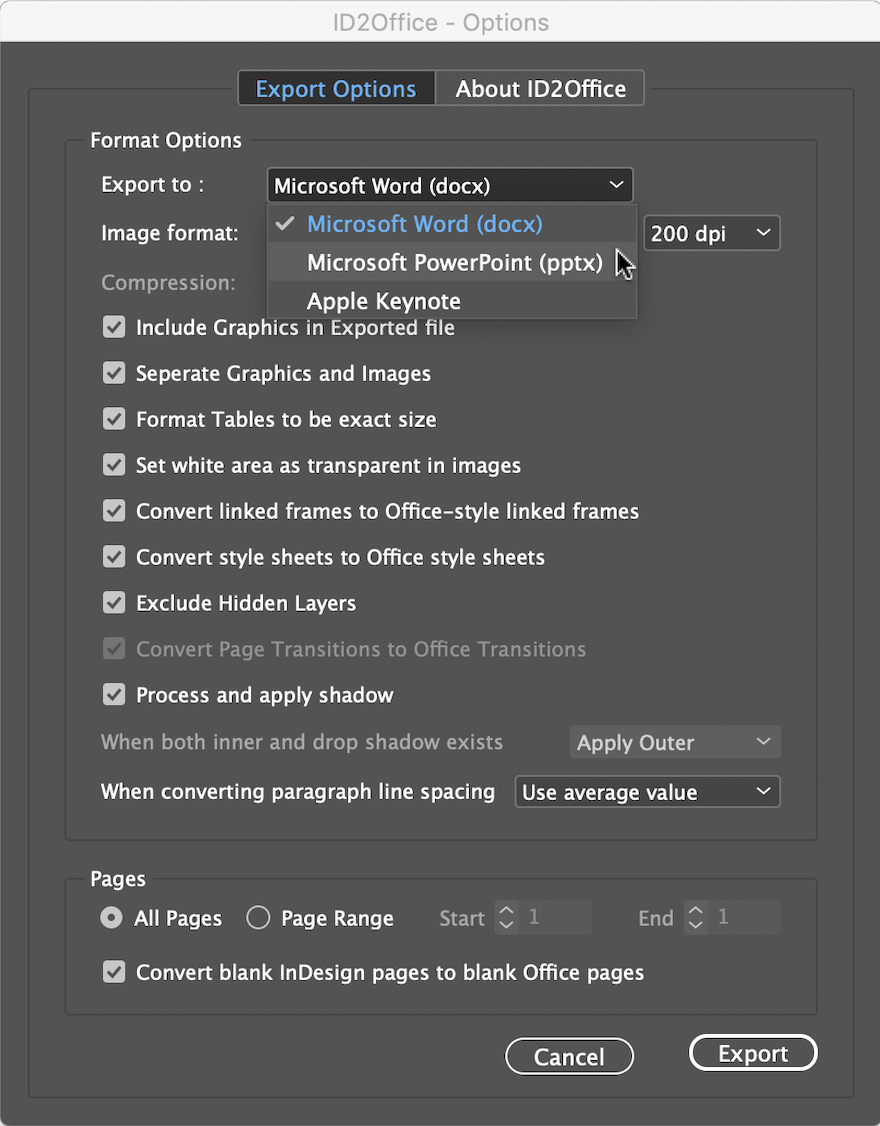
ID2Office converts InDesign files to Microsoft Word, PowerPoint, and Apple Keynote types; converting the text, associated styles, paragraph structure, related property information, tables, graphics and other objects while matching and maintaining the layout fidelity; enhancing data exchange between InDesign and Office platforms. Key new features include:
* Support for InDesign 2021 - ID2Office 2021 now supports and integrates with InDesign 2021. InDesign CC through 2020 are supported as well.
* Arabic and Hebrew language text support - ID2Office adds support for Arabic and Hebrew languages. When exporting InDesign documents with Arabic/Hebrew text, the resulting Word and PowerPoint files includes Arabic/Hebrew text. Furthermore, the right-to-left layout properties and style sheet names are propagated as well.
* Separation of images - Images are now separated as much as possible resulting in converted files having images that can be manipulated.
* Conversion of native InDesign vector graphics to Office vector graphics - InDesign vector graphics such as rectangles, lines, ovals, and polygons along with the respective properties are converted to Word, PowerPoint and Keynote vector graphics.
* InDesign form fields to Word form fields - InDesign form field objects are now converted to Word form field objects.
* URL and Link properties - Hyperlinks and local links are now supported and converted to equivalent links in resulting Word/PowerPoint file.
* Extended paragraph properties - Paragraph properties such as borders, shading and rules are now processed, and equivalent properties are made in the converted file.
System Requirements
* macOS 10.10.x or higher
* Intel based Mac
* InDesign CC, CC 2014, CC 2015, CC 2017, CC 2018, CC 2019, 2020 or 2021
* Windows 7, Windows 8/8.1 or Windows 10
* Minimum Pentium III computer
* InDesign CC, CC 2014, CC 2015, CC 2017, CC 2018, CC 2019, 2020 or 2021
Pricing and Availability:
ID2Office 2021 is available immediately in the following configurations from the Recosoft web store (per license). ID2Office Standard 2021 annual subscription (macOS/Windows) is $199.00 (USD). ID2Office Professional 2021 Annual subscription (macOS only) is $249.00 (USD).
Recosoft Corporation: http://www.recosoft.com
ID2Office 2021: http://www.recosoft.com/products/id2office
Screenshot: http://www.recosoftcorporation.com/ftpenglish2/convert-indesign-to-ppt-or-word-or-keynote.png
Recosoft Corporation has pioneered PDF2Office(R), the de-facto PDF-to-Excel, PDF-to-Word, PDF-to-PowerPoint, PDF-to-OmniGraffle conversion utility; PDF2Office(R) for iWork, the PDF-to-Keynote, PDF-to-Numbers and PDF-to-Pages conversion application; ID2Office, the InDesign-to-Word, InDesign-to-PowerPoint converter; and PDF2ID(R) the de-facto PDF-to-InDesign conversion tool. The company is a leader in designing and delivering PDF converters and InDesign software solutions enhancing workflow automation and productivity. ID2Office, PDF2Office, PDF2ID, PDFtoID are trademarks or registered trademarks of Recosoft Corporation in the US and/or other countries. Microsoft, Excel, PowerPoint, Word and the Office logo are trademarks or registered trademarks of Microsoft Corporation in the US and/or other countries. Adobe, InDesign and Creative Cloud are either registered trademarks or trademarks of Adobe System Incorporated in the US and/or other countries. Apple, Macintosh, macOS, Mac, Numbers,
Keynote, Pages, iWork, iPod, iPhone, iOS, iPad are either trademarks or registered trademarks of Apple, Inc. in the US and or other countries. All other trademarks are recognized and are the property of their respective owners.
*******
Link To Article: https://prmac.com/release-id-84248.htm
*******
---------------------------------------------------------------------------------
Note that you can alter delivered distributions at any time.
Login to your account on prMac to alter your channel selection, or to opt-out at any time.
Recosoft ships ID2Office 2021 - Export InDesign to Word, PPT & Keynote - Published on 12/10/20
Recosoft Corporation has released ID2Office 2021, the newest version of its InDesign to Word, PowerPoint and Keynote conversion solution for Adobe InDesign 2021. ID2Office 2021 includes support for InDesign 2021 in addition to supporting InDesign CC through 2020 for both macOS and Windows systems. It includes an enhanced graphics processing algorithm improving image and graphics separation in the resulting Office file types. ID2Office 2021 also identifies Arabic and Hebrew languages and more.
Osaka, Japan - Recosoft Corporation, creators of workflow automation software and plug-ins for the Adobe(R) Creative Cloud(R) platform, and developers of PDF conversion tools, has released ID2Office 2021, the newest version of its InDesign to Word, PowerPoint and Keynote conversion solution for Adobe InDesign(R) 2021.
ID2Office 2021 includes support for InDesign 2021 in addition to supporting InDesign CC through 2020 for both macOS and Windows systems. ID2Office 2021 includes an enhanced graphics processing algorithm improving image and graphics separation in the resulting Office file types. Finally, ID2Office 2021 identifies Arabic and Hebrew languages ensuring the precise conversion of text, associated properties and layout elements.
"Over the years our customers have requested improved graphics separation and the capability to process right-to-left languages such as Arabic and Hebrew. With ID2Office 2021, we were finally able to meets these needs"
Paramjit Chadha, MD, Recosoft Corporation
ID2Office converts InDesign files to Microsoft Word, PowerPoint, and Apple Keynote types; converting the text, associated styles, paragraph structure, related property information, tables, graphics and other objects while matching and maintaining the layout fidelity; enhancing data exchange between InDesign and Office platforms. Key new features include:
* Support for InDesign 2021 - ID2Office 2021 now supports and integrates with InDesign 2021. InDesign CC through 2020 are supported as well.
* Arabic and Hebrew language text support - ID2Office adds support for Arabic and Hebrew languages. When exporting InDesign documents with Arabic/Hebrew text, the resulting Word and PowerPoint files includes Arabic/Hebrew text. Furthermore, the right-to-left layout properties and style sheet names are propagated as well.
* Separation of images - Images are now separated as much as possible resulting in converted files having images that can be manipulated.
* Conversion of native InDesign vector graphics to Office vector graphics - InDesign vector graphics such as rectangles, lines, ovals, and polygons along with the respective properties are converted to Word, PowerPoint and Keynote vector graphics.
* InDesign form fields to Word form fields - InDesign form field objects are now converted to Word form field objects.
* URL and Link properties - Hyperlinks and local links are now supported and converted to equivalent links in resulting Word/PowerPoint file.
* Extended paragraph properties - Paragraph properties such as borders, shading and rules are now processed, and equivalent properties are made in the converted file.
System Requirements
* macOS 10.10.x or higher
* Intel based Mac
* InDesign CC, CC 2014, CC 2015, CC 2017, CC 2018, CC 2019, 2020 or 2021
* Windows 7, Windows 8/8.1 or Windows 10
* Minimum Pentium III computer
* InDesign CC, CC 2014, CC 2015, CC 2017, CC 2018, CC 2019, 2020 or 2021
Pricing and Availability:
ID2Office 2021 is available immediately in the following configurations from the Recosoft web store (per license). ID2Office Standard 2021 annual subscription (macOS/Windows) is $199.00 (USD). ID2Office Professional 2021 Annual subscription (macOS only) is $249.00 (USD).
Recosoft Corporation: http://www.recosoft.com
ID2Office 2021: http://www.recosoft.com/products/id2office
Screenshot: http://www.recosoftcorporation.com/ftpenglish2/convert-indesign-to-ppt-or-word-or-keynote.png
Recosoft Corporation has pioneered PDF2Office(R), the de-facto PDF-to-Excel, PDF-to-Word, PDF-to-PowerPoint, PDF-to-OmniGraffle conversion utility; PDF2Office(R) for iWork, the PDF-to-Keynote, PDF-to-Numbers and PDF-to-Pages conversion application; ID2Office, the InDesign-to-Word, InDesign-to-PowerPoint converter; and PDF2ID(R) the de-facto PDF-to-InDesign conversion tool. The company is a leader in designing and delivering PDF converters and InDesign software solutions enhancing workflow automation and productivity. ID2Office, PDF2Office, PDF2ID, PDFtoID are trademarks or registered trademarks of Recosoft Corporation in the US and/or other countries. Microsoft, Excel, PowerPoint, Word and the Office logo are trademarks or registered trademarks of Microsoft Corporation in the US and/or other countries. Adobe, InDesign and Creative Cloud are either registered trademarks or trademarks of Adobe System Incorporated in the US and/or other countries. Apple, Macintosh, macOS, Mac, Numbers,
Keynote, Pages, iWork, iPod, iPhone, iOS, iPad are either trademarks or registered trademarks of Apple, Inc. in the US and or other countries. All other trademarks are recognized and are the property of their respective owners.
*******
Link To Article: https://prmac.com/release-id-84248.htm
*******
---------------------------------------------------------------------------------
Note that you can alter delivered distributions at any time.
Login to your account on prMac to alter your channel selection, or to opt-out at any time.
Subscribe to:
Posts (Atom)