A new article has been published at prMac.
Kinemac 2.0 released for macOS - 3D Real Time Animation Software - Published on 12/15/20
Milan based Softobe today releases Kinemac 2.0, an important feature update to their popular real-time 3D animation software for macOS. Kinemac allows anyone to create their own professional 3D and 2D animations with the utmost simplicity. It uses great technologies such as AVFoundation to manage video and audio files and to smoothly export your animations to a movie file. Now a 64 bit application, version 2.0 sports a new look and feel, new icons & GUI, light and dark mode and much more.
Milan, Italy - Softobe today is proud to announce the release of Kinemac 2.0, their popular app for macOS to easily create stunning 3D Real Time Animation Software. Kinemac 2 is the latest version of the famous 3D Real Time Animation Software for macOS. It allows you to create your own professional 3D and 2D animations with the utmost simplicity. Take a look at the stunning 4k movies created with Kinemac on our gallery.
Kinemac 2 is a 64 bit application. It uses great technologies as AVFoundation to manage your video and audio files and to smoothly export your animations to a movie file. The app comes with a new look and feel, new icons and GUI, and it's tuned up to run on macOS Catalina , Retina displays, in light and dark mode.
Version 2.0 grants several new features and improvements and is a recommended update for all customers. You can find more information on the Softobe web site. New feature highlights include:
* Kinemac is now a 64 bit application successfully tested on macOS 10.15+
* Tuned up for Retina Displays
* New interface with double resolution icons
* It supports the light/dark mode
* New and easier Authorization/Deauthorization tasks
* It uses the powerful AVFoundation framework to manage your movies and audio files
* It can properly export your animations to 4K movies
* Added the slider "Quality" to the "Export To Movie" panel
* New several trackpad gestures to quickly manage the selected sprites, the current view and the FF/Rew
* Import OBJ 3D models and assign different colours, textures and names on each single surface
* Easily duplicate an OBJ 3D sprite then copy/paste/cut/delete/swap some of its surfaces and separately animate just part of the model
* 2D static text and scrolling text with native display resolution (double resolution on Retina displays)
* You can now open additional Stage windows and move them to a different screen
* Drag and select the objects on the Stage view
* Easy Function drag and select the surfaces on the Stage view
* Easy Function click on an object on the Stage view to select its surface
* Easy click-and-drag of the camera eye/target and the light source/target on the Stage view
* Copy/Paste the key-frame-spots on the Beziers Window and quickly duplicate/repeat the sprite movements
* The modal windows are now sheets attached to the current window
* Faster save-document-check when closing a document
* Improved the security
* Improved the "Export to Movie/Pictures" task
* Improved the management of the Bezier curves
* Several additions, minor fixes and improvements
Kinemac is easy and intuitive. Just drag your images, texts, movies, songs, vectorial logo and 3D models onto the Kinemac stage and get them within your animation. You can further quickly use the built-in objects as cubes, cylinders, spheres, tubes, pies, rectangles, disks, 2D and 3D Text and animate your actors with a pair of keyframes.
Softobe: https://softobe.com/
Kinemac 2.0: https://softobe.com/kinemac/
Download Kinemac: https://softobe.com/download/kinemac.dmg
Purchase: https://softobe.com/sb_store.html
Gallery: https://softobe.com/kinemac/gallery
Application Icon: https://softobe.com/kinemac/kinemac_Icon_for_press_1024x1024.png
Softobe is a software development company specialised in software development for macOS and iOS. More info on the Softobe web site. Copyright (C) 2011-2020 Softobe. All Rights Reserved. Apple, the Apple logo, Mac and Macintosh are registered trademarks of Apple Inc. in the U.S. and/or other countries.
*******
Link To Article: https://prmac.com/release-id-84256.htm
*******
---------------------------------------------------------------------------------
Note that you can alter delivered distributions at any time.
Login to your account on prMac to alter your channel selection, or to opt-out at any time.


App Wrapper 4.0 - Post-Build Processor now available for macOS Big Sur
A new article has been published at prMac.
App Wrapper 4.0 - Post-Build Processor now available for macOS Big Sur - Published on 12/15/20
Ohanaware Co., Ltd. today releases App Wrapper 4.0, a massive overhaul and re-write of their popular premium post-build process for macOS. App Wrapper was designed to simplify the process of preparing applications for submission to the Mac App Store and deploying on web sites. This landmark release features a UI redesign to improvement clarity and discoverability, while at the same a complete rewrite of the processing engine to make it fast enough to be used for debugging with minimal impact.
Hengchun, Taiwan - Ohanaware Co., Ltd. Announce the immediate release of App Wrapper 4.0, a massive overhaul and re-write of their popular premium post-build process for macOS. This landmark release features a UI redesign to improvement clarity and discoverability, while at the same a complete rewrite of the processing engine to make it fast enough to be used for debugging with minimal impact.
Since 2011 Ohanaware have been developing their premium post-build processor, aiding developers to process their applications for Apple's App Store and Apple's Notarization process. Version 4.0 is the fourth re-write of the product, taking everything that Ohanaware have learned in the last 9 years and re-employing that knowledge to create a modern, more assistive, more discoverable, more capable and importantly, more expandable product for todays post-build requirements. Major New Features in App Wrapper 4.0 include:
* Designed for macOS Big Sur: With a finely tuned engine to be used when debugging apps, performing nearly all the same tasks as a build, but in the quickest time possible, adding minimal impact to App Wrapper's customers workflows.
* Handsome Interface: Working with Tim Parnell from Strawberry Software, the interface was crafted to save time by improving accessibility, grouping things logically, and attempting to make the most needed options as available and clear as we could.
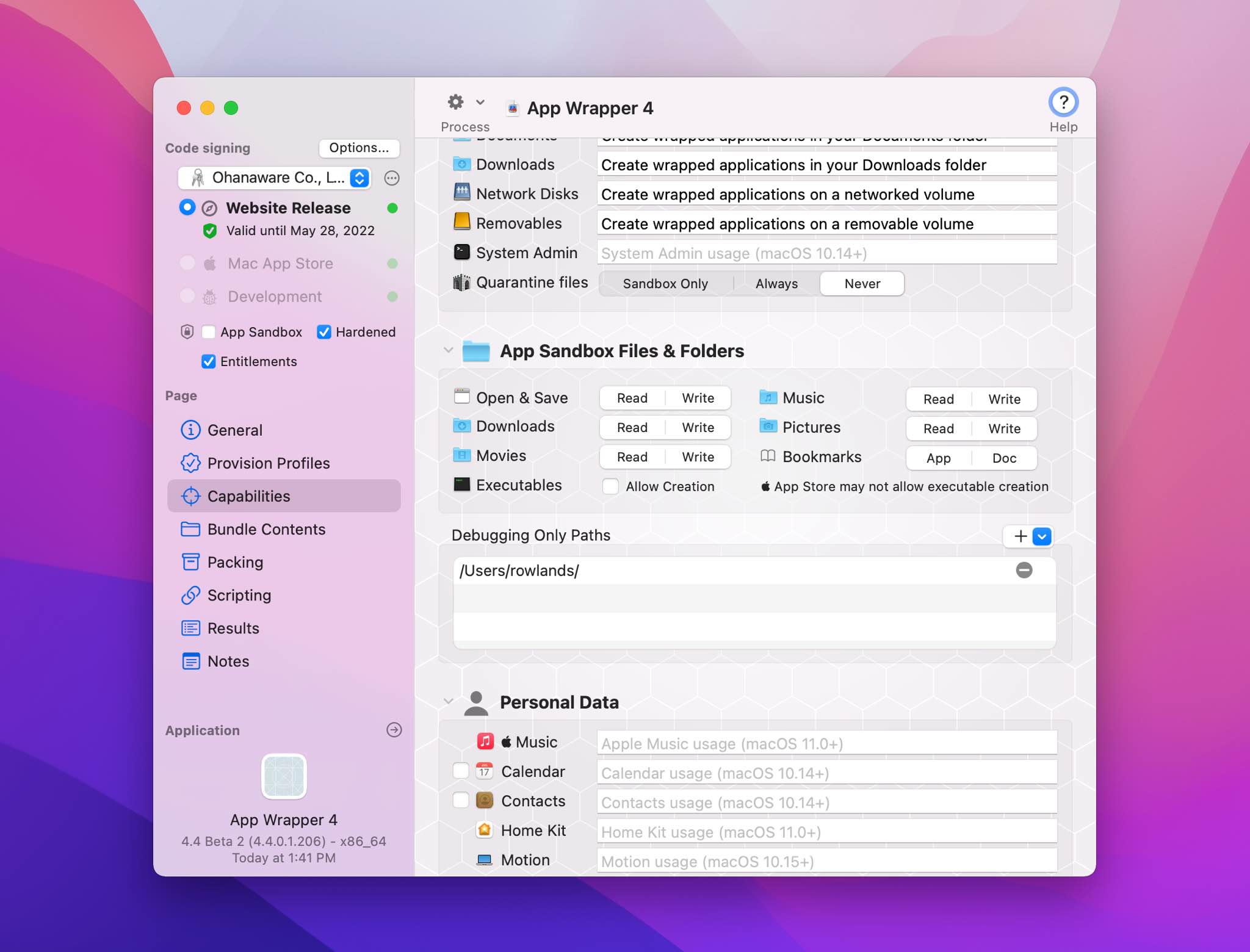
* Direct and built-in plist editor: Now more precise and custom edit to the Info.plist or Entitlements can be made directly in App Wrapper, saving time and easing the workflow.
* Dynamic Text: Replaces special constants in fields, plists and entitlements, using information from the application, signing certificate and more.
* SF Symbols Support: A built-in rasterizer (on macOS Big Sur) which can convert SF Symbols into a multi-representation TIFF images, allowing SF Symbols to be used on older versions of the macOS.
* DropDMG support: App Wrapper 4 now works with C-Command's DropDMG as well as Araelium's DMG Canvas.
* Submit Mac Apps directly to the App Store: With App Wrapper 4, App Store Submission is now as easy as a checkbox in the Packing Page.
Major Improvements over App Wrapper 3:
* Improved Performance: The fastest we've clocked App Wrapper processing itself was 300 ms (0.3 seconds), which includes analyzing the application, modifying it and doing a complete code sign of all the nested executables in order.
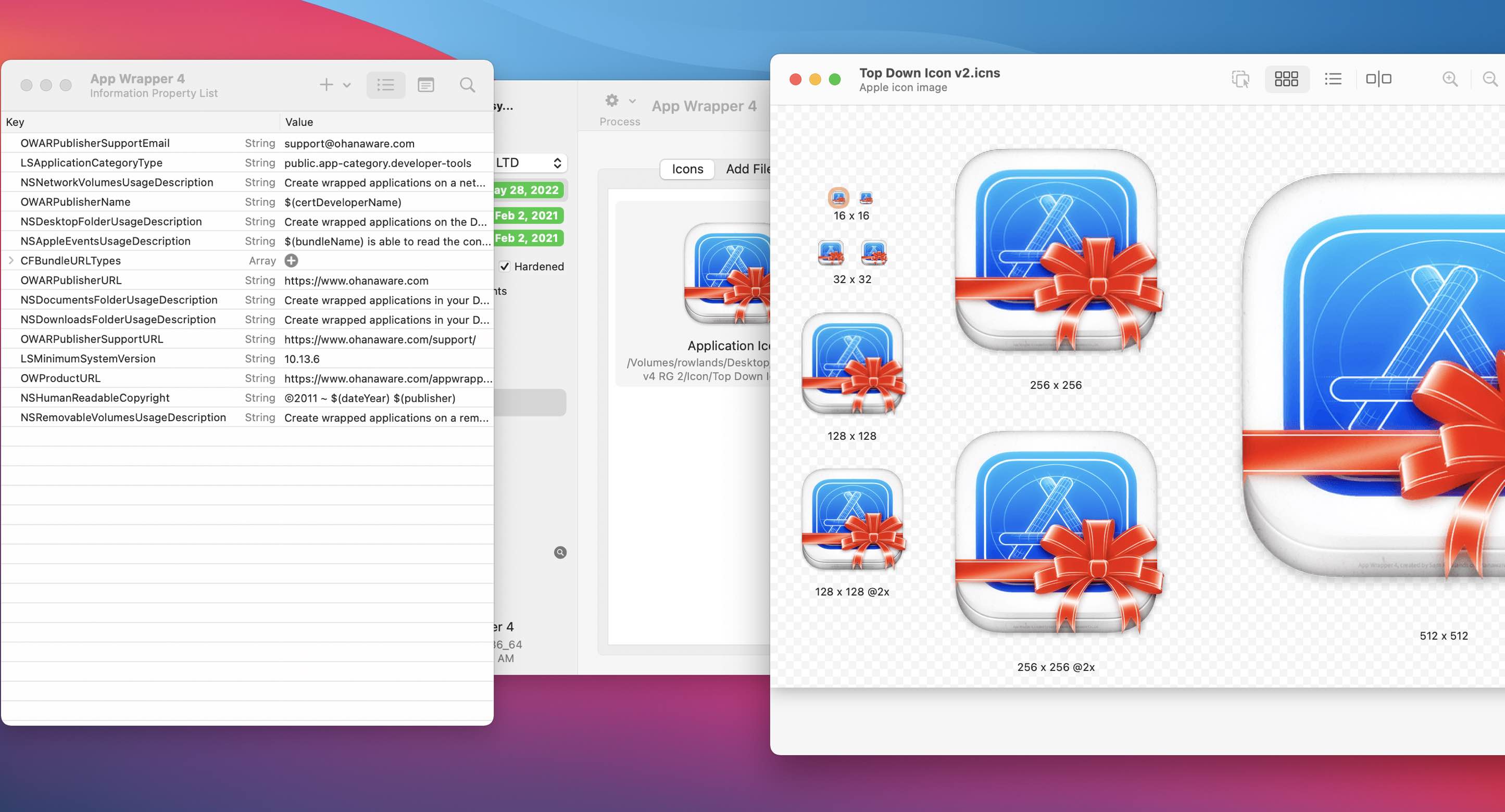
* New Icon Editor: Allows icons to be created from a single image (using templates) or from multiple different sized images. App Wrapper 4 now uses ICNSmini in its icon editor to compress ICNS files down to 1/3rd of their size.
* Unified Progress: Wrapping, Archiving and Apple Submission is all done in one single window, making it easy to see exactly what's going on and where.
* Checking engine: Redesigned to cover more ground and to provide clearer information when a problem is discovered.
* Identity Selector: Reimagined many times over to provide a clear overview of the certificates and their status.
* Xojo Integration: Overhauled scripting system allows for Xojo scripts to be directly copy/pasted into the Xojo IDE and for options to be configured from the Xojo IDE.
App Wrapper 4 was built with Xojo 2020r1.2 in conjunction with the Ohanaware App Kit, and wrapped with App Wrapper 4.
Compatibility:
* macOS 10.13.6 High Sierra, macOS 10.14 Mojave, macOS 10.15 Catalina or macOS 11.0 Big Sur
* 8GB of RAM
* 50MB of disk space
* Xcode 10 or newer
Pricing and Availability:
App Wrapper 4 is available right now from the Ohanaware Website. App Wrapper 4 offers a no-obligation 14 Day trial. The RRP of App Wrapper 4 is $49.99 (USD) for a single user 1-Year Update Plan. Customers with a valid Update Plan can upgrade to App Wrapper 4 with no additional cost. Customers with expired Update Plans can extend their plans for $39.99 (USD). Ohanaware currently uses FastSpring as handle payments on the Ohanaware website.
App Wrapper 4: https://ohanaware.com/appwrapper/
Download App Wrapper: https://www.ohanaware.com/appwrapper/release/appWrapper.dmg
Purchase App Wrapper: https://ohanaware.onfastspring.com/app-wrapper
Screenshot 1: https://ohanaware.com/appwrapper/aw4/general@2x.jpg
Screenshot 2: https://ohanaware.com/appwrapper/aw4/improvements@2x.jpg
High Resolution Icon (1024px): https://www.ohanaware.com/appwrapper/aw4/aw4Icon_1024w.png
Since 2006, Joy Sha & Sam Rowlands have been building top ten, award winning apps. Their most notable applications include Funtastic Photos, which set the benchmark for modern photo editing. HDRtist & HDRtist Pro which has over 100,000 users world wide. App Wrapper, which is the #1 third party product to help developers prepare their apps for the App Store. All Material and Software (C) Copyright 2006-2020 Ohanaware Co., Ltd. All Rights Reserved. Apple, the Apple logo, Mac OS X and Macintosh are registered trademarks of Apple Inc. in the U.S. and/or other countries. Other trademarks and registered trademarks may be the property of their respective owners.
*******
Link To Article: https://prmac.com/release-id-84257.htm
*******
---------------------------------------------------------------------------------
Note that you can alter delivered distributions at any time.
Login to your account on prMac to alter your channel selection, or to opt-out at any time.
App Wrapper 4.0 - Post-Build Processor now available for macOS Big Sur - Published on 12/15/20
Ohanaware Co., Ltd. today releases App Wrapper 4.0, a massive overhaul and re-write of their popular premium post-build process for macOS. App Wrapper was designed to simplify the process of preparing applications for submission to the Mac App Store and deploying on web sites. This landmark release features a UI redesign to improvement clarity and discoverability, while at the same a complete rewrite of the processing engine to make it fast enough to be used for debugging with minimal impact.
Hengchun, Taiwan - Ohanaware Co., Ltd. Announce the immediate release of App Wrapper 4.0, a massive overhaul and re-write of their popular premium post-build process for macOS. This landmark release features a UI redesign to improvement clarity and discoverability, while at the same a complete rewrite of the processing engine to make it fast enough to be used for debugging with minimal impact.
Since 2011 Ohanaware have been developing their premium post-build processor, aiding developers to process their applications for Apple's App Store and Apple's Notarization process. Version 4.0 is the fourth re-write of the product, taking everything that Ohanaware have learned in the last 9 years and re-employing that knowledge to create a modern, more assistive, more discoverable, more capable and importantly, more expandable product for todays post-build requirements. Major New Features in App Wrapper 4.0 include:
* Designed for macOS Big Sur: With a finely tuned engine to be used when debugging apps, performing nearly all the same tasks as a build, but in the quickest time possible, adding minimal impact to App Wrapper's customers workflows.
* Handsome Interface: Working with Tim Parnell from Strawberry Software, the interface was crafted to save time by improving accessibility, grouping things logically, and attempting to make the most needed options as available and clear as we could.
* Direct and built-in plist editor: Now more precise and custom edit to the Info.plist or Entitlements can be made directly in App Wrapper, saving time and easing the workflow.
* Dynamic Text: Replaces special constants in fields, plists and entitlements, using information from the application, signing certificate and more.
* SF Symbols Support: A built-in rasterizer (on macOS Big Sur) which can convert SF Symbols into a multi-representation TIFF images, allowing SF Symbols to be used on older versions of the macOS.
* DropDMG support: App Wrapper 4 now works with C-Command's DropDMG as well as Araelium's DMG Canvas.
* Submit Mac Apps directly to the App Store: With App Wrapper 4, App Store Submission is now as easy as a checkbox in the Packing Page.
Major Improvements over App Wrapper 3:
* Improved Performance: The fastest we've clocked App Wrapper processing itself was 300 ms (0.3 seconds), which includes analyzing the application, modifying it and doing a complete code sign of all the nested executables in order.
* New Icon Editor: Allows icons to be created from a single image (using templates) or from multiple different sized images. App Wrapper 4 now uses ICNSmini in its icon editor to compress ICNS files down to 1/3rd of their size.
* Unified Progress: Wrapping, Archiving and Apple Submission is all done in one single window, making it easy to see exactly what's going on and where.
* Checking engine: Redesigned to cover more ground and to provide clearer information when a problem is discovered.
* Identity Selector: Reimagined many times over to provide a clear overview of the certificates and their status.
* Xojo Integration: Overhauled scripting system allows for Xojo scripts to be directly copy/pasted into the Xojo IDE and for options to be configured from the Xojo IDE.
App Wrapper 4 was built with Xojo 2020r1.2 in conjunction with the Ohanaware App Kit, and wrapped with App Wrapper 4.
Compatibility:
* macOS 10.13.6 High Sierra, macOS 10.14 Mojave, macOS 10.15 Catalina or macOS 11.0 Big Sur
* 8GB of RAM
* 50MB of disk space
* Xcode 10 or newer
Pricing and Availability:
App Wrapper 4 is available right now from the Ohanaware Website. App Wrapper 4 offers a no-obligation 14 Day trial. The RRP of App Wrapper 4 is $49.99 (USD) for a single user 1-Year Update Plan. Customers with a valid Update Plan can upgrade to App Wrapper 4 with no additional cost. Customers with expired Update Plans can extend their plans for $39.99 (USD). Ohanaware currently uses FastSpring as handle payments on the Ohanaware website.
App Wrapper 4: https://ohanaware.com/appwrapper/
Download App Wrapper: https://www.ohanaware.com/appwrapper/release/appWrapper.dmg
Purchase App Wrapper: https://ohanaware.onfastspring.com/app-wrapper
Screenshot 1: https://ohanaware.com/appwrapper/aw4/general@2x.jpg
Screenshot 2: https://ohanaware.com/appwrapper/aw4/improvements@2x.jpg
High Resolution Icon (1024px): https://www.ohanaware.com/appwrapper/aw4/aw4Icon_1024w.png

Since 2006, Joy Sha & Sam Rowlands have been building top ten, award winning apps. Their most notable applications include Funtastic Photos, which set the benchmark for modern photo editing. HDRtist & HDRtist Pro which has over 100,000 users world wide. App Wrapper, which is the #1 third party product to help developers prepare their apps for the App Store. All Material and Software (C) Copyright 2006-2020 Ohanaware Co., Ltd. All Rights Reserved. Apple, the Apple logo, Mac OS X and Macintosh are registered trademarks of Apple Inc. in the U.S. and/or other countries. Other trademarks and registered trademarks may be the property of their respective owners.
*******
Link To Article: https://prmac.com/release-id-84257.htm
*******
---------------------------------------------------------------------------------
Note that you can alter delivered distributions at any time.
Login to your account on prMac to alter your channel selection, or to opt-out at any time.
DesignMerge Now Available for InDesign 2021
A new article has been published at prMac.
DesignMerge Now Available for InDesign 2021 - Published on 12/14/20
Meadows Publishing Solutions releases DesignMerge Pro, its variable data publishing and personalized printing software for Adobe InDesign 2021. DesignMerge Pro supports many sophisticated VDP features, such as conditional logic, automatic copy-fitting, linear and 2D bar coding, and multi-up imposition. DesignMerge can produce output in a variety of formats, including PDF/VT, and has been tested with equipment from all major digital press manufacturers.
Schaumburg, Illinois - Meadows Publishing Solutions announced the release of their DesignMerge Pro variable data publishing and personalized printing software for Adobe InDesign 2021, supporting both Macintosh and Windows platforms. The software release includes several new and powerful features.
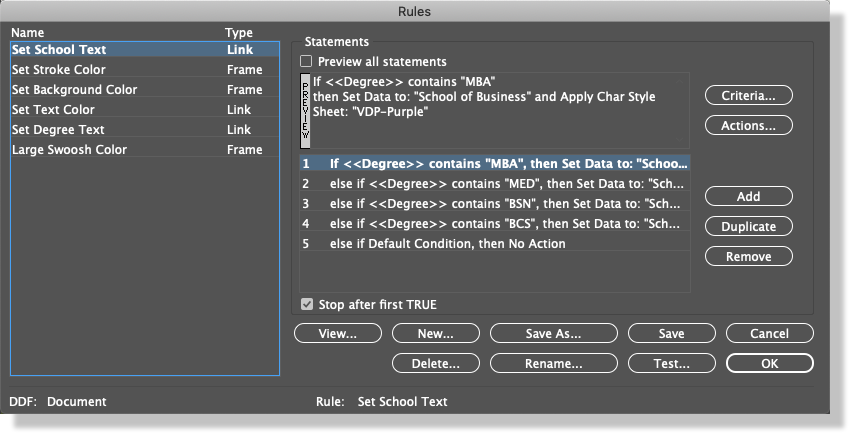
DesignMerge Pro is an advanced, professional variable data publishing and personalized printing software solution for Adobe InDesign users. In addition to standard VDP capability, such as the ability to personalize text and images, DesignMerge Pro software also includes many other sophisticated VDP features, such as conditional logic for if/then/else rules processing, automatic copy-fitting to remedy overset variable text, linear and 2D bar coding, multi-up imposition, and embedded style tags. The software is completely menu-driven, works directly inside of the Adobe InDesign page layout application, and does not require any manual programming.
New features in the 2021 release of DesignMerge Pro include the following:
* Custom and Filtered Record Range Support:
The new free-style record range feature allows processing of discontinuous data records, and also allows records to be filtered based on criteria established by the user. This new feature works well for filtering a set of proof records from larger data files.
* Label and Cutter Imposition Features:
DesignMerge now includes a brand new imposition mode that will automatically split data across multiple rows or columns on a sheet. This new feature is perfect for use with label printers and cutters.
* Specify Number of Copies per Record or Page:
With one click, you may now print multiple copies of each variable piece based on a data field. This feature works well for applications such as business cards and store signage that require multiple printed copies.
* HTTP Support for Variable Images:
The HTTP module provides support for variable pictures and other assets that can be referenced via a URL reference. Images can be stored on any server or storage location accessible via HTTP, and every image format supported by Adobe InDesign can be referenced in this same fashion.
* Additional Image Positioning Options:
New options have been added for adjusting both vertical and horizontal positioning of variable pictures after they have been sized to fit the frame. These new features are ideal for signatures and other variable width images.
"After more than 8 months of development, we are very proud of this new release," said John Kriho, President of Meadows. "DesignMerge software now includes several of the most requested features related to record processing, and the new Label and Cutter imposition modes further expand the range of possible applications for the software."
DesignMerge Pro software is available for immediate download at the Meadows web site. Please visit Meadows Publishing Solutions for more information, or email support for pricing or upgrade details.
Meadows Publishing Solutions: https://www.meadowsps.com
DesignMerge Pro: https://meadowsps.com/designmerge-pro/
Screenshot: https://meadowsps.com/wp-content/uploads/2020/04/product-dmpro-screen2-1.png
Founded in 1991, Meadows Publishing Solutions provides commercial and custom software development, integration, and consulting services for the print and electronic publishing markets. Our current areas of focus include Variable Data Printing, Database Publishing Automation, and Digital Catalog Production. Anything that connects databases to documents is our specialty. Meadows offers software to support a full range of solutions, from desktop VDP applications, to complete web-based variable composition systems, with the integration and industry knowledge that allow us to craft a reliable solution for any publishing challenge. The Meadows team has developed a number of commercial software products for Adobe InDesign that are offered under our own DesignMerge brand, including DesignMerge Pro, and DesignMerge Catalog. All Meadows software is developed in the U.S.A., with sales and support provided from our home office just outside of Chicago in Schaumburg, Illinois. All Material and
Software (C) Copyright 2020 Meadows Publishing Solutions. All Rights Reserved. Apple, the Apple logo, and macOS are registered trademarks of Apple Inc. in the U.S. and/or other countries.
*******
Link To Article: https://prmac.com/release-id-84255.htm
*******
---------------------------------------------------------------------------------
Note that you can alter delivered distributions at any time.
Login to your account on prMac to alter your channel selection, or to opt-out at any time.
DesignMerge Now Available for InDesign 2021 - Published on 12/14/20
Meadows Publishing Solutions releases DesignMerge Pro, its variable data publishing and personalized printing software for Adobe InDesign 2021. DesignMerge Pro supports many sophisticated VDP features, such as conditional logic, automatic copy-fitting, linear and 2D bar coding, and multi-up imposition. DesignMerge can produce output in a variety of formats, including PDF/VT, and has been tested with equipment from all major digital press manufacturers.
Schaumburg, Illinois - Meadows Publishing Solutions announced the release of their DesignMerge Pro variable data publishing and personalized printing software for Adobe InDesign 2021, supporting both Macintosh and Windows platforms. The software release includes several new and powerful features.
DesignMerge Pro is an advanced, professional variable data publishing and personalized printing software solution for Adobe InDesign users. In addition to standard VDP capability, such as the ability to personalize text and images, DesignMerge Pro software also includes many other sophisticated VDP features, such as conditional logic for if/then/else rules processing, automatic copy-fitting to remedy overset variable text, linear and 2D bar coding, multi-up imposition, and embedded style tags. The software is completely menu-driven, works directly inside of the Adobe InDesign page layout application, and does not require any manual programming.
New features in the 2021 release of DesignMerge Pro include the following:
* Custom and Filtered Record Range Support:
The new free-style record range feature allows processing of discontinuous data records, and also allows records to be filtered based on criteria established by the user. This new feature works well for filtering a set of proof records from larger data files.
* Label and Cutter Imposition Features:
DesignMerge now includes a brand new imposition mode that will automatically split data across multiple rows or columns on a sheet. This new feature is perfect for use with label printers and cutters.
* Specify Number of Copies per Record or Page:
With one click, you may now print multiple copies of each variable piece based on a data field. This feature works well for applications such as business cards and store signage that require multiple printed copies.
* HTTP Support for Variable Images:
The HTTP module provides support for variable pictures and other assets that can be referenced via a URL reference. Images can be stored on any server or storage location accessible via HTTP, and every image format supported by Adobe InDesign can be referenced in this same fashion.
* Additional Image Positioning Options:
New options have been added for adjusting both vertical and horizontal positioning of variable pictures after they have been sized to fit the frame. These new features are ideal for signatures and other variable width images.
"After more than 8 months of development, we are very proud of this new release," said John Kriho, President of Meadows. "DesignMerge software now includes several of the most requested features related to record processing, and the new Label and Cutter imposition modes further expand the range of possible applications for the software."
DesignMerge Pro software is available for immediate download at the Meadows web site. Please visit Meadows Publishing Solutions for more information, or email support for pricing or upgrade details.
Meadows Publishing Solutions: https://www.meadowsps.com
DesignMerge Pro: https://meadowsps.com/designmerge-pro/
Screenshot: https://meadowsps.com/wp-content/uploads/2020/04/product-dmpro-screen2-1.png
Founded in 1991, Meadows Publishing Solutions provides commercial and custom software development, integration, and consulting services for the print and electronic publishing markets. Our current areas of focus include Variable Data Printing, Database Publishing Automation, and Digital Catalog Production. Anything that connects databases to documents is our specialty. Meadows offers software to support a full range of solutions, from desktop VDP applications, to complete web-based variable composition systems, with the integration and industry knowledge that allow us to craft a reliable solution for any publishing challenge. The Meadows team has developed a number of commercial software products for Adobe InDesign that are offered under our own DesignMerge brand, including DesignMerge Pro, and DesignMerge Catalog. All Meadows software is developed in the U.S.A., with sales and support provided from our home office just outside of Chicago in Schaumburg, Illinois. All Material and
Software (C) Copyright 2020 Meadows Publishing Solutions. All Rights Reserved. Apple, the Apple logo, and macOS are registered trademarks of Apple Inc. in the U.S. and/or other countries.
*******
Link To Article: https://prmac.com/release-id-84255.htm
*******
---------------------------------------------------------------------------------
Note that you can alter delivered distributions at any time.
Login to your account on prMac to alter your channel selection, or to opt-out at any time.
MeisterApps Launches MirrorMeister for iOS and macOS
A new article has been published at prMac.
MeisterApps Launches MirrorMeister for iOS and macOS - Published on 12/14/20
MeisterApps today releases MirrorMeister, their first screen mirroring app for macOS and iOS. MirrorMeister is a cross-platform screencasting app, supporting more than 20 different Smart TVs brands, streaming devices, and televisions using the Android TV operating system. Designed with an easy-to-use interface, the app introduces new features to the market. The user just needs to download the app once and can stream music, cast photos, and videos from an iPhone, iPad, or MacBook to any TV.
Naarden, Netherlands - MeisterApps launched today their first screen mirroring app, MirrorMeister. Unlike its competitors, MirrorMeister is a cross-platform screencasting app, supporting more than 20 different Smart TVs brands, streaming devices, and televisions using the Android TV operating system. With MirrorMeister, the company aims to change the consumer expectation of what they can do with a mirroring app. Designed with an easy-to-use interface, the app introduces new features to the market.
Highlighted Features:
* Cross-Platform - The user just needs to download the app once and can stream music, cast photos, and videos from an iPhone, iPad, or MacBook to any TV without paying more for that
* Cast to Multiple Receivers - MirrorMeister shares content to a number of media receivers, including streaming devices. Users can broadcast their iOS or macOS devices to Smart TVs, Chromecast, Amazon FireTV, and more
* Wireless - MirrorMeister doesn't require any adapters. All content is shared wirelessly from any Apple device to any television or streaming receiver.
* The app is available for Family Sharing, only one subscription is needed for the entire family
According to Bart van Heijst, marketing director for MeisterApps BV, MirrorMeister was developed as an answer to a growing demand for flexible TV products. "We have received many requests to provide a high-quality screen mirroring app for any TV and that could be used in all Apple devices. With MirrorMeister, users can mirror their favorite videos during a family meeting from their iPhone on a Samsung TV and the next day, cast a business presentation from a MacBook to a Sony. They don't need to worry about compatibility issues ever again".
The app supports the following devices:
* iPhone (6S and newer), iPad (requires iOS 12 or higher), MacBook Air, MacBook Pro, iMac
* Streaming devices: Roku Streaming Player, Chromecast, Amazon FireTV, Xiaomi Mi Box
* Smart TV brands: Samsung, Roku TV, Sony, LG, Panasonic, Philips, Grundig, Arçelik, Beko, Hisense, TCL, Toshiba, Sharp, Hitachi, Skyworth, Changhong, and any other TV using Android TV operational system
MirrorMeister is available for free or with subscription on the App Store. Users can opt for monthly subscriptions to gain Pro functionality and enjoy regularly added features, updates, and services.
MirrorMeister 1.0.2: https://www.mirrormeister.com/
Download from the Mac App Store: https://apps.apple.com/app/mirrormeister-for-smart-tv/id1474077410
YouTube Video (Introduction to MirrorMeister): https://www.youtube.com/watch?v=WyB7ZCNuuJQ
Media Assets: https://drive.google.com/drive/folders/1CvLEDPtcT-F3knJvD9kiGUnjXTXsDOX5?usp=sharing
MeisterApps was established in 2019 to develop innovative, flexible, and proven solutions for the connected TV device industry. The company sells applications for most major TV brands, including Samsung, LG, Sony, Panasonic, Philips, and Roku TV. All Material and Software (C) Copyright 2020 MeisterApps BV. All Rights Reserved. Apple, the Apple logo, iPhone, iPod and iPad are registered trademarks of Apple Inc. in the U.S. and/or other countries. Other trademarks and registered trademarks may be the property of their respective owners.
*******
Link To Article: https://prmac.com/release-id-84254.htm
*******
---------------------------------------------------------------------------------
Note that you can alter delivered distributions at any time.
Login to your account on prMac to alter your channel selection, or to opt-out at any time.
MeisterApps Launches MirrorMeister for iOS and macOS - Published on 12/14/20
MeisterApps today releases MirrorMeister, their first screen mirroring app for macOS and iOS. MirrorMeister is a cross-platform screencasting app, supporting more than 20 different Smart TVs brands, streaming devices, and televisions using the Android TV operating system. Designed with an easy-to-use interface, the app introduces new features to the market. The user just needs to download the app once and can stream music, cast photos, and videos from an iPhone, iPad, or MacBook to any TV.
Naarden, Netherlands - MeisterApps launched today their first screen mirroring app, MirrorMeister. Unlike its competitors, MirrorMeister is a cross-platform screencasting app, supporting more than 20 different Smart TVs brands, streaming devices, and televisions using the Android TV operating system. With MirrorMeister, the company aims to change the consumer expectation of what they can do with a mirroring app. Designed with an easy-to-use interface, the app introduces new features to the market.
Highlighted Features:
* Cross-Platform - The user just needs to download the app once and can stream music, cast photos, and videos from an iPhone, iPad, or MacBook to any TV without paying more for that
* Cast to Multiple Receivers - MirrorMeister shares content to a number of media receivers, including streaming devices. Users can broadcast their iOS or macOS devices to Smart TVs, Chromecast, Amazon FireTV, and more
* Wireless - MirrorMeister doesn't require any adapters. All content is shared wirelessly from any Apple device to any television or streaming receiver.
* The app is available for Family Sharing, only one subscription is needed for the entire family
According to Bart van Heijst, marketing director for MeisterApps BV, MirrorMeister was developed as an answer to a growing demand for flexible TV products. "We have received many requests to provide a high-quality screen mirroring app for any TV and that could be used in all Apple devices. With MirrorMeister, users can mirror their favorite videos during a family meeting from their iPhone on a Samsung TV and the next day, cast a business presentation from a MacBook to a Sony. They don't need to worry about compatibility issues ever again".
The app supports the following devices:
* iPhone (6S and newer), iPad (requires iOS 12 or higher), MacBook Air, MacBook Pro, iMac
* Streaming devices: Roku Streaming Player, Chromecast, Amazon FireTV, Xiaomi Mi Box
* Smart TV brands: Samsung, Roku TV, Sony, LG, Panasonic, Philips, Grundig, Arçelik, Beko, Hisense, TCL, Toshiba, Sharp, Hitachi, Skyworth, Changhong, and any other TV using Android TV operational system
MirrorMeister is available for free or with subscription on the App Store. Users can opt for monthly subscriptions to gain Pro functionality and enjoy regularly added features, updates, and services.
MirrorMeister 1.0.2: https://www.mirrormeister.com/
Download from the Mac App Store: https://apps.apple.com/app/mirrormeister-for-smart-tv/id1474077410
YouTube Video (Introduction to MirrorMeister): https://www.youtube.com/watch?v=WyB7ZCNuuJQ
Media Assets: https://drive.google.com/drive/folders/1CvLEDPtcT-F3knJvD9kiGUnjXTXsDOX5?usp=sharing
MeisterApps was established in 2019 to develop innovative, flexible, and proven solutions for the connected TV device industry. The company sells applications for most major TV brands, including Samsung, LG, Sony, Panasonic, Philips, and Roku TV. All Material and Software (C) Copyright 2020 MeisterApps BV. All Rights Reserved. Apple, the Apple logo, iPhone, iPod and iPad are registered trademarks of Apple Inc. in the U.S. and/or other countries. Other trademarks and registered trademarks may be the property of their respective owners.
*******
Link To Article: https://prmac.com/release-id-84254.htm
*******
---------------------------------------------------------------------------------
Note that you can alter delivered distributions at any time.
Login to your account on prMac to alter your channel selection, or to opt-out at any time.
BatchOutput PDF Now Supports macOS Big Sur: PDF Automation Tool
A new article has been published at prMac.
BatchOutput PDF Now Supports macOS Big Sur: PDF Automation Tool - Published on 12/14/20
Zevrix Solutions releases BatchOutput PDF 2.3.6, a compatibility update to company's PDF printing automation solution for macOS. The only product for automatic PDF printing on the Mac market, the app processes PDF from watched hot folders. BatchOutput PDF saves users the time and effort of printing PDFs manually. Users only need to drop PDFs into hot folders for automatic printing. The new version adds support for the recently released macOS Big Sur and improves parsing of complex PPD files.
Toronto (ON), Canada - Zevrix Solutions announces the release of BatchOutput PDF 2.3.6, a compatibility update to the company's PDF printing automation solution for Mac. The only consumer-oriented product for automatic PDF printing on the Apple market, the software allows users to process PDF documents from watched hot folders. The software saves the time and effort of opening and printing each document manually.
The new version introduces support for the recently released macOS 11 Big Sur and is offered as a free update to licensed users. The update also ensures accurate processing of complex printer description files, fixes minor UI glitches, automatically fixes file permissions in a rare situation where the serial number couldn't be written to disk during license activation.
"The cost is very low compared to the power this app has," says Mark Lenaerts of ZwartOpWit printing company in Herenthout, Belgium. "We produce thousands of prints every week and direct them to the right printers with the correct settings. To be able to make adjustments in one place for every workflow is easy and efficient."
BatchOutput PDF helps users eliminate countless repetitive tasks of opening PDF files and adjusting print settings manually by bypassing the print dialog. Users only need to drop their PDF files into watched hot folders and the software will print the documents automatically using the hot folder settings:
* Print PDFs automatically from watched hot folders
* Create hot folders for different print settings
* Detailed output history
* Specify password for encrypted PDFs
* Printer tray selection based on document text
* Save time and hassle of printing each PDF manually
In addition to the single-user version of the program, Zevrix also offers BatchOutput PDF Server that can serve unlimited users on a network.
Pricing and Availability:
BatchOutput PDF can be purchased from Zevrix website for $24.95 USD (Server version $99.95), as well as from Mac App Store and authorized resellers. The update is free for licensed users of version 2. Trial is also available for download. BatchOutput PDF supports macOS 10.8-11.
Zevrix Solutions: https://zevrix.com
BatchOutput PDF 2.3.6: https://zevrix.com/batchoutputpdf
Download BatchOutput PDF: https://zevrix.com/downloads/BatchOutputPDF.dmg
Purchase: https://zevrix.com/store
Screenshot: https://zevrix.com/wp-content/uploads/2020/08/bopdf2-main-new.png
Located in Toronto, Canada, Zevrix Solutions provides automation and productivity solutions for Adobe Creative Cloud and Creative Suite software, PDF workflows, graphic file diagnostics and Microsoft Office output on Mac OS. Zevrix is dedicated to help professionals increase their profits through automating everyday tasks, producing error-free documents, saving disk space and cutting production costs. For more information, visit their website. Copyright (C) 2020 Zevrix Solutions. All Rights Reserved. Other trademarks and registered trademarks may be the property of their respective owners.
*******
Link To Article: https://prmac.com/release-id-84253.htm
*******
---------------------------------------------------------------------------------
Note that you can alter delivered distributions at any time.
Login to your account on prMac to alter your channel selection, or to opt-out at any time.
BatchOutput PDF Now Supports macOS Big Sur: PDF Automation Tool - Published on 12/14/20
Zevrix Solutions releases BatchOutput PDF 2.3.6, a compatibility update to company's PDF printing automation solution for macOS. The only product for automatic PDF printing on the Mac market, the app processes PDF from watched hot folders. BatchOutput PDF saves users the time and effort of printing PDFs manually. Users only need to drop PDFs into hot folders for automatic printing. The new version adds support for the recently released macOS Big Sur and improves parsing of complex PPD files.
Toronto (ON), Canada - Zevrix Solutions announces the release of BatchOutput PDF 2.3.6, a compatibility update to the company's PDF printing automation solution for Mac. The only consumer-oriented product for automatic PDF printing on the Apple market, the software allows users to process PDF documents from watched hot folders. The software saves the time and effort of opening and printing each document manually.
The new version introduces support for the recently released macOS 11 Big Sur and is offered as a free update to licensed users. The update also ensures accurate processing of complex printer description files, fixes minor UI glitches, automatically fixes file permissions in a rare situation where the serial number couldn't be written to disk during license activation.
"The cost is very low compared to the power this app has," says Mark Lenaerts of ZwartOpWit printing company in Herenthout, Belgium. "We produce thousands of prints every week and direct them to the right printers with the correct settings. To be able to make adjustments in one place for every workflow is easy and efficient."
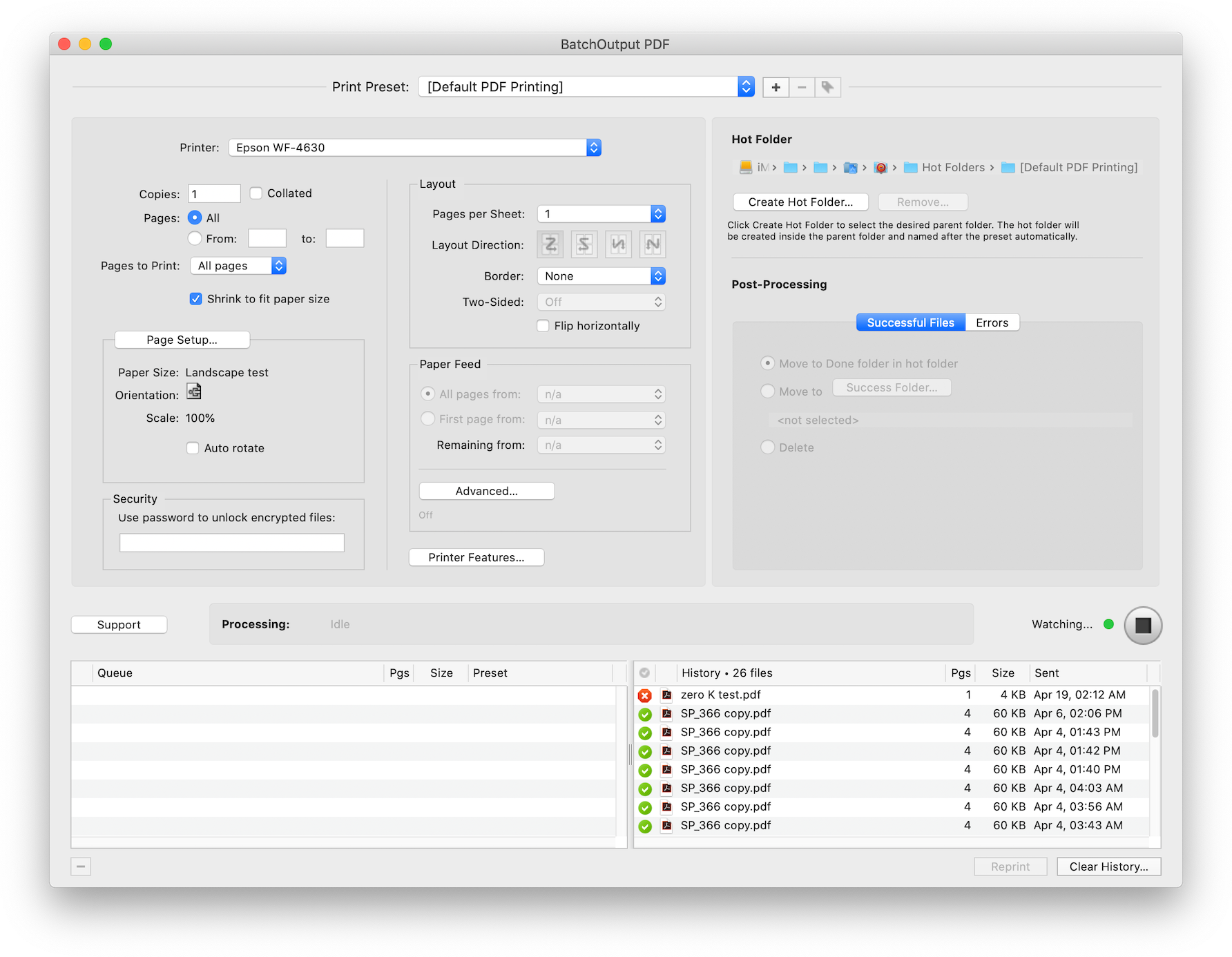
BatchOutput PDF helps users eliminate countless repetitive tasks of opening PDF files and adjusting print settings manually by bypassing the print dialog. Users only need to drop their PDF files into watched hot folders and the software will print the documents automatically using the hot folder settings:
* Print PDFs automatically from watched hot folders
* Create hot folders for different print settings
* Detailed output history
* Specify password for encrypted PDFs
* Printer tray selection based on document text
* Save time and hassle of printing each PDF manually
In addition to the single-user version of the program, Zevrix also offers BatchOutput PDF Server that can serve unlimited users on a network.
Pricing and Availability:
BatchOutput PDF can be purchased from Zevrix website for $24.95 USD (Server version $99.95), as well as from Mac App Store and authorized resellers. The update is free for licensed users of version 2. Trial is also available for download. BatchOutput PDF supports macOS 10.8-11.
Zevrix Solutions: https://zevrix.com
BatchOutput PDF 2.3.6: https://zevrix.com/batchoutputpdf
Download BatchOutput PDF: https://zevrix.com/downloads/BatchOutputPDF.dmg
Purchase: https://zevrix.com/store
Screenshot: https://zevrix.com/wp-content/uploads/2020/08/bopdf2-main-new.png
Located in Toronto, Canada, Zevrix Solutions provides automation and productivity solutions for Adobe Creative Cloud and Creative Suite software, PDF workflows, graphic file diagnostics and Microsoft Office output on Mac OS. Zevrix is dedicated to help professionals increase their profits through automating everyday tasks, producing error-free documents, saving disk space and cutting production costs. For more information, visit their website. Copyright (C) 2020 Zevrix Solutions. All Rights Reserved. Other trademarks and registered trademarks may be the property of their respective owners.
*******
Link To Article: https://prmac.com/release-id-84253.htm
*******
---------------------------------------------------------------------------------
Note that you can alter delivered distributions at any time.
Login to your account on prMac to alter your channel selection, or to opt-out at any time.
Cocoatech releases Path Finder 10 (macOS Big Sur Edition)
A new article has been published at prMac.
Cocoatech releases Path Finder 10 (macOS Big Sur Edition) - Published on 12/11/20
California based Cocoatech is pleased to announce the release of Path Finder 10, which is a paid update of their popular file browser for Path Finder 9 users. Become a master of file management with Path Finder 10. This useful app allows anyone to view hidden files, compare, merge and synchronize folders, batch rename files, use Dual Pane, browse and perform file operations on iOS devices and much more. Path Finder is extremely customizable and allows you to work how you want.
San Francisco, California - Cocoatech is pleased to announce the release of Path Finder 10, which is a paid update of their popular file browser for Path Finder 9 users. Path Finder allows you to view hidden files, compare, merge and synchronize folders, batch rename and batch select files, use Dual Pane, browse and perform file operations on iOS devices and much more. Path Finder is one of the oldest software on the macOS market (*first released in 2001) and boasts a very large and loyal userbase. The application is extremely customizable and allows you to work how you want. Become a master of file management with Path Finder 10!
Path Finder 10 brings support for AirDrop and allows users to browse and perform file operations on iOS devices. Path Finder 10 now allows you to access and browse the file system of your iPhone or iPad like you would on your desktop computer. Discover the simplicity of file transfers and copy/move operations, browse files by size, delete and perform many more file operations on your iOS device with Path Finder 10!
Path Finder 10 is fully redesigned for macOS 11 Big Sur and boasts native support for Apple Silicon processors. With the Path Finder 10 release, Cocoatech provides the users with the promised upgrade in the new yearly release cycle.
What's new:
* File browsing and file operations on iOS devices connected to USB port
* AirDrop support (currently only for devices discoverable by "Everyone")
* Fully redesigned for macOS 11 Big Sur
* Native support for Apple Silicon processors
* Added "Share" services to AirDrop, Mail, Messages, Notes
* Redesigned and improved Drop Stack
* Improved Batch Renamer functionality
* Even better support for system Dark Mode Appearance
* Many other improvements, tweaks and fixes
Supported Languages:
Path Finder supports Chinese, Czech, Dutch, English, Finnish, French, German, Italian, Japanese, Korean, Norwegian, Polish, Portuguese, Russian, Spanish and Swedish languages.
System Requirements:
* Mac OS X 10.12 or newer
Pricing and Availability:
You can try Path Finder for free for 30 days with all the features available to you during that period. Path Finder costs $36.00 (USD) for a single user license applicable for up to 3 user-owned computers, and $18.00 (USD) when upgrading from version 9. The software comes with a 60-day money back garantee. The software is available for purchase from the Cocoatech online store or from within the application itself. Volume license discounts available.
Path Finder 10.0: http://www.cocoatech.com/
Release Notes: https://cocoatech.com/#/support?notes=yes
Download Free Trial (dmg): https://get.cocoatech.com/PF10.dmg
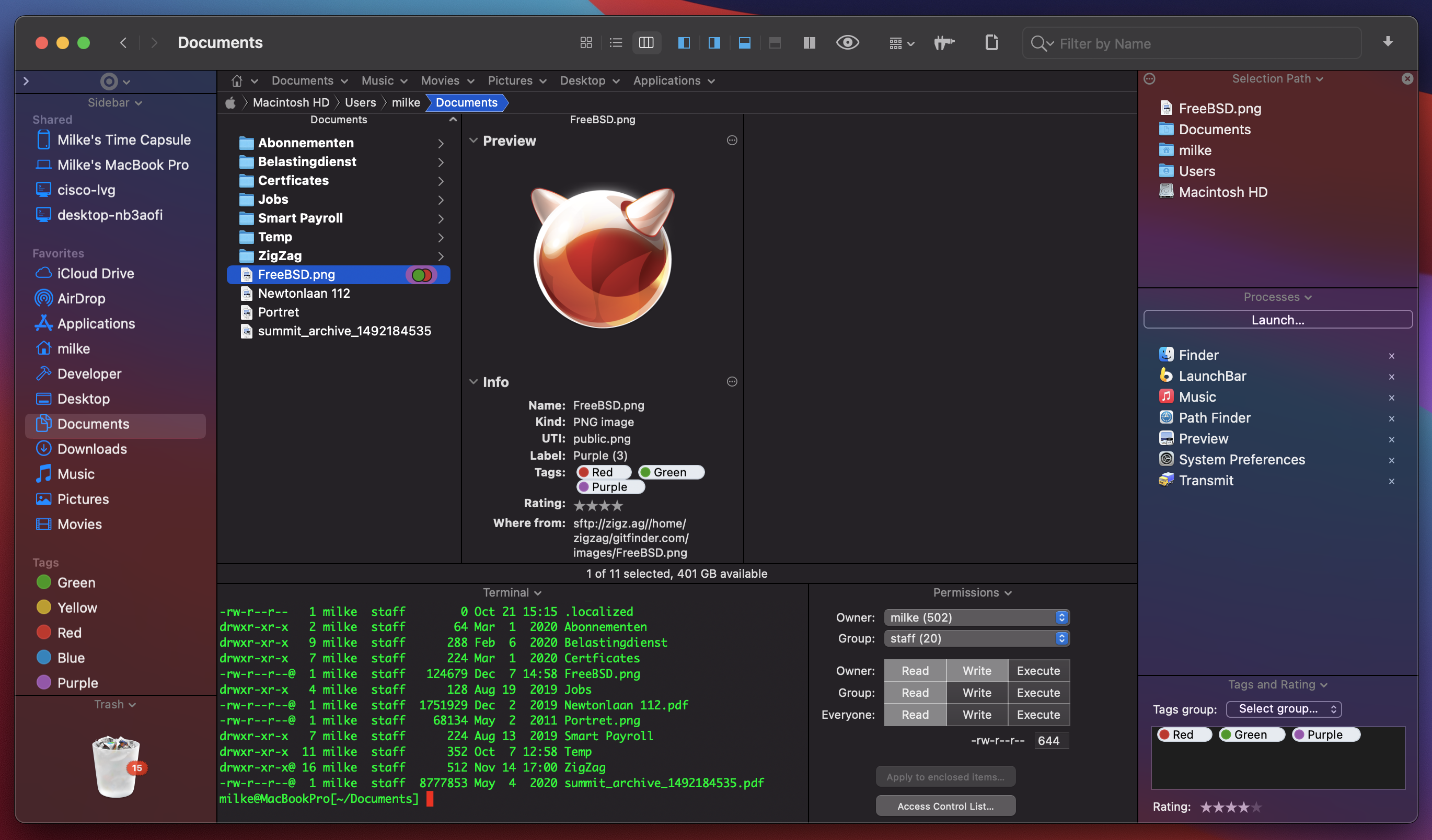
Screenshot 1: https://cocoatech.com/wp-content/uploads/2020/12/PF10_Screenshot-1_DarkTerminal.png
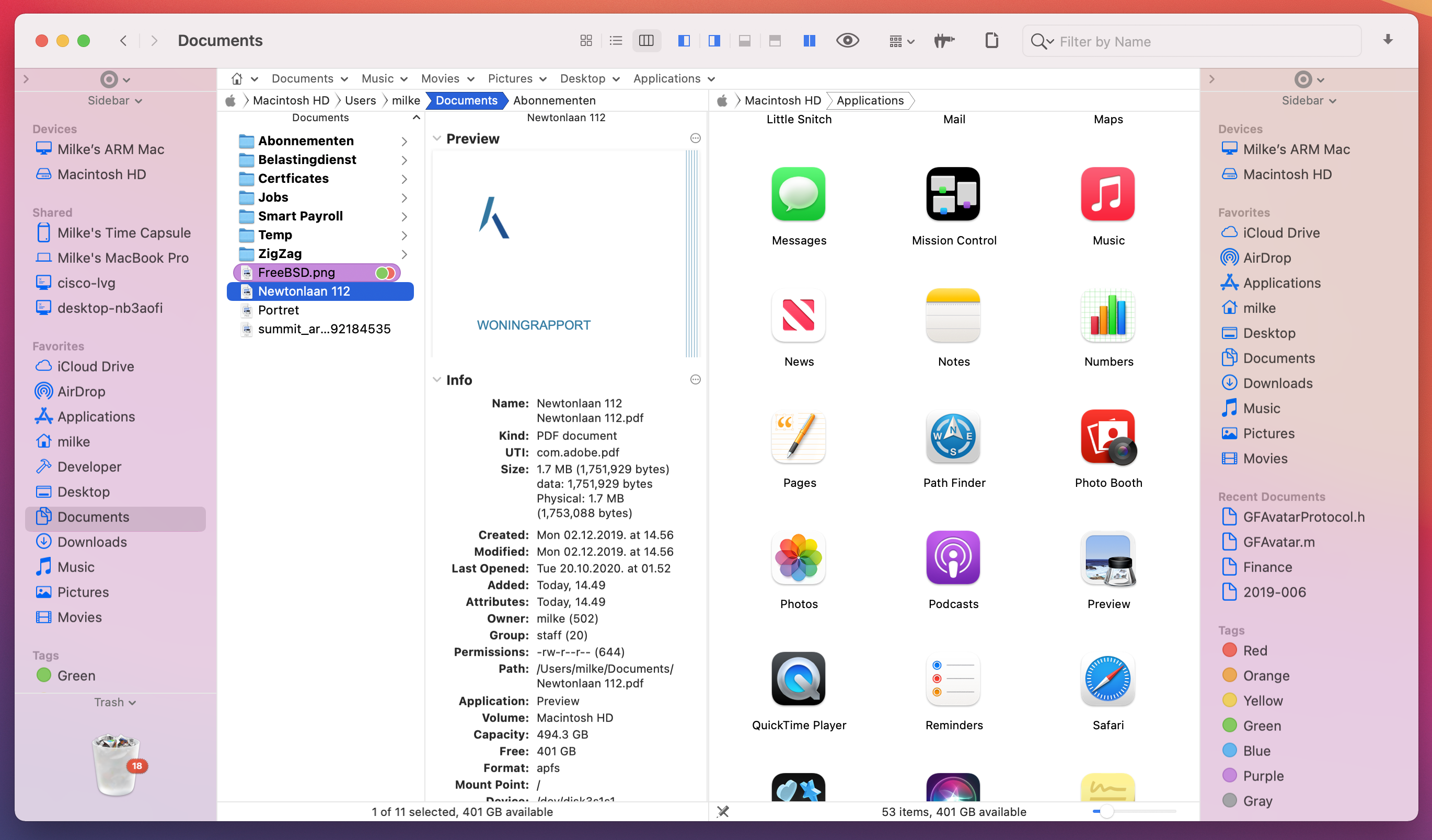
Screenshot 2: https://cocoatech.com/wp-content/uploads/2020/12/PF10_Screenshot2_LightDualPane.png
Application Icon: https://cocoatech.com/wp-content/uploads/2020/12/Path-Finder-10-icon-1024x1024-1.png
Headquartered in San Francisco, California, Cocoatech LLC is a privately funded software company founded in 2001 by Steve Gehrman. Steve has over 20 years as a software developer, and founded Cocoatech with the intention of bringing this experience to the Mac platform. The company has grown up alongside Apple helping entrepreneurs, small to large companies, and creative professionals to make order of chaos. Our team reaches from the US to Europe but our clients are all over the world. Copyright 2008-2020 Cocoatech, LLC. All Rights Reserved. Apple, the Apple logo, and Finder are registered trademarks of Apple Computer in the U.S. and/or other countries. Other trademarks and registered trademarks may be the property of their respective owners.
*******
Link To Article: https://prmac.com/release-id-84252.htm
*******
---------------------------------------------------------------------------------
Note that you can alter delivered distributions at any time.
Login to your account on prMac to alter your channel selection, or to opt-out at any time.
Cocoatech releases Path Finder 10 (macOS Big Sur Edition) - Published on 12/11/20
California based Cocoatech is pleased to announce the release of Path Finder 10, which is a paid update of their popular file browser for Path Finder 9 users. Become a master of file management with Path Finder 10. This useful app allows anyone to view hidden files, compare, merge and synchronize folders, batch rename files, use Dual Pane, browse and perform file operations on iOS devices and much more. Path Finder is extremely customizable and allows you to work how you want.
San Francisco, California - Cocoatech is pleased to announce the release of Path Finder 10, which is a paid update of their popular file browser for Path Finder 9 users. Path Finder allows you to view hidden files, compare, merge and synchronize folders, batch rename and batch select files, use Dual Pane, browse and perform file operations on iOS devices and much more. Path Finder is one of the oldest software on the macOS market (*first released in 2001) and boasts a very large and loyal userbase. The application is extremely customizable and allows you to work how you want. Become a master of file management with Path Finder 10!
Path Finder 10 brings support for AirDrop and allows users to browse and perform file operations on iOS devices. Path Finder 10 now allows you to access and browse the file system of your iPhone or iPad like you would on your desktop computer. Discover the simplicity of file transfers and copy/move operations, browse files by size, delete and perform many more file operations on your iOS device with Path Finder 10!
Path Finder 10 is fully redesigned for macOS 11 Big Sur and boasts native support for Apple Silicon processors. With the Path Finder 10 release, Cocoatech provides the users with the promised upgrade in the new yearly release cycle.
What's new:
* File browsing and file operations on iOS devices connected to USB port
* AirDrop support (currently only for devices discoverable by "Everyone")
* Fully redesigned for macOS 11 Big Sur
* Native support for Apple Silicon processors
* Added "Share" services to AirDrop, Mail, Messages, Notes
* Redesigned and improved Drop Stack
* Improved Batch Renamer functionality
* Even better support for system Dark Mode Appearance
* Many other improvements, tweaks and fixes
Supported Languages:
Path Finder supports Chinese, Czech, Dutch, English, Finnish, French, German, Italian, Japanese, Korean, Norwegian, Polish, Portuguese, Russian, Spanish and Swedish languages.
System Requirements:
* Mac OS X 10.12 or newer
Pricing and Availability:
You can try Path Finder for free for 30 days with all the features available to you during that period. Path Finder costs $36.00 (USD) for a single user license applicable for up to 3 user-owned computers, and $18.00 (USD) when upgrading from version 9. The software comes with a 60-day money back garantee. The software is available for purchase from the Cocoatech online store or from within the application itself. Volume license discounts available.
Path Finder 10.0: http://www.cocoatech.com/
Release Notes: https://cocoatech.com/#/support?notes=yes
Download Free Trial (dmg): https://get.cocoatech.com/PF10.dmg
Screenshot 1: https://cocoatech.com/wp-content/uploads/2020/12/PF10_Screenshot-1_DarkTerminal.png
Screenshot 2: https://cocoatech.com/wp-content/uploads/2020/12/PF10_Screenshot2_LightDualPane.png
Application Icon: https://cocoatech.com/wp-content/uploads/2020/12/Path-Finder-10-icon-1024x1024-1.png
Headquartered in San Francisco, California, Cocoatech LLC is a privately funded software company founded in 2001 by Steve Gehrman. Steve has over 20 years as a software developer, and founded Cocoatech with the intention of bringing this experience to the Mac platform. The company has grown up alongside Apple helping entrepreneurs, small to large companies, and creative professionals to make order of chaos. Our team reaches from the US to Europe but our clients are all over the world. Copyright 2008-2020 Cocoatech, LLC. All Rights Reserved. Apple, the Apple logo, and Finder are registered trademarks of Apple Computer in the U.S. and/or other countries. Other trademarks and registered trademarks may be the property of their respective owners.
*******
Link To Article: https://prmac.com/release-id-84252.htm
*******
---------------------------------------------------------------------------------
Note that you can alter delivered distributions at any time.
Login to your account on prMac to alter your channel selection, or to opt-out at any time.
Golden Yacca App Aids Users in Selecting Vegan Supplements
A new article has been published at prMac.
Golden Yacca App Aids Users in Selecting Vegan Supplements - Published on 12/11/20
United Kingdom-based Golden Yacca Ltd, UK announces Golden Yacca Vegan Supplements 1.3.4, an important update to their vegan supplements app for iOS and Android devices. The app allows users to order vegan food supplements made with the naturally pure powder from the whole plant of the wild desert agave Yucca Schidigera, which comes from the high-altitude desert of the southwestern United States. Version 1.3.4 brings automatic device language detection, bug fixes, and performance updates.
United Kingdom - Golden Yacca Ltd, UK is pleased to announce the release and immediate availability of Golden Yacca Vegan Supplements 1.3.4, an important update to their vegan supplements app for iPhone, iPad, iPod touch, and Android devices. The app allows users to order wild desert agave Yucca Schidigera-based food supplements. The substance has been known to the Native Americans for centuries as a valuable natural product that promotes better absorption of nutrients and has other health benefits.
Golden Yacca products are food supplements derived from the the wild desert agave Yucca Schidigera, also known as Mojave yucca or Spanish dagger. Golden Yacca contains saponins, resveratrol, and other polyphenols.
"Yucca Schidigera is found in the high-altitude desert of the southwestern United States and has been known to the Native Americans for centuries as a valuable natural product," shares company director Tomas J Stehlik. "Among other things, the Yucca schidigera supplies two important phytochemicals to our vegan users: saponins and polyphenols (including resveratrol)."
Saponins and polyphenols offers numerous health benefits. These can include exhibiting anti-inflammatory and immune-boosting properties as well as offering antibacterial effects. Golden Yacca supplements promote better absorption of nutrients and has other health benefits. It is a natural herbal product, not an extract. It is produced from the whole Yucca Schidigera plant.
Golden Yacca Vegan Supplements 1.3.4 app allows users to browse the Golden Yacca supplements, which are available in both powder and capsule form, with the ability to purchase the supplements through the app and conveniently pay for the purchase using PayPal.
The app also provides convenient information about the Yucca Schidigera plant, along with information on its usage and benefits. The app is designed for use on the iPad, iPhone, and various Android devices, allowing users to view information about the products or order the products anytime and any place.
Users around the world can access the app, as it is available in multiple languages, including English, Braid Scots, Welsh, Irish, Scottish Gaelic, Cornish, Korean, Japanese, Chinese Traditional, Chinese Simplified, Hebrew, Arabic, Czech, Danish, German, Spanish, Faroese, French, Croatian, Icelandic, Italian, Hungarian, Dutch, Norwegian, Polish, Portuguese, Romanian, Russian, Slovak, Slovenian, Finnish, and Swedish.
The Yucca Schidigera plant is found in the Mojave Desert, Chihuahuan Desert and Sonoran Desert in the southwestern United States and northwestern Mexico. Due to the extreme climates conditions in this area of the world, growing conditions are subject to great diurnal temperature variations.
These harsh conditions cause the plant to collect and synthesize various substances. The collection of these substances allows it to survive. Apart from polyphenols and resveratrol, Mojave yucca has the highest content of saponins. Navajo and Cherokee Native Americans have used Yucca for centuries as a supplement in their daily diet.
Device Requirements:
* iPhone, iPad and iPod touch
* Requires iOS 12.0 or later
* Compatible with iOS 14
* Universal Application
* 27.9 MB
Pricing and Availability:
Golden Yacca Vegan Supplements 1.3.4 is free and is available worldwide through the App Store in the Health and Fitness category. An Android version is available through the Google Play Store.
Golden Yacca Vegan Supplements 1.3.4: https://www.goldenyacca.org/
Download from the App Store: https://apps.apple.com/gb/app/id1532856467
Download from Google Play: https://play.google.com/store/apps/details?id=net.goldenyacca.app&utm_source=prmac-com&pcampaignid=prmac_2020_12
iOS and Android Screenshots (ZIP File): https://www.goldenyacca.org/_archive/GoldenYacca_screenshots_2020-12-09_en.zip
Application Icon: https://hs-dac5.kxcdn.com/ui/img/gy/GoldenYacca_AppLogo_1024x1024.png
Headquartered in the United Kingdom, Golden Yacca Ltd, UK specializes in natural vegan food supplements. All Material and Software (C) Copyright 2020 Golden Yacca Ltd, UK. All Rights Reserved. Apple, the Apple logo, iPhone, iPod and iPad are registered trademarks of Apple Inc. in the U.S. and/or other countries. Other trademarks and registered trademarks may be the property of their respective owners.
*******
Link To Article: https://prmac.com/release-id-84250.htm
*******
---------------------------------------------------------------------------------
Note that you can alter delivered distributions at any time.
Login to your account on prMac to alter your channel selection, or to opt-out at any time.
Golden Yacca App Aids Users in Selecting Vegan Supplements - Published on 12/11/20
United Kingdom-based Golden Yacca Ltd, UK announces Golden Yacca Vegan Supplements 1.3.4, an important update to their vegan supplements app for iOS and Android devices. The app allows users to order vegan food supplements made with the naturally pure powder from the whole plant of the wild desert agave Yucca Schidigera, which comes from the high-altitude desert of the southwestern United States. Version 1.3.4 brings automatic device language detection, bug fixes, and performance updates.
United Kingdom - Golden Yacca Ltd, UK is pleased to announce the release and immediate availability of Golden Yacca Vegan Supplements 1.3.4, an important update to their vegan supplements app for iPhone, iPad, iPod touch, and Android devices. The app allows users to order wild desert agave Yucca Schidigera-based food supplements. The substance has been known to the Native Americans for centuries as a valuable natural product that promotes better absorption of nutrients and has other health benefits.
Golden Yacca products are food supplements derived from the the wild desert agave Yucca Schidigera, also known as Mojave yucca or Spanish dagger. Golden Yacca contains saponins, resveratrol, and other polyphenols.
"Yucca Schidigera is found in the high-altitude desert of the southwestern United States and has been known to the Native Americans for centuries as a valuable natural product," shares company director Tomas J Stehlik. "Among other things, the Yucca schidigera supplies two important phytochemicals to our vegan users: saponins and polyphenols (including resveratrol)."
Saponins and polyphenols offers numerous health benefits. These can include exhibiting anti-inflammatory and immune-boosting properties as well as offering antibacterial effects. Golden Yacca supplements promote better absorption of nutrients and has other health benefits. It is a natural herbal product, not an extract. It is produced from the whole Yucca Schidigera plant.
Golden Yacca Vegan Supplements 1.3.4 app allows users to browse the Golden Yacca supplements, which are available in both powder and capsule form, with the ability to purchase the supplements through the app and conveniently pay for the purchase using PayPal.
The app also provides convenient information about the Yucca Schidigera plant, along with information on its usage and benefits. The app is designed for use on the iPad, iPhone, and various Android devices, allowing users to view information about the products or order the products anytime and any place.
Users around the world can access the app, as it is available in multiple languages, including English, Braid Scots, Welsh, Irish, Scottish Gaelic, Cornish, Korean, Japanese, Chinese Traditional, Chinese Simplified, Hebrew, Arabic, Czech, Danish, German, Spanish, Faroese, French, Croatian, Icelandic, Italian, Hungarian, Dutch, Norwegian, Polish, Portuguese, Romanian, Russian, Slovak, Slovenian, Finnish, and Swedish.
The Yucca Schidigera plant is found in the Mojave Desert, Chihuahuan Desert and Sonoran Desert in the southwestern United States and northwestern Mexico. Due to the extreme climates conditions in this area of the world, growing conditions are subject to great diurnal temperature variations.
These harsh conditions cause the plant to collect and synthesize various substances. The collection of these substances allows it to survive. Apart from polyphenols and resveratrol, Mojave yucca has the highest content of saponins. Navajo and Cherokee Native Americans have used Yucca for centuries as a supplement in their daily diet.
Device Requirements:
* iPhone, iPad and iPod touch
* Requires iOS 12.0 or later
* Compatible with iOS 14
* Universal Application
* 27.9 MB
Pricing and Availability:
Golden Yacca Vegan Supplements 1.3.4 is free and is available worldwide through the App Store in the Health and Fitness category. An Android version is available through the Google Play Store.
Golden Yacca Vegan Supplements 1.3.4: https://www.goldenyacca.org/
Download from the App Store: https://apps.apple.com/gb/app/id1532856467
Download from Google Play: https://play.google.com/store/apps/details?id=net.goldenyacca.app&utm_source=prmac-com&pcampaignid=prmac_2020_12
iOS and Android Screenshots (ZIP File): https://www.goldenyacca.org/_archive/GoldenYacca_screenshots_2020-12-09_en.zip
Application Icon: https://hs-dac5.kxcdn.com/ui/img/gy/GoldenYacca_AppLogo_1024x1024.png

Headquartered in the United Kingdom, Golden Yacca Ltd, UK specializes in natural vegan food supplements. All Material and Software (C) Copyright 2020 Golden Yacca Ltd, UK. All Rights Reserved. Apple, the Apple logo, iPhone, iPod and iPad are registered trademarks of Apple Inc. in the U.S. and/or other countries. Other trademarks and registered trademarks may be the property of their respective owners.
*******
Link To Article: https://prmac.com/release-id-84250.htm
*******
---------------------------------------------------------------------------------
Note that you can alter delivered distributions at any time.
Login to your account on prMac to alter your channel selection, or to opt-out at any time.
Subscribe to:
Posts (Atom)