A new article has been published at prMac.
The Mom's Choice Awards: Jack and the Beanstalk Mathematical Adventure - Published on 04/01/14
Having the Mom's choice award is a great achievement for any of the categories slated for the awards. The implication of winning the award is that such products are judged to be among the best in the family friendly media product and services. Jack and the Beanstalk, a Mathematical Adventure (App) recently won the award in a ground breaking style making it the talk on the lips of every lover of media products, especially those dedicated to child learning.
Lethbridge, Canada - The Mom's Choice Awards(R) (MCA) is an international awards program that recognizes authors, inventors, companies, parents and others for their efforts in creating quality family-friendly media, products and services. Parents, educators, librarians and retailers look for the Mom's Choice Awards Honoring Excellence seal of approval when selecting quality materials for children and families. The full details are contained at the Mom's Choice Awards(R) web store which is designed to introduce users to the family-friendly products that have exceeded rigorous evaluations standards and been awarded honorary Seal of Excellence. By this, Jack and the Beanstalk a Mathematical Adventure (App) bearing the MCA seal represents it as top quality product for children and families. There is full confidence in the product as one of the best in the realm of top rated information for kids, families and students.
There is no gain saying that the MCA has a standard code of ethics which is rigorous and strict to ensure expert and objective analysis free from any manufacturer association and for any product to scale through the strict rules of the judges, then it means that such a product has achieved more than ordinary. The evaluation process uses a propriety methodology in which entries are scored on a number of elements including production quality, design, educational value, entertainment value, originality, appeal and cost. Jack and the Beanstalk Mathematical Adventure (App) was never found wanting in any of the qualities of the worth of the award, so it won gallantly.
Jack and the Beanstalk Mathematical Adventure (App) is an educational application for children of ages 5-8 based on an epic adventure of mathematical proportions. The adventure unfolds one step at a time while learning math for the children. In this epic quest of the courageous adventurer known as Jack, users have the opportunity to tag along and actually help jack on his journey. At key moments in the story, Jack will ask for help. The task then is in using mathematical skills to make sure that Jack overcomes each obstacle and is not boiled for breakfast. According to sneak picks from the App, Jack is seen to have said, "Join me on my epic math adventure where you can help me avoid being boiled for breakfast or figure out if I will have enough time to make it down the beanstalk before the giant catches me."
From research, the minds of children grow everyday according to what they see, hear, and go through. The Jack and the Beanstalk Mathematical Adventure (App) has been a great help to the children, this is why it has been found worthy by the MCA to hold the seal of quality for children and family use. The development of the mind of children is germane to the heart of MathFileFolderGames.com, the producers of Jack and the Beanstalk Mathematical Adventure (App) and with the recent boost of the award, there has been more intention to carry on the glory of Jack and the Beanstalk Mathematical Adventure (App) to every other App developed for the children and the family.
Math Filefolder Games: http://www.mathfilefoldergames.com/
Jack and the Beanstalk a Mathematical Adventure - HD 1.1: http://www.mathfilefoldergames.com/jack-and-the-beanstalk-a-mathematical-adventure-app/
Purchase and Download: https://itunes.apple.com/app/jack-beanstalk-mathematical/id682232291
Screenshot: http://a3.mzstatic.com/us/r30/Purple4/v4/58/4e/3b/584e3bc2-dbf6-321d-c68e-1fb062f1491b/screen480x480.jpeg
App Icon: http://www.pinterest.com/pin/116952921547947165/
Math Teacher and now iOS Game designer, Justin Holladay has developed an extensive background in the education realm. As an iOS game designer, Justin pursues his passion of supporting teachers in effective teaching and integration of math games into their daily lessons. When Justin is not in the classroom sharing his math apps or collaborating with teachers on new ways to implement best practices using the iPad, he is developing and designing new math games to be utilized in the classroom. Understanding the importance of technology in the classroom, Justin is focused on leveraging these devices to improve assessment practices and increase differentiation and collaboration. In November, 2012, Justin released his first math game as an iOS game developer. All Material and Software (C) Copyright 2014 Justin Holladay. All Rights Reserved. Apple, the Apple logo, iPhone, iPod and iPad are registered trademarks of Apple Inc. in the U.S. and/or other countries. Other trademarks and
registered trademarks may be the property of their respective owners.
*******
Link To Article: http://prmac.com/release-id-66632.htm
*******
---------------------------------------------------------------------------------
Note that you can alter delivered distributions at any time.
Login to your account on prMac to alter your channel selection, or to opt-out at any time.


Theme Inn Launches a Suite of Templates for MS Office for Mac
A new article has been published at prMac.
Theme Inn Launches a Suite of Templates for MS Office for Mac - Published on 04/01/14
Theme Inn, a graphic design company that specializes in creating high-quality templates for Microsoft Office for Mac, unveils a whole bundle of innovative designs. The new Suite for MS Office is an outstanding collection of 262 templates for Word, 30 spreadsheet templates for Excel, and 10 presentation themes for PowerPoint. Suite for MS Office provides various kinds of designs, from business proposals and newsletters and more. Excel Templates make daily tasks a lot more manageable.
Sakiai, Lithuania - Theme Inn, a graphic design company that specializes in creating high-quality templates for Microsoft Office for Mac, unveils a whole bundle of innovative designs. The new Suite for MS Office 1.0 is an outstanding collection of 262 templates for Word, 30 spreadsheet templates for Excel, and 10 presentation themes for PowerPoint.
The Word Templates pack supplies a collection of 262 easy-to-use templates for creating business and personal documents with Word. It provides various kinds of designs, from business proposals and newsletters to books and menus. All layouts - from the understated elegance of text-only pages to the light-hearted mix of pictures and slogans in the poster templates - call attention to their top-notch design and great usability. All templates are available in US and international page sizes.
The second high-quality pack, Excel Templates, offers 30 diverse and practical templates for Excel. They make daily tasks a lot more manageable, whether used for business or personal needs, such as vacation planning. Users can personalize the templates to their requirements: create tables, make calculations, draw diagrams, and insert images. Excel templates are available in US and international page sizes as well.
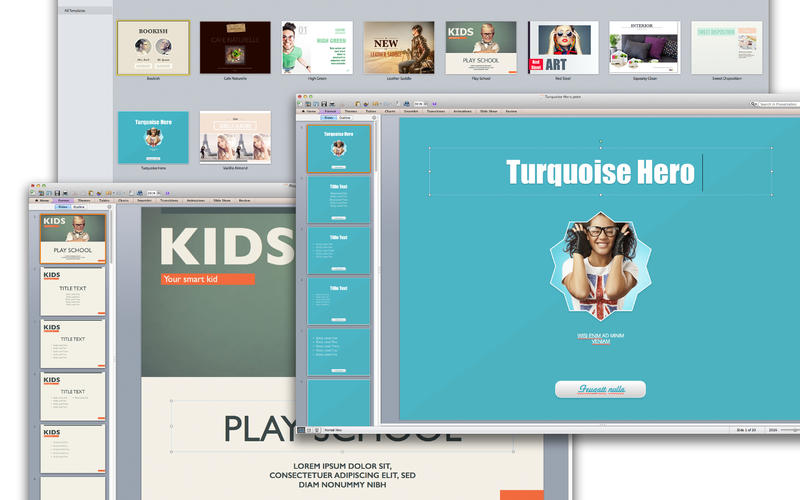
The PowerPoint Templates set contains 10 quality designs for PowerPoint presentations. More than simply being pretty backgrounds, these templates include up to 20 distinct master slides. This allows users to choose the best layout for their information, whether it mostly comprises bullet points, consists of a mix of text and illustrations, or presents multiple graphs and tables.
System Requirements:
Mac OS X 10.7 and later
MS Office 2008 for Mac or later
Pricing and Availability:
Suite for MS Office 1.0 is $39.99 USD (or equivalent amount in other currencies) and available worldwide exclusively through the Mac App Store in the Productivity category. Product samples can be viewed at Theme Inn's website.
Theme Inn: http://www.themeinn.com
Suite for MS Office 1.0: https://itunes.apple.com/WebObjects/MZStore.woa/wa/viewSoftware?id=815572862&mt=12
Screenshot: http://a4.mzstatic.com/us/r30/Purple2/v4/a9/38/ea/a938eacd-b25e-e3e2-9e34-bc35bb4f93e6/screen800x500.jpeg
Screenshot 2: http://a3.mzstatic.com/us/r30/Purple/v4/e0/1a/2a/e01a2a1e-aecb-c70f-1626-586a1aa97c84/screen800x500.jpeg
App Icon: http://a2.mzstatic.com/us/r30/Purple/v4/ec/93/94/ec9394b0-b87b-0e53-c249-90f8683e092c/suite_for_office.175x175-75.png
Theme Inn is a team of professional Mac designers who specialize in developing high-quality templates for Microsoft Office for Mac. The company defines its work through careful attention to rich visuals, ease of use and wide adaptability. Theme Inn's products are designed to save users time and help them achieve the best results. Copyright (C) 2013 Theme Inn. All Rights Reserved. Apple, the Apple logo, and Macintosh are registered trademarks of Apple Inc. in the U.S. and/or other countries. Other trademarks and registered trademarks may be the property of their respective owners.
*******
Link To Article: http://prmac.com/release-id-66631.htm
*******
---------------------------------------------------------------------------------
Note that you can alter delivered distributions at any time.
Login to your account on prMac to alter your channel selection, or to opt-out at any time.
Theme Inn Launches a Suite of Templates for MS Office for Mac - Published on 04/01/14
Theme Inn, a graphic design company that specializes in creating high-quality templates for Microsoft Office for Mac, unveils a whole bundle of innovative designs. The new Suite for MS Office is an outstanding collection of 262 templates for Word, 30 spreadsheet templates for Excel, and 10 presentation themes for PowerPoint. Suite for MS Office provides various kinds of designs, from business proposals and newsletters and more. Excel Templates make daily tasks a lot more manageable.
Sakiai, Lithuania - Theme Inn, a graphic design company that specializes in creating high-quality templates for Microsoft Office for Mac, unveils a whole bundle of innovative designs. The new Suite for MS Office 1.0 is an outstanding collection of 262 templates for Word, 30 spreadsheet templates for Excel, and 10 presentation themes for PowerPoint.
The Word Templates pack supplies a collection of 262 easy-to-use templates for creating business and personal documents with Word. It provides various kinds of designs, from business proposals and newsletters to books and menus. All layouts - from the understated elegance of text-only pages to the light-hearted mix of pictures and slogans in the poster templates - call attention to their top-notch design and great usability. All templates are available in US and international page sizes.
The second high-quality pack, Excel Templates, offers 30 diverse and practical templates for Excel. They make daily tasks a lot more manageable, whether used for business or personal needs, such as vacation planning. Users can personalize the templates to their requirements: create tables, make calculations, draw diagrams, and insert images. Excel templates are available in US and international page sizes as well.
The PowerPoint Templates set contains 10 quality designs for PowerPoint presentations. More than simply being pretty backgrounds, these templates include up to 20 distinct master slides. This allows users to choose the best layout for their information, whether it mostly comprises bullet points, consists of a mix of text and illustrations, or presents multiple graphs and tables.
System Requirements:
Mac OS X 10.7 and later
MS Office 2008 for Mac or later
Pricing and Availability:
Suite for MS Office 1.0 is $39.99 USD (or equivalent amount in other currencies) and available worldwide exclusively through the Mac App Store in the Productivity category. Product samples can be viewed at Theme Inn's website.
Theme Inn: http://www.themeinn.com
Suite for MS Office 1.0: https://itunes.apple.com/WebObjects/MZStore.woa/wa/viewSoftware?id=815572862&mt=12
Screenshot: http://a4.mzstatic.com/us/r30/Purple2/v4/a9/38/ea/a938eacd-b25e-e3e2-9e34-bc35bb4f93e6/screen800x500.jpeg

Screenshot 2: http://a3.mzstatic.com/us/r30/Purple/v4/e0/1a/2a/e01a2a1e-aecb-c70f-1626-586a1aa97c84/screen800x500.jpeg
App Icon: http://a2.mzstatic.com/us/r30/Purple/v4/ec/93/94/ec9394b0-b87b-0e53-c249-90f8683e092c/suite_for_office.175x175-75.png

Theme Inn is a team of professional Mac designers who specialize in developing high-quality templates for Microsoft Office for Mac. The company defines its work through careful attention to rich visuals, ease of use and wide adaptability. Theme Inn's products are designed to save users time and help them achieve the best results. Copyright (C) 2013 Theme Inn. All Rights Reserved. Apple, the Apple logo, and Macintosh are registered trademarks of Apple Inc. in the U.S. and/or other countries. Other trademarks and registered trademarks may be the property of their respective owners.
*******
Link To Article: http://prmac.com/release-id-66631.htm
*******
---------------------------------------------------------------------------------
Note that you can alter delivered distributions at any time.
Login to your account on prMac to alter your channel selection, or to opt-out at any time.
PhotoFlip! - The Easiest Way to Add Notes to Photos
A new article has been published at prMac.
PhotoFlip! - The Easiest Way to Add Notes to Photos - Published on 04/01/14
PhotoFlip! allows you to associate text notes to current images in your photo library, or new photos you shoot. These notes are stored in an efficient database that is synced via iCloud with your other iOS devices, so notes created on your iPhone automatically appear on your iPad, and vice versa. Your photos are easily shared via message, email, Facebook or Twitter, with or without the note embedded onto the photo. PhotoFlip! is free and ad-free, and available for iOS 7 and higher.
New York, New York - Can't remember whether that statue was in Rome or Venice, or the name of the person you met last night? You need PhotoFlip! PhotoFlip!, the easiest way to add notes to photos, is available in the iTunes App Store today. PhotoFlip! doesn't just paste text onto your photo, it utilizes a smart database to associate a unique note with any photo in your current library, or any new photo your shoot.
Features:
* Extremely simple to use
* No need to import photos into the app, and no duplication of photos
* Automatic sync via iCloud with your other iOS devices
* Share via email, message, Facebook or Twitter
* Camera support within the app
* Free and ad-free
You don't need to import your photos into PhotoFlip!, and there's no duplication of data, so very little of your device's memory is used. You can share your photos, with or without the note embedded, by email, messaging, Facebook or Twitter. Your notes sync seamlessly through iCloud with all your iOS devices, so notes you type on your iPhone show up on your iPad and vice versa! PhotoFlip! will turn your photos into real memories that will last a lifetime.
Device Requirements:
* iPhone, iPad, and iPod touch
* Requires iOS 7.0 or later
* 9.5 MB
Pricing and Availability:
PhotoFlip! 1.0.3 is Free, totally ad-free, and available worldwide exclusively through the App Store in the Photo & Video category.
PhotoFlip! 1.0.3: http://www.photo-flip.com
Download from iTunes: https://itunes.apple.com/app/id813737911
Video Review: http://dailyappshow.com/photoflip
Screenshot: http://photo-flip.com/wp-content/uploads/2014/02/140227_PF_0001_Sync.jpg
Logo: http://photo-flip.com/images/PF_Logo.png
App Icon: http://photo-flip.com/images/PF%20Icon.png
SAEC/Kinetic Vision, Inc., dba Kinetic Vision, is 60 person technology consulting company located in Cincinnati, Ohio. Kinetic Vision has been providing innovative technology solutions since 1988, and now services a growing national and international customer-base. Previously, Kinetic Vision's app development business was focused on their corporate clients, and PhotoFlip! is their first foray into the consumer app marketplace. All Material and Software (C) Copyright 2014 SAEC/Kinetic Vision, Inc. All Rights Reserved. Apple, the Apple logo, iPhone, iPod and iPad are registered trademarks of Apple Inc. in the U.S. and/or other countries. Other trademarks and registered trademarks may be the property of their respective owners.
*******
Link To Article: http://prmac.com/release-id-66613.htm
*******
---------------------------------------------------------------------------------
Note that you can alter delivered distributions at any time.
Login to your account on prMac to alter your channel selection, or to opt-out at any time.
PhotoFlip! - The Easiest Way to Add Notes to Photos - Published on 04/01/14
PhotoFlip! allows you to associate text notes to current images in your photo library, or new photos you shoot. These notes are stored in an efficient database that is synced via iCloud with your other iOS devices, so notes created on your iPhone automatically appear on your iPad, and vice versa. Your photos are easily shared via message, email, Facebook or Twitter, with or without the note embedded onto the photo. PhotoFlip! is free and ad-free, and available for iOS 7 and higher.
New York, New York - Can't remember whether that statue was in Rome or Venice, or the name of the person you met last night? You need PhotoFlip! PhotoFlip!, the easiest way to add notes to photos, is available in the iTunes App Store today. PhotoFlip! doesn't just paste text onto your photo, it utilizes a smart database to associate a unique note with any photo in your current library, or any new photo your shoot.
Features:
* Extremely simple to use
* No need to import photos into the app, and no duplication of photos
* Automatic sync via iCloud with your other iOS devices
* Share via email, message, Facebook or Twitter
* Camera support within the app
* Free and ad-free
You don't need to import your photos into PhotoFlip!, and there's no duplication of data, so very little of your device's memory is used. You can share your photos, with or without the note embedded, by email, messaging, Facebook or Twitter. Your notes sync seamlessly through iCloud with all your iOS devices, so notes you type on your iPhone show up on your iPad and vice versa! PhotoFlip! will turn your photos into real memories that will last a lifetime.
Device Requirements:
* iPhone, iPad, and iPod touch
* Requires iOS 7.0 or later
* 9.5 MB
Pricing and Availability:
PhotoFlip! 1.0.3 is Free, totally ad-free, and available worldwide exclusively through the App Store in the Photo & Video category.
PhotoFlip! 1.0.3: http://www.photo-flip.com
Download from iTunes: https://itunes.apple.com/app/id813737911
Video Review: http://dailyappshow.com/photoflip
Screenshot: http://photo-flip.com/wp-content/uploads/2014/02/140227_PF_0001_Sync.jpg

Logo: http://photo-flip.com/images/PF_Logo.png

App Icon: http://photo-flip.com/images/PF%20Icon.png

SAEC/Kinetic Vision, Inc., dba Kinetic Vision, is 60 person technology consulting company located in Cincinnati, Ohio. Kinetic Vision has been providing innovative technology solutions since 1988, and now services a growing national and international customer-base. Previously, Kinetic Vision's app development business was focused on their corporate clients, and PhotoFlip! is their first foray into the consumer app marketplace. All Material and Software (C) Copyright 2014 SAEC/Kinetic Vision, Inc. All Rights Reserved. Apple, the Apple logo, iPhone, iPod and iPad are registered trademarks of Apple Inc. in the U.S. and/or other countries. Other trademarks and registered trademarks may be the property of their respective owners.
*******
Link To Article: http://prmac.com/release-id-66613.htm
*******
---------------------------------------------------------------------------------
Note that you can alter delivered distributions at any time.
Login to your account on prMac to alter your channel selection, or to opt-out at any time.
Caato Time Tracker 1.1 for Mac now with Date Filtering and Excel Export
A new article has been published at prMac.
Caato Time Tracker 1.1 for Mac now with Date Filtering and Excel Export - Published on 04/01/14
Caato today announces Caato Time Tracker 1.1, an update to its popular time tracking app for Mac. Reliable, easy-to-use and hassle-free, Caato Time Tracker is perfect for tracking worktime, billable hours as well as your projects and tasks. Version 1.1 features a date range filter that lets users view their tracked time only for a certain timeframe. With filter presets like "Last Month" and the new excel export feature, it's possible to quickly generate reports necessary for billing clients.
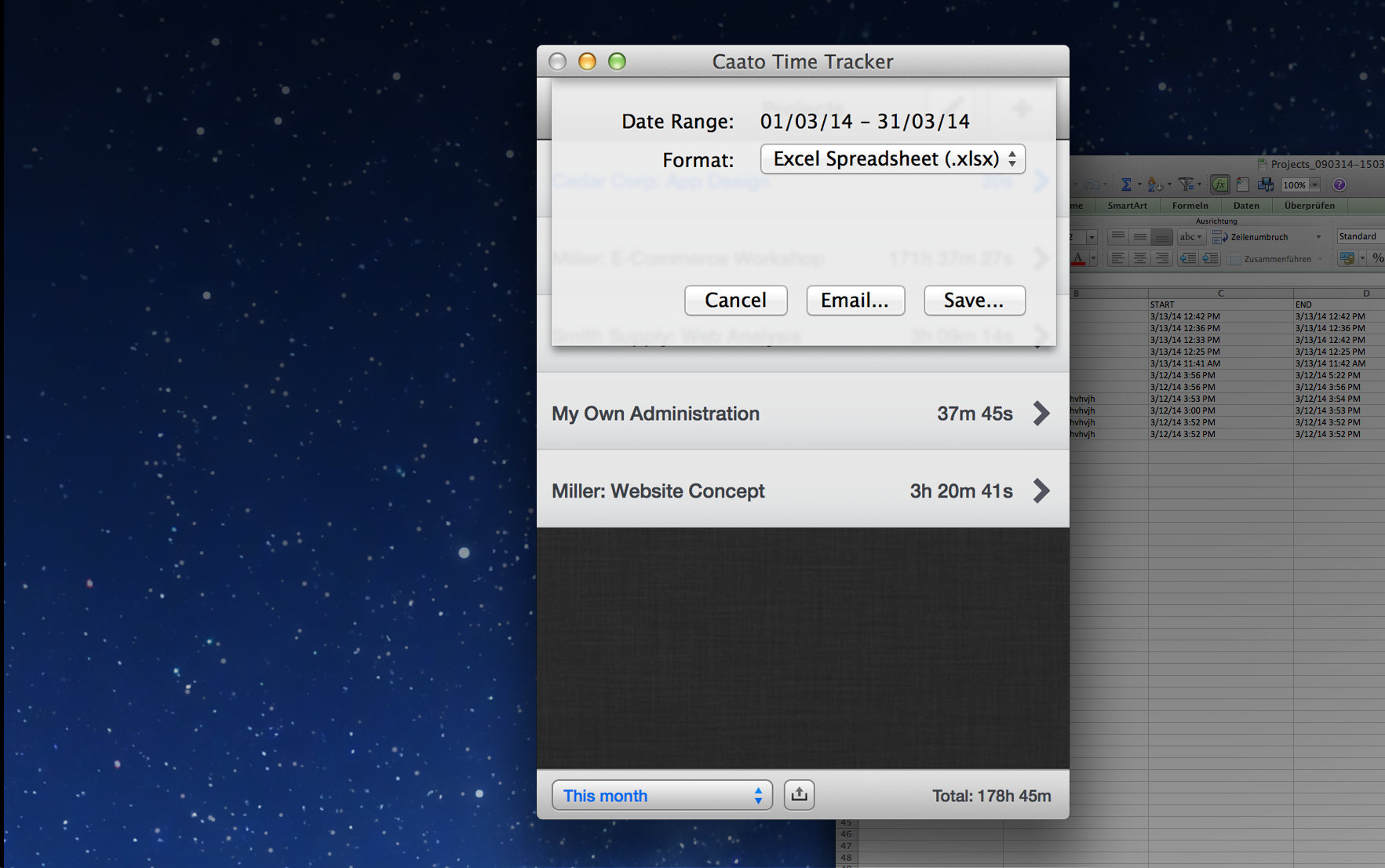
St. Leon-Rot, Germany - Caato today is proud to announce the release and immediate availability of Caato Time Tracker 1.1, an update to its popular time tracking app for Mac. The new version features a date range filter that lets users view their tracked time only for a certain timeframe. With filter presets like "Last Month" and the new excel export feature, it's possible to quickly generate reports necessary for billing clients.
The visibility toggle (Pro Version) lets users hide projects so that they can focus on currently active projects. Furthermore the app icon now shows the number of work hours that have been tracked in a day. This is very useful for everyone with flexible working hours. All new features and enhancements included in version 1.1:
* Context-sensitive Export to Excel and CSV with Formatting Options and E-Mail Feature (OS X 10.9 and higher)
* Date Range Filter to only view tracked Time in a certain Timeframe
* New Display in the Status Bar shows Sum of all visible Entries
* Project Visibility Toggle in Edit Mode (Pro Version)
* See today's Working Hours in the App Icon
* Online Manual & FAQ
* Space-saving Design saves 40% in Height compared to earlier Versions
* Optimized the Delete Workflow for Projects, Tasks and Time Entries
* Small Bugfixes, Design and Performance Enhancements
System Requirements:
* OS X 10.7 or later
* 6.6 MB
Pricing and Availability:
Caato Time Tracker 1.1 can be downloaded free of charge from the Mac App Store. There's a Pro Version Upgrade available as In-App Purchase for $8.99 (USD) that enables users to create an unlimited amount of projects. Without this upgrade users may only create one project.
Caato Time Tracker 1.1: http://www.caato.de/timetracker
Download from the Mac App Store: https://itunes.apple.com/app/caato-time-tracker/id596816253
Screenshot 1: http://caato.de/assets/img/products/time-tracker/ext/Screenshot-01.png
Screenshot 2: http://caato.de/assets/img/products/time-tracker/ext/Screenshot-02.png
Application Icon: http://caato.de/assets/img/products/time-tracker/ext/Icon_512x512.png
Caato is a Software Development Company focusing on Smartphone, Tablet, Web and Desktop Software. Copyright (C) 2014 Caato GmbH. All Rights Reserved. Mac, Mac OS and App Store are registered trademarks of Apple Inc. in the U.S. and/or other countries. Other trademarks and registered trademarks may be the property of their respective owners.
*******
Link To Article: http://prmac.com/release-id-66614.htm
*******
---------------------------------------------------------------------------------
Note that you can alter delivered distributions at any time.
Login to your account on prMac to alter your channel selection, or to opt-out at any time.
Caato Time Tracker 1.1 for Mac now with Date Filtering and Excel Export - Published on 04/01/14
Caato today announces Caato Time Tracker 1.1, an update to its popular time tracking app for Mac. Reliable, easy-to-use and hassle-free, Caato Time Tracker is perfect for tracking worktime, billable hours as well as your projects and tasks. Version 1.1 features a date range filter that lets users view their tracked time only for a certain timeframe. With filter presets like "Last Month" and the new excel export feature, it's possible to quickly generate reports necessary for billing clients.
St. Leon-Rot, Germany - Caato today is proud to announce the release and immediate availability of Caato Time Tracker 1.1, an update to its popular time tracking app for Mac. The new version features a date range filter that lets users view their tracked time only for a certain timeframe. With filter presets like "Last Month" and the new excel export feature, it's possible to quickly generate reports necessary for billing clients.
The visibility toggle (Pro Version) lets users hide projects so that they can focus on currently active projects. Furthermore the app icon now shows the number of work hours that have been tracked in a day. This is very useful for everyone with flexible working hours. All new features and enhancements included in version 1.1:
* Context-sensitive Export to Excel and CSV with Formatting Options and E-Mail Feature (OS X 10.9 and higher)
* Date Range Filter to only view tracked Time in a certain Timeframe
* New Display in the Status Bar shows Sum of all visible Entries
* Project Visibility Toggle in Edit Mode (Pro Version)
* See today's Working Hours in the App Icon
* Online Manual & FAQ
* Space-saving Design saves 40% in Height compared to earlier Versions
* Optimized the Delete Workflow for Projects, Tasks and Time Entries
* Small Bugfixes, Design and Performance Enhancements
System Requirements:
* OS X 10.7 or later
* 6.6 MB
Pricing and Availability:
Caato Time Tracker 1.1 can be downloaded free of charge from the Mac App Store. There's a Pro Version Upgrade available as In-App Purchase for $8.99 (USD) that enables users to create an unlimited amount of projects. Without this upgrade users may only create one project.
Caato Time Tracker 1.1: http://www.caato.de/timetracker
Download from the Mac App Store: https://itunes.apple.com/app/caato-time-tracker/id596816253
Screenshot 1: http://caato.de/assets/img/products/time-tracker/ext/Screenshot-01.png

Screenshot 2: http://caato.de/assets/img/products/time-tracker/ext/Screenshot-02.png
Application Icon: http://caato.de/assets/img/products/time-tracker/ext/Icon_512x512.png

Caato is a Software Development Company focusing on Smartphone, Tablet, Web and Desktop Software. Copyright (C) 2014 Caato GmbH. All Rights Reserved. Mac, Mac OS and App Store are registered trademarks of Apple Inc. in the U.S. and/or other countries. Other trademarks and registered trademarks may be the property of their respective owners.
*******
Link To Article: http://prmac.com/release-id-66614.htm
*******
---------------------------------------------------------------------------------
Note that you can alter delivered distributions at any time.
Login to your account on prMac to alter your channel selection, or to opt-out at any time.
Mix Faces For Funny Results With Face Replace! for iPhone and iPad
A new article has been published at prMac.
Mix Faces For Funny Results With Face Replace! for iPhone and iPad - Published on 04/01/14
Code Hero today introduces Face Replace! 1.0.1, an innovative new recreational photo editing utility for iPhone and iPad. This whimsical app gives users the power to blend together any two faces they want all for their amusement. Mashing parts of two face photos together is as easy as swiping your finger. Users can easily import any photos from their device or from Facebook. In celebration of the release, the app itself and Beauty photo pack will be offered free of charge for a limited time.
Wroclaw, Poland - Code Hero today is proud to announce the release of Face Replace! 1.0.1, an innovative new recreational photo editing utility developed for iPhone, iPad and iPod touch. Face Replace! has everything users need to match and swap various portrait photos together for whatever reason they can come up with. The app itself is incredibly easy and intuitive to use. Users simply drag pictures they want to blend from the list and Face Replace! automatically matches and mixes the dropped faces. To mash further two selected photos users simply swipe the screen with their finger to blend the facial parts they'd like to transform.
Face Replace! comes with a free Beauty photo pack and three inspirational photo packs Animal, Ripped and Robot available for purchase. Choosing user's own custom photos for face replace is as easy as importing the photos from their mobile device's saved photo library. To expand face replacement possibilities the app is also integrated with user's Facebook and his friends albums. Face Replace! automatically detects faces on loaded images to guarantee that ready-to-blend faces are always perfectly lined up one under the other. Facial experiments yield realistic results thanks to unique soft edged "brush stroke" feature.
Moreover, the app also creates and saves a gallery of all great creations user will ever import, make or share. Sharing users' creations with their family and friends is always available and easy to do. Whether you want to put your grandpa's mustache on, see what your and your partner's children might look like, or make a hilarious face out of anything Face Replace! is the face changing photo app that puts fun photo mashing action right at your fingertips.
Device Requirements:
* iPhone, iPad, and iPod touch
* Requires iOS 7.0 or later
* 47.5 MB
Pricing and Availability:
In celebration of this release, Face Replace! 1.0.1 is Free for a limited time and available worldwide exclusively through the App Store in the Entertainment category.
Face Replace! 1.0.1: http://face-replace.com
Download from iTunes: https://itunes.apple.com/us/app/face-replace!/id816103877?ls=1&mt=8&ct=prmac
YouTube Video: https://www.youtube.com/watch?v=M4T3NXlPB_I
Screenshot: http://a1.mzstatic.com/us/r30/Purple/v4/d5/be/0d/d5be0d14-3e53-2ceb-5580-30668a1ec802/screen480x480.jpeg
App Icon: http://a4.mzstatic.com/us/r30/Purple/v4/fc/27/e7/fc27e72a-7021-0614-5498-53e25cd2b5a6/mzl.coccymjo.175x175-75.jpg
Press Kit (zip): http://face-replace.com/PressKit.zip
Code Hero is an independent developer of imaginative mobile applications focused on providing iOS consumers with innovative and entertaining mobile photo editing experiences. (C) Code Hero 2014. All Rights Reserved. All Rights Reserved. Apple, the Apple logo, iPhone, iPod and iPad are registered trademarks of Apple Inc. in the U.S. and/or other countries.
*******
Link To Article: http://prmac.com/release-id-66605.htm
*******
---------------------------------------------------------------------------------
Note that you can alter delivered distributions at any time.
Login to your account on prMac to alter your channel selection, or to opt-out at any time.
Mix Faces For Funny Results With Face Replace! for iPhone and iPad - Published on 04/01/14
Code Hero today introduces Face Replace! 1.0.1, an innovative new recreational photo editing utility for iPhone and iPad. This whimsical app gives users the power to blend together any two faces they want all for their amusement. Mashing parts of two face photos together is as easy as swiping your finger. Users can easily import any photos from their device or from Facebook. In celebration of the release, the app itself and Beauty photo pack will be offered free of charge for a limited time.
Wroclaw, Poland - Code Hero today is proud to announce the release of Face Replace! 1.0.1, an innovative new recreational photo editing utility developed for iPhone, iPad and iPod touch. Face Replace! has everything users need to match and swap various portrait photos together for whatever reason they can come up with. The app itself is incredibly easy and intuitive to use. Users simply drag pictures they want to blend from the list and Face Replace! automatically matches and mixes the dropped faces. To mash further two selected photos users simply swipe the screen with their finger to blend the facial parts they'd like to transform.
Face Replace! comes with a free Beauty photo pack and three inspirational photo packs Animal, Ripped and Robot available for purchase. Choosing user's own custom photos for face replace is as easy as importing the photos from their mobile device's saved photo library. To expand face replacement possibilities the app is also integrated with user's Facebook and his friends albums. Face Replace! automatically detects faces on loaded images to guarantee that ready-to-blend faces are always perfectly lined up one under the other. Facial experiments yield realistic results thanks to unique soft edged "brush stroke" feature.
Moreover, the app also creates and saves a gallery of all great creations user will ever import, make or share. Sharing users' creations with their family and friends is always available and easy to do. Whether you want to put your grandpa's mustache on, see what your and your partner's children might look like, or make a hilarious face out of anything Face Replace! is the face changing photo app that puts fun photo mashing action right at your fingertips.
Device Requirements:
* iPhone, iPad, and iPod touch
* Requires iOS 7.0 or later
* 47.5 MB
Pricing and Availability:
In celebration of this release, Face Replace! 1.0.1 is Free for a limited time and available worldwide exclusively through the App Store in the Entertainment category.
Face Replace! 1.0.1: http://face-replace.com
Download from iTunes: https://itunes.apple.com/us/app/face-replace!/id816103877?ls=1&mt=8&ct=prmac
YouTube Video: https://www.youtube.com/watch?v=M4T3NXlPB_I
Screenshot: http://a1.mzstatic.com/us/r30/Purple/v4/d5/be/0d/d5be0d14-3e53-2ceb-5580-30668a1ec802/screen480x480.jpeg

App Icon: http://a4.mzstatic.com/us/r30/Purple/v4/fc/27/e7/fc27e72a-7021-0614-5498-53e25cd2b5a6/mzl.coccymjo.175x175-75.jpg

Press Kit (zip): http://face-replace.com/PressKit.zip
Code Hero is an independent developer of imaginative mobile applications focused on providing iOS consumers with innovative and entertaining mobile photo editing experiences. (C) Code Hero 2014. All Rights Reserved. All Rights Reserved. Apple, the Apple logo, iPhone, iPod and iPad are registered trademarks of Apple Inc. in the U.S. and/or other countries.
*******
Link To Article: http://prmac.com/release-id-66605.htm
*******
---------------------------------------------------------------------------------
Note that you can alter delivered distributions at any time.
Login to your account on prMac to alter your channel selection, or to opt-out at any time.
Krashlander - Ski, Jump, Crash! - Major Update to 2D Physics Ski Game
A new article has been published at prMac.
Krashlander - Ski, Jump, Crash! - Major Update to 2D Physics Ski Game - Published on 04/01/14
Farseer Games today announces Krashlander - Ski, Jump, Crash! 1.3 for iOS, a major update to their 2D platform-style, physics-powered ski game. Evil robots have destroyed the world and the player must ski down large mountain slopes and soar over gaping crevices to attack the robots and exact revenge. Krashlander has 3 different skill levels. Version 1.3 also features a simpler scoring system, 40 progressively more difficult levels, and the ability to record, play back, and share gameplay videos.
Appleton, Wisconsin - Farseer Games today is proud to announce the release and availability of Krashlander - Ski, Jump, Crash! for iOS, a major update to their 2D, platform-style, physics-powered ski game. Evil robots have destroyed the world and the player must ski down large mountain slopes and soar over gaping crevices to attack the robots and exact revenge. Utilizing a physics driven control mechanic from an abandoned game called Ski Stunt Simulator, Krashlander challenges players to destroy robots by crashing into them. It is a skill-based game with 40 progressively more challenging levels.
To navigate the game, the player uses a touch surface on the right side of the screen to control the physical posture of the skier. Adjusting the posture will help the skier avoid obstacles, increase speed, or jump off cliffs to take out the robots. Some levels may require multiple runs to destroy the target.
"The great thing about Krashlander is you can play each level a little differently," says Phil Eaves of SlidetoPlay (20 Feb 2013). "You can do flips off of cliffs if you want, or you can play it safe. It's a game that makes you feel cool when you pull off all the right moves."
Feature Highlights:
* Visually engaging, minimalist design
* 40 exciting and challenging levels
* Fun ragdoll crashes
* Novice, Expert, and Elite skill levels
* Unique physics-powered touch controls that are fluid and precise
* Skill-based gameplay
* In-game Video tutorials
* Simplified scoring system
* Ability to drag and pinch to view course
* Ability to record, replay, and post gameplay videos
Krashlander has 3 different skill levels: Novice, Expert, and Elite. Each skill level has its own set of features and earns a different amount of points per robot killed. For Novice, the player has tighter control over in-air rotation and it is easier to stick a landing. However, there is a slight loss of realism and players earn only 1 point per robot killed.
The Expert skill level features the exact control mechanic from Version 1.0 for those players who prefer it. There is a steeper learning curve and it requires more subtle control over in-air rotation, but the Expert level is more realistic. Players can earn 2 points per robot killed at the Expert level.
The Elite level is the most realistic and challenging of the skill levels. There are no external rotation torques to help adjust rotation in the air. Just like real life, the player must impart some spin on take-off and crouch or extend to speed up and slow down the rotation. There is a very steep learning curve but players earn 3 points per robot killed.
"What impresses me the most, however, is the sound design," says Game Mob (1 Feb 2013). "From the sound of the wind buzzing past you as you speed downhill, to the introductory music, everything makes you feel alone and isolated. Jeff Weber has done an incredible job. It's a testament to indie gaming that someone can create such a polished piece of work entirely by himself. Krashlander is challenging, gorgeous, and will test your mind and reflexes."
Another feature of the updated Krashlander is a more simplified scoring system. Each level has 3 robots and the player must destroy at least 2 robots to unlock the next level. Players earn points and a star for every robot they destroy. Since each skill level now has a score multiplier, the higher skill level the users plays, the greater their overall game score can be.
To create a more interactive experience, Krashlander users now have the ability to record, play back, and post their crash videos via Facebook, Twitter, YouTube, and E-mail. Version 1.3 also features a new in-game tutorial system to ease the player into the unique control mechanic.
"Much has changed since Krashlander's initial release back in 2013," says Jeff Weber, owner of Farseer Games. "For the past year, I've focused on improving Krashlander and addressing concerns and issues brought to my attention during the initial release. As a result, Krashlander is an even greater, more challenging physics-powered game for players to enjoy."
Device Requirements:
* iPad, iPhone or iPod touch
* iOS 4.0 or later
* 30.0 MB
Pricing and Availability:
Krashlander - Ski, Jump, Crash! 1.3 is only $1.99 (USD) and available worldwide exclusively through the App Store in the Games category. Review copies are available upon request.
Farseer Games: http://www.farseergames.com
Krashlander - Ski, Jump, Crash! 1.3: http://www.farseergames.com/krashlander/
Purchase and Download: https://itunes.apple.com/app/id506429660
YouTube Video: http://www.youtube.com/watch?v=BGiN5vLbMh8
App Icon: http://a2.mzstatic.com/us/r30/Purple4/v4/8e/fe/5a/8efe5a11-bd9c-6280-cc81-99f6f6537f46/mzl.pxibdpti.175x175-75.jpg
Press Kit (zip): https://www.dropbox.com/s/wfvdsrglxiaj8k4/KrashlanderMediaKit.zip
Based in Appleton, Wisconsin, Farseer Games was founded in 2011 by independent developer Jeff Weber. As a team-of-one game development house, Jeff makes unique and interesting physics games in his basement. Copyright (C) 2014 Farseer Games LLC. All Rights Reserved. Apple, the Apple logo, iPhone and iPod are registered trademarks of Apple Inc. in the U.S. and/or other countries.
*******
Link To Article: http://prmac.com/release-id-66606.htm
*******
---------------------------------------------------------------------------------
Note that you can alter delivered distributions at any time.
Login to your account on prMac to alter your channel selection, or to opt-out at any time.
Krashlander - Ski, Jump, Crash! - Major Update to 2D Physics Ski Game - Published on 04/01/14
Farseer Games today announces Krashlander - Ski, Jump, Crash! 1.3 for iOS, a major update to their 2D platform-style, physics-powered ski game. Evil robots have destroyed the world and the player must ski down large mountain slopes and soar over gaping crevices to attack the robots and exact revenge. Krashlander has 3 different skill levels. Version 1.3 also features a simpler scoring system, 40 progressively more difficult levels, and the ability to record, play back, and share gameplay videos.
Appleton, Wisconsin - Farseer Games today is proud to announce the release and availability of Krashlander - Ski, Jump, Crash! for iOS, a major update to their 2D, platform-style, physics-powered ski game. Evil robots have destroyed the world and the player must ski down large mountain slopes and soar over gaping crevices to attack the robots and exact revenge. Utilizing a physics driven control mechanic from an abandoned game called Ski Stunt Simulator, Krashlander challenges players to destroy robots by crashing into them. It is a skill-based game with 40 progressively more challenging levels.
To navigate the game, the player uses a touch surface on the right side of the screen to control the physical posture of the skier. Adjusting the posture will help the skier avoid obstacles, increase speed, or jump off cliffs to take out the robots. Some levels may require multiple runs to destroy the target.
"The great thing about Krashlander is you can play each level a little differently," says Phil Eaves of SlidetoPlay (20 Feb 2013). "You can do flips off of cliffs if you want, or you can play it safe. It's a game that makes you feel cool when you pull off all the right moves."
Feature Highlights:
* Visually engaging, minimalist design
* 40 exciting and challenging levels
* Fun ragdoll crashes
* Novice, Expert, and Elite skill levels
* Unique physics-powered touch controls that are fluid and precise
* Skill-based gameplay
* In-game Video tutorials
* Simplified scoring system
* Ability to drag and pinch to view course
* Ability to record, replay, and post gameplay videos
Krashlander has 3 different skill levels: Novice, Expert, and Elite. Each skill level has its own set of features and earns a different amount of points per robot killed. For Novice, the player has tighter control over in-air rotation and it is easier to stick a landing. However, there is a slight loss of realism and players earn only 1 point per robot killed.
The Expert skill level features the exact control mechanic from Version 1.0 for those players who prefer it. There is a steeper learning curve and it requires more subtle control over in-air rotation, but the Expert level is more realistic. Players can earn 2 points per robot killed at the Expert level.
The Elite level is the most realistic and challenging of the skill levels. There are no external rotation torques to help adjust rotation in the air. Just like real life, the player must impart some spin on take-off and crouch or extend to speed up and slow down the rotation. There is a very steep learning curve but players earn 3 points per robot killed.
"What impresses me the most, however, is the sound design," says Game Mob (1 Feb 2013). "From the sound of the wind buzzing past you as you speed downhill, to the introductory music, everything makes you feel alone and isolated. Jeff Weber has done an incredible job. It's a testament to indie gaming that someone can create such a polished piece of work entirely by himself. Krashlander is challenging, gorgeous, and will test your mind and reflexes."
Another feature of the updated Krashlander is a more simplified scoring system. Each level has 3 robots and the player must destroy at least 2 robots to unlock the next level. Players earn points and a star for every robot they destroy. Since each skill level now has a score multiplier, the higher skill level the users plays, the greater their overall game score can be.
To create a more interactive experience, Krashlander users now have the ability to record, play back, and post their crash videos via Facebook, Twitter, YouTube, and E-mail. Version 1.3 also features a new in-game tutorial system to ease the player into the unique control mechanic.
"Much has changed since Krashlander's initial release back in 2013," says Jeff Weber, owner of Farseer Games. "For the past year, I've focused on improving Krashlander and addressing concerns and issues brought to my attention during the initial release. As a result, Krashlander is an even greater, more challenging physics-powered game for players to enjoy."
Device Requirements:
* iPad, iPhone or iPod touch
* iOS 4.0 or later
* 30.0 MB
Pricing and Availability:
Krashlander - Ski, Jump, Crash! 1.3 is only $1.99 (USD) and available worldwide exclusively through the App Store in the Games category. Review copies are available upon request.
Farseer Games: http://www.farseergames.com
Krashlander - Ski, Jump, Crash! 1.3: http://www.farseergames.com/krashlander/
Purchase and Download: https://itunes.apple.com/app/id506429660
YouTube Video: http://www.youtube.com/watch?v=BGiN5vLbMh8
App Icon: http://a2.mzstatic.com/us/r30/Purple4/v4/8e/fe/5a/8efe5a11-bd9c-6280-cc81-99f6f6537f46/mzl.pxibdpti.175x175-75.jpg

Press Kit (zip): https://www.dropbox.com/s/wfvdsrglxiaj8k4/KrashlanderMediaKit.zip
Based in Appleton, Wisconsin, Farseer Games was founded in 2011 by independent developer Jeff Weber. As a team-of-one game development house, Jeff makes unique and interesting physics games in his basement. Copyright (C) 2014 Farseer Games LLC. All Rights Reserved. Apple, the Apple logo, iPhone and iPod are registered trademarks of Apple Inc. in the U.S. and/or other countries.
*******
Link To Article: http://prmac.com/release-id-66606.htm
*******
---------------------------------------------------------------------------------
Note that you can alter delivered distributions at any time.
Login to your account on prMac to alter your channel selection, or to opt-out at any time.
Quiz Poker 1.0 - Most Unique Game for IOS is here
A new article has been published at prMac.
Quiz Poker 1.0 - Most Unique Game for IOS is here - Published on 04/01/14
Raizapp today introduces Quiz Poker 1.0, its new game title for iPhone, iPad and iPod touch. A combination of trivia Quiz and video Poker, Quiz Poker is a level based game where players get new prizes and in-game goods by passing levels. The game was created in a way that makes users to learn the quiz questions even if they don't know the answers. In-game statistics show how much players know about certain categories as well as how much they need to learn to finish them.
New York, New York - Raizapp company, developer of the famous Hit app "Camera Hoax" in photo editing category, today is proud to announce the release of Quiz Poker 1.0, its new game title for iPhone, iPad and iPod touch. Quiz Poker is a combination of trivia Quiz and video Poker and promises to be one of the unique and addictive games out there. Quiz Poker is a level based game where players get new prizes and in-game goods by passing levels.
The Game has a huge potential of being a primary source of learning in a fun way. Imagine playing video poker while feeling like you are in the set of "Who wants to be a Millionaire." The game was created in a way that makes users to learn the quiz questions even if they don't know the answers. In-game statistics show how much players know about certain categories as well as how much they need to learn to finish them.
There are three difficulties in the game - easy, medium, hard, so it makes the audience from teenagers to their grandparents. Players can compete in thousands of categories starting with base 13, including Animals, Art, Books and Literature, Cinema, Fashion, Geography, Health, History, Oceans, Science, Sports, World Cuisine and the United States.
Device Requirements:
* iPhone, iPad, and iPod touch
* Requires iOS 7.0 or later
* 15.2 MB
Pricing and Availability:
Quiz Poker 1.0 is Free and available worldwide exclusively through the App Store in the Games category. In the future users can create their own categories of questions that they need to learn or want to challenge others.
Raizapp: http://www.raizapp.com
Quiz Poker 1.0: http://raizapp.com/app/quiz-poker/
Download from iTunes: https://itunes.apple.com/app/quiz-poker/id768318816
Screenshot 1: https://www.dropbox.com/s/rkl9d6dag5kacpp/play%20page%201136x600.JPG
Screenshot 2: https://www.dropbox.com/s/ff5qsch5osyemqi/question%20page%201136x600.JPG
App Icon: https://www.dropbox.com/s/6cfcrruilxn2tnb/22.PNG
Located in New York, New York, Raizapp is an app development company with unique ideas and huge potential. The company recently took over the lavGames in 2013. Copyright (C) 2014 Raizapp. All Rights Reserved. Apple, the Apple logo, iPhone, iPod and iPad are registered trademarks of Apple Inc. in the U.S. and/or other countries. Other trademarks and registered trademarks may be the property of their respective owners.
*******
Link To Article: http://prmac.com/release-id-66611.htm
*******
---------------------------------------------------------------------------------
Note that you can alter delivered distributions at any time.
Login to your account on prMac to alter your channel selection, or to opt-out at any time.
Quiz Poker 1.0 - Most Unique Game for IOS is here - Published on 04/01/14
Raizapp today introduces Quiz Poker 1.0, its new game title for iPhone, iPad and iPod touch. A combination of trivia Quiz and video Poker, Quiz Poker is a level based game where players get new prizes and in-game goods by passing levels. The game was created in a way that makes users to learn the quiz questions even if they don't know the answers. In-game statistics show how much players know about certain categories as well as how much they need to learn to finish them.
New York, New York - Raizapp company, developer of the famous Hit app "Camera Hoax" in photo editing category, today is proud to announce the release of Quiz Poker 1.0, its new game title for iPhone, iPad and iPod touch. Quiz Poker is a combination of trivia Quiz and video Poker and promises to be one of the unique and addictive games out there. Quiz Poker is a level based game where players get new prizes and in-game goods by passing levels.
The Game has a huge potential of being a primary source of learning in a fun way. Imagine playing video poker while feeling like you are in the set of "Who wants to be a Millionaire." The game was created in a way that makes users to learn the quiz questions even if they don't know the answers. In-game statistics show how much players know about certain categories as well as how much they need to learn to finish them.
There are three difficulties in the game - easy, medium, hard, so it makes the audience from teenagers to their grandparents. Players can compete in thousands of categories starting with base 13, including Animals, Art, Books and Literature, Cinema, Fashion, Geography, Health, History, Oceans, Science, Sports, World Cuisine and the United States.
Device Requirements:
* iPhone, iPad, and iPod touch
* Requires iOS 7.0 or later
* 15.2 MB
Pricing and Availability:
Quiz Poker 1.0 is Free and available worldwide exclusively through the App Store in the Games category. In the future users can create their own categories of questions that they need to learn or want to challenge others.
Raizapp: http://www.raizapp.com
Quiz Poker 1.0: http://raizapp.com/app/quiz-poker/
Download from iTunes: https://itunes.apple.com/app/quiz-poker/id768318816
Screenshot 1: https://www.dropbox.com/s/rkl9d6dag5kacpp/play%20page%201136x600.JPG

Screenshot 2: https://www.dropbox.com/s/ff5qsch5osyemqi/question%20page%201136x600.JPG

App Icon: https://www.dropbox.com/s/6cfcrruilxn2tnb/22.PNG

Located in New York, New York, Raizapp is an app development company with unique ideas and huge potential. The company recently took over the lavGames in 2013. Copyright (C) 2014 Raizapp. All Rights Reserved. Apple, the Apple logo, iPhone, iPod and iPad are registered trademarks of Apple Inc. in the U.S. and/or other countries. Other trademarks and registered trademarks may be the property of their respective owners.
*******
Link To Article: http://prmac.com/release-id-66611.htm
*******
---------------------------------------------------------------------------------
Note that you can alter delivered distributions at any time.
Login to your account on prMac to alter your channel selection, or to opt-out at any time.
Subscribe to:
Posts (Atom)