A new article has been published at prMac.
iBank for iPad 2.1 update now half price through April 10 only - Published on 04/08/14
IGG Software, Inc. today announced the release of iBank for iPad 2.1, a significant update to its powerful personal finance app for iOS 7. Free for users of earlier versions, the update delivers an all-new search function, auto-complete for data entry, and improvements to account handling, category management and investments, as well as over 20 fixes. Available from the App Store immediately, iBank for iPad 2.1 will be half-price - $10 off - through April 10 only.
Putney, Vermont - GG Software, Inc. today announced the release of iBank for iPad 2.1, a significant update to its powerful personal finance app for iOS 7. Free for users of earlier versions, the update delivers an all-new search function, auto-complete for data entry, and improvements to account handling, category management and investments, as well as over 20 fixes. Available from the App Store immediately, iBank for iPad 2.1 will be half-price - $10 off - through April 10 only.
"This is iBank for iPad's most significant release since version 1.0," says IGG's president, Ian Gillespie. "With fast search and faster data entry, it's better than ever for seeing your complete financial picture: to know where your accounts stands, to plan ahead for expenses, to budget for more savings and to invest for a more comfortable future."
iBank for iPad 2.1 now allows users to:
* Search all transactions globally or by account
* Adds type-ahead functionality to auto-fill transactions with payees, as well as categories and amounts
* Introduces new sections to manage Categories, Securities and Payees
iBank for iPad also distinguishes itself from other finance apps in several significant ways:
* iBank's clean interface presents accounts in one or more custom books, organized as needed. With a tap or a swipe, users can access accounts; get details on transactions, budgets or investments; edit or search transactions, delete info and more.
* Investment management has never been more elegant. It's easier than ever to review trades, positions, history, performance, realized and unrealized gains, market value and more. Portfolios update as changes are available, and users can drill down for security details with a tap.
*IGG's own subscription service, Direct Access, delivers instant account updates from thousands of financial institutions worldwide, via Wi-Fi or data connection, with no prompting by the user - any time and anywhere.
* Simple yet sophisticated budgeting is a key component of iBank. Schedule regular income and bills, set targets for other earnings or expenses, track spending by assigning categories to transactions. Users can check budgets with a tap, compare current performance to previous months, review old budgets, sync budgets to iBank 5 for Mac and more.
* IGG's commitment to privacy and security is paramount: iBank for iPad is ad-free. There are no third-party services offered to users. Customer data and financial records are never stored, accessed, aggregated or analyzed in any way that benefits IGG or any other marketers. And IGG never sells, trades, rents or shares customer information.
As always, users have full manual editing and entry capabilities, including the ability to split, schedule and categorize transactions; the ability to move different financial "books" between devices; multi-currency support; and many more powerful finance management tools. The app can be used by itself or in conjunction with iBank for Mac, and takes full advantage of the iPad's latest dual-core and graphics processors, its high-resolution Retina Display, and landscape and portrait modes.
For automatic updating of transactions, new users of iBank for iPad can try Direct Access for free during a 30-day trial. Maintaining the service can cost as little as 11 cents a day: just $4.99 per month, or $39.99 for an annual subscription; all options are available via In-App Purchase. Users of iBank for Mac can sync all transaction data directly from the desktop app to iBank for iPad 2.1 over Wi-Fi or a WebDAV server, with or without a Direct Access account.
A top-selling, top-grossing iOS finance app since its debut in 2012, iBank for iPad has been called "a stellar full-featured financial app" by macworld.com. Regular price at the App Store is $19.99, and the app requires iOS 7 or higher and iPad 2 or later.
IGG Software: http://www.iggsoftware.com/index.php
iBank for iPad: http://www.iggsoftware.com/ibankforipad
Purchase and Download: https://itunes.apple.com/app/ibank-for-ipad/id503140409
Screenshot: http://a2.mzstatic.com/us/r30/Purple6/v4/5a/a4/73/5aa473d5-bcfc-b158-30e4-5f81440f3c93/screen480x480.jpeg
App Icon: http://a5.mzstatic.com/us/r30/Purple/v4/29/37/d1/2937d1cc-239a-8782-5e36-608fe2efeb91/mzl.rjanxnhx.175x175-75.jpg
IGG Software, Inc., was founded in 2003 by developer Ian Gillespie to offer intuitive, elegant and powerful applications for individuals and small businesses. Based in Putney, Vermont, IGG develops the iBank family of apps exclusively for the Mac and for iOS devices. For further information, review licenses, or to schedule interviews with Ian Gillespie or CTO James Gillespie, please contact IGG Marketing Director Scott Marc Becker at the website. All Material and Software (C) Copyright 2014 IGG Software, Inc. All Rights Reserved. Apple, the Apple logo, iPhone, iPod and iPad are registered trademarks of Apple Inc. in the U.S. and/or other countries. Other trademarks and registered trademarks may be the property of their respective owners.
*******
Link To Article: http://prmac.com/release-id-66814.htm
*******
---------------------------------------------------------------------------------
Note that you can alter delivered distributions at any time.
Login to your account on prMac to alter your channel selection, or to opt-out at any time.


Experiments for Kids on iPad - Learn Science on iOS - App for Kids
A new article has been published at prMac.
Experiments for Kids on iPad - Learn Science on iOS - App for Kids - Published on 04/08/14
Okiwibook introduces its updated version of Small Experiments 3.0 for the iPad. the app helps children discover science at home.
All the experiments are explained step by step with video. Learn themes like physics, biology, and chemistry. Science experiments are the best way to learn and have fun at the same time. It is a fun way to discover the world. Small Experiments has reached the #1 Educational app in 6 countries and the #100 Overall app in 9 countries.
France - Okiwibook thinks that the best best way to learn something is to observe and manipulate it. "Small Experiments" App for iPad helps discover science at home. All the experiments are explained step by step with video. They are easy to make with common materials. Learn themes like physics, biology, and chemistry. The science experiments are probably the best way to learn and have fun at the same time. The app is already used by school in the USA, Australia, and France. It has been downloaded over 100 000 times in one year! Small Experiments has reached the #1 Educational app in 6 countries and the #100 Overall app in 9 countries.
For Kids - the app will help them to discover how our world works:
* They can follow the video step by step to realize the experiments
* They are learning in a nice environment
* They can test their knowledge with a quiz
For Parents and Teachers:
* Teach Physics, Chemistry and Biology
* Help kids discover science
* A fun way to discover the world
* Educational activities to do at school
* Full video explanation
* Nice Design
More:
* No external ads (only Okiwibook ads)
* No inApp purchase
* Parental control
Device Requirements:
* Compatible with iPad
* iOS 5.0 or later
* Languages: English, French, German, Spanish, Portuguese
* 323 MB
Pricing and availability:
Small Experiments 3.0 is $3.99 USD and is available worldwide through the App Store's Education category. Journalists and bloggers that are interested in a promo code, additional information, developer interviews can contact Okiwibook via email.
Okiwibook: http://www.okiwibook.com
Small Experiments 3.0: http://www.okiwibook.com/app/petites-experiences/
Purchase and Download: https://itunes.apple.com/app/small-experiments-hd-mega/id626145921
Icon and logo (press kit): http://www.okiwibook.com/pr/Okiwibook-pe.zip
Screenshot: http://a2.mzstatic.com/us/r30/Purple/v4/d4/4e/e4/d44ee49d-080a-32b5-e3b7-85fab4cb7051/screen960x960.jpeg
You Tube Video (Trailer): https://www.youtube.com/watch?v=20-2FGvggYI
Founded by Remy Leglise in 2013 Okiwibook is an indie studio that creates great educational apps for kids. Copyright (C) 2014 Okiwibook. All Rights Reserved. Apple, the Apple logo, iPhone, iPod and iPad are registered trademarks of Apple Inc. in the U.S. and/or other countries. Other trademarks and registered trademarks may be the property of their respective owners.
*******
Link To Article: http://prmac.com/release-id-66813.htm
*******
---------------------------------------------------------------------------------
Note that you can alter delivered distributions at any time.
Login to your account on prMac to alter your channel selection, or to opt-out at any time.
Experiments for Kids on iPad - Learn Science on iOS - App for Kids - Published on 04/08/14
Okiwibook introduces its updated version of Small Experiments 3.0 for the iPad. the app helps children discover science at home.
All the experiments are explained step by step with video. Learn themes like physics, biology, and chemistry. Science experiments are the best way to learn and have fun at the same time. It is a fun way to discover the world. Small Experiments has reached the #1 Educational app in 6 countries and the #100 Overall app in 9 countries.
France - Okiwibook thinks that the best best way to learn something is to observe and manipulate it. "Small Experiments" App for iPad helps discover science at home. All the experiments are explained step by step with video. They are easy to make with common materials. Learn themes like physics, biology, and chemistry. The science experiments are probably the best way to learn and have fun at the same time. The app is already used by school in the USA, Australia, and France. It has been downloaded over 100 000 times in one year! Small Experiments has reached the #1 Educational app in 6 countries and the #100 Overall app in 9 countries.
For Kids - the app will help them to discover how our world works:
* They can follow the video step by step to realize the experiments
* They are learning in a nice environment
* They can test their knowledge with a quiz
For Parents and Teachers:
* Teach Physics, Chemistry and Biology
* Help kids discover science
* A fun way to discover the world
* Educational activities to do at school
* Full video explanation
* Nice Design
More:
* No external ads (only Okiwibook ads)
* No inApp purchase
* Parental control
Device Requirements:
* Compatible with iPad
* iOS 5.0 or later
* Languages: English, French, German, Spanish, Portuguese
* 323 MB
Pricing and availability:
Small Experiments 3.0 is $3.99 USD and is available worldwide through the App Store's Education category. Journalists and bloggers that are interested in a promo code, additional information, developer interviews can contact Okiwibook via email.
Okiwibook: http://www.okiwibook.com
Small Experiments 3.0: http://www.okiwibook.com/app/petites-experiences/
Purchase and Download: https://itunes.apple.com/app/small-experiments-hd-mega/id626145921
Icon and logo (press kit): http://www.okiwibook.com/pr/Okiwibook-pe.zip
Screenshot: http://a2.mzstatic.com/us/r30/Purple/v4/d4/4e/e4/d44ee49d-080a-32b5-e3b7-85fab4cb7051/screen960x960.jpeg

You Tube Video (Trailer): https://www.youtube.com/watch?v=20-2FGvggYI
Founded by Remy Leglise in 2013 Okiwibook is an indie studio that creates great educational apps for kids. Copyright (C) 2014 Okiwibook. All Rights Reserved. Apple, the Apple logo, iPhone, iPod and iPad are registered trademarks of Apple Inc. in the U.S. and/or other countries. Other trademarks and registered trademarks may be the property of their respective owners.
*******
Link To Article: http://prmac.com/release-id-66813.htm
*******
---------------------------------------------------------------------------------
Note that you can alter delivered distributions at any time.
Login to your account on prMac to alter your channel selection, or to opt-out at any time.
Dogalize, the First Ever Veterinary Telemedicine and Social Network App
A new article has been published at prMac.
Dogalize, the First Ever Veterinary Telemedicine and Social Network App - Published on 04/08/14
Business Competence introduces Dogalize, a social network for dog owners. Users can create a profile for themselves and include information about their four-legged friends such as Name, Breed, and Character. The app then allows users to connect with other owners and see how they take care of their dogs. The application is also the first to feature veterinary telemedicine where one can find
consultation when a dog has an issue. Dogalize also includes geolocation to locate parks, kennels & more.
Milan, Italy - Do you have a four-legged friend? Are you constantly sharing stories and pictures of your dog? Are you always on the hunt for dog-friendly places? Are you looking for people to connect with that share your passion for dogs? Do you wish you could speak to a veterinarian whenever you have questions about your dog's health? If you said yes to any of these questions, then you need to download Business Competence's latest app, Dogalize.
Dogalize is a social network for dog owners. Users can create a profile for themselves and include information about their four-legged friends such as Name, Breed, and Character. The app then allows users to connect with other dog owners and see how they take care of their dogs.
However Dogalize is not an ordinary run-of-the-mill social network. The application is also the first to feature veterinary telemedicine. If your dog is in need of an immediate veterinarian consultation, Dogalize will connect you with an available vet via video call. This communication feature is also available for friends on your social network, meaning you can show off your dog's talents in real time.
"Video call, the free vet call, and the social network is exactly why Dogalize needs to be a part of every dog-owners' daily life," said Sara Colnago, CEO at Business Competence. "Dogs are a part of the family, and we want people to have a community that will appreciate their dog as well as support them."
The app's resources also extend beyond veterinary telemedicine. Through geolocation, users can easily find dog-friendly places like parks, kennels, restaurants, and pet shops. This eliminates the wide Internet search, because geolocation focuses on where you are.
With Dogalize, you'll never have to worry that you're annoying friends with your dog posts. Everyone on the network, including veterinarians, wants to know how you're four-legged friend is doing.
Features:
* Find friends and see how they take care of their dog
* See kennels registered in our Partner area
* Chat using emoticons and share photos and videos
* Video call friends for free and share experiences with your dog in real time
* Geolocation: Search and geolocalize friends, dog-friendly places with the integrated Google Maps system
* Check In: Share your exact location in your posts
* Voice call or video call available veterinarians
Device Requirements:
* iOS Requirement: 5.1 or later
* Compatible with iPhone, iPad, and iPod touch
* 27.3 MB
* Language: English
* Also available for Android 3.1 or later
* Android size: 22MB
Pricing and Availability:
The Dogalize App is available for Free in the iTunes App Store in the Lifestyle category. It is also available on the Google Play store.
Dogalize 1.0.1: http://www.dogalize.com/
Download from iTunes: https://itunes.apple.com/app/dogalize/id836456650
Download from Google Play: https://play.google.com/store/apps/details?id=com.dogalize
YouTube Video: https://www.youtube.com/watch?v=2h6r62rqtJA
Screenshot: http://a5.mzstatic.com/us/r30/Purple/v4/fe/ed/e2/feede237-1ed2-e2b4-9132-74d3bf43fa41/screen568x568.jpeg
App Icon: http://a3.mzstatic.com/us/r30/Purple/v4/4c/fd/77/4cfd77ed-a8e1-ccef-d8d7-142d4f03c229/mzl.peevympw.175x175-75.jpg
Business Competence was founded in 2007 with the purpose to provide our customers support, solutions and technologies, in order to ensure the requirements of efficiency and effectiveness, together with consistency and sustainability over time. All Rights Reserved. Apple, the Apple logo, iPhone, iPod and iPad are registered trademarks of Apple Inc. in the U.S. and/or other countries. All Material and Software (C) Copyright 2014 Business Competence. All Rights Reserved. Apple, the Apple logo, iPhone, iPod and iPad are registered trademarks of Apple Inc. in the U.S. and/or other countries. Other trademarks and registered trademarks may be the property of their respective owners.
*******
Link To Article: http://prmac.com/release-id-66811.htm
*******
---------------------------------------------------------------------------------
Note that you can alter delivered distributions at any time.
Login to your account on prMac to alter your channel selection, or to opt-out at any time.
Dogalize, the First Ever Veterinary Telemedicine and Social Network App - Published on 04/08/14
Business Competence introduces Dogalize, a social network for dog owners. Users can create a profile for themselves and include information about their four-legged friends such as Name, Breed, and Character. The app then allows users to connect with other owners and see how they take care of their dogs. The application is also the first to feature veterinary telemedicine where one can find
consultation when a dog has an issue. Dogalize also includes geolocation to locate parks, kennels & more.
Milan, Italy - Do you have a four-legged friend? Are you constantly sharing stories and pictures of your dog? Are you always on the hunt for dog-friendly places? Are you looking for people to connect with that share your passion for dogs? Do you wish you could speak to a veterinarian whenever you have questions about your dog's health? If you said yes to any of these questions, then you need to download Business Competence's latest app, Dogalize.
Dogalize is a social network for dog owners. Users can create a profile for themselves and include information about their four-legged friends such as Name, Breed, and Character. The app then allows users to connect with other dog owners and see how they take care of their dogs.
However Dogalize is not an ordinary run-of-the-mill social network. The application is also the first to feature veterinary telemedicine. If your dog is in need of an immediate veterinarian consultation, Dogalize will connect you with an available vet via video call. This communication feature is also available for friends on your social network, meaning you can show off your dog's talents in real time.
"Video call, the free vet call, and the social network is exactly why Dogalize needs to be a part of every dog-owners' daily life," said Sara Colnago, CEO at Business Competence. "Dogs are a part of the family, and we want people to have a community that will appreciate their dog as well as support them."
The app's resources also extend beyond veterinary telemedicine. Through geolocation, users can easily find dog-friendly places like parks, kennels, restaurants, and pet shops. This eliminates the wide Internet search, because geolocation focuses on where you are.
With Dogalize, you'll never have to worry that you're annoying friends with your dog posts. Everyone on the network, including veterinarians, wants to know how you're four-legged friend is doing.
Features:
* Find friends and see how they take care of their dog
* See kennels registered in our Partner area
* Chat using emoticons and share photos and videos
* Video call friends for free and share experiences with your dog in real time
* Geolocation: Search and geolocalize friends, dog-friendly places with the integrated Google Maps system
* Check In: Share your exact location in your posts
* Voice call or video call available veterinarians
Device Requirements:
* iOS Requirement: 5.1 or later
* Compatible with iPhone, iPad, and iPod touch
* 27.3 MB
* Language: English
* Also available for Android 3.1 or later
* Android size: 22MB
Pricing and Availability:
The Dogalize App is available for Free in the iTunes App Store in the Lifestyle category. It is also available on the Google Play store.
Dogalize 1.0.1: http://www.dogalize.com/
Download from iTunes: https://itunes.apple.com/app/dogalize/id836456650
Download from Google Play: https://play.google.com/store/apps/details?id=com.dogalize
YouTube Video: https://www.youtube.com/watch?v=2h6r62rqtJA
Screenshot: http://a5.mzstatic.com/us/r30/Purple/v4/fe/ed/e2/feede237-1ed2-e2b4-9132-74d3bf43fa41/screen568x568.jpeg

App Icon: http://a3.mzstatic.com/us/r30/Purple/v4/4c/fd/77/4cfd77ed-a8e1-ccef-d8d7-142d4f03c229/mzl.peevympw.175x175-75.jpg

Business Competence was founded in 2007 with the purpose to provide our customers support, solutions and technologies, in order to ensure the requirements of efficiency and effectiveness, together with consistency and sustainability over time. All Rights Reserved. Apple, the Apple logo, iPhone, iPod and iPad are registered trademarks of Apple Inc. in the U.S. and/or other countries. All Material and Software (C) Copyright 2014 Business Competence. All Rights Reserved. Apple, the Apple logo, iPhone, iPod and iPad are registered trademarks of Apple Inc. in the U.S. and/or other countries. Other trademarks and registered trademarks may be the property of their respective owners.
*******
Link To Article: http://prmac.com/release-id-66811.htm
*******
---------------------------------------------------------------------------------
Note that you can alter delivered distributions at any time.
Login to your account on prMac to alter your channel selection, or to opt-out at any time.
Picquest for iOS finds photographers around you
A new article has been published at prMac.
Picquest for iOS finds photographers around you - Published on 04/08/14
Independent developer, Yishay Saban today introduces Picquest 1.0, a new photography app for iPhone, iPad and iPod touch. With the new Picquest app, its easy to find and view photographers around you. Picquest shows photographers on the map by location and pings you when a photographer is nearby. You can follow a photographer, send them a message and even get to see their photo albums. You can search locations, albums or photographers by name.
Tel Aviv, Israel - Independent developer, Yishay Saban today is proud to announce the release of Picquest 1.0, a new photography app for iPhone, iPad and iPod touch. Millions of photographers are around us. With the new Picquest app, its easy to find and view photographers around you. You can even change location and search for active photographers around the globe. With the app, all the photos are streaming to your hands� Don�t miss on any moment captured by the people with the DSLR�s around. Send a message to a chosen photographer, follow and be the first to see his photos.
Post event, or whenever the photographer upload albums to picquest servers or to his Flickr/Facebook accounts, app users get notified and photos are streamed to their devices. You can view, share, like and save photos.
Picquest service protects the photographer ownership and rights over the photos. When you view the photos on your mobile app it's crystal clear and amazing. As soon as you try to get it it, it is watermarked so you can buy it, for non commercial usage only. Commercial license can be purchased as well. Photos uploaded to Picquest servers are automatically Geotagged by the service algorithm and distributed to the right people based on privacy levels and LBS (location based services).
Picquest shows photographers on the map and pings you when a photographer is nearby. You can follow a photographer, send him a message and get to see his photo albums. You can search locations, albums or photographers by name. The best thing about Picquest is that you can stop worry about finding a photographer or his photos. Picquest will connect you, the photographer and the photos. Welcome to a new world of photography in your pocket as you move around the globe.
Key features:
* Get notified about a photographer nearby
* Find a photographer on the map, nearby or based on search
* Send real-tome messages to active photographers all over the globe
* Get to see amazing photos
* Share, Like and keep special moments
* Need a photographer for you next conference? Get connected in no time
* Global photography in your pocket
Language Support:
* U.S. English
Device Requirements:
* iPhone, iPad, and iPod touch.
* Supports iOS 6.x or later.
* This app is optimized for iPhone 5.
* 12.8 MB
Pricing and Availability:
Picquest 1.0 is Free and available worldwide exclusively through the App Store in the Photo & Video category.
Picquest 1.0: http://picquest.mobi
Download from iTunes: https://itunes.apple.com/app/picquest/id829692216
Screenshot: http://res.cloudinary.com/hrscywv4p/image/upload/c_limit,h_900,w_1200/slxosyoyxk053x5zvsj4.png
App Icon: http://res.cloudinary.com/hrscywv4p/image/upload/c_limit,h_540,w_720/cfqccewii7fth9bpov41.png
Located in Tel Aviv, Israel, Picquest ltd was founded in 2012 with the aim to develop applications for the mobile photography market. All Material and Software (C) Copyright 2012-2014 Picquest ltd. All Rights Reserved. Apple, the Apple logo, iPhone, iPod and iPad are registered trademarks of Apple Inc. in the U.S. and/or other countries. Other trademarks and registered trademarks may be the property of their respective owners.
*******
Link To Article: http://prmac.com/release-id-66812.htm
*******
---------------------------------------------------------------------------------
Note that you can alter delivered distributions at any time.
Login to your account on prMac to alter your channel selection, or to opt-out at any time.
Picquest for iOS finds photographers around you - Published on 04/08/14
Independent developer, Yishay Saban today introduces Picquest 1.0, a new photography app for iPhone, iPad and iPod touch. With the new Picquest app, its easy to find and view photographers around you. Picquest shows photographers on the map by location and pings you when a photographer is nearby. You can follow a photographer, send them a message and even get to see their photo albums. You can search locations, albums or photographers by name.
Tel Aviv, Israel - Independent developer, Yishay Saban today is proud to announce the release of Picquest 1.0, a new photography app for iPhone, iPad and iPod touch. Millions of photographers are around us. With the new Picquest app, its easy to find and view photographers around you. You can even change location and search for active photographers around the globe. With the app, all the photos are streaming to your hands� Don�t miss on any moment captured by the people with the DSLR�s around. Send a message to a chosen photographer, follow and be the first to see his photos.
Post event, or whenever the photographer upload albums to picquest servers or to his Flickr/Facebook accounts, app users get notified and photos are streamed to their devices. You can view, share, like and save photos.
Picquest service protects the photographer ownership and rights over the photos. When you view the photos on your mobile app it's crystal clear and amazing. As soon as you try to get it it, it is watermarked so you can buy it, for non commercial usage only. Commercial license can be purchased as well. Photos uploaded to Picquest servers are automatically Geotagged by the service algorithm and distributed to the right people based on privacy levels and LBS (location based services).
Picquest shows photographers on the map and pings you when a photographer is nearby. You can follow a photographer, send him a message and get to see his photo albums. You can search locations, albums or photographers by name. The best thing about Picquest is that you can stop worry about finding a photographer or his photos. Picquest will connect you, the photographer and the photos. Welcome to a new world of photography in your pocket as you move around the globe.
Key features:
* Get notified about a photographer nearby
* Find a photographer on the map, nearby or based on search
* Send real-tome messages to active photographers all over the globe
* Get to see amazing photos
* Share, Like and keep special moments
* Need a photographer for you next conference? Get connected in no time
* Global photography in your pocket
Language Support:
* U.S. English
Device Requirements:
* iPhone, iPad, and iPod touch.
* Supports iOS 6.x or later.
* This app is optimized for iPhone 5.
* 12.8 MB
Pricing and Availability:
Picquest 1.0 is Free and available worldwide exclusively through the App Store in the Photo & Video category.
Picquest 1.0: http://picquest.mobi
Download from iTunes: https://itunes.apple.com/app/picquest/id829692216
Screenshot: http://res.cloudinary.com/hrscywv4p/image/upload/c_limit,h_900,w_1200/slxosyoyxk053x5zvsj4.png

App Icon: http://res.cloudinary.com/hrscywv4p/image/upload/c_limit,h_540,w_720/cfqccewii7fth9bpov41.png

Located in Tel Aviv, Israel, Picquest ltd was founded in 2012 with the aim to develop applications for the mobile photography market. All Material and Software (C) Copyright 2012-2014 Picquest ltd. All Rights Reserved. Apple, the Apple logo, iPhone, iPod and iPad are registered trademarks of Apple Inc. in the U.S. and/or other countries. Other trademarks and registered trademarks may be the property of their respective owners.
*******
Link To Article: http://prmac.com/release-id-66812.htm
*******
---------------------------------------------------------------------------------
Note that you can alter delivered distributions at any time.
Login to your account on prMac to alter your channel selection, or to opt-out at any time.
Art Illustration Wallpapers HD Free for iOS 7
A new article has been published at prMac.
Art Illustration Wallpapers HD Free for iOS 7 - Published on 04/08/14
Tokyo based developer, Dolice today announces the updated Art Illustration Wallpapers HD Free for iOS 7. This application features 300 gorgeous wallpapers, all handpicked and fully compatible with the iPhone 5s/5c/5/4s/4. All wallpaper is compatible with parallax effect of iOS 7. Flip through the pages to select wallpapers, and choose your favorites to save to your camera roll. Any wallpapers you save can be set as wallpapers on your home screen and lock screen.
Tokyo, Japan - Dolice today is proud to announce the updated Art Illustration Wallpapers HD Free for iOS 7. This application features 300 gorgeous wallpapers, all handpicked and fully compatible with the iPhone 5s/5c/5/4s/4. All wallpapers are compatible with parallax effect of iOS 7. All wallpapers can be saved for free.
Flip through the pages to select wallpapers, and choose your favorites to save to your camera roll. Any wallpapers you save can be set as wallpapers on your home screen and lock screen. There is also a feature to share wallpapers via e-mail, Facebook, and Twitter. A gallery feature is also available so wallpapers can be seen in a slideshow or in full screen mode.
Main Features:
* Save wallpapers to the camera roll
* View a list of all wallpapers as thumbnails
* Display wallpapers in full screen mode
* Wallpaper slideshow functionality
* Share wallpapers via e-mail, Facebook, and Twitter
With such a huge number of great looking wallpapers collected in one place, there is certain to be the perfect one for you! Download this application and get started decorating your iPhone's home screen and lock screen. This is a must-have application for the iPhone!
Important Notes:
If you are unable to save wallpapers, please check your access permissions for this application by opening "Settings" > "Privacy" > "Photos" from your home screen.
Device Requirements:
* iPhone, iPad, and iPod touch
* Requires iOS 6.1 or later
* 58.5 MB
Pricing and Availability:
Art Illustration Wallpapers HD Free for iOS 7 (v1.1.0) is available worldwide exclusively through the App Store in the Entertainment category.
Dolice: http://dolice.net/mb/
Art Illustration Wallpapers HD Free for iOS 7 (v1.1.0): https://itunes.apple.com/us/app/art-illustration-wallpaper/id815371940
Screenshot 1: http://dolice.net/ios/apps/screenshot/ArtIllustrationWallpaper_Screenshot.jpg
Screenshot 2: http://dolice.net/ios/apps/screenshot/ArtIllustrationWallpaper_Screenshot2.jpg
Screenshot 3: http://dolice.net/ios/apps/screenshot/ArtIllustrationWallpaper_Screenshot3.jpg
App Icon: http://dolice.net/ios/apps/screenshot/ArtIllustrationWallpaper_AppIcon.png
Located in Tokyo, Japan, Dolice was founded by Masaki Hirokawa on Oct 17, 2013. Dolice is a company that develops apps and games. That one role of everyone is the policy. Copyright (C) 2013-2014 Dolice Co., Ltd. All Rights Reserved. Apple, the Apple logo, iPhone, iPad, iPad mini, iPod touch, and Mac are registered trademarks of Apple Inc. in the U.S. and/or other countries. Other trademarks and registered trademarks may be the property of their respective owners.
*******
Link To Article: http://prmac.com/release-id-66810.htm
*******
---------------------------------------------------------------------------------
Note that you can alter delivered distributions at any time.
Login to your account on prMac to alter your channel selection, or to opt-out at any time.
Art Illustration Wallpapers HD Free for iOS 7 - Published on 04/08/14
Tokyo based developer, Dolice today announces the updated Art Illustration Wallpapers HD Free for iOS 7. This application features 300 gorgeous wallpapers, all handpicked and fully compatible with the iPhone 5s/5c/5/4s/4. All wallpaper is compatible with parallax effect of iOS 7. Flip through the pages to select wallpapers, and choose your favorites to save to your camera roll. Any wallpapers you save can be set as wallpapers on your home screen and lock screen.
Tokyo, Japan - Dolice today is proud to announce the updated Art Illustration Wallpapers HD Free for iOS 7. This application features 300 gorgeous wallpapers, all handpicked and fully compatible with the iPhone 5s/5c/5/4s/4. All wallpapers are compatible with parallax effect of iOS 7. All wallpapers can be saved for free.
Flip through the pages to select wallpapers, and choose your favorites to save to your camera roll. Any wallpapers you save can be set as wallpapers on your home screen and lock screen. There is also a feature to share wallpapers via e-mail, Facebook, and Twitter. A gallery feature is also available so wallpapers can be seen in a slideshow or in full screen mode.
Main Features:
* Save wallpapers to the camera roll
* View a list of all wallpapers as thumbnails
* Display wallpapers in full screen mode
* Wallpaper slideshow functionality
* Share wallpapers via e-mail, Facebook, and Twitter
With such a huge number of great looking wallpapers collected in one place, there is certain to be the perfect one for you! Download this application and get started decorating your iPhone's home screen and lock screen. This is a must-have application for the iPhone!
Important Notes:
If you are unable to save wallpapers, please check your access permissions for this application by opening "Settings" > "Privacy" > "Photos" from your home screen.
Device Requirements:
* iPhone, iPad, and iPod touch
* Requires iOS 6.1 or later
* 58.5 MB
Pricing and Availability:
Art Illustration Wallpapers HD Free for iOS 7 (v1.1.0) is available worldwide exclusively through the App Store in the Entertainment category.
Dolice: http://dolice.net/mb/
Art Illustration Wallpapers HD Free for iOS 7 (v1.1.0): https://itunes.apple.com/us/app/art-illustration-wallpaper/id815371940
Screenshot 1: http://dolice.net/ios/apps/screenshot/ArtIllustrationWallpaper_Screenshot.jpg

Screenshot 2: http://dolice.net/ios/apps/screenshot/ArtIllustrationWallpaper_Screenshot2.jpg

Screenshot 3: http://dolice.net/ios/apps/screenshot/ArtIllustrationWallpaper_Screenshot3.jpg
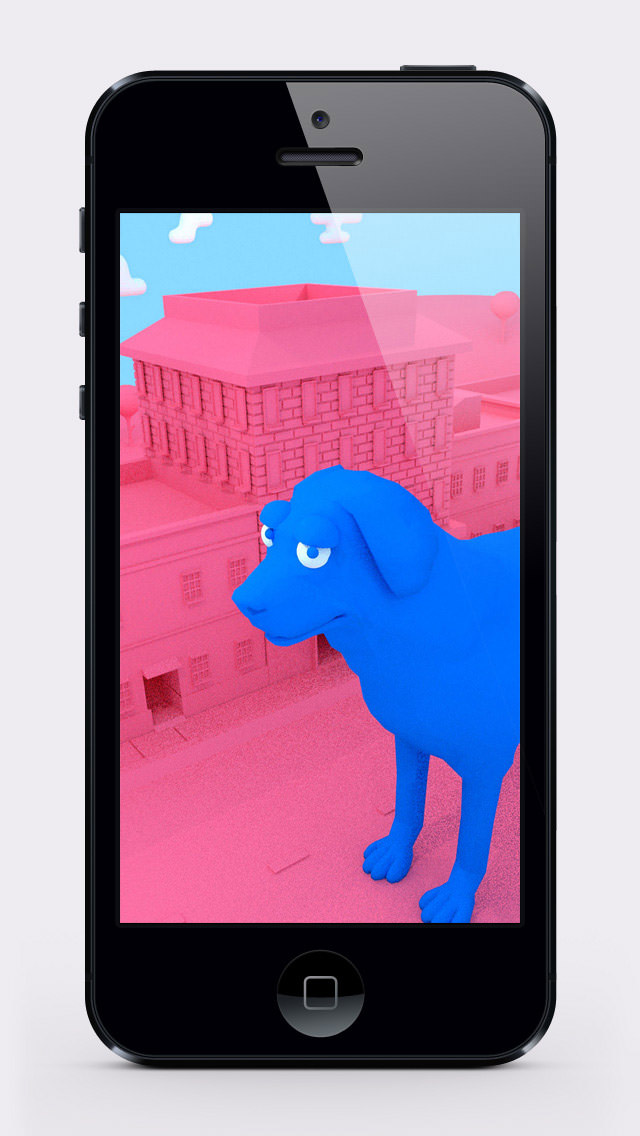
App Icon: http://dolice.net/ios/apps/screenshot/ArtIllustrationWallpaper_AppIcon.png

Located in Tokyo, Japan, Dolice was founded by Masaki Hirokawa on Oct 17, 2013. Dolice is a company that develops apps and games. That one role of everyone is the policy. Copyright (C) 2013-2014 Dolice Co., Ltd. All Rights Reserved. Apple, the Apple logo, iPhone, iPad, iPad mini, iPod touch, and Mac are registered trademarks of Apple Inc. in the U.S. and/or other countries. Other trademarks and registered trademarks may be the property of their respective owners.
*******
Link To Article: http://prmac.com/release-id-66810.htm
*******
---------------------------------------------------------------------------------
Note that you can alter delivered distributions at any time.
Login to your account on prMac to alter your channel selection, or to opt-out at any time.
P22 Type Foundry Announces Wedge - A Font by Architect Bruce Rotherham
A new article has been published at prMac.
P22 Type Foundry Announces Wedge - A Font by Architect Bruce Rotherham - Published on 04/08/14
P22's newest release, Wedge, is the singular vision of one man. Spanning decades, the design of this font by noted New Zealand architect Bruce Rotherham took the history of the Roman letter into full consideration. Despite ultimate rejection for production into metal type, the design was realized as intended and is now released in digital form. Over sixty years after it was first conceived, Wedge is now available from P22. Introductory sale pricing is available through April 30th, 2014.
Buffalo, New York - P22 Type Foundry and the International House of Fonts (IHOF) proudly announce Wedge- A Font by Architect Bruce Rotherham. P22 Wedge is the singular vision of one man. Spanning decades, the design of this font took the history of the Roman letter into full consideration. Despite ultimate rejection for production into metal type, the design was realized as intended and is now released in digital form.
Noted New Zealand architect Bruce Rotherham (1926-2004) was inspired by Herbert Bayer's 'universal alphabet' created at the Bauhaus in 1927. While he admired Bayer's pure geometry, Rotherham felt it was 'virtually unreadable'. The Bauhaus-inspired inclination for architectural publications to use sans serif faces provoked Rotherham to consider how a readable Roman book face might be approached using some of Bayer's same principles of simplification, but also retracing the evolution and use of the Roman form in an analytic manner.
The Wedge alphabet was started in 1947 when Rotherham was an architecture student at the University of Auckland. In 1958, after years of development and consultation with his father, who was a master printer, Rotherham approached Monotype to consider producing his typeface for commercial release. After some back and forth with Monotype, and despite trial proofs being made, the design was politely declined for being too much of a 'specialist face'.
Rotherham continued to practice architecture in New Zealand and Great Britain for over thirty years. By chance, he heard the BBC radio show Science Now discussing the topic of computer typesetting. Not content to give up on Wedge, he contacted the item's producer, Adrian Pickering, at the University of Southampton School of Electronics and Computer Science. Pickering worked closely in collaboration with Rotherham in the production of the digital version of the face. The type was shown posthumously for Rotherham in the 2009 exhibit Printing Types: New Zealand Type Design since 1870, held at Objectspace, in Auckland.
Over sixty years after it was first conceived, Wedge is now available from P22. Introductory sale pricing is available through April 30th, 2014.
P22 Type Foundry: https://www.p22.com/
Wedge: https://www.p22.com/family-wedge
P22 Type Foundry is an independent design house that creates computer typefaces inspired by art and history. The company is renowned for its work with museums and foundations such as the Guggenheim, the London Transport Museum, The Philadelphia Art Museum of Art and The Frank Lloyd Wright Foundation to ensure the development of accurate historical typefaces that are fully relevant for today's computer user. P22's attention to historical accuracy, along with acknowledgment of the source material, has made it a go-to source for iconic and important fonts. P22 is currently comprised of 4 distinct collections, each with a unique typographical focus. Copyright (C) 2014 P22 Type Foundry. All Rights Reserved.
*******
Link To Article: http://prmac.com/release-id-66806.htm
*******
---------------------------------------------------------------------------------
Note that you can alter delivered distributions at any time.
Login to your account on prMac to alter your channel selection, or to opt-out at any time.
P22 Type Foundry Announces Wedge - A Font by Architect Bruce Rotherham - Published on 04/08/14
P22's newest release, Wedge, is the singular vision of one man. Spanning decades, the design of this font by noted New Zealand architect Bruce Rotherham took the history of the Roman letter into full consideration. Despite ultimate rejection for production into metal type, the design was realized as intended and is now released in digital form. Over sixty years after it was first conceived, Wedge is now available from P22. Introductory sale pricing is available through April 30th, 2014.
Buffalo, New York - P22 Type Foundry and the International House of Fonts (IHOF) proudly announce Wedge- A Font by Architect Bruce Rotherham. P22 Wedge is the singular vision of one man. Spanning decades, the design of this font took the history of the Roman letter into full consideration. Despite ultimate rejection for production into metal type, the design was realized as intended and is now released in digital form.
Noted New Zealand architect Bruce Rotherham (1926-2004) was inspired by Herbert Bayer's 'universal alphabet' created at the Bauhaus in 1927. While he admired Bayer's pure geometry, Rotherham felt it was 'virtually unreadable'. The Bauhaus-inspired inclination for architectural publications to use sans serif faces provoked Rotherham to consider how a readable Roman book face might be approached using some of Bayer's same principles of simplification, but also retracing the evolution and use of the Roman form in an analytic manner.
The Wedge alphabet was started in 1947 when Rotherham was an architecture student at the University of Auckland. In 1958, after years of development and consultation with his father, who was a master printer, Rotherham approached Monotype to consider producing his typeface for commercial release. After some back and forth with Monotype, and despite trial proofs being made, the design was politely declined for being too much of a 'specialist face'.
Rotherham continued to practice architecture in New Zealand and Great Britain for over thirty years. By chance, he heard the BBC radio show Science Now discussing the topic of computer typesetting. Not content to give up on Wedge, he contacted the item's producer, Adrian Pickering, at the University of Southampton School of Electronics and Computer Science. Pickering worked closely in collaboration with Rotherham in the production of the digital version of the face. The type was shown posthumously for Rotherham in the 2009 exhibit Printing Types: New Zealand Type Design since 1870, held at Objectspace, in Auckland.
Over sixty years after it was first conceived, Wedge is now available from P22. Introductory sale pricing is available through April 30th, 2014.
P22 Type Foundry: https://www.p22.com/
Wedge: https://www.p22.com/family-wedge
P22 Type Foundry is an independent design house that creates computer typefaces inspired by art and history. The company is renowned for its work with museums and foundations such as the Guggenheim, the London Transport Museum, The Philadelphia Art Museum of Art and The Frank Lloyd Wright Foundation to ensure the development of accurate historical typefaces that are fully relevant for today's computer user. P22's attention to historical accuracy, along with acknowledgment of the source material, has made it a go-to source for iconic and important fonts. P22 is currently comprised of 4 distinct collections, each with a unique typographical focus. Copyright (C) 2014 P22 Type Foundry. All Rights Reserved.
*******
Link To Article: http://prmac.com/release-id-66806.htm
*******
---------------------------------------------------------------------------------
Note that you can alter delivered distributions at any time.
Login to your account on prMac to alter your channel selection, or to opt-out at any time.
The DayBell app helps to keep time for important periodic activity
A new article has been published at prMac.
The DayBell app helps to keep time for important periodic activity - Published on 04/08/14
Independent iOS developer, Ivan Rublev today introduces DayBell 1.1, his new auto-repeating timer app for iPhone and iPad. DayBell automatically notifies the user of a set period of time during the day. The app helps take a daily activity on schedule. Set the notification period, select a sound, and hit the Start button. With 14 preset sounds or the ability to choose a song from device's music library, it's possible to configure notifications that are easy and comfortable to accept.
Rostov-on-Don, Russian Federation - Take a daily periodic action on a schedule with notifications from the DayBell app. This app can help to take medicine, cook, walk with dog, service a machine at the factory, or do any daily periodic action in time.
The user sets the notification period, selects a sound, and hit the Start button. When the time has counted down the DayBell app notifies the user with the sound and the alert. Then the countdown automatically starts over again, unless the user hits the Stop button.
The DayBell app is intended to notify user of only one daily activity - most important one. The other less important things can be scheduled around the most important one manually. This keeps the interface of the app simple and pure. "Everybody is responsible for organizing their own activities. The DayBell app tries to help with the most important one." - says app's developer Ivan Rublev.
The DayBell app indicates the time of the next notification and the countdown. When the app is running in the foreground it prevents the screen from dimming (if the appropriate option is not disabled in the app's settings). This allows user to see the countdown at every moment. The DayBell app supports all sizes of iPhone & iPad screens and all device orientations. It makes it possible to put the device where it is comfortable for user to watch the screen.
The DayBell app works in the background and continues to notify the user from the notification center unless they stops the app manually. One noteworthy feature is the possibility to select any song from device's music library as the notification sound. This feature is available in the Extended edition.
Language Support:
* U.S. English and Russian
Device Requirements:
* iPhone, iPod touch, 3.5" and 4", or iPad
* Supports iOS 6.x or iOS 7.x
* 10 MB
Pricing and Availability:
DayBell 1.1 is available on the AppStrore for free from 8 April 2014 in the Health & Fitness and Utilities categories. The Extended edition is available via in-app purchase for $4.99 (USD).
Ivan Rublev: http://ivanrublev.me
DayBell 1.1: https://itunes.apple.com/app/daybell/id707407991
Screenshot 1: https://s1.mzstatic.com/us/r30/Purple/v4/fa/20/7f/fa207fe2-97ca-4f65-07bb-c808d3d3d7ed/mzl.tpyxyhiz.png
Screenshot 2: https://s4.mzstatic.com/us/r30/Purple/v4/db/25/83/db2583cb-17cf-94f5-5f5f-f6a4cb219722/mzl.onptmlvd.png
Screenshot 3: https://s5.mzstatic.com/us/r30/Purple6/v4/45/3b/c4/453bc4b8-121c-16eb-9d75-b288c9de71e5/mzl.oqdwnzmz.png
App Icon: https://s1.mzstatic.com/us/r30/Purple6/v4/3c/ac/1e/3cac1e90-d822-6bd2-a973-844af1f63952/mzl.wzvkcmxj.png
Ivan Rublev is an independent iOS developer. Specialized in creating high quality apps for productivity, utility, and entertainment. Copyright (C) 2014 Ivan Rublev. All Rights Reserved. Apple, the Apple logo, iPhone, iPod, and iPad are registered trademarks of Apple Inc. in the U.S. and/or other countries.
*******
Link To Article: http://prmac.com/release-id-66808.htm
*******
---------------------------------------------------------------------------------
Note that you can alter delivered distributions at any time.
Login to your account on prMac to alter your channel selection, or to opt-out at any time.
The DayBell app helps to keep time for important periodic activity - Published on 04/08/14
Independent iOS developer, Ivan Rublev today introduces DayBell 1.1, his new auto-repeating timer app for iPhone and iPad. DayBell automatically notifies the user of a set period of time during the day. The app helps take a daily activity on schedule. Set the notification period, select a sound, and hit the Start button. With 14 preset sounds or the ability to choose a song from device's music library, it's possible to configure notifications that are easy and comfortable to accept.
Rostov-on-Don, Russian Federation - Take a daily periodic action on a schedule with notifications from the DayBell app. This app can help to take medicine, cook, walk with dog, service a machine at the factory, or do any daily periodic action in time.
The user sets the notification period, selects a sound, and hit the Start button. When the time has counted down the DayBell app notifies the user with the sound and the alert. Then the countdown automatically starts over again, unless the user hits the Stop button.
The DayBell app is intended to notify user of only one daily activity - most important one. The other less important things can be scheduled around the most important one manually. This keeps the interface of the app simple and pure. "Everybody is responsible for organizing their own activities. The DayBell app tries to help with the most important one." - says app's developer Ivan Rublev.
The DayBell app indicates the time of the next notification and the countdown. When the app is running in the foreground it prevents the screen from dimming (if the appropriate option is not disabled in the app's settings). This allows user to see the countdown at every moment. The DayBell app supports all sizes of iPhone & iPad screens and all device orientations. It makes it possible to put the device where it is comfortable for user to watch the screen.
The DayBell app works in the background and continues to notify the user from the notification center unless they stops the app manually. One noteworthy feature is the possibility to select any song from device's music library as the notification sound. This feature is available in the Extended edition.
Language Support:
* U.S. English and Russian
Device Requirements:
* iPhone, iPod touch, 3.5" and 4", or iPad
* Supports iOS 6.x or iOS 7.x
* 10 MB
Pricing and Availability:
DayBell 1.1 is available on the AppStrore for free from 8 April 2014 in the Health & Fitness and Utilities categories. The Extended edition is available via in-app purchase for $4.99 (USD).
Ivan Rublev: http://ivanrublev.me
DayBell 1.1: https://itunes.apple.com/app/daybell/id707407991
Screenshot 1: https://s1.mzstatic.com/us/r30/Purple/v4/fa/20/7f/fa207fe2-97ca-4f65-07bb-c808d3d3d7ed/mzl.tpyxyhiz.png

Screenshot 2: https://s4.mzstatic.com/us/r30/Purple/v4/db/25/83/db2583cb-17cf-94f5-5f5f-f6a4cb219722/mzl.onptmlvd.png
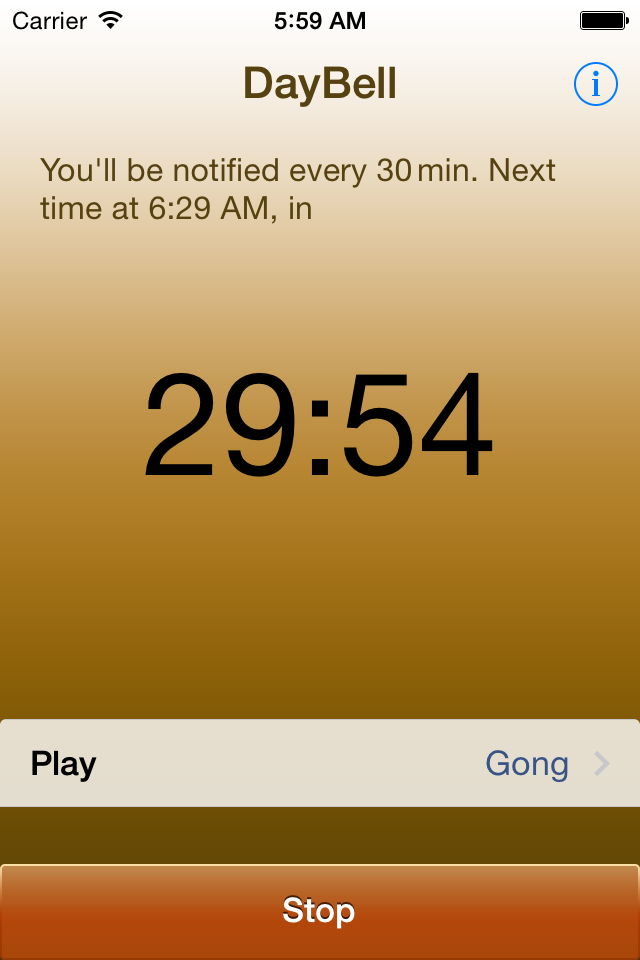
Screenshot 3: https://s5.mzstatic.com/us/r30/Purple6/v4/45/3b/c4/453bc4b8-121c-16eb-9d75-b288c9de71e5/mzl.oqdwnzmz.png

App Icon: https://s1.mzstatic.com/us/r30/Purple6/v4/3c/ac/1e/3cac1e90-d822-6bd2-a973-844af1f63952/mzl.wzvkcmxj.png

Ivan Rublev is an independent iOS developer. Specialized in creating high quality apps for productivity, utility, and entertainment. Copyright (C) 2014 Ivan Rublev. All Rights Reserved. Apple, the Apple logo, iPhone, iPod, and iPad are registered trademarks of Apple Inc. in the U.S. and/or other countries.
*******
Link To Article: http://prmac.com/release-id-66808.htm
*******
---------------------------------------------------------------------------------
Note that you can alter delivered distributions at any time.
Login to your account on prMac to alter your channel selection, or to opt-out at any time.
Subscribe to:
Posts (Atom)