A new article has been published at prMac.
AutoMailer 2.1 to send massive data-merged emails - Published on 04/26/14
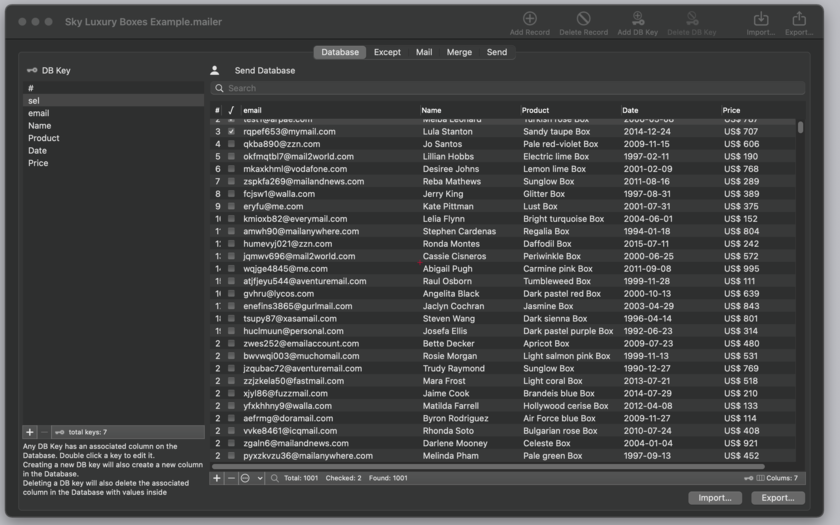
Tension Software announces AutoMailer 2.1 for Mac OS X. The application allows one to merge data from a database with email templates and send to multiple addresses in Text or Web HTML format. It allows one to prepare and send an unlimited quantity of emails with a single click. AutoMailer is document based and allows one to use as many documents the user needs to manage all the different list and required emails. AutoMailer is a flexible tool to manage your mailing list directly from your Mac.
Milano, Italy - Tension Software announces AutoMailer 2.1 for Mac OS X. AutoMailer 2.1 allows one to merge data from a database with email templates and send to multiple addresses in Text or Web HTML format. It allows one to prepare and send an unlimited quantity of emails with a single click, with a personalized contents depending of each recipient.
Emails sent by AutoMailer are standard emails. People receiving the emails will not notice any difference compared to standard emails and they will be able to reply to them as usually. The difference is that any recipient can receive a different email personalized with his own data (merged from the internal database table) even if you just sent thousands of them with a single operation. AutoMailer is document based and allows to use as many documents the user needs to manage all the different list and required emails. It is a flexible tool to manage your mailing list directly from your Mac.
AutoMailer is able to import from databases in a smart and simply way. The user can import addresses and any kind of data from any database able to export in text format, both CSV (comma separated value),TSV (Tab separated value), CSV-S (Char separated Value using semicolon). The application is able to automatically detect during imports, the data type and the file encode method to provide imports of data without any problems
Data imported into AutoMailer are managed in the internal, easy to use, document table. When imported, they can be modified, updated and enlarged with new additional data at any time. Various commands provide manipulation of internal records in a fast and intuitive way.
AutoMailer also provides a separate 'except' list of address the user can maintain, to provide a list of addresses that will never be used to send, to be sure to never send anything to those addresses. The template email used to merge data from the internal database table can now be written both in text or in html to send also emails in web format (also including pictures linked from a support server)
AutoMailer provides for HTML emails, at any time, a live preview or the email the user is composing. Emails can be previewed also for any address the user want to send to, with all the data merged for any of those users, simply selecting it from a list.
All the emails can be prepared or sent with a single command, with the capability to send them via an email server, one by one, specifying an interval time between each sending. The application can prepare all the emails using the Mail.app installed on any Mac and then manually send them or sending directly all them with a single command (as a standard email client) via an email server you have access to.
One of the goals in creating AutoMailer was ease of use. Anyone with a minimum of familiarity with the Mac will be able to use AutoMailer at best efficiency using all the potentiality of the app in a very intuitive way. Settings, data and email templates are saved inside documents, ready to be reused at later time reopening the documents. The user can prepare email templates inserting content of the database table using a simple syntax ( a popup offers all the available field tags to access tabled data, without having to type them). AutoMailer provides a lot of additional functionalities to help the user do his job in the best way, they are too much to list all.
Features:
* Document based, allows to save data and setting and have them ready for successive uses
* Can create and send both text or web (html) emails
* Possibility to manage an infinite number of data and letter template thanks to the document based approach with maximum flexibility of use
* Big emphases on simplicity and easy of use
* Elimination of duplicated and invalid emails
* Extreme easy to import, create and manipulate data to use for merge with letter template
* Imports form various encoding format from Unix, mac, Windows
* Import from Tab separated values, Comma separated values, semicolon separated values
* Table view with possibility to add, delete rows (records) and columns (fields) at any time and to edit in place inside the table
* Easy import with automatic detection of format and with selection of data source elements and destination (data fields) and browsing of source data in advance (before importing)
* Very simple creation of email templates with keywords insertion to put database data inside the emails for any email recipient
* Automatically updated popup to insert data tags inside the email template
* Emails with attachments
* Live preview for any email to send with updated data (you see the email as the recipient will see it) both for text and html emails
* Can send a single email, a subset or all the emails
* Can just prepare the email, to send them at later time manually from inside Mail.app
* Can use and send directly via an external mail server
* Log monitoring of email preparation and sending
* PDF user guide inside the app.
What's new:
* The import function now has the ability to auto-detect the file encode format (solved problems with files coming from MS Excel)
* New file encode formats for text file to import, 9 accepted formats such as (UTF8, ASCII, UTF16, UTF32, OLD MAC OS 9) and others
* Now can import using also CSV-S format (Comma Separated Values using Semicolon) often used by Excel and other MS products
* Interface change and improvements
* Duplicate Email now checks not using case-sensitive
* Various bug fixes
* Improved stability
System Requirements:
* Mac OS X 10.8 Mountain Lion or higher
Pricing and Availability:
AutoMailer 2.1 is $25 USD (or equivalent amount in other currencies) and available worldwide exclusively through the Mac App Store and the company web site.
Tension Software: http://www.tensionsoftware.com
AutoMailer: http://www.tensionsoftware.com/osx/automailer/
Download: http://sec.tensionsoftware.com/osx/automailer/automailer.dmg
Purchase: http://www.tensionsoftware.com/buy/
Screenshot: http://www.tensionsoftware.com/static/tensionsoftware/images/app/automailer/screenshots/mac/1.png
App Icon: http://www.tensionsoftware.com/static/tensionsoftware/images/app/automailer/icons/128.png
Tension Software develops software for Mac OS X and iOS using the latest Apple technology, Cocoa and Objective-C. Other brands and products referenced herein are the trademarks or registered trademarks of their respective holders.All Material and Software (C) Copyright 2014 Tension Software. All Rights Reserved. Apple, the Apple logo, iPhone, iPod and iPad are registered trademarks of Apple Inc. in the U.S. and/or other countries. Other trademarks and registered trademarks may be the property of their respective owners.
*******
Link To Article: http://prmac.com/release-id-67266.htm
*******
---------------------------------------------------------------------------------
Note that you can alter delivered distributions at any time.
Login to your account on prMac to alter your channel selection, or to opt-out at any time.


Study Habits - Download the new release for Free during Easter weekend
A new article has been published at prMac.
Study Habits - Download the new release for Free during Easter weekend - Published on 04/26/14
California based indie developer, Reginald Laigo has announced Study Habits will be free for the first time during Easter weekend to celebrate the release of iOS version 1.0.3. Featured in the Long Beach Press Telegram, CBS2 and KCAL9 news, Study Habits is more than your typical calendar, organizer or to-do list. It is the first app to integrate motivation and learning strategies to help students develop effective study habits and improve their memory, manage their time, and much more.
Long Beach, California - Indie developer Reginald Laigo has announced Study Habits will be free for the first time during Easter weekend to celebrate the release of iOS version 1.0.3. Created by a Doctor of Education, Study Habits is more than your typical calendar, planner, organizer, or to-do list - it is the first app to integrate motivation and learning strategies to help students improve their memory, manage their time, and much more.
A finalist for the Best App Ever Awards (High School and College Student App categories), featured in the Long Beach Press Telegram, CBS2 and KCAL9 news, and currently the subject of a scientific study at the University of Southern California, Study Habits is a comprehensive tool for high school and college students. A recent user remarked, "The Study Habits app is a must for any student who wants to succeed!"
Below are a few of Study Habits' many features:
* Choose from over 30 study strategies based from education psychology to develop effective study habits
* Habits addressed include boosting memory, increasing motivation, time management, and much more
* Earn achievements and unlock levels when you practice study strategies
* Calculate weighted or non-weighted assignments, and calculate semester GPA
* Syncs information from iCal and other calendars
* Calendar events and assignments are displayed through a clean, minimalistic design
* Set reminder notifications for classes, assignments, and exams
Device Requirements:
* iPhone and iPod touch
* Requires iOS 7.0 or later
* 6.8 MB
Pricing and Availability:
Study Habits 1.0.3 is free until April 21, 2014 and available worldwide exclusively through the App Store in the Productivity category.
Study Habits 1.0.3: http://www.studyhabitsapp.com
Download from iTunes: https://itunes.apple.com/app/study-habits-helping-college/id665974664
Featured on CBS 2 News: http://losangeles.cbslocal.com/video/9805093-former-usc-instructor-develops-app-to-help-improve-study-habits/
YouTube Video: http://www.youtube.com/watch?v=JxmoydKT0QI
Screenshots: http://www.studylearnapp.com/screenshots.html
App Icon: http://www.studylearnapp.com/icon.html
Located in Long Beach, California, Reginald Laigo develops apps for iOS devices. All Material and Software Copyright (C) 2014 Reginald Laigo. All Rights Reserved. Apple, the Apple logo, iPhone, iPad, iPad mini, iPod touch, and Mac are registered trademarks of Apple Inc. in the U.S. and/or other countries. Other service marks and registered trademarks may be the property of their respective owners.
*******
Link To Article: http://prmac.com/release-id-67232.htm
*******
---------------------------------------------------------------------------------
Note that you can alter delivered distributions at any time.
Login to your account on prMac to alter your channel selection, or to opt-out at any time.
Study Habits - Download the new release for Free during Easter weekend - Published on 04/26/14
California based indie developer, Reginald Laigo has announced Study Habits will be free for the first time during Easter weekend to celebrate the release of iOS version 1.0.3. Featured in the Long Beach Press Telegram, CBS2 and KCAL9 news, Study Habits is more than your typical calendar, organizer or to-do list. It is the first app to integrate motivation and learning strategies to help students develop effective study habits and improve their memory, manage their time, and much more.
Long Beach, California - Indie developer Reginald Laigo has announced Study Habits will be free for the first time during Easter weekend to celebrate the release of iOS version 1.0.3. Created by a Doctor of Education, Study Habits is more than your typical calendar, planner, organizer, or to-do list - it is the first app to integrate motivation and learning strategies to help students improve their memory, manage their time, and much more.
A finalist for the Best App Ever Awards (High School and College Student App categories), featured in the Long Beach Press Telegram, CBS2 and KCAL9 news, and currently the subject of a scientific study at the University of Southern California, Study Habits is a comprehensive tool for high school and college students. A recent user remarked, "The Study Habits app is a must for any student who wants to succeed!"
Below are a few of Study Habits' many features:
* Choose from over 30 study strategies based from education psychology to develop effective study habits
* Habits addressed include boosting memory, increasing motivation, time management, and much more
* Earn achievements and unlock levels when you practice study strategies
* Calculate weighted or non-weighted assignments, and calculate semester GPA
* Syncs information from iCal and other calendars
* Calendar events and assignments are displayed through a clean, minimalistic design
* Set reminder notifications for classes, assignments, and exams
Device Requirements:
* iPhone and iPod touch
* Requires iOS 7.0 or later
* 6.8 MB
Pricing and Availability:
Study Habits 1.0.3 is free until April 21, 2014 and available worldwide exclusively through the App Store in the Productivity category.
Study Habits 1.0.3: http://www.studyhabitsapp.com
Download from iTunes: https://itunes.apple.com/app/study-habits-helping-college/id665974664
Featured on CBS 2 News: http://losangeles.cbslocal.com/video/9805093-former-usc-instructor-develops-app-to-help-improve-study-habits/
YouTube Video: http://www.youtube.com/watch?v=JxmoydKT0QI
Screenshots: http://www.studylearnapp.com/screenshots.html
App Icon: http://www.studylearnapp.com/icon.html
Located in Long Beach, California, Reginald Laigo develops apps for iOS devices. All Material and Software Copyright (C) 2014 Reginald Laigo. All Rights Reserved. Apple, the Apple logo, iPhone, iPad, iPad mini, iPod touch, and Mac are registered trademarks of Apple Inc. in the U.S. and/or other countries. Other service marks and registered trademarks may be the property of their respective owners.
*******
Link To Article: http://prmac.com/release-id-67232.htm
*******
---------------------------------------------------------------------------------
Note that you can alter delivered distributions at any time.
Login to your account on prMac to alter your channel selection, or to opt-out at any time.
Solve And Learn About The World Of Formulas With Equate Formula Solver
A new article has been published at prMac.
Solve And Learn About The World Of Formulas With Equate Formula Solver - Published on 04/26/14
Independent developer, Behzad Soltani has announced the release of Equate Formula Solver 1.0.1, an update to the popular practical and user-friendly educational app developed for iOS devices. Equate is the most extensive formula solver developed for anyone who appreciates the wonderful world of Math, Physics and Chemistry. Conquer formulas with ease using its state of the art formula solvers. Featuring an improved UI, version 1.0.1 adds more formulas, updated units, and minor fixes.
Vancouver, Canada - Everyone with an interest for natural sciences has plenty of reasons to be excited, as Equate Formula Solver app is available from the App Store in the version 1.0.1. This is a practical and user-friendly educational app that helps you solve difficult formulas without breaking a sweat. It doesn't even matter if your task involves math, chemistry or physics - this fantastic tool can handle it all with no difficulties.
Released by Behzad Soltani, the app is loaded with advanced features, including a built-in unit convertor, effective equitation search function, "nerd out" section where all of the 200 pre-loaded formulas are displayed, fun instructional videos and possibility for direct interaction with students. New formulas are added each week, while the existing ones can be manipulated to fit present needs. Equate Formula Solver also utilizes all the advantages of networked communications, allowing the user to search for wiki references online or share the results via social networks (Facebook, Twitter) or regular SMS.
Beginners can work on their science skills in the "learn it" section of the app or practice with sample problems that come with provided answers. Equate Formula Solver is Mathjax enabled and allows user input and marking certain formulas as "favorites", while the graphic interface is quite simple to navigate and interact with. The app can also surprise and motivate students with a smart quote sandwiched in between more serious tasks. All things considered, Equate Formula Solver is one of the most powerful educational tools of the new generation, equally useful to teachers looking to enhance the learning process and students trying to understand sciences a little better.
Features:
* Built-in unit convertors
* MathJax enabled, allowing for user input displays
* Unique practice problems with answers to help you study for tests
* Unique "learn it" section to further your learning
* Formula manipulation to help you check your homework
* Equation search function to find your desired formula
* Wiki linked for an enhanced reference guide
* Science quotes to keep the brain juices flowing
* Favourite your formula of choice for easy access
* Nerd Out! section that displays all the formulas
* Share your new found knowledge with friends and students (SMS/Twitter/Facebook)
* Take advantage of more than 200 formulas
* New formulas added every week
* Universal App (iPhone, iPad)
* Student interaction (email us to be featured in the app)
* Nerdy instructional videos
Device Requirements:
* iPhone and iPod touch
* Requires iOS 7.0 or later
* 44.4 MB
Pricing and Availability:
During the launch period, Equate Formula Solver 1.0.1 offered at discounted the price of just $0.99 (USD) and in the App Store under the Education category. Promo codes are available on request for review purposes.
Equate Formula Solver 1.0.1: http://equateapp.com/
Purchase and Download: https://itunes.apple.com/app/equate-formula-solver/id703726003
Screenshot 1: http://appversal.com/site/equateapp/equate2.jpg
Screenshot 2: http://appversal.com/site/equateapp/equate1.jpg
App Icon: http://appversal.com/site/equateapp/equateicon.jpg
Nurdure Creative Solutions founded in 2014, Vancouver BC aims to help students around the globe get instant results for the equations with Equate App. All Rights Reserved. Apple, the Apple logo, iPhone, iPod and iPad are registered trademarks of Apple Inc. in the U.S. and/or other countries. Other trademarks and registered trademarks may be the property of their respective owners.
*******
Link To Article: http://prmac.com/release-id-67234.htm
*******
---------------------------------------------------------------------------------
Note that you can alter delivered distributions at any time.
Login to your account on prMac to alter your channel selection, or to opt-out at any time.
Solve And Learn About The World Of Formulas With Equate Formula Solver - Published on 04/26/14
Independent developer, Behzad Soltani has announced the release of Equate Formula Solver 1.0.1, an update to the popular practical and user-friendly educational app developed for iOS devices. Equate is the most extensive formula solver developed for anyone who appreciates the wonderful world of Math, Physics and Chemistry. Conquer formulas with ease using its state of the art formula solvers. Featuring an improved UI, version 1.0.1 adds more formulas, updated units, and minor fixes.
Vancouver, Canada - Everyone with an interest for natural sciences has plenty of reasons to be excited, as Equate Formula Solver app is available from the App Store in the version 1.0.1. This is a practical and user-friendly educational app that helps you solve difficult formulas without breaking a sweat. It doesn't even matter if your task involves math, chemistry or physics - this fantastic tool can handle it all with no difficulties.
Released by Behzad Soltani, the app is loaded with advanced features, including a built-in unit convertor, effective equitation search function, "nerd out" section where all of the 200 pre-loaded formulas are displayed, fun instructional videos and possibility for direct interaction with students. New formulas are added each week, while the existing ones can be manipulated to fit present needs. Equate Formula Solver also utilizes all the advantages of networked communications, allowing the user to search for wiki references online or share the results via social networks (Facebook, Twitter) or regular SMS.
Beginners can work on their science skills in the "learn it" section of the app or practice with sample problems that come with provided answers. Equate Formula Solver is Mathjax enabled and allows user input and marking certain formulas as "favorites", while the graphic interface is quite simple to navigate and interact with. The app can also surprise and motivate students with a smart quote sandwiched in between more serious tasks. All things considered, Equate Formula Solver is one of the most powerful educational tools of the new generation, equally useful to teachers looking to enhance the learning process and students trying to understand sciences a little better.
Features:
* Built-in unit convertors
* MathJax enabled, allowing for user input displays
* Unique practice problems with answers to help you study for tests
* Unique "learn it" section to further your learning
* Formula manipulation to help you check your homework
* Equation search function to find your desired formula
* Wiki linked for an enhanced reference guide
* Science quotes to keep the brain juices flowing
* Favourite your formula of choice for easy access
* Nerd Out! section that displays all the formulas
* Share your new found knowledge with friends and students (SMS/Twitter/Facebook)
* Take advantage of more than 200 formulas
* New formulas added every week
* Universal App (iPhone, iPad)
* Student interaction (email us to be featured in the app)
* Nerdy instructional videos
Device Requirements:
* iPhone and iPod touch
* Requires iOS 7.0 or later
* 44.4 MB
Pricing and Availability:
During the launch period, Equate Formula Solver 1.0.1 offered at discounted the price of just $0.99 (USD) and in the App Store under the Education category. Promo codes are available on request for review purposes.
Equate Formula Solver 1.0.1: http://equateapp.com/
Purchase and Download: https://itunes.apple.com/app/equate-formula-solver/id703726003
Screenshot 1: http://appversal.com/site/equateapp/equate2.jpg

Screenshot 2: http://appversal.com/site/equateapp/equate1.jpg

App Icon: http://appversal.com/site/equateapp/equateicon.jpg

Nurdure Creative Solutions founded in 2014, Vancouver BC aims to help students around the globe get instant results for the equations with Equate App. All Rights Reserved. Apple, the Apple logo, iPhone, iPod and iPad are registered trademarks of Apple Inc. in the U.S. and/or other countries. Other trademarks and registered trademarks may be the property of their respective owners.
*******
Link To Article: http://prmac.com/release-id-67234.htm
*******
---------------------------------------------------------------------------------
Note that you can alter delivered distributions at any time.
Login to your account on prMac to alter your channel selection, or to opt-out at any time.
Nano C - C language interpreter is better than ever & available on iOS
A new article has been published at prMac.
Nano C - C language interpreter is better than ever & available on iOS - Published on 04/26/14
Ukraine based independent developer, Erziman Asaliyev, has announced the recent launch of the newly updated version of Nano C for the iPhone, iPad, and iPod touch. A useful mobile C language interpreter, this app gives students and researchers the power to create and view C language calculations as text or graphs, and offers an array of other math functionalities as well. Nano C turns iOS devices into flexible calculation tools, able to convey statistics, programming information, and more.
Kyiv, Ukraine - Erziman Asaliyev, the independent mobile application developer behind Nano C - C language interpreter - and its free companion app Nano Basic, has announced the recent release of a newly updated version of Nano C onto the App Store. Compatible on iPhone, iPad, and iPod touch devices, this uniquely practical math utility enables users to create and show arbitrary C based calculations as text or graphs right on their mobile devices on demand. A perfect education companion app for students, teachers, and researchers alike, Nano C turns iOS devices into flexible calculation tools, able to convey statistics, programming information, a wide array of math calculations, and more. Newly enhanced, Nano C 1.2 is currently available for download on the App Store for $0.99 in the Education category.
Geared towards college students, teachers, and researchers, this math utility highlights a variety of charting features that enable users to not only perform calculations ranging from the very simple to the very complex, but visually show their results and implications via a single intuitive hub as well. A perfect asset for teachers to help educate students too, Nano C brings a full library of math functions, graphs, and C language interpretation tools under one digital roof that can be utilized in any setting. Accessible to even novice programming or math inclined learners, Nano C comes complete with an in-depth Help section to guide users through the app's many ins and outs, while switching between editing and viewing modes to create and augment calculations, and display results is as simple as a tap of a button.
This isn't a simple mobile calculator gimmick. Nano C offers users full C language calculation capabilities varied enough to meet virtually any need. Users - students, researchers, and teachers alike - deserve an iOS solution that offers a practical mobile outlet to create and display the high level calculations Nano C provides them with. Its an eloquent 360 degree solution, and built from the ground up to be the most user friendly C language calculation tool available on the App Store.
Device Requirements:
* iPhone, iPad, and iPod touch
* Requires iOS 7.0 or later
* 0.8 MB
Pricing and Availability:
Nano C (C language interpreter) 1.20 is $1.99 USD (or equivalent amount in other currencies) and available worldwide exclusively through the App Store in the Education category.
Erziman: http://www.erziman.com
Nano C 1.20: http://erziman.com/nano-c
Purchase and Download: https://itunes.apple.com/app/nano-c-c-language-interpreter/id829783283
Screenshot: http://a2.mzstatic.com/us/r30/Purple/v4/2a/ea/6e/2aea6e8b-83a9-f3dc-72f8-2eae9468ae80/screen568x568.jpeg
App Icon: http://erziman.com/userdata/modules/werziman/galleries/icons/erz_pages_gallery_photog_270.png
Erziman Asaliyev is a Ukraine based independent mobile application developer committed to creating effective utility solutions geared towards science and math minded iOS users. All Material and Software (C) Copyright Erziman Asaliyev 2014. All Rights Reserved. Apple, the Apple logo, iPhone, iPod and iPad are registered trademarks of Apple Inc. in the U.S. and/or other countries. Other trademarks and registered trademarks may be the property of their respective owners.
*******
Link To Article: http://prmac.com/release-id-67233.htm
*******
---------------------------------------------------------------------------------
Note that you can alter delivered distributions at any time.
Login to your account on prMac to alter your channel selection, or to opt-out at any time.
Nano C - C language interpreter is better than ever & available on iOS - Published on 04/26/14
Ukraine based independent developer, Erziman Asaliyev, has announced the recent launch of the newly updated version of Nano C for the iPhone, iPad, and iPod touch. A useful mobile C language interpreter, this app gives students and researchers the power to create and view C language calculations as text or graphs, and offers an array of other math functionalities as well. Nano C turns iOS devices into flexible calculation tools, able to convey statistics, programming information, and more.
Kyiv, Ukraine - Erziman Asaliyev, the independent mobile application developer behind Nano C - C language interpreter - and its free companion app Nano Basic, has announced the recent release of a newly updated version of Nano C onto the App Store. Compatible on iPhone, iPad, and iPod touch devices, this uniquely practical math utility enables users to create and show arbitrary C based calculations as text or graphs right on their mobile devices on demand. A perfect education companion app for students, teachers, and researchers alike, Nano C turns iOS devices into flexible calculation tools, able to convey statistics, programming information, a wide array of math calculations, and more. Newly enhanced, Nano C 1.2 is currently available for download on the App Store for $0.99 in the Education category.
Geared towards college students, teachers, and researchers, this math utility highlights a variety of charting features that enable users to not only perform calculations ranging from the very simple to the very complex, but visually show their results and implications via a single intuitive hub as well. A perfect asset for teachers to help educate students too, Nano C brings a full library of math functions, graphs, and C language interpretation tools under one digital roof that can be utilized in any setting. Accessible to even novice programming or math inclined learners, Nano C comes complete with an in-depth Help section to guide users through the app's many ins and outs, while switching between editing and viewing modes to create and augment calculations, and display results is as simple as a tap of a button.
This isn't a simple mobile calculator gimmick. Nano C offers users full C language calculation capabilities varied enough to meet virtually any need. Users - students, researchers, and teachers alike - deserve an iOS solution that offers a practical mobile outlet to create and display the high level calculations Nano C provides them with. Its an eloquent 360 degree solution, and built from the ground up to be the most user friendly C language calculation tool available on the App Store.
Device Requirements:
* iPhone, iPad, and iPod touch
* Requires iOS 7.0 or later
* 0.8 MB
Pricing and Availability:
Nano C (C language interpreter) 1.20 is $1.99 USD (or equivalent amount in other currencies) and available worldwide exclusively through the App Store in the Education category.
Erziman: http://www.erziman.com
Nano C 1.20: http://erziman.com/nano-c
Purchase and Download: https://itunes.apple.com/app/nano-c-c-language-interpreter/id829783283
Screenshot: http://a2.mzstatic.com/us/r30/Purple/v4/2a/ea/6e/2aea6e8b-83a9-f3dc-72f8-2eae9468ae80/screen568x568.jpeg

App Icon: http://erziman.com/userdata/modules/werziman/galleries/icons/erz_pages_gallery_photog_270.png

Erziman Asaliyev is a Ukraine based independent mobile application developer committed to creating effective utility solutions geared towards science and math minded iOS users. All Material and Software (C) Copyright Erziman Asaliyev 2014. All Rights Reserved. Apple, the Apple logo, iPhone, iPod and iPad are registered trademarks of Apple Inc. in the U.S. and/or other countries. Other trademarks and registered trademarks may be the property of their respective owners.
*******
Link To Article: http://prmac.com/release-id-67233.htm
*******
---------------------------------------------------------------------------------
Note that you can alter delivered distributions at any time.
Login to your account on prMac to alter your channel selection, or to opt-out at any time.
Bookmix Launches Easy Way for Writers to Create, Collaborate and Connect
A new article has been published at prMac.
Bookmix Launches Easy Way for Writers to Create, Collaborate and Connect - Published on 04/26/14
The new no-cost app Bookmix 1.02 empowers anyone to write anywhere from a few lines, to a few hundred pages, and share their unique creation with readers around the globe. Users can also invite others to participate in writing their book, which can lead to a whole new world of fresh ideas and interesting developments. The app is designed with an outstanding interface that lets users cut and copy text with a single tap, as well as access suggested words and phrases.
Cupertino, California - Writers in search of a creative new way to create, collaborate and connect, can download the brilliant new no-cost app Bookmix. Designed for both emerging and established writers alike, Bookmix empowers users to write anywhere from a few lines - to a few hundred pages - and share their unique creation with readers around the globe. Plus, users who are in the mood to collaborate can invite others to participate in writing their book, which can lead to a whole new world of fresh ideas and interesting developments. Other Bookmix special features include:
* Unique user profiles where writers can highlight their experiences, abilities and ideas
* Users can also add a picture if they wish
* A book list to keep track of all open projects
* A friends list to see whose online and contributing
Plus, the app is designed with an outstanding interface that lets users cut and copy text with a single tap, as well as access suggested words and phrases for when they stumble across dreaded writer's block.
"For many people, the hardest thing about writing a book is getting started," commented Ben Rawlinson, head of Bookmix. "Fortunately, Bookmix makes writing fun, easy and creative. Users don't have to worry about filling up hundreds of pages. They simply start on their first chapter and, if they wish, invite others from around the world to share and collaborate."
Added Mr. Rawlinson: "And just as importantly, Bookmix is perfect for writers of all skill and experience levels, from those who are just starting out, to those who have written for years or decades. There's something for everyone and since the app is available at no-cost, there's no risk to trying it out!"
Device Requirements:
* iPhone, iPad, and iPod touch
* Requires iOS 6.0 or later
* Optimized for iPhone 5
* 8.7 MB
Pricing and Availability:
Bookmix 1.02, the brilliant new no-cost app that is a fun and easy way for writers to create, collaborate and connect with readers around the world, is Free and available worldwide exclusively through the App Store in the Books category.
Bookmix 1.02: http://apps.appshout.com/bookmix/
Download from iTunes: https://itunes.apple.com/app/bookmix/id829492807
Screenshot: http://a2.mzstatic.com/us/r30/Purple6/v4/57/a1/50/57a1501a-7d96-f78f-cccb-3942ef344eba/screen568x568.jpeg
App Icon: http://apps.appshout.com/bookmix/images/icon.png
Based in Auckland, New Zealand the Bookmix team have a philosophy to create a tool that allows anyone to create a well-organized book quickly and efficiently, with professional results. Bookmix aims to help authors at any level write books and also support collaboration and the sharing of opinions between authors. All Material and Software (C) Copyright 2014 Benjamin Rawlinson. All Rights Reserved. Apple, the Apple logo, iPhone, iPod and iPad are registered trademarks of Apple Inc. in the U.S. and/or other countries. Other trademarks and registered trademarks may be the property of their respective owners.
*******
Link To Article: http://prmac.com/release-id-67235.htm
*******
---------------------------------------------------------------------------------
Note that you can alter delivered distributions at any time.
Login to your account on prMac to alter your channel selection, or to opt-out at any time.
Bookmix Launches Easy Way for Writers to Create, Collaborate and Connect - Published on 04/26/14
The new no-cost app Bookmix 1.02 empowers anyone to write anywhere from a few lines, to a few hundred pages, and share their unique creation with readers around the globe. Users can also invite others to participate in writing their book, which can lead to a whole new world of fresh ideas and interesting developments. The app is designed with an outstanding interface that lets users cut and copy text with a single tap, as well as access suggested words and phrases.
Cupertino, California - Writers in search of a creative new way to create, collaborate and connect, can download the brilliant new no-cost app Bookmix. Designed for both emerging and established writers alike, Bookmix empowers users to write anywhere from a few lines - to a few hundred pages - and share their unique creation with readers around the globe. Plus, users who are in the mood to collaborate can invite others to participate in writing their book, which can lead to a whole new world of fresh ideas and interesting developments. Other Bookmix special features include:
* Unique user profiles where writers can highlight their experiences, abilities and ideas
* Users can also add a picture if they wish
* A book list to keep track of all open projects
* A friends list to see whose online and contributing
Plus, the app is designed with an outstanding interface that lets users cut and copy text with a single tap, as well as access suggested words and phrases for when they stumble across dreaded writer's block.
"For many people, the hardest thing about writing a book is getting started," commented Ben Rawlinson, head of Bookmix. "Fortunately, Bookmix makes writing fun, easy and creative. Users don't have to worry about filling up hundreds of pages. They simply start on their first chapter and, if they wish, invite others from around the world to share and collaborate."
Added Mr. Rawlinson: "And just as importantly, Bookmix is perfect for writers of all skill and experience levels, from those who are just starting out, to those who have written for years or decades. There's something for everyone and since the app is available at no-cost, there's no risk to trying it out!"
Device Requirements:
* iPhone, iPad, and iPod touch
* Requires iOS 6.0 or later
* Optimized for iPhone 5
* 8.7 MB
Pricing and Availability:
Bookmix 1.02, the brilliant new no-cost app that is a fun and easy way for writers to create, collaborate and connect with readers around the world, is Free and available worldwide exclusively through the App Store in the Books category.
Bookmix 1.02: http://apps.appshout.com/bookmix/
Download from iTunes: https://itunes.apple.com/app/bookmix/id829492807
Screenshot: http://a2.mzstatic.com/us/r30/Purple6/v4/57/a1/50/57a1501a-7d96-f78f-cccb-3942ef344eba/screen568x568.jpeg

App Icon: http://apps.appshout.com/bookmix/images/icon.png

Based in Auckland, New Zealand the Bookmix team have a philosophy to create a tool that allows anyone to create a well-organized book quickly and efficiently, with professional results. Bookmix aims to help authors at any level write books and also support collaboration and the sharing of opinions between authors. All Material and Software (C) Copyright 2014 Benjamin Rawlinson. All Rights Reserved. Apple, the Apple logo, iPhone, iPod and iPad are registered trademarks of Apple Inc. in the U.S. and/or other countries. Other trademarks and registered trademarks may be the property of their respective owners.
*******
Link To Article: http://prmac.com/release-id-67235.htm
*******
---------------------------------------------------------------------------------
Note that you can alter delivered distributions at any time.
Login to your account on prMac to alter your channel selection, or to opt-out at any time.
Rekindle your passion of classic board game with Smiley Lines
A new article has been published at prMac.
Rekindle your passion of classic board game with Smiley Lines - Published on 04/26/14
Independent mobile app studio, Black Mouton has announced Smiley Lines 3.0.21, a fun and cute arcade-board game available for both iPhone and iPad. Smiley Lines offers a contemporary feel to the classic lines board game. Simply align 4 smileys of same color. It sounds simple but can be challenging with occurrences of the unexpected such as the annoying rocks. Version 3.0.21 introduces additional features, cute graphics and supports iOS Game Center leader-boards.
Brussels, Belgium - Black Mouton, independent mobile app studio, has announced that Smiley Lines v3.0.21 is available on App Store for both iPhone and iPad. Are you a fan of classic board game? Smiley Lines is a fun and cute arcade-board game that gave a contemporary feel to the classic lines board game. The goal of the game? simply align 4 smileys of same color. It sounds simple but can be challenging with occurrence of the unexpected such as the annoying rocks. Version 3.0.21 is now available on the App Store with additional features, cute graphics and support iOS Game Center leader-board.
"We dedicated a lot of efforts into the UI design and we believe that this game of love will bring fun and happiness to our users as well as let everyone discover the intriguing classic lines game", said Ye Wang, founder of Black Mouton and the lead designer, "if you smile while playing Smiley Lines, we hit our goal!"
Feature Highlights:
* Super simple UI and rule: tap or drag a ball (smiley face) to make a line of the same color
* 9 levels with increasing difficulty (look for the secret smileys in level 7, 8 and 9)
* Casual with no time pressure (Yet be strategic with your each move if you want to hit high scores)
* Resume your last game at any time so that you never lose your progress
* Smooth UI and animations - very intuitive game play by just playing
* Possible to undo your last move
* Add support for global leaderboard via Game Center
Language Support:
* English, French, Simplified Chinese, Traditional Chinese, Spanish, Russian and Japanese
Reviews:
"Undoubtedly one of the best graphics among apps of same kind, and a good time killer" - CocoaChina
"Our editor loved playing Smiley Lines, it has an intuitive gameplay that intrigues you from the beginning and you get addicted while level increases" - iPadown
Device Requirements:
* iPhone, iPad, and iPod touch
* Requires iOS 5.0 or later
* 25.0 MB
Pricing and Availability:
Smiley Lines 3.0.21 is Free and available worldwide exclusively through the App Store in the Games category.
Black Mouton: http://www.black-mouton.com
Smiley Lines 3.0.21: http://black-mouton.com/?page_id=100
Download from iTunes: https://itunes.apple.com/us/app/id825452412
QR Code: https://docs.google.com/file/d/0B9f03uIw3blreE4xLWFfZ1UtNm8/edit
Media Assets: https://drive.google.com/folderview?id=0B9f03uIw3blrUUlIZ0VrTkFaWGs#
Black Mouton is an independent mobile app development studio, founded by Ye and JiaJing Wang, aiming to create beautiful and fun apps for people's life. Copyright (C) 2014 Black Mouton. All Rights Reserved. Apple, the Apple logo, iPhone, iPod and iPad are registered trademarks of Apple Inc. in the U.S. and/or other countries.
*******
Link To Article: http://prmac.com/release-id-67240.htm
*******
---------------------------------------------------------------------------------
Note that you can alter delivered distributions at any time.
Login to your account on prMac to alter your channel selection, or to opt-out at any time.
Rekindle your passion of classic board game with Smiley Lines - Published on 04/26/14
Independent mobile app studio, Black Mouton has announced Smiley Lines 3.0.21, a fun and cute arcade-board game available for both iPhone and iPad. Smiley Lines offers a contemporary feel to the classic lines board game. Simply align 4 smileys of same color. It sounds simple but can be challenging with occurrences of the unexpected such as the annoying rocks. Version 3.0.21 introduces additional features, cute graphics and supports iOS Game Center leader-boards.
Brussels, Belgium - Black Mouton, independent mobile app studio, has announced that Smiley Lines v3.0.21 is available on App Store for both iPhone and iPad. Are you a fan of classic board game? Smiley Lines is a fun and cute arcade-board game that gave a contemporary feel to the classic lines board game. The goal of the game? simply align 4 smileys of same color. It sounds simple but can be challenging with occurrence of the unexpected such as the annoying rocks. Version 3.0.21 is now available on the App Store with additional features, cute graphics and support iOS Game Center leader-board.
"We dedicated a lot of efforts into the UI design and we believe that this game of love will bring fun and happiness to our users as well as let everyone discover the intriguing classic lines game", said Ye Wang, founder of Black Mouton and the lead designer, "if you smile while playing Smiley Lines, we hit our goal!"
Feature Highlights:
* Super simple UI and rule: tap or drag a ball (smiley face) to make a line of the same color
* 9 levels with increasing difficulty (look for the secret smileys in level 7, 8 and 9)
* Casual with no time pressure (Yet be strategic with your each move if you want to hit high scores)
* Resume your last game at any time so that you never lose your progress
* Smooth UI and animations - very intuitive game play by just playing
* Possible to undo your last move
* Add support for global leaderboard via Game Center
Language Support:
* English, French, Simplified Chinese, Traditional Chinese, Spanish, Russian and Japanese
Reviews:
"Undoubtedly one of the best graphics among apps of same kind, and a good time killer" - CocoaChina
"Our editor loved playing Smiley Lines, it has an intuitive gameplay that intrigues you from the beginning and you get addicted while level increases" - iPadown
Device Requirements:
* iPhone, iPad, and iPod touch
* Requires iOS 5.0 or later
* 25.0 MB
Pricing and Availability:
Smiley Lines 3.0.21 is Free and available worldwide exclusively through the App Store in the Games category.
Black Mouton: http://www.black-mouton.com
Smiley Lines 3.0.21: http://black-mouton.com/?page_id=100
Download from iTunes: https://itunes.apple.com/us/app/id825452412
QR Code: https://docs.google.com/file/d/0B9f03uIw3blreE4xLWFfZ1UtNm8/edit
Media Assets: https://drive.google.com/folderview?id=0B9f03uIw3blrUUlIZ0VrTkFaWGs#
Black Mouton is an independent mobile app development studio, founded by Ye and JiaJing Wang, aiming to create beautiful and fun apps for people's life. Copyright (C) 2014 Black Mouton. All Rights Reserved. Apple, the Apple logo, iPhone, iPod and iPad are registered trademarks of Apple Inc. in the U.S. and/or other countries.
*******
Link To Article: http://prmac.com/release-id-67240.htm
*******
---------------------------------------------------------------------------------
Note that you can alter delivered distributions at any time.
Login to your account on prMac to alter your channel selection, or to opt-out at any time.
Practice Math in Spanish or English with theGames: Kindergarten Math
A new article has been published at prMac.
Practice Math in Spanish or English with theGames: Kindergarten Math - Published on 04/26/14
MaypopDesigns, an educational app developer, has updated theGames: Kindergarten MATH Standards for the iPhone and iPad to include Spanish language capability. This innovative app is aligned with the US Common Core State Standards (CCSS) for Kindergarten Mathematics. Numbers and Geometry Sense are progressively presented to provide a truly comprehensive math practice experience within one app. A fresh redesign adds plenty of whimsy and discovery to delight and motivate young learners.
Lake Minnetonka, Minnesota - Spanish speaking parents and teachers have a new math practice app available for their young children with the update of MaypopDesign's theGames: Kindergarten Math Standards. Bilingual or Spanish Language Immersion students can use the app in English or Spanish without losing their points too! Look for "losJuegos: Mates de Kinder" in any Spanish language App Store.
Originally released in December 2013, theGames: Kindergarten Math Standards has received positive reviews from users and respected kids app review websites from the beginning:
"Overall a very comprehensive, unusual, engaging maths app for Kindergarteners." 4.5/5 Stars - the iMums
"I highly recommend it." & "Very well done." 4.5/5 - AppyMall
This update welcomes even more kids, parents and teachers from around the world to experience the joy of learning to understand and practice essential mathematical skills in a whimsical, but non-distracting internet-safe environment.
The unique game-play in theGames series of educational apps is designed to allow the student player to self-check his or her answers. This encourages important Critical Thinking Skills, such as the key points described in the National Research Council's report, Adding It Up: adaptive reasoning, strategic competence, conceptual understanding, procedural fluency and a productive disposition. All applicable to diverse life situations.
When playing theGames, a specific mathematical topic, such as counting how many of an object, or addition with tally marks, is covered with a set of 9 questions and answers within a puzzle solving session. Presenting this set of 9 questions and answers per game creates a delayed gratification opportunity and allows the student to learn from his or her mistakes. With all the possible answers visible, he or she can determine if a previous answer was a mistake and change his/her answer to make the whole puzzle work. Therefore, he/she can independently self-check and re-enforce the skills learned by successfully answering the set of questions correctly.
The young learners will be actively engaging in the following US Common Core State Standards (CCSS) topics at an appropriate academic development level, progressively moving towards a conceptual understanding of key ideas and structures within the study of mathematics.
Number Sense: (CCSS K.CC.1-2,4-7, K.NBT, K.MD.2, K.OA.1-5)
* Recognition
* Counting
* Sequencing
* Relativity
* Addition
* Subtraction
* BaseTen
Geometry Sense: (CCSS K.G.1-6, K.MD.1-3)
* Colors
* Shape ID
* Classification
* Positioning
* Patterns
* Symmetry and Direction
* Data and Measurement
Throughout the game there is opportunity for discovery, both in how the student can self-check and correct his/her answers and in the revealing of the rewards. Content emphasizes learning the facts, as well as robust critical thinking and spatial reasoning skills to help students be better learners.
Along with the language localization, the app has been redesigned and enhanced for increased usability, especially for the emerging readers in the age group. Each question is now spoken out loud automatically when presented. For those users that do not need a helpful voice, this feature is easily disabled. But, even without a voice, the questions are visually presented in an explanatory way that should make sense to users.
This is a welcome addition to the Spanish Kids Educational App market, as there are very few localized young learner apps available in the native language. The developers plan on localizing the app for other languages as well. Look for an update with French, German, Swedish, Dutch, Brazilian Portuguese, Russian, Japanese, Korean and Simplified Chinese coming along before the beginning of next school year. Be on the look-out for Grade 1 and Grade 2 versions this Spring.
Device Requirements:
* iPhone, iPad, and iPod touch
* Requires iOS 5.0 or later
* 85.8 MB
Pricing and Availability:
theGames: Kindergarten Math Standards 1.2 is $2.99 USD (or equivalent amount in other currencies) and available worldwide exclusively through the App Store in the Education category.
MaypopDesigns: http://www.maypopdesigns.com
theGames: Kindergarten Math Standards 1.2: https://itunes.apple.com/app/thegames-kindergarten-math/id734501432
Know What's Inside - Mobile App Privacy Protections: http://momswithapps.com
Screenshot 1: http://maypopdesigns.com/PressImages/KGamesSpanish1.png
Screenshot 2: http://maypopdesigns.com/PressImages/KGamesiPad1.png
App Icon: http://maypopdesigns.com/PressImages/AppIcon72x72@2x.png
MaypopDesigns is the mom and pop app creating team of Marta and Daniel Snow. Located near the shores of Lake Minnetonka, Minnesota, Mom designs, Pop programs and our two daughters provide the inspiration and testing of educational apps for mobile devices. We are committed to creating real educational apps for children that are simultaneously intuitive, instructional and aesthetically pleasing. We will provide parents and educators tools within our apps to help guide students and enhance their education. As parents and app makers, we are proud to be members of the the MOMs with Apps community. We fully support the KNOW What's Inside campaign to inform parents and educators about mobile app privacy policies. All Material and Software (C) 2014 MaypopDesigns / All Rights Reserved. Apple, the Apple logo, are registered trademarks of Apple Computer in the U.S. and/or other countries.
*******
Link To Article: http://prmac.com/release-id-67241.htm
*******
---------------------------------------------------------------------------------
Note that you can alter delivered distributions at any time.
Login to your account on prMac to alter your channel selection, or to opt-out at any time.
Practice Math in Spanish or English with theGames: Kindergarten Math - Published on 04/26/14
MaypopDesigns, an educational app developer, has updated theGames: Kindergarten MATH Standards for the iPhone and iPad to include Spanish language capability. This innovative app is aligned with the US Common Core State Standards (CCSS) for Kindergarten Mathematics. Numbers and Geometry Sense are progressively presented to provide a truly comprehensive math practice experience within one app. A fresh redesign adds plenty of whimsy and discovery to delight and motivate young learners.
Lake Minnetonka, Minnesota - Spanish speaking parents and teachers have a new math practice app available for their young children with the update of MaypopDesign's theGames: Kindergarten Math Standards. Bilingual or Spanish Language Immersion students can use the app in English or Spanish without losing their points too! Look for "losJuegos: Mates de Kinder" in any Spanish language App Store.
Originally released in December 2013, theGames: Kindergarten Math Standards has received positive reviews from users and respected kids app review websites from the beginning:
"Overall a very comprehensive, unusual, engaging maths app for Kindergarteners." 4.5/5 Stars - the iMums
"I highly recommend it." & "Very well done." 4.5/5 - AppyMall
This update welcomes even more kids, parents and teachers from around the world to experience the joy of learning to understand and practice essential mathematical skills in a whimsical, but non-distracting internet-safe environment.
The unique game-play in theGames series of educational apps is designed to allow the student player to self-check his or her answers. This encourages important Critical Thinking Skills, such as the key points described in the National Research Council's report, Adding It Up: adaptive reasoning, strategic competence, conceptual understanding, procedural fluency and a productive disposition. All applicable to diverse life situations.
When playing theGames, a specific mathematical topic, such as counting how many of an object, or addition with tally marks, is covered with a set of 9 questions and answers within a puzzle solving session. Presenting this set of 9 questions and answers per game creates a delayed gratification opportunity and allows the student to learn from his or her mistakes. With all the possible answers visible, he or she can determine if a previous answer was a mistake and change his/her answer to make the whole puzzle work. Therefore, he/she can independently self-check and re-enforce the skills learned by successfully answering the set of questions correctly.
The young learners will be actively engaging in the following US Common Core State Standards (CCSS) topics at an appropriate academic development level, progressively moving towards a conceptual understanding of key ideas and structures within the study of mathematics.
Number Sense: (CCSS K.CC.1-2,4-7, K.NBT, K.MD.2, K.OA.1-5)
* Recognition
* Counting
* Sequencing
* Relativity
* Addition
* Subtraction
* BaseTen
Geometry Sense: (CCSS K.G.1-6, K.MD.1-3)
* Colors
* Shape ID
* Classification
* Positioning
* Patterns
* Symmetry and Direction
* Data and Measurement
Throughout the game there is opportunity for discovery, both in how the student can self-check and correct his/her answers and in the revealing of the rewards. Content emphasizes learning the facts, as well as robust critical thinking and spatial reasoning skills to help students be better learners.
Along with the language localization, the app has been redesigned and enhanced for increased usability, especially for the emerging readers in the age group. Each question is now spoken out loud automatically when presented. For those users that do not need a helpful voice, this feature is easily disabled. But, even without a voice, the questions are visually presented in an explanatory way that should make sense to users.
This is a welcome addition to the Spanish Kids Educational App market, as there are very few localized young learner apps available in the native language. The developers plan on localizing the app for other languages as well. Look for an update with French, German, Swedish, Dutch, Brazilian Portuguese, Russian, Japanese, Korean and Simplified Chinese coming along before the beginning of next school year. Be on the look-out for Grade 1 and Grade 2 versions this Spring.
Device Requirements:
* iPhone, iPad, and iPod touch
* Requires iOS 5.0 or later
* 85.8 MB
Pricing and Availability:
theGames: Kindergarten Math Standards 1.2 is $2.99 USD (or equivalent amount in other currencies) and available worldwide exclusively through the App Store in the Education category.
MaypopDesigns: http://www.maypopdesigns.com
theGames: Kindergarten Math Standards 1.2: https://itunes.apple.com/app/thegames-kindergarten-math/id734501432
Know What's Inside - Mobile App Privacy Protections: http://momswithapps.com
Screenshot 1: http://maypopdesigns.com/PressImages/KGamesSpanish1.png

Screenshot 2: http://maypopdesigns.com/PressImages/KGamesiPad1.png

App Icon: http://maypopdesigns.com/PressImages/AppIcon72x72@2x.png

MaypopDesigns is the mom and pop app creating team of Marta and Daniel Snow. Located near the shores of Lake Minnetonka, Minnesota, Mom designs, Pop programs and our two daughters provide the inspiration and testing of educational apps for mobile devices. We are committed to creating real educational apps for children that are simultaneously intuitive, instructional and aesthetically pleasing. We will provide parents and educators tools within our apps to help guide students and enhance their education. As parents and app makers, we are proud to be members of the the MOMs with Apps community. We fully support the KNOW What's Inside campaign to inform parents and educators about mobile app privacy policies. All Material and Software (C) 2014 MaypopDesigns / All Rights Reserved. Apple, the Apple logo, are registered trademarks of Apple Computer in the U.S. and/or other countries.
*******
Link To Article: http://prmac.com/release-id-67241.htm
*******
---------------------------------------------------------------------------------
Note that you can alter delivered distributions at any time.
Login to your account on prMac to alter your channel selection, or to opt-out at any time.
Subscribe to:
Posts (Atom)