A new article has been published at prMac.
Askt for iOS - Free Journal Focuses On Getting to Know Self Through Q&A - Published on 06/11/14
Whyse ApS today announces Askt 3.0, an update to their unique journaling app for iOS devices. Rather than rely on just random thoughts, Askt makes it easy for the user to journal their thoughts and feelings by providing thought-provoking and inspiring questions for each day of the year. Questions are repeated each year so users have the ability to review previous answers. Askt answers can be kept secure with a passcode and are stored in the cloud.
Alleroed, Denmark - Whyse ApS today is pleased the announce the release and immediate availability of Askt 3.0, an update to their unique journaling app for iPhone and iPod touch devices. Unlike many journals that simply provide space for users to record their random thoughts, Askt provides daily inspiring and thought-provoking questions that make it easy to journal thoughts and feelings.
Feed My App describes Askt as "the perfect iOS application for anyone who wants to start a personal diary or journal because it offers you a provocative daily question every day of the year to spur you to unleash your inner feelings." (26 Apr 2014)
Askt's intriguing daily questions are repeated for each day of the year. This allows users to review their answers from previous years to track and compare differences. If a daily question is missed, users may always choose any date from the past to answer that day's question. Askt also allows users to edit previous entries at any time.
Feature Highlights:
* Elegant and easy-to-use User Interface
* A different question each day of the year
* Track and compare answers from previous years
* Daily reminders prompting user to answer questions
* Ability to maintain privacy with passcode lock
* Choose past dates to answer missed questions
* Review and edit past answers at any time
* Export all answers as a PDF (premium version only)
* Ability to add photos to daily diary entries (premium version only)
All Askt answers and journal entries can be kept secure with passcode-protection. Users can lock their app by setting a passcode, which is accessible in their profile settings. For reference, Askt keeps a record of how many questions have been answered and how long the user has been interacting with the app.
"Askt is a new kind of journal app that focuses on helping you get to know yourself rather than letting you write about random thoughts." reports Allyson Kazmucha of iMore (6 May 2014). "If you need a little help writing about yourself, Askt is a creative and inspiring way to get it."
Version 3.0 includes some exciting new user-friendly features. By popular request, Askt now offers a slimmer user interface to allow more space for journal entries. Users can customize the Askt interface to include or remove lines in their journal entries as well. By adding a local cache, Askt processes the user's requests faster and in the event the user forgets their password, they can now reset their password to gain access to their Askt journal.
Askt can send notifications that remind the user to answer the daily question. The premium version of Askt includes two new, frequently-requested features. Users can now export all their Askt journal answers as a PDF. Askt has also added a visual element to the app by providing users the ability to add photos to their daily diary entries.
"Always wanted to start a journal?" asks Patricia Rabal, Marketing Coordinator of Whyse ApS. "Askt offers an agile and smart new way to journal by asking intriguing questions that provide a springboard for you to record and share your thoughts and feelings. You can look back at previous answers, but you can't look forward. By offering a quick and simple to use journaling app that asks stimulating questions, you'll be looking forward to the new question from Askt each day!"
Device Requirements:
* iPhone or iPod touch
* Requires iOS 7.0 or later
* 6.9 MB
Pricing and Availability:
Askt 3.0 is free and available worldwide exclusively through the App Store in the Lifestyle category. Premium features are available as in-app purchases.
Askt 3.0: http://www.asktapp.com
Purchase and Download: https://itunes.apple.com/app/askt-daily-questions-journal/id781252358
Screenshot 1: http://a1.mzstatic.com/us/r30/Purple4/v4/e3/d3/26/e3d326ec-8e92-56d9-8e58-5d08b25784b1/screen568x568.jpeg
Screenshot 2: http://a2.mzstatic.com/us/r30/Purple/v4/12/a2/2d/12a22d80-d05a-d6cb-7b0c-f8906bb2bc97/screen568x568.jpeg
Screenshot 3: http://a1.mzstatic.com/us/r30/Purple6/v4/b6/64/23/b6642391-3344-3ba0-d7e7-c0379ae548d1/screen568x568.jpeg
App icon: https://www.dropbox.com/s/ut1ipo5px16xwtv/iTunesArtwork%402x.png
Based in Alleroed, Denmark, Whyse is a modern app developer that was founded in 2004. Copyright (C) 2014 Whyse ApS. All Rights Reserved. Apple, the Apple logo, iPhone, and iPod are registered trademarks of Apple Inc. in the U.S. and/or other countries. Other trademarks and registered trademarks may be the property of their respective owners.
*******
Link To Article: http://prmac.com/release-id-68346.htm
*******
---------------------------------------------------------------------------------
Note that you can alter delivered distributions at any time.
Login to your account on prMac to alter your channel selection, or to opt-out at any time.


Matchguess 1.0 released for iOS - Football Predictions Application
A new article has been published at prMac.
Matchguess 1.0 released for iOS - Football Predictions Application - Published on 06/11/14
Independent developer, Franck Coufourier today introduces Matchguess 1.0 for iOS, a social prediction app on football (soccer) matches. Designed for the 2014 World Cup, Matchguess is as much for football enthusiasts as for their friends who wish to challenge them on their favourite subject. Points are calculated by Matchguess whenever a final result is known. The predictions of all participants are retrieved automatically and players no longer have to wait for the organizer to make updates.
Creil, France - Independent developer, Franck Coufourier today is proud to announce the release of Matchguess 1.0 for iOS, a social prediction application on football (soccer) matches. Designed for the 2014 World Cup, the app will be updated later to include the most popular national and international competitions. Matchguess is as much for football enthusiasts as for their friends who wish to challenge them on their favourite subject. At the office, with family or friends, Matchguess is likely to please everyone at this time of the World Cup.
The prediction contests are automated and the predictions become more spontaneous:
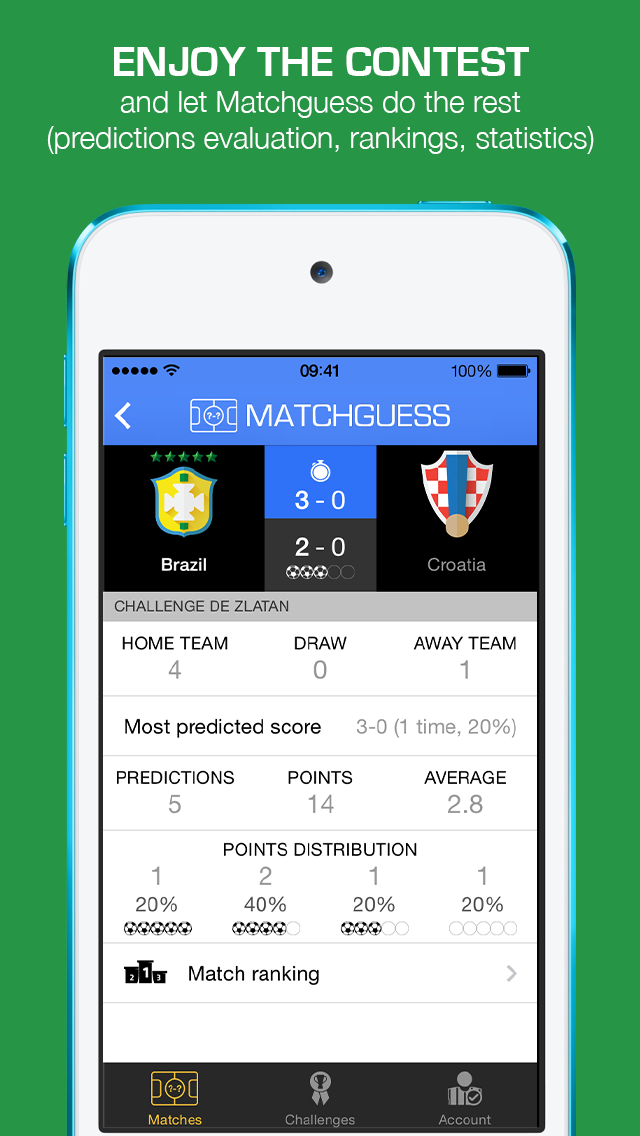
Matchguess aims to replace the spreadsheet files regularly produced around the world for prediction contests. No more forgotten predictions, Matchguess remains in the pocket. The predictions of all participants are retrieved automatically and players no longer have to wait for the organizer to make updates. Indeed, the points are calculated by Matchguess whenever a final result is known. No more mistakes calculating the points.
The rule of the game is set in advance:
* An exact score, 5 points
* A close score, 4 points
* The right winner or draw, 3 points
With Matchguess, the prediction talents will no longer be questioned. This is the best way to preserve predictions for posterity.
Simple to use for playing alone or with others:
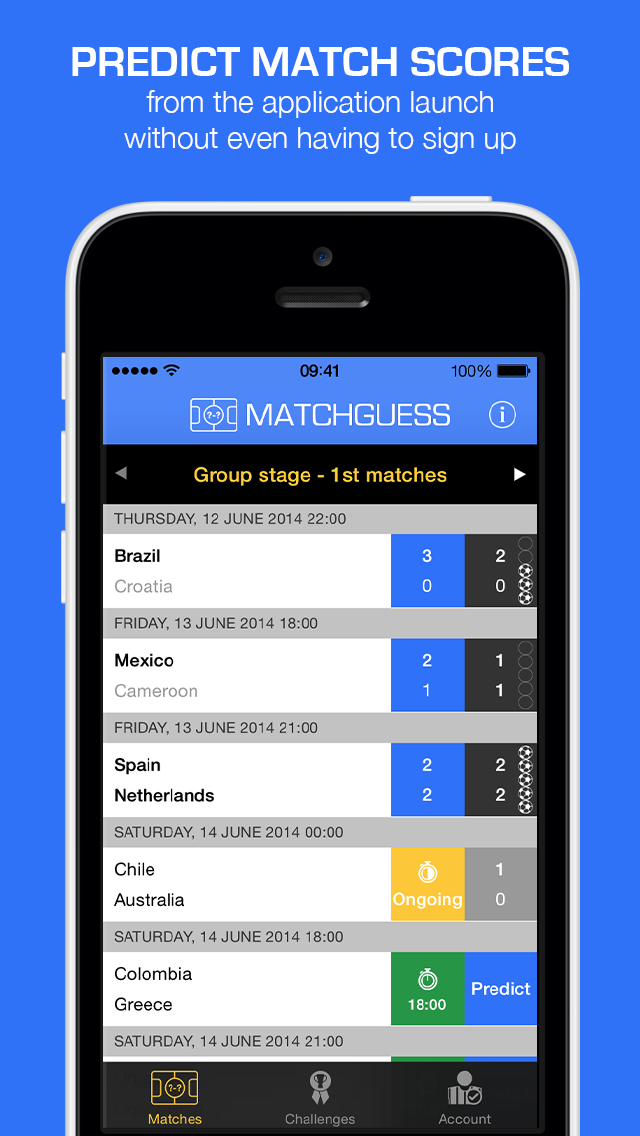
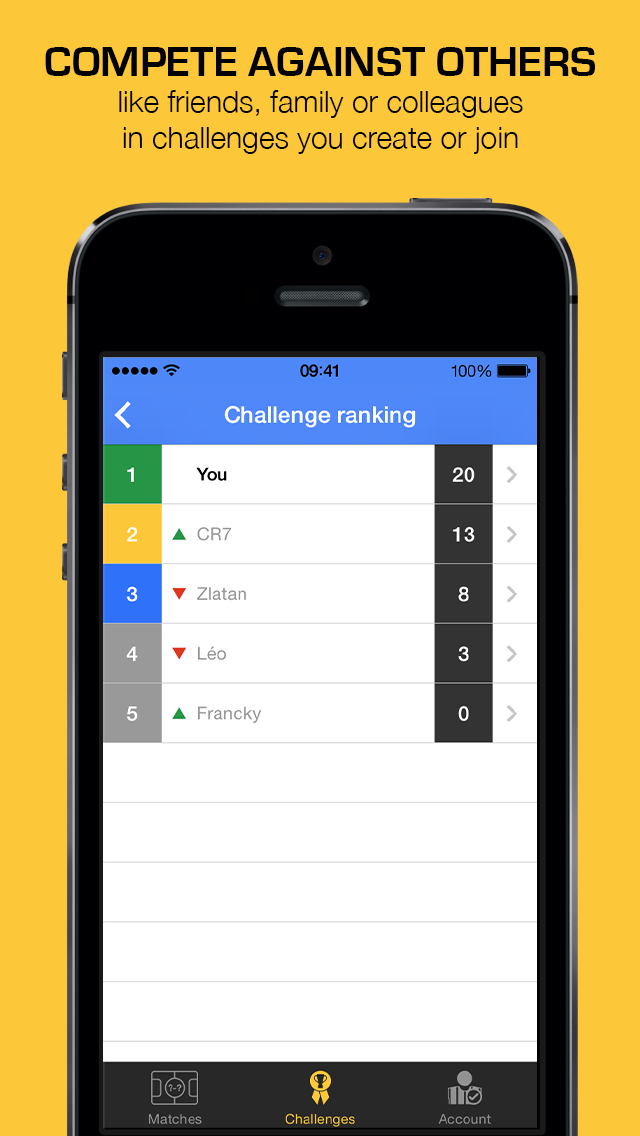
The user can predict match scores from the application launch without even having to sign up. The only important thing is that the prediction is made before the start of each match. The goal is to accumulate the most points by predicting a maximum of matches and being as accurate as possible. To compete against other players, the user must create an account and add a challenge. He can then invite his friends, family, colleagues and even supporters of his rival team by giving them a simple access code. He can also join an existing challenge. Rankings and statistics of matches and challenges will be available to allow participants of the same challenge to compare them to each other.
Device Requirements:
* iPhone, iPad, and iPod touch
* Requires iOS 7.0 or later
* 6.0 MB
Pricing and Availability:
During its launch, Matchguess 1.0 is Free and available worldwide exclusively through the App Store in the Sports category.
Matchguess 1.0: https://itunes.apple.com/app/id884821130
Screenshot 1: http://coufourier.com/screenshot_captioned_1136_01_en.png
Screenshot 2: http://coufourier.com/screenshot_captioned_1136_02_en.png
Screenshot 3: http://coufourier.com/screenshot_captioned_1136_03_en.png
App Icon: http://coufourier.com/icon_512.png
Press Kit (zip): http://coufourier.com/matchguess_press-kit_en.zip
Matchguess is one-man project leaded by Franck Coufourier. Franck is a French entrepreneur who designs and builds products and services for mobile and the web for more than 6 years. He is from a young age crazy about football and sports in general. His greatest achievements are to know the preferred foot of unknown football players, the height of the NBA basketball stars of the 90s or all the Tour de France winners since 1903, date of creation. All Material and Software (C) Copyright 2014 Franck Coufourier. All Rights Reserved. Apple, the Apple logo, iPhone, iPod and iPad are registered trademarks of Apple Inc. in the U.S. and/or other countries. Other trademarks and registered trademarks may be the property of their respective owners.
*******
Link To Article: http://prmac.com/release-id-68350.htm
*******
---------------------------------------------------------------------------------
Note that you can alter delivered distributions at any time.
Login to your account on prMac to alter your channel selection, or to opt-out at any time.
Matchguess 1.0 released for iOS - Football Predictions Application - Published on 06/11/14
Independent developer, Franck Coufourier today introduces Matchguess 1.0 for iOS, a social prediction app on football (soccer) matches. Designed for the 2014 World Cup, Matchguess is as much for football enthusiasts as for their friends who wish to challenge them on their favourite subject. Points are calculated by Matchguess whenever a final result is known. The predictions of all participants are retrieved automatically and players no longer have to wait for the organizer to make updates.
Creil, France - Independent developer, Franck Coufourier today is proud to announce the release of Matchguess 1.0 for iOS, a social prediction application on football (soccer) matches. Designed for the 2014 World Cup, the app will be updated later to include the most popular national and international competitions. Matchguess is as much for football enthusiasts as for their friends who wish to challenge them on their favourite subject. At the office, with family or friends, Matchguess is likely to please everyone at this time of the World Cup.
The prediction contests are automated and the predictions become more spontaneous:
Matchguess aims to replace the spreadsheet files regularly produced around the world for prediction contests. No more forgotten predictions, Matchguess remains in the pocket. The predictions of all participants are retrieved automatically and players no longer have to wait for the organizer to make updates. Indeed, the points are calculated by Matchguess whenever a final result is known. No more mistakes calculating the points.
The rule of the game is set in advance:
* An exact score, 5 points
* A close score, 4 points
* The right winner or draw, 3 points
With Matchguess, the prediction talents will no longer be questioned. This is the best way to preserve predictions for posterity.
Simple to use for playing alone or with others:
The user can predict match scores from the application launch without even having to sign up. The only important thing is that the prediction is made before the start of each match. The goal is to accumulate the most points by predicting a maximum of matches and being as accurate as possible. To compete against other players, the user must create an account and add a challenge. He can then invite his friends, family, colleagues and even supporters of his rival team by giving them a simple access code. He can also join an existing challenge. Rankings and statistics of matches and challenges will be available to allow participants of the same challenge to compare them to each other.
Device Requirements:
* iPhone, iPad, and iPod touch
* Requires iOS 7.0 or later
* 6.0 MB
Pricing and Availability:
During its launch, Matchguess 1.0 is Free and available worldwide exclusively through the App Store in the Sports category.
Matchguess 1.0: https://itunes.apple.com/app/id884821130
Screenshot 1: http://coufourier.com/screenshot_captioned_1136_01_en.png
Screenshot 2: http://coufourier.com/screenshot_captioned_1136_02_en.png
Screenshot 3: http://coufourier.com/screenshot_captioned_1136_03_en.png
App Icon: http://coufourier.com/icon_512.png

Press Kit (zip): http://coufourier.com/matchguess_press-kit_en.zip
Matchguess is one-man project leaded by Franck Coufourier. Franck is a French entrepreneur who designs and builds products and services for mobile and the web for more than 6 years. He is from a young age crazy about football and sports in general. His greatest achievements are to know the preferred foot of unknown football players, the height of the NBA basketball stars of the 90s or all the Tour de France winners since 1903, date of creation. All Material and Software (C) Copyright 2014 Franck Coufourier. All Rights Reserved. Apple, the Apple logo, iPhone, iPod and iPad are registered trademarks of Apple Inc. in the U.S. and/or other countries. Other trademarks and registered trademarks may be the property of their respective owners.
*******
Link To Article: http://prmac.com/release-id-68350.htm
*******
---------------------------------------------------------------------------------
Note that you can alter delivered distributions at any time.
Login to your account on prMac to alter your channel selection, or to opt-out at any time.
Brazilian Pick Up Lines for World Cup 2014 in Seven Different Languages
A new article has been published at prMac.
Brazilian Pick Up Lines for World Cup 2014 in Seven Different Languages - Published on 06/11/14
Brazilian Pick Up Lines 1.0 by GueyOfLife Apps provides you with more than 600 pick up lines in Brazilian Portuguese and is now available in seven different languages. Four categories of pick up lines to choose from make it easy to find the perfect line for any situation. Choose between classic, romantic, sexy or funny. Save your favorites into their own category for later use or share them via social media with the push of a button. A clean and intuitive interface makes this app easy to use.
El Paso, Texas - GueyOfLife Apps is proud to announce the release of Brazilian Pick Up Lines 1.0, its new travel app developed for iPhone, iPad and iPod touch devices. Brazilian Pick Up Lines provides you with more than 600 Brazilian portuguese pick up lines and their respective translations. The App is also available in seven different languages: English, Spanish, French, Italian, German, Dutch and Russian.
The pick up lines are divided into four categories making it easy to find the perfect line for any situation. Pick between classic, romantic, sexy or funny options and you're good to go. Shake your device to get the following pick up line or simply push the next button, the user interface is intuitive and easy to use. Save the lines that work best for you in your favorites category or simply share them via social media with the push of a button.
With world cup fever in full swing and droves of tourists flocking down to Brazil, this app aims to make it easy to strike up a conversation with the oposite sex and break the ice. Locals usually look favorably upon people that try and speak their native language so this will help get you in their good graces. Brazilians are known for their jovial dispositions and sensual personalities so hitting them up with some colorful pick up lines will certainly enhance the social experience while traveling for the world cup.
Device Requirements:
* iPhone, iPad, and iPod touch
* Requires iOS 4.3 or later
* 4.5 MB
Pricing and Availability:
Brazilian Pick Up Lines 1.0 is Free and available worldwide exclusively through the App Store in the Travel category.
Brazilian Pick Up Lines 1.0: http://brazilianpickuplines.com/
Download from iTunes: https://itunes.apple.com/app/brazil-pick-up-lines-for-women/id874070360
Screenshot: http://brazilianpickuplines.com/wp-content/uploads/2014/05/screenshots_ipad.jpg
App Icon: http://brazilianpickuplines.com/wp-content/uploads/2014/05/englishbella.png
All Material and Software (C) Copyright 2013-2014 GueyOfLife Apps. All Rights Reserved. Apple, the Apple logo, iPhone, iPod and iPad are registered trademarks of Apple Inc. in the U.S. and/or other countries. Other trademarks and registered trademarks may be the property of their respective owners.
*******
Link To Article: http://prmac.com/release-id-68345.htm
*******
---------------------------------------------------------------------------------
Note that you can alter delivered distributions at any time.
Login to your account on prMac to alter your channel selection, or to opt-out at any time.
Brazilian Pick Up Lines for World Cup 2014 in Seven Different Languages - Published on 06/11/14
Brazilian Pick Up Lines 1.0 by GueyOfLife Apps provides you with more than 600 pick up lines in Brazilian Portuguese and is now available in seven different languages. Four categories of pick up lines to choose from make it easy to find the perfect line for any situation. Choose between classic, romantic, sexy or funny. Save your favorites into their own category for later use or share them via social media with the push of a button. A clean and intuitive interface makes this app easy to use.
El Paso, Texas - GueyOfLife Apps is proud to announce the release of Brazilian Pick Up Lines 1.0, its new travel app developed for iPhone, iPad and iPod touch devices. Brazilian Pick Up Lines provides you with more than 600 Brazilian portuguese pick up lines and their respective translations. The App is also available in seven different languages: English, Spanish, French, Italian, German, Dutch and Russian.
The pick up lines are divided into four categories making it easy to find the perfect line for any situation. Pick between classic, romantic, sexy or funny options and you're good to go. Shake your device to get the following pick up line or simply push the next button, the user interface is intuitive and easy to use. Save the lines that work best for you in your favorites category or simply share them via social media with the push of a button.
With world cup fever in full swing and droves of tourists flocking down to Brazil, this app aims to make it easy to strike up a conversation with the oposite sex and break the ice. Locals usually look favorably upon people that try and speak their native language so this will help get you in their good graces. Brazilians are known for their jovial dispositions and sensual personalities so hitting them up with some colorful pick up lines will certainly enhance the social experience while traveling for the world cup.
Device Requirements:
* iPhone, iPad, and iPod touch
* Requires iOS 4.3 or later
* 4.5 MB
Pricing and Availability:
Brazilian Pick Up Lines 1.0 is Free and available worldwide exclusively through the App Store in the Travel category.
Brazilian Pick Up Lines 1.0: http://brazilianpickuplines.com/
Download from iTunes: https://itunes.apple.com/app/brazil-pick-up-lines-for-women/id874070360
Screenshot: http://brazilianpickuplines.com/wp-content/uploads/2014/05/screenshots_ipad.jpg

App Icon: http://brazilianpickuplines.com/wp-content/uploads/2014/05/englishbella.png

All Material and Software (C) Copyright 2013-2014 GueyOfLife Apps. All Rights Reserved. Apple, the Apple logo, iPhone, iPod and iPad are registered trademarks of Apple Inc. in the U.S. and/or other countries. Other trademarks and registered trademarks may be the property of their respective owners.
*******
Link To Article: http://prmac.com/release-id-68345.htm
*******
---------------------------------------------------------------------------------
Note that you can alter delivered distributions at any time.
Login to your account on prMac to alter your channel selection, or to opt-out at any time.
Vitamin-R brings powerful time boxing productivity app to iPhone
A new article has been published at prMac.
Vitamin-R brings powerful time boxing productivity app to iPhone - Published on 06/11/14
publicspace has brought Vitamin-R, its powerful time boxing solution, to the iPhone. Vitamin-R breaks down large, vaguely defined tasks into a series of short time slices of between 10 and 30 minutes, each with specific, easily reachable and actionable objectives - helping to improve focus and overcome procrastination. Vitamin-R for Mac has long been the most powerful Pomodoro Technique-inspired tool on Mac OS X and is now finally available on iOS.
Luxembourg City, Luxembourg - publicspace has brought Vitamin-R, its powerful time boxing solution in the Pomodoro Technique tradition, from the Mac to the iPhone. Vitamin-R creates optimal conditions for your brain by structuring your work into short bursts of distraction-free, highly-focused activity alternating with opportunities for renewal, reflection and intuition. The built-in task logging and analysis features create positive momentum towards productivity by providing you with visible feedback on your progress and achievements.
Slices Up Daunting Tasks into Manageable Chunks:
* Vitamin-R breaks down large, vaguely defined tasks into a series of short "time slices" of between 10 and 30 minutes, each with specific, easily reachable and actionable objectives. During these time slices it keeps you focused on accomplishing only this one objective and provides you with mechanisms for dealing with interruptions, poor concentration, etc.
Gets You Started:
* Vitamin-R concentrates on getting you started allowing you to break through the resistance of procrastination and create a positive feedback loop of small achievements that get you closer to your ultimate aims. You will experience less stress caused by looming deadlines and a lack of clear direction, thus enabling you to enjoy guilt-free breaks that allow your intuition and creativity to emerge.
Keeps You Focused:
* Vitamin-R features an array of highly configurable visual, audio and speech notifications that get you back to your task as soon as your attention starts wandering.
Effective Task Switching:
* Task switching is a big, but often unavoidable productivity killer. So when you need to switch tasks Vitamin-R will make it as efficient as possible and help you pick up where you left off later on.
Productive Breaks:
* Regular breaks are not for slackers. In fact, taking regular breaks is especially important for people who work with high focus. Vitamin-R's timed breaks make sure that your renewal break does not turn into a free afternoon and the "priming" technique allows your intuition to work overtime before you even start on a time slice.
Find Your Rhythm:
* Each one of us is different. Finding out what works best for you is the key to true productivity. Vitamin-R gives you the tools to gain awareness of where you spend your time and what works for you. Armed with this new knowledge, you can eliminate unproductive work patterns and discover the work rhythm that suits you best.
Make It Your Own:
* Vitamin-R plugs into your life rather than trying to take it over. You can use it occasionally to overcome procrastination or mental blocks or re-organize your entire working life around the concepts that it embodies.
Ideal for Pomodoro Technique:
* Vitamin-R provides everything you need to implement the Pomodoro Technique: sophisticated timer, log book and analysis components.
Attention Deficit Disorder:
* Vitamin-R was never specifically designed with ADHD "suffers" in mind, but many ADHD-ers have found Vitamin-R's approach to focusing attention particularly valuable.
Students:
* Vitamin-R is used by many students, especially in Medical School (who will get the joke) to revise for their exam and help them achieve to the best of their abilities.
Device Requirements:
* iPhone, iPad, and iPod touch
* Requires iOS 7.0 or later
* 3.1 MB
Pricing and Availability:
Vitamin-R for iPhone 1.0.1 is $4.99 USD (or equivalent amount in other currencies) and available worldwide exclusively through the App Store in the Business category.
publicspace: http://www.publicspace.net/
Vitamin-R for iPhone 1.0.1: http://www.publicspace.net/iphone/Vitamin-R/index.html
Purchase and Download: https://itunes.apple.com/us/app/vitamin-r-for-iphone/id884957426
Screenshot 1: http://a4.mzstatic.com/us/r30/Purple6/v4/07/72/76/0772768e-07fb-9f2d-c89a-df8971a96e0a/screen568x568.jpeg
Screenshot 2: http://a4.mzstatic.com/us/r30/Purple4/v4/d0/f6/63/d0f66372-2164-acaa-f7df-0a652fc2a50d/screen568x568.jpeg
App Icon: http://a4.mzstatic.com/us/r30/Purple6/v4/55/26/a6/5526a6d5-e332-ef73-949f-3f47d65c9900/mzl.ypzezuel.175x175-75.jpg
publicspace was founded by Frank Reiff, Ph.D. in 1996 with the aim of producing affordable best-of-breed software for the Macintosh. In the past two decades, our products including Vitamin-R, A Better Finder Rename, A Better Finder Attributes, "The Big Mean Folder Machine", Photo Date Changer, File Date Changer, Noise Machine and MacBreakZ have firmly established themselves in their respective product categories. Copyright (C) 2014 publicspace. All Rights Reserved. Apple, the Apple logo, Mac OS X, iPhone, iPod and iPad are registered trademarks of Apple Inc. in the U.S. and/or other countries.
*******
Link To Article: http://prmac.com/release-id-68348.htm
*******
---------------------------------------------------------------------------------
Note that you can alter delivered distributions at any time.
Login to your account on prMac to alter your channel selection, or to opt-out at any time.
Vitamin-R brings powerful time boxing productivity app to iPhone - Published on 06/11/14
publicspace has brought Vitamin-R, its powerful time boxing solution, to the iPhone. Vitamin-R breaks down large, vaguely defined tasks into a series of short time slices of between 10 and 30 minutes, each with specific, easily reachable and actionable objectives - helping to improve focus and overcome procrastination. Vitamin-R for Mac has long been the most powerful Pomodoro Technique-inspired tool on Mac OS X and is now finally available on iOS.
Luxembourg City, Luxembourg - publicspace has brought Vitamin-R, its powerful time boxing solution in the Pomodoro Technique tradition, from the Mac to the iPhone. Vitamin-R creates optimal conditions for your brain by structuring your work into short bursts of distraction-free, highly-focused activity alternating with opportunities for renewal, reflection and intuition. The built-in task logging and analysis features create positive momentum towards productivity by providing you with visible feedback on your progress and achievements.
Slices Up Daunting Tasks into Manageable Chunks:
* Vitamin-R breaks down large, vaguely defined tasks into a series of short "time slices" of between 10 and 30 minutes, each with specific, easily reachable and actionable objectives. During these time slices it keeps you focused on accomplishing only this one objective and provides you with mechanisms for dealing with interruptions, poor concentration, etc.
Gets You Started:
* Vitamin-R concentrates on getting you started allowing you to break through the resistance of procrastination and create a positive feedback loop of small achievements that get you closer to your ultimate aims. You will experience less stress caused by looming deadlines and a lack of clear direction, thus enabling you to enjoy guilt-free breaks that allow your intuition and creativity to emerge.
Keeps You Focused:
* Vitamin-R features an array of highly configurable visual, audio and speech notifications that get you back to your task as soon as your attention starts wandering.
Effective Task Switching:
* Task switching is a big, but often unavoidable productivity killer. So when you need to switch tasks Vitamin-R will make it as efficient as possible and help you pick up where you left off later on.
Productive Breaks:
* Regular breaks are not for slackers. In fact, taking regular breaks is especially important for people who work with high focus. Vitamin-R's timed breaks make sure that your renewal break does not turn into a free afternoon and the "priming" technique allows your intuition to work overtime before you even start on a time slice.
Find Your Rhythm:
* Each one of us is different. Finding out what works best for you is the key to true productivity. Vitamin-R gives you the tools to gain awareness of where you spend your time and what works for you. Armed with this new knowledge, you can eliminate unproductive work patterns and discover the work rhythm that suits you best.
Make It Your Own:
* Vitamin-R plugs into your life rather than trying to take it over. You can use it occasionally to overcome procrastination or mental blocks or re-organize your entire working life around the concepts that it embodies.
Ideal for Pomodoro Technique:
* Vitamin-R provides everything you need to implement the Pomodoro Technique: sophisticated timer, log book and analysis components.
Attention Deficit Disorder:
* Vitamin-R was never specifically designed with ADHD "suffers" in mind, but many ADHD-ers have found Vitamin-R's approach to focusing attention particularly valuable.
Students:
* Vitamin-R is used by many students, especially in Medical School (who will get the joke) to revise for their exam and help them achieve to the best of their abilities.
Device Requirements:
* iPhone, iPad, and iPod touch
* Requires iOS 7.0 or later
* 3.1 MB
Pricing and Availability:
Vitamin-R for iPhone 1.0.1 is $4.99 USD (or equivalent amount in other currencies) and available worldwide exclusively through the App Store in the Business category.
publicspace: http://www.publicspace.net/
Vitamin-R for iPhone 1.0.1: http://www.publicspace.net/iphone/Vitamin-R/index.html
Purchase and Download: https://itunes.apple.com/us/app/vitamin-r-for-iphone/id884957426
Screenshot 1: http://a4.mzstatic.com/us/r30/Purple6/v4/07/72/76/0772768e-07fb-9f2d-c89a-df8971a96e0a/screen568x568.jpeg

Screenshot 2: http://a4.mzstatic.com/us/r30/Purple4/v4/d0/f6/63/d0f66372-2164-acaa-f7df-0a652fc2a50d/screen568x568.jpeg

App Icon: http://a4.mzstatic.com/us/r30/Purple6/v4/55/26/a6/5526a6d5-e332-ef73-949f-3f47d65c9900/mzl.ypzezuel.175x175-75.jpg

publicspace was founded by Frank Reiff, Ph.D. in 1996 with the aim of producing affordable best-of-breed software for the Macintosh. In the past two decades, our products including Vitamin-R, A Better Finder Rename, A Better Finder Attributes, "The Big Mean Folder Machine", Photo Date Changer, File Date Changer, Noise Machine and MacBreakZ have firmly established themselves in their respective product categories. Copyright (C) 2014 publicspace. All Rights Reserved. Apple, the Apple logo, Mac OS X, iPhone, iPod and iPad are registered trademarks of Apple Inc. in the U.S. and/or other countries.
*******
Link To Article: http://prmac.com/release-id-68348.htm
*******
---------------------------------------------------------------------------------
Note that you can alter delivered distributions at any time.
Login to your account on prMac to alter your channel selection, or to opt-out at any time.
Thousands of ideas in this photo app means the end of Photo365 failure
A new article has been published at prMac.
Thousands of ideas in this photo app means the end of Photo365 failure - Published on 06/11/14
Photo 365 failure will be a thing of the past now that V2.0 of the Learn Photo365 Photography Assignment Generator App is on the app store. This app provides thousands of ideas and inspiration for any photographer taking on a Photo 365/52wk/30 day challenge. The app will now produce a full Photo 365, 52 week, or 30 day assignment list to inspire photographers, ranging from camera settings, light, composition, photographing people, landscape, nature and so much more.
Saint John, Canada - Since its launch, the Learn Photo365 Photography assignment generator apps have been inspiring thousands of photographers around the world. Photographer, educator, and developer Noel Chenier is extremely excited to announce Version 2.0 of the apps feature an update that will put an end to the scourge of photographers everywhere-failure of their Photo 365 challenge.
Photo 365/52 Week/30 Day Challenge Lists:
The app will now produce a full Photo 365, 52 week, or 30 day assignment list to inspire photographers. Assignments ranging from camera settings, light, composition, photographing people, landscape, nature will inspire you every day. With a daily reminder to get your assignment, Photo 365 completion is guaranteed.
Selfie 365:
If you are into selfies, but want to take your selfies to another level, the app can generate a full year of selfie ideas. These will be fun, creative, and possibly challenging ideas to make your selfies stand out from the masses.
More Assignments and Random Awesomeness:
I've added new assignments to the over one hundred currently in the app, and even more random objects, places, combinations, and scavenger hunt terms. There are thousands of possibilites with this app!
Favourite Assignment List:
You can save all your favourite assignments on a list just a button tap away!
Over 700 Example Images:
Each assignment has a series of example images to demonstrate the technique or inspire you!
Daily Reminder:
Taking part in a 365 day challenge? Get the app to send you a reminder each day to get your photo assignment to keep you on track.
No Network Required:
The app is completely self-contained and does not require a wifi or network connection. No matter where you are, you can always get an assignment.
Video Tours:
Take a quick tour of the apps and their features by watching the YouTube video linked below.
For SLR Photographers or iPhoneographers:
There are two main versions of the app, one for SLR shooters that is available seperately for iPhone and iPad, and a version for iPhoneographers that is tailored more to shooting with an iPhone.
Pricing and Availability:
As a firm believer that people should be able to try before they buy, there is also a Free version of the full app that contains just a fraction of the assignments available in the full paid version, but should be enough to make you want it all! So what are you waiting for? Download the app, get inspired.
Learn Photo365 Photography: http://www.learnphoto.ca/apps
Download from iTunes: https://itunes.apple.com/us/artist/noel-chenier/id566645905
YouTube Video (Tour): http://www.youtube.com/watch?v=miWRninSG1o
Press Kit (zip): http://www.learnphoto.ca/apps/media
Noel Chenier is an award winning photographer, educator, and app developer based in Saint John, New Brunswick, Canada. Copyright (C) 2014 Noel Chenier. All Rights Reserved. Apple, the Apple logo, iPhone, iPod and iPad are registered trademarks of Apple Inc. in the U.S. and/or other countries. Other trademarks and registered trademarks may be the property of their respective owners.
*******
Link To Article: http://prmac.com/release-id-68294.htm
*******
---------------------------------------------------------------------------------
Note that you can alter delivered distributions at any time.
Login to your account on prMac to alter your channel selection, or to opt-out at any time.
Thousands of ideas in this photo app means the end of Photo365 failure - Published on 06/11/14
Photo 365 failure will be a thing of the past now that V2.0 of the Learn Photo365 Photography Assignment Generator App is on the app store. This app provides thousands of ideas and inspiration for any photographer taking on a Photo 365/52wk/30 day challenge. The app will now produce a full Photo 365, 52 week, or 30 day assignment list to inspire photographers, ranging from camera settings, light, composition, photographing people, landscape, nature and so much more.
Saint John, Canada - Since its launch, the Learn Photo365 Photography assignment generator apps have been inspiring thousands of photographers around the world. Photographer, educator, and developer Noel Chenier is extremely excited to announce Version 2.0 of the apps feature an update that will put an end to the scourge of photographers everywhere-failure of their Photo 365 challenge.
Photo 365/52 Week/30 Day Challenge Lists:
The app will now produce a full Photo 365, 52 week, or 30 day assignment list to inspire photographers. Assignments ranging from camera settings, light, composition, photographing people, landscape, nature will inspire you every day. With a daily reminder to get your assignment, Photo 365 completion is guaranteed.
Selfie 365:
If you are into selfies, but want to take your selfies to another level, the app can generate a full year of selfie ideas. These will be fun, creative, and possibly challenging ideas to make your selfies stand out from the masses.
More Assignments and Random Awesomeness:
I've added new assignments to the over one hundred currently in the app, and even more random objects, places, combinations, and scavenger hunt terms. There are thousands of possibilites with this app!
Favourite Assignment List:
You can save all your favourite assignments on a list just a button tap away!
Over 700 Example Images:
Each assignment has a series of example images to demonstrate the technique or inspire you!
Daily Reminder:
Taking part in a 365 day challenge? Get the app to send you a reminder each day to get your photo assignment to keep you on track.
No Network Required:
The app is completely self-contained and does not require a wifi or network connection. No matter where you are, you can always get an assignment.
Video Tours:
Take a quick tour of the apps and their features by watching the YouTube video linked below.
For SLR Photographers or iPhoneographers:
There are two main versions of the app, one for SLR shooters that is available seperately for iPhone and iPad, and a version for iPhoneographers that is tailored more to shooting with an iPhone.
Pricing and Availability:
As a firm believer that people should be able to try before they buy, there is also a Free version of the full app that contains just a fraction of the assignments available in the full paid version, but should be enough to make you want it all! So what are you waiting for? Download the app, get inspired.
Learn Photo365 Photography: http://www.learnphoto.ca/apps
Download from iTunes: https://itunes.apple.com/us/artist/noel-chenier/id566645905
YouTube Video (Tour): http://www.youtube.com/watch?v=miWRninSG1o
Press Kit (zip): http://www.learnphoto.ca/apps/media
Noel Chenier is an award winning photographer, educator, and app developer based in Saint John, New Brunswick, Canada. Copyright (C) 2014 Noel Chenier. All Rights Reserved. Apple, the Apple logo, iPhone, iPod and iPad are registered trademarks of Apple Inc. in the U.S. and/or other countries. Other trademarks and registered trademarks may be the property of their respective owners.
*******
Link To Article: http://prmac.com/release-id-68294.htm
*******
---------------------------------------------------------------------------------
Note that you can alter delivered distributions at any time.
Login to your account on prMac to alter your channel selection, or to opt-out at any time.
In-Depth can help you to make a cool and impressive presentation
A new article has been published at prMac.
In-Depth can help you to make a cool and impressive presentation - Published on 06/11/14
Iminda has announced the release of In-Depth for iOS and Android, a new PowerPoint remote application that gives presenters more interaction with their content during presentation using Microsoft PowerPoint. In-Depth is not only a PowerPoint remote, it lets presenters view and control the presentation, make annotation at any time, zoom or highlight content of the slide, view notes or preview animations, attract audience to a specific detail with a spot light.
Tianjin, China - Presenters who want to capture audience's attention, who want to have more interaction with their slides and audience than play the presentation with a keyboard or laser pointer, who want their audience to be impressed - can download the app of In-Depth from Apple Store now.
Designed by Iminda, In-Depth works like a laser pointer but it gives presenters more with a touch screen. It is not only a PowerPoint remote player or a PowerPoint remote controller. Using this app, the presenter can view and control the presentation, zoom or highlight content of the slide, make annotations, attract audience to a specific detail with a spot light, view notes or preview animations. It will help presenters to show easily and clearly.
Key Features:
* Have complete control of your presentation including display slides, turn pages, play animations and click links
* Browse slides in thumbnail list view
* Track presentation time and progress
* Annotate slides while presenting
* Write and draw graph on slide with a pen
* Change the projector to a blackboard at any time
* Zoom in and out any object (picture, grid, graph and etc.) during presentation
* Highlight any object during presentation
* Touch and move to show a spotlight to highlight a specific detail with the rest of the presentation greyed out
* Touch and move a Laser Pointer
* View the content, position, order, current index of all animations
* Preview the next slide
* View the slide notes
All these function will make the presentation "cool and impressive" and can help presenter to deal with some temporary case and get a successful presentation easily.
"Sometimes I'm eager to write and draw something on slide or to zoom in a picture to show the details clearly during presentation, but it's impossible to change the picture's size without stop the presentation and it's so difficult to write with a mouse that I have to give up." commented one test user. "In-Depth is the perfect solution for this common problem. It's a great way for presenters to interact with their content of slides and audience. It's also a huge benefit to fresh presenters to use such function as view notes and preview animations"
Device Requirements:
* iPhone, iPad, and iPod touch
* Requires iOS 6.0 or later
* 3.2 MB
Pricing and Availability:
In-Depth 2.11.237 is $4.99 USD (or equivalent amount in other currencies) and is available worldwide exclusively through the App Store in the Productivity category. It is also available for Android devices on Google Play.
In-Depth 2.11.237: http://www.imdait.com
Download from iTunes: http://itunes.apple.com/app/id861303008
Download from Goolge Play: http://play.google.com/store/apps/details?id=com.iminda.indepth
Preview Video: http://www.imdait.com/h-col-126.html
Screenshots: http://www.imdait.com/nd.jsp?id=61
Iminda information Technology Co. Ltd is a software development company based in Tianjin, China. It is committed to R&D of mobile app and corresponding solutions for education in 2013. The dedicated professionals at Iminda work hard to ensure the consistent quality of their products and maintain a constant focus on their users. Copyright 2013-2014 Iminda information Technology Co. Ltd. All Rights Reserved. Apple, the Apple logo, iPhone, iPad, iPod, iWork and Macintosh are registered trademarks of Apple Computer in the U. S and/or other countries.
*******
Link To Article: http://prmac.com/release-id-68297.htm
*******
---------------------------------------------------------------------------------
Note that you can alter delivered distributions at any time.
Login to your account on prMac to alter your channel selection, or to opt-out at any time.
In-Depth can help you to make a cool and impressive presentation - Published on 06/11/14
Iminda has announced the release of In-Depth for iOS and Android, a new PowerPoint remote application that gives presenters more interaction with their content during presentation using Microsoft PowerPoint. In-Depth is not only a PowerPoint remote, it lets presenters view and control the presentation, make annotation at any time, zoom or highlight content of the slide, view notes or preview animations, attract audience to a specific detail with a spot light.
Tianjin, China - Presenters who want to capture audience's attention, who want to have more interaction with their slides and audience than play the presentation with a keyboard or laser pointer, who want their audience to be impressed - can download the app of In-Depth from Apple Store now.
Designed by Iminda, In-Depth works like a laser pointer but it gives presenters more with a touch screen. It is not only a PowerPoint remote player or a PowerPoint remote controller. Using this app, the presenter can view and control the presentation, zoom or highlight content of the slide, make annotations, attract audience to a specific detail with a spot light, view notes or preview animations. It will help presenters to show easily and clearly.
Key Features:
* Have complete control of your presentation including display slides, turn pages, play animations and click links
* Browse slides in thumbnail list view
* Track presentation time and progress
* Annotate slides while presenting
* Write and draw graph on slide with a pen
* Change the projector to a blackboard at any time
* Zoom in and out any object (picture, grid, graph and etc.) during presentation
* Highlight any object during presentation
* Touch and move to show a spotlight to highlight a specific detail with the rest of the presentation greyed out
* Touch and move a Laser Pointer
* View the content, position, order, current index of all animations
* Preview the next slide
* View the slide notes
All these function will make the presentation "cool and impressive" and can help presenter to deal with some temporary case and get a successful presentation easily.
"Sometimes I'm eager to write and draw something on slide or to zoom in a picture to show the details clearly during presentation, but it's impossible to change the picture's size without stop the presentation and it's so difficult to write with a mouse that I have to give up." commented one test user. "In-Depth is the perfect solution for this common problem. It's a great way for presenters to interact with their content of slides and audience. It's also a huge benefit to fresh presenters to use such function as view notes and preview animations"
Device Requirements:
* iPhone, iPad, and iPod touch
* Requires iOS 6.0 or later
* 3.2 MB
Pricing and Availability:
In-Depth 2.11.237 is $4.99 USD (or equivalent amount in other currencies) and is available worldwide exclusively through the App Store in the Productivity category. It is also available for Android devices on Google Play.
In-Depth 2.11.237: http://www.imdait.com
Download from iTunes: http://itunes.apple.com/app/id861303008
Download from Goolge Play: http://play.google.com/store/apps/details?id=com.iminda.indepth
Preview Video: http://www.imdait.com/h-col-126.html
Screenshots: http://www.imdait.com/nd.jsp?id=61
Iminda information Technology Co. Ltd is a software development company based in Tianjin, China. It is committed to R&D of mobile app and corresponding solutions for education in 2013. The dedicated professionals at Iminda work hard to ensure the consistent quality of their products and maintain a constant focus on their users. Copyright 2013-2014 Iminda information Technology Co. Ltd. All Rights Reserved. Apple, the Apple logo, iPhone, iPad, iPod, iWork and Macintosh are registered trademarks of Apple Computer in the U. S and/or other countries.
*******
Link To Article: http://prmac.com/release-id-68297.htm
*******
---------------------------------------------------------------------------------
Note that you can alter delivered distributions at any time.
Login to your account on prMac to alter your channel selection, or to opt-out at any time.
CalReader 3 - Calendar Time Logs, Calculations, Export and Readability
A new article has been published at prMac.
CalReader 3 - Calendar Time Logs, Calculations, Export and Readability - Published on 06/11/14
California based Imaja has released CalReader 3, an update to their popular calendar/productivity app for iPad, iPhone, iPod touch devices. CalReader features a display of all calendar event text, unique and fluid readability of calendar logs. The app features calendar time log export, time calculations, filtering, search, and readability. Introducing redesigned icons and behavior for iOS 7, the new interface includes new iPad usability and more.
Berkeley, California - Imaja has released CalReader 3, updated for iPad, iPhone, iPod touch and iOS 7. The CalReader app features calendar time log export, time calculations, filtering, search, and readability. The new interface includes new iPad usability and redesigned icons and behavior for iOS 7.
CalReader supports sync with iOS and OS X Calendar app via iCloud and iTunes, as well as external CalDAV calendars such as Google and Yahoo calendars.
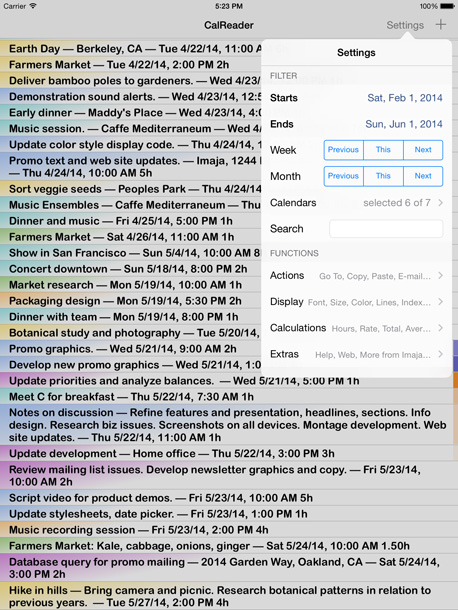
Main action views include Filter settings, Actions, Display, Calculations and Extras.
Calendar event listings can be exported by e-mail as attached TEXT, CSV (Comma-Separated Values) or TSV (Tab-Separated Values) files. Event listings include the duration for each event. The export text generated by the Copy Text With Calculations command includes a header with the selected calendar names, date range and optional search text.
CalReader features a display of all calendar event text, unique and fluid readability of calendar logs. The font size can be changed instantly with touch gestures for better readability or higher density. Fonts and font sizes can also be changed in the Settings view. Several color styles are available, using variations of the user's calendar colors.
Events within a 48 hour window of the current time are highlighted on the right edge with shades of blue for recent events and shades of orange for upcoming events.
CalReader's Filter lets users easily choose a date range to filter the visible events, and Previous, This and Next buttons provide quick selection of weeks or months. The filter can use a single calendar, multiple calendars or all calendars for viewing, and includes a text search, useful for creating event listings based on keywords, phrases, names, dates or times.
CalReader calculates total hours, number of events and total amount (based on your rate per hour), and minimum, maximum and average duration for your filter settings. Filtered calender listings can be easily copied with or without time/billing calculations for pasting into user reports or e-mails, or exported as CSV or TSV files.
Imaja's Greg Jalbert, the creator of CalReader, enthusiastically relates, "CalReader is now modernized for the iPad, iPhone, iPod touch and iOS 7, and is uniquely valuable for generating and exporting calculations and time logs, and for reviewing event details, locations and notes. The flexibility of calendar font, size and color styles provides optimal readability for studying calendar history and future for various projects, clients and keyword searches."
Device Requirements:
* iPhone, iPad, and iPod touch
* Requires iOS 6.0 or later
* 30.2 MB
Pricing and Availability:
CalReader 3 is $1.99 USD (or equivalent amount in other currencies) and available worldwide exclusively through the App Store in the Productivity and Business categories.
CalReader 3.0.1: http://www.imaja.com/calreader/
Detailed Features: http://www.imaja.com/calreader/features.html
iPhone Overview: http://www.imaja.com/calreader/indexmobile.html
Purchase and Download: http://itunes.apple.com/app/calreader/id405583558
Screenshot (iPad): http://www.imaja.com/calreader/images/ipad30/CalReader30-iPadRet-23.56.jpg
App Icon: http://www.imaja.com/calreader/images/icon-CalReader03-114_2x.png
Located in Berkeley, California, USA, Imaja was founded in 1985 by Greg Jalbert, and publishes a variety of productivity, business, graphic design, animation, music and educational software for Mac OS X, iOS and Mac OS 9, and music and video. All Material and Software (C) 1985-2014 Imaja / All Rights Reserved. Apple, iPhone, iPad, iPod and Mac OS X are registered trademarks of Apple Computer in the U.S. and/or other countries.
*******
Link To Article: http://prmac.com/release-id-68298.htm
*******
---------------------------------------------------------------------------------
Note that you can alter delivered distributions at any time.
Login to your account on prMac to alter your channel selection, or to opt-out at any time.
CalReader 3 - Calendar Time Logs, Calculations, Export and Readability - Published on 06/11/14
California based Imaja has released CalReader 3, an update to their popular calendar/productivity app for iPad, iPhone, iPod touch devices. CalReader features a display of all calendar event text, unique and fluid readability of calendar logs. The app features calendar time log export, time calculations, filtering, search, and readability. Introducing redesigned icons and behavior for iOS 7, the new interface includes new iPad usability and more.
Berkeley, California - Imaja has released CalReader 3, updated for iPad, iPhone, iPod touch and iOS 7. The CalReader app features calendar time log export, time calculations, filtering, search, and readability. The new interface includes new iPad usability and redesigned icons and behavior for iOS 7.
CalReader supports sync with iOS and OS X Calendar app via iCloud and iTunes, as well as external CalDAV calendars such as Google and Yahoo calendars.
Main action views include Filter settings, Actions, Display, Calculations and Extras.
Calendar event listings can be exported by e-mail as attached TEXT, CSV (Comma-Separated Values) or TSV (Tab-Separated Values) files. Event listings include the duration for each event. The export text generated by the Copy Text With Calculations command includes a header with the selected calendar names, date range and optional search text.
CalReader features a display of all calendar event text, unique and fluid readability of calendar logs. The font size can be changed instantly with touch gestures for better readability or higher density. Fonts and font sizes can also be changed in the Settings view. Several color styles are available, using variations of the user's calendar colors.
Events within a 48 hour window of the current time are highlighted on the right edge with shades of blue for recent events and shades of orange for upcoming events.
CalReader's Filter lets users easily choose a date range to filter the visible events, and Previous, This and Next buttons provide quick selection of weeks or months. The filter can use a single calendar, multiple calendars or all calendars for viewing, and includes a text search, useful for creating event listings based on keywords, phrases, names, dates or times.
CalReader calculates total hours, number of events and total amount (based on your rate per hour), and minimum, maximum and average duration for your filter settings. Filtered calender listings can be easily copied with or without time/billing calculations for pasting into user reports or e-mails, or exported as CSV or TSV files.
Imaja's Greg Jalbert, the creator of CalReader, enthusiastically relates, "CalReader is now modernized for the iPad, iPhone, iPod touch and iOS 7, and is uniquely valuable for generating and exporting calculations and time logs, and for reviewing event details, locations and notes. The flexibility of calendar font, size and color styles provides optimal readability for studying calendar history and future for various projects, clients and keyword searches."
Device Requirements:
* iPhone, iPad, and iPod touch
* Requires iOS 6.0 or later
* 30.2 MB
Pricing and Availability:
CalReader 3 is $1.99 USD (or equivalent amount in other currencies) and available worldwide exclusively through the App Store in the Productivity and Business categories.
CalReader 3.0.1: http://www.imaja.com/calreader/
Detailed Features: http://www.imaja.com/calreader/features.html
iPhone Overview: http://www.imaja.com/calreader/indexmobile.html
Purchase and Download: http://itunes.apple.com/app/calreader/id405583558
Screenshot (iPad): http://www.imaja.com/calreader/images/ipad30/CalReader30-iPadRet-23.56.jpg
App Icon: http://www.imaja.com/calreader/images/icon-CalReader03-114_2x.png
Located in Berkeley, California, USA, Imaja was founded in 1985 by Greg Jalbert, and publishes a variety of productivity, business, graphic design, animation, music and educational software for Mac OS X, iOS and Mac OS 9, and music and video. All Material and Software (C) 1985-2014 Imaja / All Rights Reserved. Apple, iPhone, iPad, iPod and Mac OS X are registered trademarks of Apple Computer in the U.S. and/or other countries.
*******
Link To Article: http://prmac.com/release-id-68298.htm
*******
---------------------------------------------------------------------------------
Note that you can alter delivered distributions at any time.
Login to your account on prMac to alter your channel selection, or to opt-out at any time.
Subscribe to:
Posts (Atom)