A new article has been published at prMac.
Free Kids App: MOVING BOOKS! Jajajajan Surpasses 500,000 Downloads - Published on 07/01/14
Tokyo based FORii, Inc. today announced that its free app MOVING BOOKS! Jajajajan for iPhone, iPad, iPod touch and Android devices has reached over 500,000 downloads as of July 2014. MOVING BOOKS! Jajajajan features delightful animated children's stories based on classic fairy tales and folklore, as well as modern arrangements of popular children's songs from around the world. Every book and song features original animation and unique musical arrangements.
Tokyo, Japan - FORii, Inc. (Twitter: @FORiiKids), a developer of kids educational apps for smartphones and tablets, today announced that its free kids app MOVING BOOKS! Jajajajan(R) for iPhone, iPad, iPod touch and Android devices has reached over 500,000 downloads (as of July 2014, on iOS and Android platforms combined.)
MOVING BOOKS! Jajajajan features a growing collection of delightfully animated bedtime stories and folktales such as the recently released "The Town Musicians of Bremen" and Hans Christian Andersen's "The Little Mermaid". The app also features original arrangements of popular children's songs from around the world.
The app was originally released in Japan in August 2013. On January 20, 2014, MOVING BOOKS! Jajajajan became the No. 1 Free iPhone App, and the No. 3 Top Grossing iPhone App in the Education category of the Japan App Store. In March 2014, FORii released an English language version which includes seven free animated books and songs. The app recently achieved over 30 million books and songs viewed in early June 2014.
About MOVING BOOKS! Jajajajan:
MOVING BOOKS! Jajajajan is an educational app that provides enriching moments for children and parents through delightfully animated books and songs based on classic fairy tales, folklore and children's music from around the world. Every book and song features original animation and unique musical arrangements created exclusively for MOVING BOOKS! Jajajajan.
Device Requirements:
* iPhone, iPad, and iPod touch
* Requires iOS 6.0 or later
* 26.6 MB
Pricing and Availability:
MOVING BOOKS! Jajajajan 1.0.2 is Free and available worldwide through the App Store in the Education category. There is also an Android version available on Google Play. MOVING BOOKS! Jajajajan includes seven animated books and songs such as "Three Little Pigs", "Jack and The Beanstalk" and "Let's Clap Our Hands", with additional content available through in-app purchases. In-app purchases can be synced across all devices with the same operating system. No internet connection required to play downloaded content. MOVING BOOKS! Jajajajan works with AirPlay. No subscription required.
FORii: http://www.forii.co.jp/en/
MOVING BOOKS! Jajajajan 1.0.2: https://itunes.apple.com/app/jajajajan/id792645019
Download from Google Play: https://play.google.com/store/apps/details?id=jp.co.forii.jajajajanen
Pinterest Gallery: http://www.pinterest.com/FORiiKids/
Media Assets: http://bit.ly/FORiiMediaKit20140619
FORii, Inc. develops early childhood education apps for smartphones and tablets, and is focused on children's learning through play. Based in Tokyo, Japan, FORii was founded in 2012 by President and CEO Kazutoshi Shirata with the belief that every moment is a chance to discover. For children, each new word, story and song is a new step into the amazing world around them. As parents it's an opportunity to uncover the limitless potential of every child, and the unlimited possibilities of a growing family learning and playing together. FORii created its first app, MOVING BOOKS! Jajajajan to be the key that unlocks those shared moments and opens a path to a brighter future for every child. TM & (C) 2014 FORii, Inc. All rights reserved. iPhone, iPad, and iPod touch are trademarks of Apple Inc., registered in the U.S. and other countries. App Store is a service mark of Apple Inc. Google Play is a trademark of Google Inc.
*******
Link To Article: http://prmac.com/release-id-68898.htm
*******
---------------------------------------------------------------------------------
Note that you can alter delivered distributions at any time.
Login to your account on prMac to alter your channel selection, or to opt-out at any time.

264 Commercial Use Fonts Added to Premium Fonts Collection
A new article has been published at prMac.
264 Commercial Use Fonts Added to Premium Fonts Collection - Published on 07/01/14
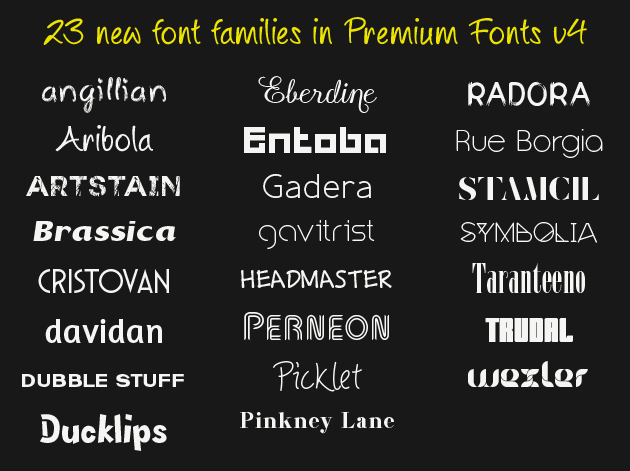
For a limited time, save 70% on brand new version of Premium Fonts. Download the newest premium font designs, each with a 10 computer commercial use license for only $29.99. 23 new font families were just added to Premium Fonts, bringing the total number of font families to 124 and the total number of fonts in this collection to 1,577 - the number of fonts has doubled since Premium Fonts launched a year ago!
San Francisco, California - MacAppware, a division of 128bit Technologies, is proud to announce today the addition of 264 new commercial use fonts to its Premium Fonts collection for creative Mac users.
Need a fresh design perspective? Tired of using the same old looking fonts? Need to change up the text style in a presentation, print project or a graphic design project? Download brand new premium font designs that just came off our development floor. This collection now includes 124 original font families, with a total of 1,577 fonts in all.
Each font is in OpenType font format and can be used for any personal and business project. Western European international character support is standard for every premium font, and NEW FONTS ARE DELIVERED AT NO EXTRA CHARGE to Premium Fonts subscription customers when available. The Mac App Store version includes the subscription to receive all new fonts released in the Premium Fonts collection.
124 Unique Font Families - Each Font Family Includes:
Regular, Bold, Italic, Bold Italic, Condensed, Condensed Bold, Condensed Italic, Expanded, Expanded Bold, Expanded Italic, Wide, Wide Bold, Wide Italic.
Each premium font in this collection just came off our design floor so you will not find them anywhere else. This collection is completely different from the 1000 OpenType Fonts collection offered by 128bit Technologies, as well as all Free Fonts collections (we never overlap or duplicate the fonts in each collection!).
* NEW! Added 264 new fonts for a total of 1,577 total fonts
* NEW! Added 23 new font families for a total of 124 unique font families
* Kerning added to 54 regular font styles
* All premium fonts in OpenType font format
* 10 computer, commercial use license
* Cross-platform compatible
* Install and use in all applications that support fonts
* Cursive, creative, classic and other beautifully crafted styles
* Perfect for presentations, logos, business cards, websites, advertisements, brochures, holidays, weddings, and more
System Requirements:
* OS X 10.6 or later
* 64-bit processor
* 49.7 MB
Pricing and Availability:
The updated Premium Fonts collection is now available on the MacAppware website, or on the Mac App Store, for a limited time discount of $29.99 (USD), a savings of 70% off the full price of $99. The Premium Fonts subscription is also available for $29.99 and subscribers will receive all future fonts at no extra charge.
MacAppware: http://www.macappware.com
Premium Fonts Collection 4.0: http://macappware.com/software/mac-fonts/
Purchase and Download (MAS): https://itunes.apple.com/us/app/premium-fonts-commercial-use/id642142422
Purchase from MacAppware: http://sites.fastspring.com/macappware/product/premiumfontssubscription?coupon=PFS30
Screenshot (23 New Font Families): http://www.macappware.com/images/fonts/PremiumFonts-v4.png
App Icon: http://www.macappware.com/images/fonts/PremiumFontsAppIcon256.png
MacAppware is a division of 128bit Technologies and a dedicated Mac software developer currently offering design, image editing and disk utility applications; unique commercial use font collections; and a carefully curated rotation of bundles and deals. Copyright (C) 2014 128bit Technologies. All Rights Reserved. Apple, the Apple logo, Mac OS X, and Macintosh are registered trademarks of Apple Inc. in the U.S. and/or other countries. All other trademarks are the property of their respective owners.
*******
Link To Article: http://prmac.com/release-id-68877.htm
*******
---------------------------------------------------------------------------------
Note that you can alter delivered distributions at any time.
Login to your account on prMac to alter your channel selection, or to opt-out at any time.
264 Commercial Use Fonts Added to Premium Fonts Collection - Published on 07/01/14
For a limited time, save 70% on brand new version of Premium Fonts. Download the newest premium font designs, each with a 10 computer commercial use license for only $29.99. 23 new font families were just added to Premium Fonts, bringing the total number of font families to 124 and the total number of fonts in this collection to 1,577 - the number of fonts has doubled since Premium Fonts launched a year ago!
San Francisco, California - MacAppware, a division of 128bit Technologies, is proud to announce today the addition of 264 new commercial use fonts to its Premium Fonts collection for creative Mac users.
Need a fresh design perspective? Tired of using the same old looking fonts? Need to change up the text style in a presentation, print project or a graphic design project? Download brand new premium font designs that just came off our development floor. This collection now includes 124 original font families, with a total of 1,577 fonts in all.
Each font is in OpenType font format and can be used for any personal and business project. Western European international character support is standard for every premium font, and NEW FONTS ARE DELIVERED AT NO EXTRA CHARGE to Premium Fonts subscription customers when available. The Mac App Store version includes the subscription to receive all new fonts released in the Premium Fonts collection.
124 Unique Font Families - Each Font Family Includes:
Regular, Bold, Italic, Bold Italic, Condensed, Condensed Bold, Condensed Italic, Expanded, Expanded Bold, Expanded Italic, Wide, Wide Bold, Wide Italic.
Each premium font in this collection just came off our design floor so you will not find them anywhere else. This collection is completely different from the 1000 OpenType Fonts collection offered by 128bit Technologies, as well as all Free Fonts collections (we never overlap or duplicate the fonts in each collection!).
* NEW! Added 264 new fonts for a total of 1,577 total fonts
* NEW! Added 23 new font families for a total of 124 unique font families
* Kerning added to 54 regular font styles
* All premium fonts in OpenType font format
* 10 computer, commercial use license
* Cross-platform compatible
* Install and use in all applications that support fonts
* Cursive, creative, classic and other beautifully crafted styles
* Perfect for presentations, logos, business cards, websites, advertisements, brochures, holidays, weddings, and more
System Requirements:
* OS X 10.6 or later
* 64-bit processor
* 49.7 MB
Pricing and Availability:
The updated Premium Fonts collection is now available on the MacAppware website, or on the Mac App Store, for a limited time discount of $29.99 (USD), a savings of 70% off the full price of $99. The Premium Fonts subscription is also available for $29.99 and subscribers will receive all future fonts at no extra charge.
MacAppware: http://www.macappware.com
Premium Fonts Collection 4.0: http://macappware.com/software/mac-fonts/
Purchase and Download (MAS): https://itunes.apple.com/us/app/premium-fonts-commercial-use/id642142422
Purchase from MacAppware: http://sites.fastspring.com/macappware/product/premiumfontssubscription?coupon=PFS30
Screenshot (23 New Font Families): http://www.macappware.com/images/fonts/PremiumFonts-v4.png
App Icon: http://www.macappware.com/images/fonts/PremiumFontsAppIcon256.png

MacAppware is a division of 128bit Technologies and a dedicated Mac software developer currently offering design, image editing and disk utility applications; unique commercial use font collections; and a carefully curated rotation of bundles and deals. Copyright (C) 2014 128bit Technologies. All Rights Reserved. Apple, the Apple logo, Mac OS X, and Macintosh are registered trademarks of Apple Inc. in the U.S. and/or other countries. All other trademarks are the property of their respective owners.
*******
Link To Article: http://prmac.com/release-id-68877.htm
*******
---------------------------------------------------------------------------------
Note that you can alter delivered distributions at any time.
Login to your account on prMac to alter your channel selection, or to opt-out at any time.
3,2,1 Run 4.0 adds iOS 7 integration
A new article has been published at prMac.
3,2,1 Run 4.0 adds iOS 7 integration - Published on 07/01/14
Paris based eCOMPOSITE today announces 3,2,1 Run 4.0, an update to its popular fitness app for iOS. 3,2,1 Run allows novice runners and better runners to track their runs with its GPS-enabled recording, providing instant speed, distance and heart rate frequency when a heart rate strap is connected. It comes with many training plans to discover running, improve or lose weight. Version 4.0 leverages full integration with iOS 7 in a new update that improves the training and running app for iPhone.
Paris, France - eCOMPOSITE today is pleased to announce 3,2,1 Run 4.0, an update to its popular fitness application developed for iPhone, iPad and iPod touch. 3,2,1 Run is the ideal tool to keep you fit, lose weight or run faster and farther. 3,2,1 Run 4 leverages full integration with iOS 7 in a new update that improves the training and running app for iPhone.
Features:
* Training / Running app with GPS tracking and audio trainings
* Integrated with Bluetooth heart rate belts from Wahoo, Polar, Runalyzer
* New: Better audio with iOS 7 Text to Speech
* New: Static maps are now entirely created with iOS maps
* New: Review speed and time for each milestone / each training phase
* New: More info on your runs in the revamped history
* Regular price: $3.99
* On sale for a limited time: $0.99
3,2,1 Run allows novice runners and better runners to track their runs with its GPS-enabled recording, providing instant speed, distance and heart rate frequency when a heart rate strap is connected. It comes with many training plans to discover running, improve or lose weight. All training plans help the runner by indicating in audio when and how to change their pace and speed.
A Free version is also available, but is limited to the last run recorded and only has some of the trainings. 3,2,1 Run comes with a companion web site to export and review previous runs online. 3,2,1, Run has already convinced tens of thousands of people to go out running and keep track of their progress.
Pricing and Availability:
For a limited time, 3,2,1 Run v4.0 (8 MB) is now available for download for $0.99 USD (Reg $3.99) on the App Store under the "Fitness" category. Users of the previous version get the update free of charge. Users of the Free version can upgrade to the full version with an in-App purchase.
eCOMPOSITE: http://www.ecomposite.fr/
3,2,1 Run (v4.0): http://321run.com
Latest Runs: http://321run.com/en/latest
Purchase and Download: https://itunes.apple.com/app/3-2-1-run/id317773242
Media Assets: https://www.flickr.com/photos/ax25/sets/72157644909604520/
Located in beautiful Paris, France, eCOMPOSITE is a company founded in 2004 by independent software developer Cyril Godefroy. After releasing its first app in 2008, eCOMPOSITE mostly focused on 3,2,1 Run and other fitness-oriented solutions for the iPhone platform. Copyright (C) 2004-2014 eCOMPOSITE. All Rights Reserved. Apple, the Apple logo, iPhone, iPod and iPad are registered trademarks of Apple Inc. in the U.S. and/or other countries.
*******
Link To Article: http://prmac.com/release-id-68884.htm
*******
---------------------------------------------------------------------------------
Note that you can alter delivered distributions at any time.
Login to your account on prMac to alter your channel selection, or to opt-out at any time.
3,2,1 Run 4.0 adds iOS 7 integration - Published on 07/01/14
Paris based eCOMPOSITE today announces 3,2,1 Run 4.0, an update to its popular fitness app for iOS. 3,2,1 Run allows novice runners and better runners to track their runs with its GPS-enabled recording, providing instant speed, distance and heart rate frequency when a heart rate strap is connected. It comes with many training plans to discover running, improve or lose weight. Version 4.0 leverages full integration with iOS 7 in a new update that improves the training and running app for iPhone.
Paris, France - eCOMPOSITE today is pleased to announce 3,2,1 Run 4.0, an update to its popular fitness application developed for iPhone, iPad and iPod touch. 3,2,1 Run is the ideal tool to keep you fit, lose weight or run faster and farther. 3,2,1 Run 4 leverages full integration with iOS 7 in a new update that improves the training and running app for iPhone.
Features:
* Training / Running app with GPS tracking and audio trainings
* Integrated with Bluetooth heart rate belts from Wahoo, Polar, Runalyzer
* New: Better audio with iOS 7 Text to Speech
* New: Static maps are now entirely created with iOS maps
* New: Review speed and time for each milestone / each training phase
* New: More info on your runs in the revamped history
* Regular price: $3.99
* On sale for a limited time: $0.99
3,2,1 Run allows novice runners and better runners to track their runs with its GPS-enabled recording, providing instant speed, distance and heart rate frequency when a heart rate strap is connected. It comes with many training plans to discover running, improve or lose weight. All training plans help the runner by indicating in audio when and how to change their pace and speed.
A Free version is also available, but is limited to the last run recorded and only has some of the trainings. 3,2,1 Run comes with a companion web site to export and review previous runs online. 3,2,1, Run has already convinced tens of thousands of people to go out running and keep track of their progress.
Pricing and Availability:
For a limited time, 3,2,1 Run v4.0 (8 MB) is now available for download for $0.99 USD (Reg $3.99) on the App Store under the "Fitness" category. Users of the previous version get the update free of charge. Users of the Free version can upgrade to the full version with an in-App purchase.
eCOMPOSITE: http://www.ecomposite.fr/
3,2,1 Run (v4.0): http://321run.com
Latest Runs: http://321run.com/en/latest
Purchase and Download: https://itunes.apple.com/app/3-2-1-run/id317773242
Media Assets: https://www.flickr.com/photos/ax25/sets/72157644909604520/
Located in beautiful Paris, France, eCOMPOSITE is a company founded in 2004 by independent software developer Cyril Godefroy. After releasing its first app in 2008, eCOMPOSITE mostly focused on 3,2,1 Run and other fitness-oriented solutions for the iPhone platform. Copyright (C) 2004-2014 eCOMPOSITE. All Rights Reserved. Apple, the Apple logo, iPhone, iPod and iPad are registered trademarks of Apple Inc. in the U.S. and/or other countries.
*******
Link To Article: http://prmac.com/release-id-68884.htm
*******
---------------------------------------------------------------------------------
Note that you can alter delivered distributions at any time.
Login to your account on prMac to alter your channel selection, or to opt-out at any time.
SIS Software releases Pocket Drive 1.0 - No Network Configuration Needed
A new article has been published at prMac.
SIS Software releases Pocket Drive 1.0 - No Network Configuration Needed - Published on 07/01/14
SIS Software announces Pocket Drive 1.00, their new productivity app for iOS. With no confusing network configuration needed, Pocket Drive allows users to wirelessly transfer files between a Mac or PC and their iPhone, iPad, and iPod touch. With a single tap, Pocket Drive wirelessly connects a user's iOS device to OS X's Finder or Windows Explorer, which sees the iOS device as just another external hard drive. Users then simply drag and drop files from their Mac or PC to their iOS device.
Trzin, Slovenia - SIS Software launches Pocket Drive to solve the file transfer and management problems every iOS user knows all too well. Pocket Drive provides the key feature Apple forgot by allowing users to wirelessly transfer files between a Mac or PC and their iPhone, iPad, and iPod touch with a single tap-no confusing network configuration needed.
By allowing users to not only transfer files, but to easily manage and organize them as well, Pocket Drive effectively turns every iOS device into a wireless hard drive with the power of OS X's Finder and the simplicity of Dropbox all rolled into one.
"Pocket Drive is the best file manager for iOS I've ever used-and that's saying something, because I've used them all." - Michael Grothaus, Senior Writer at Fast Company and former European Editor of TUAW.
"Pocket Drive's ease of wirelessly transferring files between your desktop and iPhone or iPad is simply stunning. It's a wonder Apple hasn't built such a useful and requested feature into iOS yet, but at least now they have the perfect example of how to implement it." - Luke Dormehl, Writer at Cult of Mac and author of The Apple Revolution.
Unlike other apps, Pocket Drive requires no network configuration or setup. With a single tap, Pocket Drive wirelessly connects a user's iOS device to OS X's Finder or Windows Explorer, which sees the iOS device as just another external hard drive. Users then simply drag and drop files from their Mac or PC to their iOS device.
Once on their iOS device users can manage their files just as they do on their desktop. Create folders to organize files, view or record photos and videos, listen to audio, and even create and edit text documents. And with a built-in ZIP archive and web file downloader it's easy to add more files to Pocket Drive even when away from your computer. With its beautiful design and powerful sharing capabilities Pocket Drive is the iOS file manager Apple forgot.
Pocket Drive supports storage of any file as well as the ability to open and view over 25 file types in the app itself including Pages, Numbers, Keynote, Word, Excel, PowerPoint, PDF, RTF, JPEG, GIF, TIF, MOV, MP4, MP3, and ZIP.
Device Requirements:
* iPhone, iPad, and iPod touch
* Requires iOS 6.0 or later
* 47.7 MB
Pricing and Availability:
Pocket Drive 1.00 is Free and available worldwide exclusively through the App Store in the Productivity category. Pocket Drive is available in two versions for iPhone and iPad. Pocket Drive (free) gives users 512MB of local storage space, with the option for additional storage via in-app purchase. Pocket Drive + (4.49 Euro) allows users to locally store as many files as the free space on their iOS device will allow.
SIS Software: http://www.sis.si/
Pocket Drive 1.00: http://pocketdriveapp.com
Download from iTunes: https://itunes.apple.com/app/pocket-drive/id773111079
YouTube Video (Official): https://www.youtube.com/watch?v=VTw_9SFOBuE
YouTube Video (Hands On): http://www.youtube.com/watch?v=aZ0hwCb4_lo
Press Kit (zip): https://www.dropbox.com/s/hlze52ojwai3h5w/Press%20Kit.zip
Located in Slovenia, SIS d.o.o. is focused on providing consumers with the highest quality professionally oriented mobile applications. SIS d.o.o. is well established company with previous successful apps like My Measures and My Scans that have more than 10 Million users. The developer is committed to creating mobile work resources that are at once practical and innovative. (C) 2014 SIS d.o.o. All Rights Reserved. Apple, the Apple logo, iPhone, iPod and iPad are registered trademarks of Apple Inc. in the U.S. and/or other countries.
*******
Link To Article: http://prmac.com/release-id-68881.htm
*******
---------------------------------------------------------------------------------
Note that you can alter delivered distributions at any time.
Login to your account on prMac to alter your channel selection, or to opt-out at any time.
SIS Software releases Pocket Drive 1.0 - No Network Configuration Needed - Published on 07/01/14
SIS Software announces Pocket Drive 1.00, their new productivity app for iOS. With no confusing network configuration needed, Pocket Drive allows users to wirelessly transfer files between a Mac or PC and their iPhone, iPad, and iPod touch. With a single tap, Pocket Drive wirelessly connects a user's iOS device to OS X's Finder or Windows Explorer, which sees the iOS device as just another external hard drive. Users then simply drag and drop files from their Mac or PC to their iOS device.
Trzin, Slovenia - SIS Software launches Pocket Drive to solve the file transfer and management problems every iOS user knows all too well. Pocket Drive provides the key feature Apple forgot by allowing users to wirelessly transfer files between a Mac or PC and their iPhone, iPad, and iPod touch with a single tap-no confusing network configuration needed.
By allowing users to not only transfer files, but to easily manage and organize them as well, Pocket Drive effectively turns every iOS device into a wireless hard drive with the power of OS X's Finder and the simplicity of Dropbox all rolled into one.
"Pocket Drive is the best file manager for iOS I've ever used-and that's saying something, because I've used them all." - Michael Grothaus, Senior Writer at Fast Company and former European Editor of TUAW.
"Pocket Drive's ease of wirelessly transferring files between your desktop and iPhone or iPad is simply stunning. It's a wonder Apple hasn't built such a useful and requested feature into iOS yet, but at least now they have the perfect example of how to implement it." - Luke Dormehl, Writer at Cult of Mac and author of The Apple Revolution.
Unlike other apps, Pocket Drive requires no network configuration or setup. With a single tap, Pocket Drive wirelessly connects a user's iOS device to OS X's Finder or Windows Explorer, which sees the iOS device as just another external hard drive. Users then simply drag and drop files from their Mac or PC to their iOS device.
Once on their iOS device users can manage their files just as they do on their desktop. Create folders to organize files, view or record photos and videos, listen to audio, and even create and edit text documents. And with a built-in ZIP archive and web file downloader it's easy to add more files to Pocket Drive even when away from your computer. With its beautiful design and powerful sharing capabilities Pocket Drive is the iOS file manager Apple forgot.
Pocket Drive supports storage of any file as well as the ability to open and view over 25 file types in the app itself including Pages, Numbers, Keynote, Word, Excel, PowerPoint, PDF, RTF, JPEG, GIF, TIF, MOV, MP4, MP3, and ZIP.
Device Requirements:
* iPhone, iPad, and iPod touch
* Requires iOS 6.0 or later
* 47.7 MB
Pricing and Availability:
Pocket Drive 1.00 is Free and available worldwide exclusively through the App Store in the Productivity category. Pocket Drive is available in two versions for iPhone and iPad. Pocket Drive (free) gives users 512MB of local storage space, with the option for additional storage via in-app purchase. Pocket Drive + (4.49 Euro) allows users to locally store as many files as the free space on their iOS device will allow.
SIS Software: http://www.sis.si/
Pocket Drive 1.00: http://pocketdriveapp.com
Download from iTunes: https://itunes.apple.com/app/pocket-drive/id773111079
YouTube Video (Official): https://www.youtube.com/watch?v=VTw_9SFOBuE
YouTube Video (Hands On): http://www.youtube.com/watch?v=aZ0hwCb4_lo
Press Kit (zip): https://www.dropbox.com/s/hlze52ojwai3h5w/Press%20Kit.zip
Located in Slovenia, SIS d.o.o. is focused on providing consumers with the highest quality professionally oriented mobile applications. SIS d.o.o. is well established company with previous successful apps like My Measures and My Scans that have more than 10 Million users. The developer is committed to creating mobile work resources that are at once practical and innovative. (C) 2014 SIS d.o.o. All Rights Reserved. Apple, the Apple logo, iPhone, iPod and iPad are registered trademarks of Apple Inc. in the U.S. and/or other countries.
*******
Link To Article: http://prmac.com/release-id-68881.htm
*******
---------------------------------------------------------------------------------
Note that you can alter delivered distributions at any time.
Login to your account on prMac to alter your channel selection, or to opt-out at any time.
Introducing AweNote - An advanced Note taking application for iPad
A new article has been published at prMac.
Introducing AweNote - An advanced Note taking application for iPad - Published on 07/01/14
AweSoft today introduces AweNote 1.0, an all-in-one note taking application for iPad. AweNote supports a rich set of features that you need for a note taking application. From basic features such as stylus note, text note, audio and video note, plus a wide range of built-in library of basic figures and more. Just about any shape, photo, audio, video or other document can be inserted into its content which can be rotated, set title and more. An unlimited number of applications can be created.
Ho Chi Minh, Vietnam - AweSoft today is thrilled to announce the release and immediate availability of AweNote 1.0, an all-in-one note taking application for iPad. AweNote supports a rich set of features that you need for a note taking application. From basic features such as stylus note, text note, audio and video note, plus a wide range of built-in library of basic figures and more. With all of that an unlimited number of applications can be created with AweNote, not just note taking.
There are many note taking applications for iPad on App Store. However none of them support a rich set of features as AweNote. Below are the AweNote main features:
Advanced Note:
* Supports rich text with multiple kinds of formatting text style such highlight, underline, strike through, different font name / font size / text color / alignment for any part or whole text
* Can be inserted shapes, photos, audios, videos, documents (PDF Text, MS Word / Excel / Power Point), music files, etc. as inserted objects in to its content and the objects can be rotated, set title and more
* Can link to other notes (and vice versa), photos, audios, videos, documents, music files and more as linked objects in separated panel and linked objects can set title
* Supports note date and time, alerts, multiple background styles, tag, categories and contexts
* Supports check list for each text item in note
* Supports two kinds of input: virtual keyboard and free hand drawing
* Smart drawing with various styles: solid line, dashed line, outline drawing along with color alpha supported
* Different ways of selection text / drawing lines: double tap or area select for actions
* Can record audio / video while inputing note
* Can play audio / video while inputing note
* Can phone, show map, send email, search on web, create contact, create event (to AweCal or iOS Calendar), create task (to AweCal or iOS Reminder) directly from app
* Can be starred or marked with different important levels
* Export to many kinds of document: PDF, PNG, Text to email, Facebook
* Import from popular kinds of document from Email, Web and other apps directly to app
* Supports long note with unlimited pages in the same view
* Directly create note from Weather forecast
* Directly print to air printer
Super Organization:
* AweNote supports multiple categories, that notes belong to, color code and put them in the same view
* Category can be merged
* Show or hide any category, notes in category will be showed/hidden corresponding
* Support multiple contexts
* Notes can be grouped under categories, dates, contexts and manual
* Notes can be sorted by note dates, by important level or by created date
* Categories and contexts can be sorted by title or created date
* Many ways of filtering notes or searching notes
- Support lunar date
- Show current weather and weather forecast
Backup/Restore:
* AweNote data can be backed up to Dropbox - You can restore from there when you need to
Intuitive Interface:
* Clean looking and easy to understand
* Minimal taps to enter your data
* Rich set of skins supported
* Different note's background supported
* Many kinds of view: 3-D or flat shape combine to list or folder view styles
More and more features are waiting for you to explore.
Device Requirements:
* Compatible with iPad
* Requires iOS 6.0 or later
* 9.6 MB
Pricing and Availability:
AweNote 1.0 is $9.99 USD (or equivalent amount in other currencies) and available worldwide exclusively through the App Store in the Productivity category.
AweSoft: http://www.advsoftvn.com
AweNote 1.0: http://www.advsoftvn.com/AweNote.html
Purchase and Download: https://itunes.apple.com/app/awenote/id891318627
Screenshot: http://a2.mzstatic.com/us/r30/Purple/v4/dd/c7/53/ddc7536a-d839-3231-3cc9-2c12699c4cfd/screen480x480.jpeg
App Icon: http://a4.mzstatic.com/us/r30/Purple4/v4/3a/e6/90/3ae69001-22be-ce53-a601-3951ec63ce80/mzl.ryixnumc.175x175-75.jpg
Based on Ho Chi Minh city, Vietnam, AweSoft is a young company dedicated to mobile and PC application development with focus on the iPhone, and iPad and Mac platforms. The company has a strong background from Linux, Android, and now iOS. Copyright (C) 2014 AweSoft Co., LTD. All Rights Reserved. Apple, the Apple logo, iPhone, iPod and iPad are registered trademarks of Apple Inc. in the U.S. and/or other countries.
*******
Link To Article: http://prmac.com/release-id-68880.htm
*******
---------------------------------------------------------------------------------
Note that you can alter delivered distributions at any time.
Login to your account on prMac to alter your channel selection, or to opt-out at any time.
Introducing AweNote - An advanced Note taking application for iPad - Published on 07/01/14
AweSoft today introduces AweNote 1.0, an all-in-one note taking application for iPad. AweNote supports a rich set of features that you need for a note taking application. From basic features such as stylus note, text note, audio and video note, plus a wide range of built-in library of basic figures and more. Just about any shape, photo, audio, video or other document can be inserted into its content which can be rotated, set title and more. An unlimited number of applications can be created.
Ho Chi Minh, Vietnam - AweSoft today is thrilled to announce the release and immediate availability of AweNote 1.0, an all-in-one note taking application for iPad. AweNote supports a rich set of features that you need for a note taking application. From basic features such as stylus note, text note, audio and video note, plus a wide range of built-in library of basic figures and more. With all of that an unlimited number of applications can be created with AweNote, not just note taking.
There are many note taking applications for iPad on App Store. However none of them support a rich set of features as AweNote. Below are the AweNote main features:
Advanced Note:
* Supports rich text with multiple kinds of formatting text style such highlight, underline, strike through, different font name / font size / text color / alignment for any part or whole text
* Can be inserted shapes, photos, audios, videos, documents (PDF Text, MS Word / Excel / Power Point), music files, etc. as inserted objects in to its content and the objects can be rotated, set title and more
* Can link to other notes (and vice versa), photos, audios, videos, documents, music files and more as linked objects in separated panel and linked objects can set title
* Supports note date and time, alerts, multiple background styles, tag, categories and contexts
* Supports check list for each text item in note
* Supports two kinds of input: virtual keyboard and free hand drawing
* Smart drawing with various styles: solid line, dashed line, outline drawing along with color alpha supported
* Different ways of selection text / drawing lines: double tap or area select for actions
* Can record audio / video while inputing note
* Can play audio / video while inputing note
* Can phone, show map, send email, search on web, create contact, create event (to AweCal or iOS Calendar), create task (to AweCal or iOS Reminder) directly from app
* Can be starred or marked with different important levels
* Export to many kinds of document: PDF, PNG, Text to email, Facebook
* Import from popular kinds of document from Email, Web and other apps directly to app
* Supports long note with unlimited pages in the same view
* Directly create note from Weather forecast
* Directly print to air printer
Super Organization:
* AweNote supports multiple categories, that notes belong to, color code and put them in the same view
* Category can be merged
* Show or hide any category, notes in category will be showed/hidden corresponding
* Support multiple contexts
* Notes can be grouped under categories, dates, contexts and manual
* Notes can be sorted by note dates, by important level or by created date
* Categories and contexts can be sorted by title or created date
* Many ways of filtering notes or searching notes
- Support lunar date
- Show current weather and weather forecast
Backup/Restore:
* AweNote data can be backed up to Dropbox - You can restore from there when you need to
Intuitive Interface:
* Clean looking and easy to understand
* Minimal taps to enter your data
* Rich set of skins supported
* Different note's background supported
* Many kinds of view: 3-D or flat shape combine to list or folder view styles
More and more features are waiting for you to explore.
Device Requirements:
* Compatible with iPad
* Requires iOS 6.0 or later
* 9.6 MB
Pricing and Availability:
AweNote 1.0 is $9.99 USD (or equivalent amount in other currencies) and available worldwide exclusively through the App Store in the Productivity category.
AweSoft: http://www.advsoftvn.com
AweNote 1.0: http://www.advsoftvn.com/AweNote.html
Purchase and Download: https://itunes.apple.com/app/awenote/id891318627
Screenshot: http://a2.mzstatic.com/us/r30/Purple/v4/dd/c7/53/ddc7536a-d839-3231-3cc9-2c12699c4cfd/screen480x480.jpeg

App Icon: http://a4.mzstatic.com/us/r30/Purple4/v4/3a/e6/90/3ae69001-22be-ce53-a601-3951ec63ce80/mzl.ryixnumc.175x175-75.jpg

Based on Ho Chi Minh city, Vietnam, AweSoft is a young company dedicated to mobile and PC application development with focus on the iPhone, and iPad and Mac platforms. The company has a strong background from Linux, Android, and now iOS. Copyright (C) 2014 AweSoft Co., LTD. All Rights Reserved. Apple, the Apple logo, iPhone, iPod and iPad are registered trademarks of Apple Inc. in the U.S. and/or other countries.
*******
Link To Article: http://prmac.com/release-id-68880.htm
*******
---------------------------------------------------------------------------------
Note that you can alter delivered distributions at any time.
Login to your account on prMac to alter your channel selection, or to opt-out at any time.
Albie - The Reddit Album Viewer released for iOS
A new article has been published at prMac.
Albie - The Reddit Album Viewer released for iOS - Published on 07/01/14
Indie iOS developer, Barrett Jacobsen today introduces Albie - The Reddit Album Viewer 1.0.1, his new entertainment app for iOS. Albie was specifically designed to make browsing image heavy subreddits a breeze. Highly optimized for one-handed browsing, images are intelligently sized to fit as many as possible on the screen. Intuitive gestures throughout make it so you can easily browse using only one hand. Albie supports subreddits, multireddits, posts by user, front page, saved, hidden & more.
Madison, Wisconsin - Out today is Albie - The Reddit Album Viewer - which makes browsing image heavy subreddits a breeze! Available for free for both iPhone and iPad!
Images start out in a color coded grid that makes it easy to identify which images are part of which album. Images are intelligently sized to fit as many as possible on the screen.
Holding down on an image bring up a quick access menu where you can get more information on the image, save it, hide, or view more images from the same submitter.
Tapping on a picture brings up the full size image (including animated GIFs!) and allows you to swipe to the next image. Unlike the other reddit browsers, you can swipe between albums and browse all of reddit as one long slideshow.
Intuitive gestures throughout make it so you can easily browse using only one hand
Supports subreddits, multireddits, posts by user, front page, saved, hidden and more � including all the different sorting options (Hot, New, Top day/week/month/year/all time).
Add shortcuts to frequently access subreddits/multireddits that maintain your sort settings and don't clog up your subscribed subreddit lists.
Save your logins and swap between Reddit users quickly
Free for iOS Devices on the App Store
Albie - The Reddit Album Viewer 1.0.1: http://www.albieapp.com
App Store: https://itunes.apple.com/app/reddit-album-viewer/id881875928?ls=1&mt=8&at=10l4HM&ct=pressrelease
YouTube Video: http://www.youtube.com/watch?v=VG7ddVsBtcg
Screenshot: http://a1.mzstatic.com/us/r30/Purple4/v4/57/b9/17/57b917e6-32ce-11b3-9652-af40083217d2/screen480x480.jpeg
App Icon: http://a3.mzstatic.com/us/r30/Purple/v4/e0/52/16/e0521628-9dc1-8d9d-d958-945f076ecaf9/mzl.ymjbvsej.175x175-75.jpg
Barrett Jacobsen is an independent iOS Developer located in Madison, Wisconsin. Copyright (C) 2014 Barrett Jacobsen. All Rights Reserved. Apple, the Apple logo, iPhone, iPod and iPad are registered trademarks of Apple Inc. in the U.S. and/or other countries.
*******
Link To Article: http://prmac.com/release-id-68876.htm
*******
---------------------------------------------------------------------------------
Note that you can alter delivered distributions at any time.
Login to your account on prMac to alter your channel selection, or to opt-out at any time.
Albie - The Reddit Album Viewer released for iOS - Published on 07/01/14
Indie iOS developer, Barrett Jacobsen today introduces Albie - The Reddit Album Viewer 1.0.1, his new entertainment app for iOS. Albie was specifically designed to make browsing image heavy subreddits a breeze. Highly optimized for one-handed browsing, images are intelligently sized to fit as many as possible on the screen. Intuitive gestures throughout make it so you can easily browse using only one hand. Albie supports subreddits, multireddits, posts by user, front page, saved, hidden & more.
Madison, Wisconsin - Out today is Albie - The Reddit Album Viewer - which makes browsing image heavy subreddits a breeze! Available for free for both iPhone and iPad!
Images start out in a color coded grid that makes it easy to identify which images are part of which album. Images are intelligently sized to fit as many as possible on the screen.
Holding down on an image bring up a quick access menu where you can get more information on the image, save it, hide, or view more images from the same submitter.
Tapping on a picture brings up the full size image (including animated GIFs!) and allows you to swipe to the next image. Unlike the other reddit browsers, you can swipe between albums and browse all of reddit as one long slideshow.
Intuitive gestures throughout make it so you can easily browse using only one hand
Supports subreddits, multireddits, posts by user, front page, saved, hidden and more � including all the different sorting options (Hot, New, Top day/week/month/year/all time).
Add shortcuts to frequently access subreddits/multireddits that maintain your sort settings and don't clog up your subscribed subreddit lists.
Save your logins and swap between Reddit users quickly
Free for iOS Devices on the App Store
Albie - The Reddit Album Viewer 1.0.1: http://www.albieapp.com
App Store: https://itunes.apple.com/app/reddit-album-viewer/id881875928?ls=1&mt=8&at=10l4HM&ct=pressrelease
YouTube Video: http://www.youtube.com/watch?v=VG7ddVsBtcg
Screenshot: http://a1.mzstatic.com/us/r30/Purple4/v4/57/b9/17/57b917e6-32ce-11b3-9652-af40083217d2/screen480x480.jpeg

App Icon: http://a3.mzstatic.com/us/r30/Purple/v4/e0/52/16/e0521628-9dc1-8d9d-d958-945f076ecaf9/mzl.ymjbvsej.175x175-75.jpg

Barrett Jacobsen is an independent iOS Developer located in Madison, Wisconsin. Copyright (C) 2014 Barrett Jacobsen. All Rights Reserved. Apple, the Apple logo, iPhone, iPod and iPad are registered trademarks of Apple Inc. in the U.S. and/or other countries.
*******
Link To Article: http://prmac.com/release-id-68876.htm
*******
---------------------------------------------------------------------------------
Note that you can alter delivered distributions at any time.
Login to your account on prMac to alter your channel selection, or to opt-out at any time.
Chromic 1.2 - Hollywood Quality Video Filters for iOS - Now Universal
A new article has been published at prMac.
Chromic 1.2 - Hollywood Quality Video Filters for iOS - Now Universal - Published on 07/01/14
Lucky Clan today announces Chromic 1.2 for iOS, an update to their popular app developed specifically for applying Hollywood quality color correction filters to videos. Powered by an advanced image processing engine, Chromic imports videos as a "digital negative" and develops them into rich, expressive movies. All effects are non-destructive, allowing complete freedom to edit and re-edit effects. Version 1.2 adds iPad support and a new filter strength gesture.
Lodz, Poland - Lucky Clan is thrilled to announce the release of Chromic 1.2 for iPhone, iPod touch and iPad. The version 1.2 update adds iPad support and filter strength gesture. Chromic brings hollywood quality color-correction filters to the palm of your hand! Powered by an advanced image processing engine, Chromic imports videos as a "digital negative" and develops them into rich, expressive movies.
All effects are non-destructive, allowing complete freedom to edit and re-edit effects. With filters ranging from; Film Emulation, Dramatic Hollywood Environments, Authentic Vintage Aging and many more. 8 Built in filters feature examples from each of the 6 available sets. For a limited time buy all 6 sets and save.
Filters:
* Non-destructive filters allows editing and re-editing of all effects
* 8 built in filters feature examples from all 6 full sets
* 6 Filter sets include: Film, Vintage, Special Effects, Split/Tone, Pastel Colors & Monotone
* Realtime preview of video filters
* Full screen preview in landscape mode
* Drag left/right to scrub through videos
* Drag up/down in filters preview to set filter strength
* Tap to start/stop
Gallery:
* Swipe left/right to open quick menu
* Import video from Camera Roll
* Record new video
* Export to Camera Roll
* "Pull" up/down on video to return to camera roll
* Full screen player in landscape mode, with drag to scrub
* Detailed video information
Device Requirements:
* iPhone 4/4S/5/5S/5C, iPod touch (4th/5th generation), iPad (2/3/4/Air/Mini)
* iOS 6.0 or later
* Universal Application
* 13.8 MB
Pricing and Availability:
Chromic 1.2 is free and available worldwide exclusively through the App Store in the Photo & Video category. For more information, or to schedule an interview, please contact Sylwester Los.
Lucky Clan: http://luckyclan.com/
Chromic 1.2: http://luckyclan.com/chromic
Download from iTunes: https://itunes.apple.com/app/chromic-professional-video/id724295125
Vimeo Video: http://vimeo.com/73010012
Screenshot: http://luckyclan.com/chromic/Screen1.jpg
App Icon: http://luckyclan.com/chromic/Icon.png
Located in Lodz, Poland, the Lucky Clan team is an independent software company founded by Sylwester Los in March of 2010. With a focus on the iOS platform, Lucky's mission is to provide their customers with the highest quality, reliability and compatibility with every device produced by Apple. Their flagship app, ArtStudio, has become one of the most popular tools for drawing, painting, and photo editing for iPhone and iPad. Copyright (C) 2014 Lucky Clan. All Rights Reserved. Apple, the Apple logo, iPhone, iPod and iPad are registered trademarks of Apple Inc. in the U.S. and/or other countries.
*******
Link To Article: http://prmac.com/release-id-68879.htm
*******
---------------------------------------------------------------------------------
Note that you can alter delivered distributions at any time.
Login to your account on prMac to alter your channel selection, or to opt-out at any time.
Chromic 1.2 - Hollywood Quality Video Filters for iOS - Now Universal - Published on 07/01/14
Lucky Clan today announces Chromic 1.2 for iOS, an update to their popular app developed specifically for applying Hollywood quality color correction filters to videos. Powered by an advanced image processing engine, Chromic imports videos as a "digital negative" and develops them into rich, expressive movies. All effects are non-destructive, allowing complete freedom to edit and re-edit effects. Version 1.2 adds iPad support and a new filter strength gesture.
Lodz, Poland - Lucky Clan is thrilled to announce the release of Chromic 1.2 for iPhone, iPod touch and iPad. The version 1.2 update adds iPad support and filter strength gesture. Chromic brings hollywood quality color-correction filters to the palm of your hand! Powered by an advanced image processing engine, Chromic imports videos as a "digital negative" and develops them into rich, expressive movies.
All effects are non-destructive, allowing complete freedom to edit and re-edit effects. With filters ranging from; Film Emulation, Dramatic Hollywood Environments, Authentic Vintage Aging and many more. 8 Built in filters feature examples from each of the 6 available sets. For a limited time buy all 6 sets and save.
Filters:
* Non-destructive filters allows editing and re-editing of all effects
* 8 built in filters feature examples from all 6 full sets
* 6 Filter sets include: Film, Vintage, Special Effects, Split/Tone, Pastel Colors & Monotone
* Realtime preview of video filters
* Full screen preview in landscape mode
* Drag left/right to scrub through videos
* Drag up/down in filters preview to set filter strength
* Tap to start/stop
Gallery:
* Swipe left/right to open quick menu
* Import video from Camera Roll
* Record new video
* Export to Camera Roll
* "Pull" up/down on video to return to camera roll
* Full screen player in landscape mode, with drag to scrub
* Detailed video information
Device Requirements:
* iPhone 4/4S/5/5S/5C, iPod touch (4th/5th generation), iPad (2/3/4/Air/Mini)
* iOS 6.0 or later
* Universal Application
* 13.8 MB
Pricing and Availability:
Chromic 1.2 is free and available worldwide exclusively through the App Store in the Photo & Video category. For more information, or to schedule an interview, please contact Sylwester Los.
Lucky Clan: http://luckyclan.com/
Chromic 1.2: http://luckyclan.com/chromic
Download from iTunes: https://itunes.apple.com/app/chromic-professional-video/id724295125
Vimeo Video: http://vimeo.com/73010012
Screenshot: http://luckyclan.com/chromic/Screen1.jpg

App Icon: http://luckyclan.com/chromic/Icon.png

Located in Lodz, Poland, the Lucky Clan team is an independent software company founded by Sylwester Los in March of 2010. With a focus on the iOS platform, Lucky's mission is to provide their customers with the highest quality, reliability and compatibility with every device produced by Apple. Their flagship app, ArtStudio, has become one of the most popular tools for drawing, painting, and photo editing for iPhone and iPad. Copyright (C) 2014 Lucky Clan. All Rights Reserved. Apple, the Apple logo, iPhone, iPod and iPad are registered trademarks of Apple Inc. in the U.S. and/or other countries.
*******
Link To Article: http://prmac.com/release-id-68879.htm
*******
---------------------------------------------------------------------------------
Note that you can alter delivered distributions at any time.
Login to your account on prMac to alter your channel selection, or to opt-out at any time.
Subscribe to:
Posts (Atom)