A new article has been published at prMac.
3,2,1 Run 4.0 adds iOS 7 integration - Published on 07/09/14
Paris based eCOMPOSITE has announced 3,2,1 Run 4.0, an update to its popular fitness app for iOS. 3,2,1 Run allows novice runners and better runners to track their runs with its GPS-enabled recording, providing instant speed, distance and heart rate frequency when a heart rate strap is connected. It comes with many training plans to discover running, improve or lose weight. Version 4.0 leverages full integration with iOS 7 in a new update that improves the training and running app for iPhone.
Paris, France - eCOMPOSITE has announced 3,2,1 Run 4.0, an update to its popular fitness application developed for iPhone, iPad and iPod touch. 3,2,1 Run is the ideal tool to keep you fit, lose weight or run faster and farther. 3,2,1 Run 4 leverages full integration with iOS 7 in a new update that improves the training and running app for iPhone.
Features:
* Training / Running app with GPS tracking and audio trainings
* Integrated with Bluetooth heart rate belts from Wahoo, Polar, Runalyzer
* New: Better audio with iOS 7 Text to Speech
* New: Static maps are now entirely created with iOS maps
* New: Review speed and time for each milestone / each training phase
* New: More info on your runs in the revamped history
* Regular price: $3.99
* On sale for a limited time: $0.99
3,2,1 Run allows novice runners and better runners to track their runs with its GPS-enabled recording, providing instant speed, distance and heart rate frequency when a heart rate strap is connected. It comes with many training plans to discover running, improve or lose weight. All training plans help the runner by indicating in audio when and how to change their pace and speed.
A Free version is also available, but is limited to the last run recorded and only has some of the trainings. 3,2,1 Run comes with a companion web site to export and review previous runs online. 3,2,1, Run has already convinced tens of thousands of people to go out running and keep track of their progress.
Pricing and Availability:
For a limited time, 3,2,1 Run v4.0 (8 MB) is now available for download for $0.99 USD (Reg $3.99) on the App Store under the "Fitness" category. Users of the previous version get the update free of charge. Users of the Free version can upgrade to the full version with an in-App purchase.
eCOMPOSITE: http://www.ecomposite.fr/
3,2,1 Run (v4.0): http://321run.com
Latest Runs: http://321run.com/en/latest
Purchase and Download: https://itunes.apple.com/app/3-2-1-run/id317773242
Media Assets: https://www.flickr.com/photos/ax25/sets/72157644909604520/
Located in beautiful Paris, France, eCOMPOSITE is a company founded in 2004 by independent software developer Cyril Godefroy. After releasing its first app in 2008, eCOMPOSITE mostly focused on 3,2,1 Run and other fitness-oriented solutions for the iPhone platform. Copyright (C) 2004-2014 eCOMPOSITE. All Rights Reserved. Apple, the Apple logo, iPhone, iPod and iPad are registered trademarks of Apple Inc. in the U.S. and/or other countries.
*******
Link To Article: http://prmac.com/release-id-68999.htm
*******
---------------------------------------------------------------------------------
Note that you can alter delivered distributions at any time.
Login to your account on prMac to alter your channel selection, or to opt-out at any time.

DotPen - Redefining drawing and writing on tablets and smartphones
A new article has been published at prMac.
DotPen - Redefining drawing and writing on tablets and smartphones - Published on 07/09/14
Veteran Silicon Valley product developers, Dot-Tec has announced their new Kickstarter project to bring a new touch interface writing instrument dubbed "DotPen." DotPen actually feels and writes just like a pen, does not require special software, and works with any iOS, Android, and Windows touch interface device. The Dot Pen at 143 mm long, feels like a real pen and features a unique 1.9 mm Active-Quill tip producing amazing fluid pin-point writing accuracy.
San Francisco, California - Dot-Tec has announced their new Kickstarter project to bring a new touch interface writing instrument dubbed "DotPen." DotPen actually feels and writes just like a pen, does not require special software, and works with any iOS, Android, and Windows touch interface device.
Numerous stylus pens have been introduced to the market but have fallen short of user expectations. The traditional stylus has a mushy rubber nub that too easily pops off, functions inaccurately due to the tip size, and is simply not designed well enough to draw or write with. DotPen directly solves these issues. The Dot Pen at 143 mm long feels like a real pen and features a unique 1.9 mm Active-Quill tip producing amazing fluid pin-point writing accuracy. Powered by a single AAA battery, DotPen provides up to 12 hours of continuous latency-free drawing and writing.
"We love our iPads and Android tablets, as creative people we use them to take notes, make sketches, and even draw works of art," Says Andrew Ngo, Dot-Tec designer. "We played with many capacitive pens, but they just don't work well - Poor accuracy, clumsy fat rubber writing points, horrible latency, and lousy designs. We wanted a high-quality pen that feels authentic and simply works well."
Works with virtually any device:
DotPen has been tested with a wide range of tablets and smartphones. Powered by "MagicTouch" technology, DotPen does not rely on special pre-installed software or specific apps. With a touch of a button, DotPen instantly activates to work across any device using capacitive touch.
Works with the top apps:
DotPen works independently of special software or special settings in apps. So it virtually works with any app, including popular apps such as Adobe Photoshop Touch, Evernote, ProCreate, and many more.
1.9 mm Active-Quill:
Many capacitive touch pens have cheap rubber tips that easily fall off and feel mushy and sluggish. DotPen introduces a unique Active-Quill writing tip. Crafted from a durable thermoplastic, the Active-Quill tip has an extremely low coefficient of friction which glides effortlessly over glass displays with zero latency. This precision fine point tip feels remarkably like a real pen and provides stunning clarity of resolution for both drawing and writing.
Precision Jeweler Quality:
Dot-Pen is made of precision CNC machined anodized aluminum alloy and a durable soft-touch rubber writing grip. Built to last and built for effortless writing and sketching.
Dot-Tec: http://dot-tec.com/
Kick Starter Campaign: https://www.kickstarter.com/projects/1317691058/dotpen-redefines-drawing-and-writing-for-smart-dev
YouTube Video: https://www.youtube.com/watch?v=KeZbbMafhio
Troublemakers. Pebble in your shoe. Eyelash in your eye. We're known to disrupt the industry with simple, yet sophisticated products that solve real world problems. We've worked for the creme de la creme having been at both Apple and Google. As veterans in the consumer products space with over 25 years of combined experience, we're here to get others to step it up. But in the meantime, we'll bring you unique products that you'll love. It's as simple as that. iPad and iOS are trademarks of Apple Inc., registered in the U.S. and other countries. Microsoft and Windows are either registered trademarks of Microsoft Corporation in the United States and/or other countries. Google and Android are registered trademarks of Google Inc. All other trademarks mentioned herein are the property of their respective owners.
*******
Link To Article: http://prmac.com/release-id-69001.htm
*******
---------------------------------------------------------------------------------
Note that you can alter delivered distributions at any time.
Login to your account on prMac to alter your channel selection, or to opt-out at any time.
DotPen - Redefining drawing and writing on tablets and smartphones - Published on 07/09/14
Veteran Silicon Valley product developers, Dot-Tec has announced their new Kickstarter project to bring a new touch interface writing instrument dubbed "DotPen." DotPen actually feels and writes just like a pen, does not require special software, and works with any iOS, Android, and Windows touch interface device. The Dot Pen at 143 mm long, feels like a real pen and features a unique 1.9 mm Active-Quill tip producing amazing fluid pin-point writing accuracy.
San Francisco, California - Dot-Tec has announced their new Kickstarter project to bring a new touch interface writing instrument dubbed "DotPen." DotPen actually feels and writes just like a pen, does not require special software, and works with any iOS, Android, and Windows touch interface device.
Numerous stylus pens have been introduced to the market but have fallen short of user expectations. The traditional stylus has a mushy rubber nub that too easily pops off, functions inaccurately due to the tip size, and is simply not designed well enough to draw or write with. DotPen directly solves these issues. The Dot Pen at 143 mm long feels like a real pen and features a unique 1.9 mm Active-Quill tip producing amazing fluid pin-point writing accuracy. Powered by a single AAA battery, DotPen provides up to 12 hours of continuous latency-free drawing and writing.
"We love our iPads and Android tablets, as creative people we use them to take notes, make sketches, and even draw works of art," Says Andrew Ngo, Dot-Tec designer. "We played with many capacitive pens, but they just don't work well - Poor accuracy, clumsy fat rubber writing points, horrible latency, and lousy designs. We wanted a high-quality pen that feels authentic and simply works well."
Works with virtually any device:
DotPen has been tested with a wide range of tablets and smartphones. Powered by "MagicTouch" technology, DotPen does not rely on special pre-installed software or specific apps. With a touch of a button, DotPen instantly activates to work across any device using capacitive touch.
Works with the top apps:
DotPen works independently of special software or special settings in apps. So it virtually works with any app, including popular apps such as Adobe Photoshop Touch, Evernote, ProCreate, and many more.
1.9 mm Active-Quill:
Many capacitive touch pens have cheap rubber tips that easily fall off and feel mushy and sluggish. DotPen introduces a unique Active-Quill writing tip. Crafted from a durable thermoplastic, the Active-Quill tip has an extremely low coefficient of friction which glides effortlessly over glass displays with zero latency. This precision fine point tip feels remarkably like a real pen and provides stunning clarity of resolution for both drawing and writing.
Precision Jeweler Quality:
Dot-Pen is made of precision CNC machined anodized aluminum alloy and a durable soft-touch rubber writing grip. Built to last and built for effortless writing and sketching.
Dot-Tec: http://dot-tec.com/
Kick Starter Campaign: https://www.kickstarter.com/projects/1317691058/dotpen-redefines-drawing-and-writing-for-smart-dev
YouTube Video: https://www.youtube.com/watch?v=KeZbbMafhio
Troublemakers. Pebble in your shoe. Eyelash in your eye. We're known to disrupt the industry with simple, yet sophisticated products that solve real world problems. We've worked for the creme de la creme having been at both Apple and Google. As veterans in the consumer products space with over 25 years of combined experience, we're here to get others to step it up. But in the meantime, we'll bring you unique products that you'll love. It's as simple as that. iPad and iOS are trademarks of Apple Inc., registered in the U.S. and other countries. Microsoft and Windows are either registered trademarks of Microsoft Corporation in the United States and/or other countries. Google and Android are registered trademarks of Google Inc. All other trademarks mentioned herein are the property of their respective owners.
*******
Link To Article: http://prmac.com/release-id-69001.htm
*******
---------------------------------------------------------------------------------
Note that you can alter delivered distributions at any time.
Login to your account on prMac to alter your channel selection, or to opt-out at any time.
Popular Music Player for Android Now Available for iOS - n7player 1.0.2
A new article has been published at prMac.
Popular Music Player for Android Now Available for iOS - n7player 1.0.2 - Published on 07/09/14
N7 Mobile has introduced n7player 1.0.2, their supreme music player now available for iOS devices. Originally released to rave reviews for Android, the new iOS version of n7player has been redesigned especially for iOS device users. With automatic iTunes integration and support for all major audio formats, n7player has an innovative user interface that allows quick and easy music browsing. n7player also features an advanced 10-band equalizer with bass boost for powerful audio processing.
Warsaw, Poland - N7 Mobile has announced the release of n7player 1.0.2, their supreme music player now available for iPhone, iPad, and iPod touch devices. Originally released to rave reviews for Android, the new iOS version of n7player has been redesigned especially for iPhone, iPad, and iPod touch device users.
"n7player is a great-looking music player app that features a novel interface with which to browse your music collection and a ton of features seen in advanced music players," says Abhimanyu Ghoshal of App Storm, who awarded n7player 8 out of 10 stars. "It's slick, it's well-designed, and it showcases your music collection elegantly." (26 March 2012)
With automatic iTunes integration and support for all major audio formats, n7player has an innovative user interface that allows quick and easy music browsing. The main application screen is like an interactive tag cloud which can be easily explored to find audio files. With a simple pinch-to-zoom gesture, the interface featuring the artists' names can be transformed to an album cover view. If the cover art is missing, users can download it using iTunes.
"The N7 player is a great application for music playback and has all the elements for a impressing an audiophile let aside a basic user too," claims Rahul Gupta of The Mobile Indian (13 Mar 2012). "The best part of this media player is its user interface. N7, unlike conventional music players, open up with the names of all the artists laid across the screen in fully active links to albums and artists for playback. Users can simply click on any name to play a particular file or album or they can also use the pinch to zoom feature to migrate to the album art view which is more helpful if you are not aware of the artist's name or are searching for a particular song."
Feature Highlights:
* Well designed and visually appealing gesture-controlled User Interface
* Support for all major audio formats
* Automatic iTunes music library integration
* Unique album surface with complete music library available at fingertips
* 10-band Equalizer with Preamp
* 21 built-in presets
* Ability to add unlimited number of custom presets
* Separate bass and treble control
* Balance control
* Powerful playlist/queue control
* Playlist editor with support for iTunes playlists
* Ability to create custom playlists
* Quick search for any song, album or artist
* Gesture-controlled interface
* Apple remote control and Airplay support
To provide absolute control and ease-of-use, n7player provides a queue control panel that can be accessed at the bottom of the screen interface. After choosing an artist, users can select enqueue to place that artist's songs in the queue. Users can easily remove, rearrange, save, and load the queue of song selections. There is also a playlist editor that includes support for iTunes playlists as well as the ability to create new ones.
Matthew Marchesano on Technology Tell says, "One of the best features of n7player is the equalizer. Many popular music players will not even offer this feature and possibly as a result of that, I've found many users aren't looking for one - some people won't even consider advanced sound options. Thankfully, n7player has a built-in equalizer which is equipped with presets for specific music genres and can be fine-tuned by adjusting the slider assigned to each frequency." (22 July 2013)
For the most powerful audio processing, n7player offers users the ability to tweak their sound with separate bass and treble controls, audio balance control, and an advanced 10-band equalizer with preamp. n7player has 21 built-in presets users can apply to their audio tracks or they can create an unlimited number of custom presets.
"n7player is a cool, elegant, and innovative music player that will make your music shine," asserts Marcin Kocon, CEO of N7 Mobile. "The minimalistic design and smooth interface allows you to quickly pick your favorite music from your library. n7player also puts the control over your music experience in your hands with its 10-band equalizer and bass boost. With over five million downloads by Android users, we're very excited to finally introduce this completely redesigned n7player to the iOS market."
Supported Languages:
n7player supports English, Arabic, Bokm�l, Norwegian, Catalan, Croatian, Czech, Danish, Dutch, Finnish, French, German, Greek, Hebrew, Hungarian, Italian, Japanese, Korean, Polish, Portuguese, Romanian, Russian, Simplified Chinese, Slovak, Spanish, Swedish, Thai, Traditional Chinese, Turkish, and Ukrainian.
Device Requirements:
* iPhone, iPad, and iPod touch
* Requires iOS 6.0 or later
* 8.4 MB
Pricing and Availability:
n7player 1.0.2 is only $3.99 (USD) and available worldwide through the App Store in the Music category. Review copies are available upon request.
N7 Mobile: http://n7mobile.pl/
n7player 1.0.2: http://n7mobile.pl/portfolio/
Purchase and Download: https://itunes.apple.com/app/n7player-music-player/id885820283
YouTube Video: https://www.youtube.com/watch?v=fmsolhOv-Xg
Screenshot: http://a3.mzstatic.com/us/r30/Purple/v4/d2/19/5b/d2195b17-4da0-5c89-18dd-b85d02a2a3b1/screen480x480.jpeg
App icon: http://a4.mzstatic.com/us/r30/Purple4/v4/0c/84/44/0c84446c-e5df-1687-d981-28300c95c9ad/mzl.jugydsfp.175x175-75.jpg
Based in Warsaw, Poland, N7 Mobile has been creating innovative IT solutions for international clients since 2010. N7 Mobile believes that functional and engaging mobile applications are the key to successful user acquisition and brand recognition. Copyright (C) 2014 N7 Mobile Sp. z o.o. All Rights Reserved. Apple, the Apple logo, iPhone and iPod are registered trademarks of Apple Inc. in the U.S. and/or other countries.
*******
Link To Article: http://prmac.com/release-id-69002.htm
*******
---------------------------------------------------------------------------------
Note that you can alter delivered distributions at any time.
Login to your account on prMac to alter your channel selection, or to opt-out at any time.
Popular Music Player for Android Now Available for iOS - n7player 1.0.2 - Published on 07/09/14
N7 Mobile has introduced n7player 1.0.2, their supreme music player now available for iOS devices. Originally released to rave reviews for Android, the new iOS version of n7player has been redesigned especially for iOS device users. With automatic iTunes integration and support for all major audio formats, n7player has an innovative user interface that allows quick and easy music browsing. n7player also features an advanced 10-band equalizer with bass boost for powerful audio processing.
Warsaw, Poland - N7 Mobile has announced the release of n7player 1.0.2, their supreme music player now available for iPhone, iPad, and iPod touch devices. Originally released to rave reviews for Android, the new iOS version of n7player has been redesigned especially for iPhone, iPad, and iPod touch device users.
"n7player is a great-looking music player app that features a novel interface with which to browse your music collection and a ton of features seen in advanced music players," says Abhimanyu Ghoshal of App Storm, who awarded n7player 8 out of 10 stars. "It's slick, it's well-designed, and it showcases your music collection elegantly." (26 March 2012)
With automatic iTunes integration and support for all major audio formats, n7player has an innovative user interface that allows quick and easy music browsing. The main application screen is like an interactive tag cloud which can be easily explored to find audio files. With a simple pinch-to-zoom gesture, the interface featuring the artists' names can be transformed to an album cover view. If the cover art is missing, users can download it using iTunes.
"The N7 player is a great application for music playback and has all the elements for a impressing an audiophile let aside a basic user too," claims Rahul Gupta of The Mobile Indian (13 Mar 2012). "The best part of this media player is its user interface. N7, unlike conventional music players, open up with the names of all the artists laid across the screen in fully active links to albums and artists for playback. Users can simply click on any name to play a particular file or album or they can also use the pinch to zoom feature to migrate to the album art view which is more helpful if you are not aware of the artist's name or are searching for a particular song."
Feature Highlights:
* Well designed and visually appealing gesture-controlled User Interface
* Support for all major audio formats
* Automatic iTunes music library integration
* Unique album surface with complete music library available at fingertips
* 10-band Equalizer with Preamp
* 21 built-in presets
* Ability to add unlimited number of custom presets
* Separate bass and treble control
* Balance control
* Powerful playlist/queue control
* Playlist editor with support for iTunes playlists
* Ability to create custom playlists
* Quick search for any song, album or artist
* Gesture-controlled interface
* Apple remote control and Airplay support
To provide absolute control and ease-of-use, n7player provides a queue control panel that can be accessed at the bottom of the screen interface. After choosing an artist, users can select enqueue to place that artist's songs in the queue. Users can easily remove, rearrange, save, and load the queue of song selections. There is also a playlist editor that includes support for iTunes playlists as well as the ability to create new ones.
Matthew Marchesano on Technology Tell says, "One of the best features of n7player is the equalizer. Many popular music players will not even offer this feature and possibly as a result of that, I've found many users aren't looking for one - some people won't even consider advanced sound options. Thankfully, n7player has a built-in equalizer which is equipped with presets for specific music genres and can be fine-tuned by adjusting the slider assigned to each frequency." (22 July 2013)
For the most powerful audio processing, n7player offers users the ability to tweak their sound with separate bass and treble controls, audio balance control, and an advanced 10-band equalizer with preamp. n7player has 21 built-in presets users can apply to their audio tracks or they can create an unlimited number of custom presets.
"n7player is a cool, elegant, and innovative music player that will make your music shine," asserts Marcin Kocon, CEO of N7 Mobile. "The minimalistic design and smooth interface allows you to quickly pick your favorite music from your library. n7player also puts the control over your music experience in your hands with its 10-band equalizer and bass boost. With over five million downloads by Android users, we're very excited to finally introduce this completely redesigned n7player to the iOS market."
Supported Languages:
n7player supports English, Arabic, Bokm�l, Norwegian, Catalan, Croatian, Czech, Danish, Dutch, Finnish, French, German, Greek, Hebrew, Hungarian, Italian, Japanese, Korean, Polish, Portuguese, Romanian, Russian, Simplified Chinese, Slovak, Spanish, Swedish, Thai, Traditional Chinese, Turkish, and Ukrainian.
Device Requirements:
* iPhone, iPad, and iPod touch
* Requires iOS 6.0 or later
* 8.4 MB
Pricing and Availability:
n7player 1.0.2 is only $3.99 (USD) and available worldwide through the App Store in the Music category. Review copies are available upon request.
N7 Mobile: http://n7mobile.pl/
n7player 1.0.2: http://n7mobile.pl/portfolio/
Purchase and Download: https://itunes.apple.com/app/n7player-music-player/id885820283
YouTube Video: https://www.youtube.com/watch?v=fmsolhOv-Xg
Screenshot: http://a3.mzstatic.com/us/r30/Purple/v4/d2/19/5b/d2195b17-4da0-5c89-18dd-b85d02a2a3b1/screen480x480.jpeg

App icon: http://a4.mzstatic.com/us/r30/Purple4/v4/0c/84/44/0c84446c-e5df-1687-d981-28300c95c9ad/mzl.jugydsfp.175x175-75.jpg

Based in Warsaw, Poland, N7 Mobile has been creating innovative IT solutions for international clients since 2010. N7 Mobile believes that functional and engaging mobile applications are the key to successful user acquisition and brand recognition. Copyright (C) 2014 N7 Mobile Sp. z o.o. All Rights Reserved. Apple, the Apple logo, iPhone and iPod are registered trademarks of Apple Inc. in the U.S. and/or other countries.
*******
Link To Article: http://prmac.com/release-id-69002.htm
*******
---------------------------------------------------------------------------------
Note that you can alter delivered distributions at any time.
Login to your account on prMac to alter your channel selection, or to opt-out at any time.
Chromic 1.2 - Hollywood Quality Video Filters for iOS - Now Universal
A new article has been published at prMac.
Chromic 1.2 - Hollywood Quality Video Filters for iOS - Now Universal - Published on 07/09/14
Lucky Clan has announced Chromic 1.2 for iOS, an update to their popular app developed specifically for applying Hollywood quality color correction filters to videos. Powered by an advanced image processing engine, Chromic imports videos as a "digital negative" and develops them into rich, expressive movies. All effects are non-destructive, allowing complete freedom to edit and re-edit effects. Version 1.2 adds iPad support and a new filter strength gesture.
Lodz, Poland - Lucky Clan has announced the release of Chromic 1.2 for iPhone, iPod touch and iPad. The version 1.2 update adds iPad support and filter strength gesture. Chromic brings hollywood quality color-correction filters to the palm of your hand! Powered by an advanced image processing engine, Chromic imports videos as a "digital negative" and develops them into rich, expressive movies.
All effects are non-destructive, allowing complete freedom to edit and re-edit effects. With filters ranging from; Film Emulation, Dramatic Hollywood Environments, Authentic Vintage Aging and many more. 8 Built in filters feature examples from each of the 6 available sets. For a limited time buy all 6 sets and save.
Filters:
* Non-destructive filters allows editing and re-editing of all effects
* 8 built in filters feature examples from all 6 full sets
* 6 Filter sets include: Film, Vintage, Special Effects, Split/Tone, Pastel Colors & Monotone
* Realtime preview of video filters
* Full screen preview in landscape mode
* Drag left/right to scrub through videos
* Drag up/down in filters preview to set filter strength
* Tap to start/stop
Gallery:
* Swipe left/right to open quick menu
* Import video from Camera Roll
* Record new video
* Export to Camera Roll
* "Pull" up/down on video to return to camera roll
* Full screen player in landscape mode, with drag to scrub
* Detailed video information
Device Requirements:
* iPhone 4/4S/5/5S/5C, iPod touch (4th/5th generation), iPad (2/3/4/Air/Mini)
* iOS 6.0 or later
* Universal Application
* 13.8 MB
Pricing and Availability:
Chromic 1.2 is free and available worldwide exclusively through the App Store in the Photo & Video category. For more information, or to schedule an interview, please contact Sylwester Los.
Lucky Clan: http://luckyclan.com/
Chromic 1.2: http://luckyclan.com/chromic
Download from iTunes: https://itunes.apple.com/app/chromic-professional-video/id724295125
Vimeo Video: http://vimeo.com/73010012
Screenshot: http://luckyclan.com/chromic/Screen1.jpg
App Icon: http://luckyclan.com/chromic/Icon.png
Located in Lodz, Poland, the Lucky Clan team is an independent software company founded by Sylwester Los in March of 2010. With a focus on the iOS platform, Lucky's mission is to provide their customers with the highest quality, reliability and compatibility with every device produced by Apple. Their flagship app, ArtStudio, has become one of the most popular tools for drawing, painting, and photo editing for iPhone and iPad. Copyright (C) 2014 Lucky Clan. All Rights Reserved. Apple, the Apple logo, iPhone, iPod and iPad are registered trademarks of Apple Inc. in the U.S. and/or other countries.
*******
Link To Article: http://prmac.com/release-id-69004.htm
*******
---------------------------------------------------------------------------------
Note that you can alter delivered distributions at any time.
Login to your account on prMac to alter your channel selection, or to opt-out at any time.
Chromic 1.2 - Hollywood Quality Video Filters for iOS - Now Universal - Published on 07/09/14
Lucky Clan has announced Chromic 1.2 for iOS, an update to their popular app developed specifically for applying Hollywood quality color correction filters to videos. Powered by an advanced image processing engine, Chromic imports videos as a "digital negative" and develops them into rich, expressive movies. All effects are non-destructive, allowing complete freedom to edit and re-edit effects. Version 1.2 adds iPad support and a new filter strength gesture.
Lodz, Poland - Lucky Clan has announced the release of Chromic 1.2 for iPhone, iPod touch and iPad. The version 1.2 update adds iPad support and filter strength gesture. Chromic brings hollywood quality color-correction filters to the palm of your hand! Powered by an advanced image processing engine, Chromic imports videos as a "digital negative" and develops them into rich, expressive movies.
All effects are non-destructive, allowing complete freedom to edit and re-edit effects. With filters ranging from; Film Emulation, Dramatic Hollywood Environments, Authentic Vintage Aging and many more. 8 Built in filters feature examples from each of the 6 available sets. For a limited time buy all 6 sets and save.
Filters:
* Non-destructive filters allows editing and re-editing of all effects
* 8 built in filters feature examples from all 6 full sets
* 6 Filter sets include: Film, Vintage, Special Effects, Split/Tone, Pastel Colors & Monotone
* Realtime preview of video filters
* Full screen preview in landscape mode
* Drag left/right to scrub through videos
* Drag up/down in filters preview to set filter strength
* Tap to start/stop
Gallery:
* Swipe left/right to open quick menu
* Import video from Camera Roll
* Record new video
* Export to Camera Roll
* "Pull" up/down on video to return to camera roll
* Full screen player in landscape mode, with drag to scrub
* Detailed video information
Device Requirements:
* iPhone 4/4S/5/5S/5C, iPod touch (4th/5th generation), iPad (2/3/4/Air/Mini)
* iOS 6.0 or later
* Universal Application
* 13.8 MB
Pricing and Availability:
Chromic 1.2 is free and available worldwide exclusively through the App Store in the Photo & Video category. For more information, or to schedule an interview, please contact Sylwester Los.
Lucky Clan: http://luckyclan.com/
Chromic 1.2: http://luckyclan.com/chromic
Download from iTunes: https://itunes.apple.com/app/chromic-professional-video/id724295125
Vimeo Video: http://vimeo.com/73010012
Screenshot: http://luckyclan.com/chromic/Screen1.jpg

App Icon: http://luckyclan.com/chromic/Icon.png

Located in Lodz, Poland, the Lucky Clan team is an independent software company founded by Sylwester Los in March of 2010. With a focus on the iOS platform, Lucky's mission is to provide their customers with the highest quality, reliability and compatibility with every device produced by Apple. Their flagship app, ArtStudio, has become one of the most popular tools for drawing, painting, and photo editing for iPhone and iPad. Copyright (C) 2014 Lucky Clan. All Rights Reserved. Apple, the Apple logo, iPhone, iPod and iPad are registered trademarks of Apple Inc. in the U.S. and/or other countries.
*******
Link To Article: http://prmac.com/release-id-69004.htm
*******
---------------------------------------------------------------------------------
Note that you can alter delivered distributions at any time.
Login to your account on prMac to alter your channel selection, or to opt-out at any time.
Albie - The Reddit Album Viewer released for iOS
A new article has been published at prMac.
Albie - The Reddit Album Viewer released for iOS - Published on 07/09/14
Indie iOS developer, Barrett Jacobsen has introduced Albie - The Reddit Album Viewer 1.0.1, his new entertainment app for iOS. Albie was specifically designed to make browsing image heavy subreddits a breeze. Highly optimized for one-handed browsing, images are intelligently sized to fit as many as possible on the screen. Intuitive gestures throughout make it so you can easily browse using only one hand. Albie supports subreddits, multireddits, posts by user, front page, saved, hidden & more.
Madison, Wisconsin - Out is Albie - The Reddit Album Viewer, which makes browsing image heavy subreddits a breeze. Available for free for both iPhone and iPad. Images start out in a color coded grid that makes it easy to identify which images are part of which album. Images are intelligently sized to fit as many as possible on the screen.
Holding down on an image bring up a quick access menu where you can get more information on the image, save it, hide, or view more images from the same submitter. Tapping on a picture brings up the full size image (including animated GIFs!) and allows you to swipe to the next image. Unlike the other reddit browsers, you can swipe between albums and browse all of reddit as one long slideshow.
Intuitive gestures throughout make it so you can easily browse using only one hand.
Albie supports subreddits, multireddits, posts by user, front page, saved, hidden and more - including all the different sorting options (Hot, New, Top day/week/month/year/all time). Add shortcuts to frequently access subreddits/multireddits that maintain your sort settings and don't clog up your subscribed subreddit lists. Save your logins and swap between Reddit users quickly.
Device Requirements:
* iPhone, iPad, and iPod touch
* Requires iOS 7.1 or later
* 9.5 MB
Pricing and Availability:
Albie - The Reddit Album Viewer 1.0.1 is Free and available worldwide exclusively through the App Store in the Entertainment category.
Albie - The Reddit Album Viewer 1.0.1: http://www.albieapp.com
Download from iTunes: https://itunes.apple.com/app/reddit-album-viewer/id881875928?ls=1&mt=8&at=10l4HM&ct=pressrelease
YouTube Video: http://www.youtube.com/watch?v=VG7ddVsBtcg
Screenshot: http://a1.mzstatic.com/us/r30/Purple4/v4/57/b9/17/57b917e6-32ce-11b3-9652-af40083217d2/screen480x480.jpeg
App Icon: http://a3.mzstatic.com/us/r30/Purple/v4/e0/52/16/e0521628-9dc1-8d9d-d958-945f076ecaf9/mzl.ymjbvsej.175x175-75.jpg
Barrett Jacobsen is an independent iOS Developer located in Madison, Wisconsin. Copyright (C) 2014 Barrett Jacobsen. All Rights Reserved. Apple, the Apple logo, iPhone, iPod and iPad are registered trademarks of Apple Inc. in the U.S. and/or other countries.
*******
Link To Article: http://prmac.com/release-id-69005.htm
*******
---------------------------------------------------------------------------------
Note that you can alter delivered distributions at any time.
Login to your account on prMac to alter your channel selection, or to opt-out at any time.
Albie - The Reddit Album Viewer released for iOS - Published on 07/09/14
Indie iOS developer, Barrett Jacobsen has introduced Albie - The Reddit Album Viewer 1.0.1, his new entertainment app for iOS. Albie was specifically designed to make browsing image heavy subreddits a breeze. Highly optimized for one-handed browsing, images are intelligently sized to fit as many as possible on the screen. Intuitive gestures throughout make it so you can easily browse using only one hand. Albie supports subreddits, multireddits, posts by user, front page, saved, hidden & more.
Madison, Wisconsin - Out is Albie - The Reddit Album Viewer, which makes browsing image heavy subreddits a breeze. Available for free for both iPhone and iPad. Images start out in a color coded grid that makes it easy to identify which images are part of which album. Images are intelligently sized to fit as many as possible on the screen.
Holding down on an image bring up a quick access menu where you can get more information on the image, save it, hide, or view more images from the same submitter. Tapping on a picture brings up the full size image (including animated GIFs!) and allows you to swipe to the next image. Unlike the other reddit browsers, you can swipe between albums and browse all of reddit as one long slideshow.
Intuitive gestures throughout make it so you can easily browse using only one hand.
Albie supports subreddits, multireddits, posts by user, front page, saved, hidden and more - including all the different sorting options (Hot, New, Top day/week/month/year/all time). Add shortcuts to frequently access subreddits/multireddits that maintain your sort settings and don't clog up your subscribed subreddit lists. Save your logins and swap between Reddit users quickly.
Device Requirements:
* iPhone, iPad, and iPod touch
* Requires iOS 7.1 or later
* 9.5 MB
Pricing and Availability:
Albie - The Reddit Album Viewer 1.0.1 is Free and available worldwide exclusively through the App Store in the Entertainment category.
Albie - The Reddit Album Viewer 1.0.1: http://www.albieapp.com
Download from iTunes: https://itunes.apple.com/app/reddit-album-viewer/id881875928?ls=1&mt=8&at=10l4HM&ct=pressrelease
YouTube Video: http://www.youtube.com/watch?v=VG7ddVsBtcg
Screenshot: http://a1.mzstatic.com/us/r30/Purple4/v4/57/b9/17/57b917e6-32ce-11b3-9652-af40083217d2/screen480x480.jpeg

App Icon: http://a3.mzstatic.com/us/r30/Purple/v4/e0/52/16/e0521628-9dc1-8d9d-d958-945f076ecaf9/mzl.ymjbvsej.175x175-75.jpg

Barrett Jacobsen is an independent iOS Developer located in Madison, Wisconsin. Copyright (C) 2014 Barrett Jacobsen. All Rights Reserved. Apple, the Apple logo, iPhone, iPod and iPad are registered trademarks of Apple Inc. in the U.S. and/or other countries.
*******
Link To Article: http://prmac.com/release-id-69005.htm
*******
---------------------------------------------------------------------------------
Note that you can alter delivered distributions at any time.
Login to your account on prMac to alter your channel selection, or to opt-out at any time.
LinkOptimizer for Adobe InDesign Now Supports Creative Cloud 2014
A new article has been published at prMac.
LinkOptimizer for Adobe InDesign Now Supports Creative Cloud 2014 - Published on 07/09/14
Zevrix Solutions has announced LinkOptimizer 4.9.17, a compatibility update to its popular workflow automation solution for Adobe InDesign. LinkOptimizer allows to reduce InDesign link size and speed up processing by eliminating excess image data. The software also performs image adjustments, converts file formats and helps repurpose InDesign files for web and mobile devices. The new version makes LinkOptimizer compatible with the 2014 release of InDesign CC featured as part of Adobe Creative Cloud.
Toronto (ON) Canada - Zevrix Solutions has announced the release of LinkOptimizer 4.9.17, a compatibility update to its popular workflow automation solution for Adobe InDesign. Awarded 4 out of 5 starts by Computer Arts magazine, LinkOptimizer automates complex image manipulation tasks allowing to significantly reduce the size of InDesign links, save processing time and reduce production costs.
The new version makes LinkOptimizer compatible with the recently announced 2014 release of InDesign CC, featured as part of Adobe Creative Cloud. The update is offered free of charge to LinkOptimizer users. The same version of LinkOptimizer can be used with any version of InDesign and Photoshop from CS3 and later.
"This is the best extension I ever purchased for any design app," says Wayne Guy of Edge Graphics in Van Nuys, California. "It saves hours of time, tediously replacing linked images, resizing, batch processing. Worth every penny... If you're a designer or production artist that works with large inDesign files with lots of images, like catalogs or magazines, you need this."
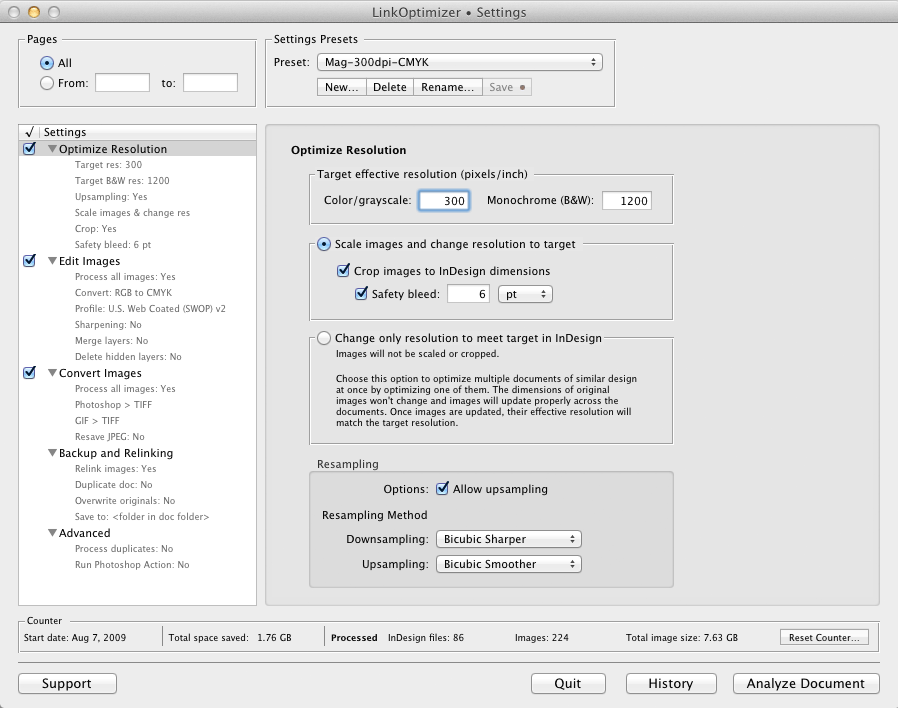
LinkOptimizer works automatically with Photoshop to eliminate the excess image data of InDesign links, perform essential image adjustments and convert image formats. For example, with just a click of a button users can:
* Scale and crop images to match their dimensions in InDesign
* Change their resolution to 300 dpi
* Convert RGB images to CMYK
* Resave JPEG images as TIFF
* Run a Photoshop Action on each image
At the end of processing, LinkOptimizer reimports images to InDesign at 100% in their precise position. As a result, users can save gigabytes of disk space, accelerate document output, reduce job turnaround and cut costs through faster processing.
Pricing and Availability:
LinkOptimizer can be purchased from Zevrix website for $259.95 USD (Light version: $179.95) as well as from authorized resellers. Trial is also available for download. The update is free for LinkOptimizer 4.x users and $130 to upgrade from previous versions. LinkOptimizer is available for Mac OS X 10.6-10.9 and works with Adobe InDesign and Photoshop CS3-CC 2014.
Zevrix Solutions: http://zevrix.com
LinkOptimizer 4.9.17: http://zevrix.com/LinkOptimizer.php
Download LinkOptimizer: http://zevrix.com/LinkOptimizer.dmg
Purchase: http://zevrix.com/store.php
Screenshot: http://zevrix.com/screenshots/lo4/optres-win.gif
Located in Toronto, Canada, Zevrix Solutions provides automation and productivity solutions for Adobe Creative Suite software, PDF and graphic file diagnostics and Microsoft Office on Mac OS. Zevrix is dedicated to help professionals increase their profits through automating everyday tasks, producing error-free documents, saving disk space and cutting production costs. For more information, visit their website. Copyright (C) 2014 Zevrix Solutions. All Rights Reserved.
*******
Link To Article: http://prmac.com/release-id-69006.htm
*******
---------------------------------------------------------------------------------
Note that you can alter delivered distributions at any time.
Login to your account on prMac to alter your channel selection, or to opt-out at any time.
LinkOptimizer for Adobe InDesign Now Supports Creative Cloud 2014 - Published on 07/09/14
Zevrix Solutions has announced LinkOptimizer 4.9.17, a compatibility update to its popular workflow automation solution for Adobe InDesign. LinkOptimizer allows to reduce InDesign link size and speed up processing by eliminating excess image data. The software also performs image adjustments, converts file formats and helps repurpose InDesign files for web and mobile devices. The new version makes LinkOptimizer compatible with the 2014 release of InDesign CC featured as part of Adobe Creative Cloud.
Toronto (ON) Canada - Zevrix Solutions has announced the release of LinkOptimizer 4.9.17, a compatibility update to its popular workflow automation solution for Adobe InDesign. Awarded 4 out of 5 starts by Computer Arts magazine, LinkOptimizer automates complex image manipulation tasks allowing to significantly reduce the size of InDesign links, save processing time and reduce production costs.
The new version makes LinkOptimizer compatible with the recently announced 2014 release of InDesign CC, featured as part of Adobe Creative Cloud. The update is offered free of charge to LinkOptimizer users. The same version of LinkOptimizer can be used with any version of InDesign and Photoshop from CS3 and later.
"This is the best extension I ever purchased for any design app," says Wayne Guy of Edge Graphics in Van Nuys, California. "It saves hours of time, tediously replacing linked images, resizing, batch processing. Worth every penny... If you're a designer or production artist that works with large inDesign files with lots of images, like catalogs or magazines, you need this."
LinkOptimizer works automatically with Photoshop to eliminate the excess image data of InDesign links, perform essential image adjustments and convert image formats. For example, with just a click of a button users can:
* Scale and crop images to match their dimensions in InDesign
* Change their resolution to 300 dpi
* Convert RGB images to CMYK
* Resave JPEG images as TIFF
* Run a Photoshop Action on each image
At the end of processing, LinkOptimizer reimports images to InDesign at 100% in their precise position. As a result, users can save gigabytes of disk space, accelerate document output, reduce job turnaround and cut costs through faster processing.
Pricing and Availability:
LinkOptimizer can be purchased from Zevrix website for $259.95 USD (Light version: $179.95) as well as from authorized resellers. Trial is also available for download. The update is free for LinkOptimizer 4.x users and $130 to upgrade from previous versions. LinkOptimizer is available for Mac OS X 10.6-10.9 and works with Adobe InDesign and Photoshop CS3-CC 2014.
Zevrix Solutions: http://zevrix.com
LinkOptimizer 4.9.17: http://zevrix.com/LinkOptimizer.php
Download LinkOptimizer: http://zevrix.com/LinkOptimizer.dmg
Purchase: http://zevrix.com/store.php
Screenshot: http://zevrix.com/screenshots/lo4/optres-win.gif
Located in Toronto, Canada, Zevrix Solutions provides automation and productivity solutions for Adobe Creative Suite software, PDF and graphic file diagnostics and Microsoft Office on Mac OS. Zevrix is dedicated to help professionals increase their profits through automating everyday tasks, producing error-free documents, saving disk space and cutting production costs. For more information, visit their website. Copyright (C) 2014 Zevrix Solutions. All Rights Reserved.
*******
Link To Article: http://prmac.com/release-id-69006.htm
*******
---------------------------------------------------------------------------------
Note that you can alter delivered distributions at any time.
Login to your account on prMac to alter your channel selection, or to opt-out at any time.
Find Hidden Money 1.0.1 for iOS - New Hide and Seek Game
A new article has been published at prMac.
Find Hidden Money 1.0.1 for iOS - New Hide and Seek Game - Published on 07/09/14
Linkyun Game has announced that Find Hidden Money 1.0.1, one of the best free hidden object games in 2014, has been drop to free worldwide on 1st July 2014 for iPhone and iPad devices. In this exciting point & click adventure, Travel the five continents, and pick up money over 50 must-see view sites all over the world. Gameplay is ridiculously simple: you tap dollar bills as many as you can to earn money. You just tap and tap, and hope your wrist doesn't break off.
Beijing, China - Linkyun Game has announced that Find Hidden Money 1.0.1, one of the best free hidden object games in 2014, has been drop to free worldwide on 1st July 2014 for iPhone and iPad devices. If you're sick of "Flappy Bird" and "2048," check out "Find Hidden Money."
This is an exciting point & click adventure. Can you find all of the hidden money? Travel the five continents, and pick up money over 50 must-see view sites all over the world. Gameplay is ridiculously simple: you tap dollar bills as many as you can to earn money. And find them all on the fine photos around the world. You just tap and tap, and hope your wrist doesn't break off.
Feature Highlights:
* 150 beautifully designed and challenging levels
* 50 world-famous view site pictures
* 10+ challenging game play conditions, such as falling flowers, snowing
* 10+ different types of money to collect
* Three handy and helpful tools, i.e. Magnifier, Time Machine, Radar
Device Requirements:
* iPhone, iPad, and iPod touch
* Requires iOS 5.0 or later
* 48.7 MB
Pricing and Availability:
Ready your iPhone, to travel world and find money! For a limited time, Find Hidden Money 1.0.1 is Free and available worldwide exclusively through the App Store in the Games category.
Linkyun Game: http://www.linkyun.com
Find Hidden Money 1.0.1: https://itunes.apple.com/app/find-hidden-money/id816730978
Screenshot: http://a4.mzstatic.com/us/r30/Purple/v4/e4/a1/8c/e4a18c40-a0bc-f419-3e6e-ccc0d32f54c4/screen480x480.jpeg
App Icon: http://a2.mzstatic.com/us/r30/Purple/v4/c3/11/50/c311502b-cecf-092b-c4f1-878d168eb7be/mzl.umwpycec.175x175-75.jpg
Located in Beijing, China, Linkyun Game was founded in 2008, with a focuse on mobile game development. Starting as a value added service in the mobile industry, the company has been exploring new opportunities of innovation and creation. We intend to bring the fun and excitement back to different genres, by focusing on its core values: intuitive gameplay, tight controls, frustration-free design, and competitive, skill-based challenge. All Material and Software (C) Copyright 2008-2014 Linkyun Game. All Rights Reserved. Apple, the Apple logo, iPhone, iPod and iPad are registered trademarks of Apple Inc. in the U.S. and/or other countries. Other trademarks and registered trademarks may be the property of their respective owners.
*******
Link To Article: http://prmac.com/release-id-69003.htm
*******
---------------------------------------------------------------------------------
Note that you can alter delivered distributions at any time.
Login to your account on prMac to alter your channel selection, or to opt-out at any time.
Find Hidden Money 1.0.1 for iOS - New Hide and Seek Game - Published on 07/09/14
Linkyun Game has announced that Find Hidden Money 1.0.1, one of the best free hidden object games in 2014, has been drop to free worldwide on 1st July 2014 for iPhone and iPad devices. In this exciting point & click adventure, Travel the five continents, and pick up money over 50 must-see view sites all over the world. Gameplay is ridiculously simple: you tap dollar bills as many as you can to earn money. You just tap and tap, and hope your wrist doesn't break off.
Beijing, China - Linkyun Game has announced that Find Hidden Money 1.0.1, one of the best free hidden object games in 2014, has been drop to free worldwide on 1st July 2014 for iPhone and iPad devices. If you're sick of "Flappy Bird" and "2048," check out "Find Hidden Money."
This is an exciting point & click adventure. Can you find all of the hidden money? Travel the five continents, and pick up money over 50 must-see view sites all over the world. Gameplay is ridiculously simple: you tap dollar bills as many as you can to earn money. And find them all on the fine photos around the world. You just tap and tap, and hope your wrist doesn't break off.
Feature Highlights:
* 150 beautifully designed and challenging levels
* 50 world-famous view site pictures
* 10+ challenging game play conditions, such as falling flowers, snowing
* 10+ different types of money to collect
* Three handy and helpful tools, i.e. Magnifier, Time Machine, Radar
Device Requirements:
* iPhone, iPad, and iPod touch
* Requires iOS 5.0 or later
* 48.7 MB
Pricing and Availability:
Ready your iPhone, to travel world and find money! For a limited time, Find Hidden Money 1.0.1 is Free and available worldwide exclusively through the App Store in the Games category.
Linkyun Game: http://www.linkyun.com
Find Hidden Money 1.0.1: https://itunes.apple.com/app/find-hidden-money/id816730978
Screenshot: http://a4.mzstatic.com/us/r30/Purple/v4/e4/a1/8c/e4a18c40-a0bc-f419-3e6e-ccc0d32f54c4/screen480x480.jpeg

App Icon: http://a2.mzstatic.com/us/r30/Purple/v4/c3/11/50/c311502b-cecf-092b-c4f1-878d168eb7be/mzl.umwpycec.175x175-75.jpg

Located in Beijing, China, Linkyun Game was founded in 2008, with a focuse on mobile game development. Starting as a value added service in the mobile industry, the company has been exploring new opportunities of innovation and creation. We intend to bring the fun and excitement back to different genres, by focusing on its core values: intuitive gameplay, tight controls, frustration-free design, and competitive, skill-based challenge. All Material and Software (C) Copyright 2008-2014 Linkyun Game. All Rights Reserved. Apple, the Apple logo, iPhone, iPod and iPad are registered trademarks of Apple Inc. in the U.S. and/or other countries. Other trademarks and registered trademarks may be the property of their respective owners.
*******
Link To Article: http://prmac.com/release-id-69003.htm
*******
---------------------------------------------------------------------------------
Note that you can alter delivered distributions at any time.
Login to your account on prMac to alter your channel selection, or to opt-out at any time.
Subscribe to:
Posts (Atom)