A new article has been published at prMac.
Doctor Who News iPhone App WhoNews Regnerates with new look - Published on 07/25/14
UK based independent developer, Paul Gee today announces WhoNews 3.5.2 for iPhone, iPad and iPod touch. The latest version of the #1 Doctor Who news app includes a brand new user interface with website previews, dynamic backgrounds and new iPad newspaper-like layout. WhoNews collates the latest news on Doctor Who from over 140 of the top Doctor Who websites, blogs, podcasts and artists every 15 minutes, 24 hours a day.
Cowden, United Kingdom - Paul Gee today is proud to announce the release of WhoNews 3.5.2. The latest version of the #1 Doctor Who news app includes a brand new user interface with website previews, dynamic backgrounds and new iPad newspaper-like layout. WhoNews collates the latest news on Doctor Who from over 140 of the top Doctor Who websites, blogs, podcasts and artists every 15 minutes, 24 hours a day.
WhoNews and WhoNews Lite (the free ad-based version) brings the latest news from over 140 of the top Doctor Who websites in one easy to use application.
WhoNews keeps fans up to speed with very latest news on the Doctor's adventures in time and space. As the new series of Doctor Who launches in August and the Doctor Who team embark on a world tour, there has never been a better time to download WhoNews.
With WhoNews the user is guaranteed to know the latest news and gossip on the world's oldest science fiction TV series. WhoNews checks the top news sites including the official BBC sites, Facebook page as well as Kasterborous and the hugely popular Peter Capaldi News every 15 minutes for new articles.
Paul Gee, developer of WhoNews, said, "It's amazing to think that nearly 5 years on WhoNews is still the number one Doctor Who news app and has become a part of the daily routine for thousands fans all across the world. In that time over 95 million news notifications have been sent and over 68,000 tweets sent via the @Who_News twitter account. It is solely down to the passion and energy of the fans that WhoNews can deliver fresh content everyday."
The original and most comprehensive Doctor Who news apps is available on iOS, Android, BlackBerry and Windows Phone.
WhoNews for iOS includes the following features:
* One universal app for iPhone, iPad and iPod touch buy once and use on all your devices
* Most recent news, blogs, podcasts and special/art views - time ordered and drawn from over 140 websites
* Dedicated Official Doctor Who stream - tracks multiple BBC sites and Facebook
* News is downloaded in bulk from over 140 sites. A resilient server compiles the latest news every 15 minutes ready to be downloaded by WhoNews
* Bookmark your favourite news for rapid access
* Email/SMS/iMessage and post articles to Facebook, Twitter, Google Reader, Evernote, Tumbler, Pinboard, Pocket, Readibility, Diigo and Vkontakte
Device Requirements:
* iPhone 3GS/4/4S/5, iPod touch (5th generation) and all iPad devices
* Requires iOS 6.1 or later
* Universal app optimized for display on all iOS devices
* 21.8 MB
Pricing and Availability:
WhoNews 3.5.2 is available in the App Store for $0.99/0.69 GBP. WhoNews Lite 2.5.2 is free to download and available worldwide exclusively through the App Store in the News category. For more information visit their website, or follow on twitter @Who_News.
Doctor Who WhoNews 3.5.2: http://www.who-news.com
Purchase and Download: https://itunes.apple.com/app/doctor-who-whonews/id324696860
WhoNews Sites: http://www.who-news.com/sites/sites.html
Screenshots 1: http://a5.mzstatic.com/eu/r30/Purple4/v4/0f/37/08/0f370826-acea-cf3a-864e-6fbb8d4afd36/screen568x568.jpeg
Screenshot 2: http://a4.mzstatic.com/eu/r30/Purple6/v4/13/76/53/137653df-c812-71af-d227-cc5b09986e99/screen568x568.jpeg
App Icon: http://www.who-news.com/2048%20x%202048.png
Located in Cowden, Kent, Paul Gee has over 20 years experience developing software for a range of mobile platforms and is a full-time software engineer. After winning the HotUKDeals 2009 iPhone programming competition he embarked on combining his love of Doctor Who with his talent for software development. Before turning his skills on developing applications for the iPhone and iPod touch he spent over 12 years working for a top research and development defence company, designing and build cutting edge wearable computing solutions for the armed forces. In 2013 Paul developed the official BBC Doctor Who: EyeStalk app transforming the camera on iOS devices into the EyeStalk of a Dalek. Copyright (C) 2014 Paul Gee. All Rights Reserved. Apple, the Apple logo, iPhone and iPod are registered trademarks of Apple Inc. in the U.S. and/or other countries.
*******
Link To Article: http://prmac.com/release-id-69422.htm
*******
---------------------------------------------------------------------------------
Note that you can alter delivered distributions at any time.
Login to your account on prMac to alter your channel selection, or to opt-out at any time.



Mercury Intermedia Launches Crossly for iPhone and iPod touch
A new article has been published at prMac.
Mercury Intermedia Launches Crossly for iPhone and iPod touch - Published on 07/25/14
Nashville based Mercury Intermedia today introduces Crossly 1.0, a free competitive crosswords game for iOS devices. Crossly combines the classic crossword format with head-to-head competition, as two players race to occupy the board with each correct answer. Crossly leverages Apple's Game Center to connect players with friends, and draws from tens of thousands of clues curated by respected crossword constructor Ben Tausig to randomly generate unique boards on the fly for optimized replay value.
Nashville, Tennessee - Mercury Intermedia, one of the world's leading mobile development and design agencies, today announced the launch of Crossly, a free competitive crosswords game for iPhone and iPod touch. Crossly marks the first direct-to-consumer release for Mercury Intermedia and combines the classic crossword format with head-to-head competition, as two players race to occupy the board with each correct answer.
"We're thrilled to release Crossly for iPhone and iPod touch," said Stephen Tallent, President and CTO, Mercury Intermedia. "Crosswords is already the most popular and well known word game in the world, and Crossly's easy gameplay and friendly competition will endear the game to a whole new audience."
Crossly leverages Apple's Game Center to connect players with friends, and draws from tens of thousands of clues curated by respected crossword constructor Ben Tausig to randomly generate unique boards on the fly for optimized replay value. Crossly's clean design and fluid animations, along with the following features, create an experience that word game enthusiasts will love:
Penciling: Penciling allows players to work on the board at any time, changing answers and adjusting their strategy as more words are completed. All penciled words are saved, even when the app is offline.
Peeks: For hard-to-guess clues, players may use one Peek per turn to reveal a letter of their choice. That letter is only visible to the player who initiates the Peek. Bonus Peeks are awarded for completing games and sharing Crossly via social media, or Peek Packs may be purchased in-app for Crossly's most avid fans.
Steal & Taunt: When a player misses a word, their opponent may choose to steal for an extra turn and the chance to send a personalized photo Taunt. In the interest of privacy, Taunts may only be sent between Game Center friends.
Passing: If a player gets stuck, they may choose to pass their turn. In order to advance gameplay, a single letter is randomly revealed on the board to both players when a turn is passed.
Accessibility: Apple's VoiceOver technology is fully integrated into every aspect of gameplay, making Crossly one of the most robust crossword experiences for people with visual disabilities.
About Ben Tausig:
Ben Tausig is the author of Penguin Classics Crossword Puzzles, Gonzo Crosswords, and Crosswords from the Underground: 72 Puzzles from Alternative Newspapers. He is a freelance puzzle constructor living in New York City. He creates a weekly feature called 'Ink Well' distributed in alternative weeklies across the continent in addition to editing the weekly American Values Club xword (avxwords.com). He has a PhD in Ethnomusicology.
Device Requirements:
* iPhone, iPad, and iPod touch
* Requires iOS 7.0 or later
* 10.1 MB
Pricing and Availability:
Crossly 1.0 is Free and available worldwide exclusively through the App Store in the Games category. Users may play as many games as they want for free, or upgrade to the ad-free Premium Mode for the "pay what you want" price of $.99, $1.99 or $2.99. Premium Mode also includes 15 additional Peeks and access to colorful themes to personalize the Crossly game experience. For additional information, visit their website and follow them on Twitter or Facebook.
Mercury Intermedia: http://mercury.io
Crossly 1.0: http://cross.ly
Download from iTunes: https://itunes.apple.com/app/id871860021
Screenshot: http://a4.mzstatic.com/us/r30/Purple4/v4/39/d1/ba/39d1ba94-5b7d-2d07-d8b8-8d9809e80c3a/screen568x568.jpeg
App Icon: http://a1508.phobos.apple.com/us/r30/Purple/v4/65/4a/1f/654a1f73-da2c-d69c-17e4-4acf68e3b576/mzl.dzvpajfh.png
Press Kit (zip): http://cross.ly/presskit.zip
Mercury Intermedia builds mobile applications and platforms for commercial media, retail, enterprise and higher education institutions. Clients such as Comcast, USA Today, Fox News, Showtime, Urban Outfitters, SAP and University of Mississippi have relied on Mercury to create top-rated mobile experiences for iOS and Android. Frequently featured and highlighted on the App Store and Google Play, Mercury's apps have been downloaded more than 85 million times and are consistently ranked #1, receiving accolades from the media and users alike. Powering these apps is Mercury's M3 content engine, which has served billions of requests and notifications to date. Founded in 1995, Mercury is headquartered in Nashville, TN. All Material and Software (C) Copyright 2014 Mercury Intermedia. All Rights Reserved. Apple, the Apple logo, iPhone, iPod and iPad are registered trademarks of Apple Inc. in the U.S. and/or other countries. Other trademarks and registered trademarks may be the property of
their respective owners.
*******
Link To Article: http://prmac.com/release-id-69421.htm
*******
---------------------------------------------------------------------------------
Note that you can alter delivered distributions at any time.
Login to your account on prMac to alter your channel selection, or to opt-out at any time.
Mercury Intermedia Launches Crossly for iPhone and iPod touch - Published on 07/25/14
Nashville based Mercury Intermedia today introduces Crossly 1.0, a free competitive crosswords game for iOS devices. Crossly combines the classic crossword format with head-to-head competition, as two players race to occupy the board with each correct answer. Crossly leverages Apple's Game Center to connect players with friends, and draws from tens of thousands of clues curated by respected crossword constructor Ben Tausig to randomly generate unique boards on the fly for optimized replay value.
Nashville, Tennessee - Mercury Intermedia, one of the world's leading mobile development and design agencies, today announced the launch of Crossly, a free competitive crosswords game for iPhone and iPod touch. Crossly marks the first direct-to-consumer release for Mercury Intermedia and combines the classic crossword format with head-to-head competition, as two players race to occupy the board with each correct answer.
"We're thrilled to release Crossly for iPhone and iPod touch," said Stephen Tallent, President and CTO, Mercury Intermedia. "Crosswords is already the most popular and well known word game in the world, and Crossly's easy gameplay and friendly competition will endear the game to a whole new audience."
Crossly leverages Apple's Game Center to connect players with friends, and draws from tens of thousands of clues curated by respected crossword constructor Ben Tausig to randomly generate unique boards on the fly for optimized replay value. Crossly's clean design and fluid animations, along with the following features, create an experience that word game enthusiasts will love:
Penciling: Penciling allows players to work on the board at any time, changing answers and adjusting their strategy as more words are completed. All penciled words are saved, even when the app is offline.
Peeks: For hard-to-guess clues, players may use one Peek per turn to reveal a letter of their choice. That letter is only visible to the player who initiates the Peek. Bonus Peeks are awarded for completing games and sharing Crossly via social media, or Peek Packs may be purchased in-app for Crossly's most avid fans.
Steal & Taunt: When a player misses a word, their opponent may choose to steal for an extra turn and the chance to send a personalized photo Taunt. In the interest of privacy, Taunts may only be sent between Game Center friends.
Passing: If a player gets stuck, they may choose to pass their turn. In order to advance gameplay, a single letter is randomly revealed on the board to both players when a turn is passed.
Accessibility: Apple's VoiceOver technology is fully integrated into every aspect of gameplay, making Crossly one of the most robust crossword experiences for people with visual disabilities.
About Ben Tausig:
Ben Tausig is the author of Penguin Classics Crossword Puzzles, Gonzo Crosswords, and Crosswords from the Underground: 72 Puzzles from Alternative Newspapers. He is a freelance puzzle constructor living in New York City. He creates a weekly feature called 'Ink Well' distributed in alternative weeklies across the continent in addition to editing the weekly American Values Club xword (avxwords.com). He has a PhD in Ethnomusicology.
Device Requirements:
* iPhone, iPad, and iPod touch
* Requires iOS 7.0 or later
* 10.1 MB
Pricing and Availability:
Crossly 1.0 is Free and available worldwide exclusively through the App Store in the Games category. Users may play as many games as they want for free, or upgrade to the ad-free Premium Mode for the "pay what you want" price of $.99, $1.99 or $2.99. Premium Mode also includes 15 additional Peeks and access to colorful themes to personalize the Crossly game experience. For additional information, visit their website and follow them on Twitter or Facebook.
Mercury Intermedia: http://mercury.io
Crossly 1.0: http://cross.ly
Download from iTunes: https://itunes.apple.com/app/id871860021
Screenshot: http://a4.mzstatic.com/us/r30/Purple4/v4/39/d1/ba/39d1ba94-5b7d-2d07-d8b8-8d9809e80c3a/screen568x568.jpeg

App Icon: http://a1508.phobos.apple.com/us/r30/Purple/v4/65/4a/1f/654a1f73-da2c-d69c-17e4-4acf68e3b576/mzl.dzvpajfh.png

Press Kit (zip): http://cross.ly/presskit.zip
Mercury Intermedia builds mobile applications and platforms for commercial media, retail, enterprise and higher education institutions. Clients such as Comcast, USA Today, Fox News, Showtime, Urban Outfitters, SAP and University of Mississippi have relied on Mercury to create top-rated mobile experiences for iOS and Android. Frequently featured and highlighted on the App Store and Google Play, Mercury's apps have been downloaded more than 85 million times and are consistently ranked #1, receiving accolades from the media and users alike. Powering these apps is Mercury's M3 content engine, which has served billions of requests and notifications to date. Founded in 1995, Mercury is headquartered in Nashville, TN. All Material and Software (C) Copyright 2014 Mercury Intermedia. All Rights Reserved. Apple, the Apple logo, iPhone, iPod and iPad are registered trademarks of Apple Inc. in the U.S. and/or other countries. Other trademarks and registered trademarks may be the property of
their respective owners.
*******
Link To Article: http://prmac.com/release-id-69421.htm
*******
---------------------------------------------------------------------------------
Note that you can alter delivered distributions at any time.
Login to your account on prMac to alter your channel selection, or to opt-out at any time.
How Files-Finder Edition can help you manage files on iPad
A new article has been published at prMac.
How Files-Finder Edition can help you manage files on iPad - Published on 07/25/14
Appsicum brings Files-Finder Edition 1.0 to the iPad. It doesn't matter in which field you are working or belongs to; you always need software and apps to make your work easier. Files � Finder Edition is a complete file organization tool which provides capabilities of document and excels editing. This app will make your work easier as if a you never had problem of file management. Files � Finder Edition will help you when you are out of the office and need to complete office work.
Jaipur, India - Which apps do you have in your iOS device? It might be a common question among friends and collages. Generally, everyone has chat apps in their device. However, there are some other apps on iTunes store that one should have in their iPhone, iPad , Android and iPod Touch. Therefore, we're discussing file manager app, file explorer app, file transfer/sharing app and PDF viewer app. Users which came from Windows or Mac generally face problems in managing files on iPad as they couldn't find options of searching and exploring. Files-finder edition is best solution for all iPad users who face problems in searching and organizing their document and files on iPad; a file manager/ explorer app for iPad.
Files-Finder edition helps users to manage their documents and files on iPad along with several other functions. This app not only works as a file/media manager, but also with having documents and excel editing capabilities. It supports almost all types of files such as Doc, Docx, RTF, TXT and many more. It displays built-in previewer for most of the file types so that its previews can be seen before operating for another function. Files-finder edition sync files on cloud networks such as Google drive, Dropbox and sugarsync. To edit documents and excel you can use Google Drive. Shortcuts can be created to access frequently use files. It has In-built browser with pre-loaded bookmarks and file downloaded manager. This app has several other features which are very important to count as well.
Features:
* Lock important files and folders for security purpose
* Browser's search function integrity with Twitter, Wikipedia and Google. You just need to type a word in browser address bar and it will search directly on Google, Wikipedia and Twitter
* Files and folders can be sorted according to tags, file size, file type, date and categorizes
* This app also allows using multiple sorting parameters at once, so files can be search instantly with file type and date instead of applying single filter or sorting method every time
* This file manager app lets you create easy voice notes
* Its download manager is equipped with background file download support
* Files can be shared over WiFi medium with enable option of password protection
* Gesture based copy/move option
* It has option of Built-in Zip creation and extraction so that documents can be zipped and extract from zipped folders
* Desktop like status bar
Device Requirements:
* Compatible with iPad
* Requires iOS 5.0 or later
* 5.3 MB
Pricing and Availability:
Files � Finder Edition 1.0 is $5.99 USD (or equivalent amount in other currencies) and available worldwide exclusively through the App Store in the Productivity category.
Files � Finder Edition 1.0: http://appsicum.com/
Purchase and Download from iTunes: https://itunes.apple.com/app/files-finder-edition/id733259837
Screenshot 1: http://a2.mzstatic.com/us/r30/Purple4/v4/56/7b/ad/567bad7c-ede7-e530-b54f-ad1cd755fa19/screen480x480.jpeg
Screenshot 2: http://a1.mzstatic.com/us/r30/Purple4/v4/1d/2d/8e/1d2d8ee4-19cf-0a7b-7f6a-348b72314125/screen480x480.jpeg
Screenshot 3: http://a2.mzstatic.com/us/r30/Purple/v4/58/25/75/58257513-fd6c-483b-cdfd-174fe12e4f6f/screen480x480.jpeg
Appiscum is a motley crew of developers and we are trying to build apps which will make your life easier and somehow help reducing the stress. It can be humor, a tool to simplify your life or may be a game! We won't promise you sun, moon or stars but yes, we can promise that we will think differently & keep on building as many cool apps as we can. If you have any ideas or suggestions, we will love to hear that. All Material and Software (C) Copyright 2014 Appiscum. All Rights Reserved. Apple, the Apple logo, iPhone, iPod and iPad are registered trademarks of Apple Inc. in the U.S. and/or other countries. Other trademarks and registered trademarks may be the property of their respective owners.
*******
Link To Article: http://prmac.com/release-id-69413.htm
*******
---------------------------------------------------------------------------------
Note that you can alter delivered distributions at any time.
Login to your account on prMac to alter your channel selection, or to opt-out at any time.
How Files-Finder Edition can help you manage files on iPad - Published on 07/25/14
Appsicum brings Files-Finder Edition 1.0 to the iPad. It doesn't matter in which field you are working or belongs to; you always need software and apps to make your work easier. Files � Finder Edition is a complete file organization tool which provides capabilities of document and excels editing. This app will make your work easier as if a you never had problem of file management. Files � Finder Edition will help you when you are out of the office and need to complete office work.
Jaipur, India - Which apps do you have in your iOS device? It might be a common question among friends and collages. Generally, everyone has chat apps in their device. However, there are some other apps on iTunes store that one should have in their iPhone, iPad , Android and iPod Touch. Therefore, we're discussing file manager app, file explorer app, file transfer/sharing app and PDF viewer app. Users which came from Windows or Mac generally face problems in managing files on iPad as they couldn't find options of searching and exploring. Files-finder edition is best solution for all iPad users who face problems in searching and organizing their document and files on iPad; a file manager/ explorer app for iPad.
Files-Finder edition helps users to manage their documents and files on iPad along with several other functions. This app not only works as a file/media manager, but also with having documents and excel editing capabilities. It supports almost all types of files such as Doc, Docx, RTF, TXT and many more. It displays built-in previewer for most of the file types so that its previews can be seen before operating for another function. Files-finder edition sync files on cloud networks such as Google drive, Dropbox and sugarsync. To edit documents and excel you can use Google Drive. Shortcuts can be created to access frequently use files. It has In-built browser with pre-loaded bookmarks and file downloaded manager. This app has several other features which are very important to count as well.
Features:
* Lock important files and folders for security purpose
* Browser's search function integrity with Twitter, Wikipedia and Google. You just need to type a word in browser address bar and it will search directly on Google, Wikipedia and Twitter
* Files and folders can be sorted according to tags, file size, file type, date and categorizes
* This app also allows using multiple sorting parameters at once, so files can be search instantly with file type and date instead of applying single filter or sorting method every time
* This file manager app lets you create easy voice notes
* Its download manager is equipped with background file download support
* Files can be shared over WiFi medium with enable option of password protection
* Gesture based copy/move option
* It has option of Built-in Zip creation and extraction so that documents can be zipped and extract from zipped folders
* Desktop like status bar
Device Requirements:
* Compatible with iPad
* Requires iOS 5.0 or later
* 5.3 MB
Pricing and Availability:
Files � Finder Edition 1.0 is $5.99 USD (or equivalent amount in other currencies) and available worldwide exclusively through the App Store in the Productivity category.
Files � Finder Edition 1.0: http://appsicum.com/
Purchase and Download from iTunes: https://itunes.apple.com/app/files-finder-edition/id733259837
Screenshot 1: http://a2.mzstatic.com/us/r30/Purple4/v4/56/7b/ad/567bad7c-ede7-e530-b54f-ad1cd755fa19/screen480x480.jpeg

Screenshot 2: http://a1.mzstatic.com/us/r30/Purple4/v4/1d/2d/8e/1d2d8ee4-19cf-0a7b-7f6a-348b72314125/screen480x480.jpeg

Screenshot 3: http://a2.mzstatic.com/us/r30/Purple/v4/58/25/75/58257513-fd6c-483b-cdfd-174fe12e4f6f/screen480x480.jpeg

Appiscum is a motley crew of developers and we are trying to build apps which will make your life easier and somehow help reducing the stress. It can be humor, a tool to simplify your life or may be a game! We won't promise you sun, moon or stars but yes, we can promise that we will think differently & keep on building as many cool apps as we can. If you have any ideas or suggestions, we will love to hear that. All Material and Software (C) Copyright 2014 Appiscum. All Rights Reserved. Apple, the Apple logo, iPhone, iPod and iPad are registered trademarks of Apple Inc. in the U.S. and/or other countries. Other trademarks and registered trademarks may be the property of their respective owners.
*******
Link To Article: http://prmac.com/release-id-69413.htm
*******
---------------------------------------------------------------------------------
Note that you can alter delivered distributions at any time.
Login to your account on prMac to alter your channel selection, or to opt-out at any time.
Free Games Bandit: New and Unique Way to Discover Free Games and Apps
A new article has been published at prMac.
Free Games Bandit: New and Unique Way to Discover Free Games and Apps - Published on 07/25/14
Want to find apps and games that you have never seen before? Born out of the frustration in dealing with the App Stores as both developers and app users, Free Games Bandit is a novel and unique solution to making app discovery for iPhone, iPad and Android both fun and fair. Free Games Bandit solves the discovery problem by presenting a collection of random free games and apps to the user. Developers, want to get your apps discovered on a level playing field?
Sheffield, United Kingdom - Free Games Bandit was born out of the frustration with dealing with the app stores as both developers and app users. Free Games Bandit is a novel and unique solution to making app discovery for iPhone, iPad and Android both fun and fair. Free Games Bandit is free for both developers and users.
Q) App discovery is a negative user experience but how can it be fixed?
A) First and foremost, as avid mobile app users and gamers many of us have a MASSIVE gripe with the current crop of app stores such as Google Play and Apple's App Store. When users visit Google Play and the iOS App Store they are presented with apps and games that they have seen a hundred of times before, its disheartening. App users can visit every day for a week, sometimes even months and see the same old stuff there.
What's going on? Users are forced to drill down categories for hours just to find an app or game that's interesting or different. Search isn't much better when results are always massively skewed towards ... that's right, the most popular apps that we've all seen a hundred times before. App discovery at the moment on the major app stores is a mind numbingly boring and frustrating experience and its time for something new.
This is where Free Games Bandit helps, it solves this discovery problem by presenting a collection of random free games and apps to you the user. It also presents them in an exciting interactive format that feels very game like, making app discovery much more FUN.
Q) With most apps sat rotting at the bottom of the app stores how can developers level the playing field?
A) So as a mobile game and app developer you spent what seems like an age and a hefty budget on creating your latest marvel app or game and put it on the app store, did a little PR, posted to various gaming forums, told your friends, announced on Facebook / Twitter etc, maybe a little paid advertising etc.., but where are the sales and downloads?
A recent study showed that 80% of most new apps and games get buried at the bottom of the app store under the immense weight of the app stores themselves. What are your chances as a developer of being discovered? That's right, virtually none, which is evident with how many apps on the app stores have fewer than 100 downloads. Exposure on the app stores is heavily weighted towards the developers that have the most popular apps. Who are these developers? They are the developers with the large marketing budgets that can push high volume users with existing services, which further pushes them up the charts towards fame and you down towards obscurity.
What would your downloads look like if you as a developer had the same chance of getting your app discovered as all other developers? Free Games Bandit provides a level playing field with an equal chance of all apps being discovered by users. Apps are chosen at random and presented to the user via an interactive game-like presentation, providing a fun and memorable way for users to discover apps that they would never otherwise see.
So if you are an app user / gamer looking for a new, unique and interesting way of finding new apps and games or a mobile developer looking for a fair and free way of promoting your apps then pop over to Free Games Bandit. There is no sign up required to use or add apps.
Free Games Bandit: http://www.freegamesbandit.com/
Screenshot: http://www.freegamesbandit.com/images/freegamesbandit_med.jpg
Icon: http://www.freegamesbandit.com/images/icon_196x196.png
Free Games Bandit is a new UK company born out of the frustration of dealing with the App Stores as both developers and app consumers. All Material and Software (C) Copyright 2014 Free Games Bandit. All Rights Reserved. Apple, the Apple logo, iPhone, iPod and iPad are registered trademarks of Apple Inc. in the U.S. and/or other countries. Other trademarks and registered trademarks may be the property of their respective owners.
*******
Link To Article: http://prmac.com/release-id-69370.htm
*******
---------------------------------------------------------------------------------
Note that you can alter delivered distributions at any time.
Login to your account on prMac to alter your channel selection, or to opt-out at any time.
Free Games Bandit: New and Unique Way to Discover Free Games and Apps - Published on 07/25/14
Want to find apps and games that you have never seen before? Born out of the frustration in dealing with the App Stores as both developers and app users, Free Games Bandit is a novel and unique solution to making app discovery for iPhone, iPad and Android both fun and fair. Free Games Bandit solves the discovery problem by presenting a collection of random free games and apps to the user. Developers, want to get your apps discovered on a level playing field?
Sheffield, United Kingdom - Free Games Bandit was born out of the frustration with dealing with the app stores as both developers and app users. Free Games Bandit is a novel and unique solution to making app discovery for iPhone, iPad and Android both fun and fair. Free Games Bandit is free for both developers and users.
Q) App discovery is a negative user experience but how can it be fixed?
A) First and foremost, as avid mobile app users and gamers many of us have a MASSIVE gripe with the current crop of app stores such as Google Play and Apple's App Store. When users visit Google Play and the iOS App Store they are presented with apps and games that they have seen a hundred of times before, its disheartening. App users can visit every day for a week, sometimes even months and see the same old stuff there.
What's going on? Users are forced to drill down categories for hours just to find an app or game that's interesting or different. Search isn't much better when results are always massively skewed towards ... that's right, the most popular apps that we've all seen a hundred times before. App discovery at the moment on the major app stores is a mind numbingly boring and frustrating experience and its time for something new.
This is where Free Games Bandit helps, it solves this discovery problem by presenting a collection of random free games and apps to you the user. It also presents them in an exciting interactive format that feels very game like, making app discovery much more FUN.
Q) With most apps sat rotting at the bottom of the app stores how can developers level the playing field?
A) So as a mobile game and app developer you spent what seems like an age and a hefty budget on creating your latest marvel app or game and put it on the app store, did a little PR, posted to various gaming forums, told your friends, announced on Facebook / Twitter etc, maybe a little paid advertising etc.., but where are the sales and downloads?
A recent study showed that 80% of most new apps and games get buried at the bottom of the app store under the immense weight of the app stores themselves. What are your chances as a developer of being discovered? That's right, virtually none, which is evident with how many apps on the app stores have fewer than 100 downloads. Exposure on the app stores is heavily weighted towards the developers that have the most popular apps. Who are these developers? They are the developers with the large marketing budgets that can push high volume users with existing services, which further pushes them up the charts towards fame and you down towards obscurity.
What would your downloads look like if you as a developer had the same chance of getting your app discovered as all other developers? Free Games Bandit provides a level playing field with an equal chance of all apps being discovered by users. Apps are chosen at random and presented to the user via an interactive game-like presentation, providing a fun and memorable way for users to discover apps that they would never otherwise see.
So if you are an app user / gamer looking for a new, unique and interesting way of finding new apps and games or a mobile developer looking for a fair and free way of promoting your apps then pop over to Free Games Bandit. There is no sign up required to use or add apps.
Free Games Bandit: http://www.freegamesbandit.com/
Screenshot: http://www.freegamesbandit.com/images/freegamesbandit_med.jpg

Icon: http://www.freegamesbandit.com/images/icon_196x196.png

Free Games Bandit is a new UK company born out of the frustration of dealing with the App Stores as both developers and app consumers. All Material and Software (C) Copyright 2014 Free Games Bandit. All Rights Reserved. Apple, the Apple logo, iPhone, iPod and iPad are registered trademarks of Apple Inc. in the U.S. and/or other countries. Other trademarks and registered trademarks may be the property of their respective owners.
*******
Link To Article: http://prmac.com/release-id-69370.htm
*******
---------------------------------------------------------------------------------
Note that you can alter delivered distributions at any time.
Login to your account on prMac to alter your channel selection, or to opt-out at any time.
Photo Book Flip lets selfie lovers instantly create photo books on iPad
A new article has been published at prMac.
Photo Book Flip lets selfie lovers instantly create photo books on iPad - Published on 07/25/14
California based Apperie, LLC has introduced Photo Book Flip 1.0.1, offering the easiest way to let selfie lovers, Instagramers and shutterbugs instantly create beautiful digital photo books on their iPad. With just a tap, Photo Book Flip intelligently lays out photos into minimalist templates inspired by photo-centric magazines. Unlike most photo apps that only let you browse photos one at a time, the app lets users flip through their own photos as if they were a beautiful photo magazine.
Arcadia, California - Apperie, LLC has announced the release of Photo Book Flip 1.0.1, offering the easiest way to let selfie lovers, Instagramers, and shutterbugs instantly create beautiful digital photo books on their iPad. With just a tap, Photo Book Flip intelligently lays out photos into minimalist templates inspired by photo-centric magazines like Kinfolk. Unlike most photo apps that only let you browse photos one at a time, the app lets users flip through their own photos as if they were a beautiful photo magazine. With Photo Book Flip users can experience their photos in a more appealing, different, and delightful way.
Within a week of its launch, users have claimed the app as working "like magic" and making browsing photos more enjoyable. Photo Book Flip has ranked in Top 50 Paid Photo and Video apps for iPad in six countries including Canada and New Zealand.
Features
* Instantly turn your photos and albums on your iPad into beautiful digital photo books
* Works with Photo Stream. Create photo books on iPad with the photos taken with iPhone and other iDevices
* Minimalist design inspired by photo-centric magazines and books to spotlight your photos
* Over 20+ page layout variations used automagically to create photo books
* Flip through photos like a book in the iBooks app
Device Requirements:
* Compatible with iPad
* Requires iOS 7.0 or later
* 0.5 MB
Pricing and Availability:
Photo Book Flip 1.0.1 is currently priced at $1.99 USD and available through the App Store globally in the Photo and Video category.
Photo Book Flip 1.0.1: http://www.apperie.com/
Purchase and Download: https://itunes.apple.com/app/photo-book-flip/id878612533
Media Assets: http://www.apperie.com/press-kit/
Apperie, LLC is an app development company based in Los Angeles and Tokyo. Our first app is Photo Book Flip for iPad. We believe life is filled with wonderful and colorful moments, and we created the app to celebrate those moments in everyone's life. Copyright 2014 Apperie, LLC. All rights reserved. All registered trademarks including Apple, iPhone, iPod, and iPad belong to their respective companies.
*******
Link To Article: http://prmac.com/release-id-69368.htm
*******
---------------------------------------------------------------------------------
Note that you can alter delivered distributions at any time.
Login to your account on prMac to alter your channel selection, or to opt-out at any time.
Photo Book Flip lets selfie lovers instantly create photo books on iPad - Published on 07/25/14
California based Apperie, LLC has introduced Photo Book Flip 1.0.1, offering the easiest way to let selfie lovers, Instagramers and shutterbugs instantly create beautiful digital photo books on their iPad. With just a tap, Photo Book Flip intelligently lays out photos into minimalist templates inspired by photo-centric magazines. Unlike most photo apps that only let you browse photos one at a time, the app lets users flip through their own photos as if they were a beautiful photo magazine.
Arcadia, California - Apperie, LLC has announced the release of Photo Book Flip 1.0.1, offering the easiest way to let selfie lovers, Instagramers, and shutterbugs instantly create beautiful digital photo books on their iPad. With just a tap, Photo Book Flip intelligently lays out photos into minimalist templates inspired by photo-centric magazines like Kinfolk. Unlike most photo apps that only let you browse photos one at a time, the app lets users flip through their own photos as if they were a beautiful photo magazine. With Photo Book Flip users can experience their photos in a more appealing, different, and delightful way.
Within a week of its launch, users have claimed the app as working "like magic" and making browsing photos more enjoyable. Photo Book Flip has ranked in Top 50 Paid Photo and Video apps for iPad in six countries including Canada and New Zealand.
Features
* Instantly turn your photos and albums on your iPad into beautiful digital photo books
* Works with Photo Stream. Create photo books on iPad with the photos taken with iPhone and other iDevices
* Minimalist design inspired by photo-centric magazines and books to spotlight your photos
* Over 20+ page layout variations used automagically to create photo books
* Flip through photos like a book in the iBooks app
Device Requirements:
* Compatible with iPad
* Requires iOS 7.0 or later
* 0.5 MB
Pricing and Availability:
Photo Book Flip 1.0.1 is currently priced at $1.99 USD and available through the App Store globally in the Photo and Video category.
Photo Book Flip 1.0.1: http://www.apperie.com/
Purchase and Download: https://itunes.apple.com/app/photo-book-flip/id878612533
Media Assets: http://www.apperie.com/press-kit/
Apperie, LLC is an app development company based in Los Angeles and Tokyo. Our first app is Photo Book Flip for iPad. We believe life is filled with wonderful and colorful moments, and we created the app to celebrate those moments in everyone's life. Copyright 2014 Apperie, LLC. All rights reserved. All registered trademarks including Apple, iPhone, iPod, and iPad belong to their respective companies.
*******
Link To Article: http://prmac.com/release-id-69368.htm
*******
---------------------------------------------------------------------------------
Note that you can alter delivered distributions at any time.
Login to your account on prMac to alter your channel selection, or to opt-out at any time.
Pick-Up-Sticks-Classic Mikado released for iPhone and iPad
A new article has been published at prMac.
Pick-Up-Sticks-Classic Mikado released for iPhone and iPad - Published on 07/25/14
Hamburg based, LITE Games has introduced Mikado 1.0, its new game title developed for iPhone, iPad and iPod touch devices. Mikado is the world-renowned game of skill involving wooden sticks, and now there is finally a smartphone version of this classic. The perfect game for short breaks and long time-outs, this modern variation of the Mikado game offers two exciting single-player modes and can be played by up to four people in the multi-player mode.
Hamburg, Germany - While it is pretty safe to say that the game has been inspired by ancient Asian oracles, the exact origins of the game are as unknown as its original name. By what is known the game made it's way to the United States via Hungary in the 1930s. Depending on language and culture the game is also known as "Zitterwackl" (Austria), "Shangai" (Italy) or "Spellicans" (England). Nowadays its most widely known title is the same as the name of the highest scoring (blue) stick: Mikado!
It took a long time, but now LITE Games has released a digital version of Mikado for iPhone and iPad. This brand new version offers four fun game-modes for every occasion:
* The classic single-player mode for a relaxed and relaxing session of picking up those sticks
* The fast paced Arcade mode demanding a precise, quick eye-finger coordination
* The multi-player mode letting up to 4 players play on the same device
* The bonus game "Pick a Loser" quickly helps to determine who's buying the next round of drinks
With its extensive settings options Mikado can be modified to suit the preferences of every player and players can compete internationally via Apple's Game Center. Intuitive gameplay, super-responsive multi-touch controls, and beautifully rendered 3D graphics make Mikado the perfect game for short breaks and long time-outs.
Device Requirements:
* iPhone, iPad, and iPod touch
* Requires iOS 5.0 or later
* 17.6 MB
Pricing and Availability:
Mikado 1.0 is Free and available worldwide exclusively through the App Store in the Games category.
LITE Games: http://www.lite-games.com
Mikado 1.0: https://itunes.apple.com/app/mikado/id854533600
Screenshot: http://a1.mzstatic.com/us/r30/Purple/v4/f3/48/da/f348da60-c4be-4e60-06b9-804cd7d33554/screen480x480.jpeg
App Icon: http://a5.mzstatic.com/us/r30/Purple2/v4/38/2a/a7/382aa787-12d9-bfc8-2dd5-bdbf7ed28a22/mzl.ppspquik.175x175-75.jpg
Press Kit (zip): http://www.lite-games.com/Press/LG_Mikado_PressPack.zip
LITE Games is the causal games label of Intent Software GmbH & Co. KG, founded in 2001 and based in Hamburg, Germany. LITE Games focusses on developing and publishing "casual classics" for the mobile operating systems Apple iOS and Android. The constantly expanding portfolio of LITE Games currently comprises more than 30 games, the emphasisis lies on the adaption of classical game concepts, and contains card games like Rummy, Canasta or Crazy Eights as well as board-, brain- or dice- games. With more than 7 million downloads and many top ranking in the Apple App Store LITE Games is one of the leading providers of mobile casual games. All Material and Software (C) Copyright 2014 Intent Software. All Rights Reserved. Apple, the Apple logo, iPhone, iPod and iPad are registered trademarks of Apple Inc. in the U.S. and/or other countries. Other trademarks and registered trademarks may be the property of their respective owners.
*******
Link To Article: http://prmac.com/release-id-69369.htm
*******
---------------------------------------------------------------------------------
Note that you can alter delivered distributions at any time.
Login to your account on prMac to alter your channel selection, or to opt-out at any time.
Pick-Up-Sticks-Classic Mikado released for iPhone and iPad - Published on 07/25/14
Hamburg based, LITE Games has introduced Mikado 1.0, its new game title developed for iPhone, iPad and iPod touch devices. Mikado is the world-renowned game of skill involving wooden sticks, and now there is finally a smartphone version of this classic. The perfect game for short breaks and long time-outs, this modern variation of the Mikado game offers two exciting single-player modes and can be played by up to four people in the multi-player mode.
Hamburg, Germany - While it is pretty safe to say that the game has been inspired by ancient Asian oracles, the exact origins of the game are as unknown as its original name. By what is known the game made it's way to the United States via Hungary in the 1930s. Depending on language and culture the game is also known as "Zitterwackl" (Austria), "Shangai" (Italy) or "Spellicans" (England). Nowadays its most widely known title is the same as the name of the highest scoring (blue) stick: Mikado!
It took a long time, but now LITE Games has released a digital version of Mikado for iPhone and iPad. This brand new version offers four fun game-modes for every occasion:
* The classic single-player mode for a relaxed and relaxing session of picking up those sticks
* The fast paced Arcade mode demanding a precise, quick eye-finger coordination
* The multi-player mode letting up to 4 players play on the same device
* The bonus game "Pick a Loser" quickly helps to determine who's buying the next round of drinks
With its extensive settings options Mikado can be modified to suit the preferences of every player and players can compete internationally via Apple's Game Center. Intuitive gameplay, super-responsive multi-touch controls, and beautifully rendered 3D graphics make Mikado the perfect game for short breaks and long time-outs.
Device Requirements:
* iPhone, iPad, and iPod touch
* Requires iOS 5.0 or later
* 17.6 MB
Pricing and Availability:
Mikado 1.0 is Free and available worldwide exclusively through the App Store in the Games category.
LITE Games: http://www.lite-games.com
Mikado 1.0: https://itunes.apple.com/app/mikado/id854533600
Screenshot: http://a1.mzstatic.com/us/r30/Purple/v4/f3/48/da/f348da60-c4be-4e60-06b9-804cd7d33554/screen480x480.jpeg

App Icon: http://a5.mzstatic.com/us/r30/Purple2/v4/38/2a/a7/382aa787-12d9-bfc8-2dd5-bdbf7ed28a22/mzl.ppspquik.175x175-75.jpg

Press Kit (zip): http://www.lite-games.com/Press/LG_Mikado_PressPack.zip
LITE Games is the causal games label of Intent Software GmbH & Co. KG, founded in 2001 and based in Hamburg, Germany. LITE Games focusses on developing and publishing "casual classics" for the mobile operating systems Apple iOS and Android. The constantly expanding portfolio of LITE Games currently comprises more than 30 games, the emphasisis lies on the adaption of classical game concepts, and contains card games like Rummy, Canasta or Crazy Eights as well as board-, brain- or dice- games. With more than 7 million downloads and many top ranking in the Apple App Store LITE Games is one of the leading providers of mobile casual games. All Material and Software (C) Copyright 2014 Intent Software. All Rights Reserved. Apple, the Apple logo, iPhone, iPod and iPad are registered trademarks of Apple Inc. in the U.S. and/or other countries. Other trademarks and registered trademarks may be the property of their respective owners.
*******
Link To Article: http://prmac.com/release-id-69369.htm
*******
---------------------------------------------------------------------------------
Note that you can alter delivered distributions at any time.
Login to your account on prMac to alter your channel selection, or to opt-out at any time.
Eltima Software releases new USB Network Gate
A new article has been published at prMac.
Eltima Software releases new USB Network Gate - Published on 07/25/14
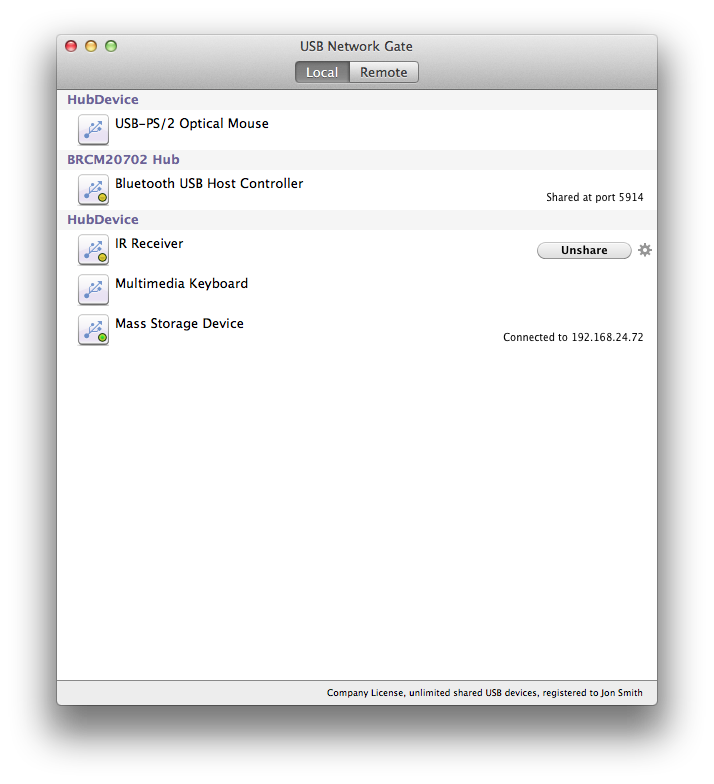
Eltima Software has announced the release of USB Network Gate 3.1 for Mac OS X. The application allows sharing USB devices over network, using these devices on virtual machines and much more. Mass storage devices are now shared and disconnected with proper saving of data on USB device. Version 3.1 offers OS X Mavericks support, experimental support for OS X Yosemite, numerous improvements in sharing and managing USB devices.
Frankfurt, Germany - Eltima Software has announced a new release of USB Network Gate 3.1 for Mac OS X. USB Network Gate is an application that allows you to connect your local USB devices to other computers over network - Internet/LAN/WAN, no matter how far they are. And vice versa - the program allows you access shared USB devices on other machines all over the world as if they were physically plugged into your computer.
New version of USB Network Gate 3.1 offers numerous new features:
* Support for OS X Mavericks (10.9)
* Experimental support for OS X Yosemite (10.10)
* Mass storage devices are now shared and disconnected with proper saving of data on USB device
* Computer name of the client currently occupying the device is now visible to other clients
* Some improvements to avoid unexpected system reboot and the daemon hanging and more
With USB Network Gate for Mac it is possible to:
* Connect remote USB devices to your Mac over network - Ethernet, Internet, LAN, WAN
* Share a USB device from your Mac with multiple computers
* Use USB devices on virtual machines & blade servers
* Access USB over RDP (Remote Desktop Protocol)
* Share your device with anyone at any location
USB Network Gate is a cross-platform technology, which makes it possible to share USB devices over the network among Mac, Windows, and Linux computers.
Pricing and Availability:
USB Network Gate runs on Mac OS 10.7 and higher and costs $89.95 (USD) for sharing 1 USB device. Please note that USB Network Gate by Eltima is licensed according to the number of shared USB devices. Every server computer (where the device will be shared) requires a separate license. Client modules of USB Network Gate are free.
USB Network Gate 3.1: http://www.eltima.com/products/usb-over-network-mac/
Download: http://www.eltima.com/download/usb_network_gate.dmg
Purchase: http://www.eltima.com/purchase/usb-over-ethernet/
Screenshot: http://www.eltima.com/images/screenshots/usb-over-network-mac/usb-over-network.png
App Icon: http://www.eltima.com/files/USB_icon.png
Eltima Software is a global software Development Company, specializing primarily in serial communication, mobile and flash software for Mac OS and Windows. Eltima Software delivers top-notch solutions having a friendly team of 40 professionals. Copyright (C) 2014 Eltima Software. All Rights Reserved. Apple, the Apple logo and Macintosh are registered trademarks of Apple Inc. in the U.S. and/or other countries.
*******
Link To Article: http://prmac.com/release-id-69367.htm
*******
---------------------------------------------------------------------------------
Note that you can alter delivered distributions at any time.
Login to your account on prMac to alter your channel selection, or to opt-out at any time.
Eltima Software releases new USB Network Gate - Published on 07/25/14
Eltima Software has announced the release of USB Network Gate 3.1 for Mac OS X. The application allows sharing USB devices over network, using these devices on virtual machines and much more. Mass storage devices are now shared and disconnected with proper saving of data on USB device. Version 3.1 offers OS X Mavericks support, experimental support for OS X Yosemite, numerous improvements in sharing and managing USB devices.
Frankfurt, Germany - Eltima Software has announced a new release of USB Network Gate 3.1 for Mac OS X. USB Network Gate is an application that allows you to connect your local USB devices to other computers over network - Internet/LAN/WAN, no matter how far they are. And vice versa - the program allows you access shared USB devices on other machines all over the world as if they were physically plugged into your computer.
New version of USB Network Gate 3.1 offers numerous new features:
* Support for OS X Mavericks (10.9)
* Experimental support for OS X Yosemite (10.10)
* Mass storage devices are now shared and disconnected with proper saving of data on USB device
* Computer name of the client currently occupying the device is now visible to other clients
* Some improvements to avoid unexpected system reboot and the daemon hanging and more
With USB Network Gate for Mac it is possible to:
* Connect remote USB devices to your Mac over network - Ethernet, Internet, LAN, WAN
* Share a USB device from your Mac with multiple computers
* Use USB devices on virtual machines & blade servers
* Access USB over RDP (Remote Desktop Protocol)
* Share your device with anyone at any location
USB Network Gate is a cross-platform technology, which makes it possible to share USB devices over the network among Mac, Windows, and Linux computers.
Pricing and Availability:
USB Network Gate runs on Mac OS 10.7 and higher and costs $89.95 (USD) for sharing 1 USB device. Please note that USB Network Gate by Eltima is licensed according to the number of shared USB devices. Every server computer (where the device will be shared) requires a separate license. Client modules of USB Network Gate are free.
USB Network Gate 3.1: http://www.eltima.com/products/usb-over-network-mac/
Download: http://www.eltima.com/download/usb_network_gate.dmg
Purchase: http://www.eltima.com/purchase/usb-over-ethernet/
Screenshot: http://www.eltima.com/images/screenshots/usb-over-network-mac/usb-over-network.png
App Icon: http://www.eltima.com/files/USB_icon.png

Eltima Software is a global software Development Company, specializing primarily in serial communication, mobile and flash software for Mac OS and Windows. Eltima Software delivers top-notch solutions having a friendly team of 40 professionals. Copyright (C) 2014 Eltima Software. All Rights Reserved. Apple, the Apple logo and Macintosh are registered trademarks of Apple Inc. in the U.S. and/or other countries.
*******
Link To Article: http://prmac.com/release-id-69367.htm
*******
---------------------------------------------------------------------------------
Note that you can alter delivered distributions at any time.
Login to your account on prMac to alter your channel selection, or to opt-out at any time.
Subscribe to:
Posts (Atom)