A new article has been published at prMac.
Major update to the multi award-winning app Easy Studio - Published on 08/09/14
Paris based 3 Elles Interactive has released Easy Studio - Animate with shapes!, a major update to its multi-award-winning app for iOS devices. Ideal for both children and adults, Easy Studio is a marvellously innovative app that offers a unique and simple User Interface to create animated films. Animated films can be saved in a library and can also be shared. In this version, the biggest feature adds the possibility to add a soundtrack to animations.
Paris, France - 3 Elles Interactive, an independent educational app developer, has released Easy Studio - Animate with shapes! for iOS, a major update on one of their award-winning apps. This free update introduces highly awaited features:
* The first one allows users to add a soundtrack to their animations with 3 options: music notes, sound effects or a microphone. Creating an animated film was easy, now films can be improved by the addition of sound.
* Users will also notice 5 new functions in the expert mode: undo/redo, bring to front/backward and mirror. These functions are the result of user feedback and should delight current and new users.
* Last but not least, 4 new languages were added to the 12 existing ones: Turkish, Traditional Chinese, Danish and Arabic making the app available in 16 languages.
Designed by teachers, Easy Studio is an amazing animation app that uses a simple interface and a step-by-step approach to make the whole family understand the magic of animation. The pre-designed templates, numerous geometric shapes and colors will spark everyone's imagination and encourage the development of creativity.
More than just a drawing app, Easy Studio is an app in which you animate your creations. This app bridges the generation gap and brings together children, parents and grand-parents. Animated films can be saved in a library and can also be shared. Even better, 3 Elles Interactive designed the app so that the file format takes up virtually no memory space - parents be reassured, your iPad will not get saturated!
Easy Studio Offers 2 Modes:
* An "Easy" mode with a tutorial and pre-defined patterns to get comfortable with the process of creating animated films
* An "Expert" mode with more sophisticated options for unlimited design and fun
Recommended for ages 6 to 106, Easy Studio � Animate with shapes! brings endless hours of digital expression and entertainment to all members of the family.
Device Requirements:
* iPhone, iPad, and iPod touch
* Requires iOS 5.1 or later
* Universal Application
* 20.4 MB
Pricing and Availability:
Easy Studio - Animate with shapes! is $3.99 USD (or equivalent amount in other currencies) and available worldwide exclusively through the App Store in the Education category.
Les Trois Elles Interactive: http://lestroiselles.com
Easy Studio - Animate with shapes!: http://lestroiselles.com/index.php/en/our-apps/easy-studio
Purchase and Download: https://itunes.apple.com/app/easy-studio-animate-shapes!/id593847174
YouTube Video: http://www.youtube.com/watch?v=Jlvqz1sR-UI
Screenshot: https://www.flickr.com/photos/126039014@N04/14796820243/
App Icon: https://www.facebook.com/photo.php?fbid=430440613698855&set=pb.205039382905647.-2207520000.1370429506.&type=3&theater
Founded by Montessori teachers who have had years of classroom experience with hundreds of children, Les Trois Elles Interactive is determined to offer qualitative educational apps on iPad and iPhone. Their objective is to provide parents and teachers Montessori based apps to use at home or at school. The Montessori Method relies on building autonomy and self-confidence by letting children do by themselves and offering them self-correcting materials to manipulate and respecting their individual rhythm. Les Trois Elles Interactive, fun digital learning made by teachers. Copyright (C) 2014 Les Trois Elles Interactive. All Rights Reserved. Apple, the Apple logo, iPhone, iPod and iPad are registered trademarks of Apple Inc. in the U.S. and/or other countries.
*******
Link To Article: http://prmac.com/release-id-69681.htm
*******
---------------------------------------------------------------------------------
Note that you can alter delivered distributions at any time.
Login to your account on prMac to alter your channel selection, or to opt-out at any time.

Create the best TinyTap App - Win an iPad mini - All August long
A new article has been published at prMac.
Create the best TinyTap App - Win an iPad mini - All August long - Published on 08/09/14
TinyTap introduces the #AugustApps competition: each week of August, TinyTap will award an iPad mini to the best educational app created. Educators can create learning apps for their classes & share them with kids around the globe in TinyTap's market, plus enter the chance to win an iPad mini. New winners will be announced every week of August. Apps eligible for consideration must teach language, math, science, art, music, or geography lessons intended for a K-6 audience and be shared publicly.
Tel Aviv, Israel - With the 2014-2015 school year fast approaching, teachers everywhere are searching for dynamic new ways to present their lessons and engage their students. While the material might not change dramatically from year to year (2 plus 2 still equals 4), students' attention spans and standards surely do.
Fortunately, you don't need to be a techie in order to digitize your lessons. And you don't need a big budget in order to afford the program to do so. In fact, for the month of August, you could even earn prizes by digitizing your lesson!
TinyTap is excited to introduce the #AugustApps competition: each week of August, TinyTap will award an iPad mini to the best educational app created. Educators can create learning apps for their classes and share them with kids around the globe in TinyTap's market, plus enter the chance to win an iPad mini. New winners will be announced every week of August!
"With a new academic year around the corner, teachers are refreshing their lesson plans regardless. We're encouraging them to do so with TinyTap, and we're rewarding the best apps created," says CEO and co-founder Yogev Shelly.
Apps eligible for consideration must teach language, math, science, art, music, or geography lessons (preference given to Common Core aligned lessons) intended for a K-6 audience and be shared publicly on TinyTap's market.
TinyTap: http://www.tinytap.it
#AugustApps Competition: http://blog.tinytap.it/2014/07/augustapps/
TinyTap Market: http://www.tinytap.it/games/
Download TinyTap from iTunes: https://itunes.apple.com/app/tinytap-make-play-educational/id493868874
Screenshot: http://blog.tinytap.it/wp-content/uploads/2014/07/AugustApps-banner-640x166.jpg
TinyTap is a privately held app development company based in Tel Aviv, Israel. Launched in 2012, the company was founded by Yogev Shelly and Oren Elbaz, who focus on developing authoring tools for educational games. TinyTap's vision is to become the go-to source for sharing and creating fun educational kids games on mobile devices. Copyright (C) 2012-2014 TinyTap. All Rights Reserved. Apple, the Apple logo, iPhone, iPod and iPad are registered trademarks of Apple Inc. in the U.S. and/or other countries.
*******
Link To Article: http://prmac.com/release-id-69680.htm
*******
---------------------------------------------------------------------------------
Note that you can alter delivered distributions at any time.
Login to your account on prMac to alter your channel selection, or to opt-out at any time.
Create the best TinyTap App - Win an iPad mini - All August long - Published on 08/09/14
TinyTap introduces the #AugustApps competition: each week of August, TinyTap will award an iPad mini to the best educational app created. Educators can create learning apps for their classes & share them with kids around the globe in TinyTap's market, plus enter the chance to win an iPad mini. New winners will be announced every week of August. Apps eligible for consideration must teach language, math, science, art, music, or geography lessons intended for a K-6 audience and be shared publicly.
Tel Aviv, Israel - With the 2014-2015 school year fast approaching, teachers everywhere are searching for dynamic new ways to present their lessons and engage their students. While the material might not change dramatically from year to year (2 plus 2 still equals 4), students' attention spans and standards surely do.
Fortunately, you don't need to be a techie in order to digitize your lessons. And you don't need a big budget in order to afford the program to do so. In fact, for the month of August, you could even earn prizes by digitizing your lesson!
TinyTap is excited to introduce the #AugustApps competition: each week of August, TinyTap will award an iPad mini to the best educational app created. Educators can create learning apps for their classes and share them with kids around the globe in TinyTap's market, plus enter the chance to win an iPad mini. New winners will be announced every week of August!
"With a new academic year around the corner, teachers are refreshing their lesson plans regardless. We're encouraging them to do so with TinyTap, and we're rewarding the best apps created," says CEO and co-founder Yogev Shelly.
Apps eligible for consideration must teach language, math, science, art, music, or geography lessons (preference given to Common Core aligned lessons) intended for a K-6 audience and be shared publicly on TinyTap's market.
TinyTap: http://www.tinytap.it
#AugustApps Competition: http://blog.tinytap.it/2014/07/augustapps/
TinyTap Market: http://www.tinytap.it/games/
Download TinyTap from iTunes: https://itunes.apple.com/app/tinytap-make-play-educational/id493868874
Screenshot: http://blog.tinytap.it/wp-content/uploads/2014/07/AugustApps-banner-640x166.jpg

TinyTap is a privately held app development company based in Tel Aviv, Israel. Launched in 2012, the company was founded by Yogev Shelly and Oren Elbaz, who focus on developing authoring tools for educational games. TinyTap's vision is to become the go-to source for sharing and creating fun educational kids games on mobile devices. Copyright (C) 2012-2014 TinyTap. All Rights Reserved. Apple, the Apple logo, iPhone, iPod and iPad are registered trademarks of Apple Inc. in the U.S. and/or other countries.
*******
Link To Article: http://prmac.com/release-id-69680.htm
*******
---------------------------------------------------------------------------------
Note that you can alter delivered distributions at any time.
Login to your account on prMac to alter your channel selection, or to opt-out at any time.
AlphaDigits Top Rated Apps for July 2014
A new article has been published at prMac.
AlphaDigits Top Rated Apps for July 2014 - Published on 08/09/14
AlphaDigits names five top class mobile apps based on the reviews during the month of July 2014. Animals: educational kids game helps children learn the names of over 200 different kinds of animals. Solo Launcher is a free home screen launcher. Download Mail1Click if you are worried about the safety and security of your communications over the internet. SpyWarn seeks to restore your privacy by providing real time protection from malware, viruses. Fox tales: Rocket Run is a unique kind of game.
Long Island, New York - Mobile app review publisher, AlphaDigits has named the top rated apps for July 2014. AlphaDigits names five top class mobile apps every month based on the reviews published in the website during the particular month. This website has now released the names of top rated mobile apps for the month of July.
Animals: Educational Kids Game (5/ 5): Animals: educational kids game is a unique kind of mobile application. This new android app makes learning for kids interesting and more fun. The app is particularly useful to kids between the ages of two to eight years. With this app, children can learn the names of over two hundred different kinds of animals across the globe and at the same time understand or know what these animals look like.
Solo Launcher (4.8/ 5): Solo Launcher offers something unique and new to your phone. This is a new home screen launcher that is absolutely free and you don't have to spend a penny in order to get this application. The app is also very smooth and clean, allowing you to build a special kind of home screen. When it comes to speed, the launcher is above average as there are no major issues pertaining to its working speed.
Mail1Click (4.7/ 5): If you are worried about the safety and security of your communications over the internet then consider downloading Mail1Click. Computer programmers and ethical hackers advise android and iOS users to avoid the default Gmail and Yahoo apps that come preinstalled in their devices due to their level of security or lack thereof. Additionally, Mail1Click provides personal headers in lieu of the regular email headers.
SpyWarn (4.5/ 5): SpyWarn seeks to restore your privacy by providing real time protection from malware, viruses and any attempt by anyone to tap into your calls. The app is pretty unique and unlike many other mobile application it is real and not for entertainment. SpyWarn is more than just antivirus as it offers more than just virus protection. It helps you regain your privacy and keep all the snoops out of your life.
Fox Tales: Rocket Run (4.3/ 5): Fox tales: Rocket Run is a unique kind of game that is filled with action and adventure. Actually the thrill in the game is what is most interesting not to mention the high quality graphics as well as entertaining tunes. It is about having a rocket and flying all the way to space. The game involves Kizu the fox and a rocket that he uses for adventure through space.
Joe Ellen, an Editor at AlphaDigits said, "We are happy to see many Android apps making it to the list this month. We expect this trend to continue." App developers can contact AlphaDigits through the onsite form to get their apps reviewed. They can contact by mail or the contact form to avail other marketing services.
AlphaDigits: http://www.alphadigits.com/
App Review Submission: http://alphadigits.com/submit-app-for-review/
AlphaDigits is a site that has been launched by a few app marketers. Enjoying the support from a handy amount of regular visitors, AlphaDigits provides reviews for iPhone, iPad and Android apps. Copyright (C) 2014 AlphaDigits. All Rights Reserved. Apple, the Apple logo, iPhone, iPod and iPad are registered trademarks of Apple Inc. in the U.S. and/or other countries.
*******
Link To Article: http://prmac.com/release-id-69679.htm
*******
---------------------------------------------------------------------------------
Note that you can alter delivered distributions at any time.
Login to your account on prMac to alter your channel selection, or to opt-out at any time.
AlphaDigits Top Rated Apps for July 2014 - Published on 08/09/14
AlphaDigits names five top class mobile apps based on the reviews during the month of July 2014. Animals: educational kids game helps children learn the names of over 200 different kinds of animals. Solo Launcher is a free home screen launcher. Download Mail1Click if you are worried about the safety and security of your communications over the internet. SpyWarn seeks to restore your privacy by providing real time protection from malware, viruses. Fox tales: Rocket Run is a unique kind of game.
Long Island, New York - Mobile app review publisher, AlphaDigits has named the top rated apps for July 2014. AlphaDigits names five top class mobile apps every month based on the reviews published in the website during the particular month. This website has now released the names of top rated mobile apps for the month of July.
Animals: Educational Kids Game (5/ 5): Animals: educational kids game is a unique kind of mobile application. This new android app makes learning for kids interesting and more fun. The app is particularly useful to kids between the ages of two to eight years. With this app, children can learn the names of over two hundred different kinds of animals across the globe and at the same time understand or know what these animals look like.
Solo Launcher (4.8/ 5): Solo Launcher offers something unique and new to your phone. This is a new home screen launcher that is absolutely free and you don't have to spend a penny in order to get this application. The app is also very smooth and clean, allowing you to build a special kind of home screen. When it comes to speed, the launcher is above average as there are no major issues pertaining to its working speed.
Mail1Click (4.7/ 5): If you are worried about the safety and security of your communications over the internet then consider downloading Mail1Click. Computer programmers and ethical hackers advise android and iOS users to avoid the default Gmail and Yahoo apps that come preinstalled in their devices due to their level of security or lack thereof. Additionally, Mail1Click provides personal headers in lieu of the regular email headers.
SpyWarn (4.5/ 5): SpyWarn seeks to restore your privacy by providing real time protection from malware, viruses and any attempt by anyone to tap into your calls. The app is pretty unique and unlike many other mobile application it is real and not for entertainment. SpyWarn is more than just antivirus as it offers more than just virus protection. It helps you regain your privacy and keep all the snoops out of your life.
Fox Tales: Rocket Run (4.3/ 5): Fox tales: Rocket Run is a unique kind of game that is filled with action and adventure. Actually the thrill in the game is what is most interesting not to mention the high quality graphics as well as entertaining tunes. It is about having a rocket and flying all the way to space. The game involves Kizu the fox and a rocket that he uses for adventure through space.
Joe Ellen, an Editor at AlphaDigits said, "We are happy to see many Android apps making it to the list this month. We expect this trend to continue." App developers can contact AlphaDigits through the onsite form to get their apps reviewed. They can contact by mail or the contact form to avail other marketing services.
AlphaDigits: http://www.alphadigits.com/
App Review Submission: http://alphadigits.com/submit-app-for-review/
AlphaDigits is a site that has been launched by a few app marketers. Enjoying the support from a handy amount of regular visitors, AlphaDigits provides reviews for iPhone, iPad and Android apps. Copyright (C) 2014 AlphaDigits. All Rights Reserved. Apple, the Apple logo, iPhone, iPod and iPad are registered trademarks of Apple Inc. in the U.S. and/or other countries.
*******
Link To Article: http://prmac.com/release-id-69679.htm
*******
---------------------------------------------------------------------------------
Note that you can alter delivered distributions at any time.
Login to your account on prMac to alter your channel selection, or to opt-out at any time.
Pocket Watch, LLC. Releases ActivePrint Cloud Server For Easy Printing
A new article has been published at prMac.
Pocket Watch, LLC. Releases ActivePrint Cloud Server For Easy Printing - Published on 08/09/14
Texas based Pocket Watch, LLC. has released ActivePrint Cloud Server. With this small standalone box almost any USB printer or available network printer will become compatible with iPhones, iPads, and Android devices. This is done by making each printer available through AirPrint, ActivePrint Cloud Print, and Google Cloud Print services simultaneously. Simply plug the ActivePrint Cloud Server in to an internet connected router or a Cable/DSL modem and it is ready to go.
Beaumont, Texas - Since releasing ActivePrint on the popular Apple iOS platform, a huge community of ActivePrint users has been created who are interested in printing from their iPads and iPhones without being limited to a select few models of printers from just one brand. This community has been a great resource for developing the new ActivePrint Cloud Server.
The ActivePrint Cloud Server is a small standalone box that is about the size of a couple of iPhones stacked together and runs on less electricity than most energy efficient lightbulbs. Despite its small size it has a lot of capabilities. Simply plug it in to an internet connected router or a Cable/DSL modem and it is ready to go. Printers can be connected to the ActivePrint Cloud Server either over the Local Area Network or directly to its two USB ports. Once a printer is connected to the Cloud Server that printer is made available to iPhones and iPads through either AirPrint or ActivePrint Cloud Printing Service or to Android and Google Chromebooks through Google Cloud Print service.
The ActivePrint Cloud Server is compatible with network and USB printers from many popular printer manufacturers including HP, Canon, Brother, Xerox, Epson, Lexmark, and many more.
The ActivePrint Cloud Server is available for pre-order for $149.95 from Friday August 1st through August 15th through the website. All pre-orders will be shipped by August 18th and receive Free Shipping.
ActivePrint Cloud Server: http://www.activeprint.net
Purchase: http://mkt.com/pocket-watch-llc/activeprint-cloud-server
Vimeo Video Demo: https://vimeo.com/102263694
Screenshot: http://www.activeprint.net/wp-content/uploads/2014/08/IMG_2175.jpg
Founded in 2002 as Pocket Watch Software by Charles Teel, our company launched what has continued to be our lead product, ActivePrint. After reorganizing Pocket Watch Software to Pocket Watch, LLC. in 2007, we continue the legacy of making technology work for our customers. Copyright (C) 2002-2014, Pocket Watch, LLC. All Rights Reserved. Apple, the Apple logo, iPhone, iPod and iPad are registered trademarks of Apple Inc. in the U.S. and/or other countries.
*******
Link To Article: http://prmac.com/release-id-69678.htm
*******
---------------------------------------------------------------------------------
Note that you can alter delivered distributions at any time.
Login to your account on prMac to alter your channel selection, or to opt-out at any time.
Pocket Watch, LLC. Releases ActivePrint Cloud Server For Easy Printing - Published on 08/09/14
Texas based Pocket Watch, LLC. has released ActivePrint Cloud Server. With this small standalone box almost any USB printer or available network printer will become compatible with iPhones, iPads, and Android devices. This is done by making each printer available through AirPrint, ActivePrint Cloud Print, and Google Cloud Print services simultaneously. Simply plug the ActivePrint Cloud Server in to an internet connected router or a Cable/DSL modem and it is ready to go.
Beaumont, Texas - Since releasing ActivePrint on the popular Apple iOS platform, a huge community of ActivePrint users has been created who are interested in printing from their iPads and iPhones without being limited to a select few models of printers from just one brand. This community has been a great resource for developing the new ActivePrint Cloud Server.
The ActivePrint Cloud Server is a small standalone box that is about the size of a couple of iPhones stacked together and runs on less electricity than most energy efficient lightbulbs. Despite its small size it has a lot of capabilities. Simply plug it in to an internet connected router or a Cable/DSL modem and it is ready to go. Printers can be connected to the ActivePrint Cloud Server either over the Local Area Network or directly to its two USB ports. Once a printer is connected to the Cloud Server that printer is made available to iPhones and iPads through either AirPrint or ActivePrint Cloud Printing Service or to Android and Google Chromebooks through Google Cloud Print service.
The ActivePrint Cloud Server is compatible with network and USB printers from many popular printer manufacturers including HP, Canon, Brother, Xerox, Epson, Lexmark, and many more.
The ActivePrint Cloud Server is available for pre-order for $149.95 from Friday August 1st through August 15th through the website. All pre-orders will be shipped by August 18th and receive Free Shipping.
ActivePrint Cloud Server: http://www.activeprint.net
Purchase: http://mkt.com/pocket-watch-llc/activeprint-cloud-server
Vimeo Video Demo: https://vimeo.com/102263694
Screenshot: http://www.activeprint.net/wp-content/uploads/2014/08/IMG_2175.jpg

Founded in 2002 as Pocket Watch Software by Charles Teel, our company launched what has continued to be our lead product, ActivePrint. After reorganizing Pocket Watch Software to Pocket Watch, LLC. in 2007, we continue the legacy of making technology work for our customers. Copyright (C) 2002-2014, Pocket Watch, LLC. All Rights Reserved. Apple, the Apple logo, iPhone, iPod and iPad are registered trademarks of Apple Inc. in the U.S. and/or other countries.
*******
Link To Article: http://prmac.com/release-id-69678.htm
*******
---------------------------------------------------------------------------------
Note that you can alter delivered distributions at any time.
Login to your account on prMac to alter your channel selection, or to opt-out at any time.
Taxonomy 2 update - File sorting utility for Mac
A new article has been published at prMac.
Taxonomy 2 update - File sorting utility for Mac - Published on 08/09/14
Moscow based developer, Vostok has released Taxonomy 2, the fast and easy-to-use tool for file sorting on Mac OS X. Useful for sorting docs, photos and media, this app allows quick and easy sorting of folders and storing them in order. Taxonomy is indispensable when it is time to clean out the Downloads folder, the Desktop or arrange projects or media. This update contains number of new features like multiple files operations, undo, file renaming and more.
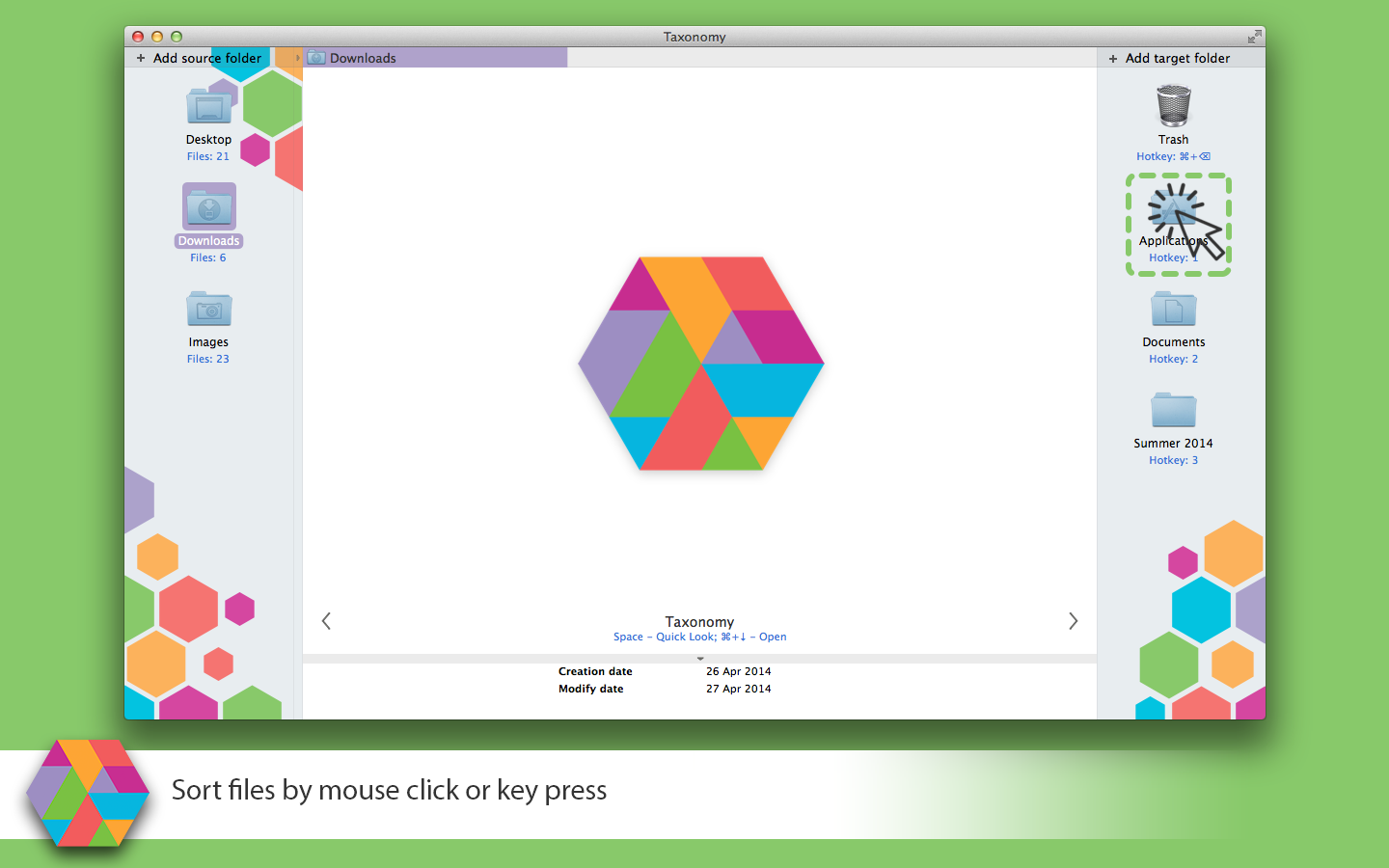
Moscow, Russian Federation - Vostok company has released Taxonomy 2 for Mac OS X. Taxonomy is an application for file sorting. It was specially designed to make file sorting quick and easy. The application shows the contents of the sortable folder file by file with preview and panel with storage folders. It takes nothing but to press a key to put a file to the storage folder or to delete it. And you see the next file in folder.
Taxonomy version 2.0 has a number of new features, which makes file sorting more fast and easy. File arrangement options allows the user to order files by name, type, size, creation and modification dates. The Grid preview helps to move or copy multiple files at a time. It shows file thumbnails and allows to choose thumbnail size and list. And now it's possible to undo actions.
Full list of new features:
* Multiple files operations
* File grid view
* Choose file arrangement type
* Undo operations
* Rename files
* Folder size calculation
* File system changes monitoring
* Show/Hide Background settings
* Show/Hide Hidden files settings
* Permanent file deletion confirmation dialog
* Built-in Help
"Thanks to all users for their feedback and feature suggestions. It's very important for us," says Andrey Zarembo-Godzyatskiy, CEO of Vostok. "Our main goal is to make handy sorting tool keeping in simple."
System Requirements:
* Mac OS X 10.7 and later
* 64-bit processor
* 5 MB
Pricing and Availability:
Taxonomy 2 may be purchased on the Mac App Store and on the Taxonomy website for $4.99 (USD). A 15-day trial version is available.
Taxonomy 2.0: http://taxonomy.vostok-dev.com
Download Trial: http://taxonomy.vostok-dev.com/files/TaxonomyTrial2.dmg
Purchase and Download (MAS): https://itunes.apple.com/us/app/taxonomy/id845291891
YouTube Video (Sample): http://www.youtube.com/watch?v=lT9zMJ3nAig
Screenshot: https://s3.amazonaws.com/taxonomy_app/Taxonomy_screen_04.png
Press Kit (zip): https://s3.amazonaws.com/taxonomy_app/MediaKit.zip
Vostok was founded in 2013 and develops games, mobile and system applications. A separate range of products is aimed at the developers and designers. All Material and Software (C) Copyright 2014 Vostok. All Rights Reserved. Apple, the Apple logo, Macintosh and Mac OS X are registered trademarks of Apple Inc. in the U.S. and/or other countries. Other trademarks and registered trademarks may be the property of their respective owners.
*******
Link To Article: http://prmac.com/release-id-69677.htm
*******
---------------------------------------------------------------------------------
Note that you can alter delivered distributions at any time.
Login to your account on prMac to alter your channel selection, or to opt-out at any time.
Taxonomy 2 update - File sorting utility for Mac - Published on 08/09/14
Moscow based developer, Vostok has released Taxonomy 2, the fast and easy-to-use tool for file sorting on Mac OS X. Useful for sorting docs, photos and media, this app allows quick and easy sorting of folders and storing them in order. Taxonomy is indispensable when it is time to clean out the Downloads folder, the Desktop or arrange projects or media. This update contains number of new features like multiple files operations, undo, file renaming and more.
Moscow, Russian Federation - Vostok company has released Taxonomy 2 for Mac OS X. Taxonomy is an application for file sorting. It was specially designed to make file sorting quick and easy. The application shows the contents of the sortable folder file by file with preview and panel with storage folders. It takes nothing but to press a key to put a file to the storage folder or to delete it. And you see the next file in folder.
Taxonomy version 2.0 has a number of new features, which makes file sorting more fast and easy. File arrangement options allows the user to order files by name, type, size, creation and modification dates. The Grid preview helps to move or copy multiple files at a time. It shows file thumbnails and allows to choose thumbnail size and list. And now it's possible to undo actions.
Full list of new features:
* Multiple files operations
* File grid view
* Choose file arrangement type
* Undo operations
* Rename files
* Folder size calculation
* File system changes monitoring
* Show/Hide Background settings
* Show/Hide Hidden files settings
* Permanent file deletion confirmation dialog
* Built-in Help
"Thanks to all users for their feedback and feature suggestions. It's very important for us," says Andrey Zarembo-Godzyatskiy, CEO of Vostok. "Our main goal is to make handy sorting tool keeping in simple."
System Requirements:
* Mac OS X 10.7 and later
* 64-bit processor
* 5 MB
Pricing and Availability:
Taxonomy 2 may be purchased on the Mac App Store and on the Taxonomy website for $4.99 (USD). A 15-day trial version is available.
Taxonomy 2.0: http://taxonomy.vostok-dev.com
Download Trial: http://taxonomy.vostok-dev.com/files/TaxonomyTrial2.dmg
Purchase and Download (MAS): https://itunes.apple.com/us/app/taxonomy/id845291891
YouTube Video (Sample): http://www.youtube.com/watch?v=lT9zMJ3nAig
Screenshot: https://s3.amazonaws.com/taxonomy_app/Taxonomy_screen_04.png
Press Kit (zip): https://s3.amazonaws.com/taxonomy_app/MediaKit.zip
Vostok was founded in 2013 and develops games, mobile and system applications. A separate range of products is aimed at the developers and designers. All Material and Software (C) Copyright 2014 Vostok. All Rights Reserved. Apple, the Apple logo, Macintosh and Mac OS X are registered trademarks of Apple Inc. in the U.S. and/or other countries. Other trademarks and registered trademarks may be the property of their respective owners.
*******
Link To Article: http://prmac.com/release-id-69677.htm
*******
---------------------------------------------------------------------------------
Note that you can alter delivered distributions at any time.
Login to your account on prMac to alter your channel selection, or to opt-out at any time.
Boj - Musical Mayhem acclaimed book app now available on iPhone
A new article has been published at prMac.
Boj - Musical Mayhem acclaimed book app now available on iPhone - Published on 08/09/14
Box of Frogs Media has released Boj - Musical Mayhem 1.2, part of the acclaimed Boj book app series read by Jason Donovan. Boj is a free-spirited bilby, a rare bandicoot from the Australian Outback, full of creativity and messy fun. Everyone loves his zest for life and adventurous spirit. The Boj series is a celebration of childhood. Boj shows us all how to loosen up, be free-thinking, creative, pro-active and resourceful - and ultimately how to put aside our differences and all get along.
Brighton, United Kingdom - Box of Frogs Media has released Boj Muscial Mayhem, part of the acclaimed Boj book app series read by Jason Donovan. Boj is a free-spirited bilby - a rare bandicoot from the Australian Outback, full of creativity and messy fun! Since popping up as the new kid in Giggly Park, Boj has made a load of new buddies.
Everyone loves his zest for life and adventurous spirit. The Boj series is a celebration of childhood. Boj shows us all how to loosen up, be free-thinking, creative, pro-active and resourceful - and ultimately how to put aside our differences and all get along!
Mr Cloppity is organising the Giggly Gig and Boj and his buddies are all set to perform in front of their parents. When Denzil squish-boshes his guitar, Boj has a Boj-a-Boom idea to get everyone playing again!
This immersive interactive digital appbook from Box of Frogs Media contains no in-app purchasing or external links. It has a Read to Me and Read by Myself option, games within the story and a sing-along at the end of the book.
Boj - Musical Mayhem is the second in a series of Boj appbooks, with Boj - The Collector being the first release, receiving 5* reviews and reaching the Top 5 in the Book charts. Both are available now on the iTunes for iPhone and iPad.
Boj is currently being aired on CBeebies in the UK and is due for release worldwide by the end of September 2014 on Sprout (USA), ABC4Kids Australia, France5, RTEjr and S4C.
Device Requirements:
* iPhone, iPad, and iPod touch
* Requires iOS 5.0 or later
* 103 MB
Pricing and Availability:
Boj - Musical Mayhem 1.2 is $3.99 USD (or equivalent amount in other currencies) and available worldwide exclusively through the App Store in the Books category.
Box Of Frogs Media: http://www.boxoffrogsmedia.com/
Boj - Musical Mayhem 1.2: http://www.boxoffrogsmedia.com/sk_portfolio/boj-musical-mayhem/
Purchase and Download: https://itunes.apple.com/app/boj-musical-mayhem/id840248287
Screenshot: http://www.boxoffrogsmedia.com/wp-content/uploads/2014/05/page-12-870x512.png
App Icon: http://a3.mzstatic.com/us/r30/Purple4/v4/ff/41/0b/ff410b3e-af5a-71c9-d8d5-92852283b8da/mzl.rthofvsz.175x175-75.jpg
Box Of Frogs Media is an independent company based in the exciting seaside city of Brighton developing and publishing appbooks across multiple platforms, primarily for the children's storybook market. We believe in the power of stories to fuel imagination and exploration of the wonderful world we live in; specialising in delivering these stories through the digital format of appbooks. Our team develop and publish iOS interactive appbooks from our studio working as an agency or developing IP - bringing together talent from all over the globe to tell wonderful digital stories. We have developed our own core technology to build appbooks and we continue to invest in new and groundbreaking features to expand our growing portfolio of books. All Material and Software (C) Copyright 2014 Box Of Frogs Media. All Rights Reserved. Apple, the Apple logo, iPhone, iPod and iPad are registered trademarks of Apple Inc. in the U.S. and/or other countries. Other trademarks and registered trademarks
may be the property of their respective owners.
*******
Link To Article: http://prmac.com/release-id-69676.htm
*******
---------------------------------------------------------------------------------
Note that you can alter delivered distributions at any time.
Login to your account on prMac to alter your channel selection, or to opt-out at any time.
Boj - Musical Mayhem acclaimed book app now available on iPhone - Published on 08/09/14
Box of Frogs Media has released Boj - Musical Mayhem 1.2, part of the acclaimed Boj book app series read by Jason Donovan. Boj is a free-spirited bilby, a rare bandicoot from the Australian Outback, full of creativity and messy fun. Everyone loves his zest for life and adventurous spirit. The Boj series is a celebration of childhood. Boj shows us all how to loosen up, be free-thinking, creative, pro-active and resourceful - and ultimately how to put aside our differences and all get along.
Brighton, United Kingdom - Box of Frogs Media has released Boj Muscial Mayhem, part of the acclaimed Boj book app series read by Jason Donovan. Boj is a free-spirited bilby - a rare bandicoot from the Australian Outback, full of creativity and messy fun! Since popping up as the new kid in Giggly Park, Boj has made a load of new buddies.
Everyone loves his zest for life and adventurous spirit. The Boj series is a celebration of childhood. Boj shows us all how to loosen up, be free-thinking, creative, pro-active and resourceful - and ultimately how to put aside our differences and all get along!
Mr Cloppity is organising the Giggly Gig and Boj and his buddies are all set to perform in front of their parents. When Denzil squish-boshes his guitar, Boj has a Boj-a-Boom idea to get everyone playing again!
This immersive interactive digital appbook from Box of Frogs Media contains no in-app purchasing or external links. It has a Read to Me and Read by Myself option, games within the story and a sing-along at the end of the book.
Boj - Musical Mayhem is the second in a series of Boj appbooks, with Boj - The Collector being the first release, receiving 5* reviews and reaching the Top 5 in the Book charts. Both are available now on the iTunes for iPhone and iPad.
Boj is currently being aired on CBeebies in the UK and is due for release worldwide by the end of September 2014 on Sprout (USA), ABC4Kids Australia, France5, RTEjr and S4C.
Device Requirements:
* iPhone, iPad, and iPod touch
* Requires iOS 5.0 or later
* 103 MB
Pricing and Availability:
Boj - Musical Mayhem 1.2 is $3.99 USD (or equivalent amount in other currencies) and available worldwide exclusively through the App Store in the Books category.
Box Of Frogs Media: http://www.boxoffrogsmedia.com/
Boj - Musical Mayhem 1.2: http://www.boxoffrogsmedia.com/sk_portfolio/boj-musical-mayhem/
Purchase and Download: https://itunes.apple.com/app/boj-musical-mayhem/id840248287
Screenshot: http://www.boxoffrogsmedia.com/wp-content/uploads/2014/05/page-12-870x512.png

App Icon: http://a3.mzstatic.com/us/r30/Purple4/v4/ff/41/0b/ff410b3e-af5a-71c9-d8d5-92852283b8da/mzl.rthofvsz.175x175-75.jpg

Box Of Frogs Media is an independent company based in the exciting seaside city of Brighton developing and publishing appbooks across multiple platforms, primarily for the children's storybook market. We believe in the power of stories to fuel imagination and exploration of the wonderful world we live in; specialising in delivering these stories through the digital format of appbooks. Our team develop and publish iOS interactive appbooks from our studio working as an agency or developing IP - bringing together talent from all over the globe to tell wonderful digital stories. We have developed our own core technology to build appbooks and we continue to invest in new and groundbreaking features to expand our growing portfolio of books. All Material and Software (C) Copyright 2014 Box Of Frogs Media. All Rights Reserved. Apple, the Apple logo, iPhone, iPod and iPad are registered trademarks of Apple Inc. in the U.S. and/or other countries. Other trademarks and registered trademarks
may be the property of their respective owners.
*******
Link To Article: http://prmac.com/release-id-69676.htm
*******
---------------------------------------------------------------------------------
Note that you can alter delivered distributions at any time.
Login to your account on prMac to alter your channel selection, or to opt-out at any time.
CADintosh 8.0 - High Performance 2D CAD Program Significantly Updated
A new article has been published at prMac.
CADintosh 8.0 - High Performance 2D CAD Program Significantly Updated - Published on 08/08/14
Lemke Software GmbH today announces CADintosh 8.0, a significant update to its high performance 2D CAD program for Mac OS X. Designed especially for Technical Draftsmen and Designers, CADintosh includes a wide variety of tools to develop technical, mechanical, and architectural drawings. Completely rewritten in Cocoa, version 8.0 includes many enhanced and updated features including support of 64-bit, sandboxing (App Store version only) and complete Unicode support.
Peine, Germany - Longtime Macintosh developer and publisher, Lemke Software GmbH today is pleased to announce the release and immediate availability of CADintosh 8.0, a significant update to its high performance 2D CAD program for Mac OS X. Designed especially for Technical Draftsmen and Designers, CADintosh includes a wide variety of tools to develop professional technical, mechanical, and architectural drawings.
CADintosh includes many workflow improvement and usability advantages. Pre-settings are saved for each drawing and the number of elements that can be used is limited only by the available memory of the OS. Version 8.0 includes a new intuitive one window interface.
Feature Highlights:
* Updated and simplified User Interface
* The number of elements is only limited by the available memory
* Saves pre-settings for each drawing
* 8 pens with freely definable line widths and line colors
* 6 different line types
* Line widths from 0.0 to 99.99 mm with each element desginated a different color and width
* Functions available for lines, circles, dimensioning, hatching, X lines, etc.
* Allows 32,000 groups
* Supports 1,024 layers
* Complex layer management
* Import and export of DXF, HPGL, IGES and PDF
* Unicode support
* Support for symbol libraries for the import and export of symbols
* Alternative units (i.e. inches)
* Runs natively in OS X
* Support of retina displays
"CADintosh, designed for 2D technical drawings, is a great drafting tool for Mac users," says Narinder Dogra of Mac Guild (6 Aug 2005). "CADintosh is loaded with tools! With so many tools and options at an engineer's disposal, creating 2D drawings is sheer joy!"
CADintosh provides the user with a wide variety of design tools at their disposal. Each drawing created in CADintosh is composed of layers that can be conveniently grouped and organized. CADintosh allows up to 1,024 layers and 32,000 groups. Users can quickly and easily create lines, circles, text, dimensions, X-lines, hatching, and set scale within their drawing. CADintosh includes 8 different pens of varying widths, colors, and styles. There are also 6 different lines types available including full line, dotted line, chain line, dotted line with two dots, zigzag line, and short dotted line. In individual mode, lines widths vary from 0.0 to 99.99 mm and each element can be designated a different color and width. Each function can be conveniently changed by accessing drop-down menus at the top of the drawing.
A native MAC OS X application, CADintosh supports the import and export of several file types including DXF, HPGL, IGES and PDF. Although CADintosh includes internal symbols, registered users can also import and export symbol libraries that can be utilized in their design. CADintosh also allows users to save symbols they've created in an archive. CADintosh projects can be created in metric or imperial units.
Completely rewritten in Cocoa, version 8.0 includes many enhanced and updated features. CADintosh now supports fullscreen and most other Cocoa services. There is also support for 64-bit and Unicode. Additionally, many internal bugs were fixed and dialogs simplified. In the MAS version of CADintosh, sandboxing support is also supplied.
"Twenty years ago, I began developing CADintosh with friends I met years on a programming course at an adult education center," Thorsten Lemke, president of Lemke Software explains. "Today, we are specialists in various areas and continue to inspire and augment one another. Although two members of our team are no longer involved, the rest of us continue to meet. Every Friday. To make CADintosh better and more powerful for our customers." He adds, "CADintosh delivers the most professional and well thought-out features for all your design requirements - all for an unbeatable price and representing an excellent value."
Language Support:
* English, Danish, French, German, Italian, Japanese, Spanish, Portuguese
Device Requirements:
* OS X 10.7 or later
* 22.7 MB
Pricing and Availability:
CADintosh 8.0 is only $33.99 (USD) and available worldwide through the Mac App Store in the Graphics & Design category. It can also be directly purchased online from the Lemkesoft website for $32.00 (USD).
Lemkesoft: http://www.lemkesoft.com/
CADintosh 8.0: http://www.lemkesoft.de/en/products/cadintosh/
Purchase and Download (MAS): https://itunes.apple.com/app/cadintosh-x/id494275914
Purchase from Lemkesoft: http://www.lemkesoft.de/en/products/cadintosh/download/
Screenshot: http://www.lemkesoft.de/uploads/pics/cadintoshschnappschuss001_k_01.jpg
Application Icon: http://a4.mzstatic.com/us/r30/Purple/v4/2f/e6/8b/2fe68b26-f1ef-7079-9e90-735ce1ea9bec/cadintosh.175x175-75.png
Based in Peine, Germany, Lemke Software GmbH is a developer and publisher of Macintosh software. Founded by Thorsten Lemke in 2002, the main focus and passion of Lemke Software is centered on the maintenance and further development of GraphicConverter. Lemke Software also develops individual solutions for special customer requirements. All Material and Software (C) Copyright 2014 Lemke Software GmbH. All Rights Reserved. Apple, the Apple logo, Macintosh and Mac OS X are registered trademarks of Apple Inc. in the U.S. and/or other countries. Other trademarks and registered trademarks may be the property of their respective owners.
*******
Link To Article: http://prmac.com/release-id-69726.htm
*******
---------------------------------------------------------------------------------
Note that you can alter delivered distributions at any time.
Login to your account on prMac to alter your channel selection, or to opt-out at any time.
CADintosh 8.0 - High Performance 2D CAD Program Significantly Updated - Published on 08/08/14
Lemke Software GmbH today announces CADintosh 8.0, a significant update to its high performance 2D CAD program for Mac OS X. Designed especially for Technical Draftsmen and Designers, CADintosh includes a wide variety of tools to develop technical, mechanical, and architectural drawings. Completely rewritten in Cocoa, version 8.0 includes many enhanced and updated features including support of 64-bit, sandboxing (App Store version only) and complete Unicode support.
Peine, Germany - Longtime Macintosh developer and publisher, Lemke Software GmbH today is pleased to announce the release and immediate availability of CADintosh 8.0, a significant update to its high performance 2D CAD program for Mac OS X. Designed especially for Technical Draftsmen and Designers, CADintosh includes a wide variety of tools to develop professional technical, mechanical, and architectural drawings.
CADintosh includes many workflow improvement and usability advantages. Pre-settings are saved for each drawing and the number of elements that can be used is limited only by the available memory of the OS. Version 8.0 includes a new intuitive one window interface.
Feature Highlights:
* Updated and simplified User Interface
* The number of elements is only limited by the available memory
* Saves pre-settings for each drawing
* 8 pens with freely definable line widths and line colors
* 6 different line types
* Line widths from 0.0 to 99.99 mm with each element desginated a different color and width
* Functions available for lines, circles, dimensioning, hatching, X lines, etc.
* Allows 32,000 groups
* Supports 1,024 layers
* Complex layer management
* Import and export of DXF, HPGL, IGES and PDF
* Unicode support
* Support for symbol libraries for the import and export of symbols
* Alternative units (i.e. inches)
* Runs natively in OS X
* Support of retina displays
"CADintosh, designed for 2D technical drawings, is a great drafting tool for Mac users," says Narinder Dogra of Mac Guild (6 Aug 2005). "CADintosh is loaded with tools! With so many tools and options at an engineer's disposal, creating 2D drawings is sheer joy!"
CADintosh provides the user with a wide variety of design tools at their disposal. Each drawing created in CADintosh is composed of layers that can be conveniently grouped and organized. CADintosh allows up to 1,024 layers and 32,000 groups. Users can quickly and easily create lines, circles, text, dimensions, X-lines, hatching, and set scale within their drawing. CADintosh includes 8 different pens of varying widths, colors, and styles. There are also 6 different lines types available including full line, dotted line, chain line, dotted line with two dots, zigzag line, and short dotted line. In individual mode, lines widths vary from 0.0 to 99.99 mm and each element can be designated a different color and width. Each function can be conveniently changed by accessing drop-down menus at the top of the drawing.
A native MAC OS X application, CADintosh supports the import and export of several file types including DXF, HPGL, IGES and PDF. Although CADintosh includes internal symbols, registered users can also import and export symbol libraries that can be utilized in their design. CADintosh also allows users to save symbols they've created in an archive. CADintosh projects can be created in metric or imperial units.
Completely rewritten in Cocoa, version 8.0 includes many enhanced and updated features. CADintosh now supports fullscreen and most other Cocoa services. There is also support for 64-bit and Unicode. Additionally, many internal bugs were fixed and dialogs simplified. In the MAS version of CADintosh, sandboxing support is also supplied.
"Twenty years ago, I began developing CADintosh with friends I met years on a programming course at an adult education center," Thorsten Lemke, president of Lemke Software explains. "Today, we are specialists in various areas and continue to inspire and augment one another. Although two members of our team are no longer involved, the rest of us continue to meet. Every Friday. To make CADintosh better and more powerful for our customers." He adds, "CADintosh delivers the most professional and well thought-out features for all your design requirements - all for an unbeatable price and representing an excellent value."
Language Support:
* English, Danish, French, German, Italian, Japanese, Spanish, Portuguese
Device Requirements:
* OS X 10.7 or later
* 22.7 MB
Pricing and Availability:
CADintosh 8.0 is only $33.99 (USD) and available worldwide through the Mac App Store in the Graphics & Design category. It can also be directly purchased online from the Lemkesoft website for $32.00 (USD).
Lemkesoft: http://www.lemkesoft.com/
CADintosh 8.0: http://www.lemkesoft.de/en/products/cadintosh/
Purchase and Download (MAS): https://itunes.apple.com/app/cadintosh-x/id494275914
Purchase from Lemkesoft: http://www.lemkesoft.de/en/products/cadintosh/download/
Screenshot: http://www.lemkesoft.de/uploads/pics/cadintoshschnappschuss001_k_01.jpg

Application Icon: http://a4.mzstatic.com/us/r30/Purple/v4/2f/e6/8b/2fe68b26-f1ef-7079-9e90-735ce1ea9bec/cadintosh.175x175-75.png

Based in Peine, Germany, Lemke Software GmbH is a developer and publisher of Macintosh software. Founded by Thorsten Lemke in 2002, the main focus and passion of Lemke Software is centered on the maintenance and further development of GraphicConverter. Lemke Software also develops individual solutions for special customer requirements. All Material and Software (C) Copyright 2014 Lemke Software GmbH. All Rights Reserved. Apple, the Apple logo, Macintosh and Mac OS X are registered trademarks of Apple Inc. in the U.S. and/or other countries. Other trademarks and registered trademarks may be the property of their respective owners.
*******
Link To Article: http://prmac.com/release-id-69726.htm
*******
---------------------------------------------------------------------------------
Note that you can alter delivered distributions at any time.
Login to your account on prMac to alter your channel selection, or to opt-out at any time.
Subscribe to:
Posts (Atom)