A new article has been published at prMac.
French Dictionary 10.0 Released with Augment Reality Based Scan Feature - Published on 09/04/14
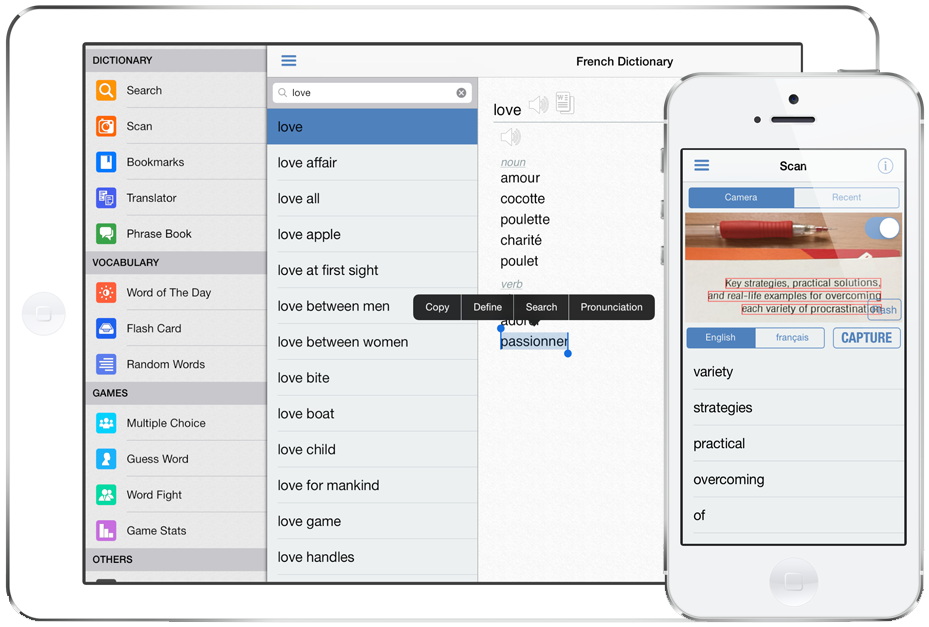
iThinkdiff today announces French Dictionary 10.0, an update to their popular bilingual dictionary app for iPhone, iPad and iPod touch. Featuring a large database, Pronunciation, Online Translator, Phrase Book, Flash cards and games help both students and travelers to translate nearly anything from French into English and vice versa. Version 10.0 introduces augment reality based scan feature. Now you can point your device camera to scan words and search in dictionary.
Dhaka, Bangladesh - iThinkdiff today is proud to announce the release of French Dictionary 10.0, an update to their popular bilingual dictionary app for iPhone, iPad and iPod touch. Featuring a large database, Pronunciation, Online Translator, Phrase Book, Flash cards and games help both students and travelers to translate nearly anything from French into English and vice versa. Version 10.0 introduces augment reality based scan feature. Now you can point your device camera to scan words and search in dictionary.
The leading iPhone, iPad, and iPod touch bilingual dictionary translates between English and French now extremly useful for augment reality based scan feature. Lead programmer Mahmud Ahsan said, "Now the dictionary will be more useful with the augment reality based scan feature using device camera. Both students and travelers can use French Dictionary to translate nearly anything from French into English or vice versa. Over 330 million people speak French, and it is my hope that this dictionary will make communication between French speakers and English speakers easier than ever before."
The new scanning feature made it easy to use the core functionality. It is trivially easy to look up written French words and find their English translations. "Wikipedia lists French script is used by a big number of people," continues Mr. Ahsan, "so it was important for us to help users look up words quickly without having to transliterate them into Latin [English] characters first."
Key Features:
* Over 141,000 English and 81,000 French words in an offline dictionary
* Translate individual words, phrases, or whole sentences
* Scan text in image by pointing device camera to search in dictionary
* Cross search feature. Touch a word for a while for the menu [Copy | Define | Search | Pronunciation]
* Bookmark and Recent History for instant recall
* Multiple games to help students improve their English or French vocabulary
* Online & Offline Pronunciation for English & French text
* Flash Card & Word of the Day for vocabulary learning
* Phrase Book
"French Dictionary was designed for both students and travelers. You can use it as a phrase book for a short trip, or you can use it to learn a language for life. And, at only $4.99 in the App Store, it's cheaper than either a paperback phrase book or even the simplest study guide. A free version with in-app purchase options is also available," said Mr. Ahsan.
French Dictionary's core translation function works offline. But when the user's device is online, several extra features become available, such as an online scoring system which helps students earn Achievements for using app features, plus a vocabulary Leaderboard which rewards the most effective students.
English words link to their Wiktionary page to help users discover the history behind words, and built-in app connections let users send their translations to other apps on their device, such as Facebook, Twitter, Email, and SMS. All current iPhones, iPads, and iPod touches are supported. Devices with a Retina display will find French Dictionary automatically optimizes itself for high-resolution text display so users don't need to squint.
Device Requirements:
* Compatible with iPhone, iPad, and iPod touch
* Requires iOS 7.0 or later
* Optimized for iPhone 5
* Universal app optimized for display on all iOS devices
* 65.4 MB
Pricing and Availability:
French Dictionary 10.0 is $4.99 USD (or equivalent amount in other currencies) and available worldwide exclusively through the App Store in the Education category. A free version with in-app purchase options is also available.
iThinkdiff: http://ithinkdiff.net
French Dictionary 10.0: http://ithinkdiff.net/iphone-applications/french-dictionary-pro/
Purchase and Download: https://search.itunes.apple.com/WebObjects/MZSearch.woa/wa/search?media=all&term=iThinkdiff+French+Dictionary
Screenshot: http://2a2cc343f5995d2fb948-5cc402153e846059e29478934321d3c6.r70.cf1.rackcdn.com/2010/11/french-dic1.png
App Icon: http://a3.mzstatic.com/us/r30/Purple4/v4/45/53/6b/45536b1f-16b3-15eb-64af-0aa5de7b25f2/mzl.fjbxegqg.350x350-75.jpg
Founded in 2010 by programmer Mahmud Ahsan, iThinkdiff is a leading creator of educational and entertainment apps for iPhones, iPads, and other Apple iOS devices. With over 7 million total downloads, thousands of five-star reviews, and 15 million monthly ad impressions, iThinkdiff games and translation apps are frequently featured on the Apple iTunes homepage. Copyright (C) 2010-2014 iThinkdiff. All Rights Reserved. Apple, the Apple logo, iPhone, iPad, iPad mini, iPod touch, and Mac are registered trademarks of Apple Inc. in the U.S. and/or other countries. Other trademarks and registered trademarks may be the property of their respective owners.
*******
Link To Article: http://prmac.com/release-id-70335.htm
*******
---------------------------------------------------------------------------------
Note that you can alter delivered distributions at any time.
Login to your account on prMac to alter your channel selection, or to opt-out at any time.


Snagger - The only site reporting app you'll need
A new article has been published at prMac.
Snagger - The only site reporting app you'll need - Published on 09/04/14
iApps Developement announces their new productivity app, Snagger for the iOS platform. Snagger is a simple yet very effective reporting app, ideal for building or maintenance contractors. The app allows you to add projects, using photos and text to identify your site. Snagger enables you to create PDF files, elimating endless paperwork, which can be sent via email straight to where you need them to be, or stored on a cloud service on the device for desktop viewing.
Kent, United Kingdom - The new app by iApps, Snagger is a simple and easy to use site auditing and snagging program for the iPad. Snagger is designed with businesses in the construction and maintenance sector in mind, enabling easy recording of problem areas which need attention.
Using Snagger you can add projects, using photos and text to identify your site. Add text to determine site name, reference and file creator. From your main site opening view you can then simply photograph your problem areas and annotate to explain the problem, and possible solutions.
Snagger enables you to take the inconvenience of form filling and endless paperwork to a minimum, creating PDF files which can be sent via email straight to where you need them to be, or stored on a pre-installed 3rd party cloud service on the device for desktop viewing.
Improve your company's productivity without all the headache of carrying all the unnecessary paperwork and download Snagger today. No matter what size the business is we think that Snagger will be a great help just because it is so simple to use and this product comes without all the hidden in app purchases.
Snagger has a dedicated Facebook page which is and will always be monitored by iApps Development, where users can add input for feature requests and iApps can monitor on how the app is being used, this app will bring a highly social aspect so don't forget to add your input to the Facebook page once you have downloaded it.
Device Requirements:
* Compatible with iPad
* Requires iOS 7.0 or later
* 4.0 MB
Pricing and Availability:
Snagger - Fault Report 1.0 is $5.99 USD (or equivalent amount in other currencies) and available worldwide exclusively through the App Store in the Productivity category.
Snagger 1.0: http://www.iappsdevelopment.com/#!snagger/c1a5
Purchase and Download: https://itunes.apple.com/app/snagger-fault-report/id911103221
Screenshot: https://dl.dropboxusercontent.com/u/93772524/screenShot3.png
App Icon: https://dl.dropboxusercontent.com/u/93772524/snaggerAppStore.png
iApps Developement makes cool, simple apps mainly for the younger user. All Material and Software (C) Copyright 2014 iApps Developement. All Rights Reserved. Apple, the Apple logo, iPhone, iPod and iPad are registered trademarks of Apple Inc. in the U.S. and/or other countries. Other trademarks and registered trademarks may be the property of their respective owners.
*******
Link To Article: http://prmac.com/release-id-70334.htm
*******
---------------------------------------------------------------------------------
Note that you can alter delivered distributions at any time.
Login to your account on prMac to alter your channel selection, or to opt-out at any time.
Snagger - The only site reporting app you'll need - Published on 09/04/14
iApps Developement announces their new productivity app, Snagger for the iOS platform. Snagger is a simple yet very effective reporting app, ideal for building or maintenance contractors. The app allows you to add projects, using photos and text to identify your site. Snagger enables you to create PDF files, elimating endless paperwork, which can be sent via email straight to where you need them to be, or stored on a cloud service on the device for desktop viewing.
Kent, United Kingdom - The new app by iApps, Snagger is a simple and easy to use site auditing and snagging program for the iPad. Snagger is designed with businesses in the construction and maintenance sector in mind, enabling easy recording of problem areas which need attention.
Using Snagger you can add projects, using photos and text to identify your site. Add text to determine site name, reference and file creator. From your main site opening view you can then simply photograph your problem areas and annotate to explain the problem, and possible solutions.
Snagger enables you to take the inconvenience of form filling and endless paperwork to a minimum, creating PDF files which can be sent via email straight to where you need them to be, or stored on a pre-installed 3rd party cloud service on the device for desktop viewing.
Improve your company's productivity without all the headache of carrying all the unnecessary paperwork and download Snagger today. No matter what size the business is we think that Snagger will be a great help just because it is so simple to use and this product comes without all the hidden in app purchases.
Snagger has a dedicated Facebook page which is and will always be monitored by iApps Development, where users can add input for feature requests and iApps can monitor on how the app is being used, this app will bring a highly social aspect so don't forget to add your input to the Facebook page once you have downloaded it.
Device Requirements:
* Compatible with iPad
* Requires iOS 7.0 or later
* 4.0 MB
Pricing and Availability:
Snagger - Fault Report 1.0 is $5.99 USD (or equivalent amount in other currencies) and available worldwide exclusively through the App Store in the Productivity category.
Snagger 1.0: http://www.iappsdevelopment.com/#!snagger/c1a5
Purchase and Download: https://itunes.apple.com/app/snagger-fault-report/id911103221
Screenshot: https://dl.dropboxusercontent.com/u/93772524/screenShot3.png

App Icon: https://dl.dropboxusercontent.com/u/93772524/snaggerAppStore.png

iApps Developement makes cool, simple apps mainly for the younger user. All Material and Software (C) Copyright 2014 iApps Developement. All Rights Reserved. Apple, the Apple logo, iPhone, iPod and iPad are registered trademarks of Apple Inc. in the U.S. and/or other countries. Other trademarks and registered trademarks may be the property of their respective owners.
*******
Link To Article: http://prmac.com/release-id-70334.htm
*******
---------------------------------------------------------------------------------
Note that you can alter delivered distributions at any time.
Login to your account on prMac to alter your channel selection, or to opt-out at any time.
Ohanaware updates Backup To Go for OS X: 21 Changes, Yosemite Compatible
A new article has been published at prMac.
Ohanaware updates Backup To Go for OS X: 21 Changes, Yosemite Compatible - Published on 09/04/14
Ohanaware Co., Ltd. today announces Backup To Go 1.1, an update to their file backup tool for Mac OS X. Backup To Go was specifically designed to simplify the process of backing up important files and folders to disks that can easily be taken with the user. These include USB sticks, thumb drives, SD Cards and external Hard Disks. Version 1.1 includes 21 changes, to improve the stability and usability of the application, while also adding some new Premium features.
Hengchun, Pingtung, Taiwan - Ohanaware Co., Ltd. today is thrilled to announce the release and immediate availability of Backup To Go 1.1, an update to their file backup tool for Mac OS X. The application has been designed to simplify the process of backing up important files and folders to disks, that can easily be taken with the user. These include USB sticks/thumbdrives, SD Cards and external Hard Disks.
When a backup disk is connected, Backup To Go can automatically perform the backup. On a successful backup, Backup To Go will auto eject the backup disk. In most cases a backup simply requires the user to connect the disk, and upon completion, they unplug the disk and take it away with them. Backup To Go utilizes the latest techniques and Apple technology to ensure that it uses zero energy while idle, which is beneficial to laptop users.
What's new in Backup To Go 1.1:
Backup To Go 1.1 includes 21 changes, to improve the stability and usability of the application, while also adding some new Premium features (available via In-App-Purchase).
The new Premium features include:
* Disk Notifications; Backup To Go will display a notification (similar to the volume adjustment panel) every time a disk is connected or ejected from the computer. Even if Backup To Go is not using the disk as a backup disk.
* Deleted Files Finder; Backup To Go will scan through the backup disk and the source folders to find files that have been deleted from the source folders. Enabling users to restore those files or remove them from the backup disk to free up space.
* Custom Disk Icons; create and apply custom icons to the backup disks so that they appear unique in the Finder, and are distinguishable from other connected disks.
Full Change List:
* Fixed a bug that was making the file size counting thread not run threaded
* Refactored the copy file engine so that it can be easily expanded in the future
* Fixed a bug that might prevent the "Show on Backup Disk" from working
* Made some under-the-hood changes to the Preferences Window (reducing memory usage)
* Visual changes to the 'Newer Files' window to be Yosemite & Mavericks compatible
* Moved the location of the "Backup To Go" data files that are stored on the backup disk
* Refactored some of the application's shared library usage
* Added a new Social sharing window
* Some Retina improvements to the file previews in the Newer files window
* Added the option to ignore ".DS_Store" files
* Fixed a bug with traditional scrollbars
* Fixed the Action Icon not showing up correctly for some users
* Refactored the NSNotificationCenter code
* Improved the disk information window
* Any open Backup To Go windows now show in the Backup To Go menu
* More changes to the error reporter/feedback system
* Nailed a bug, which could occur when command-clicking on a script/file while nothing was selected
* Improved the handling of the StatusItem menu when the option key is held down
Added some In-App-Purchase features:
* Disk Notifications, when disk are connected or ejected
* Deleted Files Finder, quickly finds files that have been deleted (to which you have a backup of)
* Custom Disk Icons, use the disk icon maker to give your backup disks unique icons
System Requirements:
* Requires Mac OS X 10.7 or newer (Backup To Go is Yosemite compatible)
* 11.4 MB
Pricing and Availability:
Backup To Go 1.1 is available today from the Mac App Store for Free in the Utilities category. Premium Features require an In-App-Purchase of $0.99 USD (the price is a time limited launch special price).
Ohanaware: http://www.ohanaware.com/
Backup To Go 1.1: http://www.ohanaware.com/backuptogo/
Purchase and Download (MAS): https://itunes.apple.com/app/backup-to-go-protect-your/id882272017?mt=12
Screenshot: http://www.ohanaware.com/backuptogo/btgMainInterface@2x.jpg
Application Icon: http://www.ohanaware.com/backuptogo/BackUpToGoIcon512@2x.png
Based in southern Taiwan, Ohanaware was founded by husband and wife team, Sam Rowlands & Joy Sha in 2008. Sharing a passion for Macs and amateur photography, their first product, Funtastic Photos, won 4-star awards from both MacWorld and MacFormat. Their second product, HDRtist Pro, won a 5-star award from MacFormat. Joy Sha has a history in the design industry with experience as a 2D and 3D artist, and she also holds a Masters degree in 3D animation. Sam Rowlands has been writing software since 1990 and is an award winning software developer. Copyright (C) 2008-2014 Ohanaware Co., Ltd. All Rights Reserved. Apple, the Apple logo, iPhone, and iPod are registered trademarks of Apple Inc. in the U.S. and/or other countries. Other trademarks and registered trademarks may be the property of their respective owners.
*******
Link To Article: http://prmac.com/release-id-70333.htm
*******
---------------------------------------------------------------------------------
Note that you can alter delivered distributions at any time.
Login to your account on prMac to alter your channel selection, or to opt-out at any time.
Ohanaware updates Backup To Go for OS X: 21 Changes, Yosemite Compatible - Published on 09/04/14
Ohanaware Co., Ltd. today announces Backup To Go 1.1, an update to their file backup tool for Mac OS X. Backup To Go was specifically designed to simplify the process of backing up important files and folders to disks that can easily be taken with the user. These include USB sticks, thumb drives, SD Cards and external Hard Disks. Version 1.1 includes 21 changes, to improve the stability and usability of the application, while also adding some new Premium features.
Hengchun, Pingtung, Taiwan - Ohanaware Co., Ltd. today is thrilled to announce the release and immediate availability of Backup To Go 1.1, an update to their file backup tool for Mac OS X. The application has been designed to simplify the process of backing up important files and folders to disks, that can easily be taken with the user. These include USB sticks/thumbdrives, SD Cards and external Hard Disks.
When a backup disk is connected, Backup To Go can automatically perform the backup. On a successful backup, Backup To Go will auto eject the backup disk. In most cases a backup simply requires the user to connect the disk, and upon completion, they unplug the disk and take it away with them. Backup To Go utilizes the latest techniques and Apple technology to ensure that it uses zero energy while idle, which is beneficial to laptop users.
What's new in Backup To Go 1.1:
Backup To Go 1.1 includes 21 changes, to improve the stability and usability of the application, while also adding some new Premium features (available via In-App-Purchase).
The new Premium features include:
* Disk Notifications; Backup To Go will display a notification (similar to the volume adjustment panel) every time a disk is connected or ejected from the computer. Even if Backup To Go is not using the disk as a backup disk.
* Deleted Files Finder; Backup To Go will scan through the backup disk and the source folders to find files that have been deleted from the source folders. Enabling users to restore those files or remove them from the backup disk to free up space.
* Custom Disk Icons; create and apply custom icons to the backup disks so that they appear unique in the Finder, and are distinguishable from other connected disks.
Full Change List:
* Fixed a bug that was making the file size counting thread not run threaded
* Refactored the copy file engine so that it can be easily expanded in the future
* Fixed a bug that might prevent the "Show on Backup Disk" from working
* Made some under-the-hood changes to the Preferences Window (reducing memory usage)
* Visual changes to the 'Newer Files' window to be Yosemite & Mavericks compatible
* Moved the location of the "Backup To Go" data files that are stored on the backup disk
* Refactored some of the application's shared library usage
* Added a new Social sharing window
* Some Retina improvements to the file previews in the Newer files window
* Added the option to ignore ".DS_Store" files
* Fixed a bug with traditional scrollbars
* Fixed the Action Icon not showing up correctly for some users
* Refactored the NSNotificationCenter code
* Improved the disk information window
* Any open Backup To Go windows now show in the Backup To Go menu
* More changes to the error reporter/feedback system
* Nailed a bug, which could occur when command-clicking on a script/file while nothing was selected
* Improved the handling of the StatusItem menu when the option key is held down
Added some In-App-Purchase features:
* Disk Notifications, when disk are connected or ejected
* Deleted Files Finder, quickly finds files that have been deleted (to which you have a backup of)
* Custom Disk Icons, use the disk icon maker to give your backup disks unique icons
System Requirements:
* Requires Mac OS X 10.7 or newer (Backup To Go is Yosemite compatible)
* 11.4 MB
Pricing and Availability:
Backup To Go 1.1 is available today from the Mac App Store for Free in the Utilities category. Premium Features require an In-App-Purchase of $0.99 USD (the price is a time limited launch special price).
Ohanaware: http://www.ohanaware.com/
Backup To Go 1.1: http://www.ohanaware.com/backuptogo/
Purchase and Download (MAS): https://itunes.apple.com/app/backup-to-go-protect-your/id882272017?mt=12
Screenshot: http://www.ohanaware.com/backuptogo/btgMainInterface@2x.jpg

Application Icon: http://www.ohanaware.com/backuptogo/BackUpToGoIcon512@2x.png

Based in southern Taiwan, Ohanaware was founded by husband and wife team, Sam Rowlands & Joy Sha in 2008. Sharing a passion for Macs and amateur photography, their first product, Funtastic Photos, won 4-star awards from both MacWorld and MacFormat. Their second product, HDRtist Pro, won a 5-star award from MacFormat. Joy Sha has a history in the design industry with experience as a 2D and 3D artist, and she also holds a Masters degree in 3D animation. Sam Rowlands has been writing software since 1990 and is an award winning software developer. Copyright (C) 2008-2014 Ohanaware Co., Ltd. All Rights Reserved. Apple, the Apple logo, iPhone, and iPod are registered trademarks of Apple Inc. in the U.S. and/or other countries. Other trademarks and registered trademarks may be the property of their respective owners.
*******
Link To Article: http://prmac.com/release-id-70333.htm
*******
---------------------------------------------------------------------------------
Note that you can alter delivered distributions at any time.
Login to your account on prMac to alter your channel selection, or to opt-out at any time.
Ocean Levels 1.0 for iOS - Displays Projected Ocean Level Increases
A new article has been published at prMac.
Ocean Levels 1.0 for iOS - Displays Projected Ocean Level Increases - Published on 09/04/14
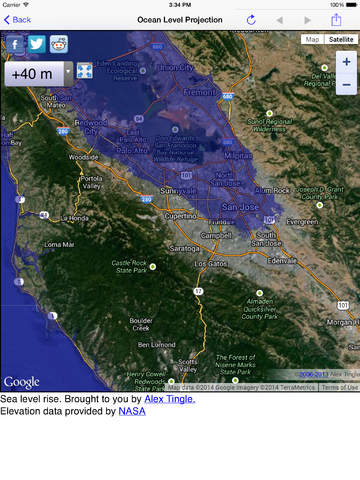
Predictive-first developer Ken Tidwell today introduces Ocean Levels 1.0 for iOS, his new location-aware mobile app. Ocean Levels displays projected ocean level increases using NASA Shuttle Radar Tomography Data to show what various changes in water level. Users can easily see the effects of increased flood levels relative to their current location using different flood depths, whether from ocean-level rise, storm surge, tsunami or perhaps even an open-ocean asteroid impact.
Portland, Oregon - Predictive-first developer Ken Tidwell is proud to announce the release of Ocean Levels 1.0, his new weather app for iOS devices. Have you ever wondered what higher water levels from tsunamis, hurricanes and monsoons might look like where you or your loved ones are right now? Are you planning to relocate your home or start a business near the ocean? Are you interested to see if your route to higher ground in case of higher water and severe weather might work as planned?
'Ocean Levels' is a location aware mobile app allowing you to see the projected effects of increased flood levels relative to your current location using different flood depths, whether from ocean-level rise, storm surge, tsunami or perhaps even an open-ocean asteroid impact.
"While there are other projected flood maps from various agencies and institutions, none of them yet attempt to plot your live location on any of their maps," stated Ken Tidwell of Min-U Guides. "We are proud to be the only ones to supply you with the most modern flood mapping data representation available."
You can choose to view your current location with various pre-selected water depths (in meters), or select from shortcuts to view global regions as desired. All maps are fully navigable including touch, pinch/zoom, double-tap/zoom, tap-hold/pan, flick/pan to move around quickly and easily. Choose views from 'Map' (with or without terrain) or 'Satellite' (with or without labels). You can also share your current (or selected at will) location via email.
* The projections utilize NASA 'Shuttle Radar Tomography Mission' (SRTM) data to plot the different water level depths
* Ocean Levels is currently localized in English and Simplified & Traditional Chinese with several new languages coming soon
* Airplay output to larger displays is supported
* Privacy - Please note that no user data is captured or stored and is only used to plot your location on the rendered maps
* All app controls and features are explained via the included 'Info' documentation
* Projections are not made for bodies of fresh water that are not connected to the sea
"We will be attending sea-level and predictive-first related conferences in the US during 2014 and 2015 and look forward to engaging with others to discuss and help address this very interesting topic," said Ken. "We will also continue to expand localization with additional languages being planned over the next few months."
Device Requirements:
* iPhone, iPad, and iPod touch
* Requires iOS 6.1 or later
* Includes all retina devices
* Universal Application
* 13.0 MB
Pricing and Availability:
Ocean Levels 1.0 is $2.99 USD (or equivalent amount in other currencies) and available worldwide exclusively through the App Store in the Weather category. Educational pricing discounts apply for all qualified institutions.
Ocean Levels 1.0: http://www.min-uguide.com/
Purchase and Download: https://itunes.apple.com/app/ocean-levels/id903619905
Screenshot: http://a5.mzstatic.com/us/r30/Purple5/v4/7f/a8/5b/7fa85bdc-420d-77ee-1fca-f65aef0fc646/screen480x480.jpeg
App Icon: http://a4.mzstatic.com/us/r30/Purple4/v4/be/49/19/be491985-8608-4ca9-b2c3-b7f51d5c6b72/mzl.iiukubui.175x175-75.jpg
Located in beautiful Portland, Oregon, the Min-U Guides team is an independent software company founded by Ken Tidwell in February of 2009. With over three decades developing software, Ken's goal is to provide predictive-first reference materials, user guides, manuals and tutorials for a broad range of topics while leveraging Apple's unique Mac/iOS platforms. Copyright (C) 2014 Ken Tidwell. All Rights Reserved. Apple, the Apple logo, iPhone, iPod, and iPad are registered trademarks of Apple Inc. in the U.S. and/or other countries. All other trademarks may be the property of their respective owners.
*******
Link To Article: http://prmac.com/release-id-70330.htm
*******
---------------------------------------------------------------------------------
Note that you can alter delivered distributions at any time.
Login to your account on prMac to alter your channel selection, or to opt-out at any time.
Ocean Levels 1.0 for iOS - Displays Projected Ocean Level Increases - Published on 09/04/14
Predictive-first developer Ken Tidwell today introduces Ocean Levels 1.0 for iOS, his new location-aware mobile app. Ocean Levels displays projected ocean level increases using NASA Shuttle Radar Tomography Data to show what various changes in water level. Users can easily see the effects of increased flood levels relative to their current location using different flood depths, whether from ocean-level rise, storm surge, tsunami or perhaps even an open-ocean asteroid impact.
Portland, Oregon - Predictive-first developer Ken Tidwell is proud to announce the release of Ocean Levels 1.0, his new weather app for iOS devices. Have you ever wondered what higher water levels from tsunamis, hurricanes and monsoons might look like where you or your loved ones are right now? Are you planning to relocate your home or start a business near the ocean? Are you interested to see if your route to higher ground in case of higher water and severe weather might work as planned?
'Ocean Levels' is a location aware mobile app allowing you to see the projected effects of increased flood levels relative to your current location using different flood depths, whether from ocean-level rise, storm surge, tsunami or perhaps even an open-ocean asteroid impact.
"While there are other projected flood maps from various agencies and institutions, none of them yet attempt to plot your live location on any of their maps," stated Ken Tidwell of Min-U Guides. "We are proud to be the only ones to supply you with the most modern flood mapping data representation available."
You can choose to view your current location with various pre-selected water depths (in meters), or select from shortcuts to view global regions as desired. All maps are fully navigable including touch, pinch/zoom, double-tap/zoom, tap-hold/pan, flick/pan to move around quickly and easily. Choose views from 'Map' (with or without terrain) or 'Satellite' (with or without labels). You can also share your current (or selected at will) location via email.
* The projections utilize NASA 'Shuttle Radar Tomography Mission' (SRTM) data to plot the different water level depths
* Ocean Levels is currently localized in English and Simplified & Traditional Chinese with several new languages coming soon
* Airplay output to larger displays is supported
* Privacy - Please note that no user data is captured or stored and is only used to plot your location on the rendered maps
* All app controls and features are explained via the included 'Info' documentation
* Projections are not made for bodies of fresh water that are not connected to the sea
"We will be attending sea-level and predictive-first related conferences in the US during 2014 and 2015 and look forward to engaging with others to discuss and help address this very interesting topic," said Ken. "We will also continue to expand localization with additional languages being planned over the next few months."
Device Requirements:
* iPhone, iPad, and iPod touch
* Requires iOS 6.1 or later
* Includes all retina devices
* Universal Application
* 13.0 MB
Pricing and Availability:
Ocean Levels 1.0 is $2.99 USD (or equivalent amount in other currencies) and available worldwide exclusively through the App Store in the Weather category. Educational pricing discounts apply for all qualified institutions.
Ocean Levels 1.0: http://www.min-uguide.com/
Purchase and Download: https://itunes.apple.com/app/ocean-levels/id903619905
Screenshot: http://a5.mzstatic.com/us/r30/Purple5/v4/7f/a8/5b/7fa85bdc-420d-77ee-1fca-f65aef0fc646/screen480x480.jpeg
App Icon: http://a4.mzstatic.com/us/r30/Purple4/v4/be/49/19/be491985-8608-4ca9-b2c3-b7f51d5c6b72/mzl.iiukubui.175x175-75.jpg

Located in beautiful Portland, Oregon, the Min-U Guides team is an independent software company founded by Ken Tidwell in February of 2009. With over three decades developing software, Ken's goal is to provide predictive-first reference materials, user guides, manuals and tutorials for a broad range of topics while leveraging Apple's unique Mac/iOS platforms. Copyright (C) 2014 Ken Tidwell. All Rights Reserved. Apple, the Apple logo, iPhone, iPod, and iPad are registered trademarks of Apple Inc. in the U.S. and/or other countries. All other trademarks may be the property of their respective owners.
*******
Link To Article: http://prmac.com/release-id-70330.htm
*******
---------------------------------------------------------------------------------
Note that you can alter delivered distributions at any time.
Login to your account on prMac to alter your channel selection, or to opt-out at any time.
Middle School Apps Series Surpasses 1 Million Downloads
A new article has been published at prMac.
Middle School Apps Series Surpasses 1 Million Downloads - Published on 09/04/14
Colorado based Monkey in the Middle Apps today announced that its series of math, science, and vocabulary apps for middle school students has been downloaded over one million times. Monkey in the Middle Apps is celebrating in September with special app giveaways. Follow them on Facebook to find out about app giveaways during September as they celebrate this milestone. The Middle School Math, Science and Vocabulary apps work on all versions of iPad, iPhone, and iPod touch.
Longmont, Colorado - Monkey in the Middle Apps is thrilled to announce that its series of math, science, and vocabulary apps for middle school students has been downloaded over one million times. If you're a middle school student or teacher you need to find out more about these apps that are being used by students from all over the world.
"We started out helping a few 7th graders practice their math, and now we've had over a million downloads. It's been an incredible journey,", explains the founder, Andrew Meier. "Our goal is to make it fast and easy to practice your skills and have some fun at the same time."
The Middle School apps series is available in 11 different languages for these subjects:
* Middle School Math 6th Grade
* Middle School Math 7th Grade
* Middle School Math 8th Grade
* Middle School Algebra
* Middle School Science 8th Grade
* Middle School Vocabulary 7th grade
Check Facebook for App Giveaways in September:
Monkey in the Middle Apps is celebrating in September with special app giveaways. Follow us on Facebook and we'll post details about the specific apps and specific days we're going to give apps away.
We also want to send a special thank you to all of the teachers and students who have supported us. Your feedback has improved our products, your classroom stories have inspired us, and your praise has encouraged us to continue. Thank you.
Pricing and Availability:
The Middle School Math, Science and Vocabulary apps work on all versions of iPad(R), iPhone(R), and iPod touch(R). They are free and available now from the App Store. Pro versions with additional quizzes are also available now from the App Store for 99 cents. A 50% educational discount is available through the Apple Volume Purchasing Program for Education. Play. Learn. Repeat.
Monkey in the Middle Apps: http://www.monkeyinthemiddleapps.com
Download Math, Vocab, and Science apps from iTunes: https://itunes.apple.com/us/artist/monkey-in-the-middle-apps-llc/id457613676?at=10l4CQ
Facebook App Giveaways: https://www.facebook.com/monkeyinthemiddleapps
Based in Colorado, Monkey in the Middle Apps builds educational games for middle school students. Founded in the fall of 2011, their Math, Vocab, and Science apps have been downloaded more than a million times, used in thousands of classrooms, and have received over a thousand five star reviews in the App Store. Copyright (C) 2014 Monkey in the Middle Apps LLC. All Rights Reserved. Apple, the Apple logo, iPhone, iPod and iPad are registered trademarks of Apple Inc. in the U.S. and/or other countries.
*******
Link To Article: http://prmac.com/release-id-70332.htm
*******
---------------------------------------------------------------------------------
Note that you can alter delivered distributions at any time.
Login to your account on prMac to alter your channel selection, or to opt-out at any time.
Middle School Apps Series Surpasses 1 Million Downloads - Published on 09/04/14
Colorado based Monkey in the Middle Apps today announced that its series of math, science, and vocabulary apps for middle school students has been downloaded over one million times. Monkey in the Middle Apps is celebrating in September with special app giveaways. Follow them on Facebook to find out about app giveaways during September as they celebrate this milestone. The Middle School Math, Science and Vocabulary apps work on all versions of iPad, iPhone, and iPod touch.
Longmont, Colorado - Monkey in the Middle Apps is thrilled to announce that its series of math, science, and vocabulary apps for middle school students has been downloaded over one million times. If you're a middle school student or teacher you need to find out more about these apps that are being used by students from all over the world.
"We started out helping a few 7th graders practice their math, and now we've had over a million downloads. It's been an incredible journey,", explains the founder, Andrew Meier. "Our goal is to make it fast and easy to practice your skills and have some fun at the same time."
The Middle School apps series is available in 11 different languages for these subjects:
* Middle School Math 6th Grade
* Middle School Math 7th Grade
* Middle School Math 8th Grade
* Middle School Algebra
* Middle School Science 8th Grade
* Middle School Vocabulary 7th grade
Check Facebook for App Giveaways in September:
Monkey in the Middle Apps is celebrating in September with special app giveaways. Follow us on Facebook and we'll post details about the specific apps and specific days we're going to give apps away.
We also want to send a special thank you to all of the teachers and students who have supported us. Your feedback has improved our products, your classroom stories have inspired us, and your praise has encouraged us to continue. Thank you.
Pricing and Availability:
The Middle School Math, Science and Vocabulary apps work on all versions of iPad(R), iPhone(R), and iPod touch(R). They are free and available now from the App Store. Pro versions with additional quizzes are also available now from the App Store for 99 cents. A 50% educational discount is available through the Apple Volume Purchasing Program for Education. Play. Learn. Repeat.
Monkey in the Middle Apps: http://www.monkeyinthemiddleapps.com
Download Math, Vocab, and Science apps from iTunes: https://itunes.apple.com/us/artist/monkey-in-the-middle-apps-llc/id457613676?at=10l4CQ
Facebook App Giveaways: https://www.facebook.com/monkeyinthemiddleapps
Based in Colorado, Monkey in the Middle Apps builds educational games for middle school students. Founded in the fall of 2011, their Math, Vocab, and Science apps have been downloaded more than a million times, used in thousands of classrooms, and have received over a thousand five star reviews in the App Store. Copyright (C) 2014 Monkey in the Middle Apps LLC. All Rights Reserved. Apple, the Apple logo, iPhone, iPod and iPad are registered trademarks of Apple Inc. in the U.S. and/or other countries.
*******
Link To Article: http://prmac.com/release-id-70332.htm
*******
---------------------------------------------------------------------------------
Note that you can alter delivered distributions at any time.
Login to your account on prMac to alter your channel selection, or to opt-out at any time.
Make your movies look like a million dollars with Movavi Video Converter
A new article has been published at prMac.
Make your movies look like a million dollars with Movavi Video Converter - Published on 09/04/14
Movavi today announces Video Converter 5.0, an update to its best-selling video conversion software for Mac OS X. Movavi Video Converter is a powerful yet easy-to-use video and audio file converter that is especially designed for OS X. Version 5 offers auto enhance, image conversion, as well as great new editing features. Other notable improvements include 4K Ultra HD video support, SD to HD video conversion, and ready-made presets for the latest mobile devices.
Novosibirsk, Russian Federation - Movavi today released a new version of its best-selling Video Converter for Mac software. Version 5 of Movavi Video Conversion for Mac transforms your Mac into an advanced encoding studio without the complexities of the professional software interface. All editing and enhancement tools are conveniently located right by the file collection in the Transformation, Crop, Text and Image Watermark, Video adjustment, and Audio adjustment tabs.
Some features offer both manual and automatic options such as the Auto Contrast, Auto White Balance, and Magic Enhance controls that fix video quality in one click. The new Normalize volume capability evens out the volume to one level across your entire movie, eliminating the jarring of inconsistent sound levels. The watermark feature enables users to add a text caption in any color, font, or size, or an image logo with customizable transparency level for copyright protection.
Since high-resolution video exploded onto the scene, Movavi has also added support for input and output 4K video conversion to the program, along with new ready-made presets for resolution upscaling. This latter helps to transcode SD/DVD movies into HD files with 1280x720px or 1920x1080px resolution while preserving and enhancing the original quality.
Video Converter for OS X now supports batch image conversion between most popular formats: JPEG, PNG, BMP, TIFF, and GIF, including video-to-GIF transformation, so users can easily create animated GIFs, in addition to the rest of the program's broad set of functions.
The list of supported video formats has been extended with VP7, VP9, and M4A with AAC, ALAC codecs, new HTML5-compatible formats, and new ready-made encoding presets to save your movies and TV episodes for the latest smartphones, gaming devices, and TV sets: Samsung Galaxy S5, Samsung Galaxy Note Pro, HTC One Mini 2, LG G3, Nokia Lumia 1520, Sony Xperia Z2, XBox One, PlayStation 4, and more. A complete list of new features and improvements in Movavi Video Converter for Mac 5 can be found on the product page on the Movavi website.
Recommended System Requirements:
* Intel-based Mac computer
* Mac OS X 10.6, 10.7, 10.8 or 10.9 - 64-bit
* Display graphics minimum resolution of 1024x768x32-bit color
* RAM: Minimum 256 MB or higher
* 1 GB of free hard disk space for proper operation
* Administrative permissions are required for installation
Pricing and Availability:
The free 7-day trial of Movavi Video Converter for Mac Version 5 can be downloaded for free from the company's official website. A full license is available for $39.99 (USD). The Apple App Store version will be available shortly. The software is also offered as part of the Movavi Super Video Bundle for Mac, which includes Screen Capture, Split Movie, and Media Player and costs $69.95. Owners of older versions of Movavi Video Converter for Mac can upgrade to v5 at a 30% discount.
Movavi: http://www.movavi.com
Movavi Video Converter 5.0: http://www.movavi.com/videoconvertermac
Download Video Converter: http://www.movavi.com/download-videoconvertermac
Screenshot 1: http://img.movavi.com/movavi.com.12/screens/videoconvertermac/5/en/1.png?_ga=1.162169333.858942445.1386564658
Screenshot 1: https://www.dropbox.com/s/2i7xnsa3hqny141/transform%20video%20options.png?dl=0
Application Icon: http://a2.mzstatic.com/us/r30/Purple/v4/e1/c8/70/e1c870da-cf29-8035-45ff-db4235efa61a/MediaConverter_Appstore.175x175-75.png
Movavi produces a wide range of multimedia programs to make sure you have fun with your videos, music, and photos on any platform and any device. Along with over 20 standalone applications, Movavi produces a complete multimedia Suite, which includes tools for video conversion, PC screen capturing, video editing and playback, online sharing and disc burning. Since its establishment in 2004, Movavi has grown from a small startup run by just three enthusiasts who produced and supported two products, to a full-scale business with more than 60 employees and an expanding product range for PC and Mac, sold in 150 countries. The company's headquarters is in Novosibirsk, Russia, with regional offices in Moscow, Russia, and Saint Louis, Missouri, USA. Copyright (C) 2014 Movavi. All Rights Reserved. Apple, the Apple logo and Mac OS X platforms are trademarks of Apple Inc. in the U.S. and/or other countries.
*******
Link To Article: http://prmac.com/release-id-70331.htm
*******
---------------------------------------------------------------------------------
Note that you can alter delivered distributions at any time.
Login to your account on prMac to alter your channel selection, or to opt-out at any time.
Make your movies look like a million dollars with Movavi Video Converter - Published on 09/04/14
Movavi today announces Video Converter 5.0, an update to its best-selling video conversion software for Mac OS X. Movavi Video Converter is a powerful yet easy-to-use video and audio file converter that is especially designed for OS X. Version 5 offers auto enhance, image conversion, as well as great new editing features. Other notable improvements include 4K Ultra HD video support, SD to HD video conversion, and ready-made presets for the latest mobile devices.
Novosibirsk, Russian Federation - Movavi today released a new version of its best-selling Video Converter for Mac software. Version 5 of Movavi Video Conversion for Mac transforms your Mac into an advanced encoding studio without the complexities of the professional software interface. All editing and enhancement tools are conveniently located right by the file collection in the Transformation, Crop, Text and Image Watermark, Video adjustment, and Audio adjustment tabs.
Some features offer both manual and automatic options such as the Auto Contrast, Auto White Balance, and Magic Enhance controls that fix video quality in one click. The new Normalize volume capability evens out the volume to one level across your entire movie, eliminating the jarring of inconsistent sound levels. The watermark feature enables users to add a text caption in any color, font, or size, or an image logo with customizable transparency level for copyright protection.
Since high-resolution video exploded onto the scene, Movavi has also added support for input and output 4K video conversion to the program, along with new ready-made presets for resolution upscaling. This latter helps to transcode SD/DVD movies into HD files with 1280x720px or 1920x1080px resolution while preserving and enhancing the original quality.
Video Converter for OS X now supports batch image conversion between most popular formats: JPEG, PNG, BMP, TIFF, and GIF, including video-to-GIF transformation, so users can easily create animated GIFs, in addition to the rest of the program's broad set of functions.
The list of supported video formats has been extended with VP7, VP9, and M4A with AAC, ALAC codecs, new HTML5-compatible formats, and new ready-made encoding presets to save your movies and TV episodes for the latest smartphones, gaming devices, and TV sets: Samsung Galaxy S5, Samsung Galaxy Note Pro, HTC One Mini 2, LG G3, Nokia Lumia 1520, Sony Xperia Z2, XBox One, PlayStation 4, and more. A complete list of new features and improvements in Movavi Video Converter for Mac 5 can be found on the product page on the Movavi website.
Recommended System Requirements:
* Intel-based Mac computer
* Mac OS X 10.6, 10.7, 10.8 or 10.9 - 64-bit
* Display graphics minimum resolution of 1024x768x32-bit color
* RAM: Minimum 256 MB or higher
* 1 GB of free hard disk space for proper operation
* Administrative permissions are required for installation
Pricing and Availability:
The free 7-day trial of Movavi Video Converter for Mac Version 5 can be downloaded for free from the company's official website. A full license is available for $39.99 (USD). The Apple App Store version will be available shortly. The software is also offered as part of the Movavi Super Video Bundle for Mac, which includes Screen Capture, Split Movie, and Media Player and costs $69.95. Owners of older versions of Movavi Video Converter for Mac can upgrade to v5 at a 30% discount.
Movavi: http://www.movavi.com
Movavi Video Converter 5.0: http://www.movavi.com/videoconvertermac
Download Video Converter: http://www.movavi.com/download-videoconvertermac
Screenshot 1: http://img.movavi.com/movavi.com.12/screens/videoconvertermac/5/en/1.png?_ga=1.162169333.858942445.1386564658

Screenshot 1: https://www.dropbox.com/s/2i7xnsa3hqny141/transform%20video%20options.png?dl=0

Application Icon: http://a2.mzstatic.com/us/r30/Purple/v4/e1/c8/70/e1c870da-cf29-8035-45ff-db4235efa61a/MediaConverter_Appstore.175x175-75.png

Movavi produces a wide range of multimedia programs to make sure you have fun with your videos, music, and photos on any platform and any device. Along with over 20 standalone applications, Movavi produces a complete multimedia Suite, which includes tools for video conversion, PC screen capturing, video editing and playback, online sharing and disc burning. Since its establishment in 2004, Movavi has grown from a small startup run by just three enthusiasts who produced and supported two products, to a full-scale business with more than 60 employees and an expanding product range for PC and Mac, sold in 150 countries. The company's headquarters is in Novosibirsk, Russia, with regional offices in Moscow, Russia, and Saint Louis, Missouri, USA. Copyright (C) 2014 Movavi. All Rights Reserved. Apple, the Apple logo and Mac OS X platforms are trademarks of Apple Inc. in the U.S. and/or other countries.
*******
Link To Article: http://prmac.com/release-id-70331.htm
*******
---------------------------------------------------------------------------------
Note that you can alter delivered distributions at any time.
Login to your account on prMac to alter your channel selection, or to opt-out at any time.
Introducing Comburet 2.0 - Professional Auto-Find Burning App For OS X
A new article has been published at prMac.
Introducing Comburet 2.0 - Professional Auto-Find Burning App For OS X - Published on 09/04/14
Everdow today introduces Comburet 2.0, their new professional burning app for OS X. Comburet is an auto-find burning device that is a blending of their popular AudioBurner and DiscBurner applications with extra enhanced features. Localized in 74 different languages, Comburet can be used to burn music CDs and data folders as well as erase rewritable discs. Comburet also allows users to create DMG and ISO files as well as burn DMG and ISO image files. Comburet supports CD, DVD, and BD.
London, United Kingdom - Everdow today is pleased to announce the release and immediate availability of Comburet 2.0, their new professional burning app for OS X. Localized in 74 different languages, Comburet is an auto-find burning device that is a blending of their popular AudioBurner and DiscBurner applications with extra enhanced features.
Comburet allows users to burn music CDs with CD-text in a host of formats such as mp3, aiff, and wav. After auto-finding the burning device, users can add their audio into the Comburet interface and select Burn. The Comburet interface displays the capacity of disc, the burning progress, and auto-verifies after burning. Comburet supports CD, DVD, and BD. The application also supports burning CD-Text in 8 different languages and conforms completely to the CD-Text standard. All audio formats that are supported by QuickTime can also be utilized in Comburet.
Comburet provides users with the ability to burn data folders and image files. From a drop down, users select whether they want to burn a folder or ISO or DMG image file. Like the Burn Audio feature, the Burn Data interface displays the capacity of disc, the burning progress, and auto-verifies after burning. Although Comburet offers users the ability to select a burning speed, the Auto option is recommended.
Feature Highlights:
* Simplified User Interface
* Auto find burning device
* Supports CD, DVD, and BD
* Burn music CD with CD-text: m4a, m4b, m4p, mp3, caf, aiff, au, sd2, wav, snd, and amr
* Burn data (folder)
* Burn image file (DMG or ISO)
* Erase rewritable discs
* Create DMG files
* Create ISO files
* Localized into 74 global languages
* Customizable burning speed
Users can easily erase rewritable discs with Comburet. After choosing whether they prefer a Quick or Complete erase of their CD-R or CD-RW disc, users can click on the Erase button to start the process. Comburet also offers users the option to eject the disc once the erase process is complete.
Some of the enhanced extra features of Comburet include the ability to create DMG and ISO files. Users first choose their Source file. Upon selection, the Volume field auto-fills. Users can customize the title in this field before selecting the destination output for the DMG or ISO file. The Comburet interface displays the progress of the file generation as well as the ability to clear all the fields.
"After creating two professional data and audio burning applications, it seemed a natural progression to create an application that combined the features of both and build upon them," says Milton Li of Everdow. "Comburet serves as a one-stop shop for all your professional burning needs. We've made it intuitive, with an auto-find and auto-fill features. We've also made it global, localizing it in 74 different languages. We've also made it easy to stay up-to-date with Comburet version by including an Update option. We're very excited to launch Comburet and believe it to be the best professional burning application for OS X on the market today."
Languages:
* English, Afrikaans, Albanian, Arabic, Armenian, Azerbaijani, Basque, Belarusian, Bengali, Bokm�l, Norwegian, Bosnian, Bulgarian, Cambodian, Catalan, Croatian, Czech, Danish, Dutch, Esperanto, Estonian, Filipino, Finnish, French, Galician, Georgian, German, Greek, Gujarati, Hausa, Hebrew, Hindi, Hungarian, Icelandic, Igbo, Indonesian, Irish, Italian, Japanese, Kannada, Korean, Laotian, Latvian, Lithuanian, Macedonian, Malay, Maltese, Marathi, Mongolian, Nepali, Persian, Polish, Portuguese, Punjabi, Romanian, Russian, Serbian, Simplified Chinese, Slovak, Slovenian, Somali, Spanish, Swahili, Swedish, Tamil, Telugu, Thai, Traditional Chinese, Turkish, Ukrainian, Urdu, Vietnamese, Welsh, Yoruba, Zulu
Device Requirements:
* OS X 10.8 or later
* 64-bit processor
* 2.6 MB
Pricing and Availability:
Comburet 2.0 is only $19.99 (USD) and available worldwide through the App Store in the Productivity category. A 15-day trial edition of Comburet may be downloaded from the website.
Everdow: http://www.everdow.co.uk
Comburet 2.0: http://everdow.co.uk/comburet.jsp
Purchase and Download (Mac App Store): https://itunes.apple.com/app/comburet/id898726236
Download Comburet: http://everdow.co.uk/Download.do?File=Comburet/Comburet.zip
Screenshot: http://www.everdow.co.uk/images/prMac/Comburet2.0.jpg
Application Icon: http://a2.mzstatic.com/us/r30/Purple3/v4/85/f8/35/85f83552-fdd7-513f-4510-dfeaf6c8e8db/Icons.175x175-75.png
Based in London, United Kingdom, Everdow Ltd was founded in 2010 by Milton Li. Everdow focuses on developing software for Mac and iOS platforms. All Material and Software (C) Copyright (C) 2014 Everdow Ltd. All Rights Reserved. Apple, the Apple logo, Macintosh and Mac OS X are registered trademarks of Apple Inc. in the U.S. and/or other countries. Other trademarks and registered trademarks may be the property of their respective owners.
*******
Link To Article: http://prmac.com/release-id-70323.htm
*******
---------------------------------------------------------------------------------
Note that you can alter delivered distributions at any time.
Login to your account on prMac to alter your channel selection, or to opt-out at any time.
Introducing Comburet 2.0 - Professional Auto-Find Burning App For OS X - Published on 09/04/14
Everdow today introduces Comburet 2.0, their new professional burning app for OS X. Comburet is an auto-find burning device that is a blending of their popular AudioBurner and DiscBurner applications with extra enhanced features. Localized in 74 different languages, Comburet can be used to burn music CDs and data folders as well as erase rewritable discs. Comburet also allows users to create DMG and ISO files as well as burn DMG and ISO image files. Comburet supports CD, DVD, and BD.
London, United Kingdom - Everdow today is pleased to announce the release and immediate availability of Comburet 2.0, their new professional burning app for OS X. Localized in 74 different languages, Comburet is an auto-find burning device that is a blending of their popular AudioBurner and DiscBurner applications with extra enhanced features.
Comburet allows users to burn music CDs with CD-text in a host of formats such as mp3, aiff, and wav. After auto-finding the burning device, users can add their audio into the Comburet interface and select Burn. The Comburet interface displays the capacity of disc, the burning progress, and auto-verifies after burning. Comburet supports CD, DVD, and BD. The application also supports burning CD-Text in 8 different languages and conforms completely to the CD-Text standard. All audio formats that are supported by QuickTime can also be utilized in Comburet.
Comburet provides users with the ability to burn data folders and image files. From a drop down, users select whether they want to burn a folder or ISO or DMG image file. Like the Burn Audio feature, the Burn Data interface displays the capacity of disc, the burning progress, and auto-verifies after burning. Although Comburet offers users the ability to select a burning speed, the Auto option is recommended.
Feature Highlights:
* Simplified User Interface
* Auto find burning device
* Supports CD, DVD, and BD
* Burn music CD with CD-text: m4a, m4b, m4p, mp3, caf, aiff, au, sd2, wav, snd, and amr
* Burn data (folder)
* Burn image file (DMG or ISO)
* Erase rewritable discs
* Create DMG files
* Create ISO files
* Localized into 74 global languages
* Customizable burning speed
Users can easily erase rewritable discs with Comburet. After choosing whether they prefer a Quick or Complete erase of their CD-R or CD-RW disc, users can click on the Erase button to start the process. Comburet also offers users the option to eject the disc once the erase process is complete.
Some of the enhanced extra features of Comburet include the ability to create DMG and ISO files. Users first choose their Source file. Upon selection, the Volume field auto-fills. Users can customize the title in this field before selecting the destination output for the DMG or ISO file. The Comburet interface displays the progress of the file generation as well as the ability to clear all the fields.
"After creating two professional data and audio burning applications, it seemed a natural progression to create an application that combined the features of both and build upon them," says Milton Li of Everdow. "Comburet serves as a one-stop shop for all your professional burning needs. We've made it intuitive, with an auto-find and auto-fill features. We've also made it global, localizing it in 74 different languages. We've also made it easy to stay up-to-date with Comburet version by including an Update option. We're very excited to launch Comburet and believe it to be the best professional burning application for OS X on the market today."
Languages:
* English, Afrikaans, Albanian, Arabic, Armenian, Azerbaijani, Basque, Belarusian, Bengali, Bokm�l, Norwegian, Bosnian, Bulgarian, Cambodian, Catalan, Croatian, Czech, Danish, Dutch, Esperanto, Estonian, Filipino, Finnish, French, Galician, Georgian, German, Greek, Gujarati, Hausa, Hebrew, Hindi, Hungarian, Icelandic, Igbo, Indonesian, Irish, Italian, Japanese, Kannada, Korean, Laotian, Latvian, Lithuanian, Macedonian, Malay, Maltese, Marathi, Mongolian, Nepali, Persian, Polish, Portuguese, Punjabi, Romanian, Russian, Serbian, Simplified Chinese, Slovak, Slovenian, Somali, Spanish, Swahili, Swedish, Tamil, Telugu, Thai, Traditional Chinese, Turkish, Ukrainian, Urdu, Vietnamese, Welsh, Yoruba, Zulu
Device Requirements:
* OS X 10.8 or later
* 64-bit processor
* 2.6 MB
Pricing and Availability:
Comburet 2.0 is only $19.99 (USD) and available worldwide through the App Store in the Productivity category. A 15-day trial edition of Comburet may be downloaded from the website.
Everdow: http://www.everdow.co.uk
Comburet 2.0: http://everdow.co.uk/comburet.jsp
Purchase and Download (Mac App Store): https://itunes.apple.com/app/comburet/id898726236
Download Comburet: http://everdow.co.uk/Download.do?File=Comburet/Comburet.zip
Screenshot: http://www.everdow.co.uk/images/prMac/Comburet2.0.jpg

Application Icon: http://a2.mzstatic.com/us/r30/Purple3/v4/85/f8/35/85f83552-fdd7-513f-4510-dfeaf6c8e8db/Icons.175x175-75.png

Based in London, United Kingdom, Everdow Ltd was founded in 2010 by Milton Li. Everdow focuses on developing software for Mac and iOS platforms. All Material and Software (C) Copyright (C) 2014 Everdow Ltd. All Rights Reserved. Apple, the Apple logo, Macintosh and Mac OS X are registered trademarks of Apple Inc. in the U.S. and/or other countries. Other trademarks and registered trademarks may be the property of their respective owners.
*******
Link To Article: http://prmac.com/release-id-70323.htm
*******
---------------------------------------------------------------------------------
Note that you can alter delivered distributions at any time.
Login to your account on prMac to alter your channel selection, or to opt-out at any time.
Subscribe to:
Posts (Atom)