A new article has been published at prMac.
WapleStuff releases Calzy 2.6 - The Smart Calculator for iOS devices - Published on 12/17/14
WapleStuff today announces Calzy 2.6, an update to their popular productivity app for iOS. Simple-to-use and straight forward, Calzy is a modern calculator for everyday use, allowing you to perform day-to-day mathematical calculations in a more elegant way. The app lets you save your frequently used expressions for reuse. Just rotate your device to spell out the result. There are no unnecessary scientific operators, and it looks gorgeous on your iPhone and iPad.
Chennai, India - WapleStuff today is excited to announce the release of Calzy 2.6, an update to their popular productivity app for iOS. Calzy 2.6 is designed for iPhone 6 and iPhone 6 Plus. Calzy's features include currency rounding, ability to bookmark a calculation with a note, ability to share a calculation through AirDrop, dark / light mode, expression editor which lets you edit, reorder and delete values.
Calzy is a modern iPhone / iPad calculator for your everyday use. It helps you perform your day to day mathematical calculation in a more elegant way. It lets you save your frequently used expression and use it back. Rotate the phone to spell out the result. There is no unnecessary scientific operators. It is simple and straight forward. It looks gorgeous on your iPhone and iPad. We believe with calzy you would love calculating the stuffs.
Features:
* Quick. Calculates as you type
* Calculation History / Bookmarks
* Spell Out (English & Your Native Language)
* Expression Edit (Edit, Delete and Reorder)
* Parenthesis Support
* Currency Rounding
* Share - Email and AirDrop
* Dark / Light mode with multiple colour schemes
* Supports Dynamic Type. (Settings > General > Text Size)
* Fullscreen / Statusbar Mode
* Regional support for Countries using decimal comma
* iPad Support (Both Portrait / Landscape)
* Beautiful, Functional and Easy to use
* Clean Interface & Natural Gestures
* Designed for iOS 8
Device Requirements:
* iPhone, iPad, or iPod touch
* Requires iOS 7.0 or later
* This app is optimized for iPhone 6 and iPhone 6 Plus.
* Universal app optimized for display on all iOS devices
* 11.3 MB
Pricing and Availability:
Calzy 2.6 is launching with the price of $1.99 USD (or equivalent amount in other currencies) and available worldwide through the App Store in the Productivity category from December 17. If you have questions or feedback please email us, we'd love to hear from you!
WapleStuff: http://www.waplestuff.com
Calzy - The Smart Calculator 2.6: http://calzy.waplestuff.com
Purchase and Download: http://itunes.apple.com/app/id623690732
Screenshot: http://a5.mzstatic.com/us/r30/Purple3/v4/98/7b/88/987b8866-f17f-5d40-3543-5b6e82698409/screen480x480.jpeg
App Icon: http://a5.mzstatic.com/us/r30/Purple3/v4/d8/5a/68/d85a6875-9f45-4966-3db9-8217f4f0e84a/icon175x175.jpeg
Press Kit (zip): http://cl.ly/1Y0W3H2f3I3t/download/Calzy_2.6_Press_Kit.zip
WapleStuff is an upcoming startup by a bunch of young minds with no International acclaims (as of this writing), but committed to craft some of the coolest apps. Copyright (C) 2014 WapleStuff. All Rights Reserved. Apple, the Apple logo, iPhone, iPod and iPad are registered trademarks of Apple Inc. in the U.S. and/or other countries.
*******
Link To Article: http://prmac.com/release-id-72480.htm
*******
---------------------------------------------------------------------------------
Note that you can alter delivered distributions at any time.
Login to your account on prMac to alter your channel selection, or to opt-out at any time.


264 Commercial Use Fonts Added to Premium Fonts Collection
A new article has been published at prMac.
264 Commercial Use Fonts Added to Premium Fonts Collection - Published on 12/17/14
MacAppware today announces the addition of 264 new commercial use fonts to its Premium Fonts collection for creative Mac users. Each premium font in this collection just came off our design floor so you will not find them anywhere else. Each font is in OpenType font format and can be used for any personal and business project. Western European international character support is standard for every premium font and new fonts are delivered at no extra charge to Premium Fonts subscription customers.
San Francisco, California - MacAppware, a division of 128bit Technologies, is proud to announce today the addition of 264 new commercial use fonts to its Premium Fonts collection for creative Mac users. Need a fresh design perspective? Tired of using the same old looking fonts? Need to change up the text style in a presentation, print project or a graphic design project? Download brand new premium font designs that just came off our development floor. This collection now includes 147 original font families, with a total of 1,841 fonts in all.
Each font is in OpenType font format and can be used for any personal and business project. Western European international character support is standard for every premium font, and NEW FONTS ARE DELIVERED AT NO EXTRA CHARGE to Premium Fonts subscription customers when available. The Mac App Store version includes the subscription to receive all new fonts released in the Premium Fonts collection. Premium Fonts has grown substantially in the past two years, beginning with only 54 font families and 702 total fonts!
147 Unique Font Families - Each Font Family Includes:
Regular, Bold, Italic, Bold Italic, Condensed, Condensed Bold, Condensed Italic, Expanded, Expanded Bold, Expanded Italic, Wide, Wide Bold, Wide Italic.
Each premium font in this collection just came off our design floor so you will not find them anywhere else. This collection is completely different from the 1000 OpenType Fonts collection offered by 128bit Technologies, as well as all Free Fonts collections (we never overlap or duplicate the fonts in each of our collections!).
* New! Added 264 new fonts for a total of 1,841 total fonts
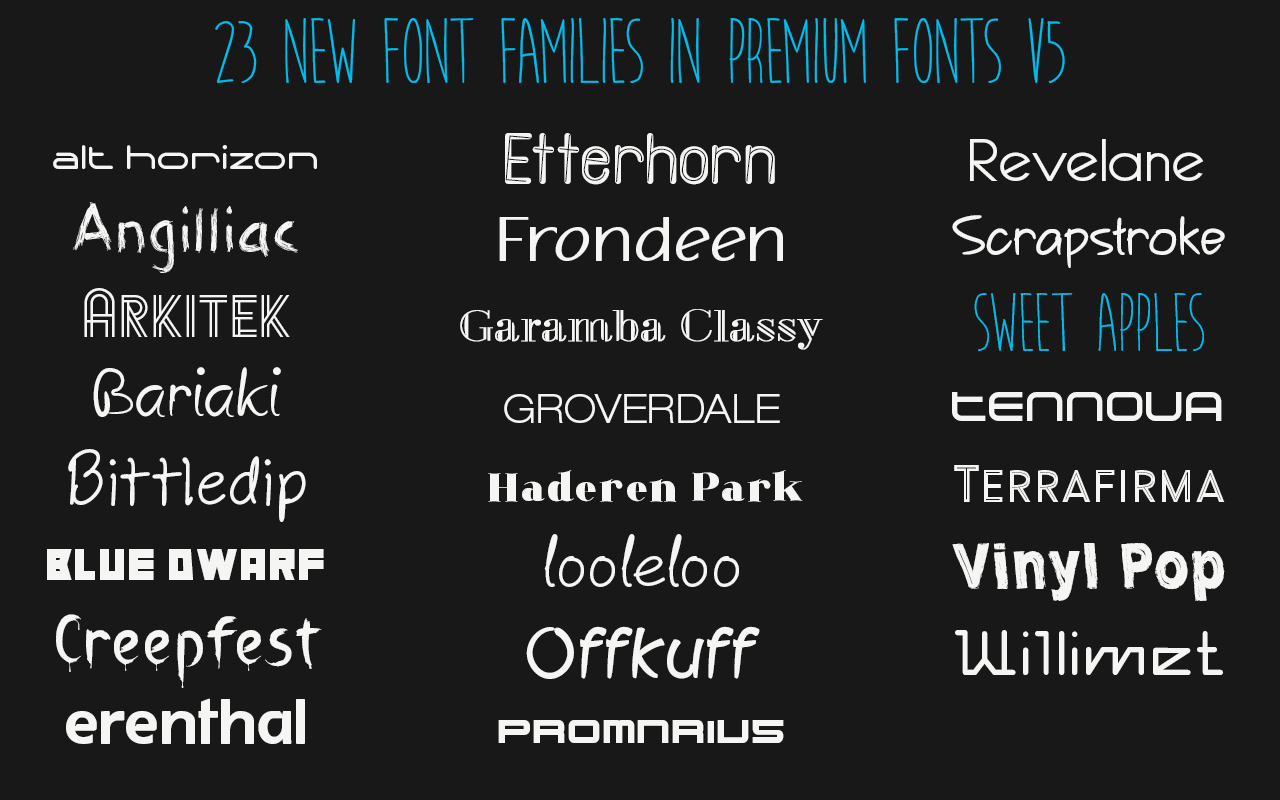
* New! Added 23 new font families for a total of 147 unique font families
* Kerning added to 54 regular font styles
* All premium fonts in OpenType font format
* 10 computer, commercial use license
* Cross-platform compatible
* Install and use in all applications that support fonts
* Cursive, creative, classic and other beautifully crafted styles
* Perfect for presentations, logos, business cards, websites, advertisements, brochures, holidays, weddings, and more
System Requirements:
* OS X 10.6 or later
* 64-bit processor
* 70.5 MB
Pricing and Availability:
The updated Premium Fonts collection is now available on the MacAppware website, or on the Mac App Store, for a limited time discount of $29.99 (USD), a savings of 70% off the full price of $99. The Premium Fonts subscription is also available for $29.99 and subscribers will receive all future fonts at no extra charge.
MacAppware: http://www.macappware.com
Premium Fonts Collection 5.0: http://macappware.com/software/commercial-use-fonts/
Purchase and Download (MAS): https://itunes.apple.com/us/app/premium-fonts-commercial-use/id642142422
Purchase from MacAppware: http://sites.fastspring.com/macappware/product/premiumfontssubscription?coupon=PFS30
Screenshot (23 New Font Families): http://www.macappware.com/images/fonts/Premium-Fonts-v5-app-store.jpg
App Icon: http://www.macappware.com/images/fonts/PremiumFontsAppIcon256.png
MacAppware is a division of 128bit Technologies and a dedicated Mac software developer currently offering design, image editing and disk utility applications; unique commercial use font collections; and a carefully curated rotation of bundles and deals. Copyright (C) 2014 128bit Technologies. All Rights Reserved. Apple, the Apple logo, Mac OS X, and Macintosh are registered trademarks of Apple Inc. in the U.S. and/or other countries. All other trademarks are the property of their respective owners.
*******
Link To Article: http://prmac.com/release-id-72476.htm
*******
---------------------------------------------------------------------------------
Note that you can alter delivered distributions at any time.
Login to your account on prMac to alter your channel selection, or to opt-out at any time.
264 Commercial Use Fonts Added to Premium Fonts Collection - Published on 12/17/14
MacAppware today announces the addition of 264 new commercial use fonts to its Premium Fonts collection for creative Mac users. Each premium font in this collection just came off our design floor so you will not find them anywhere else. Each font is in OpenType font format and can be used for any personal and business project. Western European international character support is standard for every premium font and new fonts are delivered at no extra charge to Premium Fonts subscription customers.
San Francisco, California - MacAppware, a division of 128bit Technologies, is proud to announce today the addition of 264 new commercial use fonts to its Premium Fonts collection for creative Mac users. Need a fresh design perspective? Tired of using the same old looking fonts? Need to change up the text style in a presentation, print project or a graphic design project? Download brand new premium font designs that just came off our development floor. This collection now includes 147 original font families, with a total of 1,841 fonts in all.
Each font is in OpenType font format and can be used for any personal and business project. Western European international character support is standard for every premium font, and NEW FONTS ARE DELIVERED AT NO EXTRA CHARGE to Premium Fonts subscription customers when available. The Mac App Store version includes the subscription to receive all new fonts released in the Premium Fonts collection. Premium Fonts has grown substantially in the past two years, beginning with only 54 font families and 702 total fonts!
147 Unique Font Families - Each Font Family Includes:
Regular, Bold, Italic, Bold Italic, Condensed, Condensed Bold, Condensed Italic, Expanded, Expanded Bold, Expanded Italic, Wide, Wide Bold, Wide Italic.
Each premium font in this collection just came off our design floor so you will not find them anywhere else. This collection is completely different from the 1000 OpenType Fonts collection offered by 128bit Technologies, as well as all Free Fonts collections (we never overlap or duplicate the fonts in each of our collections!).
* New! Added 264 new fonts for a total of 1,841 total fonts
* New! Added 23 new font families for a total of 147 unique font families
* Kerning added to 54 regular font styles
* All premium fonts in OpenType font format
* 10 computer, commercial use license
* Cross-platform compatible
* Install and use in all applications that support fonts
* Cursive, creative, classic and other beautifully crafted styles
* Perfect for presentations, logos, business cards, websites, advertisements, brochures, holidays, weddings, and more
System Requirements:
* OS X 10.6 or later
* 64-bit processor
* 70.5 MB
Pricing and Availability:
The updated Premium Fonts collection is now available on the MacAppware website, or on the Mac App Store, for a limited time discount of $29.99 (USD), a savings of 70% off the full price of $99. The Premium Fonts subscription is also available for $29.99 and subscribers will receive all future fonts at no extra charge.
MacAppware: http://www.macappware.com
Premium Fonts Collection 5.0: http://macappware.com/software/commercial-use-fonts/
Purchase and Download (MAS): https://itunes.apple.com/us/app/premium-fonts-commercial-use/id642142422
Purchase from MacAppware: http://sites.fastspring.com/macappware/product/premiumfontssubscription?coupon=PFS30
Screenshot (23 New Font Families): http://www.macappware.com/images/fonts/Premium-Fonts-v5-app-store.jpg
App Icon: http://www.macappware.com/images/fonts/PremiumFontsAppIcon256.png

MacAppware is a division of 128bit Technologies and a dedicated Mac software developer currently offering design, image editing and disk utility applications; unique commercial use font collections; and a carefully curated rotation of bundles and deals. Copyright (C) 2014 128bit Technologies. All Rights Reserved. Apple, the Apple logo, Mac OS X, and Macintosh are registered trademarks of Apple Inc. in the U.S. and/or other countries. All other trademarks are the property of their respective owners.
*******
Link To Article: http://prmac.com/release-id-72476.htm
*******
---------------------------------------------------------------------------------
Note that you can alter delivered distributions at any time.
Login to your account on prMac to alter your channel selection, or to opt-out at any time.
Cut Me Out pro - Chop Photos or superimpose Backgrounds
A new article has been published at prMac.
Cut Me Out pro - Chop Photos or superimpose Backgrounds - Published on 12/17/14
mTouchLabs today announces Cut Me Out Pro 1.7, their Photography app exclusively for iOS users. Have you wondered how your friends swap their faces or attached animal face? Cut out sections of an image in any shape and paste it to selected background photo with Cut Me Out Pro. You can create, save, and share impressive images with only a few swipes across your screen. Import your own background pics from Camera Roll, Photo library, Facebook and more.
Hyderabad, India - mTouchLabs today is proud to announce the release of Cut Me Out Pro 1.7, their Photography app exclusively for iOS users. Have you wondered how your friends swap their faces or attached animal face? Cut Me Out is Photoshop(tm) like app one can cut some parts of the image and paste it on other images. Easy to replace background of any photo. Chop Photo or Superimpose background.
Cut Me Out is still the best photo editing app that allows you to make hilarious pics in unbelievable places. It's so easy to use, with its Photo Chop Background Adjuster to Superimpose your images and you can go to so many places and occasions in a snap. Fooling your friends just became a bit more wicked! Cut out sections of an image in any shape and paste it to selected background photo with Cut Me Out Pro. You can create, save, and share impressive images with only a few swipes across your screen.
Main Features:
* Cut out any shape from the image and paste it on background Image
* Cut portions can be pasted in Email, SMS, Notes, or any third party app
* Supports multiple cut and paste feature (Eg. you can replace your friend's faces in a group photo)
* Import your own background pics from Camera Roll, Photo library, Facebook, etc.
* Easily move the cut portion to any place on the background
* You can make twin effects using Duplicate feature
* Erase unwanted background with Different brush sizes and there is Undo option for accidental erase
* Cut out face from one photo and paste it in same photo or some other photo
* Multiple face cut out feature is available
* Save to Library, Email and sharing with Facebook, Twitter
What Cut Me Out users say:
"Works Great - The app works great on my photos, I simply cut the face on my photo and paste on other photos, the results were good."
Cut Me Out Pro listed in Top 100 charts of Photography category in US.
Device Requirements:
* iPhone, iPad and iPod touch
* Requires iOS 7.0 or later
* Optimized for iPhone 5
* 13.4 MB
Pricing and Availability:
The wonderful, feature-rich Cut Me Out Pro 1.7 is available at just $1.99 (USD) worldwide from the App Store under the Utilities category. Cut Me Out Pro has been rated 4 by many of its existing users.
mTouchLabs: http://mtouchlabs.com
Cut Me Out Pro 1.7: https://itunes.apple.com/app/id597526128
Screenshot 1: http://a5.mzstatic.com/us/r30/Purple/v4/d2/30/fd/d230fdae-354d-91c8-899c-852a9c47381f/screen480x480.jpeg
Screenshot 2: http://a1.mzstatic.com/us/r30/Purple2/v4/13/72/8b/13728bec-149e-b628-8237-0346f6f4ac1b/screen480x480.jpeg
App Icon: http://a1.mzstatic.com/us/r30/Purple/v4/24/04/e2/2404e26e-95ac-7ac2-f2da-b577ab4e7cd0/mzl.xqrukhjr.175x175-75.jpg
Locted in Hyderabad, India, mTouchLabs is a pioneer in the mobile development arena, releasing applications that are swift, visually appealing, and highly intuitive. Copyright (C) 2014 mTouchLabs. All Rights Reserved. Apple, the Apple logo, iPhone, iPad, iPad mini, iPod touch, and Mac are registered trademarks of Apple Inc. in the U.S. and/or other countries. Other trademarks and registered trademarks may be the property of their respective owners.
*******
Link To Article: http://prmac.com/release-id-72479.htm
*******
---------------------------------------------------------------------------------
Note that you can alter delivered distributions at any time.
Login to your account on prMac to alter your channel selection, or to opt-out at any time.
Cut Me Out pro - Chop Photos or superimpose Backgrounds - Published on 12/17/14
mTouchLabs today announces Cut Me Out Pro 1.7, their Photography app exclusively for iOS users. Have you wondered how your friends swap their faces or attached animal face? Cut out sections of an image in any shape and paste it to selected background photo with Cut Me Out Pro. You can create, save, and share impressive images with only a few swipes across your screen. Import your own background pics from Camera Roll, Photo library, Facebook and more.
Hyderabad, India - mTouchLabs today is proud to announce the release of Cut Me Out Pro 1.7, their Photography app exclusively for iOS users. Have you wondered how your friends swap their faces or attached animal face? Cut Me Out is Photoshop(tm) like app one can cut some parts of the image and paste it on other images. Easy to replace background of any photo. Chop Photo or Superimpose background.
Cut Me Out is still the best photo editing app that allows you to make hilarious pics in unbelievable places. It's so easy to use, with its Photo Chop Background Adjuster to Superimpose your images and you can go to so many places and occasions in a snap. Fooling your friends just became a bit more wicked! Cut out sections of an image in any shape and paste it to selected background photo with Cut Me Out Pro. You can create, save, and share impressive images with only a few swipes across your screen.
Main Features:
* Cut out any shape from the image and paste it on background Image
* Cut portions can be pasted in Email, SMS, Notes, or any third party app
* Supports multiple cut and paste feature (Eg. you can replace your friend's faces in a group photo)
* Import your own background pics from Camera Roll, Photo library, Facebook, etc.
* Easily move the cut portion to any place on the background
* You can make twin effects using Duplicate feature
* Erase unwanted background with Different brush sizes and there is Undo option for accidental erase
* Cut out face from one photo and paste it in same photo or some other photo
* Multiple face cut out feature is available
* Save to Library, Email and sharing with Facebook, Twitter
What Cut Me Out users say:
"Works Great - The app works great on my photos, I simply cut the face on my photo and paste on other photos, the results were good."
Cut Me Out Pro listed in Top 100 charts of Photography category in US.
Device Requirements:
* iPhone, iPad and iPod touch
* Requires iOS 7.0 or later
* Optimized for iPhone 5
* 13.4 MB
Pricing and Availability:
The wonderful, feature-rich Cut Me Out Pro 1.7 is available at just $1.99 (USD) worldwide from the App Store under the Utilities category. Cut Me Out Pro has been rated 4 by many of its existing users.
mTouchLabs: http://mtouchlabs.com
Cut Me Out Pro 1.7: https://itunes.apple.com/app/id597526128
Screenshot 1: http://a5.mzstatic.com/us/r30/Purple/v4/d2/30/fd/d230fdae-354d-91c8-899c-852a9c47381f/screen480x480.jpeg

Screenshot 2: http://a1.mzstatic.com/us/r30/Purple2/v4/13/72/8b/13728bec-149e-b628-8237-0346f6f4ac1b/screen480x480.jpeg

App Icon: http://a1.mzstatic.com/us/r30/Purple/v4/24/04/e2/2404e26e-95ac-7ac2-f2da-b577ab4e7cd0/mzl.xqrukhjr.175x175-75.jpg

Locted in Hyderabad, India, mTouchLabs is a pioneer in the mobile development arena, releasing applications that are swift, visually appealing, and highly intuitive. Copyright (C) 2014 mTouchLabs. All Rights Reserved. Apple, the Apple logo, iPhone, iPad, iPad mini, iPod touch, and Mac are registered trademarks of Apple Inc. in the U.S. and/or other countries. Other trademarks and registered trademarks may be the property of their respective owners.
*******
Link To Article: http://prmac.com/release-id-72479.htm
*******
---------------------------------------------------------------------------------
Note that you can alter delivered distributions at any time.
Login to your account on prMac to alter your channel selection, or to opt-out at any time.
Glooze - Intriguing and addictive Algorithmic Shape Matching Game
A new article has been published at prMac.
Glooze - Intriguing and addictive Algorithmic Shape Matching Game - Published on 12/17/14
Riada today introduces Glooze 1.0 for iOS, a fun and addictive game requiring skill in memory, visual recognition and strategy. Intriguing dynamic shapes are generated completely algorithmically from random seeds from the 7 included themes. Players swipe matching shapes together to form new higher level shapes. Glooze includes three modes, Game Center support for highest scores and achievements with online multiplayer connections up to 4 players in a timed match, including a chat feature.
Melbourne, Australia - Riada today is proud the announce the release of Glooze 1.0 for iPad, iPhone and iPod touch, a fun and addictive game requiring skill in memory, visual recognition and strategy. Intriguing dynamic shapes are generated completely algorithmically from random seeds from the 7 included themes. Players swipe matching shapes together to form new higher level shapes. As the game progresses, new shapes are formed, and the player must manage free space. If the the board fills, the game is over.
"Not only is this game addictive in regards to achieving high scores, but is also a meditative experience", said Daniel Adair, Riada's CEO. "I find myself transfixed by the complexity and beauty of the generated shapes. You never know what the next shape will be, and that's one of the most unique and important aspects of Glooze."
Glooze includes three modes, Standard, Timed and Multiplayer. In Standard mode, the object of the game is to achieve the highest score and level before the board fills. In Timed and Multiplayer the player must combine speed and strategy to achieve the highest score in a set time.
Included free in Glooze are 7 unique themes which determine how shapes are generated and their visual appearance and animation. Although there are common root forms in each theme, particular shapes are uniquely generated with each new game and level. Tapping each shape zooms in to display smaller details.
Glooze supports Game Center for highest scores and achievements, while online multiplayer connects up to 4 players in a timed match, including a chat feature. Additional themes packs can be added through In-App purchases.
Device Requirements:
* iPhone, iPad, and iPod touch
* Requires iOS 8.0 or later
* Optimized for iPhone 5, 6/6 Plus
* 11.0 MB
Pricing and Availability:
Glooze 1.0 is free with In-App purchases for additional theme packs and available worldwide exclusively through the App Store in the Puzzle and Board games categories.
Riada: http://www.riada.com/
Glooze 1.0: http://glooze.com/
Download from iTunes: https://itunes.apple.com/app/glooze/id929395125
Screenshot 1: http://www.riada.com/assets/images/glooze/Screen1.png
Screenshot 2: http://www.riada.com/assets/images/glooze/Screen2.png
App Icon: http://www.riada.com/assets/images/glooze/GloozeIcon1024.png
Founded in 1995, Riada embraces a philosophy that software should be excellent, fun and easy to use. This commitment has ensured Riada products have been used on some of the most recognizable sites on the net. All Material and Software (C) Copyright 2014 Riada International Pty. Ltd. All Rights Reserved. Apple, the Apple logo, iPhone, iPod and iPad are registered trademarks of Apple Inc. in the U.S. and/or other countries. Other trademarks and registered trademarks may be the property of their respective owners.
*******
Link To Article: http://prmac.com/release-id-72475.htm
*******
---------------------------------------------------------------------------------
Note that you can alter delivered distributions at any time.
Login to your account on prMac to alter your channel selection, or to opt-out at any time.
Glooze - Intriguing and addictive Algorithmic Shape Matching Game - Published on 12/17/14
Riada today introduces Glooze 1.0 for iOS, a fun and addictive game requiring skill in memory, visual recognition and strategy. Intriguing dynamic shapes are generated completely algorithmically from random seeds from the 7 included themes. Players swipe matching shapes together to form new higher level shapes. Glooze includes three modes, Game Center support for highest scores and achievements with online multiplayer connections up to 4 players in a timed match, including a chat feature.
Melbourne, Australia - Riada today is proud the announce the release of Glooze 1.0 for iPad, iPhone and iPod touch, a fun and addictive game requiring skill in memory, visual recognition and strategy. Intriguing dynamic shapes are generated completely algorithmically from random seeds from the 7 included themes. Players swipe matching shapes together to form new higher level shapes. As the game progresses, new shapes are formed, and the player must manage free space. If the the board fills, the game is over.
"Not only is this game addictive in regards to achieving high scores, but is also a meditative experience", said Daniel Adair, Riada's CEO. "I find myself transfixed by the complexity and beauty of the generated shapes. You never know what the next shape will be, and that's one of the most unique and important aspects of Glooze."
Glooze includes three modes, Standard, Timed and Multiplayer. In Standard mode, the object of the game is to achieve the highest score and level before the board fills. In Timed and Multiplayer the player must combine speed and strategy to achieve the highest score in a set time.
Included free in Glooze are 7 unique themes which determine how shapes are generated and their visual appearance and animation. Although there are common root forms in each theme, particular shapes are uniquely generated with each new game and level. Tapping each shape zooms in to display smaller details.
Glooze supports Game Center for highest scores and achievements, while online multiplayer connects up to 4 players in a timed match, including a chat feature. Additional themes packs can be added through In-App purchases.
Device Requirements:
* iPhone, iPad, and iPod touch
* Requires iOS 8.0 or later
* Optimized for iPhone 5, 6/6 Plus
* 11.0 MB
Pricing and Availability:
Glooze 1.0 is free with In-App purchases for additional theme packs and available worldwide exclusively through the App Store in the Puzzle and Board games categories.
Riada: http://www.riada.com/
Glooze 1.0: http://glooze.com/
Download from iTunes: https://itunes.apple.com/app/glooze/id929395125
Screenshot 1: http://www.riada.com/assets/images/glooze/Screen1.png

Screenshot 2: http://www.riada.com/assets/images/glooze/Screen2.png

App Icon: http://www.riada.com/assets/images/glooze/GloozeIcon1024.png

Founded in 1995, Riada embraces a philosophy that software should be excellent, fun and easy to use. This commitment has ensured Riada products have been used on some of the most recognizable sites on the net. All Material and Software (C) Copyright 2014 Riada International Pty. Ltd. All Rights Reserved. Apple, the Apple logo, iPhone, iPod and iPad are registered trademarks of Apple Inc. in the U.S. and/or other countries. Other trademarks and registered trademarks may be the property of their respective owners.
*******
Link To Article: http://prmac.com/release-id-72475.htm
*******
---------------------------------------------------------------------------------
Note that you can alter delivered distributions at any time.
Login to your account on prMac to alter your channel selection, or to opt-out at any time.
Typinator 6.3 finds recently used expansions
A new article has been published at prMac.
Typinator 6.3 finds recently used expansions - Published on 12/17/14
Ergonis Software today announces Typinator 6.3, an update to its popular text expander for OS X. Typinator helps automate the process of inserting frequently used text and auto-correcting typing errors. Featuring an improved appearance (particularly on Yosemite) and more, version 6.3 introduces a handy new feature that lets you search for the most recent expansions, both in the find field in the Typinator window and in Quick Search. Export of sets has been improved as well.
Perg, Austria - Ergonis Software today announced the release of Typinator 6.3, a new version of their popular text expander. Typinator 6.3 comes with a handy new feature that lets you search for the most recent expansions, both in the find field in the Typinator window and in Quick Search. Finding recent expansions can be very helpful if you realize an unexpected expansion while typing and you don't know which abbreviation triggered this expansion.
Now you can enter "last" in the find field, and Typinator will show the abbreviation that triggered that latest expansion. Typinator also accepts "recent" and "latest" as the keywords for this search function (in German "letzte", "letztes", "letzte"; in French "dernier", "derniers" and "recent"). You can also extend your search to more than just the latest expansion. For example, "recent 5" finds the five most recent expansions.
Export of sets has been improved as well. With the new version, dragging one or more items from the abbreviation list into a Finder window now exports a set containing just the selected items. Until now, exporting was possible only for whole sets.
The new version also comes with an improved appearance, particularly on Yosemite. With a new technological basis (new compiler, new libraries, faster code, etc.), Typinator 6.3 is faster, more robust, and more responsive than ever. Many more improvements and enhancements are included in this new version. Visit Ergonis Software's website to view the full list of changes and to download a trial copy.
Typinator is a powerful, yet elegantly simple solution that boosts your productivity by automating the process of inserting frequently used text and auto-correcting typing errors. Across all applications, it detects specific sequences of typed characters and automatically replaces them with text snippets, graphics, URLs, dates and special characters.
System Requirements:
Typinator 6.3 requires Mac OS X 10.6 or newer and is fully compatible with OS X Yosemite (10.10). The usage of regular expressions requires Mac OS X 10.7 or newer.
Availability and Ordering:
Typinator can be purchased securely on the Ergonis Software website. The upgrade to Typinator 6.3 is free for anyone who owns a license for Typinator 6 or purchased a license for Typinator 5 on or after October 1st 2013. Upgrade paths are available for customers who purchased their license before October 1st 2013. All customers who purchase an upgrade or a new license for Typinator 6 will get all subsequent 6.x updates for free. For information about purchases, including enterprise licenses, volume discounts, and upgrade pricing offers, see the company's web site.
Ergonis Software: http://www.ergonis.com/
Typinator 6.3: http://www.ergonis.com/products/typinator
Download Typinator: http://www.ergonis.com/downloads/typinator-install.dmg
Purchase Typinator: https://store.ergonis.com/products/typinator
Screenshot: http://www.ergonis.com/images/products/typi/external/typinator-screen.png
Application Icon: http://www.ergonis.com/images/products/typi/external/typinator-icon.png
Headquartered in Perg, Austria, Ergonis Software Gmbh is a privately held software development company founded in 2002. With a focus on innovation, Ergonis develops ergonomic and intuitive software that boosts the productivity of Mac and PC users alike. Copyright 2002-2014 Ergonis Software Gmbh. All Rights Reserved. Ergonis products are either registered trademarks or trademarks of Ergonis Software GmbH. Other company and product names may be trademarks of their respective owners.
*******
Link To Article: http://prmac.com/release-id-72474.htm
*******
---------------------------------------------------------------------------------
Note that you can alter delivered distributions at any time.
Login to your account on prMac to alter your channel selection, or to opt-out at any time.
Typinator 6.3 finds recently used expansions - Published on 12/17/14
Ergonis Software today announces Typinator 6.3, an update to its popular text expander for OS X. Typinator helps automate the process of inserting frequently used text and auto-correcting typing errors. Featuring an improved appearance (particularly on Yosemite) and more, version 6.3 introduces a handy new feature that lets you search for the most recent expansions, both in the find field in the Typinator window and in Quick Search. Export of sets has been improved as well.
Perg, Austria - Ergonis Software today announced the release of Typinator 6.3, a new version of their popular text expander. Typinator 6.3 comes with a handy new feature that lets you search for the most recent expansions, both in the find field in the Typinator window and in Quick Search. Finding recent expansions can be very helpful if you realize an unexpected expansion while typing and you don't know which abbreviation triggered this expansion.
Now you can enter "last" in the find field, and Typinator will show the abbreviation that triggered that latest expansion. Typinator also accepts "recent" and "latest" as the keywords for this search function (in German "letzte", "letztes", "letzte"; in French "dernier", "derniers" and "recent"). You can also extend your search to more than just the latest expansion. For example, "recent 5" finds the five most recent expansions.
Export of sets has been improved as well. With the new version, dragging one or more items from the abbreviation list into a Finder window now exports a set containing just the selected items. Until now, exporting was possible only for whole sets.
The new version also comes with an improved appearance, particularly on Yosemite. With a new technological basis (new compiler, new libraries, faster code, etc.), Typinator 6.3 is faster, more robust, and more responsive than ever. Many more improvements and enhancements are included in this new version. Visit Ergonis Software's website to view the full list of changes and to download a trial copy.
Typinator is a powerful, yet elegantly simple solution that boosts your productivity by automating the process of inserting frequently used text and auto-correcting typing errors. Across all applications, it detects specific sequences of typed characters and automatically replaces them with text snippets, graphics, URLs, dates and special characters.
System Requirements:
Typinator 6.3 requires Mac OS X 10.6 or newer and is fully compatible with OS X Yosemite (10.10). The usage of regular expressions requires Mac OS X 10.7 or newer.
Availability and Ordering:
Typinator can be purchased securely on the Ergonis Software website. The upgrade to Typinator 6.3 is free for anyone who owns a license for Typinator 6 or purchased a license for Typinator 5 on or after October 1st 2013. Upgrade paths are available for customers who purchased their license before October 1st 2013. All customers who purchase an upgrade or a new license for Typinator 6 will get all subsequent 6.x updates for free. For information about purchases, including enterprise licenses, volume discounts, and upgrade pricing offers, see the company's web site.
Ergonis Software: http://www.ergonis.com/
Typinator 6.3: http://www.ergonis.com/products/typinator
Download Typinator: http://www.ergonis.com/downloads/typinator-install.dmg
Purchase Typinator: https://store.ergonis.com/products/typinator
Screenshot: http://www.ergonis.com/images/products/typi/external/typinator-screen.png

Application Icon: http://www.ergonis.com/images/products/typi/external/typinator-icon.png

Headquartered in Perg, Austria, Ergonis Software Gmbh is a privately held software development company founded in 2002. With a focus on innovation, Ergonis develops ergonomic and intuitive software that boosts the productivity of Mac and PC users alike. Copyright 2002-2014 Ergonis Software Gmbh. All Rights Reserved. Ergonis products are either registered trademarks or trademarks of Ergonis Software GmbH. Other company and product names may be trademarks of their respective owners.
*******
Link To Article: http://prmac.com/release-id-72474.htm
*******
---------------------------------------------------------------------------------
Note that you can alter delivered distributions at any time.
Login to your account on prMac to alter your channel selection, or to opt-out at any time.
Indie Developer Fortune Games to Release Island Defense for iPad
A new article has been published at prMac.
Indie Developer Fortune Games to Release Island Defense for iPad - Published on 12/17/14
Indie game developers from Fortune Games today announce Island Defense 1.1, a dynamic action and strategy game for iOS devices. Players carefully guide their cargo planes and cargo ships through dangerous obstacles and park them on their island to earn money. Then using brain stimulating tactics, they must defend their island against enemy attacks in a battle for survival in this graphically rich and action-packed game. Users will enjoy simple swipe gameplay with this intense thriller.
Moscow, Russia - Indie game developers from Fortune Games today released the dynamic action and strategy game Island Defense, available on the App Store for 0.69 Euro in UK only for initial launch campaign. Users will enjoy simple swipe gameplay with this intense thriller, using brain stimulating tactics to defend their island against enemy attacks in a battle for survival in this graphically rich and action-packed game.
Island Defense was developed as engrossing game with multiple layers and objectives, mixing a parking and tower defense game in one. The gamer mission (should they choose to accept it) is to carefully guide their cargo planes and cargo ships through dangerous obstacles and park them on their island to earn money. Then, players spend money so to build towers that can effectively defend their island against enemy attacks. Finally, users strategically place their towers, upgrade existing towers with high-tech weaponry, and rebuild damage to fight off attackers.
"Mobile gamers are rightfully demanding more engaging, better looking games," said Alexander Dubrovsky, the game designer of Island Defense. "The increasing popularity of tablets encourages the development of games that are more than just one screen, rotating the same lackluster graphics. Island Defense brings the same excitement, strategy and stunning visuals associated with console games, to the small screen."
Players defend against an onslaught of cannons, lasers, towers and missiles in a battle for survival. And if that's not enough ammunition for adrenaline, gamers will have to beware of waves of enemy battleships headed straight for their islands.
The longer gamers survive, the more points they earn that can be used to redeem rewards. Players also have the ability to unlock new islands, but they have to survive against the increasing difficulty of each enemy wave. When it's all done, users can share their scores for battle bragging rights and compare with friends to determine the ultimate Island Defender.
Features
* Two gameplays in one - parking and tower defense
* Engaging enemy waves that goes from easy to intense
* Survive the attack from various enemy ships!
* Unlockable Islands
* Intuitive gameplay
* Clear graphics and dynamic sound effects
* Score sharing
* Updates with new bonus features
"Island Defense offers users a gaming experience that is made for more than just for killing time," said Dubrovsky. "It's an addictive scenario game that requires players to use their analytical skills to not only survive, but take them to whole new dazzling islands."
Device Requirements:
* Designed for iPad
* Requires with iOS 5.0 or higher
* 103 MB
Pricing and Availability:
Island Defense 1.1 is available for 0.69 Euro to download through iTunes App Store in the Games category, UK only.
Island Defense 1.1: http://www.idefensegame.com/eng/index.php
Purchase and Download: https://itunes.apple.com/gb/app/island-defense-hd/id850472508?ls=1&mt=8
YouTube Video (Demo): https://www.youtube.com/watch?v=c6a9eYd72-Q
Screenshot 1: http://a3.mzstatic.com/eu/r30/Purple/v4/ec/ee/da/eceedaf5-198e-b564-d749-b996c04f85f1/screen480x480.jpeg
Screenshot 2: http://a4.mzstatic.com/eu/r30/Purple2/v4/81/07/48/81074873-01e3-d160-8d3d-91231dce4418/screen480x480.jpeg
App Icon: http://a3.mzstatic.com/eu/r30/Purple5/v4/8f/97/01/8f9701bc-ac84-0637-4416-e495effc071b/icon350x350.jpeg
Fortune Games is a company founded by a group of indie game developers who are striving to make exciting games for iOS and Android platforms. All Material and Software (C) Copyright 2014 Fortune Games. All Rights Reserved. Apple, the Apple logo, iPhone, iPod and iPad are registered trademarks of Apple Inc. in the U.S. and/or other countries. Other trademarks and registered trademarks may be the property of their respective owners.
*******
Link To Article: http://prmac.com/release-id-72473.htm
*******
---------------------------------------------------------------------------------
Note that you can alter delivered distributions at any time.
Login to your account on prMac to alter your channel selection, or to opt-out at any time.
Indie Developer Fortune Games to Release Island Defense for iPad - Published on 12/17/14
Indie game developers from Fortune Games today announce Island Defense 1.1, a dynamic action and strategy game for iOS devices. Players carefully guide their cargo planes and cargo ships through dangerous obstacles and park them on their island to earn money. Then using brain stimulating tactics, they must defend their island against enemy attacks in a battle for survival in this graphically rich and action-packed game. Users will enjoy simple swipe gameplay with this intense thriller.
Moscow, Russia - Indie game developers from Fortune Games today released the dynamic action and strategy game Island Defense, available on the App Store for 0.69 Euro in UK only for initial launch campaign. Users will enjoy simple swipe gameplay with this intense thriller, using brain stimulating tactics to defend their island against enemy attacks in a battle for survival in this graphically rich and action-packed game.
Island Defense was developed as engrossing game with multiple layers and objectives, mixing a parking and tower defense game in one. The gamer mission (should they choose to accept it) is to carefully guide their cargo planes and cargo ships through dangerous obstacles and park them on their island to earn money. Then, players spend money so to build towers that can effectively defend their island against enemy attacks. Finally, users strategically place their towers, upgrade existing towers with high-tech weaponry, and rebuild damage to fight off attackers.
"Mobile gamers are rightfully demanding more engaging, better looking games," said Alexander Dubrovsky, the game designer of Island Defense. "The increasing popularity of tablets encourages the development of games that are more than just one screen, rotating the same lackluster graphics. Island Defense brings the same excitement, strategy and stunning visuals associated with console games, to the small screen."
Players defend against an onslaught of cannons, lasers, towers and missiles in a battle for survival. And if that's not enough ammunition for adrenaline, gamers will have to beware of waves of enemy battleships headed straight for their islands.
The longer gamers survive, the more points they earn that can be used to redeem rewards. Players also have the ability to unlock new islands, but they have to survive against the increasing difficulty of each enemy wave. When it's all done, users can share their scores for battle bragging rights and compare with friends to determine the ultimate Island Defender.
Features
* Two gameplays in one - parking and tower defense
* Engaging enemy waves that goes from easy to intense
* Survive the attack from various enemy ships!
* Unlockable Islands
* Intuitive gameplay
* Clear graphics and dynamic sound effects
* Score sharing
* Updates with new bonus features
"Island Defense offers users a gaming experience that is made for more than just for killing time," said Dubrovsky. "It's an addictive scenario game that requires players to use their analytical skills to not only survive, but take them to whole new dazzling islands."
Device Requirements:
* Designed for iPad
* Requires with iOS 5.0 or higher
* 103 MB
Pricing and Availability:
Island Defense 1.1 is available for 0.69 Euro to download through iTunes App Store in the Games category, UK only.
Island Defense 1.1: http://www.idefensegame.com/eng/index.php
Purchase and Download: https://itunes.apple.com/gb/app/island-defense-hd/id850472508?ls=1&mt=8
YouTube Video (Demo): https://www.youtube.com/watch?v=c6a9eYd72-Q
Screenshot 1: http://a3.mzstatic.com/eu/r30/Purple/v4/ec/ee/da/eceedaf5-198e-b564-d749-b996c04f85f1/screen480x480.jpeg

Screenshot 2: http://a4.mzstatic.com/eu/r30/Purple2/v4/81/07/48/81074873-01e3-d160-8d3d-91231dce4418/screen480x480.jpeg

App Icon: http://a3.mzstatic.com/eu/r30/Purple5/v4/8f/97/01/8f9701bc-ac84-0637-4416-e495effc071b/icon350x350.jpeg

Fortune Games is a company founded by a group of indie game developers who are striving to make exciting games for iOS and Android platforms. All Material and Software (C) Copyright 2014 Fortune Games. All Rights Reserved. Apple, the Apple logo, iPhone, iPod and iPad are registered trademarks of Apple Inc. in the U.S. and/or other countries. Other trademarks and registered trademarks may be the property of their respective owners.
*******
Link To Article: http://prmac.com/release-id-72473.htm
*******
---------------------------------------------------------------------------------
Note that you can alter delivered distributions at any time.
Login to your account on prMac to alter your channel selection, or to opt-out at any time.
GraphicConverter 9.5 Adds QR Code & More To Award-Winning Image Utility
A new article has been published at prMac.
GraphicConverter 9.5 Adds QR Code & More To Award-Winning Image Utility - Published on 12/17/14
Longtime Macintosh developer and publisher, Lemke Software GmbH today announces GraphicConverter 9.5, a significant update to its award-winning image utility for Mac OS X. With the ability to export in almost 80 different formats, GraphicConverter is a universal image editing program that features image conversion from more than 200 graphic file formats. Version 9.5 includes several new and updated features such as QR code creation, and is a free update to all Version 9.x customers.
Peine, Germany - Longtime Macintosh developer and publisher, Lemke Software GmbH today is pleased the announce the release and immediate availability of GraphicConverter 9.5, a significant update to its award-winning image utility for Mac OS X. Described as the equivalent of a "Swiss Army Knife," GraphicConverter is a universal image editing program that features image conversion from more than 200 graphic file formats into almost 80 different file formats.
"For nearly twenty years, Mac users everywhere have known Lemke Software GmbH and the software called GraphicConverter as a staple in the Mac toolbox -- and one of the most loyal, service oriented software developers in the industry," says Fred Showker of Graphic Design & Publishing Center. "GraphicConverter was one of the first and most robust graphics programs to appear for the Mac. It started life as public domain and evolved into shareware. From its slideshow functions to supporting hundreds of formats, it's the best."
Feature Highlights:
* Ability to open files in 200 graphics formats
* Ability to export in almost 80 different formats
* Import directly from camera (also RAW)
* Catalog generation (web, print, picture)
* TWAIN interface for scanners
* Direct support of the photo services Google+, Flickr, and Locr
* Graphical file and picture browser
* Slide show functions
* Powerful batch processor feature
* Support for Applescript
* Express picture enhancement function
* Basic functions for editing pictures
* Advanced functions, effects, and filters for picture manipulation
* Plug-in architecture
* Color management with ColorSync and ICC profiles
* 3D image support
* Enhancement and creation of pictures for user on the Internet
* Supports the latest technologies of the different Mac OS versions
* Support for the JPEG2000 format
* Multilingual (12 available languages)
* Image verifier, which can regularly verify images on NAS devices
* Ability to browse local copies on cloud services like DropBox, SkyDrive, Copy, Amazon Cloud and Google Drive
"GraphicConverter is a well-known image processor," says MacReview. "It performs well, and cleverly combines a browser, converter, and an image editor. GraphicConverter is a very helpful application." (9 Mar 2013)
Named an Editor's Choice by PCMagazine (26 Nov 2012), Version 9.5 has incorporated several new features to increase the power and improve the functionality of GraphicConverter including:
* QR code creation
* Ability to find QR code (OS X 10.10 or later)
* Motorola Theme File (MTF) import
* Ability to export embedded GIF and mp3 data with the context menu
* Automatic Enhancement function to Picture menu
* Ability to update preference panel
* MathPad text file import
* Optional decoding of tar/gzip archives to browser
* "Closed all saved documents" function
* Sort option preference for browsing of photostream
* Mark possible images of HDR series
* Ability to paste into selection
* Utilize QR code feature to sort into subfolder to browser context menu
* APNG import
* Option to select behavior after single item rename in browser
* Contrast and color measurement to caliper tool
* Tolerance to swap colors function
* Smart crop Applescript command
* Print preview dialog
* GPX creation added to GPS menu
In addition to its broad number of new options, GraphicConverter has made several significant updates to existing features within its popular image utility app. They are:
* Support for SIXEL files with binary introducer
* Updated Sparkle framework to current OS X release
* Improved inverse geotagging
* An option to use original format in operator
* "Inverse Geotagging" option added to edit IPTC information of opened image
* Ability to define print catalog image resolution
* Enhanced "New folder with selection" options
* Ability to sort by name/exif date option to HTML catalog creation
* Ability for next/previous image to use browser sorting
* Justify option to slideshow
* Line style added to line tool
"With over 1.5 million users worldwide, GraphicConverter is one of the most utilized professional programs on the market," says Thorsten Lemke, founder of Lemke Software GmbH. "Both amateur photographers and professional designers love its quality, vast array of features, and ease of use. They also appreciate that GraphicConverter is available on a trial basis with few restrictions and at your leisure until you decide to purchase. Version 9.5 is even a free update to Version 9.x customers.
"Offering everything you'd expect in an all-around image editing program, GraphicConverter has even impressed Apple, who included GraphicConverter as a pre-installed application on many of their computers. Our newest version continues the tradition of making GraphicConverter the best image utility tool for Macs."
Language Support:
* English, Brazilian Portuguese, Chinese (simplified), Chinese (traditional), Czech, Danish, Dutch, French, German, Italian, Norwegian, Spanish, Swedish
Device Requirements:
* OS X 10.7 or later
* 1 GB
Pricing and Availability:
GraphicConverter 9.5 is only $39.95 (USD) and available worldwide through the Mac App Store (*) in the Photography category. It can also be directly purchased online from the Lemkesoft website. GraphicConverter 9.5 is a free update for all customers of version 9.x. Upgrades from older versions of GraphicConverter are available for $25.95 (USD). (*) The Mac App Store version will be available after the Apple approval process.
Lemkesoft: http://www.lemkesoft.de/en/lemkesoft/
GraphicConverter 9.5: http://www.lemkesoft.de/en/products/graphicconverter/
Key features: http://www.lemkesoft.de/en/products/graphicconverter/key-features/
Purchase and Download (MAS): https://itunes.apple.com/app/graphicconverter-9/id736099092
Purchase from Lemkesoft: http://www.lemkesoft.de/en/products/graphicconverter/download/
Application Icon: http://a5.mzstatic.com/us/r30/Purple/v4/08/06/bd/0806bdf3-a718-4896-0903-827d02eaefa3/GraphicConverter.175x175-75.png
Based in Peine, Germany, Lemke Software GmbH is a developer and publisher of Macintosh software. Founded by Thorsten Lemke in 2002, the main focus and passion of Lemke Software is centered on the maintenance and further development of GraphicConverter. Lemke Software also develops individual solutions for special customer requirements. All Material and Software (C) Copyright 2014 Lemke Software GmbH. All Rights Reserved. Apple, the Apple logo, Macintosh and Mac OS X are registered trademarks of Apple Inc. in the U.S. and/or other countries. Other trademarks and registered trademarks may be the property of their respective owners.
*******
Link To Article: http://prmac.com/release-id-72472.htm
*******
---------------------------------------------------------------------------------
Note that you can alter delivered distributions at any time.
Login to your account on prMac to alter your channel selection, or to opt-out at any time.
GraphicConverter 9.5 Adds QR Code & More To Award-Winning Image Utility - Published on 12/17/14
Longtime Macintosh developer and publisher, Lemke Software GmbH today announces GraphicConverter 9.5, a significant update to its award-winning image utility for Mac OS X. With the ability to export in almost 80 different formats, GraphicConverter is a universal image editing program that features image conversion from more than 200 graphic file formats. Version 9.5 includes several new and updated features such as QR code creation, and is a free update to all Version 9.x customers.
Peine, Germany - Longtime Macintosh developer and publisher, Lemke Software GmbH today is pleased the announce the release and immediate availability of GraphicConverter 9.5, a significant update to its award-winning image utility for Mac OS X. Described as the equivalent of a "Swiss Army Knife," GraphicConverter is a universal image editing program that features image conversion from more than 200 graphic file formats into almost 80 different file formats.
"For nearly twenty years, Mac users everywhere have known Lemke Software GmbH and the software called GraphicConverter as a staple in the Mac toolbox -- and one of the most loyal, service oriented software developers in the industry," says Fred Showker of Graphic Design & Publishing Center. "GraphicConverter was one of the first and most robust graphics programs to appear for the Mac. It started life as public domain and evolved into shareware. From its slideshow functions to supporting hundreds of formats, it's the best."
Feature Highlights:
* Ability to open files in 200 graphics formats
* Ability to export in almost 80 different formats
* Import directly from camera (also RAW)
* Catalog generation (web, print, picture)
* TWAIN interface for scanners
* Direct support of the photo services Google+, Flickr, and Locr
* Graphical file and picture browser
* Slide show functions
* Powerful batch processor feature
* Support for Applescript
* Express picture enhancement function
* Basic functions for editing pictures
* Advanced functions, effects, and filters for picture manipulation
* Plug-in architecture
* Color management with ColorSync and ICC profiles
* 3D image support
* Enhancement and creation of pictures for user on the Internet
* Supports the latest technologies of the different Mac OS versions
* Support for the JPEG2000 format
* Multilingual (12 available languages)
* Image verifier, which can regularly verify images on NAS devices
* Ability to browse local copies on cloud services like DropBox, SkyDrive, Copy, Amazon Cloud and Google Drive
"GraphicConverter is a well-known image processor," says MacReview. "It performs well, and cleverly combines a browser, converter, and an image editor. GraphicConverter is a very helpful application." (9 Mar 2013)
Named an Editor's Choice by PCMagazine (26 Nov 2012), Version 9.5 has incorporated several new features to increase the power and improve the functionality of GraphicConverter including:
* QR code creation
* Ability to find QR code (OS X 10.10 or later)
* Motorola Theme File (MTF) import
* Ability to export embedded GIF and mp3 data with the context menu
* Automatic Enhancement function to Picture menu
* Ability to update preference panel
* MathPad text file import
* Optional decoding of tar/gzip archives to browser
* "Closed all saved documents" function
* Sort option preference for browsing of photostream
* Mark possible images of HDR series
* Ability to paste into selection
* Utilize QR code feature to sort into subfolder to browser context menu
* APNG import
* Option to select behavior after single item rename in browser
* Contrast and color measurement to caliper tool
* Tolerance to swap colors function
* Smart crop Applescript command
* Print preview dialog
* GPX creation added to GPS menu
In addition to its broad number of new options, GraphicConverter has made several significant updates to existing features within its popular image utility app. They are:
* Support for SIXEL files with binary introducer
* Updated Sparkle framework to current OS X release
* Improved inverse geotagging
* An option to use original format in operator
* "Inverse Geotagging" option added to edit IPTC information of opened image
* Ability to define print catalog image resolution
* Enhanced "New folder with selection" options
* Ability to sort by name/exif date option to HTML catalog creation
* Ability for next/previous image to use browser sorting
* Justify option to slideshow
* Line style added to line tool
"With over 1.5 million users worldwide, GraphicConverter is one of the most utilized professional programs on the market," says Thorsten Lemke, founder of Lemke Software GmbH. "Both amateur photographers and professional designers love its quality, vast array of features, and ease of use. They also appreciate that GraphicConverter is available on a trial basis with few restrictions and at your leisure until you decide to purchase. Version 9.5 is even a free update to Version 9.x customers.
"Offering everything you'd expect in an all-around image editing program, GraphicConverter has even impressed Apple, who included GraphicConverter as a pre-installed application on many of their computers. Our newest version continues the tradition of making GraphicConverter the best image utility tool for Macs."
Language Support:
* English, Brazilian Portuguese, Chinese (simplified), Chinese (traditional), Czech, Danish, Dutch, French, German, Italian, Norwegian, Spanish, Swedish
Device Requirements:
* OS X 10.7 or later
* 1 GB
Pricing and Availability:
GraphicConverter 9.5 is only $39.95 (USD) and available worldwide through the Mac App Store (*) in the Photography category. It can also be directly purchased online from the Lemkesoft website. GraphicConverter 9.5 is a free update for all customers of version 9.x. Upgrades from older versions of GraphicConverter are available for $25.95 (USD). (*) The Mac App Store version will be available after the Apple approval process.
Lemkesoft: http://www.lemkesoft.de/en/lemkesoft/
GraphicConverter 9.5: http://www.lemkesoft.de/en/products/graphicconverter/
Key features: http://www.lemkesoft.de/en/products/graphicconverter/key-features/
Purchase and Download (MAS): https://itunes.apple.com/app/graphicconverter-9/id736099092
Purchase from Lemkesoft: http://www.lemkesoft.de/en/products/graphicconverter/download/
Application Icon: http://a5.mzstatic.com/us/r30/Purple/v4/08/06/bd/0806bdf3-a718-4896-0903-827d02eaefa3/GraphicConverter.175x175-75.png

Based in Peine, Germany, Lemke Software GmbH is a developer and publisher of Macintosh software. Founded by Thorsten Lemke in 2002, the main focus and passion of Lemke Software is centered on the maintenance and further development of GraphicConverter. Lemke Software also develops individual solutions for special customer requirements. All Material and Software (C) Copyright 2014 Lemke Software GmbH. All Rights Reserved. Apple, the Apple logo, Macintosh and Mac OS X are registered trademarks of Apple Inc. in the U.S. and/or other countries. Other trademarks and registered trademarks may be the property of their respective owners.
*******
Link To Article: http://prmac.com/release-id-72472.htm
*******
---------------------------------------------------------------------------------
Note that you can alter delivered distributions at any time.
Login to your account on prMac to alter your channel selection, or to opt-out at any time.
Subscribe to:
Posts (Atom)