A new article has been published at prMac.
Snake Hunt released for iOS/Android - Hide and Seek Arcade Action - Published on 01/29/15
Bali-based game developer, Dragon Game Studio today introduces Snake Hunt 1.0, a new and exciting game for iOS & Android devices. Snake Hunt let's you hunt for a series of fantasy snakes. Start with searching the colourful worlds for camouflaged snakes, and once a snake is spotted the real fun begins! Tap, swipe and do everything in your power to capture it. The Snake Hunt battle mode features true arcade action that requires both fast reactions, patience, and a clever mind.
Bali, Indonesia - Game developer, Dragon Game Studio today is pleased to announce the release and immediate availability of Snake Hunt 1.0, a new and exciting game for iOS & Android devices. Snake Hunt lets you hunt for a series of fantasy snakes. Start with searching the colourful worlds for camouflaged snakes, and once a snake is spotted the real fun begins! Tap, swipe and do everything in your power to capture it. The Snake Hunt battle mode features true arcade action that requires both fast reactions, patience, and a clever mind.
Snake Hunt is a lot of different genres melted into one unique gaming experience. It's time for you to experience the wonderful fantasy world of Snake Hunt:
* Hide & Seek gameplay:
Wonderful fantasy environments for you to explore during your journey.
* Multiple battle modes:
Because one gameplay just isn't enough! Snake Hunt features two epic battle modes. Tap and swipe your way to the the whole snake collection!
* Huge collection of snakes:
Collect the cutest and most crazy looking snakes ever. Can you discover all the special and unique snakes?
For gamers that...
enjoy a fast paced action game, just as much as as a slow paced hide and seek game! Snake Hunt has got something to offer for everyone. No matter if you prefer the fast action that the two battle modes offers, or if you prefer leisurely scrolling around the fantasy worlds trying to find new species, you for sure will enjoy Snake Hunt!
"What makes this game stand out is that it's a mix of many different genres, all packed into one", says Jonas, Founder & Creative Director of Dragon Game Studio. "The game truly has something to offer for everyone, no matter if you are a novice or a hardcore game."
Device Requirements:
* iPhone, iPad, or iPod touch
* Requires iOS 6.0 or later
* Universal app optimized for display on all iOS devices
* Optimized for iPhone 6 and iPhone 6
Pricing and Availability:
Snake Hunt 1.0 is free and available worldwide through the App Store in the Games category. There is also an Android version available on Google Play.
Dragon Game Studio: http://www.dragongamestudio.com/
Snake Hunt 1.0: https://itunes.apple.com/app/snake-hunt/id928755986
YouTube Video (Trailer): https://www.youtube.com/watch?v=A_l8YrC21JM
Screenshot: http://a4.mzstatic.com/us/r30/Purple3/v4/25/b0/7f/25b07f1c-a1e6-224d-8bd5-a865a333ea44/screen480x480.jpeg
App Icon: http://a5.mzstatic.com/us/r30/Purple5/v4/4a/83/35/4a83353e-77a7-606f-3815-2445b9a1ccd5/icon175x175.png
Dragon Game Studio is an indie game developer based in the southern part of Bali, Indonesia, also known as the Islands of the Gods. Our slogan says it all: Life is wonderful, let our games be part of it! Copyright (C) 2015 Dragon Game Studio. All Rights Reserved. Apple, the Apple logo, iPhone, iPod and iPad are registered trademarks of Apple Inc. in the U.S. and/or other countries.
*******
Link To Article: http://prmac.com/release-id-73137.htm
*******
---------------------------------------------------------------------------------
Note that you can alter delivered distributions at any time.
Login to your account on prMac to alter your channel selection, or to opt-out at any time.



InfoLogic releases MathMagic Lite 9.0 for Mac - Free Equation Editor
A new article has been published at prMac.
InfoLogic releases MathMagic Lite 9.0 for Mac - Free Equation Editor - Published on 01/29/15
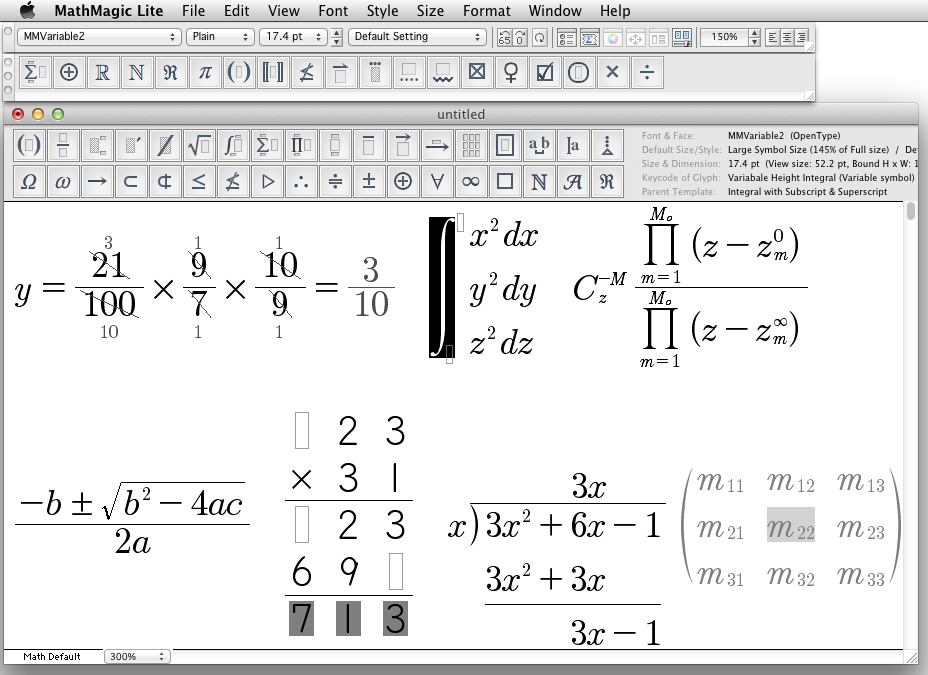
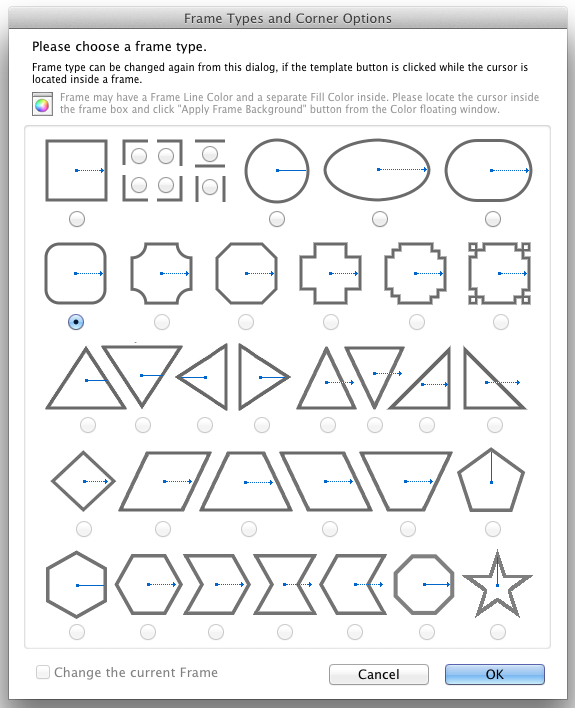
InfoLogic today announces MathMagic Lite 9.0 for Mac, an update to their complimentary equation editor for Mac OS X. Available for free on 4 major platforms, MathMagic Lite was developed specifically to help both mobile, and desktop users write and easily share mathematical expressions and technical information more easily and quickly. Version 9.0 supports user configurable Vertical Fences, Horizontal Fences, Over and Under Bars, more Frame types, adjustable fence height and width, and more.
Vancouver, Canada - InfoLogic today is proud to announce the release of MathMagic Lite 9.0 for Mac, their complimentary equation editor for Mac OS X in the suite of award-winning equation editor products. Available for free on 4 major platforms (Android, iOS, Mac OS X and Windows), MathMagic Lite Edition was developed specifically to help both mobile, and desktop users write and easily share mathematical expressions and technical information more easily and quickly.
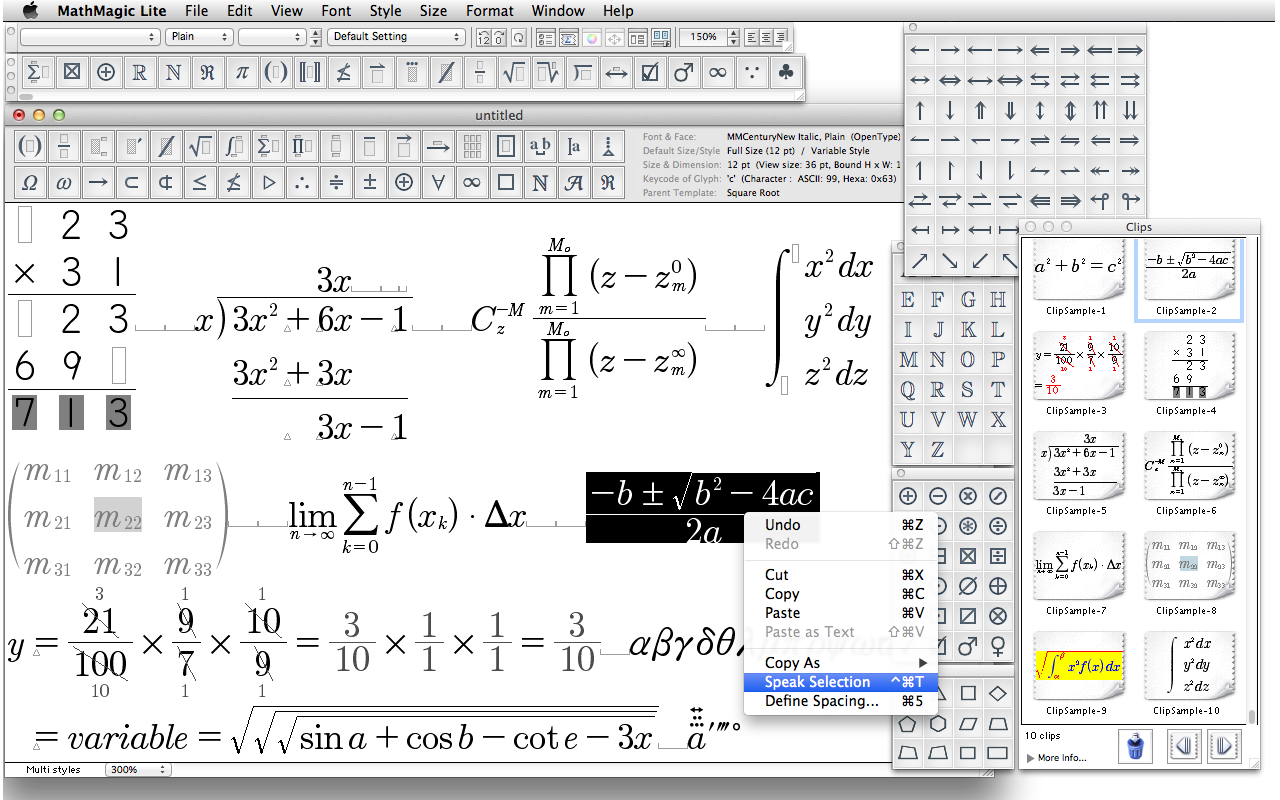
MathMagic Lite 9.0 supports user configurable Vertical Fences, Horizontal Fences, Over and Under Bars, more Frame types, adjustable fence height and width, and more. New interface helps user select desired fences, bars, and symbols more easily with its visual preview support.
v9.0 also supports negative width for a tight gap and kerning control for text.
MathMagic Lite for Mac can save its equations and Math worksheets in SVG, PNG, Math-To-Speech and more, for use in web, email, presentation, and word processing. Unlike their paid versions, MathMagic Lite has some less used or high end complex features disabled or removed, focusing more on K12 Math levels. High end users who need more advanced features can try MathMagic Personal and MathMagic Pro.
System Requirements:
* Mac OS X 10.6 or later including 10.10 Yosemite
Pricing and Availability:
MathMagic Lite for Mac OS X is completely free. It is available immediately for download from the MathMagic website. For more information please visit InfoLogic online.
MathMagic Lite for Mac 9.0: http://www.mathmagic.com/product/lite.html
Download MathMagic Lite: http://www.mathmagic.com/download/
Screenshot (Main interface and samples): http://www.mathmagic.com/product/images/MMLite9mainscreen.png
Screenshot (Box and Frame type selector interface): http://www.mathmagic.com/product/images/MMLite9FrameTypes.png
Screenshot (Palettes and sample equations): http://www.mathmagic.com/product/images/MMLite9mainscreen2.png
Application Icon: http://www.mathmagic.com/screenshot/mathmagic_icon_logo2.jpg
Headquartered in Vancouver, Canada, InfoLogic, founded in 1996, specializes in technical and desktop publishing, high quality digital content and Macintosh software development. Released in 1998, MathMagic is its flagship product. Copyright 1996-2015 InfoLogic, Inc. All Rights Reserved. MathMagic, MathMagic Pro Edition, MathMagic Personal Edition, MathMagic Prime Edition, MathMagic Lite Edition, MathMagic logo, InfoLogic logo, and InfoLogic are trademarks or registered trademarks of InfoLogic, Inc. Other trademarks and registered trademarks may be the property of their respective owners.
*******
Link To Article: http://prmac.com/release-id-73136.htm
*******
---------------------------------------------------------------------------------
Note that you can alter delivered distributions at any time.
Login to your account on prMac to alter your channel selection, or to opt-out at any time.
InfoLogic releases MathMagic Lite 9.0 for Mac - Free Equation Editor - Published on 01/29/15
InfoLogic today announces MathMagic Lite 9.0 for Mac, an update to their complimentary equation editor for Mac OS X. Available for free on 4 major platforms, MathMagic Lite was developed specifically to help both mobile, and desktop users write and easily share mathematical expressions and technical information more easily and quickly. Version 9.0 supports user configurable Vertical Fences, Horizontal Fences, Over and Under Bars, more Frame types, adjustable fence height and width, and more.
Vancouver, Canada - InfoLogic today is proud to announce the release of MathMagic Lite 9.0 for Mac, their complimentary equation editor for Mac OS X in the suite of award-winning equation editor products. Available for free on 4 major platforms (Android, iOS, Mac OS X and Windows), MathMagic Lite Edition was developed specifically to help both mobile, and desktop users write and easily share mathematical expressions and technical information more easily and quickly.
MathMagic Lite 9.0 supports user configurable Vertical Fences, Horizontal Fences, Over and Under Bars, more Frame types, adjustable fence height and width, and more. New interface helps user select desired fences, bars, and symbols more easily with its visual preview support.
v9.0 also supports negative width for a tight gap and kerning control for text.
MathMagic Lite for Mac can save its equations and Math worksheets in SVG, PNG, Math-To-Speech and more, for use in web, email, presentation, and word processing. Unlike their paid versions, MathMagic Lite has some less used or high end complex features disabled or removed, focusing more on K12 Math levels. High end users who need more advanced features can try MathMagic Personal and MathMagic Pro.
System Requirements:
* Mac OS X 10.6 or later including 10.10 Yosemite
Pricing and Availability:
MathMagic Lite for Mac OS X is completely free. It is available immediately for download from the MathMagic website. For more information please visit InfoLogic online.
MathMagic Lite for Mac 9.0: http://www.mathmagic.com/product/lite.html
Download MathMagic Lite: http://www.mathmagic.com/download/
Screenshot (Main interface and samples): http://www.mathmagic.com/product/images/MMLite9mainscreen.png
Screenshot (Box and Frame type selector interface): http://www.mathmagic.com/product/images/MMLite9FrameTypes.png
Screenshot (Palettes and sample equations): http://www.mathmagic.com/product/images/MMLite9mainscreen2.png
Application Icon: http://www.mathmagic.com/screenshot/mathmagic_icon_logo2.jpg

Headquartered in Vancouver, Canada, InfoLogic, founded in 1996, specializes in technical and desktop publishing, high quality digital content and Macintosh software development. Released in 1998, MathMagic is its flagship product. Copyright 1996-2015 InfoLogic, Inc. All Rights Reserved. MathMagic, MathMagic Pro Edition, MathMagic Personal Edition, MathMagic Prime Edition, MathMagic Lite Edition, MathMagic logo, InfoLogic logo, and InfoLogic are trademarks or registered trademarks of InfoLogic, Inc. Other trademarks and registered trademarks may be the property of their respective owners.
*******
Link To Article: http://prmac.com/release-id-73136.htm
*******
---------------------------------------------------------------------------------
Note that you can alter delivered distributions at any time.
Login to your account on prMac to alter your channel selection, or to opt-out at any time.
DEVONthink and DEVONnote 2.8.3 - Smarter, Faster, and More Reliable
A new article has been published at prMac.
DEVONthink and DEVONnote 2.8.3 - Smarter, Faster, and More Reliable - Published on 01/29/15
DEVONtechnologies, LLC today updates all editions of its intelligent information and document manager DEVONthink as well as the smart notebook DEVONnote. DEVONthink and DEVONnote help its users classify and organize documents effortlessly with unique artificial intelligence. Free and recommended for all users, version 2.8.3 now allows users to select and copy text from Quick-Look-based views, and brings even better artificial intelligence accuracy as well as further improvements and bug fixes.
Coeur d'Alene, Idaho - DEVONtechnologies, LLC updates all editions of its intelligent information and document manager DEVONthink as well as the smart notebook DEVONnote. DEVONthink and DEVONnote help its users classify and organize documents effortlessly with unique artificial intelligence. The improved algorithm in version 2.8.3 improves the accuracy of all AI-based functionality: See also, classify, concordance, automatic grouping, and summarizing.
DEVONthink 2.8.3 now allows users to select and copy text from Quick-Look-based views. This includes e.g. Microsoft Office or OpenOffice documents. OpenOffice documents also open no longer internally but in their default application when being double-clicked. The update adds support for images when converting Markdown to RTF, and improves Wiki-linking, e.g. for Japanese Katakana.
Finally, version 2.8.3 fixes synchronization bugs and other more minor issues. The updates bring more optimizations for OS X Yosemite and improve the performance and the reliability of the application, too.
"The built-in artificial intelligence is what makes DEVONthink and DEVONnote unique. It automatically or semi-automatically classifies documents of all kinds for its users, finds related materials, or even creates summaries. This new update improves this key functionality for even better results," comments Eric Bohnisch-Volkmann, President of DEVONtechnologies.
Pricing and Availability:
* DEVONthink Pro Office: US $149.95
* DEVONthink Pro: US $79.95
* DEVONthink Personal: US $49.95 (App Store: $49.99)
* DEVONnote: US $24.95 (App Store: $24.99)
All editions of DEVONthink as well as DEVONnote require an Intel-based Mac and OS X 10.7.5 or later (in the App Store: OS X 10.9 or later). They can be downloaded from DEVONtechnologies online and be test-driven for free before they need to be properly licensed. DEVONthink Personal and DEVONnote are also available in the App Store; DEVONthink can be purchased in bundles with DEVONagent for an attractive bundle price in DEVONtechnologies' online shop.
DEVONtechnologies: http://www.devontechnologies.com
DEVONproducts: http://www.devontechnologies.com/redirect.php?id=products
Download: http://www.devontechnologies.com/redirect.php?id=download
Online Shop: http://www.devontechnologies.com/redirect.php?id=shop
Devonian Blog: http://www.devontechnologies.com/redirect.php?id=blog
DEVONtechnologies LLC creates end-user and server applications for the Mac and iOS platforms that enhance productivity, organization, and user experience with unique artificial intelligence technology. All applications are focused on both ease of use and satisfying the needs of even the most savvy users. The underlying DEVONtechnology is a flexible and versatile foundation that can be used for a large range of purposes from databases, data mining, and information retrieval to human-computer interfaces. DEVONtechnologies LLC was founded 2002 and incorporated 2004, and is today headquartered in Coeur d'Alene, Idaho, USA. All Material and Software (C) Copyright 2015 DEVONtechnologies LLC. All Rights Reserved. Apple, the Apple logo, Macintosh and Mac OS X are registered trademarks of Apple Inc. in the U.S. and/or other countries. Other trademarks and registered trademarks may be the property of their respective owners.
*******
Link To Article: http://prmac.com/release-id-73141.htm
*******
---------------------------------------------------------------------------------
Note that you can alter delivered distributions at any time.
Login to your account on prMac to alter your channel selection, or to opt-out at any time.
DEVONthink and DEVONnote 2.8.3 - Smarter, Faster, and More Reliable - Published on 01/29/15
DEVONtechnologies, LLC today updates all editions of its intelligent information and document manager DEVONthink as well as the smart notebook DEVONnote. DEVONthink and DEVONnote help its users classify and organize documents effortlessly with unique artificial intelligence. Free and recommended for all users, version 2.8.3 now allows users to select and copy text from Quick-Look-based views, and brings even better artificial intelligence accuracy as well as further improvements and bug fixes.
Coeur d'Alene, Idaho - DEVONtechnologies, LLC updates all editions of its intelligent information and document manager DEVONthink as well as the smart notebook DEVONnote. DEVONthink and DEVONnote help its users classify and organize documents effortlessly with unique artificial intelligence. The improved algorithm in version 2.8.3 improves the accuracy of all AI-based functionality: See also, classify, concordance, automatic grouping, and summarizing.
DEVONthink 2.8.3 now allows users to select and copy text from Quick-Look-based views. This includes e.g. Microsoft Office or OpenOffice documents. OpenOffice documents also open no longer internally but in their default application when being double-clicked. The update adds support for images when converting Markdown to RTF, and improves Wiki-linking, e.g. for Japanese Katakana.
Finally, version 2.8.3 fixes synchronization bugs and other more minor issues. The updates bring more optimizations for OS X Yosemite and improve the performance and the reliability of the application, too.
"The built-in artificial intelligence is what makes DEVONthink and DEVONnote unique. It automatically or semi-automatically classifies documents of all kinds for its users, finds related materials, or even creates summaries. This new update improves this key functionality for even better results," comments Eric Bohnisch-Volkmann, President of DEVONtechnologies.
Pricing and Availability:
* DEVONthink Pro Office: US $149.95
* DEVONthink Pro: US $79.95
* DEVONthink Personal: US $49.95 (App Store: $49.99)
* DEVONnote: US $24.95 (App Store: $24.99)
All editions of DEVONthink as well as DEVONnote require an Intel-based Mac and OS X 10.7.5 or later (in the App Store: OS X 10.9 or later). They can be downloaded from DEVONtechnologies online and be test-driven for free before they need to be properly licensed. DEVONthink Personal and DEVONnote are also available in the App Store; DEVONthink can be purchased in bundles with DEVONagent for an attractive bundle price in DEVONtechnologies' online shop.
DEVONtechnologies: http://www.devontechnologies.com
DEVONproducts: http://www.devontechnologies.com/redirect.php?id=products
Download: http://www.devontechnologies.com/redirect.php?id=download
Online Shop: http://www.devontechnologies.com/redirect.php?id=shop
Devonian Blog: http://www.devontechnologies.com/redirect.php?id=blog
DEVONtechnologies LLC creates end-user and server applications for the Mac and iOS platforms that enhance productivity, organization, and user experience with unique artificial intelligence technology. All applications are focused on both ease of use and satisfying the needs of even the most savvy users. The underlying DEVONtechnology is a flexible and versatile foundation that can be used for a large range of purposes from databases, data mining, and information retrieval to human-computer interfaces. DEVONtechnologies LLC was founded 2002 and incorporated 2004, and is today headquartered in Coeur d'Alene, Idaho, USA. All Material and Software (C) Copyright 2015 DEVONtechnologies LLC. All Rights Reserved. Apple, the Apple logo, Macintosh and Mac OS X are registered trademarks of Apple Inc. in the U.S. and/or other countries. Other trademarks and registered trademarks may be the property of their respective owners.
*******
Link To Article: http://prmac.com/release-id-73141.htm
*******
---------------------------------------------------------------------------------
Note that you can alter delivered distributions at any time.
Login to your account on prMac to alter your channel selection, or to opt-out at any time.
Packing Pro 10.2 Update Adds Extra Management Tools
A new article has been published at prMac.
Packing Pro 10.2 Update Adds Extra Management Tools - Published on 01/29/15
QuinnScape today announces Packing Pro 10.2, an update to their popular mobile packing app for iOS devices. Packing Pro features unlimited, 100% customizable packing lists, an extensive, yet flexible, catalog and handy sample lists that can be used as templates. Version 10.2 builds on the helpful alert and photo capabilities by adding a convenient, centralized management section, as well as introduces a slew of new icons for categories, people and bags for enhanced customization options.
Taipei, Taiwan - QuinnScape today is proud to announce the release of Packing Pro 10.2, an update to their popular travel app for iPhone, iPad and iPod touch. This update builds on the helpful alert and photo capabilities added last year by adding a convenient, centralized management section. It allows the user to view all past & future alerts, as well as edit or delete them, all in one place. This update also adds a slew of new icons for categories, people and bags for enhanced customization options. Lastly, full support for 64-bit devices, including iPhone 6 and iPhone 6 Plus, has also been enabled.
During the five years that Packing Pro has been on the App Store, it has been highlighted several times, including the current "Travel Companions," "Travel Survival Kit" and "Overseas Travel" promotions. It has also ranked at #1 for iPads and #2 for iPhones in the U.S. App Store's Travel section. Besides Apple, Packing Pro has also been recognized by CNN, WSJ, BBC, The New York Times, Expedia and Budget Travel, and has earned glowing reviews on major tech and app blogs (Gizmodo, Mashable, Macworld, CNET, TUAW and iPhone Life, among others).
Packing Pro is a mobile packing app that features unlimited, 100% customizable packing lists, an extensive, yet flexible, catalog and handy sample lists that can be used as templates. A host of special functions include:
* Multi-item selection from catalog for speedy list building
* Multi-item editing for easy list & catalog management
* Collapsable categories with floating headers & running item tallies
* List sorting & filtering by bag and/or person
* Item, weight and value totals & subtotals
* Item images to eliminate any confusion - never again pack the wrong item
* Item & list alerts for user-set reminders
* Email export for file sharing
* Wireless printing
* Fully customized device support for all sizes of iPhone, iPod touch & iPad
* Full multi-lingual support for English, Spanish, French, German, Italian, Portuguese, Russian, Polish, Japanese & Chinese
Besides the core features listed above (which are also present in the basic Packing (+TO DO!) app), Packing Pro also gives its users the following Pro-level features:
* iCloud auto-syncing support
* Expert packing list wizard that can "automajically" create a list
* iTunes & email file sharing, backup & out-of-app editing support
* Customized design (themes, layout, fonts, colors, textures)
* Double-sized Master Catalog with over 800 items and to-do tasks
* Twice as many sample lists
* Smart Search
With update 10.2, Packing Pro now helps users better manage their alerts & photos with a centralized tool. New icons also expand the flexibility in creating personalized lists, and full support for the newest 64-bit devices has also been enabled. See for yourself how this has greatly improved the overall user experience.
Device Requirements:
* iPhone, iPad, and iPod touch
* Requires iOS 6.0 or later
* Optimized for iPhone 5, iPhone 6/6 Plus
* Universal Application
* 15.5 MB
Pricing and Availability:
Packing Pro 10.2 is a universal app that is available for purchase worldwide on the App Store in the Travel category for $2.99, or the equivalent in local currency. The basic Packing (+TO DO!) app sells for $0.99 (USD).
QuinnScape: http://www.quinnscape.com/
Packing Pro 10.2: http://www.quinnscape.com/PackingPro.asp
Purchase and Download: http://itunes.apple.com/app/packing-pro/id312266675
Video Demos: http://www.quinnscape.com/PackingPro-videodemo.asp
Screenshot: http://www.quinnscape.com/images/PackingPro-iPad-v10.0.png
App Icon: http://www.quinnscape.com/images/PackingPro-Icon-250x250.png
Since its founding in October 2008, QuinnScape has been managed by Quinn Genzel. Quinn is best known for his popular, top-ranking travel packing apps: Packing (+TO DO!) and Packing Pro. Packing Pro has been recognized by Apple, CNN, WSJ, BBC, National Geographic, Budget Travel, Fodor's, CNET, Macworld and a host of others as one of their top apps for traveling. Other app created by Quinn include a grocery shopping list app (Shopping Pro), nature appreciation apps (iLove Nature and iLove Birds), 3D VR action games (R.I.P and Ghost Buddy) and high-quality puzzles (the aQ's Pro Slider Puzzle series). Copyright (C) 2008-2015 QuinnScape. All Rights Reserved. Apple, the Apple logo, iPhone, iPod and iPad are registered trademarks of Apple Inc. in the U.S. and/or other countries.
*******
Link To Article: http://prmac.com/release-id-73135.htm
*******
---------------------------------------------------------------------------------
Note that you can alter delivered distributions at any time.
Login to your account on prMac to alter your channel selection, or to opt-out at any time.
Packing Pro 10.2 Update Adds Extra Management Tools - Published on 01/29/15
QuinnScape today announces Packing Pro 10.2, an update to their popular mobile packing app for iOS devices. Packing Pro features unlimited, 100% customizable packing lists, an extensive, yet flexible, catalog and handy sample lists that can be used as templates. Version 10.2 builds on the helpful alert and photo capabilities by adding a convenient, centralized management section, as well as introduces a slew of new icons for categories, people and bags for enhanced customization options.
Taipei, Taiwan - QuinnScape today is proud to announce the release of Packing Pro 10.2, an update to their popular travel app for iPhone, iPad and iPod touch. This update builds on the helpful alert and photo capabilities added last year by adding a convenient, centralized management section. It allows the user to view all past & future alerts, as well as edit or delete them, all in one place. This update also adds a slew of new icons for categories, people and bags for enhanced customization options. Lastly, full support for 64-bit devices, including iPhone 6 and iPhone 6 Plus, has also been enabled.
During the five years that Packing Pro has been on the App Store, it has been highlighted several times, including the current "Travel Companions," "Travel Survival Kit" and "Overseas Travel" promotions. It has also ranked at #1 for iPads and #2 for iPhones in the U.S. App Store's Travel section. Besides Apple, Packing Pro has also been recognized by CNN, WSJ, BBC, The New York Times, Expedia and Budget Travel, and has earned glowing reviews on major tech and app blogs (Gizmodo, Mashable, Macworld, CNET, TUAW and iPhone Life, among others).
Packing Pro is a mobile packing app that features unlimited, 100% customizable packing lists, an extensive, yet flexible, catalog and handy sample lists that can be used as templates. A host of special functions include:
* Multi-item selection from catalog for speedy list building
* Multi-item editing for easy list & catalog management
* Collapsable categories with floating headers & running item tallies
* List sorting & filtering by bag and/or person
* Item, weight and value totals & subtotals
* Item images to eliminate any confusion - never again pack the wrong item
* Item & list alerts for user-set reminders
* Email export for file sharing
* Wireless printing
* Fully customized device support for all sizes of iPhone, iPod touch & iPad
* Full multi-lingual support for English, Spanish, French, German, Italian, Portuguese, Russian, Polish, Japanese & Chinese
Besides the core features listed above (which are also present in the basic Packing (+TO DO!) app), Packing Pro also gives its users the following Pro-level features:
* iCloud auto-syncing support
* Expert packing list wizard that can "automajically" create a list
* iTunes & email file sharing, backup & out-of-app editing support
* Customized design (themes, layout, fonts, colors, textures)
* Double-sized Master Catalog with over 800 items and to-do tasks
* Twice as many sample lists
* Smart Search
With update 10.2, Packing Pro now helps users better manage their alerts & photos with a centralized tool. New icons also expand the flexibility in creating personalized lists, and full support for the newest 64-bit devices has also been enabled. See for yourself how this has greatly improved the overall user experience.
Device Requirements:
* iPhone, iPad, and iPod touch
* Requires iOS 6.0 or later
* Optimized for iPhone 5, iPhone 6/6 Plus
* Universal Application
* 15.5 MB
Pricing and Availability:
Packing Pro 10.2 is a universal app that is available for purchase worldwide on the App Store in the Travel category for $2.99, or the equivalent in local currency. The basic Packing (+TO DO!) app sells for $0.99 (USD).
QuinnScape: http://www.quinnscape.com/
Packing Pro 10.2: http://www.quinnscape.com/PackingPro.asp
Purchase and Download: http://itunes.apple.com/app/packing-pro/id312266675
Video Demos: http://www.quinnscape.com/PackingPro-videodemo.asp
Screenshot: http://www.quinnscape.com/images/PackingPro-iPad-v10.0.png

App Icon: http://www.quinnscape.com/images/PackingPro-Icon-250x250.png

Since its founding in October 2008, QuinnScape has been managed by Quinn Genzel. Quinn is best known for his popular, top-ranking travel packing apps: Packing (+TO DO!) and Packing Pro. Packing Pro has been recognized by Apple, CNN, WSJ, BBC, National Geographic, Budget Travel, Fodor's, CNET, Macworld and a host of others as one of their top apps for traveling. Other app created by Quinn include a grocery shopping list app (Shopping Pro), nature appreciation apps (iLove Nature and iLove Birds), 3D VR action games (R.I.P and Ghost Buddy) and high-quality puzzles (the aQ's Pro Slider Puzzle series). Copyright (C) 2008-2015 QuinnScape. All Rights Reserved. Apple, the Apple logo, iPhone, iPod and iPad are registered trademarks of Apple Inc. in the U.S. and/or other countries.
*******
Link To Article: http://prmac.com/release-id-73135.htm
*******
---------------------------------------------------------------------------------
Note that you can alter delivered distributions at any time.
Login to your account on prMac to alter your channel selection, or to opt-out at any time.
6 New Lighting Effects for Final Cut Pro X from Brooklyn Effects
A new article has been published at prMac.
6 New Lighting Effects for Final Cut Pro X from Brooklyn Effects - Published on 01/29/15
Brooklyn Effects releases 6 new lighting plug-ins exclusively for Final Cut Pro X users. Each product is designed to help users create a distinct lighting effect in their project. These effects include: lens flares, light leaks, stage lights, volumetric lighting, shutter streaks, and anamorphic streaks. Create a stunning, custom lens flare for any scene, brilliant beams of light, customize the source and direction of beams, as well as contemporary-looking flashback scenes and so much more.
Brooklyn, New York - Brooklyn Effects, a New York-based special effects company, has announced the release of 6 new lighting plug-ins for the popular Final Cut Pro X(TM) non-linear editing software. These effects include: lens flares, light leaks, volumetric lighting, shutter streaks, anamorphic streaks and stage lights.
"Sometimes it can be difficult or expensive to capture the lighting you want in camera," Said Jean Moore, CEO of Brooklyn Effects, "We designed our lighting plug-ins for Final Cut Pro X to help editors create distinct lighting styles that would have been much harder to do during the production phase."
Create a stunning, custom lens flare for any scene in Final Cut Pro X with the Skyline Lights plugin by Brooklyn Effects(TM). Users can drag and drop the lens flare layer above their footage and use the control point to match the position and angle of the light source in the scene.
Nothing captivates like the lights of NYC. Brooklyn Effects(TM) has created a plug in for Final Cut Pro X providing flashes and light leaks adding liveliness to all footage. Not only is there the light selections, but transitions for FCPX to smoothly change from one clip to another.
From the center of the world to your editing station, editors can create brilliant beams of light in their scene with the Times Lights plugin from Brooklyn Effects(TM). Users can drag and drop the filter onto their footage in FCPX. Then, use the control points to customize the source and direction of the beams.
FCPX editors can create contemporary-looking flashback scenes that don't rely on aged footage. The Flashback Effect gives film the shutter streaks, color, and glow of flashbacks found in many recent science fiction and action movies.
From action flicks to Sci-Fi films, users can add anamorphic light refractions to their film with the Light Streak Filter from Brooklyn Effects. This filter was designed to allow users to emit add streaking rays of light from the bright areas in their scene, eliminating the need for composite footage.
Finally, editors can set the stage for your film in Final Cut Pro X using the 3D lighting tools from Brooklyn Effects. This collection comes with spot lights, point lights and lens flares that can be positioned and angled using on-screen control points.
System Requirements:
* Mac OS X Version 10.10 Mavericks or higher
* Mac Computer with a minimum of a Core 2 Duo processor, 2GB RAM, and 256MB VRAM
* Final Cut Pro X version 10.1.3 or newer
* 50 MB
Pricing and Availability:
All of these FCPX lighting effects are available now in the on-line store for $19.95. Brooklyn Effects say they have more useful tools and effects for Final Cut Pro X arriving shortly.
Brooklyn Effects: http://brooklyneffects.com/
Times Lights: http://www.brooklyneffects.com/final-cut-pro-x-effect/times-lights
Flashback Effect: http://www.brooklyneffects.com/final-cut-pro-x-effect/flashback
Lighting Tools: http://www.brooklyneffects.com/final-cut-pro-x-effect/lighting-tools
Skyline Lights: http://www.brooklyneffects.com/final-cut-pro-x-effect/skyline-lights
Screenshots: https://www.flickr.com/photos/129325017@N05/16027406406/
Brooklyn Effects(TM) is a special effects developer for Final Cut Pro X plugins out of Brooklyn, New York. Specializing in post-production tools and Apple Final Cut Pro X add-ons. All Material and Software (C) Copyright 2015 Brooklyn Effects. All Apple, the Apple logo, and Macintosh are registered trademarks of Apple Inc. in the U.S. and/or other countries. All other trademarks and trade names are the property of their respective owners.
*******
Link To Article: http://prmac.com/release-id-73134.htm
*******
---------------------------------------------------------------------------------
Note that you can alter delivered distributions at any time.
Login to your account on prMac to alter your channel selection, or to opt-out at any time.
6 New Lighting Effects for Final Cut Pro X from Brooklyn Effects - Published on 01/29/15
Brooklyn Effects releases 6 new lighting plug-ins exclusively for Final Cut Pro X users. Each product is designed to help users create a distinct lighting effect in their project. These effects include: lens flares, light leaks, stage lights, volumetric lighting, shutter streaks, and anamorphic streaks. Create a stunning, custom lens flare for any scene, brilliant beams of light, customize the source and direction of beams, as well as contemporary-looking flashback scenes and so much more.
Brooklyn, New York - Brooklyn Effects, a New York-based special effects company, has announced the release of 6 new lighting plug-ins for the popular Final Cut Pro X(TM) non-linear editing software. These effects include: lens flares, light leaks, volumetric lighting, shutter streaks, anamorphic streaks and stage lights.
"Sometimes it can be difficult or expensive to capture the lighting you want in camera," Said Jean Moore, CEO of Brooklyn Effects, "We designed our lighting plug-ins for Final Cut Pro X to help editors create distinct lighting styles that would have been much harder to do during the production phase."
Create a stunning, custom lens flare for any scene in Final Cut Pro X with the Skyline Lights plugin by Brooklyn Effects(TM). Users can drag and drop the lens flare layer above their footage and use the control point to match the position and angle of the light source in the scene.
Nothing captivates like the lights of NYC. Brooklyn Effects(TM) has created a plug in for Final Cut Pro X providing flashes and light leaks adding liveliness to all footage. Not only is there the light selections, but transitions for FCPX to smoothly change from one clip to another.
From the center of the world to your editing station, editors can create brilliant beams of light in their scene with the Times Lights plugin from Brooklyn Effects(TM). Users can drag and drop the filter onto their footage in FCPX. Then, use the control points to customize the source and direction of the beams.
FCPX editors can create contemporary-looking flashback scenes that don't rely on aged footage. The Flashback Effect gives film the shutter streaks, color, and glow of flashbacks found in many recent science fiction and action movies.
From action flicks to Sci-Fi films, users can add anamorphic light refractions to their film with the Light Streak Filter from Brooklyn Effects. This filter was designed to allow users to emit add streaking rays of light from the bright areas in their scene, eliminating the need for composite footage.
Finally, editors can set the stage for your film in Final Cut Pro X using the 3D lighting tools from Brooklyn Effects. This collection comes with spot lights, point lights and lens flares that can be positioned and angled using on-screen control points.
System Requirements:
* Mac OS X Version 10.10 Mavericks or higher
* Mac Computer with a minimum of a Core 2 Duo processor, 2GB RAM, and 256MB VRAM
* Final Cut Pro X version 10.1.3 or newer
* 50 MB
Pricing and Availability:
All of these FCPX lighting effects are available now in the on-line store for $19.95. Brooklyn Effects say they have more useful tools and effects for Final Cut Pro X arriving shortly.
Brooklyn Effects: http://brooklyneffects.com/
Times Lights: http://www.brooklyneffects.com/final-cut-pro-x-effect/times-lights
Flashback Effect: http://www.brooklyneffects.com/final-cut-pro-x-effect/flashback
Lighting Tools: http://www.brooklyneffects.com/final-cut-pro-x-effect/lighting-tools
Skyline Lights: http://www.brooklyneffects.com/final-cut-pro-x-effect/skyline-lights
Screenshots: https://www.flickr.com/photos/129325017@N05/16027406406/
Brooklyn Effects(TM) is a special effects developer for Final Cut Pro X plugins out of Brooklyn, New York. Specializing in post-production tools and Apple Final Cut Pro X add-ons. All Material and Software (C) Copyright 2015 Brooklyn Effects. All Apple, the Apple logo, and Macintosh are registered trademarks of Apple Inc. in the U.S. and/or other countries. All other trademarks and trade names are the property of their respective owners.
*******
Link To Article: http://prmac.com/release-id-73134.htm
*******
---------------------------------------------------------------------------------
Note that you can alter delivered distributions at any time.
Login to your account on prMac to alter your channel selection, or to opt-out at any time.
Updates and Deep Discounts On Veenix TypeBookCreator for Mac
A new article has been published at prMac.
Updates and Deep Discounts On Veenix TypeBookCreator for Mac - Published on 01/29/15
Veenix, LLC, has announced OS 10.10 (Yosemite) updates for both of its leading font software titles, TypeBook Creator and TypeWise. Recent updates for TypeBook Creator include a modern UI makeover plus the original UI version is now also included. TypeWise features a fast-scrolling WYSIWYG font list plus Veenix's powerful GlyphLogicEngine technology. Additionally, during Deep Discount Week, users can save up to 60% on single user licenses of both products.
Brooklyn, New York - Veenix, LLC, has announced OS 10.10 (Yosemite) updates for both of its leading font software titles, TypeBook Creator and TypeWise. TypeBook Creator is the graphic arts industry standard for creating printed type specimen books and fonts catalogs on the Mac. Recent updates include a modern UI makeover for Macintosh OS 10.10 (Yosemite), but for those who prefer a more icon-driven UI, the original UI version is now also included in the demo download as well as all of the purchased packages. Users get both and can choose the UI that suits them best. TypeBook Creator is also specially priced during Deep Discount Week at just $29.95, a $40 savings.
TypeWise is a smart font viewer and manager that helps users find and view fonts and characters quickly. TypeWise features a fast-scrolling WYSIWYG font list, gorgeous repertoire and character set layouts, plus Veenix's powerful GlyphLogicEngine technology which analyzes font characteristics and automatically organizes fonts by visual energy as well as into 16 different standard font classifications: text fonts, sans serif fonts, serif fonts, picture, script and thematic fonts, monospaced fonts, fraction and expert fonts and more. Recent updates include under-the-hood changes for Yosemite. TypeWise is also specially priced during Deep Discount Week at just $9.95, a $20 savings.
Veenix: http://www.veenix.com
TypeBook Creator: http://www.veenix.com/FontTools.html
Veenix, LLC develops and publishes mass market and trade software for the Macintosh platform. The company focuses on software products for the creative industries, and generally with embedded smart technologies. All Material and Software (C) Copyright 2015 Veenix, LLC. All Rights Reserved. Apple, the Apple logo, Macintosh and Mac OS X are registered trademarks of Apple Inc. in the U.S. and/or other countries. Other trademarks and registered trademarks may be the property of their respective owners.
*******
Link To Article: http://prmac.com/release-id-73070.htm
*******
---------------------------------------------------------------------------------
Note that you can alter delivered distributions at any time.
Login to your account on prMac to alter your channel selection, or to opt-out at any time.
Updates and Deep Discounts On Veenix TypeBookCreator for Mac - Published on 01/29/15
Veenix, LLC, has announced OS 10.10 (Yosemite) updates for both of its leading font software titles, TypeBook Creator and TypeWise. Recent updates for TypeBook Creator include a modern UI makeover plus the original UI version is now also included. TypeWise features a fast-scrolling WYSIWYG font list plus Veenix's powerful GlyphLogicEngine technology. Additionally, during Deep Discount Week, users can save up to 60% on single user licenses of both products.
Brooklyn, New York - Veenix, LLC, has announced OS 10.10 (Yosemite) updates for both of its leading font software titles, TypeBook Creator and TypeWise. TypeBook Creator is the graphic arts industry standard for creating printed type specimen books and fonts catalogs on the Mac. Recent updates include a modern UI makeover for Macintosh OS 10.10 (Yosemite), but for those who prefer a more icon-driven UI, the original UI version is now also included in the demo download as well as all of the purchased packages. Users get both and can choose the UI that suits them best. TypeBook Creator is also specially priced during Deep Discount Week at just $29.95, a $40 savings.
TypeWise is a smart font viewer and manager that helps users find and view fonts and characters quickly. TypeWise features a fast-scrolling WYSIWYG font list, gorgeous repertoire and character set layouts, plus Veenix's powerful GlyphLogicEngine technology which analyzes font characteristics and automatically organizes fonts by visual energy as well as into 16 different standard font classifications: text fonts, sans serif fonts, serif fonts, picture, script and thematic fonts, monospaced fonts, fraction and expert fonts and more. Recent updates include under-the-hood changes for Yosemite. TypeWise is also specially priced during Deep Discount Week at just $9.95, a $20 savings.
Veenix: http://www.veenix.com
TypeBook Creator: http://www.veenix.com/FontTools.html
Veenix, LLC develops and publishes mass market and trade software for the Macintosh platform. The company focuses on software products for the creative industries, and generally with embedded smart technologies. All Material and Software (C) Copyright 2015 Veenix, LLC. All Rights Reserved. Apple, the Apple logo, Macintosh and Mac OS X are registered trademarks of Apple Inc. in the U.S. and/or other countries. Other trademarks and registered trademarks may be the property of their respective owners.
*******
Link To Article: http://prmac.com/release-id-73070.htm
*******
---------------------------------------------------------------------------------
Note that you can alter delivered distributions at any time.
Login to your account on prMac to alter your channel selection, or to opt-out at any time.
myTuner Radio: Major release of new features also for desktop computers
A new article has been published at prMac.
myTuner Radio: Major release of new features also for desktop computers - Published on 01/29/15
The myTuner Radio team has been working hard during the last months. AppGeneration Software has announced version 4 of myTuner Radio for all major mobile platforms, including iOS, Android and Windows Phone. This week AppGeneration Software is proud to announce that myTuner Radio is also available for desktop computers! Now, not only Mac OS X users, but also Windows desktop users (Windows 8.1) can enjoy our app, with more than 30,000 radio stations available from 120 countries.
Porto, Portugal - The myTuner Radio team has been working hard during the last months. We have announced version 4 of myTuner Radio for all major mobile platforms (iOS, Android and Windows Phone) and this week we are proud to announce some exciting news, myTuner Radio is also available for desktop computers! Now, not only Mac OS X users, but also Windows desktop users (Windows 8.1) can enjoy our app, with more than 30000 radio stations available from 120 countries.
Last year, Mac OS X users received myTuner Radio with great enthusiasm. People could finally have the same ultimate experience when it comes to listening to the radio on their Macs, as those who had it on their iOS devices. We have improved the app over time, launched some minor bug fixes and we are currently working on a new version for the Mac OS X that will take this radio app experience even further.
This year, we thought that it was time for Windows Desktop users (8.1) to discover myTuner Radio. So, we created a special new interface designed only for Windows users and most of the features of the app for mobile devices have been migrated to this operating system. Plus, the Windows app is available for Free as a special launch campaign!
We are proud to announce that myTuner Radio is now also available for the two major desktop platforms!
Feature Highlights:
* Listen to the best local radio stations
* Listen to radio stations from over 120 countries
* Listen to more than 30,000 worldwide radio stations
* Search by the radio station's name or by country
* Record radio stations in real time
* Add stations to the favorites list
* Listen to the best Podcasts by country (Windows only)
* Listen in the background
Language Support:
* English
* Spanish (only for Windows)
* Portuguese (only for Windows)
System Requirements:
* OS X 10.9 or later with 10.4 MB free space
* Windows 8.1 with 8.1 MB free space
Price and Availability:
MyTuner Radio is available on the Mac App Store and the Windows Store in the Music category. Mac OS X version is available for $9.99 USD (and a free version with Ad support). The Windows version is available for free as a special launch campaign!
myTuner Radio: http://www.mytuner.mobi
Download for Mac (Pro version): https://itunes.apple.com/us/app/mytuner-radio/id808285143
Download for Mac (Free version): https://itunes.apple.com/us/app/mytuner-radio-free/id881415018
Download for Windows: http://apps.microsoft.com/windows/en-us/app/mytuner-radio/de5e230e-2690-47d1-9712-ec23218d30ee
Screenshot (Mac OS): http://a3.mzstatic.com/us/r30/Purple4/v4/13/18/ae/1318aed3-3152-4ff5-1809-1aa9ad48e369/screen800x500.jpeg
Screenshot (Windows): http://wscont1.apps.microsoft.com/winstore/1x/b1efd21a-8d99-4513-965f-82e64eebcf35/Screenshot.428155.1000000.jpg
Based in Porto, Portugal, AppGeneration Software specializes in software development and editorial content to provide a unique experience centered on smartphones and tablets. Copyright (C) 2015 AppGeneration. All Rights Reserved. Apple, the Apple logo, Mac OS X, iPhone, iPod, iPad and Macintosh are registered trademarks of Apple Inc. in the U.S. and/or other countries.
*******
Link To Article: http://prmac.com/release-id-73069.htm
*******
---------------------------------------------------------------------------------
Note that you can alter delivered distributions at any time.
Login to your account on prMac to alter your channel selection, or to opt-out at any time.
myTuner Radio: Major release of new features also for desktop computers - Published on 01/29/15
The myTuner Radio team has been working hard during the last months. AppGeneration Software has announced version 4 of myTuner Radio for all major mobile platforms, including iOS, Android and Windows Phone. This week AppGeneration Software is proud to announce that myTuner Radio is also available for desktop computers! Now, not only Mac OS X users, but also Windows desktop users (Windows 8.1) can enjoy our app, with more than 30,000 radio stations available from 120 countries.
Porto, Portugal - The myTuner Radio team has been working hard during the last months. We have announced version 4 of myTuner Radio for all major mobile platforms (iOS, Android and Windows Phone) and this week we are proud to announce some exciting news, myTuner Radio is also available for desktop computers! Now, not only Mac OS X users, but also Windows desktop users (Windows 8.1) can enjoy our app, with more than 30000 radio stations available from 120 countries.
Last year, Mac OS X users received myTuner Radio with great enthusiasm. People could finally have the same ultimate experience when it comes to listening to the radio on their Macs, as those who had it on their iOS devices. We have improved the app over time, launched some minor bug fixes and we are currently working on a new version for the Mac OS X that will take this radio app experience even further.
This year, we thought that it was time for Windows Desktop users (8.1) to discover myTuner Radio. So, we created a special new interface designed only for Windows users and most of the features of the app for mobile devices have been migrated to this operating system. Plus, the Windows app is available for Free as a special launch campaign!
We are proud to announce that myTuner Radio is now also available for the two major desktop platforms!
Feature Highlights:
* Listen to the best local radio stations
* Listen to radio stations from over 120 countries
* Listen to more than 30,000 worldwide radio stations
* Search by the radio station's name or by country
* Record radio stations in real time
* Add stations to the favorites list
* Listen to the best Podcasts by country (Windows only)
* Listen in the background
Language Support:
* English
* Spanish (only for Windows)
* Portuguese (only for Windows)
System Requirements:
* OS X 10.9 or later with 10.4 MB free space
* Windows 8.1 with 8.1 MB free space
Price and Availability:
MyTuner Radio is available on the Mac App Store and the Windows Store in the Music category. Mac OS X version is available for $9.99 USD (and a free version with Ad support). The Windows version is available for free as a special launch campaign!
myTuner Radio: http://www.mytuner.mobi
Download for Mac (Pro version): https://itunes.apple.com/us/app/mytuner-radio/id808285143
Download for Mac (Free version): https://itunes.apple.com/us/app/mytuner-radio-free/id881415018
Download for Windows: http://apps.microsoft.com/windows/en-us/app/mytuner-radio/de5e230e-2690-47d1-9712-ec23218d30ee
Screenshot (Mac OS): http://a3.mzstatic.com/us/r30/Purple4/v4/13/18/ae/1318aed3-3152-4ff5-1809-1aa9ad48e369/screen800x500.jpeg

Screenshot (Windows): http://wscont1.apps.microsoft.com/winstore/1x/b1efd21a-8d99-4513-965f-82e64eebcf35/Screenshot.428155.1000000.jpg

Based in Porto, Portugal, AppGeneration Software specializes in software development and editorial content to provide a unique experience centered on smartphones and tablets. Copyright (C) 2015 AppGeneration. All Rights Reserved. Apple, the Apple logo, Mac OS X, iPhone, iPod, iPad and Macintosh are registered trademarks of Apple Inc. in the U.S. and/or other countries.
*******
Link To Article: http://prmac.com/release-id-73069.htm
*******
---------------------------------------------------------------------------------
Note that you can alter delivered distributions at any time.
Login to your account on prMac to alter your channel selection, or to opt-out at any time.
Subscribe to:
Posts (Atom)