A new article has been published at prMac.
Top Cool Fun Games Announces New Game Title - Grand Theft Dual Getaway - Published on 02/06/15
Seattle based Top Cool Fun Games has released Grand Theft Dual Getaway 1.0 for iOS, Android, and Amazon, their sixth game title in less than 3 months. Grand Theft Dual Getaway is a challenging game where players control two cars at the same time to race through oncoming traffic, picking up nitrous bottles, and escaping the police. With a heart pumping soundtrack this game will surely appeal to both racing fans as well as fans of strategy arcade games.
Seattle, Washington - Top Cool Fun Games has announced the release of Grand Theft Dual Getaway 1.0 for iOS, Android, and Amazon, their sixth game title in less than 3 months. Grand Theft Dual Getaway is a challenging game where players control two cars at the same time to race through oncoming traffic, picking up nitrous bottles, and escaping the police.
Players control two separate cars independently to change lanes to avoid other cars and pick up nitrous bottles to gain speed. Not picking up a nitrous bottle allows the police to pick it up and gain speed to catch up. The faster you go the more challenging it becomes! This An addicting game that will challenge your reflexes as well as your mind. With a heart pumping soundtrack this game will surely appeal to both racing fans as well as fans of strategy arcade games.
Grand Theft Dual Getaway Features:
* Control 2 Cars at the same time
* Avoid oncoming traffic
* Pickup Nitrous bottles to speed up
* Missed Nitrous get picked up by the police increasing their speed to catch you
* Apple Game Center and Amazon GameCircle enabled to share high scores and compete with friends
* In App purchase to remove advertisements
Device Requirements:
* iPhone, iPad, and iPod touch
* Optimized for iPhone 5, iPhone 6/6 Plus
* Optimized for both Android and iOS devices
* Requires iOS 5.0 or later
* 15.1 MB
Pricing and Availability:
Grand Theft Dual Getaway 1.0 is Free (with in-app purchase) and available worldwide through the App Store in the Games category. Grand Theft Dual Getaway is also available on Google Play and Amazon.
Grand Theft Dual Getaway 1.0: http://topcoolfungames.com/app/grand-theft-dual-getaway/
Download from iTunes: https://itunes.apple.com/app/grand-theft-dual-getaway-2/id951485360
Screenshot 1: http://topcoolfungames.com/wp-content/uploads/Title-screenshot-amazon.png
Screenshot 2: http://topcoolfungames.com/wp-content/uploads/gameplay-1-amazon.png
Screenshot 3: http://topcoolfungames.com/wp-content/uploads/gameplay-2-amazon.png
App Icon: http://topcoolfungames.com/wp-content/uploads/icon-lightblue-512.png
Top Cool Fun Games is an independent gaming studio focusing on the best games for iOS and Android Mobile devices. The business model of the company is to build and release the best quality games and apps for iOS and Android mobile devices using rapid development systems and app reskinning. Our primary goal is to keep the build cycle as short as possible. Most of our apps use a Freemium software model, where players can download and play any of our games for free. All games are monetized with items that can be purchased within each game that helps improve the gaming experience. We also subsidize our development and production costs of free games through the use of mobile ads and affiliate redirection for targeted products and services. All Material and Software (C) Copyright 2015 Top Cool Fun Games, LLC. All Rights Reserved. Apple, the Apple logo, iPhone, iPod and iPad are registered trademarks of Apple Inc. in the U.S. and/or other countries. Other trademarks and registered
trademarks are the property of their respective owners.
*******
Link To Article: http://prmac.com/release-id-73234.htm
*******
---------------------------------------------------------------------------------
Note that you can alter delivered distributions at any time.
Login to your account on prMac to alter your channel selection, or to opt-out at any time.


Maintain Releases Cocktail 8.1.2 (Yosemite Edition)
A new article has been published at prMac.
Maintain Releases Cocktail 8.1.2 (Yosemite Edition) - Published on 02/06/15
Maintain has released Cocktail 8.1.2 (Yosemite Edition), the latest maintenance update for users running OS X Yosemite. Cocktail is a general purpose utility for OS X that lets users clean, repair and optimize their Macs. This version contains major improvements on the "Clear System caches" procedure, fixes compatibility issues with Safari Cookies cookie manager and adds OS X 10.10.2 Yosemite compatibility. The update is highly recommended for all users of Cocktail (Yosemite Edition).
Ekero, Sweden - Maintain has released Cocktail 8.1.2 (Yosemite Edition), the latest maintenance update of Cocktail for users running OS X Yosemite 10.10. This version contains major improvements on the "Clear System caches" procedure, fixes compatibility issues with Safari Cookies cookie manager and adds OS X 10.10.2 Yosemite compatibility. The update is highly recommended for all users of Cocktail (Yosemite Edition).
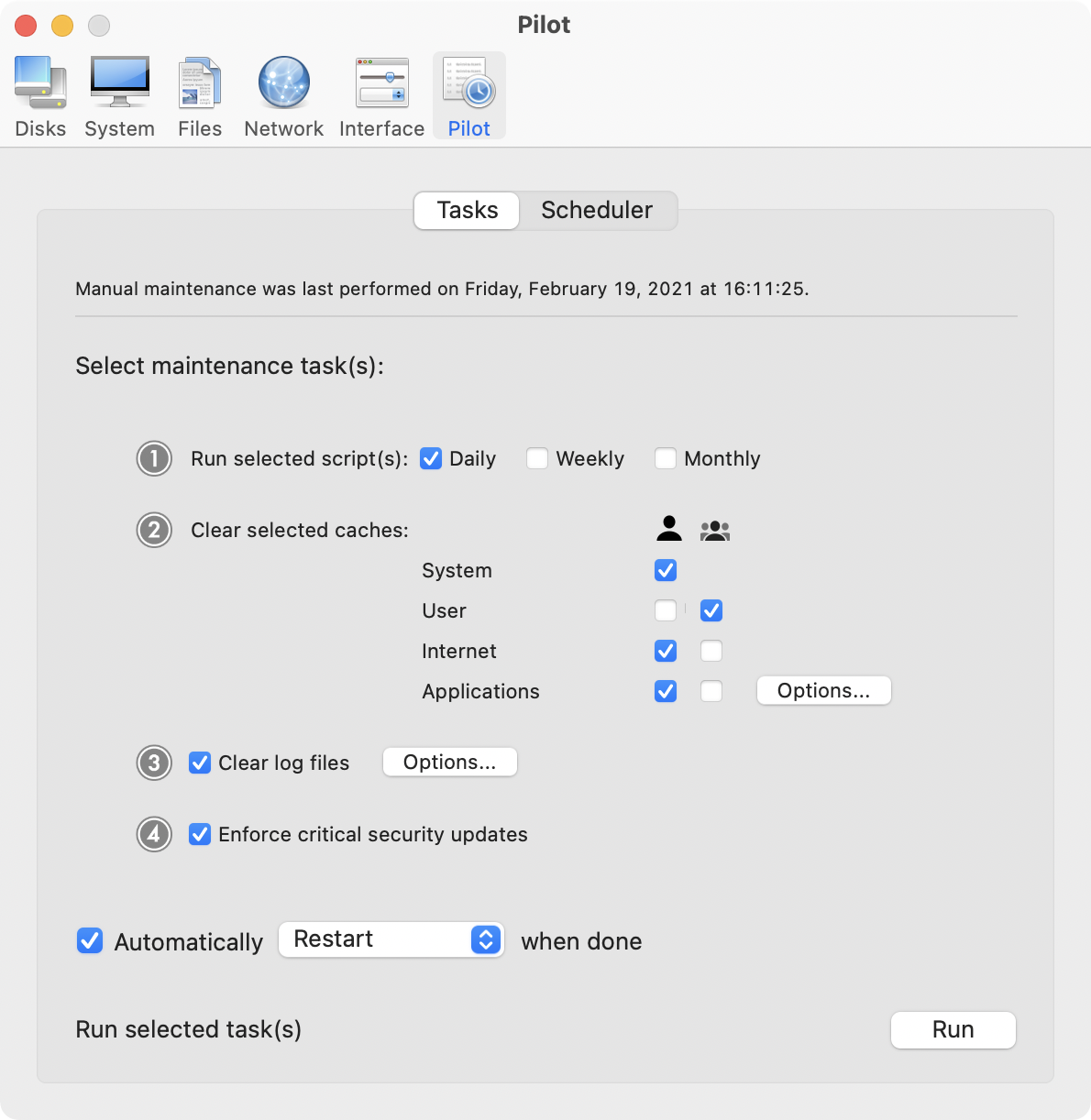
Cocktail is a general purpose utility for OS X that lets you clean, repair and optimize your Mac. The application serves up a perfect mix of maintenance tools and tweaks, all accessible through a clean and easy to use interface. Cocktail's features are arranged into five categories that helps you manage various aspects of your computer. It also comes with an automatic Pilot mode that allows you to simply press a button and relax, knowing that Cocktail will take care of the rest.
Disk:
* Automatically check S.M.A.R.T. status of disks
* Enable or disable journaling
* Repair disk permissions
* Reset home directory permissions and Access Control Lists
* Set disk sleep (spindown) time and change other sleep settings
System:
* Run periodic maintenance scripts
* Purge inactive memory and optimize virtual memory usage
* Enabled or disable virtual memory swapping
* Manage Spotlight indexing
* Erase Spotlight indexes
* Modify Time Machine settings
* Rebuild Mail's Envelope Index
* Rebuild Launch Services database
* Update locate and whatis databases
* Force empty the Trash
* Change startup mode or set startup delay
* Disable startup sound
* Disable Notification Center
Files:
* Clear system caches
* Clear user caches
* Clear font caches
* Clear virtual memory swap files
* Clear temporary files
* Clear Internet caches
* Clear cookies, download lists, form values and history files
* Clear Adobe Flash Player caches and cookies
* Search for corrupted preference files
* Delete unnecessary localization (language resources) files
* Clear and manage (view, print and save) log files
* Clear DNS cache
* Delete invisible DS Store files
* Delete locked or inaccessible items
Network:
* Change speed, duplex and MTU of network cards
* Easily optimize network settings for common connection types
* Modify IP configuration parameters
Interface:
* Customize look and features of Finder, Dock, login window and other system services
* Modify hidden settings of Safari, iTunes and QuickTime
System Requirements:
Cocktail 8.1.2 (Yosemite Edition) requires OS X Yosemite 10.10 to run. Cocktail (Mavericks Edition) for OS X 10.9, Cocktail (Mountain Lion Edition) for OS X 10.8 and Cocktail (Lion Edition) for OS X 10.7 are available for download from Maintain website.
Pricing and Availability:
Cocktail 8.1.2 (Yosemite Edition)is $19.00 (USD) for a single user license and available for purchase from the Maintain website.
Cocktail 8.1.2: http://www.maintain.se/cocktail
Download Cocktail 8.1.2 (Yosemite Edition): http://usa.maintain.se/CocktailYE.dmg
Purchase Cocktail: http://www.maintain.se/cocktail
Vimeo Video: https://vimeo.com/109816714
Screenshot: http://www.maintain.se/downloads/screenshots/screenshot1.png
Application Icon: http://www.maintain.se/downloads/screenshots/icon.png
Maintain develops tailored applications for Mac users. We work towards creating technical solutions which maintain your computer and make it as efficient and easy to use as possible. In addition, we offer comprehensive consultancy and support services which cover everything from operation of existing systems to purchase and implementation of new technical solutions. Among our clients are: Major League Baseball, Puma, The New York Times, Sony Pictures, Ericsson, Fortum, The City Of Calgary, Peak Performance, Loreal, Harvard University, Los Angeles Times, Swedish Film Institute, Weber, ESPN, Business Week, Swedish National Police Board, Norwegian Broadcasting Corporation, Getty Images, University of Texas, South Park Studios, CompUSA, bwin, Lockheed Martin, Defense Intelligence Agency, University of Michigan and hundred of thousands of Mac users around the world. Copyright (C) 2015 Maintain. All Rights Reserved. Apple, the Apple logo and Mac are registered trademarks of Apple Inc. in
the U.S. and/or other countries.
*******
Link To Article: http://prmac.com/release-id-73233.htm
*******
---------------------------------------------------------------------------------
Note that you can alter delivered distributions at any time.
Login to your account on prMac to alter your channel selection, or to opt-out at any time.
Maintain Releases Cocktail 8.1.2 (Yosemite Edition) - Published on 02/06/15
Maintain has released Cocktail 8.1.2 (Yosemite Edition), the latest maintenance update for users running OS X Yosemite. Cocktail is a general purpose utility for OS X that lets users clean, repair and optimize their Macs. This version contains major improvements on the "Clear System caches" procedure, fixes compatibility issues with Safari Cookies cookie manager and adds OS X 10.10.2 Yosemite compatibility. The update is highly recommended for all users of Cocktail (Yosemite Edition).
Ekero, Sweden - Maintain has released Cocktail 8.1.2 (Yosemite Edition), the latest maintenance update of Cocktail for users running OS X Yosemite 10.10. This version contains major improvements on the "Clear System caches" procedure, fixes compatibility issues with Safari Cookies cookie manager and adds OS X 10.10.2 Yosemite compatibility. The update is highly recommended for all users of Cocktail (Yosemite Edition).
Cocktail is a general purpose utility for OS X that lets you clean, repair and optimize your Mac. The application serves up a perfect mix of maintenance tools and tweaks, all accessible through a clean and easy to use interface. Cocktail's features are arranged into five categories that helps you manage various aspects of your computer. It also comes with an automatic Pilot mode that allows you to simply press a button and relax, knowing that Cocktail will take care of the rest.
Disk:
* Automatically check S.M.A.R.T. status of disks
* Enable or disable journaling
* Repair disk permissions
* Reset home directory permissions and Access Control Lists
* Set disk sleep (spindown) time and change other sleep settings
System:
* Run periodic maintenance scripts
* Purge inactive memory and optimize virtual memory usage
* Enabled or disable virtual memory swapping
* Manage Spotlight indexing
* Erase Spotlight indexes
* Modify Time Machine settings
* Rebuild Mail's Envelope Index
* Rebuild Launch Services database
* Update locate and whatis databases
* Force empty the Trash
* Change startup mode or set startup delay
* Disable startup sound
* Disable Notification Center
Files:
* Clear system caches
* Clear user caches
* Clear font caches
* Clear virtual memory swap files
* Clear temporary files
* Clear Internet caches
* Clear cookies, download lists, form values and history files
* Clear Adobe Flash Player caches and cookies
* Search for corrupted preference files
* Delete unnecessary localization (language resources) files
* Clear and manage (view, print and save) log files
* Clear DNS cache
* Delete invisible DS Store files
* Delete locked or inaccessible items
Network:
* Change speed, duplex and MTU of network cards
* Easily optimize network settings for common connection types
* Modify IP configuration parameters
Interface:
* Customize look and features of Finder, Dock, login window and other system services
* Modify hidden settings of Safari, iTunes and QuickTime
System Requirements:
Cocktail 8.1.2 (Yosemite Edition) requires OS X Yosemite 10.10 to run. Cocktail (Mavericks Edition) for OS X 10.9, Cocktail (Mountain Lion Edition) for OS X 10.8 and Cocktail (Lion Edition) for OS X 10.7 are available for download from Maintain website.
Pricing and Availability:
Cocktail 8.1.2 (Yosemite Edition)is $19.00 (USD) for a single user license and available for purchase from the Maintain website.
Cocktail 8.1.2: http://www.maintain.se/cocktail
Download Cocktail 8.1.2 (Yosemite Edition): http://usa.maintain.se/CocktailYE.dmg
Purchase Cocktail: http://www.maintain.se/cocktail
Vimeo Video: https://vimeo.com/109816714
Screenshot: http://www.maintain.se/downloads/screenshots/screenshot1.png
Application Icon: http://www.maintain.se/downloads/screenshots/icon.png

Maintain develops tailored applications for Mac users. We work towards creating technical solutions which maintain your computer and make it as efficient and easy to use as possible. In addition, we offer comprehensive consultancy and support services which cover everything from operation of existing systems to purchase and implementation of new technical solutions. Among our clients are: Major League Baseball, Puma, The New York Times, Sony Pictures, Ericsson, Fortum, The City Of Calgary, Peak Performance, Loreal, Harvard University, Los Angeles Times, Swedish Film Institute, Weber, ESPN, Business Week, Swedish National Police Board, Norwegian Broadcasting Corporation, Getty Images, University of Texas, South Park Studios, CompUSA, bwin, Lockheed Martin, Defense Intelligence Agency, University of Michigan and hundred of thousands of Mac users around the world. Copyright (C) 2015 Maintain. All Rights Reserved. Apple, the Apple logo and Mac are registered trademarks of Apple Inc. in
the U.S. and/or other countries.
*******
Link To Article: http://prmac.com/release-id-73233.htm
*******
---------------------------------------------------------------------------------
Note that you can alter delivered distributions at any time.
Login to your account on prMac to alter your channel selection, or to opt-out at any time.
The Minotaur is the Hero in A-Maze-In, a New Take on the Maze Game
A new article has been published at prMac.
The Minotaur is the Hero in A-Maze-In, a New Take on the Maze Game - Published on 02/06/15
Who says Minotaurs always have to be the bad guys? Developed by Marobi Entertainment, A-Maze-In for iOS devices answers this ageless question with one of the most original and irreverent maze games this side of the Mediterranean Sea. Embark on a quest as Mino, a teen Minotaur who attempts to rescue his true love. Help Mino defeat five challenging bosses. A-Maze-In can be downloaded from the App Store.
Calgary, Canada - MAROBI Entertainment Inc. has announced its newest app, A-Maze-In for iOS devices. Embark on a quest as Mino, a teen Minotaur who attempts to rescue his true love, Mina, from her captor - facing Cyclops, Hydras, Harpies, and Centaurs through 5 unique islands and more than 110 mazes. Help Mino defeat five challenging bosses such as the terrifying Medusa, Cerberus the Hellhound, and even the Kraken itself!
If players want to stay in one piece, they can make use of Mino's many Minotaur abilities - including special skills such as "Fire Belch" (a deadly burp that turns enemies into ash) and "Force of Nature" (fart to stun enemies). Another strategy is to avoid the game's deadly traps - such as floor spikes, giant boulders, crumbling floors, and flame throwers. Navigate the maze and locate the key (or keys!) that unlock the exit to proceed on your journey.
"We have the deepest appreciation for classic arcade games like Pac-Man and Gauntlet," says Robert Pitman, executive producer at Marobi Entertainment. " A-Maze-In was inspired by the classics - but it charts its own path with a charming protagonist, lengthy campaign, and monsters taken straight out of Greek mythology. Ever wanted to play as a wind breaking, fire belching Minotaur? Well, now is your chance!"
Key Features:
* 110 unique mazes to explore
* 5 distinct themes - from Medusa's underground lair to the Kraken's watery tomb
* 40 achievements
* 11 different enemies: Harpies, Greek warriors, three-headed Hydras, and the inimitable Cyclops
* Great cartoon-style visuals and fun effects: Stun enemies by breaking wind or destroy them by belching fire
* Dangerous traps to avoid - such as flamethrowers, crumbling floors, saw traps and giant boulders
* Find and use magic portals; collect potions to power up Mino's special abilities; locate keys to open up new areas; and eat the bones of the dead to gain hearts and improve your score
Device Requirements:
* iPhone, iPad, and iPod touch
* Requires iOS 6.0 or later
* 94.4 MB
Pricing and Availability:
A-Maze-In 1.0.3 is free and available worldwide exclusively through the App Store in the Games category. In-app purchases are optional; players can find them in the aptly named "MinoStore."
MAROBI Entertainment: http://www.marobientertainment.com/
A-Maze-In 1.0.3: https://itunes.apple.com/app/a-maze-in/id837651901
YouTube Video (Demo): https://www.youtube.com/watch?v=OgqjfjjY9lw
Screenshot: http://imgur.com/a/xl6av
App Icon: http://imgur.com/CUBVAH2
MAROBI Entertainment Inc. is a small startup based in Montreal Quebec that was co-founded in 2014 by Emmanuel Boulay and Robert Pitman - two mobile and social game industry veterans with over 25 years of combined experience. With the addition of veteran artist Frederic Cte, MAROBI creates fun and innovative games that break the mold and redefines or creates new genres. To learn more about MAROBI, please visit the website. All Material and Software (C) Copyright 2015 MAROBI Entertainment Inc. All Rights Reserved. Apple, the Apple logo, iPhone, iPod and iPad are registered trademarks of Apple Inc. in the U.S. and/or other countries. Other trademarks and registered trademarks may be the property of their respective owners.
*******
Link To Article: http://prmac.com/release-id-73232.htm
*******
---------------------------------------------------------------------------------
Note that you can alter delivered distributions at any time.
Login to your account on prMac to alter your channel selection, or to opt-out at any time.
The Minotaur is the Hero in A-Maze-In, a New Take on the Maze Game - Published on 02/06/15
Who says Minotaurs always have to be the bad guys? Developed by Marobi Entertainment, A-Maze-In for iOS devices answers this ageless question with one of the most original and irreverent maze games this side of the Mediterranean Sea. Embark on a quest as Mino, a teen Minotaur who attempts to rescue his true love. Help Mino defeat five challenging bosses. A-Maze-In can be downloaded from the App Store.
Calgary, Canada - MAROBI Entertainment Inc. has announced its newest app, A-Maze-In for iOS devices. Embark on a quest as Mino, a teen Minotaur who attempts to rescue his true love, Mina, from her captor - facing Cyclops, Hydras, Harpies, and Centaurs through 5 unique islands and more than 110 mazes. Help Mino defeat five challenging bosses such as the terrifying Medusa, Cerberus the Hellhound, and even the Kraken itself!
If players want to stay in one piece, they can make use of Mino's many Minotaur abilities - including special skills such as "Fire Belch" (a deadly burp that turns enemies into ash) and "Force of Nature" (fart to stun enemies). Another strategy is to avoid the game's deadly traps - such as floor spikes, giant boulders, crumbling floors, and flame throwers. Navigate the maze and locate the key (or keys!) that unlock the exit to proceed on your journey.
"We have the deepest appreciation for classic arcade games like Pac-Man and Gauntlet," says Robert Pitman, executive producer at Marobi Entertainment. " A-Maze-In was inspired by the classics - but it charts its own path with a charming protagonist, lengthy campaign, and monsters taken straight out of Greek mythology. Ever wanted to play as a wind breaking, fire belching Minotaur? Well, now is your chance!"
Key Features:
* 110 unique mazes to explore
* 5 distinct themes - from Medusa's underground lair to the Kraken's watery tomb
* 40 achievements
* 11 different enemies: Harpies, Greek warriors, three-headed Hydras, and the inimitable Cyclops
* Great cartoon-style visuals and fun effects: Stun enemies by breaking wind or destroy them by belching fire
* Dangerous traps to avoid - such as flamethrowers, crumbling floors, saw traps and giant boulders
* Find and use magic portals; collect potions to power up Mino's special abilities; locate keys to open up new areas; and eat the bones of the dead to gain hearts and improve your score
Device Requirements:
* iPhone, iPad, and iPod touch
* Requires iOS 6.0 or later
* 94.4 MB
Pricing and Availability:
A-Maze-In 1.0.3 is free and available worldwide exclusively through the App Store in the Games category. In-app purchases are optional; players can find them in the aptly named "MinoStore."
MAROBI Entertainment: http://www.marobientertainment.com/
A-Maze-In 1.0.3: https://itunes.apple.com/app/a-maze-in/id837651901
YouTube Video (Demo): https://www.youtube.com/watch?v=OgqjfjjY9lw
Screenshot: http://imgur.com/a/xl6av
App Icon: http://imgur.com/CUBVAH2
MAROBI Entertainment Inc. is a small startup based in Montreal Quebec that was co-founded in 2014 by Emmanuel Boulay and Robert Pitman - two mobile and social game industry veterans with over 25 years of combined experience. With the addition of veteran artist Frederic Cte, MAROBI creates fun and innovative games that break the mold and redefines or creates new genres. To learn more about MAROBI, please visit the website. All Material and Software (C) Copyright 2015 MAROBI Entertainment Inc. All Rights Reserved. Apple, the Apple logo, iPhone, iPod and iPad are registered trademarks of Apple Inc. in the U.S. and/or other countries. Other trademarks and registered trademarks may be the property of their respective owners.
*******
Link To Article: http://prmac.com/release-id-73232.htm
*******
---------------------------------------------------------------------------------
Note that you can alter delivered distributions at any time.
Login to your account on prMac to alter your channel selection, or to opt-out at any time.
Speed PRO+ 2.01 adds silent mode and international language fix
A new article has been published at prMac.
Speed PRO+ 2.01 adds silent mode and international language fix - Published on 02/06/15
Austin based Mother Tucker, LLC has announced Speed PRO+ 2.01, an update to their GPS and Activity tracking app for iOS devices. Featuring a full-screen display of average speed, top speed, distance, route time, altitude and more, Speed PRO+ gives users a realtime dashboard and map view of their current track and allows them to save their tracks with GPS and activity data. Offering Universal device support, version 2.01 adds silent mode and international language fix.
Austin, Texas - Mother Tucker, LLC has announced the release of Speed PRO+ 2.01, an update to their GPS and Activity tracking app for iPhones and iPads. Designed originally for GPS-equipped iPhones and iPads, Speed PRO+ gives users a realtime dashboard and map view of their current track and allows them to save their tracks with GPS and activity data. The most significant features are: realtime tracking; saved tracks; automatic pause/resume; downloadable altitude readings; track editing; and a customizable speedometer interface.
Main Features:
* GPS & Activity Tracking (Step Count, Stairs Ascended, Stairs Descended)
* Track Database: iCloud or local
* Track Editing: Trim off the unwanted portions in your saved tracks
* 'Background Updates' location option allows your app to execute in the background
* Full-screen display of your Speed, Average Speed, Top Speed, Distance, Route Time, Altitude and Course
* Pause/Resume tracking by tapping Speedometer
* Auto Pause/Resume option keeps the app paused when you're stopped
* Auto Pause At option allows you to control the speed at which the app auto pauses & resumes
* Silent Mode option to turn off sound effects
* Orientation Lock option
* Option to remove the fractions from the displayed speed
* Reset Confirmations option (Turn On if you want a confirmation sheet when you tap 'Reset')
* Navigate back to the camera with a Left or Right swipe
* Share Map&Speedometer snapshots on Facebook, Twitter, VK, Dropbox, Sina Weibo or via In-App Mail
* Share Current Route KML via In-App Mail, VK or Dropbox
* Altitude source option ("Device," "MapQuest," "USGS")
* Portrait and Landscape orientation support
* Camera Background option: Turn on to show a live feed of your camera in the speedometer background
* Mirroring option for HUD on windshield
* Units option ("Miles," "Km")
* GPS Accuracy option
* 'Background Updates' location option allows your app to execute in the background
* Built-in Color Themes
* Custom Theme lets you choose your speedometer colors with a color picker
Camera Features:
* Take a Photo by Single Tapping anywhere
* Start/Stop Recording by Double Tapping anywhere
* Set Focus by Pressing & Holding 1 finger on desired point
* Set Exposure by Pressing & Holding 2 fingers on desired point
* Navigate back to the speedometer with a Left or Right swipe
* Your videos and photos are saved to your Saved Photos Album
* EXIF (Camera Timestamp GPS)
Device Requirements:
* iPhone and iPad WiFi
* iOS 7.0 or higher
* Universal Application
* 16.2 MB Hard Drive space
Pricing and Availability:
Speed PRO+ 2.01 is Free for a limited time and available worldwide exclusively through the App Store in the Navigation category.
Mother Tucker: http://www.mothertuckerllc.com
Speed PRO+ 2.01: http://www.mothertuckerllc.com/speedpro/speedpro.html
Download from iTunes: http://itunes.apple.com/us/app/speed-pro+/id510776298
Blip Video: http://blip.tv/dailyappshow/speed-pro-iphone-app-demo-dailyappshow-7148048
Screenshot: http://www.mothertuckerllc.com/speedpro/10.PNG
App Icon: http://www.mothertuckerllc.com/speedpro256x256.png
Located in Austin, TX, Mother Tucker, LLC was founded in 2009 by Raymond Perez and Nicole Tucker Perez. Mother Tucker, LLC develops software for iOS devices including many that were featured by Apple. Copyright (C) 2009-2015 Mother Tucker, LLC. All Rights Reserved. Apple, the Apple logo, iPhone, iPod and iPad are registered trademarks of Apple Inc. in the U.S. and/or other countries.
*******
Link To Article: http://prmac.com/release-id-73231.htm
*******
---------------------------------------------------------------------------------
Note that you can alter delivered distributions at any time.
Login to your account on prMac to alter your channel selection, or to opt-out at any time.
Speed PRO+ 2.01 adds silent mode and international language fix - Published on 02/06/15
Austin based Mother Tucker, LLC has announced Speed PRO+ 2.01, an update to their GPS and Activity tracking app for iOS devices. Featuring a full-screen display of average speed, top speed, distance, route time, altitude and more, Speed PRO+ gives users a realtime dashboard and map view of their current track and allows them to save their tracks with GPS and activity data. Offering Universal device support, version 2.01 adds silent mode and international language fix.
Austin, Texas - Mother Tucker, LLC has announced the release of Speed PRO+ 2.01, an update to their GPS and Activity tracking app for iPhones and iPads. Designed originally for GPS-equipped iPhones and iPads, Speed PRO+ gives users a realtime dashboard and map view of their current track and allows them to save their tracks with GPS and activity data. The most significant features are: realtime tracking; saved tracks; automatic pause/resume; downloadable altitude readings; track editing; and a customizable speedometer interface.
Main Features:
* GPS & Activity Tracking (Step Count, Stairs Ascended, Stairs Descended)
* Track Database: iCloud or local
* Track Editing: Trim off the unwanted portions in your saved tracks
* 'Background Updates' location option allows your app to execute in the background
* Full-screen display of your Speed, Average Speed, Top Speed, Distance, Route Time, Altitude and Course
* Pause/Resume tracking by tapping Speedometer
* Auto Pause/Resume option keeps the app paused when you're stopped
* Auto Pause At option allows you to control the speed at which the app auto pauses & resumes
* Silent Mode option to turn off sound effects
* Orientation Lock option
* Option to remove the fractions from the displayed speed
* Reset Confirmations option (Turn On if you want a confirmation sheet when you tap 'Reset')
* Navigate back to the camera with a Left or Right swipe
* Share Map&Speedometer snapshots on Facebook, Twitter, VK, Dropbox, Sina Weibo or via In-App Mail
* Share Current Route KML via In-App Mail, VK or Dropbox
* Altitude source option ("Device," "MapQuest," "USGS")
* Portrait and Landscape orientation support
* Camera Background option: Turn on to show a live feed of your camera in the speedometer background
* Mirroring option for HUD on windshield
* Units option ("Miles," "Km")
* GPS Accuracy option
* 'Background Updates' location option allows your app to execute in the background
* Built-in Color Themes
* Custom Theme lets you choose your speedometer colors with a color picker
Camera Features:
* Take a Photo by Single Tapping anywhere
* Start/Stop Recording by Double Tapping anywhere
* Set Focus by Pressing & Holding 1 finger on desired point
* Set Exposure by Pressing & Holding 2 fingers on desired point
* Navigate back to the speedometer with a Left or Right swipe
* Your videos and photos are saved to your Saved Photos Album
* EXIF (Camera Timestamp GPS)
Device Requirements:
* iPhone and iPad WiFi
* iOS 7.0 or higher
* Universal Application
* 16.2 MB Hard Drive space
Pricing and Availability:
Speed PRO+ 2.01 is Free for a limited time and available worldwide exclusively through the App Store in the Navigation category.
Mother Tucker: http://www.mothertuckerllc.com
Speed PRO+ 2.01: http://www.mothertuckerllc.com/speedpro/speedpro.html
Download from iTunes: http://itunes.apple.com/us/app/speed-pro+/id510776298
Blip Video: http://blip.tv/dailyappshow/speed-pro-iphone-app-demo-dailyappshow-7148048
Screenshot: http://www.mothertuckerllc.com/speedpro/10.PNG

App Icon: http://www.mothertuckerllc.com/speedpro256x256.png

Located in Austin, TX, Mother Tucker, LLC was founded in 2009 by Raymond Perez and Nicole Tucker Perez. Mother Tucker, LLC develops software for iOS devices including many that were featured by Apple. Copyright (C) 2009-2015 Mother Tucker, LLC. All Rights Reserved. Apple, the Apple logo, iPhone, iPod and iPad are registered trademarks of Apple Inc. in the U.S. and/or other countries.
*******
Link To Article: http://prmac.com/release-id-73231.htm
*******
---------------------------------------------------------------------------------
Note that you can alter delivered distributions at any time.
Login to your account on prMac to alter your channel selection, or to opt-out at any time.
Graphic Inspector 2 Is Released: Image and Vector Graphics Checkup Tool
A new article has been published at prMac.
Graphic Inspector 2 Is Released: Image and Vector Graphics Checkup Tool - Published on 02/06/15
Zevrix Solutions has announced Graphic Inspector 2, a major upgrade to its quality control solution for images and vector graphic files. Graphic Inspector checks multiple files for potential problems according to user's workflow requirements. The software provides graphic professionals of any trade with the compete info on images and vector graphics, saving the time and hassle of checking them manually. Version 2 introduces revamped user interface, improved previews, faster processing and more.
Toronto (ON) Canada - Zevrix Solutions has announced the release of Graphic Inspector 2, a major upgrade to its quality control solution for images and vector graphic files. Graphic Inspector can check entire folders of files for potential problems according to user's workflow requirements. The software provides graphic professionals with the most exhaustive info on multiple images, saving the time and hassle of checking each of them manually.
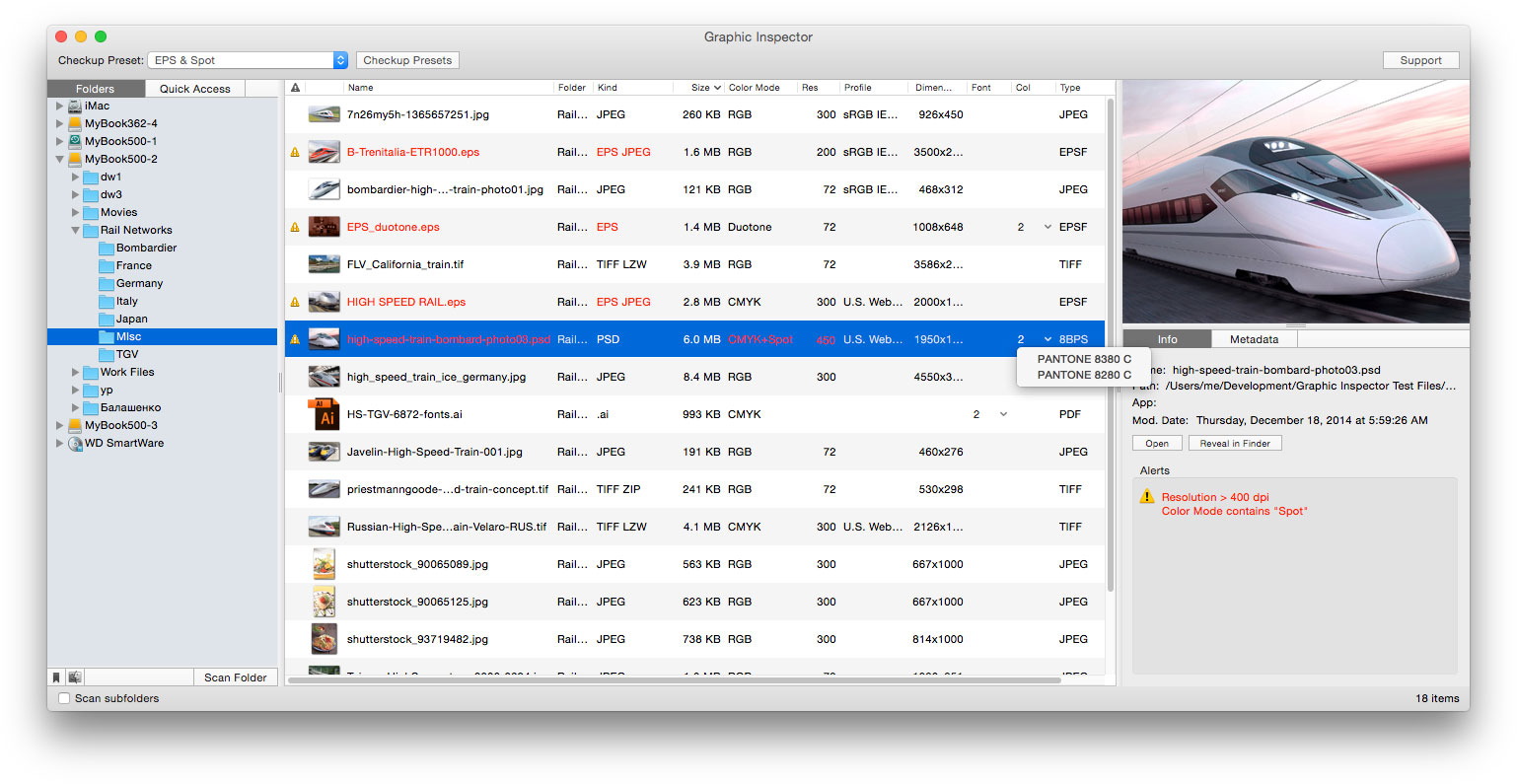
With the new version, the file processing engine was rewritten from ground up to improve the app's performance and stability, and ensure compatibility with future operating system upgrades. In addition, the version 2 introduces revamped user interface, Quick Look based resizable image previews, direct access to the list of file's fonts and spot colors, variable size icon previews, enhanced data storage facilities and other new features and improvements
"I'm surprised no one else thought of it before: to display every bit of useful information about vector or raster graphic files and flag the ones that match rules you define," writes Jay Nelson in Layers magazine. "With its combination of price, utility, and thoughtful design, Graphic Inspector is a rare gem."
Graphic Inspector is designed to help users of any trade, whether it's print, web design, digital photography or publishing on mobile devices. The software lets users create preflight settings tailored to their workflow requirements and quickly locate files with specific attributes. For example, users can detect files whose color mode is RGB, format - JPEG, resolution is below 300 dpi, ICC profile isn't "US Web Coated" and so on.
In addition to such general file info as kind, color mode, resolution and EXIF metadata, Graphic Inspector also reports ICC profile, spot colors, fonts in Illustrator files, and EPS and TIFF compression, which makes it an indispensable tool for prepress professionals.
Pricing and Availability:
Graphic Inspector 2 can be purchased from the Zevrix web site for USD $39.95, as well as from authorized resellers. The upgrade is $20 for licensed users of version 1 (free if purchased after September 1, 2014). Graphic Inspector 2 is free with purchase of PDF Checkpoint or InPreflight Pro for Adobe InDesign. Trial is also available for download. Graphic Inspector requires Mac OS X 10.7-10.10.
Zevrix Solutions: http://zevrix.com
Graphic Inspector 2: http://zevrix.com/GraphicInspector.php
Download Graphic Inspector 2: http://zevrix.com/GraphicInspector.dmg
Purchase: http://zevrix.com/store.php
Screenshot: http://zevrix.com/screenshots/gi2/gi2-main.jpg
Located in Toronto, Canada, Zevrix Solutions provides automation and productivity solutions for Adobe Creative Cloud software, PDF workflows, graphic file diagnostics and Microsoft Office output on Mac OS. Zevrix is dedicated to help professionals increase their profits through automating everyday tasks, producing error-free documents, saving disk space and cutting production costs. For more information, visit their website. Copyright (C) 2015 Zevrix Solutions. All Rights Reserved. Other trademarks and registered trademarks may be the property of their respective owners.
*******
Link To Article: http://prmac.com/release-id-73230.htm
*******
---------------------------------------------------------------------------------
Note that you can alter delivered distributions at any time.
Login to your account on prMac to alter your channel selection, or to opt-out at any time.
Graphic Inspector 2 Is Released: Image and Vector Graphics Checkup Tool - Published on 02/06/15
Zevrix Solutions has announced Graphic Inspector 2, a major upgrade to its quality control solution for images and vector graphic files. Graphic Inspector checks multiple files for potential problems according to user's workflow requirements. The software provides graphic professionals of any trade with the compete info on images and vector graphics, saving the time and hassle of checking them manually. Version 2 introduces revamped user interface, improved previews, faster processing and more.
Toronto (ON) Canada - Zevrix Solutions has announced the release of Graphic Inspector 2, a major upgrade to its quality control solution for images and vector graphic files. Graphic Inspector can check entire folders of files for potential problems according to user's workflow requirements. The software provides graphic professionals with the most exhaustive info on multiple images, saving the time and hassle of checking each of them manually.
With the new version, the file processing engine was rewritten from ground up to improve the app's performance and stability, and ensure compatibility with future operating system upgrades. In addition, the version 2 introduces revamped user interface, Quick Look based resizable image previews, direct access to the list of file's fonts and spot colors, variable size icon previews, enhanced data storage facilities and other new features and improvements
"I'm surprised no one else thought of it before: to display every bit of useful information about vector or raster graphic files and flag the ones that match rules you define," writes Jay Nelson in Layers magazine. "With its combination of price, utility, and thoughtful design, Graphic Inspector is a rare gem."
Graphic Inspector is designed to help users of any trade, whether it's print, web design, digital photography or publishing on mobile devices. The software lets users create preflight settings tailored to their workflow requirements and quickly locate files with specific attributes. For example, users can detect files whose color mode is RGB, format - JPEG, resolution is below 300 dpi, ICC profile isn't "US Web Coated" and so on.
In addition to such general file info as kind, color mode, resolution and EXIF metadata, Graphic Inspector also reports ICC profile, spot colors, fonts in Illustrator files, and EPS and TIFF compression, which makes it an indispensable tool for prepress professionals.
Pricing and Availability:
Graphic Inspector 2 can be purchased from the Zevrix web site for USD $39.95, as well as from authorized resellers. The upgrade is $20 for licensed users of version 1 (free if purchased after September 1, 2014). Graphic Inspector 2 is free with purchase of PDF Checkpoint or InPreflight Pro for Adobe InDesign. Trial is also available for download. Graphic Inspector requires Mac OS X 10.7-10.10.
Zevrix Solutions: http://zevrix.com
Graphic Inspector 2: http://zevrix.com/GraphicInspector.php
Download Graphic Inspector 2: http://zevrix.com/GraphicInspector.dmg
Purchase: http://zevrix.com/store.php
Screenshot: http://zevrix.com/screenshots/gi2/gi2-main.jpg
Located in Toronto, Canada, Zevrix Solutions provides automation and productivity solutions for Adobe Creative Cloud software, PDF workflows, graphic file diagnostics and Microsoft Office output on Mac OS. Zevrix is dedicated to help professionals increase their profits through automating everyday tasks, producing error-free documents, saving disk space and cutting production costs. For more information, visit their website. Copyright (C) 2015 Zevrix Solutions. All Rights Reserved. Other trademarks and registered trademarks may be the property of their respective owners.
*******
Link To Article: http://prmac.com/release-id-73230.htm
*******
---------------------------------------------------------------------------------
Note that you can alter delivered distributions at any time.
Login to your account on prMac to alter your channel selection, or to opt-out at any time.
BriCliffThom Releases Matcholor for iOS
A new article has been published at prMac.
BriCliffThom Releases Matcholor for iOS - Published on 02/06/15
Today, BriCliffThom has released Matcholor, an addicting drag-drop game suitable for all ages, on the App Store. The objective of the game is to match the center square's color with either of the 2 (top and bottom) target area's color and drag the square into the appropriate area for points. The game is for anyone being bored and can be learned in just a few seconds. Matcholor is entertaining and includes Game Center integration.
San Jose, California - After weeks of hard work, BriCliffThom has released "Matcholor" to users worldwide. Everyday, people experience boredom, whether it's at school, at work, or waiting for the bus. We need something to entertain ourselves to make time fly by. Matcholor is aimed to solve that problem. The game idea started when Brian, the iOS developer, became bored during winter break and decided to create something new. Inspired by popular games, BriCliffThom decided to use Brian's idea and create a simple game that can be learned in just seconds.
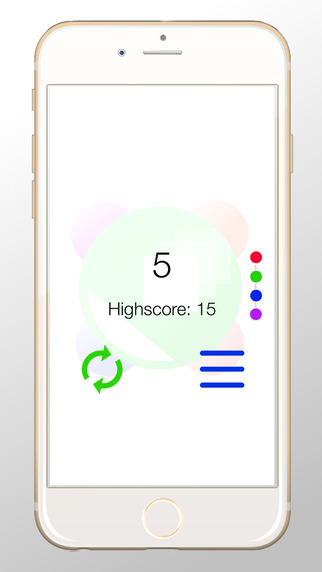
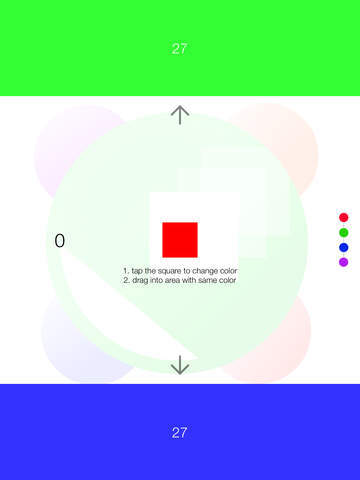
Matcholor is an extremely fun game suitable for all ages. The game is for everyone who's looking for some entertainment during a boring event or just during anytime of the day. The objective of the game is to match the center square's color with either of the 2 (top and bottom) target area's color and drag the square into the appropriate area for points.
Matcholor will absolutely blow your mind! It is an extremely simple game relied heavily on dragging and tagging. It takes just 10 seconds to learn.
Device Requirements:
* iPhone, iPad, and iPod touch
* Optimized for iPhone 5, 6/6�Plus
* Requires iOS 7.0 or later
* 25.3 MB
Pricing and Availability:
Matcholor 1.1 is free and available worldwide exclusively through the App Store in the Games category.
BriClifThom: http://bricliffthom.webs.com/
Matcholor 1.1: https://itunes.apple.com/app/matcholor/id954676153
Screenshot 1: http://a5.mzstatic.com/us/r30/Purple1/v4/90/fc/58/90fc5865-38cc-e533-934b-2d17aa408dbb/screen322x572.jpeg
Screenshot 2: http://a3.mzstatic.com/us/r30/Purple1/v4/a7/a3/ef/a7a3ef11-641a-4263-0bf8-6c471586ea5d/screen480x480.jpeg
App Icon: http://a3.mzstatic.com/us/r30/Purple1/v4/23/b0/67/23b067d9-c9ad-9a9c-9f7e-26530df0fcad/icon175x175.png
BriCliffThom is a family coding studio in San Jose, CA. It was first founded in 2011 by the family members. The family coding studio name BriCliffThom consists of president Cliff Lin(40), deveoper/graphic designer Brian Lin(16), and graphic designer Thomas Lin(14). It is BriCliffThom's 5th app on the App store. Brian Lin has been learning how to code every since 3 grade when he first started with BASIC. In the summer of 6th grade, he attended a camp and taught himself C . The year after, he became interested with iOS development and started to self learn Objective-C. During the course of 8th grade, he began releasing apps onto the App Store. Brian also won the WWDC Student Scholarship for two years in a roll. All Material and Software (C) Copyright 2015 BriCliffThom. All Rights Reserved. Apple, the Apple logo, iPhone, iPod and iPad are registered trademarks of Apple Inc. in the U.S. and/or other countries. Other trademarks and registered trademarks may be the property of their
respective owners.
*******
Link To Article: http://prmac.com/release-id-73229.htm
*******
---------------------------------------------------------------------------------
Note that you can alter delivered distributions at any time.
Login to your account on prMac to alter your channel selection, or to opt-out at any time.
BriCliffThom Releases Matcholor for iOS - Published on 02/06/15
Today, BriCliffThom has released Matcholor, an addicting drag-drop game suitable for all ages, on the App Store. The objective of the game is to match the center square's color with either of the 2 (top and bottom) target area's color and drag the square into the appropriate area for points. The game is for anyone being bored and can be learned in just a few seconds. Matcholor is entertaining and includes Game Center integration.
San Jose, California - After weeks of hard work, BriCliffThom has released "Matcholor" to users worldwide. Everyday, people experience boredom, whether it's at school, at work, or waiting for the bus. We need something to entertain ourselves to make time fly by. Matcholor is aimed to solve that problem. The game idea started when Brian, the iOS developer, became bored during winter break and decided to create something new. Inspired by popular games, BriCliffThom decided to use Brian's idea and create a simple game that can be learned in just seconds.
Matcholor is an extremely fun game suitable for all ages. The game is for everyone who's looking for some entertainment during a boring event or just during anytime of the day. The objective of the game is to match the center square's color with either of the 2 (top and bottom) target area's color and drag the square into the appropriate area for points.
Matcholor will absolutely blow your mind! It is an extremely simple game relied heavily on dragging and tagging. It takes just 10 seconds to learn.
Device Requirements:
* iPhone, iPad, and iPod touch
* Optimized for iPhone 5, 6/6�Plus
* Requires iOS 7.0 or later
* 25.3 MB
Pricing and Availability:
Matcholor 1.1 is free and available worldwide exclusively through the App Store in the Games category.
BriClifThom: http://bricliffthom.webs.com/
Matcholor 1.1: https://itunes.apple.com/app/matcholor/id954676153
Screenshot 1: http://a5.mzstatic.com/us/r30/Purple1/v4/90/fc/58/90fc5865-38cc-e533-934b-2d17aa408dbb/screen322x572.jpeg
Screenshot 2: http://a3.mzstatic.com/us/r30/Purple1/v4/a7/a3/ef/a7a3ef11-641a-4263-0bf8-6c471586ea5d/screen480x480.jpeg
App Icon: http://a3.mzstatic.com/us/r30/Purple1/v4/23/b0/67/23b067d9-c9ad-9a9c-9f7e-26530df0fcad/icon175x175.png

BriCliffThom is a family coding studio in San Jose, CA. It was first founded in 2011 by the family members. The family coding studio name BriCliffThom consists of president Cliff Lin(40), deveoper/graphic designer Brian Lin(16), and graphic designer Thomas Lin(14). It is BriCliffThom's 5th app on the App store. Brian Lin has been learning how to code every since 3 grade when he first started with BASIC. In the summer of 6th grade, he attended a camp and taught himself C . The year after, he became interested with iOS development and started to self learn Objective-C. During the course of 8th grade, he began releasing apps onto the App Store. Brian also won the WWDC Student Scholarship for two years in a roll. All Material and Software (C) Copyright 2015 BriCliffThom. All Rights Reserved. Apple, the Apple logo, iPhone, iPod and iPad are registered trademarks of Apple Inc. in the U.S. and/or other countries. Other trademarks and registered trademarks may be the property of their
respective owners.
*******
Link To Article: http://prmac.com/release-id-73229.htm
*******
---------------------------------------------------------------------------------
Note that you can alter delivered distributions at any time.
Login to your account on prMac to alter your channel selection, or to opt-out at any time.
Recover Calls History from iPhone - Save Call history to Mac or iPhone
A new article has been published at prMac.
Recover Calls History from iPhone - Save Call history to Mac or iPhone - Published on 02/06/15
mTouchLabs has introduced Backup Call Logs 1.0, their new utility app exclusively for iPhone and iPod touch. Backup Call Logs allows you to backup your call history from your device to a Mac in .xls format. Perfect for home, traveling or business, you can archive and maintain records of all your call history at a single location in an Excel file. You can filter call info by sender, incoming, outgoing or sort calls by time and date. A detailed help guide is available within the app.
Hyderabad, India - mTouchLabs has announced the release of Backup Call Logs 1.0, their utility app exclusively for iPhone and iPod touch. Every time you or anyone else makes or receives a call on an iPhone, the date, duration and contact information is recorded into your iPhone's call log. This includes both standard phone calls and FaceTime. Maybe you're curious to see who you're on the phone with the most or maybe you need to the phone's call log for legal reasons. Whatever the case, Backup Call Logs app can recover your call log from an iTunes backup, then it lets you quickly export your call history to your computer as .xls format.
Feature Highlights:
* Save Backup Call History directly to your computer
* Call History saved in .xls format
* Email the Call History in excel file format
* Manage History of Backups with in the app
* Easy to search for any call details in your backup file
* You can export Call History of Multiple devices into multiple excel files
* Detailed help guide available within the app
Device Requirements:
* iPhone, iPad and iPod touch
* Requires iOS 7.0 or later
* This app is optimized for iPhone 5
* 4.2 MB
Pricing and Availability:
Backup Call Logs 1.0 is $4.99 USD (or equivalent amount in other currencies) and available worldwide exclusively through the App Store in the Utilities category.
mTouchLabs: http://www.mtouchlabs.com
Backup Call Logs 1.0: https://itunes.apple.com/app/backup-call-logs-save-or-export/id924929642
Screenshot 1: http://a4.mzstatic.com/us/r30/Purple3/v4/44/4b/50/444b5009-f11f-d07c-ab29-8f3db522a64f/screen568x568.jpeg
Screenshot 2: http://a4.mzstatic.com/us/r30/Purple5/v4/d6/d4/0b/d6d40bb9-d5e9-9752-b753-95e2d93a8c8a/screen568x568.jpeg
App Icon: http://a4.mzstatic.com/us/r30/Purple1/v4/02/6e/1f/026e1f13-79eb-f7d5-e5ab-7d717bca34e2/pr_source.175x175-75.jpg
mTouchLabs is a pioneer in the mobile development arena, releasing applications that are swift, visually appealing, and highly intuitive. Copyright (C) 2015 mTouchLabs. All Rights Reserved. Apple, the Apple logo, iPhone, iPad, iPad mini, iPod touch, and Mac are registered trademarks of Apple Inc. in the U.S. and/or other countries. Other trademarks and registered trademarks may be the property of their respective owners.
*******
Link To Article: http://prmac.com/release-id-73228.htm
*******
---------------------------------------------------------------------------------
Note that you can alter delivered distributions at any time.
Login to your account on prMac to alter your channel selection, or to opt-out at any time.
Recover Calls History from iPhone - Save Call history to Mac or iPhone - Published on 02/06/15
mTouchLabs has introduced Backup Call Logs 1.0, their new utility app exclusively for iPhone and iPod touch. Backup Call Logs allows you to backup your call history from your device to a Mac in .xls format. Perfect for home, traveling or business, you can archive and maintain records of all your call history at a single location in an Excel file. You can filter call info by sender, incoming, outgoing or sort calls by time and date. A detailed help guide is available within the app.
Hyderabad, India - mTouchLabs has announced the release of Backup Call Logs 1.0, their utility app exclusively for iPhone and iPod touch. Every time you or anyone else makes or receives a call on an iPhone, the date, duration and contact information is recorded into your iPhone's call log. This includes both standard phone calls and FaceTime. Maybe you're curious to see who you're on the phone with the most or maybe you need to the phone's call log for legal reasons. Whatever the case, Backup Call Logs app can recover your call log from an iTunes backup, then it lets you quickly export your call history to your computer as .xls format.
Feature Highlights:
* Save Backup Call History directly to your computer
* Call History saved in .xls format
* Email the Call History in excel file format
* Manage History of Backups with in the app
* Easy to search for any call details in your backup file
* You can export Call History of Multiple devices into multiple excel files
* Detailed help guide available within the app
Device Requirements:
* iPhone, iPad and iPod touch
* Requires iOS 7.0 or later
* This app is optimized for iPhone 5
* 4.2 MB
Pricing and Availability:
Backup Call Logs 1.0 is $4.99 USD (or equivalent amount in other currencies) and available worldwide exclusively through the App Store in the Utilities category.
mTouchLabs: http://www.mtouchlabs.com
Backup Call Logs 1.0: https://itunes.apple.com/app/backup-call-logs-save-or-export/id924929642
Screenshot 1: http://a4.mzstatic.com/us/r30/Purple3/v4/44/4b/50/444b5009-f11f-d07c-ab29-8f3db522a64f/screen568x568.jpeg

Screenshot 2: http://a4.mzstatic.com/us/r30/Purple5/v4/d6/d4/0b/d6d40bb9-d5e9-9752-b753-95e2d93a8c8a/screen568x568.jpeg

App Icon: http://a4.mzstatic.com/us/r30/Purple1/v4/02/6e/1f/026e1f13-79eb-f7d5-e5ab-7d717bca34e2/pr_source.175x175-75.jpg

mTouchLabs is a pioneer in the mobile development arena, releasing applications that are swift, visually appealing, and highly intuitive. Copyright (C) 2015 mTouchLabs. All Rights Reserved. Apple, the Apple logo, iPhone, iPad, iPad mini, iPod touch, and Mac are registered trademarks of Apple Inc. in the U.S. and/or other countries. Other trademarks and registered trademarks may be the property of their respective owners.
*******
Link To Article: http://prmac.com/release-id-73228.htm
*******
---------------------------------------------------------------------------------
Note that you can alter delivered distributions at any time.
Login to your account on prMac to alter your channel selection, or to opt-out at any time.
Subscribe to:
Posts (Atom)