A new article has been published at prMac.
Video Zoom for iOS - Add Zoom To Existing Videos - Free for Few Days - Published on 03/24/15
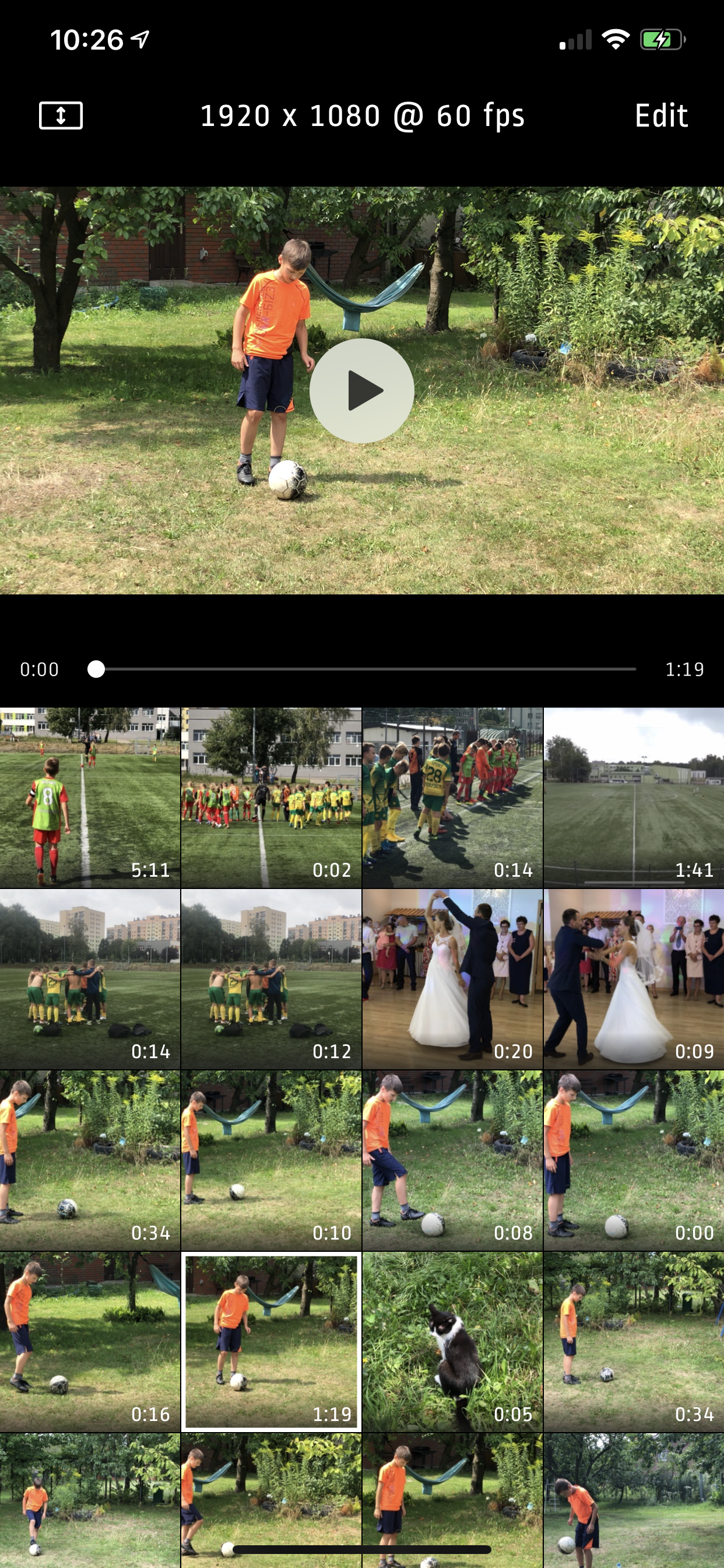
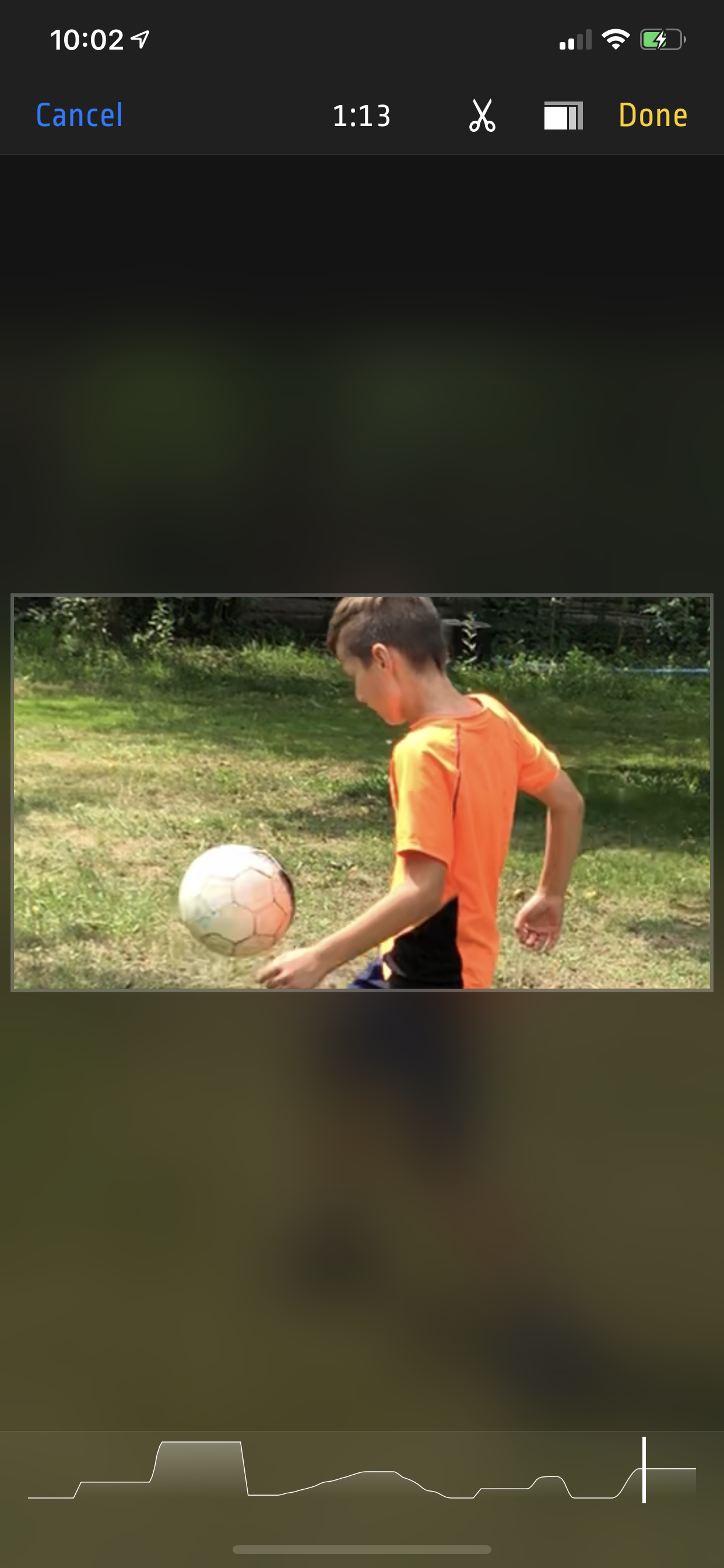
Lucky Clan has introduced Video Zoom 1.0, its new video app developed for iOS devices. Video Zoom lets anyone apply zoom to videos from their existing iOS Photo Library. Use this app to add Zoom effects to existing videos, or just crop the video, as well as use Video Zoom as a normal app or Photo Extension. Video Zoom supports both front and back camera, Save zoomed video as a new clip or overwrite the original, and it's possible to revert back to the original.
Lodz, Poland - Lucky Clan has announced the release and immediate availability of Video Zoom 1.0, its new video app developed for iOS. Video Zoom is the first app on the App Store which let user apply zoom to videos from iOS Photo Library. Do your videos look boring? Did you forget to use zoom during recording? Use this app to add Zoom effects to existing videos. Or just crop a video. Use it as a normal app or Photo Extension.
How to use it:
1. Tap video thumbnail to preview video or tap " " to record new video.
2. Tap thumbnail again to select the video and open editor.
3. Use pinch/drag gestures to add zoom effect to video. You can do it when video is playing or paused.
4. Tap "Done" and select "Overwrite" or "Save As a Copy" to start rendering. Even if you choose "Overwrite" you can revert to original anytime.
Features:
* Photo Extension support allowing you to quickly launch Video Zoom app from system Photos
* Add Video Zoom/Pan/Crop effect to existing videos
* Turn device to landscape orientation to open full screen preview
* Possibility to revert to original video from the app gallery (tap and hold on thumbnail)
* iOS Photo Library support (no internal library)
* Recording from Front or Back camera
* Save zoomed video as a New Clip or Overwrite
Device Requirements:
* iPhone 4S/5/5S/5C/6/6 , iPod touch 5th generation, iPad (2nd/3rd/4th/Mini/Mini2/Air/Air2)
* iOS 8.0 or later
* Universal Application
* 3.4 MB
Pricing and Availability:
Video Zoom 1.0 is free for a limited time (Normal price is $1.99 USD) and available worldwide exclusively through the App Store in the Photo & Video category.
Lucky Clan: http://www.luckyclan.com/
Video Zoom 1.0: http://luckyclan.com/videozoom/
Download from iTunes: https://itunes.apple.com/app/video-zoom-apply-zoom-to-existing/id949836723
Screenshot 1: http://www.luckyclan.com/videozoom/Screen1.png
Screenshot 2: http://www.luckyclan.com/videozoom/Screen2.png
App Icon: http://www.luckyclan.com/videozoom/Icon.png
Located in Lodz, Poland, the Lucky Clan team is an independent software company founded by Sylwester Los in March of 2010. With a focus on the iOS platform, Lucky's mission is to provide their customers with the highest quality, reliability and compatibility with every device produced by Apple. Their flagship app, ArtStudio, has become one of the most popular tools for drawing, painting, and photo editing for iPhone and iPad. Copyright (C) 2015 Lucky Clan. All Rights Reserved. Apple, the Apple logo, iPhone, iPod and iPad are registered trademarks of Apple Inc. in the U.S. and/or other countries.
*******
Link To Article: http://prmac.com/release-id-74028.htm
*******
---------------------------------------------------------------------------------
Note that you can alter delivered distributions at any time.
Login to your account on prMac to alter your channel selection, or to opt-out at any time.


New EastEnders TV Theme Piano practice App
A new article has been published at prMac.
New EastEnders TV Theme Piano practice App - Published on 03/24/15
UK based, eto music practice Apps today introduces EastEnders 1.0.0, their new music app for Apple iPad devices. For the first time, the very popular theme tune for UK's EastEnders TV soap drama is now available as a Piano practice App. Learn to play this well known theme on the Piano or Keyboard. Featuring four versions of EastEnders for Piano, this is a truly engaging and atmospheric piece of music and probably one of the best known TV theme tunes from Simon May.
Llandysul, United Kingdom - eto music practice Apps, the producers of unique music practice for schools and home learners, today is proud to announce the release of EastEnders 1.0.0, their new music app for Apple iPad devices. For the first time and just published, the very popular theme tune for UK's EastEnders TV soap drama is now available as a Piano practice App. Learn to play this well known theme on the Piano or Keyboard.
This is a truly engaging and atmospheric piece of music and probably one of the best known TV theme tunes from Simon May. You have four versions of EastEnders for Piano to practise and learn to read and play music:
1. EastEnders - with the piano sound as a guide. Choose Right Hand or Left Hand or both. Practise one hand while the other is played for you. This version has mainly single lines in both hands with a few chords.
2. EastEnders - without the piano sound as a guide. You now can be the soloist with the band.
3. EastEnders - with more chords to practise and play. It's a little more difficult but worth the practice.
4. EastEnders - with more chords to practise and play; but without the piano sound. Again you can be the soloist with the band.
* All are in the key of E Flat; the key that is used on TV and all have the same full range of practice facilities.
Here's a Practice Plan:
* Choose a version to practise and Choose Tempo 35 to start with so that you can practise very slowly
* Switch OFF Left Hand and Switch ON RH Fingering - Using appropriate fingering really will make it easier
* Enter 1 for Start Bar and 2 for End and switch on the Repeat/ Loop
* Press Play and you will see and hear an introductory bar, the music will play through Bars 1 and 2 and fade on Bar 3
* Play using the suggested fingering on the appropriate notes - At tempo 35 you can follow the fingering. Persevere it is worth it
* On both hands: 1 is your Thumb; 5 is your 'pinky'
* Go through the whole piece practising both hands separately and then together; choosing different Start and End bars until you can play all the way through without mistakes
* Then choose a faster tempo and repeat the process - You will find that you will get through the piece much quicker as you increase the tempi - as long as you do not move on until you are perfect
Device Requirements:
* Compatible with iPad
* Requires iOS 5.1.1 or later
* 155 MB
Pricing and Availability:
EastEnders 1.0.0 is $3.99 USD (or equivalent amount in other currencies) and available worldwide exclusively through the App Store in the Music category.
eto music practice: http://www.etomusicpractice.co.uk/
EastEnders 1.0.0: https://itunes.apple.com/app/eastenders-learn-to-play-this/id975692299
Screenshot: http://a3.mzstatic.com/us/r30/Purple1/v4/63/5a/21/635a217e-b7f5-06ac-c00e-40bdf8757107/screen480x480.jpeg
App Icon: http://a1.mzstatic.com/us/r30/Purple3/v4/a9/20/91/a920912d-bf42-c913-2b24-153cdc7ac4fe/icon175x175.jpeg
eto music practice Apps are based in Wales. We produce a wide range of music practice Apps for Schools and Home Learners for all levels. The Apps help users to practise, learn to read and play music and then perform. eto apps is the brand name of Ymarfwe/Webpractice. The company produces and publishes music practice apps now selling in 33 countries globally. The company is based in Llandysul, West Wales, UK. All Material and Software (C) Copyright 2015 eto Music Practice. All Rights Reserved. Apple, the Apple logo, iPhone, iPod and iPad are registered trademarks of Apple Inc. in the U.S. and/or other countries. Music Copyright Sony/ATV Music Publishing (UK) Ltd. Other trademarks and registered trademarks may be the property of their respective owners.
*******
Link To Article: http://prmac.com/release-id-74027.htm
*******
---------------------------------------------------------------------------------
Note that you can alter delivered distributions at any time.
Login to your account on prMac to alter your channel selection, or to opt-out at any time.
New EastEnders TV Theme Piano practice App - Published on 03/24/15
UK based, eto music practice Apps today introduces EastEnders 1.0.0, their new music app for Apple iPad devices. For the first time, the very popular theme tune for UK's EastEnders TV soap drama is now available as a Piano practice App. Learn to play this well known theme on the Piano or Keyboard. Featuring four versions of EastEnders for Piano, this is a truly engaging and atmospheric piece of music and probably one of the best known TV theme tunes from Simon May.
Llandysul, United Kingdom - eto music practice Apps, the producers of unique music practice for schools and home learners, today is proud to announce the release of EastEnders 1.0.0, their new music app for Apple iPad devices. For the first time and just published, the very popular theme tune for UK's EastEnders TV soap drama is now available as a Piano practice App. Learn to play this well known theme on the Piano or Keyboard.
This is a truly engaging and atmospheric piece of music and probably one of the best known TV theme tunes from Simon May. You have four versions of EastEnders for Piano to practise and learn to read and play music:
1. EastEnders - with the piano sound as a guide. Choose Right Hand or Left Hand or both. Practise one hand while the other is played for you. This version has mainly single lines in both hands with a few chords.
2. EastEnders - without the piano sound as a guide. You now can be the soloist with the band.
3. EastEnders - with more chords to practise and play. It's a little more difficult but worth the practice.
4. EastEnders - with more chords to practise and play; but without the piano sound. Again you can be the soloist with the band.
* All are in the key of E Flat; the key that is used on TV and all have the same full range of practice facilities.
Here's a Practice Plan:
* Choose a version to practise and Choose Tempo 35 to start with so that you can practise very slowly
* Switch OFF Left Hand and Switch ON RH Fingering - Using appropriate fingering really will make it easier
* Enter 1 for Start Bar and 2 for End and switch on the Repeat/ Loop
* Press Play and you will see and hear an introductory bar, the music will play through Bars 1 and 2 and fade on Bar 3
* Play using the suggested fingering on the appropriate notes - At tempo 35 you can follow the fingering. Persevere it is worth it
* On both hands: 1 is your Thumb; 5 is your 'pinky'
* Go through the whole piece practising both hands separately and then together; choosing different Start and End bars until you can play all the way through without mistakes
* Then choose a faster tempo and repeat the process - You will find that you will get through the piece much quicker as you increase the tempi - as long as you do not move on until you are perfect
Device Requirements:
* Compatible with iPad
* Requires iOS 5.1.1 or later
* 155 MB
Pricing and Availability:
EastEnders 1.0.0 is $3.99 USD (or equivalent amount in other currencies) and available worldwide exclusively through the App Store in the Music category.
eto music practice: http://www.etomusicpractice.co.uk/
EastEnders 1.0.0: https://itunes.apple.com/app/eastenders-learn-to-play-this/id975692299
Screenshot: http://a3.mzstatic.com/us/r30/Purple1/v4/63/5a/21/635a217e-b7f5-06ac-c00e-40bdf8757107/screen480x480.jpeg

App Icon: http://a1.mzstatic.com/us/r30/Purple3/v4/a9/20/91/a920912d-bf42-c913-2b24-153cdc7ac4fe/icon175x175.jpeg

eto music practice Apps are based in Wales. We produce a wide range of music practice Apps for Schools and Home Learners for all levels. The Apps help users to practise, learn to read and play music and then perform. eto apps is the brand name of Ymarfwe/Webpractice. The company produces and publishes music practice apps now selling in 33 countries globally. The company is based in Llandysul, West Wales, UK. All Material and Software (C) Copyright 2015 eto Music Practice. All Rights Reserved. Apple, the Apple logo, iPhone, iPod and iPad are registered trademarks of Apple Inc. in the U.S. and/or other countries. Music Copyright Sony/ATV Music Publishing (UK) Ltd. Other trademarks and registered trademarks may be the property of their respective owners.
*******
Link To Article: http://prmac.com/release-id-74027.htm
*******
---------------------------------------------------------------------------------
Note that you can alter delivered distributions at any time.
Login to your account on prMac to alter your channel selection, or to opt-out at any time.
Creature - The Revolutionary 2D Animation Tool for Mac
A new article has been published at prMac.
Creature - The Revolutionary 2D Animation Tool for Mac - Published on 03/24/15
Kestrel Moon Studios has introduced Creature 1.07, its new cutting-edge 2D animation software for Mac OS X. The ideal animation tool for game developers, digital artists and web designers alike, Creature was designed specifically to add stunningly fluid animation to your digital content. Take advantage of Creature's Directible Automated Animation Engine and powerful workflow to produce amazingly complex animation in an incredibly easy and time-efficient manner.
Singapore - Kestrel Moon Studios has announced the release of Creature 1.07, the company's new cutting-edge 2D animation software developed exclusively for Mac OS X. The ideal animation tool for game developers, digital artists and web designers alike, Creature was designed specifically to add stunningly fluid animation to your digital content. Creature allows anyone to automatically generate complex motion like Walk Cycles, Hair + Cloth Dynamics and other forms of secondary motion easily using its built in Physics and Procedural Animation Engine. This results in huge time and cost savings for the animator.
Creature also provides advanced features like Motion Capture/Transfer, Path Creation/Following and Soft Body Physics. These features, normally found in high end VFX software, are now available to the 2D animator using Creature. Creature exports animations to a wide variety of image and video formats. It also supports the export of animations to most major Game Engines. Game developers can playback character animations authored with Creature via provided source code runtimes.
Creature Features
* Skeletal Animation and High Performance Skinning
* FK, IK for easy posing
* Bone Physics Motors for Automated Walk Cycles, Tail Flopping and other Secondary Motion
* Mesh Deformation Motors to do manual FFD and automated warping for Eye blinking, Wing Flapping
* Motion Capture + Transfer
* Soft Body Dynamics
* Motion Path/Curve Tools
* Mathematical Function Scripting to manipulate animation curves
* Complete control of Animation Data, including manipulating Spline curves over the entire timeline
* Automated and User-adjustable tools for Meshing, Rigging and Bone-weighting
* Versioning and Backups for projects
System Requirements:
* OS X 10.10 or later
* 64-bit processor
* 8.9 MB
Pricing and Availability:
Creature 1.07 is $99.99 USD (or equivalent amount in other currencies) and available worldwide through the App Store in the Graphics & Design category.
Creature 1.07: http://creature.kestrelmoon.com
Purchase and Download (MAS): https://itunes.apple.com/app/creature/id955069004
YouTube Video (Trailer): https://www.youtube.com/watch?v=em_T76M2wRE
Screenshot 1: http://a1.mzstatic.com/us/r30/Purple1/v4/53/30/6c/53306c0a-40f7-2acc-fa69-9259a5ea9a41/screen800x500.jpeg
Screenshot 2: http://a2.mzstatic.com/us/r30/Purple3/v4/df/a4/09/dfa40935-9707-be89-6072-7edbe2100775/screen800x500.jpeg
Application Icon: http://a2.mzstatic.com/us/r30/Purple1/v4/8d/02/72/8d027273-f134-bf54-dbc3-0f30a46f86b0/icon128-2x.png
Situated in sunny Singapore, Kestrel Moon Studios Pte Ltd. is an indie development shop specializing in bringing innovative, high quality graphics tools to the art and game development communities. All Material and Software (C) Copyright 2015 Kestrel Moon Studios Pte Ltd. All Rights Reserved. Apple, the Apple logo, Mac OS X and Macintosh are registered trademarks of Apple Inc. in the U.S. and/or other countries. Other trademarks and registered trademarks may be the property of their respective owners.
*******
Link To Article: http://prmac.com/release-id-73985.htm
*******
---------------------------------------------------------------------------------
Note that you can alter delivered distributions at any time.
Login to your account on prMac to alter your channel selection, or to opt-out at any time.
Creature - The Revolutionary 2D Animation Tool for Mac - Published on 03/24/15
Kestrel Moon Studios has introduced Creature 1.07, its new cutting-edge 2D animation software for Mac OS X. The ideal animation tool for game developers, digital artists and web designers alike, Creature was designed specifically to add stunningly fluid animation to your digital content. Take advantage of Creature's Directible Automated Animation Engine and powerful workflow to produce amazingly complex animation in an incredibly easy and time-efficient manner.
Singapore - Kestrel Moon Studios has announced the release of Creature 1.07, the company's new cutting-edge 2D animation software developed exclusively for Mac OS X. The ideal animation tool for game developers, digital artists and web designers alike, Creature was designed specifically to add stunningly fluid animation to your digital content. Creature allows anyone to automatically generate complex motion like Walk Cycles, Hair + Cloth Dynamics and other forms of secondary motion easily using its built in Physics and Procedural Animation Engine. This results in huge time and cost savings for the animator.
Creature also provides advanced features like Motion Capture/Transfer, Path Creation/Following and Soft Body Physics. These features, normally found in high end VFX software, are now available to the 2D animator using Creature. Creature exports animations to a wide variety of image and video formats. It also supports the export of animations to most major Game Engines. Game developers can playback character animations authored with Creature via provided source code runtimes.
Creature Features
* Skeletal Animation and High Performance Skinning
* FK, IK for easy posing
* Bone Physics Motors for Automated Walk Cycles, Tail Flopping and other Secondary Motion
* Mesh Deformation Motors to do manual FFD and automated warping for Eye blinking, Wing Flapping
* Motion Capture + Transfer
* Soft Body Dynamics
* Motion Path/Curve Tools
* Mathematical Function Scripting to manipulate animation curves
* Complete control of Animation Data, including manipulating Spline curves over the entire timeline
* Automated and User-adjustable tools for Meshing, Rigging and Bone-weighting
* Versioning and Backups for projects
System Requirements:
* OS X 10.10 or later
* 64-bit processor
* 8.9 MB
Pricing and Availability:
Creature 1.07 is $99.99 USD (or equivalent amount in other currencies) and available worldwide through the App Store in the Graphics & Design category.
Creature 1.07: http://creature.kestrelmoon.com
Purchase and Download (MAS): https://itunes.apple.com/app/creature/id955069004
YouTube Video (Trailer): https://www.youtube.com/watch?v=em_T76M2wRE
Screenshot 1: http://a1.mzstatic.com/us/r30/Purple1/v4/53/30/6c/53306c0a-40f7-2acc-fa69-9259a5ea9a41/screen800x500.jpeg
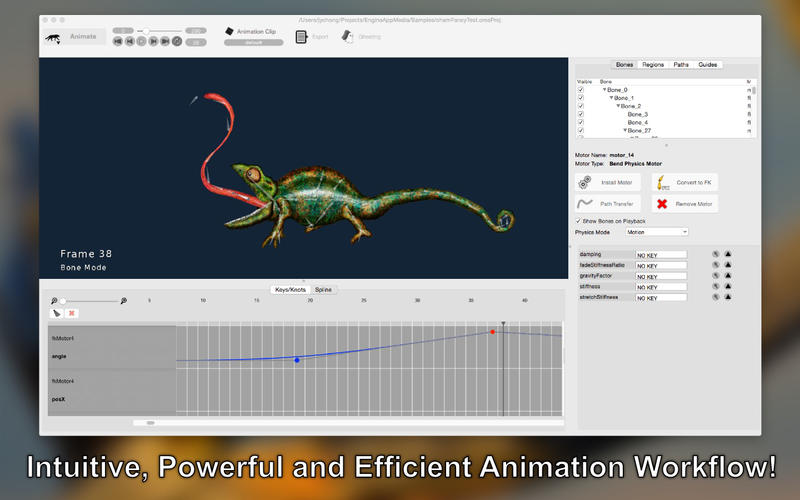
Screenshot 2: http://a2.mzstatic.com/us/r30/Purple3/v4/df/a4/09/dfa40935-9707-be89-6072-7edbe2100775/screen800x500.jpeg

Application Icon: http://a2.mzstatic.com/us/r30/Purple1/v4/8d/02/72/8d027273-f134-bf54-dbc3-0f30a46f86b0/icon128-2x.png

Situated in sunny Singapore, Kestrel Moon Studios Pte Ltd. is an indie development shop specializing in bringing innovative, high quality graphics tools to the art and game development communities. All Material and Software (C) Copyright 2015 Kestrel Moon Studios Pte Ltd. All Rights Reserved. Apple, the Apple logo, Mac OS X and Macintosh are registered trademarks of Apple Inc. in the U.S. and/or other countries. Other trademarks and registered trademarks may be the property of their respective owners.
*******
Link To Article: http://prmac.com/release-id-73985.htm
*******
---------------------------------------------------------------------------------
Note that you can alter delivered distributions at any time.
Login to your account on prMac to alter your channel selection, or to opt-out at any time.
Power APP adds low latency Bluetooth Speaker support to Air Microphone
A new article has been published at prMac.
Power APP adds low latency Bluetooth Speaker support to Air Microphone - Published on 03/24/15
Power APP has announced Air Microphone 2.1.0, an important update to their popular productivity app for iOS devices. Air Microphone enables the iPhone or iPad to serve as a convenient, handheld microphone to connect to a public address system with built-in equalization. The connection is made via Bluetooth or AppleTV, and the live audio can be amplified for an audience through the TV's sound system. Version 2.1.0 allows to connect direct directly to Bluetooth enabled sound systems.
Pfaeffikon, Switzerland - Power APP has announced the release of Air Microphone 2.1.0, an important update to their popular productivity app developed for iPhone and iPad devices. Air Microphone enables the iPhone or iPad to serve as a convenient, handheld microphone to connect to a public address system with built-in equalization.
The connection is made via Bluetooth or AppleTV, and the live audio can be amplified for an audience through the TV's sound system. Mac computers with Intel processors can also serve as Air Microphone wireless mic receivers, and they can be connected to any sound system to create an easily configured PA system.
Feature Highlights:
* Extreme low latency Bluetooth connection
* Perfect for speeches and presentations
* Handheld public address system with built-in equalization
* Features Apple's proprietary AirPlay Mirroring technology
* Wireless signal can be received by an Apple TV digital media receiver
* Mac computers can also serve as Air Microphone receivers
* Air Microphone also transmits background images from the iDevice
This latest update allows Air Microphone to connect direct directly to Bluetooth enabled sound systems, making the setup even faster and easier. Bluetooth support offers extra low latency, making Air Microphone 2.1.0 suitable for different public address needs.
"More and more speaker systems are Bluetooth enabled, both consumer and professional speakers. Of course we had to enable Bluetooth to Air Microphone, but we discovered latency being the biggest obstacle. We put a lot of work to reduce latency as much as possible and are proud to say that we almost eliminated latency." explains Christian Schaffner, General Manager of Power APP AG.
Device Requirements:
* iPhone, iPad, and iPod touch
* Optimized for iPhone 5, iPhone 6/6 Plus
* Requires iOS 6.1 or later
* 11.2 MB
Pricing and Availability:
Air Microphone 2.1.0 is $1.99 USD (or equivalent amount in other currencies) and available worldwide exclusively through the App Store in the Productivity category.
Power App: http://www.powerapp.ch
Air Microphone 2.1.0: http://powerapp.ch/product/air-microphone/
Purchase and Download: https://itunes.apple.com/app/air-microphone/id594419791
Screenshot: http://a1.mzstatic.com/us/r30/Purple3/v4/1e/2b/91/1e2b91fe-eaf2-3c0d-230f-00c6872e47d0/screen480x480.jpeg
App Icon: http://a1.mzstatic.com/us/r30/Purple3/v4/28/98/85/28988515-395f-0ff2-7fb9-d0e2682f4945/icon175x175.png
Based in Pfaeffikon, Switzerland, Power App AG is an independent company founded in 2010 by Christian Schaffner. Power App's main focus is developing powerful, versatile applications for the Mac and iOS platforms. Copyright (C) 2010-2015 Power App AG. All Rights Reserved. Apple, the Apple logo, Mac, iPhone, iPod, and iPad are registered trademarks of Apple Inc. in the U.S. and/or other countries. Other trademarks and registered trademarks may be the property of their respective owners.
*******
Link To Article: http://prmac.com/release-id-73984.htm
*******
---------------------------------------------------------------------------------
Note that you can alter delivered distributions at any time.
Login to your account on prMac to alter your channel selection, or to opt-out at any time.
Power APP adds low latency Bluetooth Speaker support to Air Microphone - Published on 03/24/15
Power APP has announced Air Microphone 2.1.0, an important update to their popular productivity app for iOS devices. Air Microphone enables the iPhone or iPad to serve as a convenient, handheld microphone to connect to a public address system with built-in equalization. The connection is made via Bluetooth or AppleTV, and the live audio can be amplified for an audience through the TV's sound system. Version 2.1.0 allows to connect direct directly to Bluetooth enabled sound systems.
Pfaeffikon, Switzerland - Power APP has announced the release of Air Microphone 2.1.0, an important update to their popular productivity app developed for iPhone and iPad devices. Air Microphone enables the iPhone or iPad to serve as a convenient, handheld microphone to connect to a public address system with built-in equalization.
The connection is made via Bluetooth or AppleTV, and the live audio can be amplified for an audience through the TV's sound system. Mac computers with Intel processors can also serve as Air Microphone wireless mic receivers, and they can be connected to any sound system to create an easily configured PA system.
Feature Highlights:
* Extreme low latency Bluetooth connection
* Perfect for speeches and presentations
* Handheld public address system with built-in equalization
* Features Apple's proprietary AirPlay Mirroring technology
* Wireless signal can be received by an Apple TV digital media receiver
* Mac computers can also serve as Air Microphone receivers
* Air Microphone also transmits background images from the iDevice
This latest update allows Air Microphone to connect direct directly to Bluetooth enabled sound systems, making the setup even faster and easier. Bluetooth support offers extra low latency, making Air Microphone 2.1.0 suitable for different public address needs.
"More and more speaker systems are Bluetooth enabled, both consumer and professional speakers. Of course we had to enable Bluetooth to Air Microphone, but we discovered latency being the biggest obstacle. We put a lot of work to reduce latency as much as possible and are proud to say that we almost eliminated latency." explains Christian Schaffner, General Manager of Power APP AG.
Device Requirements:
* iPhone, iPad, and iPod touch
* Optimized for iPhone 5, iPhone 6/6 Plus
* Requires iOS 6.1 or later
* 11.2 MB
Pricing and Availability:
Air Microphone 2.1.0 is $1.99 USD (or equivalent amount in other currencies) and available worldwide exclusively through the App Store in the Productivity category.
Power App: http://www.powerapp.ch
Air Microphone 2.1.0: http://powerapp.ch/product/air-microphone/
Purchase and Download: https://itunes.apple.com/app/air-microphone/id594419791
Screenshot: http://a1.mzstatic.com/us/r30/Purple3/v4/1e/2b/91/1e2b91fe-eaf2-3c0d-230f-00c6872e47d0/screen480x480.jpeg

App Icon: http://a1.mzstatic.com/us/r30/Purple3/v4/28/98/85/28988515-395f-0ff2-7fb9-d0e2682f4945/icon175x175.png

Based in Pfaeffikon, Switzerland, Power App AG is an independent company founded in 2010 by Christian Schaffner. Power App's main focus is developing powerful, versatile applications for the Mac and iOS platforms. Copyright (C) 2010-2015 Power App AG. All Rights Reserved. Apple, the Apple logo, Mac, iPhone, iPod, and iPad are registered trademarks of Apple Inc. in the U.S. and/or other countries. Other trademarks and registered trademarks may be the property of their respective owners.
*******
Link To Article: http://prmac.com/release-id-73984.htm
*******
---------------------------------------------------------------------------------
Note that you can alter delivered distributions at any time.
Login to your account on prMac to alter your channel selection, or to opt-out at any time.
MakeDongle Protects Mac, Windows or Linux Software with a USB Dongle
A new article has been published at prMac.
MakeDongle Protects Mac, Windows or Linux Software with a USB Dongle - Published on 03/23/15
Excel Software announced MakeDongle 1.0 that runs on Mac or Windows computers. MakeDongle generates a secure USB dongle that grants a license to run protected software on the attached Mac, Windows or Linux computer. MakeDongle complements a diverse suite of protection and licensing tools. MakeDongle can be used standalone or with the QuickLicense, AppProtect or DocProtect products. It also works with licensing plugins for FileMaker and Xojo.
Henderson, Nevada - Excel Software announced MakeDongle 1.0 that runs on Mac or Windows computers. MakeDongle generates a secure USB dongle that grants a license to run protected software on the attached Mac, Windows or Linux computer. MakeDongle complements a diverse suite of protection and licensing tools.
Protected software can be stored on the computer or dongle itself. When launch, the dongle is validated before the software is allowed to run. When building dongles, MakeDongle can copy multiple licenses, applications or installers to the USB drive. A dongle without additional software can be generated in seconds.
MakeDongle can be used standalone or with the QuickLicense, AppProtect or DocProtect products. It also works with licensing plugins for FileMaker and Xojo. To use MakeDongle alone, add a programming command to Mac or Windows software. Several coding interfaces are supported with sample code provided for popular programming languages.
MakeDongle works with QuickLicense. QuickLicense supports many license types including Trial, Product, Try/Buy and Subscription. Software is protected by adding API programming commands or by using the AddLicense wrapping tool without programming.
AddLicense is a popular choice for runtime environments like MAX or Unity since application code and resources can be securely embedded within the EXE or APP file. Protected software can immediately launch when the appropriate dongle is present or first require a manual or online activation process. MakeDongle and QuickLicense give developers many options for software and hardware protection.
MakeDongle works with QuickLicenseRT Linux. QuickLicense and MakeDongle run on a Mac or Windows computer to produce a dongle and license files. The protected Linux software works on a Linux computer with the dongle installed in any free USB port.
MakeDongle works with AppProtect. AppProtects wraps a Mac or Windows software into a protected application that runs when the dongle is installed. An optional computer unique password or online activation can be required.
MakeDongle works with DocProtect. DocProtect wraps PDF, EPUB, Video, SWF or HTML files into a Mac or Windows application. The protected document can be used on any computer when the dongle is installed. An optional computer unique password or online activation can be required. MakeDongle, DocProtect and QuickLicense can be combined to support other license types and features.
Excel spreadsheets can be protected using QuickLicense and OfficeProtect to produce an EXE for Windows or APP for Mac. This protection can be combined with a USB dongle that determines what computer can run the application. The application and encrypted data files can be stored on the dongle making them easily portable between computers.
Pricing and Availability:
MakeDongle 1.0 is $395 (USD) for a Single User License on Mac or Windows. MakeDongle can be used to produce unlimited dongles for any number of products. The product includes royalty-free distribution rights for protected Mac or Windows software that uses the included MakeDongle standalone API. MakeDongle MacOSX runs on 10.7 or later. MakeDongle Windows runs on Windows Vista, 7, 8 or 8.1 but can produce dongles that also work on Windows XP. Visit the company web site for demonstration videos and product information.
Excel Software: http://www.excelsoftware.com
MakeDongle 1.0: http://www.excelsoftware.com/makedongle
Purchase MakeDongle: http://www.excelsoftware.com/priceandordering
Screenshot: http://www.excelsoftware.com/image/makedongle_screen.jpg
App Icon: http://www.excelsoftware.com/image/makedongleicon.gif
Established in 1985, Excel Software provides Windows and Mac OS X software products to thousands of users worldwide. Capabilities include system modeling & simulation, requirements management, software design, code generation, reengineering, bug tracking, help authoring, software license management, document protection and internet marketing automation. All Material and Software (C) Copyright 2015 Excel Software. All Rights Reserved. Apple, the Apple logo, Mac OS X and Macintosh are registered trademarks of Apple Inc. in the U.S. and/or other countries. Other trademarks and registered trademarks may be the property of their respective owners.
*******
Link To Article: http://prmac.com/release-id-74026.htm
*******
---------------------------------------------------------------------------------
Note that you can alter delivered distributions at any time.
Login to your account on prMac to alter your channel selection, or to opt-out at any time.
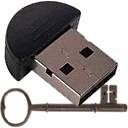
MakeDongle Protects Mac, Windows or Linux Software with a USB Dongle - Published on 03/23/15
Excel Software announced MakeDongle 1.0 that runs on Mac or Windows computers. MakeDongle generates a secure USB dongle that grants a license to run protected software on the attached Mac, Windows or Linux computer. MakeDongle complements a diverse suite of protection and licensing tools. MakeDongle can be used standalone or with the QuickLicense, AppProtect or DocProtect products. It also works with licensing plugins for FileMaker and Xojo.
Henderson, Nevada - Excel Software announced MakeDongle 1.0 that runs on Mac or Windows computers. MakeDongle generates a secure USB dongle that grants a license to run protected software on the attached Mac, Windows or Linux computer. MakeDongle complements a diverse suite of protection and licensing tools.
Protected software can be stored on the computer or dongle itself. When launch, the dongle is validated before the software is allowed to run. When building dongles, MakeDongle can copy multiple licenses, applications or installers to the USB drive. A dongle without additional software can be generated in seconds.
MakeDongle can be used standalone or with the QuickLicense, AppProtect or DocProtect products. It also works with licensing plugins for FileMaker and Xojo. To use MakeDongle alone, add a programming command to Mac or Windows software. Several coding interfaces are supported with sample code provided for popular programming languages.
MakeDongle works with QuickLicense. QuickLicense supports many license types including Trial, Product, Try/Buy and Subscription. Software is protected by adding API programming commands or by using the AddLicense wrapping tool without programming.
AddLicense is a popular choice for runtime environments like MAX or Unity since application code and resources can be securely embedded within the EXE or APP file. Protected software can immediately launch when the appropriate dongle is present or first require a manual or online activation process. MakeDongle and QuickLicense give developers many options for software and hardware protection.
MakeDongle works with QuickLicenseRT Linux. QuickLicense and MakeDongle run on a Mac or Windows computer to produce a dongle and license files. The protected Linux software works on a Linux computer with the dongle installed in any free USB port.
MakeDongle works with AppProtect. AppProtects wraps a Mac or Windows software into a protected application that runs when the dongle is installed. An optional computer unique password or online activation can be required.
MakeDongle works with DocProtect. DocProtect wraps PDF, EPUB, Video, SWF or HTML files into a Mac or Windows application. The protected document can be used on any computer when the dongle is installed. An optional computer unique password or online activation can be required. MakeDongle, DocProtect and QuickLicense can be combined to support other license types and features.
Excel spreadsheets can be protected using QuickLicense and OfficeProtect to produce an EXE for Windows or APP for Mac. This protection can be combined with a USB dongle that determines what computer can run the application. The application and encrypted data files can be stored on the dongle making them easily portable between computers.
Pricing and Availability:
MakeDongle 1.0 is $395 (USD) for a Single User License on Mac or Windows. MakeDongle can be used to produce unlimited dongles for any number of products. The product includes royalty-free distribution rights for protected Mac or Windows software that uses the included MakeDongle standalone API. MakeDongle MacOSX runs on 10.7 or later. MakeDongle Windows runs on Windows Vista, 7, 8 or 8.1 but can produce dongles that also work on Windows XP. Visit the company web site for demonstration videos and product information.
Excel Software: http://www.excelsoftware.com
MakeDongle 1.0: http://www.excelsoftware.com/makedongle
Purchase MakeDongle: http://www.excelsoftware.com/priceandordering
Screenshot: http://www.excelsoftware.com/image/makedongle_screen.jpg
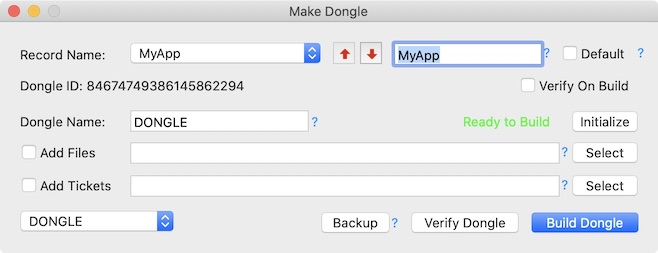
App Icon: http://www.excelsoftware.com/image/makedongleicon.gif
Established in 1985, Excel Software provides Windows and Mac OS X software products to thousands of users worldwide. Capabilities include system modeling & simulation, requirements management, software design, code generation, reengineering, bug tracking, help authoring, software license management, document protection and internet marketing automation. All Material and Software (C) Copyright 2015 Excel Software. All Rights Reserved. Apple, the Apple logo, Mac OS X and Macintosh are registered trademarks of Apple Inc. in the U.S. and/or other countries. Other trademarks and registered trademarks may be the property of their respective owners.
*******
Link To Article: http://prmac.com/release-id-74026.htm
*******
---------------------------------------------------------------------------------
Note that you can alter delivered distributions at any time.
Login to your account on prMac to alter your channel selection, or to opt-out at any time.
PhotoMarks - Powerful Photo Watermarking Solution for Mac and PC
A new article has been published at prMac.
PhotoMarks - Powerful Photo Watermarking Solution for Mac and PC - Published on 03/23/15
Bits&Coffee has released PhotoMarks 2.0, a powerful photo watermarking program for Mac and PC. PhotoMarks enables photographers, web designers, business people, and families to protect their copyrighted images quickly and efficiently on any computer. It works by editing photos in batch mode and takes advantage of multi-core processors for speeding up the process significantly. Photomarks can completely customize the appearance of text and logo marks, as well as perform additional edits.
Craiova, Romania - With PhotoMarks, Bits&Coffee is committed to offering the best possible experience for each platform (Windows or Mac OS X). The program has an elegant wizard-like interface with previews available for every step of the process, a comprehensive Help file and contextual help in-app, making it very easy to use even for the novice users.
In version 2.0, PhotoMarks adds: Drag & drop support for the Logo, Text watermark filters, and also for the Resize, Crop filters, Support for OS X Yosemite, Retina support for Macs, An improved user interface, Support for new DSLR digital cameras, Improved scripts.
PhotoMarks is a fully-featured batch photo watermarking solution. The program can completely customize the appearance of text and logo marks, as well as perform additional edits like resize, rename, auto rotate, or decorate photos with beautiful graphical frames, all in the same session.
It works by editing photos in batch mode and takes advantage of multi-core processors for speeding up the process significantly. Settings can be saved as profiles to be easily reused later, and scripts can be used to automate the process through the command line.
Pricing and Availability:
PhotoMarks runs on Mac OS X Yosemite, Mavericks, Mountain Lion, Lion as well as Windows 8.1, 8, 7, Vista, and XP. One license costs $29.95(USD). A free trial version is available for downloaded and the full version can be securely purchased from our website.
PhotoMarks 2.0: http://photomarksapp.com
Since 2005, Bits&Coffee has been developing and marketing image enhancement productivity software for business and home users. In addition to PhotoMarks for Mac, PC, and iOS, the company also offers BatchPhoto, a complete solution for batch photo editing on Mac and PC, as well as Image Espresso, a free online image converter and editor. All Material and Software (C) Copyright 2015 Bits&Coffee. All Rights Reserved. Apple, the Apple logo, Macintosh and Mac OS X are registered trademarks of Apple Inc. in the U.S. and/or other countries. Other trademarks and registered trademarks may be the property of their respective owners.
*******
Link To Article: http://prmac.com/release-id-74025.htm
*******
---------------------------------------------------------------------------------
Note that you can alter delivered distributions at any time.
Login to your account on prMac to alter your channel selection, or to opt-out at any time.
PhotoMarks - Powerful Photo Watermarking Solution for Mac and PC - Published on 03/23/15
Bits&Coffee has released PhotoMarks 2.0, a powerful photo watermarking program for Mac and PC. PhotoMarks enables photographers, web designers, business people, and families to protect their copyrighted images quickly and efficiently on any computer. It works by editing photos in batch mode and takes advantage of multi-core processors for speeding up the process significantly. Photomarks can completely customize the appearance of text and logo marks, as well as perform additional edits.
Craiova, Romania - With PhotoMarks, Bits&Coffee is committed to offering the best possible experience for each platform (Windows or Mac OS X). The program has an elegant wizard-like interface with previews available for every step of the process, a comprehensive Help file and contextual help in-app, making it very easy to use even for the novice users.
In version 2.0, PhotoMarks adds: Drag & drop support for the Logo, Text watermark filters, and also for the Resize, Crop filters, Support for OS X Yosemite, Retina support for Macs, An improved user interface, Support for new DSLR digital cameras, Improved scripts.
PhotoMarks is a fully-featured batch photo watermarking solution. The program can completely customize the appearance of text and logo marks, as well as perform additional edits like resize, rename, auto rotate, or decorate photos with beautiful graphical frames, all in the same session.
It works by editing photos in batch mode and takes advantage of multi-core processors for speeding up the process significantly. Settings can be saved as profiles to be easily reused later, and scripts can be used to automate the process through the command line.
Pricing and Availability:
PhotoMarks runs on Mac OS X Yosemite, Mavericks, Mountain Lion, Lion as well as Windows 8.1, 8, 7, Vista, and XP. One license costs $29.95(USD). A free trial version is available for downloaded and the full version can be securely purchased from our website.
PhotoMarks 2.0: http://photomarksapp.com
Since 2005, Bits&Coffee has been developing and marketing image enhancement productivity software for business and home users. In addition to PhotoMarks for Mac, PC, and iOS, the company also offers BatchPhoto, a complete solution for batch photo editing on Mac and PC, as well as Image Espresso, a free online image converter and editor. All Material and Software (C) Copyright 2015 Bits&Coffee. All Rights Reserved. Apple, the Apple logo, Macintosh and Mac OS X are registered trademarks of Apple Inc. in the U.S. and/or other countries. Other trademarks and registered trademarks may be the property of their respective owners.
*******
Link To Article: http://prmac.com/release-id-74025.htm
*******
---------------------------------------------------------------------------------
Note that you can alter delivered distributions at any time.
Login to your account on prMac to alter your channel selection, or to opt-out at any time.
SIMpalm will be attending CTIA Super Mobility 2015
A new article has been published at prMac.
SIMpalm will be attending CTIA Super Mobility 2015 - Published on 03/23/15
Leading app development company, SIMpalm, will be attending the CTIS Super Mobility 2015 event in Los Vegas. The event will be held from 9th to 11th September. This is a must-attend event for CIOs, CSOs, CTOs and those with responsibility for secure mobility in Government and Enterprise. From business strategies and consumer trends to industry developments and the latest policies, CTIA's Mobile Innovation Conference gives you a comprehensive, in-depth look at the whole moving picture.
Silver Spring, Maryland - SIMpalm, a leading app development company in the USA, will be attending the CTIS Super Mobility 2015 event this year. The event will be held in Las Vegas from 9th September to 11th September. This is a must-attend event for CIOs, CSOs, CTOs and those with responsibility for secure mobility in Government and Enterprise. All these highly experienced persons come to attend this summit and will share their experiences gained through learning with their peers. The event will be hosted and attended by participant from several industries, sharing their experiences and connections in the lunch organized there. Conference consists of several activities like Keynote speakers, presentations, and Exhibit Floor and networking events.
SIMpalm will be available at the event and will showcase its work. SIMpalm has expertise in building application for different Industries like Healthcare, Startups, Entertainment, Financial, Government, Retail, E-Commerce and others. Apart from building custom software solution, our consultants have worked for large enterprises to provide Business and Technical Consulting.
SIMpalm decided to attend the conference to get the better understanding and knowledge of the current trends in the industry and present its skill sets to other attendees. SIMpalm is looking forward to these feature's learning opportunity: Mobile Innovation Conference. In partnership with Northwestern University's renowned McCormick School of Engineering and Applied Science, we have developed a curriculum based on the most up-to-date research and knowledge available. From business strategies and consumer trends to industry developments and the latest policies, CTIA's Mobile Innovation Conference gives you a comprehensive, in-depth look at the whole moving picture.
Keynotes:
* Soak up the inspiration at CTIA Super Mobility 2015's supercharged Keynotes, where industry titans share their insights on the hottest innovations, best ideas and toughest challenges in mobile today.
* Studio C. Get an insider's view of the future of your industry at exclusive live interviews with C-Suite execs, conducted in a broadcast studio environment by heavy-hitter tech and business reporters.
* MobileCON Thought Leadership Program. Specifically for IT pros and execs, the focused content in this program includes targeted educational sessions, presentations on our Thought Leadership Stages and unique Answer Bars.
* CIO Summit. Top IT executives in the mobile industry will convene at an exclusive Summit to strengthen their circle of influence, advance their mobile agenda, and learn the newest mobile IT approaches. Participation is limited to the first 100 qualified registrants.
Mobile Onstage. These one-of-a-kind learning experiences shine the spotlight on the advancements that are radically changing the way connected consumers utilize mobile. Don't miss the educational demos and interactive presentations on the Connected Life and iZone stages.
* Partner Events. CTIA Super Mobility 2015 is an inspiring convergence of dozens of co-located industry shows that represent the entire new mobile ecosystem. To learn about the wide range of conference sessions and learning opportunities they offer.
SIMpalm will be available there to greet visitors and explain them about skills and experience. Our CEO, Dr. Piyush Jain, would be speaking at several sessions to share some of his knowledge and personal experiences. SIMpalm has built several clients on the East Coast of USA and regarded as a leading app development company in NYC.
SIMpalm: http://www.simpalm.com
SIMpalm was founded in 2009 to bring more mobility in the world. SIMpalm design, develop and deploy mobile applications and responsive web for its clients. SIMpalm provided end to end services for mobile app/web including design, development, testing and deployment. It has highly skilled iOS, iPhone application development, Android App Developers, iPad Application Development services, HTML5 developers to build mobile apps for any industry vertical. It also builds cloud based backend for mobile apps on Parse, Amazon AWS, LAMP and Windows Azure. Not only native apps, it builds app and web using cross platform technologies like HTML5, Sencha Touch, Jquery, Titanium, Xamarin, Angular JS, Backbone JS and Appprecessor. We develop solutions for Startups, SMEs, Enterprises and Government organization. Some of its major clients includeFlextronics USA, Forte Payment Systems, Bed Bath and Beyond, Blue Cross Blue Shield and Cantada. All Material and Software (C) Copyright 2015 SIMpalm. All
Rights Reserved. Apple, the Apple logo, iPhone, iPod and iPad are registered trademarks of Apple Inc. in the U.S. and/or other countries. Other trademarks and registered trademarks may be the property of their respective owners.
*******
Link To Article: http://prmac.com/release-id-74024.htm
*******
---------------------------------------------------------------------------------
Note that you can alter delivered distributions at any time.
Login to your account on prMac to alter your channel selection, or to opt-out at any time.
SIMpalm will be attending CTIA Super Mobility 2015 - Published on 03/23/15
Leading app development company, SIMpalm, will be attending the CTIS Super Mobility 2015 event in Los Vegas. The event will be held from 9th to 11th September. This is a must-attend event for CIOs, CSOs, CTOs and those with responsibility for secure mobility in Government and Enterprise. From business strategies and consumer trends to industry developments and the latest policies, CTIA's Mobile Innovation Conference gives you a comprehensive, in-depth look at the whole moving picture.
Silver Spring, Maryland - SIMpalm, a leading app development company in the USA, will be attending the CTIS Super Mobility 2015 event this year. The event will be held in Las Vegas from 9th September to 11th September. This is a must-attend event for CIOs, CSOs, CTOs and those with responsibility for secure mobility in Government and Enterprise. All these highly experienced persons come to attend this summit and will share their experiences gained through learning with their peers. The event will be hosted and attended by participant from several industries, sharing their experiences and connections in the lunch organized there. Conference consists of several activities like Keynote speakers, presentations, and Exhibit Floor and networking events.
SIMpalm will be available at the event and will showcase its work. SIMpalm has expertise in building application for different Industries like Healthcare, Startups, Entertainment, Financial, Government, Retail, E-Commerce and others. Apart from building custom software solution, our consultants have worked for large enterprises to provide Business and Technical Consulting.
SIMpalm decided to attend the conference to get the better understanding and knowledge of the current trends in the industry and present its skill sets to other attendees. SIMpalm is looking forward to these feature's learning opportunity: Mobile Innovation Conference. In partnership with Northwestern University's renowned McCormick School of Engineering and Applied Science, we have developed a curriculum based on the most up-to-date research and knowledge available. From business strategies and consumer trends to industry developments and the latest policies, CTIA's Mobile Innovation Conference gives you a comprehensive, in-depth look at the whole moving picture.
Keynotes:
* Soak up the inspiration at CTIA Super Mobility 2015's supercharged Keynotes, where industry titans share their insights on the hottest innovations, best ideas and toughest challenges in mobile today.
* Studio C. Get an insider's view of the future of your industry at exclusive live interviews with C-Suite execs, conducted in a broadcast studio environment by heavy-hitter tech and business reporters.
* MobileCON Thought Leadership Program. Specifically for IT pros and execs, the focused content in this program includes targeted educational sessions, presentations on our Thought Leadership Stages and unique Answer Bars.
* CIO Summit. Top IT executives in the mobile industry will convene at an exclusive Summit to strengthen their circle of influence, advance their mobile agenda, and learn the newest mobile IT approaches. Participation is limited to the first 100 qualified registrants.
Mobile Onstage. These one-of-a-kind learning experiences shine the spotlight on the advancements that are radically changing the way connected consumers utilize mobile. Don't miss the educational demos and interactive presentations on the Connected Life and iZone stages.
* Partner Events. CTIA Super Mobility 2015 is an inspiring convergence of dozens of co-located industry shows that represent the entire new mobile ecosystem. To learn about the wide range of conference sessions and learning opportunities they offer.
SIMpalm will be available there to greet visitors and explain them about skills and experience. Our CEO, Dr. Piyush Jain, would be speaking at several sessions to share some of his knowledge and personal experiences. SIMpalm has built several clients on the East Coast of USA and regarded as a leading app development company in NYC.
SIMpalm: http://www.simpalm.com
SIMpalm was founded in 2009 to bring more mobility in the world. SIMpalm design, develop and deploy mobile applications and responsive web for its clients. SIMpalm provided end to end services for mobile app/web including design, development, testing and deployment. It has highly skilled iOS, iPhone application development, Android App Developers, iPad Application Development services, HTML5 developers to build mobile apps for any industry vertical. It also builds cloud based backend for mobile apps on Parse, Amazon AWS, LAMP and Windows Azure. Not only native apps, it builds app and web using cross platform technologies like HTML5, Sencha Touch, Jquery, Titanium, Xamarin, Angular JS, Backbone JS and Appprecessor. We develop solutions for Startups, SMEs, Enterprises and Government organization. Some of its major clients includeFlextronics USA, Forte Payment Systems, Bed Bath and Beyond, Blue Cross Blue Shield and Cantada. All Material and Software (C) Copyright 2015 SIMpalm. All
Rights Reserved. Apple, the Apple logo, iPhone, iPod and iPad are registered trademarks of Apple Inc. in the U.S. and/or other countries. Other trademarks and registered trademarks may be the property of their respective owners.
*******
Link To Article: http://prmac.com/release-id-74024.htm
*******
---------------------------------------------------------------------------------
Note that you can alter delivered distributions at any time.
Login to your account on prMac to alter your channel selection, or to opt-out at any time.
Subscribe to:
Posts (Atom)