A new article has been published at prMac.
WEKA MEDIA PUBLISHING GmbH chooses Magzter to widen its global presence - Published on 04/28/15
WEKA MEDIA PUBLISHING GmbH, adds three of its best-selling magazines; AUDIO, Connect and PC Magazin to the world's largest and fastest growing global digital multi-platform magazine newsstand and bookstore, Magzter. WEKA MEDIA PUBLISHING GmbH has been enriching the knowledge of people, who like to update themselves with the latest technologies involving telecommunications, audio systems, mobile phones, personal computers and networks.
New York, New York - One of Germany's most trusted publishing companies, WEKA MEDIA PUBLISHING GmbH, adds three of its best-selling magazines; AUDIO, Connect and PC Magazin to the world's largest and fastest growing global digital multi-platform magazine newsstand and bookstore, Magzter.
WEKA MEDIA PUBLISHING GmbH has been enriching the knowledge of people, who like to update themselves with the latest technologies involving telecommunications, audio systems, mobile phones, personal computers and networks. These magazines also provide fundamental expert know-how and credibility to lead the products efficiently to success. By adding these magazines to its catalog, Magzter has further strengthened its roots in technology domain.
Here's what you can read on Magzter:
AUDIO is a monthly magazine that focuses on hi-fi, music speakers, amplifiers, CD players and home theater systems. It is priced at EUR 59.99 for an annual subscription on Magzter.
Connect is the ultimate practical guide to telecommunications and networked world. This monthly magazine is priced at EUR 55.99 for an annual subscription on Magzter.
PC Magazin provides high-level techniques, hardware expertise and up-to-date reports on personal & mobile computing. This monthly magazine is priced at EUR 26.99 for an annual subscription on Magzter.
"We are delighted with Magzter, which has given us a completely new approach in the distribution of our magazines. With Magzter, we are addressing customer groups, to which previously WMP did not have access." - Hans Stubinger - Marketing & Sales B2C, WEKA MEDIA PUBLISHING GmbH
"WEKA MEDIA PUBLISHING GmbH's magazines have been the most reliable sources of information for technology enthusiasts in Germany and other European countries. We firmly believe that such information on technological advancements should be available to all universally, and Magzter will help these magazines to reach out to over 25 million subscribers." - Girish Ramdas, CEO, Magzter Inc.
"From choosing between different home theatre systems to providing hardware expertise in mobile computing, WEKA MEDIA PUBLISHING GmbH's magazines are the perfect companions to solve all your technology related queries. For tech-savvy aficionados, these magazines are the ultimate guides, which provide quick solutions to complex issues." - Vijay Radhakrishnan, President, Magzter Inc.
WEKA MEDIA PUBLISHING GmbH is the leading supplier of special interest magazines in Germany and part of the pan-European active WEKA Holding which consists of 20 media companies in five European countries (Germany, Netherlands, France, Switzerland, Austria) as well as of various service companies.
With its special interest titles, WEKA MEDIA PUBLISHING GmbH is a provider of an outstanding, high-quality editorial spectrum on all topics related to telecommunications & mobile, IT, Internet & B2B, consumer electronics, hi-fi & home networking.
With its test services, WMP provides fundamental expert know-how and credibility. The connect test seal as well as the other test seals of the magazines represent incorruptible and outstanding test results and is a seal of quality recognized both of users and industry.
Device Requirements:
* iPhone, iPad, and iPod touch
* Optimized for iPhone 5, iPhone 6/6 Plus
* Requires iOS 7.0 or later
* 16.6 MB
Pricing and Availability:
Magzter - Magazine & Book Store 4.0.1 is free and available worldwide through the App Store in the News category. Magzter also launched a path-breaking "All You Can Read" subscription service called Magzter GOLD, which gives digital readers unlimited access to 2,000+ magazines for a low monthly price. The app is also available on Google Play, and Windows 8, the web, Amazon App Store, Kindle Fire, and NOOK and is expanding to more platforms soon. Magzter's easy purchase and renewal systems ensure subscriptions are paid on time, eliminating the need for paper checks and postal mail issues. Users can buy their magazines on any of the above devices/platforms and seamlessly port their purchases to any other devices, a feature unique to Magzter.
Magzter - Magazine & Book Store 4.0.1: http://www.magzter.com
Download from iTunes: https://itunes.apple.com/app/magzter-magazine-store/id412163953
Download from Google Play: https://play.google.com/store/apps/details?id=com.dci.magzter&hl=en
Download from Windows 8: http://apps.microsoft.com/windows/en-in/app/magzter/d6cf8e63-6af5-4710-b5e9-d3a0514292c6
Screenshot: http://cdn.magzter.com/1426066416/1427806273/images/thumb/390_thumb_1.jpg
App Icon: http://a2.mzstatic.com/us/r30/Purple5/v4/81/fc/d3/81fcd369-00cd-a585-26d7-ee2f176c3c4b/mzl.orihehsu.175x175-75.jpg
Magzter is the world's largest and fastest growing global digital multi-platform magazine newsstand and bookstore with over 25 million digital consumers, more than 5,500 magazines, thousands of books from over 2,500 publishers. Headquartered in New York, Magzter has its local offices in London, Paris, Barcelona, Munich, Amsterdam, Helsinki, Cape Town, Chennai and Singapore and will soon be expanding to other countries. Founded by global entrepreneurs, Girish Ramdas and Vijay Radhakrishnan in June 2011, Magzter enables magazine publishers around the world to create and deliver digital editions of their titles to global consumers. Powered by its proprietary OREY Click Publishing System(R), Magzter also enables their customers to publish interactive/audio-visual content in the magazine as it supports HTML5. Magzter launched Magzter GOLD subscription service to give digital readers unlimited access to thousands of magazines for a low monthly price.All Material and Software (C) Copyright
2015 Magzter Inc. All Rights Reserved. Apple, the Apple logo, iPhone, iPod and iPad are registered trademarks of Apple Inc. in the U.S. and/or other countries. Other trademarks and registered trademarks may be the property of their respective owners.
*******
Link To Article: http://prmac.com/release-id-74664.htm
*******
---------------------------------------------------------------------------------
Note that you can alter delivered distributions at any time.
Login to your account on prMac to alter your channel selection, or to opt-out at any time.


LinkOptimizer 4.9.41 for InDesign Lets Remove Alpha Channels from Images
A new article has been published at prMac.
LinkOptimizer 4.9.41 for InDesign Lets Remove Alpha Channels from Images - Published on 04/28/15
Toronto based Zevrix Solutions today announces LinkOptimizer 4.9.41, a feature update to its workflow automation solution for Adobe InDesign. LinkOptimizer allows users to reduce the size of InDesign links and speed up processing by eliminating excess image data, performing essential image adjustments and converting file formats. The new version adds an option to automatically remove all alpha channels from images during Photoshop processing.
Toronto (ON) Canada - Zevrix Solutions today is proud to announce the release of LinkOptimizer 4.9.41, a feature update to its workflow automation solution for Adobe InDesign. Awarded 4 out of 5 starts by Computer Arts magazine, LinkOptimizer automates complex image manipulation tasks allowing to significantly reduce the size of InDesign links, save processing time and reduce production costs.
The new version adds an option to automatically remove all alpha channels from images during Adobe Photoshop processing. This feature was in high demand by LinkOptimizer users as complex alpha channels can substantially increase the disk space required for an image. The new option doesn't affect color component and spot color channels.
"LinkOptimizer makes cutting huge linked images down to size a cinch," reports Computer Arts. "For those wanting to quickly optimize their images and cut down on processing time, LinkOptimizer is a very smart choice."
LinkOptimizer works automatically with Photoshop to eliminate the excess image data of InDesign links, perform essential image adjustments and convert image formats. To decrease the job size, LinkOptimizer automatically reduces the image resolution, scales and crops the images in Photoshop according to their dimensions in InDesign and the target resolution specified, and reimports them to InDesign at 100% in their precise position.
In addition, the software can convert image colors to specific ICC profile, apply sharpening filters, merge layers and delete hidden ones, and process copies of InDesign documents instead of original files. As a result, users can save gigabytes of disk space and hours of optimizing images manually, accelerate document output, reduce job turnaround and cut costs through faster processing.
Pricing and Availability:
LinkOptimizer can be purchased from Zevrix website for $259.95 USD (Light version: $179.95) as well as from authorized resellers. Trial is also available for download. The update is free for LinkOptimizer 4.x users and $130 to upgrade from previous versions. LinkOptimizer requires Mac OS X 10.6-10.10 and Adobe InDesign and Photoshop CS3-CC 2014.
Zevrix Solutions: http://zevrix.com
LinkOptimizer 4.9.41: http://zevrix.com/LinkOptimizer.php
Download LinkOptimizer: http://zevrix.com/LinkOptimizer.dmg
Purchase: http://zevrix.com/store.php
Screenshot: http://zevrix.com/screenshots/lo4/edit.gif
Located in Toronto, Canada, Zevrix Solutions provides automation and productivity solutions for Adobe Creative Cloud and Creative Suite software, PDF workflows, graphic file diagnostics and Microsoft Office output on Mac OS. Zevrix is dedicated to help professionals increase their profits through automating everyday tasks, producing error-free documents, saving disk space and cutting production costs. For more information, visit their website. Copyright (C) 2015 Zevrix Solutions. All Rights Reserved. Other trademarks and registered trademarks may be the property of their respective owners.
*******
Link To Article: http://prmac.com/release-id-74660.htm
*******
---------------------------------------------------------------------------------
Note that you can alter delivered distributions at any time.
Login to your account on prMac to alter your channel selection, or to opt-out at any time.
LinkOptimizer 4.9.41 for InDesign Lets Remove Alpha Channels from Images - Published on 04/28/15
Toronto based Zevrix Solutions today announces LinkOptimizer 4.9.41, a feature update to its workflow automation solution for Adobe InDesign. LinkOptimizer allows users to reduce the size of InDesign links and speed up processing by eliminating excess image data, performing essential image adjustments and converting file formats. The new version adds an option to automatically remove all alpha channels from images during Photoshop processing.
Toronto (ON) Canada - Zevrix Solutions today is proud to announce the release of LinkOptimizer 4.9.41, a feature update to its workflow automation solution for Adobe InDesign. Awarded 4 out of 5 starts by Computer Arts magazine, LinkOptimizer automates complex image manipulation tasks allowing to significantly reduce the size of InDesign links, save processing time and reduce production costs.
The new version adds an option to automatically remove all alpha channels from images during Adobe Photoshop processing. This feature was in high demand by LinkOptimizer users as complex alpha channels can substantially increase the disk space required for an image. The new option doesn't affect color component and spot color channels.
"LinkOptimizer makes cutting huge linked images down to size a cinch," reports Computer Arts. "For those wanting to quickly optimize their images and cut down on processing time, LinkOptimizer is a very smart choice."
LinkOptimizer works automatically with Photoshop to eliminate the excess image data of InDesign links, perform essential image adjustments and convert image formats. To decrease the job size, LinkOptimizer automatically reduces the image resolution, scales and crops the images in Photoshop according to their dimensions in InDesign and the target resolution specified, and reimports them to InDesign at 100% in their precise position.
In addition, the software can convert image colors to specific ICC profile, apply sharpening filters, merge layers and delete hidden ones, and process copies of InDesign documents instead of original files. As a result, users can save gigabytes of disk space and hours of optimizing images manually, accelerate document output, reduce job turnaround and cut costs through faster processing.
Pricing and Availability:
LinkOptimizer can be purchased from Zevrix website for $259.95 USD (Light version: $179.95) as well as from authorized resellers. Trial is also available for download. The update is free for LinkOptimizer 4.x users and $130 to upgrade from previous versions. LinkOptimizer requires Mac OS X 10.6-10.10 and Adobe InDesign and Photoshop CS3-CC 2014.
Zevrix Solutions: http://zevrix.com
LinkOptimizer 4.9.41: http://zevrix.com/LinkOptimizer.php
Download LinkOptimizer: http://zevrix.com/LinkOptimizer.dmg
Purchase: http://zevrix.com/store.php
Screenshot: http://zevrix.com/screenshots/lo4/edit.gif
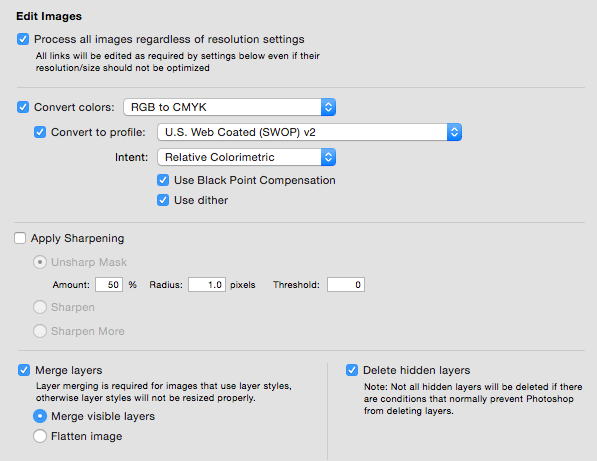
Located in Toronto, Canada, Zevrix Solutions provides automation and productivity solutions for Adobe Creative Cloud and Creative Suite software, PDF workflows, graphic file diagnostics and Microsoft Office output on Mac OS. Zevrix is dedicated to help professionals increase their profits through automating everyday tasks, producing error-free documents, saving disk space and cutting production costs. For more information, visit their website. Copyright (C) 2015 Zevrix Solutions. All Rights Reserved. Other trademarks and registered trademarks may be the property of their respective owners.
*******
Link To Article: http://prmac.com/release-id-74660.htm
*******
---------------------------------------------------------------------------------
Note that you can alter delivered distributions at any time.
Login to your account on prMac to alter your channel selection, or to opt-out at any time.
Cowly Owl launches Monster Mingle for iOS - Child-Safe Game
A new article has been published at prMac.
Cowly Owl launches Monster Mingle for iOS - Child-Safe Game - Published on 04/28/15
UK based Cowly Owl today introduces Monster Mingle 1.0.1, its new child-safe game for iPhone, iPod touch and iPad devices. Build your own friendly monster! Choose different body parts to help explore the world and uncover each unique island. Hop and walk on land, swim under the sea or fly in the sky. Developed for children between 3-7 years, they will discover fun creatures, musical scenery and hidden surprises as their monster plays in this magical kingdom.
London, United Kingdom - Cowly Owl is happy to introduce the release of Monster Mingle, for iPhone, iPod touch and iPad, available worldwide on the App Store. Build your own friendly monster! Choose different body parts to help explore the world and uncover each unique island. Discover fun creatures, musical scenery and hidden surprises as your monster plays in this magical kingdom. A free play imaginative landscape helps children to be creative, building the creatures they want and learning what is needed to fly high, swim fast or simply walk around. Can you find all 40 body parts?
Features:
* Combine different eyes, mouths, noses, beaks, arms, legs, wings, fins, horns and bodies
* Hop and walk on land, swim under the sea or fly in the sky
* Find food to feed your hungry monster
* Talk and sing to the other creatures
* No goals or objectives, just a free play sandbox
A child safe app with no in-app purchases, no social media integration or third party advertising. This app is suitable for children between 3 - 7 years old. Created by Cowly Owl, a British micro-studio creating playful digital toys and educational games.
"This vibrant world is full of other creatures who sing and gibber, islands that float and waters teeming with life....This mingling of monster parts is a riot, and one that your children will want to explore over and over again." Jinny Gudmundsen, USA Today
"This isn't a game or a story: it's pure exploration and experimentation, although that does give children the freedom to invent their own narratives about who their monster is and what it's doing." Stuart Dredge, The Guardian
Device Requirements:
* iPhone, iPad, and iPod touch
* Optimized for iPhone 5, iPhone 6/6 Plus
* Requires iOS 7.0 or later
* 0.7 MB
Pricing and Availability:
Monster Mingle 1.0.1 is $2.99 USD (or equivalent amount in other currencies) and available worldwide exclusively through the App Store in the Education category.
Monster Mingle 1.0.1: http://www.cowlyowl.com/monster-mingle
Purchase and Download: https://itunes.apple.com/us/app/monster-mingle/id915545000?mt=8&at=11lom9&ct=prmac
YouTube Video (Trailer): https://www.youtube.com/watch?v=zNbHD_Tf-ww
Screenshot: http://a4.mzstatic.com/us/r30/Purple3/v4/dc/be/a6/dcbea6e5-f715-44d7-ee9b-51ce33f157e0/screen480x480.jpeg
App Icon: http://a3.mzstatic.com/us/r30/Purple3/v4/7b/44/e1/7b44e1c6-8448-b028-e378-52f00a2a269e/icon175x175.jpeg
Cowly Owl is a British studio creating playful digital toys, educational apps and interactive experiences. Monster Mingle is our 4th app, after Dinosaur Mix (build your own dinosaur), Little Digits (finger counting for iPad) and Makego (a digital toy that turned your iPhone into a toy car). Copyright (C) 2015 Cowly Owl Ltd. All Rights Reserved. Apple, the Apple logo, iPhone, iPod and iPad are registered trademarks of Apple Inc. in the U.S. and/or other countries.
*******
Link To Article: http://prmac.com/release-id-74659.htm
*******
---------------------------------------------------------------------------------
Note that you can alter delivered distributions at any time.
Login to your account on prMac to alter your channel selection, or to opt-out at any time.
Cowly Owl launches Monster Mingle for iOS - Child-Safe Game - Published on 04/28/15
UK based Cowly Owl today introduces Monster Mingle 1.0.1, its new child-safe game for iPhone, iPod touch and iPad devices. Build your own friendly monster! Choose different body parts to help explore the world and uncover each unique island. Hop and walk on land, swim under the sea or fly in the sky. Developed for children between 3-7 years, they will discover fun creatures, musical scenery and hidden surprises as their monster plays in this magical kingdom.
London, United Kingdom - Cowly Owl is happy to introduce the release of Monster Mingle, for iPhone, iPod touch and iPad, available worldwide on the App Store. Build your own friendly monster! Choose different body parts to help explore the world and uncover each unique island. Discover fun creatures, musical scenery and hidden surprises as your monster plays in this magical kingdom. A free play imaginative landscape helps children to be creative, building the creatures they want and learning what is needed to fly high, swim fast or simply walk around. Can you find all 40 body parts?
Features:
* Combine different eyes, mouths, noses, beaks, arms, legs, wings, fins, horns and bodies
* Hop and walk on land, swim under the sea or fly in the sky
* Find food to feed your hungry monster
* Talk and sing to the other creatures
* No goals or objectives, just a free play sandbox
A child safe app with no in-app purchases, no social media integration or third party advertising. This app is suitable for children between 3 - 7 years old. Created by Cowly Owl, a British micro-studio creating playful digital toys and educational games.
"This vibrant world is full of other creatures who sing and gibber, islands that float and waters teeming with life....This mingling of monster parts is a riot, and one that your children will want to explore over and over again." Jinny Gudmundsen, USA Today
"This isn't a game or a story: it's pure exploration and experimentation, although that does give children the freedom to invent their own narratives about who their monster is and what it's doing." Stuart Dredge, The Guardian
Device Requirements:
* iPhone, iPad, and iPod touch
* Optimized for iPhone 5, iPhone 6/6 Plus
* Requires iOS 7.0 or later
* 0.7 MB
Pricing and Availability:
Monster Mingle 1.0.1 is $2.99 USD (or equivalent amount in other currencies) and available worldwide exclusively through the App Store in the Education category.
Monster Mingle 1.0.1: http://www.cowlyowl.com/monster-mingle
Purchase and Download: https://itunes.apple.com/us/app/monster-mingle/id915545000?mt=8&at=11lom9&ct=prmac
YouTube Video (Trailer): https://www.youtube.com/watch?v=zNbHD_Tf-ww
Screenshot: http://a4.mzstatic.com/us/r30/Purple3/v4/dc/be/a6/dcbea6e5-f715-44d7-ee9b-51ce33f157e0/screen480x480.jpeg

App Icon: http://a3.mzstatic.com/us/r30/Purple3/v4/7b/44/e1/7b44e1c6-8448-b028-e378-52f00a2a269e/icon175x175.jpeg

Cowly Owl is a British studio creating playful digital toys, educational apps and interactive experiences. Monster Mingle is our 4th app, after Dinosaur Mix (build your own dinosaur), Little Digits (finger counting for iPad) and Makego (a digital toy that turned your iPhone into a toy car). Copyright (C) 2015 Cowly Owl Ltd. All Rights Reserved. Apple, the Apple logo, iPhone, iPod and iPad are registered trademarks of Apple Inc. in the U.S. and/or other countries.
*******
Link To Article: http://prmac.com/release-id-74659.htm
*******
---------------------------------------------------------------------------------
Note that you can alter delivered distributions at any time.
Login to your account on prMac to alter your channel selection, or to opt-out at any time.
GeniCan - The smart garbage can that saves you time and money
A new article has been published at prMac.
GeniCan - The smart garbage can that saves you time and money - Published on 04/28/15
GeniCan launches 37-day Indiegogo campaign to raise funds for its innovative smart garbage can. GeniCan is an intelligent device that affixes to your garbage can, translating barcodes and spoken word into grocery lists. It is used in tandem with the GeniCan iOS & Android app, which sorts and lists frequent purchases, listing them by aisle in your local supermarket, finds and downloads online coupons, and estimates home delivery.
Money raised from the campaign will go towards production costs.
London, United Kingdom - GeniCan launches a $50,000, 37-day Indiegogo campaign to raise funds for its innovative smart garbage can. Money raised from the campaign will go towards production costs of the GeniCan. GeniCan is an intelligent device that affixes to your garbage can, translating barcodes and spoken word into grocery lists. It is used in tandem with the GeniCan iOS & Android app, which sorts and lists frequent purchases - listing them by aisle in your local supermarket - finds and downloads online coupons, and estimates home delivery. GeniCan saves you time and money by making your grocery shopping more efficient.
Here's how it works:
* GeniCan installs easily in your garbage can and scans items as you (or anyone in your home, family or office) discard them. It alerts you when the garbage is full.
* If an item doesn't have a barcode, such as fresh produce, baked goods or handmade items, GeniCan will simply ask you "What would you like me to add to your list?" and your response is translated to text and automatically sent to your personalized shopping list you can access on your phone via the GeniCan iOS & Android app.
* You'll never circle the store wondering where the juice packs are again, the app will make your shopping trips more efficient with your grocery list sorted by aisle.
* Wasting money on products you already have in your pantry but forgot about is a thing of the past, and GeniCan offers coupons for the products you purchase the most.
* If you want to eliminate the trip to the grocery store altogether, GeniCan will offer direct shipments from online retailers as you throw your items in the trash.
Co-founder and Inventor of GeniCan, Rob Griffin, says, "I'm excited to launch GeniCan to the Indiegogo community. GeniCan is a simple, elegant solution for the struggles of the modern kitchen. Help us fund our project and save money, time and hassle at home."
GeniCan: http://www.genican.com/
Indiegogo Campaign: https://www.indiegogo.com/projects/genican-your-garbage-can-just-got-smart/
Media Assets: http://www.genican.com/press/
GeniCan was founded in 2014 by Rob Griffin, Daniel O'Donnell and David Pestka, and is based in Newtown, Connecticut, USA. All Material and Software (C) Copyright 2015 GeniCan. All Rights Reserved. Apple, the Apple logo, iPhone, iPod and iPad are registered trademarks of Apple Inc. in the U.S. and/or other countries. Other trademarks and registered trademarks may be the property of their respective owners.
*******
Link To Article: http://prmac.com/release-id-74655.htm
*******
---------------------------------------------------------------------------------
Note that you can alter delivered distributions at any time.
Login to your account on prMac to alter your channel selection, or to opt-out at any time.
GeniCan - The smart garbage can that saves you time and money - Published on 04/28/15
GeniCan launches 37-day Indiegogo campaign to raise funds for its innovative smart garbage can. GeniCan is an intelligent device that affixes to your garbage can, translating barcodes and spoken word into grocery lists. It is used in tandem with the GeniCan iOS & Android app, which sorts and lists frequent purchases, listing them by aisle in your local supermarket, finds and downloads online coupons, and estimates home delivery.
Money raised from the campaign will go towards production costs.
London, United Kingdom - GeniCan launches a $50,000, 37-day Indiegogo campaign to raise funds for its innovative smart garbage can. Money raised from the campaign will go towards production costs of the GeniCan. GeniCan is an intelligent device that affixes to your garbage can, translating barcodes and spoken word into grocery lists. It is used in tandem with the GeniCan iOS & Android app, which sorts and lists frequent purchases - listing them by aisle in your local supermarket - finds and downloads online coupons, and estimates home delivery. GeniCan saves you time and money by making your grocery shopping more efficient.
Here's how it works:
* GeniCan installs easily in your garbage can and scans items as you (or anyone in your home, family or office) discard them. It alerts you when the garbage is full.
* If an item doesn't have a barcode, such as fresh produce, baked goods or handmade items, GeniCan will simply ask you "What would you like me to add to your list?" and your response is translated to text and automatically sent to your personalized shopping list you can access on your phone via the GeniCan iOS & Android app.
* You'll never circle the store wondering where the juice packs are again, the app will make your shopping trips more efficient with your grocery list sorted by aisle.
* Wasting money on products you already have in your pantry but forgot about is a thing of the past, and GeniCan offers coupons for the products you purchase the most.
* If you want to eliminate the trip to the grocery store altogether, GeniCan will offer direct shipments from online retailers as you throw your items in the trash.
Co-founder and Inventor of GeniCan, Rob Griffin, says, "I'm excited to launch GeniCan to the Indiegogo community. GeniCan is a simple, elegant solution for the struggles of the modern kitchen. Help us fund our project and save money, time and hassle at home."
GeniCan: http://www.genican.com/
Indiegogo Campaign: https://www.indiegogo.com/projects/genican-your-garbage-can-just-got-smart/
Media Assets: http://www.genican.com/press/
GeniCan was founded in 2014 by Rob Griffin, Daniel O'Donnell and David Pestka, and is based in Newtown, Connecticut, USA. All Material and Software (C) Copyright 2015 GeniCan. All Rights Reserved. Apple, the Apple logo, iPhone, iPod and iPad are registered trademarks of Apple Inc. in the U.S. and/or other countries. Other trademarks and registered trademarks may be the property of their respective owners.
*******
Link To Article: http://prmac.com/release-id-74655.htm
*******
---------------------------------------------------------------------------------
Note that you can alter delivered distributions at any time.
Login to your account on prMac to alter your channel selection, or to opt-out at any time.
OneIT Releases iEmergency 2.1 for iPhone
A new article has been published at prMac.
OneIT Releases iEmergency 2.1 for iPhone - Published on 04/28/15
Ottawa based OneIT today announces iEmergency 2.1, an update to its proprietary iOS application. Perfect for camping, travel, and working outdoors, iEmergency is a global, multilingual emergency toolset for iPhone devices. It works everywhere in the world, is available in a variety of languages, and includes the data, tools, and resources you need to survive an emergency. The toolkit is always with you, and is a unified interface for many different emergency resources.
Ottawa, Canada - OneIT (Thomas Luke McManus) today announced that its proprietary iOS application iEmergency, is now available publicly with version 2.1. A previous release was published outlining details of the version and stating the public release would occur by end-of-month April 2015. This public release marks the completion of all testing and pre-release review processes. iEmergency 2.1 for iOS is now available on the App Store for immediate download.
About iEmergency:
(iEmergency - Global Lifesaving Preparedness Toolset and Emergency Call Abroad) iEmergency is the powerful set of tools and resources you need to survive any emergency. It works everywhere in the world, is available in a variety of languages, and includes the resources you need to survive an emergency. The tools included are perfect for camping, travel, and working outdoors. The toolkit is always with you, and is a unified interface for many different emergency resources.
What's New in Version 2.1:
* Added localized interfaces for both French and Spanish - iEmergency can be used in English, French, and Spanish, with a fully translated interface
* Interface and design improvements
* Better location monitoring and accuracy
* Performance enhancements and bug fixes
Device Requirements:
* iPhone 4S or later
* iOS 7.0 or later
* 9.5 MB available device storage
Pricing and Availability:
iEmergency 2.1 is only $0.99 USD (or equivalent amount in other currencies) and available worldwide exclusively through the App Store in the Utilities category.
iEmergency 2.1: http://iemg.co/
Purchase and Download: https://itunes.apple.com/app/iemergency/id495504894
End User License Agreement (EULA): http://www.apple.com/legal/internet-services/itunes/appstore/dev/stdeula/
Privacy Policy: http://iosprivacyen.iemg.co/
Customer Support: http://support.iemg.co/
Screenshot: http://a3.mzstatic.com/us/r30/Purple1/v4/4c/4b/2a/4c4b2afd-0705-a29a-ccc7-c4b025f0e1de/screen322x572.jpeg
Located in Ottawa, Canada, OneIT was founded in 2013 by Thomas Luke McManus as a personal venture which develops iOS mobile applications. OneIT's primary product is iEmergency, a robust emergency toolset for iPhone devices. OneIT, with its iEmergency product, sells its apps in over 50 global markets. All Material and Software (C) 2013-2015 Thomas Luke McManus / All Rights Reserved. Apple, the Apple logo, iPod, the iPod logo, are registered trademarks of Apple Computer in the U.S. and/or other countries.
*******
Link To Article: http://prmac.com/release-id-74658.htm
*******
---------------------------------------------------------------------------------
Note that you can alter delivered distributions at any time.
Login to your account on prMac to alter your channel selection, or to opt-out at any time.
OneIT Releases iEmergency 2.1 for iPhone - Published on 04/28/15
Ottawa based OneIT today announces iEmergency 2.1, an update to its proprietary iOS application. Perfect for camping, travel, and working outdoors, iEmergency is a global, multilingual emergency toolset for iPhone devices. It works everywhere in the world, is available in a variety of languages, and includes the data, tools, and resources you need to survive an emergency. The toolkit is always with you, and is a unified interface for many different emergency resources.
Ottawa, Canada - OneIT (Thomas Luke McManus) today announced that its proprietary iOS application iEmergency, is now available publicly with version 2.1. A previous release was published outlining details of the version and stating the public release would occur by end-of-month April 2015. This public release marks the completion of all testing and pre-release review processes. iEmergency 2.1 for iOS is now available on the App Store for immediate download.
About iEmergency:
(iEmergency - Global Lifesaving Preparedness Toolset and Emergency Call Abroad) iEmergency is the powerful set of tools and resources you need to survive any emergency. It works everywhere in the world, is available in a variety of languages, and includes the resources you need to survive an emergency. The tools included are perfect for camping, travel, and working outdoors. The toolkit is always with you, and is a unified interface for many different emergency resources.
What's New in Version 2.1:
* Added localized interfaces for both French and Spanish - iEmergency can be used in English, French, and Spanish, with a fully translated interface
* Interface and design improvements
* Better location monitoring and accuracy
* Performance enhancements and bug fixes
Device Requirements:
* iPhone 4S or later
* iOS 7.0 or later
* 9.5 MB available device storage
Pricing and Availability:
iEmergency 2.1 is only $0.99 USD (or equivalent amount in other currencies) and available worldwide exclusively through the App Store in the Utilities category.
iEmergency 2.1: http://iemg.co/
Purchase and Download: https://itunes.apple.com/app/iemergency/id495504894
End User License Agreement (EULA): http://www.apple.com/legal/internet-services/itunes/appstore/dev/stdeula/
Privacy Policy: http://iosprivacyen.iemg.co/
Customer Support: http://support.iemg.co/
Screenshot: http://a3.mzstatic.com/us/r30/Purple1/v4/4c/4b/2a/4c4b2afd-0705-a29a-ccc7-c4b025f0e1de/screen322x572.jpeg

Located in Ottawa, Canada, OneIT was founded in 2013 by Thomas Luke McManus as a personal venture which develops iOS mobile applications. OneIT's primary product is iEmergency, a robust emergency toolset for iPhone devices. OneIT, with its iEmergency product, sells its apps in over 50 global markets. All Material and Software (C) 2013-2015 Thomas Luke McManus / All Rights Reserved. Apple, the Apple logo, iPod, the iPod logo, are registered trademarks of Apple Computer in the U.S. and/or other countries.
*******
Link To Article: http://prmac.com/release-id-74658.htm
*******
---------------------------------------------------------------------------------
Note that you can alter delivered distributions at any time.
Login to your account on prMac to alter your channel selection, or to opt-out at any time.
Stargazing Forecast App Sky Live Released for Apple Watch
A new article has been published at prMac.
Stargazing Forecast App Sky Live Released for Apple Watch - Published on 04/28/15
Virginia based Vito Technology Inc. today announces Sky Live 1.1.0, an update to their stargazing forecast app for iOS devices. From cloud and visibility conditions, to the list of most interesting astronomy events, Sky Live will provide all the information needed to plan the perfect night of stargazing. Version 1.1.0 now works on Apple Watch to provide hourly location-based stargazing forecast with amazing space photographs and visual effects.
Alexandria, Virginia - Today Vito Technology Inc. announced that their stargazing forecast app Sky Live now works on Apple Watch to provide hourly location-based stargazing forecast with amazing space photographs and visual effects. From cloud and visibility conditions to the list of most interesting astronomy events, Sky Live will provide all the information needed to plan the perfect night of stargazing.
After launching your Apple Watch app you will be presented with the Stargazing Index - a percentage showing how good tonight is for stargazing. It is a combination of all relevant factors boiled down to one number:
* Upcoming celestial events
* Current phase of the Moon
* Number of visible planets, stars, and constellations
* Hourly weather report
* Current cloudiness
* Level of light pollution in the area
A scroll down in the app shows why the night is good in extensive detail. The user can see exactly how bright the moon is, which planets are visible above the horizon, how thick the cloud are, temperature, humidity and more. The Sky Live iPhone app and widget also have new revised design with clearer graphics and interface.
Highlights
* Detailed info on stargazing conditions for any location in the world for seven days ahead
* Option to save favorite locations
* Moon phases
* Rise, Set, and Max Altitude for the most important objects: the Sun, the Moon, Mars, Venus, Jupiter, Saturn and the International Space Station
* Cloudiness
* Weather forecast
* Light pollution
* The International Space Station position over the map
* ISS crew data
Supported Languages:
Sky Live is localized to 10 languages: English, French, German, Italian, Spanish, Russian, Japanese, Korean, Chinese Simplified and Chinese Traditional languages.
Device Requirements:
* iPhone, iPad, and iPod touch
* Optimized for iPhone 5, iPhone 6/6 Plus
* Requires iOS 7.0 or later
* 38.0 MB
Pricing and Availability:
Sky Live 1.1.0 is only $0.99 USD (or equivalent amount in other currencies) and available worldwide exclusively through the App Store in the Education category.
Vito Technology: http://vitotechnology.com/
Sky Live 1.1.0: https://itunes.apple.com/app/sky-live-stargazing-weather/id693905898
Screenshots (Watch): http://vitotechnology.com/letters_watch.html
Screenshot (iPhone): http://a1.mzstatic.com/us/r30/Purple1/v4/30/26/36/302636f2-694f-2c3c-4949-5492f2cb9f61/screen322x572.jpeg
App Icon: http://a5.mzstatic.com/us/r30/Purple5/v4/5b/46/d3/5b46d3e2-3886-ab45-e0c9-6fb0a2c08151/icon175x175.jpeg
Based in Alexandria, Virginia, Vito Technology Inc. is headed by CEO Victor Toporkov and has developed an impressive portfolio of products for Windows Mobile since it entered the mobile software market in 2001. The company's latest endeavors include iOS and Web 2.0 software development. Vito Technology won an Apple Design Award in 2010 for its Star Walk for iPad app. The company consists of two departments: Research & Development Department and Marketing Department with 30 employees in total. Copyright (C) 2015 Vito Technology Inc. All Rights Reserved. Apple, the Apple logo, iPhone, iPod, and iPad are registered trademarks of Apple Inc. in the U.S. and/or other countries.
*******
Link To Article: http://prmac.com/release-id-74639.htm
*******
---------------------------------------------------------------------------------
Note that you can alter delivered distributions at any time.
Login to your account on prMac to alter your channel selection, or to opt-out at any time.
Stargazing Forecast App Sky Live Released for Apple Watch - Published on 04/28/15
Virginia based Vito Technology Inc. today announces Sky Live 1.1.0, an update to their stargazing forecast app for iOS devices. From cloud and visibility conditions, to the list of most interesting astronomy events, Sky Live will provide all the information needed to plan the perfect night of stargazing. Version 1.1.0 now works on Apple Watch to provide hourly location-based stargazing forecast with amazing space photographs and visual effects.
Alexandria, Virginia - Today Vito Technology Inc. announced that their stargazing forecast app Sky Live now works on Apple Watch to provide hourly location-based stargazing forecast with amazing space photographs and visual effects. From cloud and visibility conditions to the list of most interesting astronomy events, Sky Live will provide all the information needed to plan the perfect night of stargazing.
After launching your Apple Watch app you will be presented with the Stargazing Index - a percentage showing how good tonight is for stargazing. It is a combination of all relevant factors boiled down to one number:
* Upcoming celestial events
* Current phase of the Moon
* Number of visible planets, stars, and constellations
* Hourly weather report
* Current cloudiness
* Level of light pollution in the area
A scroll down in the app shows why the night is good in extensive detail. The user can see exactly how bright the moon is, which planets are visible above the horizon, how thick the cloud are, temperature, humidity and more. The Sky Live iPhone app and widget also have new revised design with clearer graphics and interface.
Highlights
* Detailed info on stargazing conditions for any location in the world for seven days ahead
* Option to save favorite locations
* Moon phases
* Rise, Set, and Max Altitude for the most important objects: the Sun, the Moon, Mars, Venus, Jupiter, Saturn and the International Space Station
* Cloudiness
* Weather forecast
* Light pollution
* The International Space Station position over the map
* ISS crew data
Supported Languages:
Sky Live is localized to 10 languages: English, French, German, Italian, Spanish, Russian, Japanese, Korean, Chinese Simplified and Chinese Traditional languages.
Device Requirements:
* iPhone, iPad, and iPod touch
* Optimized for iPhone 5, iPhone 6/6 Plus
* Requires iOS 7.0 or later
* 38.0 MB
Pricing and Availability:
Sky Live 1.1.0 is only $0.99 USD (or equivalent amount in other currencies) and available worldwide exclusively through the App Store in the Education category.
Vito Technology: http://vitotechnology.com/
Sky Live 1.1.0: https://itunes.apple.com/app/sky-live-stargazing-weather/id693905898
Screenshots (Watch): http://vitotechnology.com/letters_watch.html
Screenshot (iPhone): http://a1.mzstatic.com/us/r30/Purple1/v4/30/26/36/302636f2-694f-2c3c-4949-5492f2cb9f61/screen322x572.jpeg

App Icon: http://a5.mzstatic.com/us/r30/Purple5/v4/5b/46/d3/5b46d3e2-3886-ab45-e0c9-6fb0a2c08151/icon175x175.jpeg

Based in Alexandria, Virginia, Vito Technology Inc. is headed by CEO Victor Toporkov and has developed an impressive portfolio of products for Windows Mobile since it entered the mobile software market in 2001. The company's latest endeavors include iOS and Web 2.0 software development. Vito Technology won an Apple Design Award in 2010 for its Star Walk for iPad app. The company consists of two departments: Research & Development Department and Marketing Department with 30 employees in total. Copyright (C) 2015 Vito Technology Inc. All Rights Reserved. Apple, the Apple logo, iPhone, iPod, and iPad are registered trademarks of Apple Inc. in the U.S. and/or other countries.
*******
Link To Article: http://prmac.com/release-id-74639.htm
*******
---------------------------------------------------------------------------------
Note that you can alter delivered distributions at any time.
Login to your account on prMac to alter your channel selection, or to opt-out at any time.
Noteboom Tutorials Introduces Tutor for Photos for OS X
A new article has been published at prMac.
Noteboom Tutorials Introduces Tutor for Photos for OS X - Published on 04/28/15
Noteboom Tutorials has introduced Tutor for Photos for OS X, their latest video tutorial for the Mac. Tutor for Photos for OS X consists of 43 easy-to-follow video lessons designed to give users a better understanding of how to effectively use Apple's photo management software Photos. It includes lessons on importing photos, using the iCloud Photo Library, organizing photos by faces and albums, creating book and calendar projects, and exporting options.
Holland, Michigan - Noteboom Tutorials has introduced Tutor for Photos for OS X, their latest video tutorial for the Mac. Tutor for Photos for OS X consists of 43 easy-to-follow video lessons designed to give users a better understanding of how to effectively use Apple's photo management software Photos.
Tutor for Photos for OS X covers various subjects including importing from iPhoto, syncing with iCloud Photo Library, managing multiple libraries, and showing the sidebar to make it more like iPhoto. The tutorial also looks at organizing photos into albums, smart albums, faces, folders, and how to hide your photos. The new Photos includes extensive editing tools and the tutorial shows you how to use them. Demos include enhancing photos, adding filters, straightening photos, cropping photos, and making adjustments to photos. Tutor for Photos for OS X also includes tips when editing including how to compare edits to the original photo and creating versions. The tutorial also includes lessons on various sharing options including creating books, calendars, slideshows, and ordering prints.
This new tutorial is included with a membership to NoteboomTutorials.com online. Membership is subscription based and includes over 950 lessons on OS X Yosemite, OS X iMovie, the iPad and iOS 8, Numbers, Pages, Keynote, and more. Membership also includes access to new tutorials as they are released. Users can watch the tutorials on any device - Mac, iPad, or iPhone. The site tracks the tutorials users are enrolled in as well as a user's progress by tracking individual lessons as they are viewed.
"We are excited to add Tutor for Photos for OS X to our catalog of tutorials, said Dan Wassink, President of Noteboom Productions, Ltd. "We work hard to explain all of the features of Apple's new Photos app in simple terms and video demonstrations. Our tutorials have been well received so far as our existing tutorials have had over 225,000 downloads in the App Store with an average rating of 4.4 stars. We look forward to helping many more people manage their photos more effectively with this latest tutorial - Tutor for Photos for OS X."
Features include:
* 43 Easy-to-Follow Videos
* Tutorials are divided into short chapters averaging around 5 minutes each
* Low-cost solution to comprehensive training
* View tutorial on any device
* Includes access to multiple tutorials
* Progress in tutorial is tracked in the user's account on the website
Lessons include:
Tutor for Photos OS X - Introduction
* Importing Photos and Videos
* Importing from iPhoto or Aperture
* Importing from Cameras and SD Cards
* iCloud Photo Library
* Importing from My Photo Stream
* Importing from Files and Folders
* Managing Multiple Libraries
Viewing Photos and Videos
* Viewing Your Photos and Videos
* Viewing Moments, Collections, and Years
* Sidebar and Split View
* Viewing Photo Information
* Viewing Photos in Full Screen Mode
* Selecting Photos and Videos
* Hiding Photos and Videos
Organizing Photos and Videos
* Adding Keywords
* Organizing by Faces
* Creating Albums
* Creating Smart Albums
* Creating Folders
* Finding Photos and Videos
* Deleting Photos and Videos
Editing Photos
* Basic Editing Tips
* Choosing RAW as Original File
* Enhancing and Rotating Photos
* Cropping and Straightening Photos
* Applying Filters
* Adjusting the Look of Photos
* Retouching Photos
* Reducing and Removing Red-Eye
Creating Projects
* Creating Slideshows
* Creating Books
* Creating Calendars
* Creating Cards
Sharing Options
* iCloud Photo Sharing
* Printing Photos
* Ordering Prints
* Exporting Photos
Pricing and Availability:
Tutor for Photos for OS X is included in membership to Noteboom Tutorials online. Membership is available for $8 USD a month, $19 USD a quarter, and $59 USD annual subscription.
Noteboom Tutorials: http://www.noteboomtutorials.com
Tutor for Photos: http://www.noteboomtutorials.com/tutorial/tutor-for-photos-for-os-x/
Membership Plans and Options: http://www.noteboomtutorials.com/become-member/
Screenshot: http://i2.wp.com/www.noteboomtutorials.com/wp-content/uploads/2015/04/tutor-tip-photos-app-1200.jpg
App Icon: http://i1.wp.com/www.noteboomtutorials.com/wp-content/uploads/2015/04/icon-2561.png
Noteboom Tutorials by Noteboom Productions, Ltd., is an independent developer based out of Holland, Michigan, was formed in 2010 by Dan Wassink and Beth Wassink for the purpose of creating video tutorials for the iPhone/iPod touch, iPad, and the Macintosh computer. Copyright (C) 2015 Noteboom Productions, Ltd. All Rights Reserved. Apple, the Apple logo, iPhone, iPod and iPad are registered trademarks of Apple Inc. in the U.S. and/or other countries.
*******
Link To Article: http://prmac.com/release-id-74638.htm
*******
---------------------------------------------------------------------------------
Note that you can alter delivered distributions at any time.
Login to your account on prMac to alter your channel selection, or to opt-out at any time.
Noteboom Tutorials Introduces Tutor for Photos for OS X - Published on 04/28/15
Noteboom Tutorials has introduced Tutor for Photos for OS X, their latest video tutorial for the Mac. Tutor for Photos for OS X consists of 43 easy-to-follow video lessons designed to give users a better understanding of how to effectively use Apple's photo management software Photos. It includes lessons on importing photos, using the iCloud Photo Library, organizing photos by faces and albums, creating book and calendar projects, and exporting options.
Holland, Michigan - Noteboom Tutorials has introduced Tutor for Photos for OS X, their latest video tutorial for the Mac. Tutor for Photos for OS X consists of 43 easy-to-follow video lessons designed to give users a better understanding of how to effectively use Apple's photo management software Photos.
Tutor for Photos for OS X covers various subjects including importing from iPhoto, syncing with iCloud Photo Library, managing multiple libraries, and showing the sidebar to make it more like iPhoto. The tutorial also looks at organizing photos into albums, smart albums, faces, folders, and how to hide your photos. The new Photos includes extensive editing tools and the tutorial shows you how to use them. Demos include enhancing photos, adding filters, straightening photos, cropping photos, and making adjustments to photos. Tutor for Photos for OS X also includes tips when editing including how to compare edits to the original photo and creating versions. The tutorial also includes lessons on various sharing options including creating books, calendars, slideshows, and ordering prints.
This new tutorial is included with a membership to NoteboomTutorials.com online. Membership is subscription based and includes over 950 lessons on OS X Yosemite, OS X iMovie, the iPad and iOS 8, Numbers, Pages, Keynote, and more. Membership also includes access to new tutorials as they are released. Users can watch the tutorials on any device - Mac, iPad, or iPhone. The site tracks the tutorials users are enrolled in as well as a user's progress by tracking individual lessons as they are viewed.
"We are excited to add Tutor for Photos for OS X to our catalog of tutorials, said Dan Wassink, President of Noteboom Productions, Ltd. "We work hard to explain all of the features of Apple's new Photos app in simple terms and video demonstrations. Our tutorials have been well received so far as our existing tutorials have had over 225,000 downloads in the App Store with an average rating of 4.4 stars. We look forward to helping many more people manage their photos more effectively with this latest tutorial - Tutor for Photos for OS X."
Features include:
* 43 Easy-to-Follow Videos
* Tutorials are divided into short chapters averaging around 5 minutes each
* Low-cost solution to comprehensive training
* View tutorial on any device
* Includes access to multiple tutorials
* Progress in tutorial is tracked in the user's account on the website
Lessons include:
Tutor for Photos OS X - Introduction
* Importing Photos and Videos
* Importing from iPhoto or Aperture
* Importing from Cameras and SD Cards
* iCloud Photo Library
* Importing from My Photo Stream
* Importing from Files and Folders
* Managing Multiple Libraries
Viewing Photos and Videos
* Viewing Your Photos and Videos
* Viewing Moments, Collections, and Years
* Sidebar and Split View
* Viewing Photo Information
* Viewing Photos in Full Screen Mode
* Selecting Photos and Videos
* Hiding Photos and Videos
Organizing Photos and Videos
* Adding Keywords
* Organizing by Faces
* Creating Albums
* Creating Smart Albums
* Creating Folders
* Finding Photos and Videos
* Deleting Photos and Videos
Editing Photos
* Basic Editing Tips
* Choosing RAW as Original File
* Enhancing and Rotating Photos
* Cropping and Straightening Photos
* Applying Filters
* Adjusting the Look of Photos
* Retouching Photos
* Reducing and Removing Red-Eye
Creating Projects
* Creating Slideshows
* Creating Books
* Creating Calendars
* Creating Cards
Sharing Options
* iCloud Photo Sharing
* Printing Photos
* Ordering Prints
* Exporting Photos
Pricing and Availability:
Tutor for Photos for OS X is included in membership to Noteboom Tutorials online. Membership is available for $8 USD a month, $19 USD a quarter, and $59 USD annual subscription.
Noteboom Tutorials: http://www.noteboomtutorials.com
Tutor for Photos: http://www.noteboomtutorials.com/tutorial/tutor-for-photos-for-os-x/
Membership Plans and Options: http://www.noteboomtutorials.com/become-member/
Screenshot: http://i2.wp.com/www.noteboomtutorials.com/wp-content/uploads/2015/04/tutor-tip-photos-app-1200.jpg

App Icon: http://i1.wp.com/www.noteboomtutorials.com/wp-content/uploads/2015/04/icon-2561.png

Noteboom Tutorials by Noteboom Productions, Ltd., is an independent developer based out of Holland, Michigan, was formed in 2010 by Dan Wassink and Beth Wassink for the purpose of creating video tutorials for the iPhone/iPod touch, iPad, and the Macintosh computer. Copyright (C) 2015 Noteboom Productions, Ltd. All Rights Reserved. Apple, the Apple logo, iPhone, iPod and iPad are registered trademarks of Apple Inc. in the U.S. and/or other countries.
*******
Link To Article: http://prmac.com/release-id-74638.htm
*******
---------------------------------------------------------------------------------
Note that you can alter delivered distributions at any time.
Login to your account on prMac to alter your channel selection, or to opt-out at any time.
Subscribe to:
Posts (Atom)