A new article has been published at prMac.
Microspot Releases Electronic Symbol Libraries 2 - Published on 05/09/15
Microspot Ltd, has announced the release of a brand new product, Electronic Symbol Libraries 2 to help bring your Electronic schematics and professional layouts to life. With Electronic Symbol Libraries 2 you'll be creating more vivid, creative and complete plans and schematics quicker than ever. With the ability to export to PDF, Ai and other file formats, combined with a vast array of over 1200 items there are endless possibilities to your creations.
Maidstone, United Kingdom - Microspot Ltd, has announced the release of a brand new product, Electronic Symbol Libraries 2 to help bring your Electronic schematics and professional layouts to life. With Electronic Symbol Libraries 2 you'll be creating more vivid, creative and complete plans quicker than ever.
What can this app do for you?
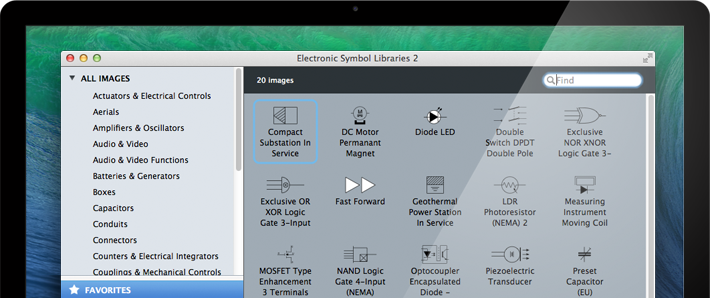
Speed: With Microspot Libraries you'll be designing much faster and more efficiently. There's no need to focus on drawing the symbols you need for your designs, when you could be spending time focusing on your projects. The Electronic Symbol Libraries 2 in particular contains over 1200 items which can all be dragged and dropped into your document saving you the hassle of having to draw them yourself. There is even a search function so if you know exactly what you are looking for you can find it quickly and effortlessly.
Effortless Creativity: Schematics can be fiddly and tricky to get to right, the symbols in Electronic Symbol Libraries 2 are all fully scalable vector drawn graphics allowing you full control over the scales you are working in. As they are vector they are completely editable meaning that they can be customized to fit any style of design you are working on.
Endless Possibilities: With the ability to export to PDF, Ai and other file formats, combined with a vast array of over 1200 items there are endless possibilities to your creations.
Time Saving: With Microspot's Library facility you can store your symbols in their own libraries and start to build your own catalog of graphics. You no longer need to keep drawing your frequently used symbols over and over again, simply save them into a new library and you'll be saving yourself hours of repetitive work. In addition, the free library catalog that comes with Microspot Electronic Symbol Libraries brings even more features for functionality with other Mac OS X applications, export options and favorites.
System Requirements:
* Mac OS X 10.6 or later
* Intel Processor
* 200 MB hard disk space
Pricing and Availability:
Microspot Electronic Symbol Libraries 2 are available from the Microspot web store. Microspot Electronic Symbol Libraries 2 has a retail price of $15.99 (GBP 10.49 or Euro 14.99).
Microspot: http://www.microspot.com
Electronic Symbol Libraries 2: http://www.microspot.com/products/libraries/electronic-symbol-liraries-2.htm
Purchase: http://www.microspot.com/products/libraries/electronic-symbol-liraries-2-pricing.htm
Screenshot: http://www.microspot.com/images/products/productPages/libraries/electronic-symbols-2/favorite-symbols.png
App Icon: http://www.microspot.com/images/products/productPages/libraries/electronic-symbols-2/elecsymbols96x96icon.png
Founded in 1964, Microspot develops Macintosh and Windows software for 3D modeling and animation, interior design, 2D drawing and drafting, image editing, and media management. Microspot offers affordable, easy-to-use software that produces professional results. Its customers are business and home users worldwide. Copyright (C) 1964-2015 Microspot Ltd. All Rights Reserved. Apple, the Apple logo, Macintosh and Mac OS X are registered trademarks of Apple Inc. in the U.S. and/or other countries.
*******
Link To Article: http://prmac.com/release-id-74804.htm
*******
---------------------------------------------------------------------------------
Note that you can alter delivered distributions at any time.
Login to your account on prMac to alter your channel selection, or to opt-out at any time.


Silver brings the Swift language to Android and Windows developers
A new article has been published at prMac.
Silver brings the Swift language to Android and Windows developers - Published on 05/09/15
RemObjects Software has announced Silver, the free compiler that brings Apple's Swift programming language to .NET, Java and Android developers. Part of their Elements compiler toolchain, Silver builds on ten years of solid compiler infrastructure to let developers use Swift to create apps for Android, .NET and Java. Swift code will compile directly to IL code that runs on Microsoft's Common Language Runtime, or to Java Byte code that runs on the JVM or on Android.
Hanover Park, Illinois - RemObjects Software has announced the first release of Silver, the free compiler that brings Apple's Swift programming language to .NET, Java and Android developers. Part of their Elements compiler toolchain, also updated today to version 8.1, Silver builds on ten years of solid compiler infrastructure to let developers use Swift to create apps for Android, .NET (including ASP.NET, Windows apps, Windows Phone, WinRT and cross-platform server apps) and Java.
Platforms:
With Silver, the Swift language supports each of these platforms directly and natively, without bloated abstraction layers that would hide the underlying frameworks. Swift code will compile directly to IL code that runs on Microsoft's Common Language Runtime, or to Java Byte code that runs on the JVM or on Android. For completeness, Silver also directly targets the Cooca platform, so its users can create apps for Mac and iOS, as well.
Development Environments:
Elements supports developers working on both Windows and Mac -
* On Windows, developers can use the **Visual Studio** IDE (included free of charge), which has been extended with deep integration for Swift *and* a full development and debugging stack for both Java and Cocoa.
* On Mac, developers can leverage RemObject's own brand-new **Fire** development environment which has been developed from the ground up especially for the Mac and for the Elements languages, and Swift in particular.
Pricing and Availability:
Silver is available free of charge, including support for all three platforms and both development environments. Contributions are welcome to help finance the ongoing development of the compiler and its surrounding tools. More information and downloads can be found at RemObjects Software online.
RemObjects Software: http://www.remobjects.com
Silver: http://www.remobjects.com/elements/silver
Download Silver: http://www.remobjects.com/elements/download
Purchase: http://www.remobjects.com/elements/pricing
Screenshot: http://www.remobjects.com/images/fire/screenshots/Silver-New-Cooper-Project.png
App Icon: http://www.remobjects.com/images/product-logos/Elements-1024.png
Located in Hanover Park, Illinois, RemObjects Software, LLC is a privately held company co-founded in 2002 by Marc Hoffman. RemObjects Software is a leading developer of compilers, developer tools and libraries with expertise across many platforms and a deep understanding of today's multi-platform development world. Their Elements compiler is build on ten-plus years of solid compiler experience, and their award-winning library products are in use anywhere from small one-man shops to Fortune 500 companies. Copyright 2002-2015 RemObjects Software, LLC. All Rights Reserved. Apple and the Apple logo, Mac OS X, iPhone, iPod and Macintosh are registered trademarks of Apple Computer in the U.S. and/or other countries.
*******
Link To Article: http://prmac.com/release-id-74802.htm
*******
---------------------------------------------------------------------------------
Note that you can alter delivered distributions at any time.
Login to your account on prMac to alter your channel selection, or to opt-out at any time.
Silver brings the Swift language to Android and Windows developers - Published on 05/09/15
RemObjects Software has announced Silver, the free compiler that brings Apple's Swift programming language to .NET, Java and Android developers. Part of their Elements compiler toolchain, Silver builds on ten years of solid compiler infrastructure to let developers use Swift to create apps for Android, .NET and Java. Swift code will compile directly to IL code that runs on Microsoft's Common Language Runtime, or to Java Byte code that runs on the JVM or on Android.
Hanover Park, Illinois - RemObjects Software has announced the first release of Silver, the free compiler that brings Apple's Swift programming language to .NET, Java and Android developers. Part of their Elements compiler toolchain, also updated today to version 8.1, Silver builds on ten years of solid compiler infrastructure to let developers use Swift to create apps for Android, .NET (including ASP.NET, Windows apps, Windows Phone, WinRT and cross-platform server apps) and Java.
Platforms:
With Silver, the Swift language supports each of these platforms directly and natively, without bloated abstraction layers that would hide the underlying frameworks. Swift code will compile directly to IL code that runs on Microsoft's Common Language Runtime, or to Java Byte code that runs on the JVM or on Android. For completeness, Silver also directly targets the Cooca platform, so its users can create apps for Mac and iOS, as well.
Development Environments:
Elements supports developers working on both Windows and Mac -
* On Windows, developers can use the **Visual Studio** IDE (included free of charge), which has been extended with deep integration for Swift *and* a full development and debugging stack for both Java and Cocoa.
* On Mac, developers can leverage RemObject's own brand-new **Fire** development environment which has been developed from the ground up especially for the Mac and for the Elements languages, and Swift in particular.
Pricing and Availability:
Silver is available free of charge, including support for all three platforms and both development environments. Contributions are welcome to help finance the ongoing development of the compiler and its surrounding tools. More information and downloads can be found at RemObjects Software online.
RemObjects Software: http://www.remobjects.com
Silver: http://www.remobjects.com/elements/silver
Download Silver: http://www.remobjects.com/elements/download
Purchase: http://www.remobjects.com/elements/pricing
Screenshot: http://www.remobjects.com/images/fire/screenshots/Silver-New-Cooper-Project.png

App Icon: http://www.remobjects.com/images/product-logos/Elements-1024.png

Located in Hanover Park, Illinois, RemObjects Software, LLC is a privately held company co-founded in 2002 by Marc Hoffman. RemObjects Software is a leading developer of compilers, developer tools and libraries with expertise across many platforms and a deep understanding of today's multi-platform development world. Their Elements compiler is build on ten-plus years of solid compiler experience, and their award-winning library products are in use anywhere from small one-man shops to Fortune 500 companies. Copyright 2002-2015 RemObjects Software, LLC. All Rights Reserved. Apple and the Apple logo, Mac OS X, iPhone, iPod and Macintosh are registered trademarks of Apple Computer in the U.S. and/or other countries.
*******
Link To Article: http://prmac.com/release-id-74802.htm
*******
---------------------------------------------------------------------------------
Note that you can alter delivered distributions at any time.
Login to your account on prMac to alter your channel selection, or to opt-out at any time.
AlphaDigits Top Rated Apps April 2015
A new article has been published at prMac.
AlphaDigits Top Rated Apps April 2015 - Published on 05/09/15
AlphaDigits has named the five top class mobile apps based on the reviews during the month of April 2015. Auto Law Pro allows you to capture video, take pictures, and enter data about any auto-related incident. Skiplayer makes it extremely easy for you to navigate your playlist while driving. Division Z is a tower-building, divisive defense game that pits players against zombies. BrightNest lets you schedule the tasks that need to get done. Uscreen is a video sharing platform.
Long Island, New York - Mobile app review publisher, AlphaDigits has named the top rated apps for April 2015. AlphaDigits names five top class mobile apps every month based on the reviews published in the website during the particular month. This website has now released the names of top rated mobile apps for the month of April.
Auto Law Pro (10 /10): Auto Law Pro is an app for iOS devices that allows you to take down essential pieces of information if you have been in an accident, are caught up in an emergency situation, or have been stopped by the police and are being written up a ticket. It's an app that fits on your phone, iPad or iPod touch that allows you to capture video, take pictures, and enter data about any auto-related incident.
Skiplayer (9.3 /10): Remember, that while you are driving, the last thing you want to do is take your eyes off the road. Skiplayer is an app that plays your playlist, but makes it extremely easy for you to navigate your playlist, and even permanently skip songs you just don't want to hear anymore. Skiplayer integrates seamlessly with your car's controls so you can use your car's media FWD button to permanently skip a song, or, while that song is playing, tap on the iPhone screen to pull up the Skip Forever control - disabling that song forever.
Division Z (8.7 /10): The playful minds at Thinking Monkey Studio - try not to giggle - have assembled their own version of a tower-building, divisive defense game that pits players against a new wave of enemy - zombies. Sure, zombies have been seen far and wide in the gaming galaxy, but Division Z brings a fresh take to taking them on with multiple levels of difficulty and rewards that increase as your tactical skill soar.
BrightNest (8.7 /10): BrightNest not only lets you schedule the tasks that need to get done, it makes sure that they are done as often as they need to be done, based on the nature of the task and offers advice on when best to take care of things. This app also provides sources for any questions you may have. It provides tips and tricks for other areas of your home, such as Spring Cleaning, money-saving advice, and reusing products to be green.
Uscreen (8.7 /10): It's a video sharing platform that makes it easy for you to market and share your videos. Whether you are teacher who wants to publish educational videos, a do-it-yourself network looking to share videos that allow subscribers to login and peruse your library of useful DIY clips, or a marketing firm who likes to demonstrate the difference you can make in your clients' operation, Uscreen allows you to build your framework and customize it to meet you specific needs.
While speaking about their new app marketing packages, Joe Ellen, an Editor at AlphaDigits said, "We are planning to start web designing and development service for app developers from this May. We offer two homepage design for free of cost. They can avail our service, if they are satisfied with our designs." Developers can contact AlphaDigits through the onsite form to get their apps reviewed. They can contact by mail or the contact form to avail other marketing services.
AlphaDigits: http://alphadigits.com/
Submit App for Review: http://alphadigits.com/submit-app-for-review/
AlphaDigits is a review site run by a few app marketers. Enjoying the support from a handy amount of regular visitors, AlphaDigits provides reviews for iPhone, iPad and Android apps. Copyright (C) 2015 AlphaDigits. All Rights Reserved. Apple, the Apple logo, iPhone, iPod and iPad are registered trademarks of Apple Inc. in the U.S. and/or other countries.
*******
Link To Article: http://prmac.com/release-id-74803.htm
*******
---------------------------------------------------------------------------------
Note that you can alter delivered distributions at any time.
Login to your account on prMac to alter your channel selection, or to opt-out at any time.
AlphaDigits Top Rated Apps April 2015 - Published on 05/09/15
AlphaDigits has named the five top class mobile apps based on the reviews during the month of April 2015. Auto Law Pro allows you to capture video, take pictures, and enter data about any auto-related incident. Skiplayer makes it extremely easy for you to navigate your playlist while driving. Division Z is a tower-building, divisive defense game that pits players against zombies. BrightNest lets you schedule the tasks that need to get done. Uscreen is a video sharing platform.
Long Island, New York - Mobile app review publisher, AlphaDigits has named the top rated apps for April 2015. AlphaDigits names five top class mobile apps every month based on the reviews published in the website during the particular month. This website has now released the names of top rated mobile apps for the month of April.
Auto Law Pro (10 /10): Auto Law Pro is an app for iOS devices that allows you to take down essential pieces of information if you have been in an accident, are caught up in an emergency situation, or have been stopped by the police and are being written up a ticket. It's an app that fits on your phone, iPad or iPod touch that allows you to capture video, take pictures, and enter data about any auto-related incident.
Skiplayer (9.3 /10): Remember, that while you are driving, the last thing you want to do is take your eyes off the road. Skiplayer is an app that plays your playlist, but makes it extremely easy for you to navigate your playlist, and even permanently skip songs you just don't want to hear anymore. Skiplayer integrates seamlessly with your car's controls so you can use your car's media FWD button to permanently skip a song, or, while that song is playing, tap on the iPhone screen to pull up the Skip Forever control - disabling that song forever.
Division Z (8.7 /10): The playful minds at Thinking Monkey Studio - try not to giggle - have assembled their own version of a tower-building, divisive defense game that pits players against a new wave of enemy - zombies. Sure, zombies have been seen far and wide in the gaming galaxy, but Division Z brings a fresh take to taking them on with multiple levels of difficulty and rewards that increase as your tactical skill soar.
BrightNest (8.7 /10): BrightNest not only lets you schedule the tasks that need to get done, it makes sure that they are done as often as they need to be done, based on the nature of the task and offers advice on when best to take care of things. This app also provides sources for any questions you may have. It provides tips and tricks for other areas of your home, such as Spring Cleaning, money-saving advice, and reusing products to be green.
Uscreen (8.7 /10): It's a video sharing platform that makes it easy for you to market and share your videos. Whether you are teacher who wants to publish educational videos, a do-it-yourself network looking to share videos that allow subscribers to login and peruse your library of useful DIY clips, or a marketing firm who likes to demonstrate the difference you can make in your clients' operation, Uscreen allows you to build your framework and customize it to meet you specific needs.
While speaking about their new app marketing packages, Joe Ellen, an Editor at AlphaDigits said, "We are planning to start web designing and development service for app developers from this May. We offer two homepage design for free of cost. They can avail our service, if they are satisfied with our designs." Developers can contact AlphaDigits through the onsite form to get their apps reviewed. They can contact by mail or the contact form to avail other marketing services.
AlphaDigits: http://alphadigits.com/
Submit App for Review: http://alphadigits.com/submit-app-for-review/
AlphaDigits is a review site run by a few app marketers. Enjoying the support from a handy amount of regular visitors, AlphaDigits provides reviews for iPhone, iPad and Android apps. Copyright (C) 2015 AlphaDigits. All Rights Reserved. Apple, the Apple logo, iPhone, iPod and iPad are registered trademarks of Apple Inc. in the U.S. and/or other countries.
*******
Link To Article: http://prmac.com/release-id-74803.htm
*******
---------------------------------------------------------------------------------
Note that you can alter delivered distributions at any time.
Login to your account on prMac to alter your channel selection, or to opt-out at any time.
Week Weather for iPhone adds new weather data sources
A new article has been published at prMac.
Week Weather for iPhone adds new weather data sources - Published on 05/09/15
In a slick and innovative way Week Weather provides a 5-7 day weather forecast. At one glance users see on which days / times of days it will be sunny, raining or cloudy and see a "heat map" of the week. The update adds Open Weather Map as a second data source - users can now switch the weather data source at any time and find out which one is more accurate for their location. Also new: Live temperature readings of private Netatmo Weather Stations around the forecast location are shown on a map.
Munich, Germany - Week Weather, the new iPhone app by developer Wolfgang Augustin provides the quickest and best overview of the weather for the next 5-7 days. At one glance users see on which days and times of the day it will be sunny, raining or really cloudy. Separate overviews show a heat map of the week, cloudiness, rain and rain intensity, wind and humidity.
With Week Weather it's easy to answer questions like: Which evening will be good for a barbecue? When can I enjoy a nice breeze to go surfing? When will it be really sunny?
New features include:
* Open Weather Map as a second weather data source - Users can switch between Open Weather Map and the Norwegian Meteorological Institute at any time and find out which one is more accurate for their locations
* Live temperature readings from Netatmo Weather Stations - A map with actual live temperature readings around the forecast location is shown (available on iPhone 5 and newer)
* New support system with knowledge base
Upon launch Week Weather received quite some attention and favorable reviews by various publishers and on the App Stores worldwide:
"Get beautiful forecasts with Week Weather. You've not seen a weather forecast like this. It takes imagination and creativity to stand out with a weather app, but developer Wolfgang Augustin has done just that with Week Weather." - c|net
"Week Weather for iPhone is a new app that lets you view your current and upcoming weather quickly. The app provides an information-rich, yet easy-to-read outlook on a week's worth of weather." - iMore
"Week Weather is a slick app that brings a new approach to the forecast. If you want a fast app that provides a good overview of the next seven days, then Week Weather is one to check out." - AppAdvice
Device Requirements:
* iPhone, iPad, and iPod touch
* Requires iOS 8.1 or later
* Optimized for iPhone 5, 6/6 Plus
* 11.0 MB
Pricing and Availability:
Week Weather 1.1 is $1.99 USD (or equivalent amount in other currencies) and available worldwide exclusively through the App Store in the Weather category.
Week Weather 1.1: http://weekweather.strikingly.com/
Purchase and Download: https://itunes.apple.com/app/apple-store/id965651362?pt=358323&ct=20150501_prMac&mt=8
c|net Review: http://www.cnet.com/how-to/get-beautiful-forecasts-with-week-weather/
App Advice Review: http://appadvice.com/review/week-weather
iMore Article: http://www.imore.com/week-weather-iphone-gives-you-7-days-weather-glance
YouTube Video (Trailer): https://www.youtube.com/watch?v=PgwuhlsWTvU&spfreload=10
Located in Munich, Germany, Wolfgang Augustin is developing apps since 2010 with a dedication to create innovative and smart apps for the iPhone and iPad. All Material and Software (C) Copyright 2015 Wolfgang Augustin. All Rights Reserved. Apple, the Apple logo, iPhone, iPod and iPad are registered trademarks of Apple Inc. in the U.S. and/or other countries. Other trademarks and registered trademarks may be the property of their respective owners.
*******
Link To Article: http://prmac.com/release-id-74801.htm
*******
---------------------------------------------------------------------------------
Note that you can alter delivered distributions at any time.
Login to your account on prMac to alter your channel selection, or to opt-out at any time.
Week Weather for iPhone adds new weather data sources - Published on 05/09/15
In a slick and innovative way Week Weather provides a 5-7 day weather forecast. At one glance users see on which days / times of days it will be sunny, raining or cloudy and see a "heat map" of the week. The update adds Open Weather Map as a second data source - users can now switch the weather data source at any time and find out which one is more accurate for their location. Also new: Live temperature readings of private Netatmo Weather Stations around the forecast location are shown on a map.
Munich, Germany - Week Weather, the new iPhone app by developer Wolfgang Augustin provides the quickest and best overview of the weather for the next 5-7 days. At one glance users see on which days and times of the day it will be sunny, raining or really cloudy. Separate overviews show a heat map of the week, cloudiness, rain and rain intensity, wind and humidity.
With Week Weather it's easy to answer questions like: Which evening will be good for a barbecue? When can I enjoy a nice breeze to go surfing? When will it be really sunny?
New features include:
* Open Weather Map as a second weather data source - Users can switch between Open Weather Map and the Norwegian Meteorological Institute at any time and find out which one is more accurate for their locations
* Live temperature readings from Netatmo Weather Stations - A map with actual live temperature readings around the forecast location is shown (available on iPhone 5 and newer)
* New support system with knowledge base
Upon launch Week Weather received quite some attention and favorable reviews by various publishers and on the App Stores worldwide:
"Get beautiful forecasts with Week Weather. You've not seen a weather forecast like this. It takes imagination and creativity to stand out with a weather app, but developer Wolfgang Augustin has done just that with Week Weather." - c|net
"Week Weather for iPhone is a new app that lets you view your current and upcoming weather quickly. The app provides an information-rich, yet easy-to-read outlook on a week's worth of weather." - iMore
"Week Weather is a slick app that brings a new approach to the forecast. If you want a fast app that provides a good overview of the next seven days, then Week Weather is one to check out." - AppAdvice
Device Requirements:
* iPhone, iPad, and iPod touch
* Requires iOS 8.1 or later
* Optimized for iPhone 5, 6/6 Plus
* 11.0 MB
Pricing and Availability:
Week Weather 1.1 is $1.99 USD (or equivalent amount in other currencies) and available worldwide exclusively through the App Store in the Weather category.
Week Weather 1.1: http://weekweather.strikingly.com/
Purchase and Download: https://itunes.apple.com/app/apple-store/id965651362?pt=358323&ct=20150501_prMac&mt=8
c|net Review: http://www.cnet.com/how-to/get-beautiful-forecasts-with-week-weather/
App Advice Review: http://appadvice.com/review/week-weather
iMore Article: http://www.imore.com/week-weather-iphone-gives-you-7-days-weather-glance
YouTube Video (Trailer): https://www.youtube.com/watch?v=PgwuhlsWTvU&spfreload=10
Located in Munich, Germany, Wolfgang Augustin is developing apps since 2010 with a dedication to create innovative and smart apps for the iPhone and iPad. All Material and Software (C) Copyright 2015 Wolfgang Augustin. All Rights Reserved. Apple, the Apple logo, iPhone, iPod and iPad are registered trademarks of Apple Inc. in the U.S. and/or other countries. Other trademarks and registered trademarks may be the property of their respective owners.
*******
Link To Article: http://prmac.com/release-id-74801.htm
*******
---------------------------------------------------------------------------------
Note that you can alter delivered distributions at any time.
Login to your account on prMac to alter your channel selection, or to opt-out at any time.
Millenway Studios launches Don't Die Birdie
A new article has been published at prMac.
Millenway Studios launches Don't Die Birdie - Published on 05/09/15
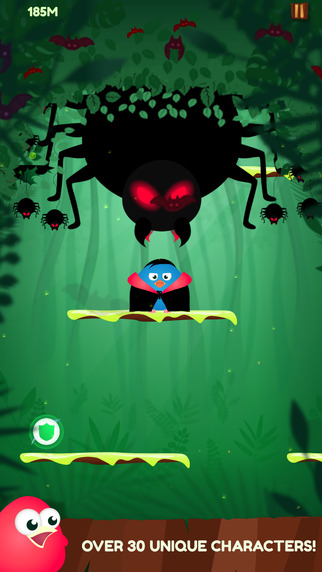
Swedish game developer, Millenway Studios has announced Don't Die Birdie 1.4, their first original mobile game iOS and Android devices. Where in the jungle players will get to know Toby and his friends. In this exciting jungle adventure, players will get to know Toby and his friends by descending, evading and surviving. When jumping from branch to branch, gamers have to look out for treacherous branches as well as dangerous insects, in particular the big black spiders, that will try to attack.
Cupertino, California - Millenway Studios has announced the release of Don't Die Birdie 1.4, their first original mobile game iOS and Android devices. In this exciting jungle adventure, players will get to know Toby and his friends by descending, evading and surviving. When jumping from branch to branch, gamers have to look out for treacherous branches as well as dangerous insects, in particular the big black spiders, that will try to attack. It's easy to start playing, but it takes a lot to become a master.
In designing the game Millenway Studios wanted to create a game that was appealing to a wide audience. This with a design of inviting colors as well as cute and friendly characters in an easily expandable universe. 'We've been working hard for a long time to produce Don't Die Birdie. We've put our hearts and souls into what we believe will, with it's charming characters and attractive design, be a new favourite game for many.' Eyoel Lundberg, CEO, Millenway Studios.
Device Requirements:
* iPhone, iPad, and iPod touch
* Optimized for iPhone 5, iPhone 6/6 Plus
* Requires iOS 7.1 or later
* 51.2 MB
Pricing and Availability:
Don't Die Birdie 1.4, the addicitve and wonderfully animated iOS game, is $1.99 USD (or equivalent amount in other currencies) and available worldwide through the App Store in the Games category. A dedicated Android version is also available via Google Play. Android version Requires Android 2.3 and up.
Millenway Studios: http://www.millenway.com
Don't Die Birdie 1.4: http://apps.appshout.com/dont-die-birdie/
Purchase and Download: https://itunes.apple.com/app/dont-die-birdie/id915696006
YouTube Video (Demo): https://www.youtube.com/watch?v=3_6oDx3eAyk
Screenshot: http://a3.mzstatic.com/us/r30/Purple1/v4/f9/98/bc/f998bc29-fd43-c93f-7521-2880d82ab6b6/screen322x572.jpeg
App Icon: http://apps.appshout.com/dont-die-birdie/images/icon.png
Millenway Studios is a young, self-financed, mobile app company seated in Norrkoping, Sweden. The company consists of two experienced developers and one person with a background in advertising. Their goal is to create entertainment for all ages and all platforms, starting with iOS. All Material and Software (C) Copyright 2015 Millenway Studios. All Rights Reserved. Apple, the Apple logo, iPhone, iPod and iPad are registered trademarks of Apple Inc. in the U.S. and/or other countries. Other trademarks and registered trademarks may be the property of their respective owners.
*******
Link To Article: http://prmac.com/release-id-74800.htm
*******
---------------------------------------------------------------------------------
Note that you can alter delivered distributions at any time.
Login to your account on prMac to alter your channel selection, or to opt-out at any time.
Millenway Studios launches Don't Die Birdie - Published on 05/09/15
Swedish game developer, Millenway Studios has announced Don't Die Birdie 1.4, their first original mobile game iOS and Android devices. Where in the jungle players will get to know Toby and his friends. In this exciting jungle adventure, players will get to know Toby and his friends by descending, evading and surviving. When jumping from branch to branch, gamers have to look out for treacherous branches as well as dangerous insects, in particular the big black spiders, that will try to attack.
Cupertino, California - Millenway Studios has announced the release of Don't Die Birdie 1.4, their first original mobile game iOS and Android devices. In this exciting jungle adventure, players will get to know Toby and his friends by descending, evading and surviving. When jumping from branch to branch, gamers have to look out for treacherous branches as well as dangerous insects, in particular the big black spiders, that will try to attack. It's easy to start playing, but it takes a lot to become a master.
In designing the game Millenway Studios wanted to create a game that was appealing to a wide audience. This with a design of inviting colors as well as cute and friendly characters in an easily expandable universe. 'We've been working hard for a long time to produce Don't Die Birdie. We've put our hearts and souls into what we believe will, with it's charming characters and attractive design, be a new favourite game for many.' Eyoel Lundberg, CEO, Millenway Studios.
Device Requirements:
* iPhone, iPad, and iPod touch
* Optimized for iPhone 5, iPhone 6/6 Plus
* Requires iOS 7.1 or later
* 51.2 MB
Pricing and Availability:
Don't Die Birdie 1.4, the addicitve and wonderfully animated iOS game, is $1.99 USD (or equivalent amount in other currencies) and available worldwide through the App Store in the Games category. A dedicated Android version is also available via Google Play. Android version Requires Android 2.3 and up.
Millenway Studios: http://www.millenway.com
Don't Die Birdie 1.4: http://apps.appshout.com/dont-die-birdie/
Purchase and Download: https://itunes.apple.com/app/dont-die-birdie/id915696006
YouTube Video (Demo): https://www.youtube.com/watch?v=3_6oDx3eAyk
Screenshot: http://a3.mzstatic.com/us/r30/Purple1/v4/f9/98/bc/f998bc29-fd43-c93f-7521-2880d82ab6b6/screen322x572.jpeg
App Icon: http://apps.appshout.com/dont-die-birdie/images/icon.png

Millenway Studios is a young, self-financed, mobile app company seated in Norrkoping, Sweden. The company consists of two experienced developers and one person with a background in advertising. Their goal is to create entertainment for all ages and all platforms, starting with iOS. All Material and Software (C) Copyright 2015 Millenway Studios. All Rights Reserved. Apple, the Apple logo, iPhone, iPod and iPad are registered trademarks of Apple Inc. in the U.S. and/or other countries. Other trademarks and registered trademarks may be the property of their respective owners.
*******
Link To Article: http://prmac.com/release-id-74800.htm
*******
---------------------------------------------------------------------------------
Note that you can alter delivered distributions at any time.
Login to your account on prMac to alter your channel selection, or to opt-out at any time.
iThinkdiff introduces Find da Pair for iOS - New Matching Pairs Game
A new article has been published at prMac.
iThinkdiff introduces Find da Pair for iOS - New Matching Pairs Game - Published on 05/09/15
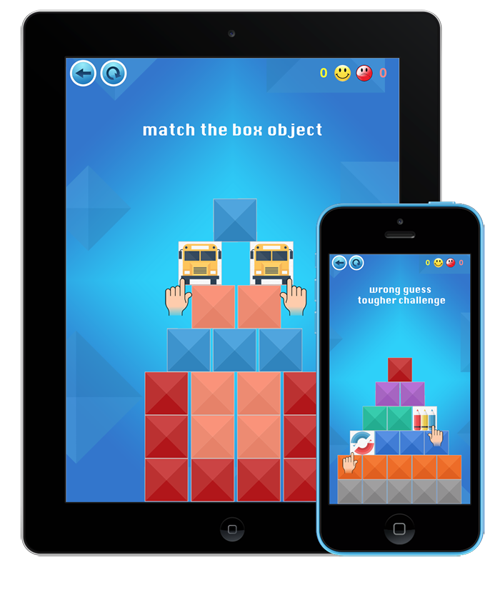
iThinkdiff has announced Find da Pair 1.0, its new game for iOS devices. A game designed to both enhance the memory and keep players entertained, Find da Pair lets players of all ages participate in a classic hunt for matching pairs of items. The twist is that each time the player guesses wrong, the objects are bounced around the screen like pool balls, so the player has to use more than just rote memory. The game offers easy beginner levels to challenging expert levels.
Melaka, Malaysia - iThinkdiff has announced the release of its new game, Find da Pair, for iPhone, iPad, and iPod touch. A game designed to both enhance the memory and keep players entertained, Find da Pair lets players of all ages participate in a classic hunt for matching pairs of items. The twist is that each time the player guesses wrong, the objects are bounced around the screen like pool balls, so the player has to use more than just rote memory.
Key Features
* 100 levels of game play, from easy beginner levels to challenging expert levels
* Scoring system and online statistics that allows players to see how well they compare to other players across the world
* Attractively illustrated objects, background music, and sound effects make the game highly entertaining
Mahmud Ahsan, iThinkdiff's Lead Developer, said, "It's a physics-based game for exercising your brain. Users have to match objects, but if a user wrongly selects two boxes, the boxes move, shake, or rotate and the game becomes more interesting to solve."
Each level has only 20 boxes (10 pairs), but the arrangement of the boxes and the force used to rearrange the boxes is set to make each level slightly harder than the level before it, so it's easy to start playing the game but challenging to get all the way to level 100.
Device Requirements:
* iPhone, iPad, and iPod touch
* Optimized for iPhone 5, iPhone 6/6 Plus
* Requires iOS 8.0 or later
* 27.0 MB
Pricing and Availability:
Find da Pair 1.0 is Free and available worldwide through the App Store in the Games category.
Find da Pair 1.0: http://ithinkdiff.net/ios-games/find-da-pair/
Download from iTunes: https://itunes.apple.com/app/find-da-pair/id980815761
YouTube Video (Game Play): https://www.youtube.com/watch?v=zZH63uW0gdg
Screenshot: http://2a2cc343f5995d2fb948-5cc402153e846059e29478934321d3c6.r70.cf1.rackcdn.com/2015/04/fdp_itd.png
App Icon: http://a4.mzstatic.com/us/r30/Purple1/v4/b2/fc/b4/b2fcb49e-6990-3ce0-4f37-7449c5f9a305/icon175x175.jpeg
Founded in 2010 by programmer Mahmud Ahsan, iThinkdiff is a leading creator of educational and entertainment apps for iPhones, iPads, and Android devices. With over 8 million total downloads, thousands of five-star reviews, and 15 million monthly ad impressions, iThinkdiff games and translation apps are frequently featured on the Apple iTunes homepage. Copyright (C) 2010-2015 iThinkdiff. All Rights Reserved. Apple, the Apple logo, iPhone, iPad, iPad mini, iPod touch, and Mac are registered trademarks of Apple Inc. in the U.S. and/or other countries. Other trademarks and registered trademarks may be the property of their respective owners.
*******
Link To Article: http://prmac.com/release-id-74799.htm
*******
---------------------------------------------------------------------------------
Note that you can alter delivered distributions at any time.
Login to your account on prMac to alter your channel selection, or to opt-out at any time.
iThinkdiff introduces Find da Pair for iOS - New Matching Pairs Game - Published on 05/09/15
iThinkdiff has announced Find da Pair 1.0, its new game for iOS devices. A game designed to both enhance the memory and keep players entertained, Find da Pair lets players of all ages participate in a classic hunt for matching pairs of items. The twist is that each time the player guesses wrong, the objects are bounced around the screen like pool balls, so the player has to use more than just rote memory. The game offers easy beginner levels to challenging expert levels.
Melaka, Malaysia - iThinkdiff has announced the release of its new game, Find da Pair, for iPhone, iPad, and iPod touch. A game designed to both enhance the memory and keep players entertained, Find da Pair lets players of all ages participate in a classic hunt for matching pairs of items. The twist is that each time the player guesses wrong, the objects are bounced around the screen like pool balls, so the player has to use more than just rote memory.
Key Features
* 100 levels of game play, from easy beginner levels to challenging expert levels
* Scoring system and online statistics that allows players to see how well they compare to other players across the world
* Attractively illustrated objects, background music, and sound effects make the game highly entertaining
Mahmud Ahsan, iThinkdiff's Lead Developer, said, "It's a physics-based game for exercising your brain. Users have to match objects, but if a user wrongly selects two boxes, the boxes move, shake, or rotate and the game becomes more interesting to solve."
Each level has only 20 boxes (10 pairs), but the arrangement of the boxes and the force used to rearrange the boxes is set to make each level slightly harder than the level before it, so it's easy to start playing the game but challenging to get all the way to level 100.
Device Requirements:
* iPhone, iPad, and iPod touch
* Optimized for iPhone 5, iPhone 6/6 Plus
* Requires iOS 8.0 or later
* 27.0 MB
Pricing and Availability:
Find da Pair 1.0 is Free and available worldwide through the App Store in the Games category.
Find da Pair 1.0: http://ithinkdiff.net/ios-games/find-da-pair/
Download from iTunes: https://itunes.apple.com/app/find-da-pair/id980815761
YouTube Video (Game Play): https://www.youtube.com/watch?v=zZH63uW0gdg
Screenshot: http://2a2cc343f5995d2fb948-5cc402153e846059e29478934321d3c6.r70.cf1.rackcdn.com/2015/04/fdp_itd.png
App Icon: http://a4.mzstatic.com/us/r30/Purple1/v4/b2/fc/b4/b2fcb49e-6990-3ce0-4f37-7449c5f9a305/icon175x175.jpeg
Founded in 2010 by programmer Mahmud Ahsan, iThinkdiff is a leading creator of educational and entertainment apps for iPhones, iPads, and Android devices. With over 8 million total downloads, thousands of five-star reviews, and 15 million monthly ad impressions, iThinkdiff games and translation apps are frequently featured on the Apple iTunes homepage. Copyright (C) 2010-2015 iThinkdiff. All Rights Reserved. Apple, the Apple logo, iPhone, iPad, iPad mini, iPod touch, and Mac are registered trademarks of Apple Inc. in the U.S. and/or other countries. Other trademarks and registered trademarks may be the property of their respective owners.
*******
Link To Article: http://prmac.com/release-id-74799.htm
*******
---------------------------------------------------------------------------------
Note that you can alter delivered distributions at any time.
Login to your account on prMac to alter your channel selection, or to opt-out at any time.
Prankr Watch - It's Definitely Not A Fart Watch But It's Just As Fun
A new article has been published at prMac.
Prankr Watch - It's Definitely Not A Fart Watch But It's Just As Fun - Published on 05/09/15
Prank Your Friends! Louisiana based Empires Mobile, LLC has announced Prankr Watch 1.0, their hilarious new prank utility developed exclusively for iOS and Apple Watch. Prankr Watch will surely offer the most fun you will have with your Apple Watch. Pick a sound on your watch or iPhone. Place your iPhone near the person you plan to prank. Hit play on your Apple Watch and watch the fun chaos begin. The app offers over 50 high quality prank sounds.
Lafayette, Louisiana - In the beginning of the iPhone there was 1 app that ruled them all, 1 app that blazed the path for the App Store, and that app was a Fart App! But now in 2015, something new has taken it's place, something more wholesome, something more fun, and that app is Prankr Watch for the Apple Watch.
Prankr Watch runs lightning fast on the Apple Watch (unlike some other 3rd party apps) and is packed to the brim with 50+ hand picked sounds that will startle you, shock you and make you laugh! We've had a chance to play with our Apple Watch for about a week now and trust us when we say, Prankr Watch is the most fun you will have on your Apple Watch!
Here is how you use Prankr Watch to pull off pranks on your friends and family.
1. Pick a sound on watch or phone
2. Place your phone near the person you plan to prank
3. Hit play on your Apple Watch and watch the fun chaos begin
Prankr Watch Pro Tip #1:
Set Your iPhone On Auto Lock Never Then Activate Stealth Mode On Our iPhone App Right Before You Start Your Prank.
Prankr Watch Pro Tip #2:
Pair Your iPhone With A Bluetooth Speaker And See How Prankr Watch Ascends To A New Level Of Awesome Because Of Our High Quality Sounds.
Device Requirements:
* iPhone and Apple Watch
* iOS 8.2 or later
* Optimized for iPhone 5, iPhone 6/6 Plus
* 17.8 MB
Pricing and Availability:
Prankr Watch v1.0 for iOS and Apple Watch is available for $0.99 worldwide exclusively through the iTunes App Store in the Utilities category. The average user can easily find it by searching in the Apple Watch App Store app for Prankr Watch.
Empires Mobile: http://www.emojiworlds.com
Prankr Watch - Prank Your Friends! 1.0: https://itunes.apple.com/us/app/prankr-watch-prank-your-friends!/id984001175
Screenshot 1: http://a2.mzstatic.com/us/r30/Purple1/v4/ea/fa/7d/eafa7dfd-cdd8-a99b-b005-acdc5a780324/screen1136x1136.jpeg
Screenshot 2: http://a3.mzstatic.com/us/r30/Purple7/v4/a8/27/b3/a827b34d-fb5e-7df6-8779-69cb19bd2921/screen1136x1136.jpeg
App Icon: http://is5.mzstatic.com/image/pf/us/r30/Purple7/v4/b2/b4/09/b2b409d9-6ce2-b6d3-1c80-f31a341003d5/AppIcon60x60_U00402x.png
Based in Lafayette, Louisiana, Empires Mobile, LLC. creates hd emoji apps that put smiles on people's faces worldwide under our Emoji World name. We enjoy making good paid apps at fair prices. Unlike other companies our first priority is our users and then profits, never the other way around. We are branching out into wearables and our first app is Prankr Watch for the Apple Watch! Copyright (C) 2015 Empires Mobile, LLC. All Rights Reserved. Apple, the Apple logo, iPhone, and Apple Watch are registered trademarks of Apple Inc. in the U.S. and/or other countries.
*******
Link To Article: http://prmac.com/release-id-74798.htm
*******
---------------------------------------------------------------------------------
Note that you can alter delivered distributions at any time.
Login to your account on prMac to alter your channel selection, or to opt-out at any time.
Prankr Watch - It's Definitely Not A Fart Watch But It's Just As Fun - Published on 05/09/15
Prank Your Friends! Louisiana based Empires Mobile, LLC has announced Prankr Watch 1.0, their hilarious new prank utility developed exclusively for iOS and Apple Watch. Prankr Watch will surely offer the most fun you will have with your Apple Watch. Pick a sound on your watch or iPhone. Place your iPhone near the person you plan to prank. Hit play on your Apple Watch and watch the fun chaos begin. The app offers over 50 high quality prank sounds.
Lafayette, Louisiana - In the beginning of the iPhone there was 1 app that ruled them all, 1 app that blazed the path for the App Store, and that app was a Fart App! But now in 2015, something new has taken it's place, something more wholesome, something more fun, and that app is Prankr Watch for the Apple Watch.
Prankr Watch runs lightning fast on the Apple Watch (unlike some other 3rd party apps) and is packed to the brim with 50+ hand picked sounds that will startle you, shock you and make you laugh! We've had a chance to play with our Apple Watch for about a week now and trust us when we say, Prankr Watch is the most fun you will have on your Apple Watch!
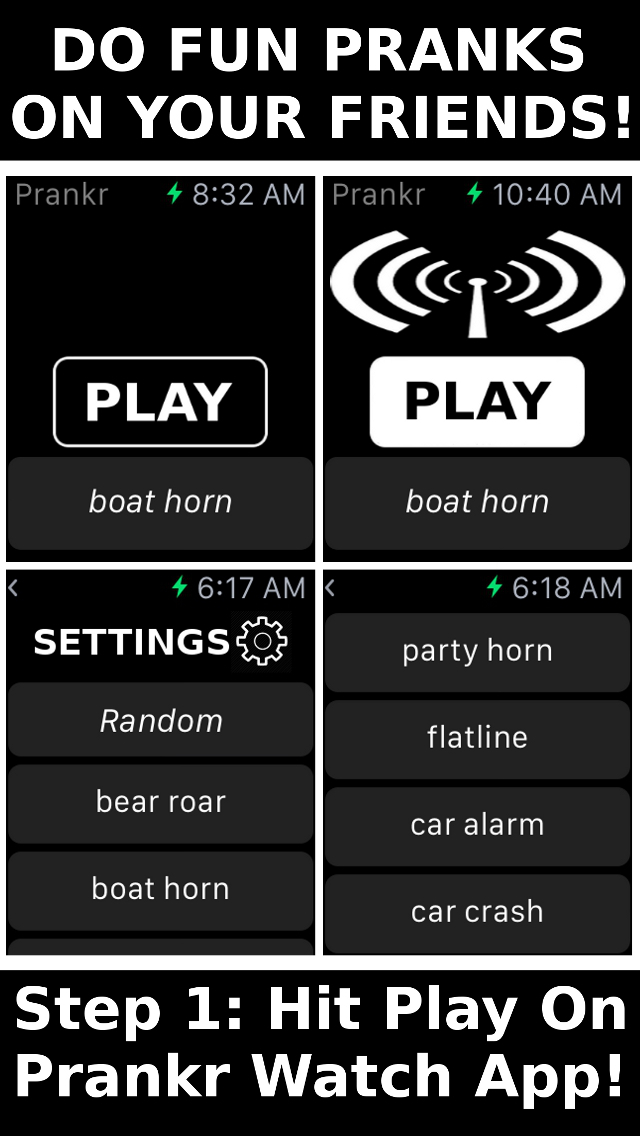
Here is how you use Prankr Watch to pull off pranks on your friends and family.
1. Pick a sound on watch or phone
2. Place your phone near the person you plan to prank
3. Hit play on your Apple Watch and watch the fun chaos begin
Prankr Watch Pro Tip #1:
Set Your iPhone On Auto Lock Never Then Activate Stealth Mode On Our iPhone App Right Before You Start Your Prank.
Prankr Watch Pro Tip #2:
Pair Your iPhone With A Bluetooth Speaker And See How Prankr Watch Ascends To A New Level Of Awesome Because Of Our High Quality Sounds.
Device Requirements:
* iPhone and Apple Watch
* iOS 8.2 or later
* Optimized for iPhone 5, iPhone 6/6 Plus
* 17.8 MB
Pricing and Availability:
Prankr Watch v1.0 for iOS and Apple Watch is available for $0.99 worldwide exclusively through the iTunes App Store in the Utilities category. The average user can easily find it by searching in the Apple Watch App Store app for Prankr Watch.
Empires Mobile: http://www.emojiworlds.com
Prankr Watch - Prank Your Friends! 1.0: https://itunes.apple.com/us/app/prankr-watch-prank-your-friends!/id984001175
Screenshot 1: http://a2.mzstatic.com/us/r30/Purple1/v4/ea/fa/7d/eafa7dfd-cdd8-a99b-b005-acdc5a780324/screen1136x1136.jpeg
Screenshot 2: http://a3.mzstatic.com/us/r30/Purple7/v4/a8/27/b3/a827b34d-fb5e-7df6-8779-69cb19bd2921/screen1136x1136.jpeg

App Icon: http://is5.mzstatic.com/image/pf/us/r30/Purple7/v4/b2/b4/09/b2b409d9-6ce2-b6d3-1c80-f31a341003d5/AppIcon60x60_U00402x.png

Based in Lafayette, Louisiana, Empires Mobile, LLC. creates hd emoji apps that put smiles on people's faces worldwide under our Emoji World name. We enjoy making good paid apps at fair prices. Unlike other companies our first priority is our users and then profits, never the other way around. We are branching out into wearables and our first app is Prankr Watch for the Apple Watch! Copyright (C) 2015 Empires Mobile, LLC. All Rights Reserved. Apple, the Apple logo, iPhone, and Apple Watch are registered trademarks of Apple Inc. in the U.S. and/or other countries.
*******
Link To Article: http://prmac.com/release-id-74798.htm
*******
---------------------------------------------------------------------------------
Note that you can alter delivered distributions at any time.
Login to your account on prMac to alter your channel selection, or to opt-out at any time.
Subscribe to:
Posts (Atom)