A new article has been published at prMac.
FunPlus Set to Change Role of Mobile Games Publisher via PublishingPlus - Published on 05/11/15
Next Generation of Game Publishing Looks to Mitigate Risk on Mobile: PublishingPlus is now open for all free-to-play game developers to apply, regardless of team size or location. Drawing from FunPlus' expertise as a global leader in the F2P mobile industry, and strong local presence in major marketplaces worldwide, PublishingPlus provides independent development partners with a wide range of financial and operational support in addition to expert guidance throughout each game's lifecycle.
San Francisco, California - The FunPlus Group, a worldwide mobile social gaming company, today announced the creation of PublishingPlus, a revolutionary new mobile game publishing program that will provide game developers with a simple, transparent alternative to "traditional" publishing. PublishingPlus is now open for all free-to-play developers to apply, regardless of team size or location.
Before joining FunPlus as Head of Business Development, Greg Essig managed the games section of the App Store at Apple, where he liaised with numerous game publishers and developers. Prior to Apple, Essig helped create the gaming division for Creative Artists Agency (CAA) where he led numerous development and publishing arrangements. These roles helped shape his understanding of the mobile games marketplace and how PublishingPlus can make it better for developers.
Drawing from FunPlus' expertise as a global leader in the free-to-play mobile industry, and strong local presence in major marketplaces worldwide, PublishingPlus will provide independent development partners with a wide range of financial and operational support in addition to expert guidance throughout all stages of their games' lifecycles. Through a structured tier-based system, the program will give developers clearly defined, pre-negotiated milestones and deliverables to ensure concrete expectations for both parties with significantly mitigated risk.
The PublishingPlus program is based on four differentiating tenets:
* 100% upfront financial support from concept to launch
* A 50/50 net revenue split between FunPlus and developers
* Global marketing and operations support on iOS and Android
* Developers' continued ownership of their IP
"PublishingPlus is a major step into the future of mobile game publishing," said FunPlus Co-founder and CEO Andy Zhong. "The current market has let too many great games fall by the wayside due to uncertainty. By eliminating that confusion and offering FunPlus' wealth of experience and resources, we hope to change this trend so that talented developers have a chance to shine."
The PublishingPlus website is live and officially accepting applications as of today, May 11. In its transparency, FunPlus includes an easily accessible term sheet for interested developers.
"PublishingPus is a mobile publishing design for the modern mobile market," said Essig, "With our structured program, developers can focus on making great games, without the headaches that come with negotiating for the resources needed to get there."
FunPlus gives developers unparalleled support in the mobile free-to-play games space. This includes project financing, art guidance, engineering and tech assistance, design, analytics, localization, monetization, marketing and live operations services.
"As a developer, choosing a publisher is critical to the success of our project, and of our company, and it can be downright scary," said Octact Co-founder and COO Paul Chieffo. "FunPlus made it easy. Their team has given us the resources to succeed and stands behind us every step of the way. PublishingPlus will make the marketplace more approachable for indie developers everywhere."
Game developers interested in applying are free to submit their ideas for consideration at any stage of development. PublishingPlus will consider applications as early as paper documents or as far along as geo-beta. Financing begins immediately and support continues for each successful tier and milestone met.
FunPlus: http://funplus.com
CrunchBase Profile: https://www.crunchbase.com/organization/funplus-game
PublishingPlus: http://publishingplus.funplus.com
Press Kit (zip): https://www.hightail.com/download/bXBZb254ZEtEa1ZqQTlVag
FunPlus is a global mobile social gaming company that puts fun first for players worldwide. Over 4 million players enjoy the company's signature game, Family Farm, each day. FunPlus has more than 200 employees and offices in San Francisco, Vancouver, Canada and Beijing, China. All Material and Software (C) Copyright 2015 FunPlus Group. All Rights Reserved. Apple, the Apple logo, iPhone, iPod and iPad are registered trademarks of Apple Inc. in the U.S. and/or other countries. Other trademarks and registered trademarks may be the property of their respective owners.
*******
Link To Article: http://prmac.com/release-id-74868.htm
*******
---------------------------------------------------------------------------------
Note that you can alter delivered distributions at any time.
Login to your account on prMac to alter your channel selection, or to opt-out at any time.

Video Ambush 1.0 for Mac OSX has been released
A new article has been published at prMac.
Video Ambush 1.0 for Mac OSX has been released - Published on 05/11/15
Indie developer Tosha Serbian has announced Video Ambush for Mac OS X, a rebranded update to his successful MPEG encoder and movie re-converter application MPEG2 Works. Convert your media, video and audio files, DVD and Blu-Ray discs, to iDevices compatible movies, video for web, H.264, MP4, DivX, MKV, x264, MPEG2, DVD, HD DVD and all available standard and pro Quick Time formats. Packed with more options than ever in a beautiful, modern user interface, the next evolution of M2W is at hand.
Belgrade, Serbia - Indie developer Tosha Serbian has announced Video Ambush for Mac OS X, a rebranded update to his successful MPEG encoder and movie re-converter application MPEG2 Works. After great feedback, Video Ambush has even furthered MPEG2 Works reputation as the one of the best video tools on Mac OSX with the release of new, rebranded application. Convert your media - video and audio files, DVD and Blu-Ray discs - to iDevices compatible movies, video for web, H.264, MP4, DivX, MKV, x264, MPEG2, DVD, HD DVD and all available standard and pro Quick Time formats using the Apple Quick Time technology for maximum compatibility. Encode to MPEG2, make the DVD with stylish built-in menus, burn it on a blank DVD media and much more.
"Video Ambush, unlike most of the other converters, uses the official Apple, Avid, Black magic and other codecs built exclusevely for QuickTime to allow importing and keep the full compatibility with Mac OS standard - iMovie, iTunes, QuickTime - and Pro video applications like Final Cut Pro, and to avoid compatibility issues and retain best possible video quality thanks to great QuickTime technology," commented Tosha Serbian, Main Developer of Video Ambush.
Feature Highlights:
* All Mac native Apple QuickTime standard and PRO formats output
* Web video output /YouTube, Facebook, Vimeo etc.
* All iPhone, iPad and Apple TV output available with auto-importing to iTunes and metadata tagging
* H.264, MP4, DivX, MKV, x264, MPEG2, DVD and HD DVD output
* Make and author DVD's with stylish DVD themes
* Lot of essential video and audio tools
* Built-in media player
* Requirements: Intel Mac, Mac OSX 10.6 or later, 25$ shareware
Do you shoot multiple videos on any given day? Video Ambush wants them all. Put the clips in one folder, then load all the clips at once, click start, and walk away. It's that simple. You've got other things to do. Video Ambush frees up the time to do it.
The app is available world-wide, on the Video Ambush Kagi store. Please visit Video Ambush online for more information, including tutorials and screenshots of the app. If you would like further information on Video Ambush, full version of the app for testing and reviewing, or you would like to schedule an interview, please do not hesitate to contact Tosha.
Video Ambush 1.0: http://www.videoambush.com
Download Demo: http://www.videoambush.com/VideoAmbushDEMO.zip
Purchase: http://store.kagi.com/cgi-bin/store.cgi?storeID=6CYAX_LIVE
Screenshot: http://www.videoambush.com/fotke/screenshots/vascrshot01.jpg
Application Icon: http://www.videoambush.com/fotke/VAicon.png
Video Ambush is developed by Tosha Serbian, video and film specialist with 25 years in movies business, Apple Macintosh guru, and independent Mac OS X shareware developer since 2003. Copyright (C) 2015 Tosha Serbian. All Rights Reserved. Apple, the Apple logo, Mac OS X, and Macintosh are registered trademarks of Apple Inc. in the U.S. and/or other countries.
*******
Link To Article: http://prmac.com/release-id-74887.htm
*******
---------------------------------------------------------------------------------
Note that you can alter delivered distributions at any time.
Login to your account on prMac to alter your channel selection, or to opt-out at any time.
Video Ambush 1.0 for Mac OSX has been released - Published on 05/11/15
Indie developer Tosha Serbian has announced Video Ambush for Mac OS X, a rebranded update to his successful MPEG encoder and movie re-converter application MPEG2 Works. Convert your media, video and audio files, DVD and Blu-Ray discs, to iDevices compatible movies, video for web, H.264, MP4, DivX, MKV, x264, MPEG2, DVD, HD DVD and all available standard and pro Quick Time formats. Packed with more options than ever in a beautiful, modern user interface, the next evolution of M2W is at hand.
Belgrade, Serbia - Indie developer Tosha Serbian has announced Video Ambush for Mac OS X, a rebranded update to his successful MPEG encoder and movie re-converter application MPEG2 Works. After great feedback, Video Ambush has even furthered MPEG2 Works reputation as the one of the best video tools on Mac OSX with the release of new, rebranded application. Convert your media - video and audio files, DVD and Blu-Ray discs - to iDevices compatible movies, video for web, H.264, MP4, DivX, MKV, x264, MPEG2, DVD, HD DVD and all available standard and pro Quick Time formats using the Apple Quick Time technology for maximum compatibility. Encode to MPEG2, make the DVD with stylish built-in menus, burn it on a blank DVD media and much more.
"Video Ambush, unlike most of the other converters, uses the official Apple, Avid, Black magic and other codecs built exclusevely for QuickTime to allow importing and keep the full compatibility with Mac OS standard - iMovie, iTunes, QuickTime - and Pro video applications like Final Cut Pro, and to avoid compatibility issues and retain best possible video quality thanks to great QuickTime technology," commented Tosha Serbian, Main Developer of Video Ambush.
Feature Highlights:
* All Mac native Apple QuickTime standard and PRO formats output
* Web video output /YouTube, Facebook, Vimeo etc.
* All iPhone, iPad and Apple TV output available with auto-importing to iTunes and metadata tagging
* H.264, MP4, DivX, MKV, x264, MPEG2, DVD and HD DVD output
* Make and author DVD's with stylish DVD themes
* Lot of essential video and audio tools
* Built-in media player
* Requirements: Intel Mac, Mac OSX 10.6 or later, 25$ shareware
Do you shoot multiple videos on any given day? Video Ambush wants them all. Put the clips in one folder, then load all the clips at once, click start, and walk away. It's that simple. You've got other things to do. Video Ambush frees up the time to do it.
The app is available world-wide, on the Video Ambush Kagi store. Please visit Video Ambush online for more information, including tutorials and screenshots of the app. If you would like further information on Video Ambush, full version of the app for testing and reviewing, or you would like to schedule an interview, please do not hesitate to contact Tosha.
Video Ambush 1.0: http://www.videoambush.com
Download Demo: http://www.videoambush.com/VideoAmbushDEMO.zip
Purchase: http://store.kagi.com/cgi-bin/store.cgi?storeID=6CYAX_LIVE
Screenshot: http://www.videoambush.com/fotke/screenshots/vascrshot01.jpg

Application Icon: http://www.videoambush.com/fotke/VAicon.png

Video Ambush is developed by Tosha Serbian, video and film specialist with 25 years in movies business, Apple Macintosh guru, and independent Mac OS X shareware developer since 2003. Copyright (C) 2015 Tosha Serbian. All Rights Reserved. Apple, the Apple logo, Mac OS X, and Macintosh are registered trademarks of Apple Inc. in the U.S. and/or other countries.
*******
Link To Article: http://prmac.com/release-id-74887.htm
*******
---------------------------------------------------------------------------------
Note that you can alter delivered distributions at any time.
Login to your account on prMac to alter your channel selection, or to opt-out at any time.
Twirlaloop Slots - Social Slot Gaming Arrives on Apple Watch
A new article has been published at prMac.
Twirlaloop Slots - Social Slot Gaming Arrives on Apple Watch - Published on 05/11/15
Las Vegas startup developer Twirlaloop has released Twirlaloop Slots 1.2 the social slot gaming app designed for the iPhone and the new Apple Watch. Twirlaloop includes three classic Las Vegas slot games that include 3x3 reels, with 5 lines of play. The app can be played simultaneously on the iPhone and Apple Watch, with shared coins. The game includes Game Center for leaderboards and achievements, daily coin collects, and in-app purchases for more coins.
Las Vegas, NV - Twirlaloop is proud to announce the release of Twirlaloop Slots 1.2 the social slot gaming app designed for the iPhone and the new Apple Watch. The app includes classic Vegas slot games that beautifully fit full-screen with 3x3 reels and 5 lines of play. Unlike most of its competitors, it can be played on both Apple Watch and iPhone simultaneously with shared coins.
With the convenience of Apple Watch it's possible for players to play games in a more casual manner than even on their iPhone. The game features three old-fashioned classic Vegas slot games, Game Center for leaderboards and achievements, daily coin collects, and in-app purchases for more coins.
The first game, Red Sevens, is pure Vegas slot odds. In the second game, Diamond Mine, the player picks through three rounds of three diamonds to find the 100X diamond. The third game, Fruit Frenzy, features free spins with exponentiating wild multipliers. The developer will be adding more slot titles in the future with even more interesting graphics and game mechanics.
"This is first iteration of Twirlaloop based on the current limitations of Apple Watch. Eventually when the technology improves and developers gain more access to Apple Watch's features it will open up new avenues in social and casual gaming right on your wrist. With a glance and a tap, you can spin a slot game with a very small slice of time that you can't normally do on your phone. Then when you have time to reach for your phone, you can get a similar but more refined slot experience." says lead developer Tony Suriyathep.
Features:
* Play on both Apple Watch and iPhone
* Beautiful full-screen reels and animation to show off on your Apple Watch
* Game Center leaderboards and achievements to compare your luck
* Start with 1000 coins and collect 300 free coins daily to keep you spinning
* Coins and score are shared between iPhone and Apple Watch
* Made in Las Vegas with authentic Vegas odds
Device Requirements:
* iPhone, iPad, iPod touch, and Apple Watch
* Requires iOS 8.2 or later
* Optimized for iPhone 5, iPhone 6, and iPhone 6 Plus
* 21.1 MB
Pricing and Availability:
Twirlaloop Slots 1.2 is free and is available worldwide exclusively in the App Store in the Games category.
Twirlaloop: http://www.twirlaloop.com
Download: https://itunes.apple.com/app/twirlaloop-slots/id984111783
Promotional Image: http://t.suriyathep.com/wp-content/uploads/2015/05/iphone6_iwatch42.jpg
App Icon: http://t.suriyathep.com/wp-content/uploads/2015/05/wk_icon_circle_120.png
Twirlaloop is a Las Vegas based company, delivering high quality casino slot games on the latest technologies with authentic Vegas odds and uniquely addicting game designs. Copyright (C) 2015 Twirlaloop. All Rights Reserved. Apple, the Apple logo, iPhone, iPad and iPod are registered trademarks of Apple Inc. in the U.S. and/or other countries.
*******
Link To Article: http://prmac.com/release-id-74885.htm
*******
---------------------------------------------------------------------------------
Note that you can alter delivered distributions at any time.
Login to your account on prMac to alter your channel selection, or to opt-out at any time.
Twirlaloop Slots - Social Slot Gaming Arrives on Apple Watch - Published on 05/11/15
Las Vegas startup developer Twirlaloop has released Twirlaloop Slots 1.2 the social slot gaming app designed for the iPhone and the new Apple Watch. Twirlaloop includes three classic Las Vegas slot games that include 3x3 reels, with 5 lines of play. The app can be played simultaneously on the iPhone and Apple Watch, with shared coins. The game includes Game Center for leaderboards and achievements, daily coin collects, and in-app purchases for more coins.
Las Vegas, NV - Twirlaloop is proud to announce the release of Twirlaloop Slots 1.2 the social slot gaming app designed for the iPhone and the new Apple Watch. The app includes classic Vegas slot games that beautifully fit full-screen with 3x3 reels and 5 lines of play. Unlike most of its competitors, it can be played on both Apple Watch and iPhone simultaneously with shared coins.
With the convenience of Apple Watch it's possible for players to play games in a more casual manner than even on their iPhone. The game features three old-fashioned classic Vegas slot games, Game Center for leaderboards and achievements, daily coin collects, and in-app purchases for more coins.
The first game, Red Sevens, is pure Vegas slot odds. In the second game, Diamond Mine, the player picks through three rounds of three diamonds to find the 100X diamond. The third game, Fruit Frenzy, features free spins with exponentiating wild multipliers. The developer will be adding more slot titles in the future with even more interesting graphics and game mechanics.
"This is first iteration of Twirlaloop based on the current limitations of Apple Watch. Eventually when the technology improves and developers gain more access to Apple Watch's features it will open up new avenues in social and casual gaming right on your wrist. With a glance and a tap, you can spin a slot game with a very small slice of time that you can't normally do on your phone. Then when you have time to reach for your phone, you can get a similar but more refined slot experience." says lead developer Tony Suriyathep.
Features:
* Play on both Apple Watch and iPhone
* Beautiful full-screen reels and animation to show off on your Apple Watch
* Game Center leaderboards and achievements to compare your luck
* Start with 1000 coins and collect 300 free coins daily to keep you spinning
* Coins and score are shared between iPhone and Apple Watch
* Made in Las Vegas with authentic Vegas odds
Device Requirements:
* iPhone, iPad, iPod touch, and Apple Watch
* Requires iOS 8.2 or later
* Optimized for iPhone 5, iPhone 6, and iPhone 6 Plus
* 21.1 MB
Pricing and Availability:
Twirlaloop Slots 1.2 is free and is available worldwide exclusively in the App Store in the Games category.
Twirlaloop: http://www.twirlaloop.com
Download: https://itunes.apple.com/app/twirlaloop-slots/id984111783
Promotional Image: http://t.suriyathep.com/wp-content/uploads/2015/05/iphone6_iwatch42.jpg

App Icon: http://t.suriyathep.com/wp-content/uploads/2015/05/wk_icon_circle_120.png

Twirlaloop is a Las Vegas based company, delivering high quality casino slot games on the latest technologies with authentic Vegas odds and uniquely addicting game designs. Copyright (C) 2015 Twirlaloop. All Rights Reserved. Apple, the Apple logo, iPhone, iPad and iPod are registered trademarks of Apple Inc. in the U.S. and/or other countries.
*******
Link To Article: http://prmac.com/release-id-74885.htm
*******
---------------------------------------------------------------------------------
Note that you can alter delivered distributions at any time.
Login to your account on prMac to alter your channel selection, or to opt-out at any time.
File Transfer App Deliver Now Lets Upload Non-compressed Folders to FTP
A new article has been published at prMac.
File Transfer App Deliver Now Lets Upload Non-compressed Folders to FTP - Published on 05/11/15
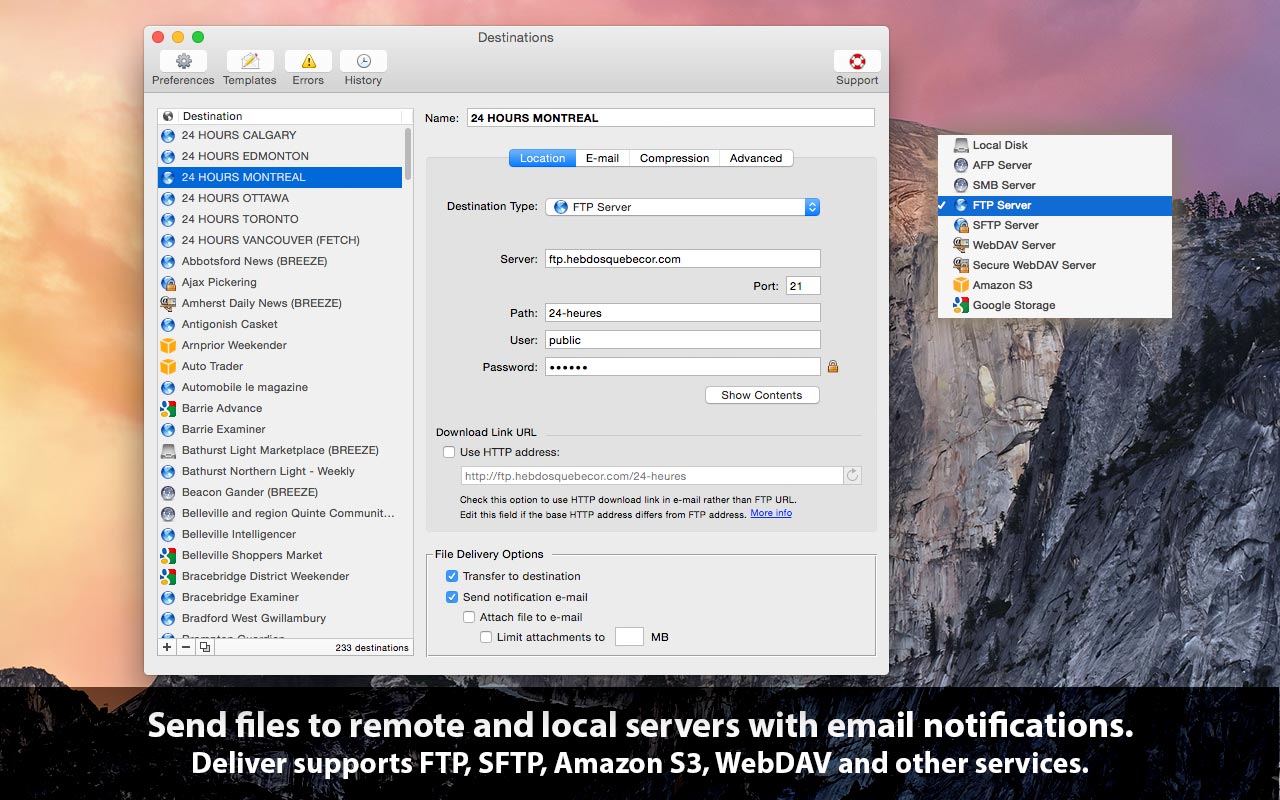
Toronto based Zevrix Solutions today announces Deliver 2.4.17, a feature update to its automated file transfer solution for remote and local destinations. Deliver lets users send files to FTP, Google Storage, Amazon S3, WebDAV and other servers and offers automatic e-mail notifications, delivery to multiple destinations, file encryption, delivery history and other time saving features. The new version allows users to transfer non-compressed folders directly to FTP and SFTP servers.
Toronto (ON) Canada - Zevrix Solutions today is proud to announce the release of Deliver 2.4.17, a feature update to its file transfer solution for remote and local destinations. Deliver lets users send files over the Internet and local networks with automatic e-mail notifications, file compression, delivery history and other powerful time saving capabilities. It supports FTP, Google Storage, Amazon S3, WebDAV and other remote and local services, and allows to send files to multiple destinations at once.
The new version allows users to transfer folders to FTP and SFTP servers as is, without compressing them into a single file prior to delivery. Following customer requests, this feature has been implemented to meet the requirements of users who need to delivery digital content without altering its source structure.
"Deliver gives plenty to like," writes Natalia Nowak on Mac360, a Mac app reviews site. "It's a secure document delivery system with tracking built in, and straightforward and comprehensive user interface."
Deliver simplifies and streamlines file delivery operations of ad agencies, printers, audio recording studios, video producers and legal offices worldwide. Users only need to drop files on the program's icon and they will be delivered automatically to the desired destinations with customizable e-mail confirmations issued upon delivery. Recipients can download the file using a link inserted automatically into the notification e-mail.
Deliver offers the following key features:
* Send files to FTP, WebDAV, Amazon S3, AFP and other servers
* Automatic variable e-mail notifications
* Hyperlink to file for instant download by recipients
* Compress files automatically
* Create lo-res PDF on the fly and attach to e-mail
* Delivery history
Pricing and Availability:
Deliver can be purchased from Zevrix website for $19.95 (USD), as well as from Mac App Store and authorized resellers. Trial is also available for download. The update is free for licensed users of Deliver 2.x. Deliver requires Mac OS X 10.5-10.10 (some features require OS X 10.7 or later).
Zevrix Solutions: http://zevrix.com
Deliver 2.4.17: http://zevrix.com/Deliver.php
Download Deliver: http://zevrix.com/Deliver.dmg
Purchase: http://zevrix.com/store.php
Screenshot: http://zevrix.com/screenshots/deliver-2/MAS/deliver-mas-location.jpg
Located in Toronto, Canada, Zevrix Solutions provides automation and productivity solutions for Adobe Creative Cloud and Creative Suite software, PDF workflows, graphic file diagnostics and Microsoft Office output on Mac OS. Zevrix is dedicated to help professionals increase their profits through automating everyday tasks, producing error-free documents, saving disk space and cutting production costs. For more information, visit their website. Copyright (C) 2015 Zevrix Solutions. All Rights Reserved. Other trademarks and registered trademarks may be the property of their respective owners.
*******
Link To Article: http://prmac.com/release-id-74884.htm
*******
---------------------------------------------------------------------------------
Note that you can alter delivered distributions at any time.
Login to your account on prMac to alter your channel selection, or to opt-out at any time.
File Transfer App Deliver Now Lets Upload Non-compressed Folders to FTP - Published on 05/11/15
Toronto based Zevrix Solutions today announces Deliver 2.4.17, a feature update to its automated file transfer solution for remote and local destinations. Deliver lets users send files to FTP, Google Storage, Amazon S3, WebDAV and other servers and offers automatic e-mail notifications, delivery to multiple destinations, file encryption, delivery history and other time saving features. The new version allows users to transfer non-compressed folders directly to FTP and SFTP servers.
Toronto (ON) Canada - Zevrix Solutions today is proud to announce the release of Deliver 2.4.17, a feature update to its file transfer solution for remote and local destinations. Deliver lets users send files over the Internet and local networks with automatic e-mail notifications, file compression, delivery history and other powerful time saving capabilities. It supports FTP, Google Storage, Amazon S3, WebDAV and other remote and local services, and allows to send files to multiple destinations at once.
The new version allows users to transfer folders to FTP and SFTP servers as is, without compressing them into a single file prior to delivery. Following customer requests, this feature has been implemented to meet the requirements of users who need to delivery digital content without altering its source structure.
"Deliver gives plenty to like," writes Natalia Nowak on Mac360, a Mac app reviews site. "It's a secure document delivery system with tracking built in, and straightforward and comprehensive user interface."
Deliver simplifies and streamlines file delivery operations of ad agencies, printers, audio recording studios, video producers and legal offices worldwide. Users only need to drop files on the program's icon and they will be delivered automatically to the desired destinations with customizable e-mail confirmations issued upon delivery. Recipients can download the file using a link inserted automatically into the notification e-mail.
Deliver offers the following key features:
* Send files to FTP, WebDAV, Amazon S3, AFP and other servers
* Automatic variable e-mail notifications
* Hyperlink to file for instant download by recipients
* Compress files automatically
* Create lo-res PDF on the fly and attach to e-mail
* Delivery history
Pricing and Availability:
Deliver can be purchased from Zevrix website for $19.95 (USD), as well as from Mac App Store and authorized resellers. Trial is also available for download. The update is free for licensed users of Deliver 2.x. Deliver requires Mac OS X 10.5-10.10 (some features require OS X 10.7 or later).
Zevrix Solutions: http://zevrix.com
Deliver 2.4.17: http://zevrix.com/Deliver.php
Download Deliver: http://zevrix.com/Deliver.dmg
Purchase: http://zevrix.com/store.php
Screenshot: http://zevrix.com/screenshots/deliver-2/MAS/deliver-mas-location.jpg
Located in Toronto, Canada, Zevrix Solutions provides automation and productivity solutions for Adobe Creative Cloud and Creative Suite software, PDF workflows, graphic file diagnostics and Microsoft Office output on Mac OS. Zevrix is dedicated to help professionals increase their profits through automating everyday tasks, producing error-free documents, saving disk space and cutting production costs. For more information, visit their website. Copyright (C) 2015 Zevrix Solutions. All Rights Reserved. Other trademarks and registered trademarks may be the property of their respective owners.
*******
Link To Article: http://prmac.com/release-id-74884.htm
*******
---------------------------------------------------------------------------------
Note that you can alter delivered distributions at any time.
Login to your account on prMac to alter your channel selection, or to opt-out at any time.
Movie Genius - Popular Movie Recommendation App Makes All Genres Free
A new article has been published at prMac.
Movie Genius - Popular Movie Recommendation App Makes All Genres Free - Published on 05/11/15
Renniksoft today announces Movie Genius 4.9, their popular movie recommendation app for iOS devices. With 20 film genres to choose from, Movie Genius offers intelligent recommendations based on matching themes, plots, and audience opinion. Users can view trailers, cast and crew lists, biographies, link to IMDb and more. Movie Genius is supported by a database of tens of thousands of films and syncs between devices using iCloud. Version 4.9 includes many new features to their Free Version.
Bath, United Kingdom - Renniksoft today is pleased to announce Movie Genius 4.9, their popular movie recommendation app for iOS devices. Movie Genius offers intelligent recommendations based on matching themes, plots, and audience opinion. Users can view trailers, cast and crew lists, biographies, Rotten Tomatoes reviews, link to IMDb and more. Movie Genius is supported by a database of tens of thousands of films and now syncs between devices using iCloud. Preferences such as saved lists, personal ratings, movie recommendations, and settings can be saved and transferred using iCloud.
With a unique movie matching algorithm that provides intelligent recommendations based on matching themes, plots, and audience opinion, Movie Genius users are prompted to rate films and indicate whether they liked it, didn't like it, or just want to ignore its listing. Over a quarter million users have received more realistic recommendations and discovered new movies they might enjoy using Movie Genius.
"The way (Movie Genius) works is kinda like Netflix in a way," says Steve and Raju of EPN.TV. "You go through lists of movie categories and specific titles and you say whether you like it or you don't like it or if you've never seen it, you just ignore it. And based on that, over time, the app will recommend movies of things you might see." (12 June 2012)
With Movie Genius, users can search upcoming movies, movies now playing in theaters, popular movies, and top rated movies. Listings in Movie Genius can include cast and crew lists, film overviews, biographies, filmographies, photos, movie trailers, critic reviews, Rotten Tomatoes ratings and an IMDb link. Movie Genius also provides the film's MPAA age rating, its release date, duration, language, ratings by audiences and critics, votes, and where a film can be found available for streaming.
Best of all, Movie Genius has updated its app to now include all 20 movie genres within the free version, where only 8 genres were previously available.
Move Genius takes the app update one step further by adding a feature that has been requested and in demand by many avid Movie Genius users, which is the ability to synchronise using iCloud. Users can now handle Movie Genius cross-platform on iOS devices without skipping a beat. Preferences such as saved lists, personal ratings, movie recommendations, and settings are saved and transfered using iCloud.
Feature Highlights:
* Intelligent recommendations based on matching themes, plots and audience opinion
* Search for favorite movies to rate and find similar recommendations
* 20 movie genres to choose from
* View cast and crew lists, pictures, biographies and filmographies
* View trailers and clips from movie with one tap
* Rotten Tomatoes integration to see critics and audience scores immediately
* All movies link to IMDb pages
* List of places a film can be found available for streaming
* Filter out movies based on MPAA age ratings
* Recommendations are sorted by rating (highest first)
* Sync between all devices using iCloud
* Share film recommendations via Facebook, Twitter, or email
* Ability to rent or purchase a movie from iTunes
* Movie News bulletins
* Engaging high quality graphics
* No ads with in-app purchase
* Intuitive User Interface
* Improved interface response time
Described as a "very cool app indeed" by the Daily App Show (19 Jul 2011), Movie Genius offers a robust search function to help users find their favorite movies to rate by searching via title or actor. Additional recommendations can be received after the user determines a rating and badges display the number of movies that Movie Genius recommends. Exploring new movies is just as easy, as search results are displayed by highest rating first. Users can also change search displays to suit preferences.
Further filters include the ability to customize the Genius screens and determine the movie recommendations based on the MPAA ratings. Additionally, users are informed whether a film is available for streaming on Netflix, Amazon, Hulu Plus, Crackle, YouTube Movies, EPIX, XFINITY Streampix, SnagFilms, Fandor, Google play, Vudu, Sony or iTunes.
James Horton of the Daily App Show (19 Aug 2014)
"This is great because now that I'm liking all of these (movies), when I (select) different genres, it's going to actually help me out."
A fully interactive app, Movie Genius allows users to share their recommendations via Twitter, Facebook, and email. Users also have the ability of saving the suggested movie to create a customized list of films they would like to see. Movies can be added to several lists and renamed in any way.
"We are thrilled to introduce some really cool upgrades to the already popular Movie Genius by offering all movie genres free to anyone using the app!," says Clive Skinner, founder of Renniksoft. "Through listening to our users, we've even integrated iCloud for a truly mobile and streamlined experience."
Languages:
* English, French, Spanish
Device Requirements:
* iPhone, iPad, and iPod touch
* Requires iOS 8.0 or later
* Optimized for iPhone 5, iPhone 6, and iPhone 6 Plus
* 17.4 MB
Pricing and Availability:
Movie Genius 4.9 is free and available worldwide exclusively through the App Store in the Entertainment category. An ad-free version that removes ads is available for an in-app purchase of $2.99 (USD).
Movie Genius 4.9: http://renniksoft.com
Purchase and Download: https://itunes.apple.com/app/movie-genius-film-movies-streaming/id461356526
Media Assets: http://www.renniksoft.com/media.html
Based in the historic city of Bath in the United Kingdom, Renniksoft was founded in 2011 to develop innovative and original apps exclusively for the Apple iPhone, iPad and iPod touch devices. Copyright (C) 2015 Renniksoft. All Rights Reserved. Apple, the Apple logo, iPhone, iPad and iPod are registered trademarks of Apple Inc. in the U.S. and/or other countries.
*******
Link To Article: http://prmac.com/release-id-74865.htm
*******
---------------------------------------------------------------------------------
Note that you can alter delivered distributions at any time.
Login to your account on prMac to alter your channel selection, or to opt-out at any time.
Movie Genius - Popular Movie Recommendation App Makes All Genres Free - Published on 05/11/15
Renniksoft today announces Movie Genius 4.9, their popular movie recommendation app for iOS devices. With 20 film genres to choose from, Movie Genius offers intelligent recommendations based on matching themes, plots, and audience opinion. Users can view trailers, cast and crew lists, biographies, link to IMDb and more. Movie Genius is supported by a database of tens of thousands of films and syncs between devices using iCloud. Version 4.9 includes many new features to their Free Version.
Bath, United Kingdom - Renniksoft today is pleased to announce Movie Genius 4.9, their popular movie recommendation app for iOS devices. Movie Genius offers intelligent recommendations based on matching themes, plots, and audience opinion. Users can view trailers, cast and crew lists, biographies, Rotten Tomatoes reviews, link to IMDb and more. Movie Genius is supported by a database of tens of thousands of films and now syncs between devices using iCloud. Preferences such as saved lists, personal ratings, movie recommendations, and settings can be saved and transferred using iCloud.
With a unique movie matching algorithm that provides intelligent recommendations based on matching themes, plots, and audience opinion, Movie Genius users are prompted to rate films and indicate whether they liked it, didn't like it, or just want to ignore its listing. Over a quarter million users have received more realistic recommendations and discovered new movies they might enjoy using Movie Genius.
"The way (Movie Genius) works is kinda like Netflix in a way," says Steve and Raju of EPN.TV. "You go through lists of movie categories and specific titles and you say whether you like it or you don't like it or if you've never seen it, you just ignore it. And based on that, over time, the app will recommend movies of things you might see." (12 June 2012)
With Movie Genius, users can search upcoming movies, movies now playing in theaters, popular movies, and top rated movies. Listings in Movie Genius can include cast and crew lists, film overviews, biographies, filmographies, photos, movie trailers, critic reviews, Rotten Tomatoes ratings and an IMDb link. Movie Genius also provides the film's MPAA age rating, its release date, duration, language, ratings by audiences and critics, votes, and where a film can be found available for streaming.
Best of all, Movie Genius has updated its app to now include all 20 movie genres within the free version, where only 8 genres were previously available.
Move Genius takes the app update one step further by adding a feature that has been requested and in demand by many avid Movie Genius users, which is the ability to synchronise using iCloud. Users can now handle Movie Genius cross-platform on iOS devices without skipping a beat. Preferences such as saved lists, personal ratings, movie recommendations, and settings are saved and transfered using iCloud.
Feature Highlights:
* Intelligent recommendations based on matching themes, plots and audience opinion
* Search for favorite movies to rate and find similar recommendations
* 20 movie genres to choose from
* View cast and crew lists, pictures, biographies and filmographies
* View trailers and clips from movie with one tap
* Rotten Tomatoes integration to see critics and audience scores immediately
* All movies link to IMDb pages
* List of places a film can be found available for streaming
* Filter out movies based on MPAA age ratings
* Recommendations are sorted by rating (highest first)
* Sync between all devices using iCloud
* Share film recommendations via Facebook, Twitter, or email
* Ability to rent or purchase a movie from iTunes
* Movie News bulletins
* Engaging high quality graphics
* No ads with in-app purchase
* Intuitive User Interface
* Improved interface response time
Described as a "very cool app indeed" by the Daily App Show (19 Jul 2011), Movie Genius offers a robust search function to help users find their favorite movies to rate by searching via title or actor. Additional recommendations can be received after the user determines a rating and badges display the number of movies that Movie Genius recommends. Exploring new movies is just as easy, as search results are displayed by highest rating first. Users can also change search displays to suit preferences.
Further filters include the ability to customize the Genius screens and determine the movie recommendations based on the MPAA ratings. Additionally, users are informed whether a film is available for streaming on Netflix, Amazon, Hulu Plus, Crackle, YouTube Movies, EPIX, XFINITY Streampix, SnagFilms, Fandor, Google play, Vudu, Sony or iTunes.
James Horton of the Daily App Show (19 Aug 2014)
"This is great because now that I'm liking all of these (movies), when I (select) different genres, it's going to actually help me out."
A fully interactive app, Movie Genius allows users to share their recommendations via Twitter, Facebook, and email. Users also have the ability of saving the suggested movie to create a customized list of films they would like to see. Movies can be added to several lists and renamed in any way.
"We are thrilled to introduce some really cool upgrades to the already popular Movie Genius by offering all movie genres free to anyone using the app!," says Clive Skinner, founder of Renniksoft. "Through listening to our users, we've even integrated iCloud for a truly mobile and streamlined experience."
Languages:
* English, French, Spanish
Device Requirements:
* iPhone, iPad, and iPod touch
* Requires iOS 8.0 or later
* Optimized for iPhone 5, iPhone 6, and iPhone 6 Plus
* 17.4 MB
Pricing and Availability:
Movie Genius 4.9 is free and available worldwide exclusively through the App Store in the Entertainment category. An ad-free version that removes ads is available for an in-app purchase of $2.99 (USD).
Movie Genius 4.9: http://renniksoft.com
Purchase and Download: https://itunes.apple.com/app/movie-genius-film-movies-streaming/id461356526
Media Assets: http://www.renniksoft.com/media.html
Based in the historic city of Bath in the United Kingdom, Renniksoft was founded in 2011 to develop innovative and original apps exclusively for the Apple iPhone, iPad and iPod touch devices. Copyright (C) 2015 Renniksoft. All Rights Reserved. Apple, the Apple logo, iPhone, iPad and iPod are registered trademarks of Apple Inc. in the U.S. and/or other countries.
*******
Link To Article: http://prmac.com/release-id-74865.htm
*******
---------------------------------------------------------------------------------
Note that you can alter delivered distributions at any time.
Login to your account on prMac to alter your channel selection, or to opt-out at any time.
Fresh Air - Real Time Air Quality Index for iPhone and Apple Watch
A new article has been published at prMac.
Fresh Air - Real Time Air Quality Index for iPhone and Apple Watch - Published on 05/11/15
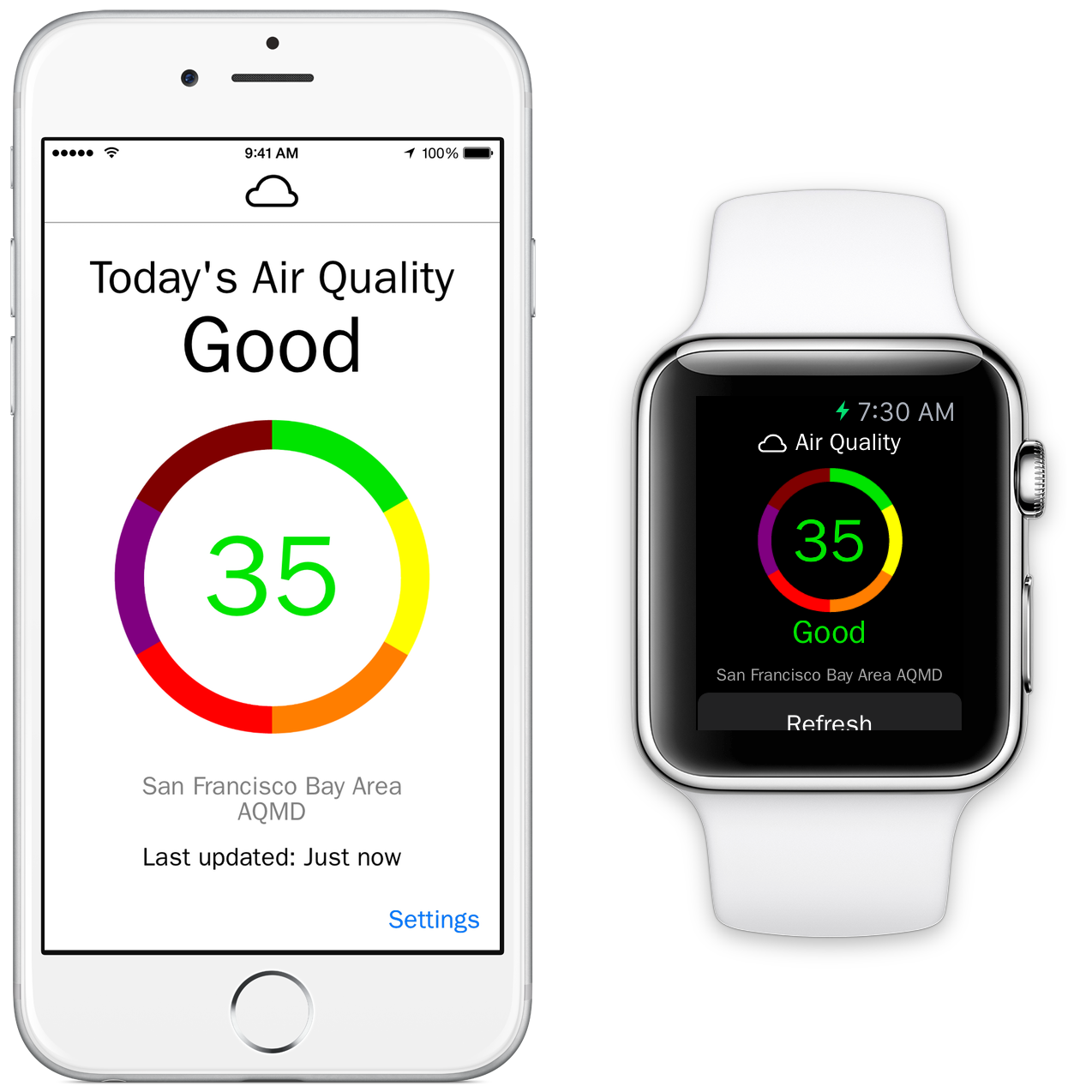
Raleigh based 'e design' today introduces Fresh Air - Air Quality Index 1.0, the new fitness app for the iPhone and Apple Watch. Fresh Air is a unique Apple Watch app. Providing anyone with real-time air quality information with just a glance, the app can display the exact air quality for the current location. If the air quality worsens, Fresh Air can immediately notify users via the iPhone or Apple Watch. They can then tap on the device's screen to view more information.
Raleigh, North Carolina - 'e design' today is proud to announce the release of Fresh Air - Air Quality Index 1.0, their newest app developed exclusively for the iPhone and Apple Watch. Providing anyone with real-time air quality information, Fresh Air displays at-a-glance the exact air quality for the current location. If the air quality worsens, Fresh Air can notify users instantly on their iPhone or Apple Watch.
Fresh Air looks awesome on the Apple Watch. Simply swipe up on the Watch screen to display the Glance with the current air quality category or launch the Apple Watch app to get more detailed information. Fresh Air delivers information about current air quality conditions in an easy to view and understand format, using the EPA's color-coded Air Quality Index (AQI). Granular notifications allow users to receive notifications when the air quality category reaches a certain level.
"For people with asthma and COPD, poor air quality can make symptoms like coughing and wheezing worse. The EPA developed the AQI to report levels of ozone, particle pollution and other common air pollutants on the same scale." said Sal Conigliaro, co-owner of 'e design'. "The higher the AQI rating, the greater the impact on the public's health. The AQI is divided into six color-coded categories (green, yellow, orange, red, purple, maroon), which are intended to convey information for the ratings, (Good, Moderate, Unhealthy for Sensitive Groups, Unhealthy, Very Unhealthy, and Hazardous), about how air quality within each category relates to public health."
Feature Highlights:
* Know the air quality for the current location at a glance
* Air quality is updated twice hourly
* Check the air quality for the current location or check another location via zip code
* Make informed decisions about planned outdoor activities
* Receive notifications on the iPhone or Apple Watch if the air quality worsens
* Swipe up on the Apple Watch screen to view the current air quality
* View the air quality without an Apple Watch by using an iPhone or iPod touch
Even users without an Apple Watch can make use of the information supplied by Fresh Air. The AQI is quickly accessed from the iPhone or iPod touch screen, and it can be quickly refreshed with a simple tap of the finger. Users can set the iPhone app to supply the AQI information for their current location or view the information for other locations by simply entering a zip code in the settings screen of the app.
"Even healthy adults who are active outdoors are at risk from ozone, which can make it more difficult to breathe deeply," continued Sal. "Fresh Air instantly reports the current air quality for a user's location, so a quick swipe up on the screen of the Apple Watch allows users to view the current air quality around them. They can then use that information to make an informed decision about their planned outside activities for the day."
Device Requirements:
* iPhone, iPad, iPod touch and Apple Watch
* Optimized for iPhone 5, iPhone 6, and iPhone 6 Plus
* Requires iOS 8.2 or later
* 10.2 MB
Pricing and Availability:
Fresh Air - Air Quality Index 1.0 is only $0.99 USD (or equivalent amount in other currencies) and currently available in the U.S. App Store in the Health and Fitness category. Fresh Air is currently only available in the App Store in the United States and is expanding to the United Kingdom soon. Promo codes are available to members of the press.
e design: http://www.erinedesign.com
Fresh Air 1.0: http://fresh-air-app.com
Purchase and Download: https://itunes.apple.com/app/fresh-air-air-quality-index/id983137088
Promotional Image: http://fresh-air-app.com/promo_shot.png
App Icon: http://a2.mzstatic.com/us/r30/Purple3/v4/c8/f8/cb/c8f8cb49-bb08-cf2c-5852-6680e79b4abf/icon175x175.png
Press Kit (ZIP): http://fresh-air-app.com/Press_Kit_Images.zip
'e design' is a Raleigh-based creative agency established in 1997 and founded by Erin Conigliaro and Sal Conigliaro. The company specializes in creating apps for a wide variety of businesses, including the SNL 40th anniversary app for NBC, Yood! for Kevin Jonas, and Fresh Air, the first Apple Watch app that provides real-time, location-based air quality information. All Material and Software (C) Copyright 2015 e design. All Rights Reserved. Apple, the Apple logo, iPhone, iPod and iPad are registered trademarks of Apple Inc. in the U.S. and/or other countries. Other trademarks and registered trademarks may be the property of their respective owners.
*******
Link To Article: http://prmac.com/release-id-74864.htm
*******
---------------------------------------------------------------------------------
Note that you can alter delivered distributions at any time.
Login to your account on prMac to alter your channel selection, or to opt-out at any time.
Fresh Air - Real Time Air Quality Index for iPhone and Apple Watch - Published on 05/11/15
Raleigh based 'e design' today introduces Fresh Air - Air Quality Index 1.0, the new fitness app for the iPhone and Apple Watch. Fresh Air is a unique Apple Watch app. Providing anyone with real-time air quality information with just a glance, the app can display the exact air quality for the current location. If the air quality worsens, Fresh Air can immediately notify users via the iPhone or Apple Watch. They can then tap on the device's screen to view more information.
Raleigh, North Carolina - 'e design' today is proud to announce the release of Fresh Air - Air Quality Index 1.0, their newest app developed exclusively for the iPhone and Apple Watch. Providing anyone with real-time air quality information, Fresh Air displays at-a-glance the exact air quality for the current location. If the air quality worsens, Fresh Air can notify users instantly on their iPhone or Apple Watch.
Fresh Air looks awesome on the Apple Watch. Simply swipe up on the Watch screen to display the Glance with the current air quality category or launch the Apple Watch app to get more detailed information. Fresh Air delivers information about current air quality conditions in an easy to view and understand format, using the EPA's color-coded Air Quality Index (AQI). Granular notifications allow users to receive notifications when the air quality category reaches a certain level.
"For people with asthma and COPD, poor air quality can make symptoms like coughing and wheezing worse. The EPA developed the AQI to report levels of ozone, particle pollution and other common air pollutants on the same scale." said Sal Conigliaro, co-owner of 'e design'. "The higher the AQI rating, the greater the impact on the public's health. The AQI is divided into six color-coded categories (green, yellow, orange, red, purple, maroon), which are intended to convey information for the ratings, (Good, Moderate, Unhealthy for Sensitive Groups, Unhealthy, Very Unhealthy, and Hazardous), about how air quality within each category relates to public health."
Feature Highlights:
* Know the air quality for the current location at a glance
* Air quality is updated twice hourly
* Check the air quality for the current location or check another location via zip code
* Make informed decisions about planned outdoor activities
* Receive notifications on the iPhone or Apple Watch if the air quality worsens
* Swipe up on the Apple Watch screen to view the current air quality
* View the air quality without an Apple Watch by using an iPhone or iPod touch
Even users without an Apple Watch can make use of the information supplied by Fresh Air. The AQI is quickly accessed from the iPhone or iPod touch screen, and it can be quickly refreshed with a simple tap of the finger. Users can set the iPhone app to supply the AQI information for their current location or view the information for other locations by simply entering a zip code in the settings screen of the app.
"Even healthy adults who are active outdoors are at risk from ozone, which can make it more difficult to breathe deeply," continued Sal. "Fresh Air instantly reports the current air quality for a user's location, so a quick swipe up on the screen of the Apple Watch allows users to view the current air quality around them. They can then use that information to make an informed decision about their planned outside activities for the day."
Device Requirements:
* iPhone, iPad, iPod touch and Apple Watch
* Optimized for iPhone 5, iPhone 6, and iPhone 6 Plus
* Requires iOS 8.2 or later
* 10.2 MB
Pricing and Availability:
Fresh Air - Air Quality Index 1.0 is only $0.99 USD (or equivalent amount in other currencies) and currently available in the U.S. App Store in the Health and Fitness category. Fresh Air is currently only available in the App Store in the United States and is expanding to the United Kingdom soon. Promo codes are available to members of the press.
e design: http://www.erinedesign.com
Fresh Air 1.0: http://fresh-air-app.com
Purchase and Download: https://itunes.apple.com/app/fresh-air-air-quality-index/id983137088
Promotional Image: http://fresh-air-app.com/promo_shot.png
App Icon: http://a2.mzstatic.com/us/r30/Purple3/v4/c8/f8/cb/c8f8cb49-bb08-cf2c-5852-6680e79b4abf/icon175x175.png

Press Kit (ZIP): http://fresh-air-app.com/Press_Kit_Images.zip
'e design' is a Raleigh-based creative agency established in 1997 and founded by Erin Conigliaro and Sal Conigliaro. The company specializes in creating apps for a wide variety of businesses, including the SNL 40th anniversary app for NBC, Yood! for Kevin Jonas, and Fresh Air, the first Apple Watch app that provides real-time, location-based air quality information. All Material and Software (C) Copyright 2015 e design. All Rights Reserved. Apple, the Apple logo, iPhone, iPod and iPad are registered trademarks of Apple Inc. in the U.S. and/or other countries. Other trademarks and registered trademarks may be the property of their respective owners.
*******
Link To Article: http://prmac.com/release-id-74864.htm
*******
---------------------------------------------------------------------------------
Note that you can alter delivered distributions at any time.
Login to your account on prMac to alter your channel selection, or to opt-out at any time.
100 Essential Apple Watch Tips eBook Released
A new article has been published at prMac.
100 Essential Apple Watch Tips eBook Released - Published on 05/11/15
UK based Stopframe today introduces 100 Essential Apple Watch, a brand new eBook available in the iBookstore that reveals a wealth of tips and tutorials for Apple Watch. Priced at just $1.99, it's jam-packed with 100 helpful tips and tricks that help you to unleash the power of Apple Watch, each with a helpful image and written with concise text. You'll discover everything you need to know about the Apple Watch operating system, its built-in apps, customizations, accessibility features and more.
Bournemouth, United Kingdom - Stopframe today is proud to announce the release of 100 Essential Apple Watch Tips, a brand new eBook available in the iBookstore that reveals a wealth of tips and tutorials for Apple Watch. This iBook is jam-packed with 100 helpful tips and tricks that help you to unleash the power of Apple Watch, each with a helpful image and written with concise text. You'll discover everything you need to know about the Apple Watch operating system, its built-in apps, customizations, accessibility features and more.
Apple Watch is an incredible piece of technology that's packed with amazing features, and made from the most beautiful elements known to man. It also comes with a brand new operating system and the Digital Crown, which means you'll need to learn new techniques and tricks before you can really make the most of it. 100 Essential Apple Watch Tips is here to help. Written by best-selling technology author T A Rudderham, and brought to you by Stopframe, 100 Essential Apple Watch Tips is an essential eBook that's bursting at its digital seams with knowledge and insight.
Available on iPhone, iPad, iPod touch, and Mac:
* iOS device with iBooks 1.5 or later and iOS 4.3.3 or later
* Mac with iBooks 1.0 or later and OS X 10.9 or later
* Print Length: 300 Pages
Priced just $1.99/GBP 2.49, 100 Essential Apple Watch Tips is available from the iBookstore. Concise and free from technical jargon, it enables you to discover new features about your Apple Watch in a short amount of time. It's also packed with large color images that help you to visually follow its tips and tricks.
Stopframe: http://www.stopframe.co.uk
100 Essential Apple Watch Tips: https://itunes.apple.com/book/100-essential-apple-watch/id992956202
Image (Book Cover): http://www.stopframe.co.uk/files/100_Essential_Apple_Watch_Tips_Cover.jpg
Press Kit (zip): http://www.stopframe.co.uk/files/100_essential_apple_watch_tips_screens.zip
Launched in 2013, Stopframe publishes eBooks and interactive apps that teach users how to use their iOS devices. Stopframe's most notable books to date include iPad Air Guide, The Complete Guide to iOS 7 and iPhone 6 Guide. Copyright (C) 2015 Stopframe. All Rights Reserved. Apple, the Apple logo, iPhone, iPod and iPad are registered trademarks of Apple Inc. in the U.S. and/or other countries. Other trademarks and registered trademarks may be the property of their respective owners.
*******
Link To Article: http://prmac.com/release-id-74846.htm
*******
---------------------------------------------------------------------------------
Note that you can alter delivered distributions at any time.
Login to your account on prMac to alter your channel selection, or to opt-out at any time.
100 Essential Apple Watch Tips eBook Released - Published on 05/11/15
UK based Stopframe today introduces 100 Essential Apple Watch, a brand new eBook available in the iBookstore that reveals a wealth of tips and tutorials for Apple Watch. Priced at just $1.99, it's jam-packed with 100 helpful tips and tricks that help you to unleash the power of Apple Watch, each with a helpful image and written with concise text. You'll discover everything you need to know about the Apple Watch operating system, its built-in apps, customizations, accessibility features and more.
Bournemouth, United Kingdom - Stopframe today is proud to announce the release of 100 Essential Apple Watch Tips, a brand new eBook available in the iBookstore that reveals a wealth of tips and tutorials for Apple Watch. This iBook is jam-packed with 100 helpful tips and tricks that help you to unleash the power of Apple Watch, each with a helpful image and written with concise text. You'll discover everything you need to know about the Apple Watch operating system, its built-in apps, customizations, accessibility features and more.
Apple Watch is an incredible piece of technology that's packed with amazing features, and made from the most beautiful elements known to man. It also comes with a brand new operating system and the Digital Crown, which means you'll need to learn new techniques and tricks before you can really make the most of it. 100 Essential Apple Watch Tips is here to help. Written by best-selling technology author T A Rudderham, and brought to you by Stopframe, 100 Essential Apple Watch Tips is an essential eBook that's bursting at its digital seams with knowledge and insight.
Available on iPhone, iPad, iPod touch, and Mac:
* iOS device with iBooks 1.5 or later and iOS 4.3.3 or later
* Mac with iBooks 1.0 or later and OS X 10.9 or later
* Print Length: 300 Pages
Priced just $1.99/GBP 2.49, 100 Essential Apple Watch Tips is available from the iBookstore. Concise and free from technical jargon, it enables you to discover new features about your Apple Watch in a short amount of time. It's also packed with large color images that help you to visually follow its tips and tricks.
Stopframe: http://www.stopframe.co.uk
100 Essential Apple Watch Tips: https://itunes.apple.com/book/100-essential-apple-watch/id992956202
Image (Book Cover): http://www.stopframe.co.uk/files/100_Essential_Apple_Watch_Tips_Cover.jpg

Press Kit (zip): http://www.stopframe.co.uk/files/100_essential_apple_watch_tips_screens.zip
Launched in 2013, Stopframe publishes eBooks and interactive apps that teach users how to use their iOS devices. Stopframe's most notable books to date include iPad Air Guide, The Complete Guide to iOS 7 and iPhone 6 Guide. Copyright (C) 2015 Stopframe. All Rights Reserved. Apple, the Apple logo, iPhone, iPod and iPad are registered trademarks of Apple Inc. in the U.S. and/or other countries. Other trademarks and registered trademarks may be the property of their respective owners.
*******
Link To Article: http://prmac.com/release-id-74846.htm
*******
---------------------------------------------------------------------------------
Note that you can alter delivered distributions at any time.
Login to your account on prMac to alter your channel selection, or to opt-out at any time.
Subscribe to:
Posts (Atom)