A new article has been published at prMac.
IconFly 3 for OS X - The Simple Yet Powerful Icon Maker - Published on 06/04/15
Aperio Lux announces the release of IconFly 3.1, an important update of IconFly - their elegant, powerful and easy-to-use icon maker for OS X. IconFly allows users to create all types of icons for OS X, iOS, Apple Watch, and the Web. All icons created using IconFly are fully compatible with all the latest devices and operating systems created by Apple. The app now sports a new gorgeous and modern, but simple and user-friendly interface, designed especially for OS X Yosemite.
Kiev, Ukraine - Aperio Lux today is pleased to announce the release of IconFly 3.1, an important update of IconFly - their elegant, powerful and easy-to-use icon maker for OS X. IconFly allows users to create all types of icons for OS X, iOS, Apple Watch and the Web. All icons created using IconFly are fully compatible with all the latest devices and operating systems created by Apple.
Starting with version 3.0, IconFly has become even more simple, powerful and modern tool for the creation of icons than it was ever before. The app now sports a new gorgeous and modern, but simple and user-friendly interface. Designed especially for OS X Yosemite. IconFly 3 supports all the latest devices and operating systems created by Apple, including iOS 8 and the Apple Watch.
New QuickIcon is an innovative feature that allows users to make icons in one click. Creating icons has never been so simple and easy as using IconFly 3. AppIcon.appiconset created using IconFly is fully compatible with Xcode 6.0 or later. It allows users to add icons into their projects much more easily. IconFly can create icons from 1, 4, 8, 16 and 32-bit images in RGB, CMYK and Grayscale color spaces, while other icon converters support only 8-bit images.
Features:
* Support icons for OS X, iOS, Apple Watch and Web
* Create AppIcon.appiconset
* QuickIcon improved
* Create standard and extended favicon
* Customization for Retina OS X icons
* Replace image on any icon cell
* 6 different masks and round radii for OS X icons
* Create icons from incorrect images within or without scaling
* Notification Center support has been added
IconFly 3.1 is available in 4 editions: IconFly, IconFly Desktop, IconFly Mobile, and IconFly Web. More information is available on the Aperio Lux website.
System Requirements:
* OS X Lion 10.10 or later
* Intel 64-bit processor
* 4.0 MB
Pricing/Availability:
IconFly 3.1 is $5.99 USD (or equivalent amount in other currencies) and is available worldwide through the Mac App Store (except Russia) in the Developer Tools category. Promo codes for review available on the request.
Aperio Lux: http://aperio-lux.com/
IconFly 3.1: http://iconfly.aperio-lux.com/
Purchase and Download (MAS): https://itunes.apple.com/us/app/id556381974
Download Demo: http://iconfly.aperio-lux.com/try/
YouTube Video: http://aperio-lux.com/IconFlyInAction/
Media Kit (ZIP): http://aperio-lux.com/download.php?file=IconFly_Media_Kit
Aperio Lux is a small private group of developers, located in Kiev, Ukraine. The Aperio Lux team develops ergonomic and user-friendly software that increases user productivity on Mac OS X. Copyright (C) 2011-2015 Alexey Nikitin and Alexandr Bondar. All Rights Reserved. Apple, the Apple logo, Macintosh and Mac OS X are registered trademarks of Apple Inc. in the U.S. and/or other countries. Other trademarks and registered trademarks may be the property of their respective owners.
*******
Link To Article: http://prmac.com/release-id-75267.htm
*******
---------------------------------------------------------------------------------
Note that you can alter delivered distributions at any time.
Login to your account on prMac to alter your channel selection, or to opt-out at any time.

Mondly launches 48,000 hours of language learning in a single app
A new article has been published at prMac.
Mondly launches 48,000 hours of language learning in a single app - Published on 06/04/15
ATi Studios today introduces Mondly 1.0, a new app that teaches 24 languages to iOS users. With Mondly, people learn languages faster in a fun & engaging way by practicing authentic conversations in a highly interactive app. Mondly helps people speak a new language by focusing on full sentence communication, rather than isolated words, which makes people learn to communicate faster. Crisp and clear audio combined with beautiful graphics, creates immersion into the language right from the start.
Brasov, Romania - ATi Studios, creator of popular language learning apps, today is proud to announce the release and immediate availability of Mondly 1.0, a new app that teaches 24 languages to iOS users. With Mondly, people learn languages faster in a fun and engaging way by practicing authentic conversations in a highly interactive app. Mondly helps people speak a new language by focusing on full sentence communication, rather than isolated words, which makes people learn to communicate faster.
To keep users highly engaged the app is designed like a fun, addictive game: learners progress through lessons, complete tasks, earn achievements, unlock new content and compete with friends. Crisp and clear audio recorded by professional voice artists combined with beautiful graphics, creates immersion into the language right from the start. Using real world conversations, users record their voice and become part of the action. Recorded conversations can then be practiced even while running or driving.
Mondly iPhone and iPad apps have been downloaded 1,300,000 times in the last year and have consistently held the top spots in the Education category of App Store reaching top 10 in Education in 50 countries. The apps boast an average 4.75-star rating in the iTunes App Store from more than 7,200 iPhone and iPad customer reviews.
Mondly teaches 24 languages not just to English speakers but people speaking 20 different languages, offering 480 different courses in one single app. Each course teaches 5,000 words and phrases over 100 hours split in hundreds of interactive lessons. In total Mondly offers 48,000 hours of language learning in one app.
Mondly Key Features:
* High Level Engagement - Progress through the lessons, earn achievements and unlock new chapters - Compete with your friends
* Receive free daily lessons to keep coming back for more
* World class speech recognition - Mondly includes a speech feedback engine featuring Nuance speech recognition technology that identifies errors and helps correct the learner's pronunciation
* Adaptive Learning - As you learn so does Mondly - The app will adapt the lessons to your specific progress and needs
* Hand crafted lessons - created by language professionals, with editorially-curated images and native voices recorded by professional voice actors
* Localized in 20 Languages - people from 70 countries can use the app in their own language
* Apple Watch app - Mondly for Apple Watch helps you learn hundreds of words from each of 24 languages
The launch is primarily focused on the unification of all 24 languages into a single app, with a more refined design, extra features and an Apple Watch app adding further value to Mondly users.
Device Requirements:
* iPhone, iPad, and iPod touch
* Requires iOS 7.0 or later
* 58.7 MB
Pricing and Availability:
Mondly 1.0 is Free and available worldwide exclusively through the App Store in the Education category.
Mondly 1.0: http://www.mondlylanguages.com
Download from iTunes: https://itunes.apple.com/app/id987873536
YouTube Video (Trailer): https://www.youtube.com/watch?v=5hrtmTLcgVs
Media Assets: https://www.dropbox.com/sh/a5wbmtmxrj30d9u/AACfGMl_ruZMIe6HildM47pla?dl=0
Located in Romania, Brasov, ATi Studios was founded in 2012 by Alexandru and Tudor Iliescu. With a team of passionate professionals with deep experience in education, technology, games, and media, ATi Studios is on a mission to revolutionize the way people learn languages: to make it a faster, more fun and more fulfilling experience than it's ever been by taking full advantage of new technologies available today. All Material and Software (C) Copyright 2012-2015 ATi Studios. All Rights Reserved. Apple, the Apple logo, iPhone, iPod and iPad are registered trademarks of Apple Inc. in the U.S. and/or other countries. Other trademarks and registered trademarks may be the property of their respective owners.
*******
Link To Article: http://prmac.com/release-id-75263.htm
*******
---------------------------------------------------------------------------------
Note that you can alter delivered distributions at any time.
Login to your account on prMac to alter your channel selection, or to opt-out at any time.
Mondly launches 48,000 hours of language learning in a single app - Published on 06/04/15
ATi Studios today introduces Mondly 1.0, a new app that teaches 24 languages to iOS users. With Mondly, people learn languages faster in a fun & engaging way by practicing authentic conversations in a highly interactive app. Mondly helps people speak a new language by focusing on full sentence communication, rather than isolated words, which makes people learn to communicate faster. Crisp and clear audio combined with beautiful graphics, creates immersion into the language right from the start.
Brasov, Romania - ATi Studios, creator of popular language learning apps, today is proud to announce the release and immediate availability of Mondly 1.0, a new app that teaches 24 languages to iOS users. With Mondly, people learn languages faster in a fun and engaging way by practicing authentic conversations in a highly interactive app. Mondly helps people speak a new language by focusing on full sentence communication, rather than isolated words, which makes people learn to communicate faster.
To keep users highly engaged the app is designed like a fun, addictive game: learners progress through lessons, complete tasks, earn achievements, unlock new content and compete with friends. Crisp and clear audio recorded by professional voice artists combined with beautiful graphics, creates immersion into the language right from the start. Using real world conversations, users record their voice and become part of the action. Recorded conversations can then be practiced even while running or driving.
Mondly iPhone and iPad apps have been downloaded 1,300,000 times in the last year and have consistently held the top spots in the Education category of App Store reaching top 10 in Education in 50 countries. The apps boast an average 4.75-star rating in the iTunes App Store from more than 7,200 iPhone and iPad customer reviews.
Mondly teaches 24 languages not just to English speakers but people speaking 20 different languages, offering 480 different courses in one single app. Each course teaches 5,000 words and phrases over 100 hours split in hundreds of interactive lessons. In total Mondly offers 48,000 hours of language learning in one app.
Mondly Key Features:
* High Level Engagement - Progress through the lessons, earn achievements and unlock new chapters - Compete with your friends
* Receive free daily lessons to keep coming back for more
* World class speech recognition - Mondly includes a speech feedback engine featuring Nuance speech recognition technology that identifies errors and helps correct the learner's pronunciation
* Adaptive Learning - As you learn so does Mondly - The app will adapt the lessons to your specific progress and needs
* Hand crafted lessons - created by language professionals, with editorially-curated images and native voices recorded by professional voice actors
* Localized in 20 Languages - people from 70 countries can use the app in their own language
* Apple Watch app - Mondly for Apple Watch helps you learn hundreds of words from each of 24 languages
The launch is primarily focused on the unification of all 24 languages into a single app, with a more refined design, extra features and an Apple Watch app adding further value to Mondly users.
Device Requirements:
* iPhone, iPad, and iPod touch
* Requires iOS 7.0 or later
* 58.7 MB
Pricing and Availability:
Mondly 1.0 is Free and available worldwide exclusively through the App Store in the Education category.
Mondly 1.0: http://www.mondlylanguages.com
Download from iTunes: https://itunes.apple.com/app/id987873536
YouTube Video (Trailer): https://www.youtube.com/watch?v=5hrtmTLcgVs
Media Assets: https://www.dropbox.com/sh/a5wbmtmxrj30d9u/AACfGMl_ruZMIe6HildM47pla?dl=0
Located in Romania, Brasov, ATi Studios was founded in 2012 by Alexandru and Tudor Iliescu. With a team of passionate professionals with deep experience in education, technology, games, and media, ATi Studios is on a mission to revolutionize the way people learn languages: to make it a faster, more fun and more fulfilling experience than it's ever been by taking full advantage of new technologies available today. All Material and Software (C) Copyright 2012-2015 ATi Studios. All Rights Reserved. Apple, the Apple logo, iPhone, iPod and iPad are registered trademarks of Apple Inc. in the U.S. and/or other countries. Other trademarks and registered trademarks may be the property of their respective owners.
*******
Link To Article: http://prmac.com/release-id-75263.htm
*******
---------------------------------------------------------------------------------
Note that you can alter delivered distributions at any time.
Login to your account on prMac to alter your channel selection, or to opt-out at any time.
ZodiaCat App - The first and only personalized horoscopes for cats
A new article has been published at prMac.
ZodiaCat App - The first and only personalized horoscopes for cats - Published on 06/04/15
Itchy Brains today announces their up and coming release of ZodiaCat for iOS, giving cat owners one more special way to connect with their feline friends. ZodiaCat promises to deliver fun, daily, personalized horoscopes, written just for cats. Users simply enter their cat's name and birthday, then choose a profile picture. With a daily shake of the app, they'll receive a feline-focused, personalized horoscope for their cat. ZodiaCat will be available June 6th, 2015.
Bloomfield Hills, Michigan - On June 6, Itchy Brains will be releasing ZodiaCat, the app cat lovers have been waiting for. ZodiaCat for iPhone and iPad is the first and only app that delivers daily horoscopes for cats. Users simply enter their cat's name and birthday, then choose a profile picture. With a daily shake of the app, they'll receive a feline-focused, personalized horoscope for their cat.
And not to miss out on the Internet cat craze, with ZodiaCat users can share any one of their kitty's favorite horoscopes on Facebook and Twitter. It's sure to capture the hearts and minds (and social media pages) of cat lovers everywhere.
But there's a twist. If people choose to download the full version, not only will they get unlimited horoscopes, but they'll also be helping cats in need - we're donating 20% of our proceeds to Best Friends Animal Society. "We love cats!" says Allyson Raynes, ZodiaCat spokesperson. "And so does Best Friends. They're a really great organization."
Features:
* Horoscopes personalized by name and zodiac sign
* A new horoscope each day
* Register up to two cats
* Special birthday and holiday messages
* Shareable on social media
* 20% of proceeds to an animal charity
Pricing and Availability:
While there's a free version, the full version costs just 99 - with 20% of proceeds going to Best Friends Animal Society. The app is Apple-approved and will be available to the public starting June 6th in the Entertainment category on the App Store.
ZodiaCat: http://thezodiacatapp.com/
Demo Video: http://thezodiacatapp.com/video.html
Media Assets: http://www.thezodiacatapp.com/press.html
The ZodiaCat app was made by Itchy Brains LLC, an idea factory based in Bloomfield Hills, Michigan, a suburb outside of Detroit. Founded in 2012, Itchy Brains is a collection of app developers and designers with an award-winning background in the advertising and marketing industry. As some of the best creatives in their field, Itchy Brains is committed to using their unique set of skills to create the best apps in the industry, bar none. They believe in three fundamental principles - sticky ideas, elegant design and creative storytelling. All Material and Software (C) Copyright 2015 Itchy Brains LLC. All Rights Reserved. Apple, the Apple logo, iPhone, iPod and iPad are registered trademarks of Apple Inc. in the U.S. and/or other countries. Other trademarks and registered trademarks may be the property of their respective owners.
*******
Link To Article: http://prmac.com/release-id-75262.htm
*******
---------------------------------------------------------------------------------
Note that you can alter delivered distributions at any time.
Login to your account on prMac to alter your channel selection, or to opt-out at any time.
ZodiaCat App - The first and only personalized horoscopes for cats - Published on 06/04/15
Itchy Brains today announces their up and coming release of ZodiaCat for iOS, giving cat owners one more special way to connect with their feline friends. ZodiaCat promises to deliver fun, daily, personalized horoscopes, written just for cats. Users simply enter their cat's name and birthday, then choose a profile picture. With a daily shake of the app, they'll receive a feline-focused, personalized horoscope for their cat. ZodiaCat will be available June 6th, 2015.
Bloomfield Hills, Michigan - On June 6, Itchy Brains will be releasing ZodiaCat, the app cat lovers have been waiting for. ZodiaCat for iPhone and iPad is the first and only app that delivers daily horoscopes for cats. Users simply enter their cat's name and birthday, then choose a profile picture. With a daily shake of the app, they'll receive a feline-focused, personalized horoscope for their cat.
And not to miss out on the Internet cat craze, with ZodiaCat users can share any one of their kitty's favorite horoscopes on Facebook and Twitter. It's sure to capture the hearts and minds (and social media pages) of cat lovers everywhere.
But there's a twist. If people choose to download the full version, not only will they get unlimited horoscopes, but they'll also be helping cats in need - we're donating 20% of our proceeds to Best Friends Animal Society. "We love cats!" says Allyson Raynes, ZodiaCat spokesperson. "And so does Best Friends. They're a really great organization."
Features:
* Horoscopes personalized by name and zodiac sign
* A new horoscope each day
* Register up to two cats
* Special birthday and holiday messages
* Shareable on social media
* 20% of proceeds to an animal charity
Pricing and Availability:
While there's a free version, the full version costs just 99 - with 20% of proceeds going to Best Friends Animal Society. The app is Apple-approved and will be available to the public starting June 6th in the Entertainment category on the App Store.
ZodiaCat: http://thezodiacatapp.com/
Demo Video: http://thezodiacatapp.com/video.html
Media Assets: http://www.thezodiacatapp.com/press.html
The ZodiaCat app was made by Itchy Brains LLC, an idea factory based in Bloomfield Hills, Michigan, a suburb outside of Detroit. Founded in 2012, Itchy Brains is a collection of app developers and designers with an award-winning background in the advertising and marketing industry. As some of the best creatives in their field, Itchy Brains is committed to using their unique set of skills to create the best apps in the industry, bar none. They believe in three fundamental principles - sticky ideas, elegant design and creative storytelling. All Material and Software (C) Copyright 2015 Itchy Brains LLC. All Rights Reserved. Apple, the Apple logo, iPhone, iPod and iPad are registered trademarks of Apple Inc. in the U.S. and/or other countries. Other trademarks and registered trademarks may be the property of their respective owners.
*******
Link To Article: http://prmac.com/release-id-75262.htm
*******
---------------------------------------------------------------------------------
Note that you can alter delivered distributions at any time.
Login to your account on prMac to alter your channel selection, or to opt-out at any time.
Please, Don't Touch Anything - Reveal the Secrets of a Mysterious Panel
A new article has been published at prMac.
Please, Don't Touch Anything - Reveal the Secrets of a Mysterious Panel - Published on 06/04/15
Development studio Four Quarters and publisher BulkyPix announce the release of Please, Don't Touch Anything 1.0 for Mac OS X, available on Steam. Please, Don't Touch Anything is a mesmerizing pixel art experience. Sitting in front of a panel whose only component is a red button, players will have to use their head to try and uncover 22 strange and disturbing endings. The game challenges players to reveal each and every secret held by this mysterious panel.
Paris, France - Russian development studio Four Quarters and publisher BulkyPix are proud to announce the release of the Mac OS X version of Please, Don't Touch Anything 1.0 on Steam. Please, Don't Touch Anything is a mesmerizing pixel art experience. Sitting in front of a panel whose only component is a red button, players will have to use their head to try and uncover 22 strange and disturbing endings. To do so, they will have to examine the surroundings in order to find the right buttons combinations.
With its devious enigmas and its captivating atmosphere, Please, Don't Touch Anything urges anyone who encounters it to reveal each and every secret held by this mysterious panel. The rewards will be well worth the effort as Four Quarter did not go easy on the memorable cultural references.
Features:
* Devious enigmas
* Singular pixel art graphics
* Hypnotizing atmosphere carried by an amazing chiptune soundtrack
* Steam Cards
* Achievements
System Requirements:
* OS X 10.8 or higher
* 2.0 GHz Dual Core Intel Processor
* 1 GB RAM
* 50 MB hard drive space
Pricing and Availability:
Don't Touch Anything 1.0 is $4.99, and is available worldwide on Steam. Steam keys are available upon request. The soundtrack can be purchased on Steam for an additional $2.99 or bundled with the game for a total of $6.99. It is also available for $3.00 on Bandcamp.
BulkyPix: http://www.bulkypix.com/
Please, Don't Touch Anything 1.0: http://store.steampowered.com/app/354240
Bandcamp: https://bulkypix.bandcamp.com/releases
YouTube Trailer: https://www.youtube.com/watch?v=hgnAtlbSGbI
Media Assets: https://www.dropbox.com/sh/g79bw2gpum22c4t/AAD_8_pO9EJrX9yTSI3k1Lb2a?dl=0
BulkyPix is a leading developer and publisher of video games and apps located near Paris. With a solid catalog of high quality premium and freemium game, BulkyPix is an established player in video game development and publishing for iOS, Android, Windows Phone, PC/Mac and gaming consoles. BulkyPix also develops, produces and publishes games and apps for major brands, communication agencies, license holders, broadcasters, and public and cultural institutions/association. All Material and Software Copyright (C) 2015 BulkyPix. All Rights Reserved. Apple, the Apple logo, iPhone, iPad and iPod are registered trademarks of Apple Inc. in the U.S. and/or other countries.
*******
Link To Article: http://prmac.com/release-id-75261.htm
*******
---------------------------------------------------------------------------------
Note that you can alter delivered distributions at any time.
Login to your account on prMac to alter your channel selection, or to opt-out at any time.
Please, Don't Touch Anything - Reveal the Secrets of a Mysterious Panel - Published on 06/04/15
Development studio Four Quarters and publisher BulkyPix announce the release of Please, Don't Touch Anything 1.0 for Mac OS X, available on Steam. Please, Don't Touch Anything is a mesmerizing pixel art experience. Sitting in front of a panel whose only component is a red button, players will have to use their head to try and uncover 22 strange and disturbing endings. The game challenges players to reveal each and every secret held by this mysterious panel.
Paris, France - Russian development studio Four Quarters and publisher BulkyPix are proud to announce the release of the Mac OS X version of Please, Don't Touch Anything 1.0 on Steam. Please, Don't Touch Anything is a mesmerizing pixel art experience. Sitting in front of a panel whose only component is a red button, players will have to use their head to try and uncover 22 strange and disturbing endings. To do so, they will have to examine the surroundings in order to find the right buttons combinations.
With its devious enigmas and its captivating atmosphere, Please, Don't Touch Anything urges anyone who encounters it to reveal each and every secret held by this mysterious panel. The rewards will be well worth the effort as Four Quarter did not go easy on the memorable cultural references.
Features:
* Devious enigmas
* Singular pixel art graphics
* Hypnotizing atmosphere carried by an amazing chiptune soundtrack
* Steam Cards
* Achievements
System Requirements:
* OS X 10.8 or higher
* 2.0 GHz Dual Core Intel Processor
* 1 GB RAM
* 50 MB hard drive space
Pricing and Availability:
Don't Touch Anything 1.0 is $4.99, and is available worldwide on Steam. Steam keys are available upon request. The soundtrack can be purchased on Steam for an additional $2.99 or bundled with the game for a total of $6.99. It is also available for $3.00 on Bandcamp.
BulkyPix: http://www.bulkypix.com/
Please, Don't Touch Anything 1.0: http://store.steampowered.com/app/354240
Bandcamp: https://bulkypix.bandcamp.com/releases
YouTube Trailer: https://www.youtube.com/watch?v=hgnAtlbSGbI
Media Assets: https://www.dropbox.com/sh/g79bw2gpum22c4t/AAD_8_pO9EJrX9yTSI3k1Lb2a?dl=0
BulkyPix is a leading developer and publisher of video games and apps located near Paris. With a solid catalog of high quality premium and freemium game, BulkyPix is an established player in video game development and publishing for iOS, Android, Windows Phone, PC/Mac and gaming consoles. BulkyPix also develops, produces and publishes games and apps for major brands, communication agencies, license holders, broadcasters, and public and cultural institutions/association. All Material and Software Copyright (C) 2015 BulkyPix. All Rights Reserved. Apple, the Apple logo, iPhone, iPad and iPod are registered trademarks of Apple Inc. in the U.S. and/or other countries.
*******
Link To Article: http://prmac.com/release-id-75261.htm
*******
---------------------------------------------------------------------------------
Note that you can alter delivered distributions at any time.
Login to your account on prMac to alter your channel selection, or to opt-out at any time.
Space Squid for iOS - Guide Your Squid Through Deep Space
A new article has been published at prMac.
Space Squid for iOS - Guide Your Squid Through Deep Space - Published on 06/04/15
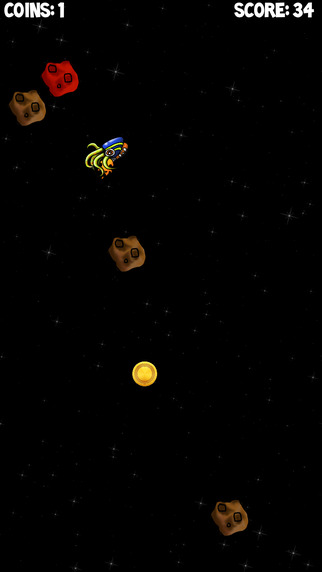
Independent developer John Torres announces the release of Space Squid 1.0 for iOS device. Space Squid is a unique twist on classic arcade game play! Tap to guide the squid through deep space, and avoid space objects at all costs! Collect coins to earn lives, and compete with the world for the highest score on the leaderboard! See how you stack up against your friends and the world on the Game Center leaderboards, or share your high scores on Facebook and Twitter.
Sacramento, California - Independent developer John Torres is proud to announce the release of Space Squid 1.0 for iOS device. Space Squid is a unique twist on classic arcade game play! Tap to guide the squid through deep space, and avoid space objects at all costs! Collect coins to earn lives, and compete with the world for the highest score on the leaderboard! See how you stack up against your friends and the world on the Game Center leaderboards, or share your high scores with your friends and family on Facebook and Twitter.
Features:
* Game Center leaderboard integration
* Share your high scores
* Targeted for iOS 8
* In-app purchase for ad-free version
Space Squid was developed in Sacramento, California in late 2014 and early 2015. This app was developed and created by John Torres a computer engineering and computer science student in Sacramento, California, with some of the artwork created by John Torres' sister Brennyn Torres, a graduate of Brigham Young University in Fine Arts with a BFA. The app is intended to entertain a wide spectrum of consumers and is a result of passionate programming and modern game development.
Device Requirements:
* iPhone, iPad, and iPod touch
* Optimized for iPhone 5, iPhone 6, and iPhone 6 Plus
* Requires iOS 8.0 or later
* 10.6 MB
Pricing and Availability:
Space Squid 1.0 is free, and is available worldwide exclusively through the App Store in the Games category. An in-app purchase is available to remove ads.
John Andrew Torres: http://www.johnandrewtorres.com/
Download: https://itunes.apple.com/app/space-squid/id944587506
Space Squid 1.0: http://www.johnandrewtorres.com/products/
Screenshot: http://a5.mzstatic.com/us/r30/Purple5/v4/dd/76/cb/dd76cb68-1bcd-f1e2-abbc-266818f3dc6c/screen322x572.jpeg
App Icon: http://a2.mzstatic.com/us/r30/Purple5/v4/b9/6c/15/b96c15fd-3607-7f84-1266-979a64dba0c9/icon175x175.png
John Torres is a programmer specializing in mobile development. He is a computer engineering student and avid programmer. When not working on homework, an app, or being a dad, he documents his work and learning to help inspire others to create and develop. All Material and Software Copyright (C) 2015 John Torres. All Rights Reserved. Apple, the Apple logo, iPhone, iPad and iPod are registered trademarks of Apple Inc. in the U.S. and/or other countries.
*******
Link To Article: http://prmac.com/release-id-75260.htm
*******
---------------------------------------------------------------------------------
Note that you can alter delivered distributions at any time.
Login to your account on prMac to alter your channel selection, or to opt-out at any time.
Space Squid for iOS - Guide Your Squid Through Deep Space - Published on 06/04/15
Independent developer John Torres announces the release of Space Squid 1.0 for iOS device. Space Squid is a unique twist on classic arcade game play! Tap to guide the squid through deep space, and avoid space objects at all costs! Collect coins to earn lives, and compete with the world for the highest score on the leaderboard! See how you stack up against your friends and the world on the Game Center leaderboards, or share your high scores on Facebook and Twitter.
Sacramento, California - Independent developer John Torres is proud to announce the release of Space Squid 1.0 for iOS device. Space Squid is a unique twist on classic arcade game play! Tap to guide the squid through deep space, and avoid space objects at all costs! Collect coins to earn lives, and compete with the world for the highest score on the leaderboard! See how you stack up against your friends and the world on the Game Center leaderboards, or share your high scores with your friends and family on Facebook and Twitter.
Features:
* Game Center leaderboard integration
* Share your high scores
* Targeted for iOS 8
* In-app purchase for ad-free version
Space Squid was developed in Sacramento, California in late 2014 and early 2015. This app was developed and created by John Torres a computer engineering and computer science student in Sacramento, California, with some of the artwork created by John Torres' sister Brennyn Torres, a graduate of Brigham Young University in Fine Arts with a BFA. The app is intended to entertain a wide spectrum of consumers and is a result of passionate programming and modern game development.
Device Requirements:
* iPhone, iPad, and iPod touch
* Optimized for iPhone 5, iPhone 6, and iPhone 6 Plus
* Requires iOS 8.0 or later
* 10.6 MB
Pricing and Availability:
Space Squid 1.0 is free, and is available worldwide exclusively through the App Store in the Games category. An in-app purchase is available to remove ads.
John Andrew Torres: http://www.johnandrewtorres.com/
Download: https://itunes.apple.com/app/space-squid/id944587506
Space Squid 1.0: http://www.johnandrewtorres.com/products/
Screenshot: http://a5.mzstatic.com/us/r30/Purple5/v4/dd/76/cb/dd76cb68-1bcd-f1e2-abbc-266818f3dc6c/screen322x572.jpeg
App Icon: http://a2.mzstatic.com/us/r30/Purple5/v4/b9/6c/15/b96c15fd-3607-7f84-1266-979a64dba0c9/icon175x175.png

John Torres is a programmer specializing in mobile development. He is a computer engineering student and avid programmer. When not working on homework, an app, or being a dad, he documents his work and learning to help inspire others to create and develop. All Material and Software Copyright (C) 2015 John Torres. All Rights Reserved. Apple, the Apple logo, iPhone, iPad and iPod are registered trademarks of Apple Inc. in the U.S. and/or other countries.
*******
Link To Article: http://prmac.com/release-id-75260.htm
*******
---------------------------------------------------------------------------------
Note that you can alter delivered distributions at any time.
Login to your account on prMac to alter your channel selection, or to opt-out at any time.
2 Turntables and a Microphone 3.1 - iPad DJ App with Pro Loop Technology
A new article has been published at prMac.
2 Turntables and a Microphone 3.1 - iPad DJ App with Pro Loop Technology - Published on 06/04/15
Sprightly Software today announces 2 Turntables and a Microphone 3.1, an update to their highly advanced DJ setup for iPad. This music creation app features pro decks, crafted to reproduce the subtle dynamics of vinyl. Whether it's creating original music, recording live loops, remixing, or live DJing, 2 Turntables offers everything needed to produce professional quality music. Version 3.1 combines digital loop technology and turntablism, bringing music into the space age of creative expression.
Gibsons (BC) Canada - Today Sprightly Software introduces 2 Turntables and a Microphone 3.1 for iPad. This highly advanced DJ setup features pro decks, crafted to reproduce the subtle dynamics of vinyl. The new version combines digital loop technology and turntablism, bringing music into the space age of creative expression. The version 3.1 update expands hardware support to all iPad devices running iOS 8 or later. This update also provides performance, stability, and sound quality refinements, furthering the development of this modern DJ app.
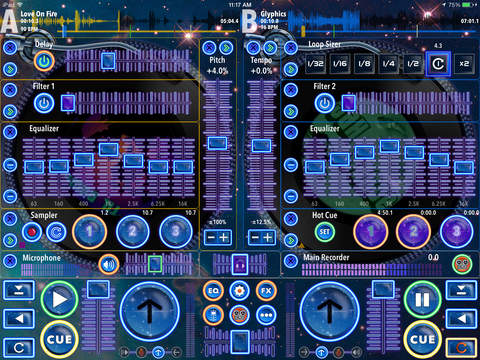
Whether it's creating original music, recording live loops, remixing, or live DJing, 2 Turntables offers everything needed to produce professional quality music. The app allows users to perform traditional turntable techniques like the Flare and Crab scratch with its innovative crossfader controls.
DJs can now bring looping up to the next level with multiple looping methods, including cue, resize, and save. Users can easily create loops from any audio recording in the studio or during performance.
The live microphone invites endless possibilities, from creating samples to mixing in live performers. Using headphones, DJs can cue up tracks and monitor the microphone during live performances. Users will enjoy the versatility of the samplers, hot cues, effects, scratching, and manual beat-matching.
This is one of the most versatile and powerful music creation apps available. 2 Turntables brings a unique approach to easily managing and organizing tracks in its iTunes-integrated music library. The app's thoughtful design allows for maximum creativity and limitless possibilities. It's amazing what can be done with just 2 Turntables and a Microphone!
Available in these Languages:
* English, Chinese, Dutch, French, German, Italian, Japanese, Portuguese and Spanish
Device Requirements:
* Compatible with iPad
* Requires iOS 8 or later
* 340 MB
Pricing and Availability:
2 Turntables and a Microphone 3.1 is on sale starting today. It's only $4.99 (USD) for a limited time and is available worldwide through the App Store. There is also a Lite version available.
2 Turntables and a Microphone 3.1: https://2turntables.com
Purchase and Download: https://itunes.apple.com/app/apple-store/id948180246
Download from iTunes: https://itunes.apple.com/app/apple-store/id903105645
YouTube Video: https://www.youtube.com/watch?v=QWLCuHyOUy8
Screenshot: http://a5.mzstatic.com/us/r30/Purple5/v4/f3/15/49/f31549ca-f24e-c125-d46a-523b5526d7f2/screen480x480.jpeg
App Icon: http://a1.mzstatic.com/us/r30/Purple3/v4/26/4e/b3/264eb382-85f0-8bce-f769-432af7e0769f/icon175x175.png
Located on the beautiful Sunshine Coast in British Columbia, Canada, Sprightly Software is an innovative, energetic, and enterprising software development company. Sprightly creates cutting-edge professional audio software that allows users to unlock their creative potential by mixing modern concepts with contemporary ideals. Copyright (C) 2015 Sprightly Software. All Rights Reserved. Apple, the Apple logo, iPhone, iPod, iPad and Macintosh are registered trademarks of Apple Inc. in the U.S. and/or other countries.
*******
Link To Article: http://prmac.com/release-id-75265.htm
*******
---------------------------------------------------------------------------------
Note that you can alter delivered distributions at any time.
Login to your account on prMac to alter your channel selection, or to opt-out at any time.
2 Turntables and a Microphone 3.1 - iPad DJ App with Pro Loop Technology - Published on 06/04/15
Sprightly Software today announces 2 Turntables and a Microphone 3.1, an update to their highly advanced DJ setup for iPad. This music creation app features pro decks, crafted to reproduce the subtle dynamics of vinyl. Whether it's creating original music, recording live loops, remixing, or live DJing, 2 Turntables offers everything needed to produce professional quality music. Version 3.1 combines digital loop technology and turntablism, bringing music into the space age of creative expression.
Gibsons (BC) Canada - Today Sprightly Software introduces 2 Turntables and a Microphone 3.1 for iPad. This highly advanced DJ setup features pro decks, crafted to reproduce the subtle dynamics of vinyl. The new version combines digital loop technology and turntablism, bringing music into the space age of creative expression. The version 3.1 update expands hardware support to all iPad devices running iOS 8 or later. This update also provides performance, stability, and sound quality refinements, furthering the development of this modern DJ app.
Whether it's creating original music, recording live loops, remixing, or live DJing, 2 Turntables offers everything needed to produce professional quality music. The app allows users to perform traditional turntable techniques like the Flare and Crab scratch with its innovative crossfader controls.
DJs can now bring looping up to the next level with multiple looping methods, including cue, resize, and save. Users can easily create loops from any audio recording in the studio or during performance.
The live microphone invites endless possibilities, from creating samples to mixing in live performers. Using headphones, DJs can cue up tracks and monitor the microphone during live performances. Users will enjoy the versatility of the samplers, hot cues, effects, scratching, and manual beat-matching.
This is one of the most versatile and powerful music creation apps available. 2 Turntables brings a unique approach to easily managing and organizing tracks in its iTunes-integrated music library. The app's thoughtful design allows for maximum creativity and limitless possibilities. It's amazing what can be done with just 2 Turntables and a Microphone!
Available in these Languages:
* English, Chinese, Dutch, French, German, Italian, Japanese, Portuguese and Spanish
Device Requirements:
* Compatible with iPad
* Requires iOS 8 or later
* 340 MB
Pricing and Availability:
2 Turntables and a Microphone 3.1 is on sale starting today. It's only $4.99 (USD) for a limited time and is available worldwide through the App Store. There is also a Lite version available.
2 Turntables and a Microphone 3.1: https://2turntables.com
Purchase and Download: https://itunes.apple.com/app/apple-store/id948180246
Download from iTunes: https://itunes.apple.com/app/apple-store/id903105645
YouTube Video: https://www.youtube.com/watch?v=QWLCuHyOUy8
Screenshot: http://a5.mzstatic.com/us/r30/Purple5/v4/f3/15/49/f31549ca-f24e-c125-d46a-523b5526d7f2/screen480x480.jpeg
App Icon: http://a1.mzstatic.com/us/r30/Purple3/v4/26/4e/b3/264eb382-85f0-8bce-f769-432af7e0769f/icon175x175.png

Located on the beautiful Sunshine Coast in British Columbia, Canada, Sprightly Software is an innovative, energetic, and enterprising software development company. Sprightly creates cutting-edge professional audio software that allows users to unlock their creative potential by mixing modern concepts with contemporary ideals. Copyright (C) 2015 Sprightly Software. All Rights Reserved. Apple, the Apple logo, iPhone, iPod, iPad and Macintosh are registered trademarks of Apple Inc. in the U.S. and/or other countries.
*******
Link To Article: http://prmac.com/release-id-75265.htm
*******
---------------------------------------------------------------------------------
Note that you can alter delivered distributions at any time.
Login to your account on prMac to alter your channel selection, or to opt-out at any time.
Enjoy Each Meaningful Drip in Sea of Social Media Content With Dripthat
A new article has been published at prMac.
Enjoy Each Meaningful Drip in Sea of Social Media Content With Dripthat - Published on 06/04/15
Dallas based Dripthat LLC has announced dripthat 1.01 for iOS, a revolutionary new app for sharing photos and videos. dripthat delivers new ways to be creative with the content people love to share. With its advanced photo and video sharing features and attention to privacy, dripthat is a complete social content sharing app, giving people total control over what content is included, who can see it and when it is shared. Easily find and arrange images and videos into story albums and more.
Dallas, Texas - Dripthat LLC has announced the release and immediate availability of dripthat 1.01 for the iPhone, a revolutionary new app for sharing photos and videos, delivering new ways to be creative with the content people love to share. With its advanced photo and video sharing features and attention to privacy, dripthat is a complete social content sharing app, giving people total control over what content is included, who can see it, and when it is shared.
The photo and video content that floods other social media becomes a trickle of meaningful content when shared using dripthat. The dripthat app allows people to easily find and arrange images and videos into story albums and share them in a new and exciting way. For the first time, people can also take videos and sequence them together with photos in shareable albums. Early dripthat users praise the app's ease of use and control features that save them time and make sharing and receiving content more enjoyable than ever.
"Dripthat makes it really easy for us to share content with the public as well as with close friends and family," said Andres, father of the Eh Bee family, a pioneering social media celebrity with more than 1.7 million followers on Vine, and an early dripthat user. "Being a family on social media today is time consuming and dripthat's unique platform makes it easy to manage and distribute our content even when we are on the go."
ADDING TEMPO
Books have chapters, television programs have episodes, and comic strips have panels. With dripthat, a person can not only choose what content to share, but arrange it in a specific order and set a tempo for when each new photo or video appears in the stream. The interval that content can be "dripped" can be mere minutes to as long as 90 days. Photos and videos in albums can also be shared all at once.
Features:
* First app to combine photos and videos in the same album
* Superior privacy settings ensure content is seen only by the people selected to view it
* Adds tempo to content sharing, letting people select when their content is seen
* Combine photos and videos in the same albums
* Superior privacy settings
* Hide specific people from being seen on lists of followers
* Unique in-app camera that creates albums that are immediately shareable
* Edit videos, crop photos or add filters before sharing
* Share content with specific people or groups without awkwardly defining relationships or permanently placing people in circles
* Precision sharing controls - photos and videos in "shareable" albums can be shared, downloaded and saved as screen shots; items in "not shareable" albums cannot
* Easy search and discovery of content and people to follow
People can direct their photo and video content to specific individuals or groups of people, better assuring that content is seen. People can also turn on and off feeds in order to see albums from only the people they want. Content can be shared privately or publicly, and the content creator can allow or prevent their images and videos from being re-shared to third parties.
Device Requirements:
* iPhone, iPad, and iPod touch
* Optimized for iPhone 5, iPhone 6/6 Plus
* Requires iOS 8.0 or later
* 11.7 MB
Pricing and Availability:
Dripthat 1.01 is free available worldwide, exclusively through the App Store i the Photo and Video category. Android and Windows Phone versions are expected later this year.
dripthat 1.01: http://www.dripthat.com/
Download from iTunes: https://itunes.apple.com/app/dripthat/id982911292
YouTube Video: https://www.youtube.com/watch?v=xWIiotlW_qQ
Media Assets: http://dripthat.mobilitypr.com/
App Icon: http://www.mobilitypr.com/clients/sites/default/files/company/gallery/Media%20browser/dripthaticon_highres_0.jpg
Press Kit (zip): http://www.mobilitypr.com/clients/sites/default/files/files/dripthat_screenshots.zip
Dripthat was founded in Dallas in 2014. Dripthat is giving people complete control over what content is shared, when it is shared and with whom. Copyright (C) 2015 Dripthat LLC. All Rights Reserved. Apple, the Apple logo, iPhone, iPad and iPod are registered trademarks of Apple Inc. in the U.S. and/or other countries.
*******
Link To Article: http://prmac.com/release-id-75218.htm
*******
---------------------------------------------------------------------------------
Note that you can alter delivered distributions at any time.
Login to your account on prMac to alter your channel selection, or to opt-out at any time.
Enjoy Each Meaningful Drip in Sea of Social Media Content With Dripthat - Published on 06/04/15
Dallas based Dripthat LLC has announced dripthat 1.01 for iOS, a revolutionary new app for sharing photos and videos. dripthat delivers new ways to be creative with the content people love to share. With its advanced photo and video sharing features and attention to privacy, dripthat is a complete social content sharing app, giving people total control over what content is included, who can see it and when it is shared. Easily find and arrange images and videos into story albums and more.
Dallas, Texas - Dripthat LLC has announced the release and immediate availability of dripthat 1.01 for the iPhone, a revolutionary new app for sharing photos and videos, delivering new ways to be creative with the content people love to share. With its advanced photo and video sharing features and attention to privacy, dripthat is a complete social content sharing app, giving people total control over what content is included, who can see it, and when it is shared.
The photo and video content that floods other social media becomes a trickle of meaningful content when shared using dripthat. The dripthat app allows people to easily find and arrange images and videos into story albums and share them in a new and exciting way. For the first time, people can also take videos and sequence them together with photos in shareable albums. Early dripthat users praise the app's ease of use and control features that save them time and make sharing and receiving content more enjoyable than ever.
"Dripthat makes it really easy for us to share content with the public as well as with close friends and family," said Andres, father of the Eh Bee family, a pioneering social media celebrity with more than 1.7 million followers on Vine, and an early dripthat user. "Being a family on social media today is time consuming and dripthat's unique platform makes it easy to manage and distribute our content even when we are on the go."
ADDING TEMPO
Books have chapters, television programs have episodes, and comic strips have panels. With dripthat, a person can not only choose what content to share, but arrange it in a specific order and set a tempo for when each new photo or video appears in the stream. The interval that content can be "dripped" can be mere minutes to as long as 90 days. Photos and videos in albums can also be shared all at once.
Features:
* First app to combine photos and videos in the same album
* Superior privacy settings ensure content is seen only by the people selected to view it
* Adds tempo to content sharing, letting people select when their content is seen
* Combine photos and videos in the same albums
* Superior privacy settings
* Hide specific people from being seen on lists of followers
* Unique in-app camera that creates albums that are immediately shareable
* Edit videos, crop photos or add filters before sharing
* Share content with specific people or groups without awkwardly defining relationships or permanently placing people in circles
* Precision sharing controls - photos and videos in "shareable" albums can be shared, downloaded and saved as screen shots; items in "not shareable" albums cannot
* Easy search and discovery of content and people to follow
People can direct their photo and video content to specific individuals or groups of people, better assuring that content is seen. People can also turn on and off feeds in order to see albums from only the people they want. Content can be shared privately or publicly, and the content creator can allow or prevent their images and videos from being re-shared to third parties.
Device Requirements:
* iPhone, iPad, and iPod touch
* Optimized for iPhone 5, iPhone 6/6 Plus
* Requires iOS 8.0 or later
* 11.7 MB
Pricing and Availability:
Dripthat 1.01 is free available worldwide, exclusively through the App Store i the Photo and Video category. Android and Windows Phone versions are expected later this year.
dripthat 1.01: http://www.dripthat.com/
Download from iTunes: https://itunes.apple.com/app/dripthat/id982911292
YouTube Video: https://www.youtube.com/watch?v=xWIiotlW_qQ
Media Assets: http://dripthat.mobilitypr.com/
App Icon: http://www.mobilitypr.com/clients/sites/default/files/company/gallery/Media%20browser/dripthaticon_highres_0.jpg

Press Kit (zip): http://www.mobilitypr.com/clients/sites/default/files/files/dripthat_screenshots.zip
Dripthat was founded in Dallas in 2014. Dripthat is giving people complete control over what content is shared, when it is shared and with whom. Copyright (C) 2015 Dripthat LLC. All Rights Reserved. Apple, the Apple logo, iPhone, iPad and iPod are registered trademarks of Apple Inc. in the U.S. and/or other countries.
*******
Link To Article: http://prmac.com/release-id-75218.htm
*******
---------------------------------------------------------------------------------
Note that you can alter delivered distributions at any time.
Login to your account on prMac to alter your channel selection, or to opt-out at any time.
Subscribe to:
Posts (Atom)