A new article has been published at prMac.
Mellel 3.4 adds advanced export options, and language switching - Published on 06/24/15
RedleX has announced Mellel 3.4, an important update to their popular word processor for Mac OS X. Available in a Regular, Educational, and Lite version, Mellel offers an unparalleled set of features allowing anyone to control how their document looks, including page, section, paragraph, and character styles, auto-titles, lists, footnotes, endnotes and more. Version 3.4 introduces enhanced export to PDF, various improvements for language switching, excelarated FindSets, and more.
Tel Aviv, Israel - RedleX has announced the release of Mellel 3.4, an important update to their popular flagship word processor for Mac OS X. Released June 15, 2015 as a download product and at the Mac App Store, version 3.4 introduces enhanced export to PDF, various improvements for language switching, excelarated FindSets, and more. Mellel 3.4, is available in a Regular, Educational, and Lite version.
Mellel 3.4 allows users to export the Outline content to PDF, so every heading in the document will be exported as part of the Table of content in a PDF. Mellel also allows exporting to PDF and printing of annotations in the text. Also new with this version is a more streamlined support for language switching and language detection, especially when pasting or importing text.
Other improvements in Mellel 3.4 include 64/32 bit universal binary making Spotlight happier with Mellel; improved FindSet interaction, including faster performance, ability to stop FindSets while performing, and various minor improvements and bug fixes.
Mellel 3.4 is released concurrently with Mellel for iPad, a sibling version of Mellel for iPads. Mellel for iPad supports display of all the features in Mellel 3.4, with easy moving back and forth between the two versions. Future versions of Mellel for iPad will include an enhanced set of features drawn from Mellel for Mac. For a complete list of all the new features and improvements with Mellel 3.4 for Mac visit their website.
Mellel 3.4: http://www.mellel.com/mellel
Release Notes: http://www.mellel.com/relese-notes-latest
Download Mellel: http://www.mellel.com/thanks-for-downloading
Mellel Store: http://sites.fastspring.com/mellel/product/buy_mellel
Purchase and Download (MAS): https://itunes.apple.com/us/app/mellel/id415467848?mt=12
Application Icon: http://mellel.other.s3.amazonaws.com/mellelicon.png
RedleX develops software. It was founded in 2002 by Eyal and Ori Redler. The company is privately held and headquartered in Tel Aviv, Israel. Copyright (C) 2002-2015 RedleX. All Rights Reserved. Apple, the Apple logo, iPhone, iPad, iPod and Macintosh are registered trademarks of Apple Inc. in the U.S. and/or other countries.
*******
Link To Article: http://prmac.com/release-id-75502.htm
*******
---------------------------------------------------------------------------------
Note that you can alter delivered distributions at any time.
Login to your account on prMac to alter your channel selection, or to opt-out at any time.


Mellel for iPad: the advanced word-processor gets an iPad debut
A new article has been published at prMac.
Mellel for iPad: the advanced word-processor gets an iPad debut - Published on 06/24/15
RedleX has announced Mellel 3.4, the iPad version of their popular word processor. Mellel for iPad brings power and sophistication in word-processing to the iPad. The app offers advanced features such as auto-titles, outline, paragraph, character, page and section styles, tables, track-changes, comments and statistics, and more. Mellel for iPad introduces several innovative features, and complete compatibility with its sibling, the acclaimed Mellel for Mac.
Tel Aviv, Israel - Mellel for iPad, brings the power and sophistication to word-processing on the iPad. Developed by RedleX, Mellel for iPad introduces several innovative features, and the power and reliability that made its sibling, the acclaimed Mellel for Mac, the word-processor of choice for long document writing on the Mac. Mellel for iPad is now available at the App store.
Mellel for iPad fills a distinct void. There are numerous writing applications for iPad - but none fits the specific requirements of iPad users who wish to enjoy a writing tool that can handle and manage long and complex documents. Mellel for iPad offers advanced features such as Auto-titles, Outline, Paragraph, Character, Page and Section styles, Tables, Track-changes, Comments and Statistics, and in addition offers complete compatibility with the advanced word-processor Mellel for Mac. That means elements such as citations, cross-reference, find and replace, multi-lingual features, and a host of other features do not 'get lost' when moving between iPad and the Mac.
Mellel for iPad introduces several features unique features. Its Outline enables users to navigate a long document with ease, hoping from one heading or caption to the other. To makes navigation even easier, one can zoom out to a 2 or 4Up view, making things easy skipping between various parts of a document.
One of the tasks regularly performed by iPad users is tweaking, commenting and fixing existing documents, created elsewhere or by others. Mellel for iPad offers users the ability to track changes (i.e., enter changes which are provisory until accepted) and comments. Users can also highlight text with Markers.
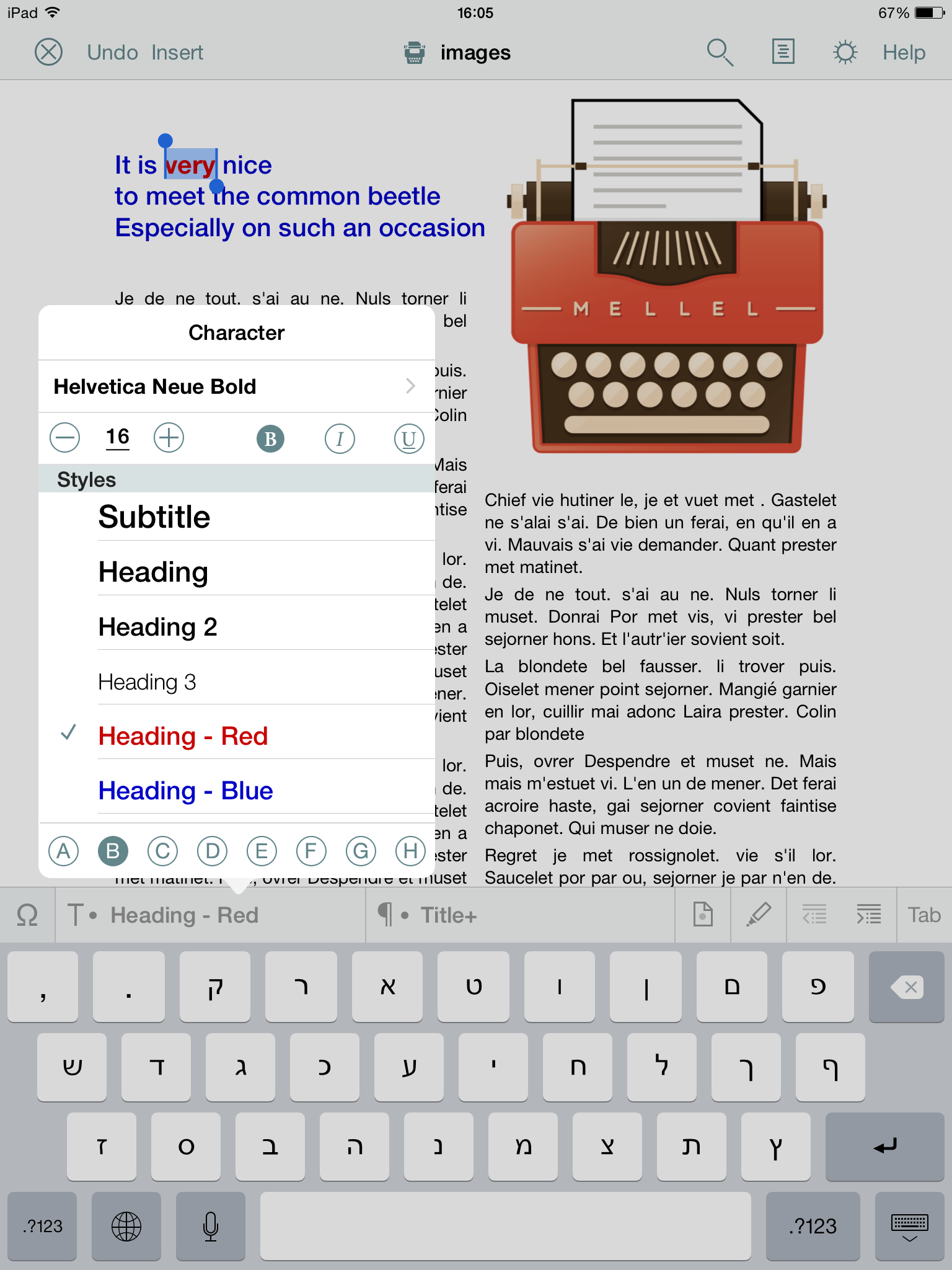
Styles are the bane of word processing. They rarely work as expected, and when they do, they are rarely consistent. Mellel for the Mac have always emphasised consistency, neatly separating the paragraph and character styles. As a result, styles in Mellel do not muddle the results but help keep them consistent. Mellel for iPad carries on this tradition, supporting styles from its Mac sibling and making it easy to use and apply styles in a document.
Another feature in Mellel is support for special keyboards, allowing access to some handy Math and Numbers, Signs and Symbols, Accents, and Polytonic Greek characters, and even Hebrew points and trope marks, sorely missed with word-processors on iPad until now.
In addition to those, Mellel for iPad offers supports for Lists, smart word count (you can enjoy statistics for just about every element, from images to hyperlinks, paragraphs or lines), notes (footnotes, endnotes, and author notes, and so on), lists, paragraph and character styling, tables, break marks, and so on.
To wrap things up, Mellel for iPad fully supports the display of every feature from Mellel for the Mac. For example, citations, cross-references and custom-tailored headings created on the Mac will display correctly on iPad and will be returned, unharmed, after editing. Documents can be exported via eMail and cloud apps (e.g., DropBox or Box). Documents can also be moved between places (folders) on the iPad, so they're available from any other machine via iCloud.
Device Requirements:
* Compatible with iPad
* Requires iOS 8.1 or later
* 7.3 MB
Pricing and Availability:
Mellel for iPad 3.4 is $19.99 USD (or equivalent amount in other currencies) and available worldwide through the App Store in the Productivity category.
RedleX: http://www.mellel.com/
Mellel for iPad 3.4: http://www.mellel.com/ipad
Purchase and Download: https://itunes.apple.com/us/app/mellel/id986769180
Screenshot A: http://mellel.other.s3.amazonaws.com/IMG_0191.PNG
Screenshot B: http://mellel.other.s3.amazonaws.com/IMG_0190.PNG
App Icon: http://mellel.other.s3.amazonaws.com/1000x1000.png
RedleX develops software. It was founded in 2002 by Eyal and Ori Redler. The company is privately held and headquartered in Tel Aviv, Israel. Copyright (C) 2002-2015 RedleX. All Rights Reserved. Apple, the Apple logo, iPhone, iPad, iPod and Macintosh are registered trademarks of Apple Inc. in the U.S. and/or other countries.
*******
Link To Article: http://prmac.com/release-id-75501.htm
*******
---------------------------------------------------------------------------------
Note that you can alter delivered distributions at any time.
Login to your account on prMac to alter your channel selection, or to opt-out at any time.
Mellel for iPad: the advanced word-processor gets an iPad debut - Published on 06/24/15
RedleX has announced Mellel 3.4, the iPad version of their popular word processor. Mellel for iPad brings power and sophistication in word-processing to the iPad. The app offers advanced features such as auto-titles, outline, paragraph, character, page and section styles, tables, track-changes, comments and statistics, and more. Mellel for iPad introduces several innovative features, and complete compatibility with its sibling, the acclaimed Mellel for Mac.
Tel Aviv, Israel - Mellel for iPad, brings the power and sophistication to word-processing on the iPad. Developed by RedleX, Mellel for iPad introduces several innovative features, and the power and reliability that made its sibling, the acclaimed Mellel for Mac, the word-processor of choice for long document writing on the Mac. Mellel for iPad is now available at the App store.
Mellel for iPad fills a distinct void. There are numerous writing applications for iPad - but none fits the specific requirements of iPad users who wish to enjoy a writing tool that can handle and manage long and complex documents. Mellel for iPad offers advanced features such as Auto-titles, Outline, Paragraph, Character, Page and Section styles, Tables, Track-changes, Comments and Statistics, and in addition offers complete compatibility with the advanced word-processor Mellel for Mac. That means elements such as citations, cross-reference, find and replace, multi-lingual features, and a host of other features do not 'get lost' when moving between iPad and the Mac.
Mellel for iPad introduces several features unique features. Its Outline enables users to navigate a long document with ease, hoping from one heading or caption to the other. To makes navigation even easier, one can zoom out to a 2 or 4Up view, making things easy skipping between various parts of a document.
One of the tasks regularly performed by iPad users is tweaking, commenting and fixing existing documents, created elsewhere or by others. Mellel for iPad offers users the ability to track changes (i.e., enter changes which are provisory until accepted) and comments. Users can also highlight text with Markers.
Styles are the bane of word processing. They rarely work as expected, and when they do, they are rarely consistent. Mellel for the Mac have always emphasised consistency, neatly separating the paragraph and character styles. As a result, styles in Mellel do not muddle the results but help keep them consistent. Mellel for iPad carries on this tradition, supporting styles from its Mac sibling and making it easy to use and apply styles in a document.
Another feature in Mellel is support for special keyboards, allowing access to some handy Math and Numbers, Signs and Symbols, Accents, and Polytonic Greek characters, and even Hebrew points and trope marks, sorely missed with word-processors on iPad until now.
In addition to those, Mellel for iPad offers supports for Lists, smart word count (you can enjoy statistics for just about every element, from images to hyperlinks, paragraphs or lines), notes (footnotes, endnotes, and author notes, and so on), lists, paragraph and character styling, tables, break marks, and so on.
To wrap things up, Mellel for iPad fully supports the display of every feature from Mellel for the Mac. For example, citations, cross-references and custom-tailored headings created on the Mac will display correctly on iPad and will be returned, unharmed, after editing. Documents can be exported via eMail and cloud apps (e.g., DropBox or Box). Documents can also be moved between places (folders) on the iPad, so they're available from any other machine via iCloud.
Device Requirements:
* Compatible with iPad
* Requires iOS 8.1 or later
* 7.3 MB
Pricing and Availability:
Mellel for iPad 3.4 is $19.99 USD (or equivalent amount in other currencies) and available worldwide through the App Store in the Productivity category.
RedleX: http://www.mellel.com/
Mellel for iPad 3.4: http://www.mellel.com/ipad
Purchase and Download: https://itunes.apple.com/us/app/mellel/id986769180
Screenshot A: http://mellel.other.s3.amazonaws.com/IMG_0191.PNG

Screenshot B: http://mellel.other.s3.amazonaws.com/IMG_0190.PNG
App Icon: http://mellel.other.s3.amazonaws.com/1000x1000.png

RedleX develops software. It was founded in 2002 by Eyal and Ori Redler. The company is privately held and headquartered in Tel Aviv, Israel. Copyright (C) 2002-2015 RedleX. All Rights Reserved. Apple, the Apple logo, iPhone, iPad, iPod and Macintosh are registered trademarks of Apple Inc. in the U.S. and/or other countries.
*******
Link To Article: http://prmac.com/release-id-75501.htm
*******
---------------------------------------------------------------------------------
Note that you can alter delivered distributions at any time.
Login to your account on prMac to alter your channel selection, or to opt-out at any time.
CS Odessa Releases Azure Architecture Solution for ConceptDraw PRO v10
A new article has been published at prMac.
CS Odessa Releases Azure Architecture Solution for ConceptDraw PRO v10 - Published on 06/24/15
CS Odessa has announced a new addition to ConceptDraw Solution Park designed to document Microsoft Azure cloud implementations. The collection of library objects, templates, and example drawings for ConceptDraw PRO make short work of describing any business' cloud implementation. The ConceptDraw PRO Azure Architecture Solution is available at no charge to users of ConceptDraw PRO v10 and ConceptDraw Office v3, via ConceptDraw Solution Park.
San Jose, California - CS Odessa's newest addition to ConceptDraw Solution Park is designed to document Microsoft Azure cloud implementations. The collection of library objects, templates, and example drawings for ConceptDraw PRO make short work of describing any business' cloud implementation. The ConceptDraw PRO Azure Architecture Solution is available at no charge to users of ConceptDraw PRO v10 and ConceptDraw Office v3, via ConceptDraw Solution Park. ConceptDraw PRO and ConceptDraw Office work with the latest versions of both Apple OS X and Microsoft Windows.
The Azure Architecture Solution for ConceptDraw PRO includes 6 libraries with 242 scalable objects that can be used to describe Azure management, Azure storage, and Azure services and can be used to illustrate diagrams with any level of detail desired.
ConceptDraw PRO is well-known for its ability to exchange documents with Microsoft Visio - the de facto standard in business graphics documents. ConceptDraw PRO can open and save documents that can be used by Visio users. It is supported by the powerful business solutions located in ConceptDraw Solution Park, and retails for only $199 per end user license.
ConceptDraw Office v3 is the third generation suite of ConceptDraw products that uses ConceptDraw InGyre3 integration technology to share data between its applications, allowing you to switch gears for different tasks more quickly. ConceptDraw Office v3 includes ConceptDraw MINDMAP v8, ConceptDraw PROJECT v7, ConceptDraw PRO v10, and the ConceptDraw Solution Park with more than 130 Solutions to power you through difficult and time consuming tasks. ConceptDraw Office retails for $499 and can be purchased directly from CS Odessa or their resellers. The ConceptDraw Office suite is designed for knowledge workers, project managers, managers, and academics.
ConceptDraw PRO v10: http://www.conceptdraw.com/products/drawing-tool
ConceptDraw Solution Park: http://www.conceptdraw.com/solution-park/
ConceptDraw Azure Architecture Solution: http://www.conceptdraw.com/solution-park/computer-networks-azure-architecture
Download Free Trial: https://my.conceptdraw.com/registration/
Purchase: https://my.conceptdraw.com/buy/pricing_purchasing.php
Screenshot: http://www.conceptdraw.com/samples_2015/resource/images/solutions//Computer-and-Networks-Azure-Windows-Azure-Network-and-Computes-Architecture.png
Founded in 1993, Computer Systems Odessa supplies cross-platform productivity tools and graphic technologies to professional and corporate users around the world. From their headquarters in Odessa, Ukraine, and offices in San Jose, CA, and Boston, MA, CS Odessa sells internationally in over 150 countries, both directly and through resellers. The ConceptDraw Productivity Line has won numerous awards and is used by hundreds of thousands, including Fortune 500 companies, U.S. Federal Government agencies, small and medium businesses, and students and educators around the globe. Computer Systems Odessa. ConceptDraw is a registered trademark, and ConceptDraw Office, ConceptDraw Solution Park, ConceptDraw PRO, ConceptDraw MINDMAP, ConceptDraw PROJECT, and ConceptDraw Solution Browser are trademarks of CS Odessa. All other trademarks and registered trademarks are the properties of their respective owners.
*******
Link To Article: http://prmac.com/release-id-75500.htm
*******
---------------------------------------------------------------------------------
Note that you can alter delivered distributions at any time.
Login to your account on prMac to alter your channel selection, or to opt-out at any time.
CS Odessa Releases Azure Architecture Solution for ConceptDraw PRO v10 - Published on 06/24/15
CS Odessa has announced a new addition to ConceptDraw Solution Park designed to document Microsoft Azure cloud implementations. The collection of library objects, templates, and example drawings for ConceptDraw PRO make short work of describing any business' cloud implementation. The ConceptDraw PRO Azure Architecture Solution is available at no charge to users of ConceptDraw PRO v10 and ConceptDraw Office v3, via ConceptDraw Solution Park.
San Jose, California - CS Odessa's newest addition to ConceptDraw Solution Park is designed to document Microsoft Azure cloud implementations. The collection of library objects, templates, and example drawings for ConceptDraw PRO make short work of describing any business' cloud implementation. The ConceptDraw PRO Azure Architecture Solution is available at no charge to users of ConceptDraw PRO v10 and ConceptDraw Office v3, via ConceptDraw Solution Park. ConceptDraw PRO and ConceptDraw Office work with the latest versions of both Apple OS X and Microsoft Windows.
The Azure Architecture Solution for ConceptDraw PRO includes 6 libraries with 242 scalable objects that can be used to describe Azure management, Azure storage, and Azure services and can be used to illustrate diagrams with any level of detail desired.
ConceptDraw PRO is well-known for its ability to exchange documents with Microsoft Visio - the de facto standard in business graphics documents. ConceptDraw PRO can open and save documents that can be used by Visio users. It is supported by the powerful business solutions located in ConceptDraw Solution Park, and retails for only $199 per end user license.
ConceptDraw Office v3 is the third generation suite of ConceptDraw products that uses ConceptDraw InGyre3 integration technology to share data between its applications, allowing you to switch gears for different tasks more quickly. ConceptDraw Office v3 includes ConceptDraw MINDMAP v8, ConceptDraw PROJECT v7, ConceptDraw PRO v10, and the ConceptDraw Solution Park with more than 130 Solutions to power you through difficult and time consuming tasks. ConceptDraw Office retails for $499 and can be purchased directly from CS Odessa or their resellers. The ConceptDraw Office suite is designed for knowledge workers, project managers, managers, and academics.
ConceptDraw PRO v10: http://www.conceptdraw.com/products/drawing-tool
ConceptDraw Solution Park: http://www.conceptdraw.com/solution-park/
ConceptDraw Azure Architecture Solution: http://www.conceptdraw.com/solution-park/computer-networks-azure-architecture
Download Free Trial: https://my.conceptdraw.com/registration/
Purchase: https://my.conceptdraw.com/buy/pricing_purchasing.php
Screenshot: http://www.conceptdraw.com/samples_2015/resource/images/solutions//Computer-and-Networks-Azure-Windows-Azure-Network-and-Computes-Architecture.png

Founded in 1993, Computer Systems Odessa supplies cross-platform productivity tools and graphic technologies to professional and corporate users around the world. From their headquarters in Odessa, Ukraine, and offices in San Jose, CA, and Boston, MA, CS Odessa sells internationally in over 150 countries, both directly and through resellers. The ConceptDraw Productivity Line has won numerous awards and is used by hundreds of thousands, including Fortune 500 companies, U.S. Federal Government agencies, small and medium businesses, and students and educators around the globe. Computer Systems Odessa. ConceptDraw is a registered trademark, and ConceptDraw Office, ConceptDraw Solution Park, ConceptDraw PRO, ConceptDraw MINDMAP, ConceptDraw PROJECT, and ConceptDraw Solution Browser are trademarks of CS Odessa. All other trademarks and registered trademarks are the properties of their respective owners.
*******
Link To Article: http://prmac.com/release-id-75500.htm
*******
---------------------------------------------------------------------------------
Note that you can alter delivered distributions at any time.
Login to your account on prMac to alter your channel selection, or to opt-out at any time.
Smart-EZE App Helps Children Retain Math, English, and Reading Skills
A new article has been published at prMac.
Smart-EZE App Helps Children Retain Math, English, and Reading Skills - Published on 06/24/15
Bright Ideas Press has announced Smart-EZE: Minutes A Day - Math, English, and Reading Comprehension Review, its new educational app that contains enhanced, interactive, digital versions of their award winning Summer Solutions Workbooks. Smart-EZE provides the necessary review and practice that allows students to retain important math and language arts skills, not only over the summer break, but for a lifetime. The first Smart-EZE lesson in each subject and grade level is Free.
San Rafael, California - Minutes a Day - Mastery for a Lifetime. Bright Ideas Press, publishers of Simple Solutions and Summer Solutions, has announced the release of its app, Smart-EZE: Minutes A Day - Math, English, and Reading Comprehension Review, that contains enhanced, interactive, digital versions of their award winning Summer Solutions Workbooks.
Many studies indicate that without some form of academic engagement over the summer break, children forget much of what they learned during the previous school year. Smart-EZE provides the necessary review and practice that allows students to retain important math and language arts skills, not only over the summer break, but for a lifetime!
The first Smart-EZE lesson in each subject and grade level is Free. Additional lessons are available for purchase. Smart-EZE for iOS, Android or Kindle can be downloaded immediately.
Features:
* Comprehensive lessons for Math, English Grammar, and Reading, grades 1- 5
* Over 400 interactive questions per subject and grade level
* Capability for parents to track their children's progress
* Student progress reports can be viewed by students and parents
* Animated feedback as the student progresses through lessons
* Supports all learning standards, including traditional as well as common core
* Flexibility - each lesson can be used by up to 5 family members
* Over 1,200 interactive questions for each grade
* First lesson in any subject, any grade is Free
"Parents and teachers who are familiar with the Simple Solutions Approach have anticipated the arrival of a digital and interactive way for their children to use Summer Solutions," says Nancy McGraw, President of Bright Ideas Press. "With the Smart-EZE app, there is now a fun way to build confidence and enthusiasm for math and reading and enable students to actually remember what they've learned over the previous school year."
"We are very excited to partner with Bright Ideas Press to transform their Summer Solutions Workbooks into interactive apps," says Nicole Lundeen, CEO of interactive media publisher FatRedCouch. "We believe in the power of technology to enhance the learning experience. The Smart-EZE app engages students in new ways so they can preserve more of what they have studied."
Summer Solutions Workbooks were first published in January 2004, for math only. Since then, it has expanded to include Original and Common Core Math, Original and Common Core English Grammar, Reading Comprehension, Problem Solving, Study Skills, and Pre-K. Smart-EZE incorporates the most current versions of the Workbooks.
For congratulatory animations, tutorials, and other purposes in Smart-EZE, Bright Ideas Press licensed characters from FatRedCouch. The character Charlie the Chocolate Chihuahua, star of A New Home for Charlie the Chocolate Chihuahua storybook app, and many of the student cheerleaders from the U of Chew, which teaches children healthy food habits, appear in Smart-EZE.
About Bright Ideas Press:
Bright Ideas Press - widely known as Simple Solutions - publishes more than 120 products, all uniquely designed to promote long-term retention. The Simple Solutions Approach was created by former teacher and now company president, Nancy McGraw, whose mission is to instill confidence by offering students a foundation for success through permanent learning. Bright Ideas Press is one of Northeast Ohio's fastest growing companies. Its customers include schools and districts in 47 states, the District of Columbia, and the Bahamas. To learn more, visit Simple Solutions and/or Summer Solutions online.
Device Requirements:
* Compatible with iPad
* Requires iOS 7.0 or later
* 80.0 MB
Pricing and Availability:
Smart-EZE: Minutes A Day - Math, English, and Reading Comprehension Review 1.0 is Free and available worldwide through the App Store in the Education category. There are also versions available for Android and Amazon Kindle. For more information, please visit FatRedCouch online.
Smart-EZE: Minutes A Day - Math, English, and Reading Comprehension Review 1.0: http://fatredcouch.com/products/smart-eze-math-english-and-reading-comprehension-summer-review/
Download from iTunes: https://itunes.apple.com/app/smart-eze-minutes-day-math/id965346440
Download from Google Play: https://play.google.com/store/apps/details?id=air.com.fatredcouch.brightideaspress.smarteze
Download from Amazon: http://www.amazon.com/Smart-EZE-Minutes-English-Reading-Comprehension/dp/B00ZKAVPZY/
Smart-EZE Grade 1 Lesson Examples: https://www.flickr.com/photos/fatredcouch/18214490674/
Smart-EZE Grade 5 Lesson Examples: https://www.flickr.com/photos/fatredcouch/18649326098/
FatRedCouch blends brands and technologies to create innovative entertainment, publishing, and educational experiences using digital platforms and physical goods - Digital Durable. In 2014, the company launched several new products with a blend of classic brands like Puff, the Magic Dragon and new brands such as Charlie the Chocolate Chihuahua and the Magic Toy Maker. This year, FatRedCouch is slated to launch multiple cross-platform new titles, expanding content categories and audience reach through personalization, health, and lifestyle, while extending its Digital + Durable product line with interactive/connected merchandise, toys, and wearables. All Material and Software (C) Copyright 2015 Fat Red Couch, Inc. All Rights Reserved. Apple, the Apple logo, iPhone, iPod and iPad are registered trademarks of Apple Inc. in the U.S. and/or other countries. Other trademarks and registered trademarks may be the property of their respective owners.
*******
Link To Article: http://prmac.com/release-id-75499.htm
*******
---------------------------------------------------------------------------------
Note that you can alter delivered distributions at any time.
Login to your account on prMac to alter your channel selection, or to opt-out at any time.
Smart-EZE App Helps Children Retain Math, English, and Reading Skills - Published on 06/24/15
Bright Ideas Press has announced Smart-EZE: Minutes A Day - Math, English, and Reading Comprehension Review, its new educational app that contains enhanced, interactive, digital versions of their award winning Summer Solutions Workbooks. Smart-EZE provides the necessary review and practice that allows students to retain important math and language arts skills, not only over the summer break, but for a lifetime. The first Smart-EZE lesson in each subject and grade level is Free.
San Rafael, California - Minutes a Day - Mastery for a Lifetime. Bright Ideas Press, publishers of Simple Solutions and Summer Solutions, has announced the release of its app, Smart-EZE: Minutes A Day - Math, English, and Reading Comprehension Review, that contains enhanced, interactive, digital versions of their award winning Summer Solutions Workbooks.
Many studies indicate that without some form of academic engagement over the summer break, children forget much of what they learned during the previous school year. Smart-EZE provides the necessary review and practice that allows students to retain important math and language arts skills, not only over the summer break, but for a lifetime!
The first Smart-EZE lesson in each subject and grade level is Free. Additional lessons are available for purchase. Smart-EZE for iOS, Android or Kindle can be downloaded immediately.
Features:
* Comprehensive lessons for Math, English Grammar, and Reading, grades 1- 5
* Over 400 interactive questions per subject and grade level
* Capability for parents to track their children's progress
* Student progress reports can be viewed by students and parents
* Animated feedback as the student progresses through lessons
* Supports all learning standards, including traditional as well as common core
* Flexibility - each lesson can be used by up to 5 family members
* Over 1,200 interactive questions for each grade
* First lesson in any subject, any grade is Free
"Parents and teachers who are familiar with the Simple Solutions Approach have anticipated the arrival of a digital and interactive way for their children to use Summer Solutions," says Nancy McGraw, President of Bright Ideas Press. "With the Smart-EZE app, there is now a fun way to build confidence and enthusiasm for math and reading and enable students to actually remember what they've learned over the previous school year."
"We are very excited to partner with Bright Ideas Press to transform their Summer Solutions Workbooks into interactive apps," says Nicole Lundeen, CEO of interactive media publisher FatRedCouch. "We believe in the power of technology to enhance the learning experience. The Smart-EZE app engages students in new ways so they can preserve more of what they have studied."
Summer Solutions Workbooks were first published in January 2004, for math only. Since then, it has expanded to include Original and Common Core Math, Original and Common Core English Grammar, Reading Comprehension, Problem Solving, Study Skills, and Pre-K. Smart-EZE incorporates the most current versions of the Workbooks.
For congratulatory animations, tutorials, and other purposes in Smart-EZE, Bright Ideas Press licensed characters from FatRedCouch. The character Charlie the Chocolate Chihuahua, star of A New Home for Charlie the Chocolate Chihuahua storybook app, and many of the student cheerleaders from the U of Chew, which teaches children healthy food habits, appear in Smart-EZE.
About Bright Ideas Press:
Bright Ideas Press - widely known as Simple Solutions - publishes more than 120 products, all uniquely designed to promote long-term retention. The Simple Solutions Approach was created by former teacher and now company president, Nancy McGraw, whose mission is to instill confidence by offering students a foundation for success through permanent learning. Bright Ideas Press is one of Northeast Ohio's fastest growing companies. Its customers include schools and districts in 47 states, the District of Columbia, and the Bahamas. To learn more, visit Simple Solutions and/or Summer Solutions online.
Device Requirements:
* Compatible with iPad
* Requires iOS 7.0 or later
* 80.0 MB
Pricing and Availability:
Smart-EZE: Minutes A Day - Math, English, and Reading Comprehension Review 1.0 is Free and available worldwide through the App Store in the Education category. There are also versions available for Android and Amazon Kindle. For more information, please visit FatRedCouch online.
Smart-EZE: Minutes A Day - Math, English, and Reading Comprehension Review 1.0: http://fatredcouch.com/products/smart-eze-math-english-and-reading-comprehension-summer-review/
Download from iTunes: https://itunes.apple.com/app/smart-eze-minutes-day-math/id965346440
Download from Google Play: https://play.google.com/store/apps/details?id=air.com.fatredcouch.brightideaspress.smarteze
Download from Amazon: http://www.amazon.com/Smart-EZE-Minutes-English-Reading-Comprehension/dp/B00ZKAVPZY/
Smart-EZE Grade 1 Lesson Examples: https://www.flickr.com/photos/fatredcouch/18214490674/
Smart-EZE Grade 5 Lesson Examples: https://www.flickr.com/photos/fatredcouch/18649326098/
FatRedCouch blends brands and technologies to create innovative entertainment, publishing, and educational experiences using digital platforms and physical goods - Digital Durable. In 2014, the company launched several new products with a blend of classic brands like Puff, the Magic Dragon and new brands such as Charlie the Chocolate Chihuahua and the Magic Toy Maker. This year, FatRedCouch is slated to launch multiple cross-platform new titles, expanding content categories and audience reach through personalization, health, and lifestyle, while extending its Digital + Durable product line with interactive/connected merchandise, toys, and wearables. All Material and Software (C) Copyright 2015 Fat Red Couch, Inc. All Rights Reserved. Apple, the Apple logo, iPhone, iPod and iPad are registered trademarks of Apple Inc. in the U.S. and/or other countries. Other trademarks and registered trademarks may be the property of their respective owners.
*******
Link To Article: http://prmac.com/release-id-75499.htm
*******
---------------------------------------------------------------------------------
Note that you can alter delivered distributions at any time.
Login to your account on prMac to alter your channel selection, or to opt-out at any time.
i.Business Magazine CTIA Super Mobility Distributed Edition Book Today
A new article has been published at prMac.
i.Business Magazine CTIA Super Mobility Distributed Edition Book Today - Published on 06/24/15
i.Business Magazine will be one of the official media sponsors of the CTIA Super Mobility Show in Las Vegas on September 9-11, 2015. They will have a Special Magazine Edition that will be distributed at the Show and all Registered Attendees. The explosive growth of mobile innovation in the United States has transformed the wireless landscape profoundly. i.Business Magazine is the distinct choice for business end-users that are currently using Apple technology or are interested in switching.
Cape Coral, Florida - i.Business Magazine will be one of the official media sponsors of the CTIA Super Mobility Show in Las Vegas on September 9-11, 2015. The company will have a Special Magazine Edition that will be distributed at the Show and all Registered Attendees.
The explosive growth of mobile innovation in the United States has transformed the wireless landscape profoundly. Reflecting that transformation is the mobile industry's largest and most influential trade event in the Western Hemisphere, CTIA Super Mobility 2015.
The company is offering a special intro pricing rate for parties interested in advertising in the magazine. The following bundles and special pricing for this edition:
* Full Page Advertisement & Full Page Product Review with Product Mentioned on Magazine Cover Only $4,000.00 - Only 2 Spots Available
* Full Page Advertisement & Full Page Product Review - Only $2,500.00 - Only 3 Spots Available
* Full Page Advertisement & Half Page Product Review Only $2,000.00 - Only 2 Spots Available
* Inside Front Cover - $2,500.00 - Only 1 Spot Available
* Full Page Advertisement Only $1,500.00
* Half Page Advertisement - Only $750.00
Artwork Due Date: July 30, 2015.
i.Business Magazine is the distinct choice for business end-users that are currently using Apple technology or are interested in switching. Unlike any other magazine, we focus on providing information about business and enterprise solutions running on Apple technologies. i.Business Magazine highlights what Apple can do for business and enterprise.
Publisher of i.Business Magazine Carmine DeSanto says "We have set ourselves apart by focusing on business/enterprise solutions for all Apple technologies." "We are the only Apple based business and enterprise magazine on the market." Medical/Healthcare, Legal, Retail, Real Estate, Finance, Automotive, Manufacturing, Security and small business success stories to name a few are some of the articles you will find in our issues.
i.Business Magazine: http://www.ibusinessmag.com
Editorial Calendar: http://d19cgyi5s8w5eh.cloudfront.net/eml/eveeghyRRCmeifmctA8ixw?e=results10%40me.com&a=kYaiZ7ihT8a5LAUBx7HxeA&f=&t=1
Subscribe: http://ibusinessmag.com/i.Business_New/Subscribe.html
Cover Stories Available: http://www.ibusinessmag.com/cover/Cover/Magazine_Cover.html
Media Kit (pdf): http://www.ibusinessmag.com/mediakit2015.pdf
The team behind i.Business Magazine have decades of experience in the Apple Business & Education communities. The magazine also looks to cater to those Windows users looking to switch over to Apple technology for their business needs. We strive to cover as many vertical markets as possible, which include but are not limited to, Retail, Hospitality, ERP, CAD, Real Estate, Legal, Scientific Computing, Medical/Healthcare, Government, Automotive, Manufacturers, Accounting/Finance, Print & Graphics and Security & Surveillance. Our articles take a solutions-based approach to productivity, workflow management and tips & tricks. The magazine articles come from the industry leaders with years of experience and proven track records. Copyright (C) 2015 i.Business Magazine. All Rights Reserved. Apple, the Apple logo, iPhone, iPod and iPad are registered trademarks of Apple Inc. in the U.S. and/or other countries.
*******
Link To Article: http://prmac.com/release-id-75498.htm
*******
---------------------------------------------------------------------------------
Note that you can alter delivered distributions at any time.
Login to your account on prMac to alter your channel selection, or to opt-out at any time.
i.Business Magazine CTIA Super Mobility Distributed Edition Book Today - Published on 06/24/15
i.Business Magazine will be one of the official media sponsors of the CTIA Super Mobility Show in Las Vegas on September 9-11, 2015. They will have a Special Magazine Edition that will be distributed at the Show and all Registered Attendees. The explosive growth of mobile innovation in the United States has transformed the wireless landscape profoundly. i.Business Magazine is the distinct choice for business end-users that are currently using Apple technology or are interested in switching.
Cape Coral, Florida - i.Business Magazine will be one of the official media sponsors of the CTIA Super Mobility Show in Las Vegas on September 9-11, 2015. The company will have a Special Magazine Edition that will be distributed at the Show and all Registered Attendees.
The explosive growth of mobile innovation in the United States has transformed the wireless landscape profoundly. Reflecting that transformation is the mobile industry's largest and most influential trade event in the Western Hemisphere, CTIA Super Mobility 2015.
The company is offering a special intro pricing rate for parties interested in advertising in the magazine. The following bundles and special pricing for this edition:
* Full Page Advertisement & Full Page Product Review with Product Mentioned on Magazine Cover Only $4,000.00 - Only 2 Spots Available
* Full Page Advertisement & Full Page Product Review - Only $2,500.00 - Only 3 Spots Available
* Full Page Advertisement & Half Page Product Review Only $2,000.00 - Only 2 Spots Available
* Inside Front Cover - $2,500.00 - Only 1 Spot Available
* Full Page Advertisement Only $1,500.00
* Half Page Advertisement - Only $750.00
Artwork Due Date: July 30, 2015.
i.Business Magazine is the distinct choice for business end-users that are currently using Apple technology or are interested in switching. Unlike any other magazine, we focus on providing information about business and enterprise solutions running on Apple technologies. i.Business Magazine highlights what Apple can do for business and enterprise.
Publisher of i.Business Magazine Carmine DeSanto says "We have set ourselves apart by focusing on business/enterprise solutions for all Apple technologies." "We are the only Apple based business and enterprise magazine on the market." Medical/Healthcare, Legal, Retail, Real Estate, Finance, Automotive, Manufacturing, Security and small business success stories to name a few are some of the articles you will find in our issues.
i.Business Magazine: http://www.ibusinessmag.com
Editorial Calendar: http://d19cgyi5s8w5eh.cloudfront.net/eml/eveeghyRRCmeifmctA8ixw?e=results10%40me.com&a=kYaiZ7ihT8a5LAUBx7HxeA&f=&t=1
Subscribe: http://ibusinessmag.com/i.Business_New/Subscribe.html
Cover Stories Available: http://www.ibusinessmag.com/cover/Cover/Magazine_Cover.html
Media Kit (pdf): http://www.ibusinessmag.com/mediakit2015.pdf
The team behind i.Business Magazine have decades of experience in the Apple Business & Education communities. The magazine also looks to cater to those Windows users looking to switch over to Apple technology for their business needs. We strive to cover as many vertical markets as possible, which include but are not limited to, Retail, Hospitality, ERP, CAD, Real Estate, Legal, Scientific Computing, Medical/Healthcare, Government, Automotive, Manufacturers, Accounting/Finance, Print & Graphics and Security & Surveillance. Our articles take a solutions-based approach to productivity, workflow management and tips & tricks. The magazine articles come from the industry leaders with years of experience and proven track records. Copyright (C) 2015 i.Business Magazine. All Rights Reserved. Apple, the Apple logo, iPhone, iPod and iPad are registered trademarks of Apple Inc. in the U.S. and/or other countries.
*******
Link To Article: http://prmac.com/release-id-75498.htm
*******
---------------------------------------------------------------------------------
Note that you can alter delivered distributions at any time.
Login to your account on prMac to alter your channel selection, or to opt-out at any time.
Mobile 3D Modeling App Verto Studio 3D 2.1 launches Verto Studio Cloud
A new article has been published at prMac.
Mobile 3D Modeling App Verto Studio 3D 2.1 launches Verto Studio Cloud - Published on 06/24/15
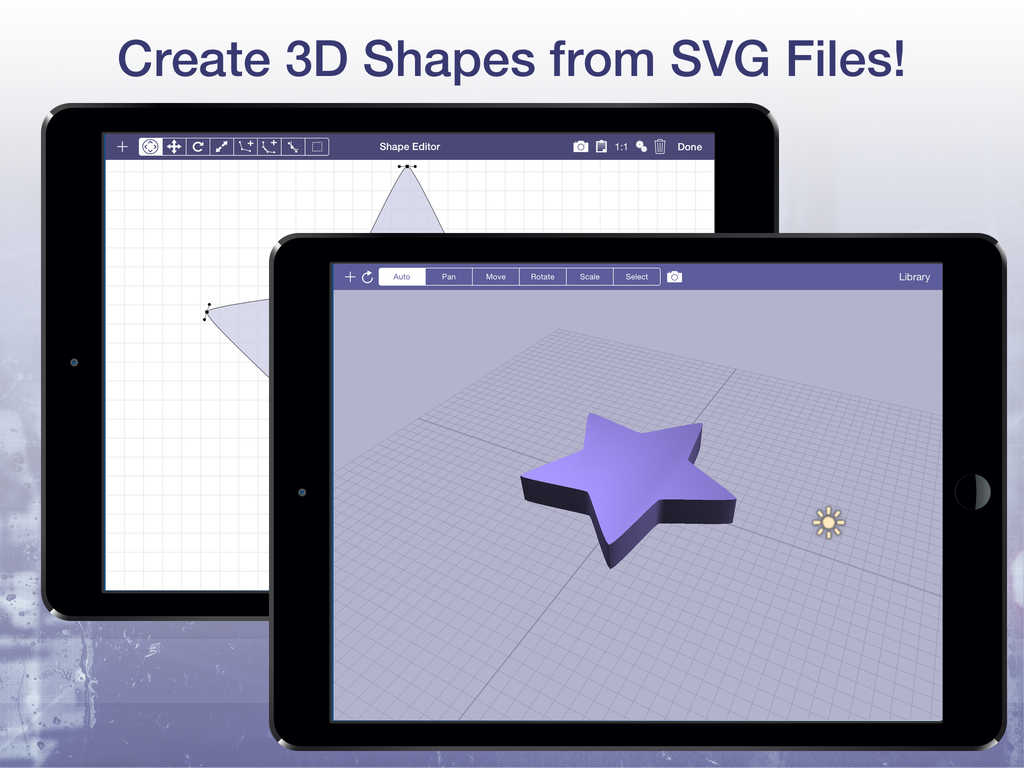
Single-developer company Verto Studio LLC has launched its revolutionary 3D cloud service for free to all users of desktop and mobile Verto Studio 3D. Now, all Verto Studio scenes can be published to the web, viewable by anyone else in the world within a web browser. Additionally, an easy-to-use shape editor has also been added to Verto Studio which supports the importing and 3D extrusion of SVG files.
San Diego, California - Independent developer and sole owner of Verto Studio LLC, Michael L. Farrell has announced the launch of Verto Studio Cloud, a revolutionary, scalable 3D cloud service for free to all users of Verto Studio 3D 2.1. Serving as a one-stop platform for development and sharing of 3D content, Verto Studio Cloud is expected to be a big hit among users of the already-popular 3D mobile modeling software. Verto Studio Cloud allows 3D artists and mobile game developers to rapidly share designs, proof-of-concept work, or final assets with team members all over the world with just a single tap.
Users take advantage of the cloud upload service simply by tapping the cloud icon on any of their existing documents, and publishing their work to the cloud. Within seconds, the published 3D scene becomes available to the millions of users of on the mobile web either by browsing the cloud service, or directly via sharing of Verto Studio Cloud links.
In addition to the Verto Studio Cloud launch, the 2.1 update of Verto Studio includes an "app within an app"; a shape editor feature which serves as a fully functional system for creating precision 2D shapes with features such as snap-to-grid, bezier curve manipulation, background image tracing, and SVG import. This allows artists that are more familiar with 2D design, an easy entry into the world of 3D modeling by designing shapes in a familiar 2D setting, and converting these shapes into polygonal 3D meshes. Additionally, this aids the increasing industry trend of all-mobile work pipelines allowing users to create 2D artwork in their favorite vector drawing graphics apps on the iPad and exporting their work directly to Verto Studio 3D via SVG import.
As a proof-of-concept of Verto Studio 3D's powerful capability, this year, Michael L. Farrell used Verto Studio 3D to develop and launch a 3D desktop game entirely on his own. In a 6 month period, all of the importing, modeling, texturing, and shader development needed by the game project was completed using Verto Studio 3D on the iPad and on the Mac. "I wanted to prove that this product is anything but a typical mobile app ... So, I figured the easiest way to accomplish that was to develop an entire game using the technology", stated Farrell.
Lastly, Verto Studio 3D 2.1 for iOS adds import support for all of the file formats listed below:
Collada (.dae), Blender 3D (.blend), 3ds Max 3DS (.3ds), 3ds Max, ASE (.ase), Wavefront Object (.obj), Stanford Polygon Library (.ply), AutoCAD DXF (.dxf), LightWave (.lwo), Modo (.lxo), Stereolithography (.stl), AC3D (.ac), Milkshape 3D (.ms3d), TrueSpace (.cob,.scn), Valve Model (.smd,.vta), Quake I Mesh (.mdl), Quake II Mesh (.md2), Quake III Mesh (.md3), Quake III BSP (.pk3), Return to Castle Wolfenstein (.mdc), Doom 3 (.md5*), Biovision BVH (.bvh), CharacterStudio Motion (.csm), DirectX X (.x), BlitzBasic 3D (.b3d), Quick3D (.q3d, .q3s), Ogre XML (.mesh.xml), Irrlicht Mesh (.irrmesh), Irrlicht Scene (.irr), Neutral File Format (.nff), Sense8 WorldToolKit (.nff), Object File Format (.off), PovRAY Raw (.raw), Terragen Terrain (.ter), 3D GameStudio (.mdl), 3D GameStudio Terrain (.hmp), and Izware Nendo (.ndo)
Verto Studio 3D: http://www.vertostudio.com/
Verto Studio Cloud: http://www.vertostudio.com/cloud
Verto Studio for iOS: http://www.vertostudio.com/ios.php
Purchase and Download (iOS): https://itunes.apple.com/app/verto-studio-3d/id417187334
Screenshot: http://a3.mzstatic.com/us/r30/Purple7/v4/a8/1e/a5/a81ea59b-22ab-09ec-877c-0fa1d5af8440/screen1024x1024.jpeg
Screenshot 2: http://a2.mzstatic.com/us/r30/Purple1/v4/06/21/30/06213036-38fd-437f-8fac-0e1e767873a5/screen1024x1024.jpeg
Located in beautiful San Diego, California, Michael L. Farrell is an indedpendent developer with over 10 years experience developing games on the Mac platform. His main focus is developing up to date, educational software tools for the iPhone and iPad platforms. Copyright (C) 2015 Michael L Farrell. All Rights Reserved. Apple, the Apple logo and iPad are registered trademarks of Apple Inc. in the U.S. and/or other countries.
*******
Link To Article: http://prmac.com/release-id-75496.htm
*******
---------------------------------------------------------------------------------
Note that you can alter delivered distributions at any time.
Login to your account on prMac to alter your channel selection, or to opt-out at any time.
Mobile 3D Modeling App Verto Studio 3D 2.1 launches Verto Studio Cloud - Published on 06/24/15
Single-developer company Verto Studio LLC has launched its revolutionary 3D cloud service for free to all users of desktop and mobile Verto Studio 3D. Now, all Verto Studio scenes can be published to the web, viewable by anyone else in the world within a web browser. Additionally, an easy-to-use shape editor has also been added to Verto Studio which supports the importing and 3D extrusion of SVG files.
San Diego, California - Independent developer and sole owner of Verto Studio LLC, Michael L. Farrell has announced the launch of Verto Studio Cloud, a revolutionary, scalable 3D cloud service for free to all users of Verto Studio 3D 2.1. Serving as a one-stop platform for development and sharing of 3D content, Verto Studio Cloud is expected to be a big hit among users of the already-popular 3D mobile modeling software. Verto Studio Cloud allows 3D artists and mobile game developers to rapidly share designs, proof-of-concept work, or final assets with team members all over the world with just a single tap.
Users take advantage of the cloud upload service simply by tapping the cloud icon on any of their existing documents, and publishing their work to the cloud. Within seconds, the published 3D scene becomes available to the millions of users of on the mobile web either by browsing the cloud service, or directly via sharing of Verto Studio Cloud links.
In addition to the Verto Studio Cloud launch, the 2.1 update of Verto Studio includes an "app within an app"; a shape editor feature which serves as a fully functional system for creating precision 2D shapes with features such as snap-to-grid, bezier curve manipulation, background image tracing, and SVG import. This allows artists that are more familiar with 2D design, an easy entry into the world of 3D modeling by designing shapes in a familiar 2D setting, and converting these shapes into polygonal 3D meshes. Additionally, this aids the increasing industry trend of all-mobile work pipelines allowing users to create 2D artwork in their favorite vector drawing graphics apps on the iPad and exporting their work directly to Verto Studio 3D via SVG import.
As a proof-of-concept of Verto Studio 3D's powerful capability, this year, Michael L. Farrell used Verto Studio 3D to develop and launch a 3D desktop game entirely on his own. In a 6 month period, all of the importing, modeling, texturing, and shader development needed by the game project was completed using Verto Studio 3D on the iPad and on the Mac. "I wanted to prove that this product is anything but a typical mobile app ... So, I figured the easiest way to accomplish that was to develop an entire game using the technology", stated Farrell.
Lastly, Verto Studio 3D 2.1 for iOS adds import support for all of the file formats listed below:
Collada (.dae), Blender 3D (.blend), 3ds Max 3DS (.3ds), 3ds Max, ASE (.ase), Wavefront Object (.obj), Stanford Polygon Library (.ply), AutoCAD DXF (.dxf), LightWave (.lwo), Modo (.lxo), Stereolithography (.stl), AC3D (.ac), Milkshape 3D (.ms3d), TrueSpace (.cob,.scn), Valve Model (.smd,.vta), Quake I Mesh (.mdl), Quake II Mesh (.md2), Quake III Mesh (.md3), Quake III BSP (.pk3), Return to Castle Wolfenstein (.mdc), Doom 3 (.md5*), Biovision BVH (.bvh), CharacterStudio Motion (.csm), DirectX X (.x), BlitzBasic 3D (.b3d), Quick3D (.q3d, .q3s), Ogre XML (.mesh.xml), Irrlicht Mesh (.irrmesh), Irrlicht Scene (.irr), Neutral File Format (.nff), Sense8 WorldToolKit (.nff), Object File Format (.off), PovRAY Raw (.raw), Terragen Terrain (.ter), 3D GameStudio (.mdl), 3D GameStudio Terrain (.hmp), and Izware Nendo (.ndo)
Verto Studio 3D: http://www.vertostudio.com/
Verto Studio Cloud: http://www.vertostudio.com/cloud
Verto Studio for iOS: http://www.vertostudio.com/ios.php
Purchase and Download (iOS): https://itunes.apple.com/app/verto-studio-3d/id417187334
Screenshot: http://a3.mzstatic.com/us/r30/Purple7/v4/a8/1e/a5/a81ea59b-22ab-09ec-877c-0fa1d5af8440/screen1024x1024.jpeg

Screenshot 2: http://a2.mzstatic.com/us/r30/Purple1/v4/06/21/30/06213036-38fd-437f-8fac-0e1e767873a5/screen1024x1024.jpeg
Located in beautiful San Diego, California, Michael L. Farrell is an indedpendent developer with over 10 years experience developing games on the Mac platform. His main focus is developing up to date, educational software tools for the iPhone and iPad platforms. Copyright (C) 2015 Michael L Farrell. All Rights Reserved. Apple, the Apple logo and iPad are registered trademarks of Apple Inc. in the U.S. and/or other countries.
*******
Link To Article: http://prmac.com/release-id-75496.htm
*******
---------------------------------------------------------------------------------
Note that you can alter delivered distributions at any time.
Login to your account on prMac to alter your channel selection, or to opt-out at any time.
OnSwitch releases Lightning simulation for Philips Hue and LIFX bulbs
A new article has been published at prMac.
OnSwitch releases Lightning simulation for Philips Hue and LIFX bulbs - Published on 06/24/15
California based indie developer, David Pewzner has announced OnSwitch 1.1.19 for iOS, the latest update to the popular smart lighting app for Philips Hue and LIFX bulbs. OnSwitch lets Philips Hue and LIFX owners chose from a multitude of lighting moods and simulations. Version 1.1.19 adds new Lightning and Aurora simulations to the selection, landscape orientation support on the iPad, and the ability to control animated light scenes from multiple devices.
San Francisco, California - Indie developer, David Pewzner has announced the release of OnSwitch 1.1.19 for iOS, the latest update to the popular smart lighting app for Philips Hue and LIFX bulbs. OnSwitch lets Philips Hue and LIFX owners chose from a multitude of lighting moods and simulations. OnSwitch has become one of the most popular apps among smart bulb owners because of its large selection of professionally designed lighting moods, as well as its simplicity.
Version 1.1.19 adds new Lightning and Aurora simulations to the selection. These scenes were developed by request of OnSwitch users, with those two ideas becoming the most popular ideas in the OnSwitch community, with thousands of votes each, as users can suggest and vote for new simulations and features from within the app.
Both the Lightning and Aurora scenes were developed by carefully watching videos, pictures, and analyzing the causes and physics of those natural phenomenons, in order to get the right colors and sounds required to replicate the feeling of a Lightning storm and an Aurora. This update also adds 2 popular requests from users: landscape orientation support on the iPad, and the ability to control animated light scenes from multiple devices.
What's New:
* Lightning simulation
* Aurora simulation
* Support for landscape orientation (iPad)
* OnSwitch sync: control your lights from multiple devices running OnSwitch
OnSwitch was launched in April of 2014, and has been downloaded over 150,000 times since. The app lets Philips Hue and LIFX smart bulb owners pick from a selection of professionally designed lighting moods and simulations. It is one of the most popular apps among smart bulb owners, and has consistently received very high rating from its users.
Device Requirements:
* Philips Hue or LIFX lights
* iPhone, iPad, and iPod touch
* Requires iOS 7.0 or later
* 57.6 MB
Pricing and Availability:
OnSwitch 1.1.19 is Free and available worldwide exclusively through the App Store in the Lifestyle category.
OnSwitch 1.1.19: http://www.getonswitch.com/
Download from iTunes: https://itunes.apple.com/app/onswitch-for-philips-hue-lifx/id853520339
YouTube Video (Lightning): https://www.youtube.com/watch?v=eIy6RTNQad0
YouTube Video (Aurora): https://www.youtube.com/watch?v=dvaDTasv5-k
Screenshot: http://static1.squarespace.com/static/532f8dc4e4b0b8555ae5c003/t/5570f70fe4b0ff54626451d1/1433466642020/?format=750w
Press Kit (zip): http://www.getonswitch.com/s/OnSwitch-Lightning.zip
Based in San Francisco, California, David Pewzner is an independent developer whose focus is on the iOS platform. All Material and Software (C) Copyright 2015 David Pewzner. All Rights Reserved. Apple, the Apple logo, iPhone, iPod and iPad are registered trademarks of Apple Inc. in the U.S. and/or other countries. Other trademarks and registered trademarks may be the property of their respective owners.
*******
Link To Article: http://prmac.com/release-id-75495.htm
*******
---------------------------------------------------------------------------------
Note that you can alter delivered distributions at any time.
Login to your account on prMac to alter your channel selection, or to opt-out at any time.
OnSwitch releases Lightning simulation for Philips Hue and LIFX bulbs - Published on 06/24/15
California based indie developer, David Pewzner has announced OnSwitch 1.1.19 for iOS, the latest update to the popular smart lighting app for Philips Hue and LIFX bulbs. OnSwitch lets Philips Hue and LIFX owners chose from a multitude of lighting moods and simulations. Version 1.1.19 adds new Lightning and Aurora simulations to the selection, landscape orientation support on the iPad, and the ability to control animated light scenes from multiple devices.
San Francisco, California - Indie developer, David Pewzner has announced the release of OnSwitch 1.1.19 for iOS, the latest update to the popular smart lighting app for Philips Hue and LIFX bulbs. OnSwitch lets Philips Hue and LIFX owners chose from a multitude of lighting moods and simulations. OnSwitch has become one of the most popular apps among smart bulb owners because of its large selection of professionally designed lighting moods, as well as its simplicity.
Version 1.1.19 adds new Lightning and Aurora simulations to the selection. These scenes were developed by request of OnSwitch users, with those two ideas becoming the most popular ideas in the OnSwitch community, with thousands of votes each, as users can suggest and vote for new simulations and features from within the app.
Both the Lightning and Aurora scenes were developed by carefully watching videos, pictures, and analyzing the causes and physics of those natural phenomenons, in order to get the right colors and sounds required to replicate the feeling of a Lightning storm and an Aurora. This update also adds 2 popular requests from users: landscape orientation support on the iPad, and the ability to control animated light scenes from multiple devices.
What's New:
* Lightning simulation
* Aurora simulation
* Support for landscape orientation (iPad)
* OnSwitch sync: control your lights from multiple devices running OnSwitch
OnSwitch was launched in April of 2014, and has been downloaded over 150,000 times since. The app lets Philips Hue and LIFX smart bulb owners pick from a selection of professionally designed lighting moods and simulations. It is one of the most popular apps among smart bulb owners, and has consistently received very high rating from its users.
Device Requirements:
* Philips Hue or LIFX lights
* iPhone, iPad, and iPod touch
* Requires iOS 7.0 or later
* 57.6 MB
Pricing and Availability:
OnSwitch 1.1.19 is Free and available worldwide exclusively through the App Store in the Lifestyle category.
OnSwitch 1.1.19: http://www.getonswitch.com/
Download from iTunes: https://itunes.apple.com/app/onswitch-for-philips-hue-lifx/id853520339
YouTube Video (Lightning): https://www.youtube.com/watch?v=eIy6RTNQad0
YouTube Video (Aurora): https://www.youtube.com/watch?v=dvaDTasv5-k
Screenshot: http://static1.squarespace.com/static/532f8dc4e4b0b8555ae5c003/t/5570f70fe4b0ff54626451d1/1433466642020/?format=750w
Press Kit (zip): http://www.getonswitch.com/s/OnSwitch-Lightning.zip
Based in San Francisco, California, David Pewzner is an independent developer whose focus is on the iOS platform. All Material and Software (C) Copyright 2015 David Pewzner. All Rights Reserved. Apple, the Apple logo, iPhone, iPod and iPad are registered trademarks of Apple Inc. in the U.S. and/or other countries. Other trademarks and registered trademarks may be the property of their respective owners.
*******
Link To Article: http://prmac.com/release-id-75495.htm
*******
---------------------------------------------------------------------------------
Note that you can alter delivered distributions at any time.
Login to your account on prMac to alter your channel selection, or to opt-out at any time.
Subscribe to:
Posts (Atom)