A new article has been published at prMac.
QuickerTek Produces Powerful External Battery for 2015 Type-C MacBook - Published on 08/26/15
QuickerTek has announced the 2015 Type-C MacBook External Battery. This battery is the only product of its kind, featuring the USB 3.1 adaptor cable necessary to power and charge the 2015 Apple 12-inch MacBook. This battery's base unit charges the MacBook for 8 extra hours of run time, utilizing the highest charge density of Li-Ion polymer batteries available. Users of the newest model MacBook are no longer confined to powering and charging their MacBook only where a power outlet is available.
Wichita, Kansas - QuickerTek, the technology leader in mobile power and wireless networking products for Apple computers, has announced the 2015 Type-C MacBook External Battery. This battery is the only product of its kind, featuring the USB 3.1 adaptor cable necessary to power and charge the 2015 Apple 12-inch MacBook. Users of the newest model MacBook are no longer confined to powering and charging their MacBook only where a power outlet is available.
This battery's base unit charges the MacBook for 8 extra hours of run time, utilizing the highest charge density of Li-Ion polymer batteries available. (Other units feature 48 hours of extra run time.) It also includes a light weight 3D case, allowing QuickerTek to custom build the battery in any size. PCM and Smart Charging protection is included in the design so cells will not overheat, over or under charge.
Another exciting quality of this battery is the way in which the user can check its charge status. Instead of LED indicators, this battery includes a button which can be pushed by the user, and the battery will send a message via Bluetooth 4.0 LE to their iPhone, iPad or MacBook displaying the charge status.
You can use this product in conjunction with QuickerTek's new 30 Watt 2015 Type-C MacBook Solar panel as well.
2015 Type-C MacBook External Battery Features:
* Increases 2015 MacBook's run time by 8 hours
* Utilizes the highest charge density Li-Ion polymer batteries available
* Battery charge status via Bluetooth 4.0 LE to iPhone, iPad or MacBook
* Custom 3D printed case
* Can be recharged via Apple's OEM charger or included 120/240vac smart charger
* PCM and Smart Charging in design so cells will not overheat or over/under charge
* Can be recharged via the 30 Watt 2015 Type-C MacBook Solar Panel from QuickerTek
* Includes the standard USB Type-C (3.1) connector cable
Specifications:
* Weight (Base Unit): 0.9 lb.
* Dimensions: 3/4" x 3 7/8" x 5"
QuickerTek: http://www.quickertek.com/
MacBook External Battery: http://www.quickertek.com/products/cjuicz.html
High Resolution Pictures: http://www.quickertek.com/media.html
QuickerTek has been a recognized leading innovator of power/solar products, antennas and RF products for the Apple community. QuickerTek products can be purchased online and from authorized resellers. Copyright (C) 2009-2015 QuickerTek. All Rights Reserved. Apple, and the Apple logo, and MacBook Pro are registered trademarks of Apple Computer Inc. in the U.S. and/or other countries.
*******
Link To Article: http://prmac.com/release-id-76358.htm
*******
---------------------------------------------------------------------------------
Note that you can alter delivered distributions at any time.
Login to your account on prMac to alter your channel selection, or to opt-out at any time.

CS Odessa Announces SysML Solution for ConceptDraw PRO v10
A new article has been published at prMac.
CS Odessa Announces SysML Solution for ConceptDraw PRO v10 - Published on 08/26/15
California based CS Odessa has announced a new easy-to-use solution that allows individuals and teams to design and model systems. The Systems Modeling Language (SysML) solution for ConceptDraw is a general-purpose modeling language library designed to describe systems engineering applications. The SysML Solution supports the specification, analysis, design, confirmation and validation of a wide range of systems and systems-of-systems.
San Jose, California - CS Odessa has announced a new easy-to-use solution that allows individuals and teams to design and model systems. The Systems Modeling Language (SysML) solution for ConceptDraw is a general-purpose modeling language library designed to describe systems engineering applications. The SysML Solution supports the specification, analysis, design, confirmation and validation of a wide range of systems and systems-of-systems.
SysML origin can be traced to an open source specification project. SysML is an extension of a subset derived from the Unified Modeling Language (UML). SysML is designed to provide a standardized way to visualize a system design. The SysML Solution is free to users of ConceptDraw PRO v10.
The ConceptDraw product line is known for constantly adding value to its products. These new additions to the ConceptDraw Solution Park are for current users of ConceptDraw PRO v10, our powerful and easy to use business graphics tool. ConceptDraw PRO is compatible with Apple OS X and Microsoft Windows. ConceptDraw PRO retails for $199 USD, and will open and save files that are in Visio 2013 format.
ConceptDraw Solution Park is an online collection of visual solutions for knowledge workers designed to provide productivity increasing solutions for all ConceptDraw products. ConceptDraw Solution Park contains many subject areas for professional applications. It delivers solutions for Project Management, Business Productivity, Universal Diagramming and Collaboration.
ConceptDraw PRO v10 is now included in ConceptDraw Office v3 which retails for $499 USD.
ConceptDraw Office v3 is an integrated set of visualization products and document exchange technologies. ConceptDraw Office consists of a diagramming platform, a mind mapping tool, and a project management tool. These tools are essential to generate business diagrams, mind maps, project plans, dashboards, presenta tions, schematics, and any other business visualizations.
ConceptDraw Productivity Line: http://www.conceptdraw.com
ConceptDraw Solution Park: http://www.conceptdraw.com/solution-park/
ConceptDraw SysML Solution: http://www.conceptdraw.com/solution-park/software-sysml
Download Trial: http://www.conceptdraw.com/GetFree21Trial.php
Screenshot (SysML Diagram Design Elements): http://www.conceptdraw.com/solution-park/resource/images/solutions/software-sysml/Software-Development-SYSML-Design-Elements-SysML-Diagrams.png
Screenshot (SySML Parametric Diagram): http://www.conceptdraw.com/solution-park/resource/images/solutions/software-sysml/Software-Development-SYSML-Parametric-Diagram.png
Founded in 1993, Computer Systems Odessa supplies cross-platform productivity tools and graphic technologies to professional and corporate users around the world. With headquarters in Odessa, Ukraine, and an U.S. office in San Jose, California, CS Odessa sells products internationally through resellers in over 30 countries. The ConceptDraw line of products has won numerous awards and is used by hundreds of thousands of people all over the world. Computer Systems Odessa. ConceptDraw is a registered trademark, and ConceptDraw Office, ConceptDraw Solution Park, ConceptDraw PRO, ConceptDraw MINDMAP, ConceptDraw PROJECT, and ConceptDraw Solution Browser are trademarks of CS Odessa. All other trademarks and registered trademarks are the properties of their respective owners.
*******
Link To Article: http://prmac.com/release-id-76357.htm
*******
---------------------------------------------------------------------------------
Note that you can alter delivered distributions at any time.
Login to your account on prMac to alter your channel selection, or to opt-out at any time.
CS Odessa Announces SysML Solution for ConceptDraw PRO v10 - Published on 08/26/15
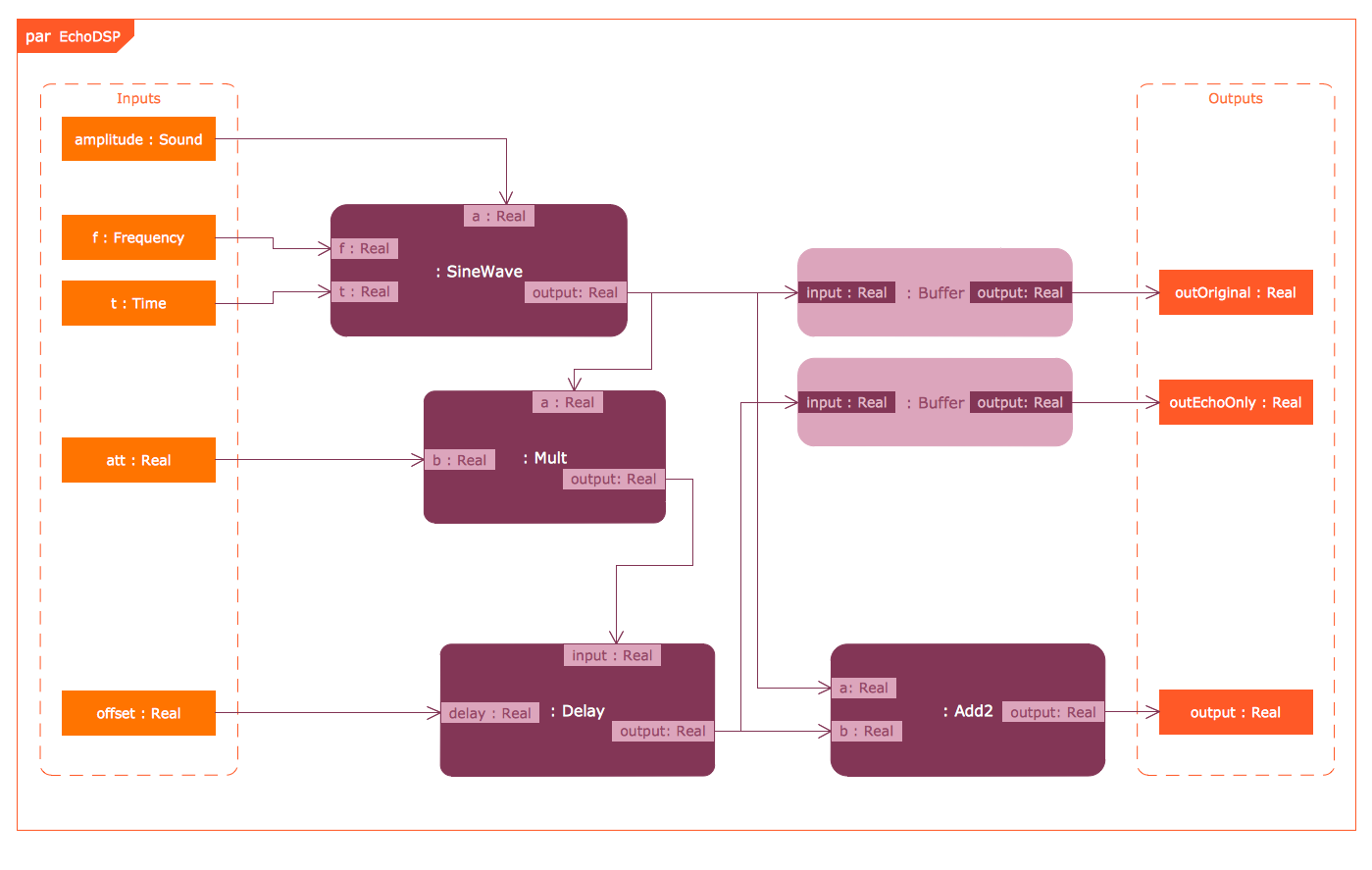
California based CS Odessa has announced a new easy-to-use solution that allows individuals and teams to design and model systems. The Systems Modeling Language (SysML) solution for ConceptDraw is a general-purpose modeling language library designed to describe systems engineering applications. The SysML Solution supports the specification, analysis, design, confirmation and validation of a wide range of systems and systems-of-systems.
San Jose, California - CS Odessa has announced a new easy-to-use solution that allows individuals and teams to design and model systems. The Systems Modeling Language (SysML) solution for ConceptDraw is a general-purpose modeling language library designed to describe systems engineering applications. The SysML Solution supports the specification, analysis, design, confirmation and validation of a wide range of systems and systems-of-systems.
SysML origin can be traced to an open source specification project. SysML is an extension of a subset derived from the Unified Modeling Language (UML). SysML is designed to provide a standardized way to visualize a system design. The SysML Solution is free to users of ConceptDraw PRO v10.
The ConceptDraw product line is known for constantly adding value to its products. These new additions to the ConceptDraw Solution Park are for current users of ConceptDraw PRO v10, our powerful and easy to use business graphics tool. ConceptDraw PRO is compatible with Apple OS X and Microsoft Windows. ConceptDraw PRO retails for $199 USD, and will open and save files that are in Visio 2013 format.
ConceptDraw Solution Park is an online collection of visual solutions for knowledge workers designed to provide productivity increasing solutions for all ConceptDraw products. ConceptDraw Solution Park contains many subject areas for professional applications. It delivers solutions for Project Management, Business Productivity, Universal Diagramming and Collaboration.
ConceptDraw PRO v10 is now included in ConceptDraw Office v3 which retails for $499 USD.
ConceptDraw Office v3 is an integrated set of visualization products and document exchange technologies. ConceptDraw Office consists of a diagramming platform, a mind mapping tool, and a project management tool. These tools are essential to generate business diagrams, mind maps, project plans, dashboards, presenta tions, schematics, and any other business visualizations.
ConceptDraw Productivity Line: http://www.conceptdraw.com
ConceptDraw Solution Park: http://www.conceptdraw.com/solution-park/
ConceptDraw SysML Solution: http://www.conceptdraw.com/solution-park/software-sysml
Download Trial: http://www.conceptdraw.com/GetFree21Trial.php
Screenshot (SysML Diagram Design Elements): http://www.conceptdraw.com/solution-park/resource/images/solutions/software-sysml/Software-Development-SYSML-Design-Elements-SysML-Diagrams.png
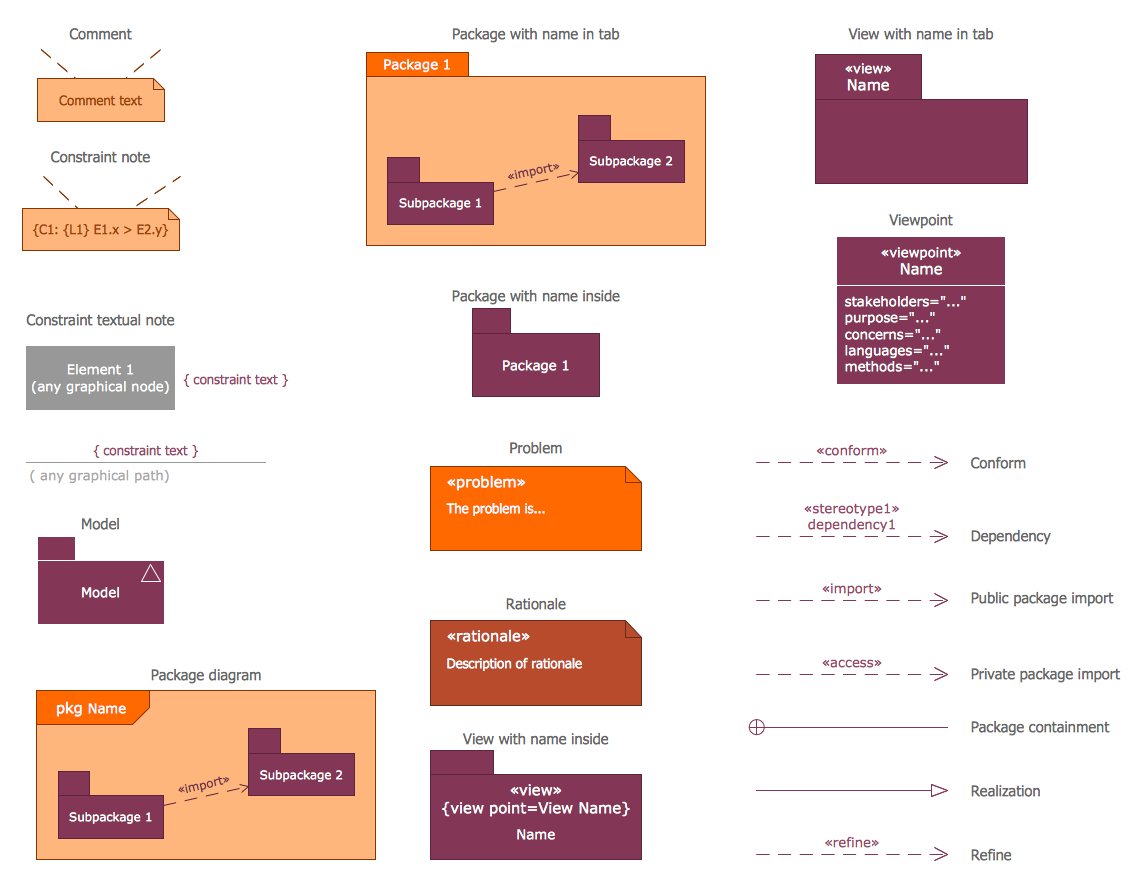
Screenshot (SySML Parametric Diagram): http://www.conceptdraw.com/solution-park/resource/images/solutions/software-sysml/Software-Development-SYSML-Parametric-Diagram.png
Founded in 1993, Computer Systems Odessa supplies cross-platform productivity tools and graphic technologies to professional and corporate users around the world. With headquarters in Odessa, Ukraine, and an U.S. office in San Jose, California, CS Odessa sells products internationally through resellers in over 30 countries. The ConceptDraw line of products has won numerous awards and is used by hundreds of thousands of people all over the world. Computer Systems Odessa. ConceptDraw is a registered trademark, and ConceptDraw Office, ConceptDraw Solution Park, ConceptDraw PRO, ConceptDraw MINDMAP, ConceptDraw PROJECT, and ConceptDraw Solution Browser are trademarks of CS Odessa. All other trademarks and registered trademarks are the properties of their respective owners.
*******
Link To Article: http://prmac.com/release-id-76357.htm
*******
---------------------------------------------------------------------------------
Note that you can alter delivered distributions at any time.
Login to your account on prMac to alter your channel selection, or to opt-out at any time.
Find My Stuff v1.1 Extends in Features for Belongings Tracking
A new article has been published at prMac.
Find My Stuff v1.1 Extends in Features for Belongings Tracking - Published on 08/26/15
The developers at Open Media LLC have created an innovative mobile app which allows users to keep up with their valuable possessions at all times. By using tiny tracking devices called beacons, the "Find My Stuff" mobile app keeps track of the exact location of any object to which a beacon is attached. Types of objects that can be tracked include car keys, bicycles, vehicles, musical instruments, wallets and purses, jewelry, pets, and even children.
London, United Kingdom - The Find My Stuff app is a universal solution for tracking physical objects through Bluetooth technology. The app communicates with the beacon to track the exact location of the beacon, which is then displayed through the app. The mobile device's built-in maps feature can be used to track the beacon's location in real-time. The app user can adjust the settings to be alerted if the beacon leaves a specified range.
There are currently many different beacons available on the market including Trackr, Estimote, Jaalee, Roximity, RadBeacons, Glimworm, G-Tag, and more. As long as the beacon model operates through the iBeacon protocol, the Find My Stuff app is compatible with it as well.
Examples of app and beacon tracking:
1.A user attaches a beacon to car keys. The next day, the user cannot find their car keys. The Find My Stuff app is activated, and the user is instantly alerted to the exact location of the car keys.
2.A user attaches a beacon to a vehicle. During the night, a thief is able to steal the car, and begins to drive away. As soon as the beacon reaches the user-specified range, a loud alert will be emitted from the mobile device. The beacon's location can be tracked in real-time via Maps functionality.
Users can track multiple items simultaneously. Car keys, vehicles, and other valuables can all be tracked at the same time without any issues. Users can also set up "Safe Zones", which are specific locations and WiFi networks in which the user will not receive notifications. There are no limits with the Find My Stuff app, and no registration is required. The history of location changes is logged, and can be viewed at any time.
Device Requirements:
* iPhone, iPad and iPod touch
* Optimized for iPhone 5, iPhone 6/6 Plus
* Universal Application
* Requires iOS 8.0 or later
* 17.1 MB
Pricing and Availability:
Find My Stuff 1.1 is Free and available worldwide exclusively through the App Store in the Navigation category.
Find My Stuff 1.1: https://www.fstuff.com
Download from iTunes: https://itunes.apple.com/app/find-my-stuff-find-your-keys/id976103154
Screenshot: http://a5.mzstatic.com/us/r30/Purple7/v4/2f/63/42/2f63428f-b8dc-4ef0-a4c1-29bd8468024b/screen480x480.jpeg
App Icon: http://a2.mzstatic.com/us/r30/Purple1/v4/24/f7/92/24f792e6-003a-88c2-4ebd-012122b0ba13/icon175x175.png
Open Media LLC is a team of individuals committed to building truly useful mobile apps. They see iBeacons as part of the wider Internet of Things (IoT) and a great way to connect people with objects. The philosophy of the Find My Stuff people is a belief in the cooperativeness of individuals; they are firm believers in reciprocal altruism and the need for human beings to help one another for the greater good of the group. The Find My Stuff team will use the Internet of Things to develop ties within the wider world community, starting with finding those pesky lost objects. All Material and Software (C) Copyright 2015 Open Media LLC. All Rights Reserved. Apple, the Apple logo, Macintosh, iPhone, iPad, iPod and Mac OS X are registered trademarks of Apple Inc. in the U.S. and/or other countries. Other trademarks and registered trademarks may be the property of their respective owners.
*******
Link To Article: http://prmac.com/release-id-76356.htm
*******
---------------------------------------------------------------------------------
Note that you can alter delivered distributions at any time.
Login to your account on prMac to alter your channel selection, or to opt-out at any time.
Find My Stuff v1.1 Extends in Features for Belongings Tracking - Published on 08/26/15
The developers at Open Media LLC have created an innovative mobile app which allows users to keep up with their valuable possessions at all times. By using tiny tracking devices called beacons, the "Find My Stuff" mobile app keeps track of the exact location of any object to which a beacon is attached. Types of objects that can be tracked include car keys, bicycles, vehicles, musical instruments, wallets and purses, jewelry, pets, and even children.
London, United Kingdom - The Find My Stuff app is a universal solution for tracking physical objects through Bluetooth technology. The app communicates with the beacon to track the exact location of the beacon, which is then displayed through the app. The mobile device's built-in maps feature can be used to track the beacon's location in real-time. The app user can adjust the settings to be alerted if the beacon leaves a specified range.
There are currently many different beacons available on the market including Trackr, Estimote, Jaalee, Roximity, RadBeacons, Glimworm, G-Tag, and more. As long as the beacon model operates through the iBeacon protocol, the Find My Stuff app is compatible with it as well.
Examples of app and beacon tracking:
1.A user attaches a beacon to car keys. The next day, the user cannot find their car keys. The Find My Stuff app is activated, and the user is instantly alerted to the exact location of the car keys.
2.A user attaches a beacon to a vehicle. During the night, a thief is able to steal the car, and begins to drive away. As soon as the beacon reaches the user-specified range, a loud alert will be emitted from the mobile device. The beacon's location can be tracked in real-time via Maps functionality.
Users can track multiple items simultaneously. Car keys, vehicles, and other valuables can all be tracked at the same time without any issues. Users can also set up "Safe Zones", which are specific locations and WiFi networks in which the user will not receive notifications. There are no limits with the Find My Stuff app, and no registration is required. The history of location changes is logged, and can be viewed at any time.
Device Requirements:
* iPhone, iPad and iPod touch
* Optimized for iPhone 5, iPhone 6/6 Plus
* Universal Application
* Requires iOS 8.0 or later
* 17.1 MB
Pricing and Availability:
Find My Stuff 1.1 is Free and available worldwide exclusively through the App Store in the Navigation category.
Find My Stuff 1.1: https://www.fstuff.com
Download from iTunes: https://itunes.apple.com/app/find-my-stuff-find-your-keys/id976103154
Screenshot: http://a5.mzstatic.com/us/r30/Purple7/v4/2f/63/42/2f63428f-b8dc-4ef0-a4c1-29bd8468024b/screen480x480.jpeg

App Icon: http://a2.mzstatic.com/us/r30/Purple1/v4/24/f7/92/24f792e6-003a-88c2-4ebd-012122b0ba13/icon175x175.png

Open Media LLC is a team of individuals committed to building truly useful mobile apps. They see iBeacons as part of the wider Internet of Things (IoT) and a great way to connect people with objects. The philosophy of the Find My Stuff people is a belief in the cooperativeness of individuals; they are firm believers in reciprocal altruism and the need for human beings to help one another for the greater good of the group. The Find My Stuff team will use the Internet of Things to develop ties within the wider world community, starting with finding those pesky lost objects. All Material and Software (C) Copyright 2015 Open Media LLC. All Rights Reserved. Apple, the Apple logo, Macintosh, iPhone, iPad, iPod and Mac OS X are registered trademarks of Apple Inc. in the U.S. and/or other countries. Other trademarks and registered trademarks may be the property of their respective owners.
*******
Link To Article: http://prmac.com/release-id-76356.htm
*******
---------------------------------------------------------------------------------
Note that you can alter delivered distributions at any time.
Login to your account on prMac to alter your channel selection, or to opt-out at any time.
Get More Productive on your iPad: Notebooks 8.1 adds Split Screen Mode
A new article has been published at prMac.
Get More Productive on your iPad: Notebooks 8.1 adds Split Screen Mode - Published on 08/26/15
Independent developer Alfons Schmid has announced Notebooks 8.1 for iPad and iPhone, an upgrade to his productivity application which integrates text processing with task management and document organization. The latest update adds a split screen mode which shows two documents side by side on an iPad - a big advantage when copying from a draft into the final document, previewing a Markdown document while editing its plain text, or taking notes while reading a PDF document.
Salzburg, Austria - Alfons Schmid has announced the release of Notebooks 8.1, an upgrade to his text processing and task management application for iPad and iPhone. Notebooks allows users to create formatted documents or plain text notes, store and organize documents and files in unlimited hierarchies, and which adds a task management layer on top of it all. This unique combination allows an uninterrupted train of thoughts without switching apps while working on documents, browsing supportive documentation, producing ideas, splitting them into tasks, assigning the tasks to their designated lists and syncing those between multiple devices.
The addition of a split screen mode-a mode in which two documents appear side by side-increases Notebooks' versatility, as it allows users to view and edit two documents simultaneously. A user could choose to display a PDF and a text document, for example, and take notes while reading the PDF; a user could open a draft and the final version of a document and paste sections from one into the other; it is even possible to open the same document in both windows and view the formatted version of a Markdown document while editing the plain text. The new split screen mode is available on iPads in landscape mode.
Notebooks, originally designed to do away with paper notes, has evolved into a powerful productivity app which includes a text processor for formatted documents, plain text and Markdown, provides space to import, store and organize files and documents in unlimited hierarchies, and which also supports complex task management. Synchronization with Dropbox or WebDAV servers makes it easy to import and export documents and to synchronize the contents of Notebooks between multiple devices (iOS, Mac and PC).
Despite its power, Notebooks strives to be light weight. It allows users to selectively turn functionality on and off and to keep the user interface as clean as possible.
Users can create beautifully formatted documents using WYSIWYG style editing, create formatted HTML using Markdown, or simply type plain text notes, and all while using custom fonts, colors, and patterns. A user-defined row of extra keys for characters that are hard to reach on the built-in keyboard allows customization and provides timesaving shortcuts. It is easy to convert between formats, or to turn a documents into a PDF or even an eBook.
Notebooks supports unlimited nested structures (books) to organize documents by topics, subjects, projects or any personal preferences. This makes it easy to separate private notes from business documents, client data from journal entries, school subjects from each other and so on. A book in Notebooks displays its contents either as a list of documents, or as a list of tasks with due dates and alert times (if desired). Task lists can be nested, too, which allows users to split complex projects into smaller, less intimidating packages which are easy to manage.
Notebooks handles all of a user's notes and documents like HTML, RTF, PDF, MS Office, iWork, email, photos, videos or web archives. It features a number of options that facilitate import, export and synchronization between multiple devices (iOS, Mac and PC), with Dropbox and WebDAV sync being two of the most prominent.
A PDF Reader module, available as in-app-purchase, allows users to annotate PDF documents and highlight phrases, add comments, notes and handwritten text or drawings, and stamp symbols or signatures onto the PDF. Users can easily browse documents by swiping through the pages, or quickly navigate large documents by using the thumbnail view; users can also set bookmarks, search the documents' full text and much more. As far as PDF handling is concerned, Notebooks' PDF Reader leaves little to be desired.
Alfons Schmid also offers desktop versions of Notebooks for Mac OS X and Windows, which synchronize and integrate with Notebooks for iPad and iPhone. With this unique combination of features, Notebooks has the potential to replace multiple apps:
* Text Editor
* Word Processor
* Task Manager
* File Organizer
* Markdown Composer (and HTML to Markdown converter)
* PDF Reader
* PDF Converter
* eBook Creator
* Email Archive
Whether users want to draft or outline a business presentation, type a chapter of a short-story, list inventory, save web pages for reading later, write an entry in a diary or journal, tick off tasks, or just capture notes and ideas on the go, Notebooks is the all-inclusive note application that will effortlessly handle all tasks.
Language Support:
* U.S. English, German, French, and Spanish
Device Requirements:
* iPhone, iPad, or iPod touch
* Requires iOS 7.0 or later
* 29.1 MB
Pricing and Availability:
Notebooks 8.1 (for iPad and iPhone) is $9.99 (USD), available worldwide exclusively through the App Store in the Productivity category. Review copies are available on request. Notebooks PDF Reader is available as an in-app-purchase for $3.99 (USD).
Notebooks 8.1: http://www.notebooksapp.com
New Features: http://www.notebooksapp.com/notebooks-8-1/
Purchase and Download: https://itunes.apple.com/app/id780438662
Screenshot (Two up Mode): http://www.notebooksapp.com/wp-content/gallery/ipad-screens/screen16.jpg
Screenshot (Notebooks): http://notebooksapp.com/Download/press/Notebooks7.png
App Icon: http://notebooksapp.com/Download/press/Notebooks_Icon.jpg
Based in Salzburg, Austria, indie developer Alfons Schmid holds a degree in Computer Science and has spent many years in consulting and sales in the field of document management, which obviously influenced the development of Notebooks. Today he works as a freelance consultant for customers throughout Central Europe. He originally created Notebooks to meet his own requirements. Copyright (C) 2008-2015 Alfons Schmid. All Rights Reserved. Apple, the Apple logo, iPhone, and iPod are registered trademarks of Apple Inc. in the U.S. and/or other countries. Other trademarks and registered trademarks may be the property of their respective owners.
*******
Link To Article: http://prmac.com/release-id-76355.htm
*******
---------------------------------------------------------------------------------
Note that you can alter delivered distributions at any time.
Login to your account on prMac to alter your channel selection, or to opt-out at any time.
Get More Productive on your iPad: Notebooks 8.1 adds Split Screen Mode - Published on 08/26/15
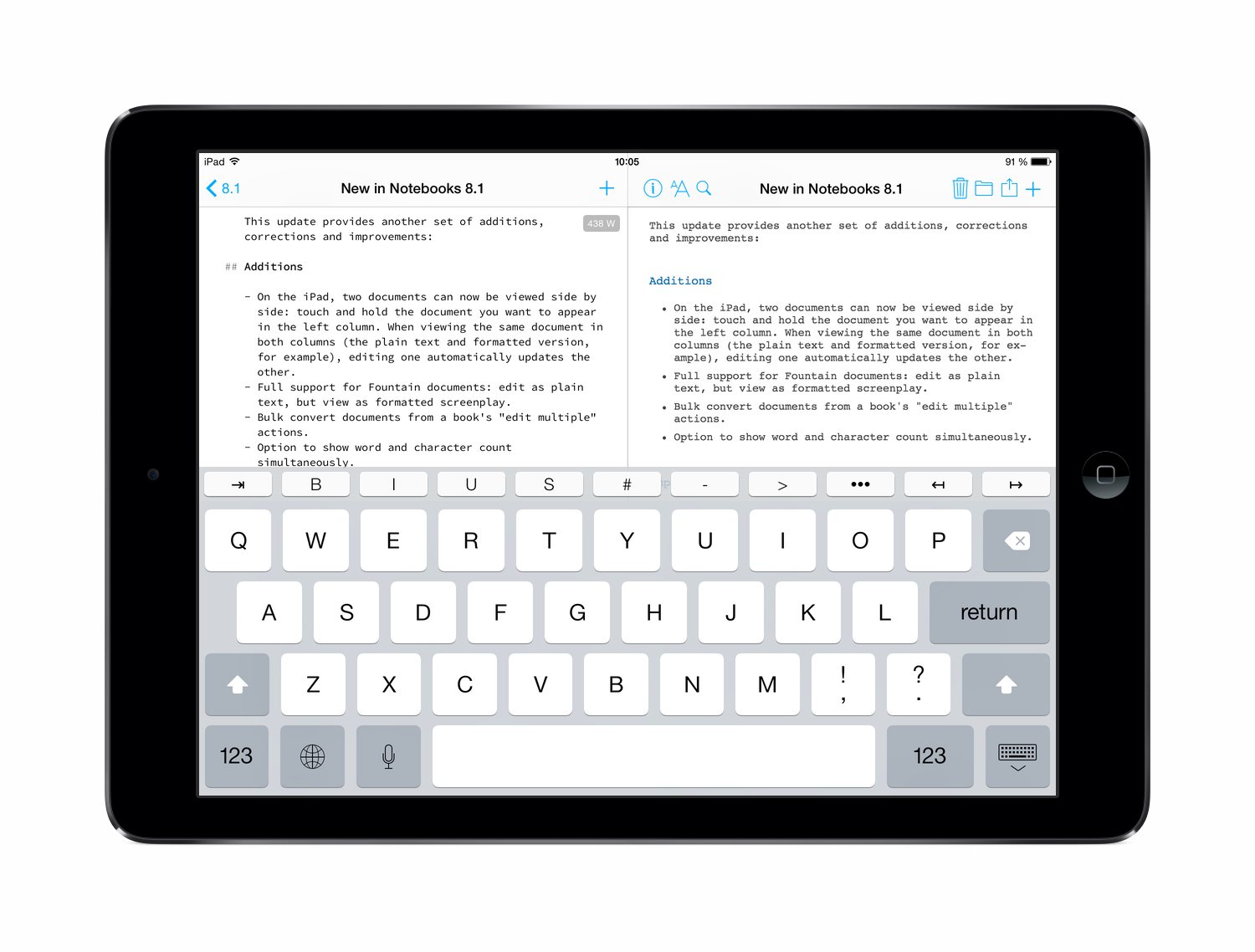
Independent developer Alfons Schmid has announced Notebooks 8.1 for iPad and iPhone, an upgrade to his productivity application which integrates text processing with task management and document organization. The latest update adds a split screen mode which shows two documents side by side on an iPad - a big advantage when copying from a draft into the final document, previewing a Markdown document while editing its plain text, or taking notes while reading a PDF document.
Salzburg, Austria - Alfons Schmid has announced the release of Notebooks 8.1, an upgrade to his text processing and task management application for iPad and iPhone. Notebooks allows users to create formatted documents or plain text notes, store and organize documents and files in unlimited hierarchies, and which adds a task management layer on top of it all. This unique combination allows an uninterrupted train of thoughts without switching apps while working on documents, browsing supportive documentation, producing ideas, splitting them into tasks, assigning the tasks to their designated lists and syncing those between multiple devices.
The addition of a split screen mode-a mode in which two documents appear side by side-increases Notebooks' versatility, as it allows users to view and edit two documents simultaneously. A user could choose to display a PDF and a text document, for example, and take notes while reading the PDF; a user could open a draft and the final version of a document and paste sections from one into the other; it is even possible to open the same document in both windows and view the formatted version of a Markdown document while editing the plain text. The new split screen mode is available on iPads in landscape mode.
Notebooks, originally designed to do away with paper notes, has evolved into a powerful productivity app which includes a text processor for formatted documents, plain text and Markdown, provides space to import, store and organize files and documents in unlimited hierarchies, and which also supports complex task management. Synchronization with Dropbox or WebDAV servers makes it easy to import and export documents and to synchronize the contents of Notebooks between multiple devices (iOS, Mac and PC).
Despite its power, Notebooks strives to be light weight. It allows users to selectively turn functionality on and off and to keep the user interface as clean as possible.
Users can create beautifully formatted documents using WYSIWYG style editing, create formatted HTML using Markdown, or simply type plain text notes, and all while using custom fonts, colors, and patterns. A user-defined row of extra keys for characters that are hard to reach on the built-in keyboard allows customization and provides timesaving shortcuts. It is easy to convert between formats, or to turn a documents into a PDF or even an eBook.
Notebooks supports unlimited nested structures (books) to organize documents by topics, subjects, projects or any personal preferences. This makes it easy to separate private notes from business documents, client data from journal entries, school subjects from each other and so on. A book in Notebooks displays its contents either as a list of documents, or as a list of tasks with due dates and alert times (if desired). Task lists can be nested, too, which allows users to split complex projects into smaller, less intimidating packages which are easy to manage.
Notebooks handles all of a user's notes and documents like HTML, RTF, PDF, MS Office, iWork, email, photos, videos or web archives. It features a number of options that facilitate import, export and synchronization between multiple devices (iOS, Mac and PC), with Dropbox and WebDAV sync being two of the most prominent.
A PDF Reader module, available as in-app-purchase, allows users to annotate PDF documents and highlight phrases, add comments, notes and handwritten text or drawings, and stamp symbols or signatures onto the PDF. Users can easily browse documents by swiping through the pages, or quickly navigate large documents by using the thumbnail view; users can also set bookmarks, search the documents' full text and much more. As far as PDF handling is concerned, Notebooks' PDF Reader leaves little to be desired.
Alfons Schmid also offers desktop versions of Notebooks for Mac OS X and Windows, which synchronize and integrate with Notebooks for iPad and iPhone. With this unique combination of features, Notebooks has the potential to replace multiple apps:
* Text Editor
* Word Processor
* Task Manager
* File Organizer
* Markdown Composer (and HTML to Markdown converter)
* PDF Reader
* PDF Converter
* eBook Creator
* Email Archive
Whether users want to draft or outline a business presentation, type a chapter of a short-story, list inventory, save web pages for reading later, write an entry in a diary or journal, tick off tasks, or just capture notes and ideas on the go, Notebooks is the all-inclusive note application that will effortlessly handle all tasks.
Language Support:
* U.S. English, German, French, and Spanish
Device Requirements:
* iPhone, iPad, or iPod touch
* Requires iOS 7.0 or later
* 29.1 MB
Pricing and Availability:
Notebooks 8.1 (for iPad and iPhone) is $9.99 (USD), available worldwide exclusively through the App Store in the Productivity category. Review copies are available on request. Notebooks PDF Reader is available as an in-app-purchase for $3.99 (USD).
Notebooks 8.1: http://www.notebooksapp.com
New Features: http://www.notebooksapp.com/notebooks-8-1/
Purchase and Download: https://itunes.apple.com/app/id780438662
Screenshot (Two up Mode): http://www.notebooksapp.com/wp-content/gallery/ipad-screens/screen16.jpg
Screenshot (Notebooks): http://notebooksapp.com/Download/press/Notebooks7.png

App Icon: http://notebooksapp.com/Download/press/Notebooks_Icon.jpg

Based in Salzburg, Austria, indie developer Alfons Schmid holds a degree in Computer Science and has spent many years in consulting and sales in the field of document management, which obviously influenced the development of Notebooks. Today he works as a freelance consultant for customers throughout Central Europe. He originally created Notebooks to meet his own requirements. Copyright (C) 2008-2015 Alfons Schmid. All Rights Reserved. Apple, the Apple logo, iPhone, and iPod are registered trademarks of Apple Inc. in the U.S. and/or other countries. Other trademarks and registered trademarks may be the property of their respective owners.
*******
Link To Article: http://prmac.com/release-id-76355.htm
*******
---------------------------------------------------------------------------------
Note that you can alter delivered distributions at any time.
Login to your account on prMac to alter your channel selection, or to opt-out at any time.
Listen Sound LLC releases Static Music Player for iPhone and Apple Watch
A new article has been published at prMac.
Listen Sound LLC releases Static Music Player for iPhone and Apple Watch - Published on 08/26/15
Listen Sound LLC has introduced Static 1.0.1, a new music player app for iPhone and Apple Watch. Delivering never-before available features in a simple, uncluttered interface, Static Music Player works with iTunes but also enables adding music to iPhone without using iTunes at all. Files can be imported using AirDrop, Dropbox, Amazon S3, and other apps that support document browsing and sharing. Static includes a graphic equalizer, loudness control, and automatically crossfades between songs.
Richmond, Virginia - Listen Sound LLC has announced the release and immediate availability of Static 1.0.1, a new music player app developed for iPhone and Apple Watch that delivers never-before available features in a simple, uncluttered interface. Static works with iTunes but also enables adding music to iPhone without using iTunes at all. Files can be imported using AirDrop, Dropbox, Amazon S3, and other apps that support document browsing and sharing.
Static includes a graphic equalizer, loudness control, and automatically crossfades between songs. Static can shuffle favorites, or by genre and makes it easy to share a YouTube video of what's currently playing.
Static Features:
* 11-band graphic equalizer that remembers settings for each connected device
* Automatic crossfade between tracks
* Loudness boost modes
* 3 shuffle modes: all, favorites, or by genres
* Album artwork color matching
* Playlists with custom artwork
* Supported audio formats: mp3, wav, m4a, m4b, aif, alac, ale
* Automatically download missing album artwork over WiFi when available
* Easily share a YouTube video of what you are listening to
Import new music easily with:
* AirDrop
* Dropbox
* Amazon S3
* Import from other apps with document picker extensions
* iTunes file sharing
* iCloud
* ZIP files supported
"I wanted a simpler, more flexible music player that wasn't trying to sell me anything." reveals developer, Aaron Pride. "Static provides a first class experience for people who buy music - without ads, marketing, or in-app purchases."
Device Requirements:
* iPhone, iPad, and iPod touch (supports Apple Watch)
* Optimized for iPhone 5, iPhone 6/6 Plus
* Requires iOS 8.2 or later
* 15.2 MB
Pricing and Availability:
Static Music Player 1.0.1 is $2.99 USD (or equivalent amount in other currencies) and available worldwide exclusively through the App Store in the Music category.
Static Music Player 1.0.1: http://listensound.com
User Manual: http://listensound.com/static/support
Purchase and Download: https://itunes.apple.com/app/static-music-player/id987719636
Vimeo Video (Preview): https://vimeo.com/128071420
Screenshot (Gif): http://listensound.com/assets/img2/covers.gif
Media Assets: http://listensound.com/static_press_kit.html
Listen Sound makes audio software and is based in Richmond, Virginia. All Material and Software (C) Copyright 2013 Listen Sound LLC. All Rights Reserved. Apple, the Apple logo, iPhone, iPod and iPad are registered trademarks of Apple Inc. in the U.S. and/or other countries. Other trademarks and registered trademarks may be the property of their respective owners.
*******
Link To Article: http://prmac.com/release-id-76354.htm
*******
---------------------------------------------------------------------------------
Note that you can alter delivered distributions at any time.
Login to your account on prMac to alter your channel selection, or to opt-out at any time.
Listen Sound LLC releases Static Music Player for iPhone and Apple Watch - Published on 08/26/15
Listen Sound LLC has introduced Static 1.0.1, a new music player app for iPhone and Apple Watch. Delivering never-before available features in a simple, uncluttered interface, Static Music Player works with iTunes but also enables adding music to iPhone without using iTunes at all. Files can be imported using AirDrop, Dropbox, Amazon S3, and other apps that support document browsing and sharing. Static includes a graphic equalizer, loudness control, and automatically crossfades between songs.
Richmond, Virginia - Listen Sound LLC has announced the release and immediate availability of Static 1.0.1, a new music player app developed for iPhone and Apple Watch that delivers never-before available features in a simple, uncluttered interface. Static works with iTunes but also enables adding music to iPhone without using iTunes at all. Files can be imported using AirDrop, Dropbox, Amazon S3, and other apps that support document browsing and sharing.
Static includes a graphic equalizer, loudness control, and automatically crossfades between songs. Static can shuffle favorites, or by genre and makes it easy to share a YouTube video of what's currently playing.
Static Features:
* 11-band graphic equalizer that remembers settings for each connected device
* Automatic crossfade between tracks
* Loudness boost modes
* 3 shuffle modes: all, favorites, or by genres
* Album artwork color matching
* Playlists with custom artwork
* Supported audio formats: mp3, wav, m4a, m4b, aif, alac, ale
* Automatically download missing album artwork over WiFi when available
* Easily share a YouTube video of what you are listening to
Import new music easily with:
* AirDrop
* Dropbox
* Amazon S3
* Import from other apps with document picker extensions
* iTunes file sharing
* iCloud
* ZIP files supported
"I wanted a simpler, more flexible music player that wasn't trying to sell me anything." reveals developer, Aaron Pride. "Static provides a first class experience for people who buy music - without ads, marketing, or in-app purchases."
Device Requirements:
* iPhone, iPad, and iPod touch (supports Apple Watch)
* Optimized for iPhone 5, iPhone 6/6 Plus
* Requires iOS 8.2 or later
* 15.2 MB
Pricing and Availability:
Static Music Player 1.0.1 is $2.99 USD (or equivalent amount in other currencies) and available worldwide exclusively through the App Store in the Music category.
Static Music Player 1.0.1: http://listensound.com
User Manual: http://listensound.com/static/support
Purchase and Download: https://itunes.apple.com/app/static-music-player/id987719636
Vimeo Video (Preview): https://vimeo.com/128071420
Screenshot (Gif): http://listensound.com/assets/img2/covers.gif

Media Assets: http://listensound.com/static_press_kit.html
Listen Sound makes audio software and is based in Richmond, Virginia. All Material and Software (C) Copyright 2013 Listen Sound LLC. All Rights Reserved. Apple, the Apple logo, iPhone, iPod and iPad are registered trademarks of Apple Inc. in the U.S. and/or other countries. Other trademarks and registered trademarks may be the property of their respective owners.
*******
Link To Article: http://prmac.com/release-id-76354.htm
*******
---------------------------------------------------------------------------------
Note that you can alter delivered distributions at any time.
Login to your account on prMac to alter your channel selection, or to opt-out at any time.
Straight ahead 1.5.3 - The Entertaining Geography Quiz Game for the iPad
A new article has been published at prMac.
Straight ahead 1.5.3 - The Entertaining Geography Quiz Game for the iPad - Published on 08/26/15
Independent developer, Ralf Ebert has announced Straight ahead 1.5.3, an important update to his geography quiz game for iPad devices. The app offers players the opportunity to learn more about the world, its continents, and countries. The app teaches interesting facts about countries located in Asia, the Middle East, Europe, North Africa, South Africa, Central America, and South America, via a 3D globe, photo galleries, news articles, and more. Version 1.5.3 offers a number of bug fixes.
Dresden, Germany - Independent developer, Ralf Ebert has announced the release and immediate availability of Straight ahead 1.5.3, an important update to his geography quiz game for iPad devices. Straight ahead offer users the opportunity to learn more about the world, its continents and countries. Through seven lessons, Straight ahead allows anyone to learn about the countries located in Asia, the Middle East, Europe, North Africa, South Africa, Central America, and South America via access to Wikipedia, photo galleries, and news sites.
Upon downloading the app, users can immediately begin brushing up on their geographical knowledge. The app doesn't require any registration or logging in. Straight ahead's straightforward and effective teaching method allows optimal learning, while making note of a user's existing knowledge. The app allows players to concentrate on countries they know less about, by repeating countries that have been answered incorrectly until the user has been trained as to the proper global location.
Beginning with the first free lessons, (the user can select the continent of their choice), every session in Straight ahead begins with a knowledge test. This allows the app to take note of the user's existing geographical knowledge, detecting which countries the user is familiar with, and which locales they need to learn more about. By using just their finger, users touch and drag an arrow labeled with the name of a country to the spot on the map where they believe the country is located. Then, by tapping the on-screen checkmark, they can see which answers are correct, and which are wrong. The proper location of each country is also indicated on the map for future reference.
Following the initial quiz, Straight ahead continues to offer an interactive learning experience, by quizzing the user on country locations, until the proper locations are consistently indicated by the player. The app also offers a number of interesting and informative facts about each country that is shown on the map. The information includes an extensive gallery of photos, Wikipedia entries about the countries, and current news from the area. Excellent graphics, informative text, beautiful photos, and pleasing audio cues combine to create an interesting an excellent learning experience.
"I have been crazy about travelling, and learning about far-away countries for as long as I can remember," says Straight ahead developer Ralf Ebert. "This has made the development of Straight ahead a labor of love. I've tried to make the learning experience enjoyable, so my app will encourage everyone to learn more about the world and its people, by accessing the app's plentiful information about foreign countries and the people who live there."
What's New in Version 1.5.3:
* Bug Fixes
In addition to discovering more information about various countries via its quizzes, Straight away also offers a freestyle learning experience, via its built-in 3D global atlas. Using this feature anyone can sit down with the app and immediately begin learning more about a specific country - be it their own, or a far-away land - by simply using their finger to rotate the globe and tapping on the country they are interested in learning more about. The app then shares information about the area via easy to navigate photo galleries, Wikipedia articles, and news stories related to the selected locale.
Features:
* Easy to use touch interface
* 3D Global Atlas
* Wikipedia entries, photo galleries, and news feeds for each country
* Informative quizzes & freestyle learning options
* Tap any country to view information about that area
* Pleasing sounds and beautiful graphics
Device Requirements:
* Compatible with iPad
* Requires iOS 8.0 or later
* 9.1 MB
Pricing and Availability:
Straight ahead 1.5.3 is free, and is available worldwide exclusively through the App Store in the Education category. Additional areas of the globe can be unlocked via a convenient $3.99 in-app purchase. The purchase unlocks all seven lesson sets; covering the countries of the continents of Asia, the Middle East, Europe, North Africa, South Africa, Central America, and South America.
Ralf Ebert: http://www.ralfebert.de/
Straight ahead 1.5.3: http://www.straight-ahead.com/
Purchase and Download: http://itunes.apple.com/app/straight-ahead/id527868789
Screenshot 1: http://www.straight-ahead.com/screenshots/straight-ahead-2.jpg
Screenshot 2: http://www.straight-ahead.com/screenshots/straight-ahead-5.jpg
App Icon: http://a4.mzstatic.com/us/r30/Purple5/v4/7d/e9/f0/7de9f037-d60e-0915-ef5e-e1df7bda4cb3/icon175x175.jpeg
Independent developer Ralf Ebert has worked as a freelance software developer since 2012, and also offers lessons on iPhone programming to other developers. Ralf enjoys travelling to far-away countries, and makes use of that enthusiasm to develop entertaining and education games to teach app users about the world around them. Copyright (C) 2015 Ralf Ebert. All Rights Reserved. Apple, the Apple logo, iPhone and iPod are registered trademarks of Apple Inc. in the U.S. and/or other countries.
*******
Link To Article: http://prmac.com/release-id-76353.htm
*******
---------------------------------------------------------------------------------
Note that you can alter delivered distributions at any time.
Login to your account on prMac to alter your channel selection, or to opt-out at any time.
Straight ahead 1.5.3 - The Entertaining Geography Quiz Game for the iPad - Published on 08/26/15
Independent developer, Ralf Ebert has announced Straight ahead 1.5.3, an important update to his geography quiz game for iPad devices. The app offers players the opportunity to learn more about the world, its continents, and countries. The app teaches interesting facts about countries located in Asia, the Middle East, Europe, North Africa, South Africa, Central America, and South America, via a 3D globe, photo galleries, news articles, and more. Version 1.5.3 offers a number of bug fixes.
Dresden, Germany - Independent developer, Ralf Ebert has announced the release and immediate availability of Straight ahead 1.5.3, an important update to his geography quiz game for iPad devices. Straight ahead offer users the opportunity to learn more about the world, its continents and countries. Through seven lessons, Straight ahead allows anyone to learn about the countries located in Asia, the Middle East, Europe, North Africa, South Africa, Central America, and South America via access to Wikipedia, photo galleries, and news sites.
Upon downloading the app, users can immediately begin brushing up on their geographical knowledge. The app doesn't require any registration or logging in. Straight ahead's straightforward and effective teaching method allows optimal learning, while making note of a user's existing knowledge. The app allows players to concentrate on countries they know less about, by repeating countries that have been answered incorrectly until the user has been trained as to the proper global location.
Beginning with the first free lessons, (the user can select the continent of their choice), every session in Straight ahead begins with a knowledge test. This allows the app to take note of the user's existing geographical knowledge, detecting which countries the user is familiar with, and which locales they need to learn more about. By using just their finger, users touch and drag an arrow labeled with the name of a country to the spot on the map where they believe the country is located. Then, by tapping the on-screen checkmark, they can see which answers are correct, and which are wrong. The proper location of each country is also indicated on the map for future reference.
Following the initial quiz, Straight ahead continues to offer an interactive learning experience, by quizzing the user on country locations, until the proper locations are consistently indicated by the player. The app also offers a number of interesting and informative facts about each country that is shown on the map. The information includes an extensive gallery of photos, Wikipedia entries about the countries, and current news from the area. Excellent graphics, informative text, beautiful photos, and pleasing audio cues combine to create an interesting an excellent learning experience.
"I have been crazy about travelling, and learning about far-away countries for as long as I can remember," says Straight ahead developer Ralf Ebert. "This has made the development of Straight ahead a labor of love. I've tried to make the learning experience enjoyable, so my app will encourage everyone to learn more about the world and its people, by accessing the app's plentiful information about foreign countries and the people who live there."
What's New in Version 1.5.3:
* Bug Fixes
In addition to discovering more information about various countries via its quizzes, Straight away also offers a freestyle learning experience, via its built-in 3D global atlas. Using this feature anyone can sit down with the app and immediately begin learning more about a specific country - be it their own, or a far-away land - by simply using their finger to rotate the globe and tapping on the country they are interested in learning more about. The app then shares information about the area via easy to navigate photo galleries, Wikipedia articles, and news stories related to the selected locale.
Features:
* Easy to use touch interface
* 3D Global Atlas
* Wikipedia entries, photo galleries, and news feeds for each country
* Informative quizzes & freestyle learning options
* Tap any country to view information about that area
* Pleasing sounds and beautiful graphics
Device Requirements:
* Compatible with iPad
* Requires iOS 8.0 or later
* 9.1 MB
Pricing and Availability:
Straight ahead 1.5.3 is free, and is available worldwide exclusively through the App Store in the Education category. Additional areas of the globe can be unlocked via a convenient $3.99 in-app purchase. The purchase unlocks all seven lesson sets; covering the countries of the continents of Asia, the Middle East, Europe, North Africa, South Africa, Central America, and South America.
Ralf Ebert: http://www.ralfebert.de/
Straight ahead 1.5.3: http://www.straight-ahead.com/
Purchase and Download: http://itunes.apple.com/app/straight-ahead/id527868789
Screenshot 1: http://www.straight-ahead.com/screenshots/straight-ahead-2.jpg

Screenshot 2: http://www.straight-ahead.com/screenshots/straight-ahead-5.jpg

App Icon: http://a4.mzstatic.com/us/r30/Purple5/v4/7d/e9/f0/7de9f037-d60e-0915-ef5e-e1df7bda4cb3/icon175x175.jpeg

Independent developer Ralf Ebert has worked as a freelance software developer since 2012, and also offers lessons on iPhone programming to other developers. Ralf enjoys travelling to far-away countries, and makes use of that enthusiasm to develop entertaining and education games to teach app users about the world around them. Copyright (C) 2015 Ralf Ebert. All Rights Reserved. Apple, the Apple logo, iPhone and iPod are registered trademarks of Apple Inc. in the U.S. and/or other countries.
*******
Link To Article: http://prmac.com/release-id-76353.htm
*******
---------------------------------------------------------------------------------
Note that you can alter delivered distributions at any time.
Login to your account on prMac to alter your channel selection, or to opt-out at any time.
Spain's Altair Magazine chooses Magzter as its digital partner
A new article has been published at prMac.
Spain's Altair Magazine chooses Magzter as its digital partner - Published on 08/26/15
Altair, a unique magazine about global traveling culture has, chosen the world's largest digital magazine newsstand, Magzter. The magazine was named after the most renowned Altair library - Barcelona, that was founded in 1979. Altair magazine, which was published as a print magazine since 1991, went digital in 2013. Altair acts as a pathway to understand the cultural, natural and political complexities of the world, with an innovative and unique point of view.
New York, New York - Altair, a unique magazine about global traveling culture, has chosen the world's largest digital magazine newsstand, Magzter. The magazine was named after the most renowned Altair library - Barcelona, that was founded in 1979. Altair magazine, which was published as a print magazine since 1991, went digital in 2013. Altair acts as a pathway to understand the cultural, natural and political complexities of the world, with an innovative and unique point of view.
Altair presents the reality of different regions, people and cultures with its strong business network spanning across 100 countries. Packed with stunning photo-essays, audio-visual content and travel columns, the magazine is an essential read for globetrotters.
"Altair MAGAZINE is happy to be committed to the largest digital newsstand - Magzter, which allows our Spanish Magazine to reach out to global readers via different platforms (iOS, Android, Windows 8) and enables us to have our own app with a simple business model. Magzter gives us the advantage of real-time access to sales reports and also helps us in understanding the tastes and needs of our global readers." - Ortn Pere, Director & Editor in Chief, Altair MAGAZINE - Spain.
"Altair magazine goes beyond the topics of tourism by covering other unique aspects of nations such as literature, art, natural resources and social environment, acting as a reflection of the timeless cultures around the world, with stunning photos and incredible articles. We are proud to be providing the digital platform for this magazine as we always want to offer high quality and prestigious content to our 26+ million readers." - Sebastiano Meneghello, Director - Content Acquisition (Spain & Latin America), Magzter Inc.
Device Requirements:
* iPhone, iPad, and iPod touch
* Optimized for iPhone 5, iPhone 6/6 Plus
* Requires iOS 7.0 or later
* 21.6 MB
Pricing and Availability:
Magzter - Magazine & Book Store 5.1 is free and available worldwide through the App Store in the News category. A bi-monthly magazine, Altair Magazine is priced at $18.82 (USD) for an annual subscription on Magzter. Magzter also launched a path-breaking "All You Can Read" subscription service called Magzter GOLD, which gives digital readers unlimited access to 2,000+ magazines for a low monthly price. The app is also available on Google Play, and Windows 8, the web, Amazon App Store, Kindle Fire, and NOOK and is expanding to more platforms soon. Magzter's easy purchase and renewal systems ensure subscriptions are paid on time, eliminating the need for paper checks and postal mail issues. Users can buy their magazines on any of the above devices/platforms and seamlessly port their purchases to any other devices, a feature unique to Magzter.
Magzter - Magazine & Book Store 5.1: http://www.magzter.com
Download from iTunes: https://itunes.apple.com/app/magzter-magazine-store/id412163953
Download from Google Play: https://play.google.com/store/apps/details?id=com.dci.magzter&hl=en
Download from Windows 8: http://apps.microsoft.com/windows/en-in/app/magzter/d6cf8e63-6af5-4710-b5e9-d3a0514292c6
Screenshot: http://cdn.magzter.com/1425571651/1437147257/images/thumb/390_thumb_1.jpg
App Icon: http://a2.mzstatic.com/us/r30/Purple5/v4/81/fc/d3/81fcd369-00cd-a585-26d7-ee2f176c3c4b/mzl.orihehsu.175x175-75.jpg
Magzter is the world's largest and fastest growing global digital magazine newsstand with over 26 million digital consumers, more than 6,000 magazines, thousands of books from over 2,500 publishers. Headquartered in New York, Magzter has its local offices in London,Paris,Barcelona,Amsterdam, Helsinki,Chennai and Singapore and will soon be expanding to other countries. Founded by global entrepreneurs, Girish Ramdas and Vijay Radhakrishnan in June 2011, Magzter enables magazine publishers around the world to create and deliver digital editions of their titles to global consumers. Powered by its proprietary OREY Click Publishing System(R), Magzter also enables their customers to publish interactive/audio-visual content in the magazine as it supports HTML5. Magzter launched Magzter GOLD subscription service to give digital readers unlimited access to thousands of magazines for a low monthly price.All Material and Software (C) Copyright 2015 Magzter Inc. All Rights Reserved. Apple, the
Apple logo, iPhone, iPod and iPad are registered trademarks of Apple Inc. in the U.S. and/or other countries. Other trademarks and registered trademarks may be the property of their respective owners.
*******
Link To Article: http://prmac.com/release-id-76352.htm
*******
---------------------------------------------------------------------------------
Note that you can alter delivered distributions at any time.
Login to your account on prMac to alter your channel selection, or to opt-out at any time.
Spain's Altair Magazine chooses Magzter as its digital partner - Published on 08/26/15
Altair, a unique magazine about global traveling culture has, chosen the world's largest digital magazine newsstand, Magzter. The magazine was named after the most renowned Altair library - Barcelona, that was founded in 1979. Altair magazine, which was published as a print magazine since 1991, went digital in 2013. Altair acts as a pathway to understand the cultural, natural and political complexities of the world, with an innovative and unique point of view.
New York, New York - Altair, a unique magazine about global traveling culture, has chosen the world's largest digital magazine newsstand, Magzter. The magazine was named after the most renowned Altair library - Barcelona, that was founded in 1979. Altair magazine, which was published as a print magazine since 1991, went digital in 2013. Altair acts as a pathway to understand the cultural, natural and political complexities of the world, with an innovative and unique point of view.
Altair presents the reality of different regions, people and cultures with its strong business network spanning across 100 countries. Packed with stunning photo-essays, audio-visual content and travel columns, the magazine is an essential read for globetrotters.
"Altair MAGAZINE is happy to be committed to the largest digital newsstand - Magzter, which allows our Spanish Magazine to reach out to global readers via different platforms (iOS, Android, Windows 8) and enables us to have our own app with a simple business model. Magzter gives us the advantage of real-time access to sales reports and also helps us in understanding the tastes and needs of our global readers." - Ortn Pere, Director & Editor in Chief, Altair MAGAZINE - Spain.
"Altair magazine goes beyond the topics of tourism by covering other unique aspects of nations such as literature, art, natural resources and social environment, acting as a reflection of the timeless cultures around the world, with stunning photos and incredible articles. We are proud to be providing the digital platform for this magazine as we always want to offer high quality and prestigious content to our 26+ million readers." - Sebastiano Meneghello, Director - Content Acquisition (Spain & Latin America), Magzter Inc.
Device Requirements:
* iPhone, iPad, and iPod touch
* Optimized for iPhone 5, iPhone 6/6 Plus
* Requires iOS 7.0 or later
* 21.6 MB
Pricing and Availability:
Magzter - Magazine & Book Store 5.1 is free and available worldwide through the App Store in the News category. A bi-monthly magazine, Altair Magazine is priced at $18.82 (USD) for an annual subscription on Magzter. Magzter also launched a path-breaking "All You Can Read" subscription service called Magzter GOLD, which gives digital readers unlimited access to 2,000+ magazines for a low monthly price. The app is also available on Google Play, and Windows 8, the web, Amazon App Store, Kindle Fire, and NOOK and is expanding to more platforms soon. Magzter's easy purchase and renewal systems ensure subscriptions are paid on time, eliminating the need for paper checks and postal mail issues. Users can buy their magazines on any of the above devices/platforms and seamlessly port their purchases to any other devices, a feature unique to Magzter.
Magzter - Magazine & Book Store 5.1: http://www.magzter.com
Download from iTunes: https://itunes.apple.com/app/magzter-magazine-store/id412163953
Download from Google Play: https://play.google.com/store/apps/details?id=com.dci.magzter&hl=en
Download from Windows 8: http://apps.microsoft.com/windows/en-in/app/magzter/d6cf8e63-6af5-4710-b5e9-d3a0514292c6
Screenshot: http://cdn.magzter.com/1425571651/1437147257/images/thumb/390_thumb_1.jpg

App Icon: http://a2.mzstatic.com/us/r30/Purple5/v4/81/fc/d3/81fcd369-00cd-a585-26d7-ee2f176c3c4b/mzl.orihehsu.175x175-75.jpg

Magzter is the world's largest and fastest growing global digital magazine newsstand with over 26 million digital consumers, more than 6,000 magazines, thousands of books from over 2,500 publishers. Headquartered in New York, Magzter has its local offices in London,Paris,Barcelona,Amsterdam, Helsinki,Chennai and Singapore and will soon be expanding to other countries. Founded by global entrepreneurs, Girish Ramdas and Vijay Radhakrishnan in June 2011, Magzter enables magazine publishers around the world to create and deliver digital editions of their titles to global consumers. Powered by its proprietary OREY Click Publishing System(R), Magzter also enables their customers to publish interactive/audio-visual content in the magazine as it supports HTML5. Magzter launched Magzter GOLD subscription service to give digital readers unlimited access to thousands of magazines for a low monthly price.All Material and Software (C) Copyright 2015 Magzter Inc. All Rights Reserved. Apple, the
Apple logo, iPhone, iPod and iPad are registered trademarks of Apple Inc. in the U.S. and/or other countries. Other trademarks and registered trademarks may be the property of their respective owners.
*******
Link To Article: http://prmac.com/release-id-76352.htm
*******
---------------------------------------------------------------------------------
Note that you can alter delivered distributions at any time.
Login to your account on prMac to alter your channel selection, or to opt-out at any time.
Subscribe to:
Posts (Atom)