A new article has been published at prMac.
FlexiHub - sharing USB and Serial ports is now available for Mac OS X - Published on 01/01/16
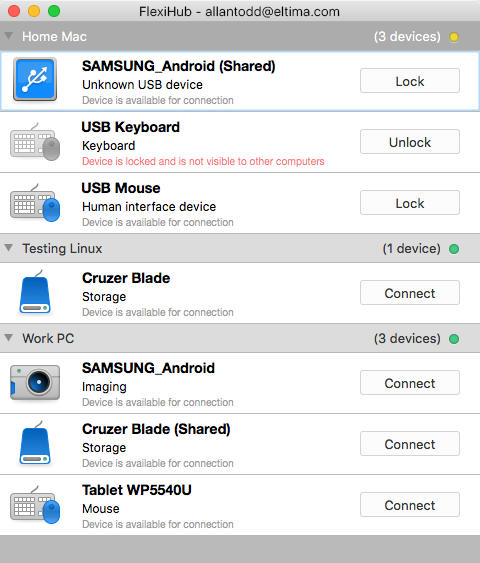
Eltima Software has released FlexiHub, its revolutionary new file sharing solution for Mac OS X. FlexiHub was specifically developed for sharing of USB and Serial (COM) ports over network. It doesn't matter where shared ports with devices are; they can be across the road, in the same room, or across the globe. FlexiHub allows efficient management of remote devices, connection and disconnection are held without user's physical presence at the USB or Serial port.
Frankfurt, Germany - Eltima Software, with its team of leaders in USB and Serial port sharing, has released a new version of its revolutionary FlexiHub program for Mac OS X. Featuring a simple and comrehensive Mac style interface, FlexiHub is a software program for sharing of USB and Serial (COM) ports over network. It doesn't matter where shared ports with devices are, they can be across the road, in the same room, or across the globe - they are easily shared and are accessible from any spot of the globe. FlexiHub allows efficient management of remote devices, connection and disconnection are held without user's physical presence at the USB or Serial port.
FlexiHub technology includes:
Unique way of USB and COM ports sharing:
All shared connections are transmitted through secured SSL protocol and can go through FlexiHub's own redirection server to ensure the most efficient connecion. There are actually three types of connection to choose from: LAN, UDP, and the redirection server.
Top Level of Privacy:
To start working with FlexiHub, a user has to register their account, which helps protecting shared connections and keep them within one account accessible only to specific people. FlexiHub uses 256-bit SSL encryption. Such secure connection cannot be intercepted and no one can get to its data. FlexiHub says NO to data loss.
FlexiHub supports most popular OS - Mac, Windows, Linux:
FlexiHub is all you need even if you are working on a Mac and need to debug colleague's software that is connected to their Linux or Windows machine. Connect to printers and scanners shared from your Linux-oriented office from your Mac and manage them as if they were connected to it directly.
Traffic Compression:
One of the common problems of software sharing of USB or COM ports is heavy traffic that overloads network and may destabilize it. FlexiHub got it covered by its unique technology of traffic compression. It helps unload network when certain devices send uncompressed data. Depending on user's needs, there is a choice between better speed or better compression rate.
Versatile Subscription Plans:
FlexiHub offers four subscription options - one of them is free, others are paid. Free subscription allows sharing one port and using software on two nodes (computers) with a limitation of 20 minutes per session.
Paid subscriptions allow sharing multiple devices among multiple nodes (computers) for unlimited periods of time. Users can use FlexiHub's own redirection server and automatic reconnection in case connection with a shared device is interrupted. Subscribing for one year of FlexiHub saves you 18% compared to subscribing for a shorter period of time.
FlexiHub: http://www.flexihub.com/
Download FlexiHub: http://flexihub.com/download/flexihub.dmg
Subscription Plans: http://www.flexihub.com/prices/
Screenshot: http://flexihub.com/submit/flexihub_mac.png
Application Icon: http://blog.eltima.com/wp-content/uploads/icon_512x512.png
Eltima Software is a global software Development Company, specializing primarily in serial communication, mobile and flash software for Mac OS and Windows. Eltima Software delivers top-notch solutions having a friendly team of 40 professionals. Copyright (C) 2015 Eltima Software. All Rights Reserved. Apple, the Apple logo and Macintosh are registered trademarks of Apple Inc. in the U.S. and/or other countries.
*******
Link To Article: http://prmac.com/release-id-78215.htm
*******
---------------------------------------------------------------------------------
Note that you can alter delivered distributions at any time.
Login to your account on prMac to alter your channel selection, or to opt-out at any time.


Guess What was just released for Apple TV?
A new article has been published at prMac.
Guess What was just released for Apple TV? - Published on 01/01/16
Yianni Software has announced GuessWhat, its new game title for Apple TV. GuessWhat puts you in the spotlight of the TV, by placing you in front of your audience. You need to guess who is shown on the TV screen with clues given by other players. Have you got enough knowledge to Guess What it is? This new fun party game features two different game modes. In Classic mode, it's you that asks the questions. Timed mode shows an answer to the rest of the audience for up to 15 seconds.
Melbourne, Australia - Yianni Software's latest Apple TV game has put you in the spotlight of the TV, by placing you in front of your audience. You need to Guess What (or who) is shown on the tv screen with the clues given by other players. Have you got enough knowledge and experience to Guess What it is? This new fun party game is played in two different game modes; Classic and Timed.
In Classic mode, it's you that asks the questions to narrow down the answer within 20 questions. It's the more traditional guessing game, where you as the guesser try to narrow down the scope by asking questions that are answered with either a simple yes or no. Timed mode shows an answer to the rest of the audience for up to 15 seconds, and have to act out or give clues to the Guesser for the answer. The Guesser has 60 seconds to see how many answers they can get right.
"On the way back from Sydney, we were playing a game of 20 questions keeping the kids entertained, explains Alexander Yianni, the director of Yianni Software. "After having just released Laddersnake on for Apple TV, it occurred to me that a similar app on the tvOS platform would be an entertaining project. The basic version of the game comes packaged with 10 categories for free with categories like Celebrities, Super heroes, Sports stars and more. The more you play the game, the more you unlock."
Device Requirements:
* Apple TV 4th generation
* Requires tv OS 9.0 or later
* 6.5 MB
Pricing and availability:
GuessWhat is available for free on the Apple TV App Store in time for Christmas; a great time for you to try guessing who it is with your friends and family, particularly during merry times. Additional category packs will be available for $1.99 (USD) for packs of 4, or you can buy the multi pack for $3.99 which will include all the categories. Up-coming updates to the app after the apple Christmas embargo include Game Center support with leaderboards and a much anticipated extra category packs for In-App purchase. Category packs include the movies and creative packs, the former containing categories Star Wars and Kids film characters.
Yianni Software: http://yianni-software.com
GuessWhat: https://itunes.apple.com/app/id1061891087
Screenshot: http://yianni-software.com/guessWhat/tvOS-screenshot-2.png
App Panel: http://yianni-software.com/guessWhat/stars-topshelf.fw.png
Located in Melbourne, Australia, yianni-software was founded in 2009 by Alexander Yianni. yianni-software specializes in developing both applications and games for the iPhone, iPad, Apple Watch and Apple TV. All Material and Software (C) 2009-2015 yianni-software / All Rights Reserved. Apple, the Apple logo, iPod, the iPod logo, are registered trademarks of Apple Computer in the U.S. and/or other countries.
*******
Link To Article: http://prmac.com/release-id-78214.htm
*******
---------------------------------------------------------------------------------
Note that you can alter delivered distributions at any time.
Login to your account on prMac to alter your channel selection, or to opt-out at any time.
Guess What was just released for Apple TV? - Published on 01/01/16
Yianni Software has announced GuessWhat, its new game title for Apple TV. GuessWhat puts you in the spotlight of the TV, by placing you in front of your audience. You need to guess who is shown on the TV screen with clues given by other players. Have you got enough knowledge to Guess What it is? This new fun party game features two different game modes. In Classic mode, it's you that asks the questions. Timed mode shows an answer to the rest of the audience for up to 15 seconds.
Melbourne, Australia - Yianni Software's latest Apple TV game has put you in the spotlight of the TV, by placing you in front of your audience. You need to Guess What (or who) is shown on the tv screen with the clues given by other players. Have you got enough knowledge and experience to Guess What it is? This new fun party game is played in two different game modes; Classic and Timed.
In Classic mode, it's you that asks the questions to narrow down the answer within 20 questions. It's the more traditional guessing game, where you as the guesser try to narrow down the scope by asking questions that are answered with either a simple yes or no. Timed mode shows an answer to the rest of the audience for up to 15 seconds, and have to act out or give clues to the Guesser for the answer. The Guesser has 60 seconds to see how many answers they can get right.
"On the way back from Sydney, we were playing a game of 20 questions keeping the kids entertained, explains Alexander Yianni, the director of Yianni Software. "After having just released Laddersnake on for Apple TV, it occurred to me that a similar app on the tvOS platform would be an entertaining project. The basic version of the game comes packaged with 10 categories for free with categories like Celebrities, Super heroes, Sports stars and more. The more you play the game, the more you unlock."
Device Requirements:
* Apple TV 4th generation
* Requires tv OS 9.0 or later
* 6.5 MB
Pricing and availability:
GuessWhat is available for free on the Apple TV App Store in time for Christmas; a great time for you to try guessing who it is with your friends and family, particularly during merry times. Additional category packs will be available for $1.99 (USD) for packs of 4, or you can buy the multi pack for $3.99 which will include all the categories. Up-coming updates to the app after the apple Christmas embargo include Game Center support with leaderboards and a much anticipated extra category packs for In-App purchase. Category packs include the movies and creative packs, the former containing categories Star Wars and Kids film characters.
Yianni Software: http://yianni-software.com
GuessWhat: https://itunes.apple.com/app/id1061891087
Screenshot: http://yianni-software.com/guessWhat/tvOS-screenshot-2.png

App Panel: http://yianni-software.com/guessWhat/stars-topshelf.fw.png

Located in Melbourne, Australia, yianni-software was founded in 2009 by Alexander Yianni. yianni-software specializes in developing both applications and games for the iPhone, iPad, Apple Watch and Apple TV. All Material and Software (C) 2009-2015 yianni-software / All Rights Reserved. Apple, the Apple logo, iPod, the iPod logo, are registered trademarks of Apple Computer in the U.S. and/or other countries.
*******
Link To Article: http://prmac.com/release-id-78214.htm
*******
---------------------------------------------------------------------------------
Note that you can alter delivered distributions at any time.
Login to your account on prMac to alter your channel selection, or to opt-out at any time.
Citrus - A Habit Forming App for New Year's Resolutions
A new article has been published at prMac.
Citrus - A Habit Forming App for New Year's Resolutions - Published on 12/31/15
Washington based Clockwork Development, LLC today announces Citrus 2.0, an update to their innovative new task manager for iOS devices. Citrus helps anyone form good habits and break bad ones. New Year's resolutions take a large amount of motivation and organization; both of which Citrus provides. Citrus features a streaks system that gives people motivation and allows them to track their progress. It also has a pie chart system that helps people organize and prioritize their time.
Bellevue, Washington - Clockwork Development, LLC today is proud to announce the release of Citrus 2.0, an update to their innovative new task manager developed for iPhone and iPod touch devices. With the New Year, many people are developing new habits and ending bad habits. Citrus' unique set of features makes it a perfect tool for helping them achieve their goals and sustain their motivation.
Citrus motivates users with fun and engaging features such as points and streaks. Every day that a user completes all of their scheduled tasks, that day turns green on the calendar. If they don't finish everything for the day, it turns red. Every task that the user completes gives them points. The points are determined by how many days long the current streak is. These features make Citrus a powerful habit-building tool.
Major Features Include:
* Streaks calendar system for tracking habits
* Time-based to-do lists with corresponding pie charts
* Rescheduling, reminders, and auto-repeat for tasks
* Customizable and unlockable color schemes
* Detailed productivity stats
* Intuitive and aesthetically pleasing user interface
Citrus also has a helpful and simple pie chart system. Each task is created with a time value. This time is put into a pie chart so that users can see an overview of their day. This helps users to easily prioritize their tasks and accomplish everything that they schedule.
What's New in Version 2.0:
Citrus 2.0 is now much more intuitive and easier for users to add a new task. In addition, version 2.0 fixes some minor bugs.
Device Requirements:
* Requires iOS 8.2 or later
* iPhone and iPod touch
* 5.4 MB
Pricing and Availability:
Citrus 2.0 is Free for the holidays and available worldwide exclusively through the App Store in the Productivity category.
Clockwork Development: http://www.cwdapps.com
Citrus 2.0: https://itunes.apple.com/app/citrus-motivational-task-manager/id1025272787
Screenshot 1: https://static1.squarespace.com/static/5583497ee4b05515cbf855d4/t/56846ac769492e32d1e02bfa/1451518668656/calendar+page+6%2B.jpg?format=2500w
Screenshot 2: https://static1.squarespace.com/static/5583497ee4b05515cbf855d4/t/56846b5da12f44c1dd505aff/1451518815781/Task+page+6%2B.jpg?format=2500w
App Icon: https://static1.squarespace.com/static/5583497ee4b05515cbf855d4/t/56846da37086d74497ade289/1451519397625/icon.png?format=1500w
Located in Bellevue, Washington/United States, Clockwork Development, LLC was founded in 2014 by Dilraj Devgun, Isaiah Suko, and Max Notarangelo. All Material and Software (c) 2014-2015 Clockwork Development, LLC / All Rights Reserved. Apple, the Apple logo, iPod, the iPod logo, are registered trademarks of Apple Computer in the U.S. and/or other countries.
*******
Link To Article: http://prmac.com/release-id-78222.htm
*******
---------------------------------------------------------------------------------
Note that you can alter delivered distributions at any time.
Login to your account on prMac to alter your channel selection, or to opt-out at any time.
Citrus - A Habit Forming App for New Year's Resolutions - Published on 12/31/15
Washington based Clockwork Development, LLC today announces Citrus 2.0, an update to their innovative new task manager for iOS devices. Citrus helps anyone form good habits and break bad ones. New Year's resolutions take a large amount of motivation and organization; both of which Citrus provides. Citrus features a streaks system that gives people motivation and allows them to track their progress. It also has a pie chart system that helps people organize and prioritize their time.
Bellevue, Washington - Clockwork Development, LLC today is proud to announce the release of Citrus 2.0, an update to their innovative new task manager developed for iPhone and iPod touch devices. With the New Year, many people are developing new habits and ending bad habits. Citrus' unique set of features makes it a perfect tool for helping them achieve their goals and sustain their motivation.
Citrus motivates users with fun and engaging features such as points and streaks. Every day that a user completes all of their scheduled tasks, that day turns green on the calendar. If they don't finish everything for the day, it turns red. Every task that the user completes gives them points. The points are determined by how many days long the current streak is. These features make Citrus a powerful habit-building tool.
Major Features Include:
* Streaks calendar system for tracking habits
* Time-based to-do lists with corresponding pie charts
* Rescheduling, reminders, and auto-repeat for tasks
* Customizable and unlockable color schemes
* Detailed productivity stats
* Intuitive and aesthetically pleasing user interface
Citrus also has a helpful and simple pie chart system. Each task is created with a time value. This time is put into a pie chart so that users can see an overview of their day. This helps users to easily prioritize their tasks and accomplish everything that they schedule.
What's New in Version 2.0:
Citrus 2.0 is now much more intuitive and easier for users to add a new task. In addition, version 2.0 fixes some minor bugs.
Device Requirements:
* Requires iOS 8.2 or later
* iPhone and iPod touch
* 5.4 MB
Pricing and Availability:
Citrus 2.0 is Free for the holidays and available worldwide exclusively through the App Store in the Productivity category.
Clockwork Development: http://www.cwdapps.com
Citrus 2.0: https://itunes.apple.com/app/citrus-motivational-task-manager/id1025272787
Screenshot 1: https://static1.squarespace.com/static/5583497ee4b05515cbf855d4/t/56846ac769492e32d1e02bfa/1451518668656/calendar+page+6%2B.jpg?format=2500w

Screenshot 2: https://static1.squarespace.com/static/5583497ee4b05515cbf855d4/t/56846b5da12f44c1dd505aff/1451518815781/Task+page+6%2B.jpg?format=2500w

App Icon: https://static1.squarespace.com/static/5583497ee4b05515cbf855d4/t/56846da37086d74497ade289/1451519397625/icon.png?format=1500w

Located in Bellevue, Washington/United States, Clockwork Development, LLC was founded in 2014 by Dilraj Devgun, Isaiah Suko, and Max Notarangelo. All Material and Software (c) 2014-2015 Clockwork Development, LLC / All Rights Reserved. Apple, the Apple logo, iPod, the iPod logo, are registered trademarks of Apple Computer in the U.S. and/or other countries.
*******
Link To Article: http://prmac.com/release-id-78222.htm
*******
---------------------------------------------------------------------------------
Note that you can alter delivered distributions at any time.
Login to your account on prMac to alter your channel selection, or to opt-out at any time.
Never fail at your Photo 365 with the Learn Photo365 app
A new article has been published at prMac.
Never fail at your Photo 365 with the Learn Photo365 app - Published on 12/31/15
Photo 365 failure will be a thing of the past with the Learn Photo365 iPhotography Assignment Generator App. This app provides thousands of ideas and inspiration for any photographer taking on a Photo 365/52wk/30 day challenge. Improve your iPhoneography by learning camera settings, light, composition, photographing people, landscape, nature and so much more. Tailored to shooting with your iPhone/iPod, assignments range from the rules of composition, creative shooting techniques and more.
Saint John, Canada - Thousands of photographers will start a Photo 365 /Photo A Day challenge January 1st, and many will fail. Since its launch, the Learn Photo365 iPhotography assignment generator apps has been combating the scourge of Photo365 failure with thousands of potential ideas to inspiring them. Right now photographers are looking for inspiration, and this is the app they'll want to know about.
Thousands Of Potential Assignments:
Over one hundred individual assignments, everything from camera settings, rules of composition, creative shooting techniques, photographing people, landscape and nature, and more subjects. But there are thousands of possible ideas with random objects and places, combined with techniques, environments. The scavenger hunt assignment gives photographs lists of terms to find with their camera...with MILLIONS of possible combinations.
Photo365/52Week/30 Day Challenge List:
The app will generate a full assignment list for a Photo 365/52 week/30 day challenge. With the daily reminder, there should be nothing stopping photographers from completing it!
Selfie 365:
There is now a Selfie365 challenge list generator for photographers to take their selfies to a new level! Thousands of fun, creative, and challenging ideas.
Favourite Assignment List:
Photographers can now keep all their fav assignments just a tap away!
Over 700 Example Images:
Each assignment has a series of example images to demonstrate the technique or inspire the photographer.
Daily Reminder:
The app will send the photographer a reminder each day to get their photo assignment to keep them on track.
No Network Required:
The app is completely self-contained and does not require a wifi or network connection. No matter where photographers are, they can always get an assignment.
Device Requirements:
* iPhone, iPad, and iPod touch
* Requires iOS 5.1 or later
* 78.8 MB
Pricing and Availability:
Learn Photo365 iPhotography Assignment Generator is $1.99 USD (or equivalent amount in other currencies) and available worldwide exclusively through the App Store in the Photo & Video category. There is also a free version of the app available on the App Store.
Learn Photo365 iPhotography Assignment Generator: http://www.learnphoto.ca/apps/
Purchase and Download: https://itunes.apple.com/app/learn-photo365-iphotography/id571827939
Download from iTunes: http://itunes.apple.com/app/photography-assignment-generator/id569035206
YouTube Video: https://www.youtube.com/watch?v=miWRninSG1o
Media Assets: http://www.learnphoto.ca/apps/media/
Noel Chenier is an award winning photographer, educator, and app developer based in Saint John, New Brunswick, Canada. He runs Learnphoto365, a site full of awesome photo tips and info. Copyright (C) 2015 Noel Chenier. All Rights Reserved. Apple, the Apple logo, iPhone, iPod and iPad are registered trademarks of Apple Inc. in the U.S. and/or other countries. Other trademarks and registered trademarks may be the property of their respective owners.
*******
Link To Article: http://prmac.com/release-id-78221.htm
*******
---------------------------------------------------------------------------------
Note that you can alter delivered distributions at any time.
Login to your account on prMac to alter your channel selection, or to opt-out at any time.
Never fail at your Photo 365 with the Learn Photo365 app - Published on 12/31/15
Photo 365 failure will be a thing of the past with the Learn Photo365 iPhotography Assignment Generator App. This app provides thousands of ideas and inspiration for any photographer taking on a Photo 365/52wk/30 day challenge. Improve your iPhoneography by learning camera settings, light, composition, photographing people, landscape, nature and so much more. Tailored to shooting with your iPhone/iPod, assignments range from the rules of composition, creative shooting techniques and more.
Saint John, Canada - Thousands of photographers will start a Photo 365 /Photo A Day challenge January 1st, and many will fail. Since its launch, the Learn Photo365 iPhotography assignment generator apps has been combating the scourge of Photo365 failure with thousands of potential ideas to inspiring them. Right now photographers are looking for inspiration, and this is the app they'll want to know about.
Thousands Of Potential Assignments:
Over one hundred individual assignments, everything from camera settings, rules of composition, creative shooting techniques, photographing people, landscape and nature, and more subjects. But there are thousands of possible ideas with random objects and places, combined with techniques, environments. The scavenger hunt assignment gives photographs lists of terms to find with their camera...with MILLIONS of possible combinations.
Photo365/52Week/30 Day Challenge List:
The app will generate a full assignment list for a Photo 365/52 week/30 day challenge. With the daily reminder, there should be nothing stopping photographers from completing it!
Selfie 365:
There is now a Selfie365 challenge list generator for photographers to take their selfies to a new level! Thousands of fun, creative, and challenging ideas.
Favourite Assignment List:
Photographers can now keep all their fav assignments just a tap away!
Over 700 Example Images:
Each assignment has a series of example images to demonstrate the technique or inspire the photographer.
Daily Reminder:
The app will send the photographer a reminder each day to get their photo assignment to keep them on track.
No Network Required:
The app is completely self-contained and does not require a wifi or network connection. No matter where photographers are, they can always get an assignment.
Device Requirements:
* iPhone, iPad, and iPod touch
* Requires iOS 5.1 or later
* 78.8 MB
Pricing and Availability:
Learn Photo365 iPhotography Assignment Generator is $1.99 USD (or equivalent amount in other currencies) and available worldwide exclusively through the App Store in the Photo & Video category. There is also a free version of the app available on the App Store.
Learn Photo365 iPhotography Assignment Generator: http://www.learnphoto.ca/apps/
Purchase and Download: https://itunes.apple.com/app/learn-photo365-iphotography/id571827939
Download from iTunes: http://itunes.apple.com/app/photography-assignment-generator/id569035206
YouTube Video: https://www.youtube.com/watch?v=miWRninSG1o
Media Assets: http://www.learnphoto.ca/apps/media/
Noel Chenier is an award winning photographer, educator, and app developer based in Saint John, New Brunswick, Canada. He runs Learnphoto365, a site full of awesome photo tips and info. Copyright (C) 2015 Noel Chenier. All Rights Reserved. Apple, the Apple logo, iPhone, iPod and iPad are registered trademarks of Apple Inc. in the U.S. and/or other countries. Other trademarks and registered trademarks may be the property of their respective owners.
*******
Link To Article: http://prmac.com/release-id-78221.htm
*******
---------------------------------------------------------------------------------
Note that you can alter delivered distributions at any time.
Login to your account on prMac to alter your channel selection, or to opt-out at any time.
Offline Traditional Chinese to English Dictionary 3.0 for iOS
A new article has been published at prMac.
Offline Traditional Chinese to English Dictionary 3.0 for iOS - Published on 12/31/15
LastThink announces the release of Offline Traditional Chinese to English Language Dictionary 3.0, the important update to their highly customizable Dictionary application for iOS devices. Users can seek and find any word's translation and synonyms anytime and anywhere from their Apple devices. The dictionary offers users a huge collection of words with their translations as well as definitions and synonyms, with well over five hundred thousand synonym variants.
Yerevan, Armenia - LastThink is proud to announce the release of Offline Traditional Chinese to English Language Dictionary 3.0, the important update to their highly customizable dictionary application developed for iPhone, iPad, and iPod touch devices. Users can seek and find any word's translation and synonyms anytime and anywhere from their Apple devices.
Features:
* Tremendous range of synonyms and antonyms with well over five hundred thousand synonym variants
* Information about the discipline of structural linguistics by suggesting vital enough sentences
* Appropriate translations of colloquial and formal words as well as conjugation of verbs and declension of nouns
* Availability of various word definitions which will exactly influence on your understanding of a Foreign Language in a detailed way
* A distinction of a section named "Favorites" with the possibility of saving as many unknown words as you wish
* Thorough analysis of parts of speech (noun, verb, adjective, adverb) and their grammatical functions (subject, object, etc.)
* A possibility of the following application usage without an internet demand
* Existence of contemporary words such as "Woot", "OMG", "Crunk" and many others
In our new updated version we grant users a chance of typing the unknown word either in capitals or in small letters and the app will bring all the possible variants and definitions of the dictionary entries saved both in capital and small letters.
If you however experience any issues, please do not hesitate to contact us if you'd like to share your experience with Offline Dictionaries, or provide suggestions on how we could improve the product further. We will be more than happy to get in touch.
NOTE: We have selected data from the internet and if any assembly or constitution doesn't want us to show the content of the unit, please recommend us to remove it.
Device Requirements:
* iPhone, iPad, and iPod touch
* Optimized for iPhone 5, iPhone 6, and iPhone 6 Plus
* Requires iOS 6.0 or later
* Universal Application
* 234 MB
Pricing and Availability:
Offline Traditional Chinese to English Language Dictionary 3.0 is free and available worldwide exclusively through the App Store in the Education category.
LastThink: http://lastthink.com/
Offline Traditional Chinese to English Language Dictionary 3.0: https://www.facebook.com/pages/Offline-Dictionary/882897578447079
Download from iTunes: https://itunes.apple.com/app/offline-traditional-chinese/id1042204825
Screenshot: http://a4.mzstatic.com/us/r30/Purple6/v4/dc/7a/b9/dc7ab923-daf0-95e3-e40f-2a0009517853/screen322x572.jpeg
App Icon: http://a4.mzstatic.com/us/r30/Purple3/v4/b7/1c/aa/b71caa16-7245-ed59-1e49-acfc323f9f3d/icon175x175.png
LastThink is an IT company with a focus on mobile development. It has extended its list of services since 2012 to offer high-end business process management, system integration, as well as up-to-date communication solutions. LastThink's mission is to deliver maximum business value to its customers by designing, developing, implementing and maintaining efficient and high quality software solutions aligned with their most essential business needs. Their team will always do its best to meet client expectations. Copyright (C) 2015 LastThink LLC. All Rights Reserved. Apple, the Apple logo, iPhone, iPad and iPod are registered trademarks of Apple Inc. in the U.S. and/or other countries.
*******
Link To Article: http://prmac.com/release-id-78220.htm
*******
---------------------------------------------------------------------------------
Note that you can alter delivered distributions at any time.
Login to your account on prMac to alter your channel selection, or to opt-out at any time.
Offline Traditional Chinese to English Dictionary 3.0 for iOS - Published on 12/31/15
LastThink announces the release of Offline Traditional Chinese to English Language Dictionary 3.0, the important update to their highly customizable Dictionary application for iOS devices. Users can seek and find any word's translation and synonyms anytime and anywhere from their Apple devices. The dictionary offers users a huge collection of words with their translations as well as definitions and synonyms, with well over five hundred thousand synonym variants.
Yerevan, Armenia - LastThink is proud to announce the release of Offline Traditional Chinese to English Language Dictionary 3.0, the important update to their highly customizable dictionary application developed for iPhone, iPad, and iPod touch devices. Users can seek and find any word's translation and synonyms anytime and anywhere from their Apple devices.
Features:
* Tremendous range of synonyms and antonyms with well over five hundred thousand synonym variants
* Information about the discipline of structural linguistics by suggesting vital enough sentences
* Appropriate translations of colloquial and formal words as well as conjugation of verbs and declension of nouns
* Availability of various word definitions which will exactly influence on your understanding of a Foreign Language in a detailed way
* A distinction of a section named "Favorites" with the possibility of saving as many unknown words as you wish
* Thorough analysis of parts of speech (noun, verb, adjective, adverb) and their grammatical functions (subject, object, etc.)
* A possibility of the following application usage without an internet demand
* Existence of contemporary words such as "Woot", "OMG", "Crunk" and many others
In our new updated version we grant users a chance of typing the unknown word either in capitals or in small letters and the app will bring all the possible variants and definitions of the dictionary entries saved both in capital and small letters.
If you however experience any issues, please do not hesitate to contact us if you'd like to share your experience with Offline Dictionaries, or provide suggestions on how we could improve the product further. We will be more than happy to get in touch.
NOTE: We have selected data from the internet and if any assembly or constitution doesn't want us to show the content of the unit, please recommend us to remove it.
Device Requirements:
* iPhone, iPad, and iPod touch
* Optimized for iPhone 5, iPhone 6, and iPhone 6 Plus
* Requires iOS 6.0 or later
* Universal Application
* 234 MB
Pricing and Availability:
Offline Traditional Chinese to English Language Dictionary 3.0 is free and available worldwide exclusively through the App Store in the Education category.
LastThink: http://lastthink.com/
Offline Traditional Chinese to English Language Dictionary 3.0: https://www.facebook.com/pages/Offline-Dictionary/882897578447079
Download from iTunes: https://itunes.apple.com/app/offline-traditional-chinese/id1042204825
Screenshot: http://a4.mzstatic.com/us/r30/Purple6/v4/dc/7a/b9/dc7ab923-daf0-95e3-e40f-2a0009517853/screen322x572.jpeg

App Icon: http://a4.mzstatic.com/us/r30/Purple3/v4/b7/1c/aa/b71caa16-7245-ed59-1e49-acfc323f9f3d/icon175x175.png

LastThink is an IT company with a focus on mobile development. It has extended its list of services since 2012 to offer high-end business process management, system integration, as well as up-to-date communication solutions. LastThink's mission is to deliver maximum business value to its customers by designing, developing, implementing and maintaining efficient and high quality software solutions aligned with their most essential business needs. Their team will always do its best to meet client expectations. Copyright (C) 2015 LastThink LLC. All Rights Reserved. Apple, the Apple logo, iPhone, iPad and iPod are registered trademarks of Apple Inc. in the U.S. and/or other countries.
*******
Link To Article: http://prmac.com/release-id-78220.htm
*******
---------------------------------------------------------------------------------
Note that you can alter delivered distributions at any time.
Login to your account on prMac to alter your channel selection, or to opt-out at any time.
Pattern Soup App Enables Users to Create Unique Collages and Patterns
A new article has been published at prMac.
Pattern Soup App Enables Users to Create Unique Collages and Patterns - Published on 12/31/15
Ultralab Apps introduces Pattern Soup 1.0 their new creative toolkit developed exclusively for iOS devices. Pattern Soup makes it possible to create unique patterns by melding user photography with artworks of contemporary designers. The variety of editing options and backgrounds make sure you create the Pattern Soup of your taste. This release also marks the collaboration between Ultralab Apps and modern artists from France, Belarus, Japan and the USA.
Minsk, Belarus - Ultralab Apps today is proud to announce the availability of Pattern Soup 1.0, an app that stands out from hundreds of collage-making apps on the App Store. By combining photo fragments with abstract backgrounds users can create unusual posts for Instagram and Tumblr and print designs for posters, T-shirts and the like.
Pattern Soup serves as an introduction into the works of contemporary artists. The first version of the app includes exciting patterns by Specialedition.co - a group of designers from Kansas; illustrations by Yoko Honda distinguished by neon hues and unmistakable 80s aesthetics; and pieces by Alain Vonck whose art is inspired by the digital culture of the 90s.
A unique pattern in Pattern Soup is created following an intuitive sequence of steps:
* Cutting out a photo fragment
* Applying a stylish grid
* Selecting an abstract background
Pattern Soup features Ultrastore - a unique service for promoting and selling digital creative assets including photos, sketches, and illustrations. By launching the store and opening access for creative individuals to submit their art, Ultralab Apps hopes to facilitate the development of mobile design community and inspire people to pursue their creative work.
Ultralab Apps team hopes Pattern Soup will be of much inspiration to iPhone users by introducing them to the works of contemporary artists and by giving them an opportunity to create artworks of their own.
Device requirements:
* Compatible with iPhone, iPad and iPod touch
* Requires iOS 8.0 or later
* 14.8 MB
Pricing and Availability:
Pattern Soup 1.0 is free with additional packs offered as in-app purchases and is available worldwide exclusively through the App Store in the Photo & Video category.
Ultralab: http://ultralabapps.com
Pattern Soup 1.0: https://itunes.apple.com/app/pattern-soup/id1048789436
Screenshot: http://apphunters.co/patternsoup/screen.jpg
App Icon: http://apphunters.co/patternsoup/icon.png
Founded in 2012, Ultralab is a community of talented developers, illustrators and marketers committed to the idea of creating apps and games that inspire, empower and entertain. All Material and Software (C) Copyright 2015 Ultralab. All Rights Reserved. Apple, the Apple logo, iPhone, iPod and iPad are registered trademarks of Apple Inc. in the U.S. and/or other countries. Other trademarks and registered trademarks may be the property of their respective owners.
*******
Link To Article: http://prmac.com/release-id-78219.htm
*******
---------------------------------------------------------------------------------
Note that you can alter delivered distributions at any time.
Login to your account on prMac to alter your channel selection, or to opt-out at any time.
Pattern Soup App Enables Users to Create Unique Collages and Patterns - Published on 12/31/15
Ultralab Apps introduces Pattern Soup 1.0 their new creative toolkit developed exclusively for iOS devices. Pattern Soup makes it possible to create unique patterns by melding user photography with artworks of contemporary designers. The variety of editing options and backgrounds make sure you create the Pattern Soup of your taste. This release also marks the collaboration between Ultralab Apps and modern artists from France, Belarus, Japan and the USA.
Minsk, Belarus - Ultralab Apps today is proud to announce the availability of Pattern Soup 1.0, an app that stands out from hundreds of collage-making apps on the App Store. By combining photo fragments with abstract backgrounds users can create unusual posts for Instagram and Tumblr and print designs for posters, T-shirts and the like.
Pattern Soup serves as an introduction into the works of contemporary artists. The first version of the app includes exciting patterns by Specialedition.co - a group of designers from Kansas; illustrations by Yoko Honda distinguished by neon hues and unmistakable 80s aesthetics; and pieces by Alain Vonck whose art is inspired by the digital culture of the 90s.
A unique pattern in Pattern Soup is created following an intuitive sequence of steps:
* Cutting out a photo fragment
* Applying a stylish grid
* Selecting an abstract background
Pattern Soup features Ultrastore - a unique service for promoting and selling digital creative assets including photos, sketches, and illustrations. By launching the store and opening access for creative individuals to submit their art, Ultralab Apps hopes to facilitate the development of mobile design community and inspire people to pursue their creative work.
Ultralab Apps team hopes Pattern Soup will be of much inspiration to iPhone users by introducing them to the works of contemporary artists and by giving them an opportunity to create artworks of their own.
Device requirements:
* Compatible with iPhone, iPad and iPod touch
* Requires iOS 8.0 or later
* 14.8 MB
Pricing and Availability:
Pattern Soup 1.0 is free with additional packs offered as in-app purchases and is available worldwide exclusively through the App Store in the Photo & Video category.
Ultralab: http://ultralabapps.com
Pattern Soup 1.0: https://itunes.apple.com/app/pattern-soup/id1048789436
Screenshot: http://apphunters.co/patternsoup/screen.jpg

App Icon: http://apphunters.co/patternsoup/icon.png

Founded in 2012, Ultralab is a community of talented developers, illustrators and marketers committed to the idea of creating apps and games that inspire, empower and entertain. All Material and Software (C) Copyright 2015 Ultralab. All Rights Reserved. Apple, the Apple logo, iPhone, iPod and iPad are registered trademarks of Apple Inc. in the U.S. and/or other countries. Other trademarks and registered trademarks may be the property of their respective owners.
*******
Link To Article: http://prmac.com/release-id-78219.htm
*******
---------------------------------------------------------------------------------
Note that you can alter delivered distributions at any time.
Login to your account on prMac to alter your channel selection, or to opt-out at any time.
New Appiness iOS app marketing guide could not come at a better time
A new article has been published at prMac.
New Appiness iOS app marketing guide could not come at a better time - Published on 12/31/15
Marketing is what separates the winners from the losers in the App Store. Plenty of free information on app marketing already exists, but the new Appiness guide from Bright Newt has given iOS developers a step-by-step plan for effectively marketing their apps without breaking the bank. With cost-per-acquisition numbers trending upward over the past six months, Appiness couldn't come at a better time. A how-to marketing guide for turning duds into profitable apps.
San Francisco, California - Several different ad and promotion networks publish their cost-per-install (CPI) numbers and have reported an upward trend in recent months. Chartboost, for example, showed an increase from $1.99 per install in March 2015 to $2.21 in June 2015. Fiksu reported a $1.79 CPI in November 2015. These numbers represent a huge problem for iOS developers.
To help address this problem, Bright Newt has released Appiness, an iOS app marketing guide. Appiness could not come at a better time. In June 2013 Distimo reported that an app needs 23,000 downloads per day to rise to the Top 50 Free Overall. This means that app developers face a $35,000 /day spend if they want to achieve any real visibility.
"Most iOS developers simply can't afford the development and ongoing optimization costs required to build a freemium app," said Kyle Hartman, Chief Newt at Bright Newt. "And once they do finish an app, they can't afford to advertise and can't get their revenue-per-install high enough to make back their money. It's a Catch-22."
The Bright Newt team wanted to give iOS developers a hand by providing a how-to marketing guide for turning duds into profitable apps. Plenty of free information on app marketing already exists, but Appiness provides step-by-step instructions for inexpensive tactics, as well as "true tales of appiness" from successful developers.
The Appiness guide comes in three different packages at three price points - Basic Appiness for $38, Extra Appiness for $69, and Total Appiness for $118. Each package comes with an assortment of other tools and resources, such as submission and launch day checklists, comprehensive spreadsheets of app review sites and app-related services, various templates, and interviews with thought leaders in the mobile industry.
The bottom line is this: Scrappy marketing is what separates the winners from the losers in the app business. If iOS developers make a unique, beautiful, and entertaining (or helpful) app, and then execute a smart, inexpensive marketing plan, then their apps will gain visibility, get more downloads, and make more money. Appiness is the winners' new, not-so-secret weapon.
Bright Newt: http://brightnewt.com/
Appiness: http://brightnewguides.com/appiness/
Promotional Image: http://brightnewt.com/wp-content/uploads/2013/12/Appiness_CoverFinal.jpg
Bright Newt is a creative company, headquartered in San Francisco Bay Area, California. Bright Newt represents a confederacy of creative professionals with different, if complimentary, skill sets and a similar way of thinking about branding, business, and relationships. Bright Newt's focus had grown from creative copywriting, marketing strategy, branding, SEO, and social media consulting to include mobile app development. All Material and Software (C) Copyright 2015 Bright Newt. All Rights Reserved. Apple, the Apple logo, iPhone, iPod and iPad are registered trademarks of Apple Inc. in the U.S. and/or other countries. Other trademarks and registered trademarks may be the property of their respective owners.
*******
Link To Article: http://prmac.com/release-id-78218.htm
*******
---------------------------------------------------------------------------------
Note that you can alter delivered distributions at any time.
Login to your account on prMac to alter your channel selection, or to opt-out at any time.
New Appiness iOS app marketing guide could not come at a better time - Published on 12/31/15
Marketing is what separates the winners from the losers in the App Store. Plenty of free information on app marketing already exists, but the new Appiness guide from Bright Newt has given iOS developers a step-by-step plan for effectively marketing their apps without breaking the bank. With cost-per-acquisition numbers trending upward over the past six months, Appiness couldn't come at a better time. A how-to marketing guide for turning duds into profitable apps.
San Francisco, California - Several different ad and promotion networks publish their cost-per-install (CPI) numbers and have reported an upward trend in recent months. Chartboost, for example, showed an increase from $1.99 per install in March 2015 to $2.21 in June 2015. Fiksu reported a $1.79 CPI in November 2015. These numbers represent a huge problem for iOS developers.
To help address this problem, Bright Newt has released Appiness, an iOS app marketing guide. Appiness could not come at a better time. In June 2013 Distimo reported that an app needs 23,000 downloads per day to rise to the Top 50 Free Overall. This means that app developers face a $35,000 /day spend if they want to achieve any real visibility.
"Most iOS developers simply can't afford the development and ongoing optimization costs required to build a freemium app," said Kyle Hartman, Chief Newt at Bright Newt. "And once they do finish an app, they can't afford to advertise and can't get their revenue-per-install high enough to make back their money. It's a Catch-22."
The Bright Newt team wanted to give iOS developers a hand by providing a how-to marketing guide for turning duds into profitable apps. Plenty of free information on app marketing already exists, but Appiness provides step-by-step instructions for inexpensive tactics, as well as "true tales of appiness" from successful developers.
The Appiness guide comes in three different packages at three price points - Basic Appiness for $38, Extra Appiness for $69, and Total Appiness for $118. Each package comes with an assortment of other tools and resources, such as submission and launch day checklists, comprehensive spreadsheets of app review sites and app-related services, various templates, and interviews with thought leaders in the mobile industry.
The bottom line is this: Scrappy marketing is what separates the winners from the losers in the app business. If iOS developers make a unique, beautiful, and entertaining (or helpful) app, and then execute a smart, inexpensive marketing plan, then their apps will gain visibility, get more downloads, and make more money. Appiness is the winners' new, not-so-secret weapon.
Bright Newt: http://brightnewt.com/
Appiness: http://brightnewguides.com/appiness/
Promotional Image: http://brightnewt.com/wp-content/uploads/2013/12/Appiness_CoverFinal.jpg

Bright Newt is a creative company, headquartered in San Francisco Bay Area, California. Bright Newt represents a confederacy of creative professionals with different, if complimentary, skill sets and a similar way of thinking about branding, business, and relationships. Bright Newt's focus had grown from creative copywriting, marketing strategy, branding, SEO, and social media consulting to include mobile app development. All Material and Software (C) Copyright 2015 Bright Newt. All Rights Reserved. Apple, the Apple logo, iPhone, iPod and iPad are registered trademarks of Apple Inc. in the U.S. and/or other countries. Other trademarks and registered trademarks may be the property of their respective owners.
*******
Link To Article: http://prmac.com/release-id-78218.htm
*******
---------------------------------------------------------------------------------
Note that you can alter delivered distributions at any time.
Login to your account on prMac to alter your channel selection, or to opt-out at any time.
Subscribe to:
Posts (Atom)