A new article has been published at prMac.
Selfie X 2.3.1 Offers Fun and Safe Selfie Sharing for iPhone Users - Published on 01/18/16
South Korean-based development team, Triankle announces Selfie X 2.3.1, an important update to their free photo and video selfie sharing app for iOS devices. The app allows anyone to share photos and videos with other users, whether they are nearby, or on the other side of the globe. Selfie X merges the best features of photo sharing and social networks into one convenient app that offers a safe and secure method of connecting with others. Version 2.3.1 brings bug fixes to the app.
Seoul, Korea - Triankle is proud to announce the release of Selfie X 2.3.1, an important update to their free photo and video selfie sharing app for iPhone, iPad, and iPod touch devices. Selfie X, (short for Selfie eXchange), offers all the best elements of photo sharing and social networks in one convenient and easy to use app that provides a way to share selfies with other users in a safe and secure manner.
Selfie X allows anyone to connect with others, whether they are in their own neighborhood, or on the other side of the globe. Available in a large array of languages, Selfie X allows users to avoid language barriers, offering the ability to communicate via photos and videos. The app allows user to see other users that are currently online, presenting the opportunity to exchange selfies and possibly grow the user's personal network.
Selfie X's well thought out interface and method of operation aim to make it a cut above alternative apps of this genre. This app allows users the ability to not only share their selfie photos and videos with the general Selfie X community, but to also safely swap selfie pics and videos simultaneously with individual users. A simultaneous swap is built on the idea of fair play, one selfie deserves another. So, if a user agrees to swap their selfie photo or video for another user's selfie, neither selfie is released for viewing until both users have submitted a photo or video.
"Folks just naturally want to reach out to others, to make a personal connection using their mobile devices, but they may have a hard time judging the intent of the other party, or have difficulty communicating due to language and culture barriers. They may also be mislead by other social media users, due to the misuse of Photoshop filters or other editing apps," says Sang June Lee, CEO of Triankle. "Selfie X relieves those concerns, by leading to selfie swaps only by users who have mutual interests. Our unique reaction videos feature offers instant feedback. Instead of the usual wink emoji, or 'OMG' reaction text, Selfie X shows the user's true reaction, with no filtering. That facial expression says a thousand words, with no language barriers!"
The simultaneous swapping method ensures both users will be online at the same time, thereby increasing the interaction between the users, and also increasing the possibility of an online chat to have fun discussing the selfie swaps. Plus, the optional "reaction" videos offer users the chance to immediately see the reaction of the opposite user when they see the entertaining selfie shot! Users also don't have to worry about selfies falling into the wrong hands, as swapped selfies, and the reaction shots, all self-delete after they are viewed, keeping moments private and between the users who shared them.
Features:
* Selfie and selfie video post, share and exchange
* Reaction video sent to swapped selfies
* Selfies self-destruct soon after exchange for maximum privacy
* Chat feature available after selfie exchange
* Exchange selfies with friends who are not Selfie X members via Facebook and Twitter
* Follow friends to view their updates
* Comment and like other user's photos
* Unlimited uploads into the user gallery
* Personal mobile web album offers exclusive URL to share selfies with friends who are not yet Selfie X members
* View who is available, and what their distance is
* Users can see who viewed their profile
* Version 2.3.1 offers a new Main Page User Interface
Selfie X offers a photo sharing experience that will have users coming back to share, "just one more selfie," time after time. Best of all, the app's built-in safety measures protect users from the usual perils of social networks, allowing users to safely build a network of friends from near and far. Once the ball starts rolling, users will be selfie ninjas in no time.
Device Requirements:
* iPhone, iPad, and iPod touch
* Requires iOS 6.0 or later
* 14.9 MB
Pricing and Availability:
Selfie X 2.3.1 is free, and is available worldwide exclusively through the App Store in the Social Networking category. An Android version is available through Google Play, and an Amazon Fire version is available through the Amazon Appstore.
Selfie X 2.3.1: http://www.selfieex.com/
Download from iTunes: https://itunes.apple.com/app/id903280485
Download from Google Play: https://play.google.com/store/apps/details?id=com.triankle.selfiex
Download from Amazon Appstore: http://www.amazon.com/gp/mas/dl/android?asin=B00RB1Y5XY
YouTube Video: https://www.youtube.com/watch?v=-BDw4cEcCGo
Media Assets: https://www.dropbox.com/sh/don1o8ob4fv57iq/AADICPYN2NNOgMVpz_EHx1oga?dl=0
Triankle, incorporated in Seoul, South Korea, is a social media app developing company that creates new ways of value added networking, specially with photos. Copyright (C) 2016 Triankle. All Rights Reserved. Apple, the Apple logo, iPhone and iPod are registered trademarks of Apple Inc. in the U.S. and/or other countries.
*******
Link To Article: http://prmac.com/release-id-78343.htm
*******
---------------------------------------------------------------------------------
Note that you can alter delivered distributions at any time.
Login to your account on prMac to alter your channel selection, or to opt-out at any time.

Keep Close Pictures - The Free Remote Slideshow for iOS Devices Updated
A new article has been published at prMac.
Keep Close Pictures - The Free Remote Slideshow for iOS Devices Updated - Published on 01/17/16
Wyari Pty Ltd announces Keep Close Pictures 1.1, and important update to their free remote slideshow app for iOS devices. The Keep Close Contact Pictures system allows you to upload photos, and have them appear on multiple iOS devices anywhere in the world automatically without the recipient having to do anything as long as they have been authorized by you. Version 1.1 brings a series of user interface and functionality updates simplifying and enhancing the system for users.
Sydney, Australia - Wyari Pty Ltd is proud to announce the release of Keep Close Pictures 1.1 for iPhone, iPad, and iPod touch devices. If you have friends or relatives in other parts of the country or the world and would love to easily send them photos of your latest trip, the family growing up, parties etc. then Keep Close Pictures is the solution for you.
Keep Close Pictures Features:
* Provides a totally free private online account
* Allows you to upload pictures from anywhere on the internet using a browser an iPhone, iPad, desktop or laptop.
* Makes the pictures appear automatically on any device you authorize
* Optimizes your pictures automatically when loaded to fit the screen
* Automatically presents the pictures in an animated slideshow
* Can use pre-saved photos or ones taken with your iPhone or iPad camera
* Supports as many simultaneous devices as you like anywhere in the world as long as they have internet access
* Best of all is totally free!
Yes, you can upload the picture on one side of the world and it will appear on the other within minutes without the recipient having to do anything, great for those who are not into technology. Just setup the iPad, connect it into the internet, and power it up, then open the app, and off you go.
Uploading pictures and annotating them with a title and description via the website is easy, once loaded they will be displayed automatically in a slideshow. The title and description are great for letting people know what the picture is about. You can remove or replace a picture at anytime so you can make sure that the slideshow is always up to date. To minimize internet usage the pictures are cached on the device and only downloaded when a picture is changed.
Device Requirements:
* iPhone, iPad, and iPod touch
* Requires iOS 8.0 or later
* Universal Application
* 4.1 MB
Pricing and Availability:
Keep Close Pictures 1.1 is free, and is available worldwide exclusively through the App Store in the Utilities category. Keep Close Pictures is a product in the Keep Close family, check out Keep Close Contact and Keep Close Contact Carer.
Keep Close Pictures Free 1.1: http://pictures.keepclosecontact.com
Download from iTunes: https://itunes.apple.com/app/keep-close-contact/id1056998158
Screenshot 1: http://pictures.keepclosecontact.com/wp-content/uploads/2015/11/Simulator-Screen-Shot-9-Nov-2015-3.12.58-PM.png
Screenshot 2: http://pictures.keepclosecontact.com/wp-content/uploads/2015/11/picture_frame-no-border1.png
App Icon: http://a5.mzstatic.com/us/r30/Purple69/v4/73/ae/63/73ae63a1-4c86-c974-0035-03683e4c8bb8/icon175x175.png
Wyari Pty Ltd is a consultancy and software development organization that has been operating in Australia for 30 years. In that time Wyari has provided services to many organizations of all sizes globally. Wyari's team has a very wide range of skills in system development and management gained from real world experience. Copyright (C) 2016 Wyari Pty Ltd. All Rights Reserved. Apple, the Apple logo, iPhone, iPad and iPod are registered trademarks of Apple Inc. in the U.S. and/or other countries.
*******
Link To Article: http://prmac.com/release-id-78365.htm
*******
---------------------------------------------------------------------------------
Note that you can alter delivered distributions at any time.
Login to your account on prMac to alter your channel selection, or to opt-out at any time.
Keep Close Pictures - The Free Remote Slideshow for iOS Devices Updated - Published on 01/17/16
Wyari Pty Ltd announces Keep Close Pictures 1.1, and important update to their free remote slideshow app for iOS devices. The Keep Close Contact Pictures system allows you to upload photos, and have them appear on multiple iOS devices anywhere in the world automatically without the recipient having to do anything as long as they have been authorized by you. Version 1.1 brings a series of user interface and functionality updates simplifying and enhancing the system for users.
Sydney, Australia - Wyari Pty Ltd is proud to announce the release of Keep Close Pictures 1.1 for iPhone, iPad, and iPod touch devices. If you have friends or relatives in other parts of the country or the world and would love to easily send them photos of your latest trip, the family growing up, parties etc. then Keep Close Pictures is the solution for you.
Keep Close Pictures Features:
* Provides a totally free private online account
* Allows you to upload pictures from anywhere on the internet using a browser an iPhone, iPad, desktop or laptop.
* Makes the pictures appear automatically on any device you authorize
* Optimizes your pictures automatically when loaded to fit the screen
* Automatically presents the pictures in an animated slideshow
* Can use pre-saved photos or ones taken with your iPhone or iPad camera
* Supports as many simultaneous devices as you like anywhere in the world as long as they have internet access
* Best of all is totally free!
Yes, you can upload the picture on one side of the world and it will appear on the other within minutes without the recipient having to do anything, great for those who are not into technology. Just setup the iPad, connect it into the internet, and power it up, then open the app, and off you go.
Uploading pictures and annotating them with a title and description via the website is easy, once loaded they will be displayed automatically in a slideshow. The title and description are great for letting people know what the picture is about. You can remove or replace a picture at anytime so you can make sure that the slideshow is always up to date. To minimize internet usage the pictures are cached on the device and only downloaded when a picture is changed.
Device Requirements:
* iPhone, iPad, and iPod touch
* Requires iOS 8.0 or later
* Universal Application
* 4.1 MB
Pricing and Availability:
Keep Close Pictures 1.1 is free, and is available worldwide exclusively through the App Store in the Utilities category. Keep Close Pictures is a product in the Keep Close family, check out Keep Close Contact and Keep Close Contact Carer.
Keep Close Pictures Free 1.1: http://pictures.keepclosecontact.com
Download from iTunes: https://itunes.apple.com/app/keep-close-contact/id1056998158
Screenshot 1: http://pictures.keepclosecontact.com/wp-content/uploads/2015/11/Simulator-Screen-Shot-9-Nov-2015-3.12.58-PM.png

Screenshot 2: http://pictures.keepclosecontact.com/wp-content/uploads/2015/11/picture_frame-no-border1.png

App Icon: http://a5.mzstatic.com/us/r30/Purple69/v4/73/ae/63/73ae63a1-4c86-c974-0035-03683e4c8bb8/icon175x175.png

Wyari Pty Ltd is a consultancy and software development organization that has been operating in Australia for 30 years. In that time Wyari has provided services to many organizations of all sizes globally. Wyari's team has a very wide range of skills in system development and management gained from real world experience. Copyright (C) 2016 Wyari Pty Ltd. All Rights Reserved. Apple, the Apple logo, iPhone, iPad and iPod are registered trademarks of Apple Inc. in the U.S. and/or other countries.
*******
Link To Article: http://prmac.com/release-id-78365.htm
*******
---------------------------------------------------------------------------------
Note that you can alter delivered distributions at any time.
Login to your account on prMac to alter your channel selection, or to opt-out at any time.
PFiddlesoft Releases Version 3.6.1 of its PFAssistive Framework
A new article has been published at prMac.
PFiddlesoft Releases Version 3.6.1 of its PFAssistive Framework - Published on 01/17/16
PFiddlesoft announces the release of version 3.6.1 of its PFAssistive Framework. The PFiddlesoft Frameworks help developers write assistive Macintosh applications for persons with disabilities using Apple's Accessibility and Quartz Event Taps APIs on OS X v10.7 Lion and newer. The PFAssistive Framework was updated to complete the implementation of full support for subclassing by client applications that need special or additional features.
Quechee, Vermont - PFiddlesoft today announced the release of version 3.6.1 of PFAssistive Framework. The PFiddlesoft Frameworks help developers write assistive Macintosh applications for persons with disabilities using Apple's Accessibility and Quartz Event Taps APIs on OS X. The PFAssistive Framework was updated to complete the implementation of full support for subclassing by client applications that need special or additional features.
The PFAssistive Framework was created in 2003 as the engine driving PFiddlesoft's highly regarded UI Browser application for developers and for users of Apple's AppleScript GUI Scripting technology. The framework supports and enhances Apple's Accessibility API. The PFEventTaps Framework was created in 2007 as the engine underlying PFiddlesoft's free Event Taps Testbench utility for developers. The framework supports and enhances Apple's Quartz Event Taps API. Both frameworks have been revised and updated over a period of years, and they have demonstrated their power and reliability in PFiddlesoft's commercial and free developer utilities.
The frameworks are written using Objective-C. They support the Intel 64-bit architecture using reference counted memory management or ARC, and they support client applications written in Objective-C or Swift. Developers can license the PFiddlesoft Frameworks for distribution or for use with their own products that use Apple's Accessibility and Quartz Event Taps technologies.
The frameworks may be licensed free of charge for personal use or for distribution or use with a free software product. A modest license fee is required to distribute or use the frameworks with a product for which payment is requested or required. Source code is available for a separate fee. Different terms apply to large or established commercial software developers. For more information, or to download the PFiddlesoft Frameworks, visit the PFAssistive Framework website.
PFiddlesoft: http://pfiddlesoft.com
PFAssistive Framework 3.6.1: http://pfiddlesoft.com/frameworks
Formed by Bill Cheeseman to develop and market Macintosh software based on Apple's Accessibility technologies, PFiddlesoft(TM) has unmatched experience controlling the Macintosh Graphical User Interface using AppleScript and other technologies. PFiddlesoft distributes applications written by Bill Cheeseman and formerly distributed by PreFab Software, Inc., including UI Browser, UI Actions, Event Taps Testbench, and the PFiddlesoft Frameworks. These products for Mac OS X carry on the tradition of PreFab Player, a seminal product released for the classic Mac OS in 1994. UI Browser was first released in 2003 to support Apple's GUI Scripting and Accessibility technologies. It was followed in 2004 by UI Actions, implementing "universal attachability" for AppleScript, and in 2007 by Event Taps Testbench, a free developer utility to explore Quartz Event Taps. The PFiddle Collection was introduced in 2010. It is a growing collection of useful and fun Macintosh software. All Material and
Software (C) Copyright 2016 PFiddlesoft is a trademark of PreForm Assistive Technologies, LLC. All Rights Reserved. Apple, the Apple logo, Mac OS X and Macintosh are registered trademarks of Apple Inc. in the U.S. and/or other countries.
*******
Link To Article: http://prmac.com/release-id-78364.htm
*******
---------------------------------------------------------------------------------
Note that you can alter delivered distributions at any time.
Login to your account on prMac to alter your channel selection, or to opt-out at any time.
PFiddlesoft Releases Version 3.6.1 of its PFAssistive Framework - Published on 01/17/16
PFiddlesoft announces the release of version 3.6.1 of its PFAssistive Framework. The PFiddlesoft Frameworks help developers write assistive Macintosh applications for persons with disabilities using Apple's Accessibility and Quartz Event Taps APIs on OS X v10.7 Lion and newer. The PFAssistive Framework was updated to complete the implementation of full support for subclassing by client applications that need special or additional features.
Quechee, Vermont - PFiddlesoft today announced the release of version 3.6.1 of PFAssistive Framework. The PFiddlesoft Frameworks help developers write assistive Macintosh applications for persons with disabilities using Apple's Accessibility and Quartz Event Taps APIs on OS X. The PFAssistive Framework was updated to complete the implementation of full support for subclassing by client applications that need special or additional features.
The PFAssistive Framework was created in 2003 as the engine driving PFiddlesoft's highly regarded UI Browser application for developers and for users of Apple's AppleScript GUI Scripting technology. The framework supports and enhances Apple's Accessibility API. The PFEventTaps Framework was created in 2007 as the engine underlying PFiddlesoft's free Event Taps Testbench utility for developers. The framework supports and enhances Apple's Quartz Event Taps API. Both frameworks have been revised and updated over a period of years, and they have demonstrated their power and reliability in PFiddlesoft's commercial and free developer utilities.
The frameworks are written using Objective-C. They support the Intel 64-bit architecture using reference counted memory management or ARC, and they support client applications written in Objective-C or Swift. Developers can license the PFiddlesoft Frameworks for distribution or for use with their own products that use Apple's Accessibility and Quartz Event Taps technologies.
The frameworks may be licensed free of charge for personal use or for distribution or use with a free software product. A modest license fee is required to distribute or use the frameworks with a product for which payment is requested or required. Source code is available for a separate fee. Different terms apply to large or established commercial software developers. For more information, or to download the PFiddlesoft Frameworks, visit the PFAssistive Framework website.
PFiddlesoft: http://pfiddlesoft.com
PFAssistive Framework 3.6.1: http://pfiddlesoft.com/frameworks
Formed by Bill Cheeseman to develop and market Macintosh software based on Apple's Accessibility technologies, PFiddlesoft(TM) has unmatched experience controlling the Macintosh Graphical User Interface using AppleScript and other technologies. PFiddlesoft distributes applications written by Bill Cheeseman and formerly distributed by PreFab Software, Inc., including UI Browser, UI Actions, Event Taps Testbench, and the PFiddlesoft Frameworks. These products for Mac OS X carry on the tradition of PreFab Player, a seminal product released for the classic Mac OS in 1994. UI Browser was first released in 2003 to support Apple's GUI Scripting and Accessibility technologies. It was followed in 2004 by UI Actions, implementing "universal attachability" for AppleScript, and in 2007 by Event Taps Testbench, a free developer utility to explore Quartz Event Taps. The PFiddle Collection was introduced in 2010. It is a growing collection of useful and fun Macintosh software. All Material and
Software (C) Copyright 2016 PFiddlesoft is a trademark of PreForm Assistive Technologies, LLC. All Rights Reserved. Apple, the Apple logo, Mac OS X and Macintosh are registered trademarks of Apple Inc. in the U.S. and/or other countries.
*******
Link To Article: http://prmac.com/release-id-78364.htm
*******
---------------------------------------------------------------------------------
Note that you can alter delivered distributions at any time.
Login to your account on prMac to alter your channel selection, or to opt-out at any time.
Offline French to English Language Dictionary, Translator 3.0 for iOS
A new article has been published at prMac.
Offline French to English Language Dictionary, Translator 3.0 for iOS - Published on 01/17/16
LastThink announces the release of Offline French to English Language Dictionary, Translator 3.0, the important update to their highly customizable dictionary application for iOS devices. Users can seek and find any word's translation and synonyms anytime and anywhere from their devices. The dictionary offers users a huge collection of words with their translations as well as definitions and synonyms, with well over 500,000 synonym variants. Version 3.0 offers improved search capability.
Yerevan, Armenia - LastThink is proud to announce the release of Offline French to English Language Dictionary, Translator 3.0, the important update to their highly customizable dictionary application developed for iPhone, iPad, and iPod touch devices. Users can seek and find any word's translation and synonyms anytime and anywhere from their Apple devices.
Features:
* Tremendous range of synonyms and antonyms with well over five hundred thousand synonym variants
* Information about the discipline of structural linguistics by suggesting vital enough sentences
* Appropriate translations of colloquial and formal words as well as conjugation of verbs and declension of nouns
* Availability of various word definitions which will exactly influence on your understanding of a Foreign Language in a detailed way
* A distinction of a section named "Favorites" with the possibility of saving as many unknown words as you wish
* Thorough analysis of parts of speech (noun, verb, adjective, adverb) and their grammatical functions (subject, object, etc.)
* A possibility of the following application usage without an internet demand
* Existence of contemporary words such as "Woot", "OMG", "Crunk" and many others
In our new updated version we grant users a chance of typing the unknown word either in capitals or in small letters and the app will bring all the possible variants and definitions of the dictionary entries saved both in capital and small letters.
If you however experience any issues, please do not hesitate to contact us if you'd like to share your experience with Offline Dictionaries, or provide suggestions on how we could improve the product further. We will be more than happy to get in touch.
NOTE: We have selected data from the internet and if any assembly or constitution doesn't want us to show the content of the unit, please recommend us to remove it.
Device Requirements:
* iPhone, iPad, and iPod touch
* Optimized for iPhone 5, iPhone 6, and iPhone 6 Plus
* Requires iOS 6.0 or later
* Universal Application
* 329 MB
Pricing and Availability:
Offline French to English Language Dictionary, Translator 3.0 is free and available worldwide exclusively through the App Store in the Education category.
LastThink: http://lastthink.com/
Offline French to English Language Dictionary, Translator 3.0: https://www.facebook.com/pages/Offline-Dictionary/882897578447079
Download from iTunes: https://itunes.apple.com/app/offline-french-to-english/id1046207998
Screenshot: http://a2.mzstatic.com/us/r30/Purple69/v4/50/a8/37/50a837d9-5816-3193-1cec-5cb16731671d/screen322x572.jpeg
App Icon: http://a3.mzstatic.com/us/r30/Purple6/v4/7e/38/92/7e389278-8cd9-6c3d-12da-01b81cb37329/icon175x175.png
LastThink is an IT company with a focus on mobile development. It has extended its list of services since 2012 to offer high-end business process management, system integration, as well as up-to-date communication solutions. LastThink's mission is to deliver maximum business value to its customers by designing, developing, implementing and maintaining efficient and high quality software solutions aligned with their most essential business needs. Their team will always do its best to meet client expectations. Copyright (C) 2016 LastThink LLC. All Rights Reserved. Apple, the Apple logo, iPhone, iPad and iPod are registered trademarks of Apple Inc. in the U.S. and/or other countries.
*******
Link To Article: http://prmac.com/release-id-78363.htm
*******
---------------------------------------------------------------------------------
Note that you can alter delivered distributions at any time.
Login to your account on prMac to alter your channel selection, or to opt-out at any time.
Offline French to English Language Dictionary, Translator 3.0 for iOS - Published on 01/17/16
LastThink announces the release of Offline French to English Language Dictionary, Translator 3.0, the important update to their highly customizable dictionary application for iOS devices. Users can seek and find any word's translation and synonyms anytime and anywhere from their devices. The dictionary offers users a huge collection of words with their translations as well as definitions and synonyms, with well over 500,000 synonym variants. Version 3.0 offers improved search capability.
Yerevan, Armenia - LastThink is proud to announce the release of Offline French to English Language Dictionary, Translator 3.0, the important update to their highly customizable dictionary application developed for iPhone, iPad, and iPod touch devices. Users can seek and find any word's translation and synonyms anytime and anywhere from their Apple devices.
Features:
* Tremendous range of synonyms and antonyms with well over five hundred thousand synonym variants
* Information about the discipline of structural linguistics by suggesting vital enough sentences
* Appropriate translations of colloquial and formal words as well as conjugation of verbs and declension of nouns
* Availability of various word definitions which will exactly influence on your understanding of a Foreign Language in a detailed way
* A distinction of a section named "Favorites" with the possibility of saving as many unknown words as you wish
* Thorough analysis of parts of speech (noun, verb, adjective, adverb) and their grammatical functions (subject, object, etc.)
* A possibility of the following application usage without an internet demand
* Existence of contemporary words such as "Woot", "OMG", "Crunk" and many others
In our new updated version we grant users a chance of typing the unknown word either in capitals or in small letters and the app will bring all the possible variants and definitions of the dictionary entries saved both in capital and small letters.
If you however experience any issues, please do not hesitate to contact us if you'd like to share your experience with Offline Dictionaries, or provide suggestions on how we could improve the product further. We will be more than happy to get in touch.
NOTE: We have selected data from the internet and if any assembly or constitution doesn't want us to show the content of the unit, please recommend us to remove it.
Device Requirements:
* iPhone, iPad, and iPod touch
* Optimized for iPhone 5, iPhone 6, and iPhone 6 Plus
* Requires iOS 6.0 or later
* Universal Application
* 329 MB
Pricing and Availability:
Offline French to English Language Dictionary, Translator 3.0 is free and available worldwide exclusively through the App Store in the Education category.
LastThink: http://lastthink.com/
Offline French to English Language Dictionary, Translator 3.0: https://www.facebook.com/pages/Offline-Dictionary/882897578447079
Download from iTunes: https://itunes.apple.com/app/offline-french-to-english/id1046207998
Screenshot: http://a2.mzstatic.com/us/r30/Purple69/v4/50/a8/37/50a837d9-5816-3193-1cec-5cb16731671d/screen322x572.jpeg

App Icon: http://a3.mzstatic.com/us/r30/Purple6/v4/7e/38/92/7e389278-8cd9-6c3d-12da-01b81cb37329/icon175x175.png

LastThink is an IT company with a focus on mobile development. It has extended its list of services since 2012 to offer high-end business process management, system integration, as well as up-to-date communication solutions. LastThink's mission is to deliver maximum business value to its customers by designing, developing, implementing and maintaining efficient and high quality software solutions aligned with their most essential business needs. Their team will always do its best to meet client expectations. Copyright (C) 2016 LastThink LLC. All Rights Reserved. Apple, the Apple logo, iPhone, iPad and iPod are registered trademarks of Apple Inc. in the U.S. and/or other countries.
*******
Link To Article: http://prmac.com/release-id-78363.htm
*******
---------------------------------------------------------------------------------
Note that you can alter delivered distributions at any time.
Login to your account on prMac to alter your channel selection, or to opt-out at any time.
RbApp 4.0 - Software Components for Xojo Developers
A new article has been published at prMac.
RbApp 4.0 - Software Components for Xojo Developers - Published on 01/16/16
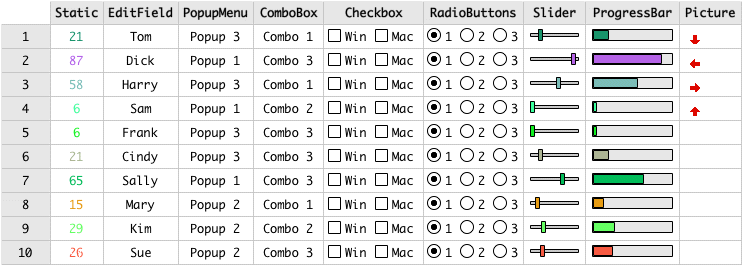
Excel Software introduces RbApp 4.0 for Xojo programmers. These pure Xojo code components require no plugins. RbApp is used to build Mac or Windows desktop applications with Xojo 2013, 2014, 2015 or later. It supports both 32-bit and 64-bit applications including both Carbon and Cocoa frameworks. RbApp 4.0 adds new enhancements to the powerful RbGrid and RbChart components to create flexible programmatic or human controlled grids, tables, charts and graphs.
Henderson, Nevada - Excel Software introduces RbApp 4.0 for Xojo programmers. These pure Xojo code components require no plugins. RbApp is used to build Mac or Windows desktop applications with Xojo 2013, 2014, 2015 or later. It supports both 32-bit and 64-bit applications including both Carbon and Cocoa frameworks.
RbApp 4.0 adds new enhancements to the powerful RbGrid and RbChart components to create flexible programmatic or human controlled grids, tables, charts and graphs. The RbGrid component adds cell range selection properties and methods to easily implement copy, paste, undo and other functions across a range of cells.
RbChart makes it easy to create dynamic charts and graphs from programmatically controlled definition and data files. A new area bar chart was added to the supported chart types. Charts can be resizable with programmatic control over variables, axis values, colors, fonts, styles, keys and other presentation parameters.
RbApp 4.0 adds new source code sample applications to demonstrate new RbGrid and RbChart features. Drop RbApp into any new or existing Xojo application in minutes. A developer can reduce development time and cost by eliminating the need to design, write and test common application requirements from scratch. RbApp has been used for over a decade in hundreds of commercial applications running on millions of computers.
RbApp empowers applications that require graphics, page layout, data entry and manipulation grids, large text editing files, undo/redo commands, tool palettes, string lists, fast XML storage, cross-platform file management, charts or graphs.
RbApp components include:
* RbGrid - Flexible, scaleable grid with powerful programming control
* RbChart - Dynamic charts, graphs and tables with minimal programming
* RbEdit - Large file text editing with undo, find, replace and print
* RbView - Powerful page layout built on Xojo graphic routines
* RbCommand - Undo/redo menu and mouse commands
* RbPalette - Tool bars and palettes for any platform
* RbStringList - String list management to simplify and optimize code
* RbXML - Fast XML read and write of data with minimal programming
* RbHelp - QuickHelp integration for interactive application help
* RbCalendar - Calendar dialog that returns a selected date
* RbLibrary - Text editing, file management and string manipulation routines
The RbApp Single User License is $295. It is compatible with all 32 or 64-bit Mac or Windows desktop applications supported by Xojo. The product includes example applications, a printed and PDF User Guide and royalty-free distribution of compiled applications. Visit the company web site for detailed information, downloadable trial edition or demonstration videos.
Excel Software: http://www.excelsoftware.com
RbApp 4.0: http://www.excelsoftware.com/rbapp.html
Purchase: http://www.excelsoftware.com/priceandordering
Screenshot: http://www.excelsoftware.com/image/grid.gif
Established in 1985, Excel Software provides Windows and Mac OS X software products to thousands of users worldwide. Capabilities include system modeling & simulation, requirements management, software design, code generation, re-engineering, bug tracking, help authoring, software license management, document protection and internet marketing automation. All Material and Software (C) Copyright 2016 Excel Software. All Rights Reserved. Apple, the Apple logo, Macintosh and Mac OS X are registered trademarks of Apple Inc. in the U.S. and/or other countries. Other trademarks and registered trademarks may be the property of their respective owners.
*******
Link To Article: http://prmac.com/release-id-78362.htm
*******
---------------------------------------------------------------------------------
Note that you can alter delivered distributions at any time.
Login to your account on prMac to alter your channel selection, or to opt-out at any time.
RbApp 4.0 - Software Components for Xojo Developers - Published on 01/16/16
Excel Software introduces RbApp 4.0 for Xojo programmers. These pure Xojo code components require no plugins. RbApp is used to build Mac or Windows desktop applications with Xojo 2013, 2014, 2015 or later. It supports both 32-bit and 64-bit applications including both Carbon and Cocoa frameworks. RbApp 4.0 adds new enhancements to the powerful RbGrid and RbChart components to create flexible programmatic or human controlled grids, tables, charts and graphs.
Henderson, Nevada - Excel Software introduces RbApp 4.0 for Xojo programmers. These pure Xojo code components require no plugins. RbApp is used to build Mac or Windows desktop applications with Xojo 2013, 2014, 2015 or later. It supports both 32-bit and 64-bit applications including both Carbon and Cocoa frameworks.
RbApp 4.0 adds new enhancements to the powerful RbGrid and RbChart components to create flexible programmatic or human controlled grids, tables, charts and graphs. The RbGrid component adds cell range selection properties and methods to easily implement copy, paste, undo and other functions across a range of cells.
RbChart makes it easy to create dynamic charts and graphs from programmatically controlled definition and data files. A new area bar chart was added to the supported chart types. Charts can be resizable with programmatic control over variables, axis values, colors, fonts, styles, keys and other presentation parameters.
RbApp 4.0 adds new source code sample applications to demonstrate new RbGrid and RbChart features. Drop RbApp into any new or existing Xojo application in minutes. A developer can reduce development time and cost by eliminating the need to design, write and test common application requirements from scratch. RbApp has been used for over a decade in hundreds of commercial applications running on millions of computers.
RbApp empowers applications that require graphics, page layout, data entry and manipulation grids, large text editing files, undo/redo commands, tool palettes, string lists, fast XML storage, cross-platform file management, charts or graphs.
RbApp components include:
* RbGrid - Flexible, scaleable grid with powerful programming control
* RbChart - Dynamic charts, graphs and tables with minimal programming
* RbEdit - Large file text editing with undo, find, replace and print
* RbView - Powerful page layout built on Xojo graphic routines
* RbCommand - Undo/redo menu and mouse commands
* RbPalette - Tool bars and palettes for any platform
* RbStringList - String list management to simplify and optimize code
* RbXML - Fast XML read and write of data with minimal programming
* RbHelp - QuickHelp integration for interactive application help
* RbCalendar - Calendar dialog that returns a selected date
* RbLibrary - Text editing, file management and string manipulation routines
The RbApp Single User License is $295. It is compatible with all 32 or 64-bit Mac or Windows desktop applications supported by Xojo. The product includes example applications, a printed and PDF User Guide and royalty-free distribution of compiled applications. Visit the company web site for detailed information, downloadable trial edition or demonstration videos.
Excel Software: http://www.excelsoftware.com
RbApp 4.0: http://www.excelsoftware.com/rbapp.html
Purchase: http://www.excelsoftware.com/priceandordering
Screenshot: http://www.excelsoftware.com/image/grid.gif
Established in 1985, Excel Software provides Windows and Mac OS X software products to thousands of users worldwide. Capabilities include system modeling & simulation, requirements management, software design, code generation, re-engineering, bug tracking, help authoring, software license management, document protection and internet marketing automation. All Material and Software (C) Copyright 2016 Excel Software. All Rights Reserved. Apple, the Apple logo, Macintosh and Mac OS X are registered trademarks of Apple Inc. in the U.S. and/or other countries. Other trademarks and registered trademarks may be the property of their respective owners.
*******
Link To Article: http://prmac.com/release-id-78362.htm
*******
---------------------------------------------------------------------------------
Note that you can alter delivered distributions at any time.
Login to your account on prMac to alter your channel selection, or to opt-out at any time.
Offline Thai to English Language Dictionary, Translator 3.0 for iOS
A new article has been published at prMac.
Offline Thai to English Language Dictionary, Translator 3.0 for iOS - Published on 01/16/16
LastThink announces the release of Offline Thai to English Language Dictionary, Translator 3.0, the important update to their highly customizable dictionary application for iOS devices. Users can seek and find any word's translation and synonyms anytime and anywhere from their devices. The dictionary offers users a huge collection of words with their translations as well as definitions and synonyms, with well over 500,000 synonym variants. Version 3.0 offers improved search capability.
Yerevan, Armenia - LastThink is proud to announce the release of Offline Thai to English Language Dictionary, Translator 3.0, the important update to their highly customizable dictionary application developed for iPhone, iPad, and iPod touch devices. Users can seek and find any word's translation and synonyms anytime and anywhere from their Apple devices.
Features:
* Tremendous range of synonyms and antonyms with well over five hundred thousand synonym variants
* Information about the discipline of structural linguistics by suggesting vital enough sentences
* Appropriate translations of colloquial and formal words as well as conjugation of verbs and declension of nouns
* Availability of various word definitions which will exactly influence on your understanding of a Foreign Language in a detailed way
* A distinction of a section named "Favorites" with the possibility of saving as many unknown words as you wish
* Thorough analysis of parts of speech (noun, verb, adjective, adverb) and their grammatical functions (subject, object, etc.)
* A possibility of the following application usage without an internet demand
* Existence of contemporary words such as "Woot", "OMG", "Crunk" and many others
In our new updated version we grant users a chance of typing the unknown word either in capitals or in small letters and the app will bring all the possible variants and definitions of the dictionary entries saved both in capital and small letters.
If you however experience any issues, please do not hesitate to contact us if you'd like to share your experience with Offline Dictionaries, or provide suggestions on how we could improve the product further. We will be more than happy to get in touch.
NOTE: We have selected data from the internet and if any assembly or constitution doesn't want us to show the content of the unit, please recommend us to remove it.
Device Requirements:
* iPhone, iPad, and iPod touch
* Optimized for iPhone 5, iPhone 6, and iPhone 6 Plus
* Requires iOS 6.0 or later
* Universal Application
* 345 MB
Pricing and Availability:
Offline Thai to English Language Dictionary, Translator 3.0 is free and available worldwide exclusively through the App Store in the Education category.
LastThink: http://lastthink.com/
Offline Thai to English Language Dictionary , Translator 3.0: https://www.facebook.com/pages/Offline-Dictionary/882897578447079
Download from iTunes: https://itunes.apple.com/app/offline-thai-to-english-language/id1042301797
Screenshot: http://a5.mzstatic.com/us/r30/Purple6/v4/16/69/35/166935c6-9b6c-7999-2ffc-32beccfd6500/screen322x572.jpeg
App Icon: http://a4.mzstatic.com/us/r30/Purple3/v4/69/07/6a/69076afe-c8d5-fa40-889a-7242a8af9bc5/icon175x175.png
LastThink is an IT company with a focus on mobile development. It has extended its list of services since 2012 to offer high-end business process management, system integration, as well as up-to-date communication solutions. LastThink's mission is to deliver maximum business value to its customers by designing, developing, implementing and maintaining efficient and high quality software solutions aligned with their most essential business needs. Their team will always do its best to meet client expectations. Copyright (C) 2016 LastThink LLC. All Rights Reserved. Apple, the Apple logo, iPhone, iPad and iPod are registered trademarks of Apple Inc. in the U.S. and/or other countries.
*******
Link To Article: http://prmac.com/release-id-78361.htm
*******
---------------------------------------------------------------------------------
Note that you can alter delivered distributions at any time.
Login to your account on prMac to alter your channel selection, or to opt-out at any time.
Offline Thai to English Language Dictionary, Translator 3.0 for iOS - Published on 01/16/16
LastThink announces the release of Offline Thai to English Language Dictionary, Translator 3.0, the important update to their highly customizable dictionary application for iOS devices. Users can seek and find any word's translation and synonyms anytime and anywhere from their devices. The dictionary offers users a huge collection of words with their translations as well as definitions and synonyms, with well over 500,000 synonym variants. Version 3.0 offers improved search capability.
Yerevan, Armenia - LastThink is proud to announce the release of Offline Thai to English Language Dictionary, Translator 3.0, the important update to their highly customizable dictionary application developed for iPhone, iPad, and iPod touch devices. Users can seek and find any word's translation and synonyms anytime and anywhere from their Apple devices.
Features:
* Tremendous range of synonyms and antonyms with well over five hundred thousand synonym variants
* Information about the discipline of structural linguistics by suggesting vital enough sentences
* Appropriate translations of colloquial and formal words as well as conjugation of verbs and declension of nouns
* Availability of various word definitions which will exactly influence on your understanding of a Foreign Language in a detailed way
* A distinction of a section named "Favorites" with the possibility of saving as many unknown words as you wish
* Thorough analysis of parts of speech (noun, verb, adjective, adverb) and their grammatical functions (subject, object, etc.)
* A possibility of the following application usage without an internet demand
* Existence of contemporary words such as "Woot", "OMG", "Crunk" and many others
In our new updated version we grant users a chance of typing the unknown word either in capitals or in small letters and the app will bring all the possible variants and definitions of the dictionary entries saved both in capital and small letters.
If you however experience any issues, please do not hesitate to contact us if you'd like to share your experience with Offline Dictionaries, or provide suggestions on how we could improve the product further. We will be more than happy to get in touch.
NOTE: We have selected data from the internet and if any assembly or constitution doesn't want us to show the content of the unit, please recommend us to remove it.
Device Requirements:
* iPhone, iPad, and iPod touch
* Optimized for iPhone 5, iPhone 6, and iPhone 6 Plus
* Requires iOS 6.0 or later
* Universal Application
* 345 MB
Pricing and Availability:
Offline Thai to English Language Dictionary, Translator 3.0 is free and available worldwide exclusively through the App Store in the Education category.
LastThink: http://lastthink.com/
Offline Thai to English Language Dictionary , Translator 3.0: https://www.facebook.com/pages/Offline-Dictionary/882897578447079
Download from iTunes: https://itunes.apple.com/app/offline-thai-to-english-language/id1042301797
Screenshot: http://a5.mzstatic.com/us/r30/Purple6/v4/16/69/35/166935c6-9b6c-7999-2ffc-32beccfd6500/screen322x572.jpeg

App Icon: http://a4.mzstatic.com/us/r30/Purple3/v4/69/07/6a/69076afe-c8d5-fa40-889a-7242a8af9bc5/icon175x175.png

LastThink is an IT company with a focus on mobile development. It has extended its list of services since 2012 to offer high-end business process management, system integration, as well as up-to-date communication solutions. LastThink's mission is to deliver maximum business value to its customers by designing, developing, implementing and maintaining efficient and high quality software solutions aligned with their most essential business needs. Their team will always do its best to meet client expectations. Copyright (C) 2016 LastThink LLC. All Rights Reserved. Apple, the Apple logo, iPhone, iPad and iPod are registered trademarks of Apple Inc. in the U.S. and/or other countries.
*******
Link To Article: http://prmac.com/release-id-78361.htm
*******
---------------------------------------------------------------------------------
Note that you can alter delivered distributions at any time.
Login to your account on prMac to alter your channel selection, or to opt-out at any time.
Desktop Clock for OS X - Track Four Different Time Zones on the Desktop
A new article has been published at prMac.
Desktop Clock for OS X - Track Four Different Time Zones on the Desktop - Published on 01/16/16
iLifeTouch announces the release of Desktop Clock 2.0.1, an important update to their clock app for Mac OS X. Desktop Clock is a simple way of knowing exactly what time it is in different Time Zones. The look and feel of the clock is very user friendly with many add-ons that are always in plain view. Desktop Clock allows the user to set 4 different clocks for 4 different locations including the user's local time zone. Version 2.0.1 offers El Capitan compatibility, and auto start at login.
Kolkata, India - iLifeTouch is pleased to announce the release of Desktop Clock 2.0.1, an important update to their clock app for Mac OS X. Desktop Clock is a simple way of knowing exactly what time it is in different Time Zones. The look and feel of the clock is very user friendly with many add-ons that are always in plain view.
Desktop Clock comes handy when on regular basis a person has to connect with friends, families, clients etc. residing in different parts of the globe. Sometimes its hard to find out suitable time to contact with people who are residing in places of different Time Zone. Desktop Clock allows the user to set 4 different clocks for 4 different locations including the user's local time zone. Users can set desired locations from preferences and also choose and select clock from 8 different clock styles and can place them individually on desktop.
This is another app from iLifeTouch that will make your life easier one day at a time.
Features
* Keep track of your city
* Add three additional time zones
* Option to have on top
* Option to resize clocks
* Option to show/hide clocks
* 8 Styles clocks
Whats new in this version?
App is now optimized to run on El Capitan and also works on all other previous compatible OS X versions.
App now auto starts at log in.
System Requirements:
* OS X 10.6 or later
* 64-bit processor
* 3.0 MB
Pricing and Availability:
Desktop clock v2.0.1 is just $1.99 USD (or an equivalent amount in other currencies) and is available worldwide exclusively through the Mac App Store in the Business category.
iLifeTouch: http://ilifetouch.com
Desktop Clock 2.0.1: http://www.ilifetouch.com/DesktopClock
Purchase and Download from Mac App Store: https://itunes.apple.com/app/desktop-clock/id424459545
Screenshot: http://a3.mzstatic.com/us/r30/Purple3/v4/d8/a4/77/d8a477be-65f7-ec53-e801-0a0013627127/screen800x500.jpeg
App Icon: http://a3.mzstatic.com/us/r30/Purple69/v4/67/dc/4d/67dc4d01-4f95-3d24-b3ce-5e400f9f7c23/icon128-2x.png
iLifeTouch treats all their apps as if they belonged to the end users. Not only do they hope for feedback, they actively encourage users to tell them what they want and to inform them if they are missing something they would love to see built into their apps. They are eagerly awaiting your input and they are here to make your lives easier using their apps. All Material and Software (C) Copyright 2016 iLifeTouch. All Rights Reserved. Apple, the Apple logo, Macintosh and Mac OS X are registered trademarks of Apple Inc. in the U.S. and/or other countries. Other trademarks and registered trademarks may be the property of their respective owners.
*******
Link To Article: http://prmac.com/release-id-78360.htm
*******
---------------------------------------------------------------------------------
Note that you can alter delivered distributions at any time.
Login to your account on prMac to alter your channel selection, or to opt-out at any time.
Desktop Clock for OS X - Track Four Different Time Zones on the Desktop - Published on 01/16/16
iLifeTouch announces the release of Desktop Clock 2.0.1, an important update to their clock app for Mac OS X. Desktop Clock is a simple way of knowing exactly what time it is in different Time Zones. The look and feel of the clock is very user friendly with many add-ons that are always in plain view. Desktop Clock allows the user to set 4 different clocks for 4 different locations including the user's local time zone. Version 2.0.1 offers El Capitan compatibility, and auto start at login.
Kolkata, India - iLifeTouch is pleased to announce the release of Desktop Clock 2.0.1, an important update to their clock app for Mac OS X. Desktop Clock is a simple way of knowing exactly what time it is in different Time Zones. The look and feel of the clock is very user friendly with many add-ons that are always in plain view.
Desktop Clock comes handy when on regular basis a person has to connect with friends, families, clients etc. residing in different parts of the globe. Sometimes its hard to find out suitable time to contact with people who are residing in places of different Time Zone. Desktop Clock allows the user to set 4 different clocks for 4 different locations including the user's local time zone. Users can set desired locations from preferences and also choose and select clock from 8 different clock styles and can place them individually on desktop.
This is another app from iLifeTouch that will make your life easier one day at a time.
Features
* Keep track of your city
* Add three additional time zones
* Option to have on top
* Option to resize clocks
* Option to show/hide clocks
* 8 Styles clocks
Whats new in this version?
App is now optimized to run on El Capitan and also works on all other previous compatible OS X versions.
App now auto starts at log in.
System Requirements:
* OS X 10.6 or later
* 64-bit processor
* 3.0 MB
Pricing and Availability:
Desktop clock v2.0.1 is just $1.99 USD (or an equivalent amount in other currencies) and is available worldwide exclusively through the Mac App Store in the Business category.
iLifeTouch: http://ilifetouch.com
Desktop Clock 2.0.1: http://www.ilifetouch.com/DesktopClock
Purchase and Download from Mac App Store: https://itunes.apple.com/app/desktop-clock/id424459545
Screenshot: http://a3.mzstatic.com/us/r30/Purple3/v4/d8/a4/77/d8a477be-65f7-ec53-e801-0a0013627127/screen800x500.jpeg

App Icon: http://a3.mzstatic.com/us/r30/Purple69/v4/67/dc/4d/67dc4d01-4f95-3d24-b3ce-5e400f9f7c23/icon128-2x.png

iLifeTouch treats all their apps as if they belonged to the end users. Not only do they hope for feedback, they actively encourage users to tell them what they want and to inform them if they are missing something they would love to see built into their apps. They are eagerly awaiting your input and they are here to make your lives easier using their apps. All Material and Software (C) Copyright 2016 iLifeTouch. All Rights Reserved. Apple, the Apple logo, Macintosh and Mac OS X are registered trademarks of Apple Inc. in the U.S. and/or other countries. Other trademarks and registered trademarks may be the property of their respective owners.
*******
Link To Article: http://prmac.com/release-id-78360.htm
*******
---------------------------------------------------------------------------------
Note that you can alter delivered distributions at any time.
Login to your account on prMac to alter your channel selection, or to opt-out at any time.
Subscribe to:
Posts (Atom)