A new article has been published at prMac.
Incredible Brain Quiz App by Versatile Techno Expresses the Brilliance - Published on 02/20/16
Versatile Techno announces Brain Quiz - Just 1 Word 1.0, their entertaining and brain-teasing word game for iOS and Android devices. The game is user-friendly, with an easy to play GUI and entails more than 1000 spelling words that offer endless fun. The best part is leadership and achievement board pop up every time to show your challenger and score. It doesn't matter what's next, you can choose free hints and continue the game.
Ahmedabad, India - Versatile Techno is proud to announce the release of Brain Quiz - Just 1 Word 1.0, their entertaining and brain-teasing word game for iPhone, iPad, iPod touch, and Android devices. The game is user-friendly, with an easy to play GUI, and entails more than 1000 spelling words to offer endless fun.
The best part is leadership and achievement board pop up every time to show your challenger and score. It doesn't matter what's next, you can choose free hints and continue the game. Keeping in mind the convenience of the player an additional feature is there that allow you to share with your friend and get the precise answer in case you stuck in between any level.
Applications have grown into a multi-million dollar entity. They are used on tablet devices and smart-phones, including some computer systems and are a way for companies to reach the targeted audience in an effective and new way. Thousands of leading companies look at app development each year, an open door to bring their company up to modern standards and guarantee their audience gets the most of their online experience.
Incredible Features of Brain Quiz:
Versatile Techno is a branding and creative company that stands first on the podium of offering this world class app named Brain Quiz that boasts several unique features like:
* Boost your concentration and cognitive skill,
* Sharp the spelling skills and vocabulary,
* More option for playing games like 4, 5 and 6 words.
The company is devoted to customer service and guarantees that all their users enjoy their host of services at cost effective prices. The team at Versatile Techno focuses on attention to detail from the in-house technicians to designers.
Device Requirements:
* iPhone, iPad, and iPod touch
* Requires iOS 6.0 or later
* Universal Application
* 50.0 MB
Pricing and Availability:
Brain Quiz - Just 1 Word 1.0 is free, and is available worldwide through the App Store in the Games category. An Android version is available through Google Play.
Brain Quiz - Just 1 Word 1.0: http://www.versatiletechno.com/brainquiz
Download from iTunes: https://itunes.apple.com/app/brain-quiz-just-1-word/id1072103388
Download from Google Play: https://play.google.com/store/apps/details?id=com.versatile.guessword.puzzle
Screenshot: http://a5.mzstatic.com/us/r30/Purple49/v4/2b/3f/26/2b3f2623-1c16-4efe-7f72-92873dfd9ce7/screen322x572.jpeg
App Icon: http://a5.mzstatic.com/us/r30/Purple49/v4/b0/e1/c9/b0e1c9e5-e7b6-e991-4fe3-cc358b07b9b2/icon175x175.jpeg
The creative mind behind this game is Versatile Techno who is leading web development and Game development company based in Ahmedabad, India. 50+ application developed successfully and still counting. All Material and Software (C) Copyright 2016 Versatile Techno. All Rights Reserved. Apple, the Apple logo, iPhone, iPod and iPad are registered trademarks of Apple Inc. in the U.S. and/or other countries. Other trademarks and registered trademarks may be the property of their respective owners.
*******
Link To Article: http://prmac.com/release-id-78774.htm
*******
---------------------------------------------------------------------------------
Note that you can alter delivered distributions at any time.
Login to your account on prMac to alter your channel selection, or to opt-out at any time.


Gotta Joga - 4.5 Stars Yoga App Now Available for iPad
A new article has been published at prMac.
Gotta Joga - 4.5 Stars Yoga App Now Available for iPad - Published on 02/20/16
Gotta Apps announces Gotta Joga 2.3, an important update to their yoga app for iOS and Apple Watch devices that helps users take a break during their day, and stay fit wherever they are. It has been selected as Best New Apps for iPhone in 40 countries in the App Store. Gotta Joga has specific yoga practices for different times of the day: wake up your body and mind in the morning, boost your energy during the day and relax in the evening. Version 2.3 offers an iPad version.
Lyon, France - Gotta Apps is proud to announce the release of Gotta Joga 2.3, an important update to their yoga app for iPhone, iPad, iPod touch, and Apple Watch devices. Gotta Joga is a yoga app that has been selected as Best New Apps for iPhone in 40 countries in the App Store. Users rated the app over 4.5 stars worldwide. Version 2.3 offers an iPad version.
Gotta Joga yoga practices are perfect for beginners and for experienced yogis:
"Great yoga app for beginners!", Tonie1113, US
"Can't recommend this app highly enough. Perfect for if you already have yoga knowledge but want to continue your practice between classes. The app has sequences with time allowance guidance as well as individual pose instruction. I've recommended this app to my yogi friends and use it a few times each week. It's great!" JenniferFinch, UK
Gotta Joga has specific yoga practices for different times of the day:
* To wake up your body and mind in the morning
* To boost your energy during the day
* To help you relax in the evening
Its calm and strengthening hatha yoga will make you stronger and less stressed, by making you focus on your breathing. Coming soon: integration with Apple's Health app.
Gotta Joga Features:
1. Practice yoga at your own rhythm, 5 minutes to 1 hour
2. Adapt your practice to your morning, day or evening
3. Learn each pose with our professional yoga teacher Anu Visuri
4. Get motivated by observing and sharing your yoga tree, which grows each time you complete a yoga practice. This yoga tree has been designed by Hanna Konola, an illustrator and artist from Helsinki, Finland.
5. Follow your poses and control your yoga practice with your Apple Watch
6. Focus on your breathing and feel more relaxed. Without the incorporation of a breath focus, Gotta Joga would just be yet another fitness workout app.
Gotta Apps is running a competition to win a Gotta Joga yoga box until the 29th of February. Follow @GottaJoga on Facebook, Twitter or Instagram to participate!
Device Requirements:
* iPhone, iPad, iPod touch, and Apple Watch
* Requires iOS 8.0 or later
* Universal Application
* 78.9 MB
Pricing and Availability:
Gotta Joga 2.3 is free, and is available worldwide exclusively through the App Store in the Health and Fitness category. Free sessions include: Quick morning, Quick day and Quick evening. Free poses include: Standing Forward Bend, Tree, Triangle Right and Meditation. Convenient in-app purchases are available, including the All Yoga Practices Pack: $5.99, All Yoga Poses Pack: $7.99, and All Yoga Pack: $9.99.
Gotta Joga 2.3: http://gottajoga.com
Download from iTunes: https://itunes.apple.com/app/gotta-joga-yoga-poses-practices/id880583924
Screenshot: https://www.dropbox.com/sh/lj1vfvvoz0eyncp/AACI6RiuTRRQoKMYcJTexcPFa/GottaJoga-iPad-Feb-16/B-App-Screenshots-iPad/screens?dl=0&preview=gottajoga-15-to-30-iPad.png
App Icon: https://www.dropbox.com/sh/lj1vfvvoz0eyncp/AACFUEcQAmxlA2tYEiXHyx3Ba/GottaJoga-iPad-Feb-16?dl=0&preview=gottajoga_yoga_app_icon_apple_app_store.jpg
Gotta Apps is a mobile apps studio dedicated to making the best health and fitness apps for all of us. In the beginning of 2012 the idea to create a jooga (yoga in Finnish) application was born. A group of Finnish women got together every week in southern Germany to practice yoga in their mother tongue. Wanting to continue that enlightening yoga experience at home and where ever they might move on to, they started to work on the initial idea of their own yoga application. Bringing in the calm and strengthening yet fun yoga experience on mobile, combined with pedagogy from the world's best schooling system and bringing that in a compact way to mobile phones, has been our vision from beginning on. All Material and Software (C) Copyright 2016 Gotta Apps. All Rights Reserved. Apple, the Apple logo, iPhone, iPod and iPad are registered trademarks of Apple Inc. in the U.S. and/or other countries. Other trademarks and registered trademarks may be the property of their respective owners.
*******
Link To Article: http://prmac.com/release-id-78775.htm
*******
---------------------------------------------------------------------------------
Note that you can alter delivered distributions at any time.
Login to your account on prMac to alter your channel selection, or to opt-out at any time.
Gotta Joga - 4.5 Stars Yoga App Now Available for iPad - Published on 02/20/16
Gotta Apps announces Gotta Joga 2.3, an important update to their yoga app for iOS and Apple Watch devices that helps users take a break during their day, and stay fit wherever they are. It has been selected as Best New Apps for iPhone in 40 countries in the App Store. Gotta Joga has specific yoga practices for different times of the day: wake up your body and mind in the morning, boost your energy during the day and relax in the evening. Version 2.3 offers an iPad version.
Lyon, France - Gotta Apps is proud to announce the release of Gotta Joga 2.3, an important update to their yoga app for iPhone, iPad, iPod touch, and Apple Watch devices. Gotta Joga is a yoga app that has been selected as Best New Apps for iPhone in 40 countries in the App Store. Users rated the app over 4.5 stars worldwide. Version 2.3 offers an iPad version.
Gotta Joga yoga practices are perfect for beginners and for experienced yogis:
"Great yoga app for beginners!", Tonie1113, US
"Can't recommend this app highly enough. Perfect for if you already have yoga knowledge but want to continue your practice between classes. The app has sequences with time allowance guidance as well as individual pose instruction. I've recommended this app to my yogi friends and use it a few times each week. It's great!" JenniferFinch, UK
Gotta Joga has specific yoga practices for different times of the day:
* To wake up your body and mind in the morning
* To boost your energy during the day
* To help you relax in the evening
Its calm and strengthening hatha yoga will make you stronger and less stressed, by making you focus on your breathing. Coming soon: integration with Apple's Health app.
Gotta Joga Features:
1. Practice yoga at your own rhythm, 5 minutes to 1 hour
2. Adapt your practice to your morning, day or evening
3. Learn each pose with our professional yoga teacher Anu Visuri
4. Get motivated by observing and sharing your yoga tree, which grows each time you complete a yoga practice. This yoga tree has been designed by Hanna Konola, an illustrator and artist from Helsinki, Finland.
5. Follow your poses and control your yoga practice with your Apple Watch
6. Focus on your breathing and feel more relaxed. Without the incorporation of a breath focus, Gotta Joga would just be yet another fitness workout app.
Gotta Apps is running a competition to win a Gotta Joga yoga box until the 29th of February. Follow @GottaJoga on Facebook, Twitter or Instagram to participate!
Device Requirements:
* iPhone, iPad, iPod touch, and Apple Watch
* Requires iOS 8.0 or later
* Universal Application
* 78.9 MB
Pricing and Availability:
Gotta Joga 2.3 is free, and is available worldwide exclusively through the App Store in the Health and Fitness category. Free sessions include: Quick morning, Quick day and Quick evening. Free poses include: Standing Forward Bend, Tree, Triangle Right and Meditation. Convenient in-app purchases are available, including the All Yoga Practices Pack: $5.99, All Yoga Poses Pack: $7.99, and All Yoga Pack: $9.99.
Gotta Joga 2.3: http://gottajoga.com
Download from iTunes: https://itunes.apple.com/app/gotta-joga-yoga-poses-practices/id880583924
Screenshot: https://www.dropbox.com/sh/lj1vfvvoz0eyncp/AACI6RiuTRRQoKMYcJTexcPFa/GottaJoga-iPad-Feb-16/B-App-Screenshots-iPad/screens?dl=0&preview=gottajoga-15-to-30-iPad.png

App Icon: https://www.dropbox.com/sh/lj1vfvvoz0eyncp/AACFUEcQAmxlA2tYEiXHyx3Ba/GottaJoga-iPad-Feb-16?dl=0&preview=gottajoga_yoga_app_icon_apple_app_store.jpg

Gotta Apps is a mobile apps studio dedicated to making the best health and fitness apps for all of us. In the beginning of 2012 the idea to create a jooga (yoga in Finnish) application was born. A group of Finnish women got together every week in southern Germany to practice yoga in their mother tongue. Wanting to continue that enlightening yoga experience at home and where ever they might move on to, they started to work on the initial idea of their own yoga application. Bringing in the calm and strengthening yet fun yoga experience on mobile, combined with pedagogy from the world's best schooling system and bringing that in a compact way to mobile phones, has been our vision from beginning on. All Material and Software (C) Copyright 2016 Gotta Apps. All Rights Reserved. Apple, the Apple logo, iPhone, iPod and iPad are registered trademarks of Apple Inc. in the U.S. and/or other countries. Other trademarks and registered trademarks may be the property of their respective owners.
*******
Link To Article: http://prmac.com/release-id-78775.htm
*******
---------------------------------------------------------------------------------
Note that you can alter delivered distributions at any time.
Login to your account on prMac to alter your channel selection, or to opt-out at any time.
Offline Nepali to English Language Dictionary 4.0 for iOS
A new article has been published at prMac.
Offline Nepali to English Language Dictionary 4.0 for iOS - Published on 02/20/16
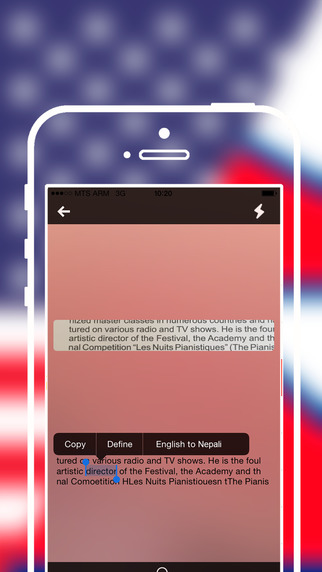
LastThink announces the release of Offline Nepali to English Language Dictionary 4.0, the important update to their highly customizable dictionary application for iOS devices. Users can seek and find any word's translation and synonyms anytime and anywhere from their devices. The dictionary offers users a huge collection of words with their translations as well as definitions and synonyms. Version 4.0 offers improved search capability.
Yerevan, Armenia - LastThink is proud to announce the release of Offline Nepali to English Language Dictionary 4.0, the important update to their highly customizable dictionary application developed for iPhone, iPad, and iPod touch devices. Users can seek and find any word's translation and synonyms anytime and anywhere from their Apple devices.
Features:
* Tremendous range of synonyms and antonyms with well over five hundred thousand synonym variants
* Information about the discipline of structural linguistics by suggesting vital enough sentences
* Appropriate translations of colloquial and formal words as well as conjugation of verbs and declension of nouns
* Availability of various word definitions which will exactly influence on your understanding of a Foreign Language in a detailed way
* A distinction of a section named "Favorites" with the possibility of saving as many unknown words as you wish
* Thorough analysis of parts of speech (noun, verb, adjective, adverb) and their grammatical functions (subject, object, etc.)
* A possibility of the following application usage without an internet demand
* Existence of contemporary words such as "Woot", "OMG", "Crunk" and many others
In our new updated version we grant users a chance of typing the unknown word either in capitals or in small letters and the app will bring all the possible variants and definitions of the dictionary entries saved both in capital and small letters.
If you however experience any issues, please do not hesitate to contact us if you'd like to share your experience with Offline Dictionaries, or provide suggestions on how we could improve the product further. We will be more than happy to get in touch.
NOTE: We have selected data from the internet and if any assembly or constitution doesn't want us to show the content of the unit, please recommend us to remove it.
Device Requirements:
* iPhone, iPad, and iPod touch
* Optimized for iPhone 5, iPhone 6, and iPhone 6 Plus
* Requires iOS 6.0 or later
* Universal Application
* 134 MB
Pricing and Availability:
Offline Nepali to English Language Dictionary 4.0 is free, and is available worldwide exclusively through the App Store in the Education category.
LastThink: http://lastthink.com/
Offline Nepali to English Language Dictionary 4.0: https://www.facebook.com/pages/Offline-Dictionary/882897578447079
Download from iTunes: https://itunes.apple.com/app/offline-nepali-to-english/id1003674408
Screenshot: http://a2.mzstatic.com/us/r30/Purple1/v4/0d/55/72/0d5572e5-a9b4-b662-6c32-aea6927f11f5/screen322x572.jpeg
App Icon: http://a1.mzstatic.com/us/r30/Purple7/v4/cc/8a/b2/cc8ab218-1396-4d7d-ef93-fd8622dd1874/icon175x175.jpeg
LastThink is an IT company with a focus on mobile development. It has extended its list of services since 2012 to offer high-end business process management, system integration, as well as up-to-date communication solutions. LastThink's mission is to deliver maximum business value to its customers by designing, developing, implementing and maintaining efficient and high quality software solutions aligned with their most essential business needs. Their team will always do its best to meet client expectations. All Material and Software (C) Copyright 2016 LastThink LLC. All Rights Reserved. Apple, the Apple logo, iPhone, iPod and iPad are registered trademarks of Apple Inc. in the U.S. and/or other countries. Other trademarks and registered trademarks may be the property of their respective owners.
*******
Link To Article: http://prmac.com/release-id-78776.htm
*******
---------------------------------------------------------------------------------
Note that you can alter delivered distributions at any time.
Login to your account on prMac to alter your channel selection, or to opt-out at any time.
Offline Nepali to English Language Dictionary 4.0 for iOS - Published on 02/20/16
LastThink announces the release of Offline Nepali to English Language Dictionary 4.0, the important update to their highly customizable dictionary application for iOS devices. Users can seek and find any word's translation and synonyms anytime and anywhere from their devices. The dictionary offers users a huge collection of words with their translations as well as definitions and synonyms. Version 4.0 offers improved search capability.
Yerevan, Armenia - LastThink is proud to announce the release of Offline Nepali to English Language Dictionary 4.0, the important update to their highly customizable dictionary application developed for iPhone, iPad, and iPod touch devices. Users can seek and find any word's translation and synonyms anytime and anywhere from their Apple devices.
Features:
* Tremendous range of synonyms and antonyms with well over five hundred thousand synonym variants
* Information about the discipline of structural linguistics by suggesting vital enough sentences
* Appropriate translations of colloquial and formal words as well as conjugation of verbs and declension of nouns
* Availability of various word definitions which will exactly influence on your understanding of a Foreign Language in a detailed way
* A distinction of a section named "Favorites" with the possibility of saving as many unknown words as you wish
* Thorough analysis of parts of speech (noun, verb, adjective, adverb) and their grammatical functions (subject, object, etc.)
* A possibility of the following application usage without an internet demand
* Existence of contemporary words such as "Woot", "OMG", "Crunk" and many others
In our new updated version we grant users a chance of typing the unknown word either in capitals or in small letters and the app will bring all the possible variants and definitions of the dictionary entries saved both in capital and small letters.
If you however experience any issues, please do not hesitate to contact us if you'd like to share your experience with Offline Dictionaries, or provide suggestions on how we could improve the product further. We will be more than happy to get in touch.
NOTE: We have selected data from the internet and if any assembly or constitution doesn't want us to show the content of the unit, please recommend us to remove it.
Device Requirements:
* iPhone, iPad, and iPod touch
* Optimized for iPhone 5, iPhone 6, and iPhone 6 Plus
* Requires iOS 6.0 or later
* Universal Application
* 134 MB
Pricing and Availability:
Offline Nepali to English Language Dictionary 4.0 is free, and is available worldwide exclusively through the App Store in the Education category.
LastThink: http://lastthink.com/
Offline Nepali to English Language Dictionary 4.0: https://www.facebook.com/pages/Offline-Dictionary/882897578447079
Download from iTunes: https://itunes.apple.com/app/offline-nepali-to-english/id1003674408
Screenshot: http://a2.mzstatic.com/us/r30/Purple1/v4/0d/55/72/0d5572e5-a9b4-b662-6c32-aea6927f11f5/screen322x572.jpeg
App Icon: http://a1.mzstatic.com/us/r30/Purple7/v4/cc/8a/b2/cc8ab218-1396-4d7d-ef93-fd8622dd1874/icon175x175.jpeg

LastThink is an IT company with a focus on mobile development. It has extended its list of services since 2012 to offer high-end business process management, system integration, as well as up-to-date communication solutions. LastThink's mission is to deliver maximum business value to its customers by designing, developing, implementing and maintaining efficient and high quality software solutions aligned with their most essential business needs. Their team will always do its best to meet client expectations. All Material and Software (C) Copyright 2016 LastThink LLC. All Rights Reserved. Apple, the Apple logo, iPhone, iPod and iPad are registered trademarks of Apple Inc. in the U.S. and/or other countries. Other trademarks and registered trademarks may be the property of their respective owners.
*******
Link To Article: http://prmac.com/release-id-78776.htm
*******
---------------------------------------------------------------------------------
Note that you can alter delivered distributions at any time.
Login to your account on prMac to alter your channel selection, or to opt-out at any time.
Developer and composer Ben Ponniah releases his first musical memory app
A new article has been published at prMac.
Developer and composer Ben Ponniah releases his first musical memory app - Published on 02/20/16
UK based indie developer, Ben Ponniah has announced Spidey�s Piano 1.0, his musical memory app for iOS devices. Featuring a sophisticated design, Spidey's Piano is a challenging but quirky game that helps anyone better develop their musical memory. Follow Spidey as he plays his music notes on the piano. Copy what he plays by tapping the piano tiles to advance your score and rescue Spidey's leg. The game features fantastic graphics, super sounds with infinite sequences to challenge players.
Abingdon, United Kingdom - Independent developer, Ben Ponniah has announced the release of Spidey�s Piano 1.0, the debut of his first musical memory app developed exclusively for iPhone, iPad and iPod touch devices. Spidey's Piano is a challenging but quirky game with sophisticated design that serves to help people of all ages and abilities to better develop their musical memory. This game involves trying to save Spidey, as Spidey's in trouble!
An evil Music mastermind has taken Spidey's leg for ransom and only you can help Spidey get it back. Follow Spidey as he plays his music notes on the piano. Copy what he plays by tapping the piano tiles to advance your score and rescue Spidey's leg. Tap the piano tiles in the same sequence as Spidey does to advance your score and complete each level with max stars. Easy to learn but difficult to master, Spidey�s Piano features fantastic graphics, super sounds with infinite sequences to challenge players.
"Passionate about music and education alike, I strived to combine these two loves in the creation Spidey's Piano," explained independent developer, Ben Ponniah. "I worked with various industry experts to create my first beautifully designed musical memory app. I created a word game before as my first attempt. However I am much happier with this app, as it can appeal to anyone who wants to improve their memory, which should be everyone really! Spidey�s Piano is truly one of the best music memory games to hit the App Store to date. I am looking forward to seeing people exercise their musical memories in an entertaining way. Most importantly, it's free! If you love free games that require skill, accuracy and brainpower, then Spidey's Piano will be a worthy addition to your device. Give it a try; you will not be disappointed."
Device Requirements:
* iPhone, iPad, and iPod touch
* Requires iOS 6.0 or later
* 37.3 MB
Pricing and Availability:
Spidey�s Piano 1.0 is Free and available worldwide exclusively through the App Store in the Games category.
Spidey�s Piano 1.0: http://www.ben.ponniah.co.uk/spidey/
Download from iTunes: https://itunes.apple.com/app/spideys-piano/id1007252772
YouTube Video: https://www.youtube.com/watch?v=0YqaU0O5xis
Media Assets: https://drive.google.com/open?id=0B3wDp4eINNl6eDA1RGxmNmhQWXc
Located in Abingdon, Oxfordshire, England, Ben Ponniah is a composer who is passionate about music and education. He has worked with various industry experts, and his focus is on creating music and educational apps for the iOS platform. All Material and Software (C) Copyright 2016 Ben Ponniah. All Rights Reserved. Apple, the Apple logo, iPhone, iPod and iPad are registered trademarks of Apple Inc. in the U.S. and/or other countries. Other trademarks and registered trademarks may be the property of their respective owners.
*******
Link To Article: http://prmac.com/release-id-78748.htm
*******
---------------------------------------------------------------------------------
Note that you can alter delivered distributions at any time.
Login to your account on prMac to alter your channel selection, or to opt-out at any time.
Developer and composer Ben Ponniah releases his first musical memory app - Published on 02/20/16
UK based indie developer, Ben Ponniah has announced Spidey�s Piano 1.0, his musical memory app for iOS devices. Featuring a sophisticated design, Spidey's Piano is a challenging but quirky game that helps anyone better develop their musical memory. Follow Spidey as he plays his music notes on the piano. Copy what he plays by tapping the piano tiles to advance your score and rescue Spidey's leg. The game features fantastic graphics, super sounds with infinite sequences to challenge players.
Abingdon, United Kingdom - Independent developer, Ben Ponniah has announced the release of Spidey�s Piano 1.0, the debut of his first musical memory app developed exclusively for iPhone, iPad and iPod touch devices. Spidey's Piano is a challenging but quirky game with sophisticated design that serves to help people of all ages and abilities to better develop their musical memory. This game involves trying to save Spidey, as Spidey's in trouble!
An evil Music mastermind has taken Spidey's leg for ransom and only you can help Spidey get it back. Follow Spidey as he plays his music notes on the piano. Copy what he plays by tapping the piano tiles to advance your score and rescue Spidey's leg. Tap the piano tiles in the same sequence as Spidey does to advance your score and complete each level with max stars. Easy to learn but difficult to master, Spidey�s Piano features fantastic graphics, super sounds with infinite sequences to challenge players.
"Passionate about music and education alike, I strived to combine these two loves in the creation Spidey's Piano," explained independent developer, Ben Ponniah. "I worked with various industry experts to create my first beautifully designed musical memory app. I created a word game before as my first attempt. However I am much happier with this app, as it can appeal to anyone who wants to improve their memory, which should be everyone really! Spidey�s Piano is truly one of the best music memory games to hit the App Store to date. I am looking forward to seeing people exercise their musical memories in an entertaining way. Most importantly, it's free! If you love free games that require skill, accuracy and brainpower, then Spidey's Piano will be a worthy addition to your device. Give it a try; you will not be disappointed."
Device Requirements:
* iPhone, iPad, and iPod touch
* Requires iOS 6.0 or later
* 37.3 MB
Pricing and Availability:
Spidey�s Piano 1.0 is Free and available worldwide exclusively through the App Store in the Games category.
Spidey�s Piano 1.0: http://www.ben.ponniah.co.uk/spidey/
Download from iTunes: https://itunes.apple.com/app/spideys-piano/id1007252772
YouTube Video: https://www.youtube.com/watch?v=0YqaU0O5xis
Media Assets: https://drive.google.com/open?id=0B3wDp4eINNl6eDA1RGxmNmhQWXc
Located in Abingdon, Oxfordshire, England, Ben Ponniah is a composer who is passionate about music and education. He has worked with various industry experts, and his focus is on creating music and educational apps for the iOS platform. All Material and Software (C) Copyright 2016 Ben Ponniah. All Rights Reserved. Apple, the Apple logo, iPhone, iPod and iPad are registered trademarks of Apple Inc. in the U.S. and/or other countries. Other trademarks and registered trademarks may be the property of their respective owners.
*******
Link To Article: http://prmac.com/release-id-78748.htm
*******
---------------------------------------------------------------------------------
Note that you can alter delivered distributions at any time.
Login to your account on prMac to alter your channel selection, or to opt-out at any time.
Klipto Is The Next Evolution in Textless Texting - Is It The New GIF?
A new article has been published at prMac.
Klipto Is The Next Evolution in Textless Texting - Is It The New GIF? - Published on 02/20/16
California based Handsome Brain Entertainment has launched Klipto 1.2.8 out of private Beta. The new Klipto Keyboard offers thousands of short videos that allow you to express yourself using famous, or delightfully obscure, quotes. Sometimes a looping facial expression doesn't quite get your point across. Klipto hopes to add another layer by adding sound to a visual moment. That means users can communicate more while texting less. And in the tone that truly captures their sentiment.
San Jose, California - Silicon Valley-based app developer Handsome Brain Entertainment has announced their newest app, Klipto. GIFs are great at conveying simple emotional responses that go one step further than old school Emoji. But what if you want to say something specific? Sometimes a looping facial expression doesn't quite get your point across. Klipto hopes to add another layer by adding sound to a visual moment. That means users can communicate more while texting less. And in the tone that truly captures their sentiment. The keyboard app aims to "pick up where GIFs leave off", says CEO Paul Taylor.
GIFs were all the rage in 2015. Facebook and Tinder both started supporting them, the former citing over five million being sent each day on its Messenger app. And Riffsy's popular GIF Keyboard reports more than four billion views of their GIFs each month. Clearly GIFs have become part of the common texting language.
Features:
* Search by Keyword or Full Sentences
* Browse by Emoji Categories
* Heart your Favorites so they're readily available when the opportunity arises
* Preview on Mute or with Sound
* Tap "New" to see just the latest and greatest additions
Kliptos take the best moments from movies, television,YouTube and Vines and turn them into sound bites that speak as a surrogate for the sender. "It's like having Amy Schumer - or Arnold Schwarznegger... or even Barack Obama - as a personal spokesperson of sorts, speaking directly on your behalf," says CEO Paul Taylor. "The new Klipto Keyboard offers thousands of short videos that allow you to express yourself using famous (or delightfully obscure) quotes. Want to text "Hey," "Thanks" or "LOL"?" There's a Klipto for that."
Don't just see it; hear it. So much of what people express is in the way they say it. Texts have always been limited by the fact it's virtually impossible to convey tone using just typed words. Emoji and GIFs help add some context. But to fully express an emotion, perhaps you need to hear it. Why add an "lol" or a smile-crying Emoji or a silent, looping, open mouth Julia Roberts when you can drop a 4 second clip of Jim Carrey bellowing like a hysterical horse? Reactions are just better with sound. So add a bit of volume to your texts. And when you get a Klipto in return, you'll literally be able to hear the uproarious laughter.
Device Requirements:
* iPhone, iPad, and iPod touch
* Requires iOS 8.0 or later
* 9.1 MB
Pricing and Availability:
Klipto 1.2.8 is Free and available worldwide exclusively through the App Store in the Utilities category. Download the Klipto keyboard today!
Klipto 1.2.8: http://www.klipto.co
Download from iTunes: https://itunes.apple.com/app/klipto/id1024398117
Screenshot: http://a1.mzstatic.com/us/r30/Purple7/v4/13/fc/e3/13fce339-5b2d-6b6e-8d20-9d3d4f271392/screen322x572.jpeg
App Logo: http://static1.squarespace.com/static/55be9e3ce4b0097b24fc71b2/t/55bea9b3e4b0489afc738007/1438558644931/?format=1500w
Located in San Jose, California, Handsome Brain Entertainment was founded in 2015 by Paul Taylor and Brad Xu to create apps that make the world a happier place. All Material and Software (C) 2016 Handsome Brain Entetainment / All Rights Reserved. Apple, the Apple logo, iPod, the iPod logo, are registered trademarks of Apple Computer in the U.S. and/or other countries. Other trademarks and registered trademarks may be the property of their respective owners.
*******
Link To Article: http://prmac.com/release-id-78749.htm
*******
---------------------------------------------------------------------------------
Note that you can alter delivered distributions at any time.
Login to your account on prMac to alter your channel selection, or to opt-out at any time.
Klipto Is The Next Evolution in Textless Texting - Is It The New GIF? - Published on 02/20/16
California based Handsome Brain Entertainment has launched Klipto 1.2.8 out of private Beta. The new Klipto Keyboard offers thousands of short videos that allow you to express yourself using famous, or delightfully obscure, quotes. Sometimes a looping facial expression doesn't quite get your point across. Klipto hopes to add another layer by adding sound to a visual moment. That means users can communicate more while texting less. And in the tone that truly captures their sentiment.
San Jose, California - Silicon Valley-based app developer Handsome Brain Entertainment has announced their newest app, Klipto. GIFs are great at conveying simple emotional responses that go one step further than old school Emoji. But what if you want to say something specific? Sometimes a looping facial expression doesn't quite get your point across. Klipto hopes to add another layer by adding sound to a visual moment. That means users can communicate more while texting less. And in the tone that truly captures their sentiment. The keyboard app aims to "pick up where GIFs leave off", says CEO Paul Taylor.
GIFs were all the rage in 2015. Facebook and Tinder both started supporting them, the former citing over five million being sent each day on its Messenger app. And Riffsy's popular GIF Keyboard reports more than four billion views of their GIFs each month. Clearly GIFs have become part of the common texting language.
Features:
* Search by Keyword or Full Sentences
* Browse by Emoji Categories
* Heart your Favorites so they're readily available when the opportunity arises
* Preview on Mute or with Sound
* Tap "New" to see just the latest and greatest additions
Kliptos take the best moments from movies, television,YouTube and Vines and turn them into sound bites that speak as a surrogate for the sender. "It's like having Amy Schumer - or Arnold Schwarznegger... or even Barack Obama - as a personal spokesperson of sorts, speaking directly on your behalf," says CEO Paul Taylor. "The new Klipto Keyboard offers thousands of short videos that allow you to express yourself using famous (or delightfully obscure) quotes. Want to text "Hey," "Thanks" or "LOL"?" There's a Klipto for that."
Don't just see it; hear it. So much of what people express is in the way they say it. Texts have always been limited by the fact it's virtually impossible to convey tone using just typed words. Emoji and GIFs help add some context. But to fully express an emotion, perhaps you need to hear it. Why add an "lol" or a smile-crying Emoji or a silent, looping, open mouth Julia Roberts when you can drop a 4 second clip of Jim Carrey bellowing like a hysterical horse? Reactions are just better with sound. So add a bit of volume to your texts. And when you get a Klipto in return, you'll literally be able to hear the uproarious laughter.
Device Requirements:
* iPhone, iPad, and iPod touch
* Requires iOS 8.0 or later
* 9.1 MB
Pricing and Availability:
Klipto 1.2.8 is Free and available worldwide exclusively through the App Store in the Utilities category. Download the Klipto keyboard today!
Klipto 1.2.8: http://www.klipto.co
Download from iTunes: https://itunes.apple.com/app/klipto/id1024398117
Screenshot: http://a1.mzstatic.com/us/r30/Purple7/v4/13/fc/e3/13fce339-5b2d-6b6e-8d20-9d3d4f271392/screen322x572.jpeg

App Logo: http://static1.squarespace.com/static/55be9e3ce4b0097b24fc71b2/t/55bea9b3e4b0489afc738007/1438558644931/?format=1500w
Located in San Jose, California, Handsome Brain Entertainment was founded in 2015 by Paul Taylor and Brad Xu to create apps that make the world a happier place. All Material and Software (C) 2016 Handsome Brain Entetainment / All Rights Reserved. Apple, the Apple logo, iPod, the iPod logo, are registered trademarks of Apple Computer in the U.S. and/or other countries. Other trademarks and registered trademarks may be the property of their respective owners.
*******
Link To Article: http://prmac.com/release-id-78749.htm
*******
---------------------------------------------------------------------------------
Note that you can alter delivered distributions at any time.
Login to your account on prMac to alter your channel selection, or to opt-out at any time.
Reggie Ashworth releases AppDelete 4.2.4 - Uninstall Anything
A new article has been published at prMac.
Reggie Ashworth releases AppDelete 4.2.4 - Uninstall Anything - Published on 02/20/16
Independent software developer, Reggie Ashworth has announced AppDelete 4.2.4, an update to his popular application deletion utility for Mac OS X. With a simple Drag & Drop, AppDelete will uninstall anything along with all of the associated items. Mac users will no longer have to hunt through their system to find and delete these items manually. AppDelete is a must-have utility for beta testers and casual users alike, and the perfect companion to any Mac fanatic's toolbox.
Anaheim, California - Independent software developer, Reggie Ashworth has announced the release of AppDelete 4.2.4, an update to his very popular application deletion utility for Mac OS X. With a simple Drag & Drop, AppDelete will uninstall anything along with all of the associated items. Mac users will no longer have to hunt through their system to find and delete these items manually.
You can drag any item that can be uninstalled onto AppDelete: Applications, Widgets, Preference Panes, Plugins, Screensavers, etc. You can also activate AppDelete in many ways: dragging items onto main window, onto dock icon, selecting in menu, right-clicking using AppDelete workflow, dragging from Launchpad, and throwing items in the trash. When the preview screen appears you can uncheck any items you would like to exclude.
You also have several choices: delete the items, log only the items, or archive (copy) the items to a .zip file for safekeeping or reinstall at a later date. The items you delete will be moved to the trash and arranged in a folder so that you can see exactly what was deleted and you know exactly where it came from. The items will not be removed from your computer until you empty them from your trash. You can also undo the last delete if you choose.
Version 4 has been 100% redesigned and updated and just one look will show you that this is an entirely new AppDelete. AppDelete Version 4.2.4 will run on Lion, Mountain Lion, Mavericks, Yosemite, and El Capitan, and here are a few of the new features included:
New in Version 4.2:
* Optimized for El Capitan (still backwards compatible with Lion/Mountain Lion/Mavericks/Yosemite)
* New refreshed UI and graphics for El Capitan
* New app icon for all OS versions
* Improved and more efficient search algorithm
* Now possible to copy/paste from log
* Fixed issue where menu bar icon wouldn't appear in dark mode (El Capitan)
* Miscellaneous bug-fixes and optimizations throughout
* And new website...
Feature Highlights:
* Search filters to find items for deletion fast (including old PPC apps)
* Finds associated items that are invisible or hidden
* Trash monitoring so that simply throwing an app in the trash triggers AppDelete
* Archive/Install from Archive feature for safekeeping and transferring items to another Mac
* Password requested only once if needed instead of multiple requests
* Keeps a Log of all activities and has the ability to Undo a deletion
* Moves items into an organized deleted package in your trash
* Force Empty Trash for stubborn to remove items
There are various options to make your AppDelete experience complete: Quick search filters to help choose items for deletion, Force Empty Trash, an Orphans feature to search and delete orphaned files, Install from Archive even for another Mac, various options in Preferences, and more. AppDelete is a must-have utility for software tinkerers, beta testers, casual users, and the perfect companion to any Mac fanatic's toolbox.
AppDelete Version 4.2.4 fixes a vulnerability in the Sparkle updater. For full Release Notes see Changelog.
Support Languages:
AppDelete supports language in U.S. English, Chinese, Czech, Danish, Dutch, Finnish, French, German, Italian, Japanese, Korean, Portuguese (Brazilian), Russian, Spanish and Swedish.
System Requirements:
* Mac OS X Version 10.7 Lion or later (El Capitan compatible)
* Intel only
* 13.3 MB Hard Drive space
Pricing and Availability:
AppDelete 4.2.4 is only $7.99 (USD) for a single user license. Upgrades from Version 2/AppDelete Lite are only $3.99 (USD). A full-featured demo is available. Note: Version 3 licenses without a serial number are also eligible for the upgrade.
AppDelete 4.2.4: http://www.reggieashworth.com/appdelete
Changelog: http://www.reggieashworth.com/appdeletenotes
Download AppDelete: http://www.reggieashworth.com/downloads/AppDelete.dmg
YouTube Channel (Tutorials): http://www.youtube.com/user/ReggieAshworth
Screenshot One (Tiff): http://www.reggieashworth.com/img/picOneCropped2.tiff
Screenshot Two (Tiff): http://www.reggieashworth.com/img/picTwoCropped2.tiff
Based in sunny Anaheim, California, Reggie Ashworth is an independent software developer whose passion for the Mac platform is only exceeded by his aim to craft simple, yet useful utilities. He is fanatical about total customer satisfaction. Copyright 2006-2016 Reggie Ashworth. All Rights Reserved. Apple, the Apple logo, and Macintosh are registered trademarks of Apple Computer in the U.S. and/or other countries.
*******
Link To Article: http://prmac.com/release-id-78750.htm
*******
---------------------------------------------------------------------------------
Note that you can alter delivered distributions at any time.
Login to your account on prMac to alter your channel selection, or to opt-out at any time.
Reggie Ashworth releases AppDelete 4.2.4 - Uninstall Anything - Published on 02/20/16
Independent software developer, Reggie Ashworth has announced AppDelete 4.2.4, an update to his popular application deletion utility for Mac OS X. With a simple Drag & Drop, AppDelete will uninstall anything along with all of the associated items. Mac users will no longer have to hunt through their system to find and delete these items manually. AppDelete is a must-have utility for beta testers and casual users alike, and the perfect companion to any Mac fanatic's toolbox.
Anaheim, California - Independent software developer, Reggie Ashworth has announced the release of AppDelete 4.2.4, an update to his very popular application deletion utility for Mac OS X. With a simple Drag & Drop, AppDelete will uninstall anything along with all of the associated items. Mac users will no longer have to hunt through their system to find and delete these items manually.
You can drag any item that can be uninstalled onto AppDelete: Applications, Widgets, Preference Panes, Plugins, Screensavers, etc. You can also activate AppDelete in many ways: dragging items onto main window, onto dock icon, selecting in menu, right-clicking using AppDelete workflow, dragging from Launchpad, and throwing items in the trash. When the preview screen appears you can uncheck any items you would like to exclude.
You also have several choices: delete the items, log only the items, or archive (copy) the items to a .zip file for safekeeping or reinstall at a later date. The items you delete will be moved to the trash and arranged in a folder so that you can see exactly what was deleted and you know exactly where it came from. The items will not be removed from your computer until you empty them from your trash. You can also undo the last delete if you choose.
Version 4 has been 100% redesigned and updated and just one look will show you that this is an entirely new AppDelete. AppDelete Version 4.2.4 will run on Lion, Mountain Lion, Mavericks, Yosemite, and El Capitan, and here are a few of the new features included:
New in Version 4.2:
* Optimized for El Capitan (still backwards compatible with Lion/Mountain Lion/Mavericks/Yosemite)
* New refreshed UI and graphics for El Capitan
* New app icon for all OS versions
* Improved and more efficient search algorithm
* Now possible to copy/paste from log
* Fixed issue where menu bar icon wouldn't appear in dark mode (El Capitan)
* Miscellaneous bug-fixes and optimizations throughout
* And new website...
Feature Highlights:
* Search filters to find items for deletion fast (including old PPC apps)
* Finds associated items that are invisible or hidden
* Trash monitoring so that simply throwing an app in the trash triggers AppDelete
* Archive/Install from Archive feature for safekeeping and transferring items to another Mac
* Password requested only once if needed instead of multiple requests
* Keeps a Log of all activities and has the ability to Undo a deletion
* Moves items into an organized deleted package in your trash
* Force Empty Trash for stubborn to remove items
There are various options to make your AppDelete experience complete: Quick search filters to help choose items for deletion, Force Empty Trash, an Orphans feature to search and delete orphaned files, Install from Archive even for another Mac, various options in Preferences, and more. AppDelete is a must-have utility for software tinkerers, beta testers, casual users, and the perfect companion to any Mac fanatic's toolbox.
AppDelete Version 4.2.4 fixes a vulnerability in the Sparkle updater. For full Release Notes see Changelog.
Support Languages:
AppDelete supports language in U.S. English, Chinese, Czech, Danish, Dutch, Finnish, French, German, Italian, Japanese, Korean, Portuguese (Brazilian), Russian, Spanish and Swedish.
System Requirements:
* Mac OS X Version 10.7 Lion or later (El Capitan compatible)
* Intel only
* 13.3 MB Hard Drive space
Pricing and Availability:
AppDelete 4.2.4 is only $7.99 (USD) for a single user license. Upgrades from Version 2/AppDelete Lite are only $3.99 (USD). A full-featured demo is available. Note: Version 3 licenses without a serial number are also eligible for the upgrade.
AppDelete 4.2.4: http://www.reggieashworth.com/appdelete
Changelog: http://www.reggieashworth.com/appdeletenotes
Download AppDelete: http://www.reggieashworth.com/downloads/AppDelete.dmg
YouTube Channel (Tutorials): http://www.youtube.com/user/ReggieAshworth
Screenshot One (Tiff): http://www.reggieashworth.com/img/picOneCropped2.tiff
Screenshot Two (Tiff): http://www.reggieashworth.com/img/picTwoCropped2.tiff
Based in sunny Anaheim, California, Reggie Ashworth is an independent software developer whose passion for the Mac platform is only exceeded by his aim to craft simple, yet useful utilities. He is fanatical about total customer satisfaction. Copyright 2006-2016 Reggie Ashworth. All Rights Reserved. Apple, the Apple logo, and Macintosh are registered trademarks of Apple Computer in the U.S. and/or other countries.
*******
Link To Article: http://prmac.com/release-id-78750.htm
*******
---------------------------------------------------------------------------------
Note that you can alter delivered distributions at any time.
Login to your account on prMac to alter your channel selection, or to opt-out at any time.
CARROT PASS: An Entirely New Approach to Health and Wellness
A new article has been published at prMac.
CARROT PASS: An Entirely New Approach to Health and Wellness - Published on 02/20/16
Michigan based developer, Marvel Apps has announced CARROT PASS 1.9.1, its latest release for iOS devices. CARROT PASS puts personalized goals, activity progress and rewards directly in the hands of users. Version 1.9.1 contains several new features and enhancements that will allow employers to host an engaging program designed to improve employee health, morale and productivity while reducing absenteeism, presenteeism and healthcare costs.
Royal Oak, Michigan - Marvel Apps' latest release of CARROT PASS has put personalized goals, activity progress and rewards exactly where they belong - in the hands of users. The Fitness Rewards app, introduced just a year ago, now gives companies of all sizes a dynamic, innovative and affordable health and wellness solution.
"Healthcare in personal, and it should be treated that way," said Michael Antaran, Founder and CEO of Marvel Apps and CARROT PASS, LLC. "Our goal is to motivate people to be more active, and with CARROT, we've eliminated friction at every turn for users. There are no reporting requirements. Best of all, every aspect of the program - from establishing goals and tracking progress to redeeming rewards - takes place solely on each participant's phone."
Royal Oak-based Marvel Apps has announced that the latest version of CARROT PASS, a free download on the Apple App Store, contains several new features and enhancements that would allow employers to host an engaging program designed to improve employee health, morale and productivity while reducing absenteeism, presenteeism and healthcare costs.
"When CARROT first launched in December 2014, it was hailed as a cool fitness rewards tool to help connect consumers with small businesses," said Antaran. "And while that functionality is still very much in place, it has grown into what we believe is now the most unique and engaging health and wellness solution available. There's no program quite like it, period."
After a series of updates that included the creation of a personalized activity goal for each user, CARROT contains features that promise to change the role smartphones play in motivating people to walk more. Most of the new features were created to support the new CARROT Health & Wellness program, including the introduction of a new CARROT currency - "Goal Coins" - which allows companies to reward employees for meeting personalized activity goals. Employees earn one Goal Coin each time they meet their daily steps goal.
CARROT also allows for the creation of a company-branded "Rewards Center" where employers participating in a CARROT Health & Wellness program can post exclusive incentives for its staff. This special tab would only be available to the company's employees. Goal Coins, as well as CARROT Reward Points, may be used to purchase these special rewards which are available directly on and through the CARROT app.
An improved "Activity" area when users can monitor their personalized steps goal, which is updated each day, is another new CARROT enhancement.
CARROT also includes a new "Featured" tab where any businesses, regardless of location, can advertise special offers to reward all CARROT users. CARROT has also streamlined the process for businesses interested in joining the CARROT Merchant Network or posting an offer.
CARROT PASS is the latest release from Marvel Apps, one of the largest and most successful mobile app developers in southeast Michigan. In the past 12 months, Marvel Apps has received much recognition thanks to the development of CARROT, including being named a "Top 50 Company to Watch" by Michigan Celebrates Small Business. More recently, Marvel Apps received an invitation from the American Heart Association to serve on the Executive Leadership Team for its 2016 Heart Walk event in Metro Detroit.
"Having the opportunity to support amazing organizations such as the American Heart Association and Healthy Detroit reminds us that there is much work to be done when it comes to community health and workplace wellness," Antaran said. "We're extremely pleased for the role we believe CARROT can play in helping to make a difference in people's lives."
Device Requirements:
* iPhone, iPad, and iPod touch
* Requires iOS 8.0 or later
* 40.1 MB
Pricing and Availability:
CARROT 1.9.1 is free and available worldwide through the App Store in the Health & Fitness category. There is also an Android version available on Google Play.
Marvel Apps: http://www.marvelapps.com
CARROT 1.9.1: http://www.carrotpass.com
More Info: http://www.carrotpass.com/consumer/
Download from iTunes: https://itunes.apple.com/app/carrot-health-wellness-rewards/id885399146
Screenshot: http://static1.squarespace.com/static/53612cc9e4b0ec04b0fe2791/t/56b39348f8baf36d1ae6cc3c/1454609416565/?format=300w
App Icon: https://static-s.aa-cdn.net/img/ios/885399146/13378b231d34ba3314b14cbd0f7ea32a?v=1
Marvel Apps LLC is an independent software development company based in Royal Oak, Michigan. Company founder Michael Antaran was selected by Goldman Sachs to participate in its 2014 10k Small Business Program - a program he successfully completed while developing CARROT, a unique Fitness Rewards app. Marvel Apps was also one of just 16 U.S. companies invited to participate in a Small Business Coaching Session hosted by Goldman Sachs and Bloomberg LP in New York in July 2015. With the ability to accommodate multiple programming languages and adapt in a start-up environment, Marvel Apps has produced multiple Top 10 Apps in the Mac App Store. Their team consists of the brightest engineers from the top schools in Michigan. All Material and Software (C) Copyright 2016 Marvel Apps LLC. All Rights Reserved. Apple, the Apple logo, Mac OS X, iPhone, iPod, iPad and Macintosh are registered trademarks of Apple Inc. in the U.S. and/or other countries. Other trademarks and registered trademarks
may be the property of their respective owners.
*******
Link To Article: http://prmac.com/release-id-78747.htm
*******
---------------------------------------------------------------------------------
Note that you can alter delivered distributions at any time.
Login to your account on prMac to alter your channel selection, or to opt-out at any time.
CARROT PASS: An Entirely New Approach to Health and Wellness - Published on 02/20/16
Michigan based developer, Marvel Apps has announced CARROT PASS 1.9.1, its latest release for iOS devices. CARROT PASS puts personalized goals, activity progress and rewards directly in the hands of users. Version 1.9.1 contains several new features and enhancements that will allow employers to host an engaging program designed to improve employee health, morale and productivity while reducing absenteeism, presenteeism and healthcare costs.
Royal Oak, Michigan - Marvel Apps' latest release of CARROT PASS has put personalized goals, activity progress and rewards exactly where they belong - in the hands of users. The Fitness Rewards app, introduced just a year ago, now gives companies of all sizes a dynamic, innovative and affordable health and wellness solution.
"Healthcare in personal, and it should be treated that way," said Michael Antaran, Founder and CEO of Marvel Apps and CARROT PASS, LLC. "Our goal is to motivate people to be more active, and with CARROT, we've eliminated friction at every turn for users. There are no reporting requirements. Best of all, every aspect of the program - from establishing goals and tracking progress to redeeming rewards - takes place solely on each participant's phone."
Royal Oak-based Marvel Apps has announced that the latest version of CARROT PASS, a free download on the Apple App Store, contains several new features and enhancements that would allow employers to host an engaging program designed to improve employee health, morale and productivity while reducing absenteeism, presenteeism and healthcare costs.
"When CARROT first launched in December 2014, it was hailed as a cool fitness rewards tool to help connect consumers with small businesses," said Antaran. "And while that functionality is still very much in place, it has grown into what we believe is now the most unique and engaging health and wellness solution available. There's no program quite like it, period."
After a series of updates that included the creation of a personalized activity goal for each user, CARROT contains features that promise to change the role smartphones play in motivating people to walk more. Most of the new features were created to support the new CARROT Health & Wellness program, including the introduction of a new CARROT currency - "Goal Coins" - which allows companies to reward employees for meeting personalized activity goals. Employees earn one Goal Coin each time they meet their daily steps goal.
CARROT also allows for the creation of a company-branded "Rewards Center" where employers participating in a CARROT Health & Wellness program can post exclusive incentives for its staff. This special tab would only be available to the company's employees. Goal Coins, as well as CARROT Reward Points, may be used to purchase these special rewards which are available directly on and through the CARROT app.
An improved "Activity" area when users can monitor their personalized steps goal, which is updated each day, is another new CARROT enhancement.
CARROT also includes a new "Featured" tab where any businesses, regardless of location, can advertise special offers to reward all CARROT users. CARROT has also streamlined the process for businesses interested in joining the CARROT Merchant Network or posting an offer.
CARROT PASS is the latest release from Marvel Apps, one of the largest and most successful mobile app developers in southeast Michigan. In the past 12 months, Marvel Apps has received much recognition thanks to the development of CARROT, including being named a "Top 50 Company to Watch" by Michigan Celebrates Small Business. More recently, Marvel Apps received an invitation from the American Heart Association to serve on the Executive Leadership Team for its 2016 Heart Walk event in Metro Detroit.
"Having the opportunity to support amazing organizations such as the American Heart Association and Healthy Detroit reminds us that there is much work to be done when it comes to community health and workplace wellness," Antaran said. "We're extremely pleased for the role we believe CARROT can play in helping to make a difference in people's lives."
Device Requirements:
* iPhone, iPad, and iPod touch
* Requires iOS 8.0 or later
* 40.1 MB
Pricing and Availability:
CARROT 1.9.1 is free and available worldwide through the App Store in the Health & Fitness category. There is also an Android version available on Google Play.
Marvel Apps: http://www.marvelapps.com
CARROT 1.9.1: http://www.carrotpass.com
More Info: http://www.carrotpass.com/consumer/
Download from iTunes: https://itunes.apple.com/app/carrot-health-wellness-rewards/id885399146
Screenshot: http://static1.squarespace.com/static/53612cc9e4b0ec04b0fe2791/t/56b39348f8baf36d1ae6cc3c/1454609416565/?format=300w
App Icon: https://static-s.aa-cdn.net/img/ios/885399146/13378b231d34ba3314b14cbd0f7ea32a?v=1
Marvel Apps LLC is an independent software development company based in Royal Oak, Michigan. Company founder Michael Antaran was selected by Goldman Sachs to participate in its 2014 10k Small Business Program - a program he successfully completed while developing CARROT, a unique Fitness Rewards app. Marvel Apps was also one of just 16 U.S. companies invited to participate in a Small Business Coaching Session hosted by Goldman Sachs and Bloomberg LP in New York in July 2015. With the ability to accommodate multiple programming languages and adapt in a start-up environment, Marvel Apps has produced multiple Top 10 Apps in the Mac App Store. Their team consists of the brightest engineers from the top schools in Michigan. All Material and Software (C) Copyright 2016 Marvel Apps LLC. All Rights Reserved. Apple, the Apple logo, Mac OS X, iPhone, iPod, iPad and Macintosh are registered trademarks of Apple Inc. in the U.S. and/or other countries. Other trademarks and registered trademarks
may be the property of their respective owners.
*******
Link To Article: http://prmac.com/release-id-78747.htm
*******
---------------------------------------------------------------------------------
Note that you can alter delivered distributions at any time.
Login to your account on prMac to alter your channel selection, or to opt-out at any time.
Subscribe to:
Posts (Atom)