A new article has been published at prMac.
Zone Diet Features Advice, Tools, Videos, Meal Delivery Info and More - Published on 02/27/16
Zone Diet - Realistic Choice for a Low Carb High Protein Diet 1.0 by Apps Genie Ltd., is a simple, yet powerful all-in-one information hub that features practical tips, videos, articles, meal delivery information, and more. It is designed to help people get informed, feel empowered, and maximize their results from a low carb high protein diet program. Eating lean high protein foods is nourishing and also helps satiate hunger, which is especially important for dieters.
London, United Kingdom - As reported by Livestrong.com, people who want to lose weight, improve their fitness level, and boost their well-being can take a major step in that direction by choosing a diet that includes plenty of high protein, low carb foods. And now, people can make the journey to a healthier, fitter and leaner body simpler and safer thanks to the new app Zone Diet - Realistic Choice for a Low Carb High Protein Diet (a.k.a. Zone Diet).
Developed by Apps Genie Ltd., Zone Diet is a simple, yet powerful all-in-one knowledge hub that features practical tips, videos, articles, tools, meal delivery information, and more - and all of it is designed to help people get informed, feel empowered, and maximize their results.
The science behind a low carb, high protein based diet program is based on the fact that reducing carb intake sends the body into a metabolic state called ketosis, in which it burns fat for fuel. At the same time, eating lean high protein foods is nourishing and also helps satiate hunger - which is especially important for dieters, who often find that snacking between meals or late at night are the root causes of their unwanted and unhealthy weight gain. Whether they're at the gym, the grocery store, at work, or anywhere else, users can log into Zone Diet and learn about:
* How the Zone Diet works and why it's effective
* The pros and cons of the Zone Diet
* What to eat while on the Zone Diet - and what to avoid
* What makes the Zone Diet unique vs. other programs
* How the Zone Diet links wellness with longevity
* Zone Diet options for vegetarians and vegans
* How to order Zone Diet meals to their door
* 10 powerful, yet little-known fat blasting tips
In addition, users can use the app to take notes, to scan and upload documents, and to launch a voice recorder - all of which help them stay organized, and keep their diet on- track and headed in the right direction.
"Much of the information available on low carb, high protein diets is either incomplete and biased, or just totally wrong and therefore possibly dangerous," commented Heidi Morsi Apps Genie Ltd. "Zone Diet was created to provide people with information and tools so they can make smart, realistic decisions. It's like having a personal diet and wellness coach on their iPad or iPhone, who they can consult anytime and anywhere!"
Zone Diet - Realistic Choice for a Low Carb High Protein Diet (a.k.a. Zone Diet) by Apps Genie Ltd., is a simple, yet powerful all-in-one information hub that features practical tips, videos, articles, meal delivery information, and more - and all of it is designed to help people get informed, feel empowered, and maximize their results from a low carb high protein diet program.
Device Requirements:
* iPhone, iPad, and iPod touch
* Requires iOS 6.0 or later
* 58.3 MB
Pricing and Availability:
Zone Diet - Realistic Choice for a Low Carb High Protein Diet 1.0 is $3.99 USD (or equivalent amount in other currencies) and available worldwide exclusively through the App Store in the Health & Fitness category.
Zone Diet 1.0: http://apps.appshout.com/zone-diet/
Purchase and Download: http://itunes.apple.com/app/zone-diet/id1039628505
YouTube Video (Demo): https://www.youtube.com/watch?v=cTr93im0OPo
Screenshot: http://a1.mzstatic.com/us/r30/Purple3/v4/56/74/d4/5674d4b2-d365-18d9-aeac-f0138bbf8ca5/screen322x572.jpeg
App Icon: http://apps.appshout.com/zone-diet/images/icon.png
Based in London, United Kingdom, Apps Genie Limited are rapidly building a portfolio of high quality iOS apps for both iPhone & iPad. Focussing on games & utilities, their apps have been favourably received by App Store users worldwide. All Material and Software (C) Copyright 2016 Apps Genie Limited. All Rights Reserved. Apple, the Apple logo, iPhone, iPod and iPad are registered trademarks of Apple Inc. in the U.S. and/or other countries. Other trademarks and registered trademarks may be the property of their respective owners.
*******
Link To Article: http://prmac.com/release-id-78829.htm
*******
---------------------------------------------------------------------------------
Note that you can alter delivered distributions at any time.
Login to your account on prMac to alter your channel selection, or to opt-out at any time.


Keep Close Pictures Free - Remote Slideshow for iOS New Feature Release
A new article has been published at prMac.
Keep Close Pictures Free - Remote Slideshow for iOS New Feature Release - Published on 02/27/16
Sydney based Wyari Pty Ltd has released Keep Close Pictures Free 1.3, an update to their popular slideshow utility for iOS devices. Keep Close Pictures allows you to upload photos, and have them appear on multiple iOS devices in an automated slideshow anywhere in the world automatically without the recipient having to do anything as long as they have been authorized by you. Version 1.3 offers new features such as in-app picture upload, variable slide speed, change frame colour and more.
Sydney, Australia - Wyari Pty Ltd has released Keep Close Pictures 1.3 for iPhone, iPad, and iPod touch devices. If you have friends or relatives in other parts of the country or the world and would love to easily send them photos of your latest trip, the family growing up, parties etc. then Keep Close Pictures is the solution for you.
Keep Close Pictures Features:
* Upload pictures from anywhere on the internet using the app or a browser on an iPhone, iPad, desktop or laptop
* The pictures appear automatically on any device you authorise in a digital picture frame
* Optimizes your pictures automatically when loaded to fit the iPad screen
* Automatic presentation of pictures in an animated slideshow
* Can use pre-saved photos or ones taken with your iPhone or iPad camera
* Supports as many simultaneous devices as you like anywhere in the world as long as they have internet access
* Change slideshow speed
* Change picture frame colour
* Allow manual picture scrolling or fully automatic
* Best of all is totally free
Yes, you can upload the picture on one side of the world and it will appear on the other within minutes without the recipient having to do anything, great for those who are not into technology. Just setup the iPad, connect it into the internet, and power it up, then open the app, and off you go.
Uploading pictures and annotating them with a title and description is easy, once loaded they will be displayed automatically in a slideshow. The title and description are great for letting people know what the picture is about. You can remove or replace a picture at anytime so you can make sure that the slideshow is always up to date. To minimize internet usage the pictures are cached on the device and only downloaded when a picture is changed.
Device Requirements:
* iPhone, iPad, and iPod touch
* Requires iOS 8.0 or later
* Universal Application
* 10 MB
Pricing and Availability:
Keep Close Pictures Free 1.3 is free, and is available worldwide exclusively through the App Store in the Utilities category. Keep Close Pictures is a product in the Keep Close family, check out Keep Close Contact and Keep Close Contact Carer.
Keep Close Pictures 1.3: http://pictures.keepclosecontact.com
Download from iTunes: https://itunes.apple.com/app/keep-close-pictures-free/id1056998158
Screenshot 1: http://pictures.keepclosecontact.com/wp-content/uploads/2016/02/Simulator-Screen-Shot-13-Feb-2016-7.17.32-PM.png
Screenshot 2: http://pictures.keepclosecontact.com/wp-content/uploads/2016/02/Simulator-Screen-Shot-13-Feb-2016-7.17.04-PM.png
App Icon: http://pictures.keepclosecontact.com/wp-content/uploads/2015/11/cropped-picture_frame-1024.jpg
Wyari Pty Ltd is a consultancy and software development organization that has been operating in Australia for 30 years. In that time Wyari has provided services to many organizations of all sizes globally. Wyari's team has a very wide range of skills in system development and management gained from real world experience. Copyright (C) 2016 Wyari Pty Ltd. All Rights Reserved. Apple, the Apple logo, iPhone, iPad and iPod are registered trademarks of Apple Inc. in the U.S. and/or other countries.
*******
Link To Article: http://prmac.com/release-id-78830.htm
*******
---------------------------------------------------------------------------------
Note that you can alter delivered distributions at any time.
Login to your account on prMac to alter your channel selection, or to opt-out at any time.
Keep Close Pictures Free - Remote Slideshow for iOS New Feature Release - Published on 02/27/16
Sydney based Wyari Pty Ltd has released Keep Close Pictures Free 1.3, an update to their popular slideshow utility for iOS devices. Keep Close Pictures allows you to upload photos, and have them appear on multiple iOS devices in an automated slideshow anywhere in the world automatically without the recipient having to do anything as long as they have been authorized by you. Version 1.3 offers new features such as in-app picture upload, variable slide speed, change frame colour and more.
Sydney, Australia - Wyari Pty Ltd has released Keep Close Pictures 1.3 for iPhone, iPad, and iPod touch devices. If you have friends or relatives in other parts of the country or the world and would love to easily send them photos of your latest trip, the family growing up, parties etc. then Keep Close Pictures is the solution for you.
Keep Close Pictures Features:
* Upload pictures from anywhere on the internet using the app or a browser on an iPhone, iPad, desktop or laptop
* The pictures appear automatically on any device you authorise in a digital picture frame
* Optimizes your pictures automatically when loaded to fit the iPad screen
* Automatic presentation of pictures in an animated slideshow
* Can use pre-saved photos or ones taken with your iPhone or iPad camera
* Supports as many simultaneous devices as you like anywhere in the world as long as they have internet access
* Change slideshow speed
* Change picture frame colour
* Allow manual picture scrolling or fully automatic
* Best of all is totally free
Yes, you can upload the picture on one side of the world and it will appear on the other within minutes without the recipient having to do anything, great for those who are not into technology. Just setup the iPad, connect it into the internet, and power it up, then open the app, and off you go.
Uploading pictures and annotating them with a title and description is easy, once loaded they will be displayed automatically in a slideshow. The title and description are great for letting people know what the picture is about. You can remove or replace a picture at anytime so you can make sure that the slideshow is always up to date. To minimize internet usage the pictures are cached on the device and only downloaded when a picture is changed.
Device Requirements:
* iPhone, iPad, and iPod touch
* Requires iOS 8.0 or later
* Universal Application
* 10 MB
Pricing and Availability:
Keep Close Pictures Free 1.3 is free, and is available worldwide exclusively through the App Store in the Utilities category. Keep Close Pictures is a product in the Keep Close family, check out Keep Close Contact and Keep Close Contact Carer.
Keep Close Pictures 1.3: http://pictures.keepclosecontact.com
Download from iTunes: https://itunes.apple.com/app/keep-close-pictures-free/id1056998158
Screenshot 1: http://pictures.keepclosecontact.com/wp-content/uploads/2016/02/Simulator-Screen-Shot-13-Feb-2016-7.17.32-PM.png

Screenshot 2: http://pictures.keepclosecontact.com/wp-content/uploads/2016/02/Simulator-Screen-Shot-13-Feb-2016-7.17.04-PM.png

App Icon: http://pictures.keepclosecontact.com/wp-content/uploads/2015/11/cropped-picture_frame-1024.jpg

Wyari Pty Ltd is a consultancy and software development organization that has been operating in Australia for 30 years. In that time Wyari has provided services to many organizations of all sizes globally. Wyari's team has a very wide range of skills in system development and management gained from real world experience. Copyright (C) 2016 Wyari Pty Ltd. All Rights Reserved. Apple, the Apple logo, iPhone, iPad and iPod are registered trademarks of Apple Inc. in the U.S. and/or other countries.
*******
Link To Article: http://prmac.com/release-id-78830.htm
*******
---------------------------------------------------------------------------------
Note that you can alter delivered distributions at any time.
Login to your account on prMac to alter your channel selection, or to opt-out at any time.
Always play the right note with Ukulele Tuner Pro
A new article has been published at prMac.
Always play the right note with Ukulele Tuner Pro - Published on 02/27/16
Daikyouju Labs has released Ukulele Tuner Pro 2.0, their innovative tuner for iOS devices. Combining speed with precision, design and an intuitive interface, Ukulele Tuner Pro indicates the sound frequency in Hertz in order to achieve the exact note, depending on the type of ukulele. The musician just needs to play the string and a light comes on when it is in tune. It features a handy tuning fork to play the exact sound frequency in Hertz. Perfect for professional musicians & ukulele lovers alike.
Lima, Peru - Daikyouju Labs has released Ukulele Tuner Pro 2.0 for iOS, an innovative app that combines speed - thanks to its high responsiveness - with precision, design and an intuitive interface that makes it easy to use. A great app for professional musicians and ukulele lovers, Ukulele Tuner Pro is the only tuner optimized for 64-bit, which indicates the sound frequency in Hertz (Hz) in order to achieve the exact note depending on the type of ukulele (soprano, concert, tenor or baritone). The musician just needs to play the string and a light comes on when it is in tune. The app also features a handy tuning fork to play the exact sound frequency in Hertz(Hz).
Thanks to its minimalist design, Ukulele Tuner Pro loads instantly and the musician, student or amateur will be able to save time to devote to practicing or playing his/her instrument. Ukulele Tuner Pro users around the world have recommended this app for its fast performance, intuitive interface and sound precision.
"This app is wonderful. My ukulele was in tune within seconds, I highly recommend this app." as said by one of our satisfied users. Indeed, thinking about them, Daikyouju Labs prepares next updates in March 2016.
Available in 11 languages, Ukulele Tuner Pro is a tuner that every instrumentalist and ukulele lover would like to have and has an exceptional discount.
Device Requirements:
* iPhone, iPad, and iPod touch
* Requires iOS 5.1.1 or later
* 3.6 MB
Pricing and Availability:
Ukulele Tuner Pro 2.0 is just $2.99 USD (or equivalent amount in other currencies) and available worldwide exclusively through the App Store in the Music category.
Ukulele Tuner Pro 2.0: http://www.daikyoujulabs.com
Purchase and Download: https://itunes.apple.com/app/ukulele-tuner-pro-tune-your/id815791310
Screenshot 1: http://www.daikyoujulabs.com/ukulele-tuner-pro/ukulele-tuner-pro-screenshot-1.png
Screenshot 2: http://www.daikyoujulabs.com/ukulele-tuner-pro/ukulele-tuner-pro-screenshot-2.png
App Icon: http://www.daikyoujulabs.com/ukulele-tuner-pro/ukulele-tuner-pro.png
Daikyouju Labs is a company founded in Lima, Peru, created to provide the highest quality tuning apps to musicians worldwide. Our Mission is to give the best satisfaction to our clients. Our Vision is to achieve the excellence by giving an awesome customer experience. Copyright (C) 2016 Daikyouju Labs. All Rights Reserved. Apple, the Apple logo, iPhone, iPod and iPad are registered trademarks of Apple Inc. in the U.S. and/or other countries.
*******
Link To Article: http://prmac.com/release-id-78831.htm
*******
---------------------------------------------------------------------------------
Note that you can alter delivered distributions at any time.
Login to your account on prMac to alter your channel selection, or to opt-out at any time.
Always play the right note with Ukulele Tuner Pro - Published on 02/27/16
Daikyouju Labs has released Ukulele Tuner Pro 2.0, their innovative tuner for iOS devices. Combining speed with precision, design and an intuitive interface, Ukulele Tuner Pro indicates the sound frequency in Hertz in order to achieve the exact note, depending on the type of ukulele. The musician just needs to play the string and a light comes on when it is in tune. It features a handy tuning fork to play the exact sound frequency in Hertz. Perfect for professional musicians & ukulele lovers alike.
Lima, Peru - Daikyouju Labs has released Ukulele Tuner Pro 2.0 for iOS, an innovative app that combines speed - thanks to its high responsiveness - with precision, design and an intuitive interface that makes it easy to use. A great app for professional musicians and ukulele lovers, Ukulele Tuner Pro is the only tuner optimized for 64-bit, which indicates the sound frequency in Hertz (Hz) in order to achieve the exact note depending on the type of ukulele (soprano, concert, tenor or baritone). The musician just needs to play the string and a light comes on when it is in tune. The app also features a handy tuning fork to play the exact sound frequency in Hertz(Hz).
Thanks to its minimalist design, Ukulele Tuner Pro loads instantly and the musician, student or amateur will be able to save time to devote to practicing or playing his/her instrument. Ukulele Tuner Pro users around the world have recommended this app for its fast performance, intuitive interface and sound precision.
"This app is wonderful. My ukulele was in tune within seconds, I highly recommend this app." as said by one of our satisfied users. Indeed, thinking about them, Daikyouju Labs prepares next updates in March 2016.
Available in 11 languages, Ukulele Tuner Pro is a tuner that every instrumentalist and ukulele lover would like to have and has an exceptional discount.
Device Requirements:
* iPhone, iPad, and iPod touch
* Requires iOS 5.1.1 or later
* 3.6 MB
Pricing and Availability:
Ukulele Tuner Pro 2.0 is just $2.99 USD (or equivalent amount in other currencies) and available worldwide exclusively through the App Store in the Music category.
Ukulele Tuner Pro 2.0: http://www.daikyoujulabs.com
Purchase and Download: https://itunes.apple.com/app/ukulele-tuner-pro-tune-your/id815791310
Screenshot 1: http://www.daikyoujulabs.com/ukulele-tuner-pro/ukulele-tuner-pro-screenshot-1.png

Screenshot 2: http://www.daikyoujulabs.com/ukulele-tuner-pro/ukulele-tuner-pro-screenshot-2.png

App Icon: http://www.daikyoujulabs.com/ukulele-tuner-pro/ukulele-tuner-pro.png

Daikyouju Labs is a company founded in Lima, Peru, created to provide the highest quality tuning apps to musicians worldwide. Our Mission is to give the best satisfaction to our clients. Our Vision is to achieve the excellence by giving an awesome customer experience. Copyright (C) 2016 Daikyouju Labs. All Rights Reserved. Apple, the Apple logo, iPhone, iPod and iPad are registered trademarks of Apple Inc. in the U.S. and/or other countries.
*******
Link To Article: http://prmac.com/release-id-78831.htm
*******
---------------------------------------------------------------------------------
Note that you can alter delivered distributions at any time.
Login to your account on prMac to alter your channel selection, or to opt-out at any time.
App for WhatsApp brings the WhatsApp Messenger to the Mac
A new article has been published at prMac.
App for WhatsApp brings the WhatsApp Messenger to the Mac - Published on 02/27/16
coldX Software Development has released App for WhatsApp 3.0.0, an update to their popular messenger app for OS X. App for WhatsApp allows anyone to chat via the beloved WhatsApp Messenger service directly from their Macs. This popular application lets users send and receive WhatsApp Messages and Media directly from the Mac and integrates perfectly into the Mac user experience. Version 3.0.0 brings a lot of great new features that are only available with App for WhatsApp.
Dielheim, Germany - coldX Software Development has released App for WhatsApp 3.0.0, an update to their popular messenger app for OS X. App for WhatsApp allows everybody to chat via the beloved WhatsApp Messenger service directly from their Macs. App for WhatsApp lets users send and receive WhatsApp Messages and Media (Photos and Videos) directly from the Mac and integrates perfectly into the Mac user experience.
The App is exclusively available through the Mac App Store and is a huge success so far, being the top selling Mac App in nearly all european markets since its initial release in December 2015 and also being one of the top selling Mac Apps in the US, Mexico and many other countries. It has had outstanding customer feedback with an international average rating of 4.5/5 stars out of more than 2.000 reviews.
General features:
* Integrates seamlessly into the Mac user experience
* Drag and drop to send media
* Reply to incoming messages right from the message notification
* Shows unread message count in the Dock icon badge
* Shows new unread message alert in the MenuBar
* Downloads images and videos to the Mac
* Plays videos inside the App
* Option to choose a custom chat window wallpaper image
* App window supports full screen and split screen mode
* Standalone Application. No need to have a Web Browser window open to write WhatsApp messages
* Optimized for minimum CPU and Memory footprint using latest Swift 2.0 technology
App for WhatsApp is by far superior to its freeware counterparts as it has very useful unique features, which are the key of the App's overwhelming success:
* Photo and video recording and sharing within the App
* Privacy Mode: Automatically locks the App with a password after a user selected time for protecting the users privacy
* Do not Disturb Mode: Disables all notifications to allow the user to concentrate on his work while the App is in the background
* Customization options for the notifications (show/hide sender and message preview)
* Simple photo sharing by using Drag and Drop directly from the Apple Photos App
* Launch at login
* Open the App window with a keyboard shortcut at any time
Version 3.0.0 brings a lot of great new features that are only available with App for WhatsApp:
* Record videos up to 30s inside App for WhatsApp using your Mac's built in iSight camera and share with your friends via WhatsApp
* Take a picture with your Mac's built in iSight camera from within the App and send it via WhatsApp
* Add filters to the pictures taken with App for WhatsApp before sending to your friends
* Play voice messages
* Choose between more than 20 different notification sounds
* Select a custom wallpaper for your chat window
* Option to only use monochrome MenuBar icons
* Drag and Drop images directly from Apple Photos App
* Change your profile picture from within App for WhatsApp
* Added support for full-screen and split-screen App window
* Fixes a bug that could lead to the Emoji menu reacting sluggish
* Fixes a bug that could lead to the App not launching after login
* Fixes a bug that could lead to App for WhatsApp not asking for a password after a relaunch even though privacy mode was activated
* Various other fixes and optimizations
Language Support:
* English, German and French
Device Requirements:
* WhatsApp Web compatible smartphone (iPhone 4s or later, Android, Windows Phone, ...)
* Mac OS X 10.11 El Capitan
* 64-bit processor
* 5.4 MB
Pricing and Availability:
App for WhatsApp 3.0.0 for Mac is $1.99 (USD) and available worldwide through the Mac App Store in the Social Networking Category. Promo Codes for reviewing the App are available on request.
App for WhatsApp 3.0.0: https://www.appforwhatsapp.com
Purchase and Download (MAS): https://itunes.apple.com/app/app-for-whatsapp/id963574990
Screenshot 1: https://www.appforwhatsapp.com/Screenshots/Screenshot1Full.jpg
Screenshot 2: https://www.appforwhatsapp.com/Screenshots/Screenshot2Full.jpg
Screenshot 3: https://www.appforwhatsapp.com/Screenshots/Screenshot3Full.jpg
App Icon: https://www.appforwhatsapp.com/press/AppIcon.png
coldX is a small App development company based in Germany with lots of experience in all different kinds of software development from iPhone Apps to scientific applications. With focus on the Mac and iOS platforms, we love to develop software that is just a pleasure to use. From every day desktop helper tools to full grown applications we believe software should make peoples lives easier by helping them achieve their goals. Copyright (C) 2016 coldX Software Development. All Rights Reserved. Apple, the Apple logo and Mac OS X platforms are trademarks of Apple Inc. in the U.S. and/or other countries.
*******
Link To Article: http://prmac.com/release-id-78833.htm
*******
---------------------------------------------------------------------------------
Note that you can alter delivered distributions at any time.
Login to your account on prMac to alter your channel selection, or to opt-out at any time.
App for WhatsApp brings the WhatsApp Messenger to the Mac - Published on 02/27/16
coldX Software Development has released App for WhatsApp 3.0.0, an update to their popular messenger app for OS X. App for WhatsApp allows anyone to chat via the beloved WhatsApp Messenger service directly from their Macs. This popular application lets users send and receive WhatsApp Messages and Media directly from the Mac and integrates perfectly into the Mac user experience. Version 3.0.0 brings a lot of great new features that are only available with App for WhatsApp.
Dielheim, Germany - coldX Software Development has released App for WhatsApp 3.0.0, an update to their popular messenger app for OS X. App for WhatsApp allows everybody to chat via the beloved WhatsApp Messenger service directly from their Macs. App for WhatsApp lets users send and receive WhatsApp Messages and Media (Photos and Videos) directly from the Mac and integrates perfectly into the Mac user experience.
The App is exclusively available through the Mac App Store and is a huge success so far, being the top selling Mac App in nearly all european markets since its initial release in December 2015 and also being one of the top selling Mac Apps in the US, Mexico and many other countries. It has had outstanding customer feedback with an international average rating of 4.5/5 stars out of more than 2.000 reviews.
General features:
* Integrates seamlessly into the Mac user experience
* Drag and drop to send media
* Reply to incoming messages right from the message notification
* Shows unread message count in the Dock icon badge
* Shows new unread message alert in the MenuBar
* Downloads images and videos to the Mac
* Plays videos inside the App
* Option to choose a custom chat window wallpaper image
* App window supports full screen and split screen mode
* Standalone Application. No need to have a Web Browser window open to write WhatsApp messages
* Optimized for minimum CPU and Memory footprint using latest Swift 2.0 technology
App for WhatsApp is by far superior to its freeware counterparts as it has very useful unique features, which are the key of the App's overwhelming success:
* Photo and video recording and sharing within the App
* Privacy Mode: Automatically locks the App with a password after a user selected time for protecting the users privacy
* Do not Disturb Mode: Disables all notifications to allow the user to concentrate on his work while the App is in the background
* Customization options for the notifications (show/hide sender and message preview)
* Simple photo sharing by using Drag and Drop directly from the Apple Photos App
* Launch at login
* Open the App window with a keyboard shortcut at any time
Version 3.0.0 brings a lot of great new features that are only available with App for WhatsApp:
* Record videos up to 30s inside App for WhatsApp using your Mac's built in iSight camera and share with your friends via WhatsApp
* Take a picture with your Mac's built in iSight camera from within the App and send it via WhatsApp
* Add filters to the pictures taken with App for WhatsApp before sending to your friends
* Play voice messages
* Choose between more than 20 different notification sounds
* Select a custom wallpaper for your chat window
* Option to only use monochrome MenuBar icons
* Drag and Drop images directly from Apple Photos App
* Change your profile picture from within App for WhatsApp
* Added support for full-screen and split-screen App window
* Fixes a bug that could lead to the Emoji menu reacting sluggish
* Fixes a bug that could lead to the App not launching after login
* Fixes a bug that could lead to App for WhatsApp not asking for a password after a relaunch even though privacy mode was activated
* Various other fixes and optimizations
Language Support:
* English, German and French
Device Requirements:
* WhatsApp Web compatible smartphone (iPhone 4s or later, Android, Windows Phone, ...)
* Mac OS X 10.11 El Capitan
* 64-bit processor
* 5.4 MB
Pricing and Availability:
App for WhatsApp 3.0.0 for Mac is $1.99 (USD) and available worldwide through the Mac App Store in the Social Networking Category. Promo Codes for reviewing the App are available on request.
App for WhatsApp 3.0.0: https://www.appforwhatsapp.com
Purchase and Download (MAS): https://itunes.apple.com/app/app-for-whatsapp/id963574990
Screenshot 1: https://www.appforwhatsapp.com/Screenshots/Screenshot1Full.jpg

Screenshot 2: https://www.appforwhatsapp.com/Screenshots/Screenshot2Full.jpg

Screenshot 3: https://www.appforwhatsapp.com/Screenshots/Screenshot3Full.jpg

App Icon: https://www.appforwhatsapp.com/press/AppIcon.png

coldX is a small App development company based in Germany with lots of experience in all different kinds of software development from iPhone Apps to scientific applications. With focus on the Mac and iOS platforms, we love to develop software that is just a pleasure to use. From every day desktop helper tools to full grown applications we believe software should make peoples lives easier by helping them achieve their goals. Copyright (C) 2016 coldX Software Development. All Rights Reserved. Apple, the Apple logo and Mac OS X platforms are trademarks of Apple Inc. in the U.S. and/or other countries.
*******
Link To Article: http://prmac.com/release-id-78833.htm
*******
---------------------------------------------------------------------------------
Note that you can alter delivered distributions at any time.
Login to your account on prMac to alter your channel selection, or to opt-out at any time.
Maintain Releases Cocktail 9.2.2 (El Capitan Edition)
A new article has been published at prMac.
Maintain Releases Cocktail 9.2.2 (El Capitan Edition) - Published on 02/27/16
Maintain has released Cocktail 9.2.2 (El Capitan Edition), the latest maintenance update for users running OS X El Capitan 10.11. Cocktail is a general purpose utility for OS X that lets users clean, repair and optimize their Macs. This version adds ability to hide the Dock and OS X 10.11.3 compatibility. It also contains improvements on the "Clear audio component caches" procedure, overall performance improvements and updated Automator actions.
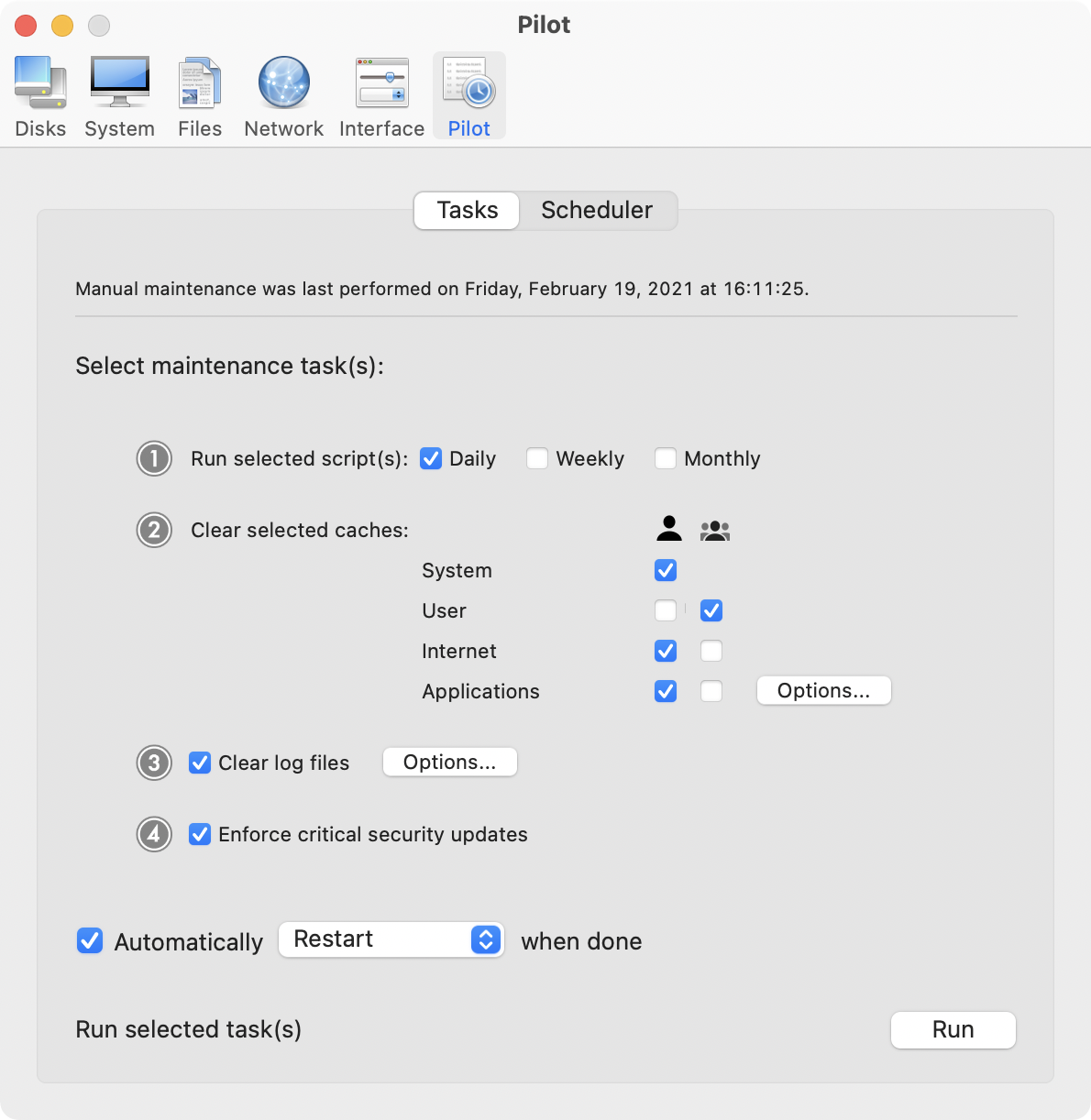
Ekero, Sweden - Maintain has released Cocktail 9.2.2 (El Capitan Edition), the latest maintenance update for users running OS X El Capitan 10.11. Cocktail is a general purpose utility for OS X that lets you clean, repair and optimize your Mac. The application serves up a perfect mix of maintenance tools and tweaks, all accessible through a clean and easy to use interface. Cocktail's features are arranged into five categories that helps you manage various aspects of your computer. It also comes with an automatic Pilot mode that allows you to simply press a button and relax, knowing that Cocktail will take care of the rest.
Disk:
* Automatically check S.M.A.R.T. status of disks
* Enable or disable journaling
* Repair disk permissions
* Reset home directory permissions and ACLs
* Set disk sleep (spindown) time
* Modify standby delay
* Change other disk sleep settings
* Force eject CD/DVD
System:
* Run periodic maintenance scripts
* Purge inactive memory and optimize virtual memory usage
* Manage Spotlight indexing
* Erase Spotlight indexes
* Modify Time Machine settings
* Rebuild Launch Services and Help databases
* Rebuild Mail's Envelope Index
* Update locate and whatis databases
* Force empty the Trash
* Change startup mode or set startup delay
* Disable startup sound
* Disable Notification Center and App Nap
Files:
* Clear system caches
* Clear user caches
* Clear font caches
* Clear virtual memory swap files
* Clear temporary files
* Clear Internet caches
* Clear cookies, download lists, form values and history files
* Clear Adobe Flash Player caches and cookies
* Clear applications caches
* Search for corrupted preference files
* Delete unnecessary localization (language resources) files
* Clear and manage (view, print and save) log files
* Delete invisible DS Store files
* Delete locked or inaccessible items
Network:
* Change speed, duplex and MTU of network cards
* Easily optimize network settings for common connection types
* Modify IP configuration parameters
* Configure File Sharing settings
Interface:
* Customize look and features of Finder, Dock, login window and other system services
* Modify hidden settings of Safari, QuickTime X and iTunes
Pilot:
* Clean, repair and optimize your system with one click of the button
* Schedule clearing of caches and log files as well as permissions repair and run of periodic maintenance scripts
What's New:
* Added ability to hide the Dock (Interface - Dock)
* Improvements on the "Clear audio component caches" procedure
* Overall performance improvements
* Minor interface improvements
* Added OS X 10.11.3 compatibility
* Updated Automator actions
System Requirements:
Cocktail 9.2.2 (El Capitan Edition) requires OS X El Capitan 10.11 to run. Cocktail (Yosemite Edition) for OS X 10.10, Cocktail (Mavericks Edition) for OS X 10.9, Cocktail (Mountain Lion Edition) for OS X 10.8 and Cocktail (Lion Edition) for OS X 10.7 are available for download from Maintain website.
Pricing and Availability:
Cocktail is $19.00 (USD) for a single user license and available for purchase from the Maintain website. When unregistered, Cocktail runs in demo mode and will expire after the tenth launch.
Cocktail 9.2.2 (El Capitan Edition): http://www.maintain.se/cocktail
Download Cocktail 9.2.2 (El Capitan Edition): http://usa.maintain.se/Cocktail9ECE.dmg
Vimeo Video: https://vimeo.com/109816714
Screenshot: http://www.maintain.se/downloads/screenshots/screenshot1.png
Application Icon: http://www.maintain.se/downloads/screenshots/icon.png
Maintain develops tailored applications for Mac users. We work towards creating technical solutions which maintain your computer and make it as efficient and easy to use as possible. In addition, we offer comprehensive consultancy and support services which cover everything from operation of existing systems to purchase and implementation of new technical solutions. Among our clients are: Major League Baseball, Puma, The New York Times, Sony Pictures, Ericsson, Fortum, The City Of Calgary, Peak Performance, Loreal, Harvard University, Los Angeles Times, Swedish Film Institute, Weber, ESPN, Business Week, Swedish National Police Board, Norwegian Broadcasting Corporation, Getty Images, University of Texas, South Park Studios, CompUSA, bwin, Lockheed Martin, Defense Intelligence Agency, University of Michigan and hundred of thousands of Mac users around the world. Copyright (C) 2016 Maintain. All Rights Reserved. Apple, the Apple logo and Mac are registered trademarks of Apple Inc. in
the U.S. and/or other countries.
*******
Link To Article: http://prmac.com/release-id-78834.htm
*******
---------------------------------------------------------------------------------
Note that you can alter delivered distributions at any time.
Login to your account on prMac to alter your channel selection, or to opt-out at any time.
Maintain Releases Cocktail 9.2.2 (El Capitan Edition) - Published on 02/27/16
Maintain has released Cocktail 9.2.2 (El Capitan Edition), the latest maintenance update for users running OS X El Capitan 10.11. Cocktail is a general purpose utility for OS X that lets users clean, repair and optimize their Macs. This version adds ability to hide the Dock and OS X 10.11.3 compatibility. It also contains improvements on the "Clear audio component caches" procedure, overall performance improvements and updated Automator actions.
Ekero, Sweden - Maintain has released Cocktail 9.2.2 (El Capitan Edition), the latest maintenance update for users running OS X El Capitan 10.11. Cocktail is a general purpose utility for OS X that lets you clean, repair and optimize your Mac. The application serves up a perfect mix of maintenance tools and tweaks, all accessible through a clean and easy to use interface. Cocktail's features are arranged into five categories that helps you manage various aspects of your computer. It also comes with an automatic Pilot mode that allows you to simply press a button and relax, knowing that Cocktail will take care of the rest.
Disk:
* Automatically check S.M.A.R.T. status of disks
* Enable or disable journaling
* Repair disk permissions
* Reset home directory permissions and ACLs
* Set disk sleep (spindown) time
* Modify standby delay
* Change other disk sleep settings
* Force eject CD/DVD
System:
* Run periodic maintenance scripts
* Purge inactive memory and optimize virtual memory usage
* Manage Spotlight indexing
* Erase Spotlight indexes
* Modify Time Machine settings
* Rebuild Launch Services and Help databases
* Rebuild Mail's Envelope Index
* Update locate and whatis databases
* Force empty the Trash
* Change startup mode or set startup delay
* Disable startup sound
* Disable Notification Center and App Nap
Files:
* Clear system caches
* Clear user caches
* Clear font caches
* Clear virtual memory swap files
* Clear temporary files
* Clear Internet caches
* Clear cookies, download lists, form values and history files
* Clear Adobe Flash Player caches and cookies
* Clear applications caches
* Search for corrupted preference files
* Delete unnecessary localization (language resources) files
* Clear and manage (view, print and save) log files
* Delete invisible DS Store files
* Delete locked or inaccessible items
Network:
* Change speed, duplex and MTU of network cards
* Easily optimize network settings for common connection types
* Modify IP configuration parameters
* Configure File Sharing settings
Interface:
* Customize look and features of Finder, Dock, login window and other system services
* Modify hidden settings of Safari, QuickTime X and iTunes
Pilot:
* Clean, repair and optimize your system with one click of the button
* Schedule clearing of caches and log files as well as permissions repair and run of periodic maintenance scripts
What's New:
* Added ability to hide the Dock (Interface - Dock)
* Improvements on the "Clear audio component caches" procedure
* Overall performance improvements
* Minor interface improvements
* Added OS X 10.11.3 compatibility
* Updated Automator actions
System Requirements:
Cocktail 9.2.2 (El Capitan Edition) requires OS X El Capitan 10.11 to run. Cocktail (Yosemite Edition) for OS X 10.10, Cocktail (Mavericks Edition) for OS X 10.9, Cocktail (Mountain Lion Edition) for OS X 10.8 and Cocktail (Lion Edition) for OS X 10.7 are available for download from Maintain website.
Pricing and Availability:
Cocktail is $19.00 (USD) for a single user license and available for purchase from the Maintain website. When unregistered, Cocktail runs in demo mode and will expire after the tenth launch.
Cocktail 9.2.2 (El Capitan Edition): http://www.maintain.se/cocktail
Download Cocktail 9.2.2 (El Capitan Edition): http://usa.maintain.se/Cocktail9ECE.dmg
Vimeo Video: https://vimeo.com/109816714
Screenshot: http://www.maintain.se/downloads/screenshots/screenshot1.png
Application Icon: http://www.maintain.se/downloads/screenshots/icon.png

Maintain develops tailored applications for Mac users. We work towards creating technical solutions which maintain your computer and make it as efficient and easy to use as possible. In addition, we offer comprehensive consultancy and support services which cover everything from operation of existing systems to purchase and implementation of new technical solutions. Among our clients are: Major League Baseball, Puma, The New York Times, Sony Pictures, Ericsson, Fortum, The City Of Calgary, Peak Performance, Loreal, Harvard University, Los Angeles Times, Swedish Film Institute, Weber, ESPN, Business Week, Swedish National Police Board, Norwegian Broadcasting Corporation, Getty Images, University of Texas, South Park Studios, CompUSA, bwin, Lockheed Martin, Defense Intelligence Agency, University of Michigan and hundred of thousands of Mac users around the world. Copyright (C) 2016 Maintain. All Rights Reserved. Apple, the Apple logo and Mac are registered trademarks of Apple Inc. in
the U.S. and/or other countries.
*******
Link To Article: http://prmac.com/release-id-78834.htm
*******
---------------------------------------------------------------------------------
Note that you can alter delivered distributions at any time.
Login to your account on prMac to alter your channel selection, or to opt-out at any time.
Kata Kata Cartoon Magazine is now available on Magzter
A new article has been published at prMac.
Kata Kata Cartoon Magazine is now available on Magzter - Published on 02/27/16
Kata Kata has choosen Magzter to extends its global digital reach. An authentic African cartoon magazine from Netherlands, Kata Kata magazine tries to discuss and sensitize African/global socio-political and cultural issues. At the same time, it equally offers a maxim that life is perhaps not all about seriousness and one needs some laughs and relaxation to face serious challenges in life. Magzter is the world's largest digital magazine newsstand.
New York City, New York - Kata Kata, the authentic African cartoon magazine from Netherlands, has choosen Magzter, the world's largest digital magazine newsstand, to extends its global digital reach. The magazine tries to discuss and sensitize African/global socio-political and cultural issues. At the same time, it equally offers a maxim that life is perhaps not all about seriousness and one needs some laughs and relaxation to face serious challenges in life.
In the latest issue of Kata Kata Cartoon magazine, catch up with an exclusive interview with Ugandan musician, Lillian Mbabazi. Also, don't miss the interesting articles such as corporates and the changing fashion trends, the most amazing spots in Africa, gadgets and a new breed of anti-socials, and the basics of skin care.
"It has always been our desire for our unique content to reach many readers globally without compromising on the production cost. Our collaboration with Magzter has provided us a perfect possibility to achieve this important goal. We now can save a lot on the printing, at the same time, we do not only have more online readers worldwide, we equally generate more income from these online subscribers. A very smart business approach, thus! With more than 28 million subscribers, coupled with its transparent business records and impeccable customers care service, Magzter is clearly and unapologetically our ideal choice. Little wonder why Magzter is indeed the world's leading digital newsstand. Who wouldn't like to partner with such a noble digital giant?" - Ogo Ubabukoh - Publisher, Kata Kata Cartoon Magazine - Netherlands
"Usually, cartoon/comic magazines are aimed at impressing the children with fantasy stories. However, Kata Kata Cartoon Magazine uniquely stands out by showcasing the African socio-political realities through its satirical cartoons, which completely engage the readers. Here's wishing Kata Kata Cartoon Magazine to have a great digital growth and create more hearty laughs via Magzter." - Girish Ramdas, CEO, Magzter Inc.
"Netherlands is a land of many interesting magazines, and I am glad to see that promising magazines like Kata Kata are taking up the digital route to increase their readership. Driving home a message with the help of cartoon sketches is a difficult art, but Kata Kata Cartoon Magazine has been able to do it effectively in a light-hearted way. Enjoy reading this cheerful and optimistic magazine on Magzter!" - Vijay Radhakrishnan, President, Magzter Inc.
Device Requirements:
* iPhone, iPad, and iPod touch
* Optimized for iPhone 5, iPhone 6/6 Plus
* Requires iOS 7.0 or later
* 31.8 MB
Pricing and Availability:
Magzter - Digital Magazine Newsstand 6.3 is free and available worldwide through the App Store in the News category. A quarterly magazine, Kata Kata Cartoon Magazine is priced at 3.59 EUR ($3.99 USD) for an annual subscription on Magzter. Kata Kata Cartoon Magazine also comes as a treat to Magzter GOLD users, who can enjoy reading it along with 3,500+ other international digital magazines. The app is also available on Google Play, and Windows 8, the web, Amazon App Store, Kindle Fire, and NOOK and is expanding to more platforms soon. Magzter's easy purchase and renewal systems ensure subscriptions are paid on time, eliminating the need for paper checks and postal mail issues. Users can buy their magazines on any of the above devices/platforms and seamlessly port their purchases to any other devices, a feature unique to Magzter.
Magzter - Digital Magazine Newsstand 6.3: http://www.magzter.com
Download from iTunes: https://itunes.apple.com/in/app/magzter-reading-destination/id412163953
Download from Google Play: https://play.google.com/store/apps/details?id=com.dci.magzter&hl=en
Screenshot: http://cdn.magzter.com/1448963344/1453737182/images/thumb/390_thumb_1.jpg
App Icon: http://a2.mzstatic.com/us/r30/Purple5/v4/81/fc/d3/81fcd369-00cd-a585-26d7-ee2f176c3c4b/mzl.orihehsu.175x175-75.jpg
Magzter is the world's largest and fastest growing global digital magazine newsstand with over 28.5 million digital consumers, more than 7,500 magazines from over 3,000 publishers. Headquartered in New York, Magzter has its local offices in London, Paris, Barcelona, Amsterdam, Helsinki, Mexico City, Chennai and Singapore and will soon be expanding to other countries. Founded by global entrepreneurs, Girish Ramdas and Vijay Radhakrishnan in June 2011, Magzter enables magazine publishers around the world to create and deliver digital editions of their titles to global consumers. Powered by its proprietary OREY Click Publishing System(R), Magzter also enables their customers to publish interactive/audio-visual content in the magazine as it supports HTML5. Magzter launched Magzter GOLD subscription service to give digital readers unlimited access to thousands of magazines for a low monthly price. All Material and Software (C) Copyright 2016 Magzter Inc. All Rights Reserved. Apple, the
Apple logo, iPhone, iPod and iPad are registered trademarks of Apple Inc. in the U.S. and/or other countries. Other trademarks and registered trademarks may be the property of their respective owners.
*******
Link To Article: http://prmac.com/release-id-78832.htm
*******
---------------------------------------------------------------------------------
Note that you can alter delivered distributions at any time.
Login to your account on prMac to alter your channel selection, or to opt-out at any time.
Kata Kata Cartoon Magazine is now available on Magzter - Published on 02/27/16
Kata Kata has choosen Magzter to extends its global digital reach. An authentic African cartoon magazine from Netherlands, Kata Kata magazine tries to discuss and sensitize African/global socio-political and cultural issues. At the same time, it equally offers a maxim that life is perhaps not all about seriousness and one needs some laughs and relaxation to face serious challenges in life. Magzter is the world's largest digital magazine newsstand.
New York City, New York - Kata Kata, the authentic African cartoon magazine from Netherlands, has choosen Magzter, the world's largest digital magazine newsstand, to extends its global digital reach. The magazine tries to discuss and sensitize African/global socio-political and cultural issues. At the same time, it equally offers a maxim that life is perhaps not all about seriousness and one needs some laughs and relaxation to face serious challenges in life.
In the latest issue of Kata Kata Cartoon magazine, catch up with an exclusive interview with Ugandan musician, Lillian Mbabazi. Also, don't miss the interesting articles such as corporates and the changing fashion trends, the most amazing spots in Africa, gadgets and a new breed of anti-socials, and the basics of skin care.
"It has always been our desire for our unique content to reach many readers globally without compromising on the production cost. Our collaboration with Magzter has provided us a perfect possibility to achieve this important goal. We now can save a lot on the printing, at the same time, we do not only have more online readers worldwide, we equally generate more income from these online subscribers. A very smart business approach, thus! With more than 28 million subscribers, coupled with its transparent business records and impeccable customers care service, Magzter is clearly and unapologetically our ideal choice. Little wonder why Magzter is indeed the world's leading digital newsstand. Who wouldn't like to partner with such a noble digital giant?" - Ogo Ubabukoh - Publisher, Kata Kata Cartoon Magazine - Netherlands
"Usually, cartoon/comic magazines are aimed at impressing the children with fantasy stories. However, Kata Kata Cartoon Magazine uniquely stands out by showcasing the African socio-political realities through its satirical cartoons, which completely engage the readers. Here's wishing Kata Kata Cartoon Magazine to have a great digital growth and create more hearty laughs via Magzter." - Girish Ramdas, CEO, Magzter Inc.
"Netherlands is a land of many interesting magazines, and I am glad to see that promising magazines like Kata Kata are taking up the digital route to increase their readership. Driving home a message with the help of cartoon sketches is a difficult art, but Kata Kata Cartoon Magazine has been able to do it effectively in a light-hearted way. Enjoy reading this cheerful and optimistic magazine on Magzter!" - Vijay Radhakrishnan, President, Magzter Inc.
Device Requirements:
* iPhone, iPad, and iPod touch
* Optimized for iPhone 5, iPhone 6/6 Plus
* Requires iOS 7.0 or later
* 31.8 MB
Pricing and Availability:
Magzter - Digital Magazine Newsstand 6.3 is free and available worldwide through the App Store in the News category. A quarterly magazine, Kata Kata Cartoon Magazine is priced at 3.59 EUR ($3.99 USD) for an annual subscription on Magzter. Kata Kata Cartoon Magazine also comes as a treat to Magzter GOLD users, who can enjoy reading it along with 3,500+ other international digital magazines. The app is also available on Google Play, and Windows 8, the web, Amazon App Store, Kindle Fire, and NOOK and is expanding to more platforms soon. Magzter's easy purchase and renewal systems ensure subscriptions are paid on time, eliminating the need for paper checks and postal mail issues. Users can buy their magazines on any of the above devices/platforms and seamlessly port their purchases to any other devices, a feature unique to Magzter.
Magzter - Digital Magazine Newsstand 6.3: http://www.magzter.com
Download from iTunes: https://itunes.apple.com/in/app/magzter-reading-destination/id412163953
Download from Google Play: https://play.google.com/store/apps/details?id=com.dci.magzter&hl=en
Screenshot: http://cdn.magzter.com/1448963344/1453737182/images/thumb/390_thumb_1.jpg

App Icon: http://a2.mzstatic.com/us/r30/Purple5/v4/81/fc/d3/81fcd369-00cd-a585-26d7-ee2f176c3c4b/mzl.orihehsu.175x175-75.jpg

Magzter is the world's largest and fastest growing global digital magazine newsstand with over 28.5 million digital consumers, more than 7,500 magazines from over 3,000 publishers. Headquartered in New York, Magzter has its local offices in London, Paris, Barcelona, Amsterdam, Helsinki, Mexico City, Chennai and Singapore and will soon be expanding to other countries. Founded by global entrepreneurs, Girish Ramdas and Vijay Radhakrishnan in June 2011, Magzter enables magazine publishers around the world to create and deliver digital editions of their titles to global consumers. Powered by its proprietary OREY Click Publishing System(R), Magzter also enables their customers to publish interactive/audio-visual content in the magazine as it supports HTML5. Magzter launched Magzter GOLD subscription service to give digital readers unlimited access to thousands of magazines for a low monthly price. All Material and Software (C) Copyright 2016 Magzter Inc. All Rights Reserved. Apple, the
Apple logo, iPhone, iPod and iPad are registered trademarks of Apple Inc. in the U.S. and/or other countries. Other trademarks and registered trademarks may be the property of their respective owners.
*******
Link To Article: http://prmac.com/release-id-78832.htm
*******
---------------------------------------------------------------------------------
Note that you can alter delivered distributions at any time.
Login to your account on prMac to alter your channel selection, or to opt-out at any time.
Medication for Mac OS X - Never Forget to Take Your Medication Again!
A new article has been published at prMac.
Medication for Mac OS X - Never Forget to Take Your Medication Again! - Published on 02/26/16
iLifeTouch announces Medication 1.0.1 for Mac OS X. The app is the perfect tool enabling users to completely manage their medication. Schedules, reminders, and dosages are visually displayed. Multiple users can be set up on the app to manage daily, weekly and monthly pill dosages. Users can register their daily medication, and receive reminders as needed. Graphs will show visually how many pills are left to take for the day. Never forget to take a medication again!
Kolkata, India - iLifeTouch is proud to announce the release of Medication 1.0.1 for Mac OS X. The "Medication" app is the perfect tool enabling users to completely manage their medication. Schedules, reminders and dosages are visually displayed. Multiple users can be set up on the Medication app to manage daily, weekly and monthly pill dosages.
Schedule your different medication easily using icons or colors on your Mac. Users can register their daily medication and receive reminders as needed. Keep yourself and your loved ones safe knowing their medication needs are organized. Never forget to take your medication again! Remember when to take your pills and manage the dosages correctly. The graphs will show visually how many pills are left to take for the day.
Top Features:
* Add pills with different icons and colors
* Manage medication stock and add pills when stock is empty
* Add pill reminders using built-in calendar
* Check off reminders after consuming the pill
* Register doctor appointments and get notified beforehand
* Add multiple users and manage med usage separately for each user
* Sync med usage data across all your Macs over iCloud
* Get a detailed over view of the monthly and yearly med usage on an easy graph chart
Medication is simple to use. It makes sure that you and your loved ones or anyone you care about never misses an important pill of medication again. It makes it stress free if you have so many different medications to take daily. So, download Medication today, and never worry about timing and dosages again.
System Requirements:
* OS X 10.10 or later
* 64-bit processor
* 3.6 MB
Pricing and Availability:
Medication 1.0.1 is just $2.99 USD (or an equivalent amount in other currencies) and is available worldwide exclusively through the Mac App Store in the Medical category.
iLifeTouch: http://www.ilifetouch.com
Medication 1.0.1: http://www.ilifetouch.com/Medication
Purchase and Download from Mac App Store: https://itunes.apple.com/app/medication/id1084637479
Screenshot: http://a3.mzstatic.com/us/r30/Purple69/v4/0f/bf/5a/0fbf5a93-f53a-aa8b-46c5-1ebece8bbc1c/screen800x500.jpeg
App Icon: http://a5.mzstatic.com/us/r30/Purple69/v4/e8/1e/75/e81e75b7-1e5e-76ac-ed3b-41ee9a9bce42/icon128-2x.png
iLifeTouch treats all their apps as if they belonged to the end users. Not only do they hope for feedback, they actively encourage users to tell them what they want and to inform them if they are missing something they would love to see built into their apps. They are eagerly awaiting your input and they are here to make your lives easier using their apps. All Material and Software (C) Copyright 2016 iLifeTouch. All Rights Reserved. Apple, the Apple logo, Macintosh and Mac OS X are registered trademarks of Apple Inc. in the U.S. and/or other countries. Other trademarks and registered trademarks may be the property of their respective owners.
*******
Link To Article: http://prmac.com/release-id-78851.htm
*******
---------------------------------------------------------------------------------
Note that you can alter delivered distributions at any time.
Login to your account on prMac to alter your channel selection, or to opt-out at any time.
Medication for Mac OS X - Never Forget to Take Your Medication Again! - Published on 02/26/16
iLifeTouch announces Medication 1.0.1 for Mac OS X. The app is the perfect tool enabling users to completely manage their medication. Schedules, reminders, and dosages are visually displayed. Multiple users can be set up on the app to manage daily, weekly and monthly pill dosages. Users can register their daily medication, and receive reminders as needed. Graphs will show visually how many pills are left to take for the day. Never forget to take a medication again!
Kolkata, India - iLifeTouch is proud to announce the release of Medication 1.0.1 for Mac OS X. The "Medication" app is the perfect tool enabling users to completely manage their medication. Schedules, reminders and dosages are visually displayed. Multiple users can be set up on the Medication app to manage daily, weekly and monthly pill dosages.
Schedule your different medication easily using icons or colors on your Mac. Users can register their daily medication and receive reminders as needed. Keep yourself and your loved ones safe knowing their medication needs are organized. Never forget to take your medication again! Remember when to take your pills and manage the dosages correctly. The graphs will show visually how many pills are left to take for the day.
Top Features:
* Add pills with different icons and colors
* Manage medication stock and add pills when stock is empty
* Add pill reminders using built-in calendar
* Check off reminders after consuming the pill
* Register doctor appointments and get notified beforehand
* Add multiple users and manage med usage separately for each user
* Sync med usage data across all your Macs over iCloud
* Get a detailed over view of the monthly and yearly med usage on an easy graph chart
Medication is simple to use. It makes sure that you and your loved ones or anyone you care about never misses an important pill of medication again. It makes it stress free if you have so many different medications to take daily. So, download Medication today, and never worry about timing and dosages again.
System Requirements:
* OS X 10.10 or later
* 64-bit processor
* 3.6 MB
Pricing and Availability:
Medication 1.0.1 is just $2.99 USD (or an equivalent amount in other currencies) and is available worldwide exclusively through the Mac App Store in the Medical category.
iLifeTouch: http://www.ilifetouch.com
Medication 1.0.1: http://www.ilifetouch.com/Medication
Purchase and Download from Mac App Store: https://itunes.apple.com/app/medication/id1084637479
Screenshot: http://a3.mzstatic.com/us/r30/Purple69/v4/0f/bf/5a/0fbf5a93-f53a-aa8b-46c5-1ebece8bbc1c/screen800x500.jpeg

App Icon: http://a5.mzstatic.com/us/r30/Purple69/v4/e8/1e/75/e81e75b7-1e5e-76ac-ed3b-41ee9a9bce42/icon128-2x.png

iLifeTouch treats all their apps as if they belonged to the end users. Not only do they hope for feedback, they actively encourage users to tell them what they want and to inform them if they are missing something they would love to see built into their apps. They are eagerly awaiting your input and they are here to make your lives easier using their apps. All Material and Software (C) Copyright 2016 iLifeTouch. All Rights Reserved. Apple, the Apple logo, Macintosh and Mac OS X are registered trademarks of Apple Inc. in the U.S. and/or other countries. Other trademarks and registered trademarks may be the property of their respective owners.
*******
Link To Article: http://prmac.com/release-id-78851.htm
*******
---------------------------------------------------------------------------------
Note that you can alter delivered distributions at any time.
Login to your account on prMac to alter your channel selection, or to opt-out at any time.
Subscribe to:
Posts (Atom)