A new article has been published at prMac.
Seasonality Pro Offers Advanced Wind Simulation for the Upper Atmosphere - Published on 03/02/16
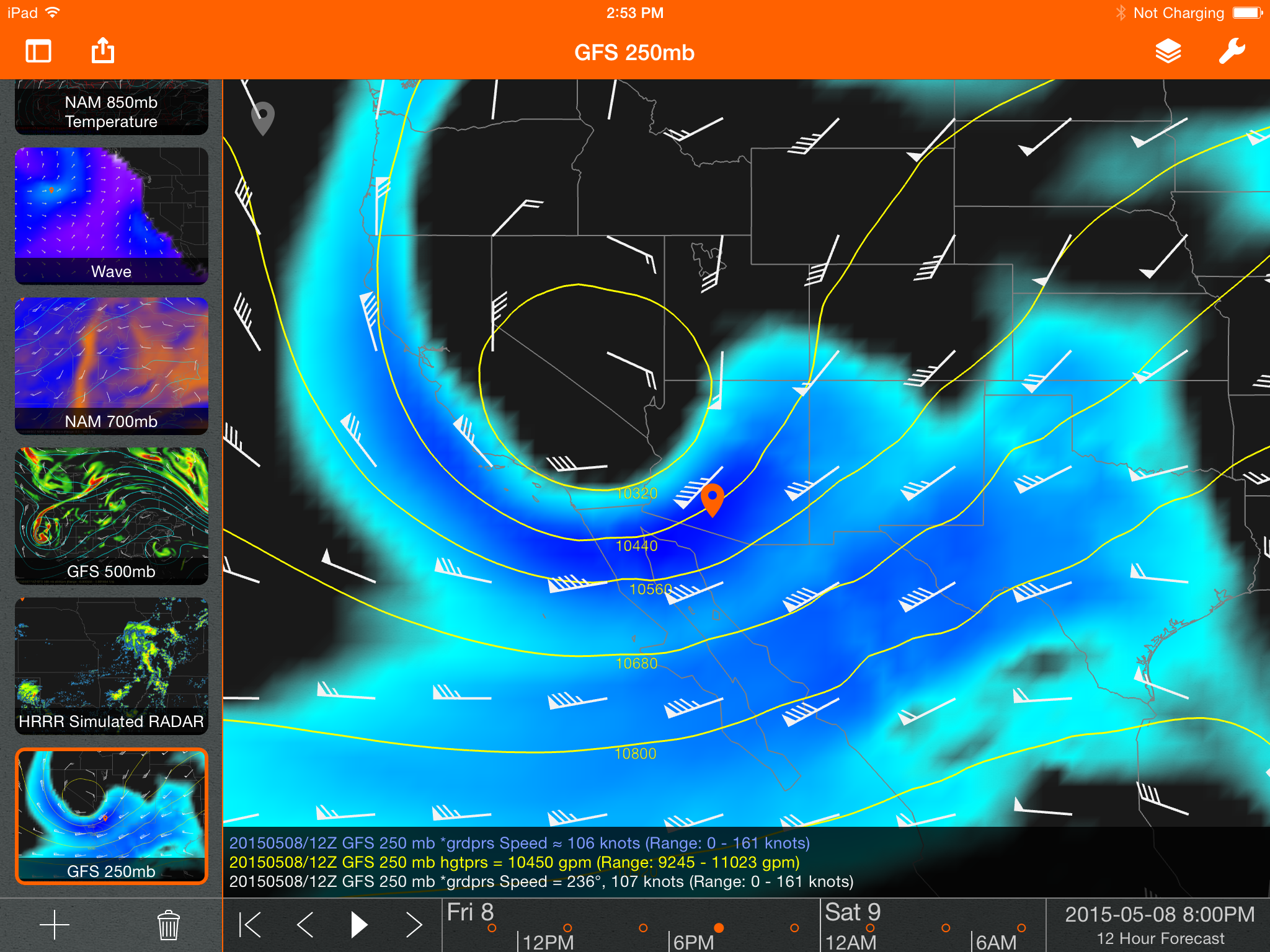
Michigan baseed Gaucho Software has announced Seasonality Pro 1.1, the latest update to its professional weather app developed for iPhone, iPad and iPod touch devices. Seasonality Pro is a powerful tool that allows meteorologists to view and analyze weather model forecast data. Version 1.1 adds a new Particle Mode map layer to show the wind field from the surface to the upper atmosphere, an easy new way to animate maps over a longer period of time, and full support for multitasking on iOS 9.
Mt. Pleasant, Michigan - Gaucho Software has announced the release of Seasonality Pro 1.1, the latest update to its professional weather app developed for iPhone, iPad and iPod touch devices. Seasonality Pro is a powerful tool that allows meteorologists to view and analyze weather model forecast data. The latest version adds a new Particle Mode map layer to show the wind field from the surface to the upper atmosphere, an easy new way to animate maps over a longer period of time, and full support for multitasking on iOS 9.
The new Particle Mode feature has been a user-favorite in Seasonality apps for years. The feature animates thousands of particles to show the motion of the wind at the surface. Now in Seasonality Pro 1.1, Particle Mode can be used to display the wind at any modeled level in the atmosphere. This is useful for keeping track of the jet stream and other upper air phenomena.
The time bar has always been a useful way to control what time period is animated on the map. Seasonality 1.1 adds the ability to pinch to zoom in and out on the time bar, so users can easily choose whether they want to animate over hours, days, or anywhere in-between. The app automatically handles loading just enough data to draw the animation rapidly, and makes it easy for users to narrow in on the time period they want to study.
Device Requirements:
* iPhone, iPad, and iPod touch
* Requires iOS 8.0 or later
* 18.7 MB
Pricing and Availability:
Seasonality Pro 1.1 is $5.99 USD (or equivalent amount in other currencies) and available worldwide exclusively through the App Store in the Weather category. Current customers can upgrade for free.
Seasonality Pro 1.1: http://getseasonality.com/pro/
Purchase and Download: https://itunes.apple.com/app/seasonality-pro/id949893263
Screenshot: http://getseasonality.com/art/scr-pro-3-large.png
App Icon: http://a4.mzstatic.com/us/r30/Purple49/v4/86/5d/b1/865db129-d352-fbd1-10ce-32799840dce7/icon175x175.png
Gaucho Software, LLC is a privately held software company based in Michigan, USA. Since 2004, the company has been creating powerful weather applications for Mac, iPhone, iPad, and Apple TV. Catering to all needs and skill sets, from hobbyist to professional, it is dedicated to crafting scientifically worthy tools that unleash the full power of today's intuitive devices. Its unusual, deeply appreciated applications have earned it praise in the press as well as a dedicated following. Copyright (C) 2016 Gaucho Software, LLC. All Rights Reserved. Apple, the Apple logo, iPhone, iPod and iPad are registered trademarks of Apple Inc. in the U.S. and/or other countries.
*******
Link To Article: http://prmac.com/release-id-78885.htm
*******
---------------------------------------------------------------------------------
Note that you can alter delivered distributions at any time.
Login to your account on prMac to alter your channel selection, or to opt-out at any time.


Ilium Software Releases eWallet Password Management App for Mac Users
A new article has been published at prMac.
Ilium Software Releases eWallet Password Management App for Mac Users - Published on 03/02/16
Michigan based Ilium Software has announced eWallet 8, a major update to their popular productivity app for Mac OS X. Featuring military-grade 256-bit AES encryption for security, eWallet offers Mac users the ability to store, access, and protect passwords and other sensitive data such as bank account information from any device. Version 8 now includes the SyncPro engine that allows for wallets to be synchronized automatically and securely between devices using the cloud.
Ann Arbor, Michigan - Ilium Software has announced eWallet 8, a major update to their popular productivity app for Mac OS X. Available now in the Mac App Store, eWallet(R) offers Mac users the ability to store, access, and protect passwords and other sensitive data such as bank account information from any device. Instead of wasting valuable mental energy trying to remember a long-forgotten unique password or security questions, eWallet users can easily keep track of their important data on-the-go and take their electronic security to the next level.
First introduced eighteen years ago, and with high downloads in the iTunes and Android, Microsoft and other app stores, eWallet for Mac, Windows, iPhone, and Android has set the standard for rock-solid data storage. Thousands of loyal users have continued to use eWallet since the very beginning, and the many positive reviews in iTunes are a testament to the reliability, flexibility, and simplicity of this password management front-runner.
Now Mac users with OS X 10.9 or later can take advantage of such powerful features as:
* Military-grade 256-bit AES encryption for security, card organization for convenience
* Beautifully designed, customizable "card" interface to create a virtual wallet that's organized and uniquely yours
* Multiple "wallets" to keep bank account, insurance, credit card and other personal details protected and always at hand
* Seamless Cloud or local WiFi sync: your information stays secure and current no matter which device you access with eWallet's iOS and Android apps (purchased separately)
* iCloud or Dropbox backup: never lose track of your data
* Random password generation tools to keep your many online profiles hacker-proof
* AutoPass auto-fill tool for login information - never wrack your brain for a forgotten password again
"I would like to thank you for the 8.0 update with sync on Mac for Dropbox and iCloud. It was a personal request of mine from last year, which you kindly replied to with an outline of your plans for this excellent, essential, enduring program. eWallet is on the top of my recommendation list," says one of Ilium Software's many satisfied eWallet users.
Device Requirements:
* Mac running OS X 10.9 or later
Pricing and Availability:
eWallet 8 for Mac OS X is currently $9.99 (USD) and is available worldwide through the Mac App Store in the Productivity category.
Ilium Software: http://www.iliumsoft.com/
eWallet 8 for Mac: http://www.iliumsoft.com/ewallet/mac
Purchase and Download: http://itunes.apple.com/us/app/ewallet/id411718305?mt=12&uo=4&at=11l4BY
Screenshot 1: http://www.iliumsoft.com/files/9814/3163/3953/Visa.png
Screenshot 2: http://www.iliumsoft.com/files/3714/3163/4133/PasswordGenerator.png
App Icon: http://www.iliumsoft.com/site/unl/pix/eWalletAppIcon175.png
Based in Ann Arbor, Michigan, Ilium Software has been designing and creating information management tools for mobile devices since 1997. While the technology has changed, the need for easy and useful ways to manage information on the go has not. Ilium has over 18 years of experience making and supporting award-winning info managers for mobile devices. Its products are easy to use, and make it simple and painless for you to organize - and use - your information. Ilium Software, eWallet, and SyncPro are registered trademarks of Ilium Software, Inc. Copyright (C) 1997-2016 Ilium Software. All Rights Reserved. Other trademarks and registered trademarks may be the property of their respective owners.
*******
Link To Article: http://prmac.com/release-id-78887.htm
*******
---------------------------------------------------------------------------------
Note that you can alter delivered distributions at any time.
Login to your account on prMac to alter your channel selection, or to opt-out at any time.
Ilium Software Releases eWallet Password Management App for Mac Users - Published on 03/02/16
Michigan based Ilium Software has announced eWallet 8, a major update to their popular productivity app for Mac OS X. Featuring military-grade 256-bit AES encryption for security, eWallet offers Mac users the ability to store, access, and protect passwords and other sensitive data such as bank account information from any device. Version 8 now includes the SyncPro engine that allows for wallets to be synchronized automatically and securely between devices using the cloud.
Ann Arbor, Michigan - Ilium Software has announced eWallet 8, a major update to their popular productivity app for Mac OS X. Available now in the Mac App Store, eWallet(R) offers Mac users the ability to store, access, and protect passwords and other sensitive data such as bank account information from any device. Instead of wasting valuable mental energy trying to remember a long-forgotten unique password or security questions, eWallet users can easily keep track of their important data on-the-go and take their electronic security to the next level.
First introduced eighteen years ago, and with high downloads in the iTunes and Android, Microsoft and other app stores, eWallet for Mac, Windows, iPhone, and Android has set the standard for rock-solid data storage. Thousands of loyal users have continued to use eWallet since the very beginning, and the many positive reviews in iTunes are a testament to the reliability, flexibility, and simplicity of this password management front-runner.
Now Mac users with OS X 10.9 or later can take advantage of such powerful features as:
* Military-grade 256-bit AES encryption for security, card organization for convenience
* Beautifully designed, customizable "card" interface to create a virtual wallet that's organized and uniquely yours
* Multiple "wallets" to keep bank account, insurance, credit card and other personal details protected and always at hand
* Seamless Cloud or local WiFi sync: your information stays secure and current no matter which device you access with eWallet's iOS and Android apps (purchased separately)
* iCloud or Dropbox backup: never lose track of your data
* Random password generation tools to keep your many online profiles hacker-proof
* AutoPass auto-fill tool for login information - never wrack your brain for a forgotten password again
"I would like to thank you for the 8.0 update with sync on Mac for Dropbox and iCloud. It was a personal request of mine from last year, which you kindly replied to with an outline of your plans for this excellent, essential, enduring program. eWallet is on the top of my recommendation list," says one of Ilium Software's many satisfied eWallet users.
Device Requirements:
* Mac running OS X 10.9 or later
Pricing and Availability:
eWallet 8 for Mac OS X is currently $9.99 (USD) and is available worldwide through the Mac App Store in the Productivity category.
Ilium Software: http://www.iliumsoft.com/
eWallet 8 for Mac: http://www.iliumsoft.com/ewallet/mac
Purchase and Download: http://itunes.apple.com/us/app/ewallet/id411718305?mt=12&uo=4&at=11l4BY
Screenshot 1: http://www.iliumsoft.com/files/9814/3163/3953/Visa.png

Screenshot 2: http://www.iliumsoft.com/files/3714/3163/4133/PasswordGenerator.png

App Icon: http://www.iliumsoft.com/site/unl/pix/eWalletAppIcon175.png

Based in Ann Arbor, Michigan, Ilium Software has been designing and creating information management tools for mobile devices since 1997. While the technology has changed, the need for easy and useful ways to manage information on the go has not. Ilium has over 18 years of experience making and supporting award-winning info managers for mobile devices. Its products are easy to use, and make it simple and painless for you to organize - and use - your information. Ilium Software, eWallet, and SyncPro are registered trademarks of Ilium Software, Inc. Copyright (C) 1997-2016 Ilium Software. All Rights Reserved. Other trademarks and registered trademarks may be the property of their respective owners.
*******
Link To Article: http://prmac.com/release-id-78887.htm
*******
---------------------------------------------------------------------------------
Note that you can alter delivered distributions at any time.
Login to your account on prMac to alter your channel selection, or to opt-out at any time.
Dorsunator Synchronizes Text, Photo and Web Links Between Devices
A new article has been published at prMac.
Dorsunator Synchronizes Text, Photo and Web Links Between Devices - Published on 03/02/16
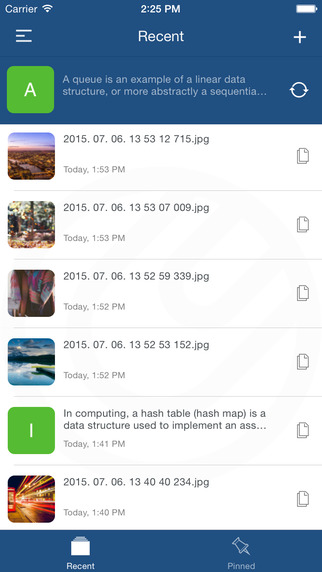
Developed by Pragmatic Bits Ltd., Dorsunator 1.2.1 has addressed the problem of temporary and very quick data exchange across device and OS boundaries. Temporary means short-living data that users need to pass back-and-forth between various devices. The philosophy of Dorsunator is that users should not need to think how to transfer something from one device to another, and it should happen as automatically as possible. This improves workflow speed and also reduces decision fatigue and frustration.
Budapest, Hungary - Developed by Pragmatic Bits Ltd., Dorsunator has addressed the problem of temporary and very quick data exchange across device and OS boundaries. Today, everyone owns multiple devices: a mobile phone, a tablet and probably a laptop and there is a chance that they are not all the same brand or the same system. Sometimes, the process of dropping a piece of data from one physical device to an other one (let it be a block of text, a single image or a web location) is just too complex.
Dorsunator fills this hole and offers quick and temporary data transmission across various device and OS boundaries. Temporary means short-living data that users need to pass back-and-forth between various devices - these usually include website links, temporary text blocks, images that users don't need or want to add into other asset containers: photos or web bookmarks. The philosophy of Dorsunator is that users should not need to think how to transfer something from one device to another, and it should happen as automatically as possible. This improves workflow speed and also reduces decision fatigue and frustration.
Popular uses of Dorsunator include:
* Save a web address or article for reading later on another device
* SMS content copying and syncing
* Extend a device clipboard with multiple items
* Sync screenshots or photos
* Collecting content from web and from multiple devices
Key features:
* Automatic clipboard syncing across devices and platforms
* Data is transferred over the internet, devices don't need to be on the same Wifi network
* View and manipulate synchronized items in the history table
* Pin items to quickly access favorites
* Quickly view device clipboard
* Take a new or existing photo directly from Dorsunator and share across devices
* Share clip items with other apps
* When enabled, get notifications for incoming clip items coming from other devices
* For iOS, today widget support under iOS 8 or later
* Sharing from other applications
* Customizable hotkeys and drag and drop on Mac OS X and Windows
Device Requirements:
* iPhone, iPad, and iPod touch
* Requires iOS 8.2 or later
* 9.6 MB
Pricing and Availability:
Dorsunator 1.2.1 is only $0.99 USD (or equivalent amount in other currencies) and available worldwide exclusively through the App Store in the Productivity category. Also available for Android, Mac OS X and Windows.
Dorsunator 1.2.1: http://www.dorsunator.com
More Info: http://apps.appshout.com/dorsunator/
Purchase and Download: https://itunes.apple.com/app/apple-store/id974032501
YouTube Video (Demo): https://www.youtube.com/watch?v=lkMHuiFktyI
Screenshot: http://a2.mzstatic.com/us/r30/Purple1/v4/64/12/26/6412261b-3342-d193-6d6e-d9c9e38053e5/screen322x572.jpeg
App Icon: http://apps.appshout.com/dorsunator/images/icon.png
Pragmatic Bits is a software development startup founded in mid 2014 and located in Budapest, Hungary. With a philosophy to create software by always selecting the pragmatic way, the right tooling on the right platform. Their main profile is mobile application development and product development in media and broadcast industry. All Material and Software (C) Copyright 2016 Pragmatic Bits Ltd. All Rights Reserved. Apple, the Apple logo, iPhone, iPod and iPad are registered trademarks of Apple Inc. in the U.S. and/or other countries. Other trademarks and registered trademarks may be the property of their respective owners.
*******
Link To Article: http://prmac.com/release-id-78889.htm
*******
---------------------------------------------------------------------------------
Note that you can alter delivered distributions at any time.
Login to your account on prMac to alter your channel selection, or to opt-out at any time.
Dorsunator Synchronizes Text, Photo and Web Links Between Devices - Published on 03/02/16
Developed by Pragmatic Bits Ltd., Dorsunator 1.2.1 has addressed the problem of temporary and very quick data exchange across device and OS boundaries. Temporary means short-living data that users need to pass back-and-forth between various devices. The philosophy of Dorsunator is that users should not need to think how to transfer something from one device to another, and it should happen as automatically as possible. This improves workflow speed and also reduces decision fatigue and frustration.
Budapest, Hungary - Developed by Pragmatic Bits Ltd., Dorsunator has addressed the problem of temporary and very quick data exchange across device and OS boundaries. Today, everyone owns multiple devices: a mobile phone, a tablet and probably a laptop and there is a chance that they are not all the same brand or the same system. Sometimes, the process of dropping a piece of data from one physical device to an other one (let it be a block of text, a single image or a web location) is just too complex.
Dorsunator fills this hole and offers quick and temporary data transmission across various device and OS boundaries. Temporary means short-living data that users need to pass back-and-forth between various devices - these usually include website links, temporary text blocks, images that users don't need or want to add into other asset containers: photos or web bookmarks. The philosophy of Dorsunator is that users should not need to think how to transfer something from one device to another, and it should happen as automatically as possible. This improves workflow speed and also reduces decision fatigue and frustration.
Popular uses of Dorsunator include:
* Save a web address or article for reading later on another device
* SMS content copying and syncing
* Extend a device clipboard with multiple items
* Sync screenshots or photos
* Collecting content from web and from multiple devices
Key features:
* Automatic clipboard syncing across devices and platforms
* Data is transferred over the internet, devices don't need to be on the same Wifi network
* View and manipulate synchronized items in the history table
* Pin items to quickly access favorites
* Quickly view device clipboard
* Take a new or existing photo directly from Dorsunator and share across devices
* Share clip items with other apps
* When enabled, get notifications for incoming clip items coming from other devices
* For iOS, today widget support under iOS 8 or later
* Sharing from other applications
* Customizable hotkeys and drag and drop on Mac OS X and Windows
Device Requirements:
* iPhone, iPad, and iPod touch
* Requires iOS 8.2 or later
* 9.6 MB
Pricing and Availability:
Dorsunator 1.2.1 is only $0.99 USD (or equivalent amount in other currencies) and available worldwide exclusively through the App Store in the Productivity category. Also available for Android, Mac OS X and Windows.
Dorsunator 1.2.1: http://www.dorsunator.com
More Info: http://apps.appshout.com/dorsunator/
Purchase and Download: https://itunes.apple.com/app/apple-store/id974032501
YouTube Video (Demo): https://www.youtube.com/watch?v=lkMHuiFktyI
Screenshot: http://a2.mzstatic.com/us/r30/Purple1/v4/64/12/26/6412261b-3342-d193-6d6e-d9c9e38053e5/screen322x572.jpeg
App Icon: http://apps.appshout.com/dorsunator/images/icon.png

Pragmatic Bits is a software development startup founded in mid 2014 and located in Budapest, Hungary. With a philosophy to create software by always selecting the pragmatic way, the right tooling on the right platform. Their main profile is mobile application development and product development in media and broadcast industry. All Material and Software (C) Copyright 2016 Pragmatic Bits Ltd. All Rights Reserved. Apple, the Apple logo, iPhone, iPod and iPad are registered trademarks of Apple Inc. in the U.S. and/or other countries. Other trademarks and registered trademarks may be the property of their respective owners.
*******
Link To Article: http://prmac.com/release-id-78889.htm
*******
---------------------------------------------------------------------------------
Note that you can alter delivered distributions at any time.
Login to your account on prMac to alter your channel selection, or to opt-out at any time.
Smart Baby Monitor With IBM Watson-like Feature Launches on Kickstarter
A new article has been published at prMac.
Smart Baby Monitor With IBM Watson-like Feature Launches on Kickstarter - Published on 03/02/16
allb inc. has announced the launch of allb on kickstarter. allb is a smart wearable device for babies to monitor their vitals 24/7 and sends alerts to parents via smartphone if any abnormal patterns are detected. The iOS or Android app will also provide powerful insights to parents by analyzing the gathered data as well as comparing it to other babies using the monitor worldwide. allb's algorithm also creates customized thresholds for each baby. Estimated delivery is July 2016.
New York, New York - allb inc. has announced the launch of their kickstarter campaign for allb, a smart baby monitor. The monitor is easily attached to a baby's diaper or pants, and monitors the baby for temperature, respiratory rate and sleeping pattern 24/7. This data is uploaded to the company's cloud and alerts the parents via smartphones if any abnormal patterns are detected. Parents will be able to access real-time data from anywhere through their iOS or Android app. Parents can also see their baby's historical data and compare them to similar age groups within the allb community.
One of allb's main feature is the "insight" feature. The company has worked with pediatricians to create over 60 proprietary algorithms to analyze the baby's historical and real-time data to provide customized alerts and insight to each baby. Few examples of alerts and insights include:
* Joshua's stopped breathing! Go check on him right now!
* Jenifer had less sleep than usual. You can expect her to cry or whine.
* Jennifer needs more daily sleep time. Average babies similar to her age sleeps for X hours.
Studies show lack of sleep affects early childhood development. Try to make it a comfortable environment for her to sleep in. - This insight is shown when sleep-deprivation is prolonged for extended period of time. This is a similar feature to IBM Watson(TM) providing insight for Under Armor(R)'s UA Record(TM)
allb's algorithm also creates customized thresholds for each baby instead of using just "rule of thumb" numbers used by alternative services and by pediatricians. The algorithm is designed to detect patterns such as temperature is usually increased between 1pm and 5pm and factors this information in determining a more accurate alert threshold.
Other features include
* Comfortable design for babies
* Medical grade, non-toxic silicone
* Size - Slightly larger than $1 coin
* Connects using Bluetooth LE
* 15 meter range
* 5 day battery life - recharged via micro-usb
* Uploaded data accessed from anywhere by authorized devices
* Chat feature - There is evidence that psychosocial or psychological intervention after childbirth helped reduce the risk of postnatal depression.
Pricing and Availability
allb will retail for $149.00 (USD). The Kickstarter price, starting from $89 (40% off retail) to $109 (26% off retail). Estimated delivery is for an July 2016 availability.
allb: http://myallb.com
Kickstarter Project: https://www.kickstarter.com/projects/1431060853/237919677?token=185b75fe
With offices in New York, New York and Seoul, South Korea, allb Inc. was established in 2015 with a couple of friends who were a business consultant, an engineer and a pediatrician. The company's primary business focus is develping IoT that can improve the lives of babies and their parents. Smart Baby Care for Hardworking Parents. All Material and Software (C) Copyright 2016 allb Inc. All Rights Reserved. Apple, the Apple logo, iPhone, iPod and iPad are registered trademarks of Apple Inc. in the U.S. and/or other countries. Other trademarks and registered trademarks may be the property of their respective owners.
*******
Link To Article: http://prmac.com/release-id-78888.htm
*******
---------------------------------------------------------------------------------
Note that you can alter delivered distributions at any time.
Login to your account on prMac to alter your channel selection, or to opt-out at any time.
Smart Baby Monitor With IBM Watson-like Feature Launches on Kickstarter - Published on 03/02/16
allb inc. has announced the launch of allb on kickstarter. allb is a smart wearable device for babies to monitor their vitals 24/7 and sends alerts to parents via smartphone if any abnormal patterns are detected. The iOS or Android app will also provide powerful insights to parents by analyzing the gathered data as well as comparing it to other babies using the monitor worldwide. allb's algorithm also creates customized thresholds for each baby. Estimated delivery is July 2016.
New York, New York - allb inc. has announced the launch of their kickstarter campaign for allb, a smart baby monitor. The monitor is easily attached to a baby's diaper or pants, and monitors the baby for temperature, respiratory rate and sleeping pattern 24/7. This data is uploaded to the company's cloud and alerts the parents via smartphones if any abnormal patterns are detected. Parents will be able to access real-time data from anywhere through their iOS or Android app. Parents can also see their baby's historical data and compare them to similar age groups within the allb community.
One of allb's main feature is the "insight" feature. The company has worked with pediatricians to create over 60 proprietary algorithms to analyze the baby's historical and real-time data to provide customized alerts and insight to each baby. Few examples of alerts and insights include:
* Joshua's stopped breathing! Go check on him right now!
* Jenifer had less sleep than usual. You can expect her to cry or whine.
* Jennifer needs more daily sleep time. Average babies similar to her age sleeps for X hours.
Studies show lack of sleep affects early childhood development. Try to make it a comfortable environment for her to sleep in. - This insight is shown when sleep-deprivation is prolonged for extended period of time. This is a similar feature to IBM Watson(TM) providing insight for Under Armor(R)'s UA Record(TM)
allb's algorithm also creates customized thresholds for each baby instead of using just "rule of thumb" numbers used by alternative services and by pediatricians. The algorithm is designed to detect patterns such as temperature is usually increased between 1pm and 5pm and factors this information in determining a more accurate alert threshold.
Other features include
* Comfortable design for babies
* Medical grade, non-toxic silicone
* Size - Slightly larger than $1 coin
* Connects using Bluetooth LE
* 15 meter range
* 5 day battery life - recharged via micro-usb
* Uploaded data accessed from anywhere by authorized devices
* Chat feature - There is evidence that psychosocial or psychological intervention after childbirth helped reduce the risk of postnatal depression.
Pricing and Availability
allb will retail for $149.00 (USD). The Kickstarter price, starting from $89 (40% off retail) to $109 (26% off retail). Estimated delivery is for an July 2016 availability.
allb: http://myallb.com
Kickstarter Project: https://www.kickstarter.com/projects/1431060853/237919677?token=185b75fe
With offices in New York, New York and Seoul, South Korea, allb Inc. was established in 2015 with a couple of friends who were a business consultant, an engineer and a pediatrician. The company's primary business focus is develping IoT that can improve the lives of babies and their parents. Smart Baby Care for Hardworking Parents. All Material and Software (C) Copyright 2016 allb Inc. All Rights Reserved. Apple, the Apple logo, iPhone, iPod and iPad are registered trademarks of Apple Inc. in the U.S. and/or other countries. Other trademarks and registered trademarks may be the property of their respective owners.
*******
Link To Article: http://prmac.com/release-id-78888.htm
*******
---------------------------------------------------------------------------------
Note that you can alter delivered distributions at any time.
Login to your account on prMac to alter your channel selection, or to opt-out at any time.
Dejal announces Simon 4.2 - Server Monitoring Tool
A new article has been published at prMac.
Dejal announces Simon 4.2 - Server Monitoring Tool - Published on 03/02/16
Portland based Dejal Systems, LLC has announced Simon 4.2, an update to the essential server monitoring tool for Mac OS X. Simon checks web pages, FTP and DNS servers, local or remote ports or volumes, and many other kinds of services for changes or failures. HTML reports enable remote viewing of a summary and/or details of Simon monitoring. Version 4.2 includes new exclusion and difference analysis filters, email, preview and reports improvements, and much more.
Portland, Oregon - Dejal Systems, LLC has announced the immediate availability of Dejal Simon 4.2, the essential server monitoring tool for Mac OS X. It checks web pages, FTP and DNS servers, local or remote ports or volumes, and other services for changes or failures, and notifies you via email, sound, speech, Twitter, SMS, HTML reports, and other means.
Add tests to Simon to track updated sites, to alert you when an important server goes down or recovers, check on Samba SMB, take periodic screenshots of the system, track posts and new comments on your or friends' blogs, check for web mail, make sure a key application is running, get notifications of updates to favorite news and entertainment websites, keep an eye on auctions, and many other uses.
Services include Web (HTTP) to check web pages (including secure ones, and supporting POST and cookies), FTP files and directory listings, DNS, Ping servers, see Twitter updates, watch a local Application, capture periodic Screenshots, watch for System Log Errors, and more. Plus, you can easily add your own services via custom port connections, AppleScripts, shell scripts, or Perl, PHP, Python, etc.
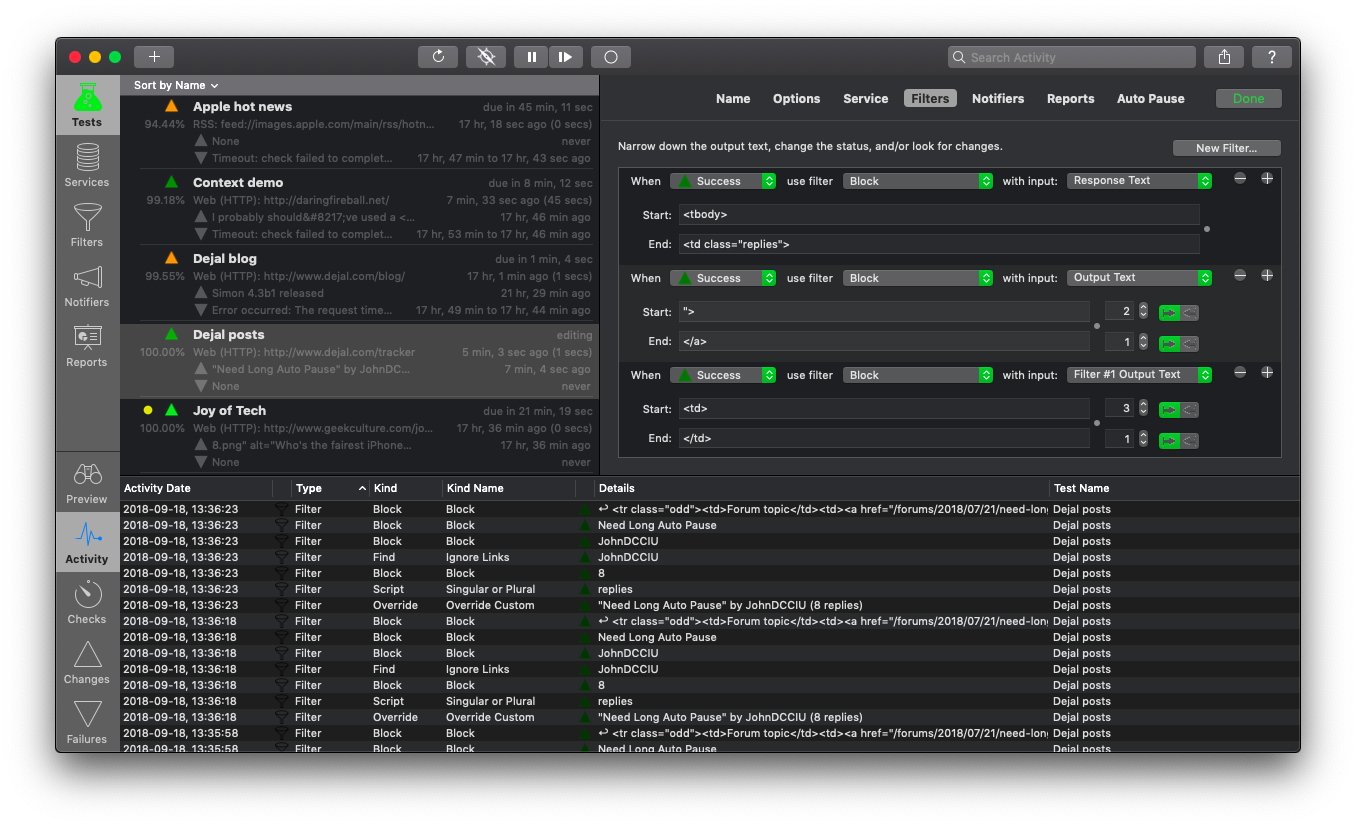
Use filters to avoid dynamic content and detect changes in the output of the service and other filters. You can look at multiple portions, or the 10th occurrence, find via simple text matching or powerful regular expressions. You can also remove HTML tags or numbers from the text, result in a change or failure if some text is found or missing, only detect a change if a number changes by some threshold, or is out of range, and many more possibilities.
Receive notification of changes, failures, and/or recoveries via various Actions, auto-generated Email messages, Growl notifications, Twitter updates or direct messages, SMS messages, an audible Sound, or customizable Speech. You can use custom scripts and port sessions for notifiers too.
HTML reports enable remote viewing of a summary and/or details of Simon monitoring. Reports can be saved to a local web server, or uploaded remotely. Customizable templates (with several examples provided) allow embedding in a web page, using a compact format suitable for viewing on PDAs and cellphones, creating a RSS feed, and more.
Version 4.2 is a free update for licensed Simon 4 customers. Changes include:
* A handy new Exclude Block filter
* New difference analysis filters
* New filter variables
* Email notifier improvements
* Preview improvements
* Several fixes of the reports feature
* Lots of security and stability improvements
* And more
Language Support:
* English, French, German, and Chinese
System Requirements:
* Intel Mac
* OS X version 10.10 or later
* 60 MB disk space
Pricing and Availability:
Dejal Simon 4.2 is available for $99.00 USD, and available as a full-featured demo. This is a free update for licensed Simon 4 users, with upgrades from version 3 available for $49.00.
Dejal Simon 4.2: http://www.dejal.com/simon/
Release Notes: http://www.dejal.com/simon/release/
Download Dejal Simon: http://www.dejal.com/download/?prod=simon&op=show&ref=pr
Screenshot: http://www.dejal.com/simon/images/full/tests-filters-activity.png
Application Icon: http://www.dejal.com/simon/images/icons/1024.png
Media Assets: http://www.dejal.com/simon/media/
Founded by David Sinclair in 1991, Dejal Systems, LLC was originally established in New Zealand, and later moved to Portland, Oregon in 2001. With a focus on the Mac, iPad and iPhone platforms, Dejal specializes in user-friendly and flexible utility software. Copyright 2016 Dejal Systems, LLC. All Rights Reserved. Dejal, the Dejal logo, and Simon are trademarks of Dejal Systems, LLC. Apple, the Apple logo, are registered trademarks of Apple Computer in the U.S. and/or other countries.
*******
Link To Article: http://prmac.com/release-id-78886.htm
*******
---------------------------------------------------------------------------------
Note that you can alter delivered distributions at any time.
Login to your account on prMac to alter your channel selection, or to opt-out at any time.
Dejal announces Simon 4.2 - Server Monitoring Tool - Published on 03/02/16
Portland based Dejal Systems, LLC has announced Simon 4.2, an update to the essential server monitoring tool for Mac OS X. Simon checks web pages, FTP and DNS servers, local or remote ports or volumes, and many other kinds of services for changes or failures. HTML reports enable remote viewing of a summary and/or details of Simon monitoring. Version 4.2 includes new exclusion and difference analysis filters, email, preview and reports improvements, and much more.
Portland, Oregon - Dejal Systems, LLC has announced the immediate availability of Dejal Simon 4.2, the essential server monitoring tool for Mac OS X. It checks web pages, FTP and DNS servers, local or remote ports or volumes, and other services for changes or failures, and notifies you via email, sound, speech, Twitter, SMS, HTML reports, and other means.
Add tests to Simon to track updated sites, to alert you when an important server goes down or recovers, check on Samba SMB, take periodic screenshots of the system, track posts and new comments on your or friends' blogs, check for web mail, make sure a key application is running, get notifications of updates to favorite news and entertainment websites, keep an eye on auctions, and many other uses.
Services include Web (HTTP) to check web pages (including secure ones, and supporting POST and cookies), FTP files and directory listings, DNS, Ping servers, see Twitter updates, watch a local Application, capture periodic Screenshots, watch for System Log Errors, and more. Plus, you can easily add your own services via custom port connections, AppleScripts, shell scripts, or Perl, PHP, Python, etc.
Use filters to avoid dynamic content and detect changes in the output of the service and other filters. You can look at multiple portions, or the 10th occurrence, find via simple text matching or powerful regular expressions. You can also remove HTML tags or numbers from the text, result in a change or failure if some text is found or missing, only detect a change if a number changes by some threshold, or is out of range, and many more possibilities.
Receive notification of changes, failures, and/or recoveries via various Actions, auto-generated Email messages, Growl notifications, Twitter updates or direct messages, SMS messages, an audible Sound, or customizable Speech. You can use custom scripts and port sessions for notifiers too.
HTML reports enable remote viewing of a summary and/or details of Simon monitoring. Reports can be saved to a local web server, or uploaded remotely. Customizable templates (with several examples provided) allow embedding in a web page, using a compact format suitable for viewing on PDAs and cellphones, creating a RSS feed, and more.
Version 4.2 is a free update for licensed Simon 4 customers. Changes include:
* A handy new Exclude Block filter
* New difference analysis filters
* New filter variables
* Email notifier improvements
* Preview improvements
* Several fixes of the reports feature
* Lots of security and stability improvements
* And more
Language Support:
* English, French, German, and Chinese
System Requirements:
* Intel Mac
* OS X version 10.10 or later
* 60 MB disk space
Pricing and Availability:
Dejal Simon 4.2 is available for $99.00 USD, and available as a full-featured demo. This is a free update for licensed Simon 4 users, with upgrades from version 3 available for $49.00.
Dejal Simon 4.2: http://www.dejal.com/simon/
Release Notes: http://www.dejal.com/simon/release/
Download Dejal Simon: http://www.dejal.com/download/?prod=simon&op=show&ref=pr
Screenshot: http://www.dejal.com/simon/images/full/tests-filters-activity.png
Application Icon: http://www.dejal.com/simon/images/icons/1024.png

Media Assets: http://www.dejal.com/simon/media/
Founded by David Sinclair in 1991, Dejal Systems, LLC was originally established in New Zealand, and later moved to Portland, Oregon in 2001. With a focus on the Mac, iPad and iPhone platforms, Dejal specializes in user-friendly and flexible utility software. Copyright 2016 Dejal Systems, LLC. All Rights Reserved. Dejal, the Dejal logo, and Simon are trademarks of Dejal Systems, LLC. Apple, the Apple logo, are registered trademarks of Apple Computer in the U.S. and/or other countries.
*******
Link To Article: http://prmac.com/release-id-78886.htm
*******
---------------------------------------------------------------------------------
Note that you can alter delivered distributions at any time.
Login to your account on prMac to alter your channel selection, or to opt-out at any time.
BatchOutput for Microsoft Excel Improves Workbook PDF Export Reliability
A new article has been published at prMac.
BatchOutput for Microsoft Excel Improves Workbook PDF Export Reliability - Published on 03/01/16
Zevrix Solutions announces BatchOutput XLS 2.3.6, a maintenance update to its output automation solution for Microsoft Excel on Mac OS. In addition to batch printing and PDF conversion, the software lets users carry out automated professional PDF production directly from Excel and effortlessly repurpose Excel spreadsheets for web and mobile devices. The new version ensures that the scaling and orientation settings are applied to all sheets when printing or exporting an entire workbook to PDF.
Toronto (ON) Canada - Zevrix Solutions today is proud to announce the release of BatchOutput XLS 2.3.6, a maintenance update to its output automation solution for Microsoft Excel on Mac OS. The software provides advanced solutions for demanding enterprise and office publishing environments through automation of printing and professional PDF output. With just a click of a button BatchOutput XLS can print and export hundreds of Excel files to PDF while the user is busy getting other important work done.
The new version ensures that the scaling and orientation settings are applied to all sheets when printing or exporting an entire Excel workbook to PDF. In previous versions such settings were applied to the current active sheet only.
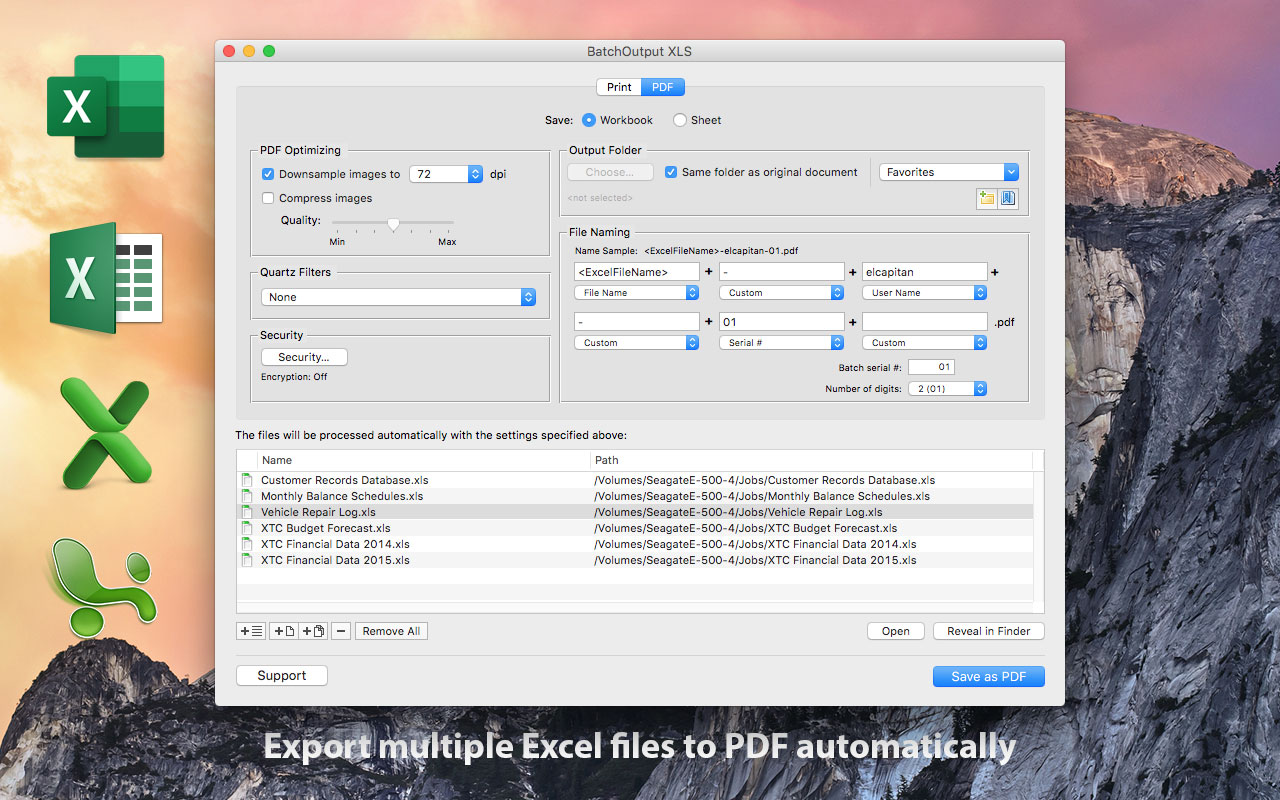
In addition to batch printing, BatchOutput XLS allows to carry out powerful professional PDF production directly from Excel, helping users simplify and streamline the conversion process. BatchOutput XLS is the only app on the market that brings advanced PDF creation options right to Excel user's fingertips:
* Batch print and export Excel documents to PDF with a click of a button
* Variable PDF file names based on user name, date, batch number and other values
* Reduce PDF file size and optimize documents for web, print or mobile devices
* Encrypt and password-protect PDF from unauthorized copying, printing and viewing
* Apply Quartz filters to change PDF color tone, brightness and other qualities
BatchOutput XLS is a part of the Zevrix BatchOutput product family which also includes output automation solutions for Microsoft Word, PowerPoint, Adobe InDesign and PDF workflows.
Pricing and Availability:
BatchOutput XLS can be purchased for $39.95 (USD) from Zevrix website, as well as from authorized resellers, Mac App Store and MacUpdate. Trial is also available for download. BatchOutput XLS requires Mac OS X 10.6 - 10.11 and Microsoft Excel 2008, 2011 or 2016.
Zevrix Solutions: http://zevrix.com
BatchOutput XLS 2.3.6: http://zevrix.com/BatchOutputOffice.php
Download BatchOutput XLS: http://zevrix.com/BatchOutputOffice.dmg
Purchase: http://zevrix.com/store.php
Screenshot: http://zevrix.com/screenshots/bo-office/MAS/box2-pdf-mas.jpg
Located in Toronto, Canada, Zevrix Solutions provides automation and productivity solutions for Adobe Creative Cloud and Creative Suite software, PDF workflows, graphic file diagnostics and Microsoft Office output on Mac OS. Zevrix is dedicated to help professionals increase their profits through automating everyday tasks, producing error-free documents, saving disk space and cutting production costs. For more information, visit their website. Copyright (C) 2016 Zevrix Solutions. All Rights Reserved. Other trademarks and registered trademarks may be the property of their respective owners.
*******
Link To Article: http://prmac.com/release-id-78898.htm
*******
---------------------------------------------------------------------------------
Note that you can alter delivered distributions at any time.
Login to your account on prMac to alter your channel selection, or to opt-out at any time.
BatchOutput for Microsoft Excel Improves Workbook PDF Export Reliability - Published on 03/01/16
Zevrix Solutions announces BatchOutput XLS 2.3.6, a maintenance update to its output automation solution for Microsoft Excel on Mac OS. In addition to batch printing and PDF conversion, the software lets users carry out automated professional PDF production directly from Excel and effortlessly repurpose Excel spreadsheets for web and mobile devices. The new version ensures that the scaling and orientation settings are applied to all sheets when printing or exporting an entire workbook to PDF.
Toronto (ON) Canada - Zevrix Solutions today is proud to announce the release of BatchOutput XLS 2.3.6, a maintenance update to its output automation solution for Microsoft Excel on Mac OS. The software provides advanced solutions for demanding enterprise and office publishing environments through automation of printing and professional PDF output. With just a click of a button BatchOutput XLS can print and export hundreds of Excel files to PDF while the user is busy getting other important work done.
The new version ensures that the scaling and orientation settings are applied to all sheets when printing or exporting an entire Excel workbook to PDF. In previous versions such settings were applied to the current active sheet only.
In addition to batch printing, BatchOutput XLS allows to carry out powerful professional PDF production directly from Excel, helping users simplify and streamline the conversion process. BatchOutput XLS is the only app on the market that brings advanced PDF creation options right to Excel user's fingertips:
* Batch print and export Excel documents to PDF with a click of a button
* Variable PDF file names based on user name, date, batch number and other values
* Reduce PDF file size and optimize documents for web, print or mobile devices
* Encrypt and password-protect PDF from unauthorized copying, printing and viewing
* Apply Quartz filters to change PDF color tone, brightness and other qualities
BatchOutput XLS is a part of the Zevrix BatchOutput product family which also includes output automation solutions for Microsoft Word, PowerPoint, Adobe InDesign and PDF workflows.
Pricing and Availability:
BatchOutput XLS can be purchased for $39.95 (USD) from Zevrix website, as well as from authorized resellers, Mac App Store and MacUpdate. Trial is also available for download. BatchOutput XLS requires Mac OS X 10.6 - 10.11 and Microsoft Excel 2008, 2011 or 2016.
Zevrix Solutions: http://zevrix.com
BatchOutput XLS 2.3.6: http://zevrix.com/BatchOutputOffice.php
Download BatchOutput XLS: http://zevrix.com/BatchOutputOffice.dmg
Purchase: http://zevrix.com/store.php
Screenshot: http://zevrix.com/screenshots/bo-office/MAS/box2-pdf-mas.jpg
Located in Toronto, Canada, Zevrix Solutions provides automation and productivity solutions for Adobe Creative Cloud and Creative Suite software, PDF workflows, graphic file diagnostics and Microsoft Office output on Mac OS. Zevrix is dedicated to help professionals increase their profits through automating everyday tasks, producing error-free documents, saving disk space and cutting production costs. For more information, visit their website. Copyright (C) 2016 Zevrix Solutions. All Rights Reserved. Other trademarks and registered trademarks may be the property of their respective owners.
*******
Link To Article: http://prmac.com/release-id-78898.htm
*******
---------------------------------------------------------------------------------
Note that you can alter delivered distributions at any time.
Login to your account on prMac to alter your channel selection, or to opt-out at any time.
New app makes you donate to Donald Trump if you don't acheive your goals
A new article has been published at prMac.
New app makes you donate to Donald Trump if you don't acheive your goals - Published on 03/01/16
California based DatsuSoftware today introduces Flight: Habit and Goal Tracker 1.0.0, its new productivity app for iOS and Android devices. Flight not only allows you to track your habits and goals, but also boosts your incentive to succeed by allowing you to commit to real-world stakes to help hold yourself accountable. Flight also works across all your devices in real-time, without any need for syncing. Its sleek design is a joy to use, making habit tracking easier than ever before.
Los Angeles, California - A new app lets users track all of their personal habits and goals in one place, while using donating money to Donald Trump's campaign as incentive to succeed. The app is called Flight: Habit and Goal Tracker. It was designed by DatsuSoftware to allow users to manage all of their life's goals and habits, but also boost incentive to succeed by enabling users to commit to real-world stakes. Flight urges users to "Trump" their goals. If you don't succeed, you have to give money to the last person you'd want to give your money to: Donald Trump.
Flight is currently available on both Android and iPhone, and already has thousands of dollars at stake by users having just been launched this month. "I came up with the idea because I couldn't find an app in the app store that met my needs," said Jason Martin, Datsusoftware's CEO. "I started building Flight as just a tool I could use myself, but when friends started to become interested in using the app as well I knew I had something more people would want to use."
A Chapman University Research Study shows that you are 3x more likely to accomplish a goal if you put money on the line. By creating a commitment contract, and setting a deadline, you give yourself additional motivation to succeed. Flight lets users set those stakes. Flight's SMART Goal Management System allows users to organize their life goals, from their big bucket list all the way down to the small goals for the week. A SMART goal is defined as one that is Specific, Measurable, Achievable, Results-focused, and Time-bound.
Habits are also split between good habits to build (like exercise) and bad habits to break (like smoking). Flight works across all devices in real-time, without any need for syncing - and its sleek design is a joy to use. Users can also customize their stakes, pledging money to be donated to a charity, make a monetary bet with a friend (or foe), or even set custom stakes such as agreeing to post an embarrassing picture on Social Media. Whether it's building good habits or setting life goals, Flight has all the tools you need to take your life to new heights.
Device Requirements:
* iPhone, iPad, and iPod touch
* Requires iOS 6.0 or later
* 11.0 MB
Pricing and Availability:
Flight: Habit and Goal Tracker 1.0.0 is Free and available worldwide through the App Store in the Productivity category. There is also an Android version available on Google Play.
Flight: Habit and Goal Tracker 1.0.0: http://flight.do
Download from iTunes: https://itunes.apple.com/app/flight-habit-and-goal-tracker/id1073790725
Download from Google Play: https://play.google.com/store/apps/details?id=com.datsusoftware.flight
YouTube Video (Promo): https://www.youtube.com/watch?v=bqeK5dW73Cw
Media Assets: https://www.dropbox.com/sh/ra1vaszlfx8jkev/AACuj_rXbrOcxoeSMhAM7OEza?dl=0
DatsuSoftware was founded in Los Angeles, California in 2014. All Material and Software (C) Copyright 2016 DatsuSoftware, LLC. All Rights Reserved. Apple, the Apple logo, iPhone, iPod and iPad are registered trademarks of Apple Inc. in the U.S. and/or other countries. Other trademarks and registered trademarks may be the property of their respective owners.
*******
Link To Article: http://prmac.com/release-id-78897.htm
*******
---------------------------------------------------------------------------------
Note that you can alter delivered distributions at any time.
Login to your account on prMac to alter your channel selection, or to opt-out at any time.
New app makes you donate to Donald Trump if you don't acheive your goals - Published on 03/01/16
California based DatsuSoftware today introduces Flight: Habit and Goal Tracker 1.0.0, its new productivity app for iOS and Android devices. Flight not only allows you to track your habits and goals, but also boosts your incentive to succeed by allowing you to commit to real-world stakes to help hold yourself accountable. Flight also works across all your devices in real-time, without any need for syncing. Its sleek design is a joy to use, making habit tracking easier than ever before.
Los Angeles, California - A new app lets users track all of their personal habits and goals in one place, while using donating money to Donald Trump's campaign as incentive to succeed. The app is called Flight: Habit and Goal Tracker. It was designed by DatsuSoftware to allow users to manage all of their life's goals and habits, but also boost incentive to succeed by enabling users to commit to real-world stakes. Flight urges users to "Trump" their goals. If you don't succeed, you have to give money to the last person you'd want to give your money to: Donald Trump.
Flight is currently available on both Android and iPhone, and already has thousands of dollars at stake by users having just been launched this month. "I came up with the idea because I couldn't find an app in the app store that met my needs," said Jason Martin, Datsusoftware's CEO. "I started building Flight as just a tool I could use myself, but when friends started to become interested in using the app as well I knew I had something more people would want to use."
A Chapman University Research Study shows that you are 3x more likely to accomplish a goal if you put money on the line. By creating a commitment contract, and setting a deadline, you give yourself additional motivation to succeed. Flight lets users set those stakes. Flight's SMART Goal Management System allows users to organize their life goals, from their big bucket list all the way down to the small goals for the week. A SMART goal is defined as one that is Specific, Measurable, Achievable, Results-focused, and Time-bound.
Habits are also split between good habits to build (like exercise) and bad habits to break (like smoking). Flight works across all devices in real-time, without any need for syncing - and its sleek design is a joy to use. Users can also customize their stakes, pledging money to be donated to a charity, make a monetary bet with a friend (or foe), or even set custom stakes such as agreeing to post an embarrassing picture on Social Media. Whether it's building good habits or setting life goals, Flight has all the tools you need to take your life to new heights.
Device Requirements:
* iPhone, iPad, and iPod touch
* Requires iOS 6.0 or later
* 11.0 MB
Pricing and Availability:
Flight: Habit and Goal Tracker 1.0.0 is Free and available worldwide through the App Store in the Productivity category. There is also an Android version available on Google Play.
Flight: Habit and Goal Tracker 1.0.0: http://flight.do
Download from iTunes: https://itunes.apple.com/app/flight-habit-and-goal-tracker/id1073790725
Download from Google Play: https://play.google.com/store/apps/details?id=com.datsusoftware.flight
YouTube Video (Promo): https://www.youtube.com/watch?v=bqeK5dW73Cw
Media Assets: https://www.dropbox.com/sh/ra1vaszlfx8jkev/AACuj_rXbrOcxoeSMhAM7OEza?dl=0
DatsuSoftware was founded in Los Angeles, California in 2014. All Material and Software (C) Copyright 2016 DatsuSoftware, LLC. All Rights Reserved. Apple, the Apple logo, iPhone, iPod and iPad are registered trademarks of Apple Inc. in the U.S. and/or other countries. Other trademarks and registered trademarks may be the property of their respective owners.
*******
Link To Article: http://prmac.com/release-id-78897.htm
*******
---------------------------------------------------------------------------------
Note that you can alter delivered distributions at any time.
Login to your account on prMac to alter your channel selection, or to opt-out at any time.
Subscribe to:
Posts (Atom)