A new article has been published at prMac.
iBusiness Magazine InfoComm 2016 Edition - Advertising Opportunities - Published on 03/11/16
iBusiness has become an official media partner for InfoComm 2016, which will take place in Las Vegas, Nevada, from June 4 - 10. i.Business will sponsor the Innovations Showcase, a dedicated area on the show floor for first-time exhibitors with creative new solutions and best-of-breed products. iBusiness magazine will be onsite during InfoComm and distributing its InfoComm 2016 Special Show Edition. iBusiness will be distributed throughout InfoComm 2016 with over a 500,000 readers worldwide.
Cape Coral, Florida - iBusiness has become an official media partner for InfoComm 2016, which will take place in Las Vegas, Nevada, from June 4 - 10. i.Business will sponsor the Innovations Showcase, a dedicated area on the show floor for first-time exhibitors with creative new solutions and best-of-breed products. iBusiness magazine will be onsite during InfoComm and distributing its InfoComm 2016 Special Show Edition.
"InfoComm showcases new innovative business solutions and our magazine is a perfect fit for InfoComm attendees," says Carmine De Santo, publisher of iBusiness Magazine.
iBusiness will be distributed throughout InfoComm 2016 with over a 500,000 readers worldwide. InfoComm is one of the largest events focused on the professional audiovisual industry. From acoustic technology to the latest in video wall displays, InfoComm brings together nearly 1,000 exhibitors and 40,000 attendees to see where the future of the AV industry is headed.
We have the following Advertisement Packages available for this InfoComm16 edition:
* Exclusive Your Product Image & Logo! on the Magazine Cover, Full Page Advertisement, Full Page Product Review, Company Banner Newsletter Sponsorship for only $15,000.00 - Only one Spot available for this bundle
* 2 Full Page Spread Advertisement, Full Page Product Review & Product Name on Cover of the Magazine for only $9,000.00 - 2 Spots available
* Premium Full Page Advertisement - First Right Hand Side Page #1, Full Product Review, Mention on Front Cover - for only $5,500.00 - Only one Spot available for this bundle
* Full Back Cover Advertisement, Full Page Advertisement - Premium Location, Full Page Product Review & Mention on Front Cover $6,000.00 - Only one Spot available for this bundle - SOLD OUT
* Inside Page1 (Right Hand Side) - Full Page Advertisement, Mention on Front Cover & Full Page Product Review $5,500.00 - Only 1 Spot available for this bundle
* Inside Front Cover Full Page Advertisement, Mention on Front Cover & Full Page Product Review $4,500.00 - Only 1 Spot available for this bundle
* Inside Back Cover Full Page Advertisement, Mention on Front Cover & Full Page Product Review $3,500.00 - Only 1 Spot available for this bundle
* Full Page Advertisement, Full Page Product Review & Product Name on Cover of the Magazine for only $3,500.00 - 3 Spots available
* 1/2 Page Advertisement & Full Page Product Review $2,150.00
* Full Page Advertisement Only $2,200.00
* 1/2 Page Advertisement $950.00
About InfoComm International
InfoComm International(R) is the international trade association representing the professional audiovisual and information communications industries. InfoComm has more than 5,000 members, including manufacturers, systems integrators, dealers and distributors, independent consultants, programmers, rental and staging companies, end users and multimedia professionals from more than 80 countries. InfoComm International is the leading resource for AV standards, market research and news. Its training, certification and education programs set a standard of excellence for AV professionals. InfoComm International is the founder of InfoComm, the largest annual conference and exhibition for AV buyers and sellers in North America. InfoComm also produces trade shows in Europe, the Middle East, China, India and Latin America. Additional information is available at the InfoComm website.
iBusiness Magazine: http://www.ibusinessmag.com
Presentation Deck File: http://www.ibusinessmag.com/iBusinessMagazine.pdf
Media Kit: http://www.ibusinessmag.com/mediakit2016.pdf
Subscribe to iBusiness Magazine: http://ibusinessmag.com/i.Business_New/Subscribe.html
About iBusiness Magazine: http://www.ibusinessmag.com/i.Business_New/About_Us.html
InfoComm16: http://www.infocommshow.org
The team behind iBusiness Magazine have decades of experience in the Business to Business & Education communities. We strive to cover as many vertical markets as possible, which include but are not limited to, Retail, Hospitality, ERP, CAD, Real Estate, Legal, Scientific Computing, Medical/Healthcare, Government, Automotive, Manufacturers, Accounting/Finance, Print & Graphics and Security & Surveillance. Our articles take a solutions-based approach to productivity, workflow management and tips & tricks. The magazine articles come from the industry leaders with years of experience and proven track records. Copyright (C) 2016 i.Business Magazine.
*******
Link To Article: http://prmac.com/release-id-78983.htm
*******
---------------------------------------------------------------------------------
Note that you can alter delivered distributions at any time.
Login to your account on prMac to alter your channel selection, or to opt-out at any time.

Machines at War 3 v2.0 Real Time Strategy Game Released for iOS
A new article has been published at prMac.
Machines at War 3 v2.0 Real Time Strategy Game Released for iOS - Published on 03/11/16
Isotope 244 today announces Machines at War 3 v2.0, an important update to their popular real time strategy game for iOS devices. Machines at War 3 features over 130 different types of units and technologies to build and wage war with. The game boasts 21 campaign missions, unlimited random map skirmishes with many settings, and network multiplayer to challenge friends. This is the first update for the game in three years, and includes new features, new units, and support for the latest devices.
Tampa, Florida - Isotope 244 today is pleased to announce that Machines at War 3 v2.0 is released for iOS. The update includes new features, new units, and support for the latest devices. This real time strategy game features over 130 different types of units and technologies to build and wage war with. The game boasts 21 campaign missions, unlimited random map skirmishes with many settings, and network multiplayer to challenge friends.
The update includes many features RTS fans have asked for, including a new infantry unit that wields damage with a flamethrower. Managing unit positions is also easier now that patrol waypoints are clearly indicated when a unit is selected. The real time strategy game also adds enhanced resolution support for the iPhone 6 and 6 plus, so the games graphics are more detailed with an expanded view of the battle map. The Machines at War 3 update also adds 64 bit support and includes over 20 other minor bug fixes and changes.
Update Features:
* New infantry flamethrower units
* iPhone 6 resolution support
* Indicators for patrol waypoints
* 64 bit support
Review Quotes:
"The best RTS game available on iOS." - MobileTechReview
"Machines at War 3 has a variety unmatched by other RTS titles." - Nizulo
"The randomly generated maps mean that the experience is new each and every time." - Daily Joypad
Game Features:
* Build over 130 different types of units and technologies
* Rescue the Omicron Initiative in 21 missions
* Command and conquer massive 5,000 unit battles
* Play unlimited random map skirmishes
* Conquer four friends in online multiplayer combat
* Deploy a full arsenal of infantry, aircraft, naval, and ground forces
Supported Languages:
* English, German, Chinese, Japanese, French, Korean, Spanish, Portuguese, Russian and Italian
Device Requirements:
* iPhone, iPad, and iPod touch
* Requires iOS 6.0 or later
* 96.9 MB
Pricing and Availability:
Machines at War 3 (v2.0) is $6.99 USD (or equivalent amount in other currencies) and available worldwide exclusively through the App Store in the Games (Strategy Game > Real Time Strategy Game) category. Machines at War 3 is also available for Mac and Windows ($14.99). An Android version is coming soon to Google Play. Request a review copy now, or visit the Isotope 244 website to learn more about Machines at War 3 and its story and features.
Machines at War 3 (v2.0): http://www.isotope244.com/machines-at-war-3.html
Purchase and Download: https://itunes.apple.com/app/machines-at-war-3/id646436754
YouTube Video: https://www.youtube.com/watch?v=3pbCLYDm6Ck
Screenshot 1: http://www.isotope244.com/mw3/screenshots/maw3_1136_1b_gui.jpg
Screenshot 2: http://www.isotope244.com/mw3/screenshots/maw3_1136_2.jpg
Media Assets: http://www.isotope244.com/press/sheet.php?p=machines_at_war_3
Isotope 244 is an independent developer of games for iPad, iPhone, Mac, and Windows based in Tampa, FL USA. It was founded by James Bryant in 1999. Isotope 244 is best known for developing strategy and action games for both desktop and mobile devices. The company has received numerous awards for its real-time strategy and action games. Copyright (C) 2016 Isotope 244. All Rights Reserved. Apple, the Apple logo, iPhone, iPod, iPad and Macintosh are registered trademarks of Apple Inc. in the U.S. and/or other countries.
*******
Link To Article: http://prmac.com/release-id-78982.htm
*******
---------------------------------------------------------------------------------
Note that you can alter delivered distributions at any time.
Login to your account on prMac to alter your channel selection, or to opt-out at any time.
Machines at War 3 v2.0 Real Time Strategy Game Released for iOS - Published on 03/11/16
Isotope 244 today announces Machines at War 3 v2.0, an important update to their popular real time strategy game for iOS devices. Machines at War 3 features over 130 different types of units and technologies to build and wage war with. The game boasts 21 campaign missions, unlimited random map skirmishes with many settings, and network multiplayer to challenge friends. This is the first update for the game in three years, and includes new features, new units, and support for the latest devices.
Tampa, Florida - Isotope 244 today is pleased to announce that Machines at War 3 v2.0 is released for iOS. The update includes new features, new units, and support for the latest devices. This real time strategy game features over 130 different types of units and technologies to build and wage war with. The game boasts 21 campaign missions, unlimited random map skirmishes with many settings, and network multiplayer to challenge friends.
The update includes many features RTS fans have asked for, including a new infantry unit that wields damage with a flamethrower. Managing unit positions is also easier now that patrol waypoints are clearly indicated when a unit is selected. The real time strategy game also adds enhanced resolution support for the iPhone 6 and 6 plus, so the games graphics are more detailed with an expanded view of the battle map. The Machines at War 3 update also adds 64 bit support and includes over 20 other minor bug fixes and changes.
Update Features:
* New infantry flamethrower units
* iPhone 6 resolution support
* Indicators for patrol waypoints
* 64 bit support
Review Quotes:
"The best RTS game available on iOS." - MobileTechReview
"Machines at War 3 has a variety unmatched by other RTS titles." - Nizulo
"The randomly generated maps mean that the experience is new each and every time." - Daily Joypad
Game Features:
* Build over 130 different types of units and technologies
* Rescue the Omicron Initiative in 21 missions
* Command and conquer massive 5,000 unit battles
* Play unlimited random map skirmishes
* Conquer four friends in online multiplayer combat
* Deploy a full arsenal of infantry, aircraft, naval, and ground forces
Supported Languages:
* English, German, Chinese, Japanese, French, Korean, Spanish, Portuguese, Russian and Italian
Device Requirements:
* iPhone, iPad, and iPod touch
* Requires iOS 6.0 or later
* 96.9 MB
Pricing and Availability:
Machines at War 3 (v2.0) is $6.99 USD (or equivalent amount in other currencies) and available worldwide exclusively through the App Store in the Games (Strategy Game > Real Time Strategy Game) category. Machines at War 3 is also available for Mac and Windows ($14.99). An Android version is coming soon to Google Play. Request a review copy now, or visit the Isotope 244 website to learn more about Machines at War 3 and its story and features.
Machines at War 3 (v2.0): http://www.isotope244.com/machines-at-war-3.html
Purchase and Download: https://itunes.apple.com/app/machines-at-war-3/id646436754
YouTube Video: https://www.youtube.com/watch?v=3pbCLYDm6Ck
Screenshot 1: http://www.isotope244.com/mw3/screenshots/maw3_1136_1b_gui.jpg

Screenshot 2: http://www.isotope244.com/mw3/screenshots/maw3_1136_2.jpg

Media Assets: http://www.isotope244.com/press/sheet.php?p=machines_at_war_3
Isotope 244 is an independent developer of games for iPad, iPhone, Mac, and Windows based in Tampa, FL USA. It was founded by James Bryant in 1999. Isotope 244 is best known for developing strategy and action games for both desktop and mobile devices. The company has received numerous awards for its real-time strategy and action games. Copyright (C) 2016 Isotope 244. All Rights Reserved. Apple, the Apple logo, iPhone, iPod, iPad and Macintosh are registered trademarks of Apple Inc. in the U.S. and/or other countries.
*******
Link To Article: http://prmac.com/release-id-78982.htm
*******
---------------------------------------------------------------------------------
Note that you can alter delivered distributions at any time.
Login to your account on prMac to alter your channel selection, or to opt-out at any time.
New Habit Development App Promises to Help Users Design Better Lifestyle
A new article has been published at prMac.
New Habit Development App Promises to Help Users Design Better Lifestyle - Published on 03/11/16
Independent developer, Roman Aleksandrenko today introduces Habitloop 1.0, his new habit development app. Habitloop provides the means to achieve goals and build habits successfully, enhancing happiness and healthiness. Habitloop's methodology ensures an actual lifestyle shift by developing a natural connection between a user's trigger and a new action. The app promises to deliver serious benefits to users, giving them the means to craft the lifestyle of their dreams.
San Francisco, California - Independent developer, Roman Aleksandrenko today is proud to announce the release of Habitloop 1.0, his new habit development app officially available for iPhone users on the Apple Store. Habitloop provides the means to achieve goals and build habits successfully, enhancing happiness and healthiness. The app promises to deliver serious benefits to users, giving them the means to craft the lifestyle of their dreams.
To be clear, habit tracking apps are a dime a dozen these days, but that's what makes Habitloop special. It's not designed to just track habits. It was created to give people proven ideas for habit development that work for their friends and other users. This allows individuals to invest their time wisely and take the right steps to reach their goals and live happier.
Unlike similar-sounding apps that rely on motivation, peer pressure or visual support, Habitloop is different. Most apps ultimately fail to achieve their purpose because only a true lifestyle shift will really work. Habitloop relies on if-then planning methodology that was proven in over 100 studies. The app provides an essential solution - 45% of Americans set their New Year's resolutions but only 8% are able to develop the habits needed to succeed.
Habitloop's methodology ensures an actual lifestyle shift by developing a natural connection between a user's trigger (an old habitual action) and a new action (a new habit). Each time the new action is repeated using the app, the connection in the user's brain grows stronger, moving from a conscious act to an unconscious habit.
"Finally, there will be a solution that we can call a habit development app," says founder Roman Aleksandrenko. "Habitloop isn't just another habit tracking app. It actually makes a difference in your life. Habitloop will give users the most efficient ideas and strongest methodology to set them up for success."
Device Requirements:
* iPhone, iPad, and iPod touch
* Requires iOS 7.0 or later
* 9.3 MB
Pricing and Availability:
Habitloop 1.0 is Free (with in-app purchase) and available worldwide exclusively through the App Store in the Productivity category. To learn more about Habitloop and how it can help create a better lifestyle, visit Habitloop online.
Habitloop 1.0: http://habitloopapp.com
Download from iTunes: http://itunes.apple.com/app/habitloop/id1072271285
Screenshot: http://a5.mzstatic.com/us/r30/Purple49/v4/fe/b4/8a/feb48afd-579c-6037-c67a-b83803ff2a86/screen322x572.jpeg
App Icon: http://a3.mzstatic.com/us/r30/Purple69/v4/72/14/a1/7214a1bb-d42f-5c0d-b8e6-508d5c36f80a/icon175x175.jpeg
Based in San Francisco, California, independent developer Roman Aleksandrenko has years of experience in creating SaaS, web and mobile products. As a product manager, Roman worked on SaaS marketing optimization platform for enterprise customers at BoostMedia in San Francisco. He also cofounded ImmigrationGuide to help hundreds of people from overseas develop their careers in the US. All Material and Software (C) Copyright 2016 Roman Aleksandrenko. All Rights Reserved. Apple, the Apple logo, iPhone, iPod and iPad are registered trademarks of Apple Inc. in the U.S. and/or other countries. Other trademarks and registered trademarks may be the property of their respective owners.
*******
Link To Article: http://prmac.com/release-id-78980.htm
*******
---------------------------------------------------------------------------------
Note that you can alter delivered distributions at any time.
Login to your account on prMac to alter your channel selection, or to opt-out at any time.
New Habit Development App Promises to Help Users Design Better Lifestyle - Published on 03/11/16
Independent developer, Roman Aleksandrenko today introduces Habitloop 1.0, his new habit development app. Habitloop provides the means to achieve goals and build habits successfully, enhancing happiness and healthiness. Habitloop's methodology ensures an actual lifestyle shift by developing a natural connection between a user's trigger and a new action. The app promises to deliver serious benefits to users, giving them the means to craft the lifestyle of their dreams.
San Francisco, California - Independent developer, Roman Aleksandrenko today is proud to announce the release of Habitloop 1.0, his new habit development app officially available for iPhone users on the Apple Store. Habitloop provides the means to achieve goals and build habits successfully, enhancing happiness and healthiness. The app promises to deliver serious benefits to users, giving them the means to craft the lifestyle of their dreams.
To be clear, habit tracking apps are a dime a dozen these days, but that's what makes Habitloop special. It's not designed to just track habits. It was created to give people proven ideas for habit development that work for their friends and other users. This allows individuals to invest their time wisely and take the right steps to reach their goals and live happier.
Unlike similar-sounding apps that rely on motivation, peer pressure or visual support, Habitloop is different. Most apps ultimately fail to achieve their purpose because only a true lifestyle shift will really work. Habitloop relies on if-then planning methodology that was proven in over 100 studies. The app provides an essential solution - 45% of Americans set their New Year's resolutions but only 8% are able to develop the habits needed to succeed.
Habitloop's methodology ensures an actual lifestyle shift by developing a natural connection between a user's trigger (an old habitual action) and a new action (a new habit). Each time the new action is repeated using the app, the connection in the user's brain grows stronger, moving from a conscious act to an unconscious habit.
"Finally, there will be a solution that we can call a habit development app," says founder Roman Aleksandrenko. "Habitloop isn't just another habit tracking app. It actually makes a difference in your life. Habitloop will give users the most efficient ideas and strongest methodology to set them up for success."
Device Requirements:
* iPhone, iPad, and iPod touch
* Requires iOS 7.0 or later
* 9.3 MB
Pricing and Availability:
Habitloop 1.0 is Free (with in-app purchase) and available worldwide exclusively through the App Store in the Productivity category. To learn more about Habitloop and how it can help create a better lifestyle, visit Habitloop online.
Habitloop 1.0: http://habitloopapp.com
Download from iTunes: http://itunes.apple.com/app/habitloop/id1072271285
Screenshot: http://a5.mzstatic.com/us/r30/Purple49/v4/fe/b4/8a/feb48afd-579c-6037-c67a-b83803ff2a86/screen322x572.jpeg

App Icon: http://a3.mzstatic.com/us/r30/Purple69/v4/72/14/a1/7214a1bb-d42f-5c0d-b8e6-508d5c36f80a/icon175x175.jpeg

Based in San Francisco, California, independent developer Roman Aleksandrenko has years of experience in creating SaaS, web and mobile products. As a product manager, Roman worked on SaaS marketing optimization platform for enterprise customers at BoostMedia in San Francisco. He also cofounded ImmigrationGuide to help hundreds of people from overseas develop their careers in the US. All Material and Software (C) Copyright 2016 Roman Aleksandrenko. All Rights Reserved. Apple, the Apple logo, iPhone, iPod and iPad are registered trademarks of Apple Inc. in the U.S. and/or other countries. Other trademarks and registered trademarks may be the property of their respective owners.
*******
Link To Article: http://prmac.com/release-id-78980.htm
*******
---------------------------------------------------------------------------------
Note that you can alter delivered distributions at any time.
Login to your account on prMac to alter your channel selection, or to opt-out at any time.
User Hook Helps App Developers Create Power Users
A new article has been published at prMac.
User Hook Helps App Developers Create Power Users - Published on 03/11/16
Cullaboration Media today announces the launch of User Hook, a mobile app user retention & re-engagement service. User Hook helps mobile app developers create a relationship between themselves and their users. After adding User Hook to a mobile app by using the provided SDKs, developers are able to administer all messaging through the User Hook admin website. Through the use of in-app messaging, feedback forms, surveys & push messages, developers are able to engage users and gain their trust.
Franklin, Tennessee - User Hook, a mobile app user retention and re-engagement service, opens publicly to all mobile developers after a successful closed beta. User Hook helps mobile app developers create a relationship between themselves and their users. Through the use of in-app messaging, feedback forms, surveys, and push messages, developers are able to engage users and gain their trust.
"As an app developer, I often felt a distance between myself and my users. We had no relationship," says Matt Johnston, founder of User Hook. "So we developed a suite of tools that allow us to listen to our users and use that feedback to give them a better app experience."
After adding User Hook to a mobile app by using the provided iOS or Android SDKs, developers are able to administer all messaging through the User Hook admin website. User Hook's advanced user targeting allows developers to reach the right user, with the right message, at the right time.
User Hook's tools include:
* In-App Feedback Forms
* In-App Surveys
* Scheduled Push Messages
* Rate This App Prompt
* User Targeting Tools
* SDKs for iOS and Android
User Hook is available as a monthly subscription service with a Free plan option for developers who want to try User Hook's functionality.
Cullaboration Media: http://cullaboration.com
User Hook: http://userhook.com
Based in Franklin, Tennessee, Cullaboration Media is a development company and publisher of a wide range of mobile applications. Copyright (C) 2016 Cullaboration Media. All Rights Reserved. Apple, the Apple logo, iPhone, iPod and iPad are registered trademarks of Apple Inc. in the U.S. and/or other countries. All other trademarks and trade names are the property of their respective owners.
*******
Link To Article: http://prmac.com/release-id-78981.htm
*******
---------------------------------------------------------------------------------
Note that you can alter delivered distributions at any time.
Login to your account on prMac to alter your channel selection, or to opt-out at any time.
User Hook Helps App Developers Create Power Users - Published on 03/11/16
Cullaboration Media today announces the launch of User Hook, a mobile app user retention & re-engagement service. User Hook helps mobile app developers create a relationship between themselves and their users. After adding User Hook to a mobile app by using the provided SDKs, developers are able to administer all messaging through the User Hook admin website. Through the use of in-app messaging, feedback forms, surveys & push messages, developers are able to engage users and gain their trust.
Franklin, Tennessee - User Hook, a mobile app user retention and re-engagement service, opens publicly to all mobile developers after a successful closed beta. User Hook helps mobile app developers create a relationship between themselves and their users. Through the use of in-app messaging, feedback forms, surveys, and push messages, developers are able to engage users and gain their trust.
"As an app developer, I often felt a distance between myself and my users. We had no relationship," says Matt Johnston, founder of User Hook. "So we developed a suite of tools that allow us to listen to our users and use that feedback to give them a better app experience."
After adding User Hook to a mobile app by using the provided iOS or Android SDKs, developers are able to administer all messaging through the User Hook admin website. User Hook's advanced user targeting allows developers to reach the right user, with the right message, at the right time.
User Hook's tools include:
* In-App Feedback Forms
* In-App Surveys
* Scheduled Push Messages
* Rate This App Prompt
* User Targeting Tools
* SDKs for iOS and Android
User Hook is available as a monthly subscription service with a Free plan option for developers who want to try User Hook's functionality.
Cullaboration Media: http://cullaboration.com
User Hook: http://userhook.com
Based in Franklin, Tennessee, Cullaboration Media is a development company and publisher of a wide range of mobile applications. Copyright (C) 2016 Cullaboration Media. All Rights Reserved. Apple, the Apple logo, iPhone, iPod and iPad are registered trademarks of Apple Inc. in the U.S. and/or other countries. All other trademarks and trade names are the property of their respective owners.
*******
Link To Article: http://prmac.com/release-id-78981.htm
*******
---------------------------------------------------------------------------------
Note that you can alter delivered distributions at any time.
Login to your account on prMac to alter your channel selection, or to opt-out at any time.
Phone Drive - File Manager for iOS Adds Box, Yandex.Disk Cloud Service
A new article has been published at prMac.
Phone Drive - File Manager for iOS Adds Box, Yandex.Disk Cloud Service - Published on 03/10/16
Eightythree Technology today announces Phone Drive - File Manager 6.3.1, a critical update to their innovative, multi-functional file management app for iOS. Phone Drive is a personal and secure wireless drive, allowing users to save, manage, edit and view files on any iPhone, iPad or iPod touch. Connecting via Wi-Fi to either Mac or PC desktops allows files to be easily transferred via Finder or Windows Explorer and more. Version 6.3.1 adds support for Box and Yandex.Disk cloud service.
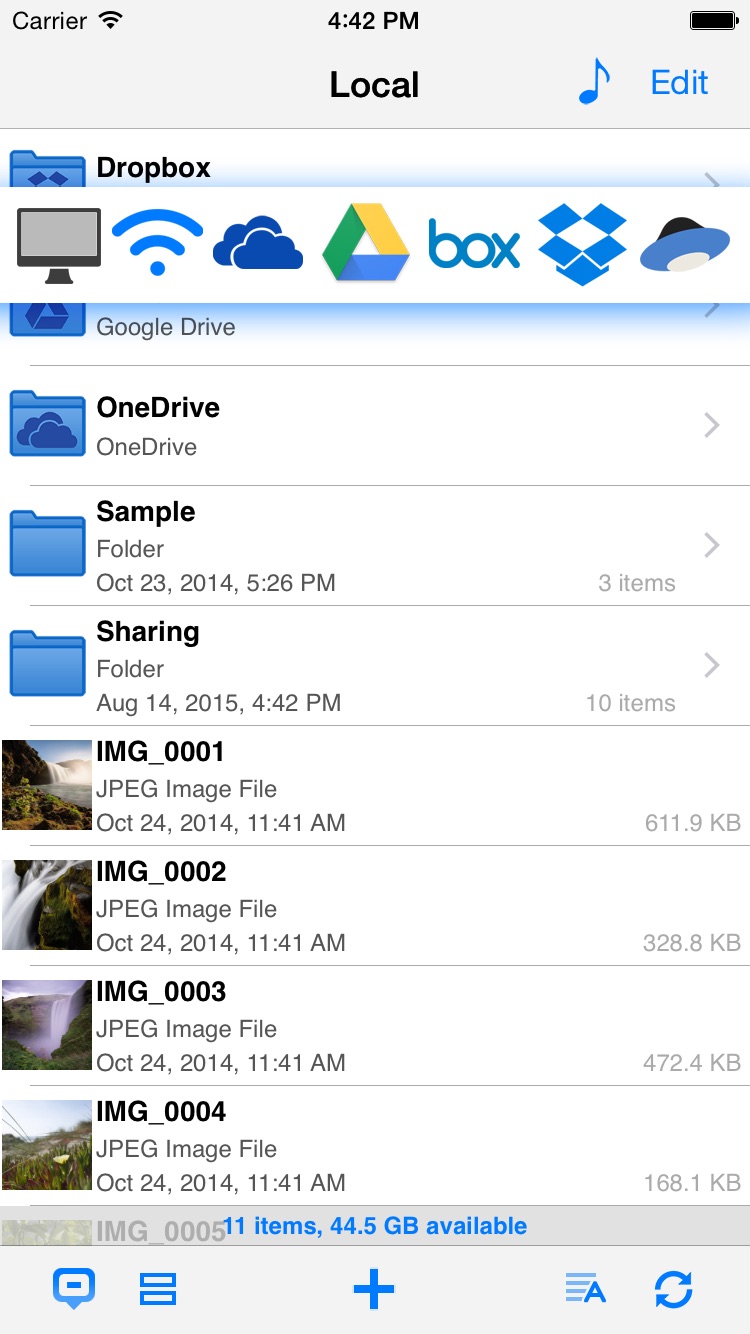
London, United Kingdom - Eightythree Technology today is proud to announce the release and immediate availability of Phone Drive - File Manager, a critical update to their innovative, multi-functional file management app developed for iPhone, iPad and iPod touch devices. Version 6.3.1 adds support for Box and Yandex.Disk cloud service. Phone Drive is a personal and secure wireless drive, allowing users to save, manage, edit and view files on iPhone, iPad and iPod touch devices. Connecting via Wi-Fi to either Mac or PC desktops allows files to be easily transferred via Finder or Windows Explorer and then viewed or edited directly on the device using a variety of included in-app utilities. With this new update users can link to their favourite cloud services directly with Dropbox, Google Drive, Microsoft OneDrive, iCloud Drive, Box and Yandex.Disk accounts for easy-to-use cloud management.
"Our simple and easy-to-use cloud management system is exclusive to Phone Drive. It's an innovative feature that sets us apart from all of the other personal utility apps on the market," said Felix Yew, Founder at Eightythree Technology. "We have seen such enormous success with this app in various countries and we are looking forward to the future as we continue to evolve our product to suit the ever-changing needs of our consumers."
Unlike the current storage facility offered by iOS, which only stores particular filetypes within individual apps, Phone Drive allows users to use their device as a virtual wireless hard drive and store almost every popular file format - from music and photographs to spreadsheets and presentations.
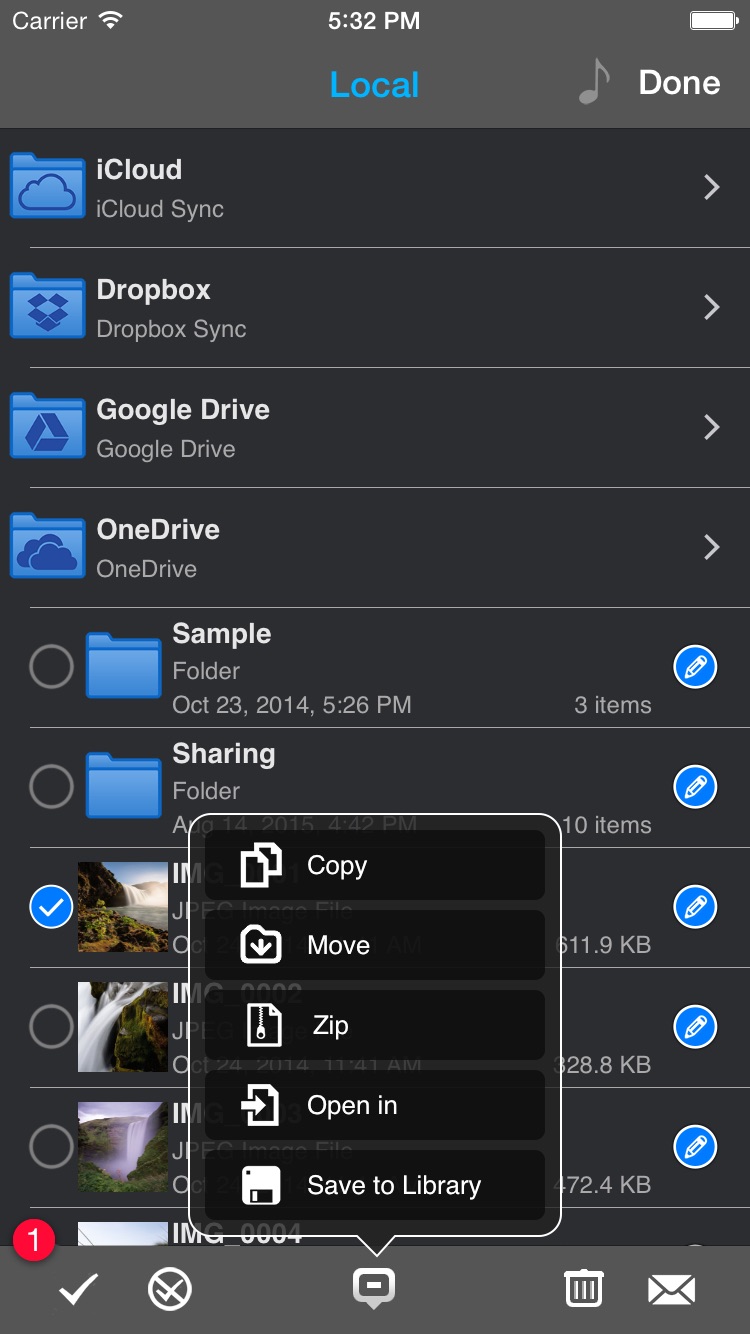
Built-in file viewers allow quick retrieval and editing without leaving the app, including; audio player, image viewer, voice recorder, text editor and document viewer supporting PDFs, MS Office, iWork, Text and HTML documents. In addition, a full file manager allows organisation on-the-go as well as supporting zip and archiving functionality.
Full list of supported formats:
* Audio (WAV, MP3, M4A, CAF, AIF, AIFF, AAC)
* Images (JPG, PNG, GIF, BMP, TIF, TIFF, ICO)
* Movies (MP4, MOV, MPV, M4V)
* iWorks (Pages, Numbers, and Keynote)
* Microsoft Office (Word, Excel and PowerPoint)
* RTF (Rich Text Format)
* RTFD (TextEdit with embedded images)
* PDF Documents
* Plain text
* Source code
* HTML web pages - Web archives
When away from the desk files can be transferred directly to-and-from other mobile devices using bluetooth, whilst an in-built personal Wi-Fi hotpot allows wireless connection to any computer, even on the road. Security can be enabled using a passcode lock, whilst file transfers between mobile device and computer are also password protected.
"Phone Drive offers iOS users a wireless drive that is incredibly easy-to-use for almost infinite purposes - storing photographs, music, documents even websites." commented Felix Yew of Eightythree Technology. "Normally any unused iPhone or iPad storage space cannot be accessed directly by consumers. With Phone Drive we have designed a fully open system where users can connect to their device as a wireless drive and access files on-the-go without leaving the app as well as linking most popular cloud service Dropbox, Google Drive, Microsoft OneDrive, iCloud, Box or Yandex.Disk."
Language Support:
Phone Drive supports English, Dutch, French, German, Greek, Italian, Japanese, Korean, Portuguese, Russian, Simplified Chinese, Spanish, Swedish, Traditional Chinese and Turkish Languages.
Device Requirements:
* iPhone, iPad, and iPod touch
* Optimized for iPhone 5, iPhone 6s/6s Plus
* Requires iOS 7.0 or later
* Universal Application
* 14.2 MB
Pricing and Availability:
Phone Drive 6.3.1 is $1.99 USD (or equivalent amount in other currencies) and available worldwide exclusively through the App Store in the Utilities category.
Phone Drive 6.3.1: http://www.eightythreetech.com/phonedrive/
Purchase and Download: https://itunes.apple.com/app/phone-drive/id431033044
Screenshot 1: https://is1-ssl.mzstatic.com/image/thumb/Purple69/v4/b6/f3/30/b6f3301e-ff0f-347c-e898-d3aff7bba4a8/pr_source.png/0x0ss.jpg
Screenshot 2: https://is1-ssl.mzstatic.com/image/thumb/Purple69/v4/0d/f4/a3/0df4a335-5f1c-ca04-2f77-a273abcb9ee6/mzl.ucsadrfs.png/0x0ss.jpg
Screenshot 3: https://is1-ssl.mzstatic.com/image/thumb/Purple49/v4/9f/95/e7/9f95e73c-7c6a-f3ce-4484-2c6c7e9eaa19/mzl.hphzwnyr.png/0x0ss.jpg
Screenshot 4: https://is1-ssl.mzstatic.com/image/thumb/Purple69/v4/f1/79/c8/f179c8a8-d383-dea5-90c3-f1fe2aaf831b/mzl.eozmthxv.png/0x0ss.jpg
Eightythree Technology is a small, independent studio that creates innovative products for iOS platform. Officially founded in October 2009, the company's portfolio has grown from one app to multiple apps that enable people to do amazing things. All Material and Software (C) Copyright 2016 Eightythree Technology. All Rights Reserved. Apple, the Apple logo, iPhone, iPod and iPad are registered trademarks of Apple Inc. in the U.S. and/or other countries. Other trademarks and registered trademarks may be the property of their respective owners.
*******
Link To Article: http://prmac.com/release-id-78971.htm
*******
---------------------------------------------------------------------------------
Note that you can alter delivered distributions at any time.
Login to your account on prMac to alter your channel selection, or to opt-out at any time.
Phone Drive - File Manager for iOS Adds Box, Yandex.Disk Cloud Service - Published on 03/10/16
Eightythree Technology today announces Phone Drive - File Manager 6.3.1, a critical update to their innovative, multi-functional file management app for iOS. Phone Drive is a personal and secure wireless drive, allowing users to save, manage, edit and view files on any iPhone, iPad or iPod touch. Connecting via Wi-Fi to either Mac or PC desktops allows files to be easily transferred via Finder or Windows Explorer and more. Version 6.3.1 adds support for Box and Yandex.Disk cloud service.
London, United Kingdom - Eightythree Technology today is proud to announce the release and immediate availability of Phone Drive - File Manager, a critical update to their innovative, multi-functional file management app developed for iPhone, iPad and iPod touch devices. Version 6.3.1 adds support for Box and Yandex.Disk cloud service. Phone Drive is a personal and secure wireless drive, allowing users to save, manage, edit and view files on iPhone, iPad and iPod touch devices. Connecting via Wi-Fi to either Mac or PC desktops allows files to be easily transferred via Finder or Windows Explorer and then viewed or edited directly on the device using a variety of included in-app utilities. With this new update users can link to their favourite cloud services directly with Dropbox, Google Drive, Microsoft OneDrive, iCloud Drive, Box and Yandex.Disk accounts for easy-to-use cloud management.
"Our simple and easy-to-use cloud management system is exclusive to Phone Drive. It's an innovative feature that sets us apart from all of the other personal utility apps on the market," said Felix Yew, Founder at Eightythree Technology. "We have seen such enormous success with this app in various countries and we are looking forward to the future as we continue to evolve our product to suit the ever-changing needs of our consumers."
Unlike the current storage facility offered by iOS, which only stores particular filetypes within individual apps, Phone Drive allows users to use their device as a virtual wireless hard drive and store almost every popular file format - from music and photographs to spreadsheets and presentations.
Built-in file viewers allow quick retrieval and editing without leaving the app, including; audio player, image viewer, voice recorder, text editor and document viewer supporting PDFs, MS Office, iWork, Text and HTML documents. In addition, a full file manager allows organisation on-the-go as well as supporting zip and archiving functionality.
Full list of supported formats:
* Audio (WAV, MP3, M4A, CAF, AIF, AIFF, AAC)
* Images (JPG, PNG, GIF, BMP, TIF, TIFF, ICO)
* Movies (MP4, MOV, MPV, M4V)
* iWorks (Pages, Numbers, and Keynote)
* Microsoft Office (Word, Excel and PowerPoint)
* RTF (Rich Text Format)
* RTFD (TextEdit with embedded images)
* PDF Documents
* Plain text
* Source code
* HTML web pages - Web archives
When away from the desk files can be transferred directly to-and-from other mobile devices using bluetooth, whilst an in-built personal Wi-Fi hotpot allows wireless connection to any computer, even on the road. Security can be enabled using a passcode lock, whilst file transfers between mobile device and computer are also password protected.
"Phone Drive offers iOS users a wireless drive that is incredibly easy-to-use for almost infinite purposes - storing photographs, music, documents even websites." commented Felix Yew of Eightythree Technology. "Normally any unused iPhone or iPad storage space cannot be accessed directly by consumers. With Phone Drive we have designed a fully open system where users can connect to their device as a wireless drive and access files on-the-go without leaving the app as well as linking most popular cloud service Dropbox, Google Drive, Microsoft OneDrive, iCloud, Box or Yandex.Disk."
Language Support:
Phone Drive supports English, Dutch, French, German, Greek, Italian, Japanese, Korean, Portuguese, Russian, Simplified Chinese, Spanish, Swedish, Traditional Chinese and Turkish Languages.
Device Requirements:
* iPhone, iPad, and iPod touch
* Optimized for iPhone 5, iPhone 6s/6s Plus
* Requires iOS 7.0 or later
* Universal Application
* 14.2 MB
Pricing and Availability:
Phone Drive 6.3.1 is $1.99 USD (or equivalent amount in other currencies) and available worldwide exclusively through the App Store in the Utilities category.
Phone Drive 6.3.1: http://www.eightythreetech.com/phonedrive/
Purchase and Download: https://itunes.apple.com/app/phone-drive/id431033044
Screenshot 1: https://is1-ssl.mzstatic.com/image/thumb/Purple69/v4/b6/f3/30/b6f3301e-ff0f-347c-e898-d3aff7bba4a8/pr_source.png/0x0ss.jpg
Screenshot 2: https://is1-ssl.mzstatic.com/image/thumb/Purple69/v4/0d/f4/a3/0df4a335-5f1c-ca04-2f77-a273abcb9ee6/mzl.ucsadrfs.png/0x0ss.jpg
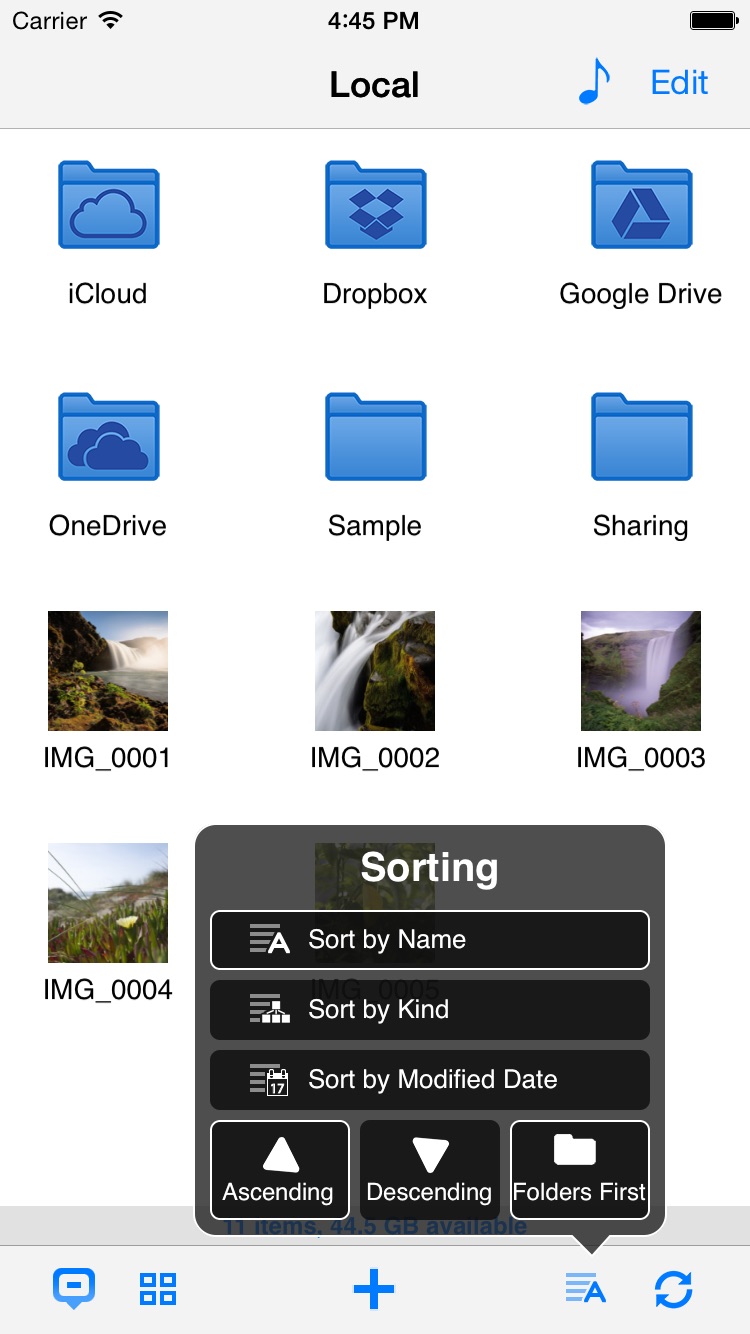
Screenshot 3: https://is1-ssl.mzstatic.com/image/thumb/Purple49/v4/9f/95/e7/9f95e73c-7c6a-f3ce-4484-2c6c7e9eaa19/mzl.hphzwnyr.png/0x0ss.jpg
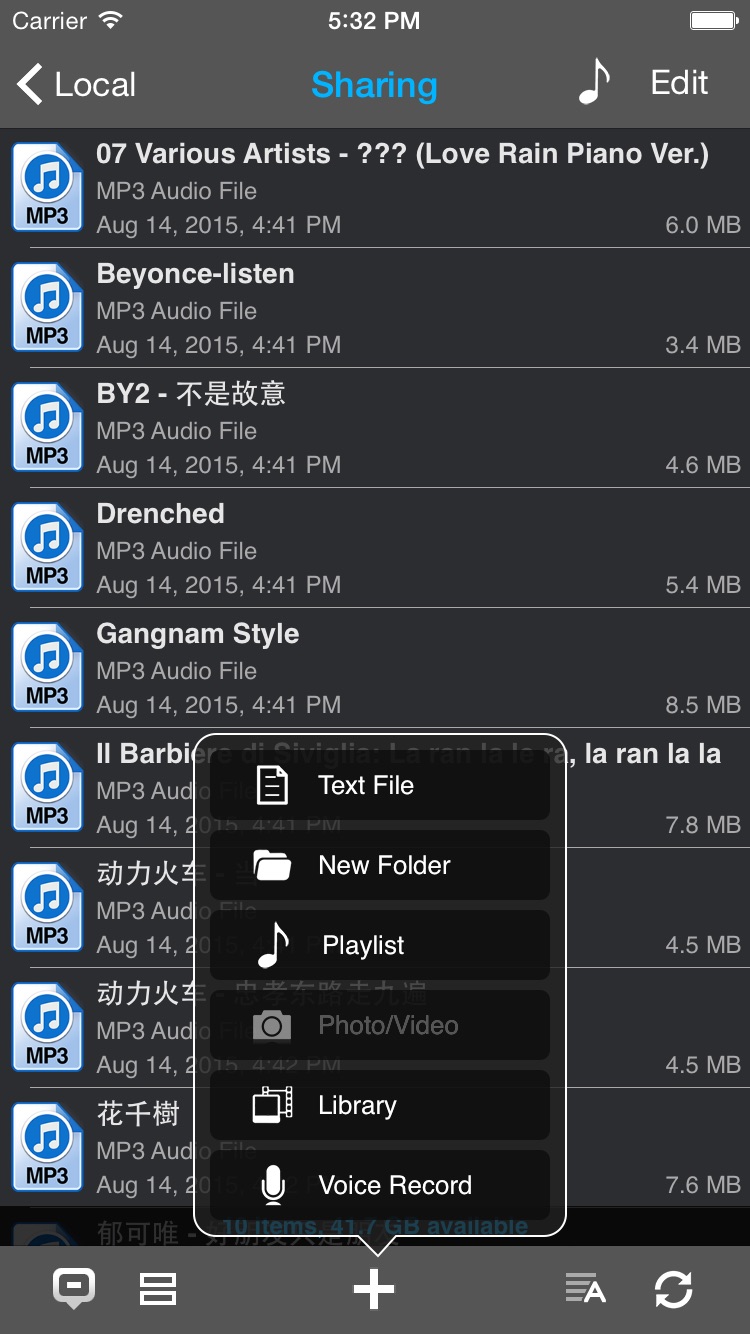
Screenshot 4: https://is1-ssl.mzstatic.com/image/thumb/Purple69/v4/f1/79/c8/f179c8a8-d383-dea5-90c3-f1fe2aaf831b/mzl.eozmthxv.png/0x0ss.jpg
Eightythree Technology is a small, independent studio that creates innovative products for iOS platform. Officially founded in October 2009, the company's portfolio has grown from one app to multiple apps that enable people to do amazing things. All Material and Software (C) Copyright 2016 Eightythree Technology. All Rights Reserved. Apple, the Apple logo, iPhone, iPod and iPad are registered trademarks of Apple Inc. in the U.S. and/or other countries. Other trademarks and registered trademarks may be the property of their respective owners.
*******
Link To Article: http://prmac.com/release-id-78971.htm
*******
---------------------------------------------------------------------------------
Note that you can alter delivered distributions at any time.
Login to your account on prMac to alter your channel selection, or to opt-out at any time.
Eat What app includes barcode feature for checking ingredients
A new article has been published at prMac.
Eat What app includes barcode feature for checking ingredients - Published on 03/10/16
We Have Kids today announce Eat What, available for iOS and Android devices. Eat What gives you all the details you need about what you're eating, whether you're grocery shopping, cooking, or dining out. When a user wants to know more about a product's ingredients, they need only scan the bar code for immediate access to the most important information about the item. The latest version now includes all the latest news and feature stories about nutrition, diet, and healthy eating.
Cracow, Poland - We Have Kids today is proud to announce the release of The Eat What app, available for Android and iPhone systems, gives you all the details you need about what you're eating, whether you're grocery shopping, cooking, or dining out. When a user wants to know more about a product's ingredients, they need only scan the bar code for immediate access to the most important information about the item. In addition to the extensive database of nutrition information, the latest version now includes all the latest news and feature stories about nutrition, diet, and healthy eating.
The Eat What app actually does what almost every app claims to: It's innovative, it breaks new ground in health and nutrition, and it solves a problem that makes your life so much easier as you're seeking to make careful choices about the foods that you eat.
Besides delivering all the latest news and informative articles about what's healthy and what's not, the app puts a database of plants, ingredients and chemical additives at your fingertips so that you know exactly what you're eating - and what to avoid, whether it's because of your preference for organic products, any health conditions and dietary restrictions, or simply because you want to learn about the compounds and substances found so often in processed food products.
If you didn't know what abelmosk was before, now you will. "The database has countless entries from all over the world, and we update it weekly," said producer at Kids. "That's just the beginning. We've added a comprehensive news feature to give users access to all the latest news articles on nutrition, diet, and healthy food. Our other in-app options include diets, prepared by nutrition professionals, designed for specific lifestyle or health situations, like when women are breastfeeding or children have allergies triggered by any additives."
The app also includes a handy OCR feature which can be used to scan the ingredients of a food packet label to ascertain the nutrition content and dietary requirements for that food item.
One of Eat What's best features is the barcode feature. Scan the ingredients label on a product while shopping, and if you've never heard of acetaldehyde the app will explain it for you. The app also makes it easy to share info with friends on Facebook, and it never gets old because the app database is updated weekly with new product and ingredient information, and new diet profiles. The producer welcomes interaction, including suggestions for new diet profiles and ingredient entries. The app itself is designed in English, and the iPhone version also offers a free "lite" app option.
Features:
* Ingredients database - lots of information from the whole wide world - and still growing
* Barcode with the best existing ingredients database in the world - a tool which allows you to scan the barcode and directly check what this product really contains - Any chosen product can be checked if it meets the requirements of your diet
* An E-numbered ingredients list, determining the harmfulness and harmlessness of the products and food ingredients
*Diet Store (nutrition profiles) - buy a diet that will protect you from diseases and will help you eat better according to your needs, with reference to diseases that require special care as it comes to the choice of food and the preventive actions that have to be taken to prevent further development of the disorder - Carry your own and your relatives' safety always by your side. Diets have been prepared by professional dietitians and food experts that have knowledge in the foods and additives
* It is also possible to create your own diet, based on your preferences. Scan the products, filtering them only to those appropriate for your diet
* Speech recognition - read out the ingredients list and check what you are really eating
* Facebook - share information about your food ingredients with your friends
Device Requirements:
* OS Requirements: iOS 5.1.1 or later & Android 2.3.3 and up
* Compatible with iPad, iPhone and iPod touch
* Size: iOS - Paid Version - 7.8 MB, Lite Version - 8.6 MB & Android - 12 MB
Pricing and Availability:
Eat What is currently available for Free with in-app purchase and Paid version at a cost of $1.99 (USD) with in-app purchase at iTunes App Store in Health & Fitness category. Eat What is also available in Android for Free with in-app purchases at Google Play Store in Health & Fitness category.
Eat What for iOS: https://itunes.apple.com/us/app/eat-what/id745639896
Eat What Lite for iOS: https://itunes.apple.com/us/app/eat-what-lite/id849147831
Eat What for Android: https://play.google.com/store/apps/details?id=info.eatwhat.eatwhatus
YouTube Video (App Demo): https://www.youtube.com/watch?v=vJ46FORS_Rk
Screenshot: http://a3.mzstatic.com/us/r30/Purple6/v4/23/42/c5/2342c5fc-ca76-a826-29ce-050e0fa9c1eb/screen568x568.jpeg
App Icon: http://a4.mzstatic.com/us/r30/Purple49/v4/04/23/7f/04237f63-11b6-ea29-ac1c-13c315ba1f9f/icon175x175.jpeg
We Have Kids is a company focused on one simple goal - raising consumer food awareness. Under the leadership of Kuba Szymonik, the company continues to develop its Eat What app for iPhone and Android systems. The app has a pocket food scanner, ingredients database and diet profile, all in one place. With today's fast-paced lifestyle, people don't have the time to search for and find the right food for their dietary needs. Our goal is to give them a quick yet reliable answer for basic questions like: What is it that I am eating and is it good for me depending on my diets or health in general. All Material and Software (C) Copyright 2016 We Have Kids. All Rights Reserved. Apple, the Apple logo, iPhone, iPod and iPad are registered trademarks of Apple Inc. in the U.S. and/or other countries. Other trademarks and registered trademarks may be the property of their respective owners.
*******
Link To Article: http://prmac.com/release-id-78970.htm
*******
---------------------------------------------------------------------------------
Note that you can alter delivered distributions at any time.
Login to your account on prMac to alter your channel selection, or to opt-out at any time.
Eat What app includes barcode feature for checking ingredients - Published on 03/10/16
We Have Kids today announce Eat What, available for iOS and Android devices. Eat What gives you all the details you need about what you're eating, whether you're grocery shopping, cooking, or dining out. When a user wants to know more about a product's ingredients, they need only scan the bar code for immediate access to the most important information about the item. The latest version now includes all the latest news and feature stories about nutrition, diet, and healthy eating.
Cracow, Poland - We Have Kids today is proud to announce the release of The Eat What app, available for Android and iPhone systems, gives you all the details you need about what you're eating, whether you're grocery shopping, cooking, or dining out. When a user wants to know more about a product's ingredients, they need only scan the bar code for immediate access to the most important information about the item. In addition to the extensive database of nutrition information, the latest version now includes all the latest news and feature stories about nutrition, diet, and healthy eating.
The Eat What app actually does what almost every app claims to: It's innovative, it breaks new ground in health and nutrition, and it solves a problem that makes your life so much easier as you're seeking to make careful choices about the foods that you eat.
Besides delivering all the latest news and informative articles about what's healthy and what's not, the app puts a database of plants, ingredients and chemical additives at your fingertips so that you know exactly what you're eating - and what to avoid, whether it's because of your preference for organic products, any health conditions and dietary restrictions, or simply because you want to learn about the compounds and substances found so often in processed food products.
If you didn't know what abelmosk was before, now you will. "The database has countless entries from all over the world, and we update it weekly," said producer at Kids. "That's just the beginning. We've added a comprehensive news feature to give users access to all the latest news articles on nutrition, diet, and healthy food. Our other in-app options include diets, prepared by nutrition professionals, designed for specific lifestyle or health situations, like when women are breastfeeding or children have allergies triggered by any additives."
The app also includes a handy OCR feature which can be used to scan the ingredients of a food packet label to ascertain the nutrition content and dietary requirements for that food item.
One of Eat What's best features is the barcode feature. Scan the ingredients label on a product while shopping, and if you've never heard of acetaldehyde the app will explain it for you. The app also makes it easy to share info with friends on Facebook, and it never gets old because the app database is updated weekly with new product and ingredient information, and new diet profiles. The producer welcomes interaction, including suggestions for new diet profiles and ingredient entries. The app itself is designed in English, and the iPhone version also offers a free "lite" app option.
Features:
* Ingredients database - lots of information from the whole wide world - and still growing
* Barcode with the best existing ingredients database in the world - a tool which allows you to scan the barcode and directly check what this product really contains - Any chosen product can be checked if it meets the requirements of your diet
* An E-numbered ingredients list, determining the harmfulness and harmlessness of the products and food ingredients
*Diet Store (nutrition profiles) - buy a diet that will protect you from diseases and will help you eat better according to your needs, with reference to diseases that require special care as it comes to the choice of food and the preventive actions that have to be taken to prevent further development of the disorder - Carry your own and your relatives' safety always by your side. Diets have been prepared by professional dietitians and food experts that have knowledge in the foods and additives
* It is also possible to create your own diet, based on your preferences. Scan the products, filtering them only to those appropriate for your diet
* Speech recognition - read out the ingredients list and check what you are really eating
* Facebook - share information about your food ingredients with your friends
Device Requirements:
* OS Requirements: iOS 5.1.1 or later & Android 2.3.3 and up
* Compatible with iPad, iPhone and iPod touch
* Size: iOS - Paid Version - 7.8 MB, Lite Version - 8.6 MB & Android - 12 MB
Pricing and Availability:
Eat What is currently available for Free with in-app purchase and Paid version at a cost of $1.99 (USD) with in-app purchase at iTunes App Store in Health & Fitness category. Eat What is also available in Android for Free with in-app purchases at Google Play Store in Health & Fitness category.
Eat What for iOS: https://itunes.apple.com/us/app/eat-what/id745639896
Eat What Lite for iOS: https://itunes.apple.com/us/app/eat-what-lite/id849147831
Eat What for Android: https://play.google.com/store/apps/details?id=info.eatwhat.eatwhatus
YouTube Video (App Demo): https://www.youtube.com/watch?v=vJ46FORS_Rk
Screenshot: http://a3.mzstatic.com/us/r30/Purple6/v4/23/42/c5/2342c5fc-ca76-a826-29ce-050e0fa9c1eb/screen568x568.jpeg

App Icon: http://a4.mzstatic.com/us/r30/Purple49/v4/04/23/7f/04237f63-11b6-ea29-ac1c-13c315ba1f9f/icon175x175.jpeg

We Have Kids is a company focused on one simple goal - raising consumer food awareness. Under the leadership of Kuba Szymonik, the company continues to develop its Eat What app for iPhone and Android systems. The app has a pocket food scanner, ingredients database and diet profile, all in one place. With today's fast-paced lifestyle, people don't have the time to search for and find the right food for their dietary needs. Our goal is to give them a quick yet reliable answer for basic questions like: What is it that I am eating and is it good for me depending on my diets or health in general. All Material and Software (C) Copyright 2016 We Have Kids. All Rights Reserved. Apple, the Apple logo, iPhone, iPod and iPad are registered trademarks of Apple Inc. in the U.S. and/or other countries. Other trademarks and registered trademarks may be the property of their respective owners.
*******
Link To Article: http://prmac.com/release-id-78970.htm
*******
---------------------------------------------------------------------------------
Note that you can alter delivered distributions at any time.
Login to your account on prMac to alter your channel selection, or to opt-out at any time.
New Game Release for iOS - FlippyCoin 3D
A new article has been published at prMac.
New Game Release for iOS - FlippyCoin 3D - Published on 03/10/16
Independent developer Jeremy Jones announces the release of the game FlippyCoin 3D 1.0 for iOS devices. The game is complex - flip a coin and see how many heads you can get in a row. Set on a blue backdrop, each flip of the coin is a perfect result of the velocity of your swipe gesture. The coin-flipping physics are satisfying and the game escalates with every flip of heads. Flip tails, and the game is over. Unlock achievements! There are 8 achievements to be unlocked.
Fairfield, Iowa - Independent developer, Jeremy Jones is excited to announce the recent release of FlippyCoin 3D 1.0. The game is a complex - flip a coin simulation. See how many heads you can get in a row. The coin-flipping physics are satisfying and the game escalates with every flip of heads.
Set on a blue backdrop, each flip of the coin is a perfect result of the velocity of your swipe gesture. As you flip the coin, a tails means an immediate game over, while a heads means one more step toward a high score and one more chance to flip the coin. Challenge your friends! With Game Center integration you can send your friends challenges to beat your high score. Unlock achievements! There are 8 achievements to be unlocked.
Device Requirements:
* iPhone, iPad, and iPod touch
* Requires iOS 9.2 or later
* 13.1 MB
Pricing and Availability:
FlippyCoin 3D 1.0 is free, and is available worldwide exclusively through the App Store in the Game category.
Stay or Switch: http://www.stayorswitch.com/about.html
Download from iTunes: https://itunes.apple.com/us/app/id1078114608
Screenshot: http://stayorswitch.com/flippycoin3dscreenshot.png
App Icon: http://stayorswitch.com/flippycoinappicon180.png
Jeremy Jones is an independent iOS developer based in Fairfield, Iowa. All Material and Software (C) Copyright 2016 Jeremy Jones. All Rights Reserved. Apple, the Apple logo, iPhone, iPod and iPad are registered trademarks of Apple Inc. in the U.S. and/or other countries. Other trademarks and registered trademarks may be the property of their respective owners.
*******
Link To Article: http://prmac.com/release-id-78979.htm
*******
---------------------------------------------------------------------------------
Note that you can alter delivered distributions at any time.
Login to your account on prMac to alter your channel selection, or to opt-out at any time.
New Game Release for iOS - FlippyCoin 3D - Published on 03/10/16
Independent developer Jeremy Jones announces the release of the game FlippyCoin 3D 1.0 for iOS devices. The game is complex - flip a coin and see how many heads you can get in a row. Set on a blue backdrop, each flip of the coin is a perfect result of the velocity of your swipe gesture. The coin-flipping physics are satisfying and the game escalates with every flip of heads. Flip tails, and the game is over. Unlock achievements! There are 8 achievements to be unlocked.
Fairfield, Iowa - Independent developer, Jeremy Jones is excited to announce the recent release of FlippyCoin 3D 1.0. The game is a complex - flip a coin simulation. See how many heads you can get in a row. The coin-flipping physics are satisfying and the game escalates with every flip of heads.
Set on a blue backdrop, each flip of the coin is a perfect result of the velocity of your swipe gesture. As you flip the coin, a tails means an immediate game over, while a heads means one more step toward a high score and one more chance to flip the coin. Challenge your friends! With Game Center integration you can send your friends challenges to beat your high score. Unlock achievements! There are 8 achievements to be unlocked.
Device Requirements:
* iPhone, iPad, and iPod touch
* Requires iOS 9.2 or later
* 13.1 MB
Pricing and Availability:
FlippyCoin 3D 1.0 is free, and is available worldwide exclusively through the App Store in the Game category.
Stay or Switch: http://www.stayorswitch.com/about.html
Download from iTunes: https://itunes.apple.com/us/app/id1078114608
Screenshot: http://stayorswitch.com/flippycoin3dscreenshot.png

App Icon: http://stayorswitch.com/flippycoinappicon180.png

Jeremy Jones is an independent iOS developer based in Fairfield, Iowa. All Material and Software (C) Copyright 2016 Jeremy Jones. All Rights Reserved. Apple, the Apple logo, iPhone, iPod and iPad are registered trademarks of Apple Inc. in the U.S. and/or other countries. Other trademarks and registered trademarks may be the property of their respective owners.
*******
Link To Article: http://prmac.com/release-id-78979.htm
*******
---------------------------------------------------------------------------------
Note that you can alter delivered distributions at any time.
Login to your account on prMac to alter your channel selection, or to opt-out at any time.
Subscribe to:
Posts (Atom)