A new article has been published at prMac.
Numerical Audio Releases RP-1 for iOS (AU, IAA, AB, Standalone) - Published on 03/24/16
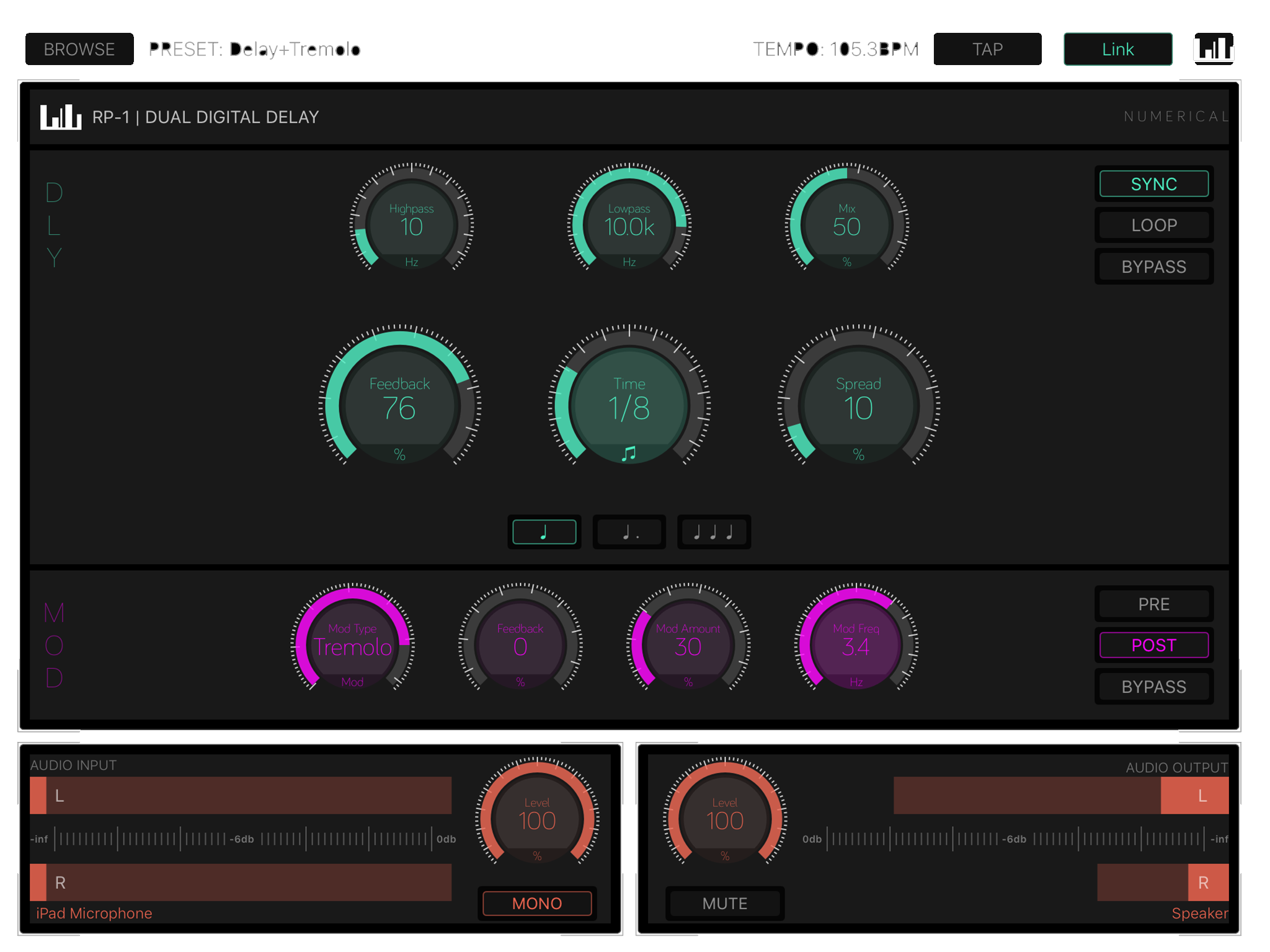
Numerical Audio announces RP-1 1.0.4 , a highly flexible stereo delay for iOS devices that integrates with everything from AudioBus over Inter-App Audio to AudioUnit Hosts and of course Ableton Link. What's more, RP-1 comes with a solid standalone application that makes real-time effects processing as simple as connecting a USB Audio Interface or Microphone. A wide range of effects are available, ranging from basic slapback and ping-ping type echos to complex modulations and soundscapes.
Stuttgart, Germany - Numerical Audio is proud to announce the release of RP-1 1.0.4, a highly flexible stereo delay for iPhone and iPad that integrates with everything from AudioBus over Inter-App Audio to AudioUnit Hosts and of course Ableton Link. What's more, RP-1 comes with a solid standalone application that makes real-time effects processing as simple as connecting a USB Audio Interface or singing into the internal Microphone.
Features:
* Two independent delay sections with flexible routing options and effect bypass
* Long Delay for Echo type effects
* Short Delay for Chorus, Vibrato & Flanger effects (Mod Frequency from 0.1hz - 10hz)
* Lowpass and Highpass Filter
* Delay times from 10ms to 2000ms in free mode
* Delay times for 1/32th to 4bars when tempo synced
* Tempo Sync via AU Host or Ableton Link
* Tap Tempo and Manual Tempo
* Normal, Dotted and Triplet mode
* True Stereo Processing
* Stereo Spread
* Standalone operation with Mic Input or USB Audio
* Audio Unit Extension
* Inter App Audio support
* Audiobus support
* Ableton Link support
Requirements:
* iPhone, iPad, and iPod touch
* Requires iOS 9.0 or later
* Universal Application
* 7.2 MB
Pricing and Availability:
RP-1 1.0.4 is $5.99 USD (or an equivalent amount in other currencies), and is available worldwide exclusively through the App Store in the Music category.
Numerical Audio: http://numericalaudio.com
RP-1 1.0.4: http://numericalaudio.com/rp1.html
Purchase and Download from iTunes: https://itunes.apple.com/app/rp-1/id1079530569
Screenshot: http://numericalaudio.com/img/rp1/scree_rp1_1.png
App Icon: http://numericalaudio.com/img/rp1/iTunesArtwork.png
Numerical Audio is a small team of indie developers who are passionate about creating new and interesting tools for sound creation and design. Come find us at the Numerical Audio website. All Material and Software (C) Copyright 2016 Numerical Audio. All Rights Reserved. Apple, the Apple logo, iPhone, iPod and iPad are registered trademarks of Apple Inc. in the U.S. and/or other countries. Other trademarks and registered trademarks may be the property of their respective owners.
*******
Link To Article: http://prmac.com/release-id-79071.htm
*******
---------------------------------------------------------------------------------
Note that you can alter delivered distributions at any time.
Login to your account on prMac to alter your channel selection, or to opt-out at any time.


newMacgadgets Introduces Smartphone Coasters 2.0 - New and Improved
A new article has been published at prMac.
newMacgadgets Introduces Smartphone Coasters 2.0 - New and Improved - Published on 03/24/16
newMacgadgets has just introduced their new and improved Smartphone Coasters. Designed for home or business, Smartphone Coasters are a desktop stand for all iPhone models including the new iPhone SE. Hotels, bars and restaurant patrons will appreciate the hands-free convenience these Smartphone stands provide. Smartphone Coasters are 4 1/2" circular clear acrylic discs with non-skid bumpers. The center slot is large enough to hold all Smartphones and is designed to work with most cases.
San Diego, California - newMacgadgets has just introduced their new and improved Smartphone Coasters. Designed for home or business, Smartphone Coasters are a new desktop stand for all iPhone models including the new iPhone SE, iPhone 5, iPhone 6 and iPhone 6 Plus.
Smartphone Coasters are designed for home or business. For home use, Smartphone Coasters complement any setting. Guests will appreciate the convenience of propping up their iPhone when watching sports, eating or just out on the deck. Smartphone Coasters hold the iPhone upright making viewing texts, videos, FaceTime a breeze.
For business The stylish all-acrylic design makes Smartphone Coasters the perfect fit for conference rooms, office lobbies, lounges, meeting rooms, trade-shows, special events and much more. Smartphone Coasters complement any professional business setting to provide a Smartphone stand clients and customers will appreciate.
Smartphone Coasters are also designed for the Hospitality industry. Hotels, bars and restaurant patrons will appreciate the hands-free convenience these Smartphone stands provide.
Smartphone Coasters are 4 1/2" circular clear acrylic discs with non-skid bumpers. The center slot is large enough to hold all Smartphones and is designed to work with most cases.
Pricing and Availability:
Smartphone Coasters are compatible with all iPhone models and is sold in sets of 4 for $24.95 (USD) plus shipping. newMacgadgets also carries a full-line of iPad and iPhone acrylic stands and mounts. Visit their site today for additional information.
Smartphone Coasters: http://newpcgadgets.com/products/smartphone_stand/
Image (iPhone Counter Stand): http://newpcgadgets.com/products/smartphone_stand/images/smartphone-stand-iphone.jpg
Image (Stackable Smartphone Stand Set of 4): http://newpcgadgets.com/products/smartphone_stand/images/smartphone-stand-stackable.jpg
Image (Smartphone Stand for Hotels and Restaurants): http://newpcgadgets.com/products/smartphone_stand/images/smartphone-stand-hotels.jpg
newMacgadgets a division of newPCgadgets, designs innovative products and accessories for Apple and PC computers, laptops and mobile devices. With over 20 years of experience they have designed over 150 products for large companies like Apple, IBM and Epson. Copyright (C) 2016 newMacgadgets. All Rights Reserved. Apple, the Apple logo, iPhone, iPod and iPad are registered trademarks of Apple Inc. in the U.S. and/or other countries.
*******
Link To Article: http://prmac.com/release-id-79072.htm
*******
---------------------------------------------------------------------------------
Note that you can alter delivered distributions at any time.
Login to your account on prMac to alter your channel selection, or to opt-out at any time.
newMacgadgets Introduces Smartphone Coasters 2.0 - New and Improved - Published on 03/24/16
newMacgadgets has just introduced their new and improved Smartphone Coasters. Designed for home or business, Smartphone Coasters are a desktop stand for all iPhone models including the new iPhone SE. Hotels, bars and restaurant patrons will appreciate the hands-free convenience these Smartphone stands provide. Smartphone Coasters are 4 1/2" circular clear acrylic discs with non-skid bumpers. The center slot is large enough to hold all Smartphones and is designed to work with most cases.
San Diego, California - newMacgadgets has just introduced their new and improved Smartphone Coasters. Designed for home or business, Smartphone Coasters are a new desktop stand for all iPhone models including the new iPhone SE, iPhone 5, iPhone 6 and iPhone 6 Plus.
Smartphone Coasters are designed for home or business. For home use, Smartphone Coasters complement any setting. Guests will appreciate the convenience of propping up their iPhone when watching sports, eating or just out on the deck. Smartphone Coasters hold the iPhone upright making viewing texts, videos, FaceTime a breeze.
For business The stylish all-acrylic design makes Smartphone Coasters the perfect fit for conference rooms, office lobbies, lounges, meeting rooms, trade-shows, special events and much more. Smartphone Coasters complement any professional business setting to provide a Smartphone stand clients and customers will appreciate.
Smartphone Coasters are also designed for the Hospitality industry. Hotels, bars and restaurant patrons will appreciate the hands-free convenience these Smartphone stands provide.
Smartphone Coasters are 4 1/2" circular clear acrylic discs with non-skid bumpers. The center slot is large enough to hold all Smartphones and is designed to work with most cases.
Pricing and Availability:
Smartphone Coasters are compatible with all iPhone models and is sold in sets of 4 for $24.95 (USD) plus shipping. newMacgadgets also carries a full-line of iPad and iPhone acrylic stands and mounts. Visit their site today for additional information.
Smartphone Coasters: http://newpcgadgets.com/products/smartphone_stand/
Image (iPhone Counter Stand): http://newpcgadgets.com/products/smartphone_stand/images/smartphone-stand-iphone.jpg

Image (Stackable Smartphone Stand Set of 4): http://newpcgadgets.com/products/smartphone_stand/images/smartphone-stand-stackable.jpg

Image (Smartphone Stand for Hotels and Restaurants): http://newpcgadgets.com/products/smartphone_stand/images/smartphone-stand-hotels.jpg

newMacgadgets a division of newPCgadgets, designs innovative products and accessories for Apple and PC computers, laptops and mobile devices. With over 20 years of experience they have designed over 150 products for large companies like Apple, IBM and Epson. Copyright (C) 2016 newMacgadgets. All Rights Reserved. Apple, the Apple logo, iPhone, iPod and iPad are registered trademarks of Apple Inc. in the U.S. and/or other countries.
*******
Link To Article: http://prmac.com/release-id-79072.htm
*******
---------------------------------------------------------------------------------
Note that you can alter delivered distributions at any time.
Login to your account on prMac to alter your channel selection, or to opt-out at any time.
AutoTrash - Remove Unwanted Files Automatically
A new article has been published at prMac.
AutoTrash - Remove Unwanted Files Automatically - Published on 03/24/16
iLifeTouch announces the release of AutoTrash 1.0 for Mac OS X. AutoTrash is an automatic trash cleaner for the Mac which will remove all the useless junk file periodically and move them to trash. Users can define their own time for deletion of a particular folder or file with out any hassle. Life becomes much simpler when users stop worrying about files which keep collecting on hard drive and eventually become useless after a certain period of time.
Kolkata, India - iLifeTouch is pleased to announce the release of AutoTrash 1.0. AutoTrash is an automatic trash cleaner for your Mac which will remove all the useless junk files periodically and move them to trash. Users can define their own time for deletion of a particular folder or file with out any hassle.
Life becomes much simpler when you stop worrying about files which keep storing in your hard drive and eventually become useless after a certain period of time. This is where the usefulness of AutoTrash comes into action. Those files can easily be removed from your hard drive by AutoTrash without having to do anything from your side.
Highlights:
* Easy to Add files and folders
* Predefined presets to get the job done quickly
* Option to add custom Presets
* Highly intuitive app layout
* Search files within a Preset quickly
In order to experience the best out of AutoTrash, please read the following points. There are 7 kinds of time frames that you can set AutoTrash to delete files automatically without any confusion.
Every Year: This preset is for files, which you want to keep for one Year in your Mac. Such files are subjected to be deleted when the files time frame of a Year gets over. So the files will get deleted in the very next launch of the app on completion of this time frame with an alert.
Quarterly: This preset is for files, which you want to keep for 4 Months in your Mac. Such files are subjected to be deleted when the files time frame of 4 Months gets over. So the files will get deleted in the very next launch of the app on completion of this time frame with an alert.
Monthly: This preset is for files, which you want to keep for 30 Days in your Mac. Such files are subjected to be deleted when the files time frame of 30 Days gets over. So the files will get deleted in the very next launch of the app on completion of this time frame with an alert.
Every Two Week: This preset is for files, which you want to keep for 14 Days in your Mac. Such files are subjected to be deleted when the files time frame of 14 Days gets over. So the files will get deleted in the very next launch of the app on completion of this time frame with an alert.
Weekly: This preset is for files, which you want to keep for 7 Days in your Mac. Such files are subjected to be deleted when the files time frame of 7 Days gets over. So the files will get deleted in the very next launch of the app on completion of this time frame with an alert.
Daily: This preset is for files, which you want to delete daily automatically. Such files are subjected to be deleted when the files time frame of a day gets over. So the files will get deleted in the very next launch of the app on completion of this time frame with an alert.
Manually: When a user creates a preset and select "Manually" as a time frame option, Auto Trash does not delete or move files to Trash automatically. This is where users select and delete files manually with a peace of mind.
By default the app is set to provide an alert for the deletion of file(s) once the time frame for the same is over. User can also select which expired file(s) to be removed and which to be retained. Thus, the user doesn't lose any file without a notice. So, download AutoTrash today and keep your Mac Clean!
System Requirements:
* OS X 10.10 or later
* 64-bit processor
* 1.0 MB
Pricing and Availability:
AutoTrash 1.0 is just $0.99 USD (or an equivalent amount in other currencies) and is available worldwide exclusively through the Mac App Store in the Utilities category.
iLifeTouch: http://www.ilifetouch.com
AutoTrash - Remove Unwanted Files Automatically 1.0: http://www.ilifetouch.com/Autotrash-Remove-Unwanted
Purchase and Download from Mac App Store: https://itunes.apple.com/app/autotrash-remove-unwanted/id1089885277
Screenshot: http://a5.mzstatic.com/us/r30/Purple69/v4/d0/a3/b7/d0a3b7f2-6036-e3d0-ffa8-b222d126dc24/screen800x500.jpeg
App Icon: http://a5.mzstatic.com/us/r30/Purple69/v4/f5/14/d2/f514d2ad-8202-b8f3-39ff-6fcb2605b678/icon128-2x.png
iLifeTouch treats all their apps as if they belonged to the end users. Not only do they hope for feedback, they actively encourage users to tell them what they want and to inform them if they are missing something they would love to see built into their apps. They are eagerly awaiting your input and they are here to make your lives easier using their apps. All Material and Software (C) Copyright 2016 iLifeTouch. All Rights Reserved. Apple, the Apple logo, Macintosh and Mac OS X are registered trademarks of Apple Inc. in the U.S. and/or other countries. Other trademarks and registered trademarks may be the property of their respective owners.
*******
Link To Article: http://prmac.com/release-id-79070.htm
*******
---------------------------------------------------------------------------------
Note that you can alter delivered distributions at any time.
Login to your account on prMac to alter your channel selection, or to opt-out at any time.
AutoTrash - Remove Unwanted Files Automatically - Published on 03/24/16
iLifeTouch announces the release of AutoTrash 1.0 for Mac OS X. AutoTrash is an automatic trash cleaner for the Mac which will remove all the useless junk file periodically and move them to trash. Users can define their own time for deletion of a particular folder or file with out any hassle. Life becomes much simpler when users stop worrying about files which keep collecting on hard drive and eventually become useless after a certain period of time.
Kolkata, India - iLifeTouch is pleased to announce the release of AutoTrash 1.0. AutoTrash is an automatic trash cleaner for your Mac which will remove all the useless junk files periodically and move them to trash. Users can define their own time for deletion of a particular folder or file with out any hassle.
Life becomes much simpler when you stop worrying about files which keep storing in your hard drive and eventually become useless after a certain period of time. This is where the usefulness of AutoTrash comes into action. Those files can easily be removed from your hard drive by AutoTrash without having to do anything from your side.
Highlights:
* Easy to Add files and folders
* Predefined presets to get the job done quickly
* Option to add custom Presets
* Highly intuitive app layout
* Search files within a Preset quickly
In order to experience the best out of AutoTrash, please read the following points. There are 7 kinds of time frames that you can set AutoTrash to delete files automatically without any confusion.
Every Year: This preset is for files, which you want to keep for one Year in your Mac. Such files are subjected to be deleted when the files time frame of a Year gets over. So the files will get deleted in the very next launch of the app on completion of this time frame with an alert.
Quarterly: This preset is for files, which you want to keep for 4 Months in your Mac. Such files are subjected to be deleted when the files time frame of 4 Months gets over. So the files will get deleted in the very next launch of the app on completion of this time frame with an alert.
Monthly: This preset is for files, which you want to keep for 30 Days in your Mac. Such files are subjected to be deleted when the files time frame of 30 Days gets over. So the files will get deleted in the very next launch of the app on completion of this time frame with an alert.
Every Two Week: This preset is for files, which you want to keep for 14 Days in your Mac. Such files are subjected to be deleted when the files time frame of 14 Days gets over. So the files will get deleted in the very next launch of the app on completion of this time frame with an alert.
Weekly: This preset is for files, which you want to keep for 7 Days in your Mac. Such files are subjected to be deleted when the files time frame of 7 Days gets over. So the files will get deleted in the very next launch of the app on completion of this time frame with an alert.
Daily: This preset is for files, which you want to delete daily automatically. Such files are subjected to be deleted when the files time frame of a day gets over. So the files will get deleted in the very next launch of the app on completion of this time frame with an alert.
Manually: When a user creates a preset and select "Manually" as a time frame option, Auto Trash does not delete or move files to Trash automatically. This is where users select and delete files manually with a peace of mind.
By default the app is set to provide an alert for the deletion of file(s) once the time frame for the same is over. User can also select which expired file(s) to be removed and which to be retained. Thus, the user doesn't lose any file without a notice. So, download AutoTrash today and keep your Mac Clean!
System Requirements:
* OS X 10.10 or later
* 64-bit processor
* 1.0 MB
Pricing and Availability:
AutoTrash 1.0 is just $0.99 USD (or an equivalent amount in other currencies) and is available worldwide exclusively through the Mac App Store in the Utilities category.
iLifeTouch: http://www.ilifetouch.com
AutoTrash - Remove Unwanted Files Automatically 1.0: http://www.ilifetouch.com/Autotrash-Remove-Unwanted
Purchase and Download from Mac App Store: https://itunes.apple.com/app/autotrash-remove-unwanted/id1089885277
Screenshot: http://a5.mzstatic.com/us/r30/Purple69/v4/d0/a3/b7/d0a3b7f2-6036-e3d0-ffa8-b222d126dc24/screen800x500.jpeg

App Icon: http://a5.mzstatic.com/us/r30/Purple69/v4/f5/14/d2/f514d2ad-8202-b8f3-39ff-6fcb2605b678/icon128-2x.png

iLifeTouch treats all their apps as if they belonged to the end users. Not only do they hope for feedback, they actively encourage users to tell them what they want and to inform them if they are missing something they would love to see built into their apps. They are eagerly awaiting your input and they are here to make your lives easier using their apps. All Material and Software (C) Copyright 2016 iLifeTouch. All Rights Reserved. Apple, the Apple logo, Macintosh and Mac OS X are registered trademarks of Apple Inc. in the U.S. and/or other countries. Other trademarks and registered trademarks may be the property of their respective owners.
*******
Link To Article: http://prmac.com/release-id-79070.htm
*******
---------------------------------------------------------------------------------
Note that you can alter delivered distributions at any time.
Login to your account on prMac to alter your channel selection, or to opt-out at any time.
MCE Ships 1TB PCIe-based Flash Storage Upgrade for Mac Pro (Late 2013)
A new article has been published at prMac.
MCE Ships 1TB PCIe-based Flash Storage Upgrade for Mac Pro (Late 2013) - Published on 03/24/16
MCE Technologies (MCE) announces a 1TB internal PCIe-based Flash storage upgrade solution for the Mac Pro (Late 2013) The 1TB Upgrade Kits are based on the super-fast PCIe storage architecture in those machines and can read and write at speeds of 1000MB/sec. All tools required to perform the installation, an illustrated installation guide, and drive cloning software are included. The MCE 1TB Internal PCIe-based Flash Storage upgrade solution is $899.00 and is available for immediate shipment.
San Dimas, California - MCE Technologies (MCE) today announces it is now shipping a 1TB internal PCIe-based Flash Storage upgrade solution for the cylinder Mac Pro (Late 2013). The 1TB Upgrade Kits are based on the super-fast PCIe storage architecture present in those machines and include all tools required to perform the installation, an illustrated installation guide, and drive cloning software.
"We're very excited to be able to offer a 1TB PCIe-based flash storage upgrade kit that matches the performance of the latest Mac Pros ," stated Arnold Ramirez, president of MCE. "The stock 256GB drives are too small to get real work done and our 1TB unit, complete with factory original heat sink, allows users to get more work done meanwhile reducing the need to purchase slower, expensive external drives."
The MCE 1TB PCIe-based Flash Storage Upgrade Kits for the Mac Pro (Late 2013) are easy to install and are based on the PCIe (4 Lane) architecture in those machines and can transfer date at speeds of up to 1000MB/sec. The 1TB PCIe-based flash drives are compatible with all versions of Mac OS X capable of running on the Mac Pro (Late 2013) as well as Mac OS X Boot Camp, feature native TRIM and S.M.A.R.T. support to ensure longevity and each drive carries a one year warranty.
Pricing and Availability:
The MCE 1TB PCIe-based Flash Storage Upgrade Kits for Mac Pro (Late 2013) are $899.00 (USD) and include the 1TB PCIe-based Flash Storage drive, an installation toolkit, an illustrated installation guide, and drive cloning software. The kit is user-installable.
MCE Technologies: http://www.mcetech.com
1TB PCIe-Based Flash Upgrade for Mac Pro: http://store.mcetech.com/mm/merchant.mvc?Store_Code=MTOS&Screen=PROD&Product_Code=1TBPCIESSD-MP13
Screenshot: http://store.mcetech.com/mm/graphics/00000001/macpro_open_1tb_pcie-based_flash_mce_h675.jpg
MCE Technologies is a leader in the development of innovative storage peripherals and accessories for the Apple Macintosh platform and markets a wide range of Macintosh related products and solutions to distributors, dealers and end users. MCE is based in San Dimas, California and can be reached by telephone at (800) 5000-MAC (800-500-0622) in the U.S. or at (909) 599-3105 internationally. More information about products by MCE Technologies can be found on the the MCE Technologies website. Copyright (C) 2016 MCE Technologies. All Rights Reserved. Apple, the Apple logo, Mac OS X, and Macintosh are registered trademarks of Apple Inc. in the U.S. and/or other countries.
*******
Link To Article: http://prmac.com/release-id-79068.htm
*******
---------------------------------------------------------------------------------
Note that you can alter delivered distributions at any time.
Login to your account on prMac to alter your channel selection, or to opt-out at any time.
MCE Ships 1TB PCIe-based Flash Storage Upgrade for Mac Pro (Late 2013) - Published on 03/24/16
MCE Technologies (MCE) announces a 1TB internal PCIe-based Flash storage upgrade solution for the Mac Pro (Late 2013) The 1TB Upgrade Kits are based on the super-fast PCIe storage architecture in those machines and can read and write at speeds of 1000MB/sec. All tools required to perform the installation, an illustrated installation guide, and drive cloning software are included. The MCE 1TB Internal PCIe-based Flash Storage upgrade solution is $899.00 and is available for immediate shipment.
San Dimas, California - MCE Technologies (MCE) today announces it is now shipping a 1TB internal PCIe-based Flash Storage upgrade solution for the cylinder Mac Pro (Late 2013). The 1TB Upgrade Kits are based on the super-fast PCIe storage architecture present in those machines and include all tools required to perform the installation, an illustrated installation guide, and drive cloning software.
"We're very excited to be able to offer a 1TB PCIe-based flash storage upgrade kit that matches the performance of the latest Mac Pros ," stated Arnold Ramirez, president of MCE. "The stock 256GB drives are too small to get real work done and our 1TB unit, complete with factory original heat sink, allows users to get more work done meanwhile reducing the need to purchase slower, expensive external drives."
The MCE 1TB PCIe-based Flash Storage Upgrade Kits for the Mac Pro (Late 2013) are easy to install and are based on the PCIe (4 Lane) architecture in those machines and can transfer date at speeds of up to 1000MB/sec. The 1TB PCIe-based flash drives are compatible with all versions of Mac OS X capable of running on the Mac Pro (Late 2013) as well as Mac OS X Boot Camp, feature native TRIM and S.M.A.R.T. support to ensure longevity and each drive carries a one year warranty.
Pricing and Availability:
The MCE 1TB PCIe-based Flash Storage Upgrade Kits for Mac Pro (Late 2013) are $899.00 (USD) and include the 1TB PCIe-based Flash Storage drive, an installation toolkit, an illustrated installation guide, and drive cloning software. The kit is user-installable.
MCE Technologies: http://www.mcetech.com
1TB PCIe-Based Flash Upgrade for Mac Pro: http://store.mcetech.com/mm/merchant.mvc?Store_Code=MTOS&Screen=PROD&Product_Code=1TBPCIESSD-MP13
Screenshot: http://store.mcetech.com/mm/graphics/00000001/macpro_open_1tb_pcie-based_flash_mce_h675.jpg

MCE Technologies is a leader in the development of innovative storage peripherals and accessories for the Apple Macintosh platform and markets a wide range of Macintosh related products and solutions to distributors, dealers and end users. MCE is based in San Dimas, California and can be reached by telephone at (800) 5000-MAC (800-500-0622) in the U.S. or at (909) 599-3105 internationally. More information about products by MCE Technologies can be found on the the MCE Technologies website. Copyright (C) 2016 MCE Technologies. All Rights Reserved. Apple, the Apple logo, Mac OS X, and Macintosh are registered trademarks of Apple Inc. in the U.S. and/or other countries.
*******
Link To Article: http://prmac.com/release-id-79068.htm
*******
---------------------------------------------------------------------------------
Note that you can alter delivered distributions at any time.
Login to your account on prMac to alter your channel selection, or to opt-out at any time.
Maintain Releases Cocktail 9.2.3 (El Capitan Edition)
A new article has been published at prMac.
Maintain Releases Cocktail 9.2.3 (El Capitan Edition) - Published on 03/24/16
Maintain today announces Cocktail 9.2.3 (El Capitan Edition), the latest maintenance update for users running OS X El Capitan 10.11. Cocktail is a general purpose utility for OS X that lets users clean, repair and optimize their Macs. This version adds ability to disable disk image verification. It also contains improvements on the "Optimize network" procedure, fixes compatibility issues with EtreCheck and adds OS X 10.11.4 compatibility.
Ekero, Sweden - Maintain today is pleased to announce the release of Cocktail 9.2.3 (El Capitan Edition), the latest maintenance update for users running OS X El Capitan 10.11. Cocktail is a general purpose utility for OS X that lets you clean, repair and optimize your Mac. The application serves up a perfect mix of maintenance tools and tweaks, all accessible through a clean and easy to use interface. Cocktail's features are arranged into five categories that helps you manage various aspects of your computer. It also comes with an automatic Pilot mode that allows you to simply press a button and relax, knowing that Cocktail will take care of the rest.
Disk:
* Automatically check S.M.A.R.T. status of disks
* Enable or disable journaling
* Repair disk permissions
* Reset home directory permissions and ACLs
* Set disk sleep (spindown) time
* Modify standby delay
* Change other disk sleep settings
* Force eject CD/DVD
System:
* Run periodic maintenance scripts
* Purge inactive memory and optimize virtual memory usage
* Manage Spotlight indexing
* Erase Spotlight indexes
* Modify Time Machine settings
* Rebuild Launch Services and Help databases
* Rebuild Mail's Envelope Index
* Update locate and whatis databases
* Force empty the Trash
* Change startup mode or set startup delay
* Disable startup sound
* Disable Notification Center and App Nap
Files:
* Clear system caches
* Clear user caches
* Clear font caches
* Clear virtual memory swap files
* Clear temporary files
* Clear Internet caches
* Clear cookies, download lists, form values and history files
* Clear Adobe Flash Player caches and cookies
* Clear applications caches
* Search for corrupted preference files
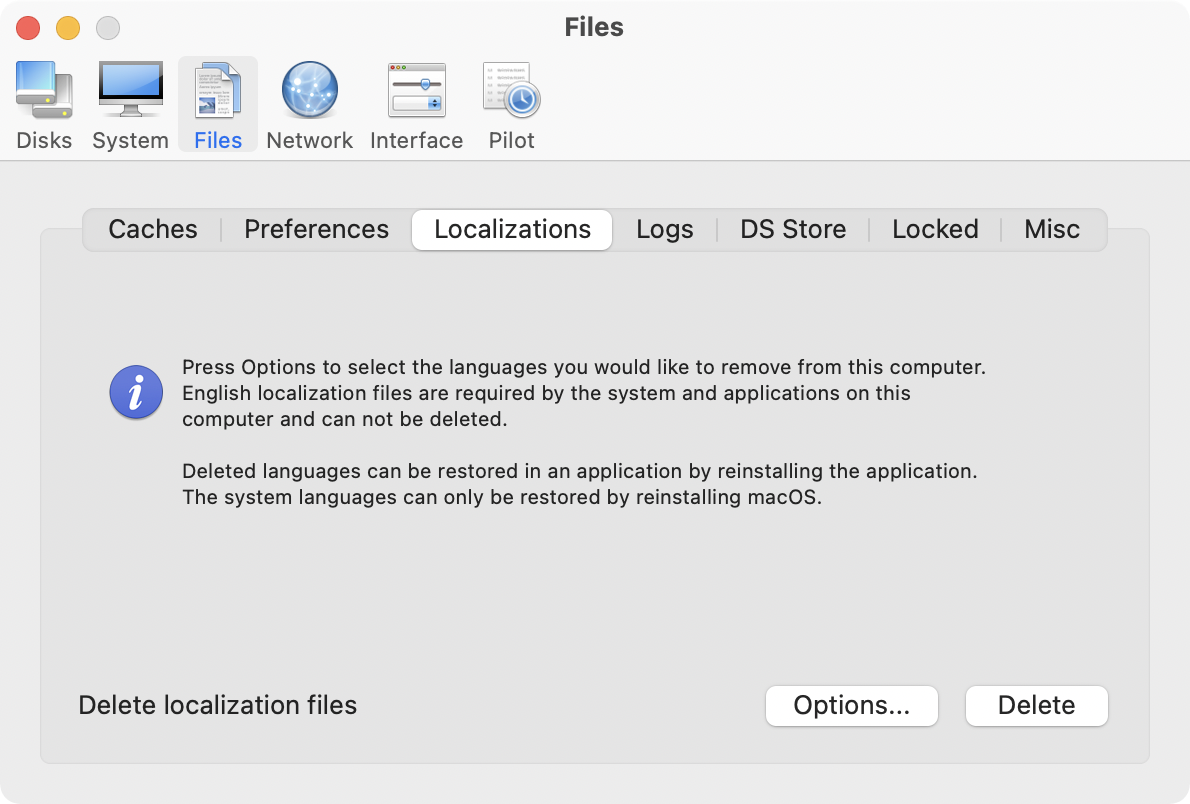
* Delete unnecessary localization (language resources) files
* Clear and manage (view, print and save) log files
* Delete invisible DS Store files
* Delete locked or inaccessible items
Network:
* Change speed, duplex and MTU of network cards
* Easily optimize network settings for common connection types
* Modify IP configuration parameters
* Configure File Sharing settings
Interface:
* Customize look and features of Finder, Dock, login window and other system services
* Modify hidden settings of Safari, QuickTime X and iTunes
Pilot:
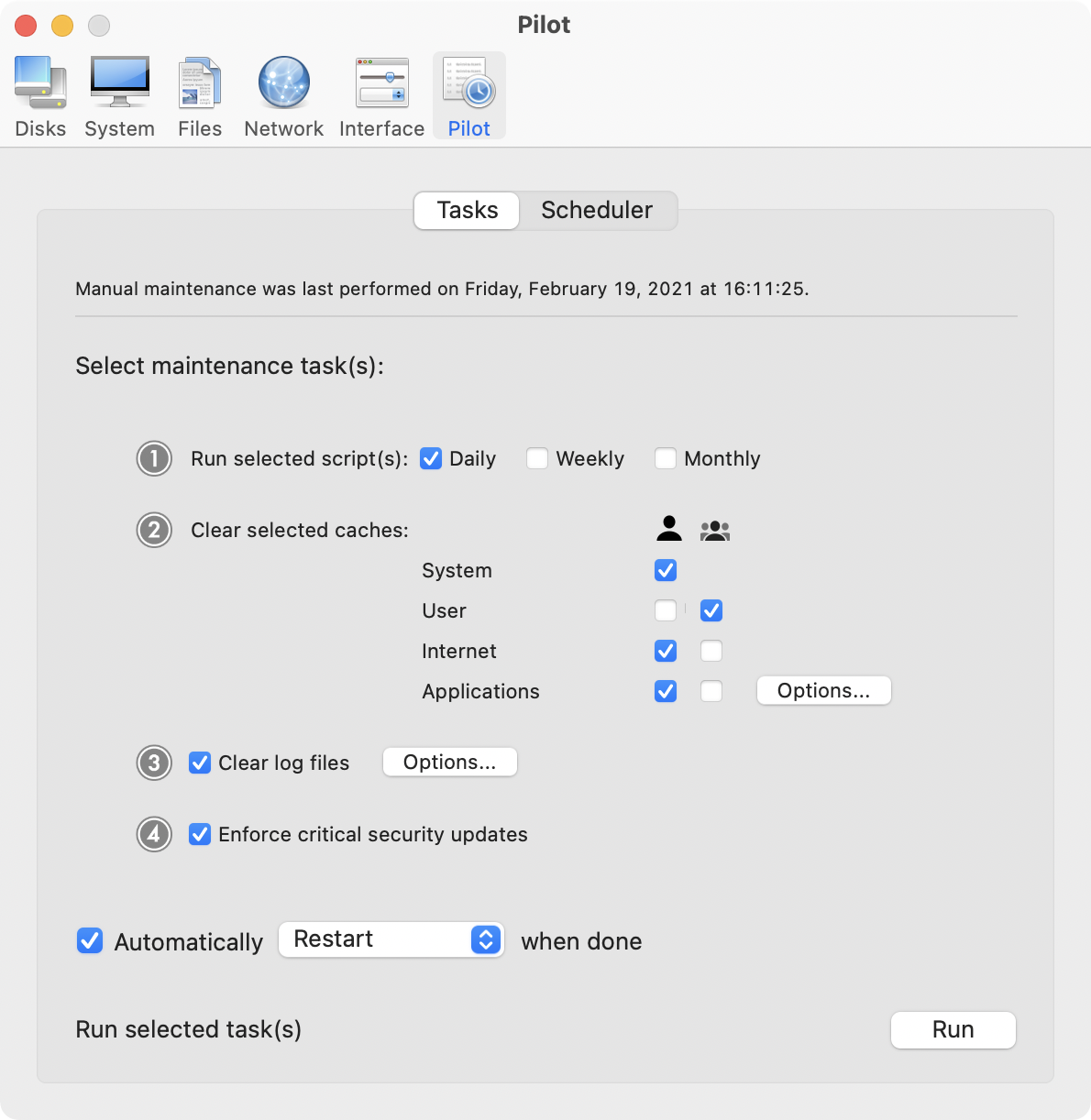
* Clean, repair and optimize your system with one click of the button
* Schedule clearing of caches and log files as well as permissions repair and run of periodic maintenance scripts
What's New:
* Added ability to disable disk image verification (Interface - Finder)
* Improvements on the "Optimize network" procedure
* Fixed compatibility issues with EtreCheck
* Added OS X 10.11.4 compatibility
* Other minor bug fixes and improvements
System Requirements:
Cocktail 9.2.3 (El Capitan Edition) requires OS X El Capitan 10.11 to run. Cocktail (Yosemite Edition) for OS X 10.10, Cocktail (Mavericks Edition) for OS X 10.9, Cocktail (Mountain Lion Edition) for OS X 10.8 and Cocktail (Lion Edition) for OS X 10.7 are available for download from Maintain website.
Pricing and Availability:
Cocktail is $19.00 (USD) for a single user license and available for purchase from the Maintain website. When unregistered, Cocktail runs in demo mode and will expire after the tenth launch.
Cocktail: http://www.maintain.se/cocktail
Download Cocktail 9.2.3 (El Capitan Edition): http://usa.maintain.se/Cocktail9ECE.dmg
Vimeo Video: https://vimeo.com/109816714
Screenshot 1: http://www.maintain.se/downloads/screenshots/screenshot1.png
Screenshot 2: http://www.maintain.se/downloads/screenshots/screenshot2.png
Application Icon: http://www.maintain.se/downloads/screenshots/icon.png
Maintain develops tailored applications for Mac users. We work towards creating technical solutions which maintain your computer and make it as efficient and easy to use as possible. In addition, we offer comprehensive consultancy and support services which cover everything from operation of existing systems to purchase and implementation of new technical solutions. Among our clients are: Major League Baseball, Puma, The New York Times, Sony Pictures, Ericsson, Fortum, The City Of Calgary, Peak Performance, Loreal, Harvard University, Los Angeles Times, Swedish Film Institute, Weber, ESPN, Business Week, Swedish National Police Board, Norwegian Broadcasting Corporation, Getty Images, University of Texas, South Park Studios, CompUSA, bwin, Lockheed Martin, Defense Intelligence Agency, University of Michigan and hundred of thousands of Mac users around the world. Copyright (C) 2016 Maintain. All Rights Reserved. Apple, the Apple logo and Mac are registered trademarks of Apple Inc. in
the U.S. and/or other countries.
*******
Link To Article: http://prmac.com/release-id-79069.htm
*******
---------------------------------------------------------------------------------
Note that you can alter delivered distributions at any time.
Login to your account on prMac to alter your channel selection, or to opt-out at any time.
Maintain Releases Cocktail 9.2.3 (El Capitan Edition) - Published on 03/24/16
Maintain today announces Cocktail 9.2.3 (El Capitan Edition), the latest maintenance update for users running OS X El Capitan 10.11. Cocktail is a general purpose utility for OS X that lets users clean, repair and optimize their Macs. This version adds ability to disable disk image verification. It also contains improvements on the "Optimize network" procedure, fixes compatibility issues with EtreCheck and adds OS X 10.11.4 compatibility.
Ekero, Sweden - Maintain today is pleased to announce the release of Cocktail 9.2.3 (El Capitan Edition), the latest maintenance update for users running OS X El Capitan 10.11. Cocktail is a general purpose utility for OS X that lets you clean, repair and optimize your Mac. The application serves up a perfect mix of maintenance tools and tweaks, all accessible through a clean and easy to use interface. Cocktail's features are arranged into five categories that helps you manage various aspects of your computer. It also comes with an automatic Pilot mode that allows you to simply press a button and relax, knowing that Cocktail will take care of the rest.
Disk:
* Automatically check S.M.A.R.T. status of disks
* Enable or disable journaling
* Repair disk permissions
* Reset home directory permissions and ACLs
* Set disk sleep (spindown) time
* Modify standby delay
* Change other disk sleep settings
* Force eject CD/DVD
System:
* Run periodic maintenance scripts
* Purge inactive memory and optimize virtual memory usage
* Manage Spotlight indexing
* Erase Spotlight indexes
* Modify Time Machine settings
* Rebuild Launch Services and Help databases
* Rebuild Mail's Envelope Index
* Update locate and whatis databases
* Force empty the Trash
* Change startup mode or set startup delay
* Disable startup sound
* Disable Notification Center and App Nap
Files:
* Clear system caches
* Clear user caches
* Clear font caches
* Clear virtual memory swap files
* Clear temporary files
* Clear Internet caches
* Clear cookies, download lists, form values and history files
* Clear Adobe Flash Player caches and cookies
* Clear applications caches
* Search for corrupted preference files
* Delete unnecessary localization (language resources) files
* Clear and manage (view, print and save) log files
* Delete invisible DS Store files
* Delete locked or inaccessible items
Network:
* Change speed, duplex and MTU of network cards
* Easily optimize network settings for common connection types
* Modify IP configuration parameters
* Configure File Sharing settings
Interface:
* Customize look and features of Finder, Dock, login window and other system services
* Modify hidden settings of Safari, QuickTime X and iTunes
Pilot:
* Clean, repair and optimize your system with one click of the button
* Schedule clearing of caches and log files as well as permissions repair and run of periodic maintenance scripts
What's New:
* Added ability to disable disk image verification (Interface - Finder)
* Improvements on the "Optimize network" procedure
* Fixed compatibility issues with EtreCheck
* Added OS X 10.11.4 compatibility
* Other minor bug fixes and improvements
System Requirements:
Cocktail 9.2.3 (El Capitan Edition) requires OS X El Capitan 10.11 to run. Cocktail (Yosemite Edition) for OS X 10.10, Cocktail (Mavericks Edition) for OS X 10.9, Cocktail (Mountain Lion Edition) for OS X 10.8 and Cocktail (Lion Edition) for OS X 10.7 are available for download from Maintain website.
Pricing and Availability:
Cocktail is $19.00 (USD) for a single user license and available for purchase from the Maintain website. When unregistered, Cocktail runs in demo mode and will expire after the tenth launch.
Cocktail: http://www.maintain.se/cocktail
Download Cocktail 9.2.3 (El Capitan Edition): http://usa.maintain.se/Cocktail9ECE.dmg
Vimeo Video: https://vimeo.com/109816714
Screenshot 1: http://www.maintain.se/downloads/screenshots/screenshot1.png
Screenshot 2: http://www.maintain.se/downloads/screenshots/screenshot2.png
Application Icon: http://www.maintain.se/downloads/screenshots/icon.png

Maintain develops tailored applications for Mac users. We work towards creating technical solutions which maintain your computer and make it as efficient and easy to use as possible. In addition, we offer comprehensive consultancy and support services which cover everything from operation of existing systems to purchase and implementation of new technical solutions. Among our clients are: Major League Baseball, Puma, The New York Times, Sony Pictures, Ericsson, Fortum, The City Of Calgary, Peak Performance, Loreal, Harvard University, Los Angeles Times, Swedish Film Institute, Weber, ESPN, Business Week, Swedish National Police Board, Norwegian Broadcasting Corporation, Getty Images, University of Texas, South Park Studios, CompUSA, bwin, Lockheed Martin, Defense Intelligence Agency, University of Michigan and hundred of thousands of Mac users around the world. Copyright (C) 2016 Maintain. All Rights Reserved. Apple, the Apple logo and Mac are registered trademarks of Apple Inc. in
the U.S. and/or other countries.
*******
Link To Article: http://prmac.com/release-id-79069.htm
*******
---------------------------------------------------------------------------------
Note that you can alter delivered distributions at any time.
Login to your account on prMac to alter your channel selection, or to opt-out at any time.
Online Nepal TV For iOS
A new article has been published at prMac.
Online Nepal TV For iOS - Published on 03/24/16
LastThink announces the release of Online Nepal TV 3.5, their highly customizable TV application for iOS devices. Anyone can directly access their favorite TV channel and watch diverse films, news, programs from their iPad, iPhone and iPod touch anywhere and anytime. Vibes are smart TV and movie playlists. Users can easily record their favorite films, news, talk shows, programs and more. Users can also share what they are watching via Facebook, Twitter, YouTube, Dropbox, email and more.
Yerevan, Armenia - LastThink is proud to announce the release of Online Nepal TV 3.5, their highly customizable TV application developed for iPad and iPhone devices. Users can directly access their favorite TV channel and watch diverse films, news, programs from their iPad, iPhone and iPod touch anywhere and anytime.
Features:
* Navigating album photos by sliding your finger right or left on the screen
* Change the device you are streaming the picture to, by taping on the Play button in the upper right corner of your iPad's screen and selecting a desired device
* Screening and shooting any moment of your preferred TV program or film you like
* Altering the boring parts and moving straight to the best part at once - Filter by HD-only and favorite channels
* Rotating channels easily by a mere touch on your screen
* Organize your favorite TV shows, sport teams, movies, and actors and find where you can watch them - on TV and on demand
* Recording your favorite films, news, Talk Shows, programs and etc.
* Sharing what you're watching via Facebook, Twitter, YouTube, Dropbox, email and more - Vibes are smart TV and movie playlists
* The highest quality even with the lowest Internet and HD quality with the normal Internet - You can watch TV channels in HD level
* Editing and cropping videos into smaller parts. In addition to, you can take videos of your favorite program
* Capturing the funniest and most interesting moments of what you are watching with the trim tool
* Searching the content across streaming and broadcast services
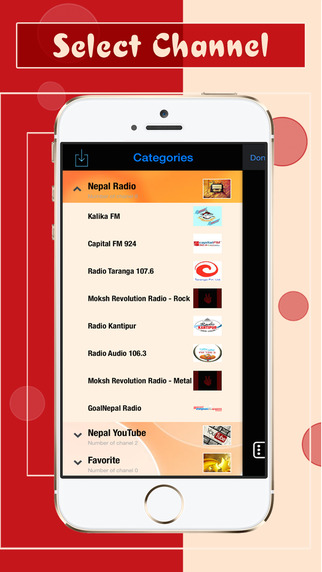
* Discovering more than 100 channels of great entertainment beyond the Nepal Online TV app right on your device's touchscreen interface
If you however experience any issues, please do not hesitate to contact us if you'd like to share your experience with live TV channels, or provide suggestions on how we could improve the product further. We will be more than happy to get in touch.
NOTE: We have selected data from the internet and if any assembly or constitution doesn't want us to show the content of the unit, please recommend us to remove it. We follow TV regulations and adjustments and we select original TV content data without artificial editions.
Device Requirements:
* iPhone, iPad, and iPod touch
* Optimized for iPhone 5, iPhone 6, and iPhone 6 Plus
* Requires iOS 6.0 or later
* Universal Application
* 39.6 MB
Pricing and Availability:
Online Nepal TV 3.5 is free and is available worldwide exclusively through the App Store in the Entertainment category.
LastThink: http://lastthink.com/
Online Nepal TV 3.5: https://www.facebook.com/Online-Nepal-TV-1443974692571789
Download from iTunes: https://itunes.apple.com/app/online-nepal-tv/id906609943
Screenshot: http://a1.mzstatic.com/us/r30/Purple5/v4/eb/6a/bd/eb6abd6b-fd9a-f789-2738-f0e4e3c4f09d/screen322x572.jpeg
App Icon: http://a3.mzstatic.com/us/r30/Purple69/v4/f7/6b/b6/f76bb697-2227-4749-7311-fed8cb4811c5/icon175x175.jpeg
LastThink is an IT company with a focus on mobile development. It has extended its list of services since 2012 to offer high-end business process management, system integration, as well as up-to-date communication solutions. LastThink's mission is to deliver maximum business value to its customers by designing, developing, implementing and maintaining efficient and high quality software solutions aligned with their most essential business needs. Their team will always do its best to meet client expectations. All Material and Software (C) Copyright 2016 LastThink LLC. All Rights Reserved. Apple, the Apple logo, iPhone, iPod and iPad are registered trademarks of Apple Inc. in the U.S. and/or other countries. Other trademarks and registered trademarks may be the property of their respective owners.
*******
Link To Article: http://prmac.com/release-id-79067.htm
*******
---------------------------------------------------------------------------------
Note that you can alter delivered distributions at any time.
Login to your account on prMac to alter your channel selection, or to opt-out at any time.
Online Nepal TV For iOS - Published on 03/24/16
LastThink announces the release of Online Nepal TV 3.5, their highly customizable TV application for iOS devices. Anyone can directly access their favorite TV channel and watch diverse films, news, programs from their iPad, iPhone and iPod touch anywhere and anytime. Vibes are smart TV and movie playlists. Users can easily record their favorite films, news, talk shows, programs and more. Users can also share what they are watching via Facebook, Twitter, YouTube, Dropbox, email and more.
Yerevan, Armenia - LastThink is proud to announce the release of Online Nepal TV 3.5, their highly customizable TV application developed for iPad and iPhone devices. Users can directly access their favorite TV channel and watch diverse films, news, programs from their iPad, iPhone and iPod touch anywhere and anytime.
Features:
* Navigating album photos by sliding your finger right or left on the screen
* Change the device you are streaming the picture to, by taping on the Play button in the upper right corner of your iPad's screen and selecting a desired device
* Screening and shooting any moment of your preferred TV program or film you like
* Altering the boring parts and moving straight to the best part at once - Filter by HD-only and favorite channels
* Rotating channels easily by a mere touch on your screen
* Organize your favorite TV shows, sport teams, movies, and actors and find where you can watch them - on TV and on demand
* Recording your favorite films, news, Talk Shows, programs and etc.
* Sharing what you're watching via Facebook, Twitter, YouTube, Dropbox, email and more - Vibes are smart TV and movie playlists
* The highest quality even with the lowest Internet and HD quality with the normal Internet - You can watch TV channels in HD level
* Editing and cropping videos into smaller parts. In addition to, you can take videos of your favorite program
* Capturing the funniest and most interesting moments of what you are watching with the trim tool
* Searching the content across streaming and broadcast services
* Discovering more than 100 channels of great entertainment beyond the Nepal Online TV app right on your device's touchscreen interface
If you however experience any issues, please do not hesitate to contact us if you'd like to share your experience with live TV channels, or provide suggestions on how we could improve the product further. We will be more than happy to get in touch.
NOTE: We have selected data from the internet and if any assembly or constitution doesn't want us to show the content of the unit, please recommend us to remove it. We follow TV regulations and adjustments and we select original TV content data without artificial editions.
Device Requirements:
* iPhone, iPad, and iPod touch
* Optimized for iPhone 5, iPhone 6, and iPhone 6 Plus
* Requires iOS 6.0 or later
* Universal Application
* 39.6 MB
Pricing and Availability:
Online Nepal TV 3.5 is free and is available worldwide exclusively through the App Store in the Entertainment category.
LastThink: http://lastthink.com/
Online Nepal TV 3.5: https://www.facebook.com/Online-Nepal-TV-1443974692571789
Download from iTunes: https://itunes.apple.com/app/online-nepal-tv/id906609943
Screenshot: http://a1.mzstatic.com/us/r30/Purple5/v4/eb/6a/bd/eb6abd6b-fd9a-f789-2738-f0e4e3c4f09d/screen322x572.jpeg
App Icon: http://a3.mzstatic.com/us/r30/Purple69/v4/f7/6b/b6/f76bb697-2227-4749-7311-fed8cb4811c5/icon175x175.jpeg

LastThink is an IT company with a focus on mobile development. It has extended its list of services since 2012 to offer high-end business process management, system integration, as well as up-to-date communication solutions. LastThink's mission is to deliver maximum business value to its customers by designing, developing, implementing and maintaining efficient and high quality software solutions aligned with their most essential business needs. Their team will always do its best to meet client expectations. All Material and Software (C) Copyright 2016 LastThink LLC. All Rights Reserved. Apple, the Apple logo, iPhone, iPod and iPad are registered trademarks of Apple Inc. in the U.S. and/or other countries. Other trademarks and registered trademarks may be the property of their respective owners.
*******
Link To Article: http://prmac.com/release-id-79067.htm
*******
---------------------------------------------------------------------------------
Note that you can alter delivered distributions at any time.
Login to your account on prMac to alter your channel selection, or to opt-out at any time.
iClassics turns Oscar Wilde into Interactive Tales - Born to be iWilde!
A new article has been published at prMac.
iClassics turns Oscar Wilde into Interactive Tales - Born to be iWilde! - Published on 03/24/16
iClassics Productions S.L today introduces iWilde Collection 1.0 for iOS, its fourth collection of reinvented classics featuring the Irish aesthete Oscar Wilde. Step into a universe where flowers, trees and statues are living, breathing creatures that bear witness to how beauty and kindheartedness can suffer in a cruel world. Ready your senses for an unforgettable palette of colors and sensations, where imagination and interactivity combine to give you a literary experience like no other.
Barcelona, Spain - iClassics Productions S.L, the start-up model of Interactive books, today is pleased to announce the release of iWilde Collection 1.0 for iOS, its fourth collection of reinvented classics featuring the Irish aesthete Oscar Wilde. The company launches this app book with its unique approach to interactive storytelling.
iWilde Collection is a glimpse into the works of the author in a unique interactive experience that gathers some of his well-known tales such as "The Selfish Giant, The Nightingale and the Rose" and "The Happy Prince." It is an hour of interactive stories available in four languages: English, Spanish, French and Portuguese. iWilde Collection has been launched exclusively for iPhone, iPad and iPod and it will be released for Android devices throughout spring.
In previous collections such as iPoe, iLovecraft and iDickens, iClassics presented mystery and horror stories, and they go a step beyond this time and introduce 'Wilde Collection', entertainment for all ages. The interactive book is available on the AppStore, in the Book Category, at a special release price for only 1,99Euro (or equivalent currencies) from the Thursday, March 24.
The work is a very creative piece of art directed by David G. Fores, co-founder of iClassics. 'iWilde Collection' is illustrated by the Cesar Samaniego, who worked as a layout artist for well-known apps such Angry Birds, and includes an immersive original soundtrack composed by Gerard Pastor, who previously co-created with musical masters such as Franois Bergeron, producer of Cirque du Soleil, and Michael Nyman.
Ready your senses for an unforgettable palette of colors and sensations, where imagination and interactivity combine to give you a literary experience like no other!
Our Readers Say:
Yet Another Classic Book Almost Literally Brought To Life ***** (by Brother to Vorlons) "This is not the same as turning works of literature into pablum like the movies so often do. These iClassics are still books, there's still just as much joy of reading to be had as from reading from a paper page. The only difference is in how creatively they are illustrated. This sort of thing is the promise of the iPad fulfilled. More like this please. Perhaps some H. G. Wells or C. S. Lewis. Maybe even some Harlan Ellison next time."
I feared to turn the page ***** (by Klandemann) "What a wonderful idea this was. Took a second to get the flow of the ebook (which really is what this is, just enhanced, you don't lose the pleasure of reading. You HAVE to have earbuds in) but once I did, oh man. The appropriately creepy illustration coupled with tension building music and ambience made me afraid to turn the page. Scary stories somehow made scarier. Truly a great way to read Lovecraft. I think I will expand my collection of this app. I'm glad I had the opportunity to purchase this one at a reduced price for the anniversary yesterday. Thanks! Keep up the good work."
Feature Highlights:
* 3 interactive tales + the illustrated biography of Oscar Wilde
* Available in 4 languages: English, Spanish, French and Portuguese
* For the first time in iClassics: Interactive original soundtrack by Miguel Tejada
* Outstanding artwork by Cesar Samaniego gathering more than 39 illustrations, 84 animations and 36 interactive pages
Device Requirements:
* iPhone, iPad, or iPod touch
* Requires iOS 8.0 or later
* Universal app optimized to be displayed in all iOS devices
* 216 MB (WiFi recommended to download)
Princing and Availability - All iClassics apps:
* Release Special Price: $1.99
* Regular Price: $4.99
* Available worldwide exclusively through the App Store in the Books category
iWilde Collection 1.0: http://iclassicscollection.com/en/iwilde-info/
Purchase and Download: https://itunes.apple.com/app/iwilde-collection-happy-prince/id1077774549
YouTube Video (Trailer): https://www.youtube.com/watch?v=cAc8drGCnRE
Promotional Image (Born to be iWilde): http://iclassicscollection.com/wp-content/uploads/2016/03/born_to_be_iwilde_peque-1024x1024.jpg
Promotional Image (iWilde Collection): http://iclassicscollection.com/wp-content/uploads/2016/03/1240x650_wilde.jpg
iClassics Productions, S.L was founded in 2015 by the experienced management team of Play Creatividad. iClassics dreams of a world where universal classics are within reach of anybody with the nowadays entertainment. Some of their apps, such as iPoe Collection, has been awarded by the Digital Book World, reference magazine for innovation in digital reading, and has proven to be a useful teaching tool to engage students of all ages for the Spanish Foundation 'German Sanchez Ruizperez'. They created a library of interactive classics with a new standpoint in format and aesthetics, in a way that every reader can easily get hooked on it. Their selection criteria go for those authors who were ahead of his time and inspired next generations with their stories. Its contribution consists in turning the works of these authors into a unique audiovisual interactive experience where illustration, animation, music, videos blend together under a very fine creative direction. All Material and
Software (C) 2016 iClassics Productions, S.L / All Rights Reserved. Apple, the Apple logo, iPhone, iPod and iPad are registered trademarks of Apple Inc. in the U.S. and/or other countries.
*******
Link To Article: http://prmac.com/release-id-79063.htm
*******
---------------------------------------------------------------------------------
Note that you can alter delivered distributions at any time.
Login to your account on prMac to alter your channel selection, or to opt-out at any time.
iClassics turns Oscar Wilde into Interactive Tales - Born to be iWilde! - Published on 03/24/16
iClassics Productions S.L today introduces iWilde Collection 1.0 for iOS, its fourth collection of reinvented classics featuring the Irish aesthete Oscar Wilde. Step into a universe where flowers, trees and statues are living, breathing creatures that bear witness to how beauty and kindheartedness can suffer in a cruel world. Ready your senses for an unforgettable palette of colors and sensations, where imagination and interactivity combine to give you a literary experience like no other.
Barcelona, Spain - iClassics Productions S.L, the start-up model of Interactive books, today is pleased to announce the release of iWilde Collection 1.0 for iOS, its fourth collection of reinvented classics featuring the Irish aesthete Oscar Wilde. The company launches this app book with its unique approach to interactive storytelling.
iWilde Collection is a glimpse into the works of the author in a unique interactive experience that gathers some of his well-known tales such as "The Selfish Giant, The Nightingale and the Rose" and "The Happy Prince." It is an hour of interactive stories available in four languages: English, Spanish, French and Portuguese. iWilde Collection has been launched exclusively for iPhone, iPad and iPod and it will be released for Android devices throughout spring.
In previous collections such as iPoe, iLovecraft and iDickens, iClassics presented mystery and horror stories, and they go a step beyond this time and introduce 'Wilde Collection', entertainment for all ages. The interactive book is available on the AppStore, in the Book Category, at a special release price for only 1,99Euro (or equivalent currencies) from the Thursday, March 24.
The work is a very creative piece of art directed by David G. Fores, co-founder of iClassics. 'iWilde Collection' is illustrated by the Cesar Samaniego, who worked as a layout artist for well-known apps such Angry Birds, and includes an immersive original soundtrack composed by Gerard Pastor, who previously co-created with musical masters such as Franois Bergeron, producer of Cirque du Soleil, and Michael Nyman.
Ready your senses for an unforgettable palette of colors and sensations, where imagination and interactivity combine to give you a literary experience like no other!
Our Readers Say:
Yet Another Classic Book Almost Literally Brought To Life ***** (by Brother to Vorlons) "This is not the same as turning works of literature into pablum like the movies so often do. These iClassics are still books, there's still just as much joy of reading to be had as from reading from a paper page. The only difference is in how creatively they are illustrated. This sort of thing is the promise of the iPad fulfilled. More like this please. Perhaps some H. G. Wells or C. S. Lewis. Maybe even some Harlan Ellison next time."
I feared to turn the page ***** (by Klandemann) "What a wonderful idea this was. Took a second to get the flow of the ebook (which really is what this is, just enhanced, you don't lose the pleasure of reading. You HAVE to have earbuds in) but once I did, oh man. The appropriately creepy illustration coupled with tension building music and ambience made me afraid to turn the page. Scary stories somehow made scarier. Truly a great way to read Lovecraft. I think I will expand my collection of this app. I'm glad I had the opportunity to purchase this one at a reduced price for the anniversary yesterday. Thanks! Keep up the good work."
Feature Highlights:
* 3 interactive tales + the illustrated biography of Oscar Wilde
* Available in 4 languages: English, Spanish, French and Portuguese
* For the first time in iClassics: Interactive original soundtrack by Miguel Tejada
* Outstanding artwork by Cesar Samaniego gathering more than 39 illustrations, 84 animations and 36 interactive pages
Device Requirements:
* iPhone, iPad, or iPod touch
* Requires iOS 8.0 or later
* Universal app optimized to be displayed in all iOS devices
* 216 MB (WiFi recommended to download)
Princing and Availability - All iClassics apps:
* Release Special Price: $1.99
* Regular Price: $4.99
* Available worldwide exclusively through the App Store in the Books category
iWilde Collection 1.0: http://iclassicscollection.com/en/iwilde-info/
Purchase and Download: https://itunes.apple.com/app/iwilde-collection-happy-prince/id1077774549
YouTube Video (Trailer): https://www.youtube.com/watch?v=cAc8drGCnRE
Promotional Image (Born to be iWilde): http://iclassicscollection.com/wp-content/uploads/2016/03/born_to_be_iwilde_peque-1024x1024.jpg

Promotional Image (iWilde Collection): http://iclassicscollection.com/wp-content/uploads/2016/03/1240x650_wilde.jpg

iClassics Productions, S.L was founded in 2015 by the experienced management team of Play Creatividad. iClassics dreams of a world where universal classics are within reach of anybody with the nowadays entertainment. Some of their apps, such as iPoe Collection, has been awarded by the Digital Book World, reference magazine for innovation in digital reading, and has proven to be a useful teaching tool to engage students of all ages for the Spanish Foundation 'German Sanchez Ruizperez'. They created a library of interactive classics with a new standpoint in format and aesthetics, in a way that every reader can easily get hooked on it. Their selection criteria go for those authors who were ahead of his time and inspired next generations with their stories. Its contribution consists in turning the works of these authors into a unique audiovisual interactive experience where illustration, animation, music, videos blend together under a very fine creative direction. All Material and
Software (C) 2016 iClassics Productions, S.L / All Rights Reserved. Apple, the Apple logo, iPhone, iPod and iPad are registered trademarks of Apple Inc. in the U.S. and/or other countries.
*******
Link To Article: http://prmac.com/release-id-79063.htm
*******
---------------------------------------------------------------------------------
Note that you can alter delivered distributions at any time.
Login to your account on prMac to alter your channel selection, or to opt-out at any time.
Subscribe to:
Posts (Atom)