A new article has been published at prMac.
"Buggy World" in iOS from "Kidz Learn Applications" - Published on 04/18/16
Buggy World is an educational application intended for everyone. It is a universal application available in Handheld and Tablet devices. This app can be considered as a book app as it has a collection of bug images with a detailed description of their roles, physical characteristics, their behavior and importance in nature.
Edison, New Jersey - "Kidz Learn Applications" announces "Buggy World 7.0" for iOS devices, their application that describes unusual, extraordinary characteristics and behavior of bugs in nature. This application is available for download in iOS, Blackberry, Google and Amazon Play Stores with the title "Bugs World". Upon opening the app, user can see 8 buttons. These are the classification of bugs in 8 categories. These categories describe bugs, the most common ones to the dangerous, true, and unusual ones.
The user has an option to read the contents by disabling the audio from the main screen of the app. Audio can be muted in the main screen, and none of the other pages in the app will have audio describing the contents. Each category has a detailed description and 1-2 images of bugs. The app describes about their physical location, characteristics, food habits and their role/importance in nature. The app highlights the alien like behavior in bugs and how human's directly/indirectly are affected by their actions.
Kids have a tendency to explore and would like to watch and touch the creepy, crawly big and small insects. This application fosters their interest in bugs, by describing the bug behavior and differentiating the dangerous, harmful, and the beneficial. Use of simple interface and language, in describing the content help kids to learn and understand better.
This application has 2 tabs, located at the bottom of every app page. The second tab named "Bug Questions" has questions that are related to the application. Fun question and answer sessions help kids to review the contents for better understanding and learning.
"I am a mom with 2 kids. My kid loves to play in smart phones and Tablet. He/she enjoys playing games. This made me think, why not make educational applications for kids to learn and have fun. My kid loves to learn and have fun with my applications. Hence the apps are intended for all kids who want to grow by learning smart. My applications have Parental Gate for in-App purchases, links to external websites and Social Media. Kid's will have fun learning," adds Sole Proprietor of "Kidz Learn Applications".
Device Requirements:
* iPhone, iPad, and iPod touch
* Requires iOS 6.0 or later
* 98.8 MB
Pricing and Availability:
"Buggy World" in just $1.99, and is available worldwide through the App Store in the Education category. "Bugs World" in Android, is $1.99, and is available through Google Play.
Kidz Learn Applications: http://kidzlearn.co/iosandroid-links.html
Buggy World 7.0: https://itunes.apple.com/app/buggy-world/id566997531
Purchase and Download from Amazon App Store: http://www.amazon.com/Independent-Bugs-World/dp/B00AWF9TTQ
Purchase and Download from Google Play Store: https://play.google.com/store/apps/details?id=com.bugsworldam.application&hl=en
Know Whats Inside: https://knowwhatsinside.com/kidz-learn-application
Kidz Learn Applications are designed for kid's to have fun and enhance their learning abilities.The many paid, and unpaid applications do not require WIFI or net connection to play. Kidz Learn considers Security and Privacy of kid's important. The applications are developed taking security and privacy in to consideration. All Material and Software (C) Copyright 2016 Kidz Learn Applications. All Rights Reserved. Apple, the Apple logo, iPhone, iPod and iPad are registered trademarks of Apple Inc. in the U.S. and/or other countries. Other trademarks and registered trademarks may be the property of their respective owners.
*******
Link To Article: http://prmac.com/release-id-79253.htm
*******
---------------------------------------------------------------------------------
Note that you can alter delivered distributions at any time.
Login to your account on prMac to alter your channel selection, or to opt-out at any time.

Advanced Photo Transfer App is now available on the App Store
A new article has been published at prMac.
Advanced Photo Transfer App is now available on the App Store - Published on 04/18/16
Capable Bits today introduces Photo Transfer App 1.0 for iOS, their new advanced transfer app with live photos and videos support. Supporting all the latest technologies and features of the platform, Photo Transfer App allows you to transfer, backup and share your videos and photos (including Live Photos) privately, quickly and in full resolution. Easily free space on your device with Photo Transfer App. The app features a beautiful as well as easy-to-use interface.
Odessa, Ukraine - Capable Bits today is proud to announce the release of Photo Transfer App 1.0 for iOS, their new advanced transfer app with live photos and videos support. Supporting all the latest technologies and features of the platform, Photo Transfer App allows you to transfer, backup and share your videos and photos (including Live Photos) privately, quickly and in full resolution. Easily free space on your device with Photo Transfer App. The app features a beautiful as well as easy-to-use interface.
Features:
* Transfer photos and videos to computer and vice versa without additional software
* Live Photos support - You can share with friends or backup your live photos as .mov, .gif or even .jpeg .mov format
* Fast and handy transfer to the connected cloud drives: Dropbox, GoogleDrive and Flickr
* Share transferred photos right after they were transferred via email, iMessages or just copy short URL and share it wherever you want
* Free space on your device - You're able to delete transferred photos and keep your iPhone storage clear
* Splitscreen support - Now you're able to save photos in Safari and share it immediately in the easiest way
"We've created Image Transfer app - one of the best transfer apps on the App Store with more than 5 million downloads," explained Eugene Plokhoj, CEO of Odessa based CapableBits Inc. "This experience and feedback from our customers allowed us to create Photo Transfer App with advanced transfer technologies, beautiful interface and helpful features."
Device Requirements:
* iPhone, iPad, and iPod touch
* Requires iOS 9.1 or later
* 13.0 MB
Pricing and Availability:
Photo Transfer App 1.0 is Free and available worldwide exclusively through the App Store in the Photo & Video category. Photo Transfer App offers many nice features with many more are coming soon. Give it a try and send us your feedback.
Capable Bits: http://capablebits.com/
Photo Transfer App 1.0: https://itunes.apple.com/app/id1097293759
Media Assets: https://www.dropbox.com/sh/0k3lruew8hs6i4r/AACIzmaEFoLeoPFe0VbpBLSpa?dl=0
Since 2011, Capable Bits develops apps for the iOS platform. The team is based in Ukraine and has created apps which were downloaded more than 9 millions times. The company also works as a media specialist for their partners. All Material and Software (C) Copyright 2016 CapableBits Inc. All Rights Reserved. Apple, the Apple logo, iPhone, iPod and iPad are registered trademarks of Apple Inc. in the U.S. and/or other countries. Other trademarks and registered trademarks may be the property of their respective owners.
*******
Link To Article: http://prmac.com/release-id-79251.htm
*******
---------------------------------------------------------------------------------
Note that you can alter delivered distributions at any time.
Login to your account on prMac to alter your channel selection, or to opt-out at any time.
Advanced Photo Transfer App is now available on the App Store - Published on 04/18/16
Capable Bits today introduces Photo Transfer App 1.0 for iOS, their new advanced transfer app with live photos and videos support. Supporting all the latest technologies and features of the platform, Photo Transfer App allows you to transfer, backup and share your videos and photos (including Live Photos) privately, quickly and in full resolution. Easily free space on your device with Photo Transfer App. The app features a beautiful as well as easy-to-use interface.
Odessa, Ukraine - Capable Bits today is proud to announce the release of Photo Transfer App 1.0 for iOS, their new advanced transfer app with live photos and videos support. Supporting all the latest technologies and features of the platform, Photo Transfer App allows you to transfer, backup and share your videos and photos (including Live Photos) privately, quickly and in full resolution. Easily free space on your device with Photo Transfer App. The app features a beautiful as well as easy-to-use interface.
Features:
* Transfer photos and videos to computer and vice versa without additional software
* Live Photos support - You can share with friends or backup your live photos as .mov, .gif or even .jpeg .mov format
* Fast and handy transfer to the connected cloud drives: Dropbox, GoogleDrive and Flickr
* Share transferred photos right after they were transferred via email, iMessages or just copy short URL and share it wherever you want
* Free space on your device - You're able to delete transferred photos and keep your iPhone storage clear
* Splitscreen support - Now you're able to save photos in Safari and share it immediately in the easiest way
"We've created Image Transfer app - one of the best transfer apps on the App Store with more than 5 million downloads," explained Eugene Plokhoj, CEO of Odessa based CapableBits Inc. "This experience and feedback from our customers allowed us to create Photo Transfer App with advanced transfer technologies, beautiful interface and helpful features."
Device Requirements:
* iPhone, iPad, and iPod touch
* Requires iOS 9.1 or later
* 13.0 MB
Pricing and Availability:
Photo Transfer App 1.0 is Free and available worldwide exclusively through the App Store in the Photo & Video category. Photo Transfer App offers many nice features with many more are coming soon. Give it a try and send us your feedback.
Capable Bits: http://capablebits.com/
Photo Transfer App 1.0: https://itunes.apple.com/app/id1097293759
Media Assets: https://www.dropbox.com/sh/0k3lruew8hs6i4r/AACIzmaEFoLeoPFe0VbpBLSpa?dl=0
Since 2011, Capable Bits develops apps for the iOS platform. The team is based in Ukraine and has created apps which were downloaded more than 9 millions times. The company also works as a media specialist for their partners. All Material and Software (C) Copyright 2016 CapableBits Inc. All Rights Reserved. Apple, the Apple logo, iPhone, iPod and iPad are registered trademarks of Apple Inc. in the U.S. and/or other countries. Other trademarks and registered trademarks may be the property of their respective owners.
*******
Link To Article: http://prmac.com/release-id-79251.htm
*******
---------------------------------------------------------------------------------
Note that you can alter delivered distributions at any time.
Login to your account on prMac to alter your channel selection, or to opt-out at any time.
Digital Heaven announces SpeedScriber automated transcription service
A new article has been published at prMac.
Digital Heaven announces SpeedScriber automated transcription service - Published on 04/18/16
UK based Digital Heaven today announced SpeedScriber, an exciting advance in automated transcription for content creators. SpeedScriber provides surprisingly accurate transcripts from audio or video files in real-time or faster. Specially developed apps allow users to quickly make corrections and enable printing, PDF export and integration with video editing software. SpeedScriber is currently in development with public release planned for Q3.
London, United Kingdom - Digital Heaven today announced SpeedScriber, a brand new automated transcription service for content creators. Documentary filmmakers, journalists, audio and video producers all depend on reliable transcripts of their files, whether it be an interview for editing purposes or a text version of the finished product. While there are several web-based transcription services on the market, they generally offer delivery times of 24 hours or longer. SpeedScriber provides affordable and surprisingly accurate automated transcripts delivered in real-time or faster.
"Transcribing audio or video files manually is a tedious and time-consuming process so there is a huge demand amongst content creators for automated transcripts, yet the results are usually more comical than useful," explained Martin Baker, Founder, Digital Heaven Ltd. "We're confident that SpeedScriber will have a very positive impact on the industry and help to make transcription a regular part of the production process rather than an occasional luxury."
Features:
* Get transcripts in real-time or faster, not hours or days
* Uses industry-leading automatic speech recognition technology for surprisingly accurate transcripts
* Supports English language speakers with American or British accents and detection of different speakers plus capitalisation and punctuation
* Automatic timestamps at regular intervals
* Specially developed tools for quickly making corrections to transcripts
* Print or export transcripts to PDF and video editing apps
* Mac app with other platforms to follow
Digital Heaven has been developing plug-ins and apps for the video editing market since 2003. SpeedScriber marks the company's first venture into an on-demand service coupled with custom apps.
Pricing and availability:
SpeedScriber is currently in development and beta testing is expected to start in Q2 with public release in Q3. Potential customers can sign up on the website to register their interest in early access to SpeedScriber during the beta testing period. Pricing will be announced at a later date. A Mac app with other platforms will follow.
Digital Heaven: http://www.digital-heaven.co.uk
SpeedScriber: http://www.speedscriber.com
Media Assets: http://www.digital-heaven.co.uk/press
Digital Heaven was founded in 2000 by former BBC video editor Martin Baker. For six years the company provided broadcast post production facilities for clients such as the BBC, Channel Four and many independent production companies. After the success of their first software products, the company shifted its focus in 2005 to exclusively concentrate on software development. A total of 22 Final Cut Plug-ins, 6 Final Cut Effects, 7 applications and 2 eBooks have been added to the product range. Copyright (C) 2016 Digital Heaven. All Rights Reserved. Apple, the Apple logo, Mac OS X, and Macintosh are registered trademarks of Apple Inc. in the U.S. and/or other countries. All other trademarks and trade names are the property of their respective owners.
*******
Link To Article: http://prmac.com/release-id-79250.htm
*******
---------------------------------------------------------------------------------
Note that you can alter delivered distributions at any time.
Login to your account on prMac to alter your channel selection, or to opt-out at any time.
Digital Heaven announces SpeedScriber automated transcription service - Published on 04/18/16
UK based Digital Heaven today announced SpeedScriber, an exciting advance in automated transcription for content creators. SpeedScriber provides surprisingly accurate transcripts from audio or video files in real-time or faster. Specially developed apps allow users to quickly make corrections and enable printing, PDF export and integration with video editing software. SpeedScriber is currently in development with public release planned for Q3.
London, United Kingdom - Digital Heaven today announced SpeedScriber, a brand new automated transcription service for content creators. Documentary filmmakers, journalists, audio and video producers all depend on reliable transcripts of their files, whether it be an interview for editing purposes or a text version of the finished product. While there are several web-based transcription services on the market, they generally offer delivery times of 24 hours or longer. SpeedScriber provides affordable and surprisingly accurate automated transcripts delivered in real-time or faster.
"Transcribing audio or video files manually is a tedious and time-consuming process so there is a huge demand amongst content creators for automated transcripts, yet the results are usually more comical than useful," explained Martin Baker, Founder, Digital Heaven Ltd. "We're confident that SpeedScriber will have a very positive impact on the industry and help to make transcription a regular part of the production process rather than an occasional luxury."
Features:
* Get transcripts in real-time or faster, not hours or days
* Uses industry-leading automatic speech recognition technology for surprisingly accurate transcripts
* Supports English language speakers with American or British accents and detection of different speakers plus capitalisation and punctuation
* Automatic timestamps at regular intervals
* Specially developed tools for quickly making corrections to transcripts
* Print or export transcripts to PDF and video editing apps
* Mac app with other platforms to follow
Digital Heaven has been developing plug-ins and apps for the video editing market since 2003. SpeedScriber marks the company's first venture into an on-demand service coupled with custom apps.
Pricing and availability:
SpeedScriber is currently in development and beta testing is expected to start in Q2 with public release in Q3. Potential customers can sign up on the website to register their interest in early access to SpeedScriber during the beta testing period. Pricing will be announced at a later date. A Mac app with other platforms will follow.
Digital Heaven: http://www.digital-heaven.co.uk
SpeedScriber: http://www.speedscriber.com
Media Assets: http://www.digital-heaven.co.uk/press
Digital Heaven was founded in 2000 by former BBC video editor Martin Baker. For six years the company provided broadcast post production facilities for clients such as the BBC, Channel Four and many independent production companies. After the success of their first software products, the company shifted its focus in 2005 to exclusively concentrate on software development. A total of 22 Final Cut Plug-ins, 6 Final Cut Effects, 7 applications and 2 eBooks have been added to the product range. Copyright (C) 2016 Digital Heaven. All Rights Reserved. Apple, the Apple logo, Mac OS X, and Macintosh are registered trademarks of Apple Inc. in the U.S. and/or other countries. All other trademarks and trade names are the property of their respective owners.
*******
Link To Article: http://prmac.com/release-id-79250.htm
*******
---------------------------------------------------------------------------------
Note that you can alter delivered distributions at any time.
Login to your account on prMac to alter your channel selection, or to opt-out at any time.
AutoCrypt 2.2 for Batch Process Encryption of Files on OS X
A new article has been published at prMac.
AutoCrypt 2.2 for Batch Process Encryption of Files on OS X - Published on 04/18/16
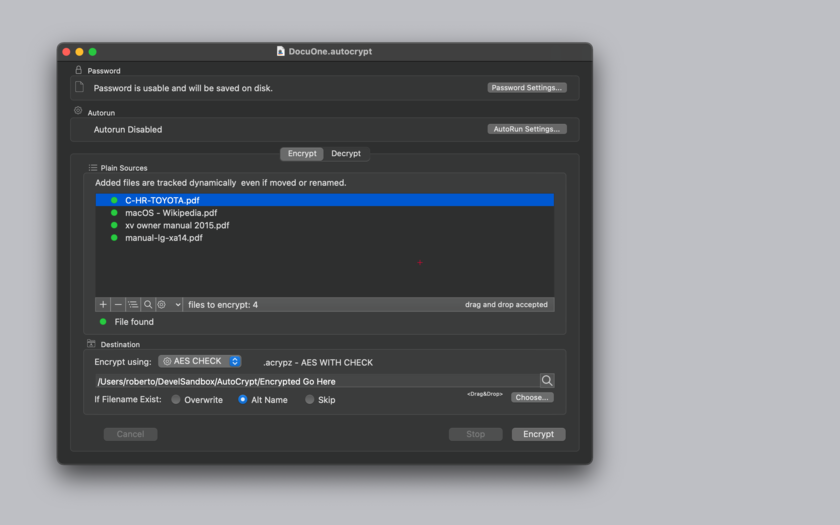
Tension Software announce AutoCrypt 2.2, their encryption/decryption app with a document based approach for Mac OS X. Using a document, AutoCrypt lets the users save in a document all the settings used to encrypt or decrypt collections of files using a powerful AES-256 algorithm Using these documents, With AutoCrypt, a single command is enough to encrypt hundred of files to a destination place. It can also work unattended launching it in the night via launch utilities such as Cronette.
Milano, Italy - Tension Software is proud to announce the release of AutoCrypt 2.2, their encryption/decryption app with a document based approach for Mac OS X. Using a document, AutoCrypt lets the users save in a document all the settings used to encrypt or decrypt collections of files using a powerful AES-256 algorithm Using these documents, AutoCrypt can be used for encryption and decryption batch process of large quantity of files in a single click.
With AutoCrypt, a single command is enough to encrypt hundred of files to a destination place. It can also work unattended launching it in the night via launch utilities such as Cronette.
Thanks to the powerful AES-256 algorithm used by AutoCrypt, all the encrypted files will be totally unreadable by anyone without the correct password. The obtained encrypted files can be transmitted or stored in unsafe places (as example internet servers) without any security problem. All the setting used to encrypt the original files, are saved inside an AutoCrypt document that can encrypt and decrypt an unlimited group of files.
In just a few words. an AutoCrypt document is a collection of setting used to encrypt or decrypt a collection of files. Copying a document and giving it to another user, allow to exchange with that user encrypted files in a safe way over the internet without the need to even input the password used to encrypt files.
In case the files to encrypt or to decrypt are updated with frequencies, an AutoCrypt document, listing this files, provides a one click method to frequently encrypt them storing the updated files in a standard place, even using unattended operation. The user can also launch AutoCrypt in the night using a document with the 'Autorun' option turned on.
AutoCrypt works basing its actions on simplicity and is the ideal solution to be used as a batch mode encryptor and decryptor, but can also be used as a standard user attended tool. AutoCrypt uses the latest technology with asynchronous tasks to perform fast and fluid encryption and decryption All the details of the job AutoCrypt has to perform is stored inside AutoCrypt documents (.AutoCrypt).
When AutoCrypt performs its job, it processes a list of files, one by one, reads each one, encrypts it and saves it in another location appending a .acrypt or .acrypx or .acrypz to the name. AutoCrypt can also automatise the reversed process, decrypting files to plain files and saving them in another place removing the .acrypt , .acripx, .acrypz at the end of the name AutoCrypt uses the latest Apple technology.
Features:
* Can work as a desktop tool or as a batch utility
* Save inside documents all the setting used to encrypt and decrypt group of files
* Encrypt and save in a custom place with one click or even unattended
* Can encrypt and decrypt list of files using the same document
* Accept input via drag and drops for an immediate and easy input
* Powerful features to manipulate list of files
* Uses latest technology with asynchronous tasks to perform fast and fluid encryption and decryption
* Can use also Blowfish encryption/decryption for previous compatibility
* Provides an embedded PDF manual
System Requirements:
* OS X Version 10.10 or higher
* Optimized for OS X 10.11
* 64-bit processor
* 2.9 MB
Pricing and availability:
AutoCrypt 2.2 is $5.99 USD (or an equivalent amount in other currencies), and is available in the Mac App Store in the Productivity category. It is also available for $7.00 from the Tension Software Website.
Tension Software: http://www.tensionsoftware.com
Autocrypt 2.2: http://www.tensionsoftware.com/osx/autocrypt/
Direct Download Link: http://dwn.tensionsoftware.com/osx/autocrypt/autocrypt.dmg
Purchase: http://www.tensionsoftware.com/buy/
Screenshot: http://www.tensionsoftware.com/static/tensionsoftware/images/app/autocrypt/screenshots/mac/1.png
App Icon: http://www.tensionsoftware.com/static/tensionsoftware/images/app/autocrypt/icons/128.png
Tension Software develops software for Mac OS X and iOS using the latest Apple technology, Cocoa and Objective-C. All Material and Software (C) Copyright 2016 Tension Software. All Rights Reserved. Apple, the Apple logo, Macintosh and Mac OS X are registered trademarks of Apple Inc. in the U.S. and/or other countries. Other trademarks and registered trademarks may be the property of their respective owners.
*******
Link To Article: http://prmac.com/release-id-79249.htm
*******
---------------------------------------------------------------------------------
Note that you can alter delivered distributions at any time.
Login to your account on prMac to alter your channel selection, or to opt-out at any time.
AutoCrypt 2.2 for Batch Process Encryption of Files on OS X - Published on 04/18/16
Tension Software announce AutoCrypt 2.2, their encryption/decryption app with a document based approach for Mac OS X. Using a document, AutoCrypt lets the users save in a document all the settings used to encrypt or decrypt collections of files using a powerful AES-256 algorithm Using these documents, With AutoCrypt, a single command is enough to encrypt hundred of files to a destination place. It can also work unattended launching it in the night via launch utilities such as Cronette.
Milano, Italy - Tension Software is proud to announce the release of AutoCrypt 2.2, their encryption/decryption app with a document based approach for Mac OS X. Using a document, AutoCrypt lets the users save in a document all the settings used to encrypt or decrypt collections of files using a powerful AES-256 algorithm Using these documents, AutoCrypt can be used for encryption and decryption batch process of large quantity of files in a single click.
With AutoCrypt, a single command is enough to encrypt hundred of files to a destination place. It can also work unattended launching it in the night via launch utilities such as Cronette.
Thanks to the powerful AES-256 algorithm used by AutoCrypt, all the encrypted files will be totally unreadable by anyone without the correct password. The obtained encrypted files can be transmitted or stored in unsafe places (as example internet servers) without any security problem. All the setting used to encrypt the original files, are saved inside an AutoCrypt document that can encrypt and decrypt an unlimited group of files.
In just a few words. an AutoCrypt document is a collection of setting used to encrypt or decrypt a collection of files. Copying a document and giving it to another user, allow to exchange with that user encrypted files in a safe way over the internet without the need to even input the password used to encrypt files.
In case the files to encrypt or to decrypt are updated with frequencies, an AutoCrypt document, listing this files, provides a one click method to frequently encrypt them storing the updated files in a standard place, even using unattended operation. The user can also launch AutoCrypt in the night using a document with the 'Autorun' option turned on.
AutoCrypt works basing its actions on simplicity and is the ideal solution to be used as a batch mode encryptor and decryptor, but can also be used as a standard user attended tool. AutoCrypt uses the latest technology with asynchronous tasks to perform fast and fluid encryption and decryption All the details of the job AutoCrypt has to perform is stored inside AutoCrypt documents (.AutoCrypt).
When AutoCrypt performs its job, it processes a list of files, one by one, reads each one, encrypts it and saves it in another location appending a .acrypt or .acrypx or .acrypz to the name. AutoCrypt can also automatise the reversed process, decrypting files to plain files and saving them in another place removing the .acrypt , .acripx, .acrypz at the end of the name AutoCrypt uses the latest Apple technology.
Features:
* Can work as a desktop tool or as a batch utility
* Save inside documents all the setting used to encrypt and decrypt group of files
* Encrypt and save in a custom place with one click or even unattended
* Can encrypt and decrypt list of files using the same document
* Accept input via drag and drops for an immediate and easy input
* Powerful features to manipulate list of files
* Uses latest technology with asynchronous tasks to perform fast and fluid encryption and decryption
* Can use also Blowfish encryption/decryption for previous compatibility
* Provides an embedded PDF manual
System Requirements:
* OS X Version 10.10 or higher
* Optimized for OS X 10.11
* 64-bit processor
* 2.9 MB
Pricing and availability:
AutoCrypt 2.2 is $5.99 USD (or an equivalent amount in other currencies), and is available in the Mac App Store in the Productivity category. It is also available for $7.00 from the Tension Software Website.
Tension Software: http://www.tensionsoftware.com
Autocrypt 2.2: http://www.tensionsoftware.com/osx/autocrypt/
Direct Download Link: http://dwn.tensionsoftware.com/osx/autocrypt/autocrypt.dmg
Purchase: http://www.tensionsoftware.com/buy/
Screenshot: http://www.tensionsoftware.com/static/tensionsoftware/images/app/autocrypt/screenshots/mac/1.png
App Icon: http://www.tensionsoftware.com/static/tensionsoftware/images/app/autocrypt/icons/128.png

Tension Software develops software for Mac OS X and iOS using the latest Apple technology, Cocoa and Objective-C. All Material and Software (C) Copyright 2016 Tension Software. All Rights Reserved. Apple, the Apple logo, Macintosh and Mac OS X are registered trademarks of Apple Inc. in the U.S. and/or other countries. Other trademarks and registered trademarks may be the property of their respective owners.
*******
Link To Article: http://prmac.com/release-id-79249.htm
*******
---------------------------------------------------------------------------------
Note that you can alter delivered distributions at any time.
Login to your account on prMac to alter your channel selection, or to opt-out at any time.
Snapeas 3.0 - Popular iOS book creation program goes Universal
A new article has been published at prMac.
Snapeas 3.0 - Popular iOS book creation program goes Universal - Published on 04/18/16
Lake Effect Solutions, LLC today announces Snapeas 3.0, an important update to their popular iOS book creation program. Snapeas is the easiest way to create beautiful hard cover, captioned photo books from the photos on an iDevice. Version 3.0 is optimized to take full advantage of the larger screen size provided on all versions of the Apple iPad, including the 12.9 inch iPad Pro. It's great to see all 24 image thumbnails on one screen, so you can more easily select and sequence your photos.
Rochester, New York - Lake Effect Solutions, LLC today is pleased to announce the release of Snapeas 3.0, an important update to their popular iOS book creation program. In addition to the Apple Pay enhancements to the previous version, this iteration introduces native support for all iPad devices. Creating a book on an iPad is a truly pleasurable experience. With all pages visible at once, no scrolling is needed to see the entire book on the screen.
Snapeas is the easiest way to create beautiful hard cover, captioned photo books from the photos on an iDevice. Following three simple steps - select, sort, caption - a user can make a book in just a few minutes. Each step is honed for ease of use and clarity, and the program works optimally on devices from an iPhone 4s to an iPad Pro (the big boy).
Each step of the book making process has been examined and simplified to reduce opportunities for confusion and error, and provides a fun and painless experience. Our artistic director has made aesthetic decisions that relieve the user from a host of often conflicting and confusing choices, thus guaranteeing a beautiful book. As easy as it is to use, extensive help is also built into the program and can be summoned at every step.
Two unique features of the app are Instant Help, which displays help and tips for each screen at the touch of a button, and Auto Caption, which automatically fills out the caption for a page when it recognizes a location (e.g. Grand Canyon). Both features are optionally enabled through Settings.
Device Requirements:
* iPhone, iPad, and iPod touch
* Requires iOS 8.0 or later
* Universal Application
* 54.0 MB
Pricing and Availability:
Snapeas 3.0 is Free and available worldwide exclusively through the App Store in the Books category. The app creates a book from 20 to 24 user-selected photos, with optional captions and title page, and uploads it to the Snapeas web site where it is printed and bound into an 8 by 8 inch linen hard cover book and mailed to the user. A special promotional price of $19.95 includes free shipping, with expedited shipping just a few dollars more.
Snapeas 3.0: http://snapeas.com
Download from iTunes: https://itunes.apple.com/app/snapeas/id1039727576
Screenshot 1: http://a5.mzstatic.com/us/r30/Purple49/v4/ba/dc/82/badc82a9-a5c2-8516-11e6-c491f35be614/screen322x572.jpeg
Screenshot 2: http://a5.mzstatic.com/us/r30/Purple69/v4/bc/b5/50/bcb550d5-0020-f899-1c59-485644292867/screen322x572.jpeg
App Icon: http://a1.mzstatic.com/us/r30/Purple49/v4/b3/62/55/b36255af-9c1e-f0ed-f00b-19e253be6da0/icon175x175.jpeg
Lake Effect Solutions, LLC, the business entity created to market Snapeas books, partnered with Furry Friend Photos to produce the Snapeas app, and with PixelPreserve, LLC to print the Snapeas books. They're all located in Rochester, New York. Furry Friend Photos was formed in 2006 to bring professional photographic values to the Rochester pet community, and later branched out into iOS app development. Snapeas is one of several apps produced under the Furry Friend Photos banner. Pixel Preserve was founded to help customers produce custom memory books - to digitize and print the proverbial shoebox of memories. The owners came together through shared interests in photography and memory preservation, and built Snapeas to enable iPhone users to create memory books directly from their iPhone pictures. All Material and Software (C) Copyright 2016 Lake Effect Solutions, LLC. All Rights Reserved. Apple, the Apple logo, iPhone, iPod and iPad are registered trademarks of Apple Inc. in the
U.S. and/or other countries. Other trademarks and registered trademarks may be the property of their respective owners.
*******
Link To Article: http://prmac.com/release-id-79247.htm
*******
---------------------------------------------------------------------------------
Note that you can alter delivered distributions at any time.
Login to your account on prMac to alter your channel selection, or to opt-out at any time.
Snapeas 3.0 - Popular iOS book creation program goes Universal - Published on 04/18/16
Lake Effect Solutions, LLC today announces Snapeas 3.0, an important update to their popular iOS book creation program. Snapeas is the easiest way to create beautiful hard cover, captioned photo books from the photos on an iDevice. Version 3.0 is optimized to take full advantage of the larger screen size provided on all versions of the Apple iPad, including the 12.9 inch iPad Pro. It's great to see all 24 image thumbnails on one screen, so you can more easily select and sequence your photos.
Rochester, New York - Lake Effect Solutions, LLC today is pleased to announce the release of Snapeas 3.0, an important update to their popular iOS book creation program. In addition to the Apple Pay enhancements to the previous version, this iteration introduces native support for all iPad devices. Creating a book on an iPad is a truly pleasurable experience. With all pages visible at once, no scrolling is needed to see the entire book on the screen.
Snapeas is the easiest way to create beautiful hard cover, captioned photo books from the photos on an iDevice. Following three simple steps - select, sort, caption - a user can make a book in just a few minutes. Each step is honed for ease of use and clarity, and the program works optimally on devices from an iPhone 4s to an iPad Pro (the big boy).
Each step of the book making process has been examined and simplified to reduce opportunities for confusion and error, and provides a fun and painless experience. Our artistic director has made aesthetic decisions that relieve the user from a host of often conflicting and confusing choices, thus guaranteeing a beautiful book. As easy as it is to use, extensive help is also built into the program and can be summoned at every step.
Two unique features of the app are Instant Help, which displays help and tips for each screen at the touch of a button, and Auto Caption, which automatically fills out the caption for a page when it recognizes a location (e.g. Grand Canyon). Both features are optionally enabled through Settings.
Device Requirements:
* iPhone, iPad, and iPod touch
* Requires iOS 8.0 or later
* Universal Application
* 54.0 MB
Pricing and Availability:
Snapeas 3.0 is Free and available worldwide exclusively through the App Store in the Books category. The app creates a book from 20 to 24 user-selected photos, with optional captions and title page, and uploads it to the Snapeas web site where it is printed and bound into an 8 by 8 inch linen hard cover book and mailed to the user. A special promotional price of $19.95 includes free shipping, with expedited shipping just a few dollars more.
Snapeas 3.0: http://snapeas.com
Download from iTunes: https://itunes.apple.com/app/snapeas/id1039727576
Screenshot 1: http://a5.mzstatic.com/us/r30/Purple49/v4/ba/dc/82/badc82a9-a5c2-8516-11e6-c491f35be614/screen322x572.jpeg

Screenshot 2: http://a5.mzstatic.com/us/r30/Purple69/v4/bc/b5/50/bcb550d5-0020-f899-1c59-485644292867/screen322x572.jpeg

App Icon: http://a1.mzstatic.com/us/r30/Purple49/v4/b3/62/55/b36255af-9c1e-f0ed-f00b-19e253be6da0/icon175x175.jpeg

Lake Effect Solutions, LLC, the business entity created to market Snapeas books, partnered with Furry Friend Photos to produce the Snapeas app, and with PixelPreserve, LLC to print the Snapeas books. They're all located in Rochester, New York. Furry Friend Photos was formed in 2006 to bring professional photographic values to the Rochester pet community, and later branched out into iOS app development. Snapeas is one of several apps produced under the Furry Friend Photos banner. Pixel Preserve was founded to help customers produce custom memory books - to digitize and print the proverbial shoebox of memories. The owners came together through shared interests in photography and memory preservation, and built Snapeas to enable iPhone users to create memory books directly from their iPhone pictures. All Material and Software (C) Copyright 2016 Lake Effect Solutions, LLC. All Rights Reserved. Apple, the Apple logo, iPhone, iPod and iPad are registered trademarks of Apple Inc. in the
U.S. and/or other countries. Other trademarks and registered trademarks may be the property of their respective owners.
*******
Link To Article: http://prmac.com/release-id-79247.htm
*******
---------------------------------------------------------------------------------
Note that you can alter delivered distributions at any time.
Login to your account on prMac to alter your channel selection, or to opt-out at any time.
Tanks and Turrets 3 released for iOS/Android Phones and Tablets
A new article has been published at prMac.
Tanks and Turrets 3 released for iOS/Android Phones and Tablets - Published on 04/18/16
Independent developer, Gordon Roberts today introduces Tanks and Turrets 3, the latest open field style tower defense game for iOS and Android Devices. In Tanks and Turrets, players must defend their medieval village from invading Tanks using futuristic weapons. This classic defense-style game offers 10 different Turrets to defend your lands. It features 10 Maps with 3 difficulty levels, offering many hours of gameplay. Tanks and Turrets supports Game Center achievements and Leaderboards.
Boise, Idaho - Independent developer, Gordon Roberts today is proud to announce the release of Tanks and Turrets 3, the latest open field style tower defense game with retina graphics for iOS and Android Devices. In Tanks and Turrets, players must defend their medieval village from invading Tanks using futuristic weapons. This classic defense-style game offers 10 different Turrets to defend your lands. It features 10 Maps with 3 difficulty levels, offering many hours of gameplay. Level up your Turrets to advance and compete with Game Center achievements and Leaderboards.
Features:
* Game Center/Google Play integration with Scoreboards and Achievements
* 10 unique challenging maps - unlimited levels
* 3 difficulty levels
* 10 types of Turrets
Following up on the popular Tanks and Turrets tower defense series (available on Android/iPad/iPhone/iTouch). Over 250,000 addicted users of the original game will enjoy the updated 3d graphics. Over 250 million vehicles have been destroyed in Tanks and Turrets to date. With 10 unique maps and 10 different Turret types the games offs many hours of fun.
Previous Releases Include:
* Tanks and Turrets HD - iPad Version - Free - Hit Top 100 Strategy Game in 73 countries
* Tanks and Turrets - Android (top 50 Free Game - Amazon Appstore - April 2011)
* Tanks and Turrets Off-Road
* Tanks and Turrets 2
Device Requirements:
* iPhone, iPod touch, iPad or Android Devices
* Requires iPhone OS 9 or Android 5
Pricing and Availability:
Tanks and Turrets 3 (v1.0) is Free (with in-app purchase) and available worldwide through the App Store in the Games category. In-app purchase available for accelerated leveling. There is also an Android version available on Google Play.
Tanks and Turrets 3 (v1.0): http://gordonroberts.net/tanks-and-turrets-3
Download from iTunes: http://itunes.apple.com/app/tanks-and-turrets-3/id1097889300
Download from Google Play: http://play.google.com/store/apps/details?id=net.gordonroberts.tanksandturretsthree
EveryPlay Gallery: http://everyplay.com/tanks-and-turrets-3/home
Screenshot: http://gordonroberts.net/Games/pro1.PNG
App Icon: http://a1.mzstatic.com/us/r30/Purple49/v4/fb/eb/c9/fbebc9af-4b43-6cb7-dffd-06d987a2be47/icon175x175.png
Gordon Roberts is a retired engineer and a part time game developer. Copyright (C) 2016 Gordon Roberts. All Rights Reserved. Apple, the Apple logo, iPhone, iPod and iPad are registered trademarks of Apple Inc. in the U.S. and/or other countries.
*******
Link To Article: http://prmac.com/release-id-79248.htm
*******
---------------------------------------------------------------------------------
Note that you can alter delivered distributions at any time.
Login to your account on prMac to alter your channel selection, or to opt-out at any time.
Tanks and Turrets 3 released for iOS/Android Phones and Tablets - Published on 04/18/16
Independent developer, Gordon Roberts today introduces Tanks and Turrets 3, the latest open field style tower defense game for iOS and Android Devices. In Tanks and Turrets, players must defend their medieval village from invading Tanks using futuristic weapons. This classic defense-style game offers 10 different Turrets to defend your lands. It features 10 Maps with 3 difficulty levels, offering many hours of gameplay. Tanks and Turrets supports Game Center achievements and Leaderboards.
Boise, Idaho - Independent developer, Gordon Roberts today is proud to announce the release of Tanks and Turrets 3, the latest open field style tower defense game with retina graphics for iOS and Android Devices. In Tanks and Turrets, players must defend their medieval village from invading Tanks using futuristic weapons. This classic defense-style game offers 10 different Turrets to defend your lands. It features 10 Maps with 3 difficulty levels, offering many hours of gameplay. Level up your Turrets to advance and compete with Game Center achievements and Leaderboards.
Features:
* Game Center/Google Play integration with Scoreboards and Achievements
* 10 unique challenging maps - unlimited levels
* 3 difficulty levels
* 10 types of Turrets
Following up on the popular Tanks and Turrets tower defense series (available on Android/iPad/iPhone/iTouch). Over 250,000 addicted users of the original game will enjoy the updated 3d graphics. Over 250 million vehicles have been destroyed in Tanks and Turrets to date. With 10 unique maps and 10 different Turret types the games offs many hours of fun.
Previous Releases Include:
* Tanks and Turrets HD - iPad Version - Free - Hit Top 100 Strategy Game in 73 countries
* Tanks and Turrets - Android (top 50 Free Game - Amazon Appstore - April 2011)
* Tanks and Turrets Off-Road
* Tanks and Turrets 2
Device Requirements:
* iPhone, iPod touch, iPad or Android Devices
* Requires iPhone OS 9 or Android 5
Pricing and Availability:
Tanks and Turrets 3 (v1.0) is Free (with in-app purchase) and available worldwide through the App Store in the Games category. In-app purchase available for accelerated leveling. There is also an Android version available on Google Play.
Tanks and Turrets 3 (v1.0): http://gordonroberts.net/tanks-and-turrets-3
Download from iTunes: http://itunes.apple.com/app/tanks-and-turrets-3/id1097889300
Download from Google Play: http://play.google.com/store/apps/details?id=net.gordonroberts.tanksandturretsthree
EveryPlay Gallery: http://everyplay.com/tanks-and-turrets-3/home
Screenshot: http://gordonroberts.net/Games/pro1.PNG

App Icon: http://a1.mzstatic.com/us/r30/Purple49/v4/fb/eb/c9/fbebc9af-4b43-6cb7-dffd-06d987a2be47/icon175x175.png

Gordon Roberts is a retired engineer and a part time game developer. Copyright (C) 2016 Gordon Roberts. All Rights Reserved. Apple, the Apple logo, iPhone, iPod and iPad are registered trademarks of Apple Inc. in the U.S. and/or other countries.
*******
Link To Article: http://prmac.com/release-id-79248.htm
*******
---------------------------------------------------------------------------------
Note that you can alter delivered distributions at any time.
Login to your account on prMac to alter your channel selection, or to opt-out at any time.
Map List - An iOS app to create lists of favorite locations
A new article has been published at prMac.
Map List - An iOS app to create lists of favorite locations - Published on 04/18/16
Melbourne based developers, The Lim brothers today introduce Map List 1.0, an iOS app that allows users to create lists of their favorite locations. Aimed at users who like to be organised, Map List can help users track locations of any type of place, for example their favourite restaurants to try, bars, or friends places. Simply search for the name or type of place and add it directly to the list. This simple app also allows users to add notes, ratings & other details for each saved location.
Melbourne, Australia - The Lim brothers are pleased to announce the release of Map List 1.0 today, an iOS app that allows users to create lists of their favorite locations. Aimed at users who like to be organised, Map List can help users track locations of any type of place, for example their favourite restaurants to try, bars, or friends places. Simply search for the name or type of place and add it directly to the list. This simple app also allows users to add notes, ratings, and other details for each saved location.
Suggestions for categories/ lists;
* Add your favourite restaurants or restaurants you want to try
* Bars
* Vegetarian Restaurants
* Coffee Stores
* Friends and family houses
* Favourite barbecue places
* Tourist attractions
* Favourite activity places
* Business - keep track of clients
* Real estate locations
* Errands
* Favourite clothing stores
* Easy parking locations
* Children/ baby friendly places
* Memorable places you have visited
* Breakfast places
Features:
* Simple to easy to use
* Create separate maps for each category
* Drop a pin on a location or search for locations, names of restaurants etc.
* Locate your own position
* View details of places including address, phone numbers, websites (where available)
* Open addresses in your navigation application
* Bookmark locations across the world
Device Requirements:
* iPhone, iPad
* Requires iOS 7 or later
* Optimized for iPhone 5
Pricing and Availability:
Map List 1.0 is free with an in app purchase to remove advertisements, and available worldwide through the App Store in the Productivity category.
Map List 1.0: http://itunes.apple.com/app/id1091377458
Screenshot: http://a3.mzstatic.com/us/r30/Purple49/v4/03/d2/7c/03d27c20-461f-606d-cc27-11cf7a251460/screen322x572.jpeg
App Icon: http://a3.mzstatic.com/us/r30/Purple49/v4/d6/21/be/d621be43-7083-d2f2-4bc1-2434af427b6d/icon175x175.png
Independent developers Chun and Meng Lim, are two brothers based in Melbourne, Australia. Copyright (C) 2016 Chun and Meng Lim. All Rights Reserved. Apple, the Apple logo, iPhone, iPod and iPad are registered trademarks of Apple Inc. in the U.S. and/or other countries.
*******
Link To Article: http://prmac.com/release-id-79246.htm
*******
---------------------------------------------------------------------------------
Note that you can alter delivered distributions at any time.
Login to your account on prMac to alter your channel selection, or to opt-out at any time.
Map List - An iOS app to create lists of favorite locations - Published on 04/18/16
Melbourne based developers, The Lim brothers today introduce Map List 1.0, an iOS app that allows users to create lists of their favorite locations. Aimed at users who like to be organised, Map List can help users track locations of any type of place, for example their favourite restaurants to try, bars, or friends places. Simply search for the name or type of place and add it directly to the list. This simple app also allows users to add notes, ratings & other details for each saved location.
Melbourne, Australia - The Lim brothers are pleased to announce the release of Map List 1.0 today, an iOS app that allows users to create lists of their favorite locations. Aimed at users who like to be organised, Map List can help users track locations of any type of place, for example their favourite restaurants to try, bars, or friends places. Simply search for the name or type of place and add it directly to the list. This simple app also allows users to add notes, ratings, and other details for each saved location.
Suggestions for categories/ lists;
* Add your favourite restaurants or restaurants you want to try
* Bars
* Vegetarian Restaurants
* Coffee Stores
* Friends and family houses
* Favourite barbecue places
* Tourist attractions
* Favourite activity places
* Business - keep track of clients
* Real estate locations
* Errands
* Favourite clothing stores
* Easy parking locations
* Children/ baby friendly places
* Memorable places you have visited
* Breakfast places
Features:
* Simple to easy to use
* Create separate maps for each category
* Drop a pin on a location or search for locations, names of restaurants etc.
* Locate your own position
* View details of places including address, phone numbers, websites (where available)
* Open addresses in your navigation application
* Bookmark locations across the world
Device Requirements:
* iPhone, iPad
* Requires iOS 7 or later
* Optimized for iPhone 5
Pricing and Availability:
Map List 1.0 is free with an in app purchase to remove advertisements, and available worldwide through the App Store in the Productivity category.
Map List 1.0: http://itunes.apple.com/app/id1091377458
Screenshot: http://a3.mzstatic.com/us/r30/Purple49/v4/03/d2/7c/03d27c20-461f-606d-cc27-11cf7a251460/screen322x572.jpeg

App Icon: http://a3.mzstatic.com/us/r30/Purple49/v4/d6/21/be/d621be43-7083-d2f2-4bc1-2434af427b6d/icon175x175.png

Independent developers Chun and Meng Lim, are two brothers based in Melbourne, Australia. Copyright (C) 2016 Chun and Meng Lim. All Rights Reserved. Apple, the Apple logo, iPhone, iPod and iPad are registered trademarks of Apple Inc. in the U.S. and/or other countries.
*******
Link To Article: http://prmac.com/release-id-79246.htm
*******
---------------------------------------------------------------------------------
Note that you can alter delivered distributions at any time.
Login to your account on prMac to alter your channel selection, or to opt-out at any time.
Subscribe to:
Posts (Atom)