A new article has been published at prMac.
A Mobile, iOS Technology Cluster for Publishers from PressPad and VORM - Published on 04/22/16
PressPad Digital Publishing and VORM design and software lab are joining together to form a mobile technology cluster for magazine publishers willing to go mobile with custom iOS apps. In the fast changing reality of mobile consumerism, publishers need reliable access to a full service digital publishing software house which is able to design innovative and dedicated digital publishing technology products from scratch.
Krakow, Poland, EU - PressPad Digital Publishing and VORM are creating a consulting and technology cluster to provide comprehensive solutions for publishers of various kinds and sizes. PressPad provides know-how in the field of digital publishing and mobile technologies. VORM extends the powers of designing modern mobile software and IOT products characterized by an innovative design approach.
In the fast changing reality of mobile consumerism, publishers need reliable access to a full service digital publishing software house which is able to design innovative and dedicated digital publishing technology products from scratch.
"Content delivery is a pain these days and one of the key elements of successful investment in digital publishing is the ability to resonate with readers through relevant technology, followed by the right design decisions", said Michael Opydo, CEO of PressPad.
While PressPad's SaaS service fits publishers who want to go mobile in a cost effective manner, with digital flip-page print replicas, the new technology cluster opens endless opportunities for crafting custom digital publishing solutions. From brand identity to the final product.
Thanks to this new partnership, publishers will gain access to a multifunctional end-to-end consulting team and software design house capable of delivering the final product, from identifying brand strategy concept, through technology behavioral design, to world class software development.
About PressPad Digital Publishing
A digital publishing platform bringing magazine brands to the mobile world of App Store. PressPad supports over 2 million users worldwide and is known for its affordable mobile apps for magazine publishers and ease of use, even for publishers with non-technical skills. PressPad lets publishers focus on their day-to-day publishing life while handling everything mobile in a frictionless manner.
About VORM
A technology design and innovation consultancy firm, VORM connects strategy with design thinking and the newest mobile technology, to create beautiful and useful experiences from start to finish. Brands that tell a story, digital products that engage people, and products notable for innovation, such as Clime, Woolet and many more.
PressPad Digital Publishing: http://www.presspadapp.com
VORM Design & Software: http://vormlab.com
Cover Photo: http://blog.presspadapp.com/wp-content/uploads/PressPad-VORM_technology-cluster-for-publishers.gif
PressPad is a Digital Publishing and Marketing Platform for Mobile Magazines and Comic Books. It is a single contact point for all things mobile, offering technology necessary to launch magazine iOS apps and than work and educate publishers to build mobile as a great distribution channel. All Material and Software (C) Copyright 2016 PressPad. All Rights Reserved. Apple, the Apple logo, iPhone, iPod and iPad are registered trademarks of Apple Inc. in the U.S. and/or other countries. Other trademarks and registered trademarks may be the property of their respective owners.
*******
Link To Article: http://prmac.com/release-id-79299.htm
*******
---------------------------------------------------------------------------------
Note that you can alter delivered distributions at any time.
Login to your account on prMac to alter your channel selection, or to opt-out at any time.


Kidz Learn 9.1 from Kidz Learn Applications
A new article has been published at prMac.
Kidz Learn 9.1 from Kidz Learn Applications - Published on 04/22/16
Kidz Learn Applications announces Kidz Learn 9.1, a learning tool application available for download for iOS, Blackberry, Google and Amazon devices. Upon opening this app the users i.e. Kids/Adults can view 6 menu options. The 6 menu options comprises of Alphabets, Numbers, Stories, Shapes, Colors, Body Parts. The Kidz Learn application gives privacy and security importance. This application does not have location detection, or ad display. There is no access to social media or external websites.
Edison, New Jersey - Kidz Learn Applications is proud to announce Kidz Learn 9.1, a learning tool application available for download for iOS, Blackberry, Google and Amazon devices. Once downloaded the app does not require an Internet connection to play the contents. Upon opening this app the users i.e. Kids/Adults can view 6 menu options. The 6 menu options comprises of Alphabets, Numbers, Stories, Shapes, Colors, Body Parts. The Kidz Learn application gives privacy and security importance. This application does not have location detection, or ad display. There is no access to social media or external websites.
Upon opening the category "Alphabets," users can see 3D-like display of Alphabets A-Z. Upon selecting an alphabet, 4 images beginning with the associated letter along with an audio are displayed. Good quality images enables child to learn and foster development.
Category "Numbers" displays 3D-like images of Numbers (1-25). Upon selecting a number, corresponding number of images are displayed along with an audio as a counting aid. If an animal is used to describe the number, sounds of animal at the end of the audio description, makes the category fun to learn.
"Shapes" category has images, and audio as an instructional description. Most of the basic shapes along with few others are described in this section.
Category "Colors" has 10 basic colors. Upon selecting the color, 4 images of an object along with audio describing the color, are displayed. Most of the images resemble real life objects.
Category "Body Parts" uses advanced blur and animation technology to describe the basic parts in a human body. This section takes a human body as an example, and describes most of the body parts from head to toe.
Category "Stories" have "Rolly-Olly" series. Most of the stories are over a minute longer and describes day-to-day fun and challenges experienced by a brother and a sister bug. Each story in the series may not have a moral to teach at the end but describes bonding and to appreciate simple challenges in life.
"I am a mom with 2 kids. My kid loves to play in smart devices. She/he enjoys playing games. This made me think, why not make educational applications for kids to learn and have fun," says Gomathy Shankaran. "My kid loves to learn and have fun with my applications. Hence the apps are intended for all kids who want to grow by learning smart. My applications have Parental Gate for in-App purchases, links to external websites and Social Media. Kid's will have fun Learning," adds Gomathy.
Device Requirements:
* iPhone, iPad, and iPod touch
* Requires iOS 6.0 or later
* Universal Application
* 92.4 MB
Pricing and Availability:
Kidz Learn 9.1 is $2.99 USD (or an equivalent amount in other currencies) and is available worldwide through the App Store in the Education category. An Android version is available for purchase and download through Google Play, and an Amazon Fire version is available for purchase and download through Amazon.
Kidz Learn Applications: https://knowwhatsinside.com/kidz-learn-application
Kidz Learn 9.1: https://itunes.apple.com/app/kidz-learn/id515833941
Purchase and Download from Amazon App Store: http://www.amazon.com/Independent-Kidz-Learn/dp/B00AYQK8A2
Purchase and Download from Google Play Store: https://play.google.com/store/apps/details?id=com.kidzlearnnew.application
Know Whats Inside: https://knowwhatsinside.com/kidz-learn-application
Kidz Learn Applications are designed for kid's to have fun and enhance their learning abilities.The many paid, and unpaid applications do not require WIFI or net connection to play. Kidz Learn considers Security and Privacy of kid's important. The applications are developed taking security and privacy in to consideration. All Material and Software (C) Copyright 2016 Kidz Learn Applications. All Rights Reserved. Apple, the Apple logo, iPhone, iPod and iPad are registered trademarks of Apple Inc. in the U.S. and/or other countries. Other trademarks and registered trademarks may be the property of their respective owners.
*******
Link To Article: http://prmac.com/release-id-79300.htm
*******
---------------------------------------------------------------------------------
Note that you can alter delivered distributions at any time.
Login to your account on prMac to alter your channel selection, or to opt-out at any time.
Kidz Learn 9.1 from Kidz Learn Applications - Published on 04/22/16
Kidz Learn Applications announces Kidz Learn 9.1, a learning tool application available for download for iOS, Blackberry, Google and Amazon devices. Upon opening this app the users i.e. Kids/Adults can view 6 menu options. The 6 menu options comprises of Alphabets, Numbers, Stories, Shapes, Colors, Body Parts. The Kidz Learn application gives privacy and security importance. This application does not have location detection, or ad display. There is no access to social media or external websites.
Edison, New Jersey - Kidz Learn Applications is proud to announce Kidz Learn 9.1, a learning tool application available for download for iOS, Blackberry, Google and Amazon devices. Once downloaded the app does not require an Internet connection to play the contents. Upon opening this app the users i.e. Kids/Adults can view 6 menu options. The 6 menu options comprises of Alphabets, Numbers, Stories, Shapes, Colors, Body Parts. The Kidz Learn application gives privacy and security importance. This application does not have location detection, or ad display. There is no access to social media or external websites.
Upon opening the category "Alphabets," users can see 3D-like display of Alphabets A-Z. Upon selecting an alphabet, 4 images beginning with the associated letter along with an audio are displayed. Good quality images enables child to learn and foster development.
Category "Numbers" displays 3D-like images of Numbers (1-25). Upon selecting a number, corresponding number of images are displayed along with an audio as a counting aid. If an animal is used to describe the number, sounds of animal at the end of the audio description, makes the category fun to learn.
"Shapes" category has images, and audio as an instructional description. Most of the basic shapes along with few others are described in this section.
Category "Colors" has 10 basic colors. Upon selecting the color, 4 images of an object along with audio describing the color, are displayed. Most of the images resemble real life objects.
Category "Body Parts" uses advanced blur and animation technology to describe the basic parts in a human body. This section takes a human body as an example, and describes most of the body parts from head to toe.
Category "Stories" have "Rolly-Olly" series. Most of the stories are over a minute longer and describes day-to-day fun and challenges experienced by a brother and a sister bug. Each story in the series may not have a moral to teach at the end but describes bonding and to appreciate simple challenges in life.
"I am a mom with 2 kids. My kid loves to play in smart devices. She/he enjoys playing games. This made me think, why not make educational applications for kids to learn and have fun," says Gomathy Shankaran. "My kid loves to learn and have fun with my applications. Hence the apps are intended for all kids who want to grow by learning smart. My applications have Parental Gate for in-App purchases, links to external websites and Social Media. Kid's will have fun Learning," adds Gomathy.
Device Requirements:
* iPhone, iPad, and iPod touch
* Requires iOS 6.0 or later
* Universal Application
* 92.4 MB
Pricing and Availability:
Kidz Learn 9.1 is $2.99 USD (or an equivalent amount in other currencies) and is available worldwide through the App Store in the Education category. An Android version is available for purchase and download through Google Play, and an Amazon Fire version is available for purchase and download through Amazon.
Kidz Learn Applications: https://knowwhatsinside.com/kidz-learn-application
Kidz Learn 9.1: https://itunes.apple.com/app/kidz-learn/id515833941
Purchase and Download from Amazon App Store: http://www.amazon.com/Independent-Kidz-Learn/dp/B00AYQK8A2
Purchase and Download from Google Play Store: https://play.google.com/store/apps/details?id=com.kidzlearnnew.application
Know Whats Inside: https://knowwhatsinside.com/kidz-learn-application
Kidz Learn Applications are designed for kid's to have fun and enhance their learning abilities.The many paid, and unpaid applications do not require WIFI or net connection to play. Kidz Learn considers Security and Privacy of kid's important. The applications are developed taking security and privacy in to consideration. All Material and Software (C) Copyright 2016 Kidz Learn Applications. All Rights Reserved. Apple, the Apple logo, iPhone, iPod and iPad are registered trademarks of Apple Inc. in the U.S. and/or other countries. Other trademarks and registered trademarks may be the property of their respective owners.
*******
Link To Article: http://prmac.com/release-id-79300.htm
*******
---------------------------------------------------------------------------------
Note that you can alter delivered distributions at any time.
Login to your account on prMac to alter your channel selection, or to opt-out at any time.
Use My IP 2.1 to Know Your Mac's Public IP Address
A new article has been published at prMac.
Use My IP 2.1 to Know Your Mac's Public IP Address - Published on 04/22/16
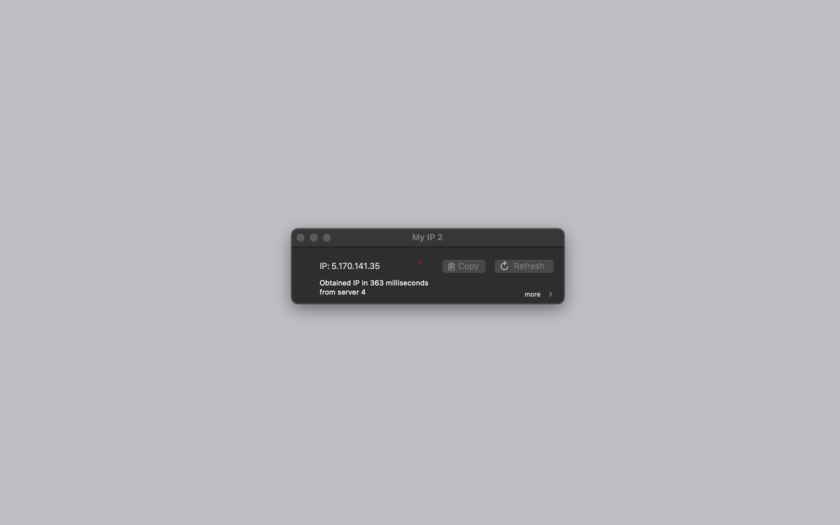
Tension Software announces My IP 2.1, their IP viewing utility app for Mac OS X. My IP 2.1 is a utility app to see with which public IP address a Mac is connected to the net (different from the IP address inside the LAN). It can work also in the background and can optionally show the current IP in the menu bar. My IP works instead indicating always your true Internet IP address, the one the world can see you at.
Milano, Italy - Tension Software is proud to announce the release of My IP 2.1, their IP viewing utility app for Mac OS X. My IP 2.1 is a utility app to see with which public IP address a Mac is connected to the net (different from the IP address inside the LAN). It can work also in background and can optionally show the current IP in the menu bar.
The public IP is the IP address you use to connect to the global net, the address the rest of the world sees you at. The public IP address sometime can be static (always the same), sometime dynamic (changed by the internet provider over time at any connection).
Obtaining the IP value of your connection could sometimes not be easy, particularly if the Mac is behind a modem router. In the case you are using a modem router, using normal system utilities, your IP address will be indicated as equal to your LAN (Local Area Network) IP address, with is really just your address inside your local network, totally different form your true external public IP address on internet. Your internal IP address has no value outside your local area network.
My IP works instead indicating always your true internet IP address, the one the world can see you at, detecting the IP address your modem router uses to connect with the rest of the world, which is the address the rest of the world identify you and can use to connect to you. Knowing your true public IP address is mandatory in many situations where you have to specify, specially for external use, at which address you are and can be reached by servers or desktops outside of your LAN.
My IP offers a simple and intuitive interface, a fast use and the option to work with 4 different servers to show your public IP address. It can optionally display the IP in the menu bar also when in background and log the IP changes on disk. The Log can be rewetted at any time.
Features:
* Fast and easy to use
* Useful to know your public IP address behind a modem router with a shared IP
* Able to show your public IP where usually system utility fails showing just your LAN IP
* Instant result available at launch
* Can use 4 different servers to calculate your public IP
* Can log the IP and its changes on a log on disk
* Can optionally display in the menu bar the current Ip also when in background
* Copy the IP from within other applications from the menu bar.
* Includes embedded PDF User Guide
* Has a similar native version for the iPhone, 'My Public IP' available on iTunes
* Optimized for OS X 10.10 and OS X 10.11
New in this release:
* Log included in main window
* Updated log format
* Bug fixes
System Requirements:
* OS X 10.10 or later
* 64-bit processor
* 1.4 MB
Pricing and Availability:
My IP 2.1 is $2.99, and is available worldwide exclusively through the Mac App Store in the Utilities category.
Tension Software: http://www.tensionsoftware.com
My IP 2.1: http://www.tensionsoftware.com/osx/myip/
Purchase and Download from Mac App Store: https://itunes.apple.com/app/my-ip-2/id779564001
Screenshot: http://www.tensionsoftware.com/static/tensionsoftware/images/app/myip/screenshots/mac/1.png
Application Icon: http://www.tensionsoftware.com/static/tensionsoftware/images/app/myip/icons/128.png
Tension Software develops software for Mac OS X and iOS using the latest Apple technology, Cocoa and Objective-C. All Material and Software (C) Copyright 2016 Tension Software. All Rights Reserved. Apple, the Apple logo, Macintosh and Mac OS X are registered trademarks of Apple Inc. in the U.S. and/or other countries. Other trademarks and registered trademarks may be the property of their respective owners.
*******
Link To Article: http://prmac.com/release-id-79297.htm
*******
---------------------------------------------------------------------------------
Note that you can alter delivered distributions at any time.
Login to your account on prMac to alter your channel selection, or to opt-out at any time.
Use My IP 2.1 to Know Your Mac's Public IP Address - Published on 04/22/16
Tension Software announces My IP 2.1, their IP viewing utility app for Mac OS X. My IP 2.1 is a utility app to see with which public IP address a Mac is connected to the net (different from the IP address inside the LAN). It can work also in the background and can optionally show the current IP in the menu bar. My IP works instead indicating always your true Internet IP address, the one the world can see you at.
Milano, Italy - Tension Software is proud to announce the release of My IP 2.1, their IP viewing utility app for Mac OS X. My IP 2.1 is a utility app to see with which public IP address a Mac is connected to the net (different from the IP address inside the LAN). It can work also in background and can optionally show the current IP in the menu bar.
The public IP is the IP address you use to connect to the global net, the address the rest of the world sees you at. The public IP address sometime can be static (always the same), sometime dynamic (changed by the internet provider over time at any connection).
Obtaining the IP value of your connection could sometimes not be easy, particularly if the Mac is behind a modem router. In the case you are using a modem router, using normal system utilities, your IP address will be indicated as equal to your LAN (Local Area Network) IP address, with is really just your address inside your local network, totally different form your true external public IP address on internet. Your internal IP address has no value outside your local area network.
My IP works instead indicating always your true internet IP address, the one the world can see you at, detecting the IP address your modem router uses to connect with the rest of the world, which is the address the rest of the world identify you and can use to connect to you. Knowing your true public IP address is mandatory in many situations where you have to specify, specially for external use, at which address you are and can be reached by servers or desktops outside of your LAN.
My IP offers a simple and intuitive interface, a fast use and the option to work with 4 different servers to show your public IP address. It can optionally display the IP in the menu bar also when in background and log the IP changes on disk. The Log can be rewetted at any time.
Features:
* Fast and easy to use
* Useful to know your public IP address behind a modem router with a shared IP
* Able to show your public IP where usually system utility fails showing just your LAN IP
* Instant result available at launch
* Can use 4 different servers to calculate your public IP
* Can log the IP and its changes on a log on disk
* Can optionally display in the menu bar the current Ip also when in background
* Copy the IP from within other applications from the menu bar.
* Includes embedded PDF User Guide
* Has a similar native version for the iPhone, 'My Public IP' available on iTunes
* Optimized for OS X 10.10 and OS X 10.11
New in this release:
* Log included in main window
* Updated log format
* Bug fixes
System Requirements:
* OS X 10.10 or later
* 64-bit processor
* 1.4 MB
Pricing and Availability:
My IP 2.1 is $2.99, and is available worldwide exclusively through the Mac App Store in the Utilities category.
Tension Software: http://www.tensionsoftware.com
My IP 2.1: http://www.tensionsoftware.com/osx/myip/
Purchase and Download from Mac App Store: https://itunes.apple.com/app/my-ip-2/id779564001
Screenshot: http://www.tensionsoftware.com/static/tensionsoftware/images/app/myip/screenshots/mac/1.png
Application Icon: http://www.tensionsoftware.com/static/tensionsoftware/images/app/myip/icons/128.png

Tension Software develops software for Mac OS X and iOS using the latest Apple technology, Cocoa and Objective-C. All Material and Software (C) Copyright 2016 Tension Software. All Rights Reserved. Apple, the Apple logo, Macintosh and Mac OS X are registered trademarks of Apple Inc. in the U.S. and/or other countries. Other trademarks and registered trademarks may be the property of their respective owners.
*******
Link To Article: http://prmac.com/release-id-79297.htm
*******
---------------------------------------------------------------------------------
Note that you can alter delivered distributions at any time.
Login to your account on prMac to alter your channel selection, or to opt-out at any time.
Earth in Concert is Celebrating Earth Day by Offering 4 Free Apps
A new article has been published at prMac.
Earth in Concert is Celebrating Earth Day by Offering 4 Free Apps - Published on 04/22/16
In celebration of Earth Day, April 22, 2016 - Earth in Concert is offering free-of-charge four Nature Maestro(R) iPad apps: Rainforest Day, Rainforest Night, Glacier Bay, and Expedition. Nature Maestro introduces students and adults to Earth's biomes and animals through immersive audio and visual explorations. Build, compose, and share audio-rich soundscapes! Animal sounds recorded on location by Dennis Hysom. Animal and biome illustrations are drawn by Christine Walker.
Sebastopol, California - To celebrate of Earth Day, April 22, 2016 - Earth in Concert is offering free-of-charge four Nature Maestro(R) iPad apps: Rainforest Day, Rainforest Night, Glacier Bay, and Expedition. Nature Maestro introduces students and adults to Earth's biomes and animals through immersive audio and visual explorations.
Nature Maestro introduces students to Earth's biomes and animals through immersive audio and visual explorations. Students and adults use their creativity and imagination to build, compose, and share audio-rich soundscapes using authentic animal sounds recorded on location by Dennis Hysom in North and Central America. Animal and biome illustrations are hand-drawn originals by Christine Walker.
"Not everyone is able to travel to a rainforest or sit there alone for hours at a stretch day and night," Hysom says. "Nature Maestro gives people a sense of immersion through a mobile app. "Standing quietly in a rainforest and listening intently, away from any human-made noise, is transformative. There's a sense of connection to the natural world that is difficult to find in everyday life. It comes from being still and listening. It's like a meditation. Even a loud sound, like a howler monkey or scarlet macaw, can be joyful, thrilling."
A sound recordist and composer with many music and nature albums and a major motion picture background ambiance to his credit, Hysom had the idea for an app as a way to share his experiences of recording in nature. Nature Maestro Rainforest Day and Nature Maestro Rainforest Night feature Costa Rican rainforest biomes. Nature Maestro Glacier Bay features Alaska's North Pacific coastal biome. Nature Maestro Expedition combines these biomes with an Earth in Concert section, including a world map for composing with all the animal sounds.
The apps are enriched for educators and contain standards-aligned, project-based learning activities for classrooms and home schooling. Dr. John McCosker of the California Academy of Sciences provided review and validation of the animal facts included in the app.
Features:
* Compose soundscapes up to two minutes by arranging animal and weather sounds
* Record external voices to tell stories and imitate the animals
* Flip, rotate, and scale animals and nature elements to create scenes
* Add nature ambiance, rhythms and melodies
* Preview and share soundscapes
* Play audiovisual matching games
* Listen and read-along verbatim to nature fun facts and glossary
* Experience stereo and panning effects when wearing earphones
* Map geo location and distance to the biome
* Use Field Notes to inspire project-based learning
* For children 6 to 11, parents and educators
* No in-app purchases or third-party advertising
* Nature Maestro Expedition is COPPA compliant
"In the long run, when it comes to protecting our Earth's great places, people with an affinity for nature will be more likely to make wise choices for our planet's health and for living in harmony with the natural world. In the short run, listening to nature develops patience, perseverance, and compassion," Hysom says. "When recording in the rainforest, you have to sit for a long time, waiting unobtrusively. A bird passes close by and you hear its wings flap and see its coloration. The feeling of being engulfed in a habitat, surrounded by wildlife, is profound."
"I'm grateful for the experiences I had composing a music and nature album series that took me to great places in North and Central America - from the Costa Rican rainforests to the Dakota's tall grass prairies, from the Caribbean to the Louisiana Bayou to Alaska's Glacier Bay," Hysom says. "With Nature Maestro, we wanted the apps to be distinguished not only by sound quality and visual beauty, but also by their ability to deliver rich, engaging experiences. We've created a versatile platform upon which to build more apps about more biomes throughout the world and present the content for immersive learning aided by mobile devices. In producing Nature Maestro, we are fortunate to be working with Island Innovation LLC for application design, development, and testing. Nature Maestro is built with Apple's SDK Xcode and uses Open AL, and the Amazing Audio Engine to ensure high sound quality."
Earth in Concert: http://www.earthinconcert.com
Nature Maestro Environmental Education Apps for iPad: http://naturemaestro.com
Download from iTunes: https://itunes.apple.com/artist/earth-in-concert/id869671584
Tutorials: http://www.naturemaestro.com/nature-maestro-tutorials.html
Screenshots: http://www.naturemaestro.com/nature-maestro-screenshots.html
Earth in Concert, located in Sebastopol, California, is a general partnership between Dennis Hysom and Christine Walker. Through music, art, books, apps and other products and services, Earth in Concert encourages creativity, an awareness of nature, and caring for our planet and one another. Hysom and Walker are also the creative team behind award-winning Wooleycat children's media. All Material and Software (C) Copyright 2016 Earth in Concert. All Rights Reserved. Apple, the Apple logo, iPhone, iPod and iPad are registered trademarks of Apple Inc. in the U.S. and/or other countries.
*******
Link To Article: http://prmac.com/release-id-79298.htm
*******
---------------------------------------------------------------------------------
Note that you can alter delivered distributions at any time.
Login to your account on prMac to alter your channel selection, or to opt-out at any time.
Earth in Concert is Celebrating Earth Day by Offering 4 Free Apps - Published on 04/22/16
In celebration of Earth Day, April 22, 2016 - Earth in Concert is offering free-of-charge four Nature Maestro(R) iPad apps: Rainforest Day, Rainforest Night, Glacier Bay, and Expedition. Nature Maestro introduces students and adults to Earth's biomes and animals through immersive audio and visual explorations. Build, compose, and share audio-rich soundscapes! Animal sounds recorded on location by Dennis Hysom. Animal and biome illustrations are drawn by Christine Walker.
Sebastopol, California - To celebrate of Earth Day, April 22, 2016 - Earth in Concert is offering free-of-charge four Nature Maestro(R) iPad apps: Rainforest Day, Rainforest Night, Glacier Bay, and Expedition. Nature Maestro introduces students and adults to Earth's biomes and animals through immersive audio and visual explorations.
Nature Maestro introduces students to Earth's biomes and animals through immersive audio and visual explorations. Students and adults use their creativity and imagination to build, compose, and share audio-rich soundscapes using authentic animal sounds recorded on location by Dennis Hysom in North and Central America. Animal and biome illustrations are hand-drawn originals by Christine Walker.
"Not everyone is able to travel to a rainforest or sit there alone for hours at a stretch day and night," Hysom says. "Nature Maestro gives people a sense of immersion through a mobile app. "Standing quietly in a rainforest and listening intently, away from any human-made noise, is transformative. There's a sense of connection to the natural world that is difficult to find in everyday life. It comes from being still and listening. It's like a meditation. Even a loud sound, like a howler monkey or scarlet macaw, can be joyful, thrilling."
A sound recordist and composer with many music and nature albums and a major motion picture background ambiance to his credit, Hysom had the idea for an app as a way to share his experiences of recording in nature. Nature Maestro Rainforest Day and Nature Maestro Rainforest Night feature Costa Rican rainforest biomes. Nature Maestro Glacier Bay features Alaska's North Pacific coastal biome. Nature Maestro Expedition combines these biomes with an Earth in Concert section, including a world map for composing with all the animal sounds.
The apps are enriched for educators and contain standards-aligned, project-based learning activities for classrooms and home schooling. Dr. John McCosker of the California Academy of Sciences provided review and validation of the animal facts included in the app.
Features:
* Compose soundscapes up to two minutes by arranging animal and weather sounds
* Record external voices to tell stories and imitate the animals
* Flip, rotate, and scale animals and nature elements to create scenes
* Add nature ambiance, rhythms and melodies
* Preview and share soundscapes
* Play audiovisual matching games
* Listen and read-along verbatim to nature fun facts and glossary
* Experience stereo and panning effects when wearing earphones
* Map geo location and distance to the biome
* Use Field Notes to inspire project-based learning
* For children 6 to 11, parents and educators
* No in-app purchases or third-party advertising
* Nature Maestro Expedition is COPPA compliant
"In the long run, when it comes to protecting our Earth's great places, people with an affinity for nature will be more likely to make wise choices for our planet's health and for living in harmony with the natural world. In the short run, listening to nature develops patience, perseverance, and compassion," Hysom says. "When recording in the rainforest, you have to sit for a long time, waiting unobtrusively. A bird passes close by and you hear its wings flap and see its coloration. The feeling of being engulfed in a habitat, surrounded by wildlife, is profound."
"I'm grateful for the experiences I had composing a music and nature album series that took me to great places in North and Central America - from the Costa Rican rainforests to the Dakota's tall grass prairies, from the Caribbean to the Louisiana Bayou to Alaska's Glacier Bay," Hysom says. "With Nature Maestro, we wanted the apps to be distinguished not only by sound quality and visual beauty, but also by their ability to deliver rich, engaging experiences. We've created a versatile platform upon which to build more apps about more biomes throughout the world and present the content for immersive learning aided by mobile devices. In producing Nature Maestro, we are fortunate to be working with Island Innovation LLC for application design, development, and testing. Nature Maestro is built with Apple's SDK Xcode and uses Open AL, and the Amazing Audio Engine to ensure high sound quality."
Earth in Concert: http://www.earthinconcert.com
Nature Maestro Environmental Education Apps for iPad: http://naturemaestro.com
Download from iTunes: https://itunes.apple.com/artist/earth-in-concert/id869671584
Tutorials: http://www.naturemaestro.com/nature-maestro-tutorials.html
Screenshots: http://www.naturemaestro.com/nature-maestro-screenshots.html
Earth in Concert, located in Sebastopol, California, is a general partnership between Dennis Hysom and Christine Walker. Through music, art, books, apps and other products and services, Earth in Concert encourages creativity, an awareness of nature, and caring for our planet and one another. Hysom and Walker are also the creative team behind award-winning Wooleycat children's media. All Material and Software (C) Copyright 2016 Earth in Concert. All Rights Reserved. Apple, the Apple logo, iPhone, iPod and iPad are registered trademarks of Apple Inc. in the U.S. and/or other countries.
*******
Link To Article: http://prmac.com/release-id-79298.htm
*******
---------------------------------------------------------------------------------
Note that you can alter delivered distributions at any time.
Login to your account on prMac to alter your channel selection, or to opt-out at any time.
Kidz Learn Applications Releases Kidz Play Puzzle
A new article has been published at prMac.
Kidz Learn Applications Releases Kidz Play Puzzle - Published on 04/21/16
Kidz Learn Applications announces the release of Kidz Play Puzzle 9.1, its new educational app for iOS, Android, Blackberry and Amazon Kindle devices. This app is for kids between the ages of 3 and 8. The questions are designed to enhance and foster learning. The app does not require an internet or wi-fi connection to play, nor does the app contain any location detection or advertisements. This app can run on both handheld and tablet devices.
Edison, New Jersey - Kidz Learn Applications has announced the release of Kidz Play Puzzle 9.1, the important update to its new educational app for iOS, Blackberry, Google Android and Amazon Kindle devices. This application is designed for kids between the ages of 3 to 8. Kidz Play Puzzle is composed of puzzles categorized in to 5 sections. The questions are designed to enhance and foster learning. With early education being important, the more children can learn during their growing years, the better they are.
Designed especially for kids, their privacy and security is given importance. The app does not require an Internet or WIFI connection to play, nor does the app contain any location detection or advertisements. There is no access to external website or social media.
Upon opening this application user i.e. Children/Adult can view 5 menu options. The 5 categories namely Size, Shape, Type, Pattern and Color, are composed of puzzles. Each category has 15-16 questions. Audio for each question, under a category enables kids to understand and repeat/solve the section with minimum adult intervention. Each question has images of 3 answers to choose from, and upon selecting the right answer the first time, the score is incremented. Scores at the end of each section allows kids to review and re-review the section until satisfied.
The category "Size" has 15 questions and ranges from size in numbers, large-small sizes, to selecting the exact missing size in an object.
The category "Shape" gives emphasis to a shape of an object rather than its physical attributes. This enables kids to match and select the correct shape from a given set that is either different or resemble the missing piece.
The category "Type" is further composed of fruits, vegetables, animals, flowers and Things. This category gives emphasis on differentiating or selecting one type from a given set.
The type "Pattern" has bunch of questions, which is composed of different shape and color patterns. The kids are asked to select a pattern that are either different from the set or select a pattern that would come next in the displayed series.
The type "Color" gives emphasis to the color of an object rather than its physical attributes. The questions are designed to select the color that are either different from the set or an exact color that resembles the main.
"I am a mom with 2 kids. My kid loves to play in smart devices. They enjoy playing games. This gave me an idea to make educational applications for kids to learn effectively. My kid loves to learn and have fun with my applications. Hence the apps are intended for all kids who want to grow by learning smart. My applications have Parental Gate for in-App purchases, links to external websites and Social Media. Kid's will have fun Learning." - says Sole Proprietor of "Kidz Learn Applications".
Device Requirements:
* iPhone, iPad, and iPod touch
* Requires iOS 6.0 or later
* Universal Application
* 46.9 MB
Pricing and Availability:
"Kidz Play Puzzle" is $0.99 USD (or an equivalent amount in other currencies), and is available worldwide through the App Store in the Education category. There is also an Android version available through Google Play, and an Amazon Fire version available through Amazon.
Kidz Learn Applications: http://kidzlearn.co/iosandroid-links.html
Kidz Play Puzzle 9.1: https://itunes.apple.com/app/kidz-play-puzzle/id721033927
Purchase and Download from Google Play: https://play.google.com/store/apps/details?id=com.kidzpuzzleAfull.application
Purchase and Download from Amazon: http://www.amazon.com/Independent-Kidz-Puzzle/dp/B00FWE0GXK
Privacy Policy: http://buggyworld.kidzlearn.co/privacy-policy.html
App Icon: http://a5.mzstatic.com/us/r30/Purple3/v4/3d/8d/11/3d8d11f3-06c0-f6be-02fb-ad650b44c122/icon175x175.png
Kidz Learn Applications are designed for kid's to have fun and enhance their learning abilities.The many paid, and unpaid applications do not require WIFI or net connection to play. Kidz Learn considers Security and Privacy of kid's important. The applications are developed taking security and privacy in to consideration. All Material and Software (C) Copyright 2016 Kidz Learn Applications. All Rights Reserved. Apple, the Apple logo, iPhone, iPod and iPad are registered trademarks of Apple Inc. in the U.S. and/or other countries. Other trademarks and registered trademarks may be the property of their respective owners.
*******
Link To Article: http://prmac.com/release-id-79296.htm
*******
---------------------------------------------------------------------------------
Note that you can alter delivered distributions at any time.
Login to your account on prMac to alter your channel selection, or to opt-out at any time.
Kidz Learn Applications Releases Kidz Play Puzzle - Published on 04/21/16
Kidz Learn Applications announces the release of Kidz Play Puzzle 9.1, its new educational app for iOS, Android, Blackberry and Amazon Kindle devices. This app is for kids between the ages of 3 and 8. The questions are designed to enhance and foster learning. The app does not require an internet or wi-fi connection to play, nor does the app contain any location detection or advertisements. This app can run on both handheld and tablet devices.
Edison, New Jersey - Kidz Learn Applications has announced the release of Kidz Play Puzzle 9.1, the important update to its new educational app for iOS, Blackberry, Google Android and Amazon Kindle devices. This application is designed for kids between the ages of 3 to 8. Kidz Play Puzzle is composed of puzzles categorized in to 5 sections. The questions are designed to enhance and foster learning. With early education being important, the more children can learn during their growing years, the better they are.
Designed especially for kids, their privacy and security is given importance. The app does not require an Internet or WIFI connection to play, nor does the app contain any location detection or advertisements. There is no access to external website or social media.
Upon opening this application user i.e. Children/Adult can view 5 menu options. The 5 categories namely Size, Shape, Type, Pattern and Color, are composed of puzzles. Each category has 15-16 questions. Audio for each question, under a category enables kids to understand and repeat/solve the section with minimum adult intervention. Each question has images of 3 answers to choose from, and upon selecting the right answer the first time, the score is incremented. Scores at the end of each section allows kids to review and re-review the section until satisfied.
The category "Size" has 15 questions and ranges from size in numbers, large-small sizes, to selecting the exact missing size in an object.
The category "Shape" gives emphasis to a shape of an object rather than its physical attributes. This enables kids to match and select the correct shape from a given set that is either different or resemble the missing piece.
The category "Type" is further composed of fruits, vegetables, animals, flowers and Things. This category gives emphasis on differentiating or selecting one type from a given set.
The type "Pattern" has bunch of questions, which is composed of different shape and color patterns. The kids are asked to select a pattern that are either different from the set or select a pattern that would come next in the displayed series.
The type "Color" gives emphasis to the color of an object rather than its physical attributes. The questions are designed to select the color that are either different from the set or an exact color that resembles the main.
"I am a mom with 2 kids. My kid loves to play in smart devices. They enjoy playing games. This gave me an idea to make educational applications for kids to learn effectively. My kid loves to learn and have fun with my applications. Hence the apps are intended for all kids who want to grow by learning smart. My applications have Parental Gate for in-App purchases, links to external websites and Social Media. Kid's will have fun Learning." - says Sole Proprietor of "Kidz Learn Applications".
Device Requirements:
* iPhone, iPad, and iPod touch
* Requires iOS 6.0 or later
* Universal Application
* 46.9 MB
Pricing and Availability:
"Kidz Play Puzzle" is $0.99 USD (or an equivalent amount in other currencies), and is available worldwide through the App Store in the Education category. There is also an Android version available through Google Play, and an Amazon Fire version available through Amazon.
Kidz Learn Applications: http://kidzlearn.co/iosandroid-links.html
Kidz Play Puzzle 9.1: https://itunes.apple.com/app/kidz-play-puzzle/id721033927
Purchase and Download from Google Play: https://play.google.com/store/apps/details?id=com.kidzpuzzleAfull.application
Purchase and Download from Amazon: http://www.amazon.com/Independent-Kidz-Puzzle/dp/B00FWE0GXK
Privacy Policy: http://buggyworld.kidzlearn.co/privacy-policy.html
App Icon: http://a5.mzstatic.com/us/r30/Purple3/v4/3d/8d/11/3d8d11f3-06c0-f6be-02fb-ad650b44c122/icon175x175.png

Kidz Learn Applications are designed for kid's to have fun and enhance their learning abilities.The many paid, and unpaid applications do not require WIFI or net connection to play. Kidz Learn considers Security and Privacy of kid's important. The applications are developed taking security and privacy in to consideration. All Material and Software (C) Copyright 2016 Kidz Learn Applications. All Rights Reserved. Apple, the Apple logo, iPhone, iPod and iPad are registered trademarks of Apple Inc. in the U.S. and/or other countries. Other trademarks and registered trademarks may be the property of their respective owners.
*******
Link To Article: http://prmac.com/release-id-79296.htm
*******
---------------------------------------------------------------------------------
Note that you can alter delivered distributions at any time.
Login to your account on prMac to alter your channel selection, or to opt-out at any time.
Date Time Calc 2.1 is a Mac Application to Calculate Dates
A new article has been published at prMac.
Date Time Calc 2.1 is a Mac Application to Calculate Dates - Published on 04/21/16
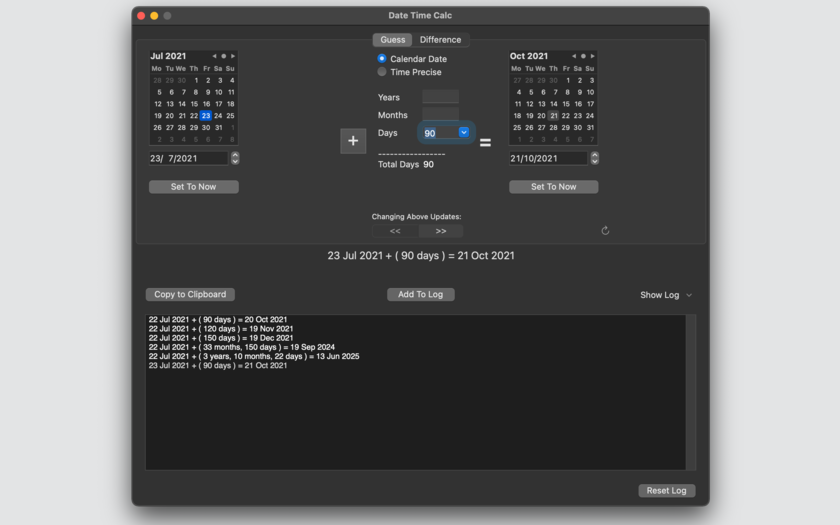
Tension Software announces Date Time Calc 2.1 for Mac OSX, their application to calculate future and past dates adding a date interval and to calculate date difference between two assigned dates. It is realized for business and technical users who are in need of calculation of date in a bullet proof way. Need to know the future date adding 150 days from today? Need to know the difference in years, months, days between 25 March 2009 and today? Date Time Calc can do it.
Milano, Italy - Tension Software is proud to announce the release of Date Time Calc 2.1, their application to calculate future, past dates and time difference between dates on a Mac. Date Time Calc is an application to calculate future and past dates adding a date interval and to calculate date difference between two assigned date
It is realized for business and technical users who are in need of calculation of date in a bullet proof way.
Do you want to know the future date adding 150 days from today? Do you want to know the difference in years, months, days between 25 March 2009 and today? Date Time Calc can do it. All using the Mac standard date-time controls you already know.
Date Time Calc is absolutely easy to use because it uses 'natural' elements to compute dates (by popular demand from the user of the old release) and it was re-written to use the latest algorithms provided by Cocoa on date computations. You can add or subtract to dates, years, months, days or work with absolute precision and add or subtract days, hours , minutes and seconds to guess future and past date-times.
You can also calculate difference between two dates using calendar specification (years, months and days) or using a time precision method specifying date and time and obtaining a difference in days, hours, minutes and seconds.
Date Time Calc has no calculation buttons, adjusting date and time in two elements instantly update the result in the remaining third element. Simply and natural as any application has to be, you will be amazed using it! Any time you calc a date or a difference the result is also displayed in textual form on the bottom of the windows. At any time you can save the result in the log (persistent over re-launch)
Date are expressed in accordance with your preference settings. Results can also be copied to the clipboard in textual format. For example:
06 Jan 2014 19:04:26 ( 120days ) = 06 May 2014 19:04:26
If you use also time, the string will show it. For example: 06 Jan 2014 19:04:26 ( 120days 12hours 30min ) = 07 May 2014 07:34:26
The log can collect and save all the calculation you need to record using a command button. At any time you can clean the log resetting it.
Features:
* Results displayed and updated as you type
* Uses 'natural' elements to compute dates (years, months, days, hours, minutes, seconds)
* Uses 'natural' elements also to compute differences (years, months, days, hours, minutes, seconds)
* Date display using your current local settings and language
* 'Set date to now' button for fast calculation of backward and forward dates from the current date
* Calculates time difference, if requested, also using hours, minutes, seconds
* Calculates time interval, if requested, also using hours, minutes, seconds
* Result summarized also in a plain text to avoid misinterpretation
* The result can be sent to the log, saved over re-launch
* Log can be reset at any time
* Bullet proof results using Mac OS X Apple libraries to calculate and manipulate dates
* PDF user guide embedded in the app
System Requirements:
* OS X 10.10 or later
* 64-bit processor
* 1.8 MB
Pricing and Availability:
Date Time Calc 2.1 is $4.99, and is available worldwide exclusively through the Mac App Store in the Utilities category.
Tension Software: http://www.tensionsoftware.com
Date Time Calc 2.1: http://www.tensionsoftware.com/osx/datetimecalc/
Purchase and Download from Mac App Store: https://itunes.apple.com/app/date-time-calc-2/id791169436
Screenshot: http://www.tensionsoftware.com/static/tensionsoftware/images/app/datetimecalc/screenshots/mac/1.png
Application Icon: http://www.tensionsoftware.com/static/tensionsoftware/images/app/datetimecalc/icons/128.png
Tension Software develops software for Mac OS X and iOS using the latest Apple technology, Cocoa and Objective-C. All Material and Software (C) Copyright 2016 Tension Software. All Rights Reserved. Apple, the Apple logo, Macintosh and Mac OS X are registered trademarks of Apple Inc. in the U.S. and/or other countries. Other trademarks and registered trademarks may be the property of their respective owners.
*******
Link To Article: http://prmac.com/release-id-79295.htm
*******
---------------------------------------------------------------------------------
Note that you can alter delivered distributions at any time.
Login to your account on prMac to alter your channel selection, or to opt-out at any time.
Date Time Calc 2.1 is a Mac Application to Calculate Dates - Published on 04/21/16
Tension Software announces Date Time Calc 2.1 for Mac OSX, their application to calculate future and past dates adding a date interval and to calculate date difference between two assigned dates. It is realized for business and technical users who are in need of calculation of date in a bullet proof way. Need to know the future date adding 150 days from today? Need to know the difference in years, months, days between 25 March 2009 and today? Date Time Calc can do it.
Milano, Italy - Tension Software is proud to announce the release of Date Time Calc 2.1, their application to calculate future, past dates and time difference between dates on a Mac. Date Time Calc is an application to calculate future and past dates adding a date interval and to calculate date difference between two assigned date
It is realized for business and technical users who are in need of calculation of date in a bullet proof way.
Do you want to know the future date adding 150 days from today? Do you want to know the difference in years, months, days between 25 March 2009 and today? Date Time Calc can do it. All using the Mac standard date-time controls you already know.
Date Time Calc is absolutely easy to use because it uses 'natural' elements to compute dates (by popular demand from the user of the old release) and it was re-written to use the latest algorithms provided by Cocoa on date computations. You can add or subtract to dates, years, months, days or work with absolute precision and add or subtract days, hours , minutes and seconds to guess future and past date-times.
You can also calculate difference between two dates using calendar specification (years, months and days) or using a time precision method specifying date and time and obtaining a difference in days, hours, minutes and seconds.
Date Time Calc has no calculation buttons, adjusting date and time in two elements instantly update the result in the remaining third element. Simply and natural as any application has to be, you will be amazed using it! Any time you calc a date or a difference the result is also displayed in textual form on the bottom of the windows. At any time you can save the result in the log (persistent over re-launch)
Date are expressed in accordance with your preference settings. Results can also be copied to the clipboard in textual format. For example:
06 Jan 2014 19:04:26 ( 120days ) = 06 May 2014 19:04:26
If you use also time, the string will show it. For example: 06 Jan 2014 19:04:26 ( 120days 12hours 30min ) = 07 May 2014 07:34:26
The log can collect and save all the calculation you need to record using a command button. At any time you can clean the log resetting it.
Features:
* Results displayed and updated as you type
* Uses 'natural' elements to compute dates (years, months, days, hours, minutes, seconds)
* Uses 'natural' elements also to compute differences (years, months, days, hours, minutes, seconds)
* Date display using your current local settings and language
* 'Set date to now' button for fast calculation of backward and forward dates from the current date
* Calculates time difference, if requested, also using hours, minutes, seconds
* Calculates time interval, if requested, also using hours, minutes, seconds
* Result summarized also in a plain text to avoid misinterpretation
* The result can be sent to the log, saved over re-launch
* Log can be reset at any time
* Bullet proof results using Mac OS X Apple libraries to calculate and manipulate dates
* PDF user guide embedded in the app
System Requirements:
* OS X 10.10 or later
* 64-bit processor
* 1.8 MB
Pricing and Availability:
Date Time Calc 2.1 is $4.99, and is available worldwide exclusively through the Mac App Store in the Utilities category.
Tension Software: http://www.tensionsoftware.com
Date Time Calc 2.1: http://www.tensionsoftware.com/osx/datetimecalc/
Purchase and Download from Mac App Store: https://itunes.apple.com/app/date-time-calc-2/id791169436
Screenshot: http://www.tensionsoftware.com/static/tensionsoftware/images/app/datetimecalc/screenshots/mac/1.png
Application Icon: http://www.tensionsoftware.com/static/tensionsoftware/images/app/datetimecalc/icons/128.png

Tension Software develops software for Mac OS X and iOS using the latest Apple technology, Cocoa and Objective-C. All Material and Software (C) Copyright 2016 Tension Software. All Rights Reserved. Apple, the Apple logo, Macintosh and Mac OS X are registered trademarks of Apple Inc. in the U.S. and/or other countries. Other trademarks and registered trademarks may be the property of their respective owners.
*******
Link To Article: http://prmac.com/release-id-79295.htm
*******
---------------------------------------------------------------------------------
Note that you can alter delivered distributions at any time.
Login to your account on prMac to alter your channel selection, or to opt-out at any time.
Battleship-style games for Smartphones and Tablets
A new article has been published at prMac.
Battleship-style games for Smartphones and Tablets - Published on 04/22/16
smuttlewerk interactive announces the latest triple patch, featuring cross-playability between the three games of their Battlle series of games. These variants of the timeless classics, Fleet Battle, Air Battle and Space Battle, differ due to their theme and different ship forms. Different ship forms equal different search patterns and alternate strategies, which helps with re-playability. It is now possible to lead your sea flotilla against the enemy air fleet or space fleet and vice versa.
Ludwigshafen, Germany - smuttlewerk interactive is happy to announce the latest triple patch, featuring cross-playability between the three games of their "Battlle" series of games. Many people played a Battleship-style game at least once in their lives � be it in school or at home. These memories can be refreshed, thanks to smuttlewerks games Fleet Battle, Air Battle and Space Battle.
These variants of the timeless classic, known as sea battle or Battleship, differ due to their theme and different ship forms. With patch 1.3 live since April 20th, it is now possible to lead your sea flotilla against the enemy air fleet or space fleet and vice versa. Different ship forms equal different search patterns and alternate strategies, which helps with re-playability. It is up to the user to choose whether he wants to combat players playing one of the other two games.
Several game modes make the games enjoyable for players: singleplayer, multiplayer online, multiplayer local (Bluetooth and local wifi) and multiplayer on one device. All modes are cross-platform compatible on Apple (App Store) and Android (Google Play) devices, except the Bluetooth variant, which is only available for Android users. A Windows Phone version is available, but all network compatibility is removed.
Graphically as well as gameplay wise the game-design philosophy can be described easily: Keep it simple! Combat is fast-paced and exciting, perfect for the quick game in between. The blueprint style, the sounds and the self-composed ambient music make for a memorable gaming atmosphere.
Since the first release of the flagship of the series in 2013, Fleet Battle, the games were downloaded more than 2 million times. All games are free to download with ads as monetization measure. The ads can be removed by paying a small amount of money.
Battlle Series: http://www.smuttlewerk.de
Download from iTunes: https://itunes.apple.com/de/developer/smuttlewerk-interactive/id418974701
Download from Google Play: https://play.google.com/store/apps/dev?id=7488507106798759979
Screenshot: https://dl.dropboxusercontent.com/u/11611988/Battle%20Games%20Forum%20Grafiken/FB_EN/fleetbattle1.jpg
App Icon: https://dl.dropboxusercontent.com/u/11611988/Battle%20Games%20Forum%20Grafiken/FB_appicon.jpg
Press Kit (zip): https://dl.dropboxusercontent.com/u/11611988/Media%20Kit%20Battle%20Series.zip
Located in Ludwigshafen, Germany, smuttlewerk interactive was founded by Martin Giaco and Ralph Kunz in October 2010. We play games. We love games. We create games. That's basically what smuttlewerk interactive is all about. Copyright (C) 2010-2016 smuttlewerk interactive. All Rights Reserved. Apple, the Apple logo, iPhone, iPod and iPad are registered trademarks of Apple Inc. in the U.S. and/or other countries.
*******
Link To Article: http://prmac.com/release-id-79294.htm
*******
---------------------------------------------------------------------------------
Note that you can alter delivered distributions at any time.
Login to your account on prMac to alter your channel selection, or to opt-out at any time.
Battleship-style games for Smartphones and Tablets - Published on 04/22/16
smuttlewerk interactive announces the latest triple patch, featuring cross-playability between the three games of their Battlle series of games. These variants of the timeless classics, Fleet Battle, Air Battle and Space Battle, differ due to their theme and different ship forms. Different ship forms equal different search patterns and alternate strategies, which helps with re-playability. It is now possible to lead your sea flotilla against the enemy air fleet or space fleet and vice versa.
Ludwigshafen, Germany - smuttlewerk interactive is happy to announce the latest triple patch, featuring cross-playability between the three games of their "Battlle" series of games. Many people played a Battleship-style game at least once in their lives � be it in school or at home. These memories can be refreshed, thanks to smuttlewerks games Fleet Battle, Air Battle and Space Battle.
These variants of the timeless classic, known as sea battle or Battleship, differ due to their theme and different ship forms. With patch 1.3 live since April 20th, it is now possible to lead your sea flotilla against the enemy air fleet or space fleet and vice versa. Different ship forms equal different search patterns and alternate strategies, which helps with re-playability. It is up to the user to choose whether he wants to combat players playing one of the other two games.
Several game modes make the games enjoyable for players: singleplayer, multiplayer online, multiplayer local (Bluetooth and local wifi) and multiplayer on one device. All modes are cross-platform compatible on Apple (App Store) and Android (Google Play) devices, except the Bluetooth variant, which is only available for Android users. A Windows Phone version is available, but all network compatibility is removed.
Graphically as well as gameplay wise the game-design philosophy can be described easily: Keep it simple! Combat is fast-paced and exciting, perfect for the quick game in between. The blueprint style, the sounds and the self-composed ambient music make for a memorable gaming atmosphere.
Since the first release of the flagship of the series in 2013, Fleet Battle, the games were downloaded more than 2 million times. All games are free to download with ads as monetization measure. The ads can be removed by paying a small amount of money.
Battlle Series: http://www.smuttlewerk.de
Download from iTunes: https://itunes.apple.com/de/developer/smuttlewerk-interactive/id418974701
Download from Google Play: https://play.google.com/store/apps/dev?id=7488507106798759979
Screenshot: https://dl.dropboxusercontent.com/u/11611988/Battle%20Games%20Forum%20Grafiken/FB_EN/fleetbattle1.jpg

App Icon: https://dl.dropboxusercontent.com/u/11611988/Battle%20Games%20Forum%20Grafiken/FB_appicon.jpg

Press Kit (zip): https://dl.dropboxusercontent.com/u/11611988/Media%20Kit%20Battle%20Series.zip
Located in Ludwigshafen, Germany, smuttlewerk interactive was founded by Martin Giaco and Ralph Kunz in October 2010. We play games. We love games. We create games. That's basically what smuttlewerk interactive is all about. Copyright (C) 2010-2016 smuttlewerk interactive. All Rights Reserved. Apple, the Apple logo, iPhone, iPod and iPad are registered trademarks of Apple Inc. in the U.S. and/or other countries.
*******
Link To Article: http://prmac.com/release-id-79294.htm
*******
---------------------------------------------------------------------------------
Note that you can alter delivered distributions at any time.
Login to your account on prMac to alter your channel selection, or to opt-out at any time.
Subscribe to:
Posts (Atom)