A new article has been published at prMac.
A Playful Kids' app with Significant Educational Backing - Published on 04/26/16
California based ACE Edutainment Apps Inc. announces Spelling Bug: Word Match 1.0.2, the latest update to their playful memory match game for iOS devices. Spelling Bug Word Match rewards kids for finding all the matching memory cards with colorful animations and a built-in coloring section. Featuring fully customizable cards, the app contains four spelling lists with hundreds of words. Version 1.0.2 includes behind-the-scenes stability improvements and stamps out some pesky bugs.
San Ysidro, California - ACE Edutainment Apps Inc. today is proud to announce the release of Spelling Bug: Word Match 1.0.2, the latest update to their educational game for iPhone, iPad and iPod touch devices. Spelling Bug Word Match and Coloring teaches kids to read and write in a playful memory match game. This fun, seasonal app rewards kids for finding all the matching memory cards with colorful animations and a built-in coloring section. Version 1.0.2 includes behind-the-scenes stability improvements and stamps out some pesky bugs.
Available in all major app stores, Spelling Bug Word Match and Coloring is a vibrant Spring apps for kids that combines seasonal fun with educational value. In addition to the appealing coloring pages, refreshingly upbeat graphics, and animation, the app offers sound spelling lessons for which ACE's Spelling Bug series has become known. Kids are invited to match memory cards, thereby hatching adorable little bugs (called buglings) from colorful bug eggs. For each successful game completed, coins are earned with which players are allowed to buy tokens to enter the coloring page area.
On closer exploration, the educational value becomes apparent. The app contains four spelling lists with hundreds of words. The Spring word list is perfect for seasonal fun, and the essential list covers all the most commonly used words in elementary grades. The 1st and 2nd grade lists are phonics based. This feature is a requirement for quality spelling lessons.
The most significant feature, however, is that the memory cards are fully customizable. Kids can match words with words, pictures, spoken clues, etc. Custom words and voice clues can be added, which offers unlimited gameplay for both native English speakers and kids who are learning to speak English as their second language. Charine Gey Van Pittius, founder and CEO of ACE Edutainment Apps Ltd. Edutainment said, "Kids learn best by playing. It is our mission to bring at least one good word app to each kid's tablet or iPad."
Special Needs Impact: Children with special needs will benefit from this app because they (or their adults) can select what appears on matching memory cards. To make the game very easy the cards can be set to have matching pictures only, on a pair. You can add your own words or letters or numbers to cards. This game also has a feature where you can record your voice to accompany what you have on a card.
In the coloring section, we have included a set of coloring pictures with clever clues to remember tricky words. These were specifically designed with dyslexic users in mind. All these custom features offer special needs kids the possibility to play for short periods of take all the time that they need. The graphics are clear and simple yet colorful and stimulating.
ACE Edutainment Apps Ltd. Edutainment Apps Inc. continues to gain momentum and fans across the globe. Having recently won several educational app awards, ACE Edutainment Apps Ltd. is fast becoming a respected developer in the edutainment space.
Device Requirements:
* iPhone, iPad, and iPod touch
* Requires iOS 6.0 or later
* 35.3 MB
Pricing and Availability:
Spelling Bug: Word Match 1.0.2 is $2.99 USD (or equivalent amount in other currencies) and available worldwide exclusively through the App Store in the Education category.
Ace Edutainment Apps: http://aceedutainmentapps.com/index.html
Spelling Bug: Word Match 1.0.2: http://aceedutainmentapps.com/word-match.html
Purchase and Download: https://itunes.apple.com/app/spelling-bug-word-match/id1101484757
YouTube Video: https://www.youtube.com/watch?v=cm3vYgnKI3M
Promo Codes: http://aceedutainmentapps.com/free-app-code.html
Media Assets: http://aceedutainmentapps.com/press-kit-spelling-bug.html
Ace Edutainment Apps are made by teachers! We understand that not all kids learn in the same way but we know that all kids like to play! Our Phonics Applications are carefully made to expand and enhance what your child learns in school. Word lists are carefully woven into engaging gameplay apps that give your child hours of meaningful fun. We understand that some kids need a little help when it comes to spelling and others need more stimulation because they are ahead of their classmates. Our apps adapt to kids' skill levels. You and your child will have fun following kid friendly progress graphs and graphics in each app. We work with kids every day. App building is absolutely the best way for us to bring our lessons in an enjoyable way. All Material and Software (C) Copyright 2016 Ace Edutainment Apps Ltd. All Rights Reserved. Apple, the Apple logo, iPhone, iPod and iPad are registered trademarks of Apple Inc. in the U.S. and/or other countries. Other trademarks and registered
trademarks may be the property of their respective owners.
*******
Link To Article: http://prmac.com/release-id-79323.htm
*******
---------------------------------------------------------------------------------
Note that you can alter delivered distributions at any time.
Login to your account on prMac to alter your channel selection, or to opt-out at any time.

Easybank - new high speed mobile app for personal financial management
A new article has been published at prMac.
Easybank - new high speed mobile app for personal financial management - Published on 04/26/16
Interactive agency, Manufactura Software LLC today introduces Easybank 1.0, its new personal finance management app developed for iPhone, iPad and iPod touch devices. The main advantage of the Easybank is high speed of interaction. With Easybank, you can capture your expenses in just 3 taps using the widget in the notification bar. There is no need to specify categories right away: Easybank will automatically determine your location and list nearby businesses, so you can add the category later.
Voronezh, Russian Federation - Manufactura Software LLC, an interactive agency, today is proud to announce the release and immediate availability of Easybank 1.0, its new personal finance management app developed for iPhone, iPad and iPod touch devices. Easybank is a handy tool for monitoring your income and spendings. Download the app to be able to:
* Add transactions in just 3 taps
* Recall what you spent your money on with automatic geotagging, no need to specify categories
* Add new categories on the go
* Check your income, expenses and balance on the same screen
* Create categories: your home budget, travel, car, or business expenses - whatever you want to keep track of
* Protect your data with a password or Touch ID
* And a lot more
Where did my money go? How to stop spending? How to save money? There are hundreds of thousands of such requests per month. You can learn how to save money! You will be able to better manage you finacecs when you undersand what you spend your money on and how much. Start keeping track of your spendings and income today with Easybank.
Groceries, gas, gym membership or dinner - capture every purchase. Effortlessly record your expenses with Easybank using the widget in the notification bar. It's quick, easy and there is no need to specify categories. Easybank will automatically determine your location and show where the money was spent.
Take the first step to get your finances in order and install Easybank. Keeping track of your income and spendings will become a habit. Easybank analytics will show your income and expenses for any selected period of time and will help improve your financial situation. Save up to 20% of your money every year just by revising your spendings with Easybank.
Device Requirements:
* iPhone, iPad, and iPod touch
* Requires iOS 8.1 or later
* 8.9 MB
Pricing and Availability:
Easybank 1.0 is Free and available worldwide exclusively through the App Store in the Finance category.
Easybank 1.0: http://easybankapp.com
Download from iTunes: https://itunes.apple.com/app/apple-store/id990927316?pt=497454&ct=presskiteng&mt=8
Screenshot: https://www.dropbox.com/sh/6l14dhfujdtyqtg/AAAxnhZ5rK8tvzJoelP9OR4Fa/EN/iPhone%20screens?dl=0
App Icon: https://www.dropbox.com/sh/6l14dhfujdtyqtg/AACwv-e6Mk11PzmqjtvDKO85a/EN/Promo?dl=0
Manufactura was founded in 2009 with a main goal to create high-class mobile applications with a focus on design, like if they were made by Apple. Today the company offers a wide range of services in graphic design, UX and UI, development of websites and mobile applications for iOS and Android using leading technology stack. Copyright (C) 2009-2016 Manufactura Software LLC. All Rights Reserved. Apple, the Apple logo, iPhone, iPod and iPad are registered trademarks of Apple Inc. in the U.S. and/or other countries.
*******
Link To Article: http://prmac.com/release-id-79322.htm
*******
---------------------------------------------------------------------------------
Note that you can alter delivered distributions at any time.
Login to your account on prMac to alter your channel selection, or to opt-out at any time.
Easybank - new high speed mobile app for personal financial management - Published on 04/26/16
Interactive agency, Manufactura Software LLC today introduces Easybank 1.0, its new personal finance management app developed for iPhone, iPad and iPod touch devices. The main advantage of the Easybank is high speed of interaction. With Easybank, you can capture your expenses in just 3 taps using the widget in the notification bar. There is no need to specify categories right away: Easybank will automatically determine your location and list nearby businesses, so you can add the category later.
Voronezh, Russian Federation - Manufactura Software LLC, an interactive agency, today is proud to announce the release and immediate availability of Easybank 1.0, its new personal finance management app developed for iPhone, iPad and iPod touch devices. Easybank is a handy tool for monitoring your income and spendings. Download the app to be able to:
* Add transactions in just 3 taps
* Recall what you spent your money on with automatic geotagging, no need to specify categories
* Add new categories on the go
* Check your income, expenses and balance on the same screen
* Create categories: your home budget, travel, car, or business expenses - whatever you want to keep track of
* Protect your data with a password or Touch ID
* And a lot more
Where did my money go? How to stop spending? How to save money? There are hundreds of thousands of such requests per month. You can learn how to save money! You will be able to better manage you finacecs when you undersand what you spend your money on and how much. Start keeping track of your spendings and income today with Easybank.
Groceries, gas, gym membership or dinner - capture every purchase. Effortlessly record your expenses with Easybank using the widget in the notification bar. It's quick, easy and there is no need to specify categories. Easybank will automatically determine your location and show where the money was spent.
Take the first step to get your finances in order and install Easybank. Keeping track of your income and spendings will become a habit. Easybank analytics will show your income and expenses for any selected period of time and will help improve your financial situation. Save up to 20% of your money every year just by revising your spendings with Easybank.
Device Requirements:
* iPhone, iPad, and iPod touch
* Requires iOS 8.1 or later
* 8.9 MB
Pricing and Availability:
Easybank 1.0 is Free and available worldwide exclusively through the App Store in the Finance category.
Easybank 1.0: http://easybankapp.com
Download from iTunes: https://itunes.apple.com/app/apple-store/id990927316?pt=497454&ct=presskiteng&mt=8
Screenshot: https://www.dropbox.com/sh/6l14dhfujdtyqtg/AAAxnhZ5rK8tvzJoelP9OR4Fa/EN/iPhone%20screens?dl=0
App Icon: https://www.dropbox.com/sh/6l14dhfujdtyqtg/AACwv-e6Mk11PzmqjtvDKO85a/EN/Promo?dl=0
Manufactura was founded in 2009 with a main goal to create high-class mobile applications with a focus on design, like if they were made by Apple. Today the company offers a wide range of services in graphic design, UX and UI, development of websites and mobile applications for iOS and Android using leading technology stack. Copyright (C) 2009-2016 Manufactura Software LLC. All Rights Reserved. Apple, the Apple logo, iPhone, iPod and iPad are registered trademarks of Apple Inc. in the U.S. and/or other countries.
*******
Link To Article: http://prmac.com/release-id-79322.htm
*******
---------------------------------------------------------------------------------
Note that you can alter delivered distributions at any time.
Login to your account on prMac to alter your channel selection, or to opt-out at any time.
MacAdmins Conference Announces 2016 Content and Pricing
A new article has been published at prMac.
MacAdmins Conference Announces 2016 Content and Pricing - Published on 04/26/16
The 2016 MacAdmins Conference will be held June 27-30 at the Penn Stater Hotel and Conference Center. This year's event will feature 5 full-day workshops and 60 technical sessions, taught by experts within the Mac and iOS IT community. Early-bird registration is $599 through May 2. Now in its 7th year, MacAdmins has grown from a small event for local system administrators to one of the world's largest Apple-focused IT events, with nearly 600 attendees from around the world.
State College, Pennsylvania - The MacAdmins Conference, one of the world's largest Apple-focused IT events, is pleased to announce the content lineup for its 2016 event, held June 27-30, 2016 at the Penn Stater Hotel and Conference Center in State College, Pennsylvania.
Nearly 600 IT professionals from Higher Ed, K-12, Corporate, Government, Healthcare, and independent consultancies will gather at the 7th annual MacAdmins Conference to learn from industry experts on a wide variety of Apple-focused deployment and management topics, from networking and monitoring to development, package deployment, and end-user support.
"We're incredibly proud to have fostered such a vibrant and passionate community at MacAdmins," said Gretchen Kuwahara, conference team member. "Every year we see senior system administrators with decades of experience as well as first-time Mac support specialists, and everyone in between, gather to share stories, learn from each other, and celebrate the Apple platforms and products that tie our passions to our careers."
This year at MacAdmins, attendees will participate in one of the five full-day workshops to kick off the event, and then customize their experience by choosing from the 60 technical sessions offered at the event. A small sampling of session titles includes:
* GRAPH ALL THE THINGS: Alerting and Monitoring for Mac Admins
* You Need an (Effective) Service Desk
* Practical Deployment Techniques for Small Labs, 2016 Edition
* Building Defensible OS X Systems
* I Want My Windows Apps: Everyone can Benefit from Application Virtualization
* Intro to 3D Printing for Mac Admins
* Leveraging Apple Tools to make your iOS Deployment Easier
* Craft your own GUIs with Python and Tinter
In addition to the conference content, MacAdmins 2016 will feature 3 evening events:
* Kickoff Dinner - Start the conference right by celebrating with food and friends
* Be Our Guest - Dinner and hop-on hop-off bus tours of campus and downtown State College
* Stump the MacAdmins Experts - Battle to see whose sysadmin knowledge reigns supreme
"We like to think of MacAdmins as summer camp for Apple Professionals," said Rusty Myers, conference team member. "People come to learn, and find themselves being a part of a caring, supportive community."
Early-bird registration is $599 (USD) through May 2, 2016 and includes a full-day workshop, conference sessions, evening events, and all meals. On May 3, 2016 the price will increase to $799.
MacAdmins partners with key vendors, whose sponsorships help keep the cost low and provide attendees with valuable connections in well-respected companies throughout the IT economy. Sponsors already lined up for this years event include: Cisco, Adobe, Parallels, JAMF Software, Quantum, Addigy, Centrify, Twocanoes, Cross IT, Filewave, ATTO Technology, and Watchman Monitoring. Additional sponsors will continue to be added leading up the conference.
MacAdmins Conference: http://macadmins.psu.edu/
Registration: http://macadmins.psu.edu/conference/registration/
MacAdmins 2016 Schedule: http://psumac2016.sched.org
Contact Info: http://macadmins.psu.edu/contact/
The MacAdmins Conference at Penn State is one of the world's largest Apple-focused IT events, bringing together nearly 600 IT professionals from around the world. Founded in 2010, MacAdmins serves the Apple system administration community by providing education, training, and networking opportunities to anyone who deploys or supports Macs and iOS devices in their organizations. All Material and Software (C) Copyright 2010-2016 MacAdmins Conference. All Rights Reserved. Apple, the Apple logo, OS X, iPhone, iPod, iPad and Macintosh are registered trademarks of Apple Inc. in the U.S. and/or other countries. Other trademarks and registered trademarks may be the property of their respective owners.
*******
Link To Article: http://prmac.com/release-id-79317.htm
*******
---------------------------------------------------------------------------------
Note that you can alter delivered distributions at any time.
Login to your account on prMac to alter your channel selection, or to opt-out at any time.
MacAdmins Conference Announces 2016 Content and Pricing - Published on 04/26/16
The 2016 MacAdmins Conference will be held June 27-30 at the Penn Stater Hotel and Conference Center. This year's event will feature 5 full-day workshops and 60 technical sessions, taught by experts within the Mac and iOS IT community. Early-bird registration is $599 through May 2. Now in its 7th year, MacAdmins has grown from a small event for local system administrators to one of the world's largest Apple-focused IT events, with nearly 600 attendees from around the world.
State College, Pennsylvania - The MacAdmins Conference, one of the world's largest Apple-focused IT events, is pleased to announce the content lineup for its 2016 event, held June 27-30, 2016 at the Penn Stater Hotel and Conference Center in State College, Pennsylvania.
Nearly 600 IT professionals from Higher Ed, K-12, Corporate, Government, Healthcare, and independent consultancies will gather at the 7th annual MacAdmins Conference to learn from industry experts on a wide variety of Apple-focused deployment and management topics, from networking and monitoring to development, package deployment, and end-user support.
"We're incredibly proud to have fostered such a vibrant and passionate community at MacAdmins," said Gretchen Kuwahara, conference team member. "Every year we see senior system administrators with decades of experience as well as first-time Mac support specialists, and everyone in between, gather to share stories, learn from each other, and celebrate the Apple platforms and products that tie our passions to our careers."
This year at MacAdmins, attendees will participate in one of the five full-day workshops to kick off the event, and then customize their experience by choosing from the 60 technical sessions offered at the event. A small sampling of session titles includes:
* GRAPH ALL THE THINGS: Alerting and Monitoring for Mac Admins
* You Need an (Effective) Service Desk
* Practical Deployment Techniques for Small Labs, 2016 Edition
* Building Defensible OS X Systems
* I Want My Windows Apps: Everyone can Benefit from Application Virtualization
* Intro to 3D Printing for Mac Admins
* Leveraging Apple Tools to make your iOS Deployment Easier
* Craft your own GUIs with Python and Tinter
In addition to the conference content, MacAdmins 2016 will feature 3 evening events:
* Kickoff Dinner - Start the conference right by celebrating with food and friends
* Be Our Guest - Dinner and hop-on hop-off bus tours of campus and downtown State College
* Stump the MacAdmins Experts - Battle to see whose sysadmin knowledge reigns supreme
"We like to think of MacAdmins as summer camp for Apple Professionals," said Rusty Myers, conference team member. "People come to learn, and find themselves being a part of a caring, supportive community."
Early-bird registration is $599 (USD) through May 2, 2016 and includes a full-day workshop, conference sessions, evening events, and all meals. On May 3, 2016 the price will increase to $799.
MacAdmins partners with key vendors, whose sponsorships help keep the cost low and provide attendees with valuable connections in well-respected companies throughout the IT economy. Sponsors already lined up for this years event include: Cisco, Adobe, Parallels, JAMF Software, Quantum, Addigy, Centrify, Twocanoes, Cross IT, Filewave, ATTO Technology, and Watchman Monitoring. Additional sponsors will continue to be added leading up the conference.
MacAdmins Conference: http://macadmins.psu.edu/
Registration: http://macadmins.psu.edu/conference/registration/
MacAdmins 2016 Schedule: http://psumac2016.sched.org
Contact Info: http://macadmins.psu.edu/contact/
The MacAdmins Conference at Penn State is one of the world's largest Apple-focused IT events, bringing together nearly 600 IT professionals from around the world. Founded in 2010, MacAdmins serves the Apple system administration community by providing education, training, and networking opportunities to anyone who deploys or supports Macs and iOS devices in their organizations. All Material and Software (C) Copyright 2010-2016 MacAdmins Conference. All Rights Reserved. Apple, the Apple logo, OS X, iPhone, iPod, iPad and Macintosh are registered trademarks of Apple Inc. in the U.S. and/or other countries. Other trademarks and registered trademarks may be the property of their respective owners.
*******
Link To Article: http://prmac.com/release-id-79317.htm
*******
---------------------------------------------------------------------------------
Note that you can alter delivered distributions at any time.
Login to your account on prMac to alter your channel selection, or to opt-out at any time.
Basil Salad introduces Go Edit 1.0 for iOS - Note Taker for Blog Authors
A new article has been published at prMac.
Basil Salad introduces Go Edit 1.0 for iOS - Note Taker for Blog Authors - Published on 04/26/16
Basil Salad Software today introduces Go Edit 1.0 for iOS, their new note taking solution for blog authors. Go Edit enables anyone to type notes in markdown mode or WYSIWYG HTML mode and easily switch between the two. The app also allows the user to embed images to documents and invoke other applications to edit these images. All notes are saved an open Textbundle file format and synchronized via iCloud, so they are editable via just about any other text editing applications.
Singapore - Basil Salad Software today is proud to announce the release and immediate availability of Go Edit 1.0 for iOS, their new note taking solution for blog authors. Go Edit enables blog authors to create post drafts in markdown or HTML rich text mode and easily convert between the two formats. The app enables users to type notes in markdown mode or WYSIWYG HTML mode and easily switch between the two. Unlike other markdown note takers, Go Edit supports embedding photos and other images in documents.
Unlike other markdown note takers, Go Edit supports embedding images in markdown or HTML documents without needing to make the images publicly available. Furthermore, Go Edit has the capability to crop images or use other image editing applications (such as Skitch) via iOS' action extension mechanism. All notes are saved an open Textbundle file format and synchronized via iCloud. Hence editable via just about any other text editing applications.
Go Edit would be great for:
* Creating drafts for blog posts that includes photos and images
* Writing rich text notes with photos and send them to others who may not have a word processing application installed to read conventional document (i.e. they don't have Microsoft Word or Apple Pages installed in their smartphones)
* Making quick edits to HTML, Markdown, or Textbundle documents received via e-mail and sending it off again
* Quickly jotting rich text notes in Markdown instead of getting dragged by the complexity of formatting text in Word, Pages, or even the iOS Notes app
Features and Benefits:
* Hassle-free writing in markdown mode
* Edit just about any HTML or markdown files
* Import markdown or HTML files into Textbundle documents
* Export notes as self-contained HTML files with embedded images
* Share documents with other applications supporting the Textbundle document format (or its compressed variant Textpack)
* Crop embedded images
* Edit embedded images in other applications supporting iOS action extensions
Device Requirements:
* iPhone, iPad, and iPod touch (including iPad Pro)
* Requires iOS 9.3 or later
* Universal Application
* 2.9 MB
Pricing and Availability:
Go Edit 1.0 is $4.99 USD (or equivalent amount in other currencies) and available worldwide exclusively through the App Store in the Productivity category.
Basil Salad Software: http://basilsalad.com
Go Edit 1.0: http://basilsalad.com/ios/go-edit/
Purchase and Download (iOS App Store): https://itunes.apple.com/app/go-edit/id1095128715?mt=8&at=10lvzo&ct=pr160419
Frequently Asked Questions: http://basilsalad.com/ios/go-edit/support/
Vimeo Video (Preview): https://vimeo.com/162981287
Media Assets: http://basilsalad.com/ios/go-edit/press-kit/
Basil Salad Software is an independent operations with the vision of creating delicious software for everyday use. We believe that good software should be simple, fun, and easy to use. We are offer software for iOS, OS X, and Android. Copyright (C) Basil Salad Software. All Rights Reserved. Apple, the Apple logo, iPhone, iPod, iPad, and Mac OS X are registered trademarks of Apple Inc. in the U.S. and/or other countries.
*******
Link To Article: http://prmac.com/release-id-79321.htm
*******
---------------------------------------------------------------------------------
Note that you can alter delivered distributions at any time.
Login to your account on prMac to alter your channel selection, or to opt-out at any time.
Basil Salad introduces Go Edit 1.0 for iOS - Note Taker for Blog Authors - Published on 04/26/16
Basil Salad Software today introduces Go Edit 1.0 for iOS, their new note taking solution for blog authors. Go Edit enables anyone to type notes in markdown mode or WYSIWYG HTML mode and easily switch between the two. The app also allows the user to embed images to documents and invoke other applications to edit these images. All notes are saved an open Textbundle file format and synchronized via iCloud, so they are editable via just about any other text editing applications.
Singapore - Basil Salad Software today is proud to announce the release and immediate availability of Go Edit 1.0 for iOS, their new note taking solution for blog authors. Go Edit enables blog authors to create post drafts in markdown or HTML rich text mode and easily convert between the two formats. The app enables users to type notes in markdown mode or WYSIWYG HTML mode and easily switch between the two. Unlike other markdown note takers, Go Edit supports embedding photos and other images in documents.
Unlike other markdown note takers, Go Edit supports embedding images in markdown or HTML documents without needing to make the images publicly available. Furthermore, Go Edit has the capability to crop images or use other image editing applications (such as Skitch) via iOS' action extension mechanism. All notes are saved an open Textbundle file format and synchronized via iCloud. Hence editable via just about any other text editing applications.
Go Edit would be great for:
* Creating drafts for blog posts that includes photos and images
* Writing rich text notes with photos and send them to others who may not have a word processing application installed to read conventional document (i.e. they don't have Microsoft Word or Apple Pages installed in their smartphones)
* Making quick edits to HTML, Markdown, or Textbundle documents received via e-mail and sending it off again
* Quickly jotting rich text notes in Markdown instead of getting dragged by the complexity of formatting text in Word, Pages, or even the iOS Notes app
Features and Benefits:
* Hassle-free writing in markdown mode
* Edit just about any HTML or markdown files
* Import markdown or HTML files into Textbundle documents
* Export notes as self-contained HTML files with embedded images
* Share documents with other applications supporting the Textbundle document format (or its compressed variant Textpack)
* Crop embedded images
* Edit embedded images in other applications supporting iOS action extensions
Device Requirements:
* iPhone, iPad, and iPod touch (including iPad Pro)
* Requires iOS 9.3 or later
* Universal Application
* 2.9 MB
Pricing and Availability:
Go Edit 1.0 is $4.99 USD (or equivalent amount in other currencies) and available worldwide exclusively through the App Store in the Productivity category.
Basil Salad Software: http://basilsalad.com
Go Edit 1.0: http://basilsalad.com/ios/go-edit/
Purchase and Download (iOS App Store): https://itunes.apple.com/app/go-edit/id1095128715?mt=8&at=10lvzo&ct=pr160419
Frequently Asked Questions: http://basilsalad.com/ios/go-edit/support/
Vimeo Video (Preview): https://vimeo.com/162981287
Media Assets: http://basilsalad.com/ios/go-edit/press-kit/
Basil Salad Software is an independent operations with the vision of creating delicious software for everyday use. We believe that good software should be simple, fun, and easy to use. We are offer software for iOS, OS X, and Android. Copyright (C) Basil Salad Software. All Rights Reserved. Apple, the Apple logo, iPhone, iPod, iPad, and Mac OS X are registered trademarks of Apple Inc. in the U.S. and/or other countries.
*******
Link To Article: http://prmac.com/release-id-79321.htm
*******
---------------------------------------------------------------------------------
Note that you can alter delivered distributions at any time.
Login to your account on prMac to alter your channel selection, or to opt-out at any time.
Kidz Learn Countries 1.0 from Kidz Learn Applications
A new article has been published at prMac.
Kidz Learn Countries 1.0 from Kidz Learn Applications - Published on 04/25/16
Kidz Learn Applications announces the release of Kidz Learn Countries 1.0, their educational app for iOS, Android, Amazon Fire, and BlackBerry devices. This application fosters learning ability in kids between the ages 6 - 9. The app has images and audio describing the images. The app teaches kids about countries, beginning with the alphabet, then using fractions, and numbers. The app works well with both phone-sized and tablet-sized mobile devices.
Edison, New Jersey - Kidz Learn Applications is proud to announce the release of Kidz Learn Countries, their educational application that is available for download as a universal app in iOS, Blackberry and Android. Once downloaded, this app does not require Internet to play the contents.
Kidz Learn Countries has 2 menu options namely "Country" menu option for Alphabets(A-Z) and Number menu option (1-10). This application fosters learning ability in a kid between the ages 6 - 9. This application has images and audio describing the images. Upon opening the app and selecting "Alphabets" option, kids can learn the names of countries beginning with letters A-Z. For example when a child select's an alphabet "B", a world map with a detailed description of the country its culture, sports and government is explained in a child's voice.
Upon selecting the "Numbers" menu option a series of numbers (1-10) are displayed. Numbers (1-10) describe math fractions taking few country flags and other shapes as an example. Upon selecting a number, say "2", a high resolution image of a flag or shape along with an audio in a child's voice states "The shape has 10 sides and 2 are colored red, hence the color red is represented as 2/10 in fraction".
"I am a mom with 2 kids. My kid loves to play on smart devices. They enjoy playing games. These thoughts gave me idea, why not make educational applications for kids to learn and have fun. My kid loves to learn and have fun with my applications. Hence the apps are intended for all kids. There are no ads or links to social media or other websites," says Sole Proprietor of "Kidz Learn Applications."
Device Requirements for Kidz Learn Countries:
* iPhone, iPad, and iPod touch
* Requires iOS 6.0 or later
* Universal Application
* 65.3 MB
Pricing and Availability:
Kidz Learn Countries 1.0 is $1.99 USD (or an equivalent amount in other currencies), and is available worldwide throughout the App Store in the Education category. There is also an Android version available for $1.99 on Google Play, and an Amazon Fire version for $0.99 through the Amazon App Store. This app is also available on Blackberry devices. The app does not have third party ads or in app purchases. This application also gives privacy and security highest priority and does not have Location detection enabled in the apps. This application does not have links to external websites or other applications.
Kidz Learn Apps: http://kidzlearn.co/iosandroid-links.html
Purchase and Download from iTunes: https://itunes.apple.com/app/kidz-learn-countries/id1084799377
Purchase and Download form Amazon App Store: http://www.amazon.com/Independent-Kidz-Learn-Countries/dp/B01CRAXQB0
Purchase and Download form Google Play Store: https://play.google.com/store/apps/details?id=com.kidzcountries.applications
Kidz Learn App Links: http://kidzlearn.co/iosandroid-links.html
Kidz Learn Applications are designed for kid's to have fun and enhance their learning abilities.The many paid, and unpaid applications do not require WIFI or net connection to play. Kidz Learn considers Security and Privacy of kid's important. The applications are developed taking security and privacy in to consideration. All Material and Software (C) Copyright 2016 Kidz Learn Applications. All Rights Reserved. Apple, the Apple logo, iPhone, iPod and iPad are registered trademarks of Apple Inc. in the U.S. and/or other countries. Other trademarks and registered trademarks may be the property of their respective owners.
*******
Link To Article: http://prmac.com/release-id-79320.htm
*******
---------------------------------------------------------------------------------
Note that you can alter delivered distributions at any time.
Login to your account on prMac to alter your channel selection, or to opt-out at any time.
Kidz Learn Countries 1.0 from Kidz Learn Applications - Published on 04/25/16
Kidz Learn Applications announces the release of Kidz Learn Countries 1.0, their educational app for iOS, Android, Amazon Fire, and BlackBerry devices. This application fosters learning ability in kids between the ages 6 - 9. The app has images and audio describing the images. The app teaches kids about countries, beginning with the alphabet, then using fractions, and numbers. The app works well with both phone-sized and tablet-sized mobile devices.
Edison, New Jersey - Kidz Learn Applications is proud to announce the release of Kidz Learn Countries, their educational application that is available for download as a universal app in iOS, Blackberry and Android. Once downloaded, this app does not require Internet to play the contents.
Kidz Learn Countries has 2 menu options namely "Country" menu option for Alphabets(A-Z) and Number menu option (1-10). This application fosters learning ability in a kid between the ages 6 - 9. This application has images and audio describing the images. Upon opening the app and selecting "Alphabets" option, kids can learn the names of countries beginning with letters A-Z. For example when a child select's an alphabet "B", a world map with a detailed description of the country its culture, sports and government is explained in a child's voice.
Upon selecting the "Numbers" menu option a series of numbers (1-10) are displayed. Numbers (1-10) describe math fractions taking few country flags and other shapes as an example. Upon selecting a number, say "2", a high resolution image of a flag or shape along with an audio in a child's voice states "The shape has 10 sides and 2 are colored red, hence the color red is represented as 2/10 in fraction".
"I am a mom with 2 kids. My kid loves to play on smart devices. They enjoy playing games. These thoughts gave me idea, why not make educational applications for kids to learn and have fun. My kid loves to learn and have fun with my applications. Hence the apps are intended for all kids. There are no ads or links to social media or other websites," says Sole Proprietor of "Kidz Learn Applications."
Device Requirements for Kidz Learn Countries:
* iPhone, iPad, and iPod touch
* Requires iOS 6.0 or later
* Universal Application
* 65.3 MB
Pricing and Availability:
Kidz Learn Countries 1.0 is $1.99 USD (or an equivalent amount in other currencies), and is available worldwide throughout the App Store in the Education category. There is also an Android version available for $1.99 on Google Play, and an Amazon Fire version for $0.99 through the Amazon App Store. This app is also available on Blackberry devices. The app does not have third party ads or in app purchases. This application also gives privacy and security highest priority and does not have Location detection enabled in the apps. This application does not have links to external websites or other applications.
Kidz Learn Apps: http://kidzlearn.co/iosandroid-links.html
Purchase and Download from iTunes: https://itunes.apple.com/app/kidz-learn-countries/id1084799377
Purchase and Download form Amazon App Store: http://www.amazon.com/Independent-Kidz-Learn-Countries/dp/B01CRAXQB0
Purchase and Download form Google Play Store: https://play.google.com/store/apps/details?id=com.kidzcountries.applications
Kidz Learn App Links: http://kidzlearn.co/iosandroid-links.html
Kidz Learn Applications are designed for kid's to have fun and enhance their learning abilities.The many paid, and unpaid applications do not require WIFI or net connection to play. Kidz Learn considers Security and Privacy of kid's important. The applications are developed taking security and privacy in to consideration. All Material and Software (C) Copyright 2016 Kidz Learn Applications. All Rights Reserved. Apple, the Apple logo, iPhone, iPod and iPad are registered trademarks of Apple Inc. in the U.S. and/or other countries. Other trademarks and registered trademarks may be the property of their respective owners.
*******
Link To Article: http://prmac.com/release-id-79320.htm
*******
---------------------------------------------------------------------------------
Note that you can alter delivered distributions at any time.
Login to your account on prMac to alter your channel selection, or to opt-out at any time.
DB-Text is an Application to Open and Edit CSV and TSV files on Mac OS X
A new article has been published at prMac.
DB-Text is an Application to Open and Edit CSV and TSV files on Mac OS X - Published on 04/26/16
Tension Software announces DB-Text 1.6, the important update to their general use tool to open and edit CSV (Comma separated value) and TSV (Tab separated value) documents on OS X. DB-Text is able to open import, edit and manage text data organized by rows and columns in a more practical and effective way then any text editor. Version 1.6 brings improved import functionality and added options to the app.
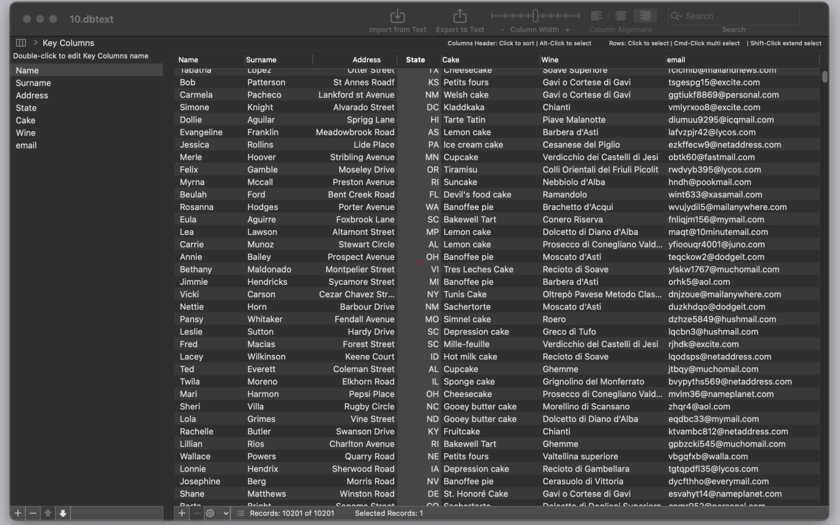
Milano, Italy - Tension Software is proud to announce the release of DB-Text 1.6, their general use tool to open and edit CSV (Comma separated value) and TSV (Tab separated value) documents on OS X. DB-Text is able to open import, edit and manage text data organized by rows and columns in a more practical and effective way then any text editor.
DB-Text can import data both in CSV (comma separated value) text format, in TSV (tab separated value) or CSV-S (Char separated Value using semicolon) text format coming from Windows, Unix and OS X. It can automatically recognize the used format analyzing the content inside. It is a simple drag-and-drop, no need to specify anything before opening a file. Data can be manipulated and exported as text (as CSV, TSV, html or custom format selecting separators and other tags) or saved inside a native DB-Text document
New in this release:
* Cascade sequential assignment to destination fields in a single click
* Import now shows position of visualized record of the total available
* Added an option to do not import first imported row also without using it as field labels
* Solved a bug not showing latest created fields inside destination popups in case of successive import operations
DB-Text is a must have for any user that manipulates data text files. It can enlarge or shrink all the columns in a single step from the toolbar. It allows to move and adjust columns as the user needs. It allows to save a lot of time doing in a proper way text data manipulation with a tool designed for the purpose with features a text editor can't match.
Features:
* Import form files using different encoding, also from Windows
* Import from TSV (tab separator) , CSV (comma separator) , CSV-S (semicolon separator)
* Import from any document via drag and drop
* Import dialog that let you select for any column (field) where to import
* Popup inside the import dialog to specify field destinations
* Data browsing before import inside the import dialog
* Optional 'Use first row as header'
* Fast opening creating a new column table for any text column in the file
* Import more then one time inside a document with a great Mac interface to specify where to add data in a pre-existing table
* Manipulation of data easy and intuitive
* Columns can be moved at any time as the user needs
* Edit in place for any data
* Sort and filter with a click inside the document
* Copy of CSV (comma separated) or TSV (tab separated) data of selected rows in the clipboard
* Assign at any time the content of a row as column header
* Saves also in native format
* Document based for a better data management
* Add delete columns and rows at any time with a click
* Edit column accessory view to see how your data are organized (useful if you have a lot of columns data)
* Export dialog that let you select from which fields to export and in which order
* Resume, Auto Save, Versions, Full screen.
* Optimized for OS X 10.11 El Capitan
System Requirements:
* OS X 10.10 or later
* 64-bit processor
* 5.9 MB
Pricing and Availability:
DB-Text 1.6 is $4.99 USD (or an equivalent amount in other currencies) and is available worldwide exclusively through the Mac App Store in the Productivity category.
Tension Software: http://www.tensionsoftware.com
DB-Text 1.6: http://www.tensionsoftware.com/osx/dbtext/
Direct Download: http://dwn.tensionsoftware.com/osx/dbtext/dbtext.dmg
Purchase and Download from Mac App Store: http://itunes.apple.com/app/db-text/id493057152
Screenshot: http://www.tensionsoftware.com/static/tensionsoftware/images/app/dbtext/screenshots/mac/1.png
Application Icon: http://www.tensionsoftware.com/static/tensionsoftware/images/app/dbtext/icons/128.png
Tension Software develops software for Mac OS X and iOS using the latest Apple technology, Cocoa and Objective-C. All Material and Software (C) Copyright 2016 Tension Software. All Rights Reserved. Apple, the Apple logo, Macintosh and Mac OS X are registered trademarks of Apple Inc. in the U.S. and/or other countries. Other trademarks and registered trademarks may be the property of their respective owners.
*******
Link To Article: http://prmac.com/release-id-79319.htm
*******
---------------------------------------------------------------------------------
Note that you can alter delivered distributions at any time.
Login to your account on prMac to alter your channel selection, or to opt-out at any time.
DB-Text is an Application to Open and Edit CSV and TSV files on Mac OS X - Published on 04/26/16
Tension Software announces DB-Text 1.6, the important update to their general use tool to open and edit CSV (Comma separated value) and TSV (Tab separated value) documents on OS X. DB-Text is able to open import, edit and manage text data organized by rows and columns in a more practical and effective way then any text editor. Version 1.6 brings improved import functionality and added options to the app.
Milano, Italy - Tension Software is proud to announce the release of DB-Text 1.6, their general use tool to open and edit CSV (Comma separated value) and TSV (Tab separated value) documents on OS X. DB-Text is able to open import, edit and manage text data organized by rows and columns in a more practical and effective way then any text editor.
DB-Text can import data both in CSV (comma separated value) text format, in TSV (tab separated value) or CSV-S (Char separated Value using semicolon) text format coming from Windows, Unix and OS X. It can automatically recognize the used format analyzing the content inside. It is a simple drag-and-drop, no need to specify anything before opening a file. Data can be manipulated and exported as text (as CSV, TSV, html or custom format selecting separators and other tags) or saved inside a native DB-Text document
New in this release:
* Cascade sequential assignment to destination fields in a single click
* Import now shows position of visualized record of the total available
* Added an option to do not import first imported row also without using it as field labels
* Solved a bug not showing latest created fields inside destination popups in case of successive import operations
DB-Text is a must have for any user that manipulates data text files. It can enlarge or shrink all the columns in a single step from the toolbar. It allows to move and adjust columns as the user needs. It allows to save a lot of time doing in a proper way text data manipulation with a tool designed for the purpose with features a text editor can't match.
Features:
* Import form files using different encoding, also from Windows
* Import from TSV (tab separator) , CSV (comma separator) , CSV-S (semicolon separator)
* Import from any document via drag and drop
* Import dialog that let you select for any column (field) where to import
* Popup inside the import dialog to specify field destinations
* Data browsing before import inside the import dialog
* Optional 'Use first row as header'
* Fast opening creating a new column table for any text column in the file
* Import more then one time inside a document with a great Mac interface to specify where to add data in a pre-existing table
* Manipulation of data easy and intuitive
* Columns can be moved at any time as the user needs
* Edit in place for any data
* Sort and filter with a click inside the document
* Copy of CSV (comma separated) or TSV (tab separated) data of selected rows in the clipboard
* Assign at any time the content of a row as column header
* Saves also in native format
* Document based for a better data management
* Add delete columns and rows at any time with a click
* Edit column accessory view to see how your data are organized (useful if you have a lot of columns data)
* Export dialog that let you select from which fields to export and in which order
* Resume, Auto Save, Versions, Full screen.
* Optimized for OS X 10.11 El Capitan
System Requirements:
* OS X 10.10 or later
* 64-bit processor
* 5.9 MB
Pricing and Availability:
DB-Text 1.6 is $4.99 USD (or an equivalent amount in other currencies) and is available worldwide exclusively through the Mac App Store in the Productivity category.
Tension Software: http://www.tensionsoftware.com
DB-Text 1.6: http://www.tensionsoftware.com/osx/dbtext/
Direct Download: http://dwn.tensionsoftware.com/osx/dbtext/dbtext.dmg
Purchase and Download from Mac App Store: http://itunes.apple.com/app/db-text/id493057152
Screenshot: http://www.tensionsoftware.com/static/tensionsoftware/images/app/dbtext/screenshots/mac/1.png
Application Icon: http://www.tensionsoftware.com/static/tensionsoftware/images/app/dbtext/icons/128.png

Tension Software develops software for Mac OS X and iOS using the latest Apple technology, Cocoa and Objective-C. All Material and Software (C) Copyright 2016 Tension Software. All Rights Reserved. Apple, the Apple logo, Macintosh and Mac OS X are registered trademarks of Apple Inc. in the U.S. and/or other countries. Other trademarks and registered trademarks may be the property of their respective owners.
*******
Link To Article: http://prmac.com/release-id-79319.htm
*******
---------------------------------------------------------------------------------
Note that you can alter delivered distributions at any time.
Login to your account on prMac to alter your channel selection, or to opt-out at any time.
Bengali Keyboard 1.0 for iOS Offers Customizable Bengali Text Entry
A new article has been published at prMac.
Bengali Keyboard 1.0 for iOS Offers Customizable Bengali Text Entry - Published on 04/26/16
LastThink today announces Bengali Keyboard for iPad and iPhone 1.0, their highly customizable keyboard application. Bengali Keyboard offers users a third-party keyboard for use with iOS apps that allows anyone to modify it to their individual taste. Users can modify the order of the keyboard for more convenient usage. The app includes the ability to save specific words for later use, emoticons, paragraph formatting, word prediction, and more.
Yerevan, Armenia - LastThink is proud to announce the release of Bengali Keyboard for iPad and iPhone 1.0, their highly customizable keyboard application. The Bengali Keyboard's customization features allow anyone to create the keyboard layout that is perfect for their needs. Features include the ability to change the size, shape, and order of characters; the ability to save specific words for later use; emoticons, word prediction, and more.
Users can change the order of the keyboard's letter layout, and even create handy shortcuts to allow entering words or even entire sentences with just a few keystrokes. The keyboard's Swipe feature allows users to swipe their finger around the keyboard to select letters and form words. The app intelligently predicts what the user intends to enter, greatly enhancing typing speed.
What's New in Version 1.0:
* Change the size, and place, as well as the shape of characters and keyboard separately
* Save any words that are used frequently in the active vocabulary for later use
* Express emotions with emoji characters (emoticons) which will correspond to entered words
* Paragraph formatting: Adjust alignment, line spacing, margins, bullets and numbering
* Optional smart auto correction: Intelligent spell checking for even the sloppiest typing
* Style: Customize the look of the keyboard. Change the color of the keys and background
* Word prediction: The keyboard guesses and displays the appropriate word as the user types
* Share text via Facebook, Twitter, email, Dropbox, and more
"When we set out to create the Bengali Keyboard, we knew we wanted to create a customizable keyboard that would offer users the ability to modify it to their individual tastes," says LastThink founder Grigori Jlavyan. Our keyboard allows Bengali speaking users to easily enter their text messages, emails, and other types of texts via a comprehensive interface, making their day-to-day communications more convenient than ever."
The Bengali Keyboard also offers handy paragraph formatting options, allowing users to adjust the alignment of their text, while also offering the ability to set line spacing, adjust margins, even add bulleted or numbered lists. Optional smart correction makes even the sloppiest speller's text entry become correct. The keyboard also offers a downloadable Bengali font for use with iOS devices, making text entry, editing, and display even more convenient.
Bengali Keyboard emphasizes the user's security above all, and while many third-party iOS keyboard apps require "Full Access" - with the ability to send back keystrokes and other information back to their developer - the Bengali Keyboard does not, protecting the text entry and sensitive user information, keeping their personal information safe from prying eyes.
Device Requirements:
* iPhone, iPad, and iPod touch
* Optimized for iPhone 5, iPhone 6/6 Plus
* Universal Application
* Requires iOS 6.1 or later
* 7.7 MB
Pricing and Availability:
Bengali Keyboard 1.0 is $1.99 and available worldwide exclusively through the App Store in the Utilities category. Review codes are available upon request.
LastThink: http://lastthink.com/
Bengali Keyboard for iPhone and iPad 1.0: https://www.facebook.com/pages/Bengal-Keyboard/608398612537778
Download from iTunes: https://itunes.apple.com/app/bengali-keyboard-for-iphone/id939963910
Screenshot: http://a2.mzstatic.com/us/r30/Purple3/v4/99/83/17/99831722-eebc-b387-d548-e372bc834240/screen322x572.jpeg
App Icon: http://a3.mzstatic.com/us/r30/Purple1/v4/c7/d2/11/c7d21110-ed34-c527-533a-70a588a2fd81/icon175x175.jpeg
LastThink is an IT company with a focus on mobile development. It has extended its list of services since 2012 to offer high-end business process management, system integration, as well as up-to-date communication solutions. LastThink's mission is to deliver maximum business value to its customers by designing, developing, implementing and maintaining efficient and high quality software solutions aligned with their most essential business needs. Their team will always do its best to meet client expectations. All Material and Software (C) Copyright 2016 LastThink. All Rights Reserved. Apple, the Apple logo, iPhone, iPod and iPad are registered trademarks of Apple Inc. in the U.S. and/or other countries. Other trademarks and registered trademarks may be the property of their respective owners.
*******
Link To Article: http://prmac.com/release-id-79318.htm
*******
---------------------------------------------------------------------------------
Note that you can alter delivered distributions at any time.
Login to your account on prMac to alter your channel selection, or to opt-out at any time.
Bengali Keyboard 1.0 for iOS Offers Customizable Bengali Text Entry - Published on 04/26/16
LastThink today announces Bengali Keyboard for iPad and iPhone 1.0, their highly customizable keyboard application. Bengali Keyboard offers users a third-party keyboard for use with iOS apps that allows anyone to modify it to their individual taste. Users can modify the order of the keyboard for more convenient usage. The app includes the ability to save specific words for later use, emoticons, paragraph formatting, word prediction, and more.
Yerevan, Armenia - LastThink is proud to announce the release of Bengali Keyboard for iPad and iPhone 1.0, their highly customizable keyboard application. The Bengali Keyboard's customization features allow anyone to create the keyboard layout that is perfect for their needs. Features include the ability to change the size, shape, and order of characters; the ability to save specific words for later use; emoticons, word prediction, and more.
Users can change the order of the keyboard's letter layout, and even create handy shortcuts to allow entering words or even entire sentences with just a few keystrokes. The keyboard's Swipe feature allows users to swipe their finger around the keyboard to select letters and form words. The app intelligently predicts what the user intends to enter, greatly enhancing typing speed.
What's New in Version 1.0:
* Change the size, and place, as well as the shape of characters and keyboard separately
* Save any words that are used frequently in the active vocabulary for later use
* Express emotions with emoji characters (emoticons) which will correspond to entered words
* Paragraph formatting: Adjust alignment, line spacing, margins, bullets and numbering
* Optional smart auto correction: Intelligent spell checking for even the sloppiest typing
* Style: Customize the look of the keyboard. Change the color of the keys and background
* Word prediction: The keyboard guesses and displays the appropriate word as the user types
* Share text via Facebook, Twitter, email, Dropbox, and more
"When we set out to create the Bengali Keyboard, we knew we wanted to create a customizable keyboard that would offer users the ability to modify it to their individual tastes," says LastThink founder Grigori Jlavyan. Our keyboard allows Bengali speaking users to easily enter their text messages, emails, and other types of texts via a comprehensive interface, making their day-to-day communications more convenient than ever."
The Bengali Keyboard also offers handy paragraph formatting options, allowing users to adjust the alignment of their text, while also offering the ability to set line spacing, adjust margins, even add bulleted or numbered lists. Optional smart correction makes even the sloppiest speller's text entry become correct. The keyboard also offers a downloadable Bengali font for use with iOS devices, making text entry, editing, and display even more convenient.
Bengali Keyboard emphasizes the user's security above all, and while many third-party iOS keyboard apps require "Full Access" - with the ability to send back keystrokes and other information back to their developer - the Bengali Keyboard does not, protecting the text entry and sensitive user information, keeping their personal information safe from prying eyes.
Device Requirements:
* iPhone, iPad, and iPod touch
* Optimized for iPhone 5, iPhone 6/6 Plus
* Universal Application
* Requires iOS 6.1 or later
* 7.7 MB
Pricing and Availability:
Bengali Keyboard 1.0 is $1.99 and available worldwide exclusively through the App Store in the Utilities category. Review codes are available upon request.
LastThink: http://lastthink.com/
Bengali Keyboard for iPhone and iPad 1.0: https://www.facebook.com/pages/Bengal-Keyboard/608398612537778
Download from iTunes: https://itunes.apple.com/app/bengali-keyboard-for-iphone/id939963910
Screenshot: http://a2.mzstatic.com/us/r30/Purple3/v4/99/83/17/99831722-eebc-b387-d548-e372bc834240/screen322x572.jpeg

App Icon: http://a3.mzstatic.com/us/r30/Purple1/v4/c7/d2/11/c7d21110-ed34-c527-533a-70a588a2fd81/icon175x175.jpeg

LastThink is an IT company with a focus on mobile development. It has extended its list of services since 2012 to offer high-end business process management, system integration, as well as up-to-date communication solutions. LastThink's mission is to deliver maximum business value to its customers by designing, developing, implementing and maintaining efficient and high quality software solutions aligned with their most essential business needs. Their team will always do its best to meet client expectations. All Material and Software (C) Copyright 2016 LastThink. All Rights Reserved. Apple, the Apple logo, iPhone, iPod and iPad are registered trademarks of Apple Inc. in the U.S. and/or other countries. Other trademarks and registered trademarks may be the property of their respective owners.
*******
Link To Article: http://prmac.com/release-id-79318.htm
*******
---------------------------------------------------------------------------------
Note that you can alter delivered distributions at any time.
Login to your account on prMac to alter your channel selection, or to opt-out at any time.
Subscribe to:
Posts (Atom)