A new article has been published at prMac.
Body Parts - Basic (Middle and Asia) from Kidz Learn Applications - Published on 04/27/16
Kidz Learn Applications announces Body Parts - Basic (Middle and Asia) 1.0, their educational app for iOS, Blackberry, Android, and Amazon Fire devices that allows a child to learn parts of a body in 5 different languages. Body Parts helps young children learn about the different body parts, along with how to pronounce the word that accompanies the respective part. Body Parts utilizes not only imagery, but HD sound as well, to help children connect the body parts to the words.
Edison, New Jersey - Kidz Learn Applications is pleased to introduce Body Parts - Basic (Middle and Asia) 1.0, their educational smartphone application available for iOS, Black Berry, Android, and Amazon Fire devices. It is an educational app that describes the basic parts of a human body in 5 languages.
Upon opening this app, users can select an image: eyes, nose, ears, lips, hands, fingers and feet; or can select the full catalog of parts from the bottom center tile. In addition, users can also select the Questions section of Body Parts, which goes into a little game for the child to play. Once inside, the voice of a young child will ask, "Which of these pictures shows the nose?" for example and there are three pictures to choose from; choose the correct answer and a large smiley face pops up and allows the player to go to the next question. This section of the game makes learning the body parts both visually and audibly stimulating, keeping the learning fun.
This app fosters kids to learn other languages by providing them with the settings tab (iOS) or Settings menu option (Android). This allows the user to learn the parts of the human body in the language he/she wants to learn. This application enables a child to learn in languages: English, Tamil, Hindi and Chinese and Arabic.
The full catalog section mentioned above this section of the app is extremely comprehensive and gives the users a breakdown of all the upper body, middle body and lower body parts, starting at the top of each respective section and giving the user a quick video breakdown of all of the body parts in that given section.
This app also takes Privacy and Security of Kids and does not display ads or take location information. This app also does not have in-app purchases, ads or links to social media and external websites.
"I am a mom with 2 kids. My kid loves to play in smart phones and Tablet. She/he enjoys playing games. This made me think, why not make educational applications for kids to learn and have fun," says Gomathy Shankaran. "My kid loves to learn and have fun with my applications. Hence the apps are intended for all kids who want to grow by learning smart. My applications have Parental Gate for in-App purchases, links to external websites and Social Media. Kid's will have fun Learning," Gomathy adds.
Device Requirements:
* iPhone, iPad, and iPod touch
* Requires iOS 6.0 or later
* 75.7 MB
Pricing and Availability:
Body Parts - Basic (Middle and Asia)1.0 is just $1.99 USD (or equivalent amount in other currencies), and is available worldwide through the App Store in the Education category. The app is also available on for Android devices through Google Play and Amazon Fire devices through the Amazon Appstore.
Body Parts - Basic (Middle and Asia) 1.0: https://itunes.apple.com/app/body-parts-basic-middle-asia/id1088010167
Purchase and Download from Google Play: https://play.google.com/store/apps/details?id=com.bodyparts2lang.application
Purchase and Download from Amazon: http://www.amazon.com/Independent-Body-Parts-Middle-and-Asia/dp/B01CUQB19K
Youtube Video: https://www.youtube.com/channel/UCbMQ72Dj9DY9kxtvUSFj7cA
Kidz Learn App Links: http://kidzlearn.co/iosandroid-links.html
Kidz Learn Applications are designed for kid's to have fun and enhance their learning abilities.The many paid, and unpaid applications do not require WIFI or net connection to play. Kidz Learn considers Security and Privacy of kid's important. The applications are developed taking security and privacy in to consideration. All Material and Software (C) Copyright 2016 Kidz Learn Applications. All Rights Reserved. Apple, the Apple logo, iPhone, iPod and iPad are registered trademarks of Apple Inc. in the U.S. and/or other countries. Other trademarks and registered trademarks may be the property of their respective owners.
*******
Link To Article: http://prmac.com/release-id-79335.htm
*******
---------------------------------------------------------------------------------
Note that you can alter delivered distributions at any time.
Login to your account on prMac to alter your channel selection, or to opt-out at any time.

Afghanistan Keyboard 1.0
A new article has been published at prMac.
Afghanistan Keyboard 1.0 - Published on 04/27/16
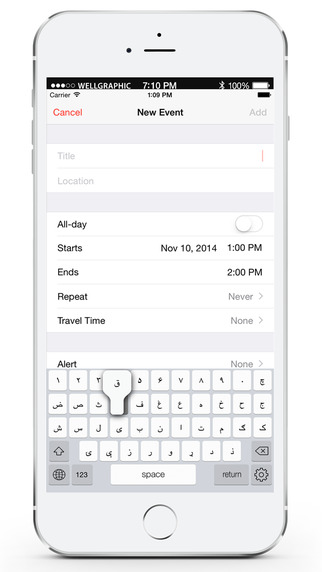
LastThink today announces Afghanistan Keyboard for iPad and iPhone 1.0, their highly customizable keyboard application. Afghanistan Keyboard offers users a third-party keyboard for use with iOS apps that allows anyone to modify it to their individual taste. Users can modify the order of the keyboard for more convenient usage. The update includes the ability to save specific words for later use, emoticons, paragraph formatting, word prediction, and more.
Yerevan, Armenia - LastThink is proud to announce the release of Afghanistan Keyboard for iPad and iPhone 1.0, their highly customizable keyboard application. The Afghanistan Keyboard's customization features allow anyone to create the keyboard layout that is perfect for their needs. Features include the ability to change the size, shape, and order of characters; the ability to save specific words for later use; emoticons, word prediction, and more.
Users can change the order of the keyboard's letter layout, and even create handy shortcuts to allow entering words or even entire sentences with just a few keystrokes. The keyboard's Swipe feature allows users to swipe their finger around the keyboard to select letters and form words. The app intelligently predicts what the user intends to enter, greatly enhancing typing speed.
What's New in Version 1.0:
* Change the size, and place, as well as the shape of characters and keyboard separately
* Save any words that are used frequently in the active vocabulary for later use
* Express emotions with emoji characters (emoticons) which will correspond to entered words
* Paragraph formatting: Adjust alignment, line spacing, margins, bullets and numbering
* Optional smart auto correction: Intelligent spell checking for even the sloppiest typing
* Style: Customize the look of the keyboard. Change the color of the keys and background
* Word prediction: The keyboard guesses and displays the appropriate word as the user types
* Share text via Facebook, Twitter, email, Dropbox, and more
"When we set out to create the Afghanistan Keyboard, we knew we wanted to create a customizable keyboard that would offer users the ability to modify it to their individual tastes," says LastThink founder Grigori Jlavyan. " Our keyboard allows Afghanistan speaking users to easily enter their text messages, emails, and other types of texts via a comprehensive interface, making their day-to-day communications more convenient than ever."
The Afghanistan Keyboard also offers handy paragraph formatting options, allowing users to adjust the alignment of their text, while also offering the ability to set line spacing, adjust margins, even add bulleted or numbered lists. Optional smart correction makes even the sloppiest speller's text entry become correct. The keyboard also offers a downloadable Afghanistan font for use with iOS devices, making text entry, editing, and display even more convenient.
Afghanistan Keyboard emphasizes the user's security above all, and while many third-party iOS keyboard apps require "Full Access" - with the ability to send back keystrokes and other information back to their developer - the Afghanistan Keyboard does not, protecting the text entry and sensitive user information, keeping their personal information safe from prying eyes.
Device Requirements:
* iPhone, iPad, and iPod touch
* Optimized for iPhone 5, iPhone 6/6 Plus
* Universal Application
* Requires iOS 8.0 or later
* 7.5 MB
Pricing and Availability:
Afghanistan Keyboard 1.0 is only $1.99 USD (or equivalent amount in other currencies) and available worldwide exclusively through the App Store in the Utilities category. Review codes are available upon request.
LastThink: http://lastthink.com/
Afghanistan Keyboard ( Pashto Keypad ) for iPad and iPhone 1.0: https://www.facebook.com/pages/IosRegion/688324511213130
Direct Download Link: https://itunes.apple.com/app/afghanistan-keyboard-pashto/id939204674
Screenshot: http://a5.mzstatic.com/us/r30/Purple1/v4/83/ff/41/83ff41d4-a160-4c1e-fa20-e96ba3eff14d/screen322x572.jpeg
App Icon: http://a4.mzstatic.com/us/r30/Purple3/v4/64/7c/76/647c76f7-8c96-0f28-1813-2fe21663542d/icon175x175.png
LastThink is an IT company with a focus on mobile development. It has extended its list of services since 2012 to offer high-end business process management, system integration, as well as up-to-date communication solutions. LastThink's mission is to deliver maximum business value to its customers by designing, developing, implementing and maintaining efficient and high quality software solutions aligned with their most essential business needs. Their team will always do its best to meet client expectations. All Material and Software (C) Copyright 2016 LastThink. All Rights Reserved. Apple, the Apple logo, iPhone, iPod and iPad are registered trademarks of Apple Inc. in the U.S. and/or other countries. Other trademarks and registered trademarks may be the property of their respective owners.
*******
Link To Article: http://prmac.com/release-id-79334.htm
*******
---------------------------------------------------------------------------------
Note that you can alter delivered distributions at any time.
Login to your account on prMac to alter your channel selection, or to opt-out at any time.
Afghanistan Keyboard 1.0 - Published on 04/27/16
LastThink today announces Afghanistan Keyboard for iPad and iPhone 1.0, their highly customizable keyboard application. Afghanistan Keyboard offers users a third-party keyboard for use with iOS apps that allows anyone to modify it to their individual taste. Users can modify the order of the keyboard for more convenient usage. The update includes the ability to save specific words for later use, emoticons, paragraph formatting, word prediction, and more.
Yerevan, Armenia - LastThink is proud to announce the release of Afghanistan Keyboard for iPad and iPhone 1.0, their highly customizable keyboard application. The Afghanistan Keyboard's customization features allow anyone to create the keyboard layout that is perfect for their needs. Features include the ability to change the size, shape, and order of characters; the ability to save specific words for later use; emoticons, word prediction, and more.
Users can change the order of the keyboard's letter layout, and even create handy shortcuts to allow entering words or even entire sentences with just a few keystrokes. The keyboard's Swipe feature allows users to swipe their finger around the keyboard to select letters and form words. The app intelligently predicts what the user intends to enter, greatly enhancing typing speed.
What's New in Version 1.0:
* Change the size, and place, as well as the shape of characters and keyboard separately
* Save any words that are used frequently in the active vocabulary for later use
* Express emotions with emoji characters (emoticons) which will correspond to entered words
* Paragraph formatting: Adjust alignment, line spacing, margins, bullets and numbering
* Optional smart auto correction: Intelligent spell checking for even the sloppiest typing
* Style: Customize the look of the keyboard. Change the color of the keys and background
* Word prediction: The keyboard guesses and displays the appropriate word as the user types
* Share text via Facebook, Twitter, email, Dropbox, and more
"When we set out to create the Afghanistan Keyboard, we knew we wanted to create a customizable keyboard that would offer users the ability to modify it to their individual tastes," says LastThink founder Grigori Jlavyan. " Our keyboard allows Afghanistan speaking users to easily enter their text messages, emails, and other types of texts via a comprehensive interface, making their day-to-day communications more convenient than ever."
The Afghanistan Keyboard also offers handy paragraph formatting options, allowing users to adjust the alignment of their text, while also offering the ability to set line spacing, adjust margins, even add bulleted or numbered lists. Optional smart correction makes even the sloppiest speller's text entry become correct. The keyboard also offers a downloadable Afghanistan font for use with iOS devices, making text entry, editing, and display even more convenient.
Afghanistan Keyboard emphasizes the user's security above all, and while many third-party iOS keyboard apps require "Full Access" - with the ability to send back keystrokes and other information back to their developer - the Afghanistan Keyboard does not, protecting the text entry and sensitive user information, keeping their personal information safe from prying eyes.
Device Requirements:
* iPhone, iPad, and iPod touch
* Optimized for iPhone 5, iPhone 6/6 Plus
* Universal Application
* Requires iOS 8.0 or later
* 7.5 MB
Pricing and Availability:
Afghanistan Keyboard 1.0 is only $1.99 USD (or equivalent amount in other currencies) and available worldwide exclusively through the App Store in the Utilities category. Review codes are available upon request.
LastThink: http://lastthink.com/
Afghanistan Keyboard ( Pashto Keypad ) for iPad and iPhone 1.0: https://www.facebook.com/pages/IosRegion/688324511213130
Direct Download Link: https://itunes.apple.com/app/afghanistan-keyboard-pashto/id939204674
Screenshot: http://a5.mzstatic.com/us/r30/Purple1/v4/83/ff/41/83ff41d4-a160-4c1e-fa20-e96ba3eff14d/screen322x572.jpeg
App Icon: http://a4.mzstatic.com/us/r30/Purple3/v4/64/7c/76/647c76f7-8c96-0f28-1813-2fe21663542d/icon175x175.png

LastThink is an IT company with a focus on mobile development. It has extended its list of services since 2012 to offer high-end business process management, system integration, as well as up-to-date communication solutions. LastThink's mission is to deliver maximum business value to its customers by designing, developing, implementing and maintaining efficient and high quality software solutions aligned with their most essential business needs. Their team will always do its best to meet client expectations. All Material and Software (C) Copyright 2016 LastThink. All Rights Reserved. Apple, the Apple logo, iPhone, iPod and iPad are registered trademarks of Apple Inc. in the U.S. and/or other countries. Other trademarks and registered trademarks may be the property of their respective owners.
*******
Link To Article: http://prmac.com/release-id-79334.htm
*******
---------------------------------------------------------------------------------
Note that you can alter delivered distributions at any time.
Login to your account on prMac to alter your channel selection, or to opt-out at any time.
Precise Screenshot is a New Generation Tool to Take Screenshots on Mac
A new article has been published at prMac.
Precise Screenshot is a New Generation Tool to Take Screenshots on Mac - Published on 04/27/16
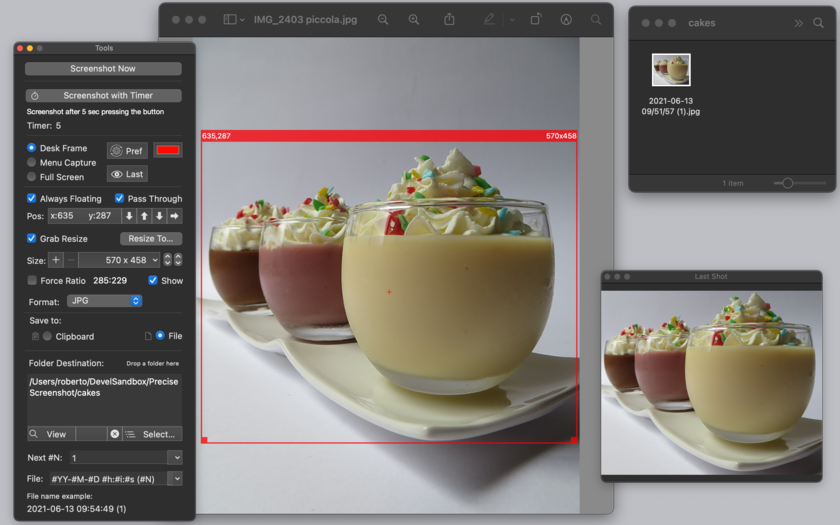
Tension Software announces Precise Screenshot 1.4.2, an important update to their new generation tool to take screenshots of Mac OS X screens. Precise Screenshot can select a resizable portion of the screen with the usual drag method or it can use pre-fixed size area from a customizable popup menu, or also use the full screen area. Precise Screenshot can take shot immediately or using a timer selectable from 0 to 10 seconds. Version 1.4.2 brings a number of bug fixes to the app.
Milano, Italy - Tension Software is proud to a announce the release of Precise Screenshot 1.4.2, an important update to their new generation tool to take screenshots from a Mac OS X screen. Precise Screenshot can select a resizable portion of the screen with the usual drag method or it can use pre-fixed size area from a customizable popup menu (with the sizes the user needs) or also use the full screen area.
Specify a new specific screen size to take screenshot with high precision is just a matter of selecting it from the custom popup, (or resizing and dragging it in the traditional way). The screenshot frame area shows it's size and position in the upper side border. The screenshot can be moved and resized with precision 1 pixel by 1 pixel. Precise Screenshot can take shot immediately or using a timer selectable from 0 to 10 seconds, (showing a count down).
It works even when in background using a status menu on the right part of the menu bar to take screenshot when other apps are in foreground and in active status. It offers also a useful tool palette with all the setting controls.It can save to the clipboard (with the picture immediately available for use) or to disk in selectable custom places. It can save to disk in JPG, PNG, TIFF format. It can save with/without alpha channel (for transparency).
'Include Menu' mode to always include in the shot the upper part of the screen with menu bar area included
Desk Frame mode to capture any portion of the screen (menu bar excluded). It can use a custom file name using meta-tags, with serial number (automatically increased) and or using date elements (Year, Month, Day, Hour, Minute, Second). The user can modify any setting at any time, also in the middle of the work as required by different situations.
Precise Screenshot can offer a preview of the latest screenshot in a floating palette. Optimized for OS X 10.11, it is fully sandboxed offering the maximum protection level combined with the maximum flexibility. It's small, fast and full featured, it has all you need for a precise and perfect work. Embedded PDF User Guide included.
What's new for this release:
* Bug fix: solved error of 1 pixel in size of screenshot when in 'Include Menu' mode
* Bug fix: movement arrow buttons are now correctly disabled when in 'Full Screen' and 'Include Menu' mode
* Other minor bug fixes
System Requirements:
* OS X 10.10 or later
* 64-bit processor
* 14.0 MB
Pricing and Availability:
Precise Screenshot 1.4.2 is $5.99 USD (or an equivalent amount in other currencies), and is available worldwide exclusively through the Mac App Store in the Utilities category.
Tension Software: http://www.tensionsoftware.com
Precise Screenshot 1.4.2: http://www.tensionsoftware.com/osx/precisescreenshot/
Purchase and Download from Mac App Store: http://itunes.apple.com/app/precise-screenshot/id531794281
Screenshot: http://www.tensionsoftware.com/static/tensionsoftware/images/app/precisescreenshot/screenshots/mac/1.png
Application Icon: http://www.tensionsoftware.com/static/tensionsoftware/images/app/precisescreenshot/icons/128.png
Tension Software develops software for Mac OS X and iOS using the latest Apple technology, Cocoa and Objective-C. All Material and Software (C) Copyright 2016 Tension Software. All Rights Reserved. Apple, the Apple logo, Macintosh and Mac OS X are registered trademarks of Apple Inc. in the U.S. and/or other countries. Other trademarks and registered trademarks may be the property of their respective owners.
*******
Link To Article: http://prmac.com/release-id-79333.htm
*******
---------------------------------------------------------------------------------
Note that you can alter delivered distributions at any time.
Login to your account on prMac to alter your channel selection, or to opt-out at any time.
Precise Screenshot is a New Generation Tool to Take Screenshots on Mac - Published on 04/27/16
Tension Software announces Precise Screenshot 1.4.2, an important update to their new generation tool to take screenshots of Mac OS X screens. Precise Screenshot can select a resizable portion of the screen with the usual drag method or it can use pre-fixed size area from a customizable popup menu, or also use the full screen area. Precise Screenshot can take shot immediately or using a timer selectable from 0 to 10 seconds. Version 1.4.2 brings a number of bug fixes to the app.
Milano, Italy - Tension Software is proud to a announce the release of Precise Screenshot 1.4.2, an important update to their new generation tool to take screenshots from a Mac OS X screen. Precise Screenshot can select a resizable portion of the screen with the usual drag method or it can use pre-fixed size area from a customizable popup menu (with the sizes the user needs) or also use the full screen area.
Specify a new specific screen size to take screenshot with high precision is just a matter of selecting it from the custom popup, (or resizing and dragging it in the traditional way). The screenshot frame area shows it's size and position in the upper side border. The screenshot can be moved and resized with precision 1 pixel by 1 pixel. Precise Screenshot can take shot immediately or using a timer selectable from 0 to 10 seconds, (showing a count down).
It works even when in background using a status menu on the right part of the menu bar to take screenshot when other apps are in foreground and in active status. It offers also a useful tool palette with all the setting controls.It can save to the clipboard (with the picture immediately available for use) or to disk in selectable custom places. It can save to disk in JPG, PNG, TIFF format. It can save with/without alpha channel (for transparency).
'Include Menu' mode to always include in the shot the upper part of the screen with menu bar area included
Desk Frame mode to capture any portion of the screen (menu bar excluded). It can use a custom file name using meta-tags, with serial number (automatically increased) and or using date elements (Year, Month, Day, Hour, Minute, Second). The user can modify any setting at any time, also in the middle of the work as required by different situations.
Precise Screenshot can offer a preview of the latest screenshot in a floating palette. Optimized for OS X 10.11, it is fully sandboxed offering the maximum protection level combined with the maximum flexibility. It's small, fast and full featured, it has all you need for a precise and perfect work. Embedded PDF User Guide included.
What's new for this release:
* Bug fix: solved error of 1 pixel in size of screenshot when in 'Include Menu' mode
* Bug fix: movement arrow buttons are now correctly disabled when in 'Full Screen' and 'Include Menu' mode
* Other minor bug fixes
System Requirements:
* OS X 10.10 or later
* 64-bit processor
* 14.0 MB
Pricing and Availability:
Precise Screenshot 1.4.2 is $5.99 USD (or an equivalent amount in other currencies), and is available worldwide exclusively through the Mac App Store in the Utilities category.
Tension Software: http://www.tensionsoftware.com
Precise Screenshot 1.4.2: http://www.tensionsoftware.com/osx/precisescreenshot/
Purchase and Download from Mac App Store: http://itunes.apple.com/app/precise-screenshot/id531794281
Screenshot: http://www.tensionsoftware.com/static/tensionsoftware/images/app/precisescreenshot/screenshots/mac/1.png
Application Icon: http://www.tensionsoftware.com/static/tensionsoftware/images/app/precisescreenshot/icons/128.png

Tension Software develops software for Mac OS X and iOS using the latest Apple technology, Cocoa and Objective-C. All Material and Software (C) Copyright 2016 Tension Software. All Rights Reserved. Apple, the Apple logo, Macintosh and Mac OS X are registered trademarks of Apple Inc. in the U.S. and/or other countries. Other trademarks and registered trademarks may be the property of their respective owners.
*******
Link To Article: http://prmac.com/release-id-79333.htm
*******
---------------------------------------------------------------------------------
Note that you can alter delivered distributions at any time.
Login to your account on prMac to alter your channel selection, or to opt-out at any time.
TaoMix 2 - An Infinite World of Sounds Available on iOS
A new article has been published at prMac.
TaoMix 2 - An Infinite World of Sounds Available on iOS - Published on 04/27/16
Montreal based inookta studio inc. today introduces TaoMix 2, their new fitness app for iOS devices. TaoMix makes it easy for anyone to create their own immersive, uniquely personal relaxing soundscapes. Users can collect and mix more than 100 carefully handpicked sounds to create dynamic soundscapes that evolve over time. They can also record and mix their own sounds to create truly unique and memorable soundscapes that can be shared with the world via Facebook, Twitter or by email.
Montreal, Canada - Available today for iPhone and iPad, TaoMix 2 makes it easy for anyone to create their own immersive, uniquely personal relaxing soundscapes that will transport them around the world, from the highest mountains to the ocean's depths.
In this sequel to the first TaoMix app, users can collect and mix more than 100 carefully handpicked sounds to create dynamic soundscapes that evolve over time, for a greater immersion. They can also record and mix their own sounds to create truly unique and memorable soundscapes that can be shared with the world via Facebook, Twitter or by email. The timer can be used to fall asleep or to set a time limit to a relaxation, meditation or yoga sessions and an Apple Watch Extension allows to play soundscapes and switch between them, without having to launch the iOS app.
"TaoMix 2 pushes the immersive experience one step further by adding randomness and customization to the soundscapes, while keeping a sleek and simple design, said Sebastien Mourey, co-founder of inookta studio. "Greater immersion leads to a better relaxation."
Key features:
* Easily create dynamic soundscapes that evolve over time
* Collect and mix more than 100 carefully handpicked sounds
* Option to generate random soundscapes
* Record sounds from your own life and surroundings to create truly unique and memorable soundscapes
* Share your creations with the world
Pricing and Availability
TaoMix 2 (v2.0.0) is available for free on the App Store in English and French, and is compatible with iPhone 4s and later, and iPad 2 and later. While the app offers enough free content to create a wide variety of soundscapes, some sound packs need to be purchased.
TaoMix 2.0: http://inookta.com/taomix/
Download from iTunes: https://itunes.apple.com/app/id1032493819
YouTube Video (App Preview): https://www.youtube.com/watch?v=FGXLAebgJlM
Screenshot: http://taomix2-cf.inookta.com/public/pr/TaoMix2_iPhone6_1.png
App Icon: http://taomix2-cf.inookta.com/public/pr/TaoMix2_icon.png
Press Kit (zip): http://inookta.com/taomix/taomix2-presskit.zip
inookta is an indie studio based in Montreal, Canada, whose mission is to create intuitive digital tools for sound exploration. All Material and Software (C) Copyright 2016 inookta studio inc. All Rights Reserved. Apple, the Apple logo, iPhone, iPod and iPad are registered trademarks of Apple Inc. in the U.S. and/or other countries. Other trademarks and registered trademarks may be the property of their respective owners.
*******
Link To Article: http://prmac.com/release-id-79331.htm
*******
---------------------------------------------------------------------------------
Note that you can alter delivered distributions at any time.
Login to your account on prMac to alter your channel selection, or to opt-out at any time.
TaoMix 2 - An Infinite World of Sounds Available on iOS - Published on 04/27/16
Montreal based inookta studio inc. today introduces TaoMix 2, their new fitness app for iOS devices. TaoMix makes it easy for anyone to create their own immersive, uniquely personal relaxing soundscapes. Users can collect and mix more than 100 carefully handpicked sounds to create dynamic soundscapes that evolve over time. They can also record and mix their own sounds to create truly unique and memorable soundscapes that can be shared with the world via Facebook, Twitter or by email.
Montreal, Canada - Available today for iPhone and iPad, TaoMix 2 makes it easy for anyone to create their own immersive, uniquely personal relaxing soundscapes that will transport them around the world, from the highest mountains to the ocean's depths.
In this sequel to the first TaoMix app, users can collect and mix more than 100 carefully handpicked sounds to create dynamic soundscapes that evolve over time, for a greater immersion. They can also record and mix their own sounds to create truly unique and memorable soundscapes that can be shared with the world via Facebook, Twitter or by email. The timer can be used to fall asleep or to set a time limit to a relaxation, meditation or yoga sessions and an Apple Watch Extension allows to play soundscapes and switch between them, without having to launch the iOS app.
"TaoMix 2 pushes the immersive experience one step further by adding randomness and customization to the soundscapes, while keeping a sleek and simple design, said Sebastien Mourey, co-founder of inookta studio. "Greater immersion leads to a better relaxation."
Key features:
* Easily create dynamic soundscapes that evolve over time
* Collect and mix more than 100 carefully handpicked sounds
* Option to generate random soundscapes
* Record sounds from your own life and surroundings to create truly unique and memorable soundscapes
* Share your creations with the world
Pricing and Availability
TaoMix 2 (v2.0.0) is available for free on the App Store in English and French, and is compatible with iPhone 4s and later, and iPad 2 and later. While the app offers enough free content to create a wide variety of soundscapes, some sound packs need to be purchased.
TaoMix 2.0: http://inookta.com/taomix/
Download from iTunes: https://itunes.apple.com/app/id1032493819
YouTube Video (App Preview): https://www.youtube.com/watch?v=FGXLAebgJlM
Screenshot: http://taomix2-cf.inookta.com/public/pr/TaoMix2_iPhone6_1.png

App Icon: http://taomix2-cf.inookta.com/public/pr/TaoMix2_icon.png

Press Kit (zip): http://inookta.com/taomix/taomix2-presskit.zip
inookta is an indie studio based in Montreal, Canada, whose mission is to create intuitive digital tools for sound exploration. All Material and Software (C) Copyright 2016 inookta studio inc. All Rights Reserved. Apple, the Apple logo, iPhone, iPod and iPad are registered trademarks of Apple Inc. in the U.S. and/or other countries. Other trademarks and registered trademarks may be the property of their respective owners.
*******
Link To Article: http://prmac.com/release-id-79331.htm
*******
---------------------------------------------------------------------------------
Note that you can alter delivered distributions at any time.
Login to your account on prMac to alter your channel selection, or to opt-out at any time.
Aleratec Releases Mac Software for 1:10 USB 3.0 Copy Cruiser Mini
A new article has been published at prMac.
Aleratec Releases Mac Software for 1:10 USB 3.0 Copy Cruiser Mini - Published on 04/27/16
California based Aleratec Inc. today announces a major software upgrade for 1:10 USB 3.0 Copy Cruiser Mini Duplicator, allowing compatibility with Mac OS X computers and laptops in addition to Windows 10/8/7/Vista platforms. The 1:10 USB 3.0 Copy Cruiser Mini is a computer-connected USB duplicator that clones up to 10 USB 3.0/2.0 flash drives simultaneously. The new software is now included with purchase of all new 1:10 USB 3.0 Copy Cruiser Mini duplicator.
Chatsworth, California - Aleratec Inc., award-winning designer, developer and manufacturer of Portable Device Management (PDM) charge/sync products for mobile devices and professional-grade duplicators for hard disk drives, USB flash drives and DVD/CD discs, today announced a major software upgrade for 1:10 USB 3.0 Copy Cruiser Mini Duplicator allowing compatibility with Mac OS X computers and laptops in addition to Windows 10/8/7/Vista platforms. The new software is now included with purchase of all new 1:10 USB 3.0 Copy Cruiser Mini duplicator. For existing customers who already own an eligible Aleratec USB duplicator, upon verification, they can also receive the new software update at no charge by contacting Aleratec customer support at +1-818-678-0484.
"Our current line of computer-connected USB duplicators are now all Mac OS compatible. We have always wanted to give Mac OS Users options when it comes to USB duplication." Notes Perry Solomon, Aleratec President and CEO. "Effective today all of our current computer-connected USB duplicators now are both Mac and Windows compatible, right out of the box. Including the 1:10 USB 3.0 Copy Cruiser Mini."
The 1:10 USB 3.0 Copy Cruiser Mini is a computer-connected USB duplicator that clones up to 10 USB 3.0/2.0 flash drives simultaneously and includes many of the advanced technologies of Aleratec's larger USB flash drive duplicators in a compact and portable package. With read/write speeds up to 5 gigabytes per second and SuperSpeed USB 3.0 duplication, 1:10 USB 3.0 Copy Cruiser Mini produces fast and highly accurate flash drive clones and is easy to setup and operate. It also includes proprietary Aleratec Software to simplify the copying process. Features include the ability to:
* Clone or update files on multiple flash drives without the need of bulky equipment
* Duplicate directly from image files, flash drives or selected files and folders from hard drive
* Create and copy images from bootable flash drives
Price and Availability
Aleratec's 1:10 USB 3.0 Copy Cruiser Mini (Aleratec P/N 330113) has an estimated Retail Price (ERP) of $314.99 and is available from Aleratec's dedicated resellers and distribution.
Also available with the Mac software is the 1:22 USB Copy Cruiser Mini duplicator (P/N 330119) with an estimated price of $629.00 and 1:16 USB 3.0 Copy Cruiser Mini duplicator (P/N 330115) with an estimated price of $499.00.
The full line of Aleratec solutions and accessories is also featured at Adorama, Amazon.com, B&H Photo Video, Barnes & Noble, Best Buy, CDW, Global Industrial, HP, Insight, MacMall, Media Supply, Newegg, Office Depot, PC Connection, PCM, Quill, Rakuten, Sam's Club, Sears, Staples, Target, and Wal-Mart in addition to other leading US retailers. Government and education customers may purchase from Government and Education Specialists including B&H Photo Video Gov, CDW-G, GovConnection, PCM-G, Shi.com, Softchoice, SoftMart, and Sparco.com. All products are available to resellers in the U.S. through D&H Distributing, Ingram Micro, and Tech Data; in Canada through Ingram Micro Canada and Tech Data Canada; in Latin America and Mexico through Tech Data; in the EMEA (Europe, Middle East, Africa) region through Ingram Micro UK.
Aleratec: http://www.aleratec.com
1:10 USB 3.0 Copy Cruiser Mini Duplicator: http://www.aleratec.com/1-to-10-usb-3-0-thumb-flash-drive-duplicator-copy-cruiser-mini-330113.html
Screenshot: http://ep.yimg.com/ay/alera/aleratec-1-10-usb-3-0-copy-cruiser-mini-computer-connect-thumb-drive-duplicator-part-330113-16.gif
Aleratec designs, develops and manufactures high-performance products acclaimed for their reliability and ease of use. Beginning in 2000, California-based Aleratec has met the needs of professionals in education, government and corporate markets with a diverse product line that includes professional-grade portable device management (PDM) charge/sync products for tablets and other mobile devices, duplicators for hard disk drives, USB flash drives and DVD/CD discs, as well as shredders, disc repair and related accessories. For more information, please visit Aleratec online or contact us toll free at 866-77-ALERATEC (866-772-5372). All Material and Software (C) Copyright 2016 Aleratec Inc. All Rights Reserved. Apple, the Apple logo, Mac OS X and Macintosh are registered trademarks of Apple Inc. in the U.S. and/or other countries. Other trademarks and registered trademarks may be the property of their respective owners.
*******
Link To Article: http://prmac.com/release-id-79332.htm
*******
---------------------------------------------------------------------------------
Note that you can alter delivered distributions at any time.
Login to your account on prMac to alter your channel selection, or to opt-out at any time.
Aleratec Releases Mac Software for 1:10 USB 3.0 Copy Cruiser Mini - Published on 04/27/16
California based Aleratec Inc. today announces a major software upgrade for 1:10 USB 3.0 Copy Cruiser Mini Duplicator, allowing compatibility with Mac OS X computers and laptops in addition to Windows 10/8/7/Vista platforms. The 1:10 USB 3.0 Copy Cruiser Mini is a computer-connected USB duplicator that clones up to 10 USB 3.0/2.0 flash drives simultaneously. The new software is now included with purchase of all new 1:10 USB 3.0 Copy Cruiser Mini duplicator.
Chatsworth, California - Aleratec Inc., award-winning designer, developer and manufacturer of Portable Device Management (PDM) charge/sync products for mobile devices and professional-grade duplicators for hard disk drives, USB flash drives and DVD/CD discs, today announced a major software upgrade for 1:10 USB 3.0 Copy Cruiser Mini Duplicator allowing compatibility with Mac OS X computers and laptops in addition to Windows 10/8/7/Vista platforms. The new software is now included with purchase of all new 1:10 USB 3.0 Copy Cruiser Mini duplicator. For existing customers who already own an eligible Aleratec USB duplicator, upon verification, they can also receive the new software update at no charge by contacting Aleratec customer support at +1-818-678-0484.
"Our current line of computer-connected USB duplicators are now all Mac OS compatible. We have always wanted to give Mac OS Users options when it comes to USB duplication." Notes Perry Solomon, Aleratec President and CEO. "Effective today all of our current computer-connected USB duplicators now are both Mac and Windows compatible, right out of the box. Including the 1:10 USB 3.0 Copy Cruiser Mini."
The 1:10 USB 3.0 Copy Cruiser Mini is a computer-connected USB duplicator that clones up to 10 USB 3.0/2.0 flash drives simultaneously and includes many of the advanced technologies of Aleratec's larger USB flash drive duplicators in a compact and portable package. With read/write speeds up to 5 gigabytes per second and SuperSpeed USB 3.0 duplication, 1:10 USB 3.0 Copy Cruiser Mini produces fast and highly accurate flash drive clones and is easy to setup and operate. It also includes proprietary Aleratec Software to simplify the copying process. Features include the ability to:
* Clone or update files on multiple flash drives without the need of bulky equipment
* Duplicate directly from image files, flash drives or selected files and folders from hard drive
* Create and copy images from bootable flash drives
Price and Availability
Aleratec's 1:10 USB 3.0 Copy Cruiser Mini (Aleratec P/N 330113) has an estimated Retail Price (ERP) of $314.99 and is available from Aleratec's dedicated resellers and distribution.
Also available with the Mac software is the 1:22 USB Copy Cruiser Mini duplicator (P/N 330119) with an estimated price of $629.00 and 1:16 USB 3.0 Copy Cruiser Mini duplicator (P/N 330115) with an estimated price of $499.00.
The full line of Aleratec solutions and accessories is also featured at Adorama, Amazon.com, B&H Photo Video, Barnes & Noble, Best Buy, CDW, Global Industrial, HP, Insight, MacMall, Media Supply, Newegg, Office Depot, PC Connection, PCM, Quill, Rakuten, Sam's Club, Sears, Staples, Target, and Wal-Mart in addition to other leading US retailers. Government and education customers may purchase from Government and Education Specialists including B&H Photo Video Gov, CDW-G, GovConnection, PCM-G, Shi.com, Softchoice, SoftMart, and Sparco.com. All products are available to resellers in the U.S. through D&H Distributing, Ingram Micro, and Tech Data; in Canada through Ingram Micro Canada and Tech Data Canada; in Latin America and Mexico through Tech Data; in the EMEA (Europe, Middle East, Africa) region through Ingram Micro UK.
Aleratec: http://www.aleratec.com
1:10 USB 3.0 Copy Cruiser Mini Duplicator: http://www.aleratec.com/1-to-10-usb-3-0-thumb-flash-drive-duplicator-copy-cruiser-mini-330113.html
Screenshot: http://ep.yimg.com/ay/alera/aleratec-1-10-usb-3-0-copy-cruiser-mini-computer-connect-thumb-drive-duplicator-part-330113-16.gif

Aleratec designs, develops and manufactures high-performance products acclaimed for their reliability and ease of use. Beginning in 2000, California-based Aleratec has met the needs of professionals in education, government and corporate markets with a diverse product line that includes professional-grade portable device management (PDM) charge/sync products for tablets and other mobile devices, duplicators for hard disk drives, USB flash drives and DVD/CD discs, as well as shredders, disc repair and related accessories. For more information, please visit Aleratec online or contact us toll free at 866-77-ALERATEC (866-772-5372). All Material and Software (C) Copyright 2016 Aleratec Inc. All Rights Reserved. Apple, the Apple logo, Mac OS X and Macintosh are registered trademarks of Apple Inc. in the U.S. and/or other countries. Other trademarks and registered trademarks may be the property of their respective owners.
*******
Link To Article: http://prmac.com/release-id-79332.htm
*******
---------------------------------------------------------------------------------
Note that you can alter delivered distributions at any time.
Login to your account on prMac to alter your channel selection, or to opt-out at any time.
Capto - Powerful New Screen Recording and Video Editing App for Mac OS X
A new article has been published at prMac.
Capto - Powerful New Screen Recording and Video Editing App for Mac OS X - Published on 04/27/16
Global Delight today introduces Capto, an end-to-end screen capturing and video-editing app for Mac OS X. Designed specifically to make quick, detailed, and informative videos and images using onscreen content, Capto offers HD screen recording, versatile image and webpage capturing, in-app video-editing tools, file management & convenient sharing options. A single editing timeline along with the ability to add details like arrows, spotlight, text, blur and more makes Capto the go-to capture app.
Udupi, India - Global Delight today is thrilled to announce the release of Capto, an end-to-end screen capturing and video-editing app for Mac OS X. Designed specifically to make quick, detailed, and informative videos and images using onscreen content, Capto offers HD screen recording, versatile image and webpage capturing, in-app video-editing tools, smart file management, and convenient sharing options.
Capto has been built from scratch and is made to equip everyday users with the ability to create professional looking videos from screen recordings. The app records in HD at 60 FPS, which can then be instantly edited. A single editing timeline along with the ability to add details like arrows, spotlight, text, blur, and more makes Capto the go-to capture app. Capto also allows users to crop, trim, cut, and import outside clips, making it the easiest video editing experience for daily users.
Capto includes a variety of image editing options to enhance and annotate screenshots. Add text, callouts, annotations etc. to create informative images in a custom canvas that acts as a personal workspace. Filing and storage of captured images and videos are taken care of by Capto's smart organizer that is directed by an intelligent folder system. All captures are sorted according to parameters that can be defined by users. To share these captures online, users simply need to set up their accounts once and Capto uploads them to Facebook, YouTube, Dropbox, Evernote etc. at the click of a button.
Some Of Capto's features:
* Fullscreen and Region Recording |Audio Recording | Timed Recording
* Video Editing | Annotations
* Fullscreen and Selection Capture | Webpage Capture
* Image Editing | Annotations
* Smart Collection Folder | File information
* Online Platform Sharing | Server Sharing
"The new Capto is a modern and fully featured screen capture app that comes with an easy video editor to help everyone post-process screen recordings," said Mr. Guruprasad Kamath, director of marketing. "By being built with the latest OS X technologies and catering to content creation like Professional Tutorials, Vlogs, Educational Lessons, Design Concepts and more, users can be assured of a high standard of screen capture videos."
System Requirements:
Capto is designed and engineered for OS X 10.10.5 (Yosemite) and 10.11 (El Capitan).
Pricing and Availability:
Capto is an all-new app that can be purchased for $29.99 (USD) from the Global Delight Webstore and Mac App Store. Students & Educators can receive a special discounted price of $19.99. There is also an upgrade program for Voila and Boom 2 customers who can receive up to 50% off on our store. To receive a free 15-day trial and more, visit Global Delight website.
Global Delight: http://www.globaldelight.com/
Capto for Mac: http://www.globaldelight.com/capto/
Global Delight is a multiple award winning closely knit unit with a penchant for creating apps that bring joy and cheer to all Apple aficionados. Some of our most popular apps include Boom 2, Vizmato, Camera Plus and Camera Plus Pro. (C) 2016 Global Delight Technologies Pvt. Ltd. All Rights Reserved. Apple, the Apple logo, iPhone, iPad, iOS, and Mac are registered trademarks of Apple Inc. in the U.S. and/or other countries. Other trademarks and registered trademarks may be the property of their respective owners.
*******
Link To Article: http://prmac.com/release-id-79330.htm
*******
---------------------------------------------------------------------------------
Note that you can alter delivered distributions at any time.
Login to your account on prMac to alter your channel selection, or to opt-out at any time.
Capto - Powerful New Screen Recording and Video Editing App for Mac OS X - Published on 04/27/16
Global Delight today introduces Capto, an end-to-end screen capturing and video-editing app for Mac OS X. Designed specifically to make quick, detailed, and informative videos and images using onscreen content, Capto offers HD screen recording, versatile image and webpage capturing, in-app video-editing tools, file management & convenient sharing options. A single editing timeline along with the ability to add details like arrows, spotlight, text, blur and more makes Capto the go-to capture app.
Udupi, India - Global Delight today is thrilled to announce the release of Capto, an end-to-end screen capturing and video-editing app for Mac OS X. Designed specifically to make quick, detailed, and informative videos and images using onscreen content, Capto offers HD screen recording, versatile image and webpage capturing, in-app video-editing tools, smart file management, and convenient sharing options.
Capto has been built from scratch and is made to equip everyday users with the ability to create professional looking videos from screen recordings. The app records in HD at 60 FPS, which can then be instantly edited. A single editing timeline along with the ability to add details like arrows, spotlight, text, blur, and more makes Capto the go-to capture app. Capto also allows users to crop, trim, cut, and import outside clips, making it the easiest video editing experience for daily users.
Capto includes a variety of image editing options to enhance and annotate screenshots. Add text, callouts, annotations etc. to create informative images in a custom canvas that acts as a personal workspace. Filing and storage of captured images and videos are taken care of by Capto's smart organizer that is directed by an intelligent folder system. All captures are sorted according to parameters that can be defined by users. To share these captures online, users simply need to set up their accounts once and Capto uploads them to Facebook, YouTube, Dropbox, Evernote etc. at the click of a button.
Some Of Capto's features:
* Fullscreen and Region Recording |Audio Recording | Timed Recording
* Video Editing | Annotations
* Fullscreen and Selection Capture | Webpage Capture
* Image Editing | Annotations
* Smart Collection Folder | File information
* Online Platform Sharing | Server Sharing
"The new Capto is a modern and fully featured screen capture app that comes with an easy video editor to help everyone post-process screen recordings," said Mr. Guruprasad Kamath, director of marketing. "By being built with the latest OS X technologies and catering to content creation like Professional Tutorials, Vlogs, Educational Lessons, Design Concepts and more, users can be assured of a high standard of screen capture videos."
System Requirements:
Capto is designed and engineered for OS X 10.10.5 (Yosemite) and 10.11 (El Capitan).
Pricing and Availability:
Capto is an all-new app that can be purchased for $29.99 (USD) from the Global Delight Webstore and Mac App Store. Students & Educators can receive a special discounted price of $19.99. There is also an upgrade program for Voila and Boom 2 customers who can receive up to 50% off on our store. To receive a free 15-day trial and more, visit Global Delight website.
Global Delight: http://www.globaldelight.com/
Capto for Mac: http://www.globaldelight.com/capto/
Global Delight is a multiple award winning closely knit unit with a penchant for creating apps that bring joy and cheer to all Apple aficionados. Some of our most popular apps include Boom 2, Vizmato, Camera Plus and Camera Plus Pro. (C) 2016 Global Delight Technologies Pvt. Ltd. All Rights Reserved. Apple, the Apple logo, iPhone, iPad, iOS, and Mac are registered trademarks of Apple Inc. in the U.S. and/or other countries. Other trademarks and registered trademarks may be the property of their respective owners.
*******
Link To Article: http://prmac.com/release-id-79330.htm
*******
---------------------------------------------------------------------------------
Note that you can alter delivered distributions at any time.
Login to your account on prMac to alter your channel selection, or to opt-out at any time.
Mahjong Deluxe 3 By EnsenaSoft Is A Tile-Match Made In Heaven On Mac OS
A new article has been published at prMac.
Mahjong Deluxe 3 By EnsenaSoft Is A Tile-Match Made In Heaven On Mac OS - Published on 04/27/16
Award-winning game developer, EnsenaSoft today introduces Mahjong Deluxe 3, the latest installment in their blockbuster series of Mahjong games for Mac OS X. Suitable to players of all ages and experience levels, Mahjong Deluxe 3 offers a modern rendition of the popular Chinese classic. This game includes 8 different worlds containing a total of 640 exciting puzzle layouts to enjoy in classic 2D and glorious 3D. An exciting scoring system, great sound effects and relaxing music adds to the fun.
Mexico City, Mexico - EnsenaSoft, an award-winning game developer and publisher, today is proud to announce Mahjong Deluxe 3 (v1.0.0), the latest installment in their blockbuster series of Mahjong games for Mac OS X. Mahjong Deluxe 3 is the newest member of the company's popular Mahjong family of games. This game includes 8 different worlds containing a total of 640 exciting puzzle layouts to enjoy in classic 2D and glorious 3D.
Puzzles are laid out using random tile orders, allowing you to replay each layout many times with a new experience each session. An exciting scoring system, great sound effects and relaxing music adds to the fun. Suitable to players of all ages and experience levels, Mahjong Deluxe 3 offers a modern rendition of the popular Chinese classic and is a must-have download in your casual game collection. Mahjong games by EnsenaSoft are immensely popular with more than 15 million downloads across all versions on different platforms.
Key Features of Mahjong Deluxe 3 includes:
* 640 Mahjong Puzzles To Solve
* 8 Worlds To Complete
* Classic 2D & Rich 3D Environments
* Random Tile Layout
* Great Graphics, Audio & Score
System Requirements:
* OS X 10.6.6 or later
* 27.0 MB
Pricing and Availability:
Mahjong Deluxe 3 (v1.0.0) is $4.99 USD (or equivalent amount in other currencies) and available exclusively through the Mac App Store in the Games category. It is also available on Amazon and PC via STEAM. Journalists interested in further information, additional assets or a promo code for review are welcome to contact EnsenaSoft by sending an email to Hans Olsen. Members of the press are encouraged to visit our website and to follow us on social media for updates to this and other great games coming to Mac OS.
EnsenaSoft: http://www.ensenasoft.com
Mahjong Deluxe 3 (v1.0.0): http://www.mahjongdeluxe3.com
Purchase and Download (Mac App Store): https://itunes.apple.com/app/mahjong-deluxe-3/id1091363860
YouTube Video (Trailer): https://www.youtube.com/watch?v=vTUt7Gm-vSo
Screenshot: http://a4.mzstatic.com/us/r30/Purple49/v4/f5/61/9f/f5619fdb-c6af-4b77-b34a-7054a3824a43/screen800x500.jpeg
App Icon: http://a2.mzstatic.com/us/r30/Purple49/v4/85/14/3a/85143afb-0a83-168b-30d4-e2abe61547c1/icon128-2x.png
EnsenaSoft is an award-winning game developer and publisher founded in Mexico in 2009, and consists of a talented group of designers, artists, programmers and musicians all committed to creating high-quality digital games content across all major gaming platforms and technologies. With a portfolio spanning hundreds of released titles, it is our continued promise to produce entertaining digital games to audiences of all ages and gaming preferences. All Material and Software (C) Copyright 2016 EnsenaSoft, S.A. de C.V. All Rights Reserved. Apple, the Apple logo, Mac OS X and Macintosh are registered trademarks of Apple Inc. in the U.S. and/or other countries. Other trademarks and registered trademarks may be the property of their respective owners.
*******
Link To Article: http://prmac.com/release-id-79329.htm
*******
---------------------------------------------------------------------------------
Note that you can alter delivered distributions at any time.
Login to your account on prMac to alter your channel selection, or to opt-out at any time.
Mahjong Deluxe 3 By EnsenaSoft Is A Tile-Match Made In Heaven On Mac OS - Published on 04/27/16
Award-winning game developer, EnsenaSoft today introduces Mahjong Deluxe 3, the latest installment in their blockbuster series of Mahjong games for Mac OS X. Suitable to players of all ages and experience levels, Mahjong Deluxe 3 offers a modern rendition of the popular Chinese classic. This game includes 8 different worlds containing a total of 640 exciting puzzle layouts to enjoy in classic 2D and glorious 3D. An exciting scoring system, great sound effects and relaxing music adds to the fun.
Mexico City, Mexico - EnsenaSoft, an award-winning game developer and publisher, today is proud to announce Mahjong Deluxe 3 (v1.0.0), the latest installment in their blockbuster series of Mahjong games for Mac OS X. Mahjong Deluxe 3 is the newest member of the company's popular Mahjong family of games. This game includes 8 different worlds containing a total of 640 exciting puzzle layouts to enjoy in classic 2D and glorious 3D.
Puzzles are laid out using random tile orders, allowing you to replay each layout many times with a new experience each session. An exciting scoring system, great sound effects and relaxing music adds to the fun. Suitable to players of all ages and experience levels, Mahjong Deluxe 3 offers a modern rendition of the popular Chinese classic and is a must-have download in your casual game collection. Mahjong games by EnsenaSoft are immensely popular with more than 15 million downloads across all versions on different platforms.
Key Features of Mahjong Deluxe 3 includes:
* 640 Mahjong Puzzles To Solve
* 8 Worlds To Complete
* Classic 2D & Rich 3D Environments
* Random Tile Layout
* Great Graphics, Audio & Score
System Requirements:
* OS X 10.6.6 or later
* 27.0 MB
Pricing and Availability:
Mahjong Deluxe 3 (v1.0.0) is $4.99 USD (or equivalent amount in other currencies) and available exclusively through the Mac App Store in the Games category. It is also available on Amazon and PC via STEAM. Journalists interested in further information, additional assets or a promo code for review are welcome to contact EnsenaSoft by sending an email to Hans Olsen. Members of the press are encouraged to visit our website and to follow us on social media for updates to this and other great games coming to Mac OS.
EnsenaSoft: http://www.ensenasoft.com
Mahjong Deluxe 3 (v1.0.0): http://www.mahjongdeluxe3.com
Purchase and Download (Mac App Store): https://itunes.apple.com/app/mahjong-deluxe-3/id1091363860
YouTube Video (Trailer): https://www.youtube.com/watch?v=vTUt7Gm-vSo
Screenshot: http://a4.mzstatic.com/us/r30/Purple49/v4/f5/61/9f/f5619fdb-c6af-4b77-b34a-7054a3824a43/screen800x500.jpeg

App Icon: http://a2.mzstatic.com/us/r30/Purple49/v4/85/14/3a/85143afb-0a83-168b-30d4-e2abe61547c1/icon128-2x.png

EnsenaSoft is an award-winning game developer and publisher founded in Mexico in 2009, and consists of a talented group of designers, artists, programmers and musicians all committed to creating high-quality digital games content across all major gaming platforms and technologies. With a portfolio spanning hundreds of released titles, it is our continued promise to produce entertaining digital games to audiences of all ages and gaming preferences. All Material and Software (C) Copyright 2016 EnsenaSoft, S.A. de C.V. All Rights Reserved. Apple, the Apple logo, Mac OS X and Macintosh are registered trademarks of Apple Inc. in the U.S. and/or other countries. Other trademarks and registered trademarks may be the property of their respective owners.
*******
Link To Article: http://prmac.com/release-id-79329.htm
*******
---------------------------------------------------------------------------------
Note that you can alter delivered distributions at any time.
Login to your account on prMac to alter your channel selection, or to opt-out at any time.
Subscribe to:
Posts (Atom)