A new article has been published at prMac.
AlphaDigits Top Rated Apps April 2016 - Published on 05/05/16
AlphaDigits has released the names of the top rated mobile apps for the month of April 2016. Thai Alphabet Game F is a linguistic guide. TaoMix 2 allows creating soundscapes on a mobile app. Gaminator is a typical casino play with Gaminator enabled mechanisms compatible with mobile devices. X-CORE Galactic plague is an Android- based war game. Bell Fruit Casino app is one of the best and most authentic iPhone casino games.
Long Island, New York - AlphaDigits names five top class mobile apps every month based on the reviews published in the website during the particular month. The website has now released the names of top rated mobile apps for the month of April 2016.
Thai Alphabet Game F (10/10): This game is a linguistic guide that guides you through the different idioms, alphabets, and letters in the Thai language. It avails a discreet interface that provides relevant alphabets and numbers available in Thai language, and also provides an easy way to write, pronounce, and understand each alphabet and its meaning.
TaoMix 2 (9.5/10): TaoMix 2 won't have you wearing orange robes and chanting, but what is will do is help you slow down. It's an app brought to us by Inootka that builds upon the successful TaoMix. TaoMix 2 allows you to create soundscapes. In the last version, you had to go to different screens to select various families of sounds and add them to your customized scapes. In TaoMix 2, the options sit on the main screen.
Gaminator (9/10): The game is a typical casino play with Gaminator enabled mechanisms compatible with mobile devices. This game comes as a charge-free package of genuine Gaminator features, 3D quality graphics, and distinctive sound effects. With this game, you'll enjoy a real Gaminator experience while playing with your desired casino slots.
X-CORE. Galactic Plague (8.5/10): X-CORE Galactic plague is an android based war game with a challenging strategy concept. The game requires its players to help the alien invaders attack earthlings whose gaming mechanics resembles that of Plague or Pandemic. In most cases, only 10% of its players are able to reach the last stage and can boast the complete levels. To test whether your gaming ability match theirs, just download and install it in your android smartphone and examine your ability to subdue and fight the earthlings.
Bell Fruit Casino (8/10): Bell Fruit Casino app is one of the best and realest iPhone casino games in the UK! You can make real money from playing your favorite slots from Bell-Fruit, Astra, to Novomatic. Each user is entitled an initial 100% deposit bonus up to 500. This casino app is available free of charge, and comes with the most rated slot games such as Cops n Robbers, Reel King, and Book of Ra Deluxe.
Joe Ellen, an Editor at AlphaDigits said, "We are running a promotional campaign for featured review service on our new website Apps and Applications. This campaign will end on May 10. Developers can contact AlphaDigits through the onsite form to get their apps reviewed. They can contact by mail or the contact form to avail other marketing services."
AlphaDigits: http://alphadigits.com/
Submit an App for Review: http://alphadigits.com/submit-app-for-review/
AlphaDigits is a review site run by a few app marketers. Enjoying the support from a handy amount of regular visitors, AlphaDigits provides reviews for iPhone, iPad and Android apps. Copyright (C) 2016 AlphaDigits. All Rights Reserved. Apple, the Apple logo, iPhone, iPod and iPad are registered trademarks of Apple Inc. in the U.S. and/or other countries.
*******
Link To Article: http://prmac.com/release-id-79400.htm
*******
---------------------------------------------------------------------------------
Note that you can alter delivered distributions at any time.
Login to your account on prMac to alter your channel selection, or to opt-out at any time.

Georgian Keyboard 2.0 for iOS
A new article has been published at prMac.
Georgian Keyboard 2.0 for iOS - Published on 05/05/16
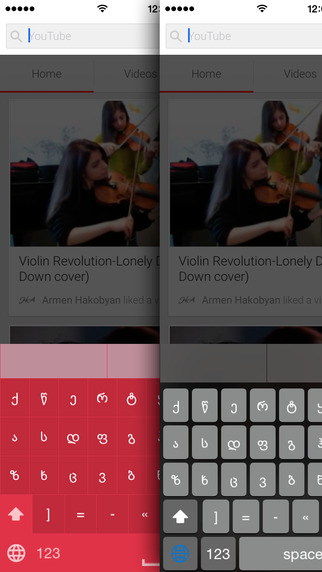
LastThink today announces Georgian Keyboard for iPad and iPhone 2.0, an important update to their highly customizable keyboard application. Georgian Keyboard offers users a third-party keyboard for use with iOS apps that allows anyone to modify it to their individual taste. Users can modify the order of the keyboard for more convenient usage. The update includes the ability to save specific words for later use, emoticons, paragraph formatting, word prediction, and more.
Yerevan, Armenia - LastThink is proud to announce the release of Georgian Keyboard for iPad and iPhone 2.0, an important update to their highly customizable keyboard application. The Georgian Keyboard's customization features allow anyone to create the keyboard layout that is perfect for their needs. Features include the ability to change the size, shape, and order of characters; the ability to save specific words for later use; emoticons, word prediction, and more.
Users can change the order of the keyboard's letter layout, and even create handy shortcuts to allow entering words or even entire sentences with just a few keystrokes. The keyboard's Swipe feature allows users to swipe their finger around the keyboard to select letters and form words. The app intelligently predicts what the user intends to enter, greatly enhancing typing speed.
What's New in Version 2.0:
* Change the size, and place, as well as the shape of characters and keyboard separately
* Save any words that are used frequently in the active vocabulary for later use
* Express emotions with emoji characters (emoticons) which will correspond to entered words
* Paragraph formatting: Adjust alignment, line spacing, margins, bullets and numbering
* Optional smart auto correction: Intelligent spell checking for even the sloppiest typing
* Style: Customize the look of the keyboard. Change the color of the keys and background
* Word prediction: The keyboard guesses and displays the appropriate word as the user types
* Share text via Facebook, Twitter, email, Dropbox, and more
"When we set out to create the Georgian Keyboard, we knew we wanted to create a customizable keyboard that would offer users the ability to modify it to their individual tastes," says LastThink founder Grigori Jlavyan. Our keyboard allows Georgian speaking users to easily enter their text messages, emails, and other types of texts via a comprehensive interface, making their day-to-day communications more convenient than ever."
The Georgian Keyboard also offers handy paragraph formatting options, allowing users to adjust the alignment of their text, while also offering the ability to set line spacing, adjust margins, even add bulleted or numbered lists. Optional smart correction makes even the sloppiest speller's text entry become correct. The keyboard also offers a downloadable Georgian font for use with iOS devices, making text entry, editing, and display even more convenient.
Georgian Keyboard emphasizes the user's security above all, and while many third-party iOS keyboard apps require "Full Access" - with the ability to send back keystrokes and other information back to their developer - the Georgian Keyboard does not, protecting the text entry and sensitive user information, keeping their personal information safe from prying eyes.
Device Requirements:
* iPhone, iPad, and iPod touch
* Optimized for iPhone 5, iPhone 6/6 Plus
* Universal Application
* Requires iOS 8.0 or later
* 9.5 MB
Pricing and Availability:
Georgian Keyboard 2.0 is $1.99 and available worldwide exclusively through the App Store in the Utilities category. Review codes are available upon request.
LastThink: http://lastthink.com/
Georgian keyboard for iPhone and iPad 2.0: https://www.facebook.com/pages/Geo-Keyboard/484918231598670
Purchase and Download from iTunes: https://itunes.apple.com/app/georgian-keyboard-ios8/id924459426
Screenshot: http://a5.mzstatic.com/us/r30/Purple1/v4/e3/09/9a/e3099a0a-21a2-f414-11fe-d7efadc40575/screen322x572.jpeg
App Icon: http://a2.mzstatic.com/us/r30/Purple1/v4/eb/6d/29/eb6d29bb-6bc2-0534-20ad-c94267e3617a/icon175x175.jpeg
LastThink is an IT company with a focus on mobile development. It has extended its list of services since 2012 to offer high-end business process management, system integration, as well as up-to-date communication solutions. LastThink's mission is to deliver maximum business value to its customers by designing, developing, implementing and maintaining efficient and high quality software solutions aligned with their most essential business needs. Their team will always do its best to meet client expectations. Copyright (C) 2016 LastThink LLC. All Rights Reserved. Apple, the Apple logo, iPhone, iPad and iPod are registered trademarks of Apple Inc. in the U.S. and/or other countries.
*******
Link To Article: http://prmac.com/release-id-79401.htm
*******
---------------------------------------------------------------------------------
Note that you can alter delivered distributions at any time.
Login to your account on prMac to alter your channel selection, or to opt-out at any time.
Georgian Keyboard 2.0 for iOS - Published on 05/05/16
LastThink today announces Georgian Keyboard for iPad and iPhone 2.0, an important update to their highly customizable keyboard application. Georgian Keyboard offers users a third-party keyboard for use with iOS apps that allows anyone to modify it to their individual taste. Users can modify the order of the keyboard for more convenient usage. The update includes the ability to save specific words for later use, emoticons, paragraph formatting, word prediction, and more.
Yerevan, Armenia - LastThink is proud to announce the release of Georgian Keyboard for iPad and iPhone 2.0, an important update to their highly customizable keyboard application. The Georgian Keyboard's customization features allow anyone to create the keyboard layout that is perfect for their needs. Features include the ability to change the size, shape, and order of characters; the ability to save specific words for later use; emoticons, word prediction, and more.
Users can change the order of the keyboard's letter layout, and even create handy shortcuts to allow entering words or even entire sentences with just a few keystrokes. The keyboard's Swipe feature allows users to swipe their finger around the keyboard to select letters and form words. The app intelligently predicts what the user intends to enter, greatly enhancing typing speed.
What's New in Version 2.0:
* Change the size, and place, as well as the shape of characters and keyboard separately
* Save any words that are used frequently in the active vocabulary for later use
* Express emotions with emoji characters (emoticons) which will correspond to entered words
* Paragraph formatting: Adjust alignment, line spacing, margins, bullets and numbering
* Optional smart auto correction: Intelligent spell checking for even the sloppiest typing
* Style: Customize the look of the keyboard. Change the color of the keys and background
* Word prediction: The keyboard guesses and displays the appropriate word as the user types
* Share text via Facebook, Twitter, email, Dropbox, and more
"When we set out to create the Georgian Keyboard, we knew we wanted to create a customizable keyboard that would offer users the ability to modify it to their individual tastes," says LastThink founder Grigori Jlavyan. Our keyboard allows Georgian speaking users to easily enter their text messages, emails, and other types of texts via a comprehensive interface, making their day-to-day communications more convenient than ever."
The Georgian Keyboard also offers handy paragraph formatting options, allowing users to adjust the alignment of their text, while also offering the ability to set line spacing, adjust margins, even add bulleted or numbered lists. Optional smart correction makes even the sloppiest speller's text entry become correct. The keyboard also offers a downloadable Georgian font for use with iOS devices, making text entry, editing, and display even more convenient.
Georgian Keyboard emphasizes the user's security above all, and while many third-party iOS keyboard apps require "Full Access" - with the ability to send back keystrokes and other information back to their developer - the Georgian Keyboard does not, protecting the text entry and sensitive user information, keeping their personal information safe from prying eyes.
Device Requirements:
* iPhone, iPad, and iPod touch
* Optimized for iPhone 5, iPhone 6/6 Plus
* Universal Application
* Requires iOS 8.0 or later
* 9.5 MB
Pricing and Availability:
Georgian Keyboard 2.0 is $1.99 and available worldwide exclusively through the App Store in the Utilities category. Review codes are available upon request.
LastThink: http://lastthink.com/
Georgian keyboard for iPhone and iPad 2.0: https://www.facebook.com/pages/Geo-Keyboard/484918231598670
Purchase and Download from iTunes: https://itunes.apple.com/app/georgian-keyboard-ios8/id924459426
Screenshot: http://a5.mzstatic.com/us/r30/Purple1/v4/e3/09/9a/e3099a0a-21a2-f414-11fe-d7efadc40575/screen322x572.jpeg
App Icon: http://a2.mzstatic.com/us/r30/Purple1/v4/eb/6d/29/eb6d29bb-6bc2-0534-20ad-c94267e3617a/icon175x175.jpeg

LastThink is an IT company with a focus on mobile development. It has extended its list of services since 2012 to offer high-end business process management, system integration, as well as up-to-date communication solutions. LastThink's mission is to deliver maximum business value to its customers by designing, developing, implementing and maintaining efficient and high quality software solutions aligned with their most essential business needs. Their team will always do its best to meet client expectations. Copyright (C) 2016 LastThink LLC. All Rights Reserved. Apple, the Apple logo, iPhone, iPad and iPod are registered trademarks of Apple Inc. in the U.S. and/or other countries.
*******
Link To Article: http://prmac.com/release-id-79401.htm
*******
---------------------------------------------------------------------------------
Note that you can alter delivered distributions at any time.
Login to your account on prMac to alter your channel selection, or to opt-out at any time.
Orders 1.1 is an Application for Mac to Archive Company Sales Orders
A new article has been published at prMac.
Orders 1.1 is an Application for Mac to Archive Company Sales Orders - Published on 05/05/16
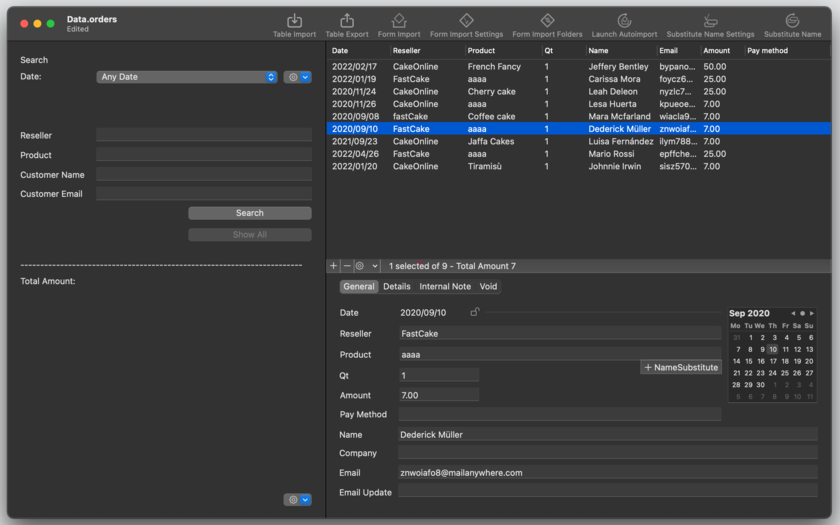
Tension Software announces Orders 1.1 for Mac OS X, an important update to their application to archive a company's sales orders, typically coming in tabled or form orders, after a previous preprocessing or directly from web servers or other sources. Orders doesn't try to do it all. Orders is about just one thing, archive your orders in a stable, secure place, easily maintainable and searchable, for successive output and post processing and for any successive use.
Milano, Italy - Tension Software is proud to announce the release of Orders 1.1 for Mac OS X, an important update to their application to archive a company's sales orders, typically coming in tabled or form orders, after a previous preprocessing or directly from web servers or other sources. The Orders application is just a part of the work chain and it doesn't try to do it all.
Orders is about just one thing, archiving orders in a stable, secure place, easily maintainable and searchable, for successive output and post processing and for any successive use. It can import from CSV (comma separated values), CSV-S (char separated values using semicolon) and FORM text files, and accepts different encoding formats. It can import also from 'form' format, and from text files with a single record per file
Orders provides an easy search and filter method to search inside all records with preset periods: today, yesterday, current week, previous week, current month, previous month, current year, previous year. It can import unattended and in an automatic way, processing at regular time interval all orders, archiving them in the internal database and moving processed input files in another folder.
For the 'form' format, the application can even be instructed to automatically import from a specific folder any text file inside this folder at startup or at a recurring time interval, and move files, after imported, into another folder. All of this is done unattended, archiving data coming in the input folder inside the internal core data database without any human intervention.
What's New in Version 1.1
* Multiple row selection to delete group of orders in one click
* Improved undo support in adding and deleting orders
* Improved undo support importing orders both via text records and via forms
Orders provides an easy search and filter method to search inside all of the records with preset periods: today, yesterday, current week, previous week, current month, previous month, current year, previous year.
System Requirements:
* OS X Version 10.10 or later
* Optimized for OS X 10.11
* 64-bit processor
* 3.8 MB
Pricing and Availability:
Orders 1.1 is $19.99 USD (or an equivalent amount in other currencies) and is available worldwide exclusively through the Mac App Store in the Productivity category.
Tension Software: http://www.tensionsoftware.com
Orders 1.1: http://www.tensionsoftware.com/osx/orders/
Purchase and Download from Mac App Store: https://itunes.apple.com/app/orders/id889716377
Screenshot: http://www.tensionsoftware.com/static/tensionsoftware/images/app/orders/screenshots/mac/1.png
App Icon: http://www.tensionsoftware.com/static/tensionsoftware/images/app/orders/icons/128.png
Tension Software develops software for Mac OS X and iOS using the latest Apple technology, Cocoa and Objective-C. All Material and Software (C) Copyright 2016 Tension Software. All Rights Reserved. Apple, the Apple logo, Macintosh and Mac OS X are registered trademarks of Apple Inc. in the U.S. and/or other countries. Other trademarks and registered trademarks may be the property of their respective owners.
*******
Link To Article: http://prmac.com/release-id-79399.htm
*******
---------------------------------------------------------------------------------
Note that you can alter delivered distributions at any time.
Login to your account on prMac to alter your channel selection, or to opt-out at any time.
Orders 1.1 is an Application for Mac to Archive Company Sales Orders - Published on 05/05/16
Tension Software announces Orders 1.1 for Mac OS X, an important update to their application to archive a company's sales orders, typically coming in tabled or form orders, after a previous preprocessing or directly from web servers or other sources. Orders doesn't try to do it all. Orders is about just one thing, archive your orders in a stable, secure place, easily maintainable and searchable, for successive output and post processing and for any successive use.
Milano, Italy - Tension Software is proud to announce the release of Orders 1.1 for Mac OS X, an important update to their application to archive a company's sales orders, typically coming in tabled or form orders, after a previous preprocessing or directly from web servers or other sources. The Orders application is just a part of the work chain and it doesn't try to do it all.
Orders is about just one thing, archiving orders in a stable, secure place, easily maintainable and searchable, for successive output and post processing and for any successive use. It can import from CSV (comma separated values), CSV-S (char separated values using semicolon) and FORM text files, and accepts different encoding formats. It can import also from 'form' format, and from text files with a single record per file
Orders provides an easy search and filter method to search inside all records with preset periods: today, yesterday, current week, previous week, current month, previous month, current year, previous year. It can import unattended and in an automatic way, processing at regular time interval all orders, archiving them in the internal database and moving processed input files in another folder.
For the 'form' format, the application can even be instructed to automatically import from a specific folder any text file inside this folder at startup or at a recurring time interval, and move files, after imported, into another folder. All of this is done unattended, archiving data coming in the input folder inside the internal core data database without any human intervention.
What's New in Version 1.1
* Multiple row selection to delete group of orders in one click
* Improved undo support in adding and deleting orders
* Improved undo support importing orders both via text records and via forms
Orders provides an easy search and filter method to search inside all of the records with preset periods: today, yesterday, current week, previous week, current month, previous month, current year, previous year.
System Requirements:
* OS X Version 10.10 or later
* Optimized for OS X 10.11
* 64-bit processor
* 3.8 MB
Pricing and Availability:
Orders 1.1 is $19.99 USD (or an equivalent amount in other currencies) and is available worldwide exclusively through the Mac App Store in the Productivity category.
Tension Software: http://www.tensionsoftware.com
Orders 1.1: http://www.tensionsoftware.com/osx/orders/
Purchase and Download from Mac App Store: https://itunes.apple.com/app/orders/id889716377
Screenshot: http://www.tensionsoftware.com/static/tensionsoftware/images/app/orders/screenshots/mac/1.png
App Icon: http://www.tensionsoftware.com/static/tensionsoftware/images/app/orders/icons/128.png

Tension Software develops software for Mac OS X and iOS using the latest Apple technology, Cocoa and Objective-C. All Material and Software (C) Copyright 2016 Tension Software. All Rights Reserved. Apple, the Apple logo, Macintosh and Mac OS X are registered trademarks of Apple Inc. in the U.S. and/or other countries. Other trademarks and registered trademarks may be the property of their respective owners.
*******
Link To Article: http://prmac.com/release-id-79399.htm
*******
---------------------------------------------------------------------------------
Note that you can alter delivered distributions at any time.
Login to your account on prMac to alter your channel selection, or to opt-out at any time.
Scary Prank Cam Booth for iOS - Have Fun Scaring Victims
A new article has been published at prMac.
Scary Prank Cam Booth for iOS - Have Fun Scaring Victims - Published on 05/05/16
Brainvire announces Scary Prank Cam Booth ++ Reloaded 1.1, the important update to their scary prank app for iOS devices. Choose the victim and ask him or her to play the Game. At the point when the victim is utilizing your mobile device, a startling picture will abruptly show up with a stunning sound out of sight. The ghost from the maze game as main scary face is absolutely terrifying. Version 1.1 brings new horror images, is more scary, and fixes bugs.
South Jordan, Utah - Brainvire is proud to announce the release of Scary Prank Cam Booth ++ Reloaded 1.1, the important update to their scary prank app for iPhone, iPad, and iPod touch devices. Make this day exceptional, Prank companions, family members, or sweetheart/beau. Irritated that a companion, sibling, or sister is playing with the mobile device or tablet constantly? Introduce the Scary Prank Cam Booth application, Choose the victim and ask him/her to play the game. At the point when the victim is utilizing the mobile device, a startling picture will abruptly show up with a stunning sound out of sight.
The victim will be scared as never before. Plus, their scared moment is captured on video forever. Now share the video to everyone on social sites. Best scare prank to make fun and shock friends! Creepy sound effect with terrifying scary face is win-win situation. The ghost from the maze game as main scary face is absolutely terrifying. It's also the ideal Halloween prank!
Instructions:
* Turn up the volume and make sure vibrate-mode is off
* Start app and play the different modes of game
* Bring the victim to a quiet area where he/she can focus e.g like dark silent room
* Hand the app to the victim you wish to scare
* Ask the person if they can see the real picture out of the negative one with full concentration on the 'White Dot'
* While he/she is focusing on the white dot of the picture, they are secretly being video-recorded
* Suddenly gesture with horror effect appears
* Their scared moment is captured on video forever
* Now share the video to everyone via Facebook ;-)
What's New in Version 1.1:
* Introducing New Horror Images
* More Scary
* Bug Fixing
You don't have to look for scary pranks anymore this app beats every other. If you don't believe try it on your friend or even yourself. I scared my friends with it every time!
Device Requirements:
* iPhone, iPad, and iPod touch
* Requires iOS 7.0 or later
* Universal Application
* 18.8 MB
Pricing and Availability:
Scary Prank Cam Booth ++ Reloaded 1.1 is free, and is available worldwide exclusively through the App Store in the Games category.
Brainvire: http://www.brainvire.com
Scary Prank Cam Booth ++ Reloaded: http://www.brainvire.com/scary-prank/
Download from iTunes: https://itunes.apple.com/app/scary-prank-cam-booth-++-reloaded/id1012933981
Screenshot: http://a1.mzstatic.com/us/r30/Purple49/v4/e4/e4/ab/e4e4ab80-800c-261f-8726-bdcf3b347d35/screen322x572.jpeg
App Icon: http://a2.mzstatic.com/us/r30/Purple49/v4/18/76/8a/18768aba-79e9-1a0b-1a1b-ba000a2889ac/icon175x175.png
If you are looking to develop a remarkable mobile application development for your business or if you have an awesome ideas for an invention, the Brainvire team of skilled developers and designers can build your idea. All Material and Software (C) Copyright 2016 Brainvire. All Rights Reserved. Apple, the Apple logo, iPhone, iPod and iPad are registered trademarks of Apple Inc. in the U.S. and/or other countries. Other trademarks and registered trademarks may be the property of their respective owners.
*******
Link To Article: http://prmac.com/release-id-79398.htm
*******
---------------------------------------------------------------------------------
Note that you can alter delivered distributions at any time.
Login to your account on prMac to alter your channel selection, or to opt-out at any time.
Scary Prank Cam Booth for iOS - Have Fun Scaring Victims - Published on 05/05/16
Brainvire announces Scary Prank Cam Booth ++ Reloaded 1.1, the important update to their scary prank app for iOS devices. Choose the victim and ask him or her to play the Game. At the point when the victim is utilizing your mobile device, a startling picture will abruptly show up with a stunning sound out of sight. The ghost from the maze game as main scary face is absolutely terrifying. Version 1.1 brings new horror images, is more scary, and fixes bugs.
South Jordan, Utah - Brainvire is proud to announce the release of Scary Prank Cam Booth ++ Reloaded 1.1, the important update to their scary prank app for iPhone, iPad, and iPod touch devices. Make this day exceptional, Prank companions, family members, or sweetheart/beau. Irritated that a companion, sibling, or sister is playing with the mobile device or tablet constantly? Introduce the Scary Prank Cam Booth application, Choose the victim and ask him/her to play the game. At the point when the victim is utilizing the mobile device, a startling picture will abruptly show up with a stunning sound out of sight.
The victim will be scared as never before. Plus, their scared moment is captured on video forever. Now share the video to everyone on social sites. Best scare prank to make fun and shock friends! Creepy sound effect with terrifying scary face is win-win situation. The ghost from the maze game as main scary face is absolutely terrifying. It's also the ideal Halloween prank!
Instructions:
* Turn up the volume and make sure vibrate-mode is off
* Start app and play the different modes of game
* Bring the victim to a quiet area where he/she can focus e.g like dark silent room
* Hand the app to the victim you wish to scare
* Ask the person if they can see the real picture out of the negative one with full concentration on the 'White Dot'
* While he/she is focusing on the white dot of the picture, they are secretly being video-recorded
* Suddenly gesture with horror effect appears
* Their scared moment is captured on video forever
* Now share the video to everyone via Facebook ;-)
What's New in Version 1.1:
* Introducing New Horror Images
* More Scary
* Bug Fixing
You don't have to look for scary pranks anymore this app beats every other. If you don't believe try it on your friend or even yourself. I scared my friends with it every time!
Device Requirements:
* iPhone, iPad, and iPod touch
* Requires iOS 7.0 or later
* Universal Application
* 18.8 MB
Pricing and Availability:
Scary Prank Cam Booth ++ Reloaded 1.1 is free, and is available worldwide exclusively through the App Store in the Games category.
Brainvire: http://www.brainvire.com
Scary Prank Cam Booth ++ Reloaded: http://www.brainvire.com/scary-prank/
Download from iTunes: https://itunes.apple.com/app/scary-prank-cam-booth-++-reloaded/id1012933981
Screenshot: http://a1.mzstatic.com/us/r30/Purple49/v4/e4/e4/ab/e4e4ab80-800c-261f-8726-bdcf3b347d35/screen322x572.jpeg

App Icon: http://a2.mzstatic.com/us/r30/Purple49/v4/18/76/8a/18768aba-79e9-1a0b-1a1b-ba000a2889ac/icon175x175.png

If you are looking to develop a remarkable mobile application development for your business or if you have an awesome ideas for an invention, the Brainvire team of skilled developers and designers can build your idea. All Material and Software (C) Copyright 2016 Brainvire. All Rights Reserved. Apple, the Apple logo, iPhone, iPod and iPad are registered trademarks of Apple Inc. in the U.S. and/or other countries. Other trademarks and registered trademarks may be the property of their respective owners.
*******
Link To Article: http://prmac.com/release-id-79398.htm
*******
---------------------------------------------------------------------------------
Note that you can alter delivered distributions at any time.
Login to your account on prMac to alter your channel selection, or to opt-out at any time.
Guru Arcade releases Pop Rocket Rescue - Interplanetary Stacking Puzzler
A new article has been published at prMac.
Guru Arcade releases Pop Rocket Rescue - Interplanetary Stacking Puzzler - Published on 05/05/16
Toronto based Guru Arcade today introduces Pop Rocket Rescue 1.0, their new game title developed for iOS and Android devices. Pop Rocket Rescue is a strategic stacking puzzler where players are tasked with rescuing Fizzies, a species of soda pop-producing aliens scattered across 13 uniquely challenging worlds. Players must build a tower using different shapes, while contending with gravity as they try to build in a way that keeps their friends safe.
Toronto, Canada - Friends stick together when the odds are stacked against them. Few mobile games take that as literally as Pop Rocket Rescue, available today on the App Store and Google Play. The latest mobile release from Guru Arcade, Pop Rocket Rescue is a strategic stacking puzzler where players are tasked with rescuing Fizzies, a species of soda pop-producing aliens scattered across 13 uniquely challenging worlds.
Guru Arcade is the interactive division of Guru Studio, the internationally renowned entertainment company behind such fun family TV hits as Justin Time and PAW Patrol. "Guru Arcade grew from our ability to make great characters, stories, and animation, which are also the foundation of great games," said Mary Bredin, EVP Content and Strategy for Guru Studio.
Building from Guru Arcade's success with kid-friendly entertainment, Pop Rocket Rescue is pursuing a slightly older crowd. "While kids will be able to enjoy the colorful planets and puzzles presented in earlier levels, the challenge ramps up fairly quickly in Pop Rocket Rescue," adds Game Designer Alex Larsen. "We like to think that this is a well-crafted puzzler for players who love a challenge."
Pop Rocket Rescue features include:
* Balance-based gameplay: Build a tower using different shapes, but don't let it fall! You'll need to contend with gravity as you try to build in a way that keeps your friends safe.
* 8 special Fizzies with their own powers: From the sticky blocks of 'Gloop' to the explosive personality of 'Cherry Boom!,' there's a Fizzie for every situation.
* Head-scratching puzzles: Every stranded Fizzie needs your help, but there are only so many pieces to use and directions to go before you tumble and topple. Can you outsmart each stage?
* 80 Levels spread across 13 worlds: Defend your tower from incoming meteors in the Smashteroid Belt, blow up debris to make room for your towers in Junkyard Boom, and use Gloop's sticky syrup to get through a Sticky Situation!
In addition to today's release of Pop Rocket Rescue, Guru Arcade has commissioned a study to learn more about the habits of mobile gamers and has published the findings. Highlights include how many games the average mobile gamer has installed, which room of the house they most frequently play in (surprise - it's not the bathroom!), and what percentage of players have seen their mobile fun get them in trouble. You can view an infographic summarizing the study's results linked below.
Device Requirements:
* iPhone, iPad, and iPod touch
* Requires iOS 7.0 or later
* 184 MB
Pricing and Availability:
Pop Rocket Rescue 1.0 is Free and available worldwide through the App Store in the Games category. There is also an Android version available on Google Play. For more information, download the Pop Rocket Rescue press kit or visit the Pop Rocket Rescue website.
Guru Arcade: http://guruarcade.com/
Pop Rocket Rescue 1.0: http://poprocketrescue.com/
Download from iTunes: https://itunes.apple.com/app/pop-rocket-rescue/id1053967162
Download from Google Play: https://play.google.com/store/apps/details?id=com.guruarcade.PopRocketRescue
Infographics: https://www.dropbox.com/sh/kjm22ceatl6c59l/AACj4I7llM9gqWvJCqlHbRqja/Infographic?dl=0
Media Assets: https://www.dropbox.com/sh/kjm22ceatl6c59l/AABbx43-lPduSLSEqZCPnKJCa?dl=0
Guru Arcade is an indie plus game developer housed at Guru Studio in Toronto. As a small but mighty dev team, Arcade is lucky to draw from the rich pool of artistic talent at the award-winning animation studio they call home. Guru Arcade was established in 2014 to create interactive companions to two of Guru's successful TV shows, Justin Time and Dinopaws, which earned top spots on the App Store charts for kids' games. Both games combined rich, high-quality animation with clear, engaging game play for preschoolers. All Material and Software (C) Copyright 2016 Guru Arcade. All Rights Reserved. Apple, the Apple logo, iPhone, iPod and iPad are registered trademarks of Apple Inc. in the U.S. and/or other countries. Other trademarks and registered trademarks may be the property of their respective owners.
*******
Link To Article: http://prmac.com/release-id-79397.htm
*******
---------------------------------------------------------------------------------
Note that you can alter delivered distributions at any time.
Login to your account on prMac to alter your channel selection, or to opt-out at any time.
Guru Arcade releases Pop Rocket Rescue - Interplanetary Stacking Puzzler - Published on 05/05/16
Toronto based Guru Arcade today introduces Pop Rocket Rescue 1.0, their new game title developed for iOS and Android devices. Pop Rocket Rescue is a strategic stacking puzzler where players are tasked with rescuing Fizzies, a species of soda pop-producing aliens scattered across 13 uniquely challenging worlds. Players must build a tower using different shapes, while contending with gravity as they try to build in a way that keeps their friends safe.
Toronto, Canada - Friends stick together when the odds are stacked against them. Few mobile games take that as literally as Pop Rocket Rescue, available today on the App Store and Google Play. The latest mobile release from Guru Arcade, Pop Rocket Rescue is a strategic stacking puzzler where players are tasked with rescuing Fizzies, a species of soda pop-producing aliens scattered across 13 uniquely challenging worlds.
Guru Arcade is the interactive division of Guru Studio, the internationally renowned entertainment company behind such fun family TV hits as Justin Time and PAW Patrol. "Guru Arcade grew from our ability to make great characters, stories, and animation, which are also the foundation of great games," said Mary Bredin, EVP Content and Strategy for Guru Studio.
Building from Guru Arcade's success with kid-friendly entertainment, Pop Rocket Rescue is pursuing a slightly older crowd. "While kids will be able to enjoy the colorful planets and puzzles presented in earlier levels, the challenge ramps up fairly quickly in Pop Rocket Rescue," adds Game Designer Alex Larsen. "We like to think that this is a well-crafted puzzler for players who love a challenge."
Pop Rocket Rescue features include:
* Balance-based gameplay: Build a tower using different shapes, but don't let it fall! You'll need to contend with gravity as you try to build in a way that keeps your friends safe.
* 8 special Fizzies with their own powers: From the sticky blocks of 'Gloop' to the explosive personality of 'Cherry Boom!,' there's a Fizzie for every situation.
* Head-scratching puzzles: Every stranded Fizzie needs your help, but there are only so many pieces to use and directions to go before you tumble and topple. Can you outsmart each stage?
* 80 Levels spread across 13 worlds: Defend your tower from incoming meteors in the Smashteroid Belt, blow up debris to make room for your towers in Junkyard Boom, and use Gloop's sticky syrup to get through a Sticky Situation!
In addition to today's release of Pop Rocket Rescue, Guru Arcade has commissioned a study to learn more about the habits of mobile gamers and has published the findings. Highlights include how many games the average mobile gamer has installed, which room of the house they most frequently play in (surprise - it's not the bathroom!), and what percentage of players have seen their mobile fun get them in trouble. You can view an infographic summarizing the study's results linked below.
Device Requirements:
* iPhone, iPad, and iPod touch
* Requires iOS 7.0 or later
* 184 MB
Pricing and Availability:
Pop Rocket Rescue 1.0 is Free and available worldwide through the App Store in the Games category. There is also an Android version available on Google Play. For more information, download the Pop Rocket Rescue press kit or visit the Pop Rocket Rescue website.
Guru Arcade: http://guruarcade.com/
Pop Rocket Rescue 1.0: http://poprocketrescue.com/
Download from iTunes: https://itunes.apple.com/app/pop-rocket-rescue/id1053967162
Download from Google Play: https://play.google.com/store/apps/details?id=com.guruarcade.PopRocketRescue
Infographics: https://www.dropbox.com/sh/kjm22ceatl6c59l/AACj4I7llM9gqWvJCqlHbRqja/Infographic?dl=0
Media Assets: https://www.dropbox.com/sh/kjm22ceatl6c59l/AABbx43-lPduSLSEqZCPnKJCa?dl=0
Guru Arcade is an indie plus game developer housed at Guru Studio in Toronto. As a small but mighty dev team, Arcade is lucky to draw from the rich pool of artistic talent at the award-winning animation studio they call home. Guru Arcade was established in 2014 to create interactive companions to two of Guru's successful TV shows, Justin Time and Dinopaws, which earned top spots on the App Store charts for kids' games. Both games combined rich, high-quality animation with clear, engaging game play for preschoolers. All Material and Software (C) Copyright 2016 Guru Arcade. All Rights Reserved. Apple, the Apple logo, iPhone, iPod and iPad are registered trademarks of Apple Inc. in the U.S. and/or other countries. Other trademarks and registered trademarks may be the property of their respective owners.
*******
Link To Article: http://prmac.com/release-id-79397.htm
*******
---------------------------------------------------------------------------------
Note that you can alter delivered distributions at any time.
Login to your account on prMac to alter your channel selection, or to opt-out at any time.
Announcing Launcher v2.0 for iOS - Now with Multiple Widgets
A new article has been published at prMac.
Announcing Launcher v2.0 for iOS - Now with Multiple Widgets - Published on 05/05/16
Cromulent Labs today introduces Launcher 2.0, a must-have app for all of your iOS devices. Available at any time by just swiping down from the top of your screen, Launcher allows you lightning fast access to apps straight from the Notification Center on your iPhone or iPad. Version 2.0 brings functionality never before seen in the App Store: the ability to show or hide its widgets based on time, day and/or location so that you always have relevant launchers at your fingertips.
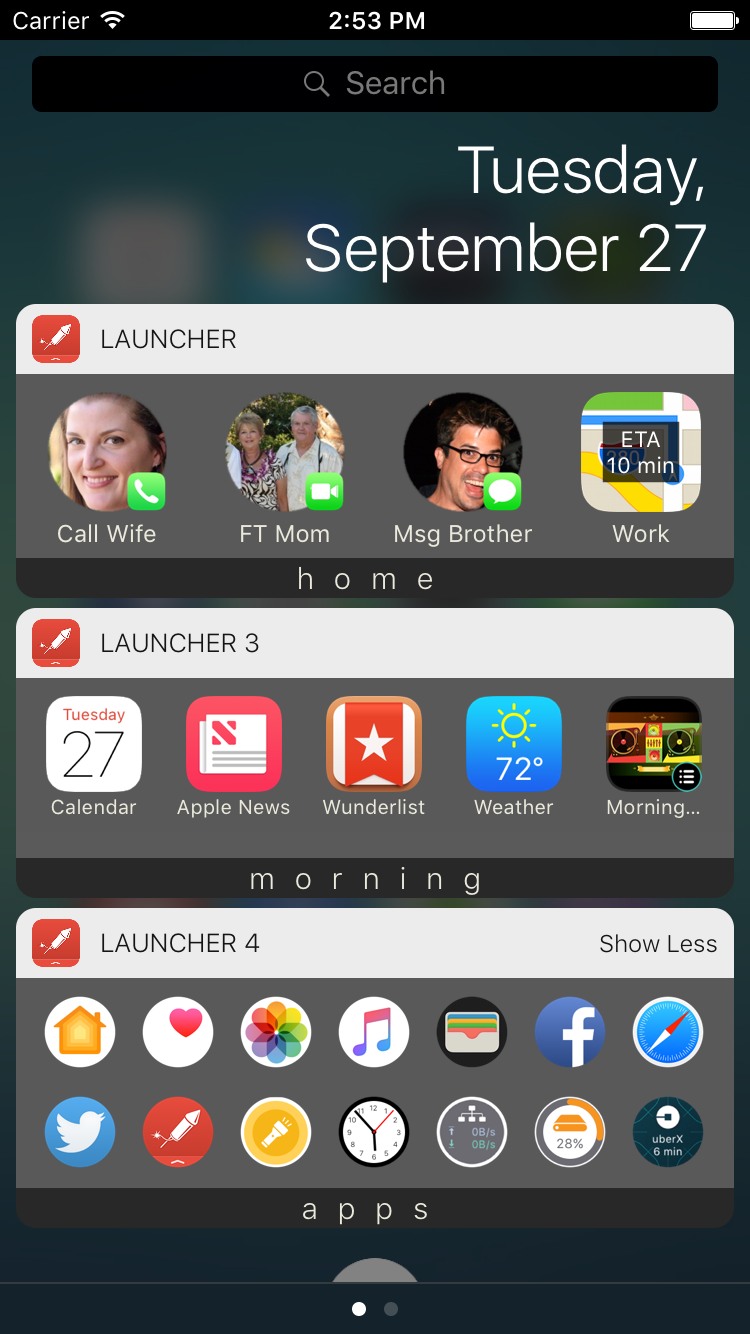
San Francisco, California - Cromulent Labs today is proud to announce the release of the next major version of its must-have app for iOS. Installed on over 2 million devices worldwide, Launcher is already the most powerful widget-based app on the App Store and it now continues to raise the bar of iOS functionality. Installing Launcher v2.0 allows you to add multiple app-launching Today Widgets to the Notification Center on your iPhone or iPad.
Multiple widgets greatly increases the number of launchers you can have in your Notification Center and helps the organization of your launchers. Each widget can be configured to show or hide based on time, day, and/or location, which is functionality never before seen in the App Store. Set up widgets for home, work, the gym, morning, weekdays, or whatever you can come up with so that you always have relevant launchers at your fingertips.
Version 2.0 also brings the ability to backup and restore launchers to and from iCloud to make your life easier when you install Launcher on multiple devices or upgrade your device. And lastly, this version allows for more icon customization including circular icons and the ability to create your own custom icons to help personalize your launchers.
With just one touch in the Notification Center you can:
* Call, message, email, and FaceTime the people you contact the most
* Get directions home or search for nearby restaurants, coffee shops, or whatever you're looking for at your current location
* See current weather conditions and forecasts, Uber time estimates, driving or transit time estimates, world clocks, and network, disk, and battery status with dynamically updating magic launchers! (Pro Version only)
* Quickly access your favorite web sites
* Start playing music immediately
* Perform actions within a number of apps. Run a Workflow, load a specific page on Facebook, fire off a canned email, tweet, and more
* Launch your most frequently used apps - thousands of apps built-in
Features:
* Backup and restore launchers to and from iCloud (Requires in-app purchase)
* Innovative auto-setup of launchers which will set up contact launchers for the people most important to you and your most frequently used apps
* Incredibly easy setup and editing of launchers. Just a few taps and you're done
* Many different icon choices so that you can configure each launcher just how you like it or create your own
* Ability to create custom launchers for apps and actions that aren't yet supported
* Pro Version users get the ability to change the icon sizes and hide labels to make widget more compact
* Choose up to four launchers to set as 3D-touch home screen quick actions for iPhone 6S and 6S Plus
Device Requirements:
* iPad, iPhone, or iPod touch
* Requires iOS 8.0 or later
* 28.7 MB
Pricing and Availability:
Launcher 2.0 is free and available worldwide exclusively through the App Store in the Productivity category. Users can choose to unlock Multiple Widgets and/or the Pro Version with one-time in-app purchases. Unlocking Multiple Widgets gives the user up to 5 more widgets and the ability to show or hide widgets based on time, day, and/or location. The Pro Version gives users up to 35 launchers per widget (maximum number is device dependent), the ability to change the size of the launcher icons and hide labels to make the widgets more compact and access to the dynamic updating magic launchers.
Cromulent Labs: http://www.cromulentlabs.com/
Launcher 2.0: http://www.cromulentlabs.com/launcher.html
Download from iTunes: https://itunes.apple.com/app/launcher/id905099592
YouTube Video: https://www.youtube.com/watch?v=NnVv72JYr2Y
Screenshot: http://www.cromulentlabs.com/images/ss/iPhone6-WidgetScreen1.png
App Icon: http://www.cromulentlabs.com/images/LauncherIcon.png
Cromulent Labs, Inc. is an independent software development company based in San Francisco. For more information about the company and its products, visit Cromulent Labs online. Copyright (C) 2016 Cromulent Labs, Inc. All Rights Reserved. Apple, the Apple logo, iPhone, iPod and iPad are registered trademarks of Apple Inc. in the U.S. and/or other countries.
*******
Link To Article: http://prmac.com/release-id-79396.htm
*******
---------------------------------------------------------------------------------
Note that you can alter delivered distributions at any time.
Login to your account on prMac to alter your channel selection, or to opt-out at any time.
Announcing Launcher v2.0 for iOS - Now with Multiple Widgets - Published on 05/05/16
Cromulent Labs today introduces Launcher 2.0, a must-have app for all of your iOS devices. Available at any time by just swiping down from the top of your screen, Launcher allows you lightning fast access to apps straight from the Notification Center on your iPhone or iPad. Version 2.0 brings functionality never before seen in the App Store: the ability to show or hide its widgets based on time, day and/or location so that you always have relevant launchers at your fingertips.
San Francisco, California - Cromulent Labs today is proud to announce the release of the next major version of its must-have app for iOS. Installed on over 2 million devices worldwide, Launcher is already the most powerful widget-based app on the App Store and it now continues to raise the bar of iOS functionality. Installing Launcher v2.0 allows you to add multiple app-launching Today Widgets to the Notification Center on your iPhone or iPad.
Multiple widgets greatly increases the number of launchers you can have in your Notification Center and helps the organization of your launchers. Each widget can be configured to show or hide based on time, day, and/or location, which is functionality never before seen in the App Store. Set up widgets for home, work, the gym, morning, weekdays, or whatever you can come up with so that you always have relevant launchers at your fingertips.
Version 2.0 also brings the ability to backup and restore launchers to and from iCloud to make your life easier when you install Launcher on multiple devices or upgrade your device. And lastly, this version allows for more icon customization including circular icons and the ability to create your own custom icons to help personalize your launchers.
With just one touch in the Notification Center you can:
* Call, message, email, and FaceTime the people you contact the most
* Get directions home or search for nearby restaurants, coffee shops, or whatever you're looking for at your current location
* See current weather conditions and forecasts, Uber time estimates, driving or transit time estimates, world clocks, and network, disk, and battery status with dynamically updating magic launchers! (Pro Version only)
* Quickly access your favorite web sites
* Start playing music immediately
* Perform actions within a number of apps. Run a Workflow, load a specific page on Facebook, fire off a canned email, tweet, and more
* Launch your most frequently used apps - thousands of apps built-in
Features:
* Backup and restore launchers to and from iCloud (Requires in-app purchase)
* Innovative auto-setup of launchers which will set up contact launchers for the people most important to you and your most frequently used apps
* Incredibly easy setup and editing of launchers. Just a few taps and you're done
* Many different icon choices so that you can configure each launcher just how you like it or create your own
* Ability to create custom launchers for apps and actions that aren't yet supported
* Pro Version users get the ability to change the icon sizes and hide labels to make widget more compact
* Choose up to four launchers to set as 3D-touch home screen quick actions for iPhone 6S and 6S Plus
Device Requirements:
* iPad, iPhone, or iPod touch
* Requires iOS 8.0 or later
* 28.7 MB
Pricing and Availability:
Launcher 2.0 is free and available worldwide exclusively through the App Store in the Productivity category. Users can choose to unlock Multiple Widgets and/or the Pro Version with one-time in-app purchases. Unlocking Multiple Widgets gives the user up to 5 more widgets and the ability to show or hide widgets based on time, day, and/or location. The Pro Version gives users up to 35 launchers per widget (maximum number is device dependent), the ability to change the size of the launcher icons and hide labels to make the widgets more compact and access to the dynamic updating magic launchers.
Cromulent Labs: http://www.cromulentlabs.com/
Launcher 2.0: http://www.cromulentlabs.com/launcher.html
Download from iTunes: https://itunes.apple.com/app/launcher/id905099592
YouTube Video: https://www.youtube.com/watch?v=NnVv72JYr2Y
Screenshot: http://www.cromulentlabs.com/images/ss/iPhone6-WidgetScreen1.png
App Icon: http://www.cromulentlabs.com/images/LauncherIcon.png

Cromulent Labs, Inc. is an independent software development company based in San Francisco. For more information about the company and its products, visit Cromulent Labs online. Copyright (C) 2016 Cromulent Labs, Inc. All Rights Reserved. Apple, the Apple logo, iPhone, iPod and iPad are registered trademarks of Apple Inc. in the U.S. and/or other countries.
*******
Link To Article: http://prmac.com/release-id-79396.htm
*******
---------------------------------------------------------------------------------
Note that you can alter delivered distributions at any time.
Login to your account on prMac to alter your channel selection, or to opt-out at any time.
MovieShop brings professional-grade video editing to your mobile device
A new article has been published at prMac.
MovieShop brings professional-grade video editing to your mobile device - Published on 05/05/16
Number One Application Co., Ltd. today announces MovieShop 1.5, an update to their popular video editing tool for iOS devices. With MovieShop, anyone can trim and combine video footage, add sound from existing media in the device's music library and upload finished content to social media outlets. Other tools include overlays, titles, effect filters, and slideshow capabilities. Version 1.5 offers a host of new features that make this a standout app for any video enthusiast.
Ho Chi Minh, Vietnam - Today, Number One Application Co., Ltd. is proud to announce the release of MovieShop 1.5, an update to their popular video editing tool that has brought mobile movie montage to a completely new level. MovieShop is a full-scale professional editing center at an extremely accessible price.
"There's no video editor on the app marketplace that gives as many easy-to-use, professional options as MovieShop - especially not at such an inexpensive rate," said Tony Long, Technical Manager. "We want to bring the ability to generate high-end content to all users so that a low budget doesn't have to mean a 'low-budget' product."
The basic functions of MovieShop include the ability to trim and combine video footage, add sound from existing media in the device's music library (as well as the built-in sound effect library), and upload finished content to social media outlets such as Vine, Snapchat, Facebook, Instagram, Vimeo, or YouTube, or send it in an email.
Other tools include overlays, titles, effect filters, and slideshow capabilities. Additional professional effects, which are currently free (but will incur charges down the road), include animated text, layer-based blendable overlay editing, chained filters for thousands of effect combinations, and multiple chroma keys (for a "green screen" effect).
Device Requirements:
* iPhone, iPad, and iPod touch
* Requires iOS 8.0 or later
* 96.8 MB
Pricing and Availability:
MovieShop 1.5 is $1.99 USD (or equivalent amount in other currencies) and available worldwide exclusively through the App Store in the Photo & Video category.
MovieShop 1.5: http://www.bestoneapp.com/movieshop.html
Purchase and Download: https://itunes.apple.com/app/id912125363
Screenshot 1: http://a2.mzstatic.com/us/r30/Purple2/v4/19/56/0a/19560aab-35bb-cde2-8d1f-239fedcc69d4/screen322x572.jpeg
Screenshot 2: http://a3.mzstatic.com/us/r30/Purple2/v4/8f/9f/e0/8f9fe0a4-997d-d4b3-e5e2-42ce9e4f3392/screen322x572.jpeg
Screenshot 3: http://a5.mzstatic.com/us/r30/Purple2/v4/68/6c/17/686c17e5-7956-ee8b-a01f-0098b7013d72/screen322x572.jpeg
App Icon: http://a4.mzstatic.com/us/r30/Purple30/v4/a4/5d/ed/a45ded68-a827-fbf0-f5a9-f8f13dcb3736/icon175x175.png
Founded in 2015, Number One Application Co., Ltd. is a Vietnam based company with dedicated engineers with over ten years of experience in the photo/video editing industry. Our engineers want to create a unique photo/video editor application for pc/mobile devices, targeting billions of non-pro users to create high-end product. We have a plan to deploy our apps onto multiple platforms (iOS/Android/Windows) with professional but easy-to-use features. We anticipate that we will become a leading company in the photo/video editing industry. All Material and Software (C) Copyright 2016 Number One Application Co., Ltd. All Rights Reserved. Apple, the Apple logo, iPhone, iPod and iPad are registered trademarks of Apple Inc. in the U.S. and/or other countries. Other trademarks and registered trademarks may be the property of their respective owners.
*******
Link To Article: http://prmac.com/release-id-79390.htm
*******
---------------------------------------------------------------------------------
Note that you can alter delivered distributions at any time.
Login to your account on prMac to alter your channel selection, or to opt-out at any time.
MovieShop brings professional-grade video editing to your mobile device - Published on 05/05/16
Number One Application Co., Ltd. today announces MovieShop 1.5, an update to their popular video editing tool for iOS devices. With MovieShop, anyone can trim and combine video footage, add sound from existing media in the device's music library and upload finished content to social media outlets. Other tools include overlays, titles, effect filters, and slideshow capabilities. Version 1.5 offers a host of new features that make this a standout app for any video enthusiast.
Ho Chi Minh, Vietnam - Today, Number One Application Co., Ltd. is proud to announce the release of MovieShop 1.5, an update to their popular video editing tool that has brought mobile movie montage to a completely new level. MovieShop is a full-scale professional editing center at an extremely accessible price.
"There's no video editor on the app marketplace that gives as many easy-to-use, professional options as MovieShop - especially not at such an inexpensive rate," said Tony Long, Technical Manager. "We want to bring the ability to generate high-end content to all users so that a low budget doesn't have to mean a 'low-budget' product."
The basic functions of MovieShop include the ability to trim and combine video footage, add sound from existing media in the device's music library (as well as the built-in sound effect library), and upload finished content to social media outlets such as Vine, Snapchat, Facebook, Instagram, Vimeo, or YouTube, or send it in an email.
Other tools include overlays, titles, effect filters, and slideshow capabilities. Additional professional effects, which are currently free (but will incur charges down the road), include animated text, layer-based blendable overlay editing, chained filters for thousands of effect combinations, and multiple chroma keys (for a "green screen" effect).
Device Requirements:
* iPhone, iPad, and iPod touch
* Requires iOS 8.0 or later
* 96.8 MB
Pricing and Availability:
MovieShop 1.5 is $1.99 USD (or equivalent amount in other currencies) and available worldwide exclusively through the App Store in the Photo & Video category.
MovieShop 1.5: http://www.bestoneapp.com/movieshop.html
Purchase and Download: https://itunes.apple.com/app/id912125363
Screenshot 1: http://a2.mzstatic.com/us/r30/Purple2/v4/19/56/0a/19560aab-35bb-cde2-8d1f-239fedcc69d4/screen322x572.jpeg

Screenshot 2: http://a3.mzstatic.com/us/r30/Purple2/v4/8f/9f/e0/8f9fe0a4-997d-d4b3-e5e2-42ce9e4f3392/screen322x572.jpeg

Screenshot 3: http://a5.mzstatic.com/us/r30/Purple2/v4/68/6c/17/686c17e5-7956-ee8b-a01f-0098b7013d72/screen322x572.jpeg

App Icon: http://a4.mzstatic.com/us/r30/Purple30/v4/a4/5d/ed/a45ded68-a827-fbf0-f5a9-f8f13dcb3736/icon175x175.png

Founded in 2015, Number One Application Co., Ltd. is a Vietnam based company with dedicated engineers with over ten years of experience in the photo/video editing industry. Our engineers want to create a unique photo/video editor application for pc/mobile devices, targeting billions of non-pro users to create high-end product. We have a plan to deploy our apps onto multiple platforms (iOS/Android/Windows) with professional but easy-to-use features. We anticipate that we will become a leading company in the photo/video editing industry. All Material and Software (C) Copyright 2016 Number One Application Co., Ltd. All Rights Reserved. Apple, the Apple logo, iPhone, iPod and iPad are registered trademarks of Apple Inc. in the U.S. and/or other countries. Other trademarks and registered trademarks may be the property of their respective owners.
*******
Link To Article: http://prmac.com/release-id-79390.htm
*******
---------------------------------------------------------------------------------
Note that you can alter delivered distributions at any time.
Login to your account on prMac to alter your channel selection, or to opt-out at any time.
Subscribe to:
Posts (Atom)